

I 10 migliori software per la gestione dei progetti nelle strutture per il 2026

Elenco dei migliori software per la gestione dei progetti nelle strutture
- 4. eMaint
- 7. MRI Software


Il miglior software per la gestione dei progetti nelle strutture ti aiuta a monitorare le richieste di manutenzione, gestire le risorse e coordinare i team in un unico posto, così nulla passa inosservato.
Senza questo strumento, le richieste si perdono nelle email, i tecnici sprecano tempo aspettando di ricevere incarichi e i responsabili non hanno visibilità sui costi o sulle tempistiche. Una piattaforma centralizzata ti aiuta a migliorare la gestione delle attività, programmare la manutenzione preventiva e ottenere report utili per prendere decisioni migliori.
Dopo aver testato e recensito diversi strumenti grazie alla mia esperienza come project manager, ho individuato le opzioni più affidabili. Ecco le mie scelte per soluzioni che ti aiuteranno a ridurre i tempi di inattività, limitare le incomprensioni e semplificare la gestione delle strutture, così potrai trovare quella più adatta alle tue esigenze.
Perché fidarsi dei nostri consigli sui software
Il nostro team testa e recensisce software dal 2012. In quanto project manager noi stessi, sappiamo quanto sia difficile — e importante — scegliere il software giusto.
Per questa guida, abbiamo valutato gli strumenti attraverso test pratici e ricerche indipendenti, assegnando un punteggio agli strumenti in base ai nostri criteri di selezione. Ci basiamo inoltre sulle competenze di leader di pensiero del settore e di professionisti attivi nella gestione dei progetti.
Le nostre recensioni riflettono il nostro giudizio editoriale umano, non un discorso di vendita.
Revisori esperti:
Tabella comparativa dei software per la gestione dei progetti nelle strutture
Confronta specifiche e prezzi delle mie selezioni di software per la gestione dei progetti nelle strutture qui sotto.
| Tool | Best For | Trial Info | Price | ||
|---|---|---|---|---|---|
| 1 | Ideale per la programmazione della manutenzione preventiva basata sui codici QR | Prova gratuita di 30 giorni + demo gratuita disponibile | Un unico piano a $35 per utente/mese (con fatturazione annuale) | Website | |
| 2 | Ideale per una configurazione intuitiva | Dimostrazione gratuita disponibile | Prezzi su richiesta | Website | |
| 3 | Ideale per il monitoraggio degli ordini di lavoro orientato alla manutenzione | Prova gratuita di 7 giorni + demo gratuita disponibile | Da $24/utente/mese | Website | |
| 4 | Demo gratuita disponibile | Prezzi su richiesta | Website | ||
| 5 | Ideale per il monitoraggio dei costi dei lavori dal campo all'ufficio | Demo gratuita disponibile | Prezzi su richiesta | Website | |
| 6 | Ideale per la previsione pluriennale dei costi in conto capitale | Demo gratuita disponibile | Prezzi su richiesta | Website | |
| 7 | Demo gratuita disponibile | Prezzo su richiesta | Website | ||
| 8 | Ideale per le operazioni di manutenzione multisito | Demo gratuita disponibile | Prezzo su richiesta | Website | |
| 9 | Ideale per la manutenzione di asset governativi e distribuiti su più sedi | Demo gratuita disponibile | Prezzo su richiesta | Website | |
| 10 | Ideale per il coordinamento dei fornitori e il controllo del budget su più sedi | Demo gratuita disponibile | Prezzo su richiesta | Website |


Recensioni dei migliori software per la gestione dei progetti nelle strutture
Leggi il mio riepilogo dettagliato di ciascuno dei migliori software per la gestione dei progetti nelle strutture presenti nel mio elenco. Analizzo funzionalità principali, pro e contro, integrazioni e casi d’uso, così potrai trovare la soluzione più adatta.

Ideale per la programmazione della manutenzione preventiva basata sui codici QR
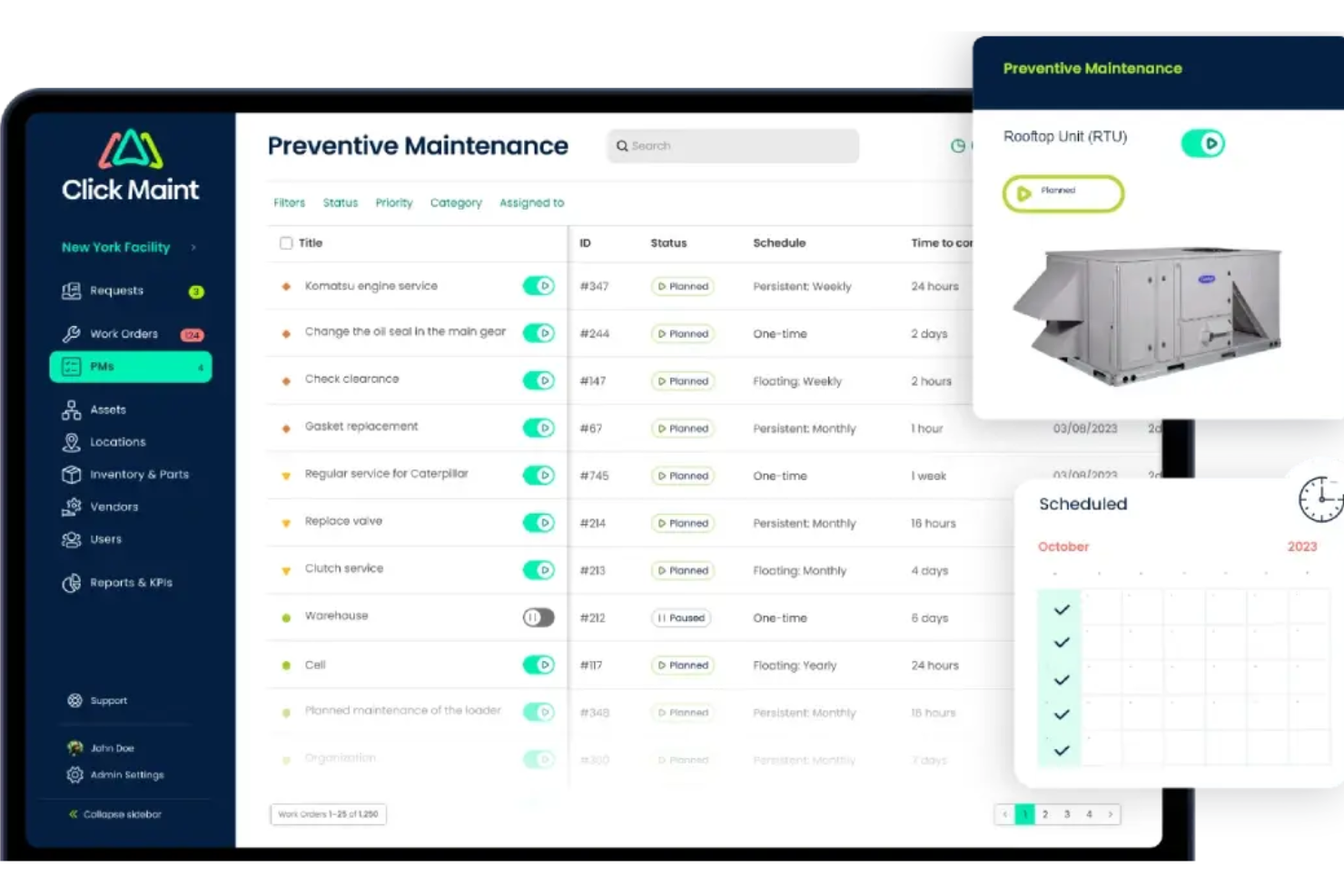
Click Maint è una piattaforma di gestione della manutenzione per i team addetti alla gestione delle strutture, che include il monitoraggio degli ordini di lavoro, la programmazione della manutenzione preventiva, la gestione degli asset, l'inventario e la supervisione di più sedi.
Per chi è più adatto Click Maint?
Click Maint è particolarmente adatto ai team di manutenzione delle strutture che gestiscono ordini di lavoro e programmi di manutenzione preventiva in più sedi, senza avere bisogno di funzionalità complete di gestione dei progetti.
Perché ho scelto Click Maint
Ho incluso Click Maint tra le mie scelte principali perché la sua programmazione della manutenzione preventiva basata sui codici QR è davvero pratica per i team che gestiscono le apparecchiature distribuite in più edifici. I tecnici scansionano il codice QR su qualsiasi asset per visualizzarne immediatamente la cronologia della manutenzione, creare un ordine di lavoro o registrare un'attività di manutenzione preventiva dal proprio telefono. La vista dell'avanzamento della manutenzione preventiva mostra quindi ogni attività programmata prossima all'attivazione, così nulla viene trascurato tra le diverse sedi.
Funzionalità principali di Click Maint
- Dashboard aziendale: Visualizza gli ordini di lavoro attivi, in ritardo e critici insieme alle richieste in attesa per tutte le sedi da un'unica dashboard.
- Modulo delle planimetrie: Posiziona asset, ordini di lavoro e richieste su mappe interattive dei piani, con indicatori di stato codificati a colori per una supervisione immediata.
- Monitoraggio dei costi degli ordini di lavoro: Registra direttamente nei singoli ordini di lavoro il tempo di lavoro, i ricambi, gli addebiti dei fornitori e i caricamenti delle fatture.
- Portale di richiesta multilivello: Consenti a un numero illimitato di richiedenti di inviare richieste di manutenzione tramite portali configurabili, con flussi di approvazione prima della trasformazione in ordini di lavoro.
Integrazioni di Click Maint
Click Maint consente lo sviluppo di software personalizzato e la sincronizzazione diretta dei dati con piattaforme esterne tramite la sua API REST, oltre all'accesso singolo tramite provider di identità aziendali.
Pros and Cons
Pros:
- Le scansioni dei codici QR collegano direttamente i tecnici alle cronologie degli asset
- La vista dell'avanzamento della manutenzione preventiva segnala la manutenzione imminente nelle diverse sedi
- Gli ordini di lavoro da dispositivi mobili supportano aggiornamenti e foto sul campo
Cons:
- Nessuna dipendenza tra progetti, milestone o cronologie tra progetti
- I costi si fermano agli ordini di lavoro e non includono i budget dei progetti

Limble
Ideale per una configurazione intuitiva
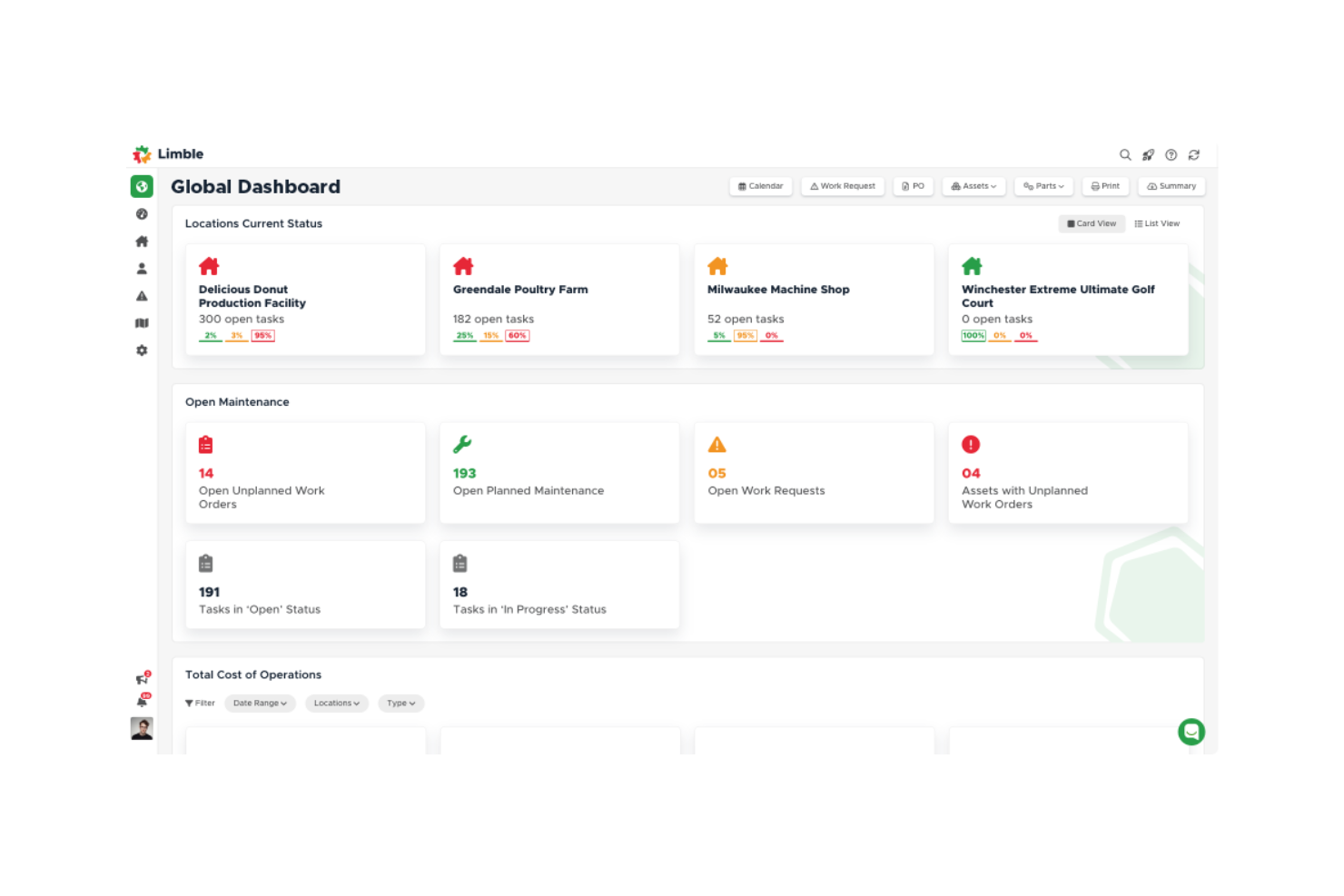
Limble è una piattaforma CMMS che centralizza la gestione degli ordini di lavoro, la pianificazione della manutenzione preventiva, il monitoraggio delle risorse, l'inventario dei ricambi e la reportistica su più siti per i team addetti alle strutture e alla manutenzione.
Per chi è più adatto Limble?
Limble è adatto ai team di manutenzione e gestione delle strutture che amministrano ambienti con molte risorse distribuite su più siti e necessitano di controllare gli ordini di lavoro e programmare la manutenzione preventiva in un unico luogo.
Perché ho scelto Limble
Ho scelto Limble come una delle soluzioni migliori perché è stato progettato fin dall'inizio intorno alle operazioni di manutenzione, il che lo rende particolarmente adatto quando il lavoro sulle strutture è principalmente determinato dallo stato delle risorse e dal volume degli ordini di lavoro. Mi piace molto il modo in cui il Generatore di manutenzione preventiva basato sull'intelligenza artificiale analizza i manuali delle risorse e genera automaticamente le attività di manutenzione preventiva, mentre il calendario di pianificazione delle risorse mi permette di trascinare e rilasciare gli incarichi dei tecnici tra i vari giorni monitorando la capacità in tempo reale. Per i team che operano su più siti, i controlli degli accessi basati sulla posizione e la reportistica tra i siti mantengono separati i dati di ogni proprietà senza perdere la visibilità a livello di portafoglio.
Funzionalità principali di Limble
- Portale per le richieste di intervento: Consente a chiunque di inviare richieste di manutenzione o assistenza tramite un collegamento o un codice QR, senza dover disporre di un profilo Limble.
- Monitoraggio dell'inventario dei ricambi: Controlla i livelli delle scorte, attiva avvisi per le quantità ridotte e collega direttamente i ricambi alle risorse, agli ordini di lavoro e ai fornitori.
- Pannello di controllo dei KPI della manutenzione: Mostra metriche in tempo reale come MTTR e MTBF, con pannelli di controllo personalizzati che riportano tempi, ricambi e costi per risorsa.
- Condivisione delle attività con i fornitori: Condivide gli ordini di lavoro con appaltatori esterni tramite un collegamento inviato via e-mail, consentendo loro di completare le istruzioni, aggiungere commenti e inviare fatture.
Integrazioni di Limble
Limble offre integrazioni native con ArcGIS Online, Augury, AssetWatch, Monnit, SAP S/4HANA, Google Calendar, Slack, Okta e Azure Active Directory. Offre inoltre l'accesso all'API REST e a MCP per collegamenti personalizzati; il numero totale di integrazioni non è indicato.
Pros and Cons
Pros:
- Gli utenti esterni inviano richieste senza profilo
- Le squadre sul campo acquisiscono foto sul posto
- Gli storici delle risorse e i ricambi rimangono organizzati
Cons:
- Non sono disponibili dipendenze o tempistiche del percorso critico
- Manca la reportistica del budget del progetto rispetto ai costi effettivi

UpKeep
Ideale per il monitoraggio degli ordini di lavoro orientato alla manutenzione
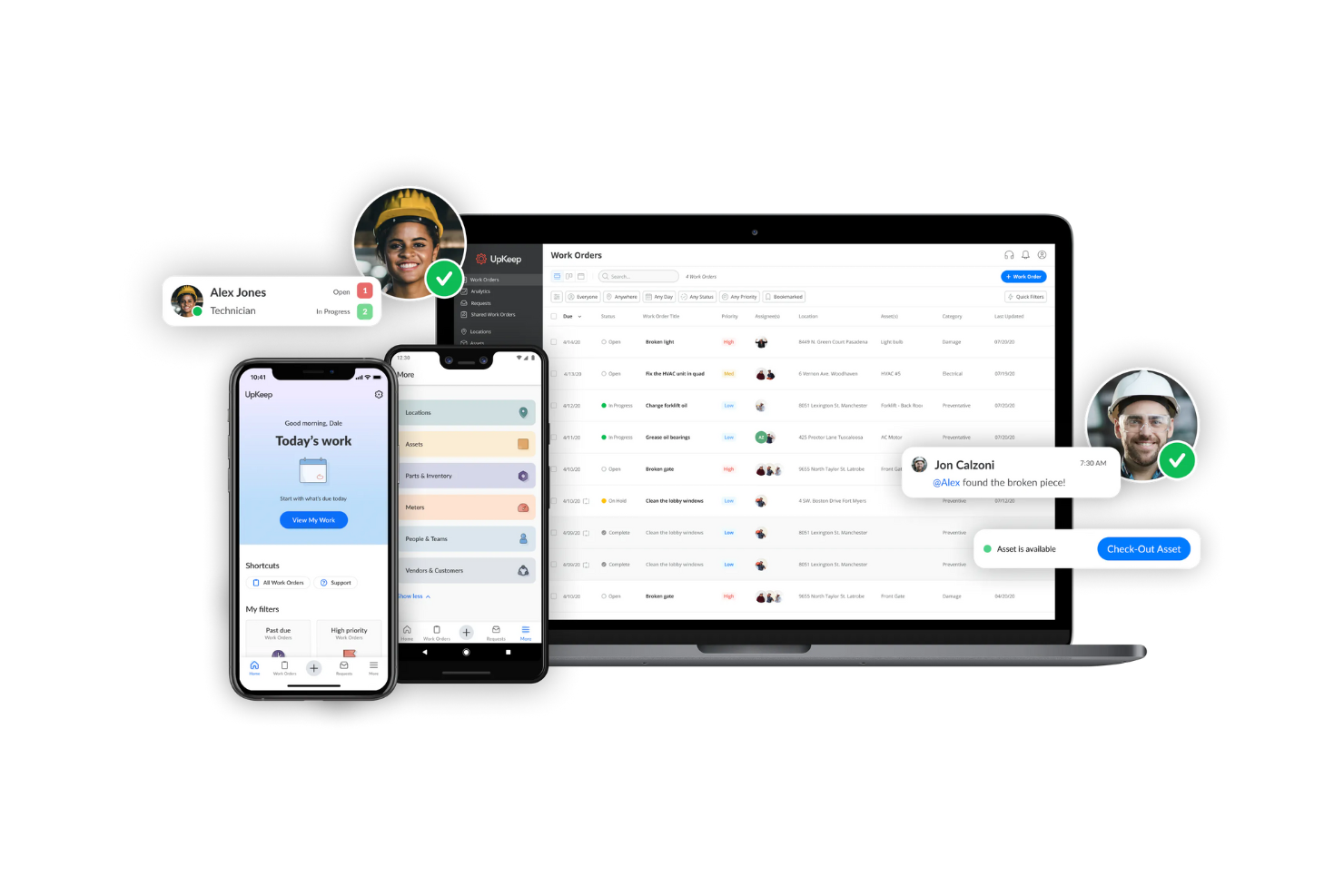
UpKeep è un CMMS progettato innanzitutto per dispositivi mobili che comprende la gestione degli ordini di lavoro, la pianificazione della manutenzione preventiva, il monitoraggio degli asset, l'inventario dei ricambi e il coordinamento dei fornitori presso diverse strutture.
Per chi è più adatto UpKeep?
UpKeep è una soluzione ideale per i responsabili della manutenzione e i loro team di tecnici che necessitano di un sistema orientato ai dispositivi mobili per gestire gli ordini di lavoro, le schede degli asset e la manutenzione preventiva in una o più strutture.
Perché ho scelto UpKeep
Ho scelto UpKeep come una delle migliori soluzioni perché gestisce l'intero ciclo di vita degli ordini di lavoro meglio di quasi ogni altro strumento di questa categoria. Apprezzo particolarmente il fatto che i tecnici possano ricevere una richiesta, ricevere un'assegnazione in base alle competenze e alla posizione, completare una lista di controllo da dispositivo mobile e chiudere l'intervento registrando nello stesso documento l'utilizzo dei ricambi e il tempo di lavoro. Anche il portale dei fornitori si distingue: i fornitori possono aggiornare lo stato, caricare file e comunicare direttamente tramite un link condiviso all'ordine di lavoro senza dover creare un account completo.
Funzionalità principali di UpKeep
- Pianificazione della manutenzione preventiva: Imposta ordini di lavoro ricorrenti in base a intervalli di calendario o ad attivatori basati su contatori, come ore di funzionamento, chilometri o cicli.
- Anagrafica degli asset con ricerca tramite QR: Archivia schede degli asset ricercabili con lo storico completo, quindi scansiona un codice QR sul campo per visualizzare immediatamente la scheda.
- Monitoraggio dell'inventario su più magazzini: Gestisci le quantità dei ricambi, le soglie delle scorte e i punti di riordino in più magazzini, depositi o veicoli di assistenza.
- Analisi della manutenzione tra le sedi: Monitora KPI come MTTR, MTBF e conformità alla manutenzione preventiva con dashboard che confrontano le prestazioni tra le strutture.
Integrazioni di UpKeep
UpKeep si connette a oltre 1.000 sistemi tramite integrazioni native, Zapier e la sua API REST pubblica, inclusi SAP, Oracle, NetSuite e Microsoft Dynamics. L'API supporta integrazioni personalizzate per ordini di lavoro, asset, ricambi, sedi e utenti.
Pros and Cons
Pros:
- Gli aggiornamenti da dispositivi mobili mantengono i tecnici aggiornati sul posto
- Gli storici degli asset supportano le decisioni sulla manutenzione ricorrente
- I fornitori possono aggiornare gli ordini di lavoro condivisi
Cons:
- Lo strumento di pianificazione non supporta dipendenze e monitoraggio delle tappe
- Nessun monitoraggio del budget rispetto ai costi effettivi a livello di progetto
eMaint
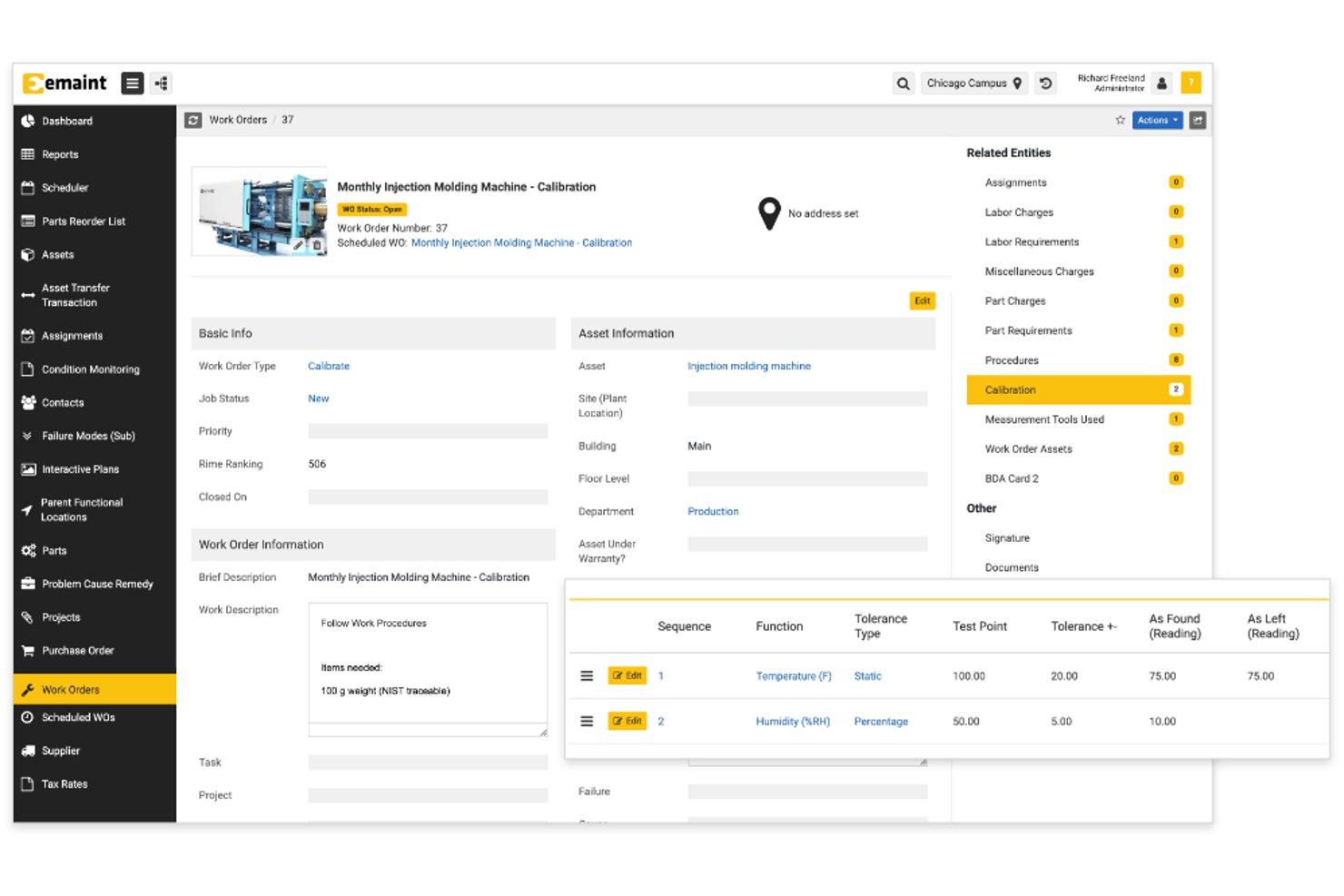
eMaint è una piattaforma CMMS sviluppata da Fluke che include la gestione degli ordini di lavoro, la pianificazione della manutenzione preventiva, il monitoraggio degli asset, la supervisione di più siti e il coordinamento dei fornitori per i team delle strutture e della manutenzione.
Per chi è più adatto eMaint?
eMaint è particolarmente adatto ai team di manutenzione e gestione delle strutture che amministrano asset e ordini di lavoro distribuiti tra più siti o sedi.
Perché ho scelto eMaint
Ho scelto eMaint come una delle migliori soluzioni perché gestisce la supervisione della manutenzione su più siti in un modo che la maggior parte delle piattaforme CMMS non offre: gli Account di consolidamento di livello Enterprise forniscono una vista unica delle metriche delle prestazioni per ogni sede, mentre gli Account principali consentono di creare e modificare ordini di lavoro, asset e attività globali da un unico punto. Mi piacciono anche le planimetrie interattive, che permettono al mio team di assegnare e monitorare il lavoro direttamente dalla mappa di un sito, invece di dover cercare tra i menu.
Funzionalità principali di eMaint
- Instradamento degli ordini di lavoro: assegna automaticamente gli ordini di lavoro in base a priorità, competenze, posizione o carico di lavoro del tecnico.
- Portale per i fornitori: offre agli appaltatori esterni un punto di accesso dedicato per ricevere notifiche di lavoro, registrare la manodopera e gli addebiti e inviare il lavoro completato per la revisione del supervisore.
- Attivazione della manutenzione basata sulle condizioni: si connette a sensori Fluke, sistemi BMS, SCADA e PLC per generare automaticamente ordini di lavoro quando le letture superano le soglie impostate.
- Monitoraggio del ciclo di vita degli asset: registra il costo totale di proprietà, l'ammortamento, la vita utile residua e le priorità di sostituzione per ogni asset presente nell'inventario.
Integrazioni di eMaint
eMaint supporta oltre 200 integrazioni preconfigurate, tra cui SAP, Oracle, Salesforce, Power BI, Tableau, sistemi SCADA, sistemi PLC e BMS. L'accesso all'API REST Enterprise e le integrazioni a basso codice collegano eMaint a oltre 1.000 app.
Pros and Cons
Pros:
- I report condivisi supportano la supervisione di più siti
- La cronologia degli asset aiuta a identificare i guasti ricorrenti
- La pianificazione con trascinamento della selezione adatta il lavoro giornaliero
Cons:
- Le regole del calendario complicano la pianificazione futura del lavoro
- Le tempistiche dei progetti non includono dipendenze delle attività documentate

Simpro
Ideale per il monitoraggio dei costi dei lavori dal campo all'ufficio

Simpro è una piattaforma per la gestione dei servizi sul campo che collega le squadre dell'ufficio e sul campo nella gestione degli ordini di lavoro, nella pianificazione dei progetti, nel calcolo dei costi dei lavori, nella manutenzione delle risorse e nel coordinamento degli appaltatori.
A chi è più adatto Simpro?
Simpro è adatto alle aziende di servizi sul campo e ai professionisti che devono monitorare i costi dei lavori dal campo all'ufficio in più sedi e con diversi appaltatori.
Perché ho scelto Simpro
Ho scelto Simpro come una delle soluzioni migliori perché riduce il divario tra ciò che accade sul posto e ciò che l'ufficio vede in tempo reale. Quando un tecnico completa un lavoro, i costi vengono aggiornati immediatamente rispetto al budget, così è possibile confrontare la spesa stimata con quella effettiva per centro di costo senza aspettare la riconciliazione di fine settimana. Mi piace anche il fatto che le viste dei diagrammi di Gantt con dipendenze tra le attività consentano di monitorare ogni fase di un progetto di gestione delle strutture, dalla pianificazione al completamento, e che gli ordini di lavoro degli appaltatori includano una colonna 'Invia stato', così sai sempre se un appaltatore ha accettato il lavoro.
Funzionalità principali di Simpro
- Pianificazione della manutenzione ricorrente: Configura lavori di manutenzione ripetuti per le sedi e le risorse dei clienti, in modo che il lavoro pianificato venga automaticamente messo in coda senza doverlo reinserire manualmente a ogni ciclo.
- Portale per appaltatori: Fornisci agli appaltatori un accesso dedicato per visualizzare gli ordini di lavoro e le fatture assegnati, senza consentire l'accesso al sistema più ampio di gestione dei lavori.
- Componente aggiuntivo Moduli digitali: Crea moduli ottimizzati per dispositivi mobili con logica condizionale per acquisire dati sulla sicurezza, controlli di conformità e informazioni sui lavori direttamente dal campo.
- Fatturazione a stato di avanzamento: Genera fatture per acconti, stati di avanzamento, saldi finali e ritenute collegate a specifiche tappe del progetto man mano che il lavoro procede.
Integrazioni di Simpro
Le integrazioni del mercato includono QuickBooks, Xero, SafetyCulture, Raken, PropertyMe e Inspect Point. Simpro offre anche un'API RESTful con autenticazione OAuth2 per le integrazioni personalizzate.
Pros and Cons
Pros:
- Costi preventivati rispetto a quelli effettivi per fase del progetto
- Le viste Gantt mostrano le dipendenze tra le attività
- Gli archivi delle risorse supportano la manutenzione ricorrente
Cons:
- Le note inserite da dispositivi mobili possono non sincronizzarsi
- Gli appaltatori non possono modificare gli ordini di lavoro assegnati
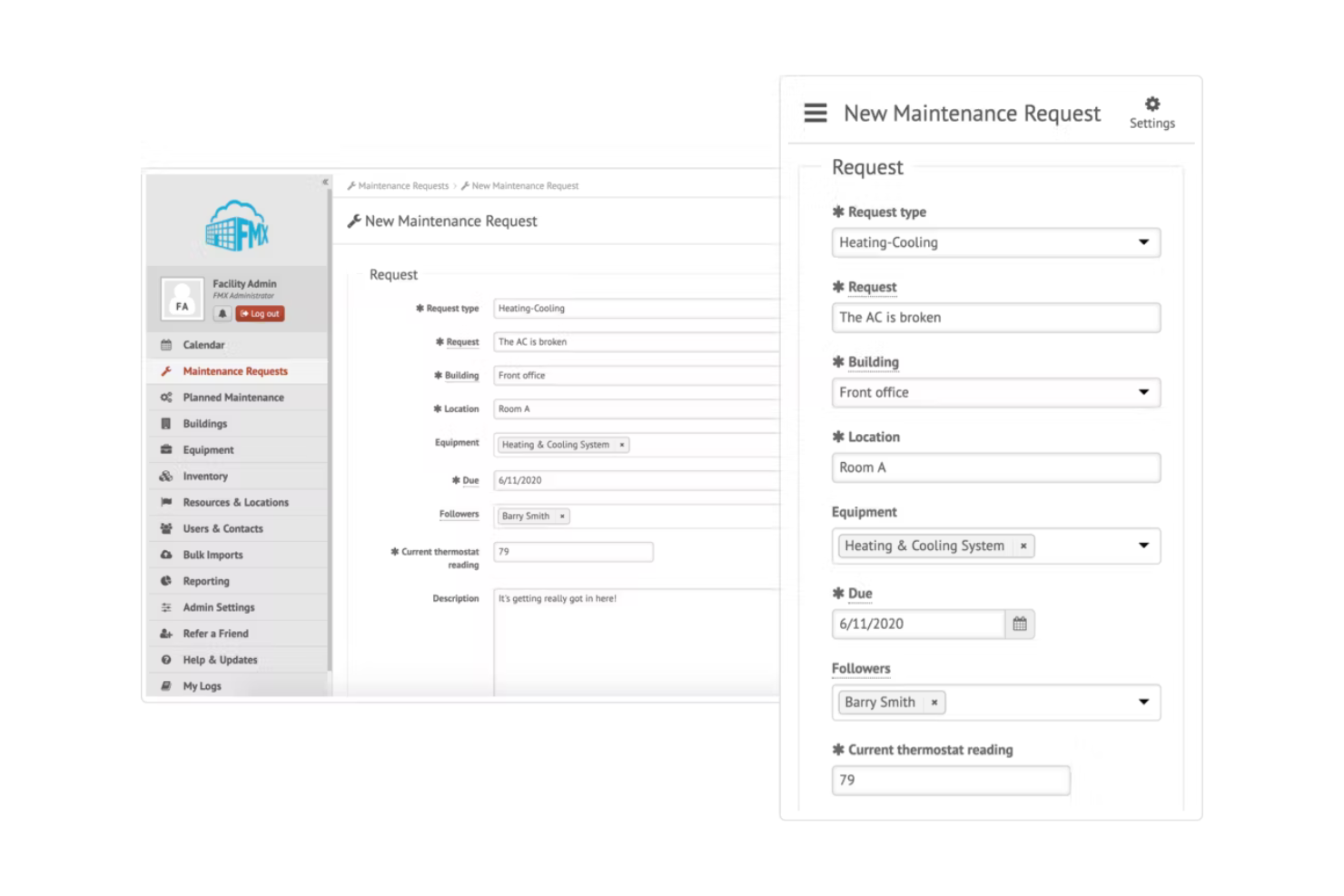
FMX è una piattaforma per la gestione delle strutture che combina la gestione degli ordini di lavoro, il monitoraggio degli asset, la pianificazione della manutenzione preventiva e la pianificazione pluriennale degli investimenti in un unico sistema.
Per chi è più adatto FMX?
FMX è particolarmente adatto ai responsabili della gestione delle strutture e ai direttori operativi che devono pianificare e giustificare le spese in conto capitale per più edifici o campus.
Perché ho scelto FMX
FMX si è guadagnato un posto nella mia lista ristretta per l'efficacia con cui il suo Capital Planner gestisce le previsioni dei costi pluriennali per un portafoglio di edifici. Apprezzo il fatto che monitori le condizioni degli asset, il valore di sostituzione e la vita utile per proiettare i costi in conto capitale per anno fiscale ed edificio, evidenziando poi le lacune di finanziamento quando la spesa pianificata supera le assegnazioni disponibili. La funzione di pianificazione degli scenari consente di modellare tempistiche alternative prima di prendere un impegno, proprio ciò che vorrei quando preparo una presentazione del budget degli investimenti per la direzione.
Caratteristiche principali di FMX
- Instradamento automatico degli ordini di lavoro: Assegna il lavoro in arrivo ai tecnici in base alle competenze, alla posizione e al carico di lavoro attuale.
- Pianificazione della manutenzione preventiva: Pianifica attività di assistenza ricorrenti attivate da intervalli di tempo, utilizzo o risultati delle ispezioni.
- Filtraggio multi-sito: Filtra ordini di lavoro, report e asset per edificio, campus o regione da un'unica visualizzazione.
- Mappatura interattiva: Posiziona asset, apparecchiature e ordini di lavoro aperti su mappe geografiche o basate su immagini delle strutture.
Integrazioni di FMX
FMX elenca integrazioni native con ArcGIS Online, EventSync: BAS, iMonnit, SensorHubb, Okta Provisioning, Slack e Twilio. La sua REST API supporta connessioni personalizzate a edifici, apparecchiature, ordini di acquisto, utenti, richieste di lavoro e attività di lavoro.
Pros and Cons
Pros:
- Le condizioni degli asset contribuiscono alle previsioni pluriennali degli investimenti
- Le dipendenze tra i progetti collegano le tempistiche e i riepiloghi dei costi
- I recensori apprezzano l'assistenza reattiva durante la configurazione
Cons:
- Gli appaltatori non dispongono di credenziali di accesso e notifiche via e-mail
- I recensori segnalano l'impegno necessario per inserire i dati durante l'implementazione

Facilio
Ideale per le operazioni di manutenzione multisito
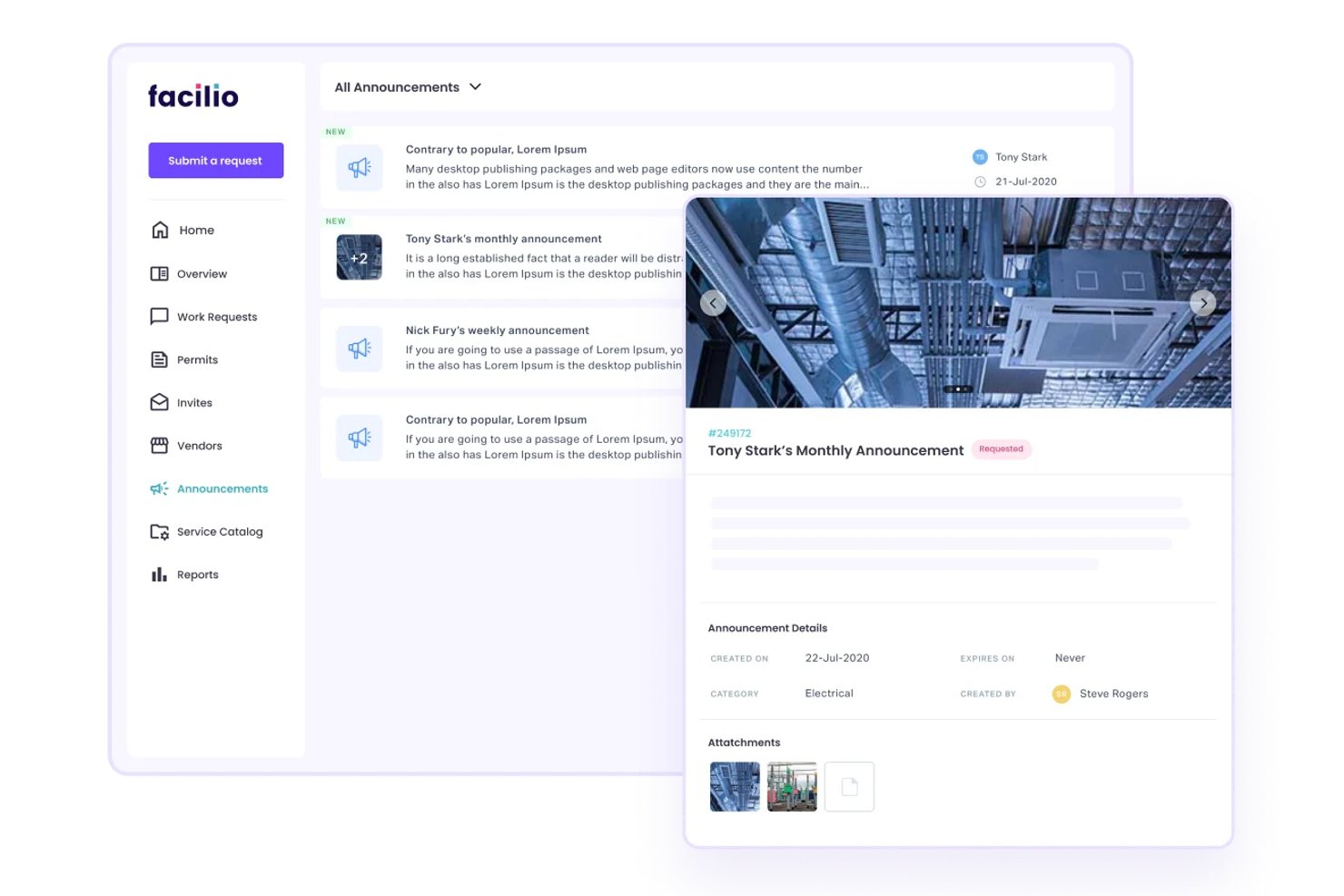
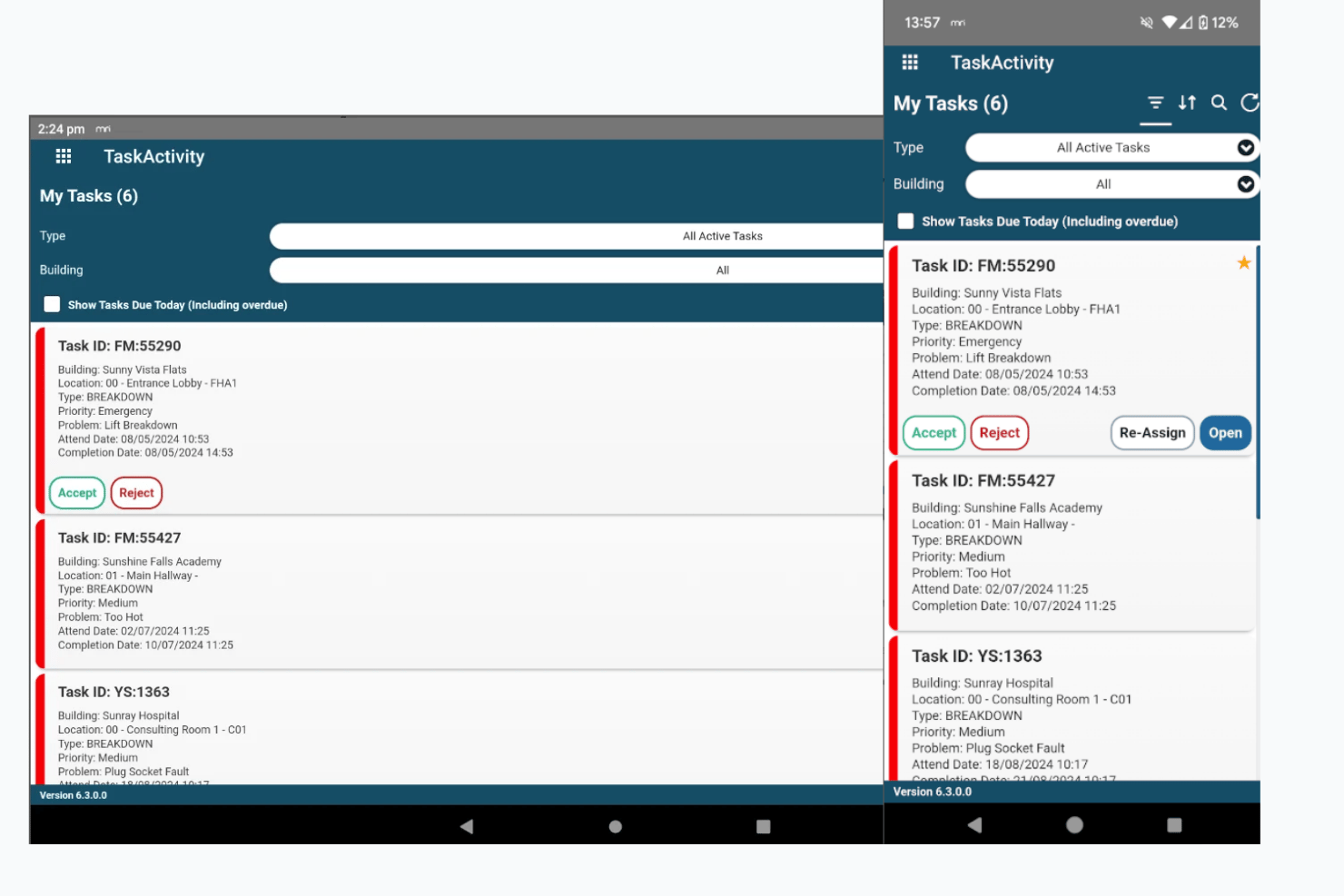
Facilio è una piattaforma CMMS connessa progettata per la gestione delle strutture aziendali, che combina il monitoraggio del ciclo di vita degli ordini di lavoro, la pianificazione della manutenzione preventiva, la gestione degli asset, il coordinamento dei fornitori e la reportistica operativa multisito.
Per chi è più adatto Facilio?
Facilio è adatto ai responsabili della gestione e della manutenzione di strutture aziendali che supervisionano ampi portafogli immobiliari distribuiti su più sedi e necessitano di un controllo centralizzato degli ordini di lavoro e del coordinamento dei fornitori.
Perché ho scelto Facilio
Ho scelto Facilio come una delle migliori soluzioni perché gestisce le operazioni di manutenzione multisito meglio della maggior parte degli strumenti CMMS che ho esaminato. I cruscotti a livello di portafoglio consentono di analizzare lo stato degli ordini di lavoro, le scadenze degli SLA e le assegnazioni dei tecnici per ogni sede da un'unica vista. Mi piace anche il fatto che sia possibile applicare in blocco le modifiche alla manutenzione preventiva all'intero portafoglio di asset, risparmiando ore quando si gestiscono decine di sedi.
Funzionalità principali di Facilio
- Monitoraggio delle credenziali dei fornitori: Monitora le certificazioni degli appaltatori e i documenti di conformità, impedendo l'assegnazione dei fornitori con credenziali scadute agli interventi.
- Assegnazione degli ordini di lavoro basata su regole: Instrada automaticamente gli ordini di lavoro al tecnico o al fornitore corretto sulla base di logiche configurabili di pianificazione, notifica ed escalation.
- Integrazione con IoT e BMS: Si connette ai sistemi di automazione degli edifici tramite BACnet/IP, Modbus, OPC UA e Niagara per attivare flussi di lavoro di manutenzione a partire dai dati in tempo reale delle apparecchiature.
- App mobili specifiche per ruolo: Offre esperienze separate tramite app mobili per tecnici, fornitori, locatari e richiedenti, con sincronizzazione offline del lavoro e convalida della posizione basata su GPS.
Integrazioni di Facilio
Facilio offre integrazioni con ServiceNow, Yardi, QuickBooks, Oracle ERP, SAP, Power BI, Autodesk, Invicara, Honeywell e Siemens. Fornisce inoltre API REST, SDK, applicazioni connesse, scripting e FOQL per connettività personalizzata.
Pros and Cons
Pros:
- I cruscotti del portafoglio consolidano i dati degli edifici
- Supporto reattivo all'implementazione in diversi fusi orari
- Gli ordini di lavoro coprono la manutenzione e la conformità
Cons:
- Le dipendenze e le tappe fondamentali del progetto non sono documentate
- I recensori segnalano arresti anomali dell'app mobile


Asset Essentials di Brightly è un CMMS basato sul cloud che centralizza la gestione degli ordini di lavoro, la pianificazione della manutenzione preventiva, il monitoraggio degli asset e il coordinamento su più sedi per i portafogli di strutture governative e istituzionali.
Per chi è più adatto Brightly?
Asset Essentials di Brightly è particolarmente adatto ad agenzie governative, distretti scolastici e istituzioni pubbliche che gestiscono la manutenzione e gli asset di portafogli estesi distribuiti su più sedi.
Perché ho scelto Brightly
Ho scelto Asset Essentials di Brightly come una delle soluzioni migliori perché è stato progettato specificamente per la portata e la complessità dei portafogli governativi e istituzionali. Apprezzo in particolare il modo in cui la sua struttura gerarchica di Regioni, Sedi e Ubicazioni consente di assegnare gli ordini di lavoro e indirizzare i progetti a singoli edifici o a intere regioni, una funzionalità che ho trovato preziosa nel coordinamento di decine di strutture. La sua integrazione con Capital Forecast consente inoltre ai team di inviare le esigenze di investimento direttamente come richieste di lavoro, con i dati associati relativi agli asset e ai costi già allegati.
Funzionalità principali di Brightly
- Gestione degli ordini di lavoro basata sull'IA: Asset Essentials utilizza l'IA per assegnare la priorità alle richieste di manutenzione, segnalare gli invii duplicati e attivare automaticamente gli ordini di lavoro in base alle condizioni degli asset.
- Assistente per i tecnici: Un assistente IA basato sulla chat fornisce in tempo reale ai tecnici sul campo istruzioni specifiche per le attività, elenchi dei componenti e informazioni sulla sicurezza.
- Analisi Data Share: Collega i dati relativi ad asset, ordini di lavoro e inventario a strumenti di business intelligence come Power BI e Tableau, con intervalli di aggiornamento quasi in tempo reale.
- Ordini di lavoro attivati dall'IoT: L'integrazione Smart Assets converte automaticamente gli avvisi dei sensori IoT in ordini di lavoro di Asset Essentials, sulla base di mappature degli asset convalidate.
Integrazioni di Brightly
Brightly documenta le integrazioni con ESRI, ArcGIS Online, Power BI, Tableau, Excel, Snowflake, MS SQL Server, Oracle, Salesforce e SharePoint. Asset Essentials offre inoltre API per sviluppatori per integrazioni personalizzate.
Pros and Cons
Pros:
- Monitora gli ordini di lavoro in numerosi edifici
- I budget dei progetti registrano manodopera e componenti
- Le richieste da dispositivi mobili includono foto utili dei problemi
Cons:
- Gli avvisi di assegnazione urgenti sui dispositivi mobili possono arrivare in ritardo
- La configurazione iniziale di asset e ubicazioni può richiedere molto tempo

Ideale per il coordinamento dei fornitori e il controllo del budget su più sedi
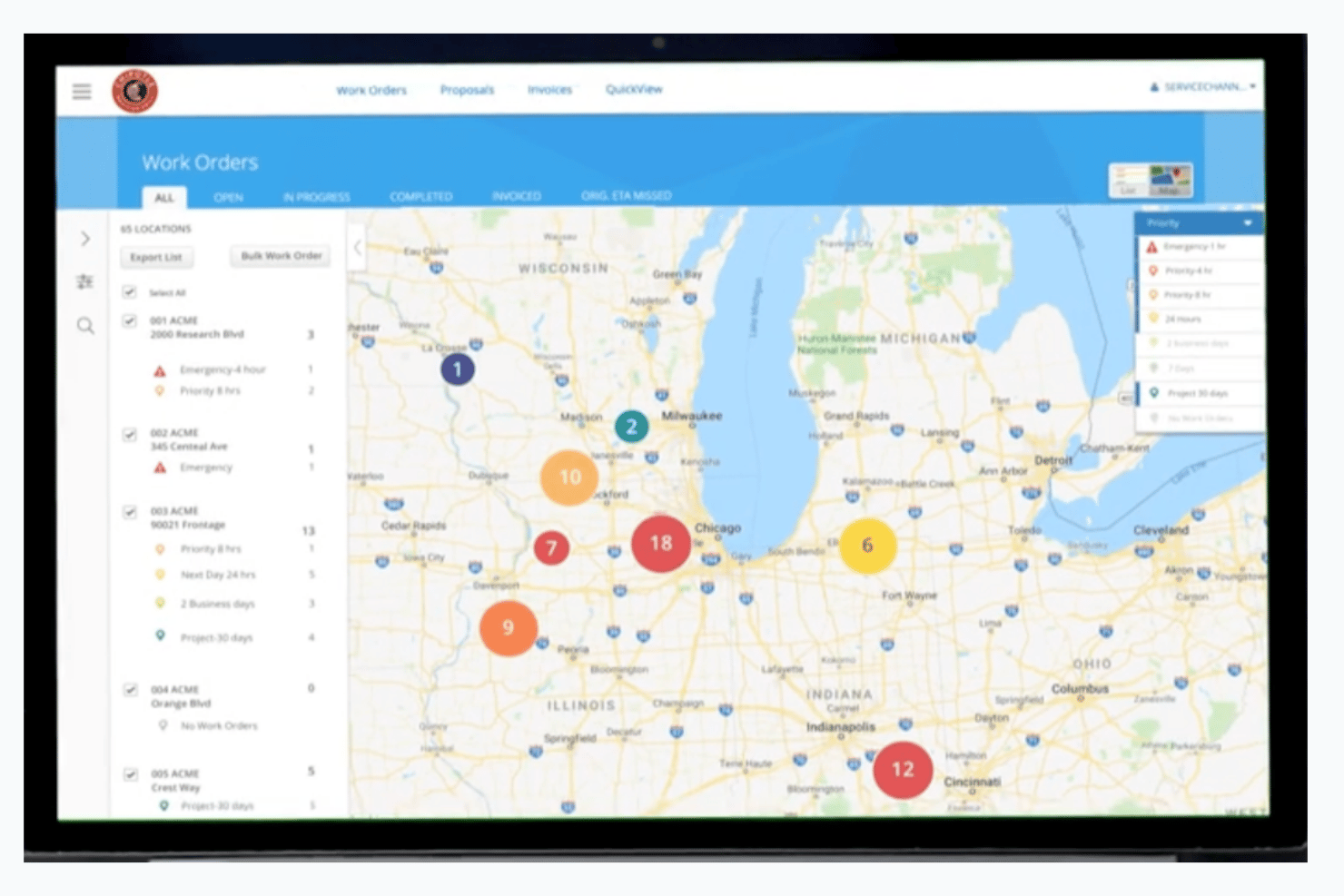
ServiceChannel è una piattaforma per la gestione delle strutture che copre la gestione del ciclo di vita degli ordini di lavoro, il coordinamento dei fornitori, il monitoraggio delle risorse, la pianificazione dei progetti e il controllo del budget per portafogli distribuiti su più sedi.
Per chi è più adatto ServiceChannel?
ServiceChannel è particolarmente adatto alle organizzazioni distribuite su più sedi che devono gestire i rapporti con i fornitori, gli ordini di lavoro e i budget dei progetti di capitale per un ampio portafoglio di strutture.
Perché ho scelto ServiceChannel
Ho scelto ServiceChannel come una delle migliori soluzioni perché gestisce il coordinamento dei fornitori e il controllo del budget per portafogli ampi e distribuiti su più sedi meglio di quasi tutti gli altri strumenti che ho visto. Il flusso di gestione delle offerte consente di raccogliere, confrontare e assegnare le offerte dei fornitori direttamente all'interno di un progetto, mentre il modulo di budget tiene traccia fianco a fianco dei costi stimati, approvati, impegnati ed effettivi. Quando un revisore che gestisce centinaia di sedi afferma che la piattaforma mantiene organizzati in tempo reale gli ordini di lavoro e le attività dei fornitori, questo è il tipo di prova di cui mi fido.
Funzionalità principali di ServiceChannel
- Pianificazione della manutenzione preventiva: Crea e assegna automaticamente richieste di intervento in base ai programmi configurati, mantenendo la cronologia della manutenzione delle risorse e raggruppando le attività relative alle risorse presenti in una singola sede.
- Creazione degli ordini di lavoro assistita dall'intelligenza artificiale: Precompila il settore, il tipo di problema e la priorità a partire dalla descrizione in linguaggio naturale o dalla foto fornita da un membro del personale, riducendo l'inserimento manuale dei dati a livello di sede.
- Monitoraggio delle prestazioni delle risorse: Monitora la spesa, i tempi di inattività, le riparazioni ricorrenti e le tendenze di affidabilità per risorsa, sede, distretto, regione e categoria, con avvisi al superamento delle soglie di costo.
- Ispezioni mobili delle sedi: Registra punteggi, note e foto rispetto agli standard del marchio direttamente da un dispositivo mobile, quindi converte i risultati in ordini di lavoro per il monitoraggio successivo.
Integrazioni di ServiceChannel
ServiceChannel dispone di un'integrazione nativa documentata con ServiceNow, oltre a integrazioni con i partner per il monitoraggio delle risorse Monaire e LoweConex. La sua API REST, i webhook e Azure Service Bus supportano integrazioni personalizzate e ad alto volume.
Pros and Cons
Pros:
- Centralizza gli ordini di lavoro e gli aggiornamenti dei fornitori
- Supporta la visibilità su centinaia di sedi
- Confronta i budget dei progetti con i costi impegnati
Cons:
- I problemi con il GPS e la registrazione degli ingressi influiscono sui team sul campo
- Le lacune nella chiusura e nelle notifiche ostacolano il completamento degli ordini di lavoro
Altri software per la gestione dei progetti nelle strutture
Ecco alcune ulteriori opzioni di software per la gestione dei progetti nelle strutture che non sono entrate nel mio elenco, ma che vale comunque la pena prendere in considerazione:
- Corrigo
Ideale per la supervisione delle risorse di portafogli di grandi dimensioni
- Fiix
Ideale per approfondimenti sulla manutenzione basati sull'intelligenza artificiale
- eWorkOrders
Ideale per la reportistica della manutenzione su più sedi
- Coast
Ideale per i team delle strutture che mettono la manutenzione al primo posto
- Yardi Facility Manager
Ideale per l'integrazione della gestione immobiliare
- FM:Systems
Ideale per progetti di portafogli di strutture con più sedi
- MaintenanceCare
Ideale per la pianificazione degli asset di manutenzione su più sedi
- IBM Maximo Application Suite
Ideale per la gestione di portafogli di strutture numerosi
- Planon
Ideale per la definizione del budget di progetti di portafogli immobiliari


Come Valuto i Software di Gestione Progetti per Strutture
Valuto ogni strumento su due livelli: le capacità indispensabili per gestire progetti plurilocali e ordini di lavoro, quindi gli elementi distintivi che fanno emergere le migliori soluzioni.
Funzionalità di Base (Requisiti Fondamentali per Questa Lista)
Quando seleziono gli strumenti per la mia lista, valuto ciascuno su una scala da 0 (non offre la funzionalità) a 5 (eccelle in quest'area) per ogni funzionalità di base elencata di seguito. Poi, calcolo il punteggio totale dello strumento come percentuale. Ogni strumento deve raggiungere un punteggio minimo totale del 65% per essere incluso nella selezione.
- Pianificazione e Programmazione dei Progetti: Verifico se uno strumento supporta Gantt, milestone e dipendenze tra attività, adatti a progetti per strutture suddivisi in fasi come ristrutturazioni di spazi affittati o sostituzioni di impianti HVAC.
- Gestione di Ordini di Lavoro e Attività: Qui è importante la creazione, l'assegnazione e il monitoraggio degli ordini di lavoro nell'ambito dei progetti, soprattutto per il coordinamento tra squadre interne e appaltatori in diversi siti.
- Monitoraggio di Budget e Costi: Cerco la possibilità di tracciare budget, ordini di variazione e spese effettive rispetto a quelle pianificate, così i responsabili delle strutture possono gestire le finanze dei progetti di capitale in un unico posto.
- Gestione Dati di Asset e Strutture: Ogni strumento dovrebbe collegare i dati relativi a edifici, attrezzature e planimetrie ai progetti attivi invece di isolare le informazioni sugli asset in un sistema separato.
- Coordinamento con Fornitori e Appaltatori: La gestione di offerte, contratti, RFI e comunicazioni tra subappaltatori è una parte fondamentale di qualsiasi flusso di lavoro di ristrutturazione o miglioramento delle strutture.
- Gestione Documentale e della Conformità: Conservare permessi, rapporti di ispezione, planimetrie e documentazione di sicurezza con controllo delle versioni e tracciabilità aiuta a mantenere i progetti conformi alle normative.
Una volta definita una lista di strumenti che soddisfano questi criteri, considero ciò che differenzia ciascuna piattaforma.
Fattori Differenzianti (Cosa Distingue i Fornitori)
Ecco come confronto e metto a paragone i diversi fornitori:
Funzionalità Distintive
L'accesso mobile in campo è un elemento che fa la differenza. Cerco app native che permettano a tecnici e appaltatori di aggiornare ordini di lavoro, scattare foto e registrare problemi offline direttamente sul luogo di lavoro. L'integrazione con BIM e CAD è rilevante quando le squadre devono sovrapporre i piani di progetto alle planimetrie durante ristrutturazioni o riconfigurazioni degli spazi. Valuto anche report e dashboard personalizzabili per quanto facilitano la lettura di costi, milestone di progetto e performance degli appaltatori da parte della direzione, senza bisogno di aggregare dati manualmente.
Oltre le Funzionalità
Le integrazioni sono molto importanti in questo settore. Verifico se una piattaforma si collega a CMMS, ERP e strumenti per l'edilizia come Procore o Autodesk, poiché i team di gestione strutture raramente lavorano con un unico sistema. La scalabilità è un altro elemento cruciale: lo strumento riesce a gestire un portafoglio multi-edificio garantendo accessi differenziati a personale, appaltatori e dirigenti? Valuto anche il supporto all'implementazione, poiché la migrazione di anni di dati su asset, planimetrie e storico dei progetti richiede una guida pratica e approfondita.
Come scegliere un software per la gestione dei progetti nelle strutture
È facile perdersi tra lunghi elenchi di funzionalità e strutture tariffarie complesse. Per aiutarti a rimanere concentrato durante il processo di selezione, ecco un elenco dei fattori da tenere a mente:
| Fattore | Elementi da considerare |
|---|---|
| Scalabilità | Il software può crescere insieme alla tua azienda? Considera l'espansione futura e se lo strumento è in grado di gestire un numero maggiore di utenti e dati senza problemi. |
| Integrazioni | Si connette agli strumenti che già utilizzi? Assicurati che si integri con i sistemi attuali, come ERP o CRM, per evitare silos di dati. |
| Personalizzazione | Puoi adattare il software ai tuoi flussi di lavoro? Cerca impostazioni flessibili che ti consentano di adattare lo strumento ai tuoi processi ed esigenze specifici. |
| Semplicità d'uso | L'interfaccia è intuitiva per il tuo team? Gli utenti dovrebbero poter navigare facilmente senza una formazione approfondita, così da ridurre il tempo dedicato all'apprendimento dello strumento. |
| Implementazione e onboarding | Quanto è semplice il processo di configurazione? Valuta le risorse necessarie e se il fornitore offre supporto, come sessioni di formazione o assistenza nella configurazione, per iniziare rapidamente. |
| Costo | Qual è il costo totale di proprietà? Considera non solo il prezzo dell'abbonamento, ma anche i costi aggiuntivi per il supporto, la formazione o gli aggiornamenti che possono incidere sul budget. |
| Misure di sicurezza | In che modo il software protegge i tuoi dati? Cerca funzionalità come la crittografia, i controlli degli accessi degli utenti e la conformità alle normative sulla protezione dei dati per mantenere la sicurezza. |
| Disponibilità del supporto | L'assistenza è facilmente accessibile? Verifica se il fornitore offre supporto 24/7, diversi metodi di contatto e una base di conoscenze completa per fornire assistenza quando si verificano problemi. |
Che cos'è il software per la gestione dei progetti delle strutture?
Il software per la gestione dei progetti delle strutture è uno strumento che aiuta a gestire la manutenzione e le attività operative delle strutture. In genere, i responsabili delle strutture, i team di manutenzione e i professionisti delle attività operative utilizzano questi strumenti per organizzare le attività e ottimizzare l'impiego delle risorse.
Le funzionalità di gestione degli ordini di lavoro, monitoraggio delle risorse e pianificazione della manutenzione aiutano a organizzare le attività quotidiane, migliorare le prestazioni delle strutture, aumentare l'efficienza e ridurre i costi operativi.
Funzionalità del software per la gestione dei progetti delle strutture
Quando selezioni un software per la gestione dei progetti delle strutture, cerca le seguenti funzionalità chiave:
- Gestione degli ordini di lavoro: organizza e monitora le attività di manutenzione, così nulla viene trascurato.
- Monitoraggio delle risorse: controlla lo stato e la posizione delle risorse per contribuire a prolungarne la durata.
- Pianificazione della manutenzione: pianifica le attività di manutenzione regolari per prevenire guasti imprevisti.
- Gestione dell'inventario: tiene traccia di parti e forniture per ridurre il rischio di esaurimento delle scorte.
- Gestione dei fornitori: consente di gestire i rapporti e i contratti con i fornitori di servizi per una collaborazione efficiente.
- Accesso da dispositivi mobili: consente ai team di gestire le attività ovunque si trovino, aumentando flessibilità e produttività.
- Dashboard personalizzabili: fornisce informazioni visive e utili sugli indicatori chiave di prestazione per aiutare a prendere decisioni consapevoli.
- Misure di sicurezza: protegge i dati sensibili con funzionalità come la crittografia e i controlli degli accessi degli utenti.
Vantaggi del software per la gestione dei progetti delle strutture
L'implementazione di un software per la gestione dei progetti delle strutture offre diversi vantaggi al team responsabile delle strutture e alla tua azienda. Ecco alcuni dei vantaggi che puoi aspettarti:
- Maggiore efficienza: automatizza e organizza attività come gli ordini di lavoro per ridurre il tempo dedicato ai processi manuali.
- Riduzione dei costi: la pianificazione della manutenzione preventiva riduce al minimo le riparazioni impreviste, prolunga la durata delle risorse e consente di risparmiare.
- Migliore gestione delle risorse: monitora l'inventario e le risorse per aiutarti a utilizzare le risorse in modo più efficace.
- Processo decisionale migliore: dashboard e report personalizzabili forniscono informazioni sulle attività operative per supportare la pianificazione strategica.
- Maggiore collaborazione: gli strumenti di gestione dei fornitori facilitano interazioni più fluide con i fornitori di servizi.
- Maggiore flessibilità: l'accesso da dispositivi mobili consente al team di gestire le attività ovunque, offrendo maggiore flessibilità.
- Maggiore sicurezza dei dati: protegge le informazioni sensibili con misure di sicurezza come la crittografia e i controlli degli accessi.
Costi e prezzi del software per la gestione dei progetti delle strutture
I costi del software per la gestione dei progetti delle strutture variano in base alle funzionalità, alle dimensioni del team, ai componenti aggiuntivi e ad altri fattori. La tabella seguente riassume i piani più comuni, i relativi prezzi medi e le funzionalità tipicamente incluse nelle soluzioni software per la gestione dei progetti delle strutture:
Tabella di confronto dei piani del software per la gestione dei progetti delle strutture
| Tipo di piano | Prezzo medio | Funzionalità comuni |
|---|---|---|
| Piano gratuito | $0 | Gestione di base degli ordini di lavoro, monitoraggio limitato delle risorse e reportistica di base |
| Piano personale | $5 - $25/utente/mese | Gestione degli ordini di lavoro, monitoraggio delle risorse, programmazione della manutenzione e accesso da dispositivi mobili. |
| Piano aziendale | $30 - $60/utente/mese | Reportistica avanzata, gestione dei fornitori, gestione dell'inventario e dashboard personalizzabili. |
| Piano per grandi aziende | $70 - $100/utente/mese | Funzionalità di sicurezza complete, capacità di integrazione, manutenzione predittiva e accesso completo all'assistenza clienti. |
Domande frequenti sul software di gestione dei progetti delle strutture
Ecco alcune risposte alle domande comuni sul software di gestione dei progetti delle strutture:
Quanto tempo occorre per implementare un software di gestione dei progetti delle strutture?
I tempi di implementazione possono variare in base alla complessità dei sistemi attuali e al software scelto. In genere, vanno da alcune settimane a diversi mesi. Pianifica la migrazione dei dati e la formazione per garantire una transizione fluida per il tuo team.
Il software di gestione dei progetti delle strutture può integrarsi con i sistemi esistenti?
La maggior parte dei software di gestione dei progetti delle strutture può integrarsi con altri sistemi, come software ERP, CRM o di contabilità. Verifica se lo strumento offre API o integrazioni predefinite che si collegano al tuo stack tecnologico esistente.
Il software di gestione dei progetti delle strutture è adatto alle piccole imprese?
Sì, molti strumenti di gestione dei progetti delle strutture sono scalabili e offrono piani pensati per le piccole imprese. Forniscono funzionalità essenziali come la gestione degli ordini di lavoro e il monitoraggio delle risorse, così i piccoli team possono gestire le strutture in modo efficiente senza aver bisogno di soluzioni complesse.
Come funziona il software di gestione dei progetti delle strutture basato sul cloud?
Le soluzioni basate sul cloud archiviano i dati su server remoti e consentono di accedervi da qualsiasi luogo con una connessione Internet. Ciò offre flessibilità, permettendo al team di gestire le attività anche in mobilità e di mantenere la sicurezza dei dati grazie ad aggiornamenti e backup regolari.
Quali misure di sicurezza devo cercare in un software di gestione dei progetti delle strutture?
Cerca funzionalità come la crittografia dei dati, i controlli di accesso degli utenti e la conformità alle normative sulla protezione dei dati. Queste misure contribuiscono a proteggere le informazioni sensibili, consentendo solo agli utenti autorizzati di accedere ai dati critici.