

I 10 migliori strumenti AI per creare diagrammi di Gantt recensiti nel 2026

10 Selezione dei migliori strumenti per creare diagrammi di Gantt con l'IA


Gli strumenti per creare diagrammi di Gantt con l'IA aiutano a fare ordine nel caos della pianificazione dei progetti. Consentono di visualizzare le tempistiche, bilanciare i carichi di lavoro e restare al passo con le priorità che cambiano, senza dover gestire fogli di calcolo infiniti o inseguire aggiornamenti tra diversi strumenti.
Avendo trascorso innumerevoli ore a testare software per la gestione dei progetti, so quanto possa essere opprimente cercare di mantenere sincronizzati più progetti, persone e scadenze. È proprio per questo che ho realizzato questa guida: per aiutarti a fare chiarezza e trovare uno strumento che renda davvero più semplice la tua giornata.
In questo articolo ti presenterò i migliori strumenti per creare diagrammi di Gantt con l'IA disponibili oggi, spiegando nel dettaglio cosa rende ciascuno di essi degno della tua attenzione. Che tu sia alla guida di un piccolo team creativo o supervisioni progetti su scala aziendale, troverai opzioni adatte al tuo flusso di lavoro, ai tuoi obiettivi e alla tua serenità.
Perché fidarsi dei nostri consigli sui software
Il nostro team testa e recensisce software dal 2012. In quanto project manager noi stessi, sappiamo quanto sia difficile — e importante — scegliere il software giusto.
Per questa guida, abbiamo valutato gli strumenti attraverso test pratici e ricerche indipendenti, assegnando un punteggio agli strumenti in base ai nostri criteri di selezione. Ci basiamo inoltre sulle competenze di leader di pensiero del settore e di professionisti attivi nella gestione dei progetti.
Le nostre recensioni riflettono il nostro giudizio editoriale umano, non un discorso di vendita.
Revisori esperti:
Tabella comparativa degli strumenti per creare diagrammi di Gantt con l'IA
Questa tabella comparativa riassume i dettagli sui prezzi degli strumenti per creare diagrammi di Gantt con l’IA che ho selezionato.
| Tool | Best For | Trial Info | Price | ||
|---|---|---|---|---|---|
| 1 | Il migliore per la modifica della timeline tramite drag-and-drop | Prova gratuita di 14 giorni | Da $7/utente/mese (fatturazione annuale) | Website | |
| 2 | Ideale per implementazione rapida e facile adozione da parte degli utenti | Prova gratuita di 14 giorni | Da $31/utente/mese (fatturato annualmente) | Website | |
| 3 | Ideale per flussi di lavoro di progetto personalizzabili | Prova gratuita di 15 giorni + piano gratuito + demo gratuita disponibile | Da $4/utente/mese (fatturato annualmente) | Website | |
| 4 | Ideale per la pianificazione automatica | Prova gratuita disponibile | Da $19/postazione/mese (fatturazione annuale) | Website | |
| 5 | Ideale per progetti open-source | Piano gratuito disponibile | Software open source gratuito | Website | |
| 6 | Ideale per la semplicità nella pianificazione | Prova gratuita di 14 giorni | Da $9.95/utente/mese (1 progetto gratuito) | Website | |
| 7 | Ideale per insight visivi basati sull’IA | Piano gratuito disponibile | Da $6.58/mese | Website | |
| 8 | Ideale per la collaborazione di team | Prova gratuita di 30 giorni + piano gratuito disponibile | Da $24/manager/mese | Website | |
| 9 | Ideale per previsioni di attività tramite IA | Piano gratuito disponibile | A partire da $3/mese | Website | |
| 10 | Ideale per la gestione delle risorse | Prova gratuita disponibile | Da $5.99/utente/mese | Website |

Recensione dei migliori strumenti per creare diagrammi di Gantt con l'IA
Di seguito trovi le mie sintesi dettagliate dei migliori software per creare diagrammi di Gantt con l’IA inclusi nella mia selezione. Le mie recensioni offrono una panoramica approfondita delle funzionalità principali, dei pro e & contro, delle integrazioni e dei casi d’uso ideali di ogni strumento, per aiutarti a trovare quello più adatto a te.

GanttPRO
Il migliore per la modifica della timeline tramite drag-and-drop

GanttPRO si guadagna un posto per il suo affidabile editing della timeline drag-and-drop, un aspetto in cui ho visto fallire la maggior parte degli strumenti Gantt. Quando mappo le dipendenze di progetto o sposto ampi programmi a metà sprint, muovere barre e milestone è naturale e reattivo.
Quello che apprezzo di più è la possibilità di regolare intere fasi senza alcuna difficoltà, così puoi gestire ritardi e riprogrammazioni senza stress. Per i progetti con molte parti in movimento, di solito è proprio qui che i team si bloccano, ma con GanttPRO puoi semplicemente trascinare, rilasciare e andare avanti.
Ideale per
- Project manager che necessitano di modifiche rapide alla timeline
- Team che gestiscono la pianificazione delle risorse e il mapping delle dipendenze
Non adatto per
- Organizzazioni che hanno bisogno di suggerimenti avanzati sulle attività basati su AI
- Utenti focalizzati su automazione a livello di attività o attività ricorrenti
Cosa differenzia GanttPRO
GanttPRO è costruito su uno stile di pianificazione principalmente visuale. A differenza di Jira, che punta sulla gestione di ticket e backlog, GanttPRO ti mette subito al lavoro sull’editing intuitivo della timeline. Regoli date, dipendenze e fasi direttamente sul diagramma. Trovo che questo approccio si adatti ai team che vogliono pianificare visivamente e vedere subito l’andamento del progetto, senza configurazioni complicate o menù nascosti.
Compromessi con GanttPRO
GanttPRO ottimizza la pianificazione rapida e visuale, ma perdi alcune automazioni e profondità offerte da strumenti più focalizzati su AI e regole a livello di attività. Se ti serve la logica per attività ricorrenti o pianificazione avanzata basata su AI, potresti trovarti limitato.
Pros and Cons
Pros:
- L’AI genera automaticamente l’intera timeline di progetto
- Supporta le dipendenze tra attività con editing drag-and-drop
- Il monitoraggio della baseline mostra la differenza tra piano e reale
Cons:
- Personalizzazione limitata dei colori del diagramma di Gantt
- Le funzionalità di collaborazione sono accessibili solo con i piani a pagamento

Ideale per implementazione rapida e facile adozione da parte degli utenti
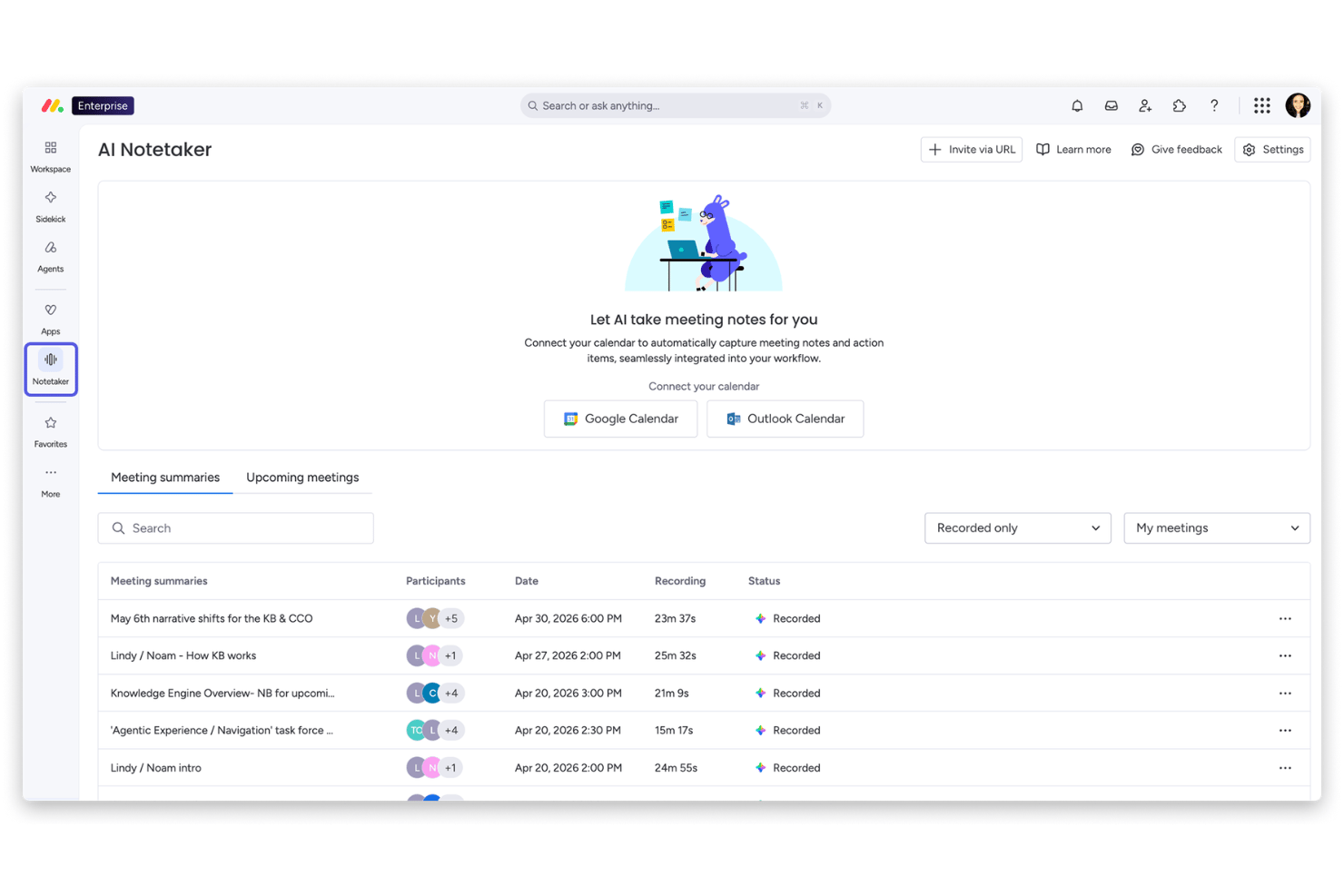
monday AI Workspace è una piattaforma di gestione del lavoro potenziata dall’IA che combina viste a diagramma di Gantt, pianificazione su timeline, monitoraggio delle dipendenze e strumenti di workflow guidati dall’intelligenza artificiale, tra cui AI Sidekick, Colonne IA e un generatore di workflow AI.
Per chi è ideale monday AI Workspace?
Si adatta perfettamente ai team interfunzionali nelle aziende di medie dimensioni che cercano uno strumento di monitoraggio dei progetti facilmente adottabile anche da utenti non tecnici.
Perché ho scelto monday AI Workspace
Ho scelto monday AI Workspace tra i migliori perché il suo Generatore di Workflow AI consente ai team di creare una bacheca di progetto strutturata partendo da un semplice prompt, passando quindi da una pagina bianca a una vista Gantt funzionante in pochi minuti. Inoltre, apprezzo il fatto che il Gantt si sincronizzi in tempo reale con le viste Kanban, Workload e Timeline, così tutti i referenti restano allineati senza dover ricostruire nulla. L’AI Sidekick aggiunge un ulteriore livello identificando rischi e sintetizzando i progressi direttamente all’interno della timeline.
Funzionalità principali di monday AI Workspace
- Colonne IA: Estrai, riassumi e struttura automaticamente le informazioni da dati non strutturati all’interno delle bacheche di progetto.
- Vista Workload: Visualizza la capacità del team e i compiti assegnati per gestire facilmente la distribuzione delle risorse nei progetti.
- Ingestione documenti: Trasforma note di riunioni, email o fogli di calcolo in attività concrete che si inseriscono direttamente nelle timeline di progetto.
- Commenti e menzioni in tempo reale: Collabora in modo interattivo ai progetti con discussioni in thread e tag degli utenti sui diagrammi di Gantt.
Integrazioni di monday AI Workspace
monday AI Workspace offre integrazioni native con Slack, Salesforce, HubSpot, Google Workspace, Microsoft Teams, Outlook, Jira, GitHub, Dropbox e Zoom. Supporta inoltre Zapier e mette a disposizione un'API per integrazioni personalizzate.
Pros and Cons
Pros:
- L’IA costruisce bacheche di progetto partendo dal testo libero
- I diagrammi di Gantt si sincronizzano con le altre viste all’istante
- Analisi dei rischi e riepiloghi all’interno della timeline
Cons:
- Le dipendenze richiedono configurazione manuale ogni volta
- Baseline e percorso critico sono disponibili solo per la versione enterprise
New Product Updates from monday AI Workspace
monday AI Workspace Adds Human Approval Routing
monday AI Workspace adds a human-in-the-loop approval block to AI Workflows, sending approval requests and routing workflow paths based on responses. For more information, visit monday AI Workspace's official site.

Ideale per flussi di lavoro di progetto personalizzabili
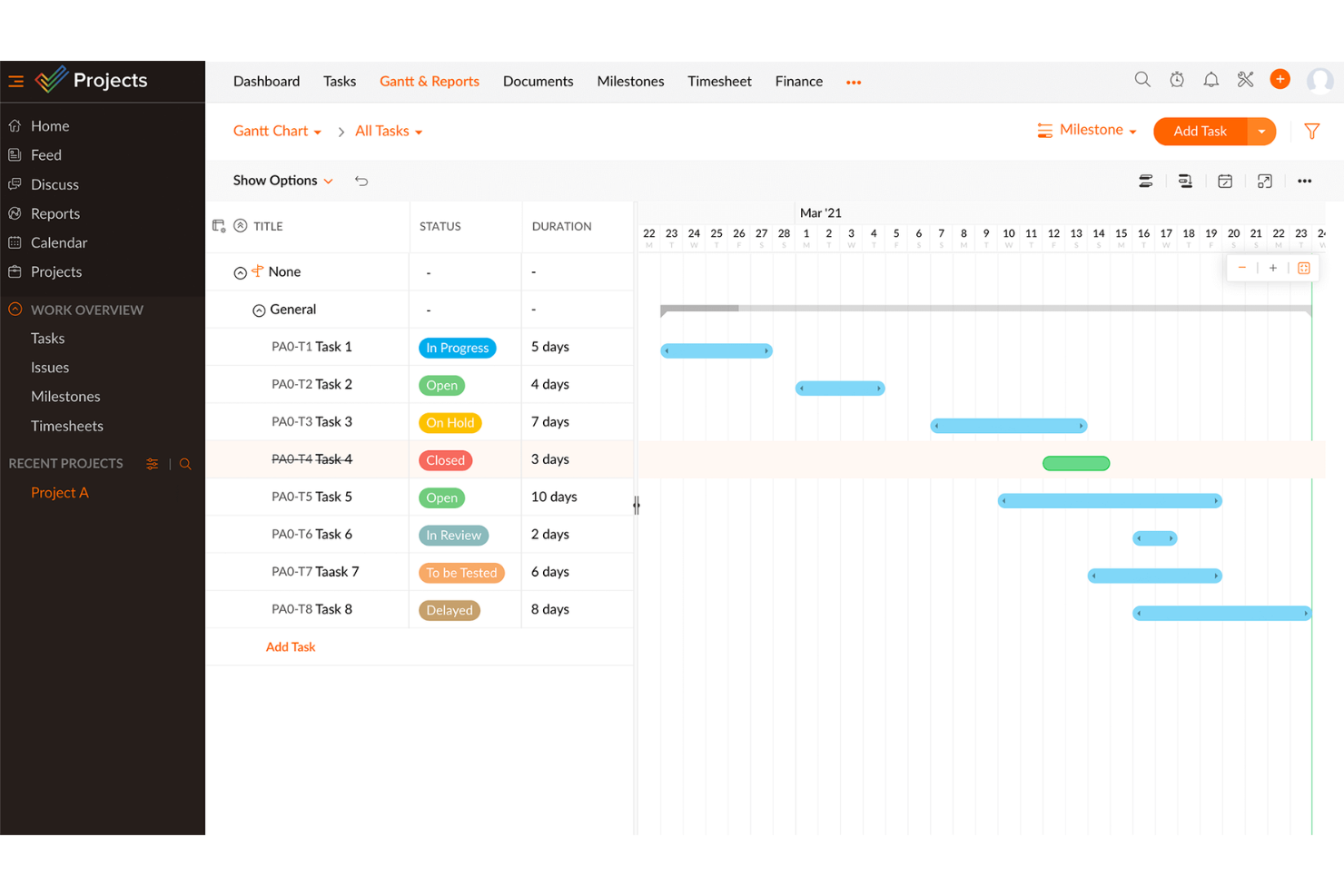
Zoho Projects è nella mia lista perché le sue funzionalità di diagramma di Gantt sono altamente personalizzabili e permettono ai team di adattare i flussi di lavoro a esigenze complesse. Quando testo l'automazione delle attività guidata dall'IA qui, vedo i team utilizzare i flussi blueprint per adattare le fasi di progetto e le approvazioni direttamente nella vista Gantt.
Ciò che mi colpisce è come puoi attivare automaticamente dipendenze e aggiornamenti di stato, il che aiuta nei progetti in cui le richieste di modifica e le revisioni dei clienti continuano a modificare le tempistiche.
Zoho Projects: Ideale per
- Team che necessitano di flussi di lavoro Gantt personalizzabili
- Organizzazioni che gestiscono progetti con frequenti cicli di approvazione
Zoho Projects: Non adatto per
- Team che cercano uno strumento Gantt semplice e pronto all'uso
- Utenti che necessitano di una gestione avanzata delle risorse o del portafoglio
Cosa distingue Zoho Projects
Zoho Projects è basato su un'automazione dei flussi di lavoro flessibile e su diagrammi di Gantt altamente personalizzabili. A differenza di strumenti più rigidi come Microsoft Project, Zoho si aspetta che tu progetti le tue fasi di progetto, i tuoi flussi blueprint e i tuoi campi personalizzati man mano che il processo evolve. In pratica, questo è ideale quando vuoi che il diagramma di Gantt guidi il tuo processo e si adatti ai requisiti che cambiano durante il progetto.
Compromessi di Zoho Projects
Zoho ottimizza per la personalizzazione e la flessibilità del flusso di lavoro, ma ciò significa anche che si spende più tempo iniziale per la configurazione, il che può rallentare i nuovi team o quelli che vogliono un'adozione rapida.
Pros and Cons
Pros:
- Fornisce funzionalità avanzate di monitoraggio del tempo e fatturazione
- Offre reportistica dettagliata e analisi approfondite dei progetti
- Si integra perfettamente con applicazioni Zoho ed esterne
Cons:
- Alcune funzionalità utili sono disponibili solo nei piani con prezzi più elevati
- Rallentamenti delle prestazioni con progetti grandi o complessi
New Product Updates from Zoho Projects
Zoho Projects Adds CodeX Scripts for Custom Modules
Zoho Projects now supports CodeX Scripts for custom modules, enabling conditional logic and rules for creating, updating, and deleting records. For more information, visit Zoho Projects' official site.
 .
.
Motion
Ideale per la pianificazione automatica

Motion si guadagna un posto nella mia lista grazie alla sua pianificazione in stile Gantt basata sull'intelligenza artificiale. Lo vedo particolarmente efficace quando i team desiderano che attività, riunioni e dipendenze di progetto vengano pianificate automaticamente senza continue modifiche manuali.
Quello che apprezzo è come Motion aggiorni programmi e orari in tempo reale man mano che i piani cambiano, così il tuo diagramma di Gantt resta sempre aggiornato anche se le priorità cambiano.
A chi è più adatto Motion
- Team che necessitano di pianificazione automatica di attività e riunioni
- Project manager che vogliono aggiornamenti dei diagrammi di Gantt tramite AI
Quando Motion non è l'ideale
- Organizzazioni con linee temporali di progetto rigide e fisse
- Team che desiderano una personalizzazione avanzata dello stile del diagramma di Gantt
Cosa distingue Motion
Motion si basa sull'idea che le pianificazioni debbano essere dinamiche, non rigide. Invece di richiedere continue modifiche manuali delle attività su un diagramma di Gantt, come avviene con ClickUp o Smartsheet, Motion utilizza l'automazione per aggiornare i tempi di progetto quando riunioni e priorità cambiano. Nella mia esperienza, questo è particolarmente utile quando i team desiderano che calendario, attività e diagramma di progetto rimangano sincronizzati automaticamente.
Compromessi con Motion
Motion dà priorità all'automazione e alla flessibilità della pianificazione, ma ciò significa perdere il controllo dettagliato sulla struttura del diagramma di Gantt e sulle dipendenze personalizzate. Questo può risultare frustrante per i team che necessitano di visualizzazioni di progetto altamente dettagliate o di una sequenza precisa delle attività.
Pros and Cons
Pros:
- Pianificazione automatica delle attività
- Assistenti AI per l'ottimizzazione delle attività
- Integrazione calendario condiviso
Cons:
- Estetica di design basica
- Non ideale per progetti complessi

Ideale per progetti open-source

ProjectLibre si guadagna il suo posto come vera scelta open-source se desideri avere il controllo diretto sui dati del tuo progetto durante la creazione di diagrammi di Gantt. Trovo che questo strumento si adatti meglio quando i team vogliono un'alternativa senza fronzoli, ospitata localmente, rispetto alle piattaforme orientate al cloud. La visualizzazione del percorso critico e il confronto delle baseline di ProjectLibre ti aiutano a mantenere sotto controllo le scadenze che cambiano, soprattutto quando accesso aperto e trasparenza sono fondamentali. Apprezzo il fatto che permette di personalizzare i flussi di lavoro per esigenze di progetto insolite o non standard.
ProjectLibre è ideale per
- Team open-source che gestiscono progetti on-premises
- Organizzazioni che necessitano di flussi di lavoro personalizzabili nei diagrammi di Gantt
ProjectLibre non è l'ideale per
- Team che necessitano di strumenti di pianificazione basati su AI integrati
- Utenti che preferiscono la collaborazione moderna e basata su cloud
Cosa distingue ProjectLibre
ProjectLibre è strutturato per team che desiderano il pieno controllo dei piani di progetto sulla propria infrastruttura invece di affidarsi a soluzioni commerciali come Microsoft Project o a strumenti cloud come Smartsheet. Il flusso di lavoro risulta familiare se hai già utilizzato strumenti legacy desktop per i Gantt, e l'approccio open-source ti permette di adattare il software a esigenze specifiche o di integrarlo con script personalizzati. In pratica, i team che investono nel mantenimento dei dati in locale o che lavorano dietro firewall restrittivi trovano molto più facile adottarlo rispetto alle app web-oriented.
Compromessi con ProjectLibre
ProjectLibre ottimizza per autonomia e personalizzazione, il che significa che si rinuncia alla collaborazione in tempo reale integrata e agli strumenti di pianificazione basati su AI ormai comuni nelle moderne piattaforme cloud.
Pros and Cons
Pros:
- Supporta le dipendenze tra attività
- Monitoraggio dettagliato dei costi
- Adatto all'uso educativo
Cons:
- Interfaccia utente obsoleta
- Assistenza clienti limitata

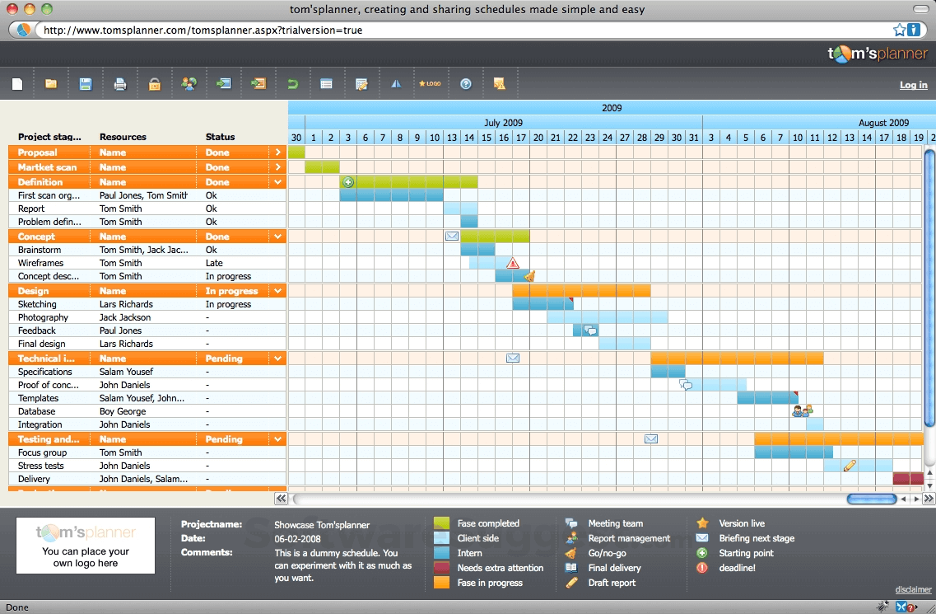
Tom’s Planner è nella mia lista ristretta perché riduce la creazione di diagrammi di Gantt alle meccaniche essenziali. Quando ho bisogno di creare e visualizzare rapidamente delle cronologie senza gestire complessità aggiuntive, è qui che vado. Mi piace il fatto che si possano aggiungere, spostare e modificare le attività su un'unica pagina—senza menu annidati o livelli da esplorare. È particolarmente adatto ai team che vogliono concentrarsi sul piano, non sull'apprendimento di un nuovo strumento.
Ideale per
- Piccoli team che desiderano una pianificazione visiva dei progetti
- Project manager che necessitano rapidamente di diagrammi di Gantt senza fronzoli
Non adatto a
- Team che necessitano di automazioni personalizzate o funzionalità AI avanzate
- Organizzazioni che gestiscono progetti complessi e multilivello
Cosa distingue Tom’s Planner
Tom’s Planner è pensato per chi vuole delineare rapidamente tempistiche e dipendenze senza perdere tempo a configurare template o board complesse. Invece dell'approccio multilivello che si trova in Jira o anche in Smartsheet, questo strumento punta sulla rapidità nella creazione e modifica in tempo reale di un diagramma di Gantt. Nella pratica, vedo che i team lo utilizzano quando vogliono solo pianificare velocemente un progetto senza affrontare una curva di apprendimento.
Compromessi di Tom’s Planner
Tom’s Planner punta su velocità e semplicità, ma si sacrificano automazioni personalizzate e pianificazione avanzata. Questo può limitare la coordinazione quando i progetti crescono o richiedono flussi di lavoro strutturati.
Pros and Cons
Pros:
- Interfaccia drag-and-drop facile
- Configurazione rapida
- Codifica a colori per le attività
Cons:
- Funzionalità avanzate limitate
- Non adatto a grandi team


Edraw.AI si distingue per me grazie alla sua generazione e analisi di grafici guidata dall'intelligenza artificiale. Quando ho testato i suoi insight visivi basati sull’IA, ho notato che trasformare dati grezzi di progetto in diagrammi di Gantt risulta immediato e chiaro, soprattutto quando si gestiscono dataset ampi o in costante cambiamento.
Apprezzo il modo in cui mette automaticamente in evidenza tendenze o colli di bottiglia in forma visiva, rendendolo una soluzione ideale per i team che basano le loro decisioni su insight intelligenti e visibili a colpo d'occhio.
Edraw.AI è ideale per
- Team che necessitano di insight visivi sui Gantt generati dall’IA
- Utenti che desiderano analisi visive istantanee dai dati
Edraw.AI non è adatto per
- Progetti che richiedono automazione di attività personalizzate
- Team che necessitano di un controllo approfondito dei processi di lavoro
Cosa distingue Edraw.AI
Edraw.AI è incentrato sulla trasformazione dei dati di progetto in linee temporali visive attraverso l'IA, permettendoti di visualizzare e modificare istantaneamente i piani di progetto. A differenza di strumenti per diagrammi di Gantt come Smartsheet, si aspetta che tu inizi importando dati o inserendo testi invece di costruire ogni attività singolarmente. Questo è efficace quando desideri insight e visualizzazioni guidate dai tuoi dati di progetto, rapidamente accessibili sotto forma di grafico.
Compromessi con Edraw.AI
Edraw.AI ottimizza la visualizzazione automatica, ma si perde il controllo diretto sull'automazione dei flussi di lavoro e sulle personalizzazione dettagliate delle attività. Se desideri una raffinazione graduale dei processi o dipendenze integrate tra le attività, incontrerai dei limiti.
Pros and Cons
Pros:
- Vasta gamma di modelli disponibili
- Interfaccia intuitiva per un apprendimento rapido
- Suggerimenti di formattazione guidati dall’IA
Cons:
- Ottimizzazione mobile limitata
- Le funzionalità avanzate possono richiedere un periodo di apprendimento

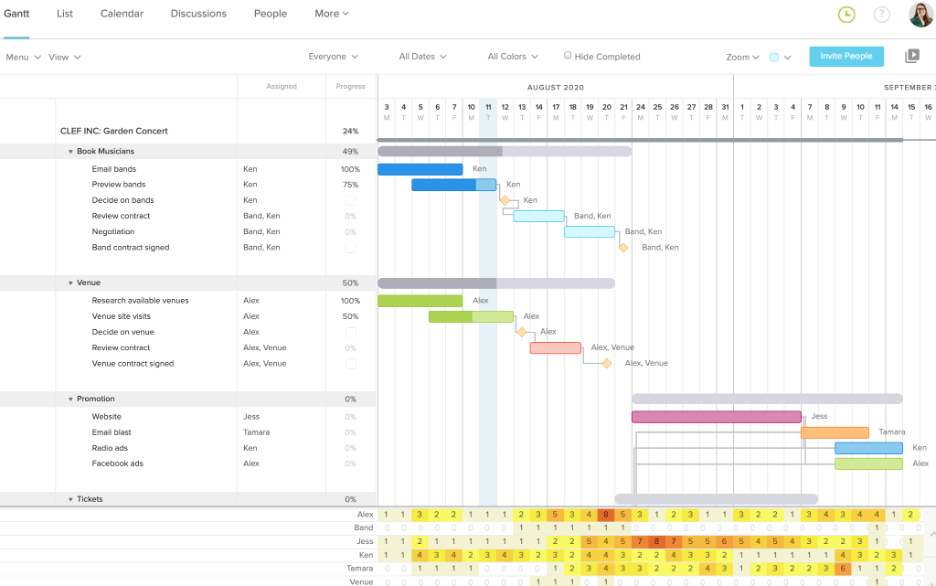
TeamGantt è nella mia lista perché trasforma il classico diagramma di Gantt in uno strumento realmente collaborativo, non solo da osservare. Quando lavoro con team che devono coordinare passaggi di consegne, aggiornare le scadenze in tempo reale e gestire le priorità insieme, questo è il primo posto che controllo.
Ho trovato la programmazione drag-and-drop, le assegnazioni per team e le discussioni direttamente sui task degli elementi che rendono la collaborazione sui progetti molto meno caotica. Quello che preferisco è che tutti possono rimanere aggiornati nel contesto giusto, senza dover inseguire chat separate o catene di email.
Ideale per TeamGantt
- Team che devono coordinare il lavoro direttamente su un diagramma di Gantt condiviso
- Responsabili di progetto che gestiscono calendari e dipendenze con input in tempo reale dal team
Non ideale per TeamGantt
- Team che hanno bisogno di strumenti avanzati per la previsione delle risorse o il bilanciamento del carico di lavoro
- Organizzazioni in cerca di un'elevata automazione o suggerimenti basati su intelligenza artificiale
Cosa distingue TeamGantt
TeamGantt mette la collaborazione in tempo reale al centro dei progetti, permettendo a più persone di aggiornare le tempistiche, assegnare attività e mantenere tutte le conversazioni in un unico posto. Mentre strumenti come Asana o Trello sono più focalizzati sulle attività o sulle bacheche, TeamGantt ti spinge a pianificare visivamente e prendere decisioni direttamente sul diagramma insieme al gruppo. Funziona particolarmente per i gruppi che desiderano un livello di coordinamento vicino al faccia a faccia senza riunioni interminabili sullo stato di avanzamento.
Compromessi con TeamGantt
TeamGantt è ottimizzato per la pianificazione condivisa e il coordinamento in tempo reale, ma si rinuncia ad automazione avanzata e previsione del carico di lavoro. Per i team che necessitano di programmazione predittiva o di gestione sofisticata delle risorse, questa rappresenta una vera limitazione.
Pros and Cons
Pros:
- Programmazione facile con drag-and-drop
- Aggiornamenti in tempo reale per la collaborazione di team
- Modelli di progetto personalizzabili
Cons:
- Funzionalità limitate di reportistica avanzata
- Può essere lento con progetti di grandi dimensioni


GanttChart.ai si distingue per la capacità di prevedere la durata delle attività di progetto e le dipendenze utilizzando l’IA, una caratteristica rara tra i tradizionali creatori di Gantt. Penso che la regolazione automatica delle tempistiche man mano che le attività cambiano sia il vero punto di forza di questo strumento, soprattutto quando i requisiti si modificano o insorgono nuovi ostacoli.
Quello che apprezzo di più è come l’IA sfrutta i dati dei progetti esistenti per suggerire tempistiche più realistiche, evitando ai miei team infinite ripianificazioni. Quando servono previsioni che si adattano all’evolversi dei progetti, le regolazioni automatiche di questo strumento sono difficili da superare.
GanttChart.ai è l’ideale per
- Team di progetto che necessitano di aggiustamenti dinamici della tempistica guidati dall’IA
- Manager che desiderano una pianificazione predittiva basata su dati reali
GanttChart.ai non è adatto per
- Team che desiderano diagrammi di Gantt classici e solo manuali
- Progetti che richiedono integrazioni approfondite con strumenti di ingegneria
Cosa distingue GanttChart.ai
GanttChart.ai si aspetta che tu consideri la pianificazione del progetto come un processo dinamico e non solo come un grafico statico. Utilizza i dati dei progetti precedenti e le modifiche attuali nella sua logica di pianificazione, apportando regolazioni e previsioni in tempo reale. A differenza dei classici strumenti come Microsoft Project che richiedono interventi manuali per ogni modifica, questo strumento si occupa automaticamente delle parti più onerose.
In pratica, è utile in ambienti in cui la durata delle attività o le dipendenze cambiano spesso e si desidera ridurre l’attenzione costante sulle tempistiche.
Compromessi di GanttChart.ai
GanttChart.ai punta sull’automazione e sugli aggiustamenti rapidi, ma si perde il controllo diretto su ogni dettaglio della tempistica, il che può frustrare i team che necessitano di strutture Gantt altamente personalizzate.
Pros and Cons
Pros:
- Visualizzazione semplice della tempistica
- Ottimo per la collaborazione di squadra
- Gestione del carico di lavoro chiara
Cons:
- Opzioni di reportistica limitate
- Leggera curva di apprendimento

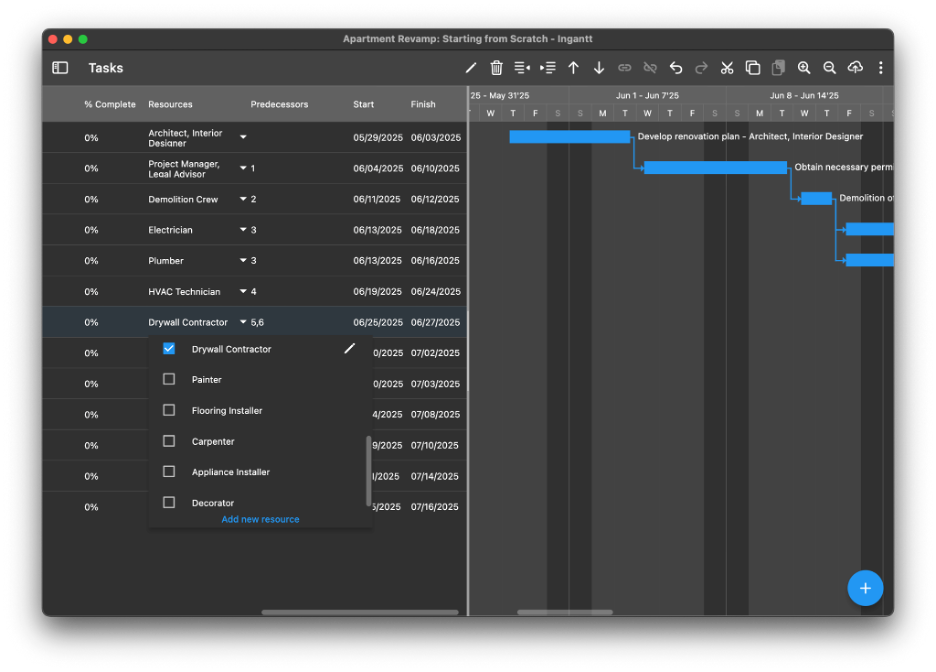
Ingantt entra nella mia selezione perché il suo approccio alla gestione delle risorse è più dettagliato e pratico rispetto alla maggior parte degli strumenti Gantt basati sull’IA. Mi piace il fatto che puoi vedere istantaneamente l’assegnazione delle risorse, monitorare il carico di lavoro e riequilibrare il personale direttamente dalla visualizzazione Gantt, mantenendo così le tempistiche dei compiti connesse alla reale capacità. Riceverai suggerimenti sulla pianificazione che aiutano a individuare i colli di bottiglia in anticipo e ad adattarti senza dover cercare tra vari report sparsi. Questo è molto utile quando i team lavorano su più progetti e devono evitare di sovraccaricare le persone chiave.
Ingantt: Ideale per
- Project manager che necessitano di un’allocazione risorse in tempo reale
- Team che gestiscono più progetti e dipendenze contemporaneamente
Ingantt: Non indicato per
- Team che hanno bisogno solo di funzioni Gantt di base
- Organizzazioni che cercano integrazioni estese o molta automazione
Cosa distingue Ingantt
Ingantt è strutturato per una gestione diretta delle risorse direttamente nel diagramma di Gantt. A differenza di strumenti semplici come ClickUp o Trello, qui si prevede che tu assegni e riequilibri attivamente il lavoro mentre pianifichi. Trovo che questo approccio sia utile quando hai bisogno di vedere esattamente chi è sovraccarico e apportare subito modifiche allo staff dalla vista di progetto.
Questo tipo di flusso di lavoro permette di collegare la pianificazione alla reale capacità del team, e non solo alle scadenze delle attività.
Compromessi con Ingantt
Ingantt è ottimizzato per l’abbinamento preciso delle risorse, ma questa specializzazione comporta meno automazioni e opzioni di integrazione più limitate. Se hai bisogno di sincronizzare i dati di progetto con molti strumenti SaaS, dovrai gestire più attività manualmente.
Pros and Cons
Pros:
- Individua rapidamente il sovraccarico delle risorse
- Bilanciamento automatico del carico di lavoro del team
- Le modifiche si riflettono subito su tutti i diagrammi
Cons:
- Per l’upgrade Enterprise serve preventivo dedicato
- Prezzo diverso per la versione mobile
Altri strumenti per creare diagrammi di Gantt con l'IA
Ecco alcune opzioni aggiuntive di strumenti per creare diagrammi di Gantt con l’IA che non sono entrate nella mia selezione, ma che vale comunque la pena valutare:
- ONES.com
Ideale per soluzioni enterprise
- Miro
Ideale per la collaborazione tipo lavagna e il brainstorming visivo
- Instagantt
Il migliore per l'integrazione con Trello
- Wrike
Ideale per la collaborazione tra team


Come valuto i creatori di diagrammi di Gantt con Intelligenza Artificiale
Cerco strumenti in cui l'IA faccia davvero risparmiare ore di pianificazione—ad esempio, generando un programma completo a partire da un brief di progetto o rischedulando le attività quando cambia una scadenza. Suddivido la mia valutazione tra le funzionalità di base che ogni strumento deve avere e i fattori differenzianti che distinguono un fornitore dall'altro.
Funzionalità di base (Requisiti minimi per questa lista)
Quando seleziono gli strumenti per la mia lista, valuto ciascuno su una scala da 0 (non offre la funzionalità) a 5 (eccelle in quest'area) per ogni funzionalità di base elencata di seguito. Poi calcolo il punteggio totale dello strumento in percentuale. Ogni strumento deve raggiungere un punteggio minimo totale del 65% per essere considerato nell'elenco.
- Generazione di diagrammi con IA: Verifico se uno strumento può trasformare un semplice brief di progetto in testo o un elenco di attività incollato in un diagramma di Gantt strutturato senza impostazioni manuali.
- Pianificazione automatica delle attività: Ogni strumento dovrebbe assegnare date e ordinare le attività usando l'IA, come creare automaticamente un piano di sprint quando si inserisce un backlog.
- Gestione di dipendenze e tempistiche: Cerco le funzionalità standard dei diagrammi di Gantt come modifica drag-and-drop, milestone, visualizzazione del percorso critico e più tipi di dipendenza.
- Previsione dei rischi e dei ritardi: L'IA dello strumento dovrebbe segnalare i rischi in anticipo—ad esempio, avvisare che un ritardo nella revisione del design sposterà una data di lancio.
- Assegnazione intelligente delle risorse: Valuto se l'IA può suggerire la riallocazione dei compiti in base alla capacità del team, non solo mostrare chi è sovraccarico a posteriori.
- Spazio di lavoro collaborativo per i progetti: I team necessitano di co-editing in tempo reale, thread di commenti sulle attività e controlli di condivisione così che gli stakeholder possano vedere le tempistiche senza accesso completo.
Una volta che ho una lista di strumenti che rispettano questi criteri, considero cosa distingue ciascuna piattaforma.
Fattori differenzianti (Cosa distingue i fornitori)
Ecco come confronto e metto a confronto i diversi fornitori:
Funzionalità distintive
La simulazione di scenari è un grande elemento distintivo secondo me. Voglio vedere se uno strumento consente di modellare linee temporali alternative—per esempio, cosa succede alla data di lancio se l'ingegneria perde uno sprint—e confrontare i risultati previsti dall'IA fianco a fianco. Anche i report di stato generati automaticamente fanno davvero risparmiare ore; i migliori strumenti estraggono i dati in tempo reale dal diagramma di Gantt e preparano aggiornamenti per gli stakeholder che puoi inviare con modifiche minime. Per i responsabili PMO che gestiscono più flussi di lavoro, cerco una vista portafoglio che tenga traccia delle dipendenze tra progetti con il supporto dell'IA.
Oltre le funzionalità
Qui è molto importante la profondità di integrazione. Uno strumento di Gantt che non si sincronizza con lo stack esistente—Jira, Asana, Slack o qualsiasi altro utilizzi il tuo team—produce più lavoro manuale di quello che elimina. Valuto anche come ogni fornitore gestisce la privacy dei dati dell'IA, specialmente se i dati di progetto inseriti nei prompt vengono impiegati per addestrare i modelli. Per i buyer aziendali, verifico la presenza di SSO, log di audit e permessi basati sui ruoli. Infine, il supporto all'onboarding fa davvero la differenza quando i team adottano la pianificazione guidata dall'IA per la prima volta.
Come scegliere uno strumento per creare diagrammi di Gantt con l'IA
È facile perdersi in lunghi elenchi di funzionalità e strutture tariffarie complesse. Per aiutarti a restare concentrato mentre affronti il tuo specifico processo di selezione del software, ecco una lista di fattori da tenere presenti:
| Fattore | Cosa considerare |
| Scalabilità | Lo strumento crescerà insieme al tuo team? Valuta se può gestire un numero maggiore di utenti o progetti man mano che il team si espande, senza aumenti significativi dei costi. |
| Integrazioni | Si collega agli strumenti che già utilizzi? Assicurati che si integri con piattaforme come Slack, Trello o Jira per ottimizzare i flussi di lavoro. |
| Personalizzazione | Puoi adattare lo strumento alle tue esigenze? Cerca opzioni per modificare visualizzazioni, campi e report in modo che rispecchino il flusso di lavoro del tuo team. |
| Facilità d'uso | Lo strumento è intuitivo? Un'interfaccia facile da usare riduce i tempi di formazione e aiuta il team ad adottare rapidamente il software. |
| Implementazione e avviamento | Quanto velocemente puoi iniziare? Valuta la disponibilità di tutorial, assistenza clienti e risorse per la configurazione, così da agevolare la transizione. |
| Costo | Il prezzo rientra nel tuo budget? Confronta il costo con le funzionalità offerte e verifica la presenza di costi nascosti o aggiornamenti obbligatori. |
| Misure di sicurezza | Quanto sono sicuri i tuoi dati? Assicurati che lo strumento offra la crittografia, backup regolari e conformità agli standard del settore. |
| Disponibilità dell'assistenza | Quale assistenza è disponibile? Considera i tempi di risposta, la disponibilità della chat dal vivo e se l'assistenza tecnica è inclusa nel tuo piano. |
Che cos'è uno strumento per creare diagrammi di Gantt con l'IA?
Uno strumento per creare diagrammi di Gantt con l'IA aiuta i responsabili di progetto a creare e gestire le tempistiche dei progetti utilizzando l'intelligenza artificiale. Questi strumenti sono comunemente utilizzati da responsabili di progetto, responsabili di team e pianificatori per migliorare l'organizzazione e l'efficienza. Le funzionalità di pianificazione automatizzata, dipendenze tra attività e collaborazione in tempo reale favoriscono una gestione efficiente dei progetti e il coordinamento del team. Nel complesso, questi strumenti semplificano la pianificazione e l'esecuzione di progetti complessi, facendo risparmiare tempo e riducendo gli errori.
Funzionalità degli strumenti per creare diagrammi di Gantt con l'IA
Quando scegli uno strumento per creare diagrammi di Gantt con l'IA, presta attenzione alle seguenti funzionalità chiave:
- Pianificazione automatizzata: adatta automaticamente le tempistiche del progetto in base alle dipendenze tra attività e alla disponibilità del team, facendo risparmiare tempo e riducendo gli errori manuali.
- Dipendenze tra attività: collega le attività tra loro in modo che le modifiche a un'attività aggiornino automaticamente quelle correlate, garantendo tempistiche accurate del progetto.
- Collaborazione in tempo reale: consente a più membri del team di lavorare contemporaneamente allo stesso progetto, migliorando la comunicazione e il coordinamento.
- Modelli personalizzabili: utilizza modelli predefiniti per configurare rapidamente nuovi progetti, adattandoli alle esigenze specifiche del settore o del team.
- Interfaccia con trascinamento: sposta facilmente le attività sulla sequenza temporale per modificare le pianificazioni, offrendo flessibilità nella pianificazione del progetto.
- Allocazione delle risorse: assegna i membri del team alle attività e monitora il loro carico di lavoro, contribuendo a bilanciare le responsabilità e a prevenire il sovraccarico.
- Monitoraggio dei progressi: controlla il completamento delle attività e le tappe fondamentali del progetto per mantenere il team informato e nei tempi previsti.
- Possibilità di integrazione: collega altri strumenti come Slack, Trello o Jira per centralizzare la gestione dei progetti e supportare i flussi di lavoro.
- Sicurezza dei dati: garantisce la protezione dei dati del progetto tramite crittografia e backup regolari, mantenendo la riservatezza e la conformità.
- Sequenza temporale visiva: utilizza una rappresentazione chiara e visiva delle attività e delle tempistiche del progetto per rendere più facili da comprendere e gestire i progetti complessi.
Vantaggi di uno strumento per creare diagrammi di Gantt con l'IA
L'implementazione di uno strumento per creare diagrammi di Gantt con l'IA offre numerosi vantaggi al tuo team e alla tua azienda. Ecco alcuni dei vantaggi che puoi aspettarti:
- Maggiore efficienza: la pianificazione automatizzata e le dipendenze tra attività riducono gli aggiustamenti manuali, facendo risparmiare tempo e minimizzando gli errori.
- Collaborazione migliorata: le funzionalità di collaborazione in tempo reale mantengono il team connesso e informato, migliorando la comunicazione e il coordinamento.
- Migliore gestione delle risorse: gli strumenti di allocazione delle risorse aiutano a bilanciare i carichi di lavoro e a prevenire il sovraccarico, garantendo che il team rimanga produttivo.
- Visibilità chiara del progetto: le sequenze temporali visive offrono una panoramica immediata dell'avanzamento del progetto, facilitando la gestione e la comprensione delle attività complesse.
- Maggiore flessibilità: le interfacce con trascinamento consentono di modificare rapidamente le pianificazioni, offrendo adattabilità nella pianificazione del progetto.
- Configurazione semplificata del progetto: i modelli personalizzabili consentono di avviare i progetti più rapidamente, adattandoli alle esigenze specifiche del settore o del team.
- Gestione sicura dei dati: le misure di sicurezza dei dati proteggono le informazioni del progetto, garantendo la riservatezza e la conformità agli standard del settore.
Costi e prezzi degli strumenti per creare diagrammi di Gantt con l'IA
La scelta di uno strumento per creare diagrammi di Gantt con l'IA richiede la comprensione dei vari modelli e piani tariffari disponibili. I costi variano in base alle funzionalità, alle dimensioni del team, all'attivazione del cliente, agli add-on e ad altri fattori. La tabella seguente riassume i piani più comuni, i relativi prezzi medi e le funzionalità generalmente incluse nelle soluzioni per creare diagrammi di Gantt con l'IA:
Tabella di confronto dei piani per gli strumenti per creare diagrammi di Gantt con l'IA
| Tipo di piano | Prezzo medio | Funzionalità comuni |
| Piano gratuito | $0 | Creazione di diagrammi di Gantt di base, numero limitato di attività e spazio di archiviazione minimo. |
| Piano personale | $5-$15/utente/mese | Dipendenze tra attività, reportistica di base e integrazioni limitate. |
| Piano aziendale | $15-$40/utente/mese | Collaborazione in tempo reale, reportistica avanzata e gestione delle risorse. |
| Piano per grandi aziende | $40-$100/utente/mese | Modelli personalizzabili, assistenza dedicata e funzionalità di sicurezza avanzate. |
Domande frequenti sui creatori di diagrammi di Gantt con IA
Ecco alcune risposte alle domande frequenti sugli strumenti per diagrammi di Gantt basati sull’IA:
In che modo l'IA migliora la creazione dei diagrammi di Gantt?
L’IA migliora la creazione dei diagrammi di Gantt automatizzando il processo di pianificazione. Utilizza algoritmi per analizzare le attività e le dipendenze, riducendo gli inserimenti manuali. Ciò consente di risparmiare tempo e ridurre al minimo gli errori. L’IA può anche modificare automaticamente le tempistiche quando cambiano i dettagli del progetto.
È possibile integrare i diagrammi di Gantt con altri strumenti?
Sì, molti creatori di diagrammi di Gantt basati sull’IA offrono integrazioni con strumenti diffusi come Slack, Trello e Jira. Questo aiuta a centralizzare i dati del progetto e a migliorare l’efficienza del flusso di lavoro. Prima di scegliere uno strumento, verifica le opzioni di integrazione disponibili nell’app per assicurarti che sia compatibile con il tuo stack tecnologico esistente.
Cosa bisogna considerare quando si sceglie un creatore di diagrammi di Gantt?
Quando selezioni un creatore di diagrammi di Gantt, considera fattori come scalabilità, facilità d’uso e funzionalità di integrazione per aumentare la fidelizzazione. Rifletti sulla complessità del tuo progetto e sulle attività ripetitive che potrebbero essere automatizzate per risparmiare tempo. Assicurati che lo strumento offra funzionalità in linea con il tuo flusso di lavoro e che possa crescere insieme alle tue esigenze. Inoltre, analizza e discuti il processo di onboarding dei clienti per garantire un’integrazione produttiva del software. Queste considerazioni aumenteranno le probabilità di un processo di onboarding efficace, ridurranno il tasso di abbandono e miglioreranno l’esperienza del cliente.
In che modo i diagrammi di Gantt basati sull'IA gestiscono le dipendenze tra le attività?
I diagrammi di Gantt basati sull’IA gestiscono le dipendenze tra le attività aggiornando automaticamente le attività correlate quando si verificano modifiche. In questo modo, la tempistica del progetto rimane accurata. Puoi collegare le attività per rappresentare le dipendenze del mondo reale, aiutandoti a visualizzare il flusso del progetto e a evitare colli di bottiglia.
Esistono problemi di sicurezza legati agli strumenti per diagrammi di Gantt basati sull'IA?
La sicurezza è importante quando si utilizzano strumenti per diagrammi di Gantt basati sull’IA. Cerca funzionalità come la crittografia dei dati e i backup regolari per aumentare la fiducia nella piattaforma. Assicurati che lo strumento sia conforme agli standard del settore per proteggere le informazioni del progetto. Esamina sempre le misure di sicurezza offerte dal fornitore.
I creatori di diagrammi di Gantt basati sull'IA offrono l'accesso da dispositivi mobili?
Molti creatori di diagrammi di Gantt basati sull’IA consentono l’accesso da dispositivi mobili, permettendo di gestire i progetti ovunque ci si trovi. Verifica se lo strumento offre un’app mobile o una versione web responsiva. Questa flessibilità può essere utile per i team che hanno bisogno di accedere ai dati del progetto in qualsiasi momento e da qualsiasi luogo.