

I 27 migliori assistenti IA per riunioni nel 2026

Selezione di assistenti alle riunioni con intelligenza artificiale


Un assistente alle riunioni con intelligenza artificiale è un software che utilizza l'intelligenza artificiale per registrare, trascrivere e riassumere le riunioni, così non perderai mai dettagli o attività successive. Se cerchi modi più intelligenti per mantenere il tuo team organizzato e concentrato, senza essere sommerso dalla presa manuale di appunti, gli assistenti alle riunioni con intelligenza artificiale possono fare davvero la differenza.
Questo elenco ti aiuterà a fare chiarezza e a confrontare le opzioni migliori, così potrai scegliere lo strumento più adatto al tuo flusso di lavoro, al tuo stile di collaborazione e ai tuoi obiettivi di produttività.
Perché fidarsi dei nostri consigli sui software
Il nostro team testa e recensisce software dal 2012. In quanto project manager noi stessi, sappiamo quanto sia difficile — e importante — scegliere il software giusto.
Per questa guida, abbiamo valutato gli strumenti attraverso test pratici e ricerche indipendenti, assegnando un punteggio agli strumenti in base ai nostri criteri di selezione. Ci basiamo inoltre sulle competenze di leader di pensiero del settore e di professionisti attivi nella gestione dei progetti.
Le nostre recensioni riflettono il nostro giudizio editoriale umano, non un discorso di vendita.
Revisori esperti:
Riepilogo dei migliori assistenti alle riunioni con intelligenza artificiale
Questa tabella comparativa riassume i dettagli sui prezzi delle mie migliori selezioni di assistenti alle riunioni con intelligenza artificiale, per aiutarti a trovare quello più adatto al tuo budget e alle esigenze della tua azienda.
| Tool | Best For | Trial Info | Price | ||
|---|---|---|---|---|---|
| 1 | Ideale per flussi di lavoro collaborativi nelle riunioni | Piano gratuito disponibile | Da $7/utente/mese (fatturato annualmente) | Website | |
| 2 | Ideale per riassunti AI delle chiamate con sincronizzazione CRM | Piano gratuito + demo gratuita disponibile | Da $15/utente/mese (fatturato annualmente) | Website | |
| 3 | Ideale per insight sulle riunioni e coaching | Prova gratuita di 14 giorni + demo gratuita disponibile | Da $19/utente/mese (fatturato annualmente) | Website | |
| 4 | Ideale per sintesi riunioni concise | Piano gratuito disponibile | Da $14/utente/mese | Website | |
| 5 | Ideale per trascrizione e appunti in tempo reale | Piano gratuito + demo gratuita disponibile | Da $8.33/utente/mese (fatturato annualmente) | Website | |
| 6 | Ideale per la trascrizione automatica delle riunioni | Piano gratuito + demo gratuita disponibile | A partire da $10/postazione/mese (fatturazione annuale) | Website | |
| 7 | Ideale per riepiloghi delle riunioni in tempo reale | Piano gratuito disponibile | Da $8/utente/mese (fatturazione annuale) | Website | |
| 8 | Ideale per la trascrizione multilingue | Piano gratuito disponibile | Da $8.17/mese (fatturato annualmente) | Website | |
| 9 | Ideale per analisi e insight sulle riunioni | Piano gratuito disponibile | A partire da $15/mese (fatturazione annuale) | Website | |
| 10 | Ideale per la cattura multilingue delle riunioni | Piano gratuito + demo gratuita disponibile | Da €39/utente/mese (fatturazione annuale) | Website |
Recensioni degli assistenti alle riunioni con intelligenza artificiale
Di seguito trovi i miei riepiloghi dettagliati degli assistenti alle riunioni con intelligenza artificiale entrati nella mia selezione. Le mie recensioni offrono un’analisi approfondita delle funzionalità, delle capacità e delle integrazioni di ogni strumento, per aiutarti a trovare quello più adatto a te.

Fellow
Ideale per flussi di lavoro collaborativi nelle riunioni
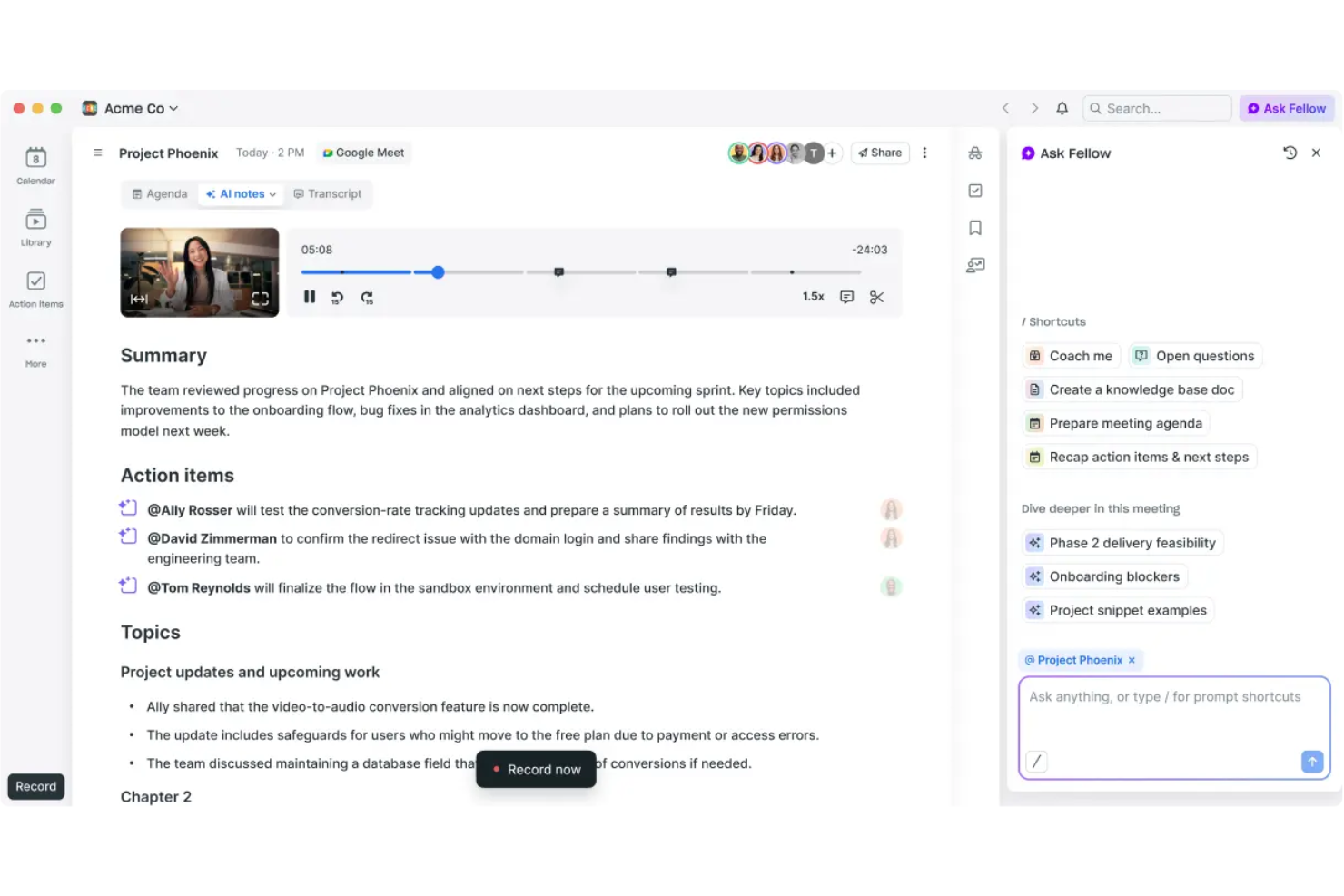
Fellow è una piattaforma assistente per riunioni AI che consente di creare agende collaborative, registrare note condivise delle riunioni e facilitare feedback strutturato del team e punti d'azione.
Per chi è ideale Fellow?
Fellow si rivolge a manager e leader di team di aziende tecnologiche di piccole e medie dimensioni che desiderano flussi di lavoro per riunioni organizzati e collaborativi.
Perché ho scelto Fellow
Ho scelto Fellow tra i migliori perché il mio team usa effettivamente le sue agende collaborative per mantenere le riunioni focalizzate e responsabili. Mi piace come possiamo prendere appunti in tempo reale fianco a fianco e assegnare punti d'azione durante la chiamata. È particolarmente utile per costruire e condividere feedback sulle riunioni direttamente nello spazio di lavoro.
Caratteristiche principali di Fellow
- Trascrizione AI delle riunioni: Genera automaticamente le trascrizioni per le riunioni registrate.
- Libreria di modelli: Offre modelli preimpostati per diversi tipi e strutture di riunione.
- Dashboard di analisi delle riunioni: Monitora la frequenza delle riunioni, il coinvolgimento e i dati dei partecipanti.
- Stream condivisi: Permette agli utenti di organizzare riunioni e note per progetto, team o argomento.
Integrazioni di Fellow
Fellow offre integrazioni native con Google Calendar, Outlook, Slack, Microsoft Teams, Zoom, Asana, Jira, Salesforce, HubSpot e Linear. È disponibile un'API per integrazioni personalizzate.
Pros and Cons
Pros:
- Feedback strutturati e gestione dei punti d'azione
- Riepiloghi e trascrizioni AI integrati delle riunioni
- Modelli di agende dedicati per diversi tipi di riunione
Cons:
- Meno automazioni dei flussi di lavoro
- Occasionali problemi di sincronizzazione con alcune piattaforme calendario
Fathom
Ideale per riassunti AI delle chiamate con sincronizzazione CRM
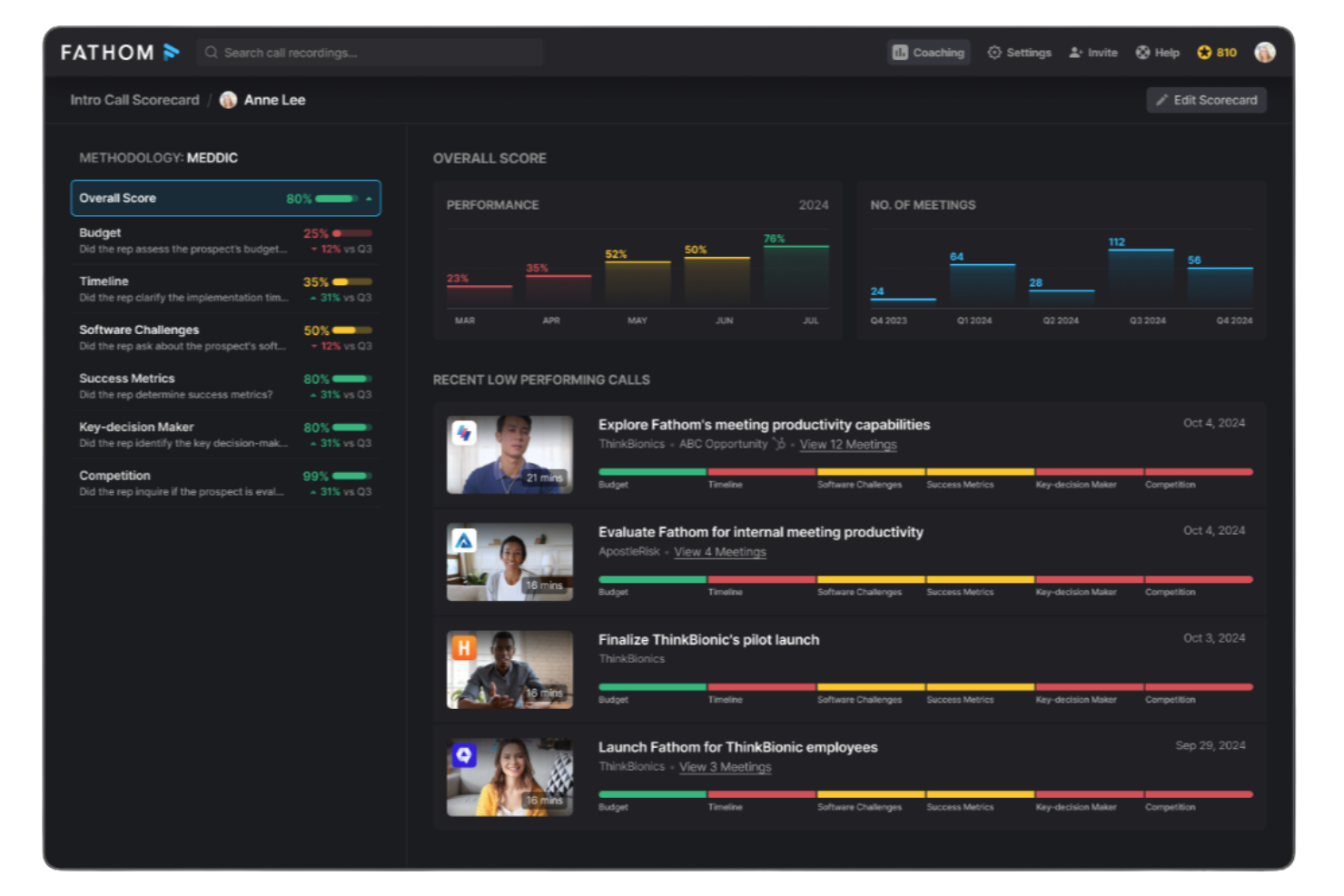
Fathom è una piattaforma assistente AI per riunioni che registra, trascrive, evidenzia e riassume le videochiamate, offrendo accesso immediato a insight e azioni da intraprendere emerse dalle riunioni.
Per chi è più adatto Fathom?
Fathom è ideale per team di vendita distribuiti, team di successo clienti e team di ricerca che registrano e analizzano riunioni virtuali su Zoom, Google Meet e Microsoft Teams.
Perché ho scelto Fathom
Ho scelto Fathom come uno dei migliori perché il mio team ottiene davvero registrazioni e trascrizioni illimitate delle riunioni senza limiti nascosti o costi aggiuntivi, rimanendo completamente gratuito per gli utenti individuali. Mi piace utilizzare Fathom per generare automaticamente riassunti delle riunioni condivisibili, evidenziare i punti chiave durante le chiamate e sincronizzare le azioni con le nostre app collegate.
Funzionalità principali di Fathom
- Trascrizione in tempo reale: Cattura in diretta le parole pronunciate su Zoom, Google Meet e Microsoft Teams.
- Supporto multilingue: Trascrive le riunioni in più lingue senza dover cambiare manualmente.
- Identificazione degli oratori: Segna chiaramente chi sta parlando per tutta la trascrizione.
- Tag automatici delle chiamate: Contrassegna argomenti e segmenti importanti per un rapido riferimento dopo le riunioni.
Integrazioni Fathom
Fathom offre integrazioni native con Salesforce, HubSpot, Slack, Notion, Google Docs, e supporta l'esportazione dei contenuti delle riunioni su Google Drive. È disponibile un'API per integrazioni personalizzate.
Pros and Cons
Pros:
- Registrazioni di riunioni illimitate per utenti individuali
- Trascrizione in tempo reale in più lingue
- Evidenzia e tagga i momenti chiave durante le chiamate
Cons:
- Nessuna registrazione offline o cattura riunioni da mobile
- L'etichettatura degli oratori può essere incoerente in chiamate numerose

Avoma
Ideale per insight sulle riunioni e coaching
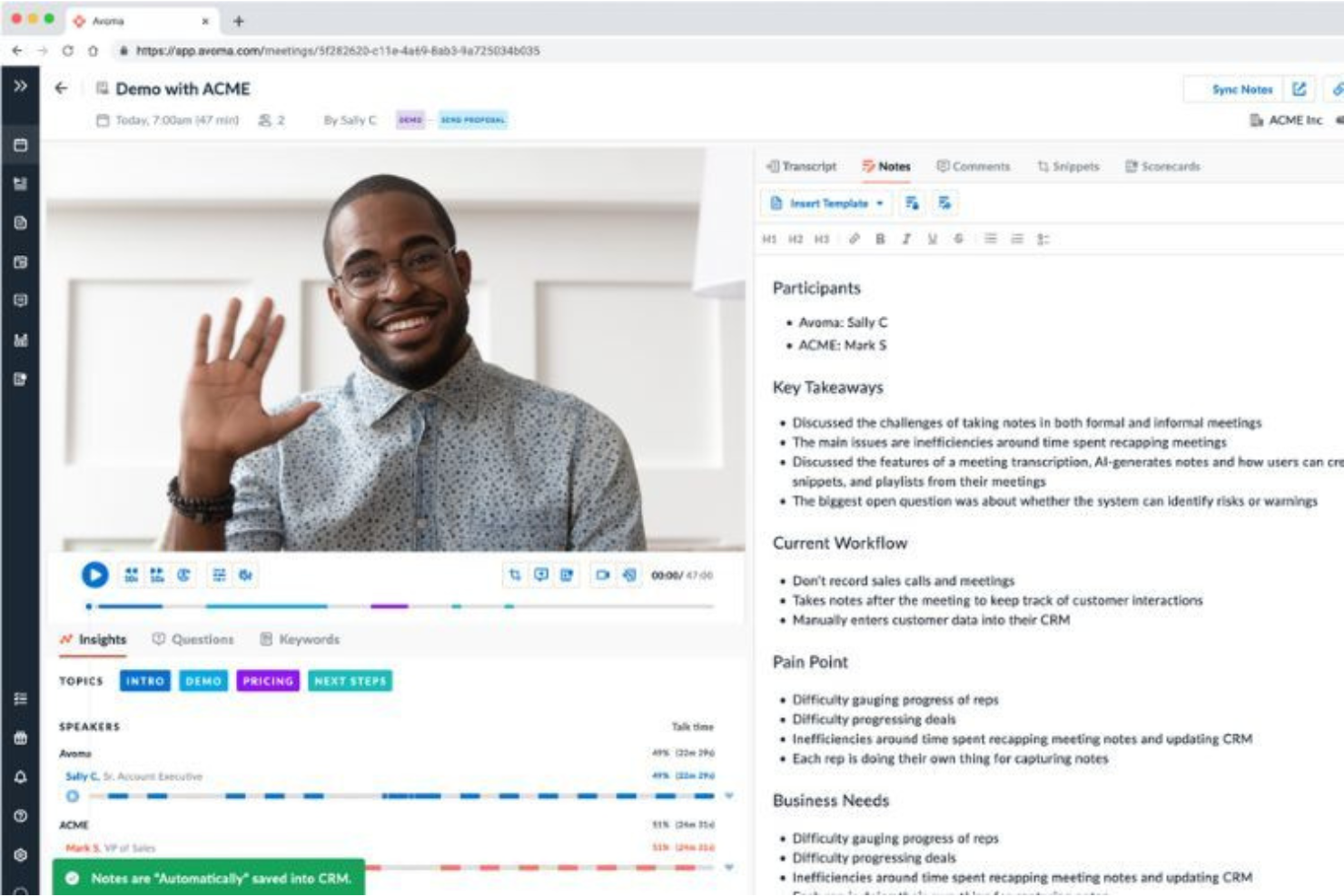
Avoma è una piattaforma assistente AI per riunioni che registra, trascrive e analizza le conversazioni, supportando funzionalità di collaborazione e coaching per i team meeting.
Per chi è ideale Avoma?
Avoma si adatta a team di vendita e front-office che necessitano di registrazione, approfondimenti e coaching per riunioni ricorrenti grazie all’AI.
Perché ho scelto Avoma
Ho scelto Avoma perché va oltre le semplici note AI offrendo trascrizioni dettagliate degli incontri, collaborazione in tempo reale nelle note e approfondimenti di coaching post-chiamata. Il mio team utilizza Avoma per annotare insieme le decisioni durante le chiamate e per organizzare i momenti salienti delle conversazioni da consultare rapidamente. Gli strumenti di coaching integrati consentono ai manager di rivedere le chiamate e condividere feedback collegati direttamente alle specifiche conversazioni.
Funzionalità principali di Avoma
- Modelli di agenda automatizzati: Permette di creare e riutilizzare agende strutturate per riunioni ricorrenti.
- Archivio di trascrizioni ricercabili: Archivia e indicizza le trascrizioni per la ricerca di parole chiave e argomenti tra tutte le conversazioni.
- Integrazione CRM: Sincronizza approfondimenti e note delle riunioni direttamente con Salesforce, HubSpot e altri CRM.
- Identificazione degli speaker: Distingue i singoli partecipanti così da attribuire correttamente dichiarazioni e task.
Integrazioni di Avoma
Avoma offre integrazioni native con Zoom, Microsoft Teams, Google Meet, Salesforce, HubSpot, Slack, Google Calendar e Outlook Calendar. È disponibile un’API per integrazioni personalizzate.
Pros and Cons
Pros:
- Modifica collaborativa delle note durante e dopo le riunioni
- Modelli di agenda automatizzati per riunioni ricorrenti
- L’intelligenza conversazionale offre coaching e analisi
Cons:
- Occasionali errori di trascrizione con accenti marcati
- Nessuna app mobile per registrare riunioni in mobilità

Granola
Ideale per sintesi riunioni concise
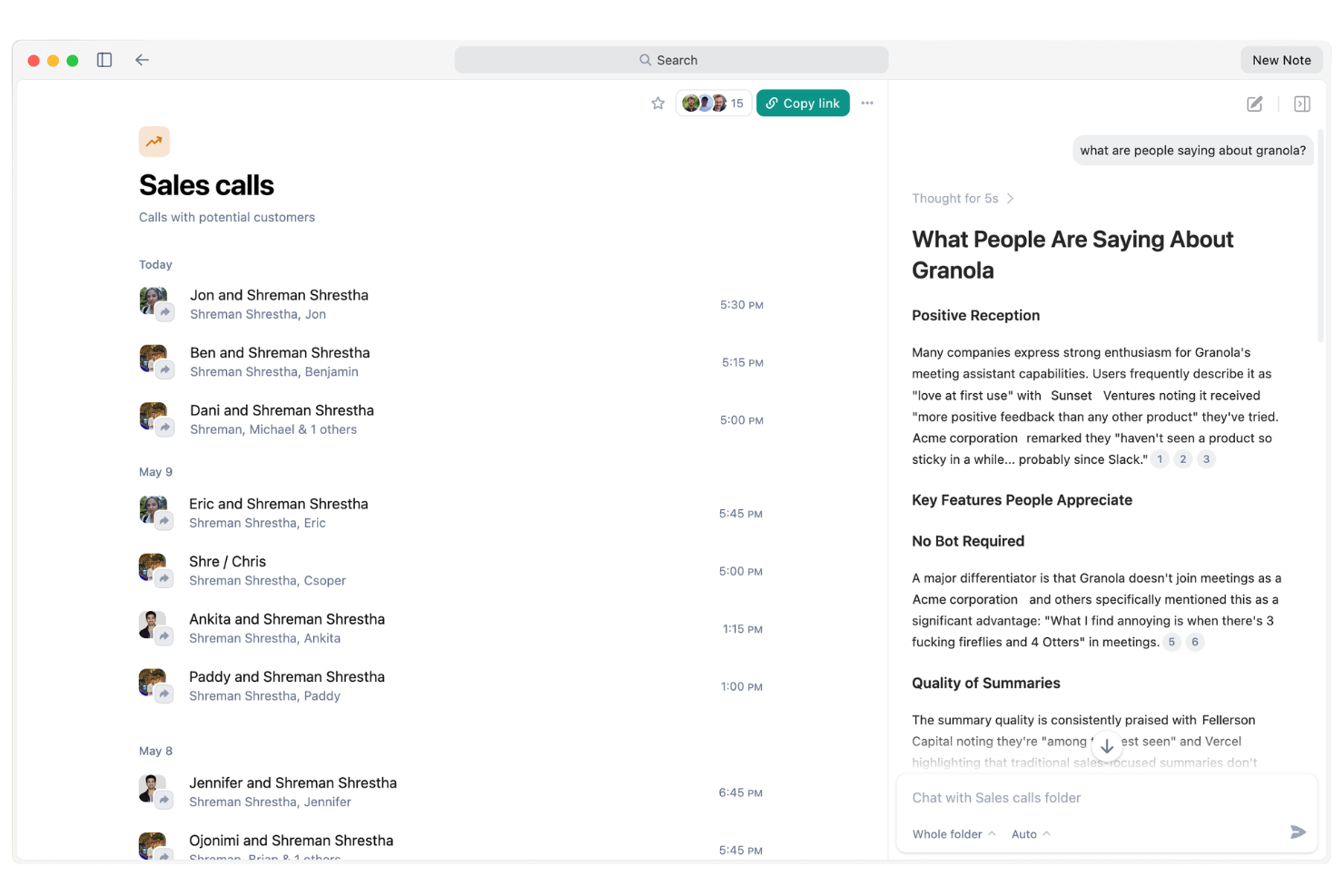
Granola è una piattaforma assistente per riunioni AI che registra le riunioni, genera trascrizioni, traccia le attività da svolgere e attiva follow-up e promemoria automatici per il tuo team.
Per chi è ideale Granola?
Granola è adatto a team di vendita e customer service impegnati che necessitano di follow-up automatici e di un tracciamento affidabile delle attività di ogni riunione.
Perché ho scelto Granola
Ho incluso Granola nella mia selezione perché apprezzo come il suo agente AI gestisce automaticamente i follow-up delle riunioni, i promemoria e gli elementi chiave da svolgere senza alcuno sforzo manuale. Mi piace come tiene traccia attivamente degli impegni e sollecita i partecipanti dopo le riunioni, così nulla viene trascurato. In pratica, questo significa che il mio team può concentrarsi sulle discussioni mentre Granola garantisce che attività e follow-up vengano sempre gestiti.
Funzionalità principali di Granola
- Trascrizione delle riunioni in tempo reale: Granola cattura e trascrive l'audio delle riunioni in tempo reale.
- Riconoscimento dei partecipanti: Identifica e assegna etichette ai diversi relatori durante le registrazioni delle riunioni.
- Archivio delle riunioni ricercabile: Permette agli utenti di cercare e recuperare facilmente note o trascrizioni di riunioni passate.
- Sintesi riunioni generate dall'AI: Genera automaticamente sintesi scritte e concise di ogni riunione.
Integrazioni di Granola
Granola offre integrazioni native con Google Calendar, Zoom, Google Meet, Slack, Notion e Salesforce. È disponibile un'API per integrazioni personalizzate.
Pros and Cons
Pros:
- Attività automatiche assegnate dopo ogni riunione
- Traccia e ricorda ai partecipanti i follow-up
- Sintetizza le riunioni con note generate dall'AI
Cons:
- I piani base limitano i minuti di trascrizione mensili
- Nessuna app mobile per l'uso in mobilità

Otter.ai
Ideale per trascrizione e appunti in tempo reale
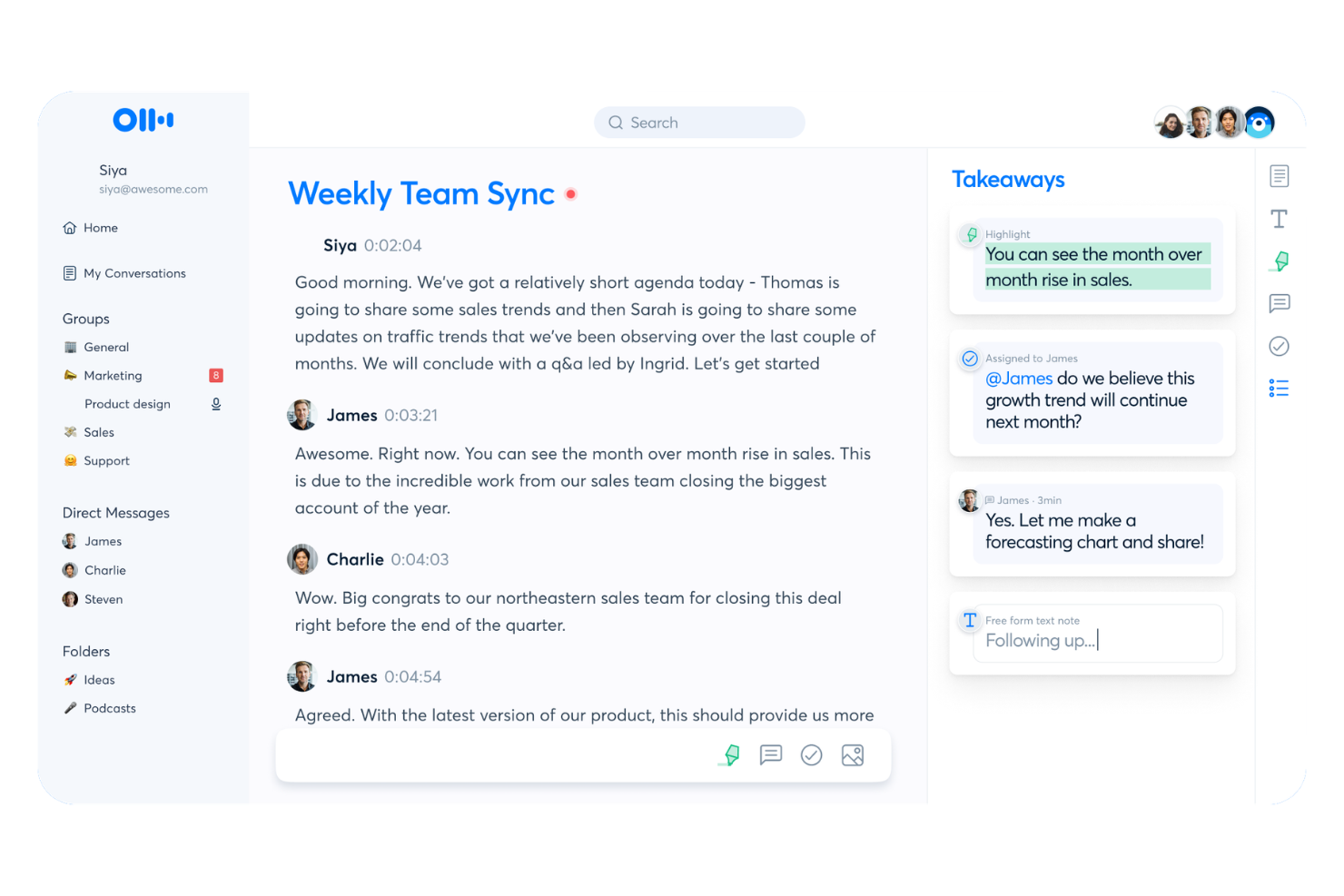
Otter.ai è una piattaforma di assistente alle riunioni basata su AI per appunti vocali in tempo reale, trascrizione automatica, collaborazione in tempo reale e trasformazione delle conversazioni in archivi ricercabili per team e organizzazioni.
Per chi è più adatto Otter.ai?
Team remoti e ibridi che necessitano di trascrizioni vocali collaborative in tempo reale e documentazione delle riunioni distribuite.
Perché ho scelto Otter.ai
Ho scelto Otter.ai tra i migliori perché mi affido ai suoi appunti vocali istantanei e alla condivisione immediata delle trascrizioni durante le riunioni interfunzionali. Mi piace collaborare su appunti condivisi in tempo reale, con i colleghi che aggiungono commenti o modifiche durante la conversazione. Il mio team utilizza le schede riassuntive interattive per catturare decisioni e assegnare compiti mentre avvengono.
Funzionalità principali di Otter.ai
- Identificazione automatica degli oratori: Distingue e etichetta gli oratori nelle trascrizioni delle riunioni.
- Sincronizzazione con piattaforme di videoconferenza: Si collega direttamente a Zoom, Google Meet e Microsoft Teams.
- Importazione audio per la trascrizione: Consente di caricare file audio per generare trascrizioni ricercabili.
- Vocabolario personalizzato: Permette di aggiungere termini di settore o nomi per una trascrizione più accurata.
Integrazioni di Otter.ai
Otter.ai offre integrazioni native con Zoom, Google Meet, Microsoft Teams, Dropbox, Google Drive e altri. È disponibile un'API per integrazioni personalizzate.
Pros and Cons
Pros:
- Trascrizione in tempo reale in riunioni e chiamate
- L’identificazione automatica degli oratori è precisa
- Collaborazione sugli appunti in tempo reale durante le conversazioni
Cons:
- Il bot per le riunioni può disturbare ospiti molto attenti alla privacy
- Le opzioni di modifica per i riepiloghi sono limitate

Ideale per la trascrizione automatica delle riunioni
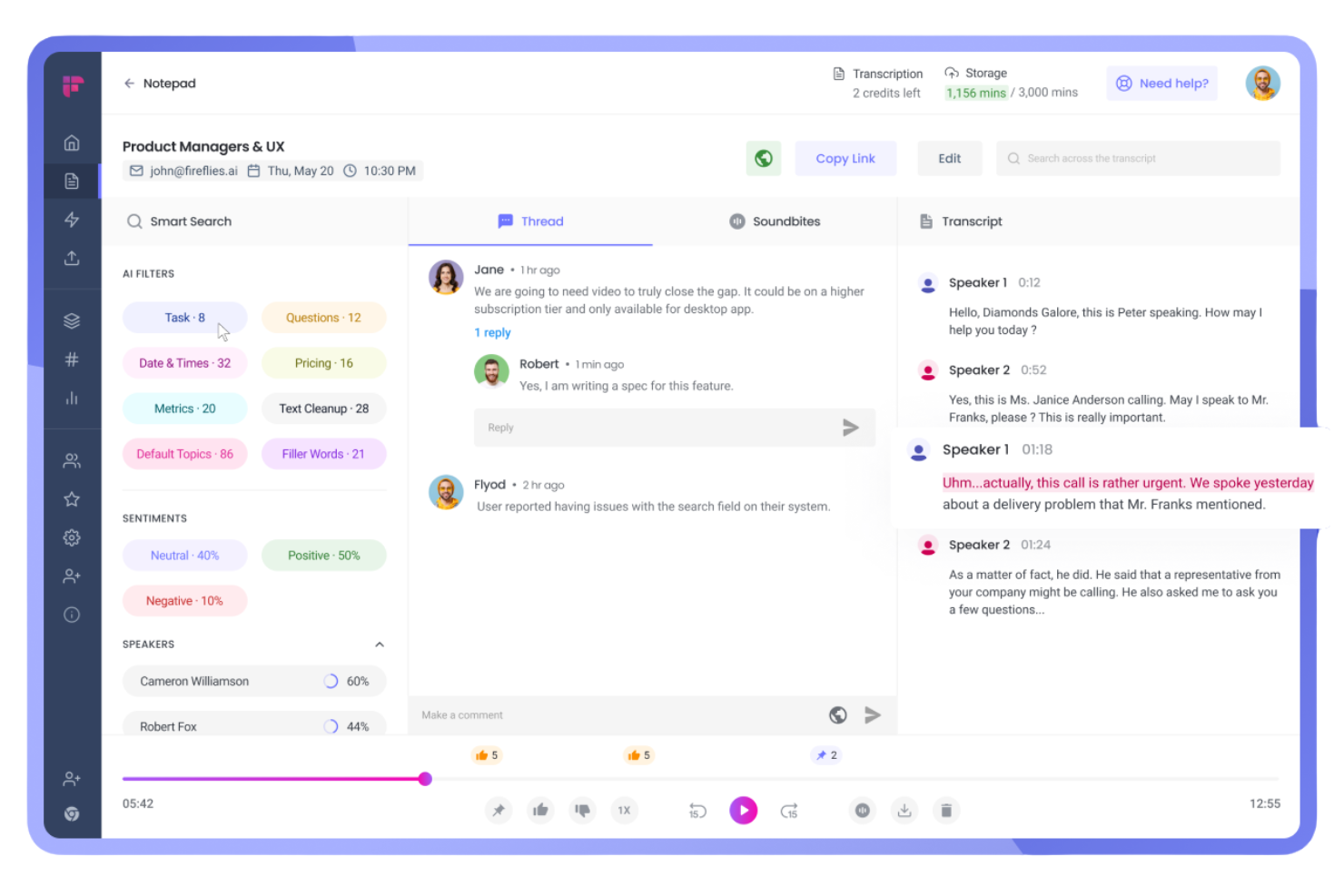
Fireflies.ai è una piattaforma di assistente alle riunioni basata su intelligenza artificiale che registra le chiamate, genera trascrizioni ricercabili, riassume automaticamente le conversazioni e si integra con un'ampia gamma di strumenti di videoconferenza e collaborazione.
Per chi è consigliato Fireflies.ai?
Team di vendita e project manager che hanno bisogno di trascrizione e documentazione automatica delle chiamate durante incontri distribuiti.
Perché ho scelto Fireflies.ai
Ho scelto Fireflies.ai tra i migliori perché trascrive e riassume automaticamente le riunioni su diverse piattaforme, gestendo la registrazione multipiattaforma in tempo reale. Utilizzo i suoi riassunti generati dall'IA per condividere resoconti personalizzati con i vari stakeholder e mi affido alla ricerca per parola chiave per tracciare le azioni chiave da ore di chiamate senza sforzi manuali.
Caratteristiche principali di Fireflies.ai
- Ricerca intelligente: Cerca le trascrizioni per parola chiave, relatore o argomento in tutte le tue riunioni.
- Identificazione dei relatori: Rileva e contrassegna automaticamente i diversi relatori durante le registrazioni.
- Strumenti di collaborazione: Evidenzia, commenta e assegna compiti direttamente nelle note delle riunioni trascritte.
- Integrazione CRM: Sincronizza dati e note delle riunioni con le principali piattaforme CRM come Salesforce e HubSpot.
Integrazioni di Fireflies.ai
Fireflies.ai offre integrazioni native con Google Meet, Zoom, Microsoft Teams, Slack, Salesforce, HubSpot, Asana, ClickUp, Monday.com e altri ancora. Si collega anche con Zapier e offre un'API per integrazioni personalizzate.
Pros and Cons
Pros:
- Trascrizione accurata di più relatori durante le riunioni
- Riassunti AI in tempo reale consegnati dopo le chiamate
- Archivio ricercabile di tutte le riunioni registrate
Cons:
- Nessuna registrazione video in diretta, solo audio
- Errori di trascrizione occasionali con accenti marcati

Tactiq
Ideale per riepiloghi delle riunioni in tempo reale

Tactiq è una piattaforma di assistente per riunioni basata su AI che cattura trascrizioni in tempo reale, genera riepiloghi e punti d'azione e si integra direttamente con piattaforme come Google Meet, Zoom e Microsoft Teams.
A chi è più indicato Tactiq?
Tactiq è ideale per team interfunzionali in ambienti di lavoro ibridi o remoti che necessitano di trascrizioni e documentazione delle riunioni istantanee, basate su AI, sulle principali piattaforme video.
Perché ho scelto Tactiq
Ho scelto Tactiq tra i migliori perché cattura trascrizioni, riepiloghi e punti d'azione in tempo reale mentre il mio team utilizza Google Meet, Zoom e Microsoft Teams. Apprezzo molto la possibilità di evidenziare i momenti chiave durante una riunione, taggare i colleghi per i follow-up e consultare subito dettagli specifici nella trascrizione. L'ho utilizzato per semplificare la presa di appunti esportando i verbali delle riunioni in strumenti come Google Docs e Notion.
Funzionalità principali di Tactiq
- Rilevamento automatico degli argomenti tramite AI: identifica e organizza automaticamente gli argomenti discussi nelle riunioni.
- Etichettatura degli speaker: distingue i diversi interlocutori all'interno della trascrizione come riferimento.
- Vocabolario personalizzato: consente di aggiungere parole chiave per un riconoscimento e una precisione migliori.
- Esportazione in diversi formati: permette di esportare in PDF, Word e file di sottotitoli per la condivisione o l'archiviazione.
Integrazioni di Tactiq
Tactiq offre integrazioni native con Google Meet, Zoom e Microsoft Teams, e fornisce opzioni di esportazione verso Google Docs, Notion e Slack. È disponibile un'API per integrazioni personalizzate.
Pros and Cons
Pros:
- Cattura trascrizioni in più lingue
- Rileva ed etichetta i diversi interlocutori
- L'AI riepiloga le riunioni con i principali punti d'azione
Cons:
- Poche integrazioni con strumenti di project management o CRM
- Talvolta gli speaker vengono etichettati in modo errato negli scambi veloci

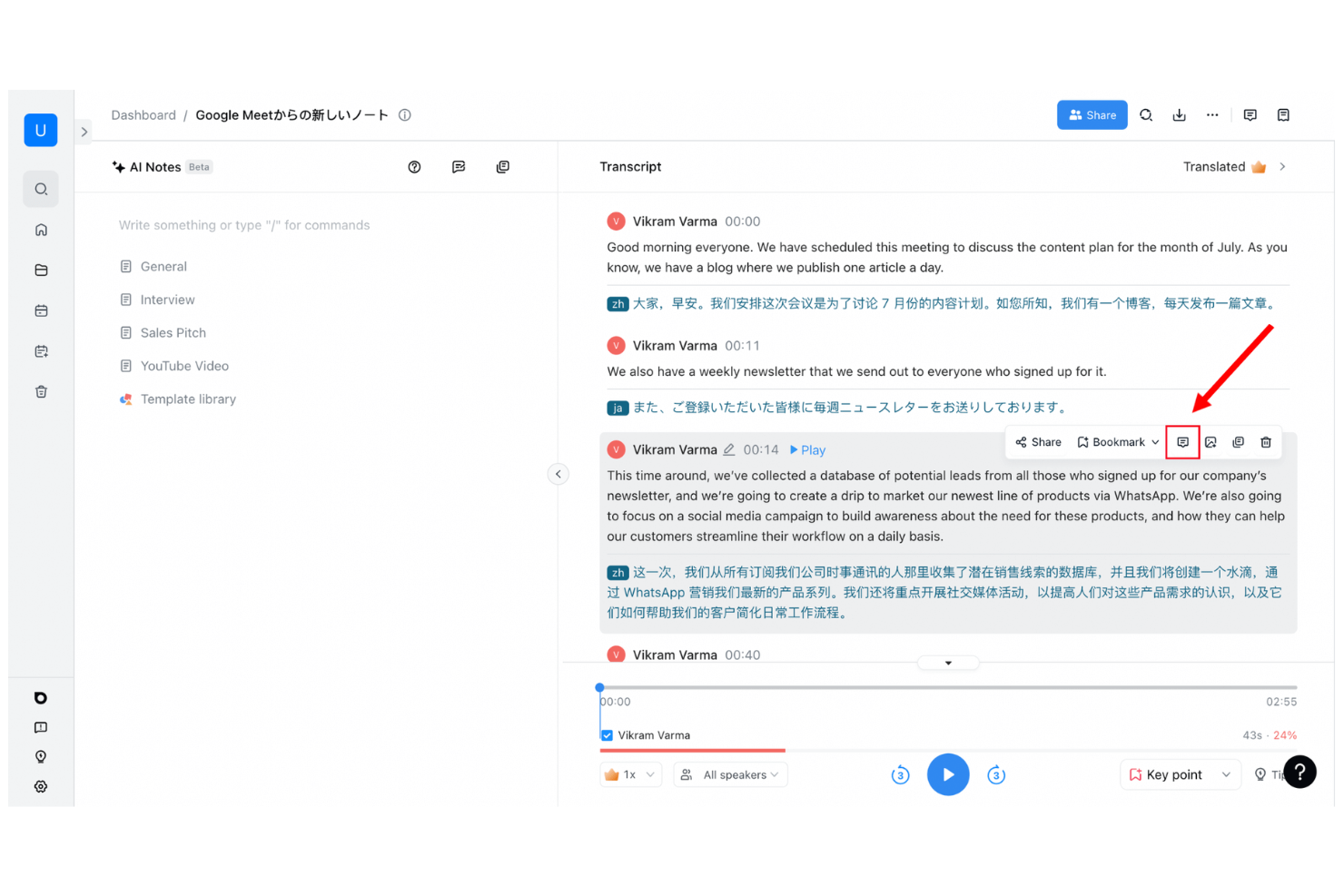
Notta è una piattaforma assistente per riunioni potenziata dall'intelligenza artificiale, progettata per registrare, trascrivere e organizzare le conversazioni da riunioni online, chiamate telefoniche e file audio o video caricati.
Per chi è ideale Notta?
Notta è adatta a professionisti che lavorano da remoto e aziende internazionali che necessitano di trascrizioni rapide e precise per riunioni, webinar, chiamate ed eventi dal vivo in più lingue.
Perché ho scelto Notta
Ho scelto Notta come uno dei migliori assistenti per riunioni basati su IA perché trascrive istantaneamente le conversazioni in tempo reale—che io sia in una videochiamata, che stia partecipando a un evento dal vivo o caricando un file audio. Mi piace poter registrare e catturare ogni parola mentre accade, poi cercare, modificare e organizzare le trascrizioni da qualsiasi dispositivo. Inoltre, apprezzo il fatto che Notta supporta più lingue e riconosca automaticamente i diversi interlocutori.
Funzionalità principali di Notta
- Generatore di riepilogo riunione: Crea automaticamente sintesi chiare e concise alimentate da IA dopo ogni riunione.
- Opzioni di esportazione: Permette di esportare le trascrizioni in formato PDF, Word, TXT o sottotitoli.
- Integrazione con il calendario: Si sincronizza con i calendari Google e Outlook per registrare automaticamente le riunioni.
- Workspace di team: Consente ai team di organizzare e condividere riunioni e trascrizioni registrate in un unico posto.
Integrazioni di Notta
Notta offre integrazioni native con Google Meet, Zoom, Microsoft Teams, Google Calendar e Outlook Calendar, e fornisce una API per integrazioni personalizzate.
Pros and Cons
Pros:
- Distingue i parlanti nelle trascrizioni
- Può unirsi e registrare automaticamente le riunioni pianificate
- Gli elementi di azione vengono estrapolati dalla conversazione
Cons:
- La trascrizione ha difficoltà con il rumore di fondo
- Il piano gratuito limita la durata di trascrizione mensile

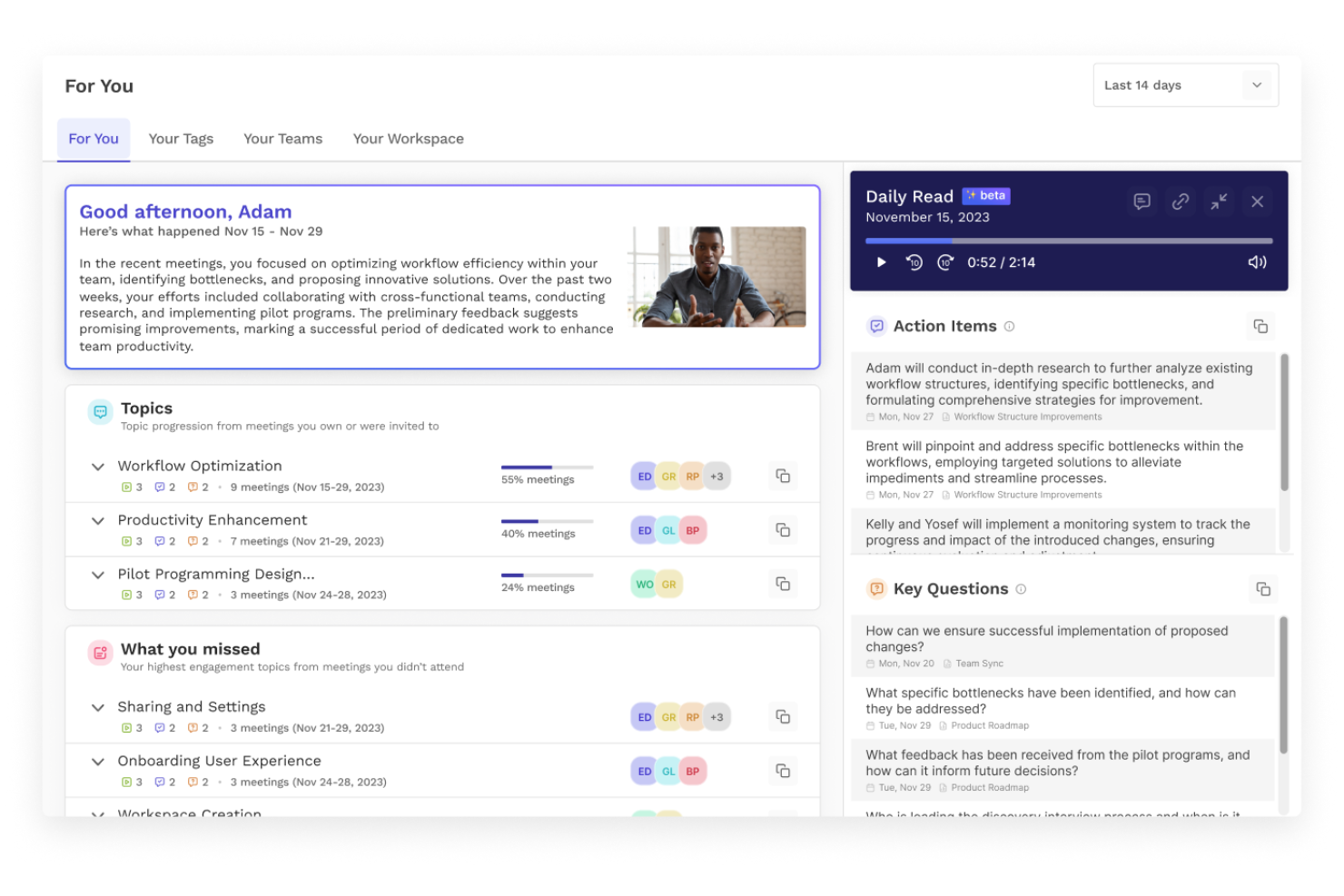
Read AI è una piattaforma assistente alle riunioni basata su intelligenza artificiale che automatizza gli appunti delle riunioni, genera riepiloghi e traccia le attività da svolgere, supportando integrazioni per la collaborazione tra i più diffusi strumenti di videoconferenza.
A chi è destinato Read AI?
Read AI è ideale per team remoti e ibridi che necessitano di riepiloghi automatici delle riunioni, tracciamento e gestione delle attività da svolgere su diverse piattaforme di videoconferenza.
Perché ho scelto Read AI
Ho scelto Read AI perché automatizza non solo gli appunti delle riunioni, ma anche i riepiloghi e le attività da svolgere, utilizzando la funzione di assistente AI. L’ho utilizzato per ottenere resoconti immediati e strutturati dopo le chiamate, e mi piace il fatto che catturi in modo affidabile ogni punto decisionale in tempo reale. Il mio team fa spesso riferimento al tracciamento delle attività in tempo reale di Read AI per restare aggiornato sui follow-up tra più riunioni.
Funzionalità principali di Read AI
- Report automatici di partecipazione alle riunioni: Genera elenchi dei partecipanti e riepiloghi della presenza dopo ogni riunione.
- Analisi dell'engagement in tempo reale: Misura l'attenzione e il coinvolgimento durante le riunioni in tempo reale.
- Supporto per vocabolario personalizzato: Permette di aggiungere termini e gergo specifici per una trascrizione accurata.
- Integrazione con il calendario: Si sincronizza con i calendari per programmare, partecipare e tracciare automaticamente le riunioni.
Integrazioni di Read AI
Read AI offre integrazioni native con Zoom, Microsoft Teams, Google Meet, Slack e altro ancora. È disponibile un’API per integrazioni personalizzate.
Pros and Cons
Pros:
- Evidenzia e tagga i momenti salienti della riunione
- Registrazioni illimitate delle riunioni per gli individui
- Esporta gli appunti delle riunioni su Notion e Drive
Cons:
- Etichettatura dei parlanti poco consistente nelle chiamate di grandi dimensioni
- Nessun supporto per la cattura delle riunioni offline o su mobile

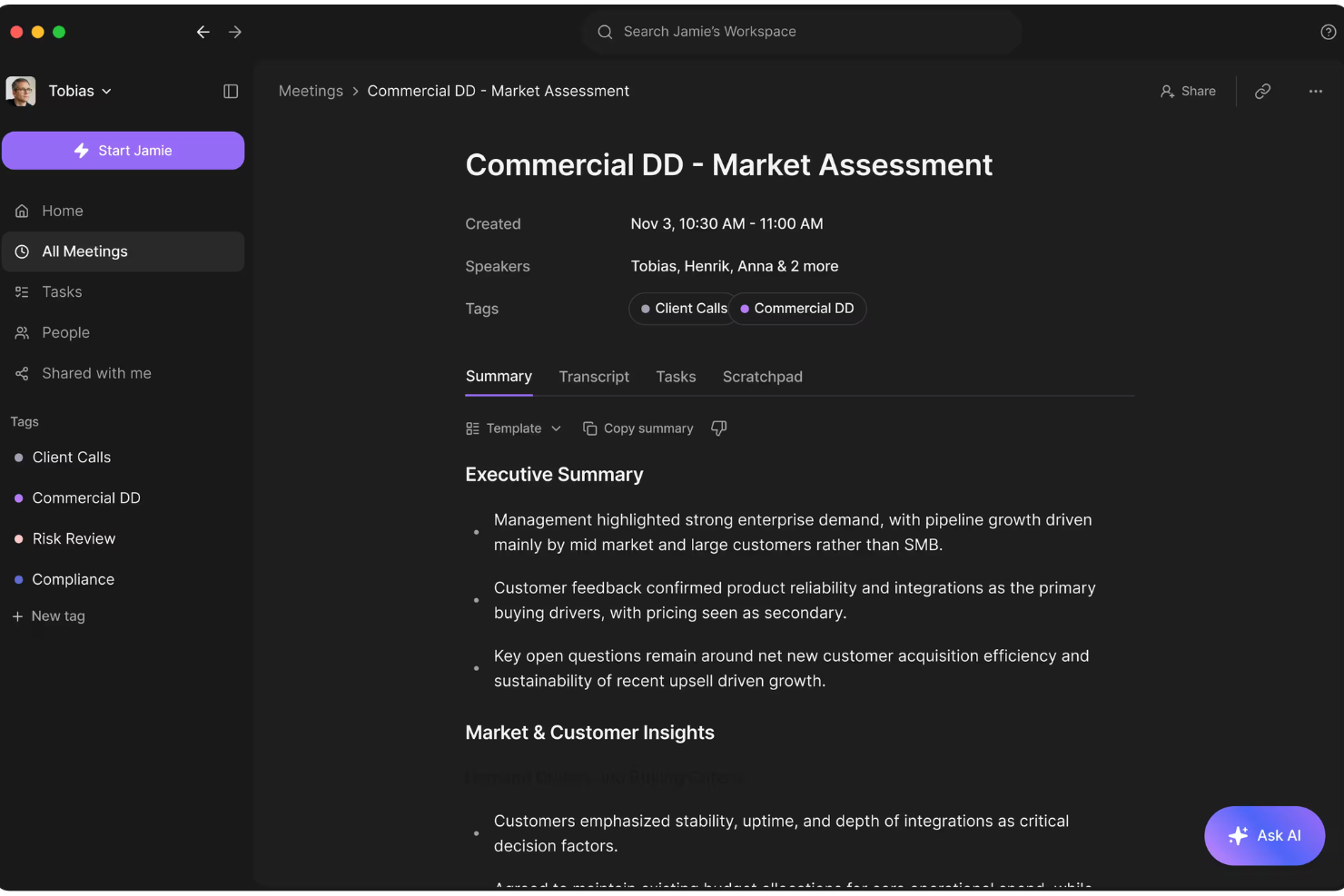
Jamie è un assistente AI per riunioni che registra automaticamente gli incontri virtuali su tutte le piattaforme, trascrive le discussioni e fornisce riassunti dettagliati e multilingue per ogni conversazione.
A chi si rivolge Jamie?
Jamie è ideale per team distribuiti e consulenti che lavorano a livello internazionale e che necessitano di trascrizioni e riassunti delle riunioni in più lingue alimentati dall'intelligenza artificiale.
Perché ho scelto Jamie
Ho scelto Jamie tra i migliori assistenti AI per riunioni perché mi piace che funzioni su qualsiasi piattaforma di meeting, non solo su quelle più famose. Posso ricevere riassunti chiari e strutturati nella lingua che preferisco subito dopo ogni riunione. Mi piace anche che Jamie si unisca in automatico e catturi tutto senza che io debba avviare la registrazione o gestire permessi.
Caratteristiche principali di Jamie
- Registrazione automatica delle riunioni: Jamie registra automaticamente l'audio di tutte le riunioni programmate.
- Identificazione dei relatori: Lo strumento distingue e etichetta i singoli partecipanti durante le riunioni.
- Estrazione delle azioni da svolgere: Jamie individua e visualizza le attività decise durante la riunione.
- Modifica ed esportazione dei riassunti: Puoi modificare i riassunti delle riunioni generati ed esportarli come file di testo o PDF.
Integrazioni di Jamie
Jamie offre integrazioni native con Google Calendar, Microsoft Outlook Calendar e con piattaforme di videoconferenza tra cui Zoom, Google Meet e Microsoft Teams. È disponibile una API per integrazioni personalizzate.
Pros and Cons
Pros:
- Le trascrizioni includono l'identificazione dei relatori
- Può unirsi automaticamente alle riunioni come partecipante
- Le azioni da svolgere vengono rilevate e elencate automaticamente
Cons:
- La qualità della trascrizione diminuisce con l'audio scadente
- I riassunti a volte attribuiscono erroneamente gli interventi ai relatori
Altri assistenti alle riunioni con intelligenza artificiale
Ecco alcune opzioni aggiuntive di assistenti alle riunioni con intelligenza artificiale che non sono entrate nella mia selezione, ma che vale comunque la pena valutare:


Come Valuto gli Assistenti AI per le Riunioni
Per essere inserito in questa lista, l’AI di uno strumento deve garantire un reale risparmio di tempo dopo daily, sprint review e aggiornamenti con gli stakeholder—non solo fornire una semplice trascrizione. Ho suddiviso la mia valutazione in funzionalità di base che ogni strumento deve possedere e in fattori differenzianti che distinguono una scelta dall’altra.
Funzionalità di Base (Requisiti Minimi per la Lista)
Quando seleziono gli strumenti per la mia lista, valuto ciascuno su una scala da 0 (funzionalità assente) a 5 (eccellenza in quest’area) per ogni funzionalità di base elencata qui sotto. Poi trasformo il punteggio totale dello strumento in percentuale. Ogni strumento deve raggiungere un punteggio minimo totale del 65% per essere preso in considerazione.
- Trascrizione Automatica delle Riunioni: Verifico se lo strumento si collega automaticamente e trascrive le chiamate su Zoom, Google Meet, Microsoft Teams e Webex senza configurazione manuale.
- Resoconti AI delle Riunioni: Un buon riassunto deve suddividere una sprint review di 45 minuti in argomenti, decisioni e risultati che posso condividere subito con gli stakeholder.
- Estrazione dei Task: Cerco un’AI in grado di individuare compiti, assegnare responsabili e segnalare scadenze partendo dal dialogo naturale, senza richiedere tag manuali.
- Integrazioni con Strumenti di Progetto: Strumenti come Otter.ai, Fireflies.ai e Fellow si differenziano per la profondità di integrazione con Jira, Asana o Monday—valuto il livello di sincronizzazione nativa.
- Archivio Ricercabile delle Riunioni: Valuto se posso cercare tra mesi di trascrizioni per parola chiave, speaker o argomento per trovare velocemente una decisione passata.
- Identificazione degli Speaker: Etichettare correttamente chi parla è fondamentale, soprattutto quando si devono attribuire task a team trasversali di ingegneri, designer e product manager.
Una volta raccolti gli strumenti che soddisfano questi criteri, considero gli elementi che distinguono ogni piattaforma.
Fattori Differenzianti (Cosa Distingue i Fornitori)
Così confronto i diversi fornitori:
Funzionalità Distintive
I template personalizzati per i resoconti AI sono fondamentali per i PM che gestiscono ogni giorno tipi diversi di riunioni—voglio un output diverso per una retrospettiva rispetto a un aggiornamento con gli stakeholder. Cerco anche una chat AI conversazionale che mi consenta di chiedere “Quali rischi sono emersi nelle sessioni di pianificazione del mese scorso?” tra le trascrizioni archiviate. L’intelligenza di progetto su più riunioni porta questa logica oltre, mettendo in evidenza blocchi ricorrenti e schemi decisionali nel tempo, aiutandomi a intercettare i trend prima che diventino problemi.
Oltre le Funzionalità
La sicurezza conta perché le trascrizioni spesso contengono dettagli sensibili di progetto, nomi di clienti e decisioni interne. Verifico la conformità SOC 2 Type II e la possibilità di configurare le policy di conservazione dei dati. Anche il modello di prezzo è un elemento che considero—alcuni strumenti limitano i minuti di riunione mensili o bloccano le integrazioni per PM su livelli tariffari più alti, modificando il costo reale per team attivi. Valuto infine l’accuratezza delle trascrizioni su terminologia tecnica, perché uno strumento che interpreta male acronimi come “CI/CD” o “OKR” genera più lavoro di correzione di quanto non ne risparmi.
Come scegliere un assistente alle riunioni con intelligenza artificiale
È facile perdersi in lunghi elenchi di funzionalità e strutture tariffarie complesse. Per aiutarti a rimanere concentrato mentre affronti il tuo esclusivo processo di selezione del software, ecco una lista di fattori da tenere presenti:
| Fattore | Cosa considerare |
|---|---|
| Scalabilità | La soluzione sarà in grado di gestire il volume di riunioni del tuo team man mano che crescerete? Verifica i limiti relativi a utenti, postazioni o riunioni. |
| Integrazioni | L'assistente si connette nativamente al tuo calendario, alla piattaforma video e agli strumenti di collaborazione? |
| Personalizzazione | Puoi modificare i modelli e i formati di esportazione o attivare flussi di lavoro specifici in base al processo del tuo team? |
| Semplicità d'uso | Le azioni principali, come pianificare, partecipare e condividere i risultati, sono chiare per tutti gli utenti, compreso il personale non tecnico? |
| Implementazione e avvio | Con quale rapidità il tuo team può iniziare a lavorare? Sono disponibili guide, risorse di formazione e assistenza per la migrazione? |
| Costo | Le funzionalità e i limiti di utilizzo corrispondono al tuo budget? Fai attenzione ai costi nascosti per le funzionalità avanzate, i limiti di utilizzo o l'assistenza. |
| Misure di sicurezza | La piattaforma soddisfa le tue esigenze di privacy dei dati e gli standard pertinenti? Cerca funzionalità di crittografia e controllo dei dati. |
| Disponibilità dell'assistenza | L'assistenza in tempo reale è accessibile quando hai bisogno di aiuto? Considera il tuo fuso orario, gli orari lavorativi e l'urgenza delle richieste di assistenza. |
Che cos'è un assistente alle riunioni con intelligenza artificiale?
Un assistente alle riunioni con intelligenza artificiale è uno strumento digitale che utilizza l'intelligenza artificiale per registrare, trascrivere e analizzare le riunioni in tempo reale. Questi strumenti automatizzano la presa di appunti generando note delle riunioni, riepiloghi e attività da svolgere durante le riunioni virtuali o in presenza.
Molte piattaforme includono anche funzionalità come la chat con intelligenza artificiale, le e-mail automatiche successive e riepiloghi ricercabili che possono essere archiviati in una base di conoscenza condivisa. Questo aiuta i membri del team a migliorare la collaborazione, aumentare la produttività e accedere a informazioni di alta qualità sulle riunioni senza lavoro manuale.
I team utilizzano sempre più gli assistenti AI per riunioni per semplificare i flussi di lavoro post-riunione, ridurre le attività ripetitive e rendere più facile condividere e mettere in pratica i risultati delle riunioni.
Funzionalità
Quando scegli un assistente AI per riunioni, presta attenzione alle seguenti funzionalità principali:
- Trascrizione in tempo reale: Acquisisce i contenuti pronunciati sotto forma di testo durante le riunioni, rendendo più facile seguire le conversazioni, rivedere i dettagli e condividere i verbali subito dopo le chiamate.
- Identificazione degli interlocutori: Distingue e assegna un'etichetta alla voce di ogni partecipante, così sai sempre chi ha detto cosa, anche durante discussioni di gruppo o tavole rotonde.
- Riepiloghi automatici: Utilizza l'AI per produrre resoconti sintetici che evidenziano gli argomenti principali, le attività da svolgere e le decisioni, fornendo note della riunione immediate che puoi utilizzare o inviare ai colleghi.
- Estrazione delle attività: Identifica, elenca e tiene automaticamente traccia delle attività o delle responsabilità successive che emergono durante la conversazione, aiutando i team a mantenere gli impegni.
- Cronologia delle riunioni consultabile: Consente di cercare nelle riunioni passate per parola chiave, argomento o partecipante, rendendo facile recuperare informazioni o rivedere conversazioni.
- Integrazioni native con le piattaforme di videoconferenza: Si collega direttamente a piattaforme come Zoom, Google Meet o Microsoft Teams, così puoi utilizzare l'assistente durante le riunioni senza cambiare scheda o strumento.
- Opzioni di esportazione e condivisione: Offre la possibilità di esportare trascrizioni e riepiloghi in formati comuni o verso le app aziendali, assicurando che le note siano disponibili nei luoghi in cui lavora il team.
- Supporto multilingue: Gestisce la trascrizione e il riepilogo in lingue diverse dall'inglese, una funzione utile per i team multinazionali o i partner internazionali.
- Controlli di sicurezza e privacy: Offre crittografia, autorizzazioni di accesso e opzioni di conformità, così i dati riservati delle riunioni sono protetti e rispettano gli standard della tua organizzazione.
Vantaggi
L'implementazione di un assistente AI per riunioni offre diversi vantaggi al tuo team e alla tua azienda. Eccone alcuni che puoi aspettarti:
- Resoconti accurati delle riunioni: La trascrizione automatica e l'identificazione degli interlocutori assicurano di acquisire ogni dettaglio e sapere esattamente chi ha detto cosa.
- Riduzione della necessità di prendere appunti manualmente: I riepiloghi AI in tempo reale e l'estrazione delle attività consentono ai partecipanti di concentrarsi sulle conversazioni invece di prendere appunti.
- Azioni successive più rapide: Le attività e le funzionalità di esportazione aiutano il team ad assegnare rapidamente i compiti o a distribuire i risultati della riunione senza ritardi.
- Maggiore responsabilità: Le trascrizioni consultabili e i resoconti accessibili facilitano il riferimento agli impegni e alle decisioni prese nelle riunioni passate.
- Accessibilità migliorata: Il supporto multilingue e le integrazioni con le piattaforme video rendono più facile partecipare alle riunioni e rivederle per i team remoti o internazionali.
- Maggiore sicurezza dei dati: I controlli della privacy e le funzionalità di crittografia proteggono le informazioni sensibili delle riunioni dagli accessi non autorizzati.
- Maggiore produttività: I processi automatizzati velocizzano la conclusione delle riunioni e liberano tempo da dedicare ad attività di maggiore valore.
Costi e prezzi
La scelta di un assistente AI per riunioni richiede la comprensione dei diversi modelli e piani tariffari disponibili. I costi variano in base alle funzionalità, alle dimensioni del team, ai componenti aggiuntivi e ad altri fattori. La tabella seguente riassume i piani più comuni, i relativi prezzi medi e le funzionalità generalmente incluse nelle soluzioni di assistente AI per riunioni:
Tabella comparativa dei piani per assistenti AI per riunioni
| Tipo di piano | Prezzo medio | Funzionalità comuni |
|---|---|---|
| Piano gratuito | $0 | Include la trascrizione di base delle riunioni, un numero limitato di minuti al mese, un singolo utente, integrazioni principali e riepiloghi essenziali. |
| Piano personale | $5-$15/user/month | Fornisce trascrizione illimitata o ampliata, identificazione individuale degli interlocutori, opzioni di esportazione, assistenza prioritaria e acquisizione delle attività. |
| Piano aziendale | $15-$40/user/month | Supporta account per team, integrazioni avanzate, cronologia condivisa delle riunioni, riepiloghi avanzati, analisi e controlli amministrativi. |
| Piano per grandi aziende | $40-$80/user/month | Offre integrazioni personalizzate, gestione dedicata dell'account, SSO, funzionalità di conformità, onboarding in blocco e opzioni di sicurezza avanzate. |
Domande frequenti sull'assistente AI per riunioni
Ecco alcune risposte alle domande comuni sull’assistente AI per riunioni:
Gli assistenti AI per riunioni possono integrarsi con il mio calendario e gli strumenti di videoconferenza esistenti?
Sì, la maggior parte degli assistenti AI per riunioni si integra con le principali app di calendario e piattaforme di videoconferenza. In questo modo è facile partecipare e registrare automaticamente le riunioni, sincronizzare gli appuntamenti e assicurarsi che note e trascrizioni siano collegate all’evento corretto.
Quanto è precisa la trascrizione degli assistenti AI per riunioni?
La precisione della trascrizione è generalmente elevata, soprattutto in ambienti silenziosi con audio nitido. Potresti notare degli errori quando i partecipanti parlano contemporaneamente, parlano velocemente o se c’è molto rumore di fondo. Per le riunioni molto importanti, è consigliabile rivedere e modificare le trascrizioni.
I miei dati delle riunioni sono al sicuro quando utilizzo un assistente AI per riunioni?
Sì, la maggior parte delle piattaforme affidabili di assistenti AI per riunioni utilizza la crittografia e offre controlli sulla privacy per proteggere i tuoi dati. Controlla sempre le impostazioni di sicurezza e le informative sulla privacy di ogni fornitore, soprattutto se lavori in un settore regolamentato o gestisci informazioni sensibili.
Gli assistenti AI per riunioni supportano più lingue?
Sì, molti assistenti AI per riunioni offrono il supporto multilingue, sia nella trascrizione sia nei riepiloghi delle riunioni. È particolarmente utile per i team internazionali o per le riunioni che passano da una lingua all’altra.
Cosa succede se un partecipante si unisce in ritardo: il suo contributo verrà acquisito?
Sì, la maggior parte degli strumenti acquisisce tutto ciò che viene detto non appena il partecipante si unisce. Tuttavia, ciò che viene discusso prima dell’attivazione dell’assistente per riunioni o dell’ingresso dell’utente non apparirà nella trascrizione. Avviare l’assistente in orario garantisce una copertura completa.
Come posso condividere le note della riunione con il mio team dopo una chiamata?
La maggior parte degli assistenti AI per riunioni consente di esportare note e trascrizioni su unità cloud, strumenti di collaborazione o tramite link condivisi. Alcuni strumenti automatizzano persino la condivisione delle note su Slack o aggiornano i sistemi di monitoraggio dei progetti con le attività individuate durante una riunione.