

Le 10 migliori app di liste di cose da fare con l’IA recensite nel 2026

10 Elenco delle migliori app di liste di cose da fare con l'IA


Gestire attività e progetti può essere opprimente, ma le app di liste di cose da fare con l'IA sono qui per aiutare. Sono progettate per affrontare il caos, offrendo funzionalità che danno priorità alle attività, suggeriscono scadenze e automatizzano persino le operazioni ripetitive. In base alla mia esperienza, questi strumenti possono trasformare il modo in cui tu e il tuo team gestite i carichi di lavoro.
Noterai che le funzionalità di IA di queste app offrono suggerimenti intelligenti e una pianificazione dinamica, facendoti risparmiare tempo e riducendo lo stress. In qualità di persona che testa e recensisce software in modo indipendente, il mio obiettivo è fornire una panoramica imparziale delle migliori opzioni disponibili.
In questo articolo ti presenterò le mie migliori scelte, concentrandomi sulle funzionalità di IA che possono rendere le attività di gestione dei tuoi progetti più efficienti ed efficaci.
Perché fidarsi dei nostri consigli sui software
Il nostro team testa e recensisce software dal 2012. In quanto project manager noi stessi, sappiamo quanto sia difficile — e importante — scegliere il software giusto.
Per questa guida, abbiamo valutato gli strumenti attraverso test pratici e ricerche indipendenti, assegnando un punteggio agli strumenti in base ai nostri criteri di selezione. Ci basiamo inoltre sulle competenze di leader di pensiero del settore e di professionisti attivi nella gestione dei progetti.
Le nostre recensioni riflettono il nostro giudizio editoriale umano, non un discorso di vendita.
Revisori esperti:
Tabella comparativa delle app di liste di cose da fare con l'IA
Questa tabella comparativa riassume i dettagli dei prezzi delle mie migliori selezioni di app di liste di cose da fare con l’IA.
| Tool | Best For | Trial Info | Price | ||
|---|---|---|---|---|---|
| 1 | Ideale per la gestione automatizzata delle attività | Prova gratuita di 7 giorni disponibile | Da $19/utente/mese (fatturato annualmente) | Website | |
| 2 | Ideale per liste di attività personalizzabili | Piano gratuito + demo gratuita disponibile | Da $10.99/utente/mese (fatturato annualmente) | Website | |
| 3 | Ideale per l'elaborazione del linguaggio naturale | Disponibile piano gratuito | A partire da $35.99/anno | Website | |
| 4 | Ideale per la pianificazione intelligente delle attività | Prova gratuita di 7 giorni | Da $4.60/utente/mese (fatturato annualmente) | Website | |
| 5 | Ideale per la previsione dei progetti | Prova gratuita di 14 giorni | Da $9,99/utente/mese (fatturazione annuale) | Website | |
| 6 | Ideale per una gestione flessibile del tempo di concentrazione | Piano gratuito disponibile | A partire da $10/postazione/mese | Website | |
| 7 | Ideale per la stima dei tempi delle attività | Piano gratuito disponibile e prova gratuita di 7 giorni | Da $5/mese (fatturato annualmente) | Website | |
| 8 | Ideale per suggerimenti intelligenti tramite AI | Piano gratuito disponibile | Da $3/utente/mese (fatturato annualmente) | Website | |
| 9 | Ideale per organizzare informazioni disperse | Piano gratuito disponibile | Da $16/mese (fatturato annualmente) | Website | |
| 10 | Ideale per la pianificazione guidata delle attività | Prova gratuita di 14 giorni disponibile | Da $20/mese (fatturati annualmente) | Website |
Recensioni delle migliori app di liste di cose da fare con l'IA
Di seguito trovi i miei riepiloghi dettagliati delle migliori app di liste di cose da fare con l’IA incluse nel mio elenco. Le mie recensioni offrono una panoramica dettagliata delle funzionalità principali, dei pro e dei contro, delle integrazioni e dei casi d’uso ideali di ogni strumento, per aiutarti a trovare quello più adatto a te.

Akiflow
Ideale per la gestione automatizzata delle attività
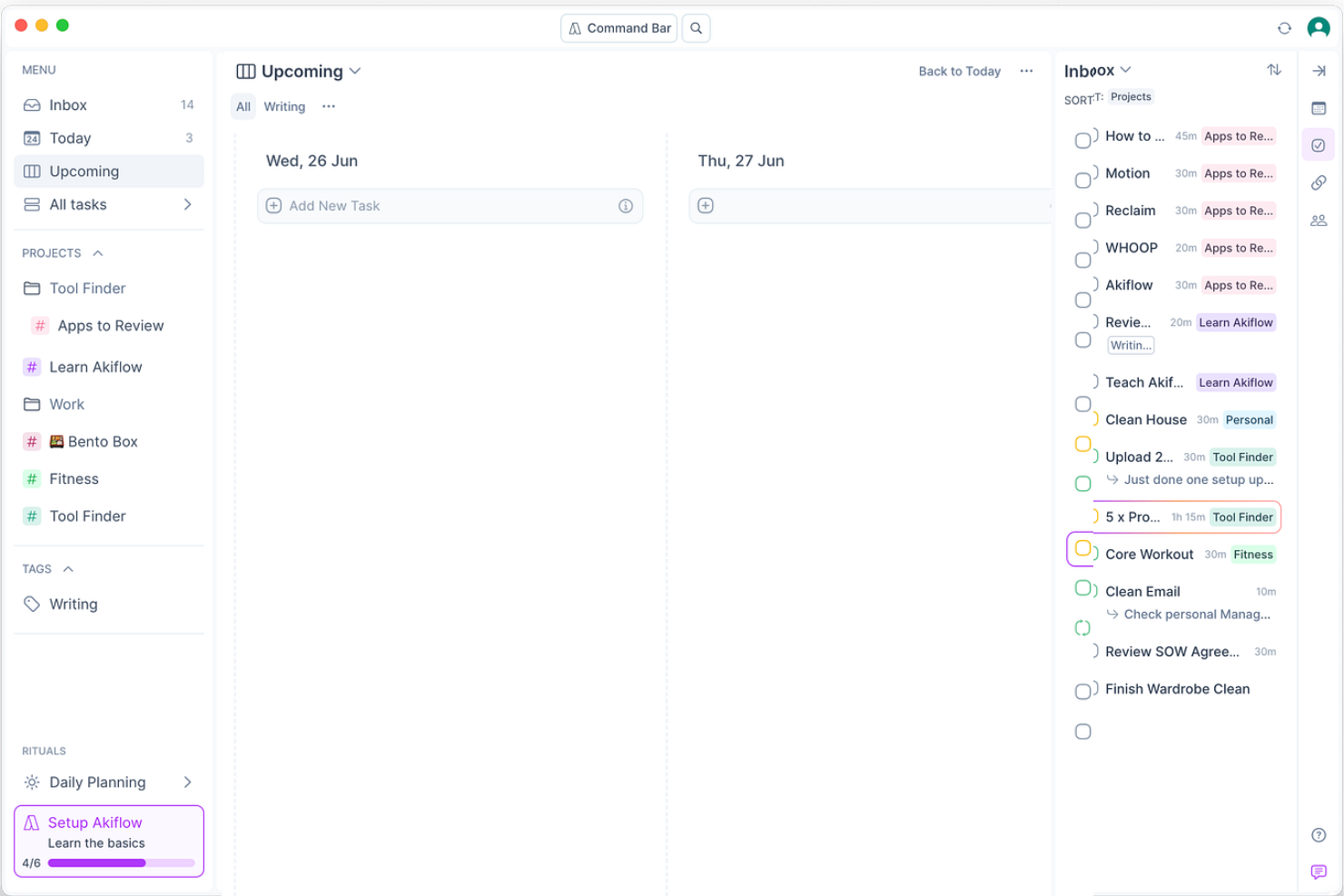
Akiflow è un planner digitale basato sull'IA che integra la gestione delle attività e la pianificazione in un'unica piattaforma. È pensato per individui e team che desiderano aumentare la produttività tramite l'automazione delle attività e una gestione efficiente del tempo attraverso il time-blocking.
Perché ho scelto Akiflow: Le capacità di intelligenza artificiale di Akiflow, come il suo assistente virtuale Aki, facilitano la gestione automatica delle attività organizzando le agende e gestendo i compiti senza soluzione di continuità. Aki può effettuare chiamate, rispondere a comandi vocali e fornire briefing giornalieri, permettendoti di concentrarti sulle priorità. Il time-blocking automatico dell'app e i rituali personalizzabili aiutano a ottimizzare il flusso di lavoro. La sua capacità di consolidare attività e calendari rende la gestione quotidiana delle attività efficiente.
Funzionalità e integrazioni principali:
Funzionalità includono il time-blocking automatico che assegna slot orari alle tue attività. Puoi personalizzare i rituali per creare un flusso di lavoro su misura per le tue esigenze. L'app offre anche un timer per la concentrazione che ti aiuta a mantenere l'attenzione sui compiti.
Integrazioni includono Google Calendar, Outlook, Slack, Todoist, Asana, Trello, Zapier, Microsoft Teams, Notion ed Evernote.
Pros and Cons
Pros:
- Supporta il time-blocking automatico
- Dispone di un assistente virtuale versatile
- Offre flussi di lavoro personalizzabili
Cons:
- Capacità offline limitate
- Curva di apprendimento elevata per i nuovi utenti

Asana
Ideale per liste di attività personalizzabili

Asana è un software di gestione delle attività progettato per migliorare la produttività del team attraverso la gestione dei progetti, l'automazione dei flussi di lavoro e il monitoraggio degli obiettivi. Si rivolge a diversi settori, incluse grandi aziende, piccole imprese e organizzazioni non profit, offrendo funzionalità IA per gestire efficacemente le attività.
Perché ho scelto Asana: Le liste di attività personalizzabili di Asana permettono di adattare il flusso di lavoro alle esigenze specifiche del tuo team. Le sue funzioni basate su IA aiutano a dare priorità alle attività e ad automatizzare i processi ricorrenti, rispecchiando perfettamente la sua proposta unica. Puoi usufruire di viste attività personalizzate e flussi di lavoro automatizzati per gestire le attività in modo efficiente. La funzione multi-homing della piattaforma consente alle attività di appartenere a più progetti, aumentando flessibilità e organizzazione.
Caratteristiche principali e integrazioni:
Caratteristiche includono viste attività personalizzate che ti permettono di gestire le attività secondo le tue preferenze. La capacità di multi-homing della piattaforma ti aiuta a monitorare le attività su più progetti contemporaneamente. Asana offre anche il monitoraggio nativo del tempo per tenere traccia delle tempistiche dei progetti.
Integrazioni includono Slack, Google Drive, Microsoft Teams, Dropbox, Salesforce, Zoom, Jira, Trello, Zapier ed Evernote.
Pros and Cons
Pros:
- Offre viste attività personalizzate
- Supporta il multi-homing per il tracciamento delle attività
- Include il monitoraggio nativo del tempo
Cons:
- Può risultare complesso per i nuovi utenti
- Funzionalità offline limitate

TickTick
Ideale per l'elaborazione del linguaggio naturale
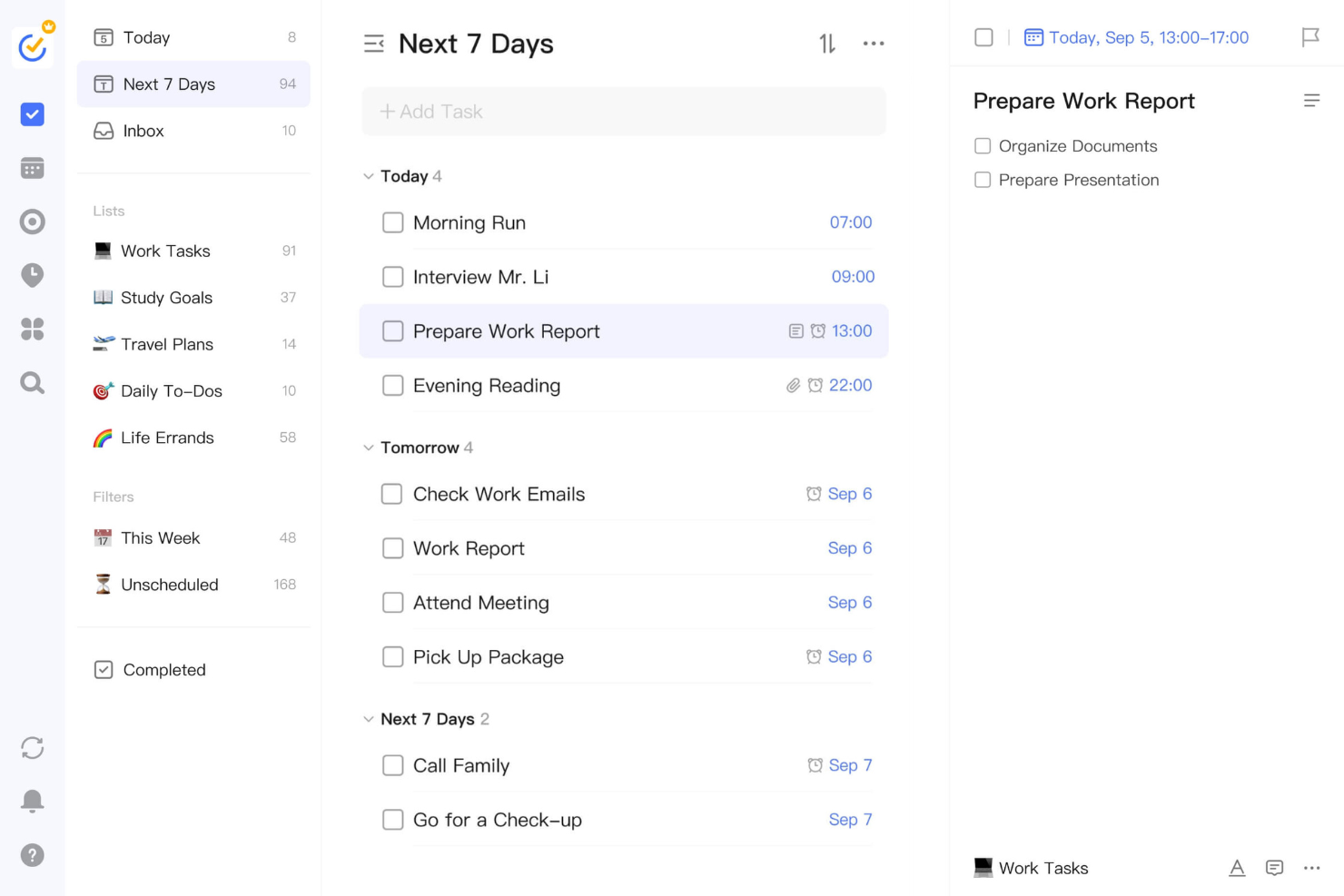
TickTick è un'app completa per la gestione delle attività, ideale per singoli e team che necessitano di un modo strutturato per organizzare attività e calendari. Offre un'elaborazione del linguaggio naturale basata sull'IA per trasformare i tuoi input in attività operative, migliorando la produttività.
Perché ho scelto TickTick: Questa app si distingue per le sue capacità di elaborazione del linguaggio naturale, che ti permettono di inserire attività in linguaggio semplice e vederle automaticamente categorizzate in modo intelligente. Può riconoscere date, orari e priorità, rendendo l'inserimento delle attività facile e immediato. L'analisi intelligente del linguaggio naturale di TickTick ti aiuta a gestire il programma con facilità. Le funzioni IA dell'app supportano una gestione e una priorizzazione efficiente delle attività, in linea con il suo punto di forza principale.
Funzionalità e integrazioni principali:
Funzionalità includono un timer Pomodoro per aumentare la concentrazione durante le sessioni di lavoro. L'app offre anche un tracker delle abitudini per aiutarti a creare e mantenere buone abitudini nel tempo. Puoi visualizzare le attività in diversi formati di calendario, inclusi mensile, settimanale e giornaliero.
Integrazioni includono Google Calendar, Outlook, Evernote, Slack, Microsoft Teams, IFTTT, Zapier, Amazon Alexa, Apple Calendar e Dropbox.
Pros and Cons
Pros:
- Supporta l'inserimento di attività in linguaggio naturale
- Dispone di un timer Pomodoro integrato
- Offre diverse visualizzazioni calendario
Cons:
- Mancano opzioni avanzate di programmazione delle attività
- Funzionalità basilare per le sotto-attività

TimeHero
Ideale per la pianificazione intelligente delle attività
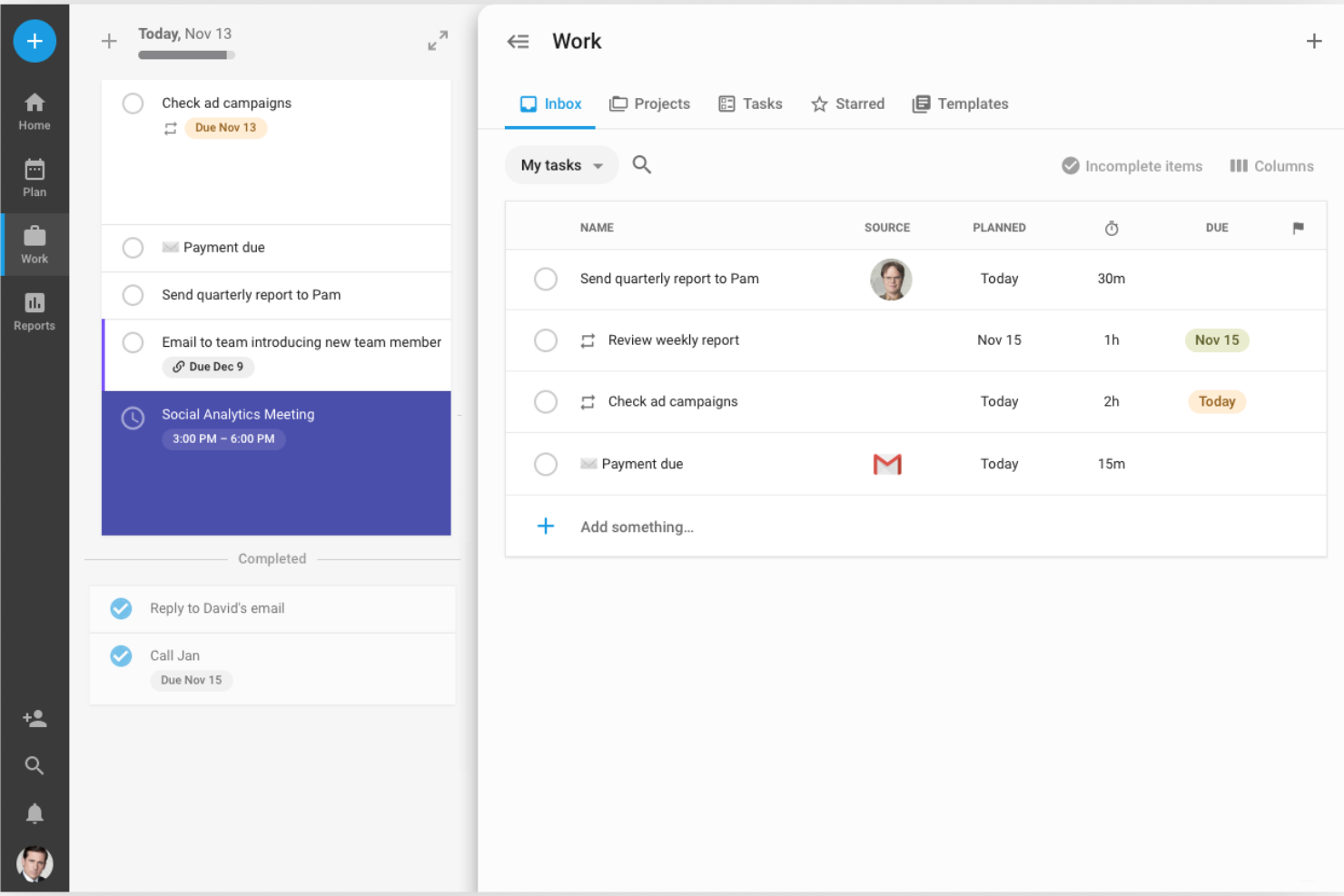
TimeHero è uno strumento di gestione delle attività alimentato dall'IA, progettato per team e singoli individui, che automatizza la pianificazione e ottimizza la produttività. Eccelle nella pianificazione automatica delle attività attorno a riunioni ed eventi, garantendo un utilizzo efficiente del tempo.
Perché ho scelto TimeHero: Le capacità di IA di TimeHero gli permettono di pianificare intelligentemente le attività tenendo conto della disponibilità del tuo calendario, in linea con il suo punto di forza. La pianificazione adattiva della piattaforma regola dinamicamente le agende in base al mutare delle priorità. TimeHero offre anche previsioni in tempo reale per aiutarti ad anticipare le sfide di carico di lavoro. La sua capacità di automatizzare le attività ricorrenti semplifica le operazioni quotidiane.
Funzionalità e integrazioni principali:
Funzionalità includono una pianificazione adattiva delle attività che si adatta ai cambi di agenda. L'app offre previsioni in tempo reale per aiutarti a pianificare con anticipo. Fornisce una timeline visiva per monitorare efficacemente i progressi e le scadenze.
Integrazioni includono Slack, Hubspot CRM, Gmail, Zoom, Typeform, JIRA, Salesforce, Google Calendar, Clio e Asana.
Pros and Cons
Pros:
- Offre pianificazione adattiva delle attività
- Fornisce previsioni in tempo reale
- Supporta l'automazione delle attività ricorrenti
Cons:
- Opzioni di personalizzazione limitate
- Richiede un certo sforzo iniziale di configurazione

Ideale per la previsione dei progetti

OmniFocus è un software di gestione delle attività pensato per i professionisti che hanno bisogno di catturare, organizzare e concentrarsi sulle proprie attività in modo efficiente. Offre funzionalità di intelligenza artificiale che aiutano gli utenti a prevedere le tempistiche dei progetti e gestire le attività su dispositivi Apple, inclusi Mac, iPhone, iPad e Apple Watch.
Perché ho scelto OmniFocus: OmniFocus eccelle nella previsione dei progetti, consentendoti di pianificare e gestire le attività con approfondimenti guidati dall'IA. La funzione delle prospettive personalizzate permette di adattare la visualizzazione delle attività al tuo flusso di lavoro, facilitando la prioritizzazione delle attività. L'integrazione del software con i dispositivi Apple assicura una gestione fluida delle attività su tutte le piattaforme. La funzione di revisione settimanale di OmniFocus ti aiuta a rimanere aggiornato sui tuoi progetti e obiettivi.
Funzionalità principali & integrazioni:
Funzionalità includono prospettive personalizzate che consentono di creare visualizzazioni delle attività su misura. Il software offre una modalità di revisione che aiuta a valutare regolarmente i progressi sui progetti. OmniFocus fornisce anche notifiche e promemoria per rispettare le scadenze.
Integrazioni includono Apple Calendar, Siri, Mail Drop e altro ancora.
Pros and Cons
Pros:
- Offre visualizzazioni delle attività personalizzabili
- Supporta la previsione dei progetti
- Offre una modalità di revisione completa
Cons:
- Limitato ai dispositivi Apple
- Curva di apprendimento più ripida per i nuovi utenti

Reclaim
Ideale per una gestione flessibile del tempo di concentrazione

Reclaim è uno strumento per la gestione del calendario potenziato dall’IA, progettato per individui e team al fine di ottimizzare la programmazione e aumentare la produttività. Si concentra sull’automazione della pianificazione di attività, riunioni e tempi di concentrazione, offrendo agli utenti maggiore controllo sulla loro settimana lavorativa.
Perché ho scelto Reclaim: Le capacità di IA di Reclaim gli permettono di gestire in modo efficiente il tuo tempo di concentrazione, garantendo periodi senza interruzioni per lavori approfonditi. Le sue funzionalità di programmazione intelligente trovano i momenti ottimali per riunioni e attività, allineandosi alle tue priorità. Reclaim fornisce inoltre pause tra una riunione e l’altra per prevenire il burnout. La capacità della piattaforma di sincronizzarsi con i calendari esistenti la rende un’aggiunta senza soluzione di continuità ai tuoi strumenti di produttività.
Funzionalità e integrazioni eccezionali:
Funzionalità includono la protezione del tempo di concentrazione per garantire periodi di lavoro ininterrotti. L’app propone link di pianificazione automatici che semplificano il coordinamento delle riunioni. Inoltre, offre analisi dettagliate per aiutarti a comprendere e migliorare la tua produttività.
Integrazioni includono Google Calendar, Outlook, Slack, Asana, Zoom, Microsoft Teams, Trello, Jira, Notion ed Evernote.
Pros and Cons
Pros:
- Offre analisi dettagliate sulla produttività
- Prevede automaticamente pause tra le riunioni
- Supporta la pianificazione flessibile delle attività
Cons:
- Limitato agli utenti di calendari digitali
- Richiede una configurazione iniziale per l’uso ottimale


Trevor AI è uno strumento di gestione delle attività e del calendario alimentato dall'intelligenza artificiale, progettato per professionisti che desiderano ottimizzare la produttività quotidiana. È pensato per utenti che necessitano di un'integrazione fluida tra attività e pianificazioni con piattaforme come Google Calendar e Todoist.
Perché ho scelto Trevor AI: Trevor AI eccelle nella stima dei tempi delle attività prevedendo quanto dureranno e suggerendo le fasce orarie ottimali. La sua funzione di pianificazione intelligente permette di assegnare automaticamente blocchi di tempo alle attività, incrementando la produttività. L'assistente interattivo di Trevor AI aiuta a gestire le attività e offre suggerimenti personalizzati per la pianificazione. La capacità di adattarsi alle preferenze dell'utente nel tempo garantisce un'esperienza di pianificazione su misura.
Funzionalità e integrazioni principali:
Funzionalità includono pianificazione intelligente che prevede la durata delle attività e assegna le fasce orarie migliori. La modalità di concentrazione riduce le distrazioni consentendo di focalizzarsi su una sola attività alla volta. Trevor AI fornisce anche suggerimenti di programmazione personalizzati per aiutare a migliorare l'efficacia della pianificazione.
Integrazioni includono Google Calendar, Microsoft To Do, Todoist, Slack, Trello, Asana, Zoom, Evernote e Microsoft Teams.
Pros and Cons
Pros:
- Offre una stima accurata dei tempi delle attività
- Fornisce suggerimenti personalizzati per la pianificazione
- Supporta un'integrazione fluida tra attività e calendario
Cons:
- Funzionalità offline limitate
- Curva di apprendimento per i nuovi utenti


Twos è un'app di produttività tutto-in-uno progettata per individui e team per organizzare note, elenchi di cose da fare e promemoria. Si rivolge a utenti che necessitano di un modo semplice ma efficace per gestire le proprie attività con l'aiuto di approfondimenti guidati dall'AI.
Perché ho scelto Twos: Questa app offre le Liste Assistente Personale (PALs) potenziate dall'AI che forniscono suggerimenti intelligenti, distinguendola da altri strumenti. Ricevi approfondimenti attivi che ti aiutano a gestire le attività in modo efficiente. L'AI di Twos può suggerire prodotti, ristoranti e altro ancora, rendendo la gestione delle attività intuitiva. La sua capacità di rilevare e riportare le attività non completate garantisce che nulla venga trascurato.
Funzionalità principali & integrazioni:
Funzionalità includono raccolta rapida di idee per catturare appunti e spunti, possibilità di organizzare le attività con riporto automatico di quelle non completate e pianificazione della giornata con una vista unificata di calendario, promemoria e note.
Integrazioni includono Google Calendar, Outlook, Apple Calendar, Todoist, Evernote, Slack, Microsoft Teams, Trello, Asana e Zapier.
Pros and Cons
Pros:
- Offre suggerimenti personalizzati tramite AI
- Interfaccia semplice per una rapida acquisizione delle attività
- Sincronizzazione tra più dispositivi
Cons:
- Capacità offline limitate
- Opzioni di personalizzazione di base


Saner.AI è un assistente personale basato sull'intelligenza artificiale progettato per aiutare le persone, in particolare chi ha ADHD, a organizzare note, email e attività in modo efficiente. Offre valore riducendo il carico cognitivo e aumentando la produttività grazie alle sue capacità di intelligenza artificiale.
Perché ho scelto Saner.AI: Questa app si distingue per le sue funzioni di organizzazione intelligente che aiutano a gestire in modo efficace le informazioni disperse. Le sue funzionalità basate sull'IA includono la classificazione automatica e una casella di posta intelligente, che semplificano il flusso di lavoro. Saner.AI apprende le tue preferenze per fornire informazioni pertinenti, riducendo la necessità di input manuali. È particolarmente utile per imprenditori e ricercatori che devono sintetizzare grandi quantità di informazioni.
Funzionalità e integrazioni principali:
Funzionalità includono un'interfaccia intuitiva che semplifica la gestione delle attività, la classificazione automatica per categorizzare le informazioni in modo efficiente e una casella di posta intelligente che raggruppa email e note per un accesso facilitato.
Integrazioni includono Google Calendar, Slack, Gmail, Microsoft Teams, Dropbox, Evernote, Trello, Asana, Todoist e Notion.
Pros and Cons
Pros:
- Offre classificazione automatica delle informazioni
- Fornisce la funzione di casella di posta intelligente
- Apprende le preferenze dell'utente per una maggiore personalizzazione
Cons:
- Attualmente in fase beta
- Funzionalità offline limitata


Sunsama è un planner digitale quotidiano progettato per i professionisti che desiderano gestire attività, calendari e pianificazione giornaliera su un'unica piattaforma. È ideale per gli utenti che vogliono ridurre le distrazioni e aumentare la concentrazione, sfruttando funzionalità di intelligenza artificiale per promuovere l'equilibrio tra lavoro e vita privata e la produttività.
Perché ho scelto Sunsama: Sunsama eccelle nella pianificazione guidata delle attività, offrendo funzionalità di intelligenza artificiale che aiutano a strutturare efficacemente la giornata. La piattaforma fornisce raccomandazioni automatiche sulle attività e stime dei tempi, in linea con il suo valore unico. L'integrazione con diversi strumenti di produttività permette una gestione delle attività senza interruzioni. Gli utenti beneficiano di sessioni di pianificazione guidate che aiutano a dare priorità ai compiti e visualizzare il carico di lavoro sul calendario.
Funzionalità e integrazioni principali:
Funzionalità includono modalità di concentrazione per ridurre al minimo le distrazioni e aumentare la produttività. La piattaforma offre timeboxing e pianificazione automatica per ottimizzare la gestione delle attività. Sunsama fornisce anche analisi per monitorare l'utilizzo del tempo e migliorare l'efficienza della pianificazione.
Integrazioni includono Google Calendar, Asana, Todoist, Trello, Slack, Outlook, ClickUp, Notion, Microsoft Teams e Zapier.
Pros and Cons
Pros:
- Supporta la pianificazione guidata delle attività
- Offre modalità di concentrazione per la produttività
- Fornisce analisi dettagliate sull'uso del tempo
Cons:
- Prezzo superiore rispetto alle alternative
- Funzionalità offline limitate
Altre app di liste di cose da fare con l'IA
Ecco alcune ulteriori opzioni di app di liste di cose da fare con l’IA che non sono entrate nel mio elenco, ma che vale comunque la pena prendere in considerazione:
- FlowSavvy
Ideale per la pianificazione di attività ricorrenti
- Hero Assistant
Ideale per l'integrazione tra calendari
- Focuster
Ideale per la programmazione automatica del calendario


Come Valuto le App To-Do List con AI
Ogni app in questo elenco deve fare di più che semplicemente aggiungere l'etichetta di AI a una lista di base: cerco strumenti che riducono davvero il lavoro manuale di acquisizione, organizzazione e gestione dei compiti nei vari progetti. Suddivido la mia valutazione tra funzionalità fondamentali che ogni strumento deve avere per qualificarsi e fattori differenzianti che separano le buone opzioni da quelle eccellenti.
Funzionalità Fondamentali (Requisiti Minimi per Questo Elenco)
Quando seleziono gli strumenti per la mia lista, valuto ciascuno su una scala da 0 (non offre la funzionalità) a 5 (eccelle in quest'area) per ogni funzionalità fondamentale elencata di seguito. Poi calcolo il punteggio totale dello strumento in percentuale. Ogni strumento deve raggiungere un punteggio totale minimo del 65% per essere considerato per l'inclusione.
- Generazione di Task tramite AI: Verifico se uno strumento può estrarre to-do azionabili da fonti come trascrizioni di riunioni, email o note incollate, e non solo interpretare il testo digitato come titolo.
- Prioritizzazione Intelligente: L'AI dovrebbe ordinare o riorganizzare i compiti in base a segnali come scadenze e dipendenze, non solo permettermi di spostarli manualmente su e giù.
- Gestione delle Liste di Attività: Cerco solide basi—sotto-attività, tag, compiti ricorrenti e viste filtrate che rendono pratico gestire il carico di lavoro di un intero progetto.
- Pianificazione & Promemoria tramite AI: Valuto se lo strumento suggerisce date di scadenza o blocca automaticamente il tempo sul mio calendario in base al carico di lavoro, invece di inviare solo promemoria statici.
- Integrazione con la Gestione Progetti: Gli strumenti dovrebbero connettersi con piattaforme come Asana, Jira o Trello così che i compiti fluiscano tra la mia to-do list e il più ampio workspace di progetto.
- Interazione in Linguaggio Naturale: Voglio poter scrivere qualcosa come "ricordamelo per la revisione del design venerdì" e che lo strumento crei un'attività con data e categoria corrette.
Una volta ottenuta una lista di strumenti che soddisfano questi criteri, considero cosa distingue ogni piattaforma.
Fattori Differenzianti (Cosa Distingue i Fornitori)
Ecco come confronto e metto a contrasto i diversi fornitori:
Funzionalità Distintive
L'aggregazione di attività tra diversi strumenti è una delle più importanti: cerco soluzioni che raccolgano to-do da conversazioni su Slack, email e bacheche di progetto in una singola vista prioritaria gestita dall'AI. L'acquisizione delle azioni dalle riunioni è altrettanto rilevante, specialmente per i Project Manager che escono da standup e revisioni sprint con dozzine di follow-up. Gli aggiornamenti di stato automatici fanno risparmiare ore di report settimanali raccogliendo le attività in riepiloghi condivisibili che gli stakeholder vorranno davvero leggere.
Oltre le Funzionalità
La fiducia nell'AI conta: valuto se il fornitore dichiara quali modelli alimentano le sue funzionalità e se gli utenti possono scegliere di non addestrare l'AI sui propri dati. La profondità delle integrazioni è altrettanto importante perché un'app to-do che non si sincronizza con il tuo attuale stack di gestione progetti crea più lavoro di quanto ne risparmi. Considero anche la scalabilità: uno strumento ottimo per un singolo PM ma senza permessi basati sui ruoli o supporto multi-workspace risulta inadeguato quando un team in crescita ha bisogno di visibilità condivisa su più progetti.
Come scegliere le app di liste di cose da fare con l'IA
È facile perdersi in lunghi elenchi di funzionalità e strutture tariffarie complesse. Per aiutarti a rimanere concentrato mentre affronti il tuo processo specifico di selezione del software, ecco una lista di fattori da tenere a mente:
| Fattore | Cosa considerare |
|---|---|
| Scalabilità | L'app può crescere insieme al tuo team? Pensa alle esigenze future e valuta se lo strumento è in grado di gestire un aumento delle attività e degli utenti senza problemi. |
| Integrazioni | L'app funziona bene con gli strumenti che già utilizzi? Cerca un'integrazione fluida con calendari, software di gestione dei progetti e piattaforme di comunicazione. |
| Personalizzazione | Puoi modificare l'app in base al tuo flusso di lavoro? Verifica se consente di personalizzare visualizzazioni, categorie di attività e campi personalizzati in base alle tue esigenze. |
| Facilità d'uso | L'interfaccia è intuitiva? Un design facile da usare riduce al minimo la curva di apprendimento, aiutando il tuo team a diventare rapidamente operativo. |
| Implementazione e onboarding | Quanto è facile iniziare? Valuta il processo di configurazione, le esercitazioni disponibili e il supporto durante la fase di transizione per garantire un avvio senza problemi. |
| Costo | Il prezzo rientra nel tuo budget? Considera tutti i costi, inclusi gli abbonamenti e i potenziali componenti aggiuntivi, e confrontali con le funzionalità di cui hai effettivamente bisogno. |
| Misure di sicurezza | I tuoi dati sono al sicuro? Assicurati che l'app offra crittografia, backup regolari e conformità alle normative sulla protezione dei dati per mantenere sicure le tue informazioni. |
Cosa sono le app di liste di cose da fare con l'IA?
Le app di liste di cose da fare basate sull'IA sono un tipo di software di gestione delle attività basato sull'IA progettato per aiutare gli utenti a gestire in modo efficiente attività e programmi. Questi strumenti sono comunemente utilizzati dai professionisti che devono organizzare la propria giornata lavorativa, stabilire le priorità delle attività e aumentare la produttività. Funzionalità come la pianificazione intelligente, l'elaborazione del linguaggio naturale e la definizione automatica delle priorità delle attività aiutano gli utenti a tenere sotto controllo le proprie responsabilità. Nel complesso, queste app offrono un modo per ottimizzare i flussi di lavoro quotidiani e ridurre lo stress legato alla gestione di più attività.
Funzionalità
Quando selezioni app di liste di cose da fare basate sull'IA, presta attenzione alle seguenti funzionalità chiave:
- Pianificazione intelligente: assegna automaticamente fasce orarie alle attività in base alla disponibilità del tuo calendario, aiutandoti a gestire il tempo in modo efficiente.
- Elaborazione del linguaggio naturale: consente di inserire le attività utilizzando il linguaggio quotidiano, rendendo l'inserimento rapido e intuitivo.
- Definizione delle priorità delle attività: utilizza l'IA per determinare quali attività sono più importanti, assicurandoti di concentrarti su ciò che conta di più.
- Promemoria automatici: invia avvisi per ricordarti le attività e le scadenze imminenti, riducendo il rischio di impegni mancati.
- Capacità di integrazione: si collega ad altri strumenti, come calendari e piattaforme di comunicazione, per centralizzare il flusso di lavoro.
- Modalità concentrazione: riduce al minimo le distrazioni consentendoti di concentrarti su un'attività alla volta, aumentando la produttività.
- Gestione delle attività ricorrenti: gestisce le attività che si ripetono nel tempo, assicurandosi che vengano programmate senza inserimenti manuali.
- Analisi del tempo: fornisce informazioni su come viene impiegato il tempo, aiutandoti a individuare le aree di miglioramento nel flusso di lavoro.
- Visualizzazioni personalizzabili: consente di organizzare le attività in base alle preferenze del flusso di lavoro personale o del team.
- Approfondimenti basati sull'IA: offre suggerimenti e informazioni basati sui modelli e sui comportamenti relativi alle tue attività, aiutandoti a ottimizzare la produttività.
Vantaggi
L'implementazione di app di liste di cose da fare basate sull'IA offre diversi vantaggi al tuo team e alla tua azienda. Ecco alcuni dei vantaggi che puoi aspettarti:
- Maggiore produttività: la definizione delle priorità delle attività basata sull'IA garantisce che il team si concentri prima sulle attività più importanti, aumentando l'efficienza complessiva.
- Gestione del tempo: la pianificazione intelligente aiuta ad assegnare le fasce orarie in modo efficace, facilitando la gestione di programmi impegnativi ed evitando sovrapposizioni.
- Riduzione dello stress: i promemoria automatici e gli avvisi sulle attività aiutano tutti a mantenere il controllo, riducendo al minimo l'ansia legata alle attività e alle scadenze dimenticate.
- Maggiore concentrazione: le modalità concentrazione consentono ai membri del team di concentrarsi su un'attività alla volta, riducendo le distrazioni e migliorando la qualità del lavoro.
- Maggiore flessibilità: le visualizzazioni personalizzabili e le capacità di integrazione consentono di adattare l'app al tuo flusso di lavoro specifico, rendendola adatta a esigenze diverse.
- Informazioni migliori: l'analisi del tempo fornisce indicazioni preziose su come viene impiegato il tempo, aiutando a individuare le aree di miglioramento e a ottimizzare la gestione delle attività.
- Gestione coerente delle attività: la gestione delle attività ricorrenti automatizza le attività ripetitive, liberando tempo per attività più strategiche.
Costi e prezzi
La scelta di app di liste di cose da fare basate sull'IA richiede la comprensione dei vari modelli e piani tariffari disponibili. I costi variano in base alle funzionalità, alle dimensioni del team, ai componenti aggiuntivi e ad altri fattori. La tabella seguente riassume i piani più comuni, i relativi prezzi medi e le funzionalità tipicamente incluse nelle soluzioni di app di liste di cose da fare basate sull'IA:
Tabella comparativa dei piani per le app di liste di cose da fare basate sull'IA
| Tipo di piano | Prezzo medio | Funzionalità comuni |
|---|---|---|
| Piano gratuito | $0 | Gestione di base delle attività, integrazioni limitate e promemoria essenziali. |
| Piano personale | $5-$10/user/month | Funzionalità avanzate per le attività, integrazione del calendario e analisi di base. |
| Piano aziendale | $10-$25/user/month | Strumenti per la collaborazione del team, sicurezza avanzata e flussi di lavoro personalizzati. |
| Piano per grandi aziende | $25-$50/user/month | Assistenza prioritaria, analisi complete e opzioni avanzate di personalizzazione. |
FAQ sulle app di liste di cose da fare basate sull'IA
Ecco alcune risposte alle domande comuni sulle app di liste di cose da fare basate sull’IA:
In che modo le app di liste di cose da fare basate sull'IA si integrano con gli strumenti esistenti?
Le app di liste di cose da fare basate sull’IA si integrano con gli strumenti esistenti tramite API e connettori integrati. In genere, troverai opzioni per sincronizzarle con calendari come Google Calendar o Outlook e piattaforme di gestione delle attività come Asana o Trello. Prima di scegliere un’app, assicurati che supporti gli strumenti che già utilizzi. Questa integrazione può aiutarti a semplificare il flusso di lavoro aggiornando automaticamente attività ed eventi su più piattaforme. Controlla le impostazioni dell’app per verificare le opzioni di integrazione e segui le istruzioni per collegare i tuoi account.
Le app di liste di cose da fare basate sull'IA possono migliorare la collaborazione del team?
Sì, le app di liste di cose da fare basate sull’IA possono migliorare la collaborazione del team. Spesso includono funzioni come liste di attività condivise, aggiornamenti in tempo reale e spazi di lavoro collaborativi. Centralizzando attività e scadenze, i membri del team possono mantenere l’allineamento sugli obiettivi del progetto. Cerca app che offrano sezioni per i commenti o funzioni di chat per comunicare senza interruzioni. Questa configurazione può ridurre il sovraccarico di email e garantire che tutti siano aggiornati. L’utilizzo di questi strumenti può portare a un lavoro di squadra più efficiente e a risultati migliori per i progetti.
Le app di liste di cose da fare basate sull'IA sono sicure?
Sì, la maggior parte delle app di liste di cose da fare basate sull’IA dà priorità alla sicurezza implementando la crittografia e aggiornamenti regolari. Quando valuti un’app, verifica le certificazioni di sicurezza e le misure di protezione dei dati. Cerca app che offrano l’autenticazione a due fattori e siano conformi a normative come il GDPR. È essenziale scegliere uno strumento che protegga le informazioni sensibili, soprattutto se gestisci dati riservati. Aggiorna regolarmente le password e controlla le impostazioni sulla privacy per mantenere la sicurezza. Leggi sempre l’informativa sulla privacy dell’app per capire come vengono gestiti i tuoi dati.
Cosa succede ora:
Se stai cercando informazioni sulle app di liste di cose da fare basate sull'IA, contatta gratuitamente un consulente di SoftwareSelect per ricevere consigli.
Compili un modulo e fai una breve conversazione in cui vengono analizzati nel dettaglio i tuoi requisiti. In seguito riceverai una lista ristretta di software da valutare. Ti accompagneranno anche durante l'intero processo di acquisto, comprese le trattative sul prezzo.