

10 strumenti alternativi a Process Street per i flussi di lavoro nel 2026

Elenco delle migliori alternative a Process Street


Con così tante alternative a Process Street disponibili, capire quale sia quella giusta per te può essere difficile. Ti aiuto io! In questo articolo ti aiuterò a scegliere facilmente, condividendo la mia esperienza personale con decine di diverse alternative a Process Street e le mie scelte tra le migliori opzioni in assoluto.
Che cos'è Process Street?
Process Street è un software per la gestione dei flussi di lavoro e dei processi, progettato per semplificare il modo in cui i team gestiscono attività e procedure ricorrenti. Viene utilizzato da aziende di diverse dimensioni per creare, gestire e monitorare i propri flussi di lavoro su una piattaforma centralizzata. Il software serve a semplificare il coordinamento di processi complessi, garantendo coerenza ed efficienza nell'esecuzione delle attività. Tra gli utenti più comuni figurano i responsabili delle operazioni, i reparti delle risorse umane e i team che hanno bisogno di standardizzare le attività ripetitive per risparmiare tempo e ridurre gli errori.
Perché fidarsi dei nostri consigli sui software
Il nostro team testa e recensisce software dal 2012. In quanto project manager noi stessi, sappiamo quanto sia difficile — e importante — scegliere il software giusto.
Per questa guida, abbiamo valutato gli strumenti attraverso test pratici e ricerche indipendenti, assegnando un punteggio agli strumenti in base ai nostri criteri di selezione. Ci basiamo inoltre sulle competenze di leader di pensiero del settore e di professionisti attivi nella gestione dei progetti.
Le nostre recensioni riflettono il nostro giudizio editoriale umano, non un discorso di vendita.
Revisori esperti:
Tabella di confronto delle alternative a Process Street
| Tool | Best For | Trial Info | Price | ||
|---|---|---|---|---|---|
| 1 | Ideale per gli appassionati del metodo Kanban | Prova gratuita di 14 giorni + piano gratuito disponibile | Da $6/utente/mese | Website | |
| 2 | Ideale per la pianificazione basata su traguardi | Piano gratuito disponibile | Da $39/mese (fatturazione annuale) | Website | |
| 3 | Ideale per il controllo centralizzato dei progetti | Prova gratuita di 14 giorni + demo gratuita disponibile | Da $45/mese (fatturato annualmente) | Website | |
| 4 | Ideale per la gestione del lavoro con i clienti | Prova gratuita di 30 giorni + demo gratuita disponibile | Da $9.99/utente/mese (fatturazione annuale) | Website | |
| 5 | Ideale per lo sviluppo software agile | Prova gratuita di 7 giorni | Da $7,91/utente/mese | Website | |
| 6 | Ideale per la creazione di flussi di lavoro alimentati dall'IA | Versione di prova gratuita di 7 giorni disponibile | A partire da $99/mese (utenti illimitati) | Website | |
| 7 | Ideale per la gestione visiva delle attività | Piano gratuito disponibile | A partire da $5/utente/mese (fatturato annualmente) | Website | |
| 8 | Ideale come workspace tutto-in-uno | Piano gratuito + demo gratuita disponibili | Da $10/membro/mese (fatturato annualmente) | Website | |
| 9 | Ideale per l'automazione | Prova gratuita di 14 giorni + piano gratuito disponibile | Da $10/utente/mese (fatturato annualmente) | Website | |
| 10 | Ideale per la reportistica completa | Prova gratuita di 15 giorni + piano gratuito + demo gratuita disponibile | A partire da $4/utente/mese (fatturato annualmente) | Website |

Panoramica delle migliori alternative a Process Street
Ecco le mie opinioni dettagliate su ogni software presente in questo elenco, compresi i relativi punti di forza e i migliori casi d’uso per ciascuno.

Ideale per gli appassionati del metodo Kanban

Kanban Tool è una soluzione di gestione progetti visiva che utilizza l'approccio delle bacheche Kanban. È l'ideale per gli appassionati del metodo Kanban, in quanto offre un ambiente dedicato a questo sistema di produttività.
Perché è una valida alternativa a Process Street:
Ho scelto Kanban Tool per questa lista grazie alla sua forte aderenza alla metodologia Kanban, che offre un sistema visivo chiaro per monitorare l'avanzamento del lavoro. Questa attenzione alla gestione visiva delle attività e al miglioramento continuo lo rende un'alternativa interessante a Process Street per chi è fedelmente legato alla filosofia Kanban.
Funzionalità principali e integrazioni:
Le principali funzionalità di Kanban Tool includono bacheche Kanban personalizzabili, monitoraggio del tempo, analisi e opzioni collaborative.
Si integra nativamente con Power BI, Zapier, Dropbox, Google Drive, OneDrive, Box, Google Calendar, iCal, Outlook, Toggl, Harvest e GitHub.
Pros and Cons
Pros:
- Funzionalità dedicate alle bacheche Kanban
- Monitoraggio del tempo e analisi della produttività
- Integrazioni native con strumenti popolari
Cons:
- Può risultare troppo specializzato per chi non utilizza il Kanban
- Funzionalità limitate oltre la gestione stile Kanban
- Costo aggiuntivo per funzionalità di analisi e reportistica

Nifty
Ideale per la pianificazione basata su traguardi

Nifty è uno strumento di gestione dei progetti che semplifica i cicli progettuali e automatizza la rendicontazione dei progressi. Si distingue per la pianificazione basata su traguardi, offrendo cronologie chiare e visive e aggiornamenti automatici sul completamento delle attività che mantengono allineati i team agli obiettivi del progetto.
Perché è una valida alternativa a Process Street:
Ho selezionato Nifty per questo elenco grazie al suo forte focus sui traguardi, fondamentale per i team che devono monitorare da vicino le fasi e le scadenze dei progetti. Il suo monitoraggio automatico dei progressi e le cronologie visive dei progetti offrono un vantaggio netto rispetto a Process Street per chi gestisce progetti complessi con molteplici deliverable.
Funzionalità principali e integrazioni:
Le funzionalità principali di Nifty includono le cronologie dei progetti basate su traguardi, che si aggiornano automaticamente al completamento delle attività, e la capacità di centralizzare comunicazione, attività e documentazione di progetto.
Si integra nativamente con strumenti come Google Drive, Slack, Zoom, Dropbox e Trello, aumentando la sua utilità per team con esigenze diverse.
Pros and Cons
Pros:
- Cronologie basate su traguardi per un monitoraggio chiaro dei progetti
- Comunicazione e documentazione centralizzate
- Integrazioni native con i più diffusi strumenti di produttività
Cons:
- Prezzo di partenza superiore rispetto ad alcune alternative
- Il requisito minimo di utenti potrebbe non adattarsi a team ristretti
- Il focus sui traguardi può risultare eccessivo per progetti più semplici

ProofHub
Ideale per il controllo centralizzato dei progetti

ProofHub è uno strumento per la gestione dei progetti e la collaborazione tra team. È ideale per il controllo centralizzato dei progetti perché centralizza tutte le informazioni e la comunicazione di progetto, semplificando la gestione a ogni livello.
Perché è una valida alternativa a Process Street:
Ho scelto ProofHub per l'elenco perché si distingue per la capacità di centralizzare il controllo dei progetti in un unico luogo. Questo è particolarmente vantaggioso per i team che necessitano di una piattaforma unificata per gestire compiti, risorse e comunicazione, un aspetto chiave in cui Process Street può essere integrato.
Caratteristiche e integrazioni principali:
Le principali funzionalità di ProofHub comprendono liste di attività, flussi di lavoro, diagrammi di Gantt, discussioni, documenti e file, monitoraggio del tempo e reportistica.
Si integra con applicazioni di terze parti come Google Drive, OneDrive, Box, Dropbox, FreshBooks, QuickBooks e altre.
Pros and Cons
Pros:
- Il modello di prezzo flat è conveniente per i team con molti utenti
- Piattaforma centralizzata per gestire tutti gli aspetti di un progetto
- Interfaccia intuitiva con una varietà di viste e strumenti per i progetti
Cons:
- Può essere meno adatto ai team molto piccoli a causa del prezzo forfettario
- Alcuni utenti segnalano la necessità di più integrazioni con strumenti esterni
- Personalizzazione limitata dei flussi di lavoro rispetto ad alcune alternative

Ideale per la gestione del lavoro con i clienti

Teamwork è uno strumento di gestione progetti che semplifica il lavoro con i clienti dall'inizio alla fine. È ideale per gestire progetti per clienti grazie alle sue funzionalità dedicate al monitoraggio del lavoro, alla gestione delle risorse e alla fatturazione.
Perché è una valida alternativa a Process Street:
Ho scelto Teamwork per questa lista perché offre un ambiente specializzato per la gestione del lavoro con i clienti. Le sue capacità di gestire le interazioni con i clienti, il monitoraggio dei progetti e la fatturazione lo rendono una valida alternativa a Process Street, soprattutto per le aziende basate sui servizi.
Caratteristiche e integrazioni principali:
Le caratteristiche principali di Teamwork includono pianificazione dei progetti, gestione delle attività, monitoraggio del tempo e fatturazione.
Si integra con strumenti popolari tra cui Gmail, HubSpot, QuickBooks, Xero, Dropbox, Google Drive, Box, Microsoft Office, Slack e Harvest.
Pros and Cons
Pros:
- Funzionalità specializzate per la gestione del lavoro con i clienti
- Funzionalità avanzate di monitoraggio del tempo e fatturazione
- Ampia gamma di integrazioni
Cons:
- Curva di apprendimento più ripida per i nuovi utenti
- Impegno annuale richiesto per le tariffe più vantaggiose
- Minimo cinque utenti per i piani a pagamento

Jira
Ideale per lo sviluppo software agile

Jira è uno strumento avanzato per la gestione agile dei progetti e il tracciamento dei ticket. Eccelle nello sviluppo software agile grazie al suo robusto set di funzionalità pensate per la pianificazione e l'implementazione iterativa.
Perché è una valida alternativa a Process Street:
Ho scelto Jira come alternativa a Process Street per la sua specializzazione nelle metodologie agili, fondamentali nei progetti di sviluppo software. Le sue funzionalità dettagliate di tracciamento dei ticket e pianificazione degli sprint offrono una soluzione su misura per questi tipi di team.
Funzionalità principali e integrazioni:
Jira è rinomato per le sue bacheche agili, la gestione del backlog e le funzionalità di pianificazione degli sprint, elementi critici per lo sviluppo agile.
Si integra nativamente con strumenti come Confluence, Bitbucket, GitHub, Slack, Trello, Google Drive, Dropbox, Zoom, Microsoft Teams, Salesforce e Jenkins.
Pros and Cons
Pros:
- Progettato specificamente per lo sviluppo software agile
- Ampie possibilità di integrazione con altri strumenti di sviluppo
- Scalabile per team di qualsiasi dimensione
Cons:
- Curva di apprendimento più ripida per chi è nuovo alle pratiche agili
- Alcuni utenti potrebbero trovare l'interfaccia complessa
- Alcuni utenti potrebbero trovare l'interfaccia complessa

Ideale per la creazione di flussi di lavoro alimentati dall'IA
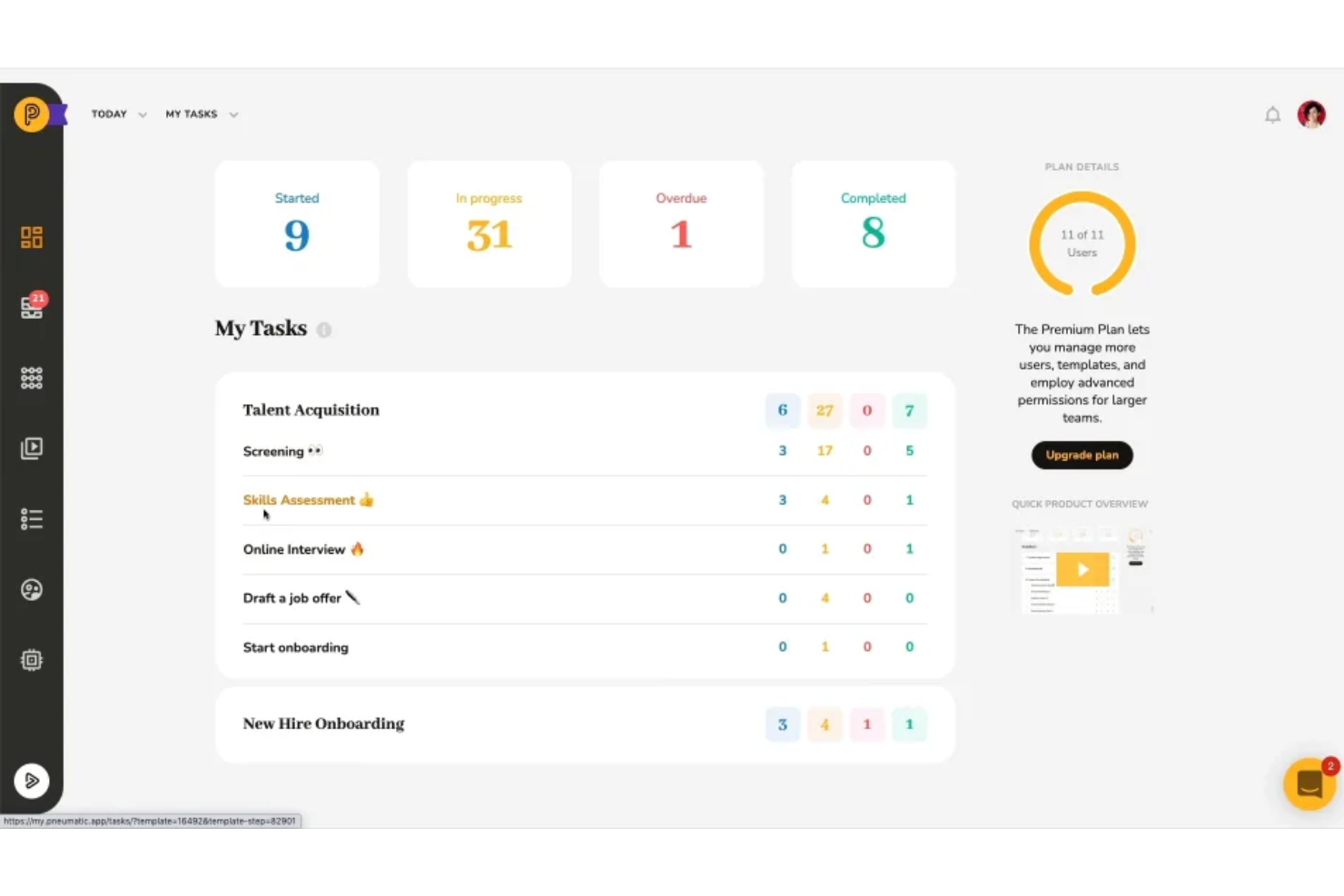
Pneumatic Workflow è una soluzione di gestione dei flussi di lavoro basata su cloud progettata per aiutare le aziende a gestire i propri processi con una piattaforma senza codice.
Perché è una valida alternativa a Process Street:
Pneumatic è una buona alternativa a Process Street grazie al suo generatore di flussi di lavoro alimentato dall'IA. Lo strumento consente agli utenti di descrivere il tipo di flusso di lavoro di cui hanno bisogno e il sistema genera automaticamente i passaggi necessari. Questo non solo semplifica il processo di creazione dei flussi di lavoro, ma assicura anche che i flussi siano adattati alle specifiche esigenze aziendali. Inoltre, i modelli generati dall'intelligenza artificiale possono essere ulteriormente personalizzati, offrendo flessibilità nella configurazione dei flussi di lavoro.
Funzionalità e integrazioni principali:
Le funzionalità includono modelli di flussi di lavoro specifici per settore, moduli per l'avvio dei flussi, white labeling, accesso ospite per la collaborazione, logica condizionale dei flussi di lavoro, flussi di lavoro basati su video, dashboard, commenti e menzioni.
Le integrazioni includono Gmail, Slack, Google Sheets, Trello, Google Docs, PandaDoc, Google Forms, Typeform, HubSpot, Google Calendar, Microsoft Outlook e ClickUp.
Pros and Cons
Pros:
- Generatore di flussi di lavoro con IA
- Modelli di flussi di lavoro personalizzabili
- Funzionalità di reportistica dettagliata
Cons:
- Non ideale per aziende di grandi dimensioni con processi complessi
- L'app mobile è meno robusta della versione desktop


Trello è uno strumento digitale di gestione dei progetti che facilita l'organizzazione e la collaborazione. Si distingue per offrire un sistema visivo per monitorare e gestire attività e progetti.
Perché è una valida alternativa a Process Street:
Ho selezionato Trello come alternativa a Process Street per la sua interfaccia visiva distintiva che semplifica la gestione delle attività. Il suo approccio basato sulle bacheche è particolarmente efficace per i team che traggono beneficio dall'organizzazione visiva, rendendolo un'ottima scelta per chi cerca un'alternativa agli strumenti di project management prevalentemente testuali.
Caratteristiche e integrazioni principali:
Le caratteristiche distintive di Trello includono bacheche, schede e liste personalizzabili che consentono agli utenti di visualizzare e gestire facilmente i propri progetti. Offre inoltre potenziamenti e automazioni per aumentare la produttività.
Integrazioni includono Slack, Google Drive, Dropbox, Box, OneDrive, Salesforce, Evernote, Mailchimp, GitHub, Zapier, Clockify, Confluence, Jira, Bitbucket e GitLab.
Pros and Cons
Pros:
- Interfaccia visiva intuitiva con funzionalità drag-and-drop
- Bacheche personalizzabili per diversi progetti e flussi di lavoro
- Ampie opzioni di integrazione con altri strumenti di produttività
Cons:
- Funzionalità limitate per la gestione di progetti complessi
- Possibile curva di apprendimento per gli utenti non abituati alla gestione delle attività su bacheca

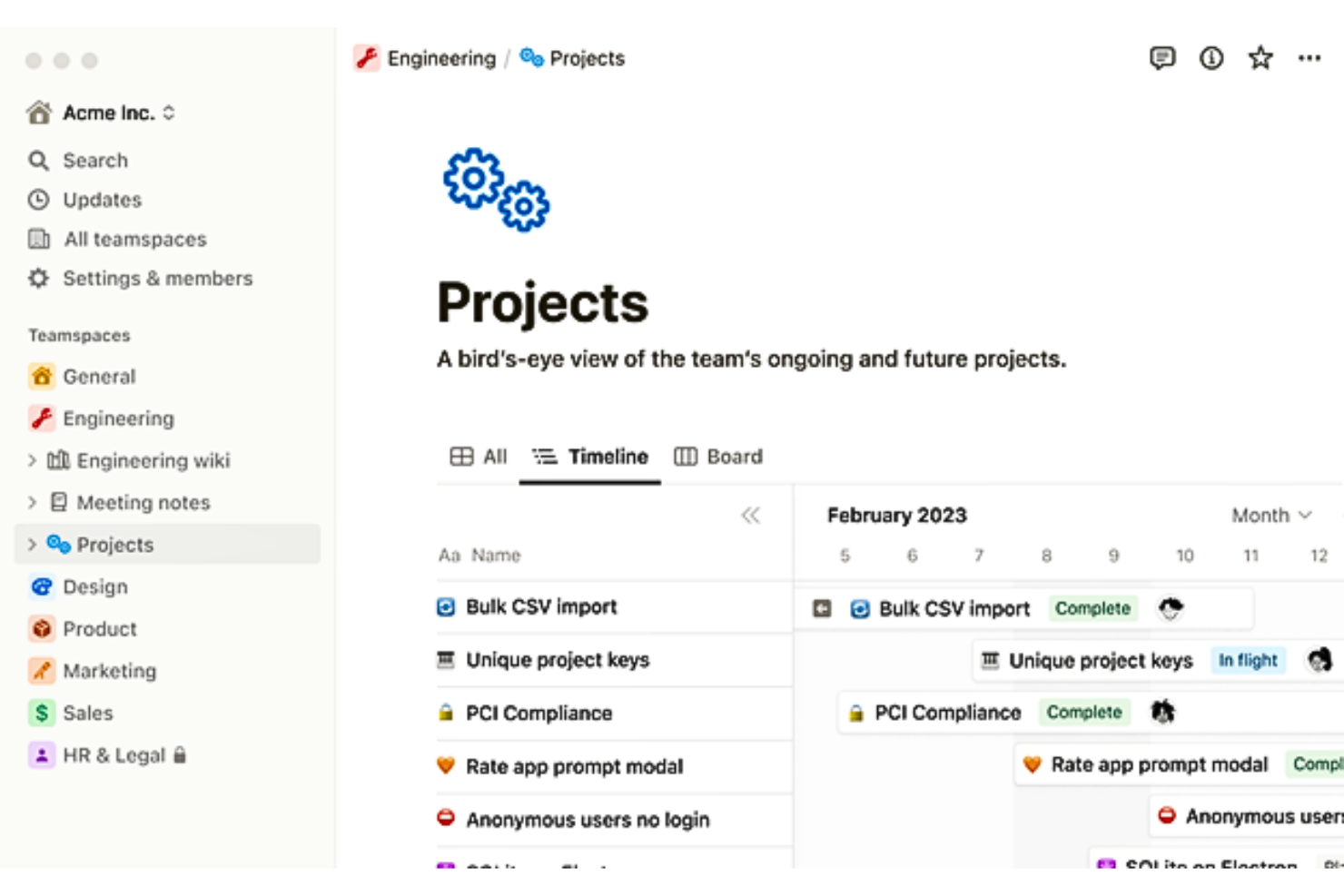
Notion è uno spazio di lavoro coeso per note, attività, wiki e database. È l'ideale per creare un ambiente di lavoro unificato che si adatta a diverse esigenze.
Perché è una buona alternativa a Process Street:
Ho scelto Notion per la sua versatilità come workspace tutto-in-uno, che costituisce un'alternativa interessante a Process Street. La sua capacità di unificare diversi strumenti in un'unica piattaforma è particolarmente degna di nota.
Caratteristiche e integrazioni principali:
Notion si distingue per le sue funzionalità integrate di presa di appunti, wiki personalizzabili, gestione delle attività e database.
Si integra nativamente con Slack, Google Drive, Google Calendar, GitHub, Trello, Asana, Figma, Jira, Typeform e Intercom, tra gli altri.
Pros and Cons
Pros:
- Versatile workspace tutto-in-uno
- Ampie opzioni di personalizzazione
- Capacità di integrazione robuste
Cons:
- Curva di apprendimento iniziale ripida
- Problemi di prestazioni con grandi quantità di dati
- Set completo di funzionalità richiede abbonamento

Wrike
Ideale per l'automazione

Wrike è uno strumento di gestione dei progetti che aiuta i team a organizzare le attività, collaborare sui progetti e monitorare i progressi. Offre funzionalità come la gestione delle attività, la pianificazione dei progetti e la collaborazione in tempo reale per mantenere il team allineato e produttivo.
Perché è una buona alternativa a Process Street:
I moduli di richiesta personalizzati di Wrike ti permettono di creare moduli su misura per le esigenze del tuo team, facilitando la raccolta delle informazioni e l'avvio di attività o progetti. Questa funzione è utile per standardizzare i processi e assicurare che tutti i dettagli necessari vengano acquisiti fin dall'inizio. Inoltre, le capacità di automazione di Wrike ti consentono di impostare regole che attivano azioni specifiche in base a determinate condizioni. Questo aiuta a ridurre il lavoro manuale e a mantenere i flussi di lavoro scorrevoli.
Funzionalità distintive e integrazioni:
Le funzionalità distintive includono gestione delle risorse, visualizzazioni del carico di lavoro, moduli di richiesta dinamici, approvazioni, cross-tagging, monitoraggio del tempo, modelli di progetto, condivisione file, modifica documenti, dipendenze tra attività, reportistica e analisi.
Si integra con Salesforce, Microsoft Teams, Zoom, Adobe Creative Cloud, Google Drive, Microsoft SharePoint, OneDrive, Wrike for Gmail, Google Sheets, Power BI, Miro e Trello.
Pros and Cons
Pros:
- Capacità di automazione dei flussi di lavoro
- Buone funzionalità di gestione delle risorse
- Varie visualizzazioni di progetto come diagrammi di Gantt, bacheche Kanban e calendari
Cons:
- Spazio di archiviazione limitato nei piani di livello inferiore
- La piattaforma può essere complicata da imparare
New Product Updates from Wrike

Wrike Adds Quick Search to Table View
Wrike adds Quick Search to Table View with full-table search across titles, descriptions, and fields, plus highlighted matches. This helps users find tasks faster in large tables. For more information, visit Wrike’s official site.

Ideale per la reportistica completa

Zoho Projects è uno strumento di gestione dei progetti che facilita la pianificazione, il monitoraggio e la collaborazione tra diversi team. Si distingue per la reportistica completa, offrendo approfondimenti e analisi dettagliate per monitorare efficacemente lo stato e l'avanzamento dei progetti.
Perché è una valida alternativa a Process Street:
Ho scelto Zoho Projects per le sue eccezionali capacità di reportistica, essenziali per le aziende che danno priorità alle decisioni basate sui dati. La sua capacità di generare report dettagliati lo rende una valida alternativa a Process Street per chi ha bisogno di monitorare da vicino le metriche di progetto.
Funzionalità e integrazioni principali:
Zoho Projects è noto per le sue funzioni di monitoraggio del tempo, automazione delle attività e gestione dei documenti. Offre anche diagrammi di Gantt interattivi e grafici di utilizzo delle risorse per una pianificazione e un monitoraggio efficaci dei progetti.
Le integrazioni includono Google Drive, Microsoft Office 365, Slack, GitHub, Bitbucket, Crashlytics, Zendesk, Zoho CRM, Zoho Analytics, Zoho Invoice e Zoho Desk.
Pros and Cons
Pros:
- Strumenti avanzati di reportistica e analisi
- Modelli e flussi di lavoro personalizzabili
- Ampie opzioni di integrazione con app Zoho e altri servizi
Cons:
- È richiesto un impegno annuale per le tariffe più convenienti
- Le funzionalità dei livelli superiori possono essere costose
- Il piano gratuito presenta limitazioni su utenti e progetti
New Product Updates from Zoho Projects
Zoho Projects Adds CodeX Scripts for Custom Modules
Zoho Projects now supports CodeX Scripts for custom modules, enabling conditional logic and rules for creating, updating, and deleting records. For more information, visit Zoho Projects' official site.
 .
.Altre alternative a Process Street
Di seguito è riportato un elenco di ulteriori alternative a Process Street che abbiamo selezionato, ma che non sono rientrate nell’elenco principale. Vale sicuramente la pena dare loro un’occhiata.
- GoodDay
Ideale per spazi di lavoro personalizzabili
- Asana
Ideale per la personalizzazione dei flussi di lavoro
- monday AI Workspace
Ideale per l'identificazione dei rischi basata sull'IA
- Flow
Ideale per la pianificazione dei progetti


Come valuto le alternative a Process Street
Divido la mia valutazione in requisiti di base, come i modelli di flusso di lavoro riutilizzabili e la logica condizionale, e fattori distintivi che separano gli strumenti creati per i team operativi dai gestori generici delle attività.
Funzionalità principali (requisiti imprescindibili per questo elenco)
Quando seleziono gli strumenti per il mio elenco, assegno a ciascuno un punteggio su una scala da 0 (non offre la funzionalità) a 5 (eccelle in quest'area) per ogni funzionalità principale elencata di seguito. Poi calcolo il punteggio totale dello strumento e lo converto in percentuale. Ogni strumento deve raggiungere un punteggio totale minimo del 65% per essere preso in considerazione.
- Modelli di flusso di lavoro ricorrenti: verifico se è possibile creare un processo una sola volta e avviarlo ripetutamente, ad esempio generando una nuova lista di controllo per l'inserimento di ogni nuovo cliente per ogni trattativa conclusa.
- Logica condizionale: ogni strumento dovrebbe supportare diramazioni se/allora, in modo che i passaggi si adattino in base agli input, ad esempio inoltrando un'approvazione all'ufficio legale solo quando il valore del contratto supera una determinata soglia.
- Assegnazione delle attività e scadenze: valuto come ogni piattaforma gestisce i responsabili dei singoli passaggi, le scadenze e le dipendenze nell'ambito dell'esecuzione di un flusso di lavoro che coinvolge più persone.
- Approvazioni e automazione dei flussi di lavoro: in questo caso sono importanti i passaggi di approvazione integrati e le azioni attivate, come l'invio automatico di una notifica a un responsabile quando una lista di controllo QA è completata e pronta per la convalida.
- Acquisizione di moduli e dati: i campi strutturati all'interno dei passaggi del flusso di lavoro dovrebbero raccogliere e riutilizzare i dati, ad esempio inserendo automaticamente la data di inizio di un nuovo dipendente in ogni attività successiva.
- Integrazioni e accesso API: considero le connessioni native a strumenti come Slack, Jira e Salesforce, oltre al supporto per API o Zapier per collegarsi agli strumenti già utilizzati.
Una volta ottenuto un elenco di strumenti che soddisfano questi criteri, considero ciò che distingue ogni piattaforma.
Fattori distintivi (ciò che differenzia i fornitori)
Ecco come confronto i diversi fornitori:
Funzionalità distintive
L'analisi dei processi è un importante fattore distintivo. Cerco dashboard che mettano in evidenza i passaggi critici, i tempi medi di completamento e i tassi di ritardo nelle diverse esecuzioni dei flussi di lavoro, così che un responsabile operativo possa individuare dove il processo di inserimento dei dipendenti subisce rallentamenti ogni trimestre. Vale la pena valutare anche la generazione di flussi di lavoro basata sull'intelligenza artificiale, poiché può trasformare in pochi minuti un documento SOP preliminare in un modello strutturato ed eseguibile. Anche i portali rivolti ai clienti sono importanti se il team gestisce processi esterni, come l'acquisizione di fornitori o l'inserimento dei clienti, che richiedono l'accesso degli ospiti senza un abbonamento a pagamento.
Oltre le funzionalità
La struttura dei prezzi è molto importante in questo settore. Alcune piattaforme applicano un costo per utente, mentre altre fatturano per esecuzione del flusso di lavoro, e questa distinzione può modificare drasticamente i costi per un team che gestisce centinaia di liste di controllo per l'inserimento ogni mese. Valuto anche la specializzazione per caso d'uso: uno strumento progettato per la gestione delle modifiche IT è molto diverso da uno ottimizzato per l'inserimento dei clienti nei servizi professionali. La compatibilità con l'ecosistema delle integrazioni completa la mia valutazione, poiché la maggior parte dei team ha bisogno che lo strumento per i processi trasferisca i dati nei ticket Jira, nei record Salesforce o nei canali Slack senza doverli reinserire manualmente.
Perché usare un'alternativa a Process Street
Process Street è uno strumento per la gestione dei flussi di lavoro e dei processi che offre alle aziende un modo semplice per gestire checklist e procedure ricorrenti. È progettato per team e aziende che puntano a semplificare le proprie procedure operative standard, creare flussi di lavoro e monitorare l'avanzamento dei processi. Questa piattaforma è particolarmente utile per chi deve gestire più checklist e assicurarsi che il team segua le procedure in modo accurato e coerente.
Tuttavia, ecco alcuni motivi per cui potresti cercare un'alternativa a Process Street:
- Considerazioni sui costi, poiché alcuni utenti potrebbero ritenere che il modello di prezzo di Process Street sia al di fuori del proprio budget.
- La necessità di funzionalità più avanzate o di maggiori opzioni di personalizzazione che non sono disponibili su Process Street.
- La preferenza per un'interfaccia utente diversa che possa risultare più intuitiva o facile da usare per determinati team.
- Il desiderio di migliori funzionalità di integrazione con altri strumenti e software già utilizzati all'interno dell'organizzazione.
- La necessità di funzionalità di reportistica e analisi più solide per ottenere informazioni più approfondite sull'efficienza dei processi e sulle prestazioni del team.
- La necessità di uno strumento che supporti un livello maggiore di automazione per processi complessi o composti da più fasi.
- Un'azienda potrebbe avere esigenze specifiche relative ai flussi di lavoro che richiedono una soluzione più specializzata rispetto a quella offerta da Process Street.
Caratteristiche principali da cercare in un'alternativa a Process Street
Quando si passa da Process Street a uno strumento alternativo, ci sono alcune funzionalità a cui non si vuole rinunciare. Quando si effettua il passaggio, è opportuno cercare uno strumento che gestisca queste funzionalità in modo altrettanto efficace o migliore rispetto a Process Street. Queste sono le funzionalità principali che valuto quando analizzo le alternative a Process Street.
- Modelli: gli utenti possono creare modelli per processi ricorrenti, che possono essere personalizzati e riutilizzati per garantire coerenza ed efficienza.
- Logica condizionale: questa funzionalità consente agli utenti di creare liste di controllo dinamiche che si adattano in base agli input, mostrando o nascondendo le attività secondo necessità.
- Assegnazione dei ruoli: le attività all'interno di una lista di controllo possono essere assegnate a specifici membri del team, garantendo responsabilità e chiarezza su chi è responsabile di ogni passaggio.
- Funzionalità di integrazione: Process Street si integra con oltre mille app tramite Zapier, webhook e API, consentendo una connessione fluida con gli altri strumenti utilizzati dalle organizzazioni.
- Monitoraggio e reportistica: il software offre il monitoraggio delle attività e dei processi, mettendo a disposizione funzionalità dettagliate di reportistica per analizzare le prestazioni, monitorare i progressi e individuare le aree di miglioramento.
- API: si riferisce alle interfacce di programmazione delle applicazioni che consentono a diversi sistemi software di comunicare tra loro.
- Notifiche: funzionalità che avvisano gli utenti di eventi importanti, aggiornamenti o azioni richieste.
- Autorizzazioni: impostazioni che controllano ciò che i diversi utenti possono vedere e fare all'interno del software.
- Approvazioni: funzionalità che consentono di far esaminare e approvare determinate azioni da utenti autorizzati.
- Flussi di lavoro automatizzati: processi che automatizzano le attività in base a specifici trigger o condizioni.
- Scadenze: funzionalità che aiutano a gestire le scadenze relative alle attività o ai progetti.
- App mobile: si riferisce alla disponibilità del software sui dispositivi mobili.
Questi criteri si basano sulle esigenze pratiche delle aziende che fanno affidamento sull'automazione dei flussi di lavoro e sulla gestione dei processi per rimanere competitive ed efficienti. Ogni funzionalità risponde direttamente a uno specifico requisito o problema che gli utenti possono incontrare nella gestione dei progetti digitali.
Esistono alternative gratuite a Process Street?
Process Street è uno strumento popolare per la gestione dei flussi di lavoro e delle liste di controllo, ma sono disponibili diverse alternative gratuite che offrono funzionalità simili. Ecco alcune alternative gratuite a Process Street:
- Asana (gratuito per 10 utenti): una piattaforma per la gestione del lavoro che aiuta i team a organizzare e gestire tutto il loro lavoro, dai piccoli progetti alle iniziative strategiche.
- Trello (gratuito per 10 bacheche): uno strumento di collaborazione che organizza i progetti in bacheche, elenchi e schede per definire le priorità e organizzare il lavoro.
- Bitrix24 (gratuito con limitazioni delle funzionalità): una piattaforma di collaborazione con una suite di strumenti per la collaborazione sui social, la comunicazione e la gestione del team.
- Airtable (gratuito per 5 collaboratori): un'azienda software basata sul cloud che combina un tradizionale foglio di calcolo con un database.
- Todoist (gratuito per 5 progetti): un'app online per la gestione delle attività e una lista di cose da fare con funzionalità per gestire attività e progetti.
- Notion (gratuito per un massimo di 10 collaboratori): uno spazio di lavoro tutto-in-uno per prendere appunti e gestire progetti e attività.
- Zoho Projects (gratuito per 2 progetti): uno strumento di gestione dei progetti basato sul cloud che aiuta a pianificare il lavoro e a tenere traccia dei progressi.
- nTask (gratuito per 5 utenti): una piattaforma per la gestione delle attività progettata per semplificare il flusso di lavoro e migliorare la produttività.
Questi strumenti offrono una vasta gamma di funzionalità, dalla gestione delle attività alle funzionalità di database, e rispondono a diverse esigenze aziendali. Possono essere utilizzati da team di qualsiasi dimensione per organizzare, pianificare e collaborare ai propri processi di lavoro.