

Le 10 migliori alternative a Filecamp per la gestione delle risorse digitali nel 2026

Migliori alternative a Filecamp: elenco ristretto


Gestire le risorse digitali può essere complesso. Se utilizzi Filecamp, potresti essere frustrato dai suoi limiti o avere bisogno di funzionalità che non offre. Non sei il solo a cercare alternative per semplificare la gestione delle risorse e soddisfare le tue esigenze specifiche.
Nella mia esperienza, trovare lo strumento giusto può far risparmiare tempo al tuo team e ridurre lo stress. Ho testato e recensito molte soluzioni di gestione delle risorse digitali, concentrandomi sulla facilità d'uso, sulle funzionalità specifiche e sul rapporto qualità-prezzo.
In questo articolo condividerò le mie migliori alternative a Filecamp. Troverai informazioni sui punti di forza di ogni strumento e su come possono aiutare il tuo team a lavorare in modo più efficiente. Troviamo la soluzione ideale per le tue esigenze di gestione delle risorse digitali.
Che cos'è Filecamp?
Filecamp è uno strumento di gestione delle risorse digitali progettato per aiutare i team a organizzare, condividere e collaborare sui file digitali. Viene comunemente utilizzato da team di marketing, professionisti creativi e agenzie che devono gestire grandi quantità di contenuti digitali in modo efficiente.
Gli strumenti di personalizzazione del marchio di Filecamp, la semplice condivisione dei file e le autorizzazioni degli utenti aiutano a organizzare le risorse, mantenere la coerenza del marchio e garantire un accesso sicuro. Nel complesso, Filecamp offre una soluzione pratica ai team che devono gestire le proprie risorse digitali.
Riepilogo delle migliori alternative a Filecamp
Questa tabella comparativa riassume i dettagli dei prezzi delle mie migliori alternative a Filecamp per aiutarti a trovare quella più adatta al tuo budget e alle esigenze della tua azienda.
| Tool | Best For | Trial Info | Price | ||
|---|---|---|---|---|---|
| 1 | Ideale per una collaborazione alla progettazione intuitiva | Piano gratuito disponibile | A partire da $15/mese (con fatturazione annuale) | Website | |
| 2 | Ideale per la coerenza del brand e la collaborazione | Demo gratuita disponibile | Prezzi su richiesta | Website | |
| 3 | Ideale per l'integrazione con Microsoft 365 | Piano gratuito disponibile | A partire da £1.99/utente/mese | Website | |
| 4 | Ideale per la conversione rapida dei contenuti | Demo gratuita + prova gratuita di 30 giorni disponibile | A partire da $199/utente/mese | Website | |
| 5 | Ideale per la gestione delle risorse conforme al GDPR | Demo gratuita + prova gratuita disponibili | Da $500/mese | Website | |
| 6 | Ideale per l'archiviazione cloud sicura e privata | Piano gratuito disponibile | A partire da $4.99/mese (con fatturazione annuale) | Website | |
| 7 | Ideale per la gestione creativa dei video | Piano gratuito + prova gratuita disponibili | A partire da $15/utente/mese (con fatturazione annuale) | Website | |
| 8 | Ideale per l'assegnazione automatizzata dei tag basata sull'intelligenza artificiale | Demo gratuita disponibile | Prezzi su richiesta | Website | |
| 9 | Ideale per la gestione dei contenuti su più canali | Demo gratuita disponibile | Prezzo su richiesta | Website | |
| 10 | Ideale per la conversione dei clienti basata sull'IA | Demo gratuita disponibile | Prezzi su richiesta | Website |
Perché fidarsi dei nostri consigli sui software
Il nostro team testa e recensisce software dal 2012. In quanto project manager noi stessi, sappiamo quanto sia difficile — e importante — scegliere il software giusto.
Per questa guida, abbiamo valutato gli strumenti attraverso test pratici e ricerche indipendenti, assegnando un punteggio agli strumenti in base ai nostri criteri di selezione. Ci basiamo inoltre sulle competenze di leader di pensiero del settore e di professionisti attivi nella gestione dei progetti.
Le nostre recensioni riflettono il nostro giudizio editoriale umano, non un discorso di vendita.
Revisori esperti:
Recensioni delle migliori alternative a Filecamp
Di seguito sono riportati i miei riepiloghi dettagliati delle migliori alternative a Filecamp incluse nel mio elenco ristretto. Le mie recensioni offrono uno sguardo approfondito alle funzionalità principali, ai pro e ai contro, alle integrazioni e ai casi d’uso ideali di ogni strumento, per aiutarti a trovare quello più adatto a te.

Canva
Ideale per una collaborazione alla progettazione intuitiva

Canva è una piattaforma di progettazione grafica per privati e gruppi che desiderano creare contenuti visivi. È ampiamente utilizzata da professionisti del marketing, responsabili dei social media e proprietari di piccole imprese per progettare qualsiasi cosa, dalla grafica per i social media alle presentazioni.
Perché è una valida alternativa a Filecamp: Canva offre un'interfaccia intuitiva che rende la progettazione accessibile a tutti. La funzionalità di trascinamento e rilascio e l'ampia libreria di modelli semplificano il processo di progettazione. Canva consente inoltre la collaborazione in tempo reale, permettendo ai membri del gruppo di lavorare insieme ai progetti. Queste funzionalità lo rendono una scelta eccellente per i gruppi che si concentrano sulla progettazione e sulla collaborazione.
Funzionalità e integrazioni principali:
Le funzionalità includono vaste librerie di risorse con contenuti multimediali di repertorio che puoi utilizzare per creare progetti professionali senza partire da zero. La funzionalità Kit del marchio di Canva aiuta il gruppo a mantenere la coerenza del marchio in tutti i progetti. Puoi anche utilizzare gli strumenti di animazione per aggiungere elementi dinamici ai tuoi contenuti visivi.
Le integrazioni includono Google Drive, Dropbox, HubSpot, Slack, Mailchimp, Pinterest, LinkedIn, YouTube e altro.
Pros and Cons
Pros:
- Interfaccia facile da usare
- Ampia libreria di modelli
- Collaborazione in tempo reale
Cons:
- Richiede una connessione Internet
- Alcune funzionalità richiedono un piano a pagamento

Frontify
Ideale per la coerenza del brand e la collaborazione

Frontify è una piattaforma di gestione del brand progettata per marketer e responsabili del brand che desiderano mantenere la coerenza del brand in tutte le comunicazioni. Aiuta i team a gestire risorse del brand, linee guida e progetti in un unico luogo.
Perché è una buona alternativa a Filecamp: gli strumenti di Frontify per la coerenza del brand e la collaborazione consentono al tuo team di accedere facilmente alle linee guida del brand e aggiornarle. Le sue funzionalità di gestione delle risorse digitali ti permettono di organizzare e condividere le risorse del brand. L'ambiente collaborativo della piattaforma supporta feedback e modifiche in tempo reale, garantendo che tutti rimangano allineati agli standard del brand. Queste funzionalità rendono Frontify un'opzione valida per i team che puntano a mantenere un'immagine del brand coerente.
Funzionalità principali e integrazioni:
Le funzionalità includono linee guida del brand personalizzabili che possono aiutare il tuo team a rispettare gli standard del brand. Inoltre, gli strumenti di analisi di Frontify forniscono metriche sulle prestazioni che indicano come vengono utilizzati i tuoi contenuti. Puoi anche utilizzare i flussi di lavoro per feedback e approvazione per contribuire ad accelerare il completamento dei progetti.
Le integrazioni includono Adobe Creative Cloud, Slack, Sketch, Figma, monday.com e altro ancora.
Pros and Cons
Pros:
- Supporta la coerenza del brand
- Strumenti di collaborazione in tempo reale
- Linee guida del brand personalizzabili
Cons:
- Richiede tempo per la configurazione iniziale
- Non ideale per progetti non legati al brand

OneDrive
Ideale per l'integrazione con Microsoft 365

OneDrive è un servizio di archiviazione cloud progettato per privati e aziende che hanno bisogno di archiviare, accedere e condividere file in modo sicuro. Offre ai team un modo pratico per collaborare e gestire i documenti online.
Perché è una valida alternativa a Filecamp: OneDrive si integra direttamente con Microsoft 365, il che lo rende una scelta eccellente per i team che già utilizzano la suite di strumenti Microsoft. Le sue funzionalità di collaborazione in tempo reale consentono a più membri del team di modificare contemporaneamente i documenti. Il controllo delle versioni dei file della piattaforma garantisce l'accesso alle versioni precedenti dei documenti. Queste funzionalità rendono OneDrive ideale per i team alla ricerca di una soluzione di archiviazione che funzioni bene con i prodotti Microsoft.
Caratteristiche e integrazioni principali:
Le caratteristiche includono l'accesso offline, che consente di lavorare sui file senza una connessione Internet. Il backup automatico di foto e video di OneDrive garantisce che i contenuti multimediali siano sempre al sicuro e accessibili. È inoltre possibile utilizzare la condivisione sicura tramite link per impostare i controlli di accesso.
Le integrazioni includono Microsoft Teams, SharePoint, Outlook, Word, Excel, PowerPoint, OneNote, Yammer, Dynamics 365, Azure e altro ancora.
Pros and Cons
Pros:
- Integrazione nativa con i prodotti Microsoft
- Collaborazione sui documenti in tempo reale
- Funzionalità di accesso offline
Cons:
- Non è l'ideale per gli utenti che non utilizzano Microsoft
- È necessaria una connessione Internet per usufruire di tutte le funzionalità

Docsie
Ideale per la conversione rapida dei contenuti

Docsie è una piattaforma di gestione dei contenuti progettata per i team che devono creare, gestire e pubblicare documentazione digitale. Viene utilizzata da redattori tecnici e responsabili dei contenuti per organizzare e distribuire la documentazione su varie piattaforme.
Perché è una buona alternativa a Filecamp: Docsie offre una conversione rapida dei contenuti, consentendo al team di distribuire efficientemente i documenti in diversi formati. Le sue funzionalità di modifica collaborativa permettono a più membri del team di lavorare contemporaneamente sui documenti. La piattaforma supporta inoltre il controllo delle versioni, garantendo che il team abbia sempre accesso ai documenti più recenti. Queste funzionalità rendono Docsie un'ottima scelta per i team che puntano a una gestione e distribuzione efficienti della documentazione.
Funzionalità distintive e integrazioni:
Funzionalità includono la possibilità di creare modelli di documenti personalizzati che aiutano a mantenere la coerenza dei contenuti. Gli strumenti di analisi di Docsie forniscono informazioni utili su come vengono utilizzati i documenti, aiutandoti a prendere decisioni basate sui dati. Puoi anche utilizzare la funzionalità di raccolta dei feedback per raccogliere direttamente nei documenti i contributi degli utenti.
Integrazioni includono Jira, Confluence, Microsoft 365 e altro.
Pros and Cons
Pros:
- Conversione rapida della documentazione
- Solido controllo delle versioni
- Strumenti di analisi integrati
Cons:
- Può essere complesso per i principianti
- Alcune funzionalità richiedono competenze tecniche

Ideale per la gestione delle risorse conforme al GDPR
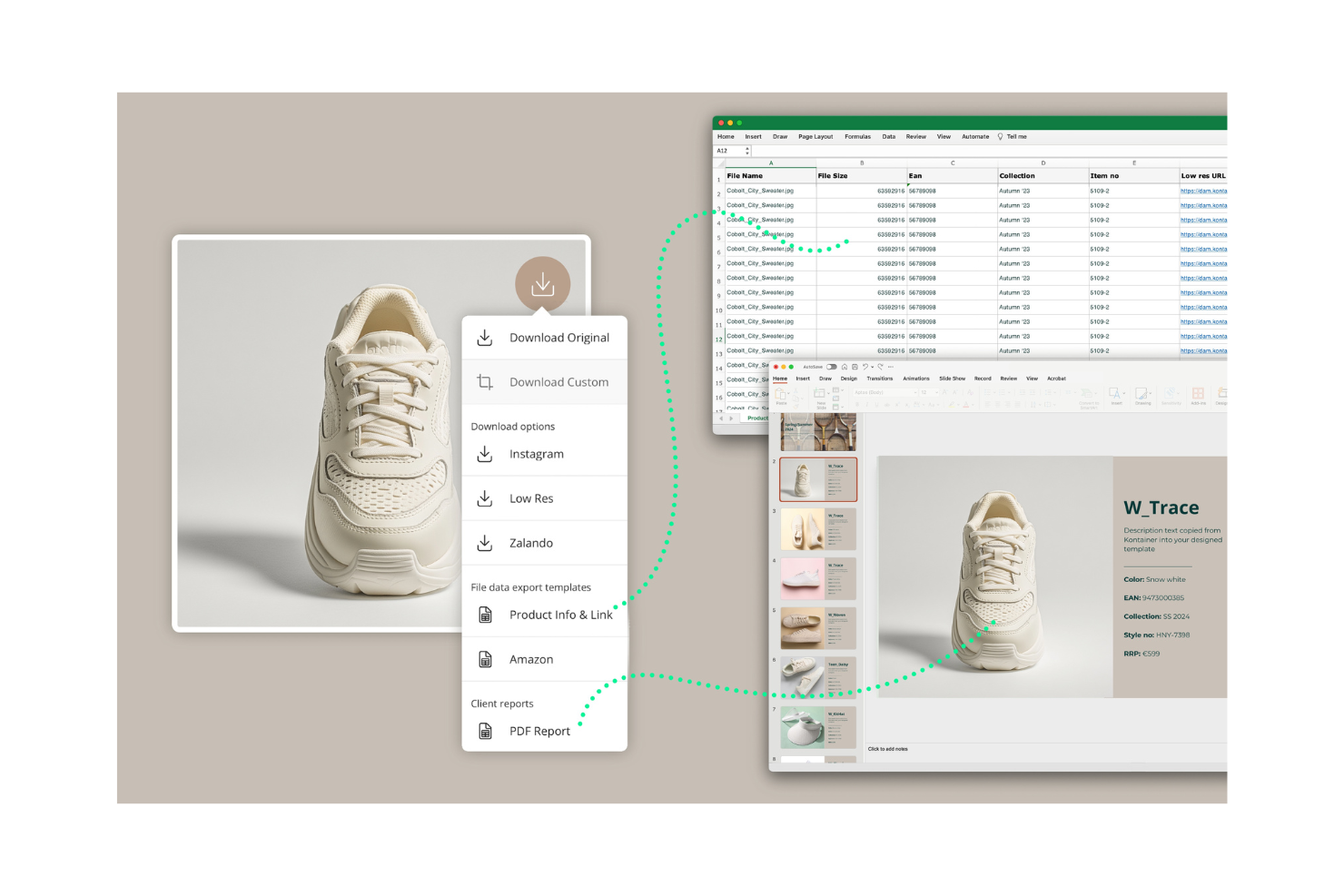
Kontainer è una piattaforma di gestione delle risorse digitali pensata per le aziende che devono archiviare e condividere file digitali in modo sicuro. Viene utilizzata dai team di marketing e dai professionisti creativi per gestire immagini, video e documenti.
Perché è una buona alternativa a Filecamp: Kontainer offre una gestione delle risorse conforme al GDPR, garantendo il rispetto delle esigenze di privacy e sicurezza dei dati del tuo team. Dispone di un'interfaccia intuitiva che consente di organizzare e accedere ai file. I campi di metadati personalizzabili della piattaforma aiutano a categorizzare le risorse in base alle proprie esigenze specifiche. Queste funzionalità rendono Kontainer una scelta eccellente per i team che danno priorità alla conformità e alla sicurezza dei dati.
Caratteristiche distintive e integrazioni:
Le funzionalità includono diritti di accesso personalizzabili che consentono di controllare chi può visualizzare e modificare le risorse. Gli strumenti di reportistica di Kontainer offrono informazioni sull'utilizzo e sull'attività delle risorse, aiutandoti a monitorare le prestazioni. Puoi anche utilizzare le sue funzionalità di collaborazione per consentire ai membri del team di lavorare insieme ai progetti.
Le integrazioni includono Adobe, Microsoft Office 365, WordPress e altro ancora.
Pros and Cons
Pros:
- Gestione dei dati conforme al GDPR
- Campi di metadati personalizzabili
- Interfaccia intuitiva
Cons:
- Le funzionalità avanzate e le integrazioni richiedono un piano superiore
- Opzioni di personalizzazione limitate nel piano base

pCloud
Ideale per l'archiviazione cloud sicura e privata

pCloud è un servizio di archiviazione cloud progettato per privati e aziende che necessitano di uno spazio di archiviazione dei file sicuro e privato. Aiuta gli utenti a archiviare, accedere e condividere i file in modo efficiente da qualsiasi dispositivo.
Perché è una buona alternativa a Filecamp: l'attenzione di pCloud all'archiviazione cloud sicura e alla privacy lo rende ideale per i team che danno priorità alla sicurezza dei dati. Le sue funzionalità di crittografia garantiscono inoltre che i file siano protetti dagli accessi non autorizzati. La piattaforma offre una facile condivisione dei file, consentendo di collaborare con membri del team e clienti. Queste funzionalità rendono pCloud una scelta adatta per chi cerca una soluzione di archiviazione affidabile e sicura.
Funzionalità e integrazioni principali:
Le funzionalità includono il controllo delle versioni dei file, che consente di recuperare versioni precedenti di vari tipi di file con nomi di file diversi. La funzionalità di backup di pCloud esegue automaticamente il backup dei file dal computer al cloud. È inoltre possibile utilizzare il suo lettore multimediale per riprodurre in streaming file audio e video dal cloud.
Le integrazioni includono Google Drive, Dropbox, Facebook, Instagram e altro ancora.
Pros and Cons
Pros:
- Funzionalità di crittografia avanzate
- Condivisione semplice dei file
- Opzioni di backup automatico
Cons:
- Richiede una connessione Internet
- Non ideale per team numerosi

Frame.io
Ideale per la gestione creativa dei video

Frame.io è una piattaforma di collaborazione video progettata per registi, montatori video e team creativi. Aiuta gli utenti a gestire i progetti video e a esaminare i contenuti.
Perché è una buona alternativa a Filecamp: Frame.io offre strumenti di gestione dei flussi di lavoro creativi che consentono al team di esaminare e approvare i contenuti video. I commenti e le annotazioni con indicazione temporale permettono di fornire riscontri precisi, migliorando la comunicazione. La piattaforma supporta inoltre la collaborazione in tempo reale, semplificando il lavoro congiunto del team sui progetti video. Queste funzionalità rendono Frame.io ideale per i team focalizzati sulla produzione video e sulla collaborazione creativa.
Funzionalità e integrazioni principali:
Le funzionalità includono strumenti avanzati per la revisione video che consentono di fornire riscontri precisi a livello di singolo fotogramma. Il sistema di controllo delle versioni di Frame.io garantisce al team l'accesso alle modifiche video più recenti. È inoltre possibile utilizzare le opzioni di condivisione sicura per distribuire i contenuti video.
Le integrazioni includono Adobe Premiere Pro, Final Cut Pro, DaVinci Resolve, Slack, Trello, Asana, YouTube, Google Drive e altro ancora.
Pros and Cons
Pros:
- Strumenti precisi per i riscontri sui video
- Opzioni sicure per la condivisione dei video
- Ideale per i team di produzione video
Cons:
- Richiede una connessione Internet
- Non è ideale per i progetti non video
Canto
Ideale per l'assegnazione automatizzata dei tag basata sull'intelligenza artificiale

Canto è una piattaforma di gestione delle risorse digitali progettata per i team di marketing e i professionisti creativi. Aiuta le aziende a organizzare, condividere e collaborare sui contenuti digitali in modo efficiente.
Perché è una buona alternativa a Filecamp: Canto offre funzionalità basate sull'intelligenza artificiale che rendono la gestione delle risorse più intelligente ed efficiente. Le funzioni di riconoscimento facciale e assegnazione automatica dei tag aiutano a classificare e trovare le risorse. La piattaforma offre inoltre opzioni di branding personalizzabili, consentendo di adattare l'interfaccia allo stile del proprio marchio. Queste funzionalità rendono Canto una scelta valida per i team che necessitano di categorizzazione e gestione avanzate delle risorse.
Caratteristiche distintive e integrazioni:
Le funzionalità includono portali personalizzabili che consentono di condividere le risorse con partner esterni. Gli strumenti di reportistica di Canto possono supportare il processo decisionale fornendo informazioni sull'utilizzo e sulle prestazioni delle risorse. È inoltre possibile gestire le linee guida e le risorse del proprio marchio in modo coerente tramite la sua piattaforma centralizzata.
Le integrazioni includono Microsoft Windows, Slack, Hootsuite, WordPress, Shopify, Google Drive, Dropbox, Box, Salesforce e altro ancora.
Pros and Cons
Pros:
- Assegnazione e ricerca dei tag basate sull'intelligenza artificiale
- Opzioni di branding personalizzabili
- Condivisione semplice delle risorse
Cons:
- Non ideale per i piccoli team
- Potrebbero essere necessari onboarding e supporto per la configurazione

Ideale per la gestione dei contenuti su più canali
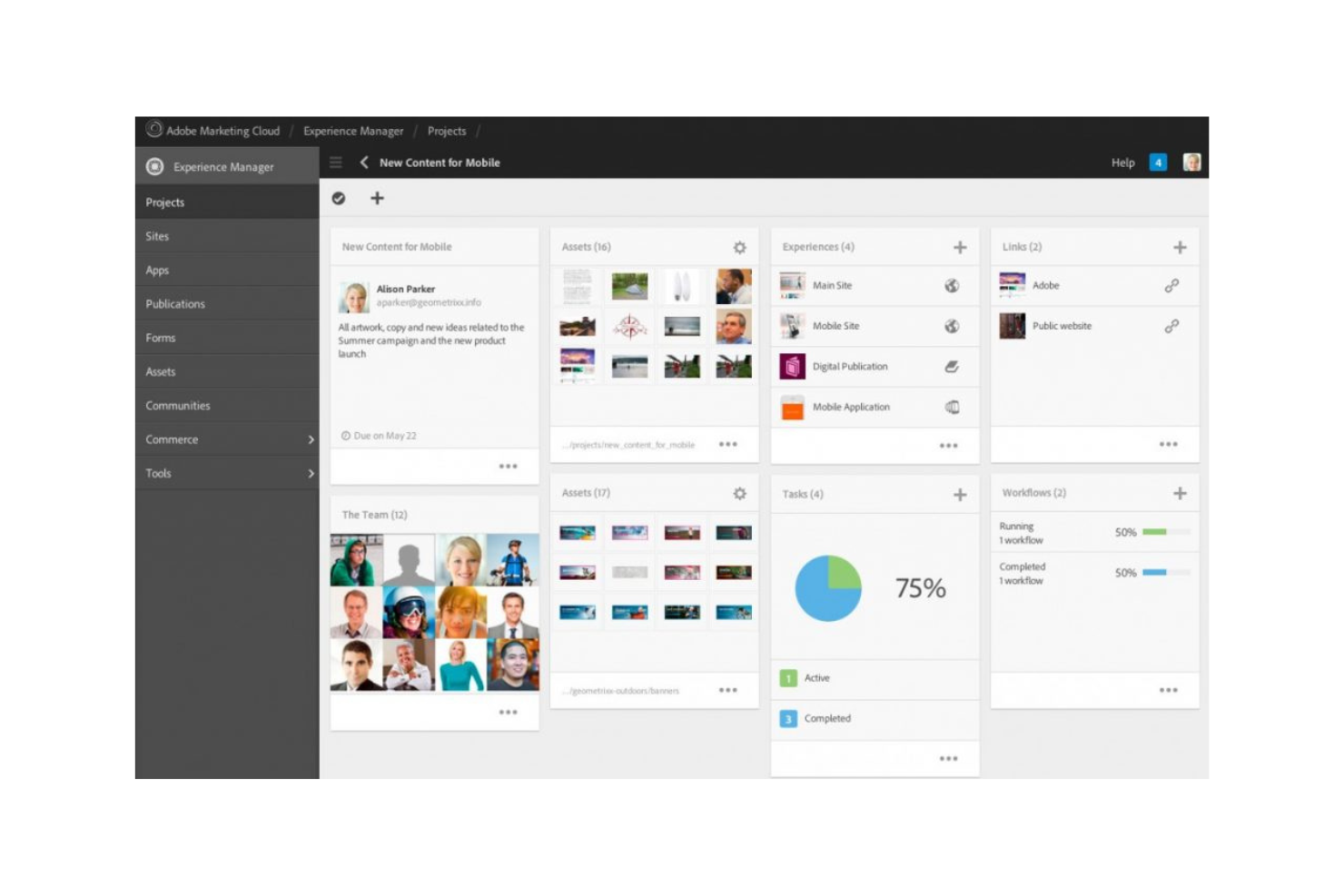
Adobe Experience Manager è un sistema di gestione delle risorse digitali e dei contenuti che supporta le aziende nella gestione e nella distribuzione di esperienze digitali su più canali. È utilizzato principalmente dai team di marketing e dai responsabili dei contenuti che desiderano ottimizzare la distribuzione dei contenuti e la gestione delle risorse.
Perché è una valida alternativa a Filecamp: le funzionalità di gestione dei contenuti e delle risorse digitali di Adobe Experience Manager consentono al tuo team di gestire in modo efficiente i contenuti per il web, i dispositivi mobili e le app. I suoi strumenti di automazione aiutano a reperire e adattare le risorse, permettendoti di dedicare meno tempo alla ricerca e alla modifica dei contenuti. Questi strumenti lo rendono un'alternativa adatta ai team che necessitano di una gestione completa dei contenuti su diverse piattaforme.
Funzionalità e integrazioni principali:
Le funzionalità includono strumenti per la creazione di moduli responsivi, l'iscrizione digitale e un sistema di gestione dell'apprendimento. Puoi gestire e ampliare la documentazione in modo efficiente con il sistema di gestione dei contenuti dei componenti nativo per il cloud. Adobe Experience Manager contribuisce inoltre a offrire esperienze personalizzate ai clienti grazie ai suoi strumenti integrati.
Le integrazioni includono Adobe Analytics, Adobe Target, Adobe Creative Cloud, Microsoft Translator, Salesforce e altro ancora.
Pros and Cons
Pros:
- Ideale per i team numerosi
- Si integra con Adobe Creative Cloud
- Supporta la distribuzione su più canali
Cons:
- Costo elevato per le piccole imprese
- Le integrazioni sono orientate ai prodotti Adobe

Acquia
Ideale per la conversione dei clienti basata sull'IA
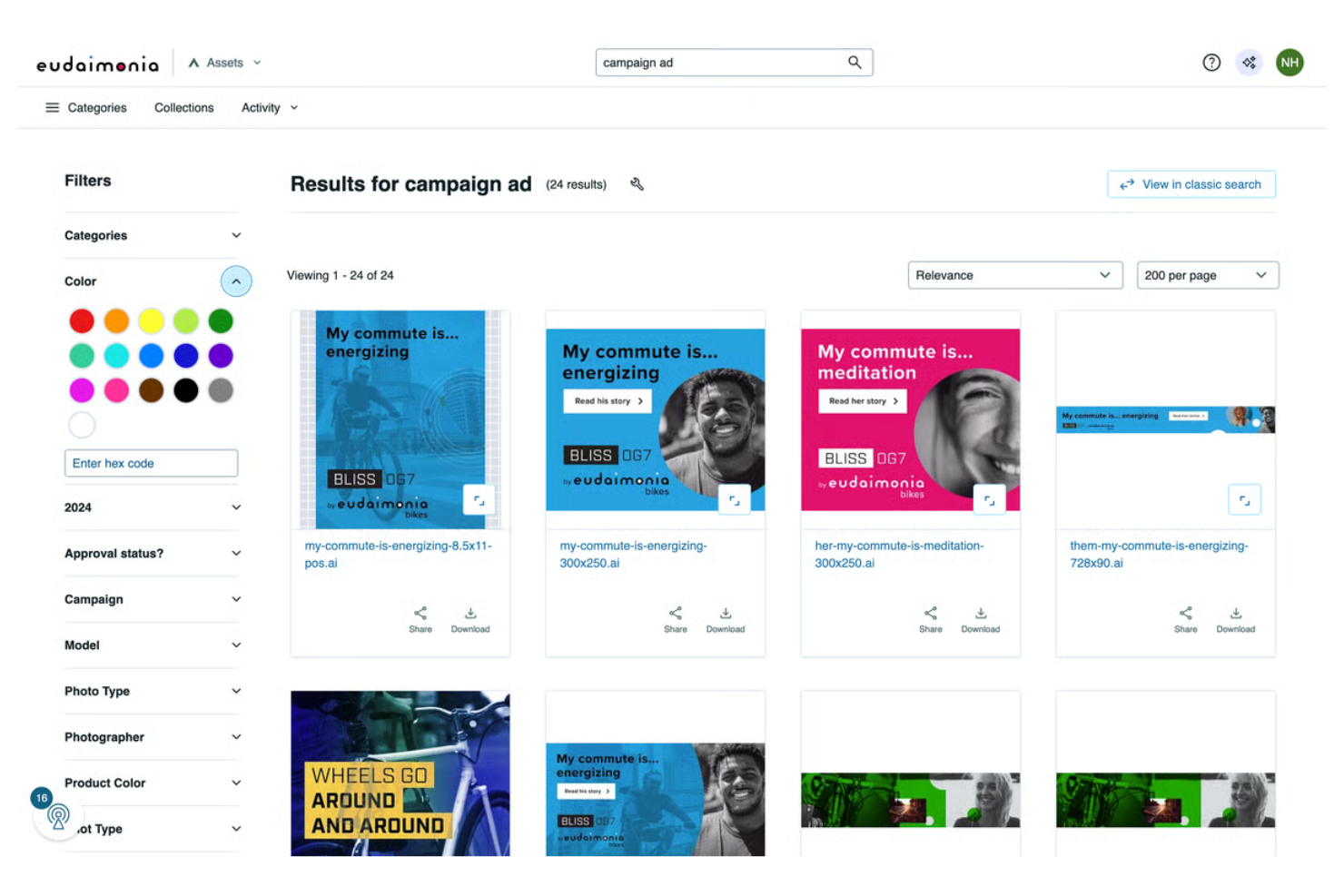
Acquia è una piattaforma di esperienza digitale basata sul cloud, rivolta principalmente ai professionisti del marketing e ai team IT che desiderano creare e gestire esperienze digitali personalizzate. Aiuta le organizzazioni a distribuire contenuti su più canali e a ottimizzare il coinvolgimento dei clienti.
Perché è una buona alternativa a Filecamp: Acquia si distingue per le sue funzionalità di gestione dei contenuti basate sull'IA, che consentono di automatizzare la personalizzazione dei contenuti e ottimizzare la conversione dei clienti. I suoi strumenti di apprendimento automatico possono analizzare i dati dei clienti e prevederne i comportamenti, aiutando il tuo team a migliorare l'efficacia delle strategie di marketing. Inoltre, offre funzionalità di hosting cloud e sicurezza che garantiscono una distribuzione affidabile e sicura dei contenuti. Questo rende Acquia una scelta valida per i team che necessitano di funzionalità avanzate di gestione e personalizzazione dei contenuti.
Funzionalità e integrazioni principali:
Le funzionalità includono una struttura per creare e gestire siti web su larga scala. Puoi anche utilizzare i suoi strumenti per assicurarti di rispettare gli standard di conformità.
Le integrazioni includono Salesforce, Adobe Marketo, Adobe Experience Manager, Google Analytics, Microsoft Dynamics 365, HubSpot, Shopify, Amazon Web Services, Sitecore e altro ancora.
Pros and Cons
Pros:
- Personalizzazione dei contenuti basata sull'IA
- Funzionalità di sicurezza avanzate
- Scalabile per grandi aziende
Cons:
- Curva di apprendimento per i nuovi utenti
- Potrebbe richiedere una formazione dedicata
Altre alternative a Filecamp
Ecco alcune alternative aggiuntive a Filecamp che non sono entrate nel mio elenco ristretto, ma che vale comunque la pena prendere in considerazione:
- Aprimo
Ideale per la gestione centralizzata delle risorse
- Google Workspace
Ideale per strumenti di produttività integrati
- Censhare
Ideale per il marketing e la personalizzazione supportati dall'IA
- Extensis
Ideale per la gestione dei caratteri e delle risorse
- Cloudinary
Ideale per l'ottimizzazione di immagini e video
- ImageKit
Ideale per trasformazioni multimediali in tempo reale


Come Valuto le Alternative a Filecamp
Scompongo la mia valutazione in criteri di base—come la condivisione sicura dei file e i portali clienti personalizzati—e in elementi distintivi che separano le migliori opzioni per agenzie e team di brand.
Funzionalità Principali (Requisiti Essenziali per Questa Lista)
Quando seleziono gli strumenti per la mia lista, classifico ognuno di essi su una scala da 0 (non offre la funzionalità) a 5 (eccelle in questo ambito) per ogni funzionalità principale elencata sotto. Poi calcolo il punteggio totale dello strumento in percentuale. Ogni strumento deve raggiungere un punteggio minimo totale del 65% per essere preso in considerazione.
- Condivisione e Archiviazione dei File: Controllo se una piattaforma gestisce file creativi di grandi dimensioni—come PSD multilivello o video grezzi—con link condivisibili e portali di caricamento per collaboratori esterni.
- Organizzazione delle Risorse Digitali: In questo ambito sono fondamentali tag, metadati e ricerca. Cerco strumenti in cui il tuo team possa trovare rapidamente una variante specifica di un logo invece di dover scavare tra cartelle annidate.
- Controlli di Accesso e Permessi: Valuto quanto siano dettagliati i permessi a livello di ruolo e cartella, soprattutto per le agenzie che gestiscono account di clienti diversi con esigenze di accesso differenti.
- Portali Clienti Personalizzati: La possibilità di consegnare le risorse tramite un portale brandizzato rivolto al cliente è una differenza chiave rispetto allo storage su cloud generico. Strumenti come Brandfolder e Bynder gestiscono questo aspetto in modi diversi, quindi confronto la profondità di personalizzazione che ognuno offre.
- Workflow di Revisione e Approvazione: I team creativi hanno bisogno di annotazione e instradamento per l'approvazione su vari tipi di file. Cerco sistemi di revisione su PDF, immagini e video—non solo il semplice commento su un unico formato.
- Controllo delle Versioni: Valuto se la piattaforma tiene traccia delle revisioni con uno storico chiaro e possibilità di ripristino, così che il tuo team eviti il classico problema di sovrascrivere una risorsa definitiva con una versione obsoleta.
Una volta che ho una lista di strumenti che soddisfano questi criteri, considero cosa distingue ciascuna piattaforma.
Fattori Distintivi (Cosa Distingue i Fornitori)
Ecco come confronto e metto a fuoco i diversi fornitori:
Funzionalità Distintive
Qui contano le integrazioni con software creativi—cerco connessioni native con Adobe Creative Cloud o Figma così i designer possono accedere alle risorse senza uscire dal proprio flusso di lavoro. Il tagging assistito da AI è un altro elemento distintivo, poiché i metadati generati automaticamente riducono ore di catalogazione manuale quando si devono gestire migliaia di asset. Valuto anche la gestione di scadenza e licenze, che aiuta i responsabili di brand a individuare quando una licenza fotografica sta per scadere prima che finisca in una campagna online.
Oltre le Funzionalità
La struttura dei prezzi è un fattore rilevante—controllo se la presenza di ospiti e utenti esterni fa aumentare i costi, poiché le agenzie che condividono asset con decine di clienti rischiano di vedere le spese salire rapidamente. Sicurezza e conformità sono inoltre cruciali, specialmente per team che gestiscono proprietà intellettuale dei clienti; verifico la presenza di certificazione SOC 2, SSO e tracciamento degli accessi. Infine, considero quanto una piattaforma si integri con i workflow esistenti, valutando integrazioni con strumenti come Asana, Monday o ClickUp, oltre all'accesso API o Zapier per automazioni personalizzate.
Perché cercare un'alternativa a Filecamp?
Sebbene Filecamp sia una buona scelta per la gestione delle risorse digitali, ci sono diversi motivi per cui alcuni utenti cercano soluzioni alternative. Potresti voler cercare un'alternativa a Filecamp per i seguenti motivi:
- Hai bisogno di opzioni di personalizzazione più avanzate
- Il tuo team necessita di migliori capacità di integrazione
- Stai cercando una soluzione più scalabile
- Desideri funzionalità di sicurezza avanzate
- Il tuo team ha bisogno di un'assistenza clienti più rapida
- Stai cercando un'opzione più conveniente
Se ti riconosci in uno di questi aspetti, sei nel posto giusto. Il mio elenco include diverse opzioni per la gestione delle risorse digitali più adatte ai team che affrontano queste difficoltà con Filecamp e cercano alternative.
Funzionalità
Per aiutarti a confrontare le funzionalità offerte dalle soluzioni alternative, ecco alcune delle principali caratteristiche di Filecamp:
- Accesso granulare: controlla l'accesso dei tuoi clienti e partner a file e cartelle.
- Temi multipli: personalizza il branding di cartelle diverse per adattarlo allo stile della tua azienda.
- Parole chiave/etichette: usa i metadati per organizzare e gestire i tuoi file multimediali digitali.
- Pagine personalizzate: crea e gestisci pagine personalizzate utilizzando un editor WYSIWYG per creare facilmente i contenuti.
- Sicurezza: offre un data center sicuro e HTTPS per i trasferimenti di file.
- Link per la richiesta di file: ti consente di ricevere file da chiunque e migliorare la collaborazione.
- Raccolte: organizza i file provenienti da più cartelle per collaborare in modo efficiente con il tuo team.
- Etichette automatiche: migliora la reperibilità grazie all'assegnazione automatica di etichette alle risorse digitali.
- Etichette: usa etichette personalizzate per l'indicizzazione e la revisione, mantenendo organizzati i tuoi file.
- Marchio personalizzato: assumi il pieno controllo del branding con il piano Professional, rendendo la piattaforma davvero tua.
Cosa succede dopo:
Se stai cercando un software per la gestione delle risorse digitali, contatta gratuitamente un consulente SoftwareSelect per ricevere consigli personalizzati.
Compili un modulo e partecipi a una breve conversazione durante la quale verranno analizzate nel dettaglio le tue esigenze. In seguito riceverai una rosa di software da valutare. Ti assisteranno persino durante l'intero processo di acquisto, comprese le negoziazioni sui prezzi.