

10 mejores soluciones de iPaaS en 2026

Selección de las mejores soluciones iPaaS


Las soluciones iPaaS son plataformas basadas en la nube que te permiten conectar, automatizar y gestionar el flujo de datos entre tus herramientas empresariales sin necesidad de desarrollar mucho código personalizado. Si estás evaluando opciones de iPaaS, probablemente te enfrentes a cuellos de botella provocados por aplicaciones desconectadas, trabajo manual y dificultades para escalar las integraciones a medida que crece tu pila tecnológica.
En esta selección, te ayudaré a comparar rápidamente las mejores herramientas iPaaS, las tareas que cada una realiza mejor y cómo se adaptan a las necesidades reales de gestión de proyectos. Utiliza esta guía para elegir una plataforma que haga frente a la complejidad y mantenga tus integraciones funcionando sin problemas durante todo 2026.
Por qué confiar en nuestras recomendaciones de software
Nuestro equipo lleva probando y evaluando software desde 2012. Como gestores de proyectos, sabemos lo difícil —y lo importante— que es elegir el software adecuado.
Para esta guía, evaluamos las herramientas mediante pruebas prácticas e investigación independiente, puntuando las herramientas según nuestros criterios de selección. También nos basamos en la experiencia de líderes de opinión del sector y de profesionales en activo de la gestión de proyectos.
Nuestras reseñas reflejan nuestro criterio editorial humano, no un discurso de ventas.
Revisores expertos:
Tabla comparativa de soluciones iPaaS
Esta tabla comparativa resume los detalles de precios de mi selección de las mejores soluciones iPaaS:
| Tool | Best For | Trial Info | Price | ||
|---|---|---|---|---|---|
| 1 | Ideal para la gestión de integraciones, API y EDI | Prueba gratuita de 30 días | Precios bajo petición | Website | |
| 2 | Ideal para diseño y depuración visual de flujos de trabajo | Plan gratuito + demo gratis disponible | Desde $9/mes (facturado anualmente) | Website | |
| 3 | Ideal para implementaciones autohospedadas y de código abierto | Prueba gratuita de 14 días | Desde 20 €/mes (facturado anualmente) | Website | |
| 4 | Ideal para acceso de por vida con tareas ilimitadas | Plan gratuito disponible | Desde $16/mes | Website | |
| 5 | Ideal para B2B/EDI y gobernanza de datos centralizada | Prueba gratuita de 30 días disponible | Desde $99/mes + uso | Website | |
| 6 | Ideal para RPA dentro del ecosistema de Microsoft | Prueba gratuita de 30 días disponible | Desde $15/usuario/mes (facturado anualmente) | Website | |
| 7 | Ideal para gobernar agentes de IA | Plan gratuito disponible | Desde $19.99/mes (facturado anualmente) | Website | |
| 8 | Ideal para la gestión del ciclo de vida de APIs a gran escala | Prueba gratuita + demo gratis disponible | Precios bajo consulta | Website | |
| 9 | Ideal para construir agentes con integraciones embebidas | Demostración gratuita disponible | Precio a consultar | Website | |
| 10 | Ideal para la creación sin código de agentes impulsados por IA | Demostración gratuita disponible | Precios a consultar | Website |
Análisis de las mejores soluciones iPaaS
A continuación encontrarás mis resúmenes detallados de las mejores soluciones iPaaS que llegaron a mi selección. Mis análisis ofrecen una visión detallada de las funciones, integraciones y casos de uso más adecuados de cada plataforma para ayudarte a encontrar la mejor opción para ti.

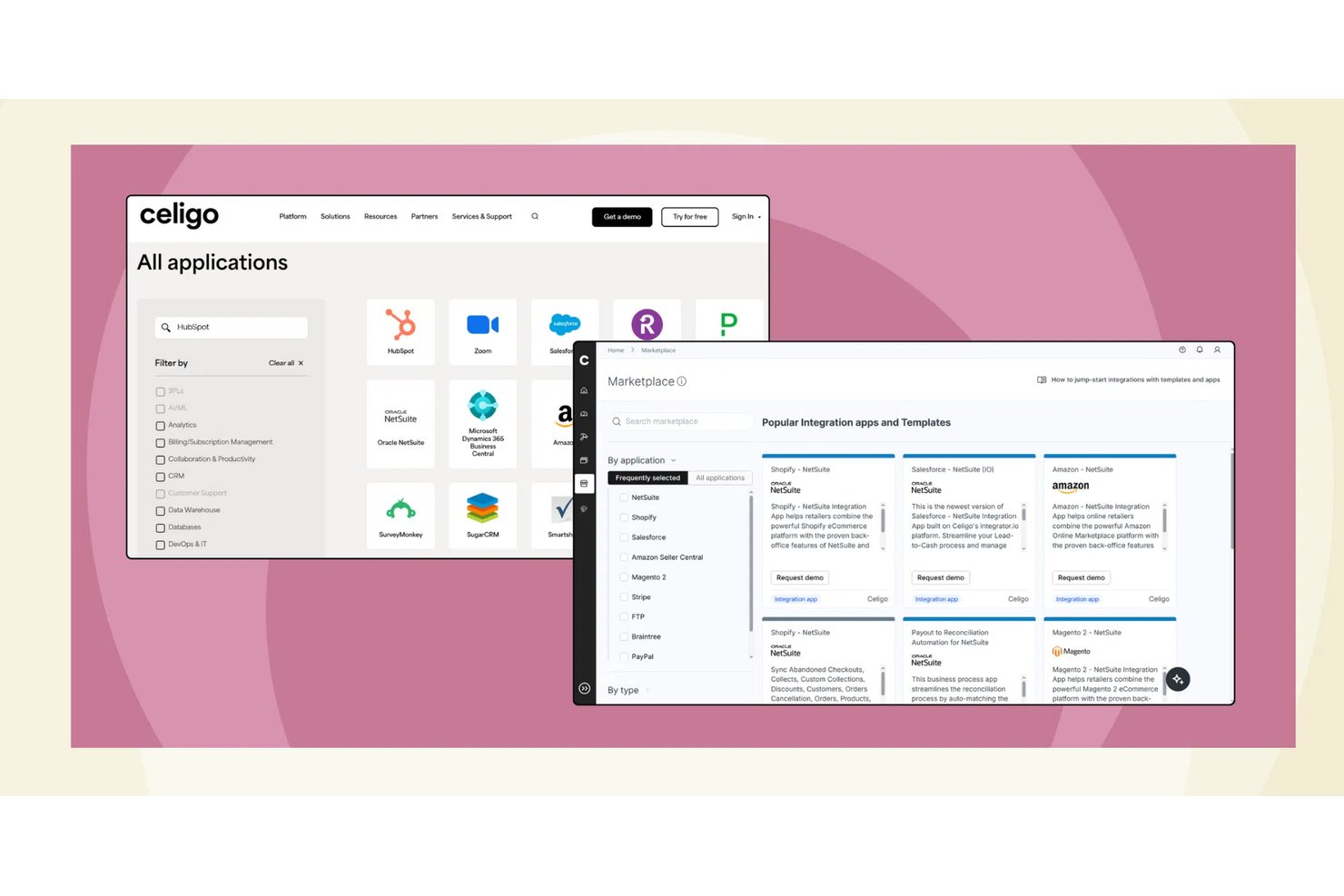
Celigo es una plataforma iPaaS que unifica la integración de aplicaciones, la gestión de API, B2B/EDI y la automatización impulsada por IA en una sola plataforma, conectando sistemas en la nube y locales mediante una biblioteca de conectores prediseñados y herramientas de flujos de trabajo basadas en flujos.
¿Para quién es más adecuado Celigo?
Celigo es una opción muy adecuada para equipos de TI y operaciones de empresas del mercado medio que gestionan entornos complejos con múltiples sistemas basados en plataformas ERP como NetSuite.
Por qué elegí Celigo
Celigo está en mi lista de opciones porque es una de las pocas plataformas iPaaS que gestiona la integración de aplicaciones, la gestión de API y EDI bajo un mismo techo. Me gusta que B2B Manager cubra todo el ciclo de vida de los socios comerciales y el procesamiento de transacciones EDI sin requerir una herramienta independiente. Además, API Builder me permite exponer las integraciones internas como API gobernadas y compartibles, lo que significa que no tengo que reconstruir conexiones punto a punto cada vez que entra un nuevo sistema en la infraestructura.
Características principales de Celigo
- Constructor visual de flujos: Diseña, programa y gestiona flujos de trabajo de varios pasos entre sistemas mediante una interfaz de arrastrar y soltar.
- Celigo Ora (automatización en lenguaje natural): Crea y gestiona integraciones describiendo las necesidades de automatización en lenguaje sencillo.
- Paneles de supervisión de integraciones: Supervisa el estado, los errores y el rendimiento en tiempo real con herramientas de alertas de autoservicio y seguimiento de SLA.
- Plantillas de integración reutilizables: Implementa esquemas de automatización preconfigurados para combinaciones populares de herramientas de gestión de proyectos, CRM y ERP.
Integraciones de Celigo
Celigo ofrece cientos de integraciones nativas, incluidas NetSuite, Salesforce, Shopify, Jira, Asana, Monday.com, Smartsheet, Wrike, Amazon y Microsoft 365. Hay una API disponible para integraciones personalizadas.
Pros and Cons
Pros:
- Gestiona de forma nativa las API, EDI y la integración de aplicaciones
- La asignación asistida por IA acelera la configuración de flujos de trabajo
- Las plantillas prediseñadas reducen considerablemente el tiempo de implementación
Cons:
- Las secuencias de comandos avanzadas requieren la participación de desarrolladores
- La configuración de EDI puede requerir mucho tiempo
New Product Updates from Celigo
Celigo Adds SuiteTax and Variant Publishing for Shopify–NetSuite
Celigo adds NetSuite SuiteTax support and variant-level sales channel publishing to its Shopify–NetSuite integration. These updates improve tax handling and give merchants more control over how product variants are published. For more information, visit Celigo’s official site.
 .
.
Make
Ideal para diseño y depuración visual de flujos de trabajo
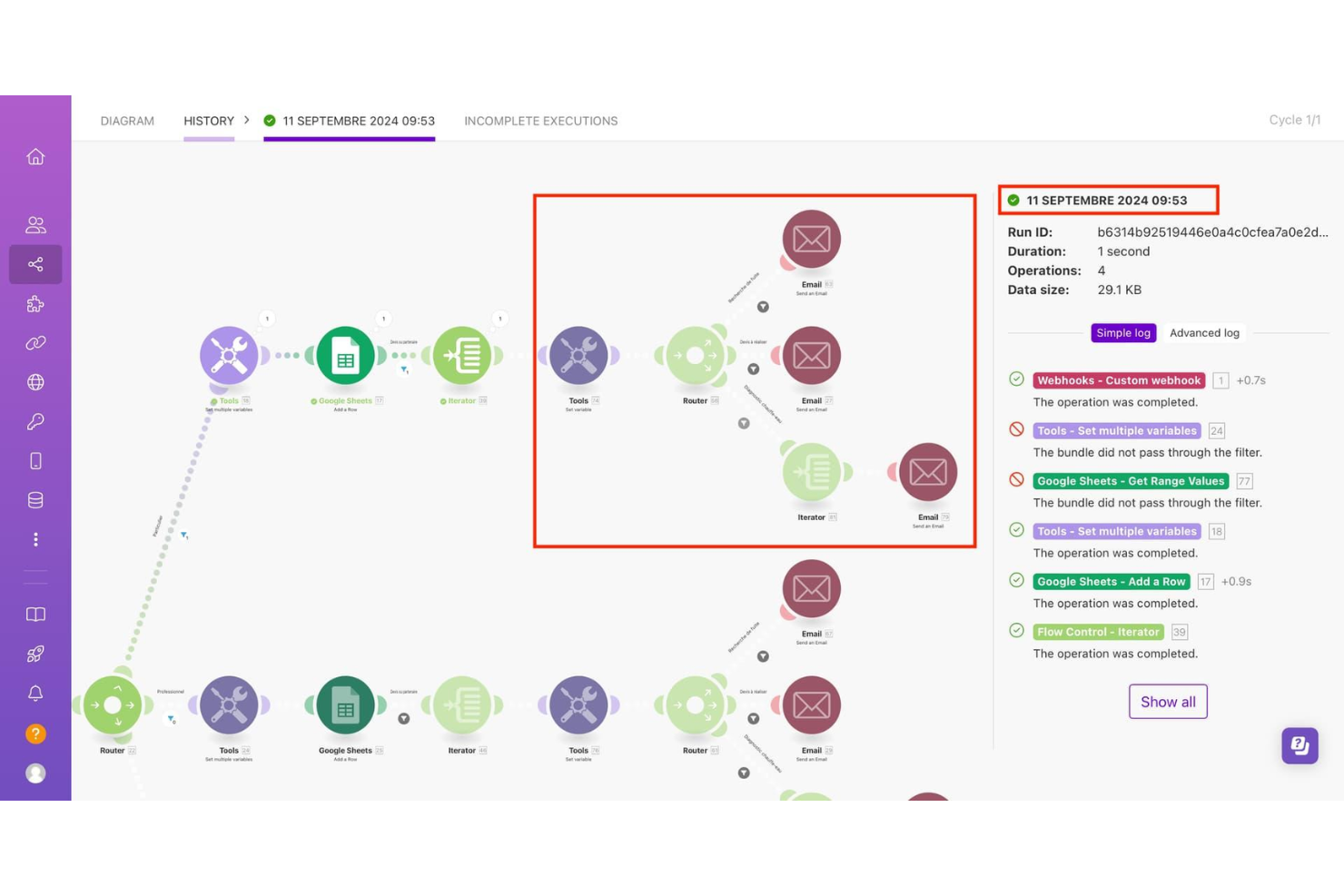
Make es una plataforma visual iPaaS que te permite crear flujos de trabajo automatizados, integraciones de varios pasos y agentes de IA a través de más de 3,000 conectores de aplicaciones preconstruidos, sin necesidad de escribir código.
¿Para Quién es Ideal Make?
Make es una excelente opción para los equipos de operaciones y automatización en empresas medianas que necesitan crear flujos de trabajo complejos y de varios pasos sin depender de los recursos de ingeniería.
Por Qué Elegí Make
Make se gana su lugar en mi lista corta por lo bien que su constructor de escenarios basado en lienzo maneja visualmente la lógica de ramificación compleja. Puedo ver el flujo de datos entre módulos en tiempo real, y cuando ocurre un error, el historial de ejecución de Make señala el módulo exacto que falló con todo el detalle de entrada/salida. Ese nivel de visibilidad paso a paso es lo que lo distingue al depurar flujos de trabajo de varias aplicaciones.
Funciones Clave de Make
- Constructor de agentes de IA: Crea y despliega agentes de IA directamente dentro de los escenarios usando los módulos nativos de IA de Make, incluyendo soporte para conexiones a grandes modelos de lenguaje.
- Webhooks personalizados: Configura disparadores instantáneos usando webhooks entrantes o salientes para conectar aplicaciones que no cuentan con conectores nativos.
- Herramientas de mapeo de datos: Transforma, analiza y formatea datos entre módulos usando funciones integradas para texto, números, fechas y arreglos.
- Programación de escenarios: Configura intervalos de ejecución automatizados hasta el minuto para controlar exactamente cuándo se ejecutan los flujos de trabajo.
Integraciones de Make
Make ofrece más de 3,000 integraciones nativas, incluyendo OpenAI, Google Gemini, Anthropic Claude, HubSpot, Microsoft 365, Pipedrive, Perplexity AI, Telegram e Instagram for Business, con una API disponible para integraciones personalizadas.
Pros and Cons
Pros:
- La tarificación por operaciones mantiene baratos los flujos de trabajo pequeños
- El lienzo visual muestra los datos en cada paso
- Manejador de errores integrado por módulo
Cons:
- El conteo de operaciones se dispara con escenarios complejos
- No hay opción de implementación autoalojada o local

n8n
Ideal para implementaciones autohospedadas y de código abierto

Con un constructor visual basado en nodos y un código fuente completamente de código abierto, n8n es una plataforma de automatización de flujos de trabajo para crear integraciones de aplicaciones y automatizaciones de varios pasos en entornos de nube y autohospedados.
¿Para quién es más adecuado n8n?
n8n es una opción excelente para equipos técnicos y desarrolladores que necesitan un control total sobre su infraestructura de automatización, incluida la residencia de los datos y los entornos de implementación personalizados.
Por qué elegí n8n
He incluido n8n entre mis principales opciones porque la alternativa de implementación autohospedada está realmente preparada para producción. Lo ejecuto mediante Docker en mi propia infraestructura, por lo que los datos de los flujos de trabajo nunca salen de mi entorno. La licencia de código justo también significa que mi equipo puede leer, bifurcar y modificar el código fuente, y hemos creado nodos personalizados en TypeScript para cubrir conectores que no existen de forma nativa.
Características principales de n8n
- Lienzo visual de flujos de trabajo: Crea automatizaciones conectando nodos en un lienzo de arrastrar y soltar, con vistas previas de los resultados en tiempo real en cada paso.
- Nodos de agentes de IA: Encadena llamadas a modelos de lenguaje de gran tamaño mediante nodos de agentes integrados que se conectan con OpenAI, Anthropic y otros modelos.
- Registros del historial de ejecuciones: Consulta un registro completo de las ejecuciones anteriores de los flujos de trabajo, incluidos los datos de entrada y salida de cada nodo.
- Ramificación condicional: Dirige los datos por diferentes rutas según los valores de los campos, los códigos de estado o las expresiones personalizadas de JavaScript.
Integraciones de n8n
n8n ofrece más de 350 integraciones nativas, incluidas Google Sheets, Slack, Shopify, Discord, Notion, Trello, Salesforce, GitHub, MySQL y Microsoft 365, además de una API para integraciones personalizadas.
Pros and Cons
Pros:
- Edición comunitaria gratuita para flujos de trabajo ilimitados
- Nodos integrados de agentes de IA y modelos de lenguaje de gran tamaño
- El historial de versiones de los flujos de trabajo registra cada cambio
- Opciones limitadas de transformación de datos integrada
Cons:
- No hay aplicación móvil para supervisar los flujos de trabajo

Ideal para acceso de por vida con tareas ilimitadas
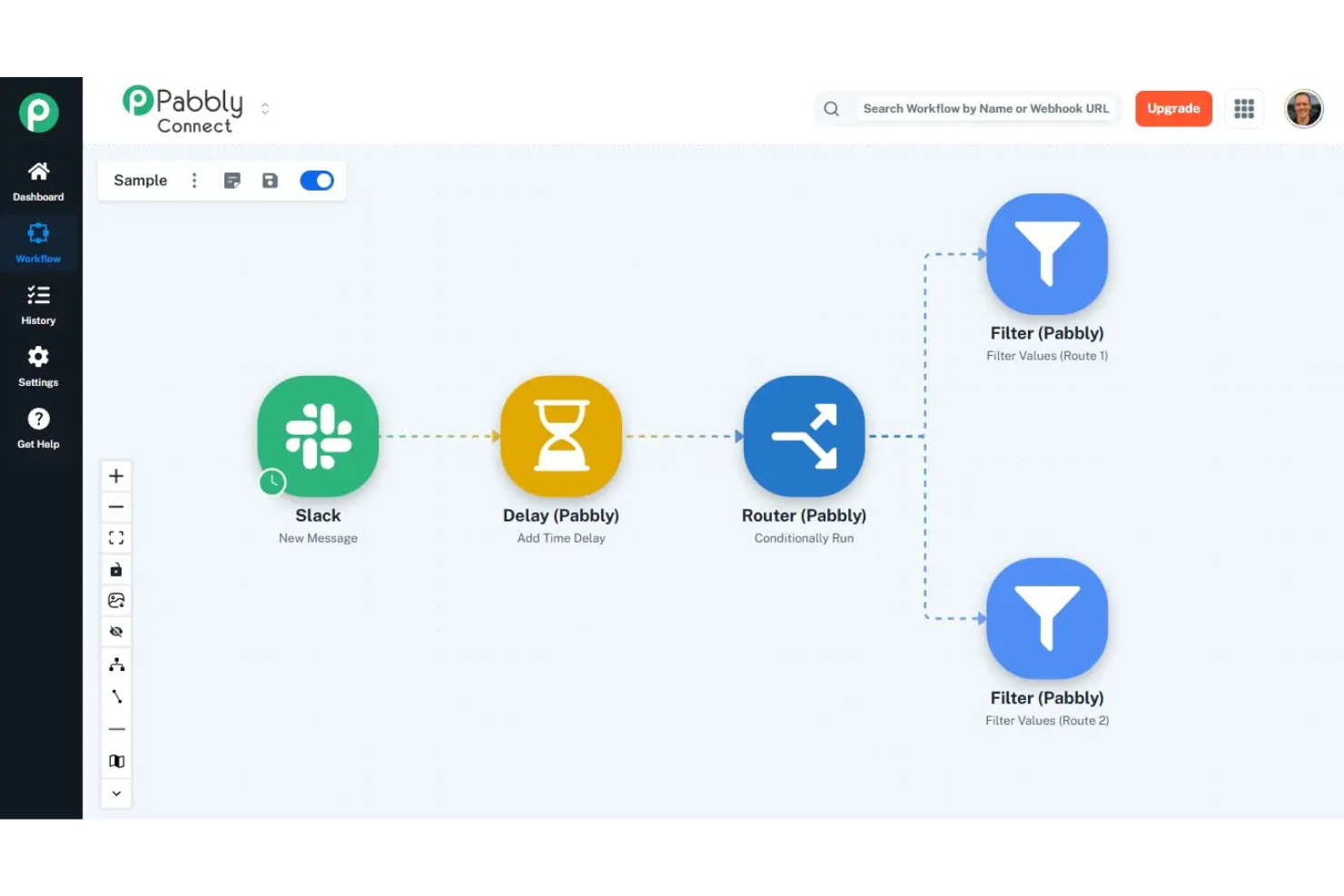
Una plataforma de integración y automatización, Pabbly Connect ofrece un constructor visual de flujos de trabajo con acciones de múltiples pasos, enrutamiento condicional, soporte para webhooks, formateo de datos y conexiones con más de 2.000 aplicaciones.
¿Para quién es mejor Pabbly Connect?
Pabbly Connect es una excelente opción para equipos de marketing y operaciones que ejecutan automatizaciones de alto volumen en CRM, correo electrónico y herramientas de comercio electrónico.
Por qué elegí Pabbly Connect
Pabbly Connect merece su lugar en mi lista porque incluso los pasos internos como formateadores, iteradores y filtros no cuentan para el total de tareas. He ejecutado flujos de trabajo de enriquecimiento de prospectos de 8 pasos entre HubSpot, Slack y Google Sheets sin que se registre ni una tarea adicional. El paso de iterador me permite recorrer datos en arrays a mitad de flujo de trabajo, lo que consumiría docenas de tareas contabilizadas en Zapier.
Características clave de Pabbly Connect
- Conector API: Envía solicitudes HTTP personalizadas a cualquier endpoint de REST API dentro de un flujo de trabajo, sin necesidad de una integración nativa.
- Acción de demora: Pausa un flujo de trabajo durante un período establecido entre pasos antes de ejecutar la siguiente acción.
- Captura de respuesta de webhook: Asigna los datos devueltos de una llamada webhook saliente a pasos posteriores del flujo de trabajo.
- Gestión de conexiones: Reconecta o actualiza las credenciales de las aplicaciones desde el panel de conexiones sin tener que reconstruir los flujos de trabajo.
Integraciones de Pabbly Connect
Pabbly Connect ofrece más de 2.000 integraciones de aplicaciones incorporadas, incluyendo Google Sheets, Mailchimp, Stripe, WooCommerce, Trello, Slack, HubSpot y Zoom. También hay un módulo API disponible para conectar con cualquier aplicación que tenga una REST API.
Pros and Cons
Pros:
- Precio de por vida elimina los costos recurrentes
- Los pasos internos no cuentan como tareas
- Sin límites por flujo de trabajo en cualquier plan
Cons:
- Los planes de nivel inferior no permiten flujos de trabajo de varios pasos
- Menos integraciones de aplicaciones que las que ofrece Zapier

Boomi
Ideal para B2B/EDI y gobernanza de datos centralizada
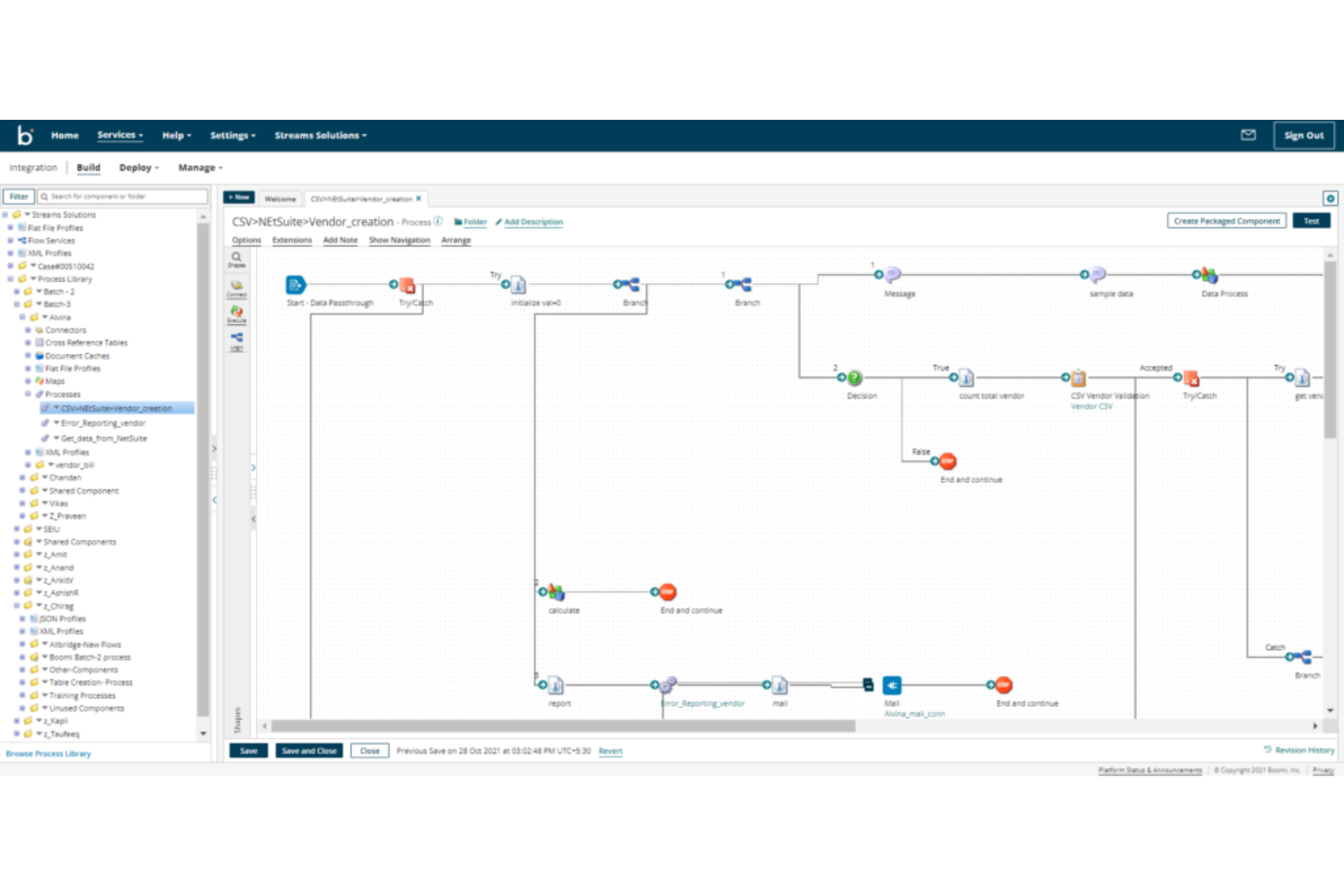
Boomi es una plataforma iPaaS nativa en la nube que abarca integración de aplicaciones, gestión de datos, B2B/EDI, transferencia gestionada de archivos, gestión de APIs y gobernanza de flujos de trabajo agenticos en entornos híbridos y multicloud.
¿Para quién es mejor Boomi?
Boomi es ideal para equipos de mercado medio y empresas de la cadena de suministro, retail o manufactura que dependen de redes de socios comerciales basadas en EDI.
Por qué elegí Boomi
Incluí a Boomi en mis principales opciones porque su gestión B2B/EDI y Boomi Data Hub están integrados en la misma plataforma que el resto de tus integraciones. Esto significa que cuando conectas socios comerciales vía EDI, utilizas el mismo marco de conectores y la misma arquitectura en estrella que gobierna tus datos internos. Me gusta especialmente cómo la gestión del golden record de Data Hub refuerza la calidad de los datos centralmente: las reglas de validación, la coincidencia difusa y la lógica de supervivencia se aplican una sola vez en el hub, y los registros limpios se sincronizan en ambos sentidos automáticamente con sistemas como SAP y Salesforce.
Características clave de Boomi
- Flujos de eventos: Un intermediario de eventos integrado que te permite construir integraciones en tiempo real y orientadas a eventos sin tener que implementar middleware adicional.
- Boomi Flow: Un creador de aplicaciones low-code para crear flujos de trabajo y formularios web orientados al usuario sobre tus integraciones.
- Transferencia gestionada de archivos: Transferencia de archivos segura y automatizada con registro de auditoría, programación y controles de cumplimiento integrados en la plataforma.
- AgentStudio: Un entorno visual para construir, gobernar y orquestar agentes de IA y herramientas habilitadas para MCP en toda tu infraestructura empresarial.
Integraciones de Boomi
Boomi ofrece integraciones nativas con Salesforce, NetSuite, SAP, Workday, ServiceNow, Shopify, Microsoft Dynamics 365 y QuickBooks. Hay una API disponible para integraciones personalizadas.
Pros and Cons
Pros:
- Gestión de socios comerciales B2B/EDI integrada
- Implementación de Atom híbrida y local
- Master Data Hub con gestión de golden records
Cons:
- Las fallas del mapeador provocan la falla de todo el lote
- Una sola JVM por Atom limita la autoescalabilidad

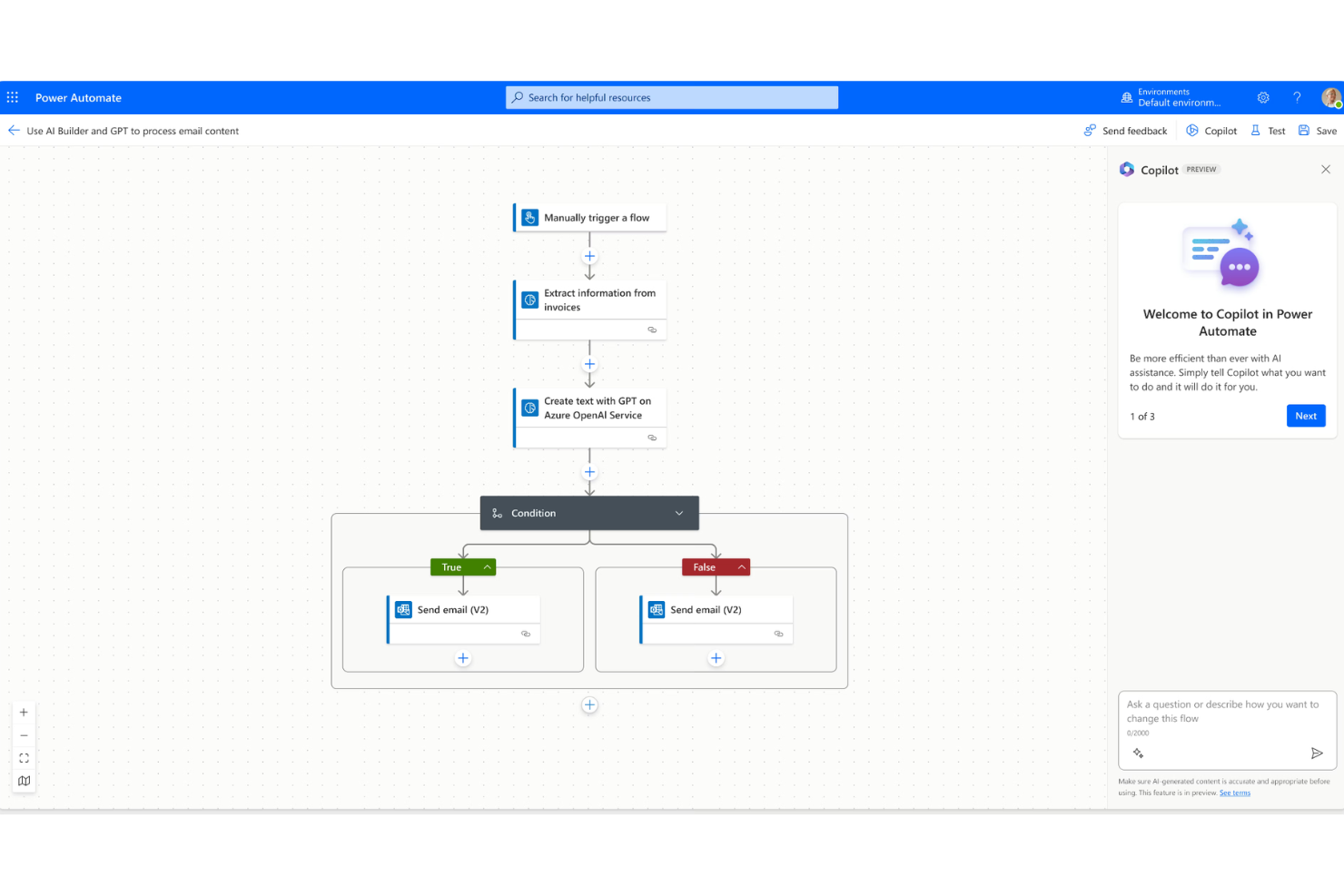
Microsoft Power Automate es una plataforma de automatización en la nube y de escritorio que combina la automatización de flujos de trabajo, RPA y minería de procesos tanto en servicios en la nube como en aplicaciones locales heredadas.
¿Para quién es mejor Microsoft Power Automate?
Microsoft Power Automate es ideal para equipos medianos y grandes que ya utilizan Microsoft 365, Azure o Dynamics 365 y desean automatizar flujos de trabajo sin salir de ese ecosistema.
Por qué elegí Microsoft Power Automate
Elegí Microsoft Power Automate porque sus flujos de escritorio ofrecen a mi equipo acceso RPA genuino a aplicaciones heredadas que no tienen APIs, como pantallas antiguas de ERP o portales web internos, sin tener que programar. Lo que encuentro interesante es que los flujos de escritorio asistidos y no asistidos se ejecutan dentro de la misma plataforma que los flujos en la nube, así que no tengo que cambiar de herramientas para gestionar tanto automatización asistida por personas como totalmente autónoma. Copilot en Power Automate también me permite describir un flujo en lenguaje natural y obtener un borrador funcional para editar, lo que reduce notablemente el tiempo de construcción.
Funciones clave de Microsoft Power Automate
- Minería de procesos: Analiza los registros de eventos de los sistemas conectados para identificar oportunidades de automatización en los flujos de trabajo existentes.
- AI Builder: Permite añadir modelos de IA preentrenados, como procesamiento de documentos o detección de sentimiento, directamente en los flujos sin trabajo personalizado de ML.
- Flujos de procesos de negocio: Guía a los usuarios a través de procesos de varios pasos en una secuencia estructurada para garantizar la finalización consistente de tareas.
- Plantillas de flujo preconstruidas: Una biblioteca de plantillas listas para usar en escenarios de automatización comunes tanto en aplicaciones de Microsoft como de terceros.
Integraciones de Microsoft Power Automate
Microsoft Power Automate cuenta con integraciones nativas en todo el ecosistema de Microsoft, incluyendo Microsoft 365 y Azure.
Pros and Cons
Pros:
- Integración nativa profunda con apps de Microsoft 365
- Flujos de escritorio y nube en una sola plataforma
- Constructor de flujos drag-and-drop sin código
Cons:
- Conectores premium bloqueados en planes de pago
- Soporte limitado para sistemas locales que no sean de Microsoft

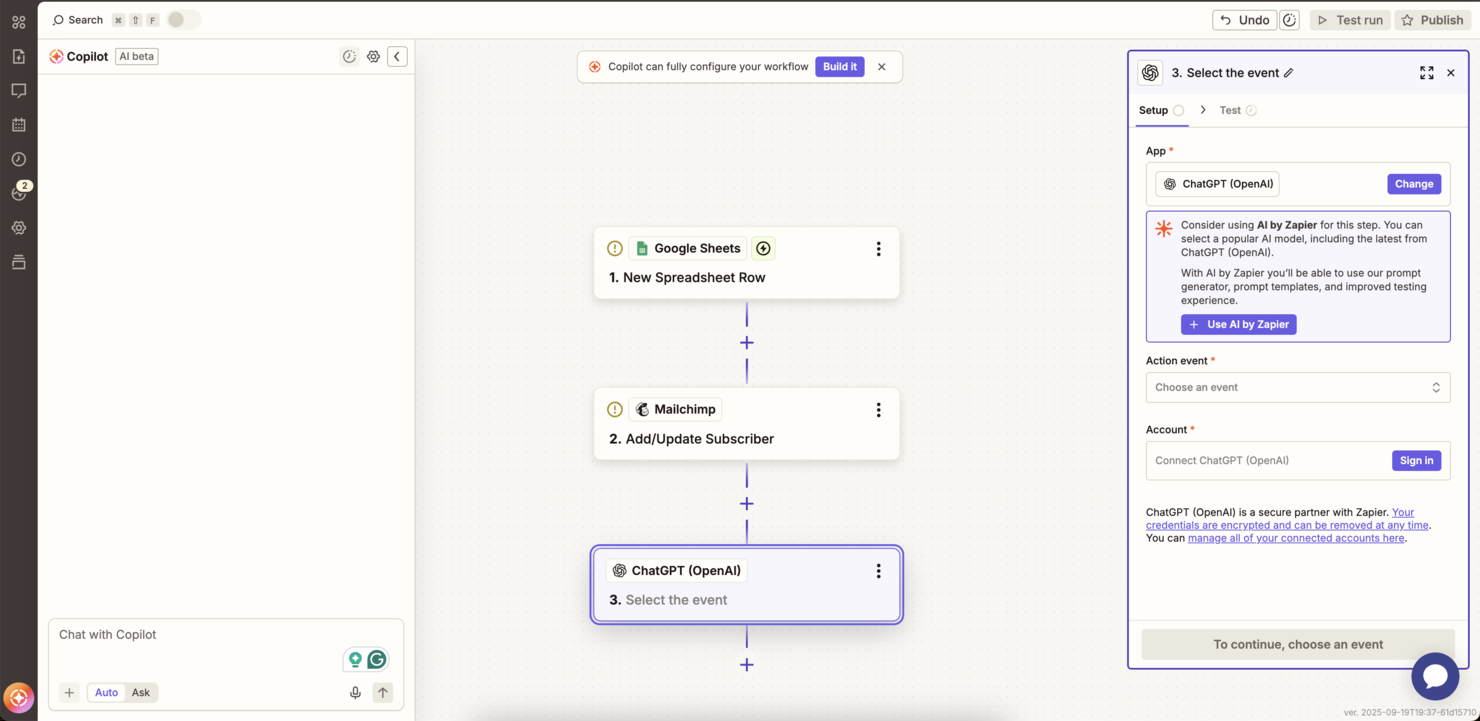
Zapier es una plataforma de automatización sin código que conecta aplicaciones web mediante flujos de trabajo basados en disparadores, Zaps de varios pasos y agentes impulsados por IA construidos a partir de su biblioteca de conectores de aplicaciones.
¿Para quién es mejor Zapier?
Zapier es una excelente opción para equipos de operaciones y de ingresos en pymes y empresas medianas que necesitan automatizar flujos de trabajo entre aplicaciones sin involucrar al área de ingeniería.
Por qué elegí Zapier
He incluido Zapier en mi lista porque es una de las únicas herramientas iPaaS que he visto que permite gobernar agentes de IA a nivel de políticas, no solo a nivel de flujo de trabajo. Los administradores de TI pueden definir exactamente qué aplicaciones y acciones están disponibles, y esas reglas se aplican de manera uniforme a todos los clientes MCP y llamadas mediante SDK. También me gusta la función de barreras de seguridad para la IA, que filtra datos sensibles y entradas inseguras antes de que se envíe o guarde cualquier cosa entre sistemas conectados.
Principales funcionalidades de Zapier
- Caminos: Añade lógica condicional a los Zaps para que las acciones se ramifiquen según valores específicos de campos o condiciones de filtro.
- Formateador: Transforma, divide y reformatea datos entre pasos sin escribir código utilizando operaciones integradas para textos, números y fechas.
- Tablas de Zapier: Almacena, recupera y actualiza registros entre Zaps utilizando una base de datos incorporada que se conecta directamente con tus flujos de trabajo.
- Transferencia: Ejecuta migraciones masivas de datos entre aplicaciones trasladando grandes volúmenes de registros históricos a través de un Zap bajo demanda.
Integraciones de Zapier
Zapier ofrece más de 6,000 integraciones nativas, incluyendo Google Sheets, Slack, Salesforce, HubSpot, Gmail, Trello, Asana, QuickBooks, Airtable, Shopify y Mailchimp, y proporciona una API para integraciones personalizadas.
Pros and Cons
Pros:
- Directorio de aplicaciones más grande con más de 9,000 conectores
- Zaps de varios pasos con caminos ramificados
- Las tablas integradas almacenan datos de los flujos de trabajo
Cons:
- La tarificación por tareas escala con el uso
- Las tareas extra se cobran a una tarifa de 1.25x

MuleSoft es una plataforma iPaaS y de gestión de APIs que permite conectar aplicaciones, automatizar flujos de datos y gestionar el ciclo de vida completo de las API en entornos cloud, locales e híbridos mediante herramientas low-code y código personalizado.
¿Para quién es mejor MuleSoft?
MuleSoft es ideal para grandes empresas con necesidades complejas de integración, especialmente aquellas que gestionan grandes volúmenes de APIs en sistemas distribuidos.
Por qué elegí MuleSoft
MuleSoft se gana su lugar en mi lista por la profunda integración del diseño, despliegue y gobernanza de APIs en un solo entorno. Lo seleccioné específicamente para equipos que gestionan APIs a gran escala: la plataforma Anypoint de MuleSoft permite diseñar APIs, publicar activos reutilizables en un marketplace compartido y aplicar políticas de gobernanza en un único lugar. También me gusta que DataWeave, su lenguaje nativo de transformación de datos, gestione conversiones de formato complejas sin depender de herramientas de terceros.
Características clave de MuleSoft
- Anypoint Exchange: Un marketplace integrado de conectores preconstruidos, plantillas y activos reutilizables que puedes incorporar directamente a tus flujos de integración.
- Despliegue en CloudHub: Infraestructura en la nube totalmente gestionada que soporta autoescalado, conmutación automática por error y despliegues sin tiempo de inactividad en 12 regiones globales.
- Anypoint Omni Gateway: Un gateway de API que te permite desplegar en Docker, Kubernetes, AWS, Azure, GCP o en local desde una única consola de administración.
- MuleSoft MCP: Una implementación del protocolo model context que permite a los desarrolladores convertir APIs y aplicaciones Mule en servidores MCP en solo unos clics.
Integraciones de MuleSoft
MuleSoft ofrece integraciones nativas en todo el ecosistema de Salesforce, SAP, ServiceNow, Workday y NetSuite. MuleSoft Anypoint Platform proporciona una API para integraciones personalizadas.
Pros and Cons
Pros:
- Más de 400 conectores preconstruidos en Exchange
- Activos reutilizables de API entre equipos
- Gobernanza granular y aplicación de políticas en las APIs
Cons:
- DataWeave requiere experiencia técnica dedicada
- La depuración en Anypoint Studio puede ser lenta
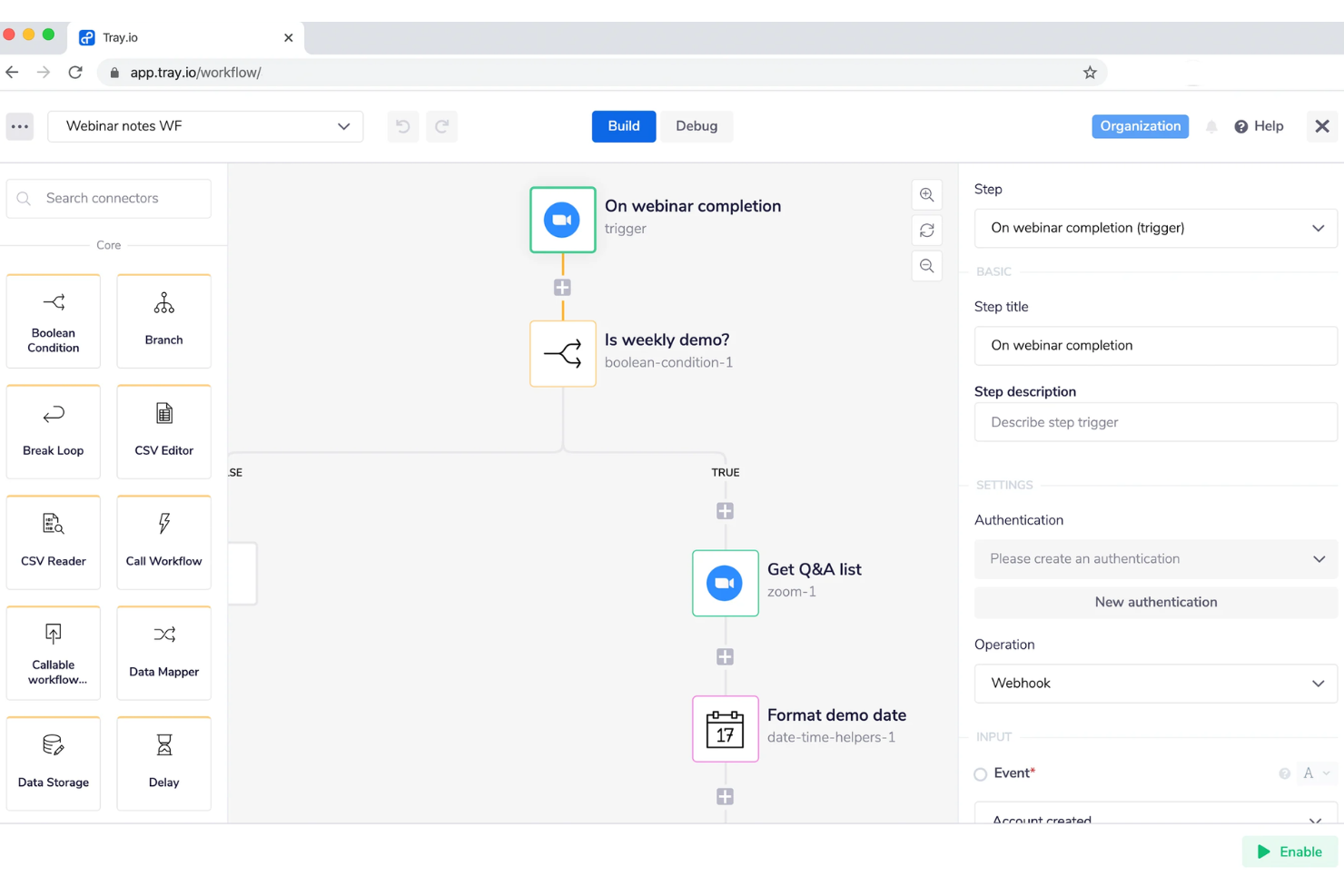
Tray.ai es una plataforma de orquestación de IA construida sobre una capa inteligente de iPaaS que conecta aplicaciones empresariales, bases de datos y servicios de IA mediante la automatización de flujos de trabajo, gestión de API y desarrollo de agentes sin código.
¿Para quién es mejor Tray.ai?
Tray.ai es ideal para equipos de producto e ingeniería de empresas medianas y grandes que necesitan integrar capacidades de integración y automatización directamente en sus propios productos de software.
Por qué elegí Tray.ai
He incluido Tray.ai en mis mejores opciones porque es una de las únicas plataformas iPaaS donde puedes incorporar capacidades de integración directamente dentro de tu propio producto. La función de integraciones embebidas permite a tus clientes conectar sus propias herramientas sin salir nunca de tu aplicación, lo que es realmente una propuesta diferente frente a las herramientas de automatización estándar. También me gusta Merlin Agent Builder, que permite a usuarios de TI y de negocio diseñar, probar y desplegar agentes de IA utilizando una interfaz sin código construida sobre la misma biblioteca de conectores que usan tus flujos de trabajo.
Principales características de Tray.ai
- Conector universal: Conéctate a cualquier endpoint de API usando un conector HTTP configurable, sin esperar a una integración preconstruida.
- Mapeo de datos y transformación digital: Transforma, filtra y reforma datos entre sistemas directamente en el constructor de flujos de trabajo usando una interfaz visual.
- Gestión de espacios de trabajo multi-tenant: Gestiona entornos de flujo de trabajo separados para diferentes clientes o unidades de negocio desde una sola consola de administración.
- Disparadores basados en eventos: Ejecuta flujos de trabajo automáticamente según webhooks, horarios o eventos de datos en tiempo real provenientes de sistemas conectados.
Integraciones de Tray.ai
Tray.ai ofrece integraciones nativas, incluyendo Salesforce, HubSpot, Slack, NetSuite, Google Sheets, Zendesk, Snowflake y Microsoft 365. Se dispone de una API para integraciones personalizadas.
Pros and Cons
Pros:
- Constructor de agentes de IA integrado con controles de seguridad
- iPaaS embebido de marca blanca en nivel empresarial
- Cumplimiento con SOC 2 Tipo II y preparado para HIPAA
Cons:
- Puede tener costos impredecibles
- Depurar flujos de trabajo con múltiples ramas es difícil

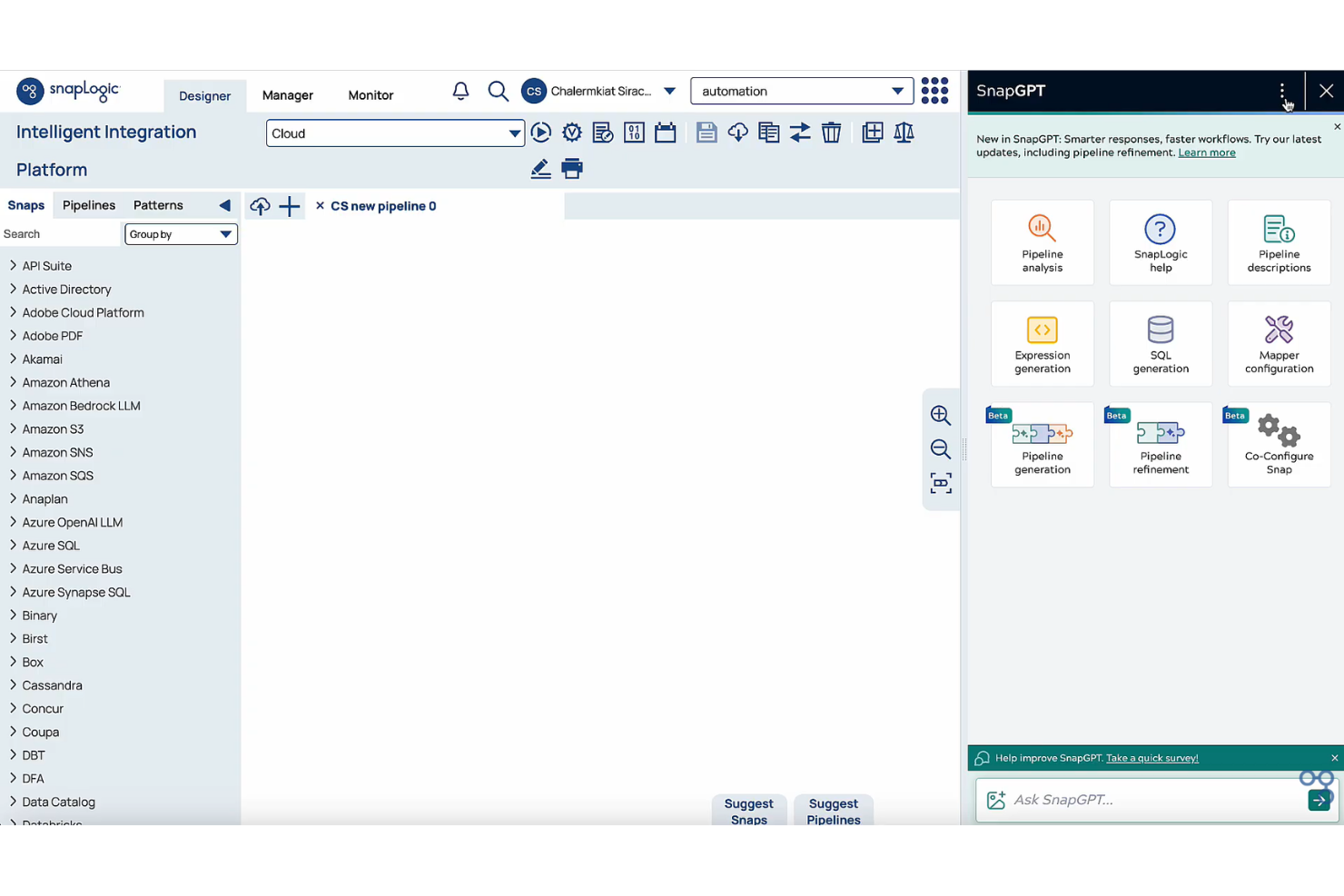
SnapLogic es una plataforma iPaaS nativa en la nube que combina integración de aplicaciones, integración de datos, gestión de API y creación de agentes de IA en un único entorno sin código o de bajo código.
¿Para quién es SnapLogic?
SnapLogic es ideal para equipos empresariales de datos e integración que necesitan conectar aplicaciones en la nube, canalizaciones de datos y flujos de trabajo de IA sin una gran implicación de desarrolladores.
Por qué elegí SnapLogic
Incluí SnapLogic en mi lista destacada gracias a AgentCreator, su entorno sin código para crear y desplegar agentes de IA que pueden automatizar flujos de trabajo complejos entre sistemas conectados sin necesidad de escribir código. También me gusta que SnapGPT permite describir una integración en lenguaje natural y genera una canalización funcional a partir de esa descripción. Juntas, estas dos capacidades hacen que SnapLogic sea realmente diferente de otras plataformas iPaaS que solo agregan IA a un constructor de flujos de trabajo ya existente como si fuera una idea secundaria.
Características clave de SnapLogic
- AutoSync: Automatiza la ingestión de datos desde aplicaciones SaaS directamente a almacenes de datos en la nube sin necesidad de configurar canalizaciones manualmente.
- SLIM: Identifica y migra integraciones desde plataformas heredadas analizando los flujos de trabajo existentes y sugiriendo rutas óptimas de migración.
- Gestión de API: Permite crear, gestionar y asegurar API con un Policy Studio visual, un centro para desarrolladores y controles de gobernanza integrados.
- AutoPrep: Limpia, normaliza y transforma datos en bruto para su uso en canalizaciones o flujos de trabajo de IA sin tener que escribir código de transformación.
Integraciones de SnapLogic
SnapLogic ofrece integraciones nativas con Salesforce, Workday, NetSuite, Snowflake, ServiceNow, SAP, Google BigQuery, Databricks y Slack. Hay una API disponible para integraciones personalizadas.
Pros and Cons
Pros:
- SnapGPT genera canalizaciones a partir de lenguaje natural
- Groundplex autohospedado para procesamiento local
- Las plantillas reutilizables de canalizaciones aceleran la creación
Cons:
- Persisten carencias en control de versiones y CI/CD
- Ocasionalmente sugiere funciones que no existen
Otras soluciones iPaaS
Estos son algunos proveedores adicionales de iPaaS que no llegaron a mi selección, pero que aún merece la pena consultar:
- Jitterbit
Ideal para implementaciones empresariales rápidas
- SAP Integration Suite
Ideal para conectar entornos centrados en SAP
- Informatica IDMC
Mejor para calidad y catalogación de datos
- APPSeCONNECT
Ideal para medianas empresas centradas en ERP


Cómo evalúo las soluciones iPaaS
Divido mi evaluación en dos capas: las capacidades básicas que una herramienta debe tener para calificar—como sincronizar Jira con Salesforce—y los diferenciadores que separan las opciones sólidas del resto.
Funcionalidad principal (requisitos básicos para esta lista)
Cuando selecciono herramientas para mi lista, califico cada una en una escala de 0 (no ofrece la funcionalidad) a 5 (destaca en esta área) para cada funcionalidad principal listada a continuación. Luego, calculo el puntaje total de la herramienta en porcentaje. Cada herramienta necesita alcanzar un puntaje mínimo total del 65% para ser considerada para incluirse.
- Biblioteca de conectores preconstruidos: Verifico cuántos conectores vienen listos para usar y si herramientas clave de gestión de proyectos como Jira, Asana, Monday y Smartsheet están cubiertas de forma nativa.
- Motor de automatización de flujos de trabajo: Aquí son importantes los flujos de trabajo de múltiples pasos y condicionales—como crear automáticamente un ticket en Jira cuando se cierra un acuerdo en Salesforce y notificar en Slack.
- Mapeo y transformación de datos: Evalúo si la herramienta soporta mapeo a nivel de campo y conversión de formato, como la sincronización de campos personalizados entre ClickUp y HubSpot.
- Sincronización en tiempo real y por lotes: Deben estar disponibles tanto los desencadenantes basados en eventos como las ejecuciones programadas por lotes, de modo que los equipos puedan ajustar la frecuencia de sincronización según la urgencia de cada flujo de trabajo.
- Herramientas de gestión de API: Busco la capacidad de construir, exponer y asegurar endpoints API personalizados para los casos en que aún no existe un conector nativo.
- Monitoreo y manejo de errores: Lo que evalúo son paneles, alertas y lógica automática de reintentos—especialmente para flujos de alto volumen donde una falla silenciosa puede detener un sprint.
Una vez que tengo una lista de herramientas que cumplen con los criterios, considero qué distingue a cada plataforma.
Factores diferenciadores (qué distingue a los proveedores)
Así es como comparo y contrasto diferentes proveedores:
Características destacadas
Un generador de flujos de baja o nula programación es importante para los equipos de PMO que desean conectar Asana a su sistema financiero sin solicitar ayuda de desarrollo. La sincronización bidireccional es otra característica que evalúo cuidadosamente—mantener el estado de las tareas reflejado entre herramientas como Jira y Monday sin crear duplicados ahorra horas de limpieza manual. Las plantillas preconstruidas para escenarios comunes de gestión de proyectos, como sincronizar la etapa de una oportunidad en un CRM con un flujo de inicio de proyecto, pueden reducir el tiempo de configuración de días a minutos.
Más allá de las características
La transparencia en los precios es algo que siempre reviso—los proveedores de iPaaS estructuran los costos según conectores, volumen de tareas o transferencia de datos, y las sorpresas a gran escala pueden exceder el presupuesto de un PMO. La postura de seguridad y cumplimiento también recibe especial atención, especialmente las certificaciones SOC 2 y GDPR, ya que los datos de los proyectos suelen fluir entre sistemas que contienen información sensible de clientes o del personal. También evalúo el soporte de onboarding y la calidad de la documentación, porque incluso la mejor plataforma frena su adopción si tu equipo no puede avanzar por sí mismo tras la configuración inicial.
Cómo elegir soluciones iPaaS
Es fácil perderse entre largas listas de funciones y complejas estructuras de precios de las soluciones de integración. Para ayudarte a mantener la atención mientras avanzas en tu proceso único de selección de software, aquí tienes una lista de factores que debes tener en cuenta:
| Factor | Qué debes tener en cuenta |
|---|---|
| Escalabilidad | ¿Puede la plataforma gestionar un aumento de usuarios, volúmenes de datos y complejidad de las automatizaciones a medida que crece tu empresa? Comprueba que existan límites transparentes y opciones de actualización. |
| Integraciones | ¿La herramienta es compatible de forma nativa con las aplicaciones y sistemas de los que dependen tus flujos de trabajo? ¿Hay conexiones de API personalizadas disponibles si la integración directa no aparece en la lista? |
| Personalización | ¿Puedes adaptar los flujos de trabajo, los campos y la lógica de automatización para que se ajusten al proceso único de tu organización? ¿Son suficientemente flexibles las opciones de lógica y asignación de datos? |
| Facilidad de uso | ¿Es fácil crear, modificar y supervisar los flujos de trabajo sin conocimientos técnicos avanzados? Solicita una demostración en directo para comprobar si tu equipo se siente cómodo con la interfaz. |
| Implementación e incorporación | ¿Qué recursos, tiempo y conocimientos se necesitan para poner en marcha tus automatizaciones? ¿Hay asistencia práctica, documentación o un especialista disponible para ayudarte durante la incorporación? |
| Coste | ¿Cómo se estructuran los niveles de precios en función de las tareas, los usuarios o las integraciones? Comprueba dos veces si existen cargos por exceso de uso, costes por conexión o limitaciones en los planes de prueba/gratuitos. |
| Medidas de seguridad | ¿Qué controles existen para los permisos de los usuarios, el cifrado de datos y los registros de auditoría? Asegúrate de que cumple tus políticas y comprueba si cuenta con certificaciones de seguridad independientes. |
| Disponibilidad del soporte | ¿Qué canales (correo electrónico, chat, teléfono) y tiempos de respuesta puedes esperar? ¿Se ofrece soporte durante tu horario laboral y en tu región? |
¿Qué son las soluciones iPaaS?
Las soluciones iPaaS (Integration Platform as a Service) son plataformas basadas en la nube que conectan, automatizan y gestionan los flujos de datos entre distintas aplicaciones o sistemas. Permiten que tu equipo cree y mantenga integraciones sin necesidad de un desarrollo personalizado, lo que facilita la orquestación de flujos de trabajo y la coherencia de los datos entre herramientas. La mayoría de las plataformas iPaaS admiten integraciones tanto para aplicaciones locales como basadas en la nube, lo que permite unas operaciones más fluidas a medida que tu empresa crece y cambia.
Características de las soluciones iPaaS
Al seleccionar soluciones iPaaS, presta atención a las siguientes características clave:
- Conectores prediseñados: Integra aplicaciones populares en la nube y locales mediante una biblioteca de conectores listos para usar, reduciendo el tiempo de configuración y los requisitos de programación.
- Constructor visual de flujos de trabajo: Diseña, asigna y automatiza flujos de trabajo empresariales complejos mediante una interfaz intuitiva de arrastrar y soltar con rutas lógicas claras.
- Herramientas de transformación de datos: Manipula, limpia y modifica datos entre sistemas para adaptarlos a los requisitos de formato de cada aplicación sin gestionar los datos manualmente.
- Sincronización en tiempo real: Mantén los datos actualizados al instante en todas las aplicaciones, garantizando que tu equipo trabaje siempre con la información más reciente.
- Supervisión y alertas de errores: Realiza un seguimiento en tiempo real de los fallos o problemas de tus integraciones, recibe notificaciones y soluciona rápidamente los problemas para minimizar el tiempo de inactividad.
- Controles de acceso basados en roles: Asigna permisos y gestiona quién puede ver, modificar o implementar integraciones en la nube para mantener tus sistemas seguros y garantizar el cumplimiento normativo.
- Gestión de API: Permite integraciones personalizadas y gestiona de forma segura las llamadas a API, la autenticación y los límites de uso desde una ubicación central.
- Compatibilidad con múltiples inquilinos: Permite separar las integraciones y los datos de distintos equipos o filiales dentro de la misma plataforma, dando soporte a organizaciones más grandes.
- Registros de auditoría: Mantén registros detallados de toda la actividad de los flujos de trabajo, los cambios y las acciones de los usuarios con fines de cumplimiento normativo y resolución de problemas.
Funciones de IA habituales de las soluciones iPaaS
Además de las funciones estándar de las soluciones iPaaS mencionadas anteriormente, muchas de estas soluciones están incorporando IA con funciones como:
- Asignación inteligente de datos: Utiliza IA para detectar, asociar y asignar automáticamente campos de datos entre distintos sistemas, reduciendo la configuración manual y acelerando la puesta en marcha de las integraciones.
- Detección automatizada de anomalías: Supervisa continuamente los flujos de datos y los flujos de trabajo mediante IA para detectar patrones inusuales y señalar rápidamente problemas que podrían indicar errores de integración o amenazas de seguridad.
- Optimización predictiva de flujos de trabajo: Analiza el rendimiento de los flujos de trabajo y los patrones de uso a lo largo del tiempo para sugerir mejoras, ayudando a los equipos a perfeccionar proactivamente las automatizaciones para lograr una mayor fiabilidad o eficiencia.
- Constructor de integraciones mediante lenguaje natural: Permite a los usuarios describir las integraciones deseadas en lenguaje sencillo y, a continuación, utiliza IA para generar flujos de trabajo o pasos de automatización, simplificando la configuración para los miembros del equipo sin conocimientos técnicos.
- Automatizaciones autorreparables: Utiliza IA para resolver automáticamente errores habituales de los flujos de trabajo o transferencias de datos fallidas sin intervención humana, minimizando el tiempo de inactividad y la resolución manual de problemas.
Ventajas de las soluciones iPaaS
La implementación de soluciones iPaaS ofrece varias ventajas para tu equipo y tu empresa. Estas son algunas de las que puedes esperar:
- Integraciones simplificadas: Centraliza todos tus flujos de datos y conexiones de sistemas en una sola plataforma, reduciendo la dependencia del código personalizado y de los procesos de integración manuales.
- Implementación más rápida de automatizaciones: Pon en marcha y mantén los flujos de trabajo de forma eficiente mediante constructores visuales y conectores prediseñados, para que tu equipo pueda responder rápidamente a las necesidades cambiantes.
- Coherencia de los datos en tiempo real: Mantén la información sincronizada en todas tus aplicaciones y bases de datos, garantizando que todos trabajen con la información más precisa y actualizada.
- Mayor escalabilidad: Adapta las capacidades de automatización e integración a medida que evolucionan las necesidades empresariales, sin estar limitado por la infraestructura o las cargas de trabajo manuales.
- Mayor visibilidad de los procesos: Utiliza paneles de gestión y registros de auditoría para realizar un seguimiento del estado de los flujos de trabajo, supervisar el rendimiento e identificar problemas antes de que provoquen interrupciones empresariales.
- Mayor seguridad y cumplimiento normativo: Aplica controles basados en roles, cifrado y seguimiento de la actividad de los usuarios para dar soporte a los equipos de TI, las políticas y los requisitos normativos.
- Mejor gestión de errores: Detecta, alerta y resuelve automáticamente los fallos de integración, ayudando a tu equipo a mantener los procesos empresariales ininterrumpidos.
Costes y precios de las soluciones iPaaS
Seleccionar soluciones iPaaS requiere comprender los diversos modelos de precios y planes disponibles. Los costes varían en función de las características, el tamaño del equipo, los complementos y otros factores. La tabla siguiente resume los planes habituales, sus precios medios y las características que suelen incluir las soluciones iPaaS:
Tabla comparativa de planes para soluciones iPaaS
| Tipo de plan | Precio medio | Características habituales |
|---|---|---|
| Plan gratuito | $0 | Conectores prediseñados limitados, automatización básica de flujos de trabajo, asistencia de la comunidad y volumen de datos limitado. |
| Plan personal | $20-$50/usuario/mes | Más conectores, creador visual de flujos de trabajo, límites de tareas moderados, asistencia por correo electrónico e informes sencillos. |
| Plan empresarial | $60-$150/usuario/mes | Integraciones avanzadas, transformación de datos, gestión de errores, sincronización de datos en tiempo real, acceso a API y permisos basados en roles. |
| Plan empresarial avanzado | $200-$500+/usuario/mes | Integraciones personalizadas, asistencia prioritaria, seguridad avanzada, registros de auditoría, controles de escalabilidad y multiarrendamiento. |
Preguntas frecuentes sobre las soluciones iPaaS
Estas son algunas respuestas a preguntas habituales sobre las soluciones iPaaS:
¿Cómo gestionan las soluciones iPaaS la seguridad de los datos?
Las soluciones PaaS suelen utilizar cifrado, controles de acceso y certificaciones de cumplimiento para proteger tus datos durante las transferencias y mientras están almacenados. La mayoría de las plataformas también ofrecen registros de auditoría y permisos basados en roles, de modo que tu equipo pueda supervisar la actividad y controlar quién tiene acceso a la información confidencial.
¿Pueden las soluciones iPaaS conectar sistemas en la nube y locales?
Sí, la mayoría de las soluciones iPaaS están diseñadas para conectar software basado en la nube con sistemas locales. Esto permite a tu equipo automatizar flujos de trabajo y compartir datos entre sistemas heredados y aplicaciones modernas en la nube sin depender de importaciones o exportaciones manuales, lo que reduce los silos de datos.
¿Cuáles son las principales diferencias entre iPaaS y la integración tradicional?
iPaaS está basada en la nube e incluye conectores prediseñados, creadores visuales y una gestión simplificada, lo que permite implementarla más rápidamente y facilita su mantenimiento frente a las integraciones personalizadas tradicionales. Los enfoques más antiguos suelen requerir una cantidad considerable de programación y gestión de la infraestructura, mientras que las plataformas iPaaS reducen la complejidad y el mantenimiento continuo.
¿Cómo ayudan las soluciones iPaaS a escalar a medida que crece mi empresa?
Las soluciones iPaaS ofrecen niveles de precios escalables, flujos de trabajo personalizables y la posibilidad de añadir usuarios y conectores a medida que evolucionan tus necesidades. Muchas plataformas también proporcionan automatización para tareas repetitivas y límites de recursos que puedes ajustar para adaptarlos a un mayor volumen de datos o a requisitos de integración adicionales.
¿Las soluciones iPaaS requieren conocimientos de programación?
No, la mayoría de las soluciones iPaaS ofrecen interfaces sin código o de bajo código para que cualquier persona de tu equipo pueda configurar integraciones y automatizaciones. Sin embargo, contar con conocimientos técnicos puede ser útil al crear flujos de trabajo avanzados o personalizados, especialmente si necesitas conectar aplicaciones específicas mediante API.