

10 mejores alternativas a RescueTime para la productividad en 2026

Lista de las mejores alternativas a RescueTime


Como gestor de proyectos, sabes que hacer un seguimiento del tiempo y la productividad es esencial para el éxito de tu equipo. Pero quizá hayas descubierto que RescueTime no satisface del todo tus necesidades. Ya sea porque le faltan funciones, porque sus opciones de personalización son limitadas o simplemente porque no se adapta a tu flujo de trabajo, no eres la única persona que busca alternativas.
Por mi experiencia probando y analizando software, he comprobado que elegir la herramienta adecuada puede marcar la diferencia. Necesitas una solución que se alinee con tus objetivos empresariales y responda a tus desafíos específicos.
En este artículo, compartiré mis principales alternativas a RescueTime. Te ofreceré una visión imparcial de cada opción para que puedas encontrar la que mejor se adapte a tu equipo. Analicemos algunas soluciones de seguimiento del tiempo que pueden ayudarte a gestionar tus proyectos de forma más eficaz.
¿Qué es RescueTime?
RescueTime es un software de seguimiento del tiempo y productividad que te ayuda a supervisar cómo empleas tus horas de trabajo. Lo utilizan profesionales independientes, trabajadores remotos y equipos que buscan mejorar su productividad. Proporciona información sobre tus hábitos diarios, lo que te permite tomar decisiones fundamentadas sobre la gestión del tiempo.
Funciones como el seguimiento automático del tiempo, los informes detallados y el establecimiento de objetivos ayudan a comprender tus patrones de trabajo y mejorar la eficiencia. En general, RescueTime ofrece datos valiosos para optimizar tu jornada laboral y aumentar tu productividad.
Tabla comparativa de alternativas a RescueTime
Esta tabla comparativa resume los detalles de precios de mis principales alternativas seleccionadas a RescueTime:
| Tool | Best For | Trial Info | Price | ||
|---|---|---|---|---|---|
| 1 | Ideal para la facturación y la atribución del tiempo a los proyectos | Prueba gratuita de 14 días | Desde $3.99/usuario/mes (facturado anualmente) | Website | |
| 2 | La mejor opción para el registro del tiempo de equipos multiplataforma | Plan gratuito + prueba gratuita de 7 días disponible | Desde $3.99/usuario/mes (facturado anualmente) | Website | |
| 3 | Ideal para el registro automático del tiempo | Prueba gratuita de 14 días + demostración gratuita disponible | Desde $9/usuario/mes (facturado anualmente) | Website | |
| 4 | Ideal para el seguimiento del tiempo con un solo clic | Prueba gratuita de 14 días + plan gratuito + demostración gratuita disponible | Desde $3.99/usuario/mes (facturado anualmente) | Website | |
| 5 | Ideal para la elaboración de presupuestos y los informes | Plan gratuito disponible | Desde $8.50/usuario/mes (facturado anualmente) | Website | |
| 6 | Ideal para un seguimiento detallado de la jornada laboral | Plan gratuito disponible + prueba gratuita de 14 días | Desde 5.83 $/usuario/mes (facturado anualmente) | Website | |
| 7 | La mejor opción para la productividad de equipos remotos | Prueba gratuita de 14 días + demostración gratuita disponible | Desde $6.67/usuario/mes (facturado anualmente) | Website | |
| 8 | Ideal para el seguimiento privado del tiempo | Prueba gratuita de 14 días | Desde $14/mes (facturado anualmente) | Website | |
| 9 | Ideal para profesionales independientes y agencias | Prueba gratuita de 7 días | Desde $9/user/month (facturado anualmente) | Website | |
| 10 | Ideal para la facturación integrada | Prueba gratuita de 30 días + plan gratuito + demostración gratuita disponible | Desde $9/usuario/mes (facturado anualmente) | Website |

Por qué confiar en nuestras recomendaciones de software
Nuestro equipo lleva probando y evaluando software desde 2012. Como gestores de proyectos, sabemos lo difícil —y lo importante— que es elegir el software adecuado.
Para esta guía, evaluamos las herramientas mediante pruebas prácticas e investigación independiente, puntuando las herramientas según nuestros criterios de selección. También nos basamos en la experiencia de líderes de opinión del sector y de profesionales en activo de la gestión de proyectos.
Nuestras reseñas reflejan nuestro criterio editorial humano, no un discurso de ventas.
Revisores expertos:
Análisis de las mejores alternativas a RescueTime
A continuación encontrarás mis resúmenes detallados de las mejores alternativas a RescueTime que se incluyeron en mi lista. Mis análisis ofrecen una visión detallada de las funciones principales, ventajas y desventajas, integraciones y casos de uso ideales de cada herramienta para ayudarte a encontrar la mejor opción para ti.

Ideal para la facturación y la atribución del tiempo a los proyectos
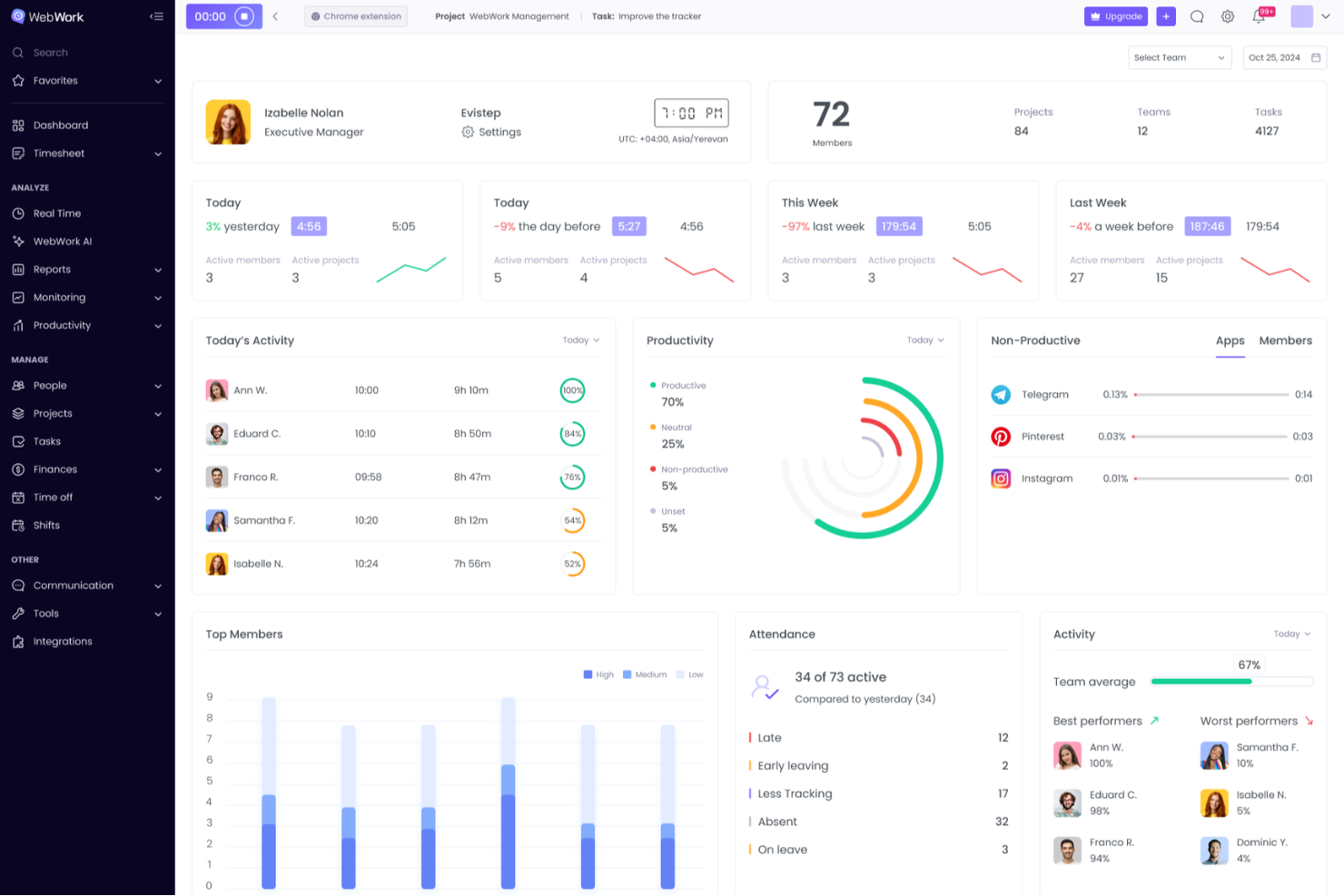
WebWork Time Tracker es un software de seguimiento del tiempo para agencias, trabajadores independientes y equipos distribuidos que necesitan una mayor visibilidad del trabajo, supervisión de proyectos y registros precisos para el trabajo de los clientes.
¿Para quién es más adecuado WebWork Time Tracker?
WebWork Time Tracker es adecuado para agencias, trabajadores independientes y equipos distribuidos que necesitan registrar con precisión las horas facturables asociadas a proyectos de clientes.
Por qué elegí WebWork Time Tracker: una buena alternativa a RescueTime revisada
Elegí WebWork Time Tracker por su enfoque en la facturación y la atribución del tiempo a los proyectos. Utilizo temporizadores basados en proyectos, tarifas facturables e informes detallados de tiempo para vincular las horas trabajadas con entregables específicos de los clientes. Esto ayuda a mi equipo a separar la actividad facturable de la no facturable antes de preparar las facturas de los clientes o revisar la rentabilidad de los proyectos.
Características principales de WebWork Time Tracker
- Capturas de pantalla: Realiza capturas de pantalla periódicas durante las sesiones de trabajo registradas.
- Uso de aplicaciones y sitios web: Registra el tiempo dedicado a aplicaciones y sitios web.
- Niveles de actividad: Mide la actividad del teclado y el ratón durante los periodos de trabajo.
- Seguimiento de asistencia: Registra las entradas, los descansos y las salidas.
Integraciones de WebWork Time Tracker
WebWork Time Tracker ofrece integraciones nativas con Slack, Trello, Asana, Jira, ClickUp, Teamwork, Todoist, Wrike, Zoho Projects y Bitbucket, además de Zapier. También se conecta con Make y proporciona una API y webhooks para integraciones personalizadas.
Pros and Cons
Pros:
- Las tarifas facturables vinculan las horas con los proyectos
- Los informes ayudan con la facturación de clientes y las revisiones de rentabilidad
- Las capturas de pantalla documentan la actividad durante las sesiones registradas
Cons:
- La supervisión mediante capturas de pantalla puede generar dudas sobre la privacidad
- El seguimiento de la actividad puede resultar invasivo para los empleados

Clockify
La mejor opción para el registro del tiempo de equipos multiplataforma

Clockify es un software de seguimiento del tiempo que presta servicio a trabajadores independientes, pequeñas empresas y equipos grandes mediante herramientas para registrar las horas de trabajo y gestionar proyectos. Te ayuda a supervisar la productividad, asignar recursos y generar informes.
Por qué es una buena alternativa a RescueTime: Seleccioné Clockify porque te proporciona visibilidad completa de los registros de tiempo del equipo en cualquier sistema operativo o dispositivo. Responde a las necesidades de registro del tiempo multiplataforma al ofrecer aplicaciones nativas para Windows, Mac, Linux, iOS, Android y navegadores web, con compatibilidad total con el seguimiento sin conexión. Esto garantiza que tu equipo distribuido pueda registrar las horas con precisión, supervisar el progreso de los proyectos en tiempo real y mantener las entregas a los clientes según lo previsto, independientemente del entorno operativo que prefieran.
Funciones e integraciones destacadas:
Las funciones incluyen herramientas de organización que te ayudan a categorizar y priorizar tareas de forma eficiente. Puedes establecer tarifas facturables para distintos proyectos y generar facturas basadas en las horas registradas. Clockify también ofrece un panel visual que proporciona una visión general del uso del tiempo y las tendencias de productividad.
Las integraciones incluyen Asana, Trello, Jira, QuickBooks Online, monday.com, GitHub y más.
Pros and Cons
Pros:
- Admite cinco usuarios gratuitos
- Admite equipos grandes
- Gestión flexible de proyectos
Cons:
- Personalización básica de las notificaciones
- Funciones de configuración del panel limitadas

Timely
Ideal para el registro automático del tiempo
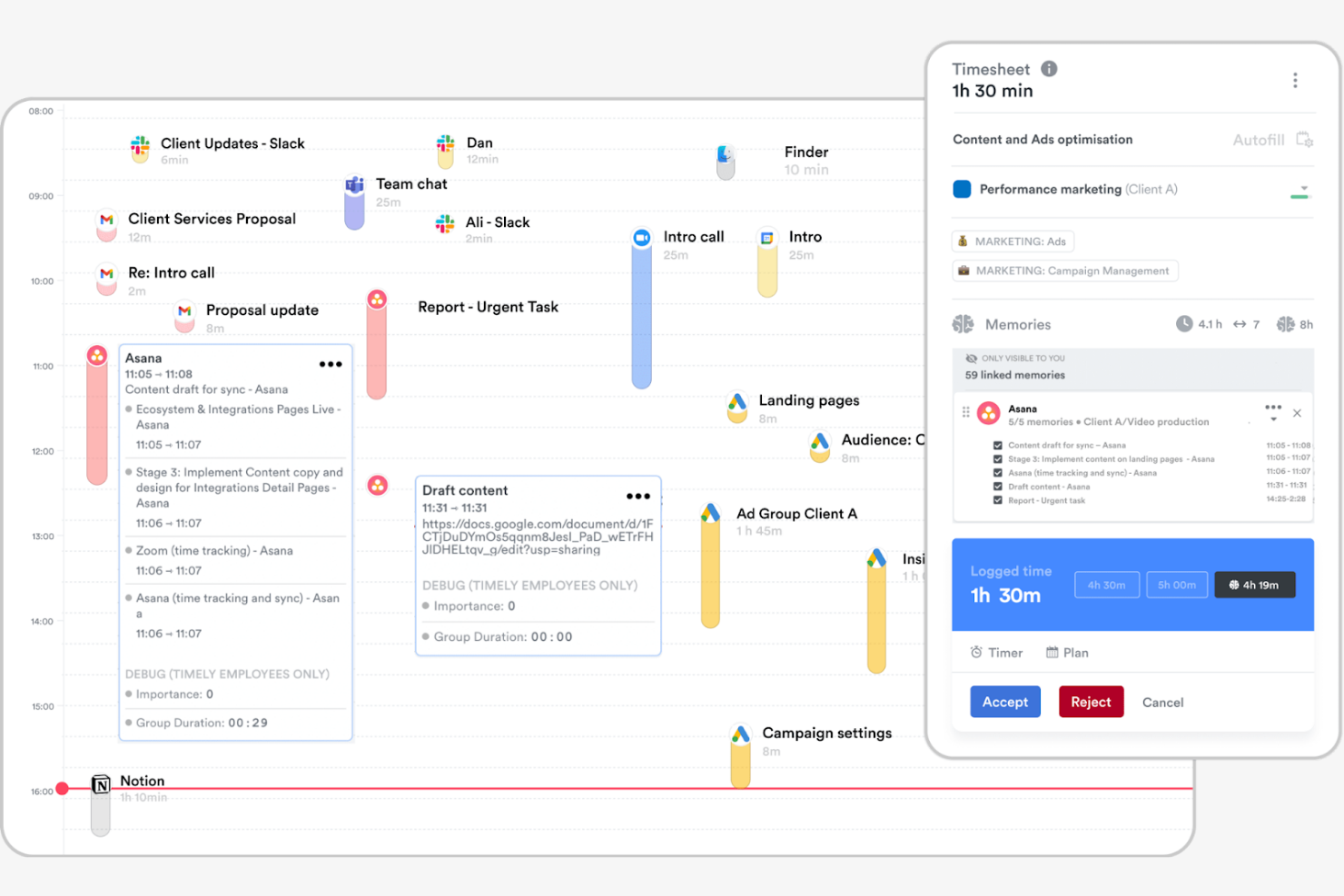
Timely es un software de seguimiento del tiempo que utiliza IA para registrar automáticamente las horas, dirigido a profesionales y equipos que priorizan un seguimiento preciso y sencillo. Puede ayudarte a gestionar proyectos, realizar un seguimiento de la productividad y asignar recursos.
Por qué es una buena alternativa a RescueTime: Timely ofrece un rastreador de memoria que registra tus actividades laborales sin necesidad de introducir datos manualmente. Esta función te ayuda a registrar todas las horas facturables y reduce el riesgo de omitir entradas. Timely también proporciona un panel de proyectos que te ayuda a comprender cómo se distribuye el tiempo entre las tareas y los proyectos. Su enfoque en la automatización y la precisión lo hace adecuado para quienes desean minimizar los esfuerzos de seguimiento manual.
Funciones e integraciones destacadas:
Las funciones incluyen cronogramas visuales de proyectos para ayudarte a organizar tareas específicas de un proyecto. La aplicación ofrece informes detallados para analizar el uso del tiempo y las tendencias de productividad. También puedes establecer presupuestos para proyectos y hacer un seguimiento del progreso en tiempo real, asegurándote de mantenerte encaminado.
Las integraciones incluyen Asana, Trello, Slack, Google Calendar, QuickBooks Online, Xero y más.
Pros and Cons
Pros:
- Seguimiento automático del tiempo con IA
- Cronogramas visuales de proyectos
- Seguimiento del presupuesto en tiempo real
Cons:
- Personalización limitada de los informes
- No ofrece funciones de dependencia entre tareas

TimeCamp
Ideal para el seguimiento del tiempo con un solo clic
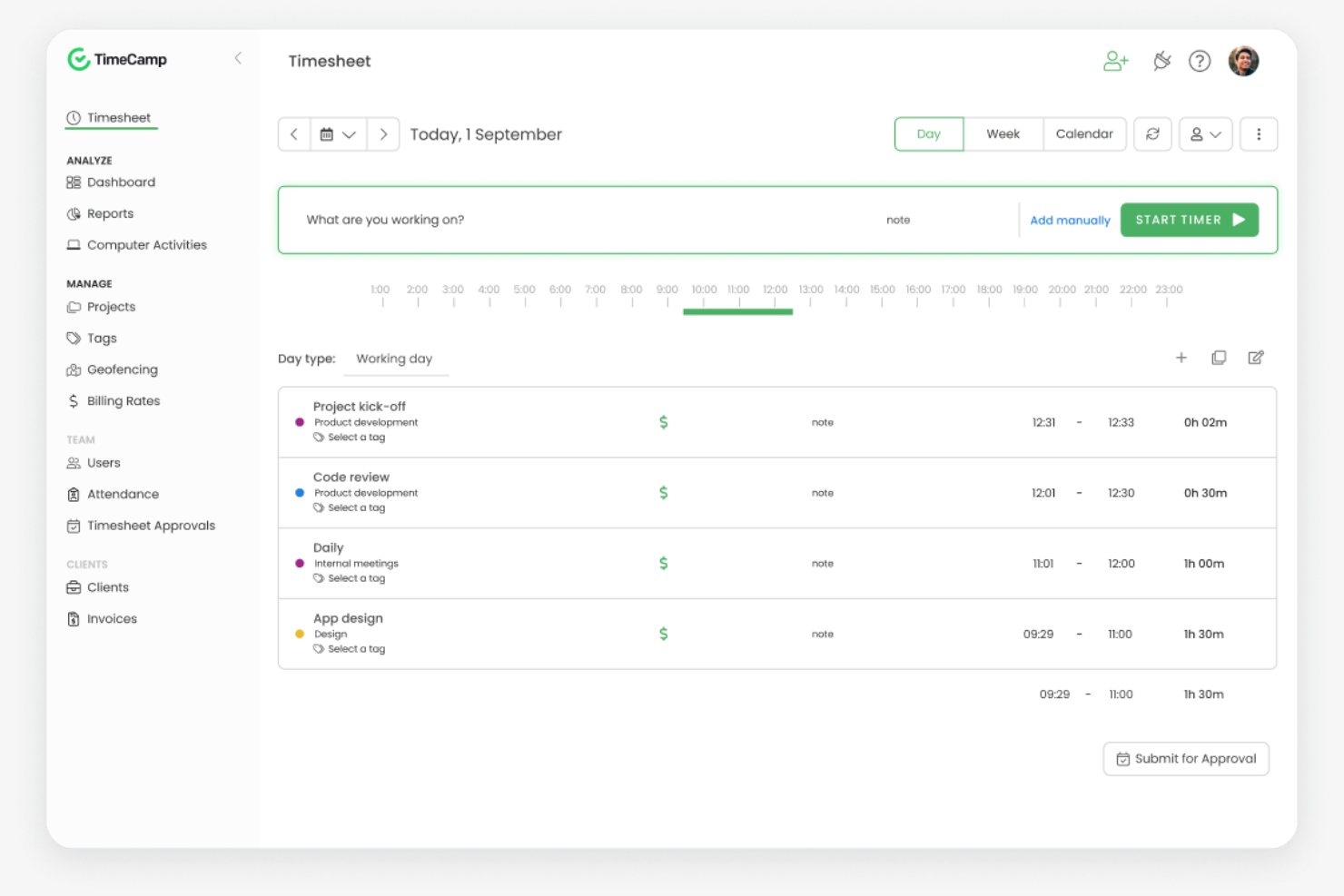
TimeCamp es un software de seguimiento del tiempo y gestión de proyectos diseñado para autónomos, pequeñas empresas y equipos grandes. Te ayuda a registrar las horas de trabajo, gestionar proyectos y analizar la productividad.
Por qué es una buena alternativa a RescueTime: TimeCamp ofrece seguimiento del tiempo con un solo clic, lo que facilita iniciar y detener los temporizadores. Proporciona un seguimiento automático del tiempo mediante la monitorización de la actividad del ordenador, lo que te ofrece información detallada sobre cómo empleas tu tiempo. También puedes generar informes detallados para analizar la productividad y el progreso de los proyectos. El enfoque de TimeCamp en la facilidad de uso y el seguimiento detallado lo convierte en una buena opción para equipos que buscan una gestión sencilla del tiempo.
Funciones e integraciones destacadas:
Las funciones incluyen plantillas de facturas personalizadas para ayudar a agilizar el proceso de facturación. Puedes establecer presupuestos para proyectos y realizar un seguimiento de los gastos para facilitar el control financiero. TimeCamp también ofrece seguimiento de la asistencia, lo que te permite supervisar la presencia de los empleados y sus ausencias.
Las integraciones incluyen Asana, Trello, Slack, Jira, QuickBooks Online, Xero, monday.com y más.
Pros and Cons
Pros:
- Seguimiento del tiempo con un solo clic
- Monitorización automática de la actividad
- Configuración y uso sencillos
Cons:
- Alertas limitadas del temporizador
- Funciones limitadas de programación de proyectos

Everhour
Ideal para la elaboración de presupuestos y los informes

Everhour es una herramienta de seguimiento del tiempo y gestión de proyectos diseñada para equipos que necesitan capacidades detalladas de elaboración de presupuestos e informes. Te ayuda a realizar un seguimiento del tiempo, gestionar presupuestos y generar hojas de horas.
Por qué es una buena alternativa a RescueTime: Everhour ofrece funciones avanzadas de elaboración de presupuestos e informes adecuadas para equipos orientados a proyectos. Puedes establecer y supervisar los presupuestos de los proyectos, asegurándote de mantenerte dentro de los límites financieros. Las herramientas de informes de Everhour proporcionan información sobre el rendimiento del equipo y el progreso de los proyectos, lo que puede ayudarte a tomar decisiones fundamentadas. Su enfoque en la gestión financiera la convierte en una buena opción para equipos que necesitan soluciones integrales de elaboración de presupuestos.
Funciones e integraciones destacadas:
Las funciones incluyen la generación de facturas a partir del tiempo registrado para ayudar a agilizar los procesos de facturación y cálculos de PTO que muestran cuánto tiempo han acumulado los miembros del equipo. Puedes realizar un seguimiento de los costes y las tarifas facturables de distintos proyectos y tareas para gestionar las diversas necesidades de los clientes. Everhour también ofrece un panel visual que proporciona una visión general del uso del tiempo y del estado del presupuesto.
Las integraciones incluyen Asana, Trello, Jira, Slack, Basecamp, GitHub, ClickUp y más.
Pros and Cons
Pros:
- Compatible con equipos orientados a proyectos
- Ayuda a gestionar los límites financieros
- Panel visual para el uso del tiempo
Cons:
- No ofrece seguimiento por GPS ni de ubicación
- Alertas básicas sobre el presupuesto de los proyectos

TMetric
Ideal para un seguimiento detallado de la jornada laboral

TMetric es un software de seguimiento del tiempo diseñado para autónomos, pequeñas empresas y equipos grandes, que permite gestionar las horas de trabajo y la productividad. Ayuda a realizar un seguimiento del tiempo, gestionar proyectos y generar informes detallados.
Por qué es una buena alternativa a RescueTime: TMetric ofrece un seguimiento detallado de la jornada laboral con funciones como el registro del tiempo facturable y la gestión de tareas. Puedes gestionar fácilmente las horas de trabajo de tu equipo y asignar tareas, lo que proporciona visibilidad sobre el progreso de los proyectos. Las capacidades de generación de informes de TMetric te permiten analizar la productividad y respaldar la toma de decisiones fundamentadas.
Funciones e integraciones destacadas:
Las funciones incluyen herramientas de presupuestación de proyectos y supervisión de gastos para respaldar la gestión financiera. TMetric también ofrece seguimiento de la asistencia, lo que te permite supervisar la presencia de los empleados y gestionar las ausencias, así como un panel de productividad del equipo que puede ayudarte a optimizar la asignación de cargas de trabajo.
Las integraciones incluyen Asana, Trello, Jira, Slack, QuickBooks Online, GitHub, monday.com y más.
Pros and Cons
Pros:
- Seguimiento detallado de la jornada laboral
- Admite la gestión de tareas
- Flexible para equipos de distintos tamaños
Cons:
- Carece de análisis avanzados
- Modo sin conexión limitado

La mejor opción para la productividad de equipos remotos

Time Doctor es un software de seguimiento del tiempo y productividad diseñado para equipos remotos y empresas que buscan mejorar la productividad y la responsabilidad. Puede ayudarte a supervisar las horas de trabajo, gestionar tareas y analizar la productividad.
Por qué es una buena alternativa a RescueTime: Time Doctor ofrece funciones detalladas de supervisión de empleados, incluidas capturas de pantalla y seguimiento de la actividad, que te ayudan a supervisar el rendimiento del equipo remoto. Puedes realizar un seguimiento del tiempo dedicado a los proyectos y establecer objetivos de productividad, lo que permite una mejor gestión de la carga de trabajo.
Funciones e integraciones destacadas:
Las funciones incluyen alertas de distracción para mantener a tu equipo concentrado, notificándoles cuando se desvían de sus tareas. El software también ofrece gestión de nóminas, lo que facilita gestionar los pagos en función de las horas registradas.
Las integraciones incluyen Asana, Trello, Jira, Salesforce, Basecamp, GitHub y más.
Pros and Cons
Pros:
- Las alertas de distracción mejoran la concentración
- Permite establecer objetivos de productividad
- Funciones de gestión de nóminas
Cons:
- Herramientas limitadas de programación basadas en turnos
- El panel puede resultar abrumador por la cantidad de datos

Memtime
Ideal para el seguimiento privado del tiempo

Memtime es un software de seguimiento del tiempo diseñado para profesionales y equipos que desean registrar las horas de trabajo sin introducir datos manualmente. Te ayuda a realizar un seguimiento automático del tiempo y a analizar la productividad.
Por qué es una buena alternativa a RescueTime: Memtime se centra en la captura automática del tiempo, eliminando la necesidad de introducir datos manualmente. Se ejecuta en segundo plano mientras registra tus actividades y el tiempo que pasas en los programas, y luego genera informes detallados que ofrecen información sobre cómo empleas tu tiempo.
Funciones e integraciones destacadas:
Las funciones incluyen el seguimiento pasivo del tiempo, que registra tus actividades mientras trabajas. Puedes generar hojas de horas personalizadas con datos históricos ilimitados para comprender tus patrones de productividad e identificar áreas de mejora.
Las integraciones incluyen Google Calendar, Microsoft Teams, Asana, Jira Cloud, ClickUp y más.
Pros and Cons
Pros:
- Captura pasiva del tiempo
- Amplia cobertura de integraciones
- Sistema sencillo de exportación de informes
Cons:
- Integración limitada con proyectos
- Formato de exportación básico

Bonsai
Ideal para profesionales independientes y agencias

Bonsai es una herramienta integral de gestión empresarial que ayuda con contratos, propuestas, seguimiento del tiempo y facturación. Está diseñada para profesionales independientes y agencias que buscan optimizar sus flujos de trabajo y gestionar proyectos de manera eficiente.
Por qué es una buena alternativa a RescueTime: Bonsai ofrece herramientas integrales para gestionar las relaciones con los clientes, incluidas plantillas de contratos y creación de propuestas. Proporciona facturación y procesamiento de pagos integrados, lo que facilita la gestión de cobros. La función de seguimiento del tiempo de Bonsai permite registrar las horas facturables y generar hojas de horas.
Funciones e integraciones destacadas:
Las funciones incluyen recordatorios automáticos para ayudarte a hacer un seguimiento de los plazos y las comunicaciones con los clientes. Puedes crear y personalizar plantillas para formularios, presupuestos y facturas, lo que puede ahorrarte tiempo en el papeleo. Bonsai también ofrece funciones de kanban, Gantt y calendario que te permiten hacer un seguimiento de los plazos de los proyectos.
Las integraciones incluyen QuickBooks Online, Zapier, Calendly, Xero, HiBob y más.
Pros and Cons
Pros:
- Compatible con profesionales independientes y agencias
- Funciones versátiles de gestión de tareas
- Plantillas de documentos personalizables
Cons:
- Gestión avanzada de proyectos limitada
- No admite dependencias entre tareas

Harvest
Ideal para la facturación integrada

Harvest es un software de seguimiento del tiempo y facturación dirigido a trabajadores independientes, pequeñas empresas y equipos que buscan gestionar proyectos y facturación. Puede ayudarte a realizar un seguimiento del tiempo, generar facturas y analizar los costos de los proyectos.
Por qué es una buena alternativa a RescueTime: Harvest ofrece facturación integrada, lo que simplifica el proceso de facturación al permitirte crear y enviar facturas directamente desde las entradas de tiempo registradas. Harvest también proporciona informes para analizar la rentabilidad de los proyectos, lo que te ayuda a tomar decisiones financieras fundamentadas.
Características e integraciones destacadas:
Las características incluyen el seguimiento de gastos para registrar los costos de los proyectos y generar facturas precisas. Puedes establecer presupuestos para los proyectos y hacer un seguimiento del progreso en tiempo real, asegurándote de mantenerte dentro de los límites financieros.
Las integraciones incluyen Asana, Slack, QuickBooks Online, Xero, Trello, Basecamp y más.
Pros and Cons
Pros:
- Función de facturación integrada
- Funciones de seguimiento de gastos
- Análisis sencillo de los costos de los proyectos
Cons:
- Herramientas limitadas de gestión avanzada de proyectos
- Registros limitados de la actividad del equipo
Otras alternativas a RescueTime
Estas son algunas alternativas adicionales a RescueTime que no se incluyeron en mi lista, pero que merece la pena conocer:
- Rize
Ideal para la concentración y el análisis de productividad
- Toggl
Ideal para un seguimiento intuitivo del tiempo
- Connecteam
Ideal para la gestión de equipos móviles
- EARLY
Ideal para el ecosistema de integración


Cómo evalúo las alternativas a RescueTime
Analizo estas herramientas en dos niveles: los requisitos básicos—como el seguimiento pasivo de aplicaciones y la atribución de proyectos—que permiten incluir una herramienta en la lista, y los factores diferenciadores que las distinguen.
Funcionalidad principal (requisitos básicos para esta lista)
Al seleccionar herramientas para mi lista, califico cada una en una escala de 0 (no ofrece la funcionalidad) a 5 (sobresale en este aspecto) para cada funcionalidad principal que se indica a continuación. Después, convierto la puntuación total de la herramienta en un porcentaje. Cada herramienta debe alcanzar una puntuación total mínima del 65% para ser considerada para su inclusión.
- Seguimiento automático del tiempo: Compruebo si la herramienta registra pasivamente el uso de aplicaciones, sitios web y documentos, de modo que un responsable de proyectos que revise su día vea datos reales, no lo que recuerda haber hecho.
- Clasificación de la productividad: Cada herramienta debería permitir clasificar las actividades como productivas o distractoras y ajustar esas etiquetas según el rol, ya que Slack puede ser fundamental para un equipo y una distracción para otro.
- Atribución de proyectos y tareas: Evalúo cómo se asigna el tiempo registrado a proyectos o clientes específicos, algo especialmente importante para consultores y equipos de agencias que concilian las horas con los entregables.
- Paneles de informes y análisis: Los informes deben mostrar tendencias tanto a nivel individual como de equipo, como los patrones semanales de tiempo de concentración o los desgloses del tiempo por proyecto que los responsables de proyectos presentan realmente a la dirección.
- Gestión de distracciones y concentración: Busco herramientas integradas, como bloqueadores de sitios, sesiones de concentración o alertas de recordatorio, que ayuden a los colaboradores a proteger sus periodos de trabajo profundo durante el día.
- Visibilidad para equipos y varios usuarios: Los paneles para responsables con acceso basado en roles son importantes en este caso, especialmente para los líderes de equipos remotos que necesitan vistas agregadas sin cruzar la línea hacia la vigilancia.
Una vez que tengo una lista de herramientas que cumplen estos criterios, considero qué distingue a cada plataforma.
Factores diferenciadores (qué distingue a los proveedores)
Así es como comparo y contrasto distintos proveedores:
Funciones destacadas
La integración con el calendario es muy importante para mí: quiero ver las reuniones de Google u Outlook superpuestas al tiempo registrado, para que los responsables de proyectos puedan conciliar las horas programadas con el trabajo profundo real. Las sugerencias de hojas de horas basadas en IA también destacan, especialmente para los consultores que, de otro modo, pasarían las tardes de los viernes redactando manualmente las entradas semanales basándose en la memoria. También evalúo las funciones de establecimiento de objetivos y busco herramientas que permitan definir objetivos diarios de concentración y enviar alertas cuando la tendencia indique que se están desviando del rumbo.
Más allá de las funciones
Compruebo hasta qué punto se conecta cada herramienta con plataformas de gestión de proyectos como Jira, Asana o ClickUp, porque el tiempo registrado solo es útil si vuelve a las herramientas en las que el equipo ya gestiona el trabajo. Los controles de privacidad son igual de importantes. Implementar una herramienta de seguimiento en un equipo distribuido resulta más sencillo cuando los colaboradores pueden ver sus propios datos y pausar el seguimiento durante su tiempo personal. También evalúo las estructuras de precios y busco modelos por puesto que escalen de forma predecible a medida que la oficina de gestión de proyectos o la agencia crece de un puñado de colaboradores a varias decenas.
¿Por qué buscar una alternativa a RescueTime?
Aunque RescueTime es una buena opción de software de seguimiento del tiempo y productividad, hay varias razones por las que algunos usuarios buscan soluciones alternativas. Es posible que estés buscando una alternativa a RescueTime porque…
- Necesitas más opciones de personalización
- Tu equipo necesita funciones sin conexión
- Quieres funciones de facturación integradas
- Tu empresa necesita análisis avanzados
- Necesitas mejores opciones de integración
- Necesitas una herramienta para equipos más grandes
Si te identificas con alguno de estos casos, has llegado al lugar adecuado. Mi lista incluye varias opciones de software más apropiadas para equipos que afrontan estos desafíos con RescueTime y buscan herramientas alternativas de seguimiento del tiempo.
Funciones principales de RescueTime
Estas son algunas de las características clave de RescueTime que te ayudarán a contrastarlas y compararlas con lo que ofrecen las soluciones alternativas:
- Seguimiento automático del tiempo: Registra el tiempo dedicado a aplicaciones y sitios web para ofrecerte una visión precisa de tu día.
- Informes detallados: Proporciona información sobre las aplicaciones, sitios web y archivos en los que has trabajado, así como sobre la evolución de tu productividad a lo largo del tiempo.
- Bloqueo de sitios web y aplicaciones: Te ayuda a mantener la concentración bloqueando sitios web y aplicaciones que distraen durante las sesiones de trabajo.
- Seguimiento de objetivos: Te permite establecer objetivos personalizados y realizar un seguimiento de tu progreso con actualizaciones en tiempo real e informes semanales.
- Sesiones de concentración: Te permiten establecer un temporizador para bloquear las distracciones y concentrarte en el trabajo.
- Sugerencias inteligentes para completar registros: Sugiere entradas de tiempo basadas en tu actividad para simplificar el seguimiento.
- Informes flexibles: Ofrece informes personalizables que se adaptan a tus necesidades específicas.
- Control de acceso basado en roles: Proporciona distintos niveles de acceso para los miembros del equipo con el fin de gestionar proyectos y tareas de manera eficiente.
- Informe de patrones diarios: Muestra patrones de productividad y concentración para ayudarte a optimizar tu jornada laboral.