
Die beste Digital Asset Management Software 2026

10 Übersicht zum Thema Digital Asset Management Software
Here's my pick of the 10 best software from the 20 tools reviewed.


Die Digital Asset Management Software ermöglicht es Benutzern, Dateien zu speichern und zu organisieren und ihre Vermögenswerte vor unbefugtem Zugriff zu schützen. DAM-Software kann den Arbeitsablauf bei Projekten verbessern und bei allgemeinen Projektherausforderungen helfen. Alle deine Dateien befinden sich an einem Ort und du brauchst nicht mehr stundenlang nach dem einen Bild zu suchen, das in den Nischen der Festplatte verschwunden ist.
Nachfolgend findest du eine Übersicht zu den einzelnen Digital Asset Management Programmen mit Screenshots, Funktionsüberblick, Preisen und unserer Bewertung.
Digital Asset Management FAQ
Hier geht es um die grundlegenden Aspekte von Digital Media Asset Management Software, wie z.B. was diese Software ausmacht und wofür du sie verwenden kannst.
Was ist Digital Asset Management?
Digital Asset Management ist ein Verzeichnis von digitalen Ressourcen – man stelle sich vor, es ist ein Online-Dateisystem. Ein DAM verbessert die Flexibilität, Kontrolle und den Datenzugriff zwischen Organisationen, Unternehmen, Abteilungen, Kunden und Partnern in Bezug auf digitale Ressourcen.
Was ist ein digitales Asset?
Ein Digital Asset ist eine “Sache”, die du online nutzen und darauf zugreifen kannst. Dazu gehören unter anderem Fotos, Videos, Markenartikel, eBooks, Logos, Illustrationen, Animationen, Präsentationen, Tabellenkalkulationen, Word-Dokumente, E-Mails – es ist alles möglich, was digital ist und Metadaten enthält.
Was ist ein Digital Asset Management System?
Das Digital Asset Management System vereinfacht den Prozess der Datenspeicherung, -freigabe und -verfolgung von digitalen Inhalten erheblich. Die zentrale Bibliothek zum Speichern und Freigeben digitaler Assets ermöglicht es den Benutzern, auf die benötigten Dokumente zuzugreifen, egal wo auf Erden sie sich befinden – ohne mit einem Onsite-Server verbunden zu sein.
Warum ist Digital Asset Management wichtig?
Die DAM-Software ermöglicht es Projektmanagern, Kundeninhalte zu organisieren und darauf zuzugreifen. Alle deine Assets sind in einer einzigen Bibliothek gespeichert, so dass du an deinem Schreibtisch, in der Warteschlange im Café oder auf dem Weg zu einem Meeting darauf zugreifen kannst.8
Wer nutzt Digital Asset Management Software?
Werbeagenturen, kreative Teams, gemeinnützige Organisationen und E-Commerce-Unternehmen sind nur einige Beispiele für Unternehmen, die ein DAM einsetzen könnten. Freiberufliche Kreative wie Fotografen und Designer nutzen oft das personalisierte Digital Asset Management zum Speichern, Teilen und Organisieren ihrer Dateien. Alles, was digital ist und Metadaten enthält, ist ein digitaler Wert. Jeder, dessen Auftrag oder Projekt die häufige Nutzung digitaler Medien oder Dateien beinhaltet in der Regel die Verwendung einer DAM.
Welche Möglichkeiten bietet die Digital Asset Management Software?
Die Digital Asset Management Software speichert digitale Assets in einer zentralen Bibliothek. Die meisten DAMs bieten zusätzliche Funktionen wie das automatische Hinzufügen von Metadaten-Tags, das Erstellen von Smart Albums und das Verfolgen von Asset-Lizenzen. Die Digital Asset Management Software läuft in der Regel sowohl auf Mac als auch auf Windows.
Nicht auf der Suche nach Digital Asset Management Software? Hier findest du unsere anderen Auflistungen von Top-Software zur Verwaltung von Teams, Ressourcen und Projekten:
- Du hast Probleme, alle deine digitalen Projekte im Griff zu behalten? Mit unseren Empfehlungen zur Projektplanung kannst du die Übersichtlichkeit bewahren.
- Die Leitung großer Teams kann Kopfschmerzen bereiten. Mit unseren Empfehlungen zur Ressourcenplanung wird sichergestellt, dass jeder das bekommt, was er braucht.
- Fokussiere dich auf das Wesentliche und erlebe jeden Tag mehr, indem du einen Blick auf unsere Produktivitäts-App-Reviews wirfst.
Anhand dieser Liste kannst du die beste Digital Asset Management Software (oft auch als DAM bezeichnet) schnell und unkompliziert vergleichen und bewerten.
Wenn du dich irgendwann mal dabei erwischt hast, dass du denkst: “Ich glaube, wir hatten diese Datei vor einem Jahr oder so. Wir könnten sie für dieses Projekt nutzen – wenn ich sie nur finden würde…”, dann solltest du darüber nachdenken, eine DAM zu besorgen. Es handelt sich um ein Speicherungs- und Verwaltungssystem für digitale Bestände. Es kann die Produktion erheblich beschleunigen und gewährleisten, dass du die am besten geeignete Datei für deine Projekte verwendest.
The Digital Project Manager ist Mehr zu den Features und Funktionalitäten voner-unterstützt. Wenn du durch Links auf unserer Website klickst, erhalten wir möglicherweise eine Provision. Mehr erfahren.
Brauche ich einen Digital Asset Manager?
Ich werde diese Frage mit drei weiteren Fragen beantworten.
Managst du kreative Teams?
Arbeitest du in einem dezentralen Team?
Arbeitest du mit mehreren Anbietern, Kunden oder Partnern zusammen?
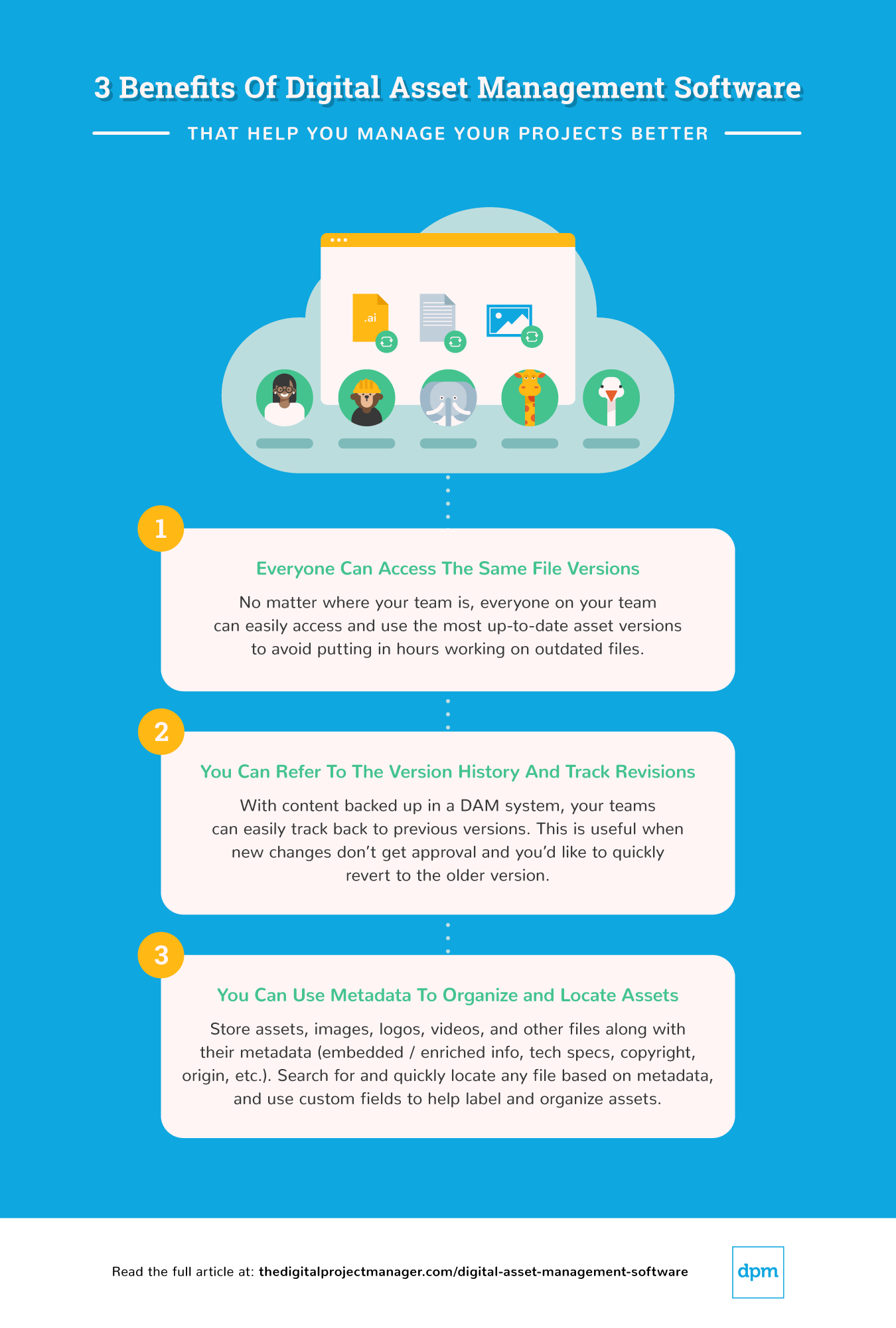
Wenn du eine dieser drei Fragen mit “Ja” beantwortet hast, kannst du wahrscheinlich von der Digital Asset Management Software profitieren. Hier sind einige der Vorteile, die sie bieten kann:+
Projektmanagement Anwendungen Vergleichskriterien
Wie kann ich DAM-Software auswerten? Hier ist eine Übersicht über meine Überlegungen:
- Benutzeroberfläche (UI): Bietet es übersichtliche Anzeigen und intuitive Navigation? Dies ist besonders wichtig, wenn dezentrale Teams und mehrere Abteilungen in der Lage sein müssen, das Tool einfach zu bedienen.
- Benutzerfreundlichkeit: Ist es einfach zu erlernen und zu bedienen? Software mit besseren Tutorials, Knowledge Centern und Kundensupport erhält eine höhere Punktzahl.
- Merkmale & Funktionalität: Wie viele der wichtigsten Merkmale und Funktionen bietet sie und wie leistungsfähig ist sie? In DAM-Software sind Funktionen wie durchsuchbare Datenbanken, Versionskontrolle, Prüf- und Genehmigungs-Workflows, Rechteverwaltung und berechtigungsbasierter Zugriff wichtig.
- Integrationen: Vorgefertigte Integrationen mit der Creative Suite von Adobe sind für viele Teams ideal. Ebenso bieten die besseren Tools eine Integration mit Projektmanagementsoftware, Content-Management-Systemen, Social-Media-Plattformen, Content-Delivery-Netzwerken, E-Commerce-Software und Analysetools.
-

Insightful
Visit WebsiteThis is an aggregated rating for this tool including ratings from Crozdesk users and ratings from other sites.4.8 -
Accelo
Visit WebsiteThis is an aggregated rating for this tool including ratings from Crozdesk users and ratings from other sites.4.4 -
Forecast
Visit WebsiteThis is an aggregated rating for this tool including ratings from Crozdesk users and ratings from other sites.4.6




Die Top 10 Digital Asset Management Software im Überblick


Adobe Experience Manager (AEM) is a digital asset management platform that helps you organize creative files and deliver them across multiple channels. With its cloud-native setup, you can manage large content libraries and publish updates quickly.
Who Is Adobe Experience Manager Best For?
This tool is best for enterprise marketing and IT teams managing high-volume content publishing across global websites and digital channels within complex, cloud-based ecosystems.
Why I Picked Adobe Experience Manager
This tool is well-suited for enterprises that need both asset management and fast publishing capabilities. Its DAM component can automate sourcing, adapting, and distributing files, while the cloud-native architecture supports scaling documentation and content delivery. Together, these features help large teams reduce repetitive tasks and speed up publishing workflows.
Teams can also build responsive digital forms with secure e-signatures, deliver training with an integrated learning system, and manage documentation at scale through digital guides. These capabilities make AEM more than just a DAM—it’s also a content delivery hub.
Adobe Experience Manager Key Features
Adobe Experience Manager offers several other features that make it a solid choice for a digital asset management solution.
- User-Friendly Interface: This simplifies the organization and retrieval of assets, so your team can efficiently manage large volumes of content.
- Advanced Governance: With role-based permissions and compliance tools, you can maintain brand integrity and make sure assets are used appropriately across your organization.
- Asset Optimization: It helps you deliver personalized content across various channels, so your digital assets are tailored to meet specific audience needs.
- Performance Insights: By analyzing asset effectiveness, this feature helps you assess how well your assets are performing and informs future content strategies.
Adobe Experience Manager Integrations
Integrations include Adobe Experience Manager Sites, Workfront, GenStudio for Performance Marketing, Adobe Express, Creative Cloud, Adobe Firefly, Adobe Analytics, OneDrive, Dropbox, Adobe Developer App Builder, third-party systems via open APIs and SDKs, and the Micro-Frontend Asset Selector.
Pros and Cons
Pros:
- Strong integrations with Adobe Creative Cloud tools
- Cloud-native system supports faster publishing at scale
- DAM automation reduces time spent searching and reformatting
Cons:
- Limited customization options impact flexibility
- Complex setup may require technical expertise


MediaValet is a digital asset management solution that helps organizations easily manage, find, and share their high-value digital assets (source, WIP, and final). It helps teams improve their productivity, increase asset ROI and drive revenue growth.
I recently spoke with Hasan Hanif, the founder and CEO of Colour Vistas, about how his team uses MediaValet in their projects that involve creating resources for sublimation printing. "Tagging and the search capabilities in particular were very useful because we could get what we wanted in a short period of time," he says. He also found the version control capabilities useful: "The other thing I liked was the good version control since nobody was working on an out-of-date file," he explains.
Who Is MediaValet Best For?
Marketing and creative teams at mid-sized to enterprise organizations that need AI-assisted search and structured collaboration across large digital asset libraries, often in content-heavy environments.
Why I Picked MediaValet
This tool has a massive global footprint, making it available in 140 countries. On top of that, advanced search and tagging features enable users to pinpoint what they need in seconds. MediaValet also supports collaborative AI content creation with automated tagging and indexing. Its AI can recognize and tag spoken words, topics, locations, people, objects, and generate transcripts and subtitles in 60+ languages—helping teams organize and collaborate on content efficiently.
With unlimited users and administrators included in enterprise subscriptions, MediaValet allows teams worldwide to scale quickly and cost-effectively. Plus, unlimited training and support ensure that all users are confident using the system and can maximize its value.
MediaValet Key Features
In addition to its AI capabilities, MediaValet offers several other features for digital asset management.
- User Permissions and Access Controls: You can manage who can view, edit, or share assets within your organization to maintain data integrity and security.
- Version Control: This lets you keep track of asset revisions and make sure your team always has access to the latest version, which minimizes confusion and errors.
- Customizable Metadata Fields: You can tailor the metadata fields to suit your organization’s specific needs, which improves organization and retrieval of assets.
- Cloud-Based Accessibility: You can access your digital assets from anywhere, which means more flexibility and convenience for teams working remotely or across multiple locations.
MediaValet Integrations
Integrations include Wrike, Workfront, Slack, Okta, Active Directory, WordPress, Drupal 8, Adobe Creative Cloud, SharePoint, Office 365, and Hootsuite. You can also access an open API to build custom integrations with your current tech stack.
Pros and Cons
Pros:
- Advanced security features keep assets protected
- Robust search capabilities allow for quick location of assets
- Mobile access allows for asset management on the go
Cons:
- Potential learning curve for new users
- Limited options for customizing the user interface


Air is a visual workspace and digital asset management platform built for creative teams. Designed for creative teams across industries, Air provides a visual workspace that integrates seamlessly with your creative processes. By focusing on centralization and AI-driven tools, it helps you overcome hurdles like disorganized assets and inefficient workflows, ensuring your team operates with clarity and precision.
Why I Picked Air
I picked Air because its AI-driven capabilities are particularly well-suited for digital asset management. The platform's facial recognition and smart tagging features ensure that your assets are easily searchable, saving valuable time for your team. Additionally, its conversational search functionality allows you to find assets using natural language queries, which simplifies the retrieval process and enhances productivity. These features directly address the common challenges faced by teams in organizing and accessing digital content.
Air Key Features
Aside from the features mentioned, I also found the these functionalities noteworthy:
- Visual Workspace: Air provides a centralized hub where your team can store, organize, and collaborate on digital assets in a visually intuitive environment.
- Annotations: This feature allows team members to provide feedback directly on the assets, streamlining communication and reducing the back-and-forth typically involved in creative processes.
- Version Control: Air helps you keep track of different versions of your assets, ensuring that your team always has access to the most recent updates without losing historical data.
- Enterprise-Grade Security: With robust security measures, Air ensures that your digital assets are protected against unauthorized access and data breaches.
Air Integrations
Integrations include Slack, Adobe Creative Cloud, Google Workspace, Microsoft Office 365, Dropbox, Box, Zapier, and more.
Pros and Cons
Pros:
- User-friendly interface
- Good asset feedback and approval features
- Smart search for quickly locating assets
Cons:
- Not ideal for non-visual assets
- Lacks a dedicated mobile app
New Product Updates from Air

Air Adds Performance Analytics and Bulk Updates
Air introduces Performance Analytics and Bulk Updates, enabling you to analyze asset performance directly within the platform while updating multiple assets at once to improve efficiency and workflow speed. For more information, visit Air's official site.
 .
.

Stockpress is a digital asset management (DAM) platform aimed at enhancing the organization, searchability, collaboration, and sharing of digital files for teams.
Who Is Stockpress Best For?
Creative and marketing teams at small to mid-sized companies that need structured, role-based access to shared brand and media assets.
Why I Picked Stockpress
I chose Stockpress because it’s uniquely designed to support role-based team collaboration, making it an ideal DAM for organizations that need a clear structure around who can access, edit, and manage digital assets. Its flexible collections system allows teams to organize files without duplication, while assigning roles and permissions to ensure each collaborator has the right level of access. This makes it easy for project managers, designers, marketers, and external partners to work together without compromising security or workflow clarity.
Stockpress Key Features
In addition, Stockpress offers several other capabilities that provide value for digital asset management.
- AI-Powered and Custom Tagging: Helps teams find what they need quickly and accurately.
- Customizable Metadata: This feature lets you add personalized metadata fields, which makes it easier for your team to categorize and search for assets based on unique criteria.
- Batch Uploading and Editing: You can streamline your workflow and save time by uploading multiple files at once and applying changes to several assets simultaneously.
- Secure Sharing Links: You can share digital assets with external partners through secure links, which provides peace of mind that your data is protected during collaboration.
Stockpress Integrations
Integrations include Webflow, Adobe Illustrator, Adobe InDesign, Adobe Photoshop, Box, Canva, Dropbox, Google Drive, Klaviyo, Mailchimp, Slack, and Okta.
Pros and Cons
Pros:
- Useful AI tagging features
- Handles large asset volumes
- Can create custom collections for assets
Cons:
- File migration support limited to enterprise plan
- Could offer more integrations
New Product Updates from Stockpress

Stockpress Introduces Integrations and AI Image Editing Enhancements
Stockpress introduces Canva integration, AI Image Editor enhancements, file Trash, Adobe InDesign plugin, and Custom Fields. These updates help teams streamline design workflows, improve image editing, and better manage digital assets. For more information, visit Stockpress’s official site.
 .
.
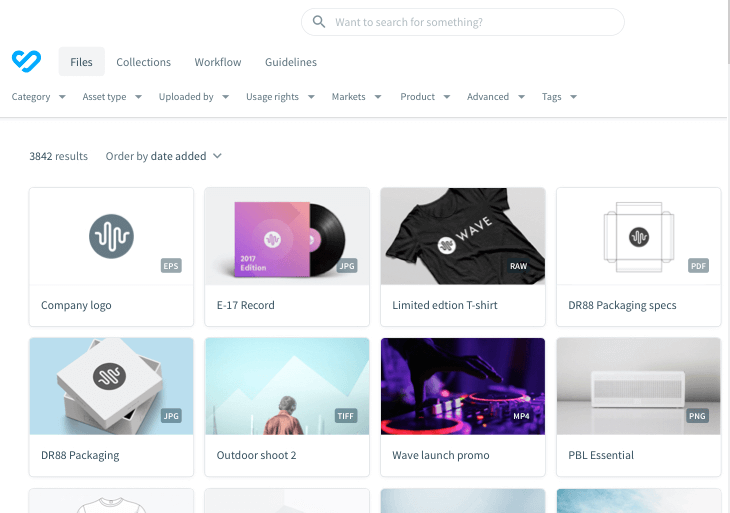
Bynder is a digital asset management platform that lets you store your creative files and prevent content chaos from happening.
I spoke with Michael Pedrotti, the co-founder of GhostCap, about his team's use of Bynder on projects that involve building and maintenance of game servers. "Bynder dragged us out of a total file mess...We had 47 logo variations and they were all over the place," he says, "Team members were spending half their working time in folders and getting a basic graphic passed took four days. Now, server diagrams are automatically tagged in Bynder and reviews happen the same day."
Who Is Bynder Best For?
Enterprise brand, marketing, and creative operations teams that need standardized asset governance and brand consistency across regions or business units.
Why I Picked Bynder
It provides cloud digital asset management delivered through a slick, clean interface. Bynder helps you create, find and use digital assets with streamlined collaboration and a focus on brand consistency across all markets and channels. Additionally, its Digital Asset Transformation (DAT) connects your current tech stack with the DAM so you can alter assets with features like resizing, focus, cropping, and removing asset backgrounds.
Just like DAT, many add-on modules complement this asset management platform. These include a brand guidelines module, creative workflow, analytics, content workflow and a video editing studio.
Bynder Key Features
There are several other features that make Bynder a standout choice for digital asset management.
- Bynder AI: Bynder's AI features help improve asset discovery and management and make it easier for your team to locate and utilize the right assets quickly.
- Content Workflow: This feature facilitates large-scale editorial content creation using structured text and approved assets, and it can help streamline your team's content production process.
- Custom Templates: This lets non-designers quickly personalize templates for various media formats, which broadens your team's creative capabilities.
- Analytics: Bynder offers insights into asset performance and usage metrics to help you make data-driven decisions to optimize your content strategy.
Bynder Integrations
Integrations include Slack, Adobe Creative Cloud, Adobe Experience Manager, Sitecore, Sitefinity, BloomReach, Drupal 7, Drupal 8, WordPress, Okta, Google, Hootsuite, Microsoft Active Directory, Collect.io, Shutterstock, SDL Tridion, Templafy, and TYPO3.
Pros and Cons
Pros:
- Built-in asset approvals
- Efficient search functionality allows quick access to assets
- AI features improve asset discovery
Cons:
- Enterprise-grade features overwhelming for small teams
- Limited customization options for certain functionalities
New Product Updates from Bynder
Bynder Expands Integrations for Content and Asset Workflows
Bynder introduces integrations with Salesforce Data 360, echo3D, FirstSpirit, monday service, Pixelz, and Frame.io. These updates enhance asset management, content workflows, and cross-platform collaboration. For more information, visit Bynder’s official site.
 .
.
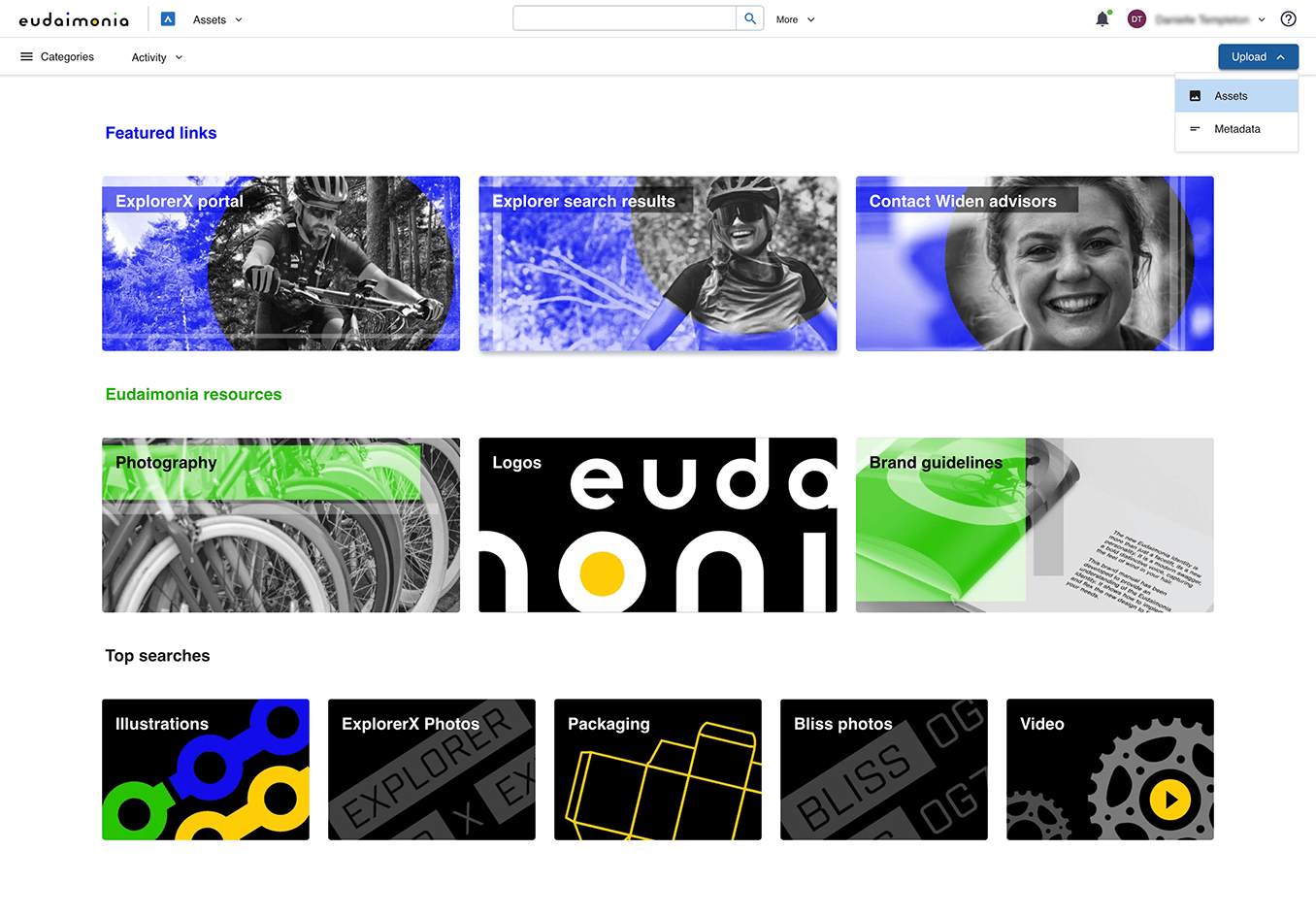
Acquia DAM (Widen) is a useful tool that serves as a central foundation to organize, share, and distribute your brand assets and product content across the web.
I recently spoke with Yad Senapathy, the founder and CEO of the Project Management Training Institute (PMTI), about how his team uses Acquia DAM to manage "training documents, course updates, and brand assets across the teams." According to him, "The most useful thing was that I could sort materials based on version and manage access by department, which saved us almost 10 hours a month in cleanup and minimized mistakes in file sharing."
Who Is Acquia DAM Best For?
Enterprise marketing and brand teams that require configurable digital asset management with structured metadata and workflow controls.
Why I Picked Acquia DAM
Something notable about this tool is its powerful search functionality and customizable metadata models. In addition to using metadata to classify your assets, you can also assign different roles and permissions to different user groups to control access levels.
It's worth mentioning that you can use this tool as a standalone digital asset management tool or build it out into a larger management system. In addition to the core DAM offering, several add-on applications are available to construct your brand management, marketing resource management, or product information management system that works for your use case. This makes it highly configurable to you needs. For example, you can use entries to assemble product content for e-commerce distribution, or portals to share curated collections within branded webpages. You could also leverage templates to build localized ads and brochures or use their workflow add-on to manage work-in-process review and approval.
Acquia DAM Key Features
Here are some other key features of Acquia DAM that might be of use to you and your team.
- Organizational Tools: You can categorize assets and utilize metadata for efficient searching, which makes it easier to manage and locate your digital content.
- Integrations: Acquia DAM integrates seamlessly with various creative and content management tools to help with the smooth coordination of assets across different platforms.
- Content Access: You get features like branded login pages and time-based access controls to manage who sees what and when and get more control over asset visibility.
- Security: Hosted on Amazon Cloud, Acquia DAM offers security measures like encryption and user audit trails to protect your valuable digital assets.
Acquia DAM Integrations
Integrations include Airtable, Clarifai, Asana, Box, Salesforce, OneDrive, Slack, Wrike, and Shutterstock. You can also find partner integrations from Adobe Creative Cloud, Enwove, Hootsuite, Modus, and Mediafly.
Pros and Cons
Pros:
- Automated workflows boost efficiency
- Effective centralization of digital assets
- Strong metadata and tagging capabilities
Cons:
- Requires significant setup and training
- Workflows only available as add-ons
New Product Updates from Acquia DAM (Widen)
Acquia DAM Enhances AI Document Summarization
Acquia DAM enhances AI document summarization, enabling automatic summaries for .docx and .pdf assets. This update helps users quickly understand document content and retrieve key information without manual review. For more information, visit Acquia DAM’s official site.
 .
.

Scaleflex is a GDPR-compliant digital asset management platform that is software-agnostic and helps teams store, manage, optimize, share, and accelerate all digital and media assets.
Who Is Scaleflex Best For?
Technology and digital product teams at mid-sized to enterprise organizations that require MACH-aligned infrastructure for managing and optimizing digital media assets.
Why I Picked Scaleflex
I chose Scaleflex because it’s MACH-certified and built around a modern architecture that aligns with microservices, API-first, cloud-native, and headless design to give you flexibility as you grow. Its features include headless digital asset APIs, widget and plugin support for embedding media libraries, and visual-AI capabilities like auto-tagging and transformation of assets. You can integrate it into your existing stack such that your image and video handling is driven by APIs and fits the way you already build.
The user interface is offered in more than 8 languages, which is great for global, remote teams. Also, custom permissions and user roles let everyone on the team enjoy a personalized solution. You can set rules and prevent duplicated assets in the media library, as well as roll back to previous versions if someone uploaded the wrong item.
Scaleflex Key Features
Scaleflex also offers several other features that can improve digital asset management for your team.
- Visual Catalog Management: This feature lets you efficiently ingest and optimize large volumes of assets and streamline the organization of your visual content.
- Web & Multi-Device Optimization: You can improve asset performance across various devices and for different channels to make sure your assets look great everywhere.
- Content Moderation: You can easily moderate visual content, which is particularly useful for user-generated content and can help you maintain quality and brand standards.
- Visual Content Syndication: This lets you control and increase conversions through effective syndication of your visual content and reach broader audiences while maintaining consistency.
Scaleflex Integrations
Integrations include Adobe Creative Cloud, WordPress, Adobe Commerce, Canva, Opencart, Kontent, Pabbly Connect, Sylius, Akeneo, Prismic, and Zapier. There are also headless APIs for custom integrations.
Pros and Cons
Pros:
- AI-powered automation capabilities
- Integrates well with various tools
- Supports large-scale asset libraries
Cons:
- Some users find the interface complex initially
- Lower-tier plans limited to one project


Pics.io is a digital asset management (DAM) platform built for mid-market, growing teams that need a scalable solution for collecting, organizing, managing, and distributing digital assets in multiple formats. It allows users to store assets in a centralized cloud library, where users can easily search and retrieve files.
During a recent conversation with Baris Zeven, the CEO of Bookyourdata, he highlighted how his team uses Pics.io to create efficiency. "Specific searches of information are made possible through the capability to label the assets with particular keywords, which saves us considerable time when we need to locate a given file," he says.
It's also increased "productivity between teams as sharing of common digital assets becomes easier," he explains.
Who Is Pics.io Best For?
Mid-market marketing and content teams seeking centralized asset management with scalable storage and collaboration capabilities.
Why I Picked Pics.io
This software offers unlimited storage by connecting directly to your own Google Drive or Amazon S3 cloud—so you always retain full control over your assets without being tied to a proprietary system, and avoid paying for space you already own. The tool supports a wide range of file formats, including images, videos, audio files, documents, and even 3D models. You can also create collections to group related digital assets, use metadata for easy search and organization, and compare different versions of files.
The tool's version control feature allows you to track changes and revert to previous file versions. This means your existing links never become broken and always show the latest approved version of the file. Collaboration features such as commenting, tagging users, and approving assets are also available and facilitate teamwork on digital projects. Other features allow you to share assets with team members or external parties, customize the interface with branding, and analyze asset usage with built-in reporting tools.
Pics.io Key Features
Pics.io offers a variety of features that can help you better manage your digital assets and workflows.
- Batch Actions: This feature lets you perform multiple file actions simultaneously, which saves valuable time and can help streamline your workflow.
- Communication Center: You can keep your team updated with notifications about changes through email, a notification center, or Slack, so everyone is in the loop.
- Website Creation: You can create online websites from your collections using customizable templates.
- Search Functionality: With the powerful search engine, you can easily find assets by titles, keywords, and metadata, which makes retrieval quick and effortless.
Pics.io Integrations
Integrations include Google Drive, Dropbox, Amazon S3, Shopify, Slack, Adobe Suite, Figma, Hootsuite, HubSpot, Salesforce, Trello, Zoho CRM, Zapier, and others via API.
Pros and Cons
Pros:
- Advanced metadata management improves organization
- Powerful search function
- Dynamic AI-based tagging
Cons:
- Some metadata features paid add-ons
- Larger files occasionally take more time to load
New Product Updates from Pics.io
Pics.io Enhances Video Intelligence With Improved UI and Search
Pics.io introduces improvements to its Video Intelligence experience, including UI/UX updates and enhanced search display. These updates make it easier to navigate videos and find relevant moments. For more information, visit Pics.io’s official site.
 introduces improvements to its Video Intelligence experience, including UI/UX updates and enhanced search display. These updates make it easier to navigate videos and find relevant moments. For more information, visit

ImageKit is a digital asset management platform built for teams managing large volumes of visual content where performance and delivery are critical. It combines asset organization, AI-powered tagging, and real-time media optimization in one system. Teams in ecommerce, media, and travel use it to manage and distribute images and videos across web and mobile channels.
Who Is ImageKit Best For?
Engineering, product, and marketing teams at mid-sized to enterprise digital businesses that need AI-assisted asset management combined with optimized media delivery across web and mobile platforms.
Why I Picked ImageKit
I picked ImageKit because it combines digital asset management with built-in media optimization and global delivery. Unlike traditional DAMs that focus only on storage and organization, ImageKit also handles real-time image and video transformations through its Image and Video APIs, helping you manage performance at the point of delivery. I also like that it supports AI-powered tagging and visual search, which helps you maintain searchable libraries without relying entirely on manual metadata. This is especially useful if you manage large, frequently updated asset collections.
ImageKit Key Features
In addition to AI-powered image optimization, ImageKit offers:
- Image API: Transform and optimize images in real time, including resizing, cropping, format conversion, and compression to improve load performance.
- Video API: Transcode and stream videos with adaptive bitrate delivery to support web and mobile playback.
- AI-powered tagging and visual search: Automatically generate tags and locate similar images to keep large asset libraries searchable.
- Central audit logs: Track asset-level and system-wide actions to support governance and accountability.
ImageKit Integrations
Integrations include React, Angular, WordPress, Shopify, and Adobe Photoshop.
Pros and Cons
Pros:
- Real-time media processing with extensive transformation options
- Reliable transformations optimize and compress images effectively
- Media personalization capabilities for dynamic asset creation
Cons:
- Some users report social media resolution issues
- Analytics page layout and filtering need improvements

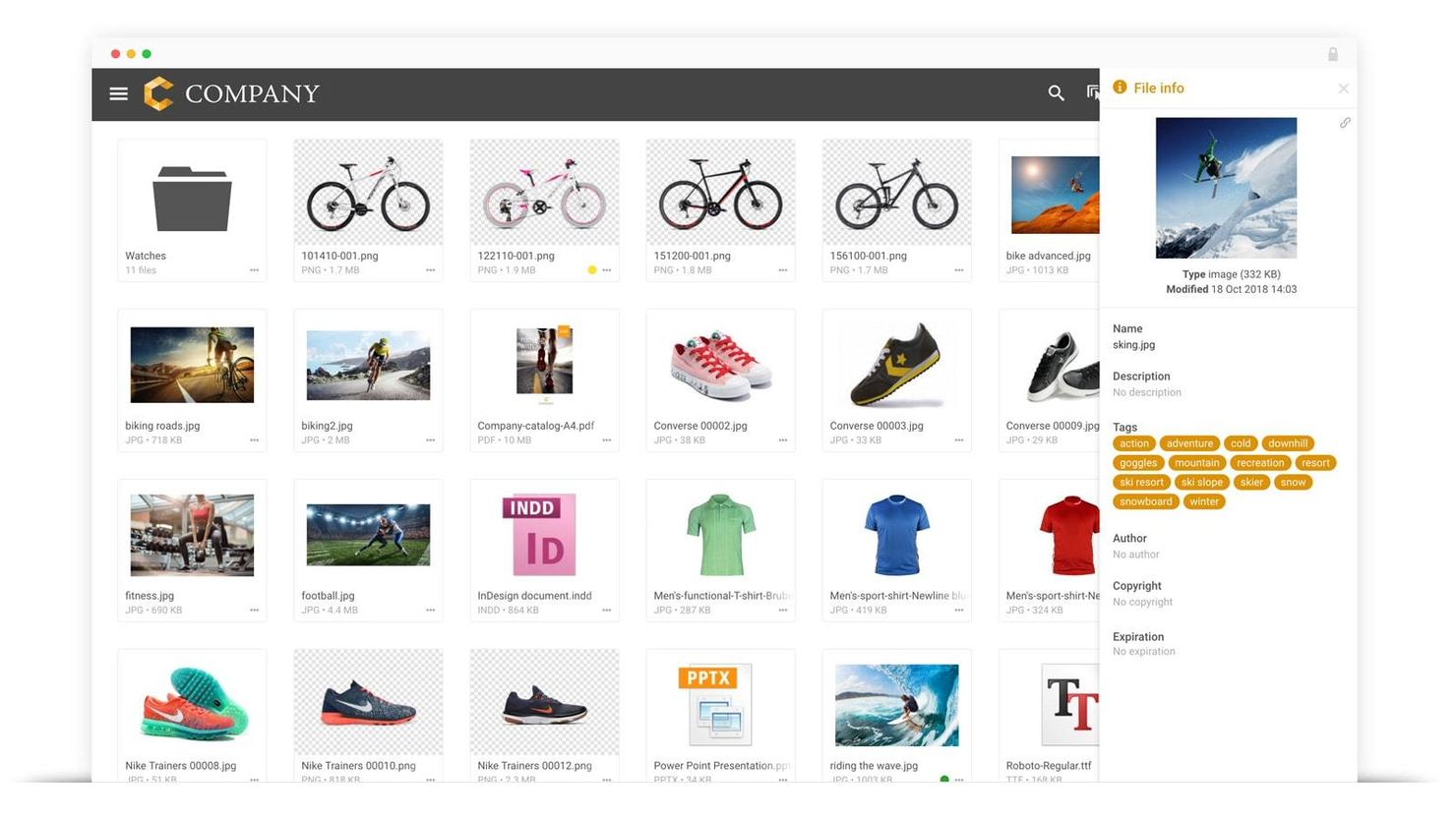
Filecamp is a digital asset management platform that helps marketing professionals get more value from their creative assets.
I spoke with Caspar Matthews of Electcomm Group Electrical & Data, which uses Filecamp on their projects. "Project records in our field can accumulate very fast and be difficult to control...The branded client portals let clients access individual documents they needed without our team spending hours sending files back and forth," he says.
It had a huge impact: "This saved us almost 30 percent of the time in the administration on one commercial fit-out project alone," he says.
Who Is Filecamp Best For?
Small to mid-sized organizations that require branded asset portals for internal teams or external stakeholders without enterprise-level complexity.
Why I Picked Filecamp
It lets you store all your images, videos, creative files, and presentations and easily find them, thanks to its powerful tagging functionality. You can upload files and folders, tag them manually or use the auto-tagging feature. Then, filter, sort, search, and download files in the original resolution or the one of your choosing.
If you are interested in your team collaborating on creative assets, Filecamp includes a proofing module where your team can engage in conversations around deliverables, suggest changes and go through approval workflows in a single place. Plus, you can do all this in a white-label product that you can make your own in a way only a few tools let you.
Filecamp Key Features
In addition to excellent organizational tools, Filecamp offers a range of other digital asset management features.
- Custom Branding: This lets you personalize your Filecamp interface with your company's logos and colors so you can provide a consistent brand experience across all user interactions.
- Granular Access Control: You can manage who has access to specific files and folders, so only authorized team members can view or edit sensitive data.
- Version Control: You can keep track of different versions of your files, access and restore previous iterations as needed, and maintain accuracy and quality.
- Advanced Searchability: This lets you utilize tagging and filtering options to quickly locate and retrieve digital assets to save time and improve workflow efficiency.
Filecamp Integrations
Integrations are not currently offered.
Pros and Cons
Pros:
- Customizable branding options for professional appearance
- Granular access controls improve security and collaboration
- Advanced search and tagging
Cons:
- Commenting limited to higher-tier plans
- You may need to pay for additional storage
New Product Updates from Filecamp
Filecamp Introduces Major Platform Enhancements
Filecamp introduces expanded storage through a migration to Azure, new dark and light modes, a flexible grid layout, and a new Tags control panel. These updates improve scalability, usability, and asset organization for creative teams. For more information, visit Filecamp's official site.
 .
.Die beste Vergleichstabelle für Digital Asset Management-Software
| Tool | Best For | Trial Info | Price | ||
|---|---|---|---|---|---|
| 1 | Best for cloud-native content publishing | Free demo available | Pricing upon request | Website | |
| 2 | Best for AI-powered search & collaboration | Free demo available | Pricing upon request | Website | |
| 3 | Best for AI-driven asset organization | Free plan available | From $10/month (billed annually) | Website | |
| 4 | Best for role-based team collaboration | Free plan available | From $39/month (billed annually) | Website | |
| 5 | Best for enterprise brand consistency | Free demo available | Pricing upon request | Website | |
| 6 | Best for configuration and customization | Free demo available | Pricing upon request | Website | |
| 7 | Best for being MACH-certified | 14-day free trial | From $213/month | Website | |
| 8 | Best for mid-markets wanting unlimited storage | 7-day free trial | From $100/month/user | Website | |
| 9 | AI-powered DAM with built-in media processing | 14-day free trial + free plan available | From $9/user/month (billed annually) | Website | |
| 10 | Best for custom branding | 30-day free trial | From $29/user/month | Website |
Kostenlose Digital Asset Management Software
Mehrere DAM-Softwareunternehmen bieten eine kostenlose Version der Software mit einigen eingeschränkten Funktionen an. Hier ist eine kurze Liste von DAM-Software, die du kostenlos testen kannst.
Mehr Digital Asset Management Software
Es gibt noch ein paar weitere DAM-Optionen, die ich noch nicht gründlich getestet habe, aber schau dir diese an, wenn die oben genannten nicht den gewünschten Ergebnisbeitrag liefern:
- 4ALLPORTAL
For integrated DAM and PIM
- Lingo
For unlimited brand kits
- Tagbox.io
For AI-powered visual search
- Cloudinary
For dynamic media transformations
- Canto
For external file sharing
- Wedia
For digital experience
- Brightspot
For smart search and filters
- Artwork Flow by Bizongo
For packaging design
- MarcomCentral
For AI-assisted asset tagging
- Eagle App
For design project organization


Möchtest du die Optionen eingrenzen?
Dieses Tool ist ziemlich nützlich. In Zusammenarbeit mit Crozdesk haben wir uns bemüht, dir Zugang zu dem “Software-Finder” zu geben.
Wenn du einige der Details über dein Projekt und die Funktionen, die du in einem Projektmanagement-Tool suchst, eingibst, wird eine Liste von Tools erstellt, die deinen Präferenzen entsprechen. Du gibst deine E-Mail an das Team weiter und es schickt dir einen nützlichen PDF-Leitfaden mit einer Zusammenfassung deiner besten Übereinstimmungen.
Welche ist deine Lieblings-Software zur Verwaltung von digitalen Daten?
In der heutigen Zeit ist die Verwaltung digitaler Inhalte ein wichtiger Bestandteil bei der Projektverwaltung. Die oben genannten sind einige Vorschläge, aber, wie immer, keine vollständige Liste. Welche Tools oder Software nutzt du für das kreative Projektmanagement? Ich würde mich freuen, deine Vorschläge in den Kommentaren zu sehen.