

2026’nın En İyi 10 Yapay Zekâ Bilgi Tabanı Yazılımı

En İyi Yapay Zekâ Bilgi Tabanı Yazılımları Kısa Listesi


Yapay zekâ bilgi tabanı yazılımı, şirket bilgilerini otomatik olarak düzenlemek, almak ve güncellemek için yapay zekâ kullanır. Ekibinizin yanıtlarına hızlıca erişmesine yardımcı olan, dağınık kaynaklardan içgörüler elde eden ve içeriği güncel tutan bir çözüme ihtiyacınız varsa doğru yerdesiniz.
Doğru yapay zekâ bilgi tabanını kullanmak, tekrarlayan soruları azaltmanıza yardımcı olur, dağıtık ekipleri destekler ve günümüzün dinamik ortamında size avantaj sağlar. Bu listede en iyi seçenekleri gösterecek, her birini benzersiz kılan özellikleri vurgulayacak ve hangi yapay zekâ bilgi tabanı aracının ekibinizin ihtiyaçlarına uygun olduğunu belirlemenize yardımcı olacağım.
Yazılım Önerilerimize Neden Güvenebilirsiniz?
Ekibimiz 2012’den beri yazılımları test ediyor ve inceliyor. Biz de proje yöneticisi olduğumuz için doğru yazılımı seçmenin ne kadar zor ve önemli olduğunu biliyoruz.
Bu rehber için araçları uygulamalı testler ve bağımsız araştırmalarla değerlendirdik ve seçim kriterlerimize göre puanladık. Ayrıca sektörün fikir önderlerinin ve alanında çalışan proje yönetimi uzmanlarının görüşlerinden de yararlanıyoruz.
İncelemelerimiz bir satış konuşması değil, editör ekibimizin kendi değerlendirmesidir.
Uzman inceleyenler:
Yapay Zekâ Bilgi Tabanı Yazılımları Karşılaştırma Tablosu
Bu karşılaştırma tablosu, en iyi yapay zekâ bilgi tabanı yazılımı seçimlerimin fiyatlandırma ayrıntılarını özetler.
| Tool | Starting Price | Website | |
|---|---|---|---|
| Best for granular documentation control | 4.7 out of 5 | Pricing upon request Free demo available | Website |
| Best for interactive self-serve guides | 4.8 out of 5 | Pricing upon request Free demo + 14-day free trial available | Website |
| Best for asynchronous team knowledge sharing | 4.7 out of 5 | $10/user/month 14-day free trial + free demo available | Website |
| Best for AI-enhanced workspace notes | 4.6 out of 5 | $20/user/month Free plan available | Website |
| Best Slack and Microsoft Teams integration | 4.4 out of 5 | $8/user/month 30-day free trial | Website |
| Best for multimedia content organization | 4.6 out of 5 | Pricing upon request Free demo available | Website |
| Best for project documentation within teams | 4.3 out of 5 | $5.78/user/month Free plan + 7-day trial available | Website |
| Best for capturing and sharing company expertise | 3.5 out of 5 | Pricing upon request Free demo available | Website |
| Best customization options for content structure | — | $249/month Free demo + 14-day free trial available | Website |
| Best for searching across internal company tools | — | $20/user/month Free plan + free demo available | Website |
En İyi Yapay Zekâ Bilgi Tabanı Yazılımları İncelemeleri
Aşağıda, kısa listeme giren en iyi yapay zekâ bilgi tabanı yazılımlarına ilişkin ayrıntılı özetlerimi bulabilirsiniz. İncelemelerim, sizin için en uygun olanı bulmanıza yardımcı olmak amacıyla her platformun özelliklerine, en iyi kullanım alanlarına ve entegrasyonlarına ayrıntılı bir bakış sunar.

Best for granular documentation control
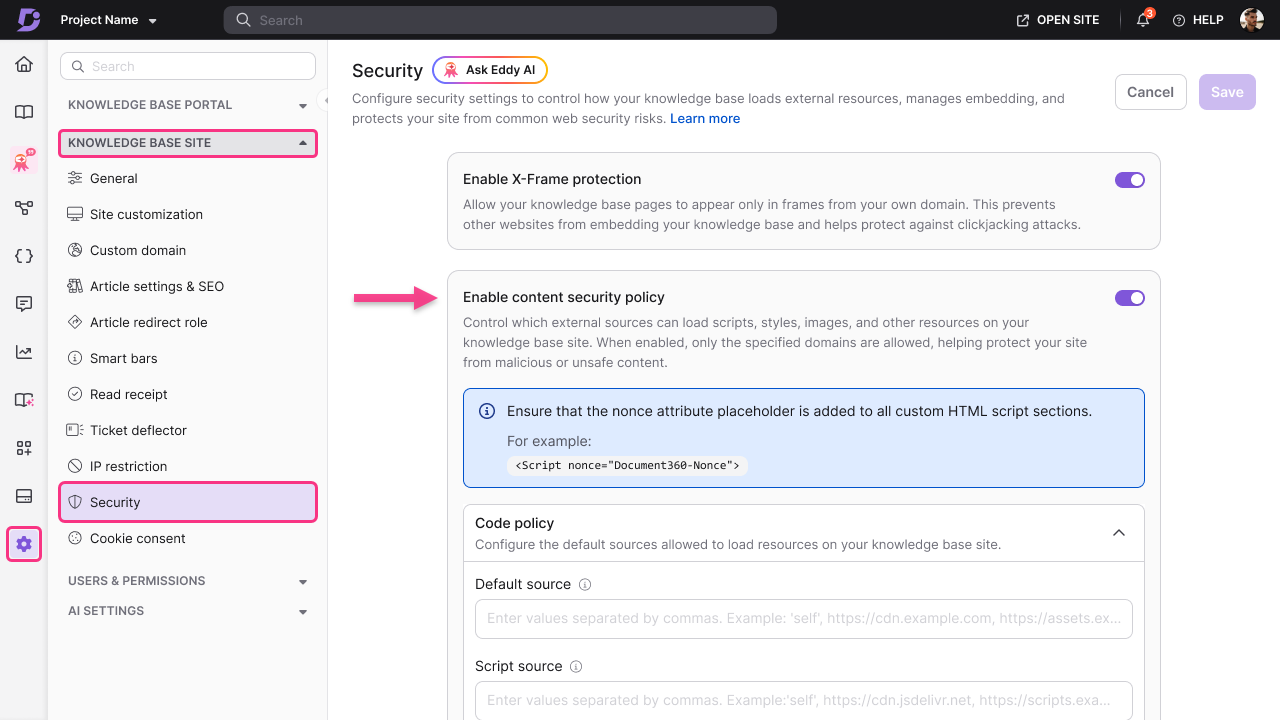
Document360 is an AI-powered knowledge base software built for technical documentation, featuring granular content organization, markdown support, advanced versioning, and customizable category hierarchy.
Who Is Document360 Best For?
Document360 is well-suited for technical writers and documentation teams at software companies who need advanced control over knowledge management.
Why I Picked Document360
I picked Document360 because I can set detailed user permissions, track every change with full version history, and configure granular workflow approvals for sensitive documentation projects. I like having deep control over documentation access and edits.
Document360 Key Features
- Markdown editor: Supports editing and formatting content using markdown syntax.
- AI-powered search: Delivers fast, context-aware results across all documentation.
- Custom branding: Lets you tailor the knowledge base interface to your company’s identity.
- Category manager: Enables users to structure content in a multi-level category tree.
Document360 Integrations
Document360 offers native integrations with Microsoft Teams, Slack, Freshdesk, Intercom, Zendesk, Google Analytics, Segment, Disqus, and Algolia, and provides an API for custom integrations.
Pros and Cons
Pros:
- AI search adapts to content complexity
- Detailed category hierarchy for organizing content
- Advanced version history with rollback
Cons:
- Limited offline or export documentation options
- Lacks real-time co-authoring inside docs
New Product Updates from Document360

Document360 Adds Feedback APIs, MCP Tools, and Zendesk Authentication
Document360 adds feedback APIs, expanded MCP tools, Zendesk account authentication, and the ability to reopen closed feedback. These updates help teams manage feedback, automate knowledge base tasks, and control integration access. For more information, visit Document360’s official site.
 .
Stonly
Best for interactive self-serve guides
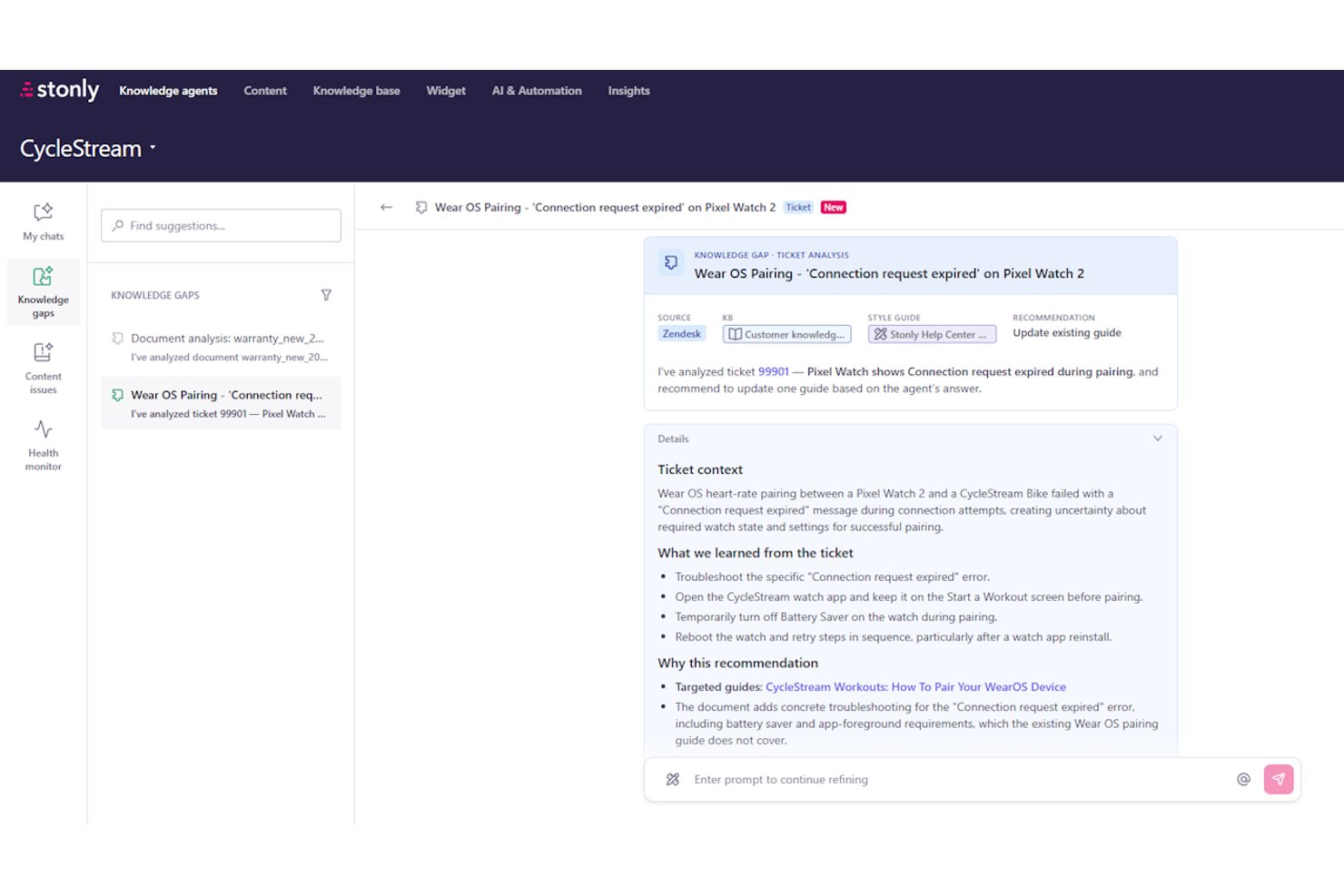
Stonly is a knowledge management platform that combines interactive step-by-step guides, AI-powered search, and automated knowledge curation to help teams build and maintain self-serve support content.
Who Is Stonly Best For?
Stonly is a strong fit for customer service and support teams that want to replace static help articles with interactive, branching guides that adapt to each user's situation.
Why I Picked Stonly
I've included Stonly in my top picks because its interactive, branching guides set it apart from knowledge bases that rely on static articles. Instead of dropping users onto a help page and hoping for the best, Stonly walks each person through a personalized resolution path using conditional logic. I particularly like how its Knowledge Agents monitor content health around the clock, automatically flagging stale guides and drafting updates for review when support tickets reveal gaps.
Stonly Key Features
- AI Agent Assist: Surfaces AI-generated response suggestions and ticket summaries directly inside Zendesk, Salesforce, and other help desks without requiring agents to switch tabs.
- Business Process Agents: Automates multi-step support workflows end-to-end, following documented processes to resolve issues like billing disputes or GDPR requests without agent intervention.
- Full-path analytics: Tracks exactly where users drop off or change course through each guide step, giving you visibility into where content is losing people.
- Multi-source AI ingestion: Pulls knowledge from Stonly content, external knowledge bases, websites, and Google Drive into a single AI layer for unified search and answers.
Stonly Integrations
Stonly integrates with Confluence, Notion, Google Drive, Google Sheets, Zendesk, Salesforce, Freshdesk, ServiceNow, Microsoft Teams, and Jira. It also supports Zapier for additional connections.
Pros and Cons
Pros:
- Business process agents automate complex support tasks
- AI-driven knowledge agents proactively flag stale content
- Interactive branching guides boost self-serve resolution rates
Cons:
- Guide performance declines with very large guides
- Customer support focus limits project documentation use

Slite
Best for asynchronous team knowledge sharing

Slite is a team knowledge base platform for organizing documents, managing wikis, discussing topics, and enabling fast search powered by AI-driven discovery.
Who Is Slite Best For?
Slite suits distributed product and project teams that need a central place to share knowledge and document collaboration asynchronously.
Why I Picked Slite
I picked Slite as one of the best because my team can ask questions directly in the knowledge base and use AI-powered answers. I use threaded discussions in documents to resolve async decisions without endless meetings, and manage company handbooks centrally.
Slite Key Features
- Templates gallery: Access ready-made templates for meeting notes, project plans, and onboarding docs.
- Knowledge base search: Search all documents and spaces using AI-powered quick find.
- Access permissions: Set workspace, folder, and doc-level permissions for granular control.
- Version history: Review or restore previous versions of any page or document.
Slite Integrations
Slite offers native integrations with Slack, Google Drive, GitHub, Figma, Loom, and Asana. It also provides an API for custom integrations.
Pros and Cons
Pros:
- Embedded conversation feedback loops
- Structured spaces for topic-based knowledge hubs
- Fast AI-powered search within documents
Cons:
- Fewer page design customization features
- Limited bulk content import and export options

Best for AI-enhanced workspace notes

Notion AI is an AI-powered workspace knowledge management platform where you can create notes, docs, wikis, and databases, combining advanced AI writing tools with modular content organization.
Who Is Notion AI Best For?
Notion AI suits individuals and teams who want to unify note-taking, documentation, and knowledge sharing within one flexible platform.
Why I Picked Notion AI
I picked Notion AI because I can generate summaries, brainstorm ideas, and automate note-taking directly in my workspace. I like using the AI to draft project docs and quickly transform raw input into polished notes with actionable highlights.
Notion AI Key Features
- Database views: Visualize and filter structured content in tables, boards, calendars, and lists.
- Wiki linking: Connect pages and docs using internal links for fast navigation.
- Permissions management: Restrict or share access for individuals, teams, or external collaborators.
- Custom templates: Build and reuse templates for repeatable documentation and workflows.
Notion AI Integrations
Notion AI offers native integrations with Slack, Google Drive, GitHub, Jira, Figma, and Zoom. It also provides an API for custom integrations.
Pros and Cons
Pros:
- Modular structure supports mixed media documentation
- Workspace search includes AI-powered suggestions
- AI generates summaries from complex notes
Cons:
- Requires consistent cloud synchronization
- Limited advanced control over AI outputs

Tettra
Best Slack and Microsoft Teams integration
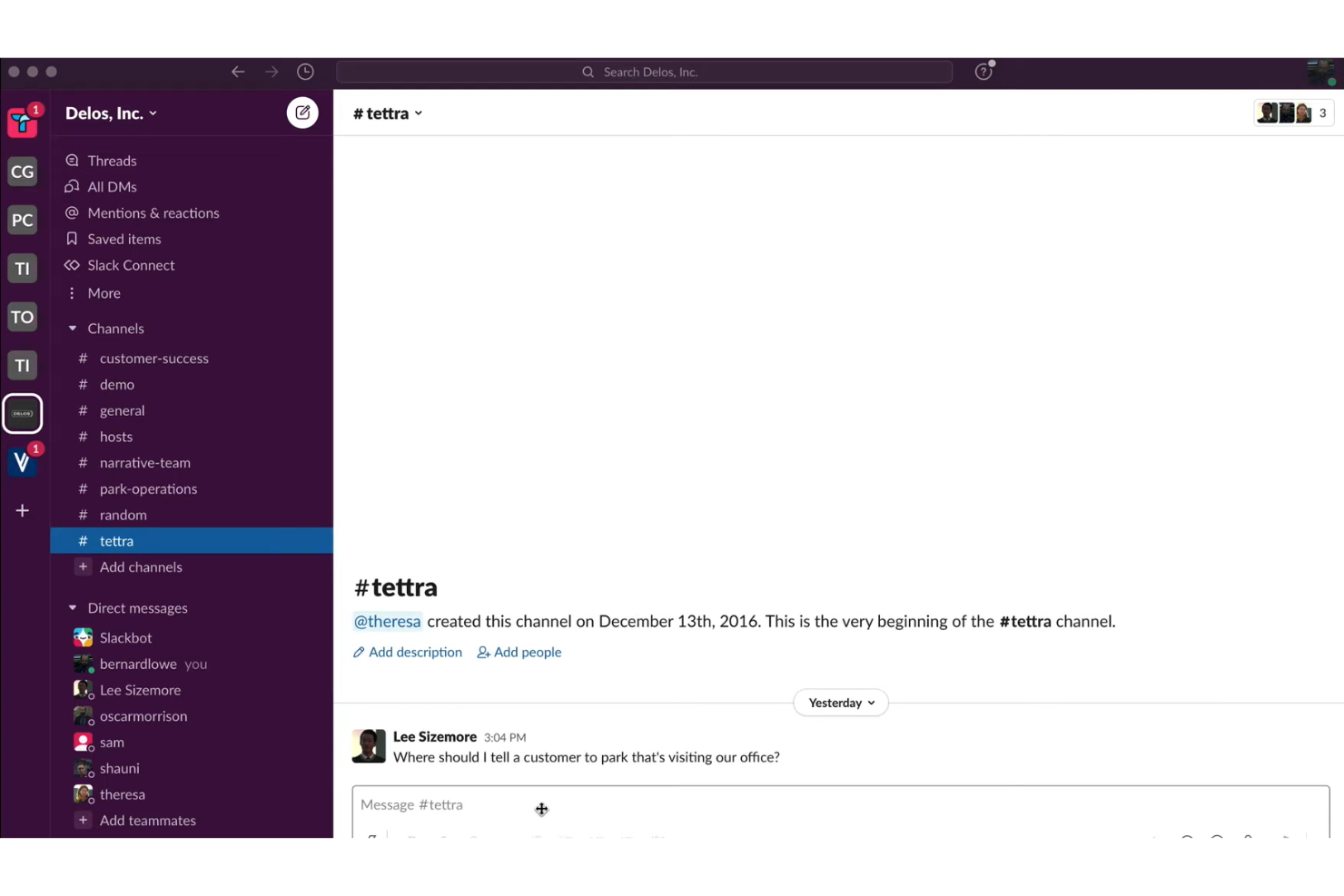
Tettra is a knowledge base software platform for internal documentation, offering features like page authoring, Q&A submission, content verification, permissions management, and integrations with popular collaboration tools.
Who Is Tettra Best For?
Tettra is a strong fit for support, product, and operations teams that depend on Slack or Microsoft Teams to manage internal knowledge and processes.
Why I Picked Tettra
I picked Tettra as one of the best because I love how I can answer questions and update knowledge directly from Slack or Microsoft Teams without switching apps. I rely on Tettra’s built-in Q&A and content verification to keep answers current and trusted for my team.
Tettra Key Features
- Templates: Create and reuse standardized page templates across your knowledge base.
- Content suggestions: Receive AI-powered recommendations for outdated or missing content.
- Granular permissions: Set detailed access controls for users and groups.
- Page requests: Allow team members to request new documentation pages for unanswered questions.
Tettra Integrations
Tettra offers native integrations with Slack, Microsoft Teams, Google Workspace, GitHub, and Zapier, and provides an API for custom integrations.
Pros and Cons
Pros:
- Simplified Q&A workflows for internal teams
- AI-powered content suggestions and verification
- Fast search across all knowledge content
Cons:
- No native mobile app for iOS or Android
- Version history limited to paid plans

Best for multimedia content organization
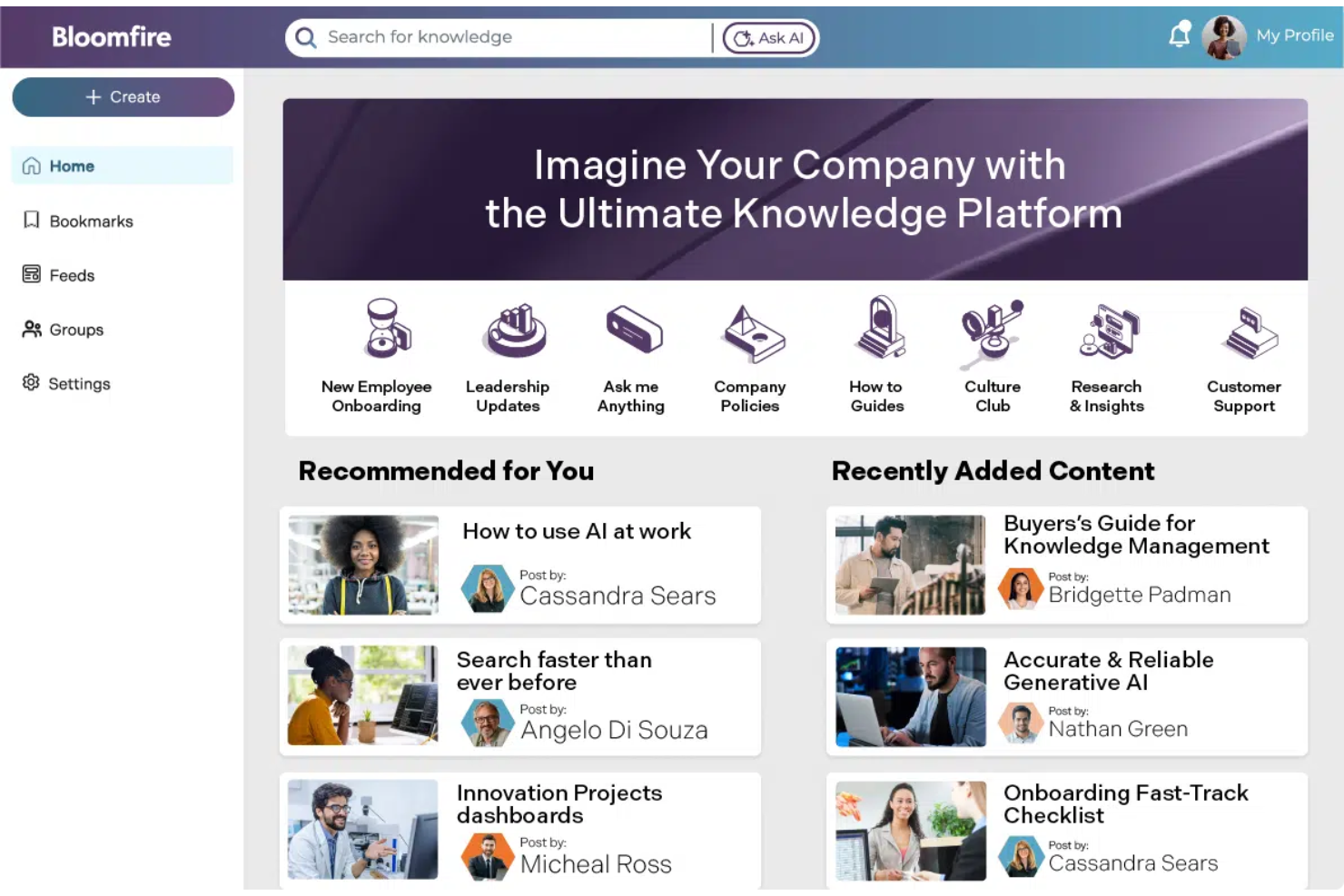
Bloomfire is an AI-powered knowledge base platform that lets you upload, tag, and organize articles, videos, audio, PDFs, and other media in a searchable company hub.
Who Is Bloomfire Best For?
Bloomfire is a great fit for marketing, customer service, or support teams that need to share and organize multimedia content across departments.
Why I Picked Bloomfire
I picked Bloomfire because I can upload and tag images, videos, and audio clips alongside documents, then use AI-powered search to surface content instantly. I like how video transcriptions and embedded multimedia previews keep all knowledge accessible in one place.
Bloomfire Key Features
- Q&A feature: Let users post questions and crowdsource answers from across the organization.
- Custom taxonomy: Enables creation of custom categories and tags for advanced organization.
- Analytics dashboard: Tracks engagement, searches, and content usage over time.
- Content scheduling: Allows admins to schedule content publication or archiving in advance.
Bloomfire Integrations
Bloomfire offers native integrations with Salesforce, Microsoft Teams, Zendesk, Google Drive, Dropbox, Box, and Slack, and provides an API for custom integrations.
Pros and Cons
Pros:
- Q&A feature enables knowledge sharing at scale
- Handles video, audio, and image uploads natively
- AI-powered search improves content discoverability
Cons:
- Limited reporting customization for analytics
- Bulk importing requires manual setup for each type
Best for project documentation within teams

Confluence is a workspace collaboration and documentation platform for creating, organizing, and sharing project knowledge, project plans, requirements, and meeting notes in one searchable hub.
Who Is Confluence Best For?
Confluence fits product, engineering, and cross-functional teams that need a structured space for sharing knowledge and documenting projects collaboratively.
Why I Picked Confluence
I picked Confluence because my team can create structured documentation spaces, use customizable page templates, and organize project wikis with granular permissions. I like embedding Jira issues and action items for tight project documentation within teams.
Confluence Key Features
- Page version history: View, compare, and restore previous page versions for easy tracking.
- Inline comments: Comment directly on any part of a page for contextual discussions.
- Search with advanced filters: Locate documents and pages using detailed filtering options.
- Bulk page management: Move, archive, or delete multiple pages at once from the space directory.
Confluence Integrations
Confluence offers native integrations with Jira, Trello, Slack, Google Drive, Microsoft 365, Dropbox, GitHub, Zendesk, and Salesforce. An API is available for custom integrations.
Pros and Cons
Pros:
- Automation for content review and publishing
- Inline editing for collaborative content creation
- Extensive content organization with spaces
Cons:
- Requires manual migration for large datasets
- Limited AI-powered content suggestions

Guru
Best for capturing and sharing company expertise

Guru is an AI-driven knowledge management platform that centralizes company information, uses intelligent workflows to suggest content, and simplifies capturing expertise within growing teams.
Who Is Guru Best For?
Knowledge managers and support teams at mid-sized to large companies who need to capture and organize internal expertise.
Why I Picked Guru
I picked Guru as one of the best because it uses AI to suggest relevant knowledge cards in real time, verifies the accuracy of shared information, and makes it simple to capture and share expertise across teams right inside your workflow.
Guru Key Features
- Browser extension: Access and capture knowledge from any website or web app without leaving your workflow.
- Card templates: Create structured knowledge cards for consistent documentation across teams.
- Knowledge alerts: Notify users about updated or important information directly within the platform.
- Permission controls: Manage who can view, edit, or publish content based on granular user roles.
Guru Integrations
Guru offers native integrations with Slack, Microsoft Teams, Salesforce, Zendesk, Google Workspace, Chrome, and Zapier. An API is also available for custom integrations.
Pros and Cons
Pros:
- Verification status clearly displayed on content
- In-app browser extension captures info instantly
- AI suggests knowledge cards during workflows
Cons:
- Formatting editor lacks advanced block options
- Search can miss relevant older cards

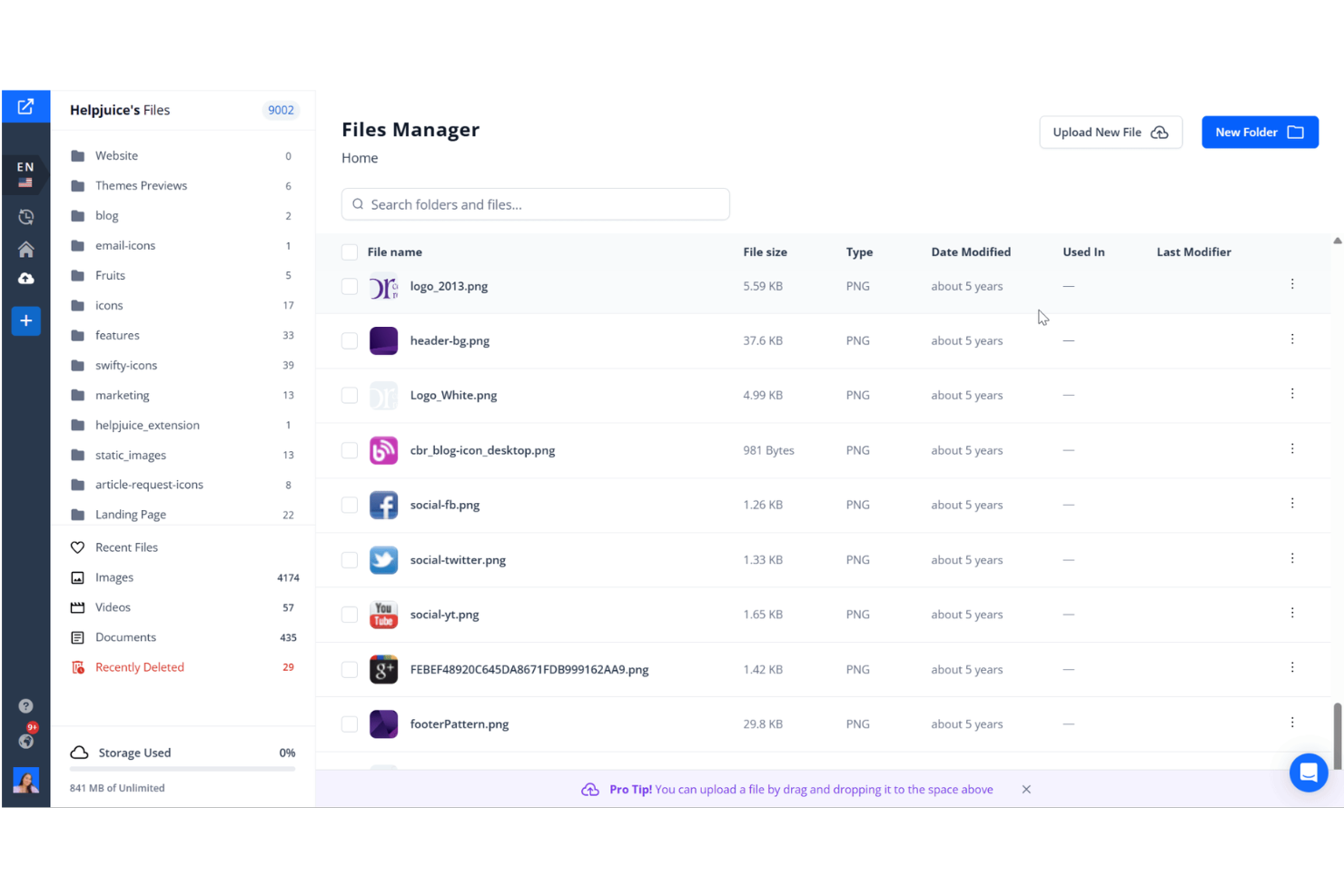
Helpjuice is an AI-driven knowledge base software that lets teams create, organize, search, and analyze internal and external documentation with tailored content structures and a user-friendly editor.
Who Is Helpjuice Best For?
Helpjuice is a strong fit for mid-sized to large organizations that want full control over their internal or external knowledge base structure.
Why I Picked Helpjuice
I picked Helpjuice as one of my favourites because I can customize every aspect of article structure, navigation, and branding. I like how I can build unlimited category levels and apply advanced formatting controls without developer input.
Helpjuice Key Features
- AI-powered search: Surfaces contextually relevant articles and suggestions as users type queries.
- Version history: Tracks every edit on an article and lets you restore previous versions.
- Embeddable widgets: Allow teams to display knowledge articles within external apps or websites.
- Article analytics: Measures searches, views, and engagement for every piece of content.
Helpjuice Integrations
Helpjuice offers native integrations with Slack, Salesforce, Zendesk, Google Chrome, and Freshdesk. An API is available for custom integrations.
Pros and Cons
Pros:
- Multi-language content management included
- AI search understands natural language queries
- Article templates for advanced formatting options
Cons:
- Limited bulk content editing actions
- Permission controls lack granular settings


GoSearch is an AI-powered enterprise search platform that connects to multiple internal company tools and data sources, letting teams find and manage knowledge spanning chat, files, wikis, tickets, and documentation.
Who Is GoSearch Best For?
GoSearch suits distributed teams and growing companies that need to search across tools like Slack, Google Workspace, Notion, and email.
Why I Picked GoSearch
I picked GoSearch as one of the best because I can search and retrieve information from across Slack, Google Drive, Notion, and email with a single query. I like that search results show document previews and highlight answers in context, which saves time when scanning large knowledge bases.
GoSearch Key Features
- AI suggestions: Surfaces related knowledge and resources as you type.
- Access control: Let admins manage user permissions for each data source.
- Search filters: Allows filtering by tool, author, or date range.
- Chrome extension: Enables quick search directly from the browser.
GoSearch Integrations
GoSearch offers native integrations with Slack, Google Workspace, Notion, GitHub, Confluence, Jira, Zendesk, Microsoft 365, Salesforce, and Box. An API is available for custom integrations.
Pros and Cons
Pros:
- Contextual previews help review results faster
- AI-powered suggestions improve over time
- Finds answers from chat, tickets, and docs
Cons:
- Bulk export options are missing
- Limited support for niche or custom tools
Diğer Yapay Zekâ Bilgi Tabanı Yazılımları
Kısa listeme giremeyen ancak yine de göz atmaya değer bazı ek yapay zekâ bilgi tabanı yazılımı seçenekleri şunlardır:


How I Evaluate AI Knowledge Base Software
Every tool on this list has to go beyond keyword search with an AI label—I look for platforms where a PM can ask a plain-language question and get a sourced, accurate answer pulled from actual project docs. I split my evaluation into core functionality every tool must have to qualify and differentiating factors that separate good options from great ones.
Core Functionality (Table Stakes For This List)
When I'm selecting tools for my list, I rank each one on a scale from 0 (does not offer the functionality) to 5 (excels in this area) for each core functionality listed below. Then, I calculate the tool's total score into a percentage. Each tool needs to achieve a minimum total score of 65% to be considered for inclusion.
- AI Semantic Search: I check whether the tool can answer a plain-language question like "what was the agreed scope change in Sprint 12?" and return a direct, sourced answer from indexed project docs.
- Generative AI Authoring: I look for built-in AI that can draft a meeting summary or update a project runbook from a prompt, not just suggest edits to existing text.
- Multi-Source Knowledge Ingestion: The tool should pull in content from places where project knowledge already lives, like Confluence wikis, Jira tickets, Google Drive folders, or uploaded PDFs.
- Source Citation & Grounding: Every AI-generated answer should trace back to its source page or document so a PM can verify the response before sharing it with stakeholders.
- Permissions & Access Controls: I evaluate whether the platform supports role-based access at the project or space level, so sensitive program data stays visible only to authorized team members.
- Knowledge Organization Structure: A tool should let you organize content into logical groupings like project spaces, phase-based categories, or tagged collections rather than dumping everything into a flat list.
Once I have a list of tools that meet this criteria, I consider what sets each platform apart.
Differentiating Factors (What Sets Vendors Apart)
Here's how I compare and contrast different vendors:
Standout Features
Content gap detection is a big differentiator. I look for tools that flag when a query has no matching article, so you know exactly where your project wiki needs attention. Auto-generated content matters too, especially when the AI can turn a Zoom transcript or Jira thread into a draft runbook without manual copy-pasting. I also evaluate multi-channel embedding, since the best setups let teammates pull AI answers directly inside Slack or Teams instead of switching to a separate knowledge portal.
Beyond Features
I pay close attention to hallucination controls—especially whether the AI flags low-confidence answers or blocks responses pulled from outdated sources. A PM sharing incorrect scope details with leadership is a real risk. Source connectors also matter. I check whether the tool syncs natively with where your project data already lives, like Confluence, Jira, or SharePoint, so you're not manually re-uploading docs every week. I also consider time-to-value: how fast you can ingest existing content and start getting accurate AI answers after setup.
Yapay Zekâ Bilgi Tabanı Yazılımı Nasıl Seçilir?
Uzun özellik listeleri ve karmaşık fiyatlandırma yapıları arasında kaybolmak kolaydır. Kendinize özgü yazılım seçim sürecinizde ilerlerken odağınızı korumanıza yardımcı olmak için göz önünde bulundurmanız gereken faktörlerin bir kontrol listesi aşağıda yer alıyor:
| Faktör | Dikkat Edilmesi Gerekenler |
|---|---|
| Ölçeklenebilirlik | Platform, ekibiniz büyürken ekibinizi destekleyecek mi? Kullanıcı, depolama ve içerik sınırlarını kontrol edin ve farklı kullanım katmanlarında fiyatlandırmanın nasıl değiştiğini değerlendirin. |
| Entegrasyonlar | Araç; Slack, Google Workspace, proje takip araçları veya kod depoları gibi temel sistemlerinize yerel olarak bağlanıyor mu? Eksiklikler, içerik tekrarlarına ve iş akışında sorunlara yol açabilir. |
| Özelleştirilebilirlik | Yapıyı, şablonları ve izinleri şirkete özel ihtiyaçlara veya benzersiz uyumluluk gereksinimlerine uyacak şekilde uyarlayabilir misiniz? Katı kurulumlar, ekipler arası benimsemeyi yavaşlatabilir. |
| Kullanım kolaylığı | İş akışları hem teknik hem de teknik olmayan ekip arkadaşları için sezgisel mi? Deneme veya tanıtım süreçlerinde sayfa oluşturma, düzenleme ve gezinme sırasında yaşanan zorluklara dikkat edin. |
| Uygulama ve işe alıştırma | Tüm ekibiniz ne kadar hızlı kullanmaya başlayabilir? İçe aktarma araçlarını, eğitim kaynaklarını ve kurulum ile geçiş belgelerinin kalitesini göz önünde bulundurun. |
| Maliyet | Fiyatlandırma zaman içinde öngörülebilir mi ve beklediğiniz ölçek ile kullanıma uygun mu? Veri veya kullanıcı sayısı arttıkça ortaya çıkabilecek gizli ücretlere ya da maliyetli yükseltmelere dikkat edin. |
| Güvenlik önlemleri | Yazılım şifreleme, SSO, erişim denetimleri ve denetim günlükleri sunuyor mu? Bu önlemlerin kuruluşunuzun güvenlik standartlarını karşılayıp karşılamadığını değerlendirin. |
| Destek erişilebilirliği | Saat dilimleriniz ve kullandığınız kanallar üzerinden yardım alabiliyor musunuz? Desteğe ihtiyaç duyduğunuzda canlı sohbet, ayrıntılı yardım belgeleri ve hızlı yönlendirme seçeneklerinin mevcut olup olmadığını değerlendirin. |
Yapay Zekâ Bilgi Tabanı Yazılımı Nedir?
Yapay zekâ bilgi tabanı yazılımı, bir şirketin dahili belgelerinden yanıtları düzenlemek, aramak ve sunmak için bilgi yönetimi araçlarını yapay zekâyla birleştiren dijital bir platformdur. Bu sistemler, aramayı hızlandırmak, ilgili içerikleri önermek ve içerik güncellemelerini otomatikleştirmek için yapay zekâ kullanır; böylece dağıtık ekiplerin bilgiye erişimini kolaylaştırır.
Yapay Zekâ Bilgi Tabanı Yazılımının Özellikleri
Yapay zekâ bilgi tabanı yazılımı seçerken aşağıdaki temel özelliklere dikkat edin:
- Yapay zekâ destekli arama: Büyük veya karmaşık içerik kitaplıklarında bile ilgili bilgileri hızla bulmak için yapay zekâ kullanır ve yanıt aramak için harcanan zamanı azaltır.
- Doğal dil işleme: Kullanıcıların günlük dille soru sormasına veya bilgi tabanında arama yapmasına olanak tanır; böylece kusursuz anahtar kelimeler kullanmadan bilgi bulmayı kolaylaştırır.
- İçerik düzenleme araçları: Şirket bilgisini kolayca gözden geçirmek ve yönetmek üzere yapılandırmak için klasörler, etiketler ve kategorilendirme özellikleri sağlar.
- Otomatik içerik önerileri: Güncellenmesi gereken makaleleri önerir, yinelenen veya güncelliğini yitirmiş içerikleri vurgular ve kullanıcı etkinliğine göre eksik belgelerin oluşturulmasını önerir.
- İzinler ve erişim denetimi: Belirli belgeleri veya bölümleri kimlerin görüntüleyebileceğini, düzenleyebileceğini ya da yönetebileceğini belirlemenize olanak tanıyarak hassas bilgileri güvende tutar.
- İş birliği özellikleri: Yorumların, bahsetmelerin ve dahili tartışmaların doğrudan makalelerin veya belgelerin içinde yapılmasını sağlar; böylece ekiplerin eş zamanlı olmadan birlikte çalışmasını kolaylaştırır.
- Sürüm geçmişi ve denetim günlükleri: Her belgede yapılan değişiklikleri izler ve önceki sürümleri geri yüklemenize olanak tanır; böylece önemli bilgilerin kaybolmamasını veya yanlışlıkla üzerine yazılmamasını sağlar.
- Analiz ve raporlama: Makale kullanımı, arama eğilimleri ve içerik eksiklikleri hakkında içgörüler sunarak belgelerin kalitesini ve zaman içindeki uygunluğunu artırmanıza yardımcı olur.
- Kolay içe ve dışa aktarma: Belgeleri diğer kaynaklardan taşımak veya bilgi tabanınızı yedek olarak kaydetmek için araçlar sunarak işe alıştırma ve geçiş süreçlerini kolaylaştırır.
- Özelleştirilebilir şablonlar: Sık kullanılan belge türleri için hazır sayfa düzenleri sunarak ekiplerin yeni içerikleri daha hızlı ve tutarlı bir yapıyla oluşturmasına yardımcı olur.
Yapay Zekâ Bilgi Tabanı Yazılımının Faydaları
Yapay zekâ bilgi tabanı yazılımını uygulamak, ekibiniz ve işletmeniz için çeşitli faydalar sağlar. Yararlanabileceğiniz bazı avantajlar şunlardır:
- Daha hızlı bilgi erişimi: Yapay zekâ destekli arama, ekip üyelerinin ilgili belgeleri ve yanıtları saniyeler içinde bulmasına yardımcı olarak manuel aramada kaybedilen zamanı azaltır.
- Geliştirilmiş bilgi tutarlılığı: Merkezi içerik düzenleme ve sürüm geçmişi araçları, herkesin en doğru ve güncel bilgilere başvurmasını sağlar.
- Tekrarlanan soruların azalması: Otomatik içerik önerileri ve self servis erişim, insanların kurum içindeki uzmanlara başvurmadan yanıt bulmasını sağlar.
- Sorunsuz iş birliği: Yerleşik yorum ve tartışma özellikleri eş zamanlı olmayan ekip çalışmasını destekleyerek işlevler arası projeleri daha verimli hâle getirir.
- Daha güçlü güvenlik ve uyumluluk: Ayrıntılı izinler, hassas içeriğe kimlerin erişebileceğini, içeriği düzenleyebileceğini veya paylaşabileceğini denetlemenizi sağlayarak veri sızıntısı riskini en aza indirir.
- Uygulanabilir içgörüler: Analiz ve raporlama özellikleri, içerik eksikliklerini ortaya çıkarmanıza, arama eğilimlerini izlemenize ve belgelerinizi sürekli olarak geliştirmenize yardımcı olur.
- Basitleştirilmiş işe alıştırma: Kolay içe aktarma araçları, şablonlar ve doğal dil işleme, yeni çalışanların daha hızlı uyum sağlamasına olanak tanır; böylece ekipler daha kısa sürede verimli hâle gelir.
Yapay Zekâ Bilgi Tabanı Yazılımının Maliyetleri ve Fiyatlandırması
Yapay zekâ bilgi tabanı yazılımını seçmek, mevcut çeşitli fiyatlandırma modellerini ve planları anlamayı gerektirir. Maliyetler özelliklere, ekip büyüklüğüne, eklentilere ve diğer unsurlara göre değişir. Aşağıdaki tabloda yaygın planlar, ortalama fiyatları ve yapay zekâ bilgi tabanı yazılımı çözümlerinde genellikle sunulan özellikler özetlenmektedir:
Yapay Zekâ Bilgi Tabanı Yazılımı İçin Plan Karşılaştırma Tablosu
| Plan Türü | Ortalama Fiyat | Yaygın Özellikler |
|---|---|---|
| Ücretsiz Plan | $0 | Temel belge oluşturma, basit arama, sınırlı depolama, temel iş birliği araçları ve temel izinler. |
| Kişisel Plan | $5-$15/kullanıcı/ay | Bireysel çalışma alanları, artırılmış depolama, gelişmiş AI araması, içerik düzenleme araçları ve öncelikli e-posta desteği. |
| İşletme Planı | $15-$35/kullanıcı/ay | Ekip çalışma alanları, gelişmiş izinler, iş akışı otomasyonu, entegrasyonlar, analizler ve ekip işe alıştırma kaynakları. |
| Kurumsal Plan | $35-$75/kullanıcı/ay | Özel işe alıştırma, tahsis edilmiş destek, SSO ve güvenlik denetimleri, uyumluluk özellikleri, gelişmiş analizler ve sınırsız sürüm geçmişi. |
How I Evaluate AI Knowledge Base Software
Every tool on this list has to go beyond keyword search with an AI label—I look for platforms where a PM can ask a plain-language question and get a sourced, accurate answer pulled from actual project docs. I split my evaluation into core functionality every tool must have to qualify and differentiating factors that separate good options from great ones.
Core Functionality (Table Stakes For This List)
When I'm selecting tools for my list, I rank each one on a scale from 0 (does not offer the functionality) to 5 (excels in this area) for each core functionality listed below. Then, I calculate the tool's total score into a percentage. Each tool needs to achieve a minimum total score of 65% to be considered for inclusion.
- AI Semantic Search: I check whether the tool can answer a plain-language question like "what was the agreed scope change in Sprint 12?" and return a direct, sourced answer from indexed project docs.
- Generative AI Authoring: I look for built-in AI that can draft a meeting summary or update a project runbook from a prompt, not just suggest edits to existing text.
- Multi-Source Knowledge Ingestion: The tool should pull in content from places where project knowledge already lives, like Confluence wikis, Jira tickets, Google Drive folders, or uploaded PDFs.
- Source Citation & Grounding: Every AI-generated answer should trace back to its source page or document so a PM can verify the response before sharing it with stakeholders.
- Permissions & Access Controls: I evaluate whether the platform supports role-based access at the project or space level, so sensitive program data stays visible only to authorized team members.
- Knowledge Organization Structure: A tool should let you organize content into logical groupings like project spaces, phase-based categories, or tagged collections rather than dumping everything into a flat list.
Once I have a list of tools that meet this criteria, I consider what sets each platform apart.
Differentiating Factors (What Sets Vendors Apart)
Here's how I compare and contrast different vendors:
Standout Features
Content gap detection is a big differentiator. I look for tools that flag when a query has no matching article, so you know exactly where your project wiki needs attention. Auto-generated content matters too, especially when the AI can turn a Zoom transcript or Jira thread into a draft runbook without manual copy-pasting. I also evaluate multi-channel embedding, since the best setups let teammates pull AI answers directly inside Slack or Teams instead of switching to a separate knowledge portal.
Beyond Features
I pay close attention to hallucination controls—especially whether the AI flags low-confidence answers or blocks responses pulled from outdated sources. A PM sharing incorrect scope details with leadership is a real risk. Source connectors also matter. I check whether the tool syncs natively with where your project data already lives, like Confluence, Jira, or SharePoint, so you're not manually re-uploading docs every week. I also consider time-to-value: how fast you can ingest existing content and start getting accurate AI answers after setup.
AI Bilgi Tabanı Yazılımı SSS'leri
AI bilgi tabanı yazılımı hakkında sık sorulan soruların bazı yanıtları şunlardır:
AI, bilgi tabanı aramasını nasıl geliştirir?
AI, yalnızca tam anahtar kelimeleri değil, bağlamı ve amacı anlamak için makine öğrenimi, üretken AI ve doğal dil işleme kullanır. Bu arama işlevi, ekibinizin gerçek soruları kullanarak arama yapmasına ve karmaşık belgelerden ilgili sonuçları alırken temel ölçümleri izlemesine olanak tanır.
İçeriği diğer bilgi tabanı araçlarından taşıyabilir misiniz?
Evet, çoğu AI bilgi tabanı yazılımı, mevcut bilgi tabanı makalelerini eski veya geleneksel bilgi tabanlarından aktarmaya yardımcı olacak içe aktarma araçları ya da entegrasyonlar içerir. Bu, geçiş sırasında bilgi kaynağınızın bütünlüğünü korur ve dağınık belgeleri anında yanıtlar sunan birleşik bir bilgi yönetimi sistemine dönüştürür.
İzinler ile erişim denetimi arasındaki fark nedir?
İzinler, belirli içeriği kimlerin görüntüleyebileceğini, düzenleyebileceğini veya yönetebileceğini belirlerken erişim denetimi, genellikle SOC 2 gibi güvenlik standartlarıyla desteklenen sistem ya da çalışma alanına giriş için daha geniş kuralları tanımlar. Her ikisi de hassas bilgileri korumanıza ve kuruluşunuz büyürken iş birliğini yönetmenize yardımcı olur.
AI bilgi tabanı yazılımı yoğun BT katılımı gerektirir mi?
Hayır, modern çözümlerin çoğu bulut tabanlıdır ve kolay kurulum için tasarlanmıştır; bu nedenle işletme ekipleri platformu genellikle çok az BT desteğiyle dağıtabilir, yapılandırabilir ve yönetebilir. Bu, ekibinizin kapsamlı teknik bilgiye ihtiyaç duymadan iş akışlarını optimize etmesini sağlar.
AI destekli bilgi tabanınızı ne sıklıkla güncellemelisiniz?
AI destekli bilgi yönetimi kurulumunuzu düzenli olarak, ideal olarak her üç ayda bir veya önemli ürün değişikliklerinden sonra gözden geçirip güncellemelisiniz. Bu, botunuzun veya yardım masanızın sorun gidermeyi etkili bir şekilde ele almasına yardımcı olur ve iletişim merkezinizde veya CRM sisteminizde daha iyi müşteri self servis hizmeti sunarak destek taleplerinin hacmini azaltır. Birçok platform, bu sık sorulan sorular için güncellemeleri otomatik olarak önerir.