

2026’nın En İyi 10 Kurumsal Bilgi Yönetimi Yazılımı

En İyi Kurumsal Bilgi Yönetimi Yazılımları Kısa Listesi


Kurumsal bilgi yönetimi yazılımı, kuruluşunuzun bilgileri ekipler arasında yakalamasına, düzenlemesine ve paylaşmasına yardımcı olarak yanıt bulmayı ve projelerin ilerlemesini kolaylaştırır. Bu araçları değerlendiriyorsanız, muhtemelen büyüyen bilgi siloları, dağınık belgeler veya çalışanlarınızın ihtiyaç duydukları bilgilere erişme biçimindeki eksiklikler nedeniyle hayal kırıklığı yaşıyorsunuz.
Doğru çözüm, ekibinizin verimli bir şekilde iş birliği yapmasını, bilgileri güncel tutmasını ve karmaşık dijital iş akışlarını desteklemesini sağlar. Bu listede, işletmeniz için en iyi seçimi yapabilmeniz amacıyla özellikleri, entegrasyonları ve kullanım alanlarını karşılaştırabilmeniz için her platformu birbirinden ayıran noktaları açıklayacağım.
Yazılım Önerilerimize Neden Güvenebilirsiniz?
Ekibimiz 2012’den beri yazılımları test ediyor ve inceliyor. Biz de proje yöneticisi olduğumuz için doğru yazılımı seçmenin ne kadar zor ve önemli olduğunu biliyoruz.
Bu rehber için araçları uygulamalı testler ve bağımsız araştırmalarla değerlendirdik ve seçim kriterlerimize göre puanladık. Ayrıca sektörün fikir önderlerinin ve alanında çalışan proje yönetimi uzmanlarının görüşlerinden de yararlanıyoruz.
İncelemelerimiz bir satış konuşması değil, editör ekibimizin kendi değerlendirmesidir.
Uzman inceleyenler:
Kurumsal Bilgi Yönetimi Yazılımları Karşılaştırma Tablosu
Bu karşılaştırma tablosu, en iyi kurumsal bilgi yönetimi yazılımı seçimlerimin fiyatlandırma ayrıntılarını özetlemektedir.
| Tool | Starting Price | Website | |
|---|---|---|---|
| Best for documentation version control | 4.7 out of 5 | Pricing upon request Free demo available | Website |
| Best for onboarding with free implementation help | 4.5 out of 5 | Pricing upon request Free demo available | Website |
| Best for AI-guided customer support knowledge | 4.8 out of 5 | Pricing upon request Free demo + 14-day free trial available | Website |
| Best for turning software workflows into SOPs | 4.8 out of 5 | $15/user/month Free plan available | Website |
| Best for lightweight document collaboration | 4.7 out of 5 | $6/user/month Free plan + 14-day trial available | Website |
| Best for compliance-driven knowledge governance | 4.7 out of 5 | Pricing upon request Free demo available | Website |
| Best for asynchronous team knowledge sharing | 4.7 out of 5 | $10/user/month 14-day free trial + free demo available | Website |
| Best for customizable workspace architecture | 4.6 out of 5 | $10/user/month Free plan + 30-day trial available | Website |
| Best for scaling team collaboration workflows | 4.3 out of 5 | $5.78/user/month Free plan + 7-day trial available | Website |
| Best for AI-powered knowledge suggestions | 3.5 out of 5 | Pricing upon request Free demo available | Website |
En İyi Kurumsal Bilgi Yönetimi Yazılımları İncelemeleri
Aşağıda, kısa listeme giren en iyi kurumsal bilgi yönetimi yazılımları hakkındaki ayrıntılı özetlerimi bulabilirsiniz. İncelemelerim, size en uygun olanı bulmanıza yardımcı olmak için her platformun özelliklerine, entegrasyonlarına ve en iyi kullanım alanlarına ayrıntılı bir bakış sunmaktadır.

Best for documentation version control
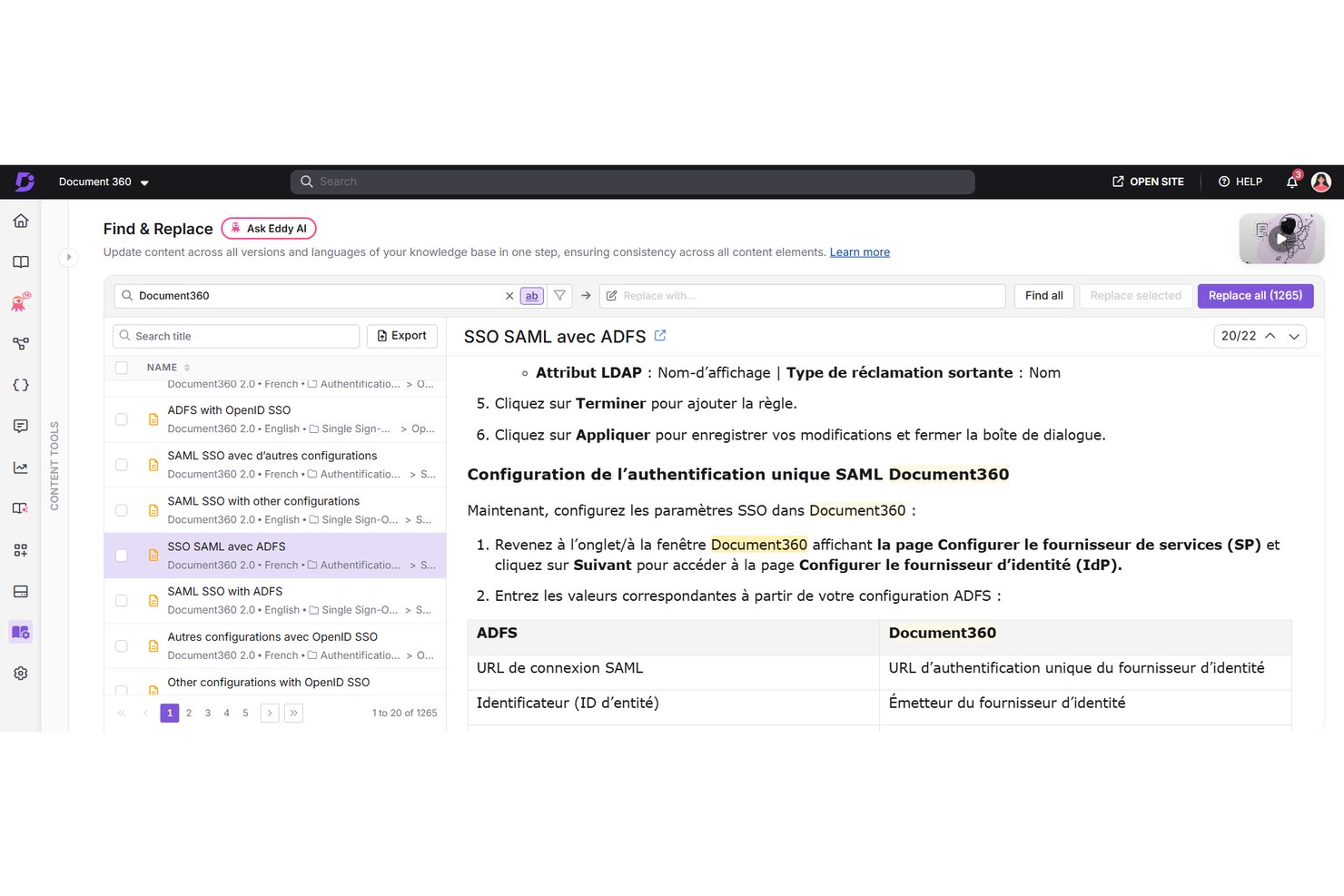
Document360 is an AI-powered knowledge base software built for enterprises to create, organize, and manage internal and external documentation across multiple workspaces.
Who Is Document360 Best For?
Document360 is a strong fit for IT and knowledge managers at mid-to-large SaaS and tech companies who own documentation infrastructure across multiple teams.
Why I Picked Document360
Document360 earns its spot on my shortlist because of how seriously it handles version control at the article level. Every edit is tracked, timestamped, and attributable to a specific author, and I can restore any previous version in a few clicks. The custom approval workflow builder means nothing goes live without passing through a defined review cycle first, which matters when multiple writers are updating the same documentation set simultaneously.
Document360 Key Features
- AI search and answer: Delivers instant, relevant results using semantic search and natural language queries.
- Six-level category hierarchy: Lets you organize documentation into deep, structured categories for easier navigation.
- Bulk article management tools: Allows mass updating, moving, reviewing, and archiving of multiple articles at once.
- Granular permissions and SSO integration: Supports enterprise security needs with fine-grained access control and SSO/SCIM support.
Document360 Integrations
Document360 offers native integrations with Slack, Microsoft Teams, Salesforce, GitHub, Freshdesk, Zendesk, Intercom, Drift, Google Analytics, and Crowdin. It also supports Zapier and provides an API for custom integrations.
Pros and Cons
Pros:
- Customizable internal and external knowledge portals
- Six-level category structure for organizing content
- Extensive article version history and restoration
Cons:
- No mobile app for on-the-go access
- No real-time collaboration options
New Product Updates from Document360

Document360 Adds Feedback APIs, MCP Tools, and Zendesk Authentication
Document360 adds feedback APIs, expanded MCP tools, Zendesk account authentication, and the ability to reopen closed feedback. These updates help teams manage feedback, automate knowledge base tasks, and control integration access. For more information, visit Document360’s official site.
 .

Hub
Best for onboarding with free implementation help

HUB is an all-in-one intranet and knowledge management platform that centralizes documentation, SOPs, and organizational knowledge with federated search, smart tagging, granular permissions, and integrations with leading cloud and project management tools.
Who Is HUB Best For?
HUB is a strong fit for mid-market organizations that need an accessible, centralized knowledge management solution without the complexity of large enterprise platforms.
Why I Picked HUB
I picked HUB as one of the best because the onboarding model is genuinely different. Every license includes around 15 hours of 1:1 expert-led setup sessions at no extra cost. The trial environment also converts directly into the live site, so there's no data migration when you launch. The AI Tag Assistant helps teams build a consistent content taxonomy from day one.
HUB Key Features
- Federated search: Search instantly across internal knowledge, SharePoint, Google Drive, Box, and Confluence from one interface.
- Granular permissions: Assign over 100 customizable access levels to control who can view, edit, and share content.
- Smart workflows and digital forms: Create approval chains and automate routine processes with built-in forms and workflow tools.
- 25+ built-in analytics reports: Access real-time insights into content engagement, search trends, and adoption metrics.
HUB Integrations
HUB offers native integrations with SharePoint, Google Workspace, Box, Microsoft Teams, Slack, BambooHR, Confluence, and more. An API is available for custom integrations.
Pros and Cons
Pros:
- Granular permissions with over 100 access levels
- AI Tag Assistant automates content taxonomy building
- Expert-led onboarding included with every license
Cons:
- Fewer generative AI features than top competitors
- Less proven at Fortune 1000 enterprise scale
Stonly
Best for AI-guided customer support knowledge
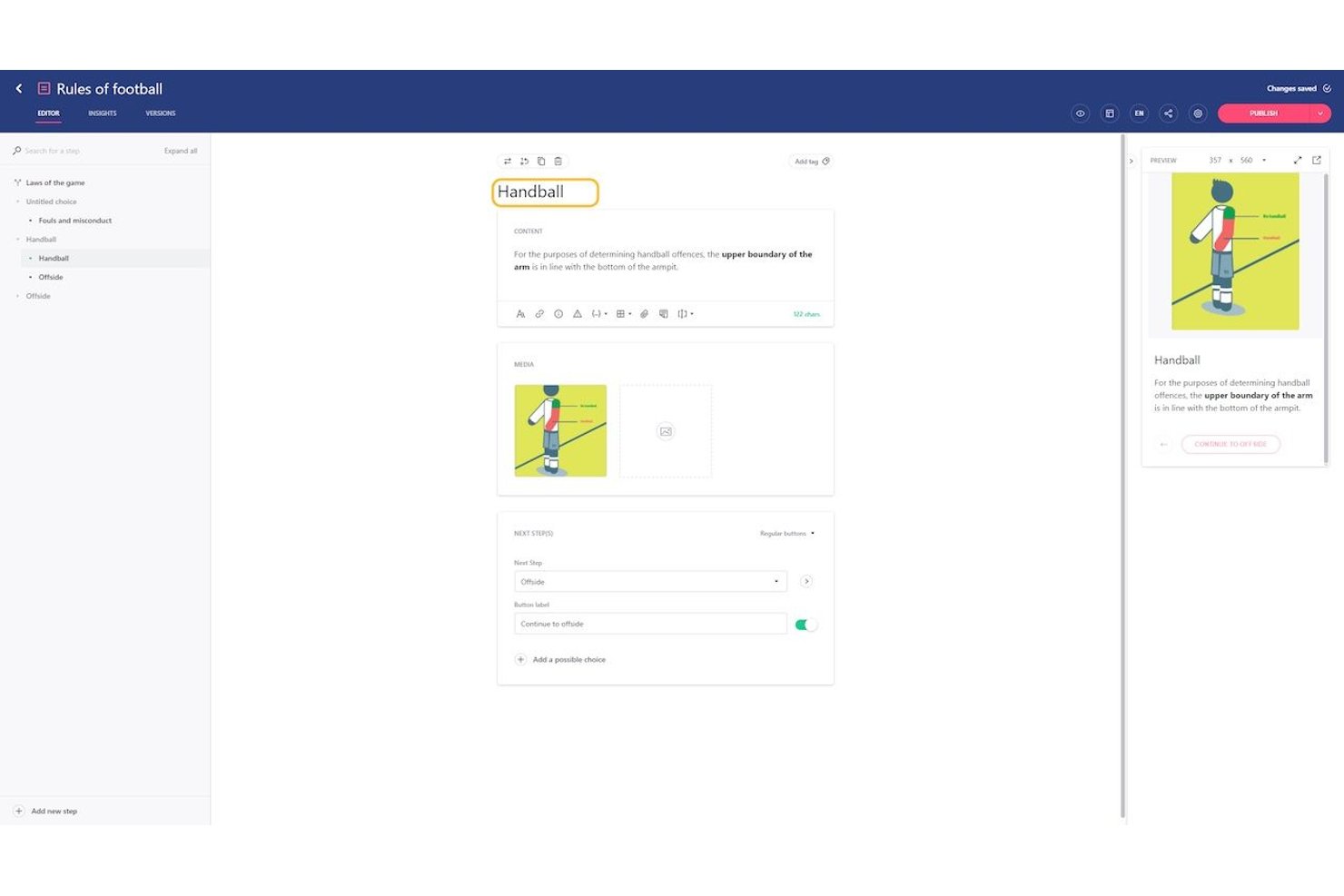
Stonly is a knowledge management platform built around interactive, branching guides that let you deliver AI-powered answers, agent-facing knowledge bases, and automated support workflows from a single content system.
Who Is Stonly Best For?
Stonly is a strong fit for customer support and CX teams that need to deliver AI-guided, self-serve knowledge to both customers and agents.
Why I Picked Stonly
I picked Stonly as one of the best because its AI-guided approach to customer support knowledge is unlike anything else on this list. Its interactive, branching guides adapt to each user's selections rather than serving static articles, which is how it achieves a reported 92% AI answer accuracy. I also love Knowledge Agents, which autonomously monitor your knowledge base around the clock, drafting fixes for outdated or missing content before gaps become support failures.
Stonly Key Features
- Business Process Agents: AI agents that handle multi-step, branching support processes end-to-end across channels like chat, email, and WhatsApp without human intervention.
- Omnichannel widget deployment: A no-code embeddable widget that surfaces knowledge base content across websites, web apps, mobile apps, and help desk tools with contextual targeting.
- Full-path analytics: Tracks user journeys through guides, including start points, navigation paths, drop-off points, and resolution outcomes, with satisfaction feedback built in.
- Content versioning and review workflows: Supports multi-user editing with approval flows, version history, and scheduled publishing to keep knowledge accurate before it goes live.
Stonly Integrations
Stonly integrates with SharePoint, Google Drive, Notion, Microsoft Teams, Slack, Jira, and Okta for enterprise knowledge workflows. It also supports connections with Zendesk, Salesforce, and Zapier.
Pros and Cons
Pros:
- Knowledge Agents automate content maintenance and improvement
- AI Answers surface precise, intent-based results
- Interactive guides personalize knowledge for each user
Cons:
- No cross-project lessons learned capture tools
- Not suited for project-centric documentation needs

Tango
Best for turning software workflows into SOPs
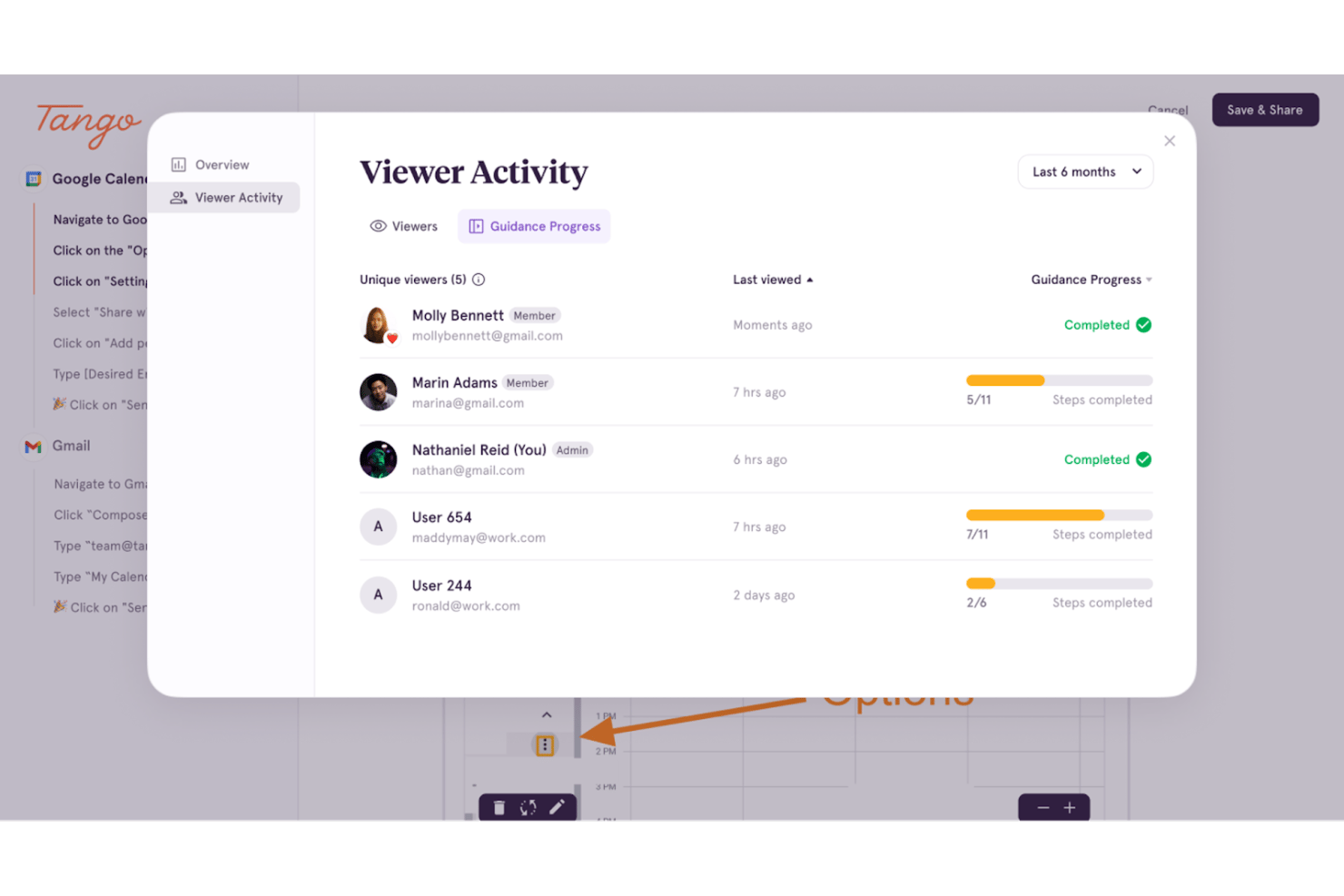
Tango is a workflow documentation and digital adoption platform that automatically captures on-screen processes into annotated, step-by-step visual guides and delivers in-app guidance through contextual overlays and interactive walkthroughs.
Who Is Tango Best For?
Tango is a strong fit for operations and enablement teams that need to turn software workflows into shareable, repeatable SOPs without spending hours writing documentation from scratch.
Why I Picked Tango
I picked Tango as one of the best because it does something no traditional KM platform does: it captures a software workflow automatically as you perform it, turning live screen actions into a fully annotated, step-by-step SOP in minutes. The "Guide Me" feature then delivers that SOP as an interactive on-screen walkthrough, overlaid directly on the live application, so employees aren't just reading instructions but being guided through each click in real time. For ops teams drowning in undocumented processes, that combination of automatic capture and contextual delivery is genuinely hard to replicate.
Tango Key Features
- Secure Blur PII redaction: Automatically detects and redacts personally identifiable information from screenshots during workflow capture.
- Version history with restore: Enterprise plan retains 365 days of version history, letting teams recover or review any previous state of a guide.
- Multi-path workflows: Branching documentation lets you build a single guide that adapts to different roles, regions, or process variations.
- SCIM provisioning and SSO: Automated user lifecycle management integrates with Okta, Google, and Azure AD to control access at scale.
Tango Integrations
Tango supports integrations with Confluence, Notion, Coda, Microsoft Teams, and Slack through embed links and shared guides. It has no documented native integrations with Jira, Asana, Microsoft Project, or Monday.com, and no public API or webhook documentation.
Pros and Cons
Pros:
- Secure Blur automatically redacts sensitive data
- In-app guides overlay directly on software
- Captures workflows into step-by-step SOPs
Cons:
- Lacks advanced project knowledge structuring features
- No support for wikis or document repositories

Nuclino
Best for lightweight document collaboration
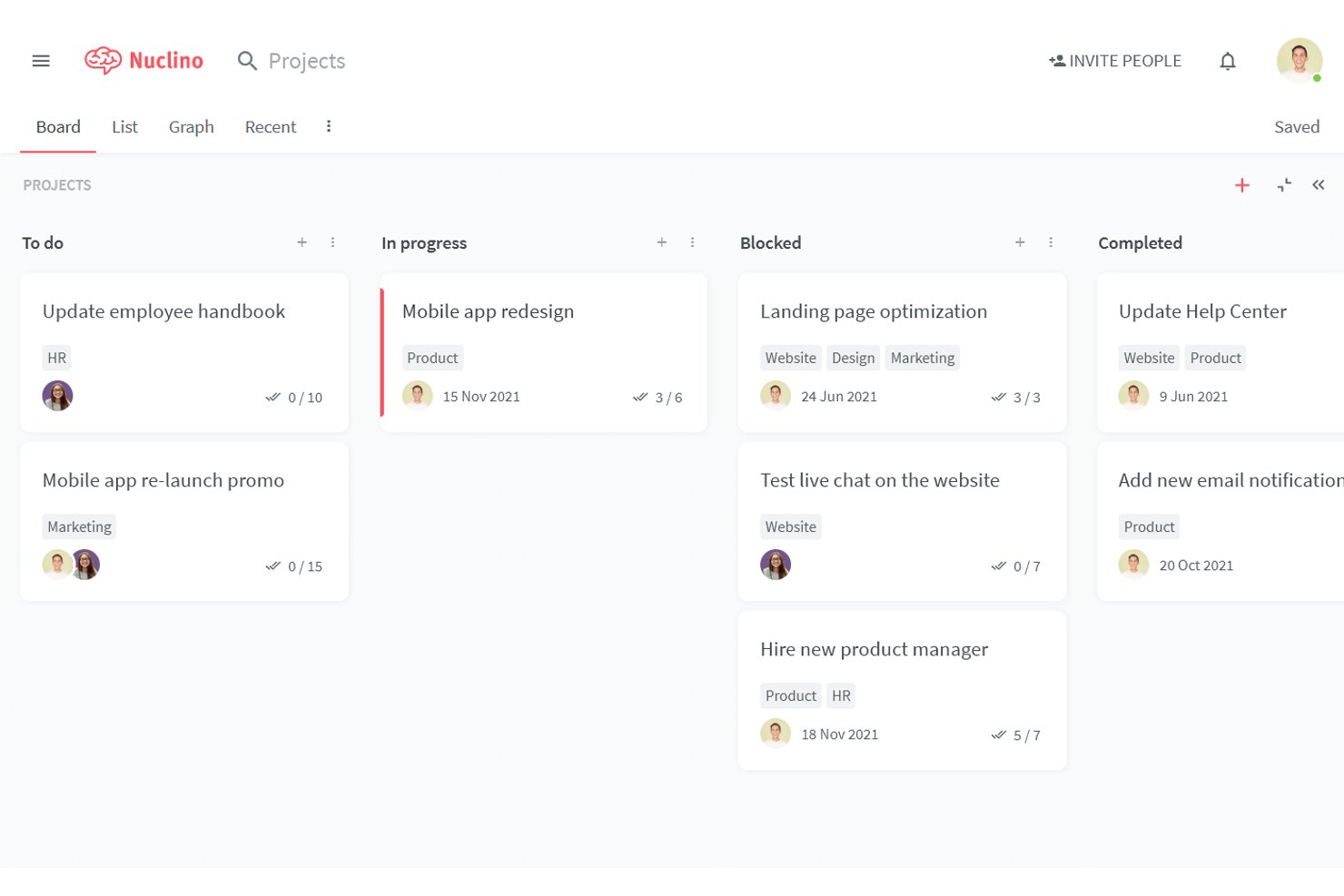
Nuclino is a collaborative knowledge base and wiki tool that lets teams create, organize, link, and search documentation using real-time editing, multiple content views, and an artificial intelligence writing assistant.
Who Is Nuclino Best For?
Nuclino is a strong fit for small to mid-sized tech teams that need a simple, low-overhead wiki for internal documentation and knowledge sharing.
Why I Picked Nuclino
I picked Nuclino as one of the best because its graph view lets you visualize how documents connect to each other, which makes spotting gaps in your team's knowledge structure genuinely useful. My team also relies on the real-time co-editing and slash-command editor, which keeps documentation current without slowing anyone down. The AI Sidekick adds another layer by drafting and summarizing content directly inside documents, so capturing knowledge from a meeting or project handoff takes minutes, not hours.
Nuclino Key Features
- Multiple content views: Switch easily between list, board, table, and graph layouts to suit your team's needs.
- Canvas embedding: Add whiteboards and diagrams directly into documentation for visual context.
- Advanced access controls: Set permissions for admins, members, guests, and read-only users to manage document security.
- Extensive integrations: Connect with platforms like Slack, Jira, Figma, Dropbox, and Microsoft 365 for knowledge sharing.
Nuclino Integrations
Nuclino offers 55+ native integrations, including Jira, Slack, Microsoft Teams, Google Drive, OneDrive, Figma, Lucidchart, Miro, InVision, Dropbox, and GitHub. An API is available for custom integrations.
Pros and Cons
Pros:
- Version history for tracking document changes
- In-document slash commands speed up editing
- Graph view for visualizing document relationships
Cons:
- No granular approval or publishing workflows
- Limited compliance certifications for enterprises

Shelf
Best for compliance-driven knowledge governance
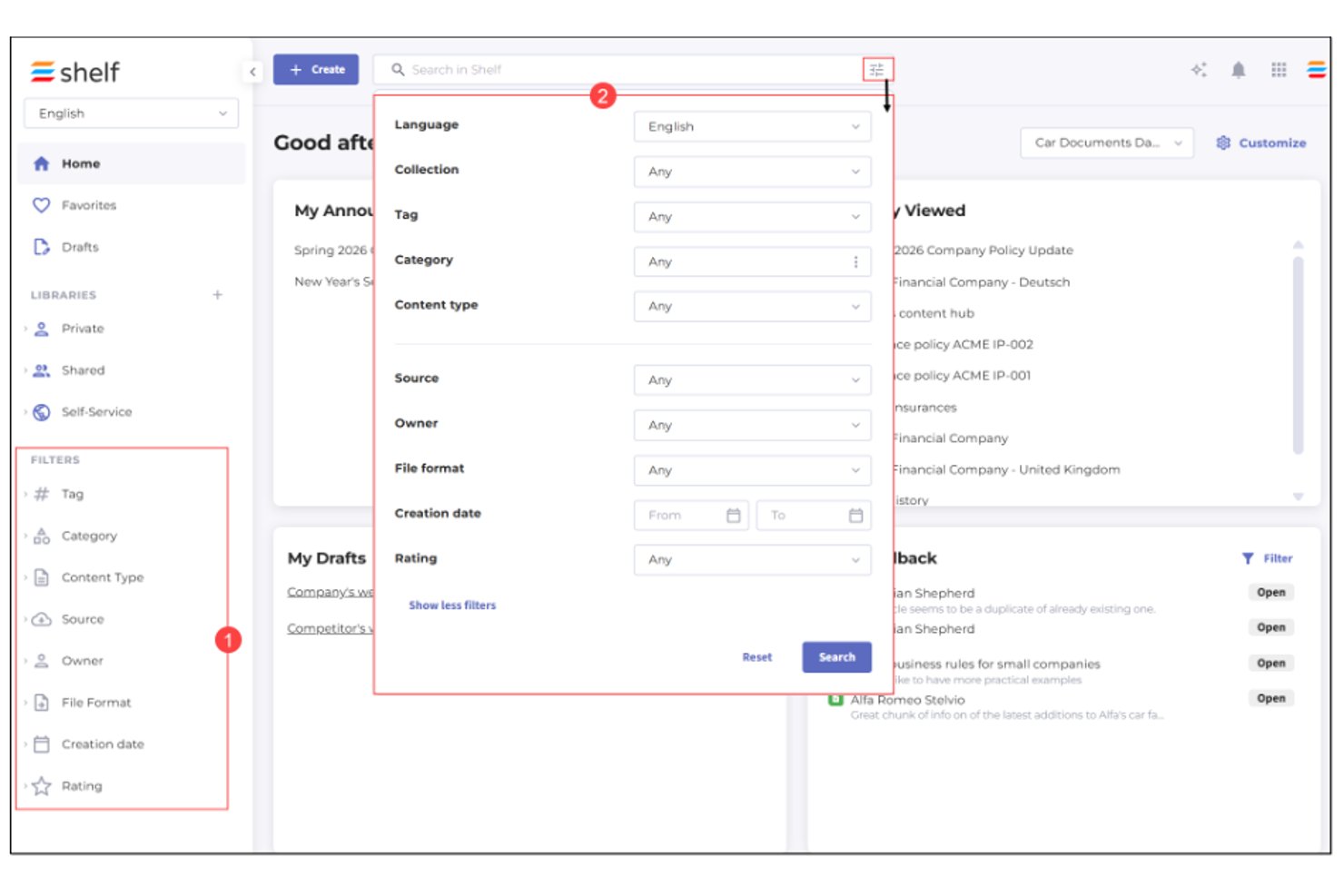
Shelf is an enterprise knowledge management platform centered on content governance, with AI-powered search, ROT (redundant, obsolete, and trivial) content detection, content quality assurance, and reusable content structures for large-scale knowledge operations.
Who Is Shelf Best For?
Shelf is a strong fit for knowledge managers at large enterprises in regulated industries like financial services and healthcare, where content accuracy and governance are non-negotiable.
Why I Picked Shelf
Shelf earns its spot on my shortlist because of how seriously it takes content governance at scale. I love that it continuously monitors your knowledge base for ROT content (redundant, obsolete, and trivial) and flags compliance-risk items before they surface in AI pipelines or agent responses. The always-on Content Quality Assurance layer gives me prescriptive guidance on exactly what needs fixing, not just a list of problems to sort through manually.
Shelf Key Features
- AI-powered search and discovery: Find relevant knowledge instantly using semantic search and metadata filters.
- Reusable content blocks: Build and update knowledge articles faster with pre-approved templates and modular content parts.
- Auto-translate engine: Convert knowledge content into over 100 languages automatically within the platform.
- Decision tree builder: Guide users through complex processes with customizable, step-by-step navigable workflows for decision-making.
Shelf Integrations
Shelf offers native integrations with Salesforce, ServiceNow, Zendesk, Confluence, Notion, SharePoint, Google Drive, Box, Genesys, and Intercom. An API is also available for custom integrations.
Pros and Cons
Pros:
- Bulk content updates with reusable blocks
- Real-time AI search suggestions
- Automated content governance monitoring
Cons:
- Limited analytics dashboard customization
- No in-platform document editing

Slite
Best for asynchronous team knowledge sharing
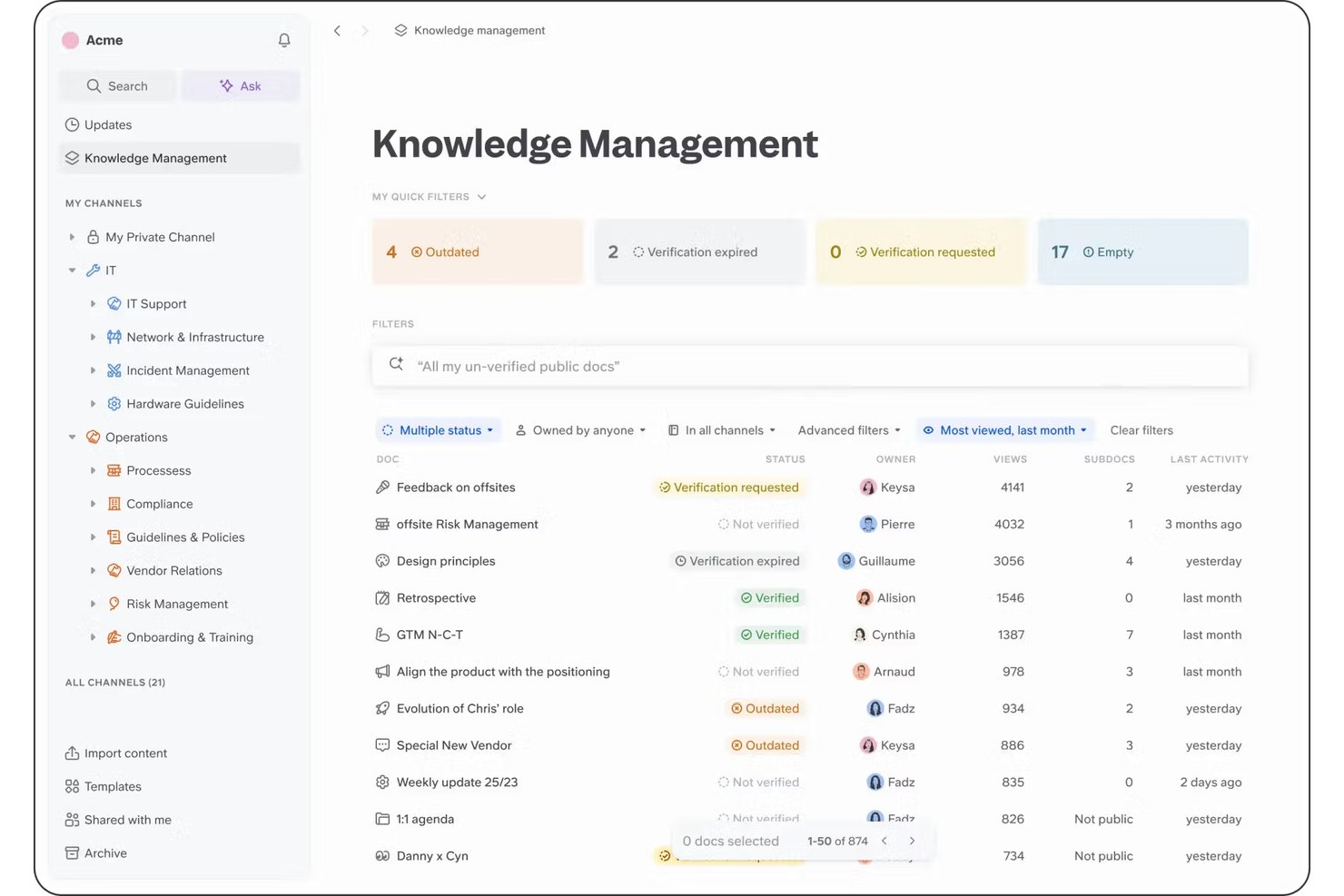
Slite is an AI-powered knowledge base built around collaborative document editing, semantic search, and an automated verification system that flags and proposes fixes for outdated content.
Who Is Slite Best For?
Slite is a strong fit for knowledge managers and operations leads at small-to-midsize tech teams who need a focused, low-overhead internal wiki.
Why I Picked Slite
I picked Slite as one of the best because its verification workflow directly solves the core async knowledge problem: stale docs. Slite auto-flags outdated content by comparing docs against activity in connected tools like GitHub and Slack, then proposes fixes for owners to approve. The Ask feature lets teammates query the knowledge base in plain language and get cited, sourced answers without pulling anyone into a meeting or Slack thread.
Slite Key Features
- AI-powered information retrieval: Lets users type questions in natural language and retrieves answers from all docs with source links.
- Granular access controls: Supports SSO, role-based permissions, and customizable viewer, commenter, and editor roles.
- Document importers: Imports content from Notion, Confluence, and Google Docs while maintaining structure.
- Custom templates: Offers reusable documentation templates for SOPs, onboarding, or recurring processes.
Slite Integrations
Slite offers over 100 native integrations, including Google Drive, Jira, Slack, GitHub, Linear, Asana, ClickUp, Confluence, Notion, and Figma.
Pros and Cons
Pros:
- AI-powered Ask retrieves answers from docs
- Asynchronous-first discussions and decision logs
- Real-time doc activity notifications for teams
Cons:
- Limited options for document formatting flexibility
- Channel hierarchy can be hard to maintain

Notion
Best for customizable workspace architecture
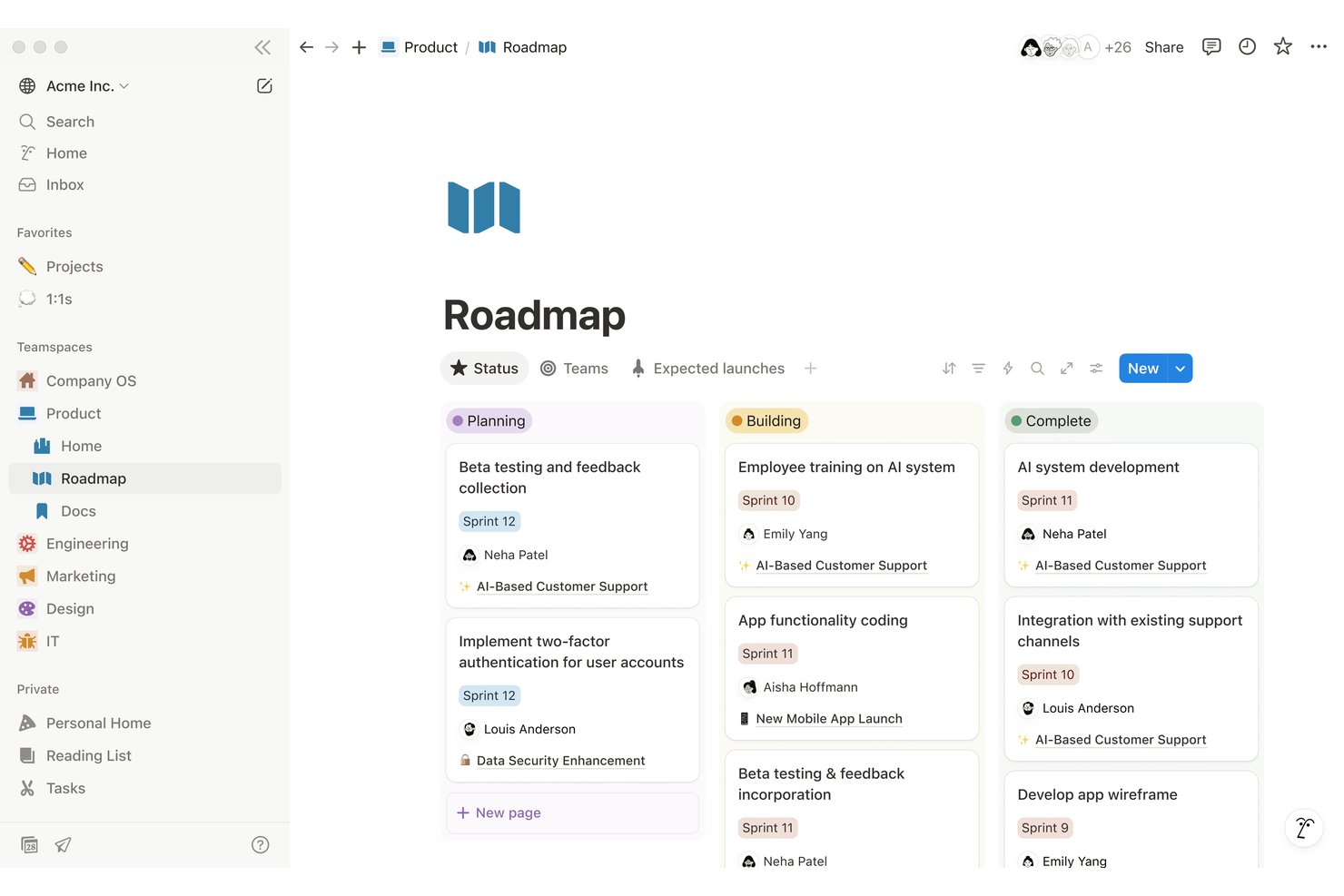
Notion is a connected workspace platform that combines wikis, databases, docs, project tracking, and AI-powered search into a single environment for enterprise teams to store, organize, and collaborate on knowledge.
Who Is Notion Best For?
Notion suits mid-market to enterprise tech teams that need cross-functional knowledge management without being locked into a rigid, predefined structure.
Why I Picked Notion
Notion is one of my top picks because its database architecture sets it apart from other knowledge management tools I've used. I can build relational databases with custom properties, link them across pages, and create multiple views (table, board, calendar) that surface the same data differently for each team. My team uses this to run interconnected SOPs, project trackers, and wikis from one workspace without duplicating content.
Notion Key Features
- Enterprise search: Use AI-powered search to find information across Notion and integrated apps like Slack, Jira, and Google Drive.
- Granular permissions: Assign role-based access and workspace-level rules to manage who can view, edit, or share pages.
- Page history: Track unlimited page revisions and restore previous versions as needed for knowledge governance.
- Automated meeting notes: Instantly generate transcripts and summaries from video calls using Notion’s built-in AI.
Notion Integrations
Notion offers native integrations with Slack, Google Drive, Jira, Figma, GitHub, Datadog, and Loom, and provides an API for custom integrations.
Pros and Cons
Pros:
- AI assistant for fast content drafting
- Advanced permissions for workspace governance
- Flexible database structure for enterprise wikis
Cons:
- Search performance decreases with workspace size
- Approval workflows lack built-in automation
Best for scaling team collaboration workflows
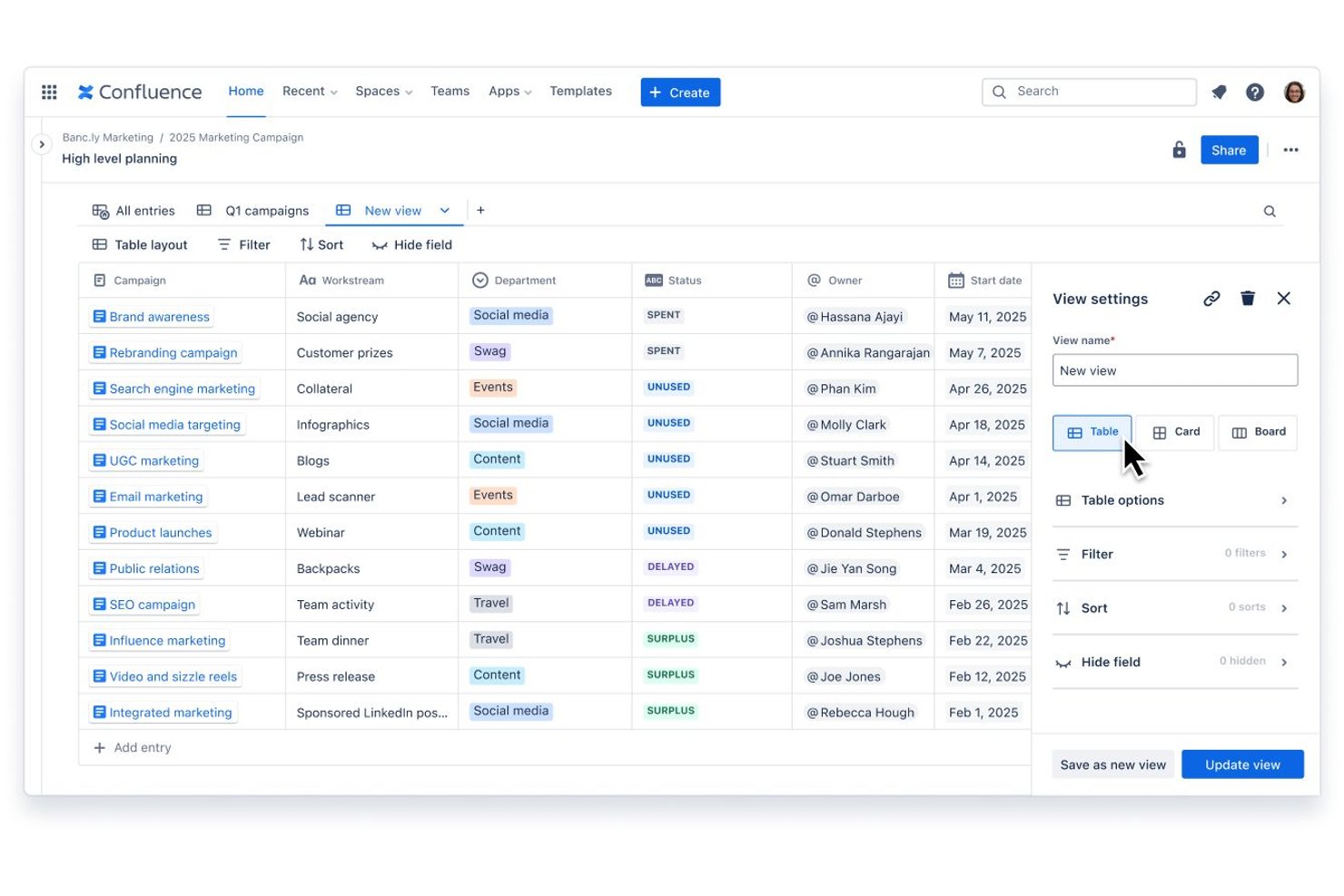
Confluence is an AI-powered knowledge management platform from Atlassian that combines structured document management, real-time collaboration, and enterprise search across pages, whiteboards, databases, and live docs.
Who Is Confluence Best For?
Confluence is a strong fit for mid-size to enterprise teams already using Jira, particularly those managing documentation and knowledge across multiple cross-functional workstreams.
Why I Picked Confluence
I picked Confluence as one of the best because its Spaces architecture scales in ways few knowledge management tools match at the enterprise level. On the Enterprise plan, multiple Confluence sites run under one organization, so separate business units maintain their own knowledge bases without losing cross-org visibility. I also rely on the Teamwork Graph, which connects documentation directly to teams, goals, and active project work, keeping knowledge tied to real delivery context rather than sitting in isolation.
Confluence Key Features
- Rovo AI search and agents: Lets you find, summarize, and transform knowledge across content types using Atlassian's AI-powered search engine.
- Databases for structured content: Organize project knowledge in tables with relationships, rollups, and metadata.
- Live Docs collaboration: Allow teams to co-edit documents in real time and track version history automatically.
- Audit logs and compliance controls: Capture detailed activity histories and support enterprise governance requirements.
Confluence Integrations
Confluence offers native integrations with Trello, Loom, Google Workspace, Microsoft 365, and Slack. It supports thousands of additional integrations through the Atlassian Marketplace and provides an API for custom integrations.
Pros and Cons
Pros:
- Built-in compliance and audit logging options
- Rovo AI finds information across all pages
- Structured spaces for project and team knowledge
Cons:
- Permissions setup can require frequent adjustments
- Bulk content management is not intuitive

Guru
Best for AI-powered knowledge suggestions
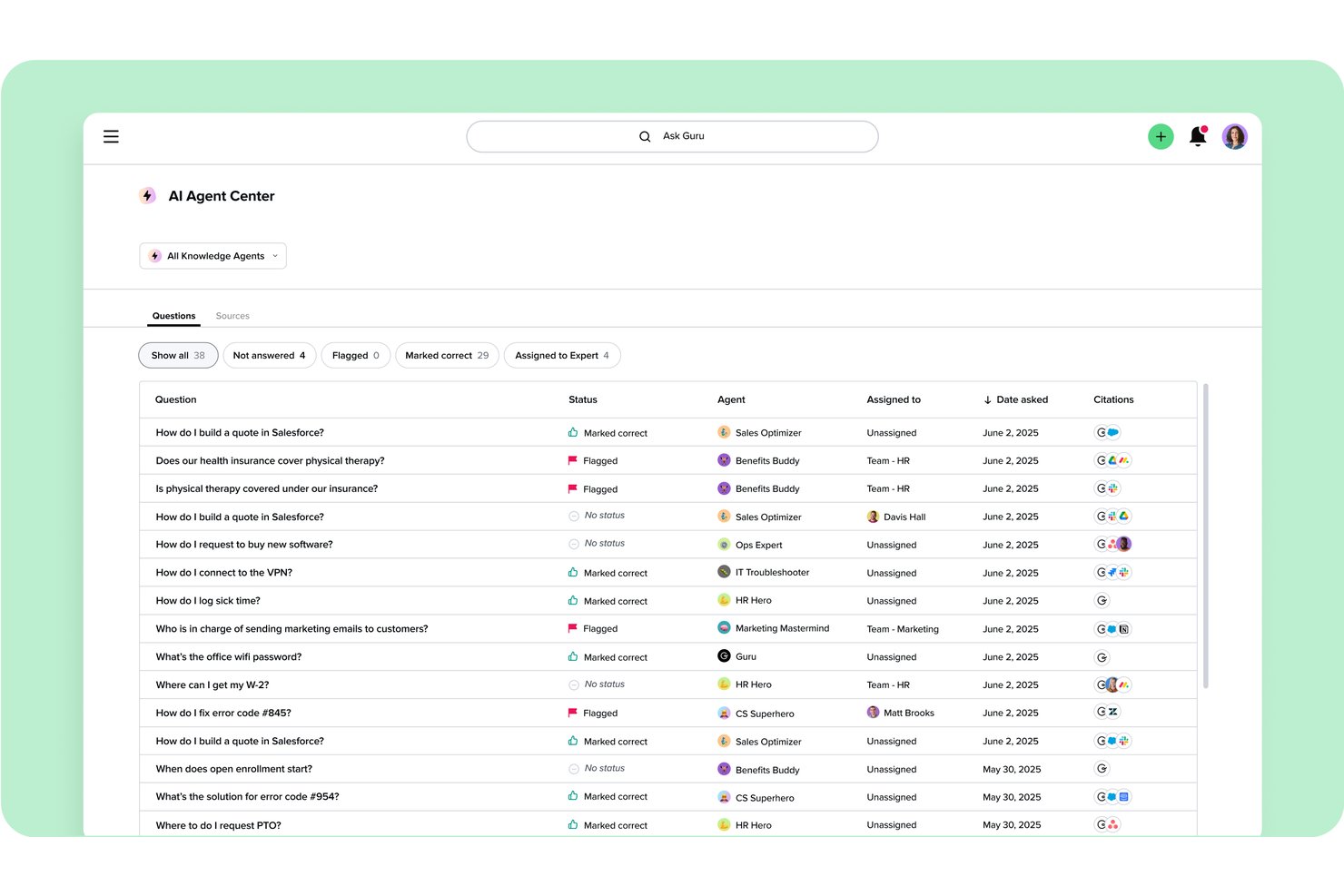
Guru is an AI-powered enterprise knowledge management platform that combines a verified knowledge base, semantic search, Knowledge Agents, and automated content governance across 100+ integrations.
Who Is Guru Best For?
Guru is a strong fit for IT and knowledge managers at mid-to-large enterprises that need to govern, maintain, and surface verified knowledge across distributed teams.
Why I Picked Guru
I picked Guru as one of the best because its Knowledge Agents proactively surface cited, permission-aware answers based on what a team member is actively working on, not just what they've typed into a search bar. I also like the automated verification system, which assigns subject matter experts to confirm card accuracy on a rolling schedule. Guru also runs duplicate detection and gap identification in the background, so the knowledge powering those AI suggestions stays accurate and complete.
Guru Key Features
- Browser extension: Surface and capture knowledge directly within Chrome and Edge while working in other web apps.
- Team Hubs and custom pages: Organize project and department knowledge into dedicated hubs and pages.
- 100+ integrations: Connect Guru to tools like Jira, Asana, Salesforce, Slack, and Microsoft Teams.
- Enterprise compliance controls: Manage access with SSO, SCIM, full audit trails, and SOC 2 Type II and HIPAA compliance.
Guru Integrations
Guru offers 100+ native integrations, including Slack, Microsoft Teams, Jira, Salesforce, Zendesk, Google Drive, Confluence, Notion, Asana, and GitHub. An API is available for custom integrations.
Pros and Cons
Pros:
- Strong compliance with enterprise security standards
- In-workflow browser extension for quick capture
- AI proactively delivers answers
Cons:
- Occasional duplicate or overlapping search results
- Limited document editing for long-form content
Diğer Kurumsal Bilgi Yönetimi Yazılımları
Kısa listeme giremeyen ancak yine de göz atmaya değer bazı ek kurumsal bilgi yönetimi çözümleri şunlardır:
- Bloomfire
For intuitive content discovery experience
- Microsoft SharePoint
For Microsoft 365 environment integration
- Glean
For enterprise-wide search connectivity
- Slab
For connected knowledge and integrations
- ClickUp
For unified docs and task management
- Basecamp
For centralizing team communications
- Zendesk
For integrating with customer support systems
- KnowledgeOwl
For creating public or private help sites
- ProProfs Knowledge Base
For multilingual knowledge base creation
- Tettra
For internal Q&A management


How I Evaluate Enterprise Knowledge Management Software
I evaluate these platforms in two layers: baseline functionality PMOs need to centralize documentation at scale, and the differentiators that set one vendor apart from another.
Core Functionality (Table Stakes For This List)
When I'm selecting tools for my list, I rank each one on a scale from 0 (does not offer the functionality) to 5 (excels in this area) for each core functionality listed below. Then, I calculate the tool's total score into a percentage. Each tool needs to achieve a minimum total score of 75% to be considered for inclusion.
- Centralized Knowledge Repository: I look for a single hub where teams store project docs, SOPs, and lessons learned across departments and programs.
- Enterprise Search & Discovery: Good search goes beyond keywords—I evaluate whether filters, tags, and metadata help distributed teams find answers fast.
- Granular Access Controls: I check for role-based permissions at the space or folder level, plus SSO and audit logs that meet enterprise security standards.
- Content Collaboration & Versioning: Multi-user editing and version history matter when several PMs update the same runbook or project charter simultaneously.
- Knowledge Structuring & Taxonomy: I evaluate how well a platform supports hierarchical folders, tags, and templates to organize knowledge for reuse across projects.
- PM Tool Integrations: Native connections to tools like Jira, Asana, or Microsoft Project keep knowledge embedded in day-to-day project workflows.
Once I have a list of tools that meet the criteria, I consider what sets each platform apart.
Differentiating Factors (What Sets Vendors Apart)
Here's how I compare and contrast different vendors:
Standout Features
AI-powered search is a major differentiator. I look for platforms where teams ask natural language questions and get relevant answers instead of scrolling through pages of results. Federated search connectors matter just as much, especially when your knowledge lives across Confluence, Google Drive, and Slack. I also evaluate content lifecycle automation—expiration alerts and ownership assignments keep documentation trustworthy long after a project closes.
Beyond Features
Security and compliance certifications like SOC 2 Type II and ISO 27001 are a priority—I check whether platforms offer data residency options and audit trails that enterprise procurement teams expect. Integration depth also matters. I evaluate whether a tool supports open APIs and bi-directional syncs with your existing stack, not just surface-level connections. Total cost of ownership is worth scrutinizing too, since hidden fees for connectors or storage overages can inflate your budget well beyond the listed per-seat price.
Kurumsal Bilgi Yönetimi Yazılımı Nasıl Seçilir?
Uzun özellik listeleri ve karmaşık fiyatlandırma yapıları arasında kaybolmak kolaydır. Kendinize özgü yazılım seçim sürecinizi yürütürken odağınızı korumanıza yardımcı olmak için göz önünde bulundurmanız gereken faktörlerin bir kontrol listesi aşağıdadır:
| Faktör | Nelere Dikkat Edilmeli? |
|---|---|
| Ölçeklenebilirlik | Kuruluşunuz büyüdükçe araç kullanıcı ve içerik artışını destekleyebilecek mi; binlerce kullanıcıyı veya milyonlarca belgeyi düşünün. |
| Entegrasyonlar | Yalnızca dosya yüklemelerinin veya temel entegrasyonların ötesine geçerek mevcut proje yönetimi, iletişim ve içerik depolama araçlarınıza gerçekten bağlanabiliyor mu? |
| Özelleştirilebilirlik | Ekiplerinizin farklı projeler veya iş birimleri genelinde bilgileri yakalama ve yeniden kullanma biçimine uyacak şekilde sınıflandırmaları, şablonları ve iş akışlarını uyarlayabiliyor musunuz? |
| Kullanım kolaylığı | Teknik bilgisi olmayan personel ve proje yöneticileri, minimum eğitimle aracı benimseyebilecek mi, yoksa rutin bilgi güncellemeleri için sürekli yönetici desteği mi gerekecek? |
| Uygulama ve işe alıştırma | Dağıtım, veri geçişi ve ilk kullanıma sunma süreçleri nasıl görünüyor; geçiş araçları veya uzman hizmetleri var mı ve kurulum için ne kadar ekip çalışması gerekecek? |
| Güvenlik önlemleri | Güvenlik özellikleri, erişim denetimleri, tek oturum açma, şifreleme ve hassas proje belgeleri için denetim dâhil olmak üzere BT politikalarınızla uyumlu mu? |
| Maliyet | Lisans ücretlerinin yanı sıra bağlayıcı, API, yapay zekâ kullanımı veya veri depolama ücretleri gibi gizli maliyetleri de göz önünde bulundurun; fiyatlandırma uzun vadeli bütçe modelinize uyuyor mu? |
| Destek erişilebilirliği | Sorunlarla karşılaşırsanız sağlayıcı hem uygulama hem de günlük operasyonlar sırasında hızlı yanıt veren kurumsal düzeyde destek ve kaynaklar sunuyor mu? |
Kurumsal Bilgi Yönetimi Yazılımı Nedir?
Kurumsal bilgi yönetimi yazılımı, kuruluşların belgeleri, süreçleri ve içgörüleri ekipler arasında merkezileştirmesine, düzenlemesine ve paylaşmasına olanak tanıyan bir platformdur. Bu araçlar işletmenizin kurumsal bilgiyi yakalamasını, bilgileri kolayca aranabilir hâle getirmesini, erişim denetimleri uygulamasını ve iş birliğini desteklemesini sağlar. En iyi uygulamaları korumak ve dağınık proje ekiplerinin ilgili bilgileri hızlıca bulup yeniden kullanmasını sağlamak için gereklidir.
Kurumsal Bilgi Yönetimi Yazılımının Özellikleri
Kurumsal bilgi yönetimi yazılımı seçerken aşağıdaki temel özelliklere dikkat edin:
- Merkezi bilgi deposu: Kuruluşunuzun tüm proje belgelerini, SOP'lerini ve bilgi varlıklarını depoladığı, düzenlediği ve yönettiği birleşik bir alan.
- Kurumsal arama: Ekiplerin büyük ve karmaşık depolarda ilgili belgeleri hızlıca bulmasına yardımcı olan tam metin, filtrelenmiş ve meta veriye dayalı arama işlevleri.
- Ayrıntılı erişim denetimleri: Belirli içerikleri kimlerin görüntüleyebileceğini, düzenleyebileceğini veya paylaşabileceğini denetleyerek hassas bilgileri güvence altına alan rol tabanlı izinler.
- İçerik iş birliği: Birden fazla kullanıcının belgeleri güncellemesine, değişiklikleri tartışmasına ve departmanlar arasında çalışmasına olanak tanıyan gerçek zamanlı veya eş zamanlı olmayan düzenleme ve yorum yapma özellikleri.
- Sürüm geçmişi: Ekiplerin önceki belge sürümlerini görmesine, içeriği geri yüklemesine ve tüm değişiklikleri denetlemesine olanak tanıyan ayrıntılı düzenleme takibi.
- Bilginin yapılandırılması: Düzen oluşturan, erişimi iyileştiren ve bilgi standartları belirleyen klasörler, etiketler, kategoriler ve şablonlar gibi araçlar.
- Proje araçlarıyla entegrasyon: Bilgiyi günlük iş akışlarına dâhil etmek için proje yönetimi, iletişim ve depolama araçları gibi platformlarla yerel ve API tabanlı bağlantılar.
- Otomatik iş akışları: Bilginin büyük ölçekte doğru, güncel ve güvenilir kalmasını sağlamak için içeriği incelemeye, onaylamaya ve arşivlemeye yönelik kurallar.
- Analiz ve raporlama: Bilgi boşlukları, içerik kalitesi ve ekip katılımı hakkında içgörü sağlayan kullanım verileri ve etkinlik raporları.
- Mobil ve uzaktan erişim: Dağıtık ekiplerin ve saha personelinin çalıştıkları her yerden bilgiye erişebilmesi veya bilgiyi güncelleyebilmesi için güvenli, hareket hâlinde erişim seçenekleri.
Kurumsal Bilgi Yönetimi Yazılımının Faydaları
Kurumsal bilgi yönetimi yazılımını uygulamak, ekibiniz ve işletmeniz için çeşitli faydalar sağlar. Yararlanabileceğiniz bazı avantajlar şunlardır:
- Daha hızlı bilgi keşfi: Yapay zekâ destekli arama ve yapılandırılmış depolar, ekiplerin ilgili belgeleri ve yanıtları saniyeler içinde bulmasına yardımcı olur.
- Geliştirilmiş proje sürekliliği: Merkezi depolama ve sürüm geçmişi, kurumsal bilgiyi korur ve ekipler veya personel değiştiğinde sürekliliği güvence altına alır.
- Tutarlı en iyi uygulamalar: Özel şablonlar ve sınıflandırma araçları süreçleri standartlaştırarak kuruluş genelindeki metodolojilerin uygulanmasını kolaylaştırır.
- Gelişmiş iş birliği: Gerçek zamanlı düzenleme ve yorum yapma özellikleri, ekiplerin kritik bilgileri birlikte oluşturabilmesi, güncelleyebilmesi ve yeniden kullanabilmesi için bilgi silolarını ortadan kaldırır.
- Daha güçlü güvenlik denetimleri: Gelişmiş izinler, şifreleme ve denetim izleri hassas içeriği güvende tutar ve uyumluluk gereksinimlerini destekler.
- Basitleştirilmiş işe alıştırma: Yeni ekip üyeleri, düzenlenmiş SOP'lere, proje belgelerine ve edinilen derslere tek bir yerden erişerek daha hızlı uyum sağlar.
- Azaltılmış yinelenen çalışma: Proje yönetimi araçlarıyla entegrasyonlar ve yaşam döngüsü otomasyonu, girişimler genelindeki gereksiz belge oluşturma çalışmalarını en aza indirmeye yardımcı olur.
Kurumsal Bilgi Yönetimi Yazılımının Maliyetleri ve Fiyatlandırması
Kurumsal bilgi yönetimi yazılımı seçmek, mevcut çeşitli fiyatlandırma modellerinin ve planların anlaşılmasını gerektirir. Maliyetler özelliklere, ekip büyüklüğüne, eklentilere ve daha fazlasına göre değişir. Aşağıdaki tablo, kurumsal bilgi yönetimi yazılımı çözümlerinde yaygın planları, bunların ortalama fiyatlarını ve genellikle sundukları özellikleri özetlemektedir:
Kurumsal Bilgi Yönetimi Yazılımı Plan Karşılaştırma Tablosu
| Plan Türü | Ortalama Fiyat | Yaygın Özellikler |
|---|---|---|
| Ücretsiz Plan | $0 | Temel belge depolama, sınırlı arama, temel iş birliği araçları ve tek çalışma alanı. |
| Bireysel Plan | $5-$15/user/month | Bireysel arşiv, gelişmiş arama, temel erişim denetimleri, sınırlı entegrasyonlar ve basit sürüm geçmişi. |
| İşletme Planı | $15-$35/user/month | Çok kullanıcılı çalışma alanları, gelişmiş izinler, iş akışı otomasyonu, analizler ve proje yönetimi araçlarıyla entegrasyonlar. |
| Kurumsal Plan | $35-$60/user/month | Sınırsız arşiv, SSO, denetim kaydı, özel taksonomi, öncelikli destek ve uyumluluk sertifikaları. |
Kurumsal Bilgi Yönetimi Yazılımı hakkında SSS
Kurumsal bilgi yönetimi yazılımı hakkında sık sorulan bazı soruların yanıtları aşağıdadır:
Hangi bilgi yönetimi sisteminin kuruluşuma uygun olduğunu nasıl anlayabilirim?
Ekibinizin iş akışlarını, entegrasyon ihtiyaçlarını ve güvenlik gereksinimlerini haritalandırarak başlayın. Platformları yalnızca özelliklerine göre değil, benzersiz ölçeklenebilirlik, kullanıcı benimsemesi ve uyumluluk ölçütlerinizle ne kadar örtüştüklerine göre sıralayın.
Mevcut belgelerimi yeni bir platforma taşıyabilir miyim?
Evet, çoğu kurumsal çözüm içe aktarma araçları veya geçiş hizmetleri sunar. Öncelikle içeriği denetleyip düzenlemeniz, ardından bilgileri aktarmak için toplu yükleme, API bağlayıcıları veya sağlayıcı destekli hizmetleri kullanmanız gerekir.
Yapay zekâ, bilgi yönetimi platformlarında nasıl bir rol oynar?
Yapay zekâ daha akıllı aramayı destekler, ilgili kaynakları önerir ve içerik etiketlemeyi otomatikleştirir. Bazı araçlar, doğal dildeki soruları yanıtlamak veya depolarınızdaki içerikleri bir araya getirip özetlemek için yapay zekâ asistanlarından da yararlanır.
Bu platformlar hassas bilgileri koruyabilir mi?
Evet, kurumsal düzeydeki seçenekler genellikle özel izinleri, şifrelemeyi, SSO’yu ve ayrıntılı denetim günlüklerini destekler. İzinleri düzenli olarak gözden geçirmek ve aracın güvenlik önlemlerini kuruluşunuzun güvenlik politikalarıyla uyumlu hâle getirmek önemlidir.
Entegrasyonlar proje yöneticilerine nasıl fayda sağlar?
Entegrasyonlar, ana araçlarınızda çalışırken başvuru materyallerini, kılavuzları ve şablonları elinizin altında tutar. Örneğin, proje yönetimi ve belge platformlarını birbirine bağlamak, günlük iş akışlarında önemli öğeleri kolayca ekleyebilmenizi veya bulabilmenizi sağlar.
Tipik uygulama süresi ne kadardır?
Uygulama, küçük ekiplerde birkaç günden büyük kuruluşlarda birkaç aya kadar sürebilir. Süre; geçiş, entegrasyonlar, kullanıcı eğitimi ve güvenlik incelemelerine duyulan ihtiyaca bağlıdır.
Son kullanıcılar için eğitim gerekli midir?
Özellikle iş akışı otomasyonu veya taksonomi tasarımı gibi gelişmiş özellikler için bir miktar eğitim yararlıdır. Birçok platform, benimsemeyi kolaylaştırmak amacıyla başlangıç kılavuzları, öğrenme modülleri veya canlı destek oturumları sunar.