

2026’da Mac için En İyi 10 Dijital Varlık Yönetimi Yazılımı

Mac için En İyi Dijital Varlık Yönetimi Yazılımları Kısa Listesi


Dijital varlık yönetimi (DAM) yazılımı, varlıklarınızı düzenli ve kolayca aranabilir durumda tutarak zamandan tasarruf etmenizi ve hayal kırıklığını azaltmanızı sağlar. Bilgisayarlar için yazılım söz konusu olduğunda çeşitli seçenekler bulunuyor; peki ya işletmeniz Mac üzerinde çalışıyorsa?
Mac için eşdeğer bir dijital varlık yönetimi yazılımı bulmak zor olabilir. Ancak dijital projeleri yönetme ve çeşitli verimlilik araçlarını kullanma konusundaki kapsamlı deneyimim sayesinde, sizin ve ekibiniz için doğru çözümü bulmanıza başarıyla yardımcı olabileceğime inanıyorum.
Why Trust Our Software Recommendations
Our team has been testing and reviewing software since 2012. As project managers ourselves, we know how difficult—and important—it is to choose the right software.
For this guide, we evaluated tools using hands-on testing and independent research, scoring tools using our selection criteria. We also draw on insights from industry thought leaders and practicing project management experts.
Our reviews reflect our human editorial judgment, not a sales pitch.
Expert reviewers:
Karşılaştırma Tablosu: Mac için Dijital Varlık Yönetimi Yazılımları
Bu karşılaştırma tablosu, Mac için en iyi dijital varlık yönetimi yazılımı seçimlerimin fiyatlandırma ayrıntılarını özetlemektedir.
| Tool | Starting Price | Website | |
|---|---|---|---|
| Best for digital asset organization | 4.7 out of 5 | $100/month 7-day free trial + free demo available | Website |
| Best for centralized feedback and approval | 4.6 out of 5 | $900/month Free plan + demo available | Book Demo |
| Best for automated file tagging and sorting | 4.8 out of 5 | $250/month Free plan + free trial available | Website |
| Best for managing and sharing brand assets | 4.7 out of 5 | $29/month 30-day free trial available | Website |
| Best for storage-based pricing with unlimited users | 4.8 out of 5 | $99/month Free plan + 14-day free trial + demo available | Website |
| Best for MacOS media synchronization | 4.7 out of 5 | Pricing upon request 14-day free trial | Website |
| Best for brand asset sharing | 4.5 out of 5 | $300/user/month Free trial + demo available | Website |
| Best for content collaboration | 4.4 out of 5 | Pricing upon request Free demo available | Website |
| Best asset management in a marketing platform | 4.3 out of 5 | $13/month Free plan + 14-day free trial + demo available | Website |
| Best for AI asset optimization | 4.5 out of 5 | $213/month 14-day free trial | Website |

Mac için En İyi Dijital Varlık Yönetimi Yazılımları İncelemeleri
Aşağıda Mac için en iyi DAM yazılımlarına ilişkin ayrıntılı incelemelerimi bulabilirsiniz. Aşağıdaki incelemelerin her biri, bu yazılım çözümlerinin avantajlarını ve dezavantajlarını, temel özelliklerini ve ideal kullanım senaryolarını ele almaktadır.

Pics.io
Best for digital asset organization

Pics.io is an advanced digital asset management platform that streamlines the organization and collaboration on digital assets. It provides a centralized system to store, access, and share files, which enhances efficiency and collaboration across various departments.
Why I picked Pics.io:
Pics.io provides advanced digital asset organization capabilities, which are essential for teams looking to efficiently manage their growing libraries of digital content. Its intuitive interface and powerful search functionalities make it a versatile choice for creative professionals and teams. It's best for digital asset organization because it provides a centralized platform where teams can easily access, manage, and distribute their digital assets, ensuring that they can quickly find and reuse existing content.
Standout features & integrations:
Features include version control, media library organization, metadata management, powerful search tools, built-in editing tools, workflow automation, customizable access permissions, collaboration features, asset sharing capabilities, and analytics for asset usage tracking.
Integrations include Google Drive, Amazon S3, Shopify, Slack, Adobe Creative Cloud (After Effects, Illustrator, Photoshop, Premiere Pro), ClickUp, Easy Projects, Google Workspace (Docs, Forms, Sheets, Slides), Hootsuite, HubSpot, its mobile app, Monday.com, Salesforce, Trello, WordPress, Wrike, Zapier, YouTube, Figma, and Zoho CRM.
Pros and Cons
Pros:
- Wide range of integrations with popular platforms
- Powerful search and organization tools
- Comprehensive digital asset management features
Cons:
- Complex features
- Not available offline
New Product Updates from Pics.io
Pics.io Adds Filtered Audit Trail CSV Exports
Pics.io now lets you export Audit Trail logs to CSV and apply filters before exporting, making it easier to analyze and share activity history. For more information, visit Pics.io's official site.
 .

Air
Best for centralized feedback and approval

Air is a creative operations platform designed to centralize the management of creative assets and workflows for teams. It offers a workspace that helps teams collect, approve, and share content.
Why I picked Air:
I like its visual workspace, which consolidates all assets and creative tools in one place. This visual-first approach allows users to manage, organize, and access their digital assets more intuitively, significantly enhancing productivity. The centralized feedback and approval processes further simplify collaboration, enabling teams to provide and receive feedback in real-time.
Standout features & integrations:
Features include smart search using AI, advanced sharing capabilities, support for various file types, version tracking, automatic asset expiration management, and digital rights management.
Integrations include Airtable, Zapier, HubSpot, Slack, Tally, Alfred, ClickUp, Google Sheets, Microsoft Excel, Canva, Adobe Premiere Pro, Salesforce, Trello, Figma, Wrike, Shopify, Amazon S3, and Google Drive.
Pros and Cons
Pros:
- Facilitates easy sharing of visual assets
- Supports various file formats
- Good for approval and feedback features
Cons:
- Lacks a dedicated mobile app
- Not ideal for non-visual digital assets
New Product Updates from Air
Air Introduces Workspace Agent Automations
Air adds scheduled automations, reusable skills, and run history tracking to its workspace agent. These features help teams automate recurring tasks and manage workflows without manual intervention. For more information, visit Air’s official site.
Best for automated file tagging and sorting
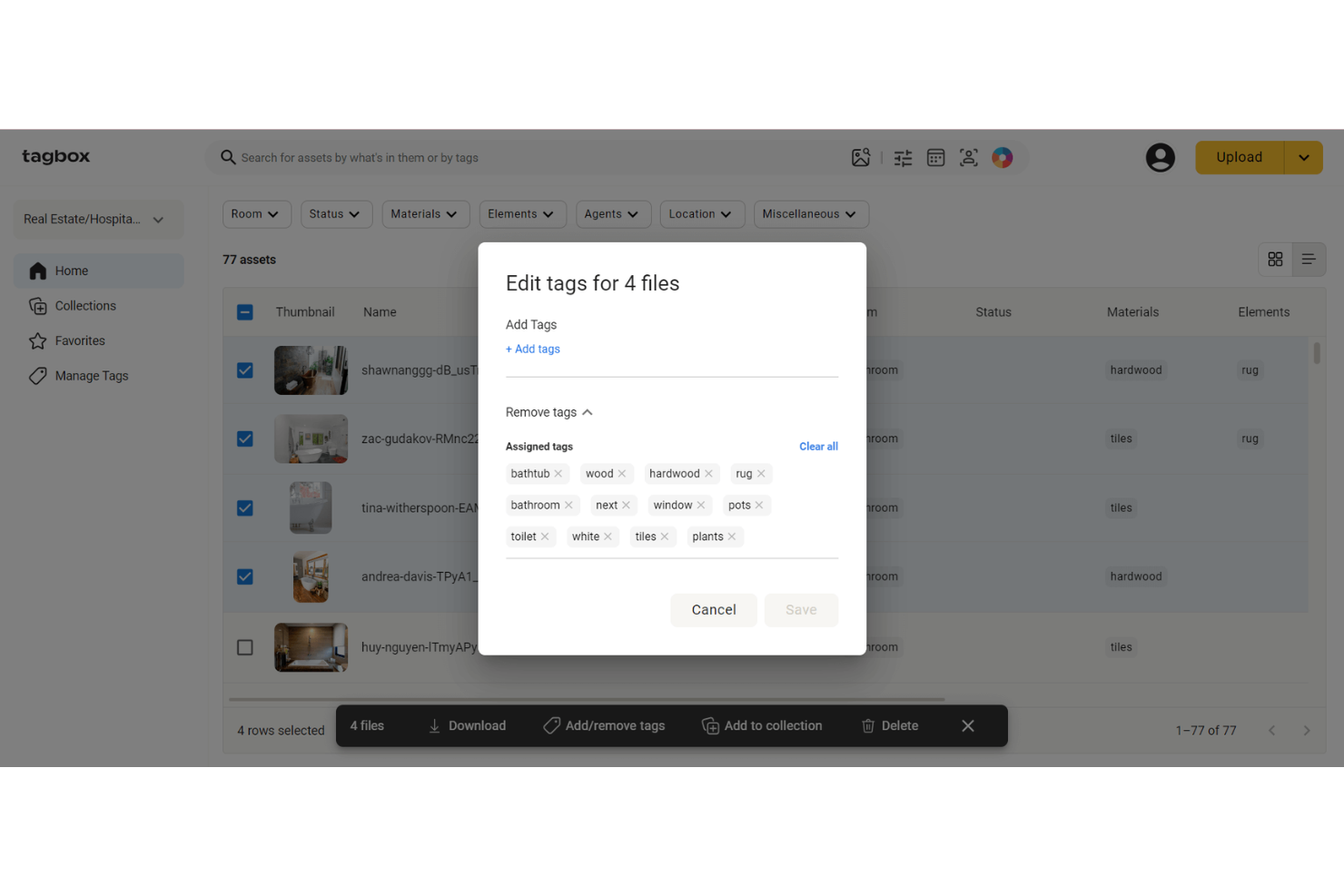
Tagbox.io is a cloud-based digital asset management platform for Mac teams that need a faster way to organize, search, and share growing libraries of creative files. Its AI tagging, facial recognition, video search, and visual asset organization tools make it a strong fit for marketing, creative, and event teams managing large photo and video collections.
Who Is Tagbox.io Best For?
Tagbox.io is a strong fit for creative and marketing teams that manage large volumes of visual assets and need faster ways to organize, find, and share files.
Why I Picked Tagbox.io
I picked Tagbox.io because it helps Mac teams organize large media libraries through automated file tagging and sorting. Its AI can tag assets by people, objects, scenes, and custom labels, so your team can find specific photos and videos without manually sorting every file. I also like its face recognition feature, which helps group and locate images of specific people across large event or marketing libraries. Its advanced search tools add another layer of control by letting you filter assets by tags, dates, collections, file type, resolution, color, and orientation.
Tagbox.io Key Features
Some other Tagbox.io features support easier collaboration and more structured asset management:
- Shareable collections: Create asset collections for specific team members, clients, or external collaborators with controlled access permissions.
- Video asset management: Search video content by people, products, speech, and brand-related moments to locate useful footage faster.
- Custom metadata fields: Add details like client names, venues, campaign labels, or approval status to keep assets organized.
- Multilingual search: Search across your asset library in 100+ languages to support multilingual teams and content libraries.
- Native Desktop App: It has the search capabilities of the web app together with advanced sync options and a simple drag and drop interface to any app.
Tagbox.io Integrations
Connect Tagbox.io through Tagbox Desktop (drag-and-drop into any app), Zapier, Make, and a REST API. Custom workflows are available for Enterprise.
Pros and Cons
Pros:
- Video search makes speech, products, and scenes easier to locate
- Face recognition helps teams find people-heavy photo collections faster
- AI tagging reduces manual sorting for large Mac media libraries
Cons:
- Mac-native desktop app support is not clearly promoted
- Workflow approvals are not a clear core DAM feature

Filecamp
Best for managing and sharing brand assets

Filecamp is a cloud-based digital asset management (DAM) platform that helps teams organize, store, and share digital files like images, videos, and documents. Accessible through any browser, including on Mac, it offers a centralized space for managing creative assets.
Why I picked Filecamp:
I picked Filecamp because of its online proofing tools and advanced download options. The proofing tools let your team review and annotate design files like PDFs and PSDs directly in the browser, making creative feedback easy and centralized. For Mac users frequently working with varied file formats, the ability to convert and download files in different versions—like turning an AI file into a JPEG—is especially helpful. These features reduce dependency on extra apps and keep your workflow smooth within your browser.
Standout features & integrations:
Features include version control, audit trails, collections, labels, favorites, shared links, branded login pages, access requests, and AI-powered auto-tagging.
Integrations are not currently listed.
Pros and Cons
Pros:
- Customizable branding options enhance professional appearance
- Granular access controls improve security and collaboration
- Advanced search and tagging
Cons:
- Commenting limited to higher-tier plans
- You may need to pay for additional storage
New Product Updates from Filecamp
Filecamp Adds Analytics, AI Thumbnails, and CDN Embed Links
Filecamp adds Analytics, AI-powered thumbnails, and CDN-backed Embed links. These updates give teams more visibility into asset usage, improve thumbnail presentation, and make embedded images easier to manage. For more information, visit Filecamp’s official site.
 .

Best for storage-based pricing with unlimited users
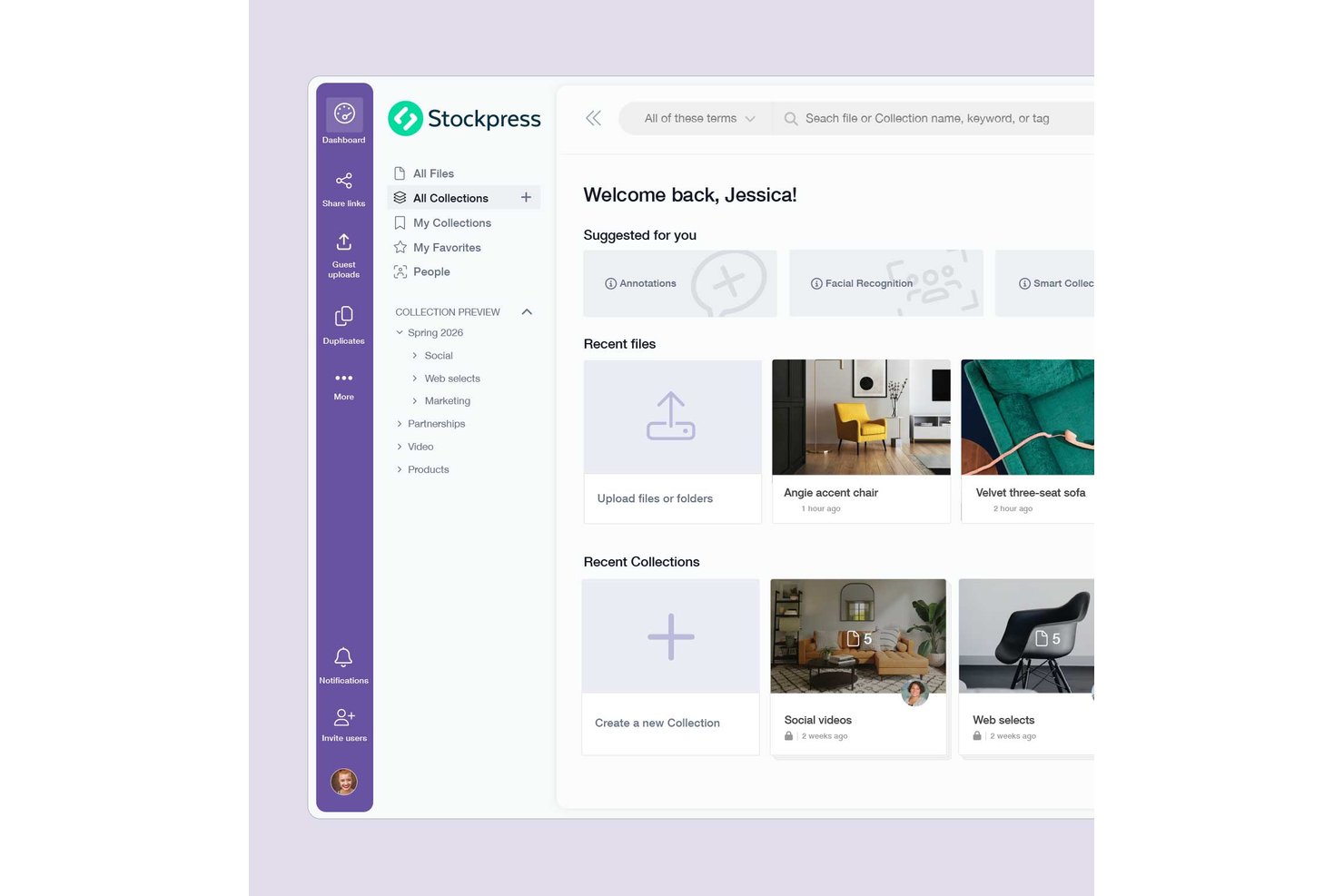
Stockpress is a cloud-based digital asset management platform that centralizes files of any type or size with AI-powered tagging, Smart Collections, version control, and granular share-link permissions.
Who Is Stockpress Best For?
Stockpress is a strong fit for marketing and agency teams that need to give many people access to a shared asset library without paying per seat.
Why I Picked Stockpress
I picked Stockpress as one of the best because its storage-based pricing with unlimited users solves a real problem: growing teams shouldn't have to justify every new seat. I especially like Smart Collections, which auto-update based on saved searches, so your library stays organized without manual sorting. AI tagging across objects, scenes, and colors means assets are actually findable the moment they land in your workspace.
Stockpress Key Features
- Version history and restore: View a full upload history for every file, compare versions side by side, and restore any previous version in one click.
- Granular share-link controls: Set passwords, expiry dates, download limits, and view-only access on individual share links without changing broader workspace permissions.
- Desktop Sync app: A Mac menu bar app that lets you sync selected Collections to Finder and automatically pushes local edits from Photoshop, Illustrator, or Lightroom back to your workspace.
- Guest upload pages: Create public-facing upload pages so external contributors can send files directly into your workspace without needing a Stockpress account.
Stockpress Integrations
Stockpress offers documented integrations with Adobe Photoshop, Adobe InDesign, Figma, Canva, Dropbox, Box, Google Drive, Slack, and Okta. It also provides an API for custom integrations, but no native Asana, monday.com, Trello, Wrike, or Zapier integrations are documented.
Pros and Cons
Pros:
- Share controls protect client deliverables
- Version history restores earlier creative files
- AI tagging speeds asset retrieval
Cons:
- No multi-stage approval routing
- Mac Desktop Sync remains beta and admin-only

Best for MacOS media synchronization

4ALLPORTAL presents a dynamic solution for Mac users seeking digital asset management software that makes it easier to manage digital content at scale. Tailored for industries such as ecommerce, media, and healthcare, it centralizes your digital assets, ensuring integration with existing content management systems and enhancing overall workflow. With AI-driven features, 4ALLPORTAL not only organizes asset management but also allows your team to focus on creative endeavors and strategic initiatives.
Why I Picked 4ALLPORTAL
I picked 4ALLPORTAL because of its MacOS Connector, which facilitates media data synchronization between Mac devices and the DAM system, enhancing offline editing capabilities. The platform's AI-driven tools, such as natural language search and auto-tagging, simplify asset retrieval and categorization, addressing common organizational challenges. Additionally, 4ALLPORTAL’s compliance features, including user-defined access rights and digital rights management, ensure your assets are used legally and securely.
4ALLPORTAL Key Features
In addition to its MacOS Connector, 4ALLPORTAL offers:
- Quick Download: This feature allows you to swiftly download files in your desired format directly from the tile view, saving time during asset retrieval.
- Version Control: Track changes and access previous versions of your assets, ensuring you can revert to earlier versions if needed.
- Automated Workflow Management: Enhance team collaboration by automating routine tasks and approvals, organizing your workflow processes.
4ALLPORTAL Integrations
Integrations include Salesforce, SAP, Adobe Creative Cloud, Microsoft Office 365, WordPress, Shopify, Magento, HubSpot, Google Analytics, and Dropbox. 4ALLPORTAL also provides an API for custom integrations, allowing further flexibility.
Pros and Cons
Pros:
- Offers AI-driven tools for enhanced asset categorization
- Provides customizable user permissions for secure asset access
- Scalable solution suitable for medium to large enterprises
Cons:
- Limited native integration options compared to other platforms
- Some users report slow performance with large file uploads

Best for brand asset sharing

Image Relay is a platform designed for efficient management and sharing of brand assets. It provides secure, controlled access to digital assets, ensuring that brand integrity is maintained across all channels.
Why I picked Image Relay:
Image Relay’s dedication to brand asset sharing, user-friendly interface, and strong search capabilities differentiates it from other DAM software for Mac. It’s considered the best for brand asset sharing due to its specialized features that support the secure and controlled distribution of digital content.
Standout features & integrations:
Features include advanced search options, customizable metadata fields, and permission settings that allow for controlled access to assets.
Integrations include Adobe InDesign, Adobe Photoshop, Airtable, Asana, Basecamp, Box, Canva, Conceptboard, Dropbox, and Egnyte.
Pros and Cons
Pros:
- User-friendly interface for easy navigation and use
- Controlled access with customizable permission settings
- Advanced search and customizable metadata for efficient asset management
Cons:
- Lower mobile experience
- Limited customization options for workflows
Canto
Best for content collaboration
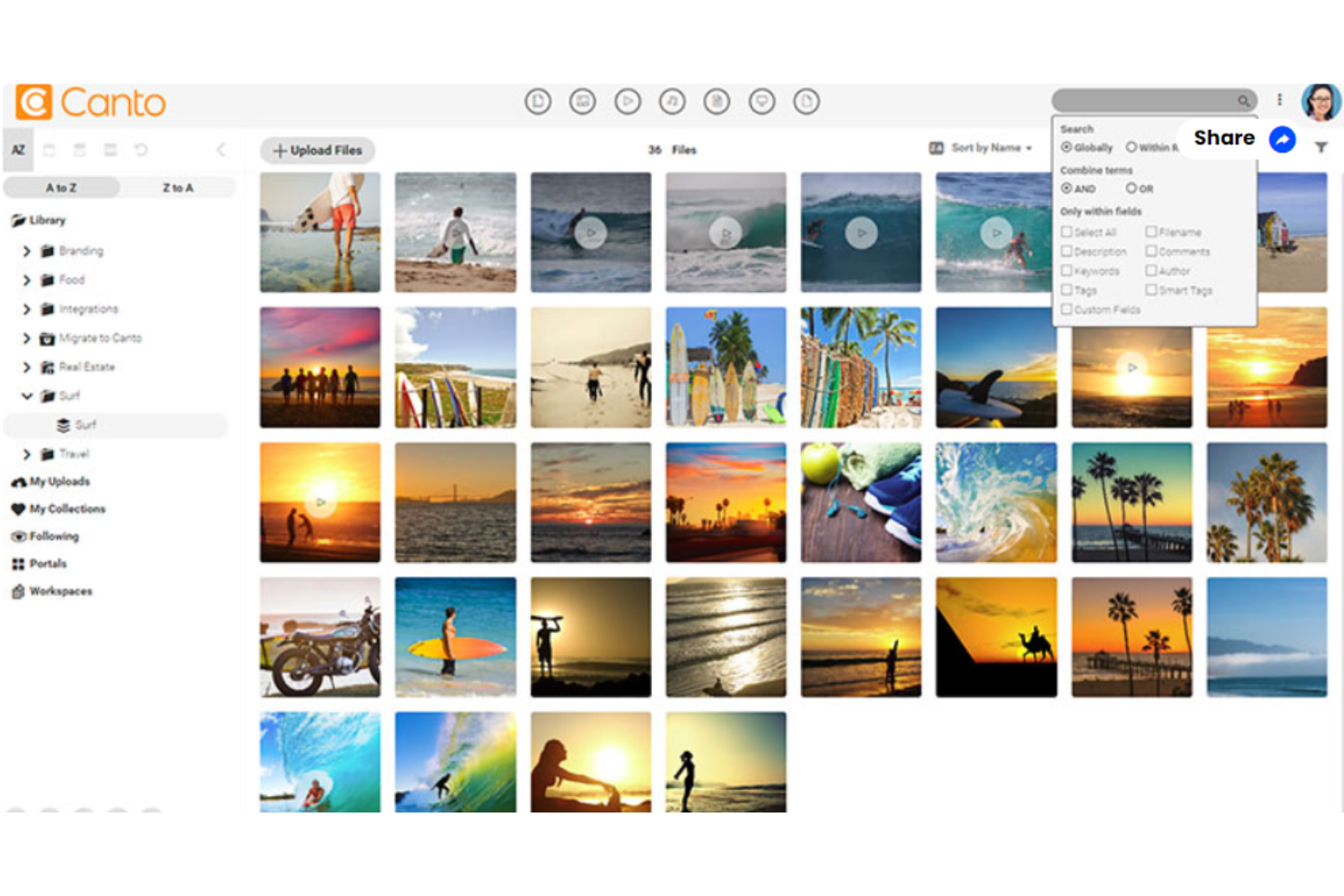
Canto simplifies digital asset management and enhances team collaboration. It helps teams and organizations efficiently store, manage, and share their digital assets such as photos, videos, and other media files.
Why I picked Canto:
Canto offers a detailed approach to managing digital assets, which makes it unique compared to other software in its category. It's best for content collaboration because it offers a centralized solution that supports teams in efficiently organizing, accessing, and sharing digital assets, which is essential for collaborative projects.
Standout features & integrations:
Features include cloud storage, advanced search capabilities, facial recognition, metadata tagging, version control, brand asset templates, workflow automation, role-based access controls, sharing and collaboration tools, and real-time analytics and reporting.
Integrations include Salesforce, Dropbox, Adobe Creative Cloud, WordPress, Hootsuite, Canva, Google Drive, Microsoft Office, and Zapier.
Pros and Cons
Pros:
- Customizable branding options
- Advanced search and smart album features
- Centralized management of digital assets
Cons:
- May be limitations when connecting to third-party applications
- May experience performance issues with larger asset libraries

Best asset management in a marketing platform

Mailchimp is a flexible marketing platform that supports businesses in managing their marketing campaigns and digital assets. It offers tools for organizing, storing, and accessing marketing files and data in one place, making it easier for teams to manage content. The platform’s intuitive design makes it accessible for users across different devices, including Mac, ensuring seamless asset management within marketing workflows.
Why I picked Mailchimp:
With Mailchimp, your team can keep track of files and use them in campaigns without having to switch between multiple tools. The platform's asset management features let you tie your assets directly to your campaigns and track them accordingly. This provides insights into how your marketing materials are performing, giving you the data you need to optimize your content.
Mailchimp Standout Features and Integrations:
Features include asset management, file organization, and performance tracking. Your team can manage marketing assets and integrate them directly into campaigns. The platform also offers real-time data insights to help you optimize asset performance.
Integrations include Shopify, WooCommerce, WordPress, Salesforce, Zapier, BigCommerce, Magento, Slack, Stripe, and HubSpot.
Pros and Cons
Pros:
- Scalable for growing marketing teams
- Optimized for creative content management
- Cloud asset management for multi-device access
Cons:
- Limited advanced filtering options
- Limited customization for asset organization

Scaleflex
Best for AI asset optimization

Scaleflex is a digital asset management solution designed to help you efficiently organize, optimize, and share your media files, like images and videos.
Why I picked Scaleflex:
I like its AI-powered optimization capabilities. This means you can automatically compress and convert your images and videos into formats like WebP or AVIF, reducing file sizes without sacrificing quality. This not only speeds up your website's loading times but also enhances user experience by delivering media faster. Additionally, Scaleflex offers on-the-fly transformations, allowing you to crop, resize, and adjust your media assets directly within the platform.
Standout features & integrations:
Features include AI-powered automation, built-in editing tools, robust security measures, performance analytics, 360° interactive views, scalable APIs, customizable workflow integration, enhanced collaboration tools, multilingual metadata taxonomies, adaptive streaming for video delivery, and advanced permissions and file sharing.
Integrations include WordPress, Filerobot, Cloudimage, Shopify, Magento, Prestashop, Drupal, Prismic, Amazon S3, Azure, Angular, and React.js.
Pros and Cons
Pros:
- Efficient media optimization
- The platform integrates well with various tools
- AI-powered automation
Cons:
- Some users find the interface complex initially
- Lower-tier plans are limited to one project
Mac için Diğer Dijital Varlık Yönetimi Yazılımları
Aşağıda kısa listeme aldığım diğer Mac dijital varlık yönetimi yazılımlarının bir listesini bulabilirsiniz. İlk 10’a girememiş olsalar da yine de değerliler ve daha fazla araştırılmaya değerdirler.
- Adobe Experience Manager
For personalized experiences
- Nuxeo
For content customization
- ResourceSpace
For asset sharing
- Extensis Portfolio
For creative workflows
- Digizuite
For omnichannel management
- Razuna
For team asset management
- MediaGraph
For cultural heritage
- Cloudinary
For visual experiences
- Brandfolder
For enterprise usability
- Papirfly
For flexible permission controls


How I Evaluate Digital Asset Management Software for Mac
When a brand manager needs to pull approved campaign assets on her Mac without chasing Slack threads, I split evaluation into baseline DAM capabilities and the differentiators that set tools apart.
Core Functionality (Table Stakes For This List)
When I'm selecting tools for my list, I rank each one on a scale from 0 (does not offer the functionality) to 5 (excels in this area) for each core functionality listed below. Then, I calculate the tool's total score into a percentage. Each tool needs to achieve a minimum total score of 65% to be considered for inclusion.
- Centralized Asset Library: I check whether you can store, browse, and retrieve images, videos, PDFs, and design files from one searchable hub instead of scattered folders.
- Metadata & Tagging: Custom fields, taxonomies, and bulk tagging matter here—like tagging assets by campaign, client, or asset type for fast filtering.
- macOS Compatibility: Each tool should run well on Mac, whether through a native desktop app, Safari-optimized browser experience, or Finder-level sync.
- Version Control & Approvals: I look for clear version histories and built-in review cycles so a creative PM can route a logo revision for sign-off without email chains.
- Permissions & Rights Management: Role-based access is key—like giving a freelancer view-only access to one project folder while internal leads retain full editing rights.
- Creative & PM Integrations: I evaluate connections to tools teams already use, such as Adobe Creative Cloud, Figma, Asana, monday.com, or Wrike.
Once I have a list of tools that meet this criteria, I consider what sets each platform apart.
Differentiating Factors (What Sets Vendors Apart)
Here's how I compare and contrast different vendors:
Standout Features
AI-powered search is a major differentiator—tools that use visual recognition or natural language queries let you find assets without remembering exact file names or tag conventions. I also evaluate brand portals, which give external clients or freelancers a curated, self-serve library instead of fielding constant asset requests over Slack. Creative workflow automation matters too, especially intake forms and routing rules that move assets from brief to approval without manual handoffs.
Beyond Features
Mac-specific performance is something I pay close attention to—whether a tool supports Apple Silicon natively, handles ProRes and HEIC files, or integrates with Finder for drag-and-drop workflows makes a real difference for creative teams. Pricing models also vary widely, so I evaluate whether a vendor charges per user, by storage, or both, and whether guest seats for external reviewers come at extra cost. Security matters too, especially SOC 2 compliance and granular audit logs for teams managing unreleased brand assets.
Mac için Dijital Varlık Yönetimi Yazılımı Nasıl Seçilir?
Uzun özellik listeleri ve karmaşık fiyatlandırma yapılarına kendinizi kaptırmanız kolaydır. Benzersiz yazılım seçimi süreciniz üzerinde çalışırken odağınızı korumanıza yardımcı olmak için aklınızda bulundurmanız gereken faktörlerin bir kontrol listesini burada bulabilirsiniz:
| Faktör | Dikkate Alınması Gerekenler |
|---|---|
| Ölçeklenebilirlik | Yazılım ekibinizle birlikte büyüyecek mi? Gelecekteki büyümeyi ve aracın artan miktarda veriyi ve kullanıcıyı sorunsuz bir şekilde işleyip işleyemeyeceğini değerlendirin. |
| Entegrasyonlar | Mevcut araçlarınıza bağlanabiliyor mu? Adobe Creative Cloud, Google Workspace veya Salesforce gibi mevcut yazılımlarınızla entegre olup olmadığını kontrol edin. |
| Özelleştirilebilirlik | İş akışınıza uyacak şekilde düzenleyebilir misiniz? Belirli ihtiyaçlarınızı ve süreçlerinizi karşılamak için ayarları, düzenleri ve seçenekleri ne ölçüde değiştirebileceğinizi düşünün. |
| Kullanım kolaylığı | Herkes için kullanıcı dostu mu? Arayüzün sezgisel olup olmadığını ve ekip üyelerinin zorlu bir öğrenme süreci yaşamadan hızlıca kullanmaya başlayıp başlayamayacağını değerlendirin. |
| Uygulama ve işe alıştırma | Kullanmaya başlamak ne kadar kolay? Kurulum sürecini, mevcut eğitim kaynaklarını ve ekibinizin yazılımı ne kadar hızlı kullanabilir duruma gelebileceğini inceleyin. |
| Maliyet | Bütçenize uygun mu? Fiyatlandırmayı sunulan özelliklerle karşılaştırın ve fiyatı artırabilecek gizli maliyetlere veya gerekli eklentilere dikkat edin. |
| Güvenlik önlemleri | Varlıklarınız korunuyor mu? Verilerinizi korumak için yazılımın şifreleme, kullanıcı izinleri ve düzenli güncellemeler gibi güçlü güvenlik önlemlerine sahip olduğundan emin olun. |
| Destek erişilebilirliği | İhtiyaç duyduğunuzda yardım alabilecek misiniz? Müşteri desteğinin erişilebilirliğini, 7/24 sunulup sunulmadığını ve sohbet, e-posta veya telefon gibi destek kanallarının çeşitliliğini değerlendirin. |
Mac için Dijital Varlık Yönetimi Yazılımındaki Trendler
DAM yazılımları, en son teknolojik gelişmelerden ve değişen kullanıcı beklentilerinden etkilenerek hızla gelişiyor. DAM pazarında fark ettiğim ve Mac kullanıcılarına dijital varlıklarını yönetmeleri için daha güçlü, sezgisel ve verimli araçlar sunmayı vadeden bazı gelişmeler şunlardır.
- Yapay Zekâ Destekli Üst Veri ve Etiketleme: Yapay zekâ artık DAM yazılımlarının temel unsurlarından biri hâline gelerek üst veri ve etiketleme süreçlerini otomatikleştiriyor. Bu, manuel veri girişini azaltıyor, aranabilirliği hızlandırıyor ve varlıkların bulunma hassasiyetini artırarak verimlilik açısından önemli bir ilerleme sağlıyor.
- Platformlar Arası Entegrasyon: DAM sistemleri, çeşitli iş araçlarına bağlanarak platformlar arası entegrasyonu giderek daha fazla sunuyor. Bu bağlantı, iş akışlarını basitleştirdiği ve uygulamalar arasında geçiş yapma ihtiyacını en aza indirdiği için önem taşıyor; böylece zamandan ve kaynaklardan tasarruf ediliyor.
- Gelişmiş Güvenlik Önlemleri: DAM platformlarındaki güvenlik, gelişmiş izin denetimlerinin uygulanmasıyla güçleniyor. Bu, dijital varlıkları artan siber tehditlere karşı korumak ve erişimin yetkili kişilerle sınırlandırılmasını sağlamak açısından büyük önem taşıyor.
- Kolaylaştırılmış İçerik Dağıtımı: DAM yazılımları, dinamik görüntüleme ve içerik dağıtımı yoluyla çevrim içi perakendecilere doğrudan içerik dağıtımını kolaylaştırıyor. Bu, marka tutarlılığını korumak ve içerik sunma sürecini hızlandırmak için hayati önem taşıyan, geleceğe dönük bir trenddir.
- Gerçek Zamanlı Ortaklaşa Düzenleme: Ekiplerin varlıkları gerçek zamanlı olarak düzenleyip etiketleyebilmesi DAM çözümlerinde giderek standart hâline geliyor. Bu özellik, ekip çalışmasına olumlu etkisiyle dikkat çekiyor; anında geri bildirim ve güncellemeler sağlayarak proje tamamlanma sürecini hızlandırıyor.
Mac için Dijital Varlık Yönetimi Yazılımı Nedir?
Mac için dijital varlık yönetimi yazılımı, Mac kullanıcılarına dijital varlıklarını etkili bir şekilde yönetebilecekleri merkezi bir platform sunar. Kullanıcıların macOS sistemlerinde görüntüler, videolar, ses dosyaları ve belgeler gibi çeşitli dijital dosyaları verimli bir şekilde düzenlemesine, depolamasına ve bulmasına yardımcı olmak üzere tasarlanmıştır.
Özellikler
Mac için dijital varlık yönetimi yazılımı seçerken aşağıdaki temel özelliklere dikkat edin:
- Üst veri etiketleme: Açıklayıcı etiketler atayarak varlıkları kategorilere ayırmanıza ve hızlı bir şekilde bulmanıza yardımcı olur.
- Sürüm denetimi: Dosyalardaki değişiklikleri izleyerek en güncel sürüme her zaman erişebilmenizi sağlar.
- Güvenli paylaşım: Erişim izinleri üzerindeki denetimi korurken dosyaları ekip üyeleri veya müşterilerle paylaşmanıza olanak tanır.
- Özelleştirilebilir iş akışları: Süreçleri ekibinizin özel ihtiyaçlarına uyacak şekilde düzenlemenize ve verimliliği artırmanıza olanak tanır.
- Yapay zekâ destekli içerik etiketleme: Varlıkları otomatik olarak kategorilere ayırarak zamandan tasarruf sağlar ve manuel çalışmayı azaltır.
- Gelişmiş arama özellikleri: Anahtar kelimeleri, etiketleri veya diğer ölçütleri kullanarak dosyaları hızlı bir şekilde bulmanızı sağlar.
- Analiz ve raporlama: Varlık kullanımı ve performansı hakkında içgörüler sunarak veriye dayalı kararlar almanıza yardımcı olur.
- Entegrasyon desteği: Daha sorunsuz bir iş akışı için Adobe Creative Cloud veya Google Workspace gibi mevcut araçlara bağlanır.
- Ölçeklenebilirlik: Artan veri ve kullanıcı hacimlerini işleyerek yazılımın ekibinizle birlikte büyüyebilmesini sağlar.
- Kullanıcı dostu arayüz: Ekip üyelerinin kapsamlı bir eğitim almadan yazılımda gezinmesini ve yazılımı kullanmasını kolaylaştırır.
Avantajlar
Mac için dijital varlık yönetimi yazılımını uygulamak, ekibiniz ve işletmeniz için çeşitli avantajlar sağlar. Yararlanabileceğiniz avantajlardan bazıları şunlardır:
- Zamandan tasarruf: Üst veri etiketleme ve gelişmiş arama özelliklerini kullanarak dosyaları hızlı bir şekilde bulun ve alın.
- Geliştirilmiş iş birliği: Herkesin doğru dosyalara erişebilmesini sağlayarak varlıkları ekibiniz ve müşterilerinizle güvenli bir şekilde paylaşın.
- Tutarlı marka kimliği: Varlıkları güncel ve marka kimliğiyle uyumlu tutan sürüm denetimi ve özelleştirilebilir iş akışlarıyla marka tutarlılığını koruyun.
- Artırılmış üretkenlik: İçerik etiketleme gibi tekrarlanan görevleri yapay zekâ destekli özelliklerle otomatikleştirerek daha önemli işler için zaman kazanın.
- Veriye dayalı kararlar: Varlık kullanımı ve performansı hakkında içgörüler elde etmek için analiz ve raporlamadan yararlanın; böylece bilinçli seçimler yapabilirsiniz.
- Ölçeklenebilir büyüme: Ölçeklenebilir yazılım özellikleri sayesinde ekibiniz büyüdükçe daha fazla veriyi ve kullanıcıyı kolayca destekleyin.
- Kullanıcı dostu deneyim: Öğrenme eğrisini azaltan ve ekibinizin kısa sürede çalışmaya başlamasına yardımcı olan sezgisel bir arayüzden yararlanın.
Maliyetler ve Fiyatlandırma
Mac için dijital varlık yönetimi yazılımı seçmek, mevcut çeşitli fiyatlandırma modellerinin ve planların anlaşılmasını gerektirir. Maliyetler; özelliklere, ekip büyüklüğüne, eklentilere ve daha fazlasına göre değişir. Aşağıdaki tabloda, Mac çözümleri için dijital varlık yönetimi yazılımlarında yaygın olarak sunulan planlar, bunların ortalama fiyatları ve genellikle içerdikleri özellikler özetlenmektedir:
Mac için Dijital Varlık Yönetimi Yazılımı Plan Karşılaştırma Tablosu
| Plan Türü | Ortalama Fiyat | Yaygın Özellikler |
|---|---|---|
| Ücretsiz Plan | $0 | Temel depolama, sınırlı paylaşım seçenekleri ve basit arama özellikleri. |
| Kişisel Plan | $5-$15/kullanıcı/ay | Geliştirilmiş depolama, meta veri etiketleme ve temel iş birliği araçları. |
| İşletme Planı | $25-$50/kullanıcı/ay | Gelişmiş arama, güvenli paylaşım, analiz ve raporlama. |
| Kurumsal Plan | $75-$150/kullanıcı/ay | Özelleştirilebilir iş akışları, kapsamlı entegrasyonlar ve özel destek. |
Mac için Dijital Varlık Yönetimi Yazılımı SSS
Mac için dijital varlık yönetimi yazılımı hakkında bana sıkça sorulan bazı sorular şunlardır:
DAM yazılımı marka tutarlılığına nasıl katkıda bulunur?
DAM yazılımı; tüm marka varlıkları için merkezi bir depo sağlayarak, yalnızca onaylanmış materyallerin kullanılmasını güvence altına almak için kontrollü erişim sunarak, onaylanmış marka varlıklarına ve mesajlaşma belgelerine erişim yoluyla tutarlı mesajlaşma sağlayarak ve tutarlı, markayla uyumlu içeriklerin daha hızlı üretilmesinde verimlilik ve hız sunarak marka tutarlılığını korur.
DAM yazılımı ile Google Drive veya Dropbox gibi bulut depolama hizmetleri arasındaki fark nedir?
Google Drive, Dropbox ve benzer hizmetler dosyaları depolayabilse de DAM yazılımı; içeriği inceleme ve onaylama, görselleri yeniden boyutlandırma, video biçimlerini değiştirme, entegrasyonlar aracılığıyla dosya paylaşma ve gelişmiş meta veri etiketleme gibi ek işlevler sunar. Bu ek özellikler, DAM yazılımını profesyonel bir ortamda çok çeşitli dijital varlıkları yönetmek için daha uygun hâle getirir.
DAM yazılımında varlıkları düzenlemek için en iyi uygulamalar nelerdir?
DAM yazılımında varlıkları düzenlemeye yönelik en iyi uygulamalar arasında tutarlı adlandırma kuralları kullanmak, kolay arama ve düzenleme için meta verilerden yararlanmak, mantıksal bir klasör yapısı oluşturmak, sürümleri titizlikle yönetmek ve güncel olmayan varlıkları kaldırmak ve içeriği gerektiğinde yeniden düzenlemek için düzenli denetimler gerçekleştirmek yer alır.
Mac için dijital varlık yönetimi yazılımı diğer Apple uygulamaları ve hizmetleriyle entegre olabilir mi?
Evet, fotoğrafçılar için DAM yazılımı gibi Mac için tasarlanmış birçok dijital varlık yönetimi çözümü, iCloud, Photos, Final Cut Pro ve diğerleri gibi popüler Apple uygulamaları ve hizmetleriyle entegrasyonlar sunar. Bu entegrasyonlar, kullanıcıların tercih ettikleri Mac ekosistemi araçları içinde varlıklara doğrudan erişmesine ve bunları yönetmesine olanak tanıyarak sorunsuz iş akışlarını kolaylaştırır.