

2026’da İncelenen Küçük İşletmeler İçin En İyi 10 Zaman Takip Yazılımı

Küçük İşletmeler İçin En İyi Zaman Takibi Yazılımları Kısa Listesi


Küçük bir işletmeyi yönetmek, özellikle de zaman takibi söz konusu olduğunda, kendine özgü zorlukları beraberinde getirir. Her dakika önemlidir ve ekibinizin çalışma süresini ve saatlerini takip etmek sürekli bir mücadele olabilir. İş gücü maliyetlerini yönetmenize ve verimliliği artırmanıza yardımcı olan zaman takibi yazılımları tam da bu noktada devreye girer.
Doğru aracı seçmek büyük fark yaratır. Bu nedenle, mevcut en iyi yazılımlar hakkında tarafsız bir görüş sunmak için çeşitli seçenekleri test ettik.
Bu makalede, küçük işletmeler için en iyi zaman takibi yazılımlarına ilişkin en iyi seçimlerimizi paylaşıyoruz. Özellikler, avantajlar ve her bir yazılımı öne çıkaran noktalar hakkında bilgiler bulacaksınız. Haydi başlayalım ve ekibiniz için doğru seçeneği bulalım.
Why Trust Our Software Recommendations
Our team has been testing and reviewing software since 2012. As project managers ourselves, we know how difficult—and important—it is to choose the right software.
For this guide, we evaluated tools using hands-on testing and independent research, scoring tools using our selection criteria. We also draw on insights from industry thought leaders and practicing project management experts.
Our reviews reflect our human editorial judgment, not a sales pitch.
Expert reviewers:
Karşılaştırma Tablosu: Küçük İşletmeler İçin Zaman Takibi
Bu karşılaştırma tablosu, küçük işletmeler için en iyi zaman takibi çözümlerime ilişkin fiyatlandırma ayrıntılarını özetlemektedir.
| Tool | Starting Price | Website | |
|---|---|---|---|
| Best for deskless teams | 4.6 out of 5 | Pricing upon request Free plan + 14-day free trial available | Website |
| Best as an AI for business | 4.4 out of 5 | $8/user/month Free trial + Free demo available | Website |
| Best for shift scheduling | 4.2 out of 5 | $99/month Free plan + 30-day free trial + free demo available | Website |
| Best for integrating calendar events | 4.5 out of 5 | $6.42/user/month Free trial available | Website |
| Best for setting up accrual rules | 4.8 out of 5 | $4.99/user/month 14-day free trial + free demo available | Website |
| Best for quick task switching | 4.7 out of 5 | $9/user/month Free plan available; 30-day free trial; Free demo available | Book Demo |
| Best for combining time and budget management | 4.6 out of 5 | $6/user/month Free plan + Free trial + Free demo available | Book Demo |
| Best for multi-level timesheet approvals | 4.6 out of 5 | $9/user/month Free plan + 30-day trial available | Website |
| Best for browser extension tracking | 4.8 out of 5 | $4.99/user/month Free plan + 7-day trial + demo available | Website |
| Best for payroll integration | 4.7 out of 5 | $20/month + $10/user/month 30-day free trial | Website |
Küçük İşletmeler İçin En İyi Zaman Takibi Yazılımları İncelemeleri
Aşağıda, kısa listemize giren küçük işletmeler için en iyi zaman takibi yazılımlarının ayrıntılı özetlerini bulabilirsiniz. Her biri; temel özelliklere, artılara ve eksilere, entegrasyonlara ve sizin için en iyi aracı bulmanıza yardımcı olacak ideal kullanım alanlarına ayrıntılı bir bakış sunar.

Best for deskless teams
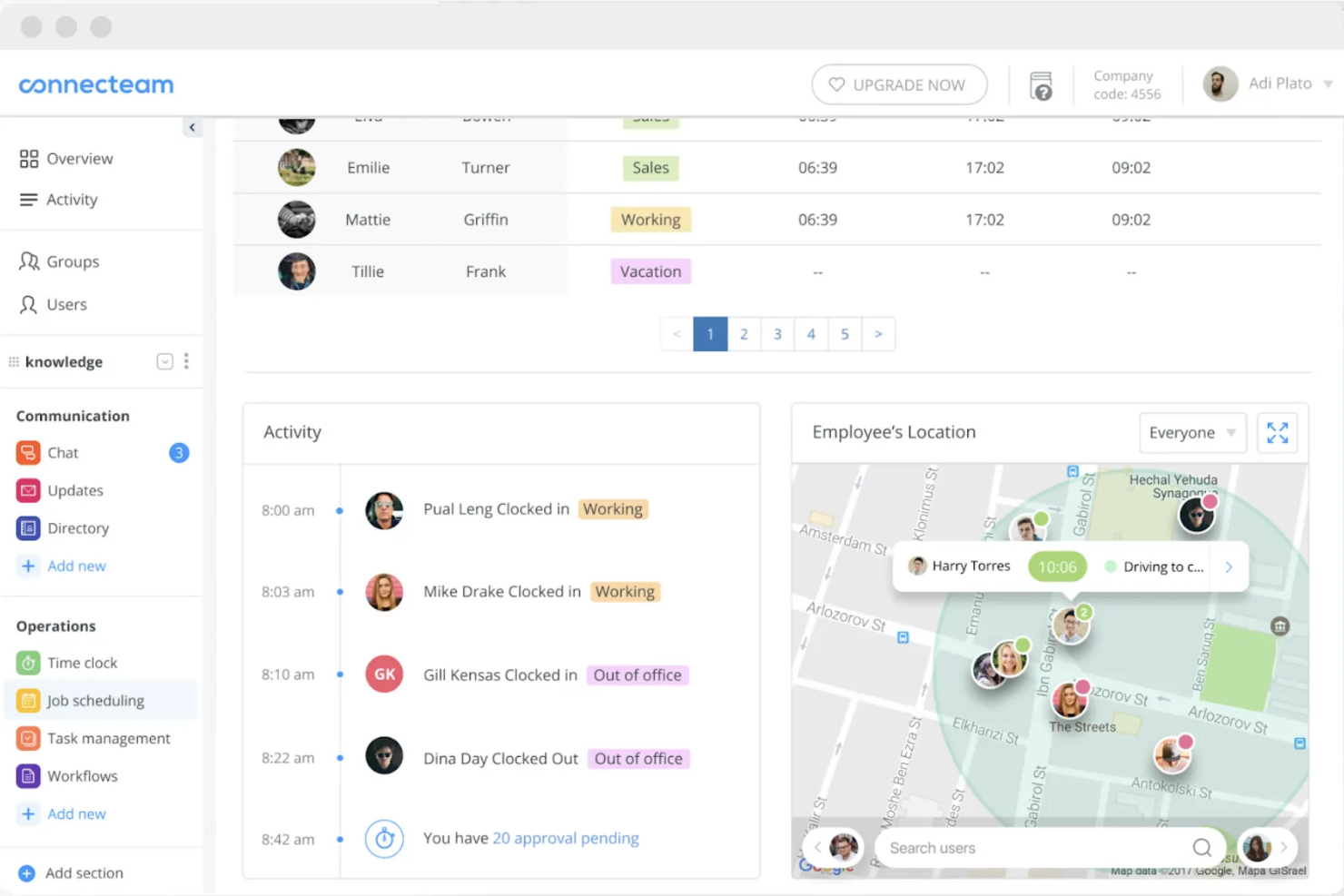
Connecteam is a time tracking and workforce management software designed for deskless teams across industries. It enables users to track time, manage schedules, and communicate efficiently.
Why I picked Connecteam: It caters specifically to deskless teams, making it easy for your team to clock in and out from any location. You can manage schedules and communicate with employees directly through the app. The tool also offers GPS tracking, providing accurate time entries.
Standout features and integrations:
Features include task management tools that help assign and prioritize tasks efficiently for better team management. You can also use the communication tools to send instant updates and messages to your team. Connecteam offers shift management, allowing you to quickly create and adjust schedules.
Integrations include QuickBooks, Xero, Zapier, Wix, Shopify, and more.
Pros and Cons
Pros:
- Free small-business plan with core tools
- All-in-one hub for deskless operations
- GPS breadcrumbs show entire shift routes
Cons:
- The feature-rich app can overwhelm new admins
- Reporting and analytics remain fairly limited
New Product Updates from Connecteam

Connecteam Adds Automatic Paid Break Actions and Manual Break Windows
Connecteam adds automatic paid break actions and configurable start windows for manual breaks. These updates help teams manage break schedules and maintain accurate timesheets. For more information, visit Connecteam’s official site.
 .

Best as an AI for business
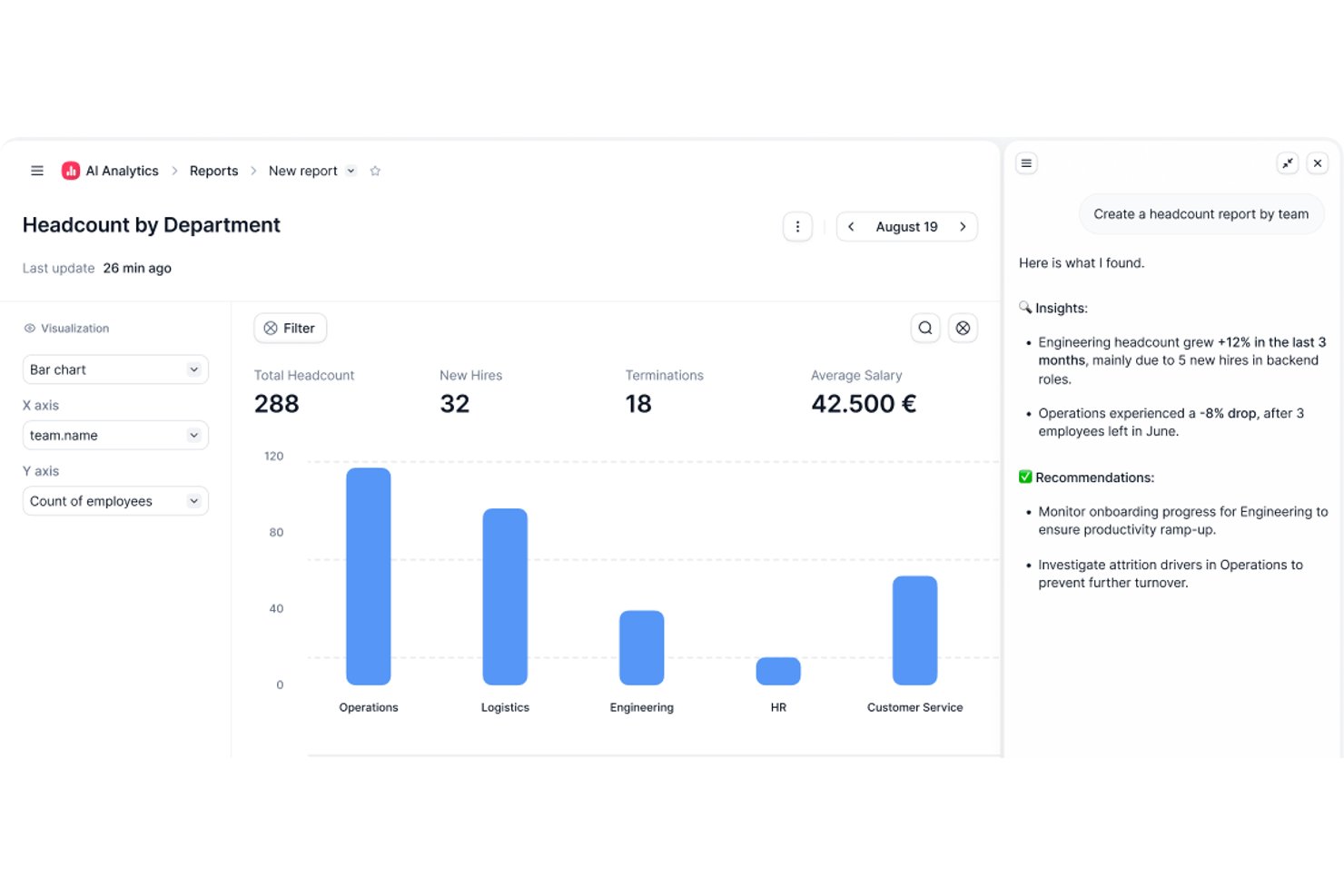
Factorial is an AI-powered HR and business operations platform that brings time tracking, project management, scheduling, and reporting together with an AI layer that handles day-to-day tasks like timetable planning and policy questions.
Who Is Factorial Best For?
Factorial is a strong fit for small businesses that want AI handling day-to-day operations—timetable planning, policy questions, and reporting—alongside time tracking.
Why I Picked Factorial
I've included Factorial in my top picks because it brings AI directly into daily business operations, handling tasks like timetable planning, report generation, and answering employee policy questions without manual effort. I especially like how its AI-powered reporting lets you query project data in plain language, and how live margin tracking by project phase keeps profitability visible in real time.
Factorial Key Features
- Smart project quoting: Build phase-level cost quotes based on team capacity and automatically convert approved quotes into active projects.
- Multi-method clock-in: Employees can clock in via QR code, GPS, geofencing, or mobile app, with entries linked directly to assigned projects.
- Phase-by-phase margin tracking: Monitor budget consumption and profitability at the individual project phase level as costs are logged in real time.
- Natural language reporting: Use the Factorial One AI assistant to query project and HR data in plain language and generate reports without manual setup.
Factorial Integrations
Factorial offers integrations with Monday.com, Microsoft Power BI, Slack, Google Workspace, Okta, Sage, and Microsoft Business Central. It also provides a public API and supports Zapier.
Pros and Cons
Pros:
- GPS and QR clock-ins suit field teams
- Phase-level margins expose project profitability
- AI answers policy questions and creates reports
Cons:
- No native client invoicing from tracked hours
- HR-first design limits dedicated timer depth
New Product Updates from Factorial
Factorial One Adds AI Automation Across HR, Finance, and IT
Factorial One adds company-context assistance, workflow automation, and connections across HR, Finance, and IT. These capabilities help employees access information, create documents, and complete routine tasks using AI. For more information, visit Factorial’s official site.
 .

Homebase
Best for shift scheduling
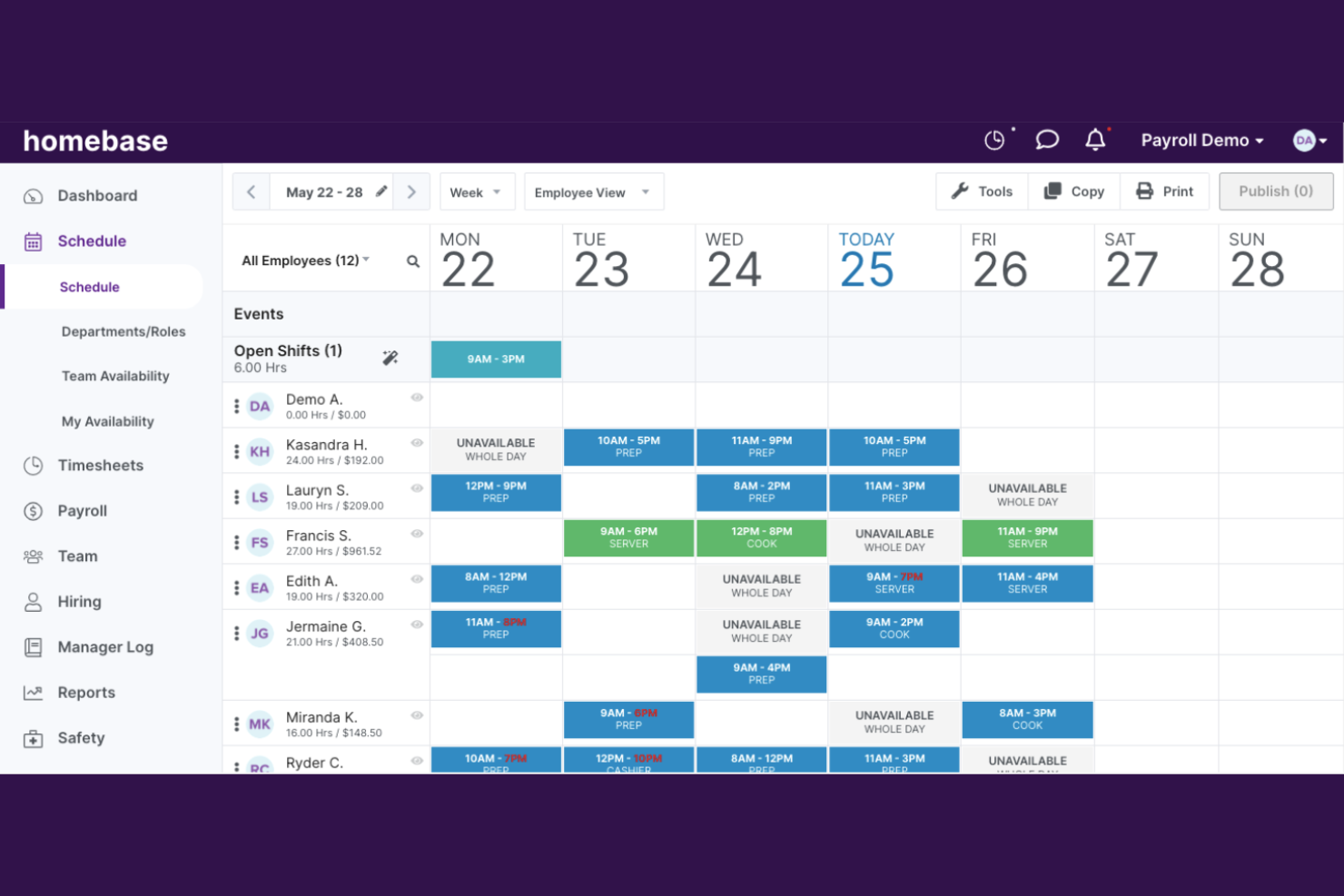
Homebase is a workforce management tool for small businesses looking to handle employee scheduling, time tracking, and team communication effectively.
Why I picked Homebase: Its focus on shift scheduling makes it ideal for businesses that need to manage rotating schedules efficiently. You can quickly create and publish schedules, keeping your team always informed. The tool also allows employees to clock in and out with ease.
Standout features and integrations:
Features include automated reminders that notify your team about upcoming shifts. You can also track employee hours directly through the app, reducing the need for manual calculations. The tool provides payroll export options, making it easy to process payments accurately.
Integrations include QuickBooks, ADP, Shopify, and more.
Pros and Cons
Pros:
- Good fit for retail and restaurants
- Built-in HR help for small teams
- Tight link between schedules and timecards
Cons:
- Support quality varies across customer reviews
- GPS tracking is limited by shift behavior
New Product Updates from Homebase

Homebase Adds Time Card Review and AutoPayroll Alerts
Homebase adds Time Card Review, time clock monitoring, and AutoPayroll email alerts. These updates help managers correct timecard errors and address payroll issues before processing. For more information, visit Homebase’s official site.
 .

DeskTime
Best for integrating calendar events
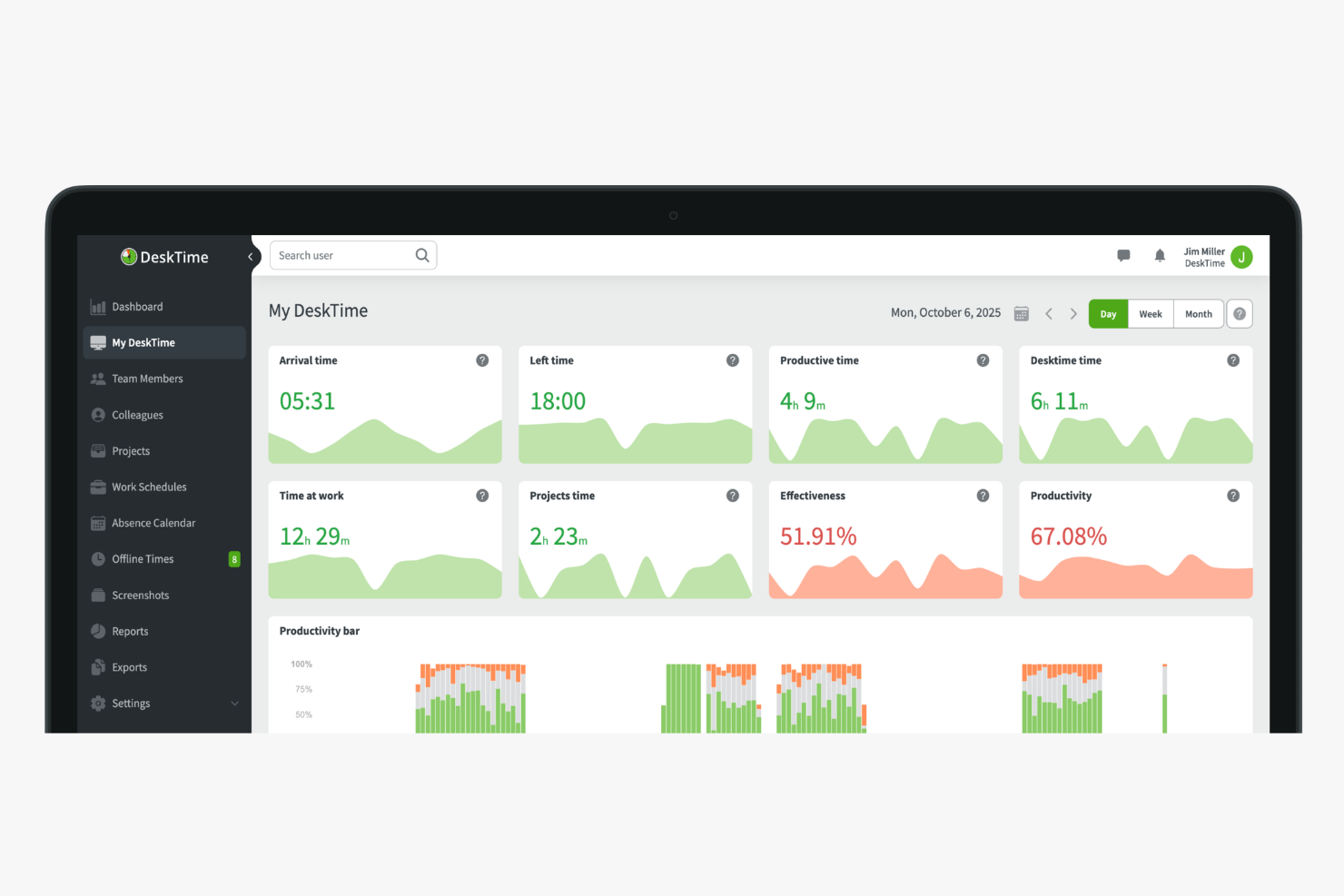
DeskTime is an automatic time tracking tool that logs app and URL usage, tracks project-level hours, calculates employee productivity, and manages attendance and absences for small teams.
Who Is DeskTime Best For?
DeskTime is a good fit for small business owners and team leads who need automatic time tracking without relying on employees to log hours manually.
Why I Picked DeskTime
I've included DeskTime in my top picks because of how it connects with Google Calendar and Outlook Calendar to fill meeting times directly into the daily timeline. Instead of manually logging time spent in a standup or a client call, DeskTime pulls those events in automatically. That means your tracked hours actually reflect how the day was spent, including time in meetings, without asking anyone to do extra data entry. I think that matters a lot for small teams where no one has time to maintain a second system.
DeskTime Key Features
- Shift scheduling: Plan and assign work shifts for team members directly within DeskTime's schedule view.
- Cost calculation: Assign hourly rates to employees or projects and have DeskTime calculate labour costs from tracked time.
- Custom reports: Filter time and productivity data by employee, project, or date range and export the results.
- Private time mode: Let employees pause tracking for personal tasks without recording any activity.
DeskTime Integrations
Integrations include Google Calendar, Outlook Calendar, Trello, Gitlab, Asana, Jira, and Zapier.
Pros and Cons
Pros:
- Supports offline and away-from-desk logging
- Classifies activity as productive or unproductive
- Tracks app and website time automatically
Cons:
- Lacks predictive web category filtering
- Mobile app has limited tracking features

Best for setting up accrual rules
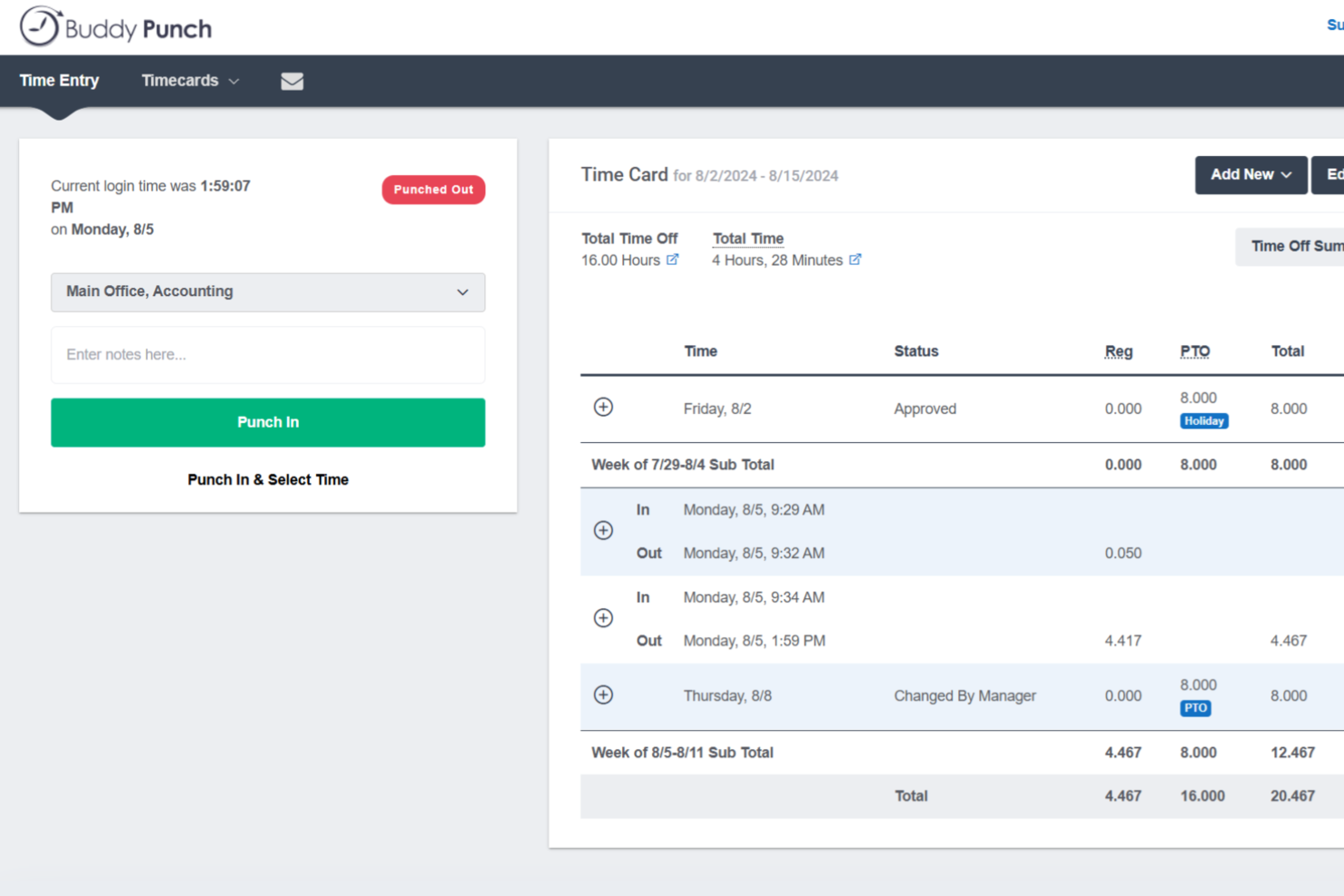
Buddy Punch is a time tracking platform built for small businesses with hourly workforces, combining employee clock-in/out, PTO management, scheduling, GPS tracking, and payroll integrations in one place.
Who Is Buddy Punch Best For?
Buddy Punch is a strong fit for small businesses that manage hourly, shift-based, or field employees across industries like retail, construction, healthcare, and hospitality.
Why I Picked Buddy Punch
I've included Buddy Punch in my top picks because its PTO management is genuinely one of the most hands-off systems I've used. You set up accrual rules once, and Buddy Punch automatically adds hours to employee balances on your schedule. Employees can check their own balances and submit time-off requests directly from the app, and when you approve a request, Buddy Punch automatically deducts the hours from their balance, adds the time to their timesheet, and flags the absence on the upcoming schedule. That's three manual steps your team no longer has to do.
Buddy Punch Key Features
- GPS tracking: Logs an employee's location at the time they punch in or out, so you always know where field or remote workers are clocking from.
- Drag-and-drop scheduling: Build and publish employee schedules visually, with shift assignments your team can view directly from the mobile app.
- Punch rounding: Automatically rounds clock-in and clock-out times to the nearest set interval, reducing manual timesheet corrections at the end of each pay period.
- Overtime alerts: Notifies managers when an employee is approaching overtime thresholds before the hours are logged.
Buddy Punch Integrations
Buddy Punch offers native integrations focused on payroll, including QuickBooks Online, QuickBooks Desktop, ADP Workforce Now, Gusto, Paychex, Paycor, Paylocity, Rippling, Workday, and SurePayroll, with 17+ payroll integrations in total. It also connects with Zapier and provides an API for custom integrations, plus single sign-on support through Google, Apple, Okta, and OneLogin.
Pros and Cons
Pros:
- Built-in PTO accruals and time-off calendar
- Geofencing blocks off-site clock-ins automatically
- Multiple clock-in methods including text-to-punch
Cons:
- Mobile app lacks some web version features
- No offline mode for areas without internet

Toggl
Best for quick task switching
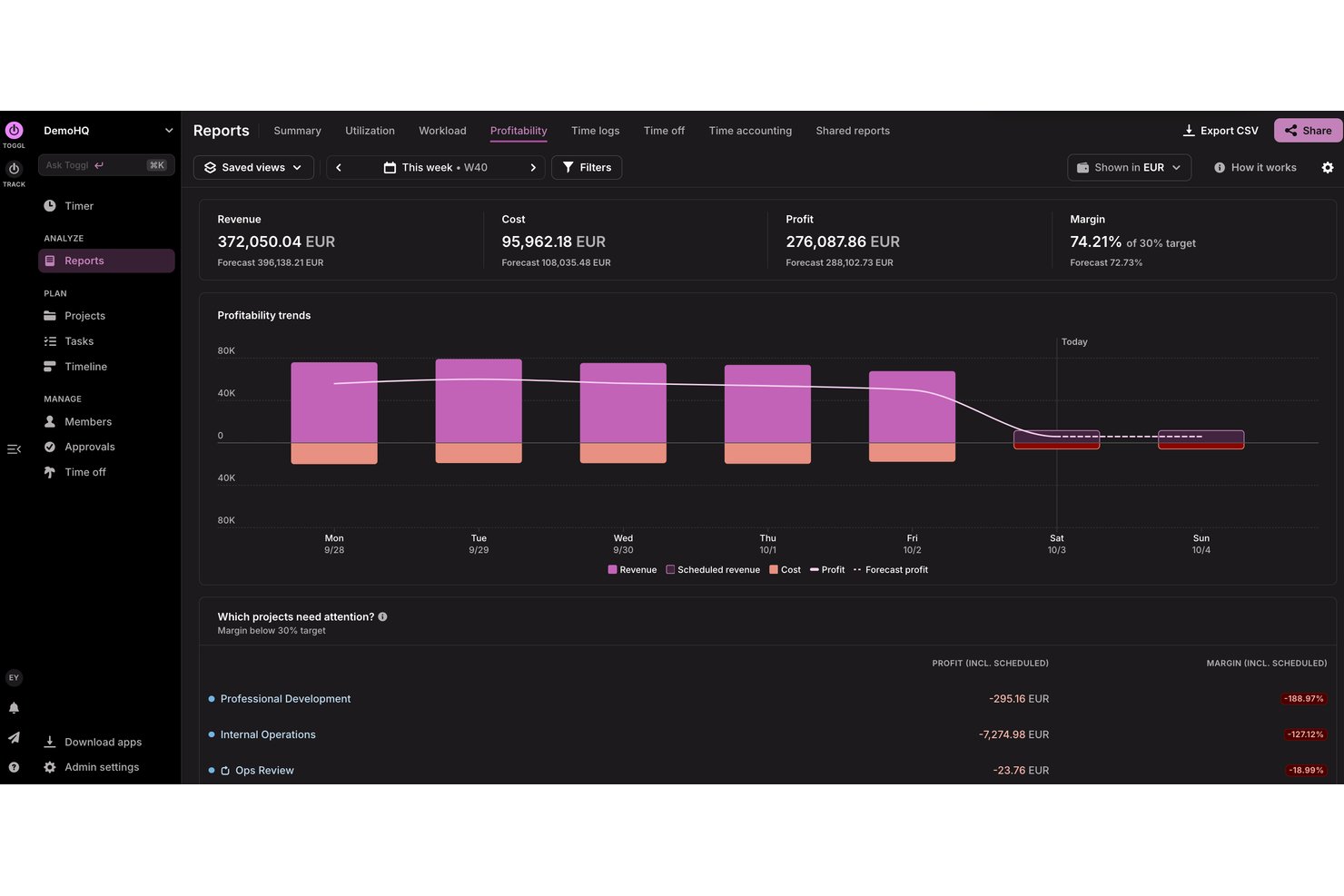
Toggl is a tool for freelancers and small to medium-sized businesses to track time, plan capacity, analyze profitability, and manage projects with ease.
Why I picked Toggl: Its simple interface lets you start tracking time without extensive training. You can quickly switch between tasks to maintain accurate time entries and access detailed reports that provide insights into time usage. Its focus on simplicity makes it a great choice for teams that value ease of use.
Standout features and integrations:
Features include a timer that allows you to track time with a single click, as well as automatic tracking on desktop. You can also use the reporting feature to gain insights into how time is spent across projects, as well as into project profitability and team capacity. The tool provides reminders and notifications to help you stay on top of your tasks. You can also use Toggl AI to get plain-language answers to questions about how time is spent, how much time a team has logged, and much more
Integrations include Google Calendar, Outlook, Jira, Asana, Todoist, GitHub, and more
Pros and Cons
Pros:
- Calendar view clarifies daily time blocks
- Intuitive interface freelancers love
- Generous free tier for small teams
Cons:
- No GPS tracking or geofencing
- Frequent feature changes confuse existing users

actiTIME
Best for combining time and budget management
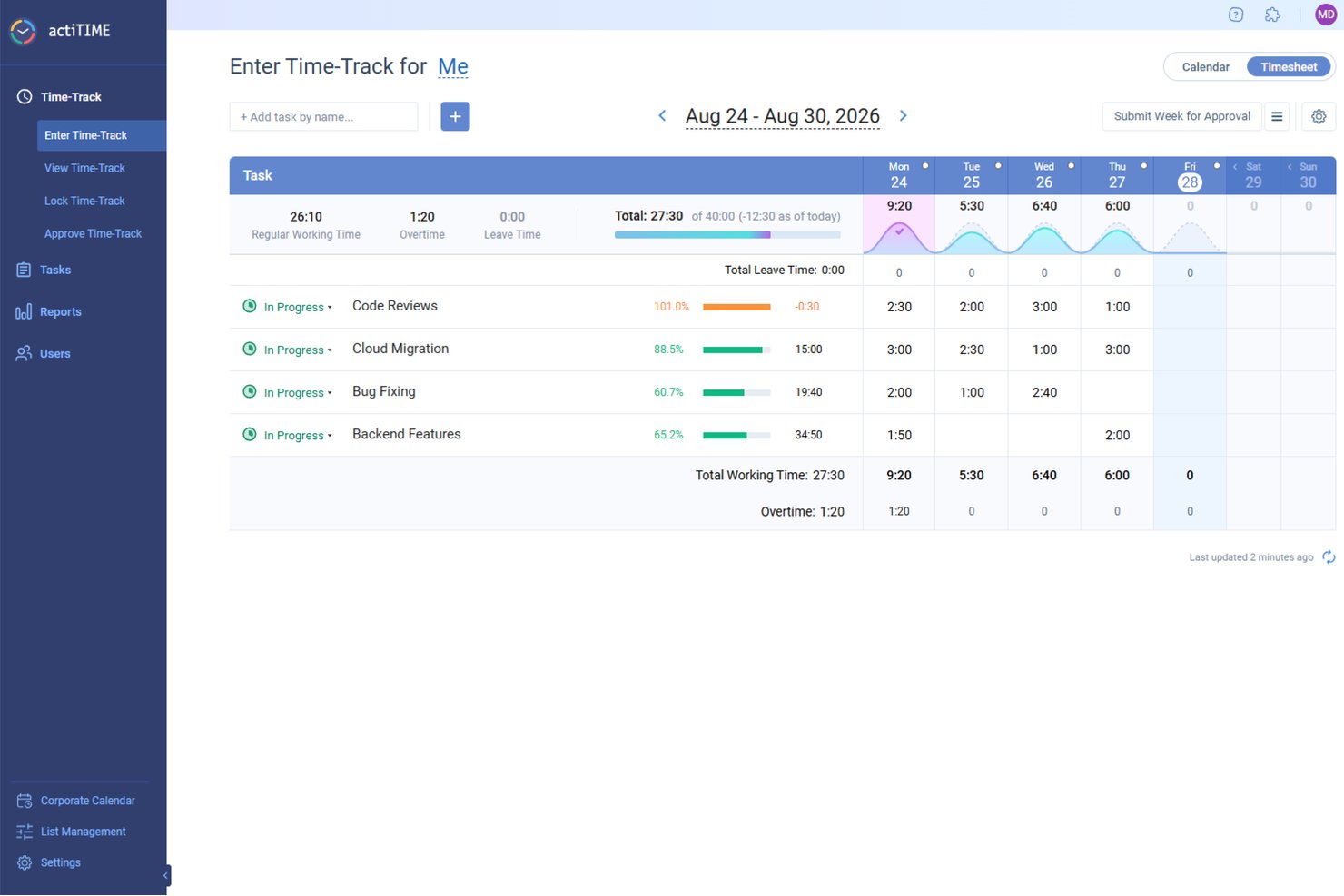
For small businesses seeking an efficient way to manage time and budget, actiTIME offers a tailored solution that addresses these needs with precision. Designed to support project tracking, budget management, and team collaboration, it appeals to a wide range of industries. By integrating easily with tools like QuickBooks, actiTIME ensures your operations are not only timely but also cost-effective, allowing you to stay focused on delivering quality work.
Why I Picked actiTIME
I picked actiTIME because its unique ability to combine time tracking with budget management makes it highly relevant for small businesses. One standout feature is its project tracking, which allows you to assign tasks, set deadlines, and monitor progress, ensuring projects are completed on time. Additionally, the budget management tools enable you to track project costs and set financial goals, helping your team stay within budget. With these features, actiTIME directly addresses the challenges of time and budget management, making it a great choice for small businesses.
actiTIME Key Features
In addition to its project tracking and budget management capabilities, I also found several other features that cater to small business needs:
- Reporting and Analytics: Generate detailed reports on time usage, project progress, and team performance to make informed decisions.
- Billing and Invoicing: Customize billing rates and generate invoices based on tracked time and expenses.
- Leave Management: Manage paid time off (PTO) and set accrual rules to ensure accurate leave tracking.
- Team Management: Assign work, manage roles, and monitor team performance to optimize productivity.
actiTIME Integrations
Integrations include QuickBooks, Zapier, and an API for custom integrations.
Pros and Cons
Pros:
- Offers customizable workflows for project management
- Allows for detailed financial and time reporting
- Includes mobile apps for both Android and iOS devices
Cons:
- Per user pricing can add up for smaller businesses
- Lacks some advanced features, like GPS and facial recognition
New Product Updates from actiTIME

actiTIME Visual Hour Indicator and Time-Track Report Redesign
actiTIME adds a wave-style hour indicator to the Timesheet and Calendar views and refreshes the Time-Track report for smoother navigation and clearer visuals. For more information, visit actiTIME's official site.
 .

Beebole
Best for multi-level timesheet approvals
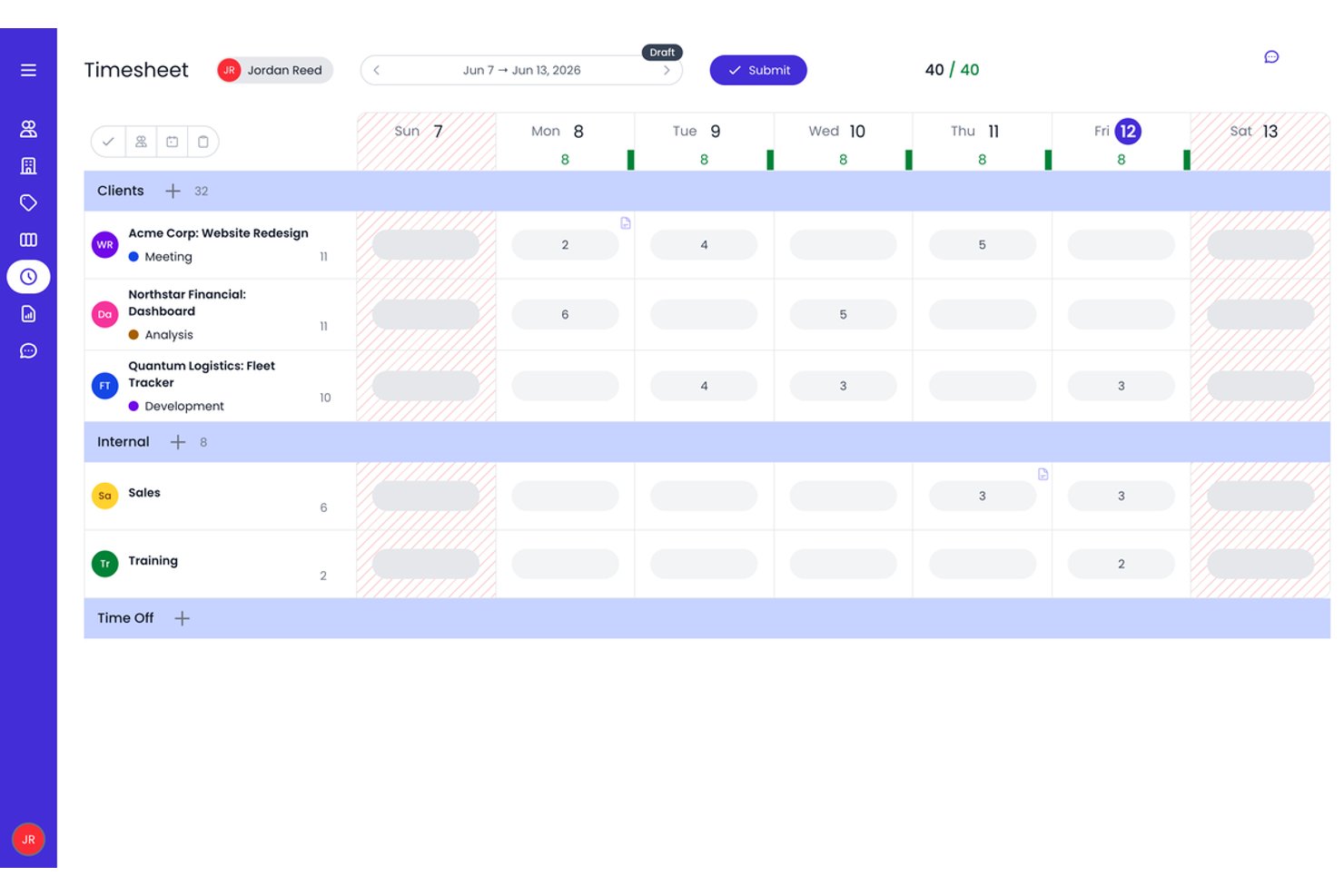
Beebole is a time tracking platform for small businesses that combines project-based time logging, multi-level timesheet approvals, resource planning, and custom reporting.
Who Is Beebole Best For?
Beebole is a strong fit for small business project managers and agency operators who need structured, multi-stage timesheet approval workflows alongside project-level billing rate controls.
Why I Picked Beebole
Beebole earns its spot on my shortlist because of how seriously it takes timesheet approvals. You can configure multi-stage approval chains, so a time entry might move from team lead to department head to finance before it's locked, which I find invaluable for client billing accuracy. I also like that planned work assigned in the resource planning view flows directly into individual timesheets, giving you a live plan-vs.-actual view without any manual reconciliation.
Beebole Key Features
- AI-suggested time entries: Beebole analyzes your desktop and browser activity to automatically suggest time entries, reducing manual logging.
- Custom report builder: Build multi-dimensional reports across 11 chart types, then schedule automated delivery or export directly to Excel or Google Sheets.
- Multi-currency billing rates: Set billable rates per user, project, client, or task in any currency, supporting teams with cross-border clients.
- Built-in resource planning: Visualize team capacity and workload across Gantt, Kanban, and Staffing views without leaving the platform.
Beebole Integrations
Beebole offers nine native integrations, including Asana, Jira, Linear, monday.com, QuickBooks Online, Xero, BambooHR, Google Calendar, and Microsoft Outlook Calendar. It also supports a GraphQL API, webhooks, and Zapier.
Pros and Cons
Pros:
- Highly customizable reporting and data exports
- AI-suggested time entries reduce manual logging
- Multi-level timesheet approval workflows built in
Cons:
- Advanced features gated to highest plan
- No native mobile app or GPS tracking

Clockify
Best for browser extension tracking

Clockify is a time tracking software for teams and individuals across various industries, including freelancers and consultants. It helps users track work hours and manage projects efficiently.
Why I picked Clockify: It offers a browser extension with real-time timers and detailed reports, making it easy to track time and productivity directly in your browser without switching between apps. This feature is perfect for those who spend most of their time online and want an easy way to log hours. Clockify also supports unlimited users, making it an ideal choice for growing teams.
Standout features and integrations:
Features include timekeeping with real-time timers, detailed time reports that provide insights into team productivity, and project management functionalities that allow you to organize tasks and deadlines effectively.
Integrations include Jira, QuickBooks, monday.com, Google Calendar, Notion, GitHub, and more.
Pros and Cons
Pros:
- Supports five users on the forever free plan
- Browser extension simplifies web-based tracking
- Detailed reports across clients and projects
Cons:
- Limited functionality when used offline
- No built-in payroll processing tools

Best for payroll integration
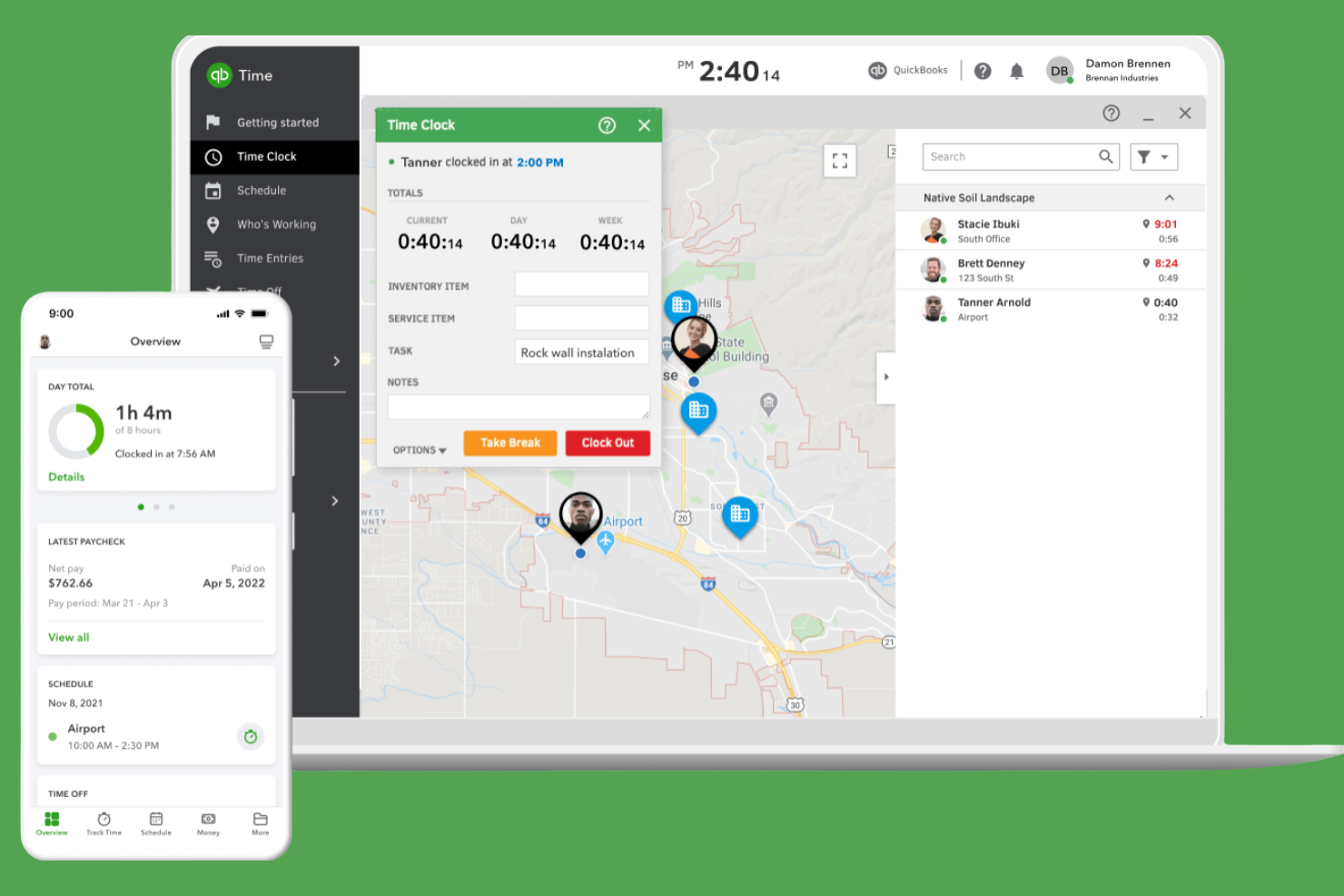
QuickBooks Time is a time tracking software for efficient payroll management. It serves small to medium-sized businesses by tracking employee hours and integrating with payroll systems.
Why I picked QuickBooks Time: It excels in payroll integration, making it easy to manage wages and tax calculations. The tool provides GPS tracking to monitor remote workers, providing accurate time entries and customized alerts for clock-ins and clock-outs.
Standout features and integrations:
Features include GPS tracking to monitor remote workers effectively. You can also set up job and shift scheduling to organize your team’s workload. The tool provides mobile time tracking, allowing your team to log hours from anywhere.
Integrations include ADP, Square, Paychex, and more.
Pros and Cons
Pros:
- Strong GPS tools for field crews
- Geofencing reduces time theft on jobs
- Deep native integration with QuickBooks payroll
Cons:
- Interface changes frustrate some long-time users
- Pricing gets expensive as headcount grows
Küçük İşletmeler İçin Diğer Zaman Takibi Yazılımları
Küçük işletmeler için kısa listeme giremeyen, ancak yine de göz atmaya değer bazı ek zaman takibi yazılımları şunlardır:
- Timely
For AI time tracking insights
- My Hours
For customizable reports
- TimeCamp
For automatic time tracking
- RescueTime
For productivity insights
- Time Doctor
For remote team monitoring
- Timesheets.com
For HR integration
- Harvest
For project time invoicing
- Insightful
For real-time analytics and time mapping
- Paymo
For task management integration
- FreshBooks
For invoicing simplicity
- Hubstaff
For GPS location tracking


How I Evaluate Time Tracking Software for Small Business
I evaluate these tools in two layers: baseline capabilities a tool must have—like project-based timers and billable rate tracking—and differentiators that matter most to small business teams.
Core Functionality (Table Stakes For This List)
When I'm selecting tools for my list, I rank each one on a scale from 0 (does not offer the functionality) to 5 (excels in this area) for each core functionality listed below. Then, I calculate the tool's total score into a percentage. Each tool needs to achieve a minimum total score of 65% to be considered for inclusion.
- Project & Task Time Tracking: I check whether you can log hours against specific projects, tasks, and clients—using both live timers and manual entry—since that's how most small teams actually work.
- Timesheet Management: The tool should let team members submit timesheets and managers approve or reject them, ideally with reminders so you're not chasing people at the end of each pay period.
- Billable Hours & Rate Configuration: I look for the ability to set per-user, per-project, or per-client rates and flag entries as billable or non-billable, which is essential for agencies juggling multiple retainers.
- Reporting & Analytics: Good reporting means more than a basic time summary. I evaluate whether you can filter by project, team member, or date range and export data for client-facing or internal budget reviews.
- Team & User Management: Small teams still need role-based access. I look at how the tool handles permissions—for example, letting a project lead see their team's hours without exposing company-wide billing data.
- PM & Accounting Integrations: I evaluate native connections to tools like QuickBooks, Xero, Asana, and Jira, plus whether the platform supports Zapier or an open API for custom workflows your team already relies on.
Once I have a list of tools that meet this criteria, I consider what sets each platform apart.
Differentiating Factors (What Sets Vendors Apart)
Here's how I compare and contrast different vendors:
Standout Features
Budget alerts matter a lot when you're running multiple client projects on tight margins—I look for tools that notify you before a project exceeds its hour cap, not after. Built-in invoicing is another differentiator, especially for agency owners who want to go from tracked hours to a client-ready invoice without exporting to a separate billing tool. I also evaluate resource scheduling features tied to time data, since small teams juggling concurrent projects need a clear view of who's available and who's overbooked.
Beyond Features
Pricing structure is one of the first things I check. Small teams need transparent per-user pricing without enterprise minimums—and a free tier or starter plan helps when you're onboarding a team of five, not fifty. Time-to-value also matters: I look for self-serve setup with templates and in-app guidance so a non-technical project lead can get their team logging hours within a day. Cross-platform accessibility rounds it out, since distributed teams need native desktop, mobile, and browser extension options with offline sync to keep time entries accurate regardless of where they're working.
Küçük İşletmeler İçin Zaman Takibi Yazılımı Nasıl Seçilir?
Uzun özellik listeleri ve karmaşık fiyatlandırma yapıları içinde kaybolmak kolaydır. Kendinize özgü yazılım seçme süreciniz üzerinde çalışırken odaklanmanıza yardımcı olmak için göz önünde bulundurmanız gereken faktörlerin bir kontrol listesini burada bulabilirsiniz:
| Faktör | Dikkat Edilmesi Gerekenler |
|---|---|
| Ölçeklenebilirlik | Araç işletmenizle birlikte büyüyebilir mi? Ekibiniz büyüdükçe daha fazla kullanıcıyı veya ek özellikleri destekleyip desteklemediğini kontrol edin. |
| Entegrasyonlar | Mevcut sistemlerinizle çalışıyor mu? Bordro, proje yönetimi ve kullandığınız diğer araçlarla entegre olduğundan emin olun. |
| Özelleştirilebilirlik | İş akışınıza uyacak şekilde özelleştirebilir misiniz? Raporları, gösterge panellerini ve kullanıcı rollerini özelleştirme seçeneklerini arayın. |
| Kullanım kolaylığı | Ekibinizin benimsemesi kolay mı? Arayüzün sezgisel olup olmadığını test edin ve kullanılabilirlikle ilgili geri bildirimler için kullanıcı değerlendirmelerini inceleyin. |
| Uygulama ve işe alıştırma | Başlamak ne kadar sürecek? Videolar, web seminerleri veya ürün tanıtımları gibi eğitim kaynaklarının bulunup bulunmadığını değerlendirin. |
| Maliyet | Fiyatlandırma şeffaf ve bütçeniz dahilinde mi? Yıllık planlara ilişkin gizli ücretler veya indirimler de dahil olmak üzere toplam maliyeti göz önünde bulundurun. |
| Güvenlik önlemleri | Verilerinizi koruyor mu? Şifreleme, erişim denetimleri ve GDPR gibi veri koruma düzenlemelerine uyumluluk özelliklerini arayın. |
| Destek bulunabilirliği | Gerektiğinde yardım alabilecek misiniz? Desteğin 7/24 ve sohbet, e-posta veya telefon gibi birden fazla kanal üzerinden sunulup sunulmadığını kontrol edin. |
Küçük İşletmeler için Zaman Takibi Yazılımı Nedir?
Küçük işletmelere yönelik zaman takibi yazılımı, çalışanların çalışma saatlerini izlemeye ve kaydetmeye yardımcı olur. Bu araçlar genellikle yöneticiler, insan kaynakları profesyonelleri ve küçük işletme sahipleri tarafından doğru bordro hazırlamak ve verimliliği artırmak için kullanılır. Zaman kaydı, raporlama ve bordro sistemi entegrasyonları gibi özellikler verimli yönetimi ve veri doğruluğunu destekler. Genel olarak bu araçlar, işletmelerin zaman kazanmasına ve çalışan saatlerini takip ederken oluşan hataları azaltmasına yardımcı olur.
Özellikler
Küçük bir işletme için zaman takibi yazılımı seçerken aşağıdaki temel özelliklere dikkat edin:
- Zaman kaydı: Çalışanların web, mobil veya kiosk tabanlı zaman saatlerini kullanarak çalışma saatlerini doğru şekilde kaydetmesini sağlar; böylece doğru bordro ve faturalandırmayı destekler.
- Raporlama: Zaman kullanımına ilişkin ayrıntılı içgörüler sunarak yöneticilerin verimliliği analiz etmesine ve iyileştirme alanlarını belirlemesine yardımcı olur.
- Entegrasyonlar: Operasyonları desteklemek ve manuel veri girişini azaltmak için bordro ve proje yönetimi araçlarına bağlanır.
- GPS takibi: Uzaktan çalışanların konumlarını izleyerek saha çalışmaları için doğru zaman girişleri sağlar.
- Otomatik zaman takibi: Zaman kaydını otomatikleştirmek, zamandan tasarruf etmek ve hataları azaltmak için çalışma etkinliklerini manuel giriş olmadan kaydeder.
- Vardiya planlama: İşletmelerin çalışan vardiyalarını planlamasına ve yönetmesine yardımcı olarak herkesin bilgilenmesini ve düzenli çalışmasını sağlar.
- Gider takibi: Proje maliyetlerini ve giderlerini izleyerek bütçe yönetimine ve finansal planlamaya yardımcı olur.
- Özelleştirilebilir gösterge paneli: Kullanıcıların arayüzlerini ihtiyaçları için en ilgili bilgileri gösterecek şekilde uyarlamasına olanak tanır.
- Mobil erişim: Çalışanların zamanı takip etmesini ve tarayıcı, masaüstü uygulaması ya da iOS ve Android cihazlar üzerinden her yerden özelliklere erişmesini sağlayarak esnekliği ve kullanım kolaylığını artırır.
- Güvenlik önlemleri: Hassas verileri şifreleme ve erişim denetimleriyle koruyarak veri koruma düzenlemelerine uyumluluğu destekler.
Avantajlar
Küçük bir işletme için zaman takibi yazılımı uygulamak, ekibiniz ve işletmeniz için çeşitli avantajlar sağlar. Yararlanabileceğiniz avantajlardan bazıları şunlardır:
- Doğru bordro: Çalışma saatlerini takip ederek ve bordro sistemleriyle entegre olarak çalışan ücretlerinin kesin şekilde hesaplanmasını sağlar.
- Artan verimlilik: Zamanın nasıl harcandığını belirleyerek yöneticilerin ve çalışanların çalışma alışkanlıklarını optimize etmesine ve önceliklere odaklanmasına yardımcı olur.
- Maliyet yönetimi: Maliyetleri kontrol etmeye ve finansal planlamayı iyileştirmeye yardımcı olmak için proje giderlerini izler ve harcanan zamanı bütçelerle karşılaştırır.
- Artan hesap verebilirlik: Çalışanların çalışma saatlerine ilişkin şeffaflık sunarak ekipler içinde sorumluluk ve güveni teşvik eder.
- Esnek planlama: Vardiyaların kolayca planlanmasını ve ayarlanmasını sağlayarak ekip üyelerinin bilgilenmesine ve programların sorunsuz ilerlemesine yardımcı olur.
- Veriye dayalı içgörüler: Bilinçli karar alma ve stratejik planlamayı desteklemek için değerli raporlar ve analizler sunar.
- Artan kolaylık: Çalışanların mobil cihazlardan zaman kaydetmesine ve özelliklere erişmesine olanak tanıyarak esneklik ve kullanım kolaylığı sunar.
Maliyetler ve Fiyatlandırma
Küçük işletmeler için zaman takip yazılımı seçmek, mevcut çeşitli fiyatlandırma modellerini ve planları anlamayı gerektirir. Maliyetler; özelliklere, ekip büyüklüğüne, eklentilere ve kredi kartıyla aylık ödeme yapmak gibi faturalandırma yönteminize göre değişir. Aşağıdaki tablo, küçük işletmelere yönelik zaman takip çözümlerinde yaygın planları, ortalama fiyatlarını ve genellikle sunulan özellikleri özetlemektedir:
Küçük İşletmeler için Zaman Takip Yazılımı Planları Karşılaştırma Tablosu
| Plan Türü | Ortalama Fiyat | Yaygın Özellikler |
|---|---|---|
| Ücretsiz Plan | $0 | Temel zaman takibi, sınırlı raporlama ve mobil erişim. |
| Kişisel Plan | $5-$10/kullanıcı/ay | Zaman takibi, temel raporlama, mobil erişim ve sınırlı entegrasyonlar. |
| İşletme Planı | $10-$25/kullanıcı/ay | Gelişmiş raporlama, proje yönetimi araçları, bordro ile entegrasyonlar ve özelleştirilebilir panolar. |
| Kurumsal Plan | $15+/kullanıcı/ay | Kapsamlı raporlama, tam entegrasyon, özel destek ve gelişmiş güvenlik özellikleri. |
Küçük İşletmeler için Zaman Takip Yazılımı SSS
Küçük işletmeler için zaman takip yazılımı hakkında sık sorulan bazı soruların yanıtları aşağıda yer almaktadır:
Zaman takip yazılımı nasıl çalışır?
Zaman takip yazılımı, sizin ve ekibinizin farklı görevler ve projeler üzerinde harcadığı zamanı kaydeder. Genellikle bir göreve başladığınızda zamanlayıcıyı başlatmanızı ve işi bitirdiğinizde durdurmanızı gerektirir. Birçok araç, bilgisayar etkinliğinize göre zamanı kaydeden otomatik takip özelliği de sunar. Bu, doğru faturalandırma ve üretkenlik analizi yapılmasına yardımcı olur. Takip edilen zamanı raporlar üzerinden görüntüleyip analiz edebilir, böylece iş akışı ve verimlilik hakkında bilinçli kararlar alabilirsiniz.
Zaman takip yazılımı proje yönetimi araçlarıyla entegre olabilir mi?
Birçok zaman takip platformu Asana, Trello, Jira veya Monday.com gibi araçlarla doğrudan entegrasyon sunar. Bu sayede takip edilen saatleri doğrudan belirli görevlere veya projelere bağlayabilir, üretkenliği analiz etmeyi ve bütçeleri yönetmeyi kolaylaştırabilirsiniz.
Zaman takip yazılımı çevrimdışı kullanılabilir mi?
Bazı zaman takip yazılımları çevrimdışı kullanılabilir. Bu araçlar, çevrimdışıyken saatleri kaydetmenize ve yeniden çevrimiçi olduğunuzda verilerinizi senkronize etmenize olanak tanır. Bu özellik, özellikle uzak bölgelerde veya bağlantının güvenilir olmadığı alanlarda çalışan ekipler için yararlıdır. Bu özellik değişiklik gösterebileceğinden, değerlendirdiğiniz yazılımın çevrimdışı işlevsellik sunup sunmadığını kontrol edin. Çevrimdışı özellikler, zaman takibini kesintisiz sürdürmenize ve doğru kayıtları korumanıza olanak tanır.
Zaman takip yazılımı projelerin bütçe ve süre aşımını azaltmaya nasıl yardımcı olabilir?
Zaman takibi, görevlerin gerçekte ne kadar sürdüğünü gerçek zamanlı olarak görmenizi sağlar. Kapsam genişlemesini erkenden fark edebilir ve aşım gerçekleşmeden önce ekibinizin iş yükünü veya proje planını ayarlayabilirsiniz. Ayrıca gelecekteki projeler için daha doğru tahminler oluşturmanıza yardımcı olur.
Zaman takip yazılımı güvenli midir?
Çoğu zaman takip yazılımı, verilerinizi korumak için güvenlik özellikleri içerir. Bunlar arasında şifreleme, düzenli yedeklemeler ve hassas bilgilere yalnızca yetkili kullanıcıların erişebilmesini sağlayan erişim kontrolleri bulunabilir. Bir araç seçerken güvenlik politikalarını ve GDPR gibi veri koruma düzenlemelerine uygunluğunu inceleyin. Güvenlik önlemlerinin uygulanması, işletme bilgilerinizi korumak ve müşterilerinizin güvenini sürdürmek açısından önemlidir.
Kurulum için teknik uzmanlığa ihtiyacım var mı?
Çoğu zaman takip yazılımını kurmak için ileri düzey teknik uzmanlığa ihtiyacınız yoktur. Bu araçlar kullanıcı dostu arayüzlere sahiptir ve kuruluma yardımcı olmak için genellikle adım adım kılavuzlar veya eğitimler içerir. Birçok sağlayıcı, sorularınızla ilgili yardım almak için sohbet, e-posta veya telefon üzerinden destek sunar. Başlangıçta biraz yönlendirmeyle yazılımı hızlıca çalışır duruma getirebilir ve zaman takibini verimli bir şekilde yapmaya odaklanabilirsiniz.
