

2026’da İncelenen En İyi 10 Yapay Zekâ Proje Bütçesi Yazılımı

10 En İyi Yapay Zekâ Proje Bütçesi Yazılımları Kısa Listesi


Bir proje bütçesini yönetmek, özellikle maliyetler değiştiğinde veya yeni giderler ortaya çıktığında hızla karmaşıklaşabilir. Yapay zekâ proje bütçesi yazılımları, güvenebileceğiniz güncel rakamlar, tahminler ve içgörüler sunarak süreci kolaylaştırır. Böylece daha net bir görünüm elde eder ve küçük sorunlar bütçe aşımlarına dönüşmeden önce harekete geçebilirsiniz.
Çok çeşitli araçları test ettim ve proje yöneticilerine gerçek değer sunan seçeneklere odaklandım. İncelemelerimde verimlilik, doğruluk ve her seçeneğin günlük bütçeleme çalışmalarını ne kadar iyi desteklediği üzerinde duruyorum.
Bu makalede en iyi seçimlerimi ele alacak ve yapay zekâ özelliklerinin bütçenizi başlangıçtan sona kadar kontrol altında tutmanıza nasıl yardımcı olabileceğini açıklayacağım.
Why Trust Our Software Recommendations
Our team has been testing and reviewing software since 2012. As project managers ourselves, we know how difficult—and important—it is to choose the right software.
For this guide, we evaluated tools using hands-on testing and independent research, scoring tools using our selection criteria. We also draw on insights from industry thought leaders and practicing project management experts.
Our reviews reflect our human editorial judgment, not a sales pitch.
Expert reviewers:
Yapay Zekâ Proje Bütçesi Yazılımları Karşılaştırma Tablosu
Bu karşılaştırma tablosu, en iyi yapay zekâ proje bütçesi yazılımı seçimlerim için fiyatlandırma ayrıntılarını özetlemektedir.
| Tool | Starting Price | Website | |
|---|---|---|---|
| Best for advanced time tracking and invoicing | 4.5 out of 5 | $17/user/month 14-day free trial | Book Demo |
| Best for AI-driven project management | 4.3 out of 5 | $10/user/month Free plan + 14-day trial + demo available | Book Demo |
| Best for integrated accounting features | 4.7 out of 5 | $38/month 30-day free trial | Website |
| Best for micro-budgets | 4.7 out of 5 | Pricing upon request Free demo available | Website |
| Best for AI in project forecasting | 4.5 out of 5 | Pricing upon request Free demo available | Website |
| Best for AI assist tools | 4.5 out of 5 | Pricing upon request Free demo available | Website |
| Best for team planner optimization | 4.5 out of 5 | $14.99/month 34-day free trial available | Website |
| Best for AI-automation | 4.7 out of 5 | $25/user/month 30-day free trial | Website |
| Best for resource management | 4.4 out of 5 | Pricing upon request Free demo available | Website |
| Best for scenario planning | 4.2 out of 5 | Pricing upon request Free demo available | Website |
En İyi Yapay Zekâ Proje Bütçesi Yazılımları İncelemesi
Aşağıda, kısa listeme giren en iyi yapay zekâ proje bütçesi yazılımlarının ayrıntılı özetlerini bulabilirsiniz. İncelemelerim, her aracın temel özelliklerine, avantajlarına & dezavantajlarına, entegrasyonlarına ve ideal kullanım alanlarına ayrıntılı bir bakış sunarak sizin için en iyi seçeneği bulmanıza yardımcı olur.

Scoro
Best for advanced time tracking and invoicing

For businesses seeking a sophisticated AI project budget software, Scoro offers a compelling solution. This tool is ideally suited for small to medium-sized enterprises across various sectors, such as consultancies, IT, and engineering, that require robust project and financial management capabilities. Scoro helps address the common challenges associated with fragmented project management tools by providing a unified platform that enhances visibility and control over project finances.
Why I Picked Scoro
I picked Scoro for its unique ability to combine AI-driven insights with comprehensive project financial management features. With Scoro, you can track budget burn and forecast profitability in real-time, which is essential for maintaining financial oversight. Additionally, its user-friendly interface paired with advanced time tracking and invoicing capabilities makes it a standout choice for those looking to manage project budgets more effectively.
Scoro Key Features
In addition to its AI-driven insights, Scoro offers several other features that cater to your project budgeting needs:
- Time Tracking: This feature allows you to monitor the time spent on projects, ensuring accurate billing and time management.
- Invoicing: Create and send invoices directly from the platform, simplifying the billing process.
- Cost Management: Keep track of project expenses and budgets in one place, providing clear visibility into financial performance.
- Collaboration Tools: Facilitate teamwork and communication across your organization to enhance project delivery.
Scoro Integrations
Integrations include Google Calendar, Microsoft Exchange, Xero, QuickBooks, Sage Intacct, Expensify, Stripe, and Jira.
Pros and Cons
Pros:
- Strong financial management tools
- Advanced resource planning capabilities
- AI powered business insights
Cons:
- Steep learning curve initially
- Higher pricing for small teams
New Product Updates from Scoro

Scoro Adds Time Mobile App and ELI Improvements
Scoro adds the Scoro Time mobile app for iOS/Android to track time anywhere and expands ELI with attachments, smarter filtering, and trigger-based actions. For more information, visit Scoro's official site.
 .

Wrike
Best for AI-driven project management
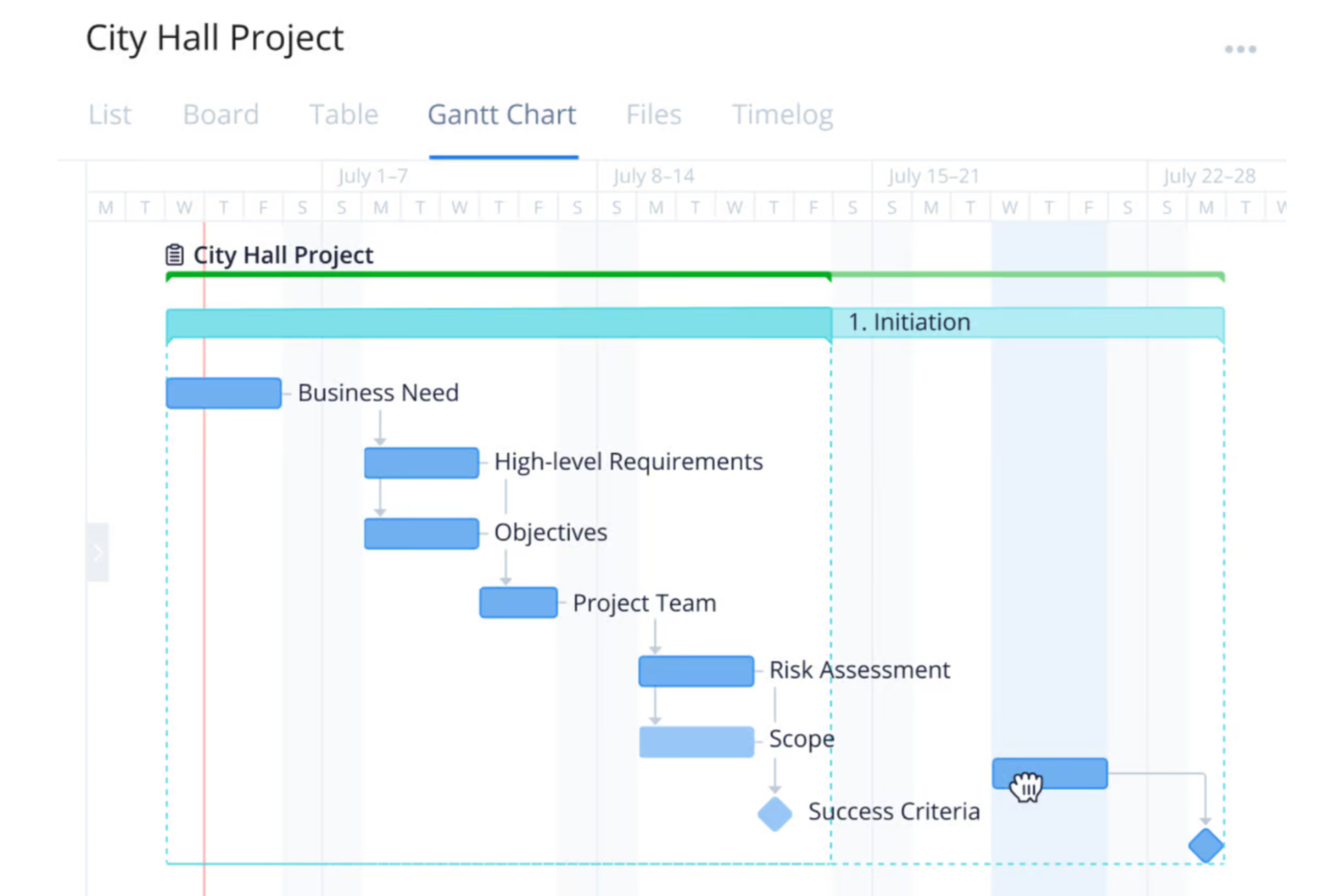
For your team seeking an AI project budget software solution, Wrike presents a compelling choice with its comprehensive project management capabilities. It appeals particularly to businesses and industries that require streamlined workflows and reduced busywork through automation and AI. Wrike addresses the challenge of managing complex projects by offering tools that facilitate efficiency and focus on essential tasks, allowing you to allocate resources effectively and maintain control over project budgets.
Why I Picked Wrike
I picked Wrike because it stands out with its integration of AI capabilities, which are particularly beneficial for project budget management. Wrike's AI tools assist in generating project plans and risk assessments, providing an analytical edge that enhances decision-making. Additionally, its real-time dashboards offer a transparent view of budget allocations and project progress, ensuring your team can quickly adapt to changes. These features align well with the needs of professionals seeking to optimize resource allocation and maintain budget control.
Wrike Key Features
In addition to its AI capabilities, Wrike offers several features that enhance its utility as a project budget software:
- Customizable Workflows: Tailor workflows to fit your team's specific budget management processes, ensuring a personalized approach to project execution.
- Generative AI: Use AI to generate project plans and translate comments, which aids in maintaining clarity and consistency across your team's communications.
- Real-Time Dashboards: Access up-to-date information on project budgets and progress, allowing for informed decision-making and timely adjustments.
- Data Hub: Centralize information access to streamline data management and enhance collaboration across different departments and teams.
Wrike Integrations
Integrations include NetSuite, QuickBooks, Jira, Microsoft Teams, Salesforce, Slack, Google Drive, Dropbox, Box, and GitHub, and the platform supports custom integrations through an API.
Pros and Cons
Pros:
- Integrates with financial accounting tools
- AI supports resource allocation decisions
- Real-time project budget visibility
Cons:
- Advanced budget features cost more
- Not purpose built budgeting software
New Product Updates from Wrike

Wrike Redesigns Workspace Search With New Filters
Wrike introduces a redesigned Workspace Search interface with recent search shortcuts, item type and location filters, and parent-task context. These updates help users find relevant work items and navigate search results efficiently. For more information, visit Wrike’s official site.
 .

Best for integrated accounting features

QuickBooks is an accounting software solution designed for small to medium-sized businesses, providing tools for invoicing, payroll, and expense tracking. Its AI features enhance financial management by automating routine tasks and providing insights into business performance.
Why I picked QuickBooks: The software includes AI features across all its plans, making it accessible for any team size. Its AI-driven automation helps you manage invoices and expenses efficiently. QuickBooks provides predictive insights, allowing you to forecast cash flow and financial trends. This ensures that you can make informed decisions without needing extensive financial expertise.
Standout Features & Integrations:
Features include automated invoicing that sends reminders to clients, payroll management tools, and expense tracking. The software offers detailed financial reporting to help you understand business performance. Its mobile app allows you to manage finances on the go, providing flexibility for your team.
Integrations include PayPal, Shopify, Square, Stripe, HubSpot, Salesforce, Mailchimp, TSheets, Gusto, and BILL.
Pros and Cons
Pros:
- Offers a mobile app
- Provides detailed reporting
- Includes AI in all plans
Cons:
- Setup requires time
- Learning curve for new users
Best for micro-budgets

Datarails is a financial planning and analysis platform designed for finance professionals, offering budgeting, forecasting, and reporting capabilities. Its AI-driven insights help you manage micro-budgets and optimize financial planning with precision.
Why I picked Datarails: The platform's AI capabilities excel in managing micro-budgets through automated data consolidation and real-time analytics. You can efficiently track financial data and generate reports with minimal manual intervention. Its predictive analytics provide insights into spending patterns, enabling you to make informed decisions. Datarails enhances your financial planning by offering detailed budget analysis and scenario planning.
Standout Features & Integrations:
Features include automated data consolidation from multiple sources, customizable dashboards that display key financial metrics, and real-time reporting. The platform offers scenario planning tools to anticipate financial changes. You can benefit from its detailed budget analysis capabilities that break down spending by category.
Integrations include Microsoft Excel, Google Sheets, QuickBooks, Xero, NetSuite, SAP, Oracle, Salesforce, Power BI, and Slack.
Pros and Cons
Pros:
- Supports scenario planning
- Provides detailed budget analysis
- Automates data consolidation
Cons:
- Setup requires time
- Learning curve for advanced features

Anaplan
Best for AI in project forecasting

Anaplan is a cloud-based planning and performance management platform aimed at large enterprises, offering solutions for scenario planning, budgeting, and forecasting. Its AI capabilities provide advanced project forecasting, helping businesses optimize their planning processes.
Why I picked Anaplan: The platform's AI-driven forecasting capabilities allow your team to predict project outcomes with precision. Its predictive analytics and scenario planning tools help you make data-driven decisions. Anaplan's flexible modeling lets you adjust plans in real-time as new data comes in. This ensures you can stay agile and responsive to changing business conditions.
Standout Features & Integrations:
Features include flexible modeling tools that adapt to your business structure, real-time data processing, and scenario planning capabilities. The platform provides advanced analytics to support strategic decision-making. Its collaborative features enhance teamwork by allowing multiple users to work on plans simultaneously.
Integrations include Salesforce, Workday, Microsoft Dynamics, SAP, Oracle, Google Cloud, AWS, Slack, Tableau, and Power BI.
Pros and Cons
Pros:
- Supports collaborative planning
- Provides real-time data
- Offers advanced forecasting
Cons:
- Technical expertise needed for setup
- Complex features require training

Prophix
Best for AI assist tools

Prophix is a corporate performance management software tailored for finance teams, offering budgeting, forecasting, and financial reporting solutions. Its AI capabilities enhance decision-making by providing predictive analytics and automated insights.
Why I picked Prophix: The software's AI assist tools help your team analyze financial data with precision. Its predictive analytics offer insights into future trends, allowing you to plan effectively. The AI-driven dashboard provides automated reporting, saving you time on manual tasks. You can also benefit from its scenario analysis feature, which helps in evaluating various financial outcomes.
Standout Features & Integrations:
Features include customizable dashboards that adapt to your needs, automated financial reporting that reduces manual work, and scenario analysis tools. The software allows you to create detailed budgets and forecasts tailored to your business. Its interface simplifies data visualization and enhances collaboration within your team.
Integrations include Microsoft Dynamics, NetSuite, Sage Intacct, QuickBooks, SAP, Oracle, Salesforce, Workday, Google Sheets, and Slack.
Pros and Cons
Pros:
- Offers predictive analytics
- Supports scenario analysis
- Provides automated reporting
Cons:
- Implementation takes time
- Learning curve for new users

YNAB
Best for team planner optimization

YNAB is a personal budgeting software designed for individuals and small teams, offering tools to manage finances and track spending. Its AI capabilities help optimize team planning by providing insights into spending habits and budget allocations.
Why I picked YNAB: The software's focus on team planner optimization allows you to manage your budget effectively. Its AI-driven insights help you track spending patterns and adjust your budget accordingly. YNAB's interface facilitates easy access to financial data and planning tools. You can rely on its forecasting features to anticipate future financial needs and make informed decisions.
Standout Features & Integrations:
Features include real-time budget tracking that updates as you spend, customizable spending categories that align with your needs, and goal-setting capabilities. The software offers detailed financial reports to help you understand your spending habits. Its mobile app ensures you can manage your budget on the go.
Integrations include Plaid, Venmo, PayPal, Square, Stripe, Capital One, Chase, Wells Fargo, Bank of America, and American Express.
Pros and Cons
Pros:
- Facilitates goal-setting
- Offers customizable categories
- Provides real-time tracking
Cons:
- Limited business features
- Limited trial available

PSOhub
Best for AI-automation

PSOhub is a project management solution designed for small to mid-sized businesses, offering features like time tracking, project planning, and contract management. Its AI capabilities focus on automating repetitive tasks and providing scenario planning tools to improve efficiency.
Why I picked PSOhub: The software's AI-driven automation helps your team save time by reducing manual data entry and repetitive tasks. Its scenario planning tools allow you to visualize different project outcomes and adapt accordingly. The interface makes it easier to manage projects and resources efficiently. You can rely on its AI features to enhance your team's productivity and decision-making processes.
Standout Features & Integrations:
Features include automated time tracking that captures work hours without manual input, contract management tools, and invoicing capabilities. The software provides project planning tools to help you allocate resources effectively. Its dashboards offer real-time insights into project progress and performance.
Integrations include HubSpot, Salesforce, Microsoft Dynamics, QuickBooks, Xero, Slack, Google Calendar, Outlook, Zapier, and Asana.
Pros and Cons
Pros:
- Provides real-time insights
- Supports scenario planning
- Automates repetitive tasks
Cons:
- Reporting dashboards lack depth compared to some competitors
- Learning curve for advanced features

Best for resource management

Workday Adaptive Planning is a cloud-based business planning software for finance teams, offering capabilities like budgeting, forecasting, and reporting. Its AI-driven analytics provide insights to improve resource management and optimize financial planning.
Why I picked Workday Adaptive Planning: The software's AI features, such as predictive analytics and scenario modeling, assist your team in effective resource management. These tools help you anticipate changes and allocate resources efficiently. The platform's interface makes it easier to visualize data and derive actionable insights. You can rely on its AI to enhance your planning accuracy and decision-making processes.
Standout Features & Integrations:
Features include dashboards that can be customized to display relevant metrics, reporting tools that generate detailed financial analysis, and collaborative planning capabilities. The software allows you to create flexible budgets and forecasts tailored to your needs. Its interface simplifies data visualization and planning tasks.
Integrations include Salesforce, NetSuite, Workday, Oracle, SAP, Microsoft Dynamics, Google Sheets, Slack, QuickBooks, and Xero.
Pros and Cons
Pros:
- Enables collaborative planning
- Offers customizable reports
- Enhances resource allocation and management
Cons:
- Setup can be time-intensive
- Learning curve for advanced features

Planful
Best for scenario planning

Planful is an AI-driven budget software designed for finance professionals to enhance financial management. It supports key business functions like finance, accounting, and operations with features like automated reporting and forecasting.
Why I picked Planful: The platform's AI capabilities, such as the Analyst Assistant, provide instant insights essential for scenario planning. Its AI tools detect anomalies and generate budget projections using historical data. You and your team can use these insights to make informed financial decisions quickly. The platform integrates with existing systems while maintaining data security.
Standout Features & Integrations:
Features include automated reporting tools that reduce manual work, forecasting capabilities that use historical data patterns, and an in-app help system for guidance. The Analyst Assistant delivers instant insights and scenario planning tools that allow you to model different financial outcomes. The platform provides dynamic reporting that adapts to your needs.
Integrations include Salesforce, NetSuite, Microsoft Dynamics, Oracle, SAP, QuickBooks, Xero, Workday, Google Sheets, and Slack.
Pros and Cons
Pros:
- Integrates with major ERPs
- Provides predictive analytics
- Supports scenario modeling
Cons:
- Learning curve for new users
- Setup requires technical knowledge
Diğer Yapay Zekâ Proje Bütçesi Yazılımları
Bunlar kısa listeme giremeyen ancak yine de göz atmaya değer bazı ek yapay zekâ proje bütçesi yazılımı seçenekleridir:
- PlanGuru
For long-range financial modeling
- Cube Software
For pre-filled timesheets
- Budgyt
For AI-resourcing
- Forecast
For real-time project health scoring
- Vena
For integrated planning
- BigTime
For billable hours tracking
- Hive
For AI task management
- Monograph
For architects and designers
- ClickUp
For customizable workflows
- Motion AI
For AI scheduling automation


How I Evaluate AI Project Budget Software
I look for tools where AI genuinely shifts how you handle project budgets—like catching a cost overrun weeks before it blows up your forecast. My evaluation splits into core functionality a tool needs to make the list and differentiating factors that separate the strongest fits.
Core Functionality (Table Stakes For This List)
When I'm selecting tools for my list, I rank each one on a scale from 0 (does not offer the functionality) to 5 (excels in this area) for each core functionality listed below. Then, I calculate the tool's total score into a percentage. Each tool needs to achieve a minimum total score of 65% to be considered for inclusion.
- AI Budget Forecasting: I evaluate whether the tool can generate forward-looking budget projections using historical project data—like predicting a Phase 2 cost overrun based on Phase 1 actuals.
- Automated Cost Tracking: The tool should capture labor, expenses, and resource costs against the budget in real time rather than relying on manual spreadsheet updates.
- AI Variance Detection: I look for proactive alerts when spending drifts from the plan, such as flagging a spike in contractor hours before it erodes your project margin.
- Predictive Estimating: A strong tool pulls from past project data to produce AI-assisted estimates, helping teams scope new projects with more accuracy than gut-feel guesswork.
- Project Financial Reporting: I check for AI-enhanced dashboards that roll up budget health across a portfolio, giving PMO leads a clear picture without hours of manual report building.
- PM Tool Integration: The platform should sync with the PM, accounting, or ERP tools your team already uses so budget data stays connected to tasks, time, and deliverables.
Once I have a list of tools that meet this criteria, I consider what sets each platform apart.
Differentiating Factors (What Sets Vendors Apart)
Here's how I compare and contrast different vendors:
Standout Features
Scenario simulation is a big one—I want to see what happens to the bottom line if a vendor rate increases or a timeline slips by three weeks before I commit to a change. AI risk scoring adds another layer by flagging projects most likely to blow their budget based on live indicators. I also look for tools that go further with auto-generated recommendations, like suggesting where to reallocate underspent funds across a portfolio.
Beyond Features
AI model transparency matters here. When a tool flags a budget overrun, I want to understand what data drove that prediction. Your finance team will ask the same questions during an audit. Integration depth is just as important—budget data in a silo loses value fast. I check whether the tool syncs bidirectionally with your accounting and ERP systems. Security posture is another key factor, since project financials are sensitive and typically require SOC 2 compliance and role-based access controls.
Yapay Zekâ Proje Bütçesi Yazılımı Nasıl Seçilir?
Uzun özellik listeleri ve karmaşık fiyatlandırma yapıları içinde kaybolmak kolaydır. Kendinize özgü yazılım seçimi sürecinizde ilerlerken odağınızı korumanıza yardımcı olmak için göz önünde bulundurmanız gereken faktörleri içeren bir kontrol listesi hazırladım:
| Faktör | Dikkat Edilmesi Gerekenler |
| Ölçeklenebilirlik | Yazılım ekibinizle birlikte büyüyebilir mi? Ek maliyetler veya karmaşıklıklar olmadan mevcut büyüklüğünüzü ve gelecekteki genişlemenizi destekleyip desteklemediğini değerlendirin. |
| Entegrasyonlar | Mevcut araçlarınızla çalışıyor mu? Müşteri ilişkileri yönetimi sisteminiz, muhasebe yazılımınız ve diğer temel platformlarınızla uyumluluğunu kontrol edin. |
| Özelleştirilebilirlik | Aracı süreçlerinize uyacak şekilde uyarlayabilir misiniz? Gösterge panellerini, iş akışlarını ve raporları ihtiyaçlarınıza göre düzenleme seçeneklerini arayın. |
| Kullanım kolaylığı | Arayüz sezgisel mi? Ekip üyelerinin kapsamlı bir eğitim veya hayal kırıklığı yaşamadan uygulamada gezinebildiğinden emin olun. |
| Uygulama ve başlangıç süreci | Ne kadar hızlı başlayabilirsiniz? Kurulum süresini, eğitim materyallerinin bulunabilirliğini ve başlangıç sürecindeki desteği değerlendirin. |
| Maliyet | Bütçenize uygun mu? Fiyatlandırma planlarını karşılaştırın ve mali durumunuzu zorlayabilecek gizli ücretler olmadığından emin olun. |
| Güvenlik önlemleri | Verileriniz korunuyor mu? Bilgilerin güvenliğini sağlamak için şifreleme, sektör standartlarına uyumluluk ve düzenli güncellemeler arayın. |
| Destek olanakları | Hangi destek seçenekleri mevcut? Özellikle operasyonlarınız açısından kritik saatlerde canlı sohbet, e-posta ve telefon desteğine erişiminiz olduğundan emin olun. |
Yapay Zekâ Proje Bütçesi Yazılımı Nedir?
Yapay zekâlı proje bütçesi yazılımı, proje bütçelerini yönetmeye ve optimize etmeye yardımcı olmak için yapay zekâ kullanan bir araçtır. Finansal analistler, proje yöneticileri ve iş liderleri bu araçları genellikle maliyet yönetimini ve karar alma süreçlerini iyileştirmek için kullanır.
Tahmine dayalı analizler, otomatikleştirilmiş öngörüler ve gerçek zamanlı veri içgörüleri, doğru bütçe planlamasına ve kaynak tahsisine yardımcı olur. Bu araçlar, finansal planlamada verimliliği ve doğruluğu artırarak değer sağlar.
Özellikler
Yapay zekâlı proje bütçesi yazılımı seçerken aşağıdaki temel özelliklere dikkat edin:
- Tahmine dayalı analizler: Gelecekteki finansal eğilimleri öngörmek için yapay zekâ kullanır ve bütçeleri daha doğru planlamanıza yardımcı olur.
- Otomatikleştirilmiş öngörüler: En az düzeyde manuel veri girişiyle bütçe öngörüleri oluşturur; zamandan tasarruf sağlar ve hataları azaltır.
- Gerçek zamanlı veri içgörüleri: Güncel finansal bilgiler sunarak hızlı karar almayı mümkün kılar.
- Senaryo planlaması: Farklı finansal sonuçları modellemenize olanak tanır ve çeşitli durumlara hazırlıklı olmanıza yardımcı olur.
- Yapay zekâ destekli uyarılar: Bütçe anormallikleri veya olası sorunlar hakkında sizi bilgilendirerek proaktif yönetim sağlar.
- Özelleştirilebilir panolar: Veri görünümlerini belirli ihtiyaçları karşılayacak şekilde uyarlamanıza olanak tanıyarak kullanılabilirliği ve odağı artırır.
- Kaynak tahsisi: Yapay zekâ analizine dayalı olarak kaynakların dağıtımını optimize ederek verimliliği artırır.
- Entegrasyon özellikleri: Finansal verilerin kesintisiz akışını sağlamak için diğer araçlara bağlanır.
- Güvenlik önlemleri: Hassas finansal bilgileri şifreleme ve uyumluluk önlemleriyle korur.
- İş birliğine dayalı özellikler: Birden fazla kullanıcının bütçelere aynı anda erişmesine ve bunlar üzerinde çalışmasına olanak tanıyarak ekip çalışmasını destekler.
Faydalar
Yapay zekâlı proje bütçesi yazılımını uygulamak, ekibiniz ve işletmeniz için çeşitli faydalar sağlar. Yararlanabileceğiniz bazı avantajlar şunlardır:
- Geliştirilmiş doğruluk: Yapay zekâ destekli analizler, bütçe öngörülerindeki manuel hataları azaltarak daha güvenilir finansal planlar oluşturulmasını sağlar.
- Zaman tasarrufu: Otomatikleştirilmiş öngörüler ve veri işleme, ekibinizin stratejik görevlere odaklanması için zaman kazandırır.
- Geliştirilmiş karar alma: Gerçek zamanlı içgörüler ve tahmine dayalı analizler, bilinçli finansal kararlar almak için gereken bilgileri sağlar.
- Proaktif yönetim: Yapay zekâ uyarıları olası bütçe sorunları hakkında sizi bilgilendirerek bunları büyümeden önce ele almanıza olanak tanır.
- Kaynak optimizasyonu: Yapay zekâ özellikleri, kaynakların verimli bir şekilde tahsis edilmesine yardımcı olarak bütçenizin en iyi şekilde kullanılmasını sağlar.
- Artan iş birliği: İş birliğine dayalı özellikler, birden fazla kullanıcının bütçeler üzerinde birlikte çalışmasına olanak tanıyarak ekip çalışmasını destekler.
- Ölçeklenebilirlik: Yazılım işletmenizle birlikte büyür ve ek zorluk yaratmadan artan veri miktarına ve karmaşıklığa uyum sağlar.
Maliyetler ve Fiyatlandırma
Yapay zekâlı proje bütçesi yazılımı seçmek, mevcut çeşitli fiyatlandırma modellerinin ve planların anlaşılmasını gerektirir. Maliyetler özelliklere, ekip büyüklüğüne, eklentilere ve diğer unsurlara göre değişir. Aşağıdaki tablo, yapay zekâlı proje bütçesi yazılımı çözümlerinde yaygın olarak sunulan planları, ortalama fiyatlarını ve tipik özelliklerini özetlemektedir:
Yapay Zekâlı Proje Bütçesi Yazılımı İçin Plan Karşılaştırma Tablosu
| Plan Türü | Ortalama Fiyat | Yaygın Özellikler |
| Ücretsiz Plan | $0 | Temel bütçeleme araçları, sınırlı raporlama ve topluluk desteği. |
| Kişisel Plan | $9-$83/kullanıcı/ay | Özelleştirilebilir panolar, temel öngörüler, e-posta desteği ve sınırlı entegrasyonlar. |
| İşletme Planı | $45-$75/kullanıcı/ay | Gelişmiş analizler, otomatikleştirilmiş uyarılar, çok kullanıcılı erişim ve gelişmiş güvenlik özellikleri. |
| Kurumsal Plan | $80-$5000/kullanıcı/ay | Tam entegrasyon özellikleri, yapay zekâ destekli içgörüler, öncelikli destek ve senaryo planlaması. |
Yapay zekâ proje bütçesi yazılımı hakkında sık sorulan sorular
Yapay zekâ proje bütçesi yazılımı hakkında sık sorulan soruların bazı yanıtları:
Yapay zekâ proje bütçesi yazılımı tahmin doğruluğunu nasıl artırabilir?
Yapay zekâ proje bütçesi yazılımı, geçmiş verileri analiz etmek ve eğilimleri belirlemek için öngörücü analitikten yararlanarak tahmin doğruluğunu artırır. Bu, gelecekteki finansal performans hakkında daha bilinçli tahminler yapmanızı sağlar. Örneğin yazılım, mevsimsel harcama modellerini öne çıkararak kaynakları daha etkili şekilde tahsis etmenize yardımcı olabilir. Veri analizini otomatikleştirerek insan hatasını azaltır ve gerçek zamanlı içgörüler sunar; böylece tahminlerinizin mümkün olduğunca doğru olmasını sağlar.
Yapay zekâ proje bütçesi yazılımını mevcut araçlarla entegre etmek zor mudur?
Hayır, yapay zekâ proje bütçesi yazılımı çözümlerinin çoğu CRM’ler, muhasebe yazılımları ve ERP sistemleri gibi mevcut araçlarla kolayca entegre olacak şekilde tasarlanmıştır. Bir araç seçmeden önce mevcut yazılım altyapınızla uyumluluğunu kontrol edin. Bu, sistemler arasında sorunsuz bir veri akışı sağlar; veri doğruluğunun korunmasına yardımcı olur ve manuel veri girişi gereksinimini ortadan kaldırarak zaman kazandırır.
Yapay zekâ proje bütçesi yazılımı uzaktan çalışan ekipleri destekleyebilir mi?
Evet, yapay zekâ proje bütçesi yazılımı finansal verilere bulut tabanlı erişim sunduğu için uzaktan çalışan ekipler açısından özellikle faydalıdır. Bu, konumdan bağımsız olarak ekibinizdeki herkesin aynı bilgilere gerçek zamanlı erişebilmesini sağlar. Ortak planlama ve paylaşılan gösterge panelleri gibi özellikler ekip çalışmasını destekler ve herkesin bütçe hedefleri doğrultusunda aynı yönde ilerlemesini sağlar; böylece uzaktan iş birliği daha verimli hâle gelir.
Yapay zekâ proje bütçesi yazılımından hangi güvenlik önlemlerini beklemeliyim?
Yapay zekâ proje bütçesi yazılımı genellikle veri şifreleme, kullanıcı kimlik doğrulaması ve GDPR gibi sektör standartlarına uyumluluk gibi güvenlik önlemlerini içerir. Bir araç seçmeden önce kuruluşunuzun güvenlik gereksinimlerini karşıladığını ve güvenlik açıklarına karşı koruma sağlamak için düzenli güncellemeler sunduğunu doğrulayın. Bu, finansal verilerinizi yetkisiz erişimden ve olası ihlallerden korumaya yardımcı olur.
Yapay zekâ proje bütçesi yazılımının yatırım getirisini nasıl değerlendiririm?
Yapay zekâ proje bütçesi yazılımının yatırım getirisini değerlendirmek için hem nicel hem de nitel faydaları göz önünde bulundurun. Nicel açıdan, manuel görevlerde tasarruf edilen zamana ve tahmin doğruluğundaki iyileşmelere bakın. Nitel açıdan ise yazılımın ekip iş birliğini ve karar alma süreçlerini nasıl geliştirdiğini değerlendirin. Kuruluşunuza değer sağlayıp sağlamadığını belirlemek için bu faydaları yazılımın maliyetleriyle karşılaştırın.