

2026’da İncelenen En İyi 10 Yapay Zekâ Not Alma Uygulaması

10 En İyi Yapay Zekâlı Not Alma Uygulamaları Kısa Listesi


Görevleri, toplantıları ve fikirleri aynı anda takip ederken projeleri yönetmek kısa sürede karmaşık bir hâl alabilir. Yapay zekâlı not alma uygulamaları tam da bu noktada devreye girer; aramaları yazıya dökmek, bilgileri düzenlemek ve en önemli noktaları öne çıkarmak gibi zahmetli işleri sizin yerinize hallederler.
Bu araçları kendim test etmek için zaman harcadım ve bazıları gerçekten de işi kolaylaştırıyor. Aşağıda, gerçek kullanıma dayalı en iyi seçimlerimi bulabilirsiniz; bunlar arasında akıllı özellikleri ve ekiplerin kullanımına uygun iş akışlarıyla öne çıkan uygulamalar da yer alıyor
Why Trust Our Software Recommendations
Our team has been testing and reviewing software since 2012. As project managers ourselves, we know how difficult—and important—it is to choose the right software.
For this guide, we evaluated tools using hands-on testing and independent research, scoring tools using our selection criteria. We also draw on insights from industry thought leaders and practicing project management experts.
Our reviews reflect our human editorial judgment, not a sales pitch.
Expert reviewers:
Yapay Zekâlı Not Alma Uygulamaları Karşılaştırma Tablosu
Bu karşılaştırma tablosu, en iyi yapay zekâlı not alma uygulamaları seçimlerim için fiyatlandırma ayrıntılarını özetlemektedir.
| Tool | Best For | Trial Info | Price | ||
|---|---|---|---|---|---|
| 1 | Best for admin-controlled meeting capture | Free plan + 14-day trial available | From $9/user/month (billed annually) | Website | |
| 2 | Best for turning meeting notes into tasks | Free plan + free demo available | From $12/user/month (billed annually) | Website | |
| 3 | Best for AI-assisted organization | Free plan + free trial + free demo available | From $10/user/month | Website | |
| 4 | Best for collaboration with AI | Free plan available | Pricing upon request | Website | |
| 5 | Best for eco-friendly AI note-taking | Free plan available | From $14/user/month | Website | |
| 6 | Best for linking notes with AI | Free plan available | From $4/user/month (billed annually) | Website | |
| 7 | Best for AI-powered voice analysis | Free plan + free demo available | From $10/user/month (billed annually) | Website | |
| 8 | Best for transcribing meetings | Free plan available | From $8.33/user/month (billed annually) | Website | |
| 9 | Best for AI-driven memory recall | Free plan available | From $12/user/month | Website | |
| 10 | Best for automating meeting notes | Free plan + free demo available | From €39/user/month (billed annually) | Website |


En İyi Yapay Zekâlı Not Alma Uygulaması İncelemeleri
Aşağıda, kısa listeme giren en iyi yapay zekâlı not alma uygulamalarının ayrıntılı özetlerini bulabilirsiniz. İncelemelerim, sizin için en uygun uygulamayı bulmanıza yardımcı olmak amacıyla her aracın temel özelliklerine, avantajlarına & dezavantajlarına, entegrasyonlarına ve ideal kullanım alanlarına ayrıntılı bir bakış sunuyor.

Best for admin-controlled meeting capture
monday AI Notetaker is an AI note-taking tool built into the monday.com platform that records, transcribes, and summarizes meetings, then connects action items directly to monday.com boards and workflows.
Who Is monday AI Workspace Best For?
monday AI Notetaker is a strong fit for project managers and team leads who already run their work inside monday.com and want meeting outcomes to feed directly into their boards and workflows.
Why I Picked monday AI Workspace
I've included monday AI Workspace in my top picks because the admin-controlled governance layer is something I rarely see done this well in a note-taking tool. Admins can set account-wide Notetaker attendance defaults, lock settings so members can't override them, and control which meeting types get recorded, which matters when sensitive client calls are in the mix. Action items pulled from transcripts link directly to monday.com boards as subitems, so meeting outcomes don't sit in a silo.
monday AI Workspace Key Features
- Real-time speaker identification: The Notetaker transcribes meetings as they happen and labels each speaker in the transcript view using participant icons.
- Searchable recording archive: Recorded meetings are searchable by keyword, letting you jump directly to the relevant moment in any recording.
- Custom summary instructions: You can write your own summary instructions, save them for reuse, or set them as the default so every meeting follows the same format.
- Workflow-based recap delivery: Meeting outcomes can be routed to Slack or Gmail automatically using the workflow builder, available on Pro and Enterprise plans.
monday AI Workspace Integrations
monday AI Workspace has native integrations with Zoom, Microsoft Teams, Google Meet, Google Calendar, and Outlook calendar. Its workflow builder connects with Slack, Gmail, and Outlook, while the Platform MCP/API supports custom retrieval of meeting data.
Pros and Cons
Pros:
- Private-by-default recordings reassure client-facing teams
- Timestamped summaries make decisions easier to revisit
- Admins can lock meeting attendance settings
Cons:
- Host approval can prevent scheduled capture
- Meeting search lacks AI tagging and clustering
New Product Updates from monday AI Workspace
monday AI Workspace Adds Human Approval Routing
monday AI Workspace adds a human-in-the-loop approval block to AI Workflows, sending approval requests and routing workflow paths based on responses. For more information, visit monday AI Workspace's official site.
ClickUp
Best for turning meeting notes into tasks
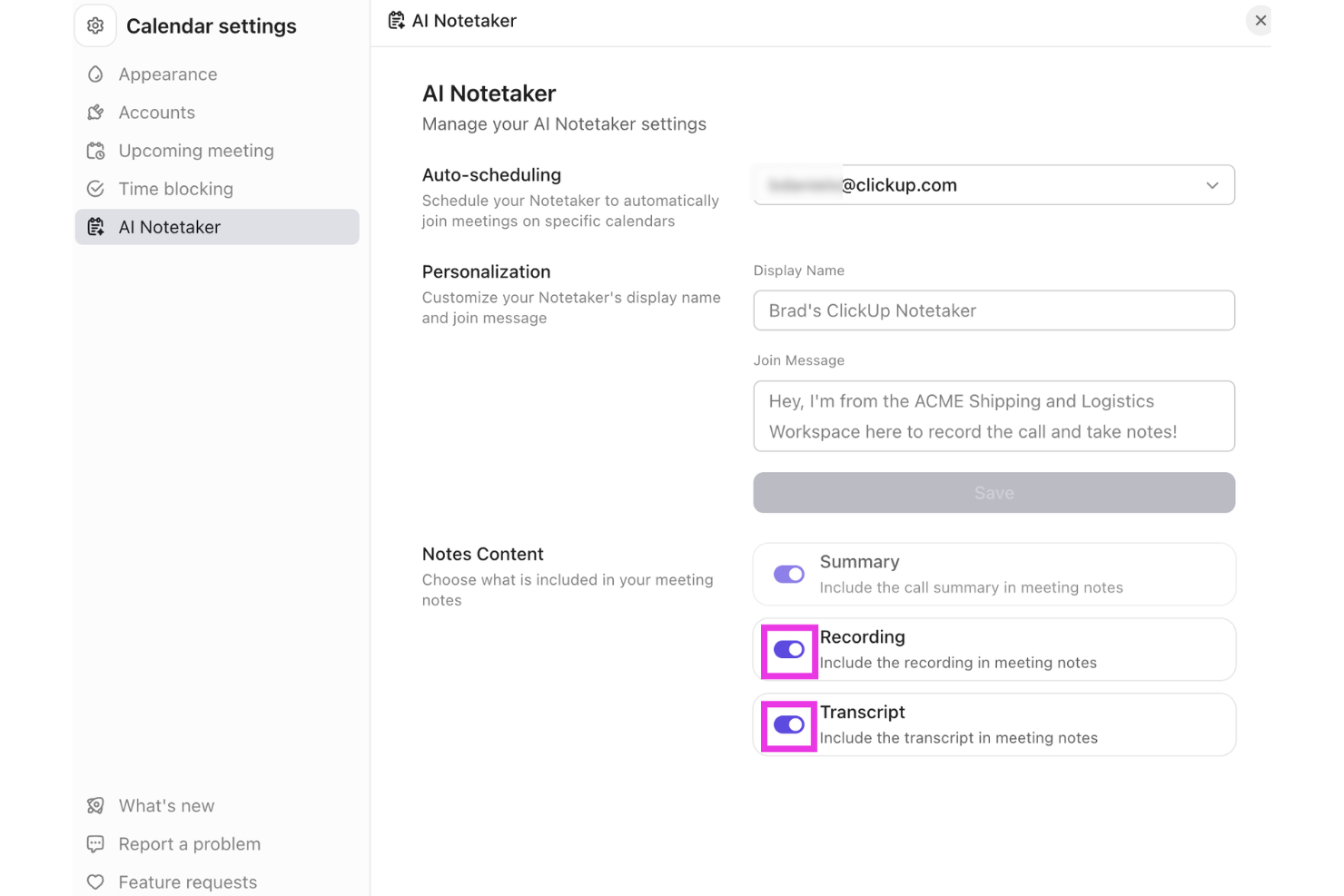
ClickUp offers a versatile platform that integrates AI capabilities to support note-taking and team collaboration. Professionals across project management, software development, and vendor management can use its tools to organize information and manage workflows in one place. With the AI Meeting Notetaker and support for turning meeting notes into tasks, ClickUp helps teams capture discussions and connect them directly to actionable work.
Why I Picked ClickUp
I picked ClickUp for turning meeting notes into tasks, using its AI Meeting Notetaker to capture conversations and organize key points from discussions. The tool records meetings, generates summaries, and converts action items into tasks that can be tracked within ClickUp. It also connects notes with projects, documents, and workflows, helping teams manage follow-ups without switching between multiple tools.
ClickUp Key Features
In addition to turning meeting notes into tasks, ClickUp offers:
- Project Tracking: Offers real-time visibility into project status, helping teams stay on top of their tasks and deadlines.
- Document Creation: Enables seamless document drafting and editing within the platform, ensuring all your notes are easily accessible.
- Time Management: Provides tools to track time spent on tasks, aiding in better resource allocation and productivity analysis.
- Integration Support: Connects with over 50 applications, allowing you to manage projects across different platforms without switching tools.
ClickUp Integrations
Integrations include Slack, Google Drive, Dropbox, Microsoft Teams, Zoom, GitHub, Jira, Salesforce, and other third-party tools.
Pros and Cons
Pros:
- All-in-one platform combining tasks, docs, goals, and collaboration tools
- Flexible customization for workflows, dashboards, and task organization
- Centralized workspace organizing tasks, projects, and clients in one platform
Cons:
- Interface complexity can overwhelm non-technical users or first-time users
- Mobile app and form features reported as limited by some users
New Product Updates from ClickUp
ClickUp Adds List Automations, Time Off Scheduling, and Org Charts
ClickUp adds template-based List automations, personal time off scheduling, a unified picker, automatic task date syncing, and Org Charts. These updates help teams automate project setup, manage availability, and organize work. For more information, visit ClickUp’s official site.
Notion
Best for AI-assisted organization

Notion is a workspace that combines note-taking, task management, and collaboration, catering to both individuals and teams. It offers AI-driven features that help users organize information and streamline workflows efficiently.
Why I picked Notion: Notion's AI capabilities assist in organizing information through smart suggestions and automated content categorization. Its flexibility allows you to create custom databases and templates tailored to your needs. The tool's ability to integrate tasks, notes, and projects in one place can increase productivity.
Standout Features & Integrations:
Features include the ability to create custom templates for different project types, which is designed to limit repetitive tasks. You can embed various types of media, from videos to code snippets, enriching your workspace. Notion's drag-and-drop interface makes it easy to rearrange content and adapt to changing project needs.
Integrations include Slack, Google Drive, Trello, Asana, Figma, GitHub, Typeform, Zapier, Jira, and Microsoft Teams.
Pros and Cons
Pros:
- Supports embedding various media types
- Drag-and-drop interface simplifies organization
- Customizable templates for diverse projects
Cons:
- Limited offline capabilities
- Free plan does not offer full scope of the tool
Best for collaboration with AI

Microsoft OneNote is a digital note-taking app that caters to individuals and teams looking for a collaborative workspace. With AI-enhanced features, it helps users organize notes, share ideas, and collaborate efficiently across projects.
Why I picked Microsoft OneNote: The tool's AI capabilities make it ideal for collaboration by enabling real-time sharing and editing of notes. It integrates with other Microsoft products, which increases productivity for teams using the Microsoft ecosystem. AI-driven features like handwriting recognition and search make it easy to find and organize information.
Standout Features & Integrations:
Features include the ability to clip web content directly into your notes, making research more efficient. You can organize your notes with sections and pages, providing a structured approach to note-taking. Additionally, the drawing tools allow you to sketch ideas or annotate documents directly within OneNote.
Integrations include Microsoft Word, Microsoft Excel, Microsoft Outlook, Microsoft Teams, OneDrive, SharePoint, PowerPoint, Skype, Yammer, and Planner.
Pros and Cons
Pros:
- Integrates with Microsoft products
- Handwriting recognition for easy note search
- Real-time collaboration with team members
Cons:
- Requires a Microsoft account for full features
- Mobile versions offer fewer features than desktop versions

Granola
Best for eco-friendly AI note-taking

Granola is an AI-powered notepad aimed at professionals who frequently attend meetings and need efficient note-taking solutions. It focuses on transcribing audio directly from your device, eliminating the need for additional meeting bots and enhancing the note-taking experience with AI-driven features.
Why I picked Granola: Granola's eco-friendly approach is reflected in its ability to transcribe audio directly from your computer, reducing the reliance on external servers. Its AI capabilities assist in creating detailed meeting notes quickly, which is ideal for back-to-back meetings. Users can customize templates to fit various meeting types, ensuring that the tool adapts to specific needs.
Standout Features & Integrations:
Features include customizable templates that let you tailor notes to different meeting formats. The AI support for post-meeting tasks helps you manage follow-ups. Additionally, Granola enables easy sharing of notes across platforms, making collaboration straightforward.
Integrations include Zoom, Slack, Microsoft Teams, Google Meet, Skype, Webex, Asana, Trello, Notion, and Evernote.
Pros and Cons
Pros:
- AI support for managing post-meeting tasks
- Customizable templates for different meetings
- Direct transcription from your device
Cons:
- No audio or video playback available
- Limited to Mac and iPhone users

Obsidian
Best for linking notes with AI

Obsidian is a note-taking app designed for users who need to organize complex information and connections between notes. It caters mainly to individuals and teams looking for a way to visualize their thoughts and ideas through interconnected notes and AI-assisted linking.
Why I picked Obsidian: The app's standout feature is its ability to link notes using AI, making it easier for you to create a web of related ideas. Obsidian uses AI to suggest connections between your notes, which can increase your ability to discover relationships. Its AI capabilities also help in categorizing and organizing your notes automatically.
Standout Features & Integrations:
Features include a graph view that visually represents the links between your notes, aiding in better comprehension. You can also customize your workspace with plugins to suit your needs. Additionally, Obsidian offers markdown support, which allows you to format notes with ease.
Integrations include Markdown, Git, Dropbox, Google Drive, Evernote, OneDrive, Todoist, Trello, and Notion.
Pros and Cons
Pros:
- Supports markdown for easy formatting
- Customizable with community plugins
- Visual graph view for note connections
Cons:
- Requires manual setup for full functionality
- Mobile app interface is less feature-rich than desktop version

Best for AI-powered voice analysis

Fireflies is an AI-driven meeting assistant that transcribes and analyzes conversations for teams and professionals. It helps capture meeting notes and insights, leveraging AI to improve understanding and collaboration.
Why I picked Fireflies: Fireflies provides AI-powered voice analysis by transcribing meetings in real-time and highlighting key topics. Its AI capabilities allow you to search and review past conversations quickly, ensuring no detail is missed. The tool's ability to analyze sentiment and track speaker participation adds depth to its transcription functionality.
Standout Features & Integrations:
Features include the ability to create action items directly from meeting notes, which helps with follow-up tasks. You can also set up reminders for important deadlines based on meeting discussions. Fireflies offers a searchable archive of all your meetings, making it easy to revisit past conversations.
Integrations include Slack, Google Meet, Zoom, Microsoft Teams, Salesforce, Asana, Trello, Dropbox, Evernote, and Zapier.
Pros and Cons
Pros:
- Searchable archive of past meetings
- Sentiment analysis for conversation insights
- Real-time transcription of meetings
Cons:
- Action items can feel overly literal
- Some users need repeated “training” for voice accuracy


Otter is a transcription service tailored for professionals who need to capture meetings and conversations accurately. It offers AI-driven transcription capabilities, making it a popular choice among teams and individuals who rely on detailed meeting notes.
Why I picked Otter: Otter excels in transcribing meetings by using advanced AI algorithms to convert speech into text in real time. It can distinguish between different speakers and provides time-stamped notes, ensuring you capture every detail. Its voice recognition technology is considered quite accurate, which minimizes the need for manual edits.
Standout Features & Integrations:
Features include live transcription during meetings, which allows you to follow along in real time. You can also highlight important parts of the conversation for easy reference later. Additionally, Otter offers keyword searching to quickly locate specific information within your transcripts.
Integrations include Zoom, Microsoft Teams, Google Meet, Dropbox, Google Calendar, Microsoft Outlook, Google Drive, Slack, and Evernote.
Pros and Cons
Pros:
- Easy keyword searching in transcripts
- Real-time transcription capabilities
- Accurate speaker identification
Cons:
- Limited functionality in noisy environments
- Transcript can include errors, garbled output, and missed wording


Mem is an AI-powered note-taking application tailored for professionals and teams who need efficient information retrieval and organization. It uses AI to enhance memory recall, allowing users to access and manage their notes.
Why I picked Mem: Mem's AI-driven features focus on knowledge management and memory recall, helping you find notes quickly with contextual search capabilities. The tool learns from your usage patterns to suggest relevant content and connections. Its AI organizes notes automatically, reducing manual effort. This makes it ideal for those who need to recall information quickly and accurately without sorting through a pile of documents.
Standout Features & Integrations:
Features include a timeline view that organizes notes chronologically for easy access. You can also create tasks and reminders, ensuring you never miss important deadlines. Mem's tagging system helps categorize and retrieve notes efficiently, intuitively create a collection of notes through hashtags, or pull in links to previous mems by hitting “@” and searching for relevant notes. Instead of a hierarchical folder system, mem enables you to create a fluid map of relevant documentation, easily retrievable without leaving the note you are currently working on.
Integrations include Slack, Google Calendar, Notion, Zapier, Trello, Asana, Microsoft Teams, Google Drive, Dropbox, and Evernote.
Pros and Cons
Pros:
- Automatic note organization
- AI suggests relevant content and connections
- Contextual search for quick information retrieval
Cons:
- Note structure and features take some time to fully understand
- Free plan limits usage per month


Jamie is an AI note-taking tool designed for meeting productivity by automatically generating detailed notes, transcripts, and action items. It caters to professionals and teams who need to focus on discussions without the distraction of manual note-taking.
Why I picked Jamie: Jamie excels in automating meeting notes, allowing your team to capture essential details without interruption. Its AI capabilities include speaker recognition and support for several languages, ensuring accurate transcription. The tool's focus on privacy and security, with GDPR compliance and data encryption, adds value for enterprise users.
Standout Features & Integrations:
Features include speaker recognition, which helps distinguish between different participants for clarity. Jamie supports over 99 languages, making it accessible for diverse teams. It also offers admin controls and single sign-on options for enterprise use.
Integrations include Notion, Google Docs, Microsoft Teams, Slack, Zoom, Google Meet, Salesforce, Asana, Trello, and monday.com.
Pros and Cons
Pros:
- Automates action items from meetings
- Integrated AI assistant for follow-ups
- Works online and in-person meetings
Cons:
- No live transcription during meetings
- Desktop-only app, no full mobile support
Diğer Yapay Zekâlı Not Alma Uygulamaları
İşte kısa listeme giremeyen ancak yine de göz atmaya değer bazı ek yapay zekâlı not alma uygulamaları:
- Supernormal
For generating meeting summaries
- Wave.co
For AI-enhanced audio notes
- Fellow
For team feedback and notes
- Avoma
For collaborative meeting insights
- Krisp
For noise cancellation in calls
- Equal Time
For meeting time management


How I Evaluate AI Note Taking Apps
Any tool on this list needs to do more than just record and transcribe—it has to use AI to turn messy project conversations into usable outputs like action items, owner assignments, and decision logs that actually flow into your PM workflow. I split my evaluation into two layers: the core functionality a tool must have to qualify, and the differentiating factors that separate a good option from the right one for your team.
Core Functionality (Table Stakes For This List)
When I'm selecting tools for my list, I rank each one on a scale from 0 (does not offer the functionality) to 5 (excels in this area) for each core functionality listed below. Then, I calculate the tool's total score into a percentage. Each tool needs to achieve a minimum total score of 65% to be considered for inclusion.
- AI-Powered Transcription: I evaluate how well each tool converts spoken dialogue into accurate, speaker-labeled text—especially during fast-paced standups or multi-speaker sprint reviews.
- AI Meeting Summarization: Each tool needs to generate structured recaps that capture key points, not just condense text. I look for summaries I could share directly with stakeholders.
- Action Item Extraction: I check whether the AI reliably pulls tasks, owners, and deadlines from conversations—like catching "Sarah will update the risk register by Friday."
- Meeting Platform Integration: The tool should connect natively with Zoom, Microsoft Teams, and Google Meet so it joins calls automatically without manual recording or uploads.
- Project Tool Integrations: I look at how well notes and tasks flow into tools like Jira, Asana, ClickUp, or Monday so extracted action items don't sit in a silo.
- AI Search & Query: Teams build up months of meeting history. I evaluate whether the AI lets you ask questions across past transcripts to find a specific decision or commitment.
Once I have a list of tools that meet this criteria, I consider what sets each platform apart.
Differentiating Factors (What Sets Vendors Apart)
Here's how I compare and contrast different vendors:
Standout Features
Multi-meeting intelligence is a big differentiator—I look for tools that can connect themes, blockers, and decisions across an entire sprint cycle rather than treating each call in isolation. Custom AI prompts also matter because PMs can build reusable templates that pull out risks or dependencies every time. I check whether a tool can auto-generate status reports from recent meetings, saving you from manually compiling weekly updates for leadership.
Beyond Features
Security and compliance weigh heavily in my evaluation because these tools record sensitive stakeholder and client conversations. I check for SOC 2 Type II certification, GDPR readiness, and clear data retention policies. Pricing structure also matters—I look at whether per-seat costs and recording minute caps scale reasonably for PMs who run five or more meetings a day. For distributed teams, transcription accuracy on technical PM vocabulary and multi-language support can make or break adoption across regions.
Yapay Zekâlı Not Alma Uygulaması Nasıl Seçilir?
Uzun özellik listeleri ve karmaşık fiyatlandırma yapıları içinde kaybolmak kolaydır. Kendinize özgü yazılım seçme sürecinizde ilerlerken odaklanmanızı korumanıza yardımcı olmak için göz önünde bulundurmanız gereken faktörleri içeren bir kontrol listesi hazırladım:
| Faktör | Dikkat Edilmesi Gerekenler |
| Ölçeklenebilirlik | Uygulama ekibinizle birlikte ne kadar iyi büyüyebilir? Önemli maliyet artışları olmadan kullanıcı eklemeyi veya özellikleri genişletmeyi destekleyip desteklemediğini değerlendirin. |
| Entegrasyonlar | Uygulama mevcut araçlarınıza bağlanabiliyor mu? Slack, Google Workspace veya Microsoft Office gibi platformlarla uyumluluğunu kontrol edin. |
| Özelleştirilebilirlik | Uygulamayı iş akışınıza göre uyarlayabiliyor musunuz? İhtiyaçlarınıza uyacak şekilde şablonları, panoları veya not düzenini ayarlama seçeneklerini arayın. |
| Kullanım Kolaylığı | Uygulama ekibinizdeki herkes için sezgisel mi? Öğrenme eğrisini değerlendirin ve teknik bilgisi olmayan ekip üyelerinin uygulamayı zorlanmadan kullanıp kullanamayacağına bakın. |
| Uygulama ve İşe Alıştırma | Uygulamayı kullanmaya ne kadar hızlı başlayabilirsiniz? Kurulum kılavuzlarının, eğitim kaynaklarının ve işe alıştırma aşamasındaki desteğin mevcut olup olmadığını değerlendirin. |
| Maliyet | Uygulama bütçenize uygun mu? Fiyatlandırma planlarını karşılaştırın ve tüm işlevlere erişmek için gizli ücretler veya ek satın alımlar gerekip gerekmediğini kontrol edin. |
| Güvenlik Önlemleri | Notlarınız güvende mi? Uygulamanın şifreleme, düzenli güncellemeler ve GDPR gibi veri koruma standartlarına uyumluluk sunduğundan emin olun. |
Yapay Zekâlı Not Alma Uygulamaları Nedir?
Yapay zekâlı not alma uygulamaları, notların kaydedilmesini ve düzenlenmesini geliştirmek için yapay zekâ kullanan dijital araçlardır. Bu araçlar genellikle verimli ve doğru belgelendirmeye ihtiyaç duyan proje yöneticileri, öğrenciler ve şirket yöneticileri gibi profesyoneller tarafından kullanılır.
Gerçek zamanlı yazıya dökme, otomatik düzenleme ve bağlama dayalı arama gibi özellikler verimliliği artırmaya ve manuel çabayı azaltmaya yardımcı olur. Genel olarak bu araçlar zamandan tasarruf sağlar, bilgilerin doğruluğunu ve erişilebilirliğini artırır.
Özellikler
Yapay zekâlı not alma uygulamalarını seçerken aşağıdaki temel özelliklere dikkat edin:
- Gerçek zamanlı transkripsiyon: Toplantılarda, telefon görüşmelerinde veya ses dosyalarında konuşulan kelimeleri anında metne dönüştürerek yazmak yerine konuşmalara odaklanmanızı sağlar.
- Otomatik düzenleme: Yapay zekâ notları akıllıca kategorilere ayırır ve sıralar; toplantı kayıtlarını veya beyin fırtınası oturumlarını yönetirken zamandan tasarruf etmenizi sağlar.
- Bağlama dayalı arama: Konu, anahtar kelime veya bağlama göre notları bulmak için yapay zekâyı kullanmanızı sağlar. Geçmiş toplantı ayrıntılarını hızlıca gözden geçirmek için idealdir.
- Konuşmacı tanıma: Konuşmacıları net bir şekilde tanımlar ve birbirinden ayırır; grup görüşmeleri ve müşteri aramaları sırasında transkript doğruluğunu artırır.
- Toplantı özetleri: Her oturum için yapay zekâ destekli özetler oluşturur; tüm sesi yeniden oynatmadan önemli noktaları ve yapılacakları gözden geçirmenizi sağlar.
- Anahtar kelime etiketleme: Kritik terimleri ve kararları otomatik olarak vurgular; içeriği daha hızlı taramanıza ve düzenlemenize yardımcı olur.
- Entegrasyon desteği: Slack, Google Workspace ve Microsoft Office gibi popüler platformlara bağlanarak hem ücretsiz sürüm hem de ücretli planlar için iş birliğini destekler.
- Duygu analizi: Görüşmelerdeki üslubu ve duyguları algılamak için yapay zekâyı kullanır; toplantılar sırasında katılımı ve uyumu değerlendirmenize yardımcı olur.
- Özelleştirilebilir şablonlar: İster hızlı bir durum kontrolü ister ayrıntılı bir proje değerlendirmesi olsun, farklı toplantı türleri için kullanıma hazır şablonlar sunar.
- Sesten metne dönüştürme: Sesli notları veya ses kayıtlarını doğru yazılı metne dönüştürür. Farklı cihazlarda kullanılabilen hepsi bir arada toplantı notu alma uygulamaları için idealdir.
Faydalar
Yapay zekâ destekli not alma uygulamalarını kullanıma sunmak, ekibiniz ve işletmeniz için çeşitli faydalar sağlar. Yararlanabileceğiniz birkaç fayda şunlardır:
- Zamandan tasarruf: Gerçek zamanlı transkripsiyon ve otomatik düzenleme, elle not almak ve notları sıralamak için harcanan zamanı azaltır.
- Geliştirilmiş doğruluk: Konuşmacı tanıma ve bağlama dayalı arama gibi yapay zekâ destekli özellikler notlarınızın doğruluğunu artırır ve notlara erişimi kolaylaştırır.
- Gelişmiş iş birliği: Entegrasyon desteği, farklı platformlardaki ekip üyeleriyle kolayca paylaşım ve iş birliği yapmanızı sağlar.
- Daha derin içgörüler: Duygu analizi ve toplantı özetleri, görüşmeler hakkında değerli içgörüler sunarak bilinçli kararlar almanıza yardımcı olur.
- Artırılmış erişilebilirlik: Sesten metne dönüştürme ve anahtar kelime etiketleme, notlarınıza herhangi bir cihazdan kolayca erişmenizi ve notlar arasında gezinmenizi sağlar.
- Özelleştirme seçenekleri: Özelleştirilebilir şablonlar, not alma deneyimini çeşitli toplantı türlerine ve iş akışlarına uyacak şekilde düzenlemenizi sağlar.
- Daha iyi düzen: Yapay zekâ özellikleri notları otomatik olarak kategorilere ayırır ve etiketler; bilgilerinizin iyi düzenlenmiş ve kolay bulunabilir olmasını sağlar.
Maliyetler ve Fiyatlandırma
Yapay zekâ destekli not alma uygulamalarını seçmek, mevcut çeşitli fiyatlandırma modellerini ve planları anlamayı gerektirir. Maliyetler özelliklere, ekip büyüklüğüne, eklentilere ve daha fazlasına göre değişir. Aşağıdaki tablo, yapay zekâ destekli not alma uygulaması çözümlerinde yaygın planları, ortalama fiyatlarını ve genellikle sunulan özellikleri özetlemektedir:
Yapay Zekâ Destekli Not Alma Uygulamaları için Plan Karşılaştırma Tablosu
| Plan Türü | Ortalama Fiyat | Yaygın Özellikler |
| Ücretsiz Plan | $0 | Temel not alma, sınırlı depolama ve temel arama işlevi. |
| Kişisel Plan | $5-$15/kullanıcı/ay | Gelişmiş arama, özelleştirilebilir şablonlar ve popüler uygulamalarla entegrasyonlar. |
| İşletme Planı | $20-$35/kullanıcı/ay | Ekip iş birliği araçları, gerçek zamanlı transkripsiyon ve gelişmiş güvenlik özellikleri. |
| Kurumsal Plan | $50-$75/kullanıcı/ay | Özel entegrasyonlar, özel destek ve analiz ile raporlama. |
Yapay Zekâ Not Alma Uygulamaları SSS
Yapay zekâ not alma uygulamaları hakkında sık sorulan soruların bazı yanıtları:
Yapay zekâ not alma uygulamaları mevcut araçlarımla entegre olabilir mi?
Yapay zekâ not alma uygulamalarının çoğu Google Workspace, Slack ve Microsoft Office gibi araçlarla sorunsuz çalışır. Birçoğu ayrıca popüler video konferans ve üretkenlik uygulamalarına bağlanarak yapay zekâ toplantı notlarını veya sesli notları ek adımlara gerek kalmadan paylaşmanıza olanak tanır. Doğrudan bir bağlantı mevcut değilse Zapier gibi platformlar, favori araçlarınızı birbirine bağlamaya veya görevleri bunlar arasında otomatikleştirmeye yardımcı olabilir. Bir uygulama seçmeden önce hangi entegrasyonların özel iş akışınızı desteklediğini kontrol edin.
Yapay zekâ not alma uygulamaları hassas bilgiler için güvenli midir?
Güvenlik, çoğu yapay zekâ toplantı asistanı ve üretkenlik uygulaması için önceliklidir. Verilerinizi korumak için genellikle şifreleme, iki faktörlü kimlik doğrulama ve GDPR uyumluluğu kullanırlar. Gizli toplantı dökümleri veya ses kayıtları işliyorsanız erişim denetimleri ve düzenli güvenlik güncellemeleri sunan araçları tercih edin. Hassas bilgileri saklamadan önce bir uygulamanın gizlilik politikasını incelemek her zaman iyi bir fikirdir.
Yapay zekâ not alma uygulamaları ekip iş birliğini nasıl geliştirebilir?
Yapay zekâ not alma uygulamaları toplantı özetlerini, dökümleri ve yapılacaklar listesini otomatik olarak oluşturarak ekiplerin aynı hedef doğrultusunda ilerlemesine yardımcı olur. İster ChatGPT destekli özellikleri, ister Fireflies.ai veya Otter.ai kullanıyor olun, bu araçlar herkesin görüşmeleri ve sonraki adımları kolayca gözden geçirmesini sağlar. Bazıları toplantılardan sonra hızlı beyin fırtınaları veya takip görüşmeleri için yapay zekâ sohbetini bile destekler. İş birliğini verimli ve anlaşılır tutmak için ekibinizin tercih ettiği iletişim kanallarına ve iş akışına uygun bir çözüm seçin.