

2026’da İncelenen En İyi 10 İnşaat Planlama Yazılımı



İnşaat projelerini yönetmek zordur. Son teslim tarihlerini, kaynakları ve beklenmedik aksaklıkları aynı anda yönetmeniz gerekir. İnşaat planlama yazılımı bu noktada devreye girer. Görevleri takip etmenize, kaynakları verimli bir şekilde tahsis etmenize ve zaman çizelgelerinize uymanıza yardımcı olur.
Yazılımları bağımsız olarak test edip inceliyorum ve proje yönetimi sektöründe deneyim sahibiyim. İnşaat planlama yazılımının günlük zorluklarınızı hafifletebileceğine inanıyorum. Amacım, mevcut en iyi seçenekleri tarafsız bir şekilde sunmak.
Bu makalede, inşaat planlama araçları için en iyi seçimlerimi bulacaksınız. Özellikleri, artıları ve eksileri ve hangi kullanıcılar için en uygun olduklarını ele alacağım. İster küçük bir ekibi ister büyük bir projeyi yönetiyor olun, burada size uygun bir seçenek var. Haydi başlayalım ve ihtiyaçlarınız için doğru çözümü bulalım.
Why Trust Our Software Recommendations
Our team has been testing and reviewing software since 2012. As project managers ourselves, we know how difficult—and important—it is to choose the right software.
For this guide, we evaluated tools using hands-on testing and independent research, scoring tools using our selection criteria. We also draw on insights from industry thought leaders and practicing project management experts.
Our reviews reflect our human editorial judgment, not a sales pitch.
Expert reviewers:
İnşaat Planlama Yazılımı Karşılaştırma Tablosu
En iyi inşaat planlama yazılımı seçimlerimin fiyatlandırma ayrıntılarını aşağıdaki tabloda karşılaştırın.
| Tool | Starting Price | Website | |
|---|---|---|---|
| Best for AI-driven scheduling for mobile teams | 4.6 out of 5 | Pricing upon request Free plan + 14-day free trial available | Website |
| Best for P6-linked weekly site planning | — | $610/project/month Free trial + demo available | Website |
| Best for complex capital project controls | 4.4 out of 5 | $37/user/month Free demo available | Website |
| Best for integrated accounting tools | 4.2 out of 5 | Pricing upon request Free demo available | Website |
| Best for Microsoft users | 4.7 out of 5 | £679.99 one-time purchase Not available | Website |
| Best for ready-made templates | 5.0 out of 5 | $3.99/user/month Free plan available | Website |
| Best for dispatching tasks | 4.6 out of 5 | Pricing upon request Free demo available | Website |
| Best for AI-supported shift scheduling | 4.6 out of 5 | $5/user/month 30-day free trial + free demo available | Website |
| Best for large projects | 4.5 out of 5 | Pricing upon request 14-day free trial for Procore Estimating + free demo available | Website |
| Best for field management | 4.5 out of 5 | $39/user/month Free plan available | Website |
En İyi İnşaat Planlama Yazılımı İncelemeleri
Aşağıda, kısa listeme giren en iyi inşaat planlama yazılımlarına ilişkin ayrıntılı özetlerimi bulabilirsiniz. İncelemelerim, her aracın temel özelliklerine, artılarına ve eksilerine, entegrasyonlarına ve ideal kullanım alanlarına ayrıntılı bir bakış sunarak sizin için en iyi seçeneği bulmanıza yardımcı olur.

Best for AI-driven scheduling for mobile teams
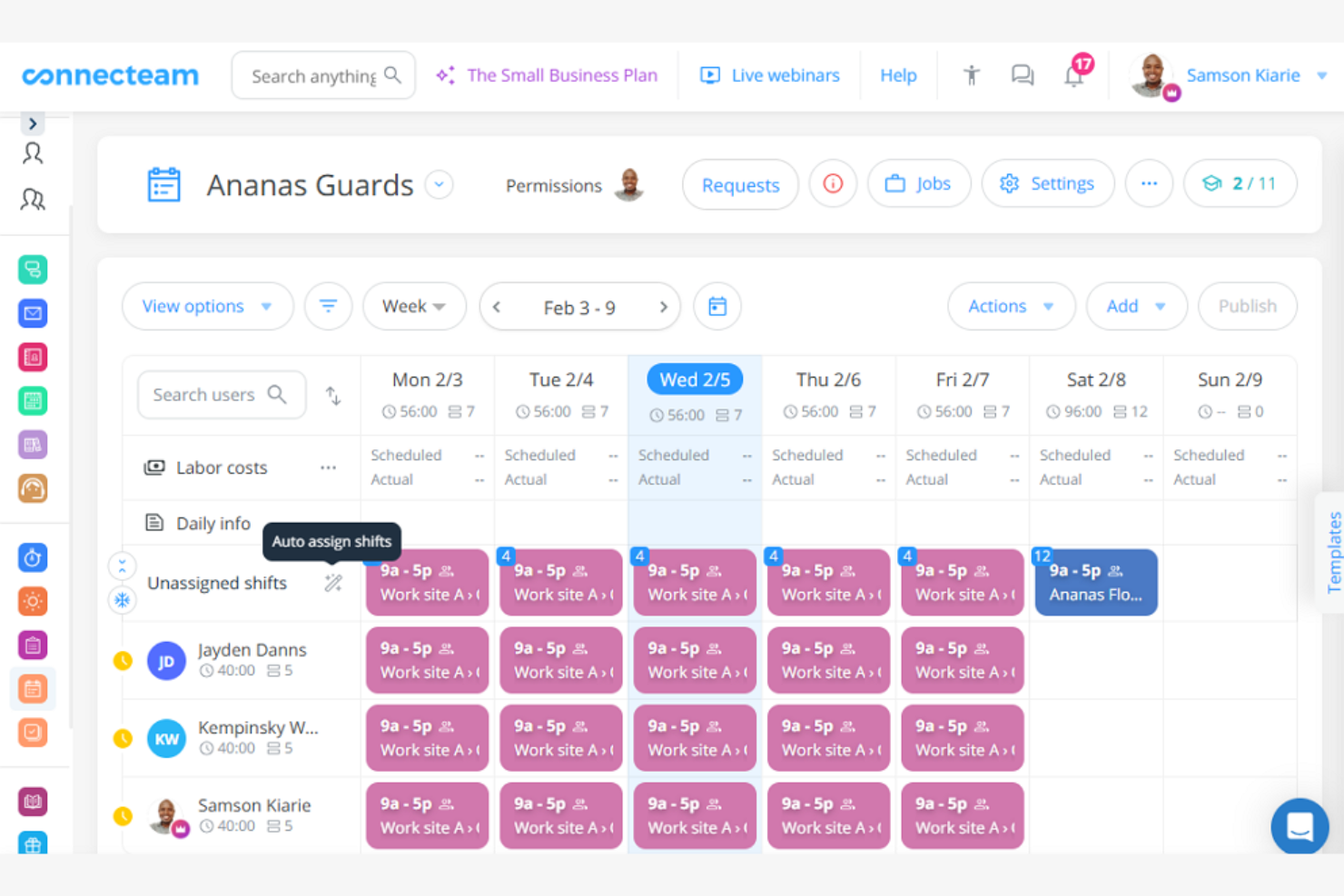
Connecteam is a construction scheduling app designed for mobile teams. It helps manage schedules, tasks, and communications, making it suitable for teams on the go.
Why I picked Connecteam: Connecteam is tailored for mobile teams, offering scheduling features that make it easy to access information from anywhere. You can send instant notifications, keeping everyone informed. Its mobile-first design allows your team to manage tasks and communicate efficiently. The app's focus on mobility makes it ideal for teams that need flexibility in the field.
Standout Features and Integrations:
Features include GPS tracking, which helps you monitor team locations and accountability. The app also offers task management tools, allowing you to assign and track tasks in real time. Additionally, Connecteam provides in-app chat, so your team can communicate without switching between platforms.
Integrations include QuickBooks, Gusto, Xero, and more.
Pros and Cons
Pros:
- In-app communication
- GPS tracking feature
- Mobile-first design
Cons:
- Basic reporting tools
- Limited customization options
New Product Updates from Connecteam

Connecteam Adds Automatic Paid Break Actions and Manual Break Windows
Connecteam adds automatic paid break actions and configurable start windows for manual breaks. These updates help teams manage break schedules and maintain accurate timesheets. For more information, visit Connecteam’s official site.
 .

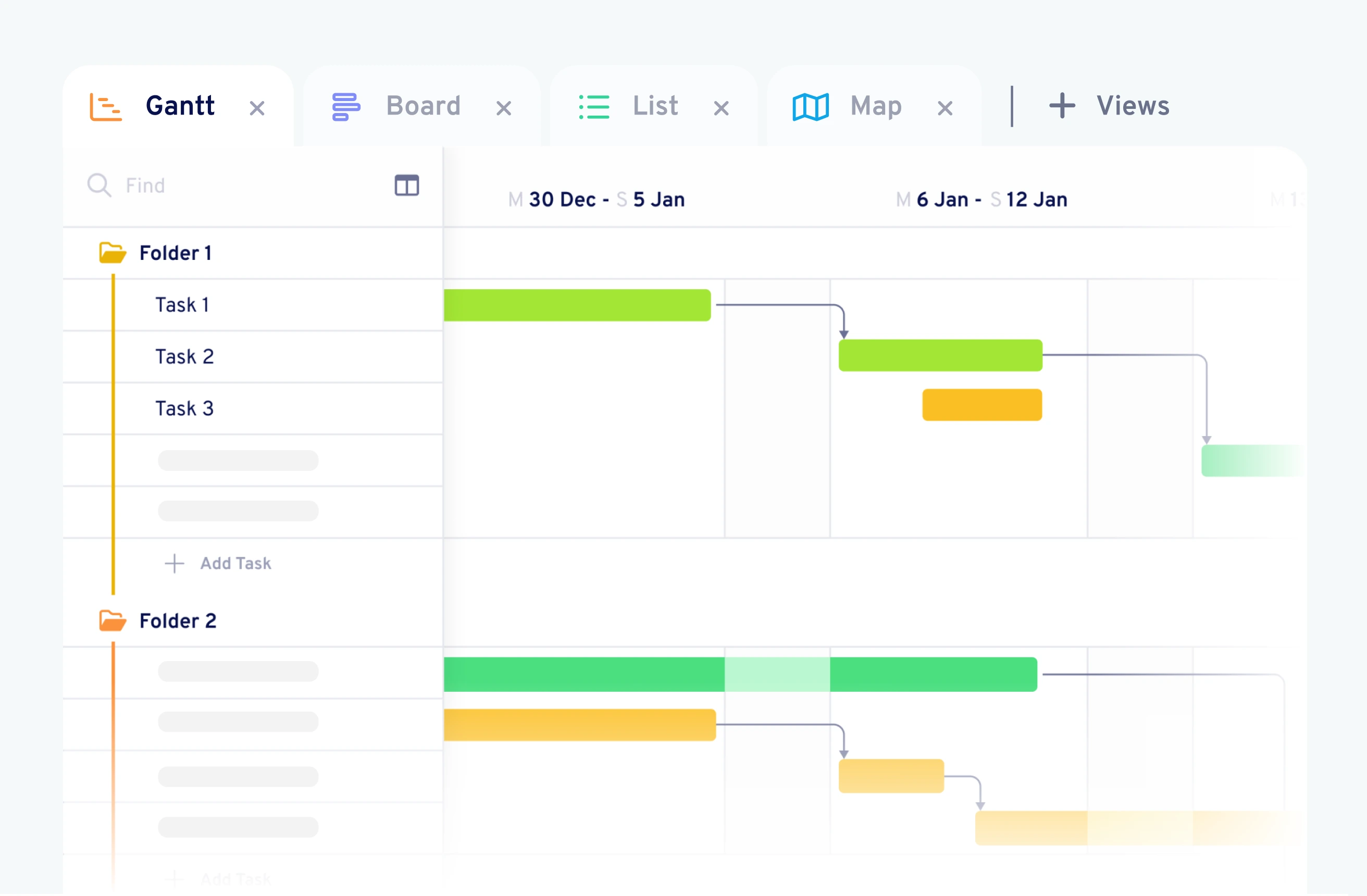
Aphex is a construction scheduling platform built around collaborative short-term planning, offering Gantt scheduling, lookaheads, weekly work plans, resource allocation, progress tracking, and P6 schedule imports.
Who Is Aphex Best For?
Aphex suits construction planners and project managers who need to bridge their P6 master schedule with day-to-day site coordination through collaborative lookaheads and weekly work plans.
Why I Picked Aphex
I picked Aphex as one of the best because it's the only tool I've seen that makes P6-linked weekly site planning genuinely collaborative. Planners can import their master schedule from P6, then build out lookaheads and weekly work plans in a shared environment where every task update ripples through to dependent activities in real time. I especially like the planning routine feature, which automates plan publication, requires engineers to promise upcoming tasks, and captures delay reasons when those promises break.
Aphex Key Features
- Relationship links: Define Start-to-Start, Start-to-Finish, Finish-to-Start, and Finish-to-Finish dependencies between tasks, with editable lag and real-time rescheduling of linked successors.
- Resource overlay: View labour, plant, materials, and subcontractor demand across the project directly on the Gantt, with clash and bottleneck identification built in.
- Board view: Arrange upcoming tasks on a whiteboard-style view grouped by owner, subcontractor, shift, or location, and edit task dates or assignments without leaving the board.
- Briefing distribution: Generate crew briefings pre-populated with that day's tasks and site context, then share them via public URL or QR code to anyone without an Aphex seat.
Aphex Integrations
Aphex integrates with Primavera P6, Microsoft Project, PowerProject, Asta, Power BI, Tableau, and mapping tools including ArcGIS. It offers Published Version, Work Area, and Plan APIs for custom connectivity.
Pros and Cons
Pros:
- Progress updates retain delay reasons and history
- Shared weekly plans surface site delays
- Linked tasks reschedule when predecessors move
Cons:
- Offline field updates remain uncertain
- No consolidated cross-project scheduling view

InEight
Best for complex capital project controls
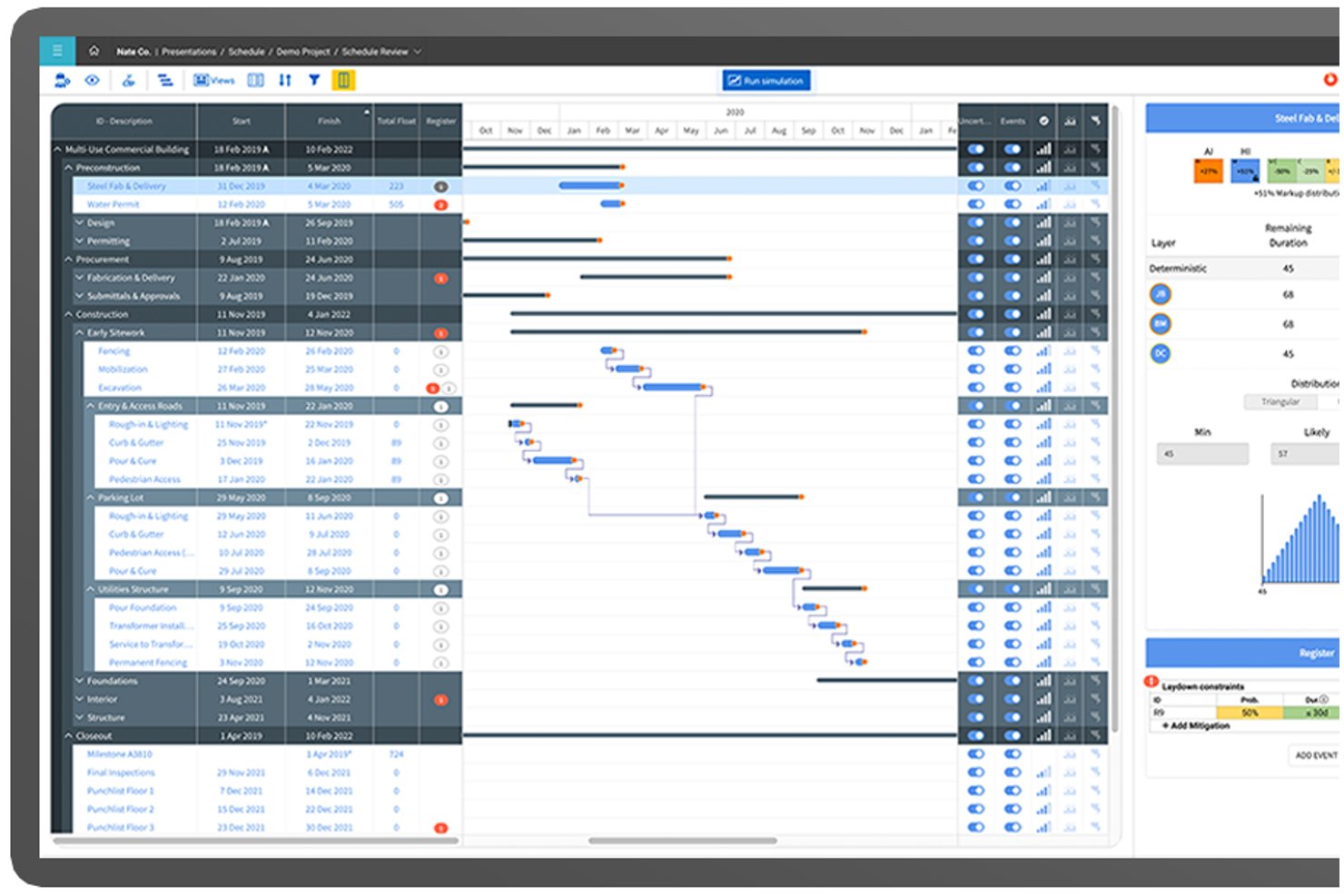
InEight is a modular project controls platform built for capital construction that integrates CPM scheduling, cost management, estimating, document control, and risk analysis across complex, large-scale projects.
Who Is InEight Best For?
InEight is built for enterprise contractors, EPCs, and owners delivering large-scale capital projects in infrastructure, energy, mining, and transportation.
Why I Picked InEight
InEight earns its spot because no other tool I've tested handles capital project scheduling at this scale. I like that the DCMA 14-point schedule health assessment and Monte Carlo risk analysis are built directly into the scheduling module. On a project with 80,000+ activities, I can identify critical path vulnerabilities before they compound. Integrated look-ahead planning ties short-interval field schedules to the master schedule, eliminating disconnected side plans.
InEight Key Features
- 4D BIM scheduling: Links schedule activities to 3D BIM models, enabling visual construction sequencing and clash detection.
- AI-powered risk analysis: Analyzes schedule data to flag risks, predict probable delays, and recommend mitigation steps.
- Submittal and procurement linking: Connects material lead times, submittals, and procurement data directly to schedule tasks.
- Weather and calendar intelligence: Automatically adjusts schedules based on weather forecasts and project-specific calendars.
InEight Integrations
InEight offers native integrations with Oracle Primavera P6, SAP, Oracle E-Business Suite, Autodesk Civil 3D, Navisworks, Revit, QuickBooks, Sage 300, Bluebeam Revu, Microsoft Excel, and SharePoint. An open API is available for custom integrations.
Pros and Cons
Pros:
- Built-in DCMA 14-point schedule health checks
- Integrated Monte Carlo risk analysis engine
- Handles extremely large, complex project schedules
Cons:
- Field teams report steep onboarding curve
- Desktop UI is dated compared to peers
CMiC
Best for integrated accounting tools

CMiC is a construction ERP platform built for general contractors, subcontractors, and civil/heavy-highway firms that combines project scheduling, project controls, financials, document management, and field operations in a single database.
Who Is CMiC Best For?
CMiC is a strong fit for mid-to-large general contractors and specialty contractors who need a single platform to manage both field operations and back-office financials.
Why I Picked CMiC
CMiC is one of my top picks because I love how its accounting module is purpose-built for construction rather than adapted from a generic system. Job costing, progress billing, retention management, and subcontractor accounting are core to how the platform operates—not bolt-ons. When a change order hits, the cost flows directly into the general ledger and the job cost record simultaneously, so my schedule and budget stay aligned without manual reconciliation across separate tools.
CMiC Key Features
- Gantt-based project scheduling: Build and manage project schedules with task dependencies, milestones, and critical path tracking across multiple projects.
- Resource management: Assign and track labor and equipment across project phases to avoid allocation conflicts.
- Submittal and RFI tracking: Log, route, and monitor submittals and RFIs directly within the project record.
- Equipment management: Track equipment hours, maintenance, and cost allocations against specific job budgets.
CMiC Integrations
CMiC offers partner-built integrations with Procore, DocuSign, Autodesk ProEst, Oracle Textura, Clearstory, HammerTech, SiteSense, Arcoro, GCPay, and EarthCam, among others. It also includes a CMiC-built Power BI connector and an API for custom integrations. Zapier support is not clearly documented.
Pros and Cons
Pros:
- Replaces multiple point solutions with one platform
- Built-in job costing per cost code
- Single database ties financials to project data
Cons:
- Interface feels dated and cluttered
- Frequent performance lags during peak use
Best for Microsoft users
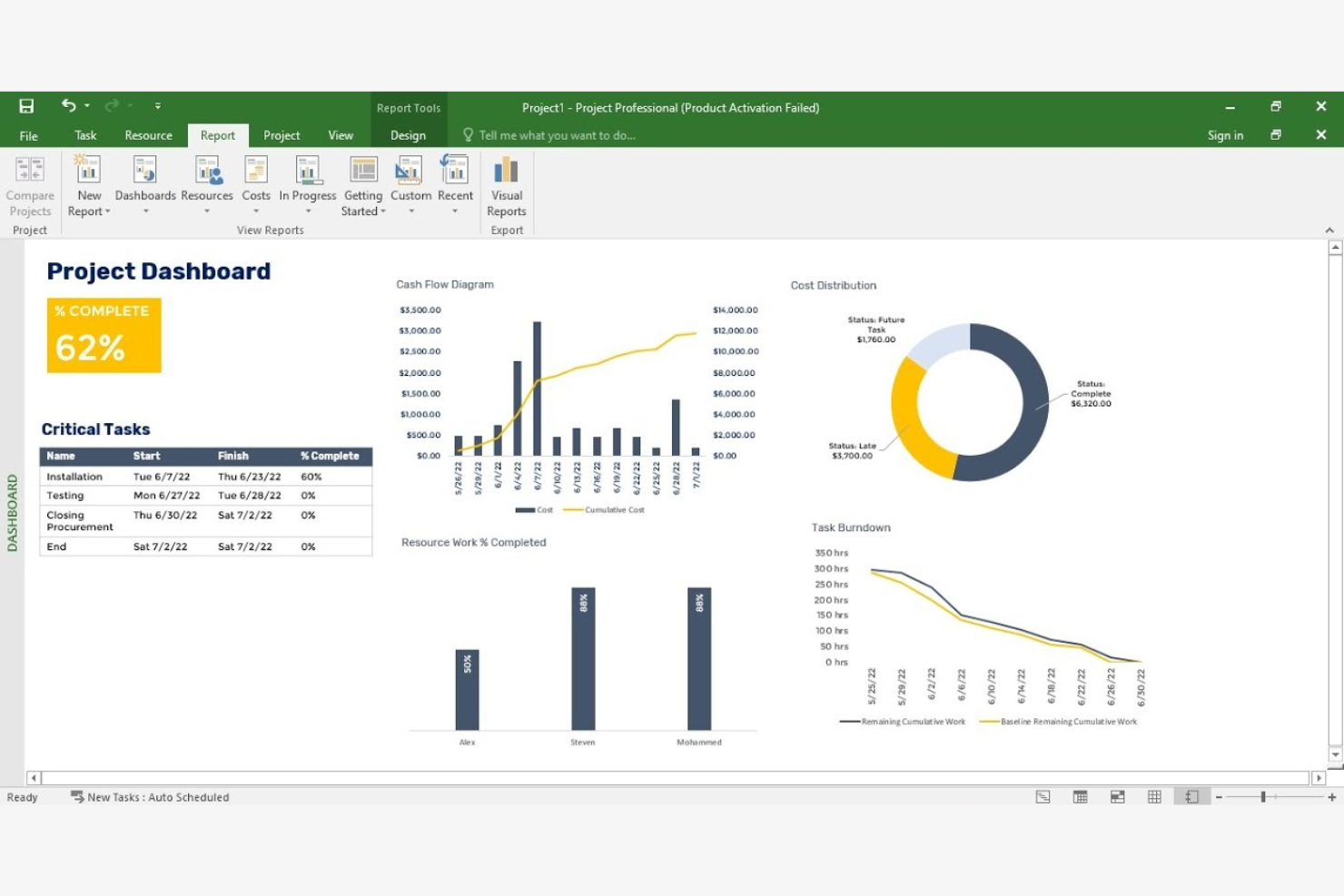
Microsoft Project is a project management software ideal for users familiar with Microsoft products. It helps teams plan, execute, and track projects efficiently, providing tools for scheduling, task management, and resource allocation.
Why I picked Microsoft Project: Microsoft Project is tailored for users who are already comfortable with the Microsoft ecosystem. It offers a familiar interface that integrates well with other Microsoft applications, making it easy for your team to adapt. The software provides detailed scheduling tools, allowing you to plan and manage complex projects. Its resource management features ensure you can allocate and track resources effectively.
Standout Features and Integrations:
Features include Gantt chart capabilities, which help you visualize project timelines and dependencies. The software also offers budget tracking, so you can keep an eye on project expenses. Additionally, Microsoft Project supports multiple project views, giving you flexibility in how you display project data.
Integrations include Microsoft Dynamics 365, Atlassian Jira, and more.
Pros and Cons
Pros:
- Budget tracking capabilities
- Supports multiple project views
- Familiar interface for Microsoft users
Cons:
- Requires Microsoft ecosystem familiarity
- Desktop access only

Plaky
Best for ready-made templates

Plaky is a construction scheduling software geared toward teams that benefit from structured templates. It serves project managers looking to simplify scheduling and task management with predefined templates.
Why I picked Plaky: Plaky excels in offering a variety of ready-made templates that you can use to save time in setup. These templates cover different construction project needs, providing a structured approach to scheduling. Its intuitive design helps you quickly adapt and implement schedules. The tool's focus on schedule templates makes it ideal for those who want a straightforward solution.
Standout Features and Integrations:
Features include a drag-and-drop interface that simplifies task adjustments, making it easy to update schedules. It also offers customizable templates, allowing you to tweak them to fit your specific project needs. Additionally, real-time team collaboration tools help everyone stay coordinated and informed.
Integrations include Pumble and more.
Pros and Cons
Pros:
- Visual board grouping and filtering
- Collaboration tools with real-time updates
- Template customization
Cons:
- Limited advanced task management
- Narrow third-party integrations

Best for dispatching tasks

FieldPulse is a scheduling and dispatching software tailored for small to medium-sized service businesses. It helps coordinate field operations, manage team schedules, and align job assignments.
Why I picked FieldPulse: FieldPulse is designed to dispatch tasks, making it ideal for teams that need quick job assignments. You can assign jobs with a few clicks, ensuring your team knows what to do and when. The cloud-based software provides a centralized dashboard to monitor job progress, which helps maintain oversight. Its focus on task dispatching makes it a valuable tool for businesses needing fast and effective job coordination.
Standout Features and Integrations:
Features include customer management tools that keep your client information organized and accessible. FieldPulse also offers invoicing capabilities, allowing you to create and send invoices directly from the app. Additionally, you can access detailed job history, helping you track past work and improve future performance.
Integrations include QuickBooks, Angi, Payrix, and more.
Pros and Cons
Pros:
- Detailed job history tracking
- Centralized job monitoring
- Direct invoicing from the app
Cons:
- Limited mileage tracking
- Lacks auto-route optimization

Deputy
Best for AI-supported shift scheduling
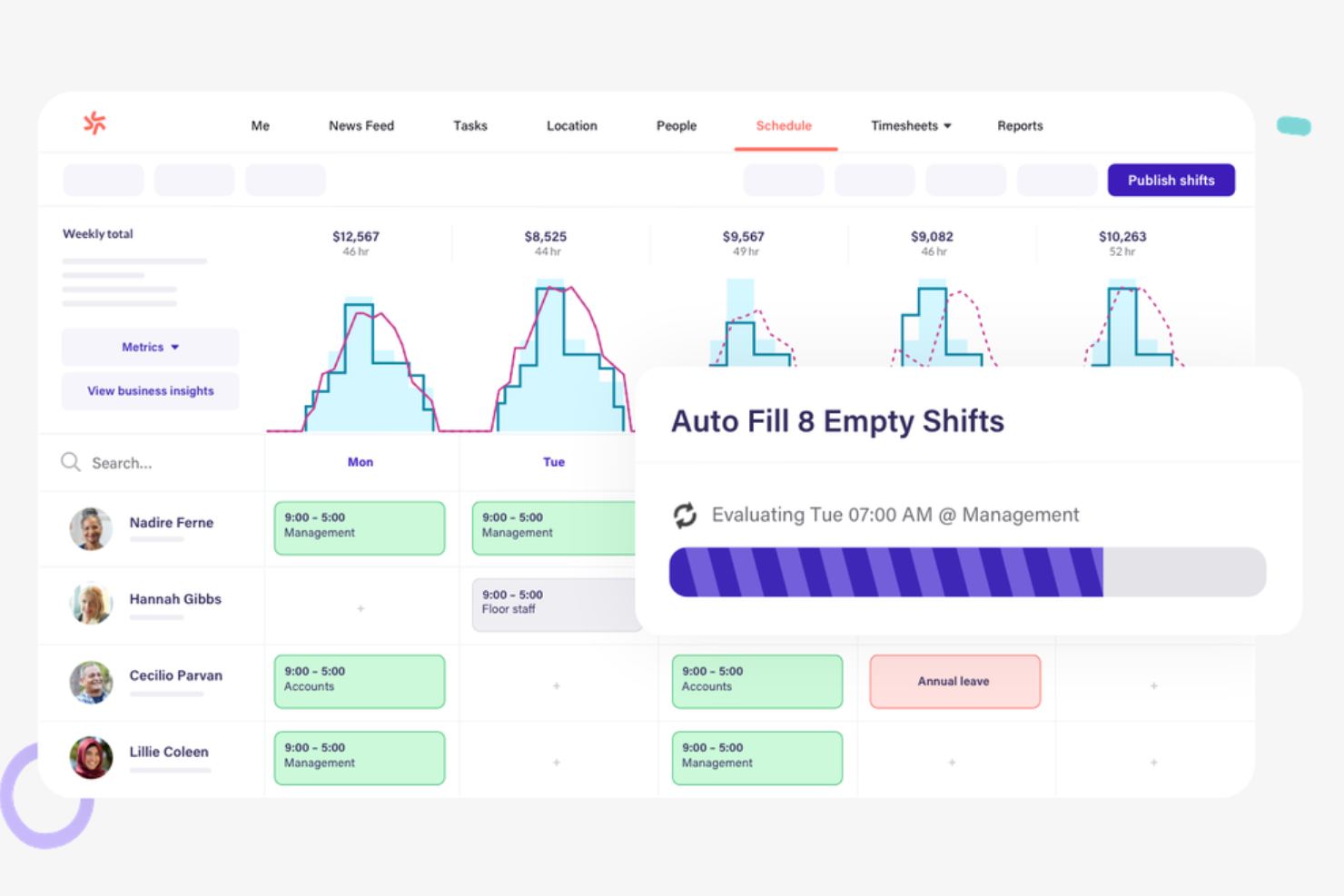
Deputy is a shift scheduling software designed for construction companies needing efficient workforce management. It helps managers organize employee shifts and track time and attendance.
Why I picked Deputy: Deputy excels in shift scheduling, making it a great choice for teams that require organized and efficient shift management. You can create and publish construction project schedules quickly, so your team is always informed. The software provides time tracking, helping you manage attendance accurately. Its focus on shift scheduling makes it ideal for businesses with variable shifts and hours.
Standout Features and Integrations:
Features include a communication platform that allows you to send messages and updates directly to your team. Deputy also offers task assignment tools, enabling you to allocate tasks alongside shifts. Additionally, the software supports compliance management, helping you adhere to labor laws.
Integrations include Xero, QuickBooks, ADP, Gusto, Square, Vend, NetSuite, and more.
Pros and Cons
Pros:
- Add-ons available to tailor the platform
- Mobile time and attendance tracking
- Supports shift swapping
Cons:
- Poor subcontractor schedule management
- Manual shift template configuration required

Procore
Best for large projects
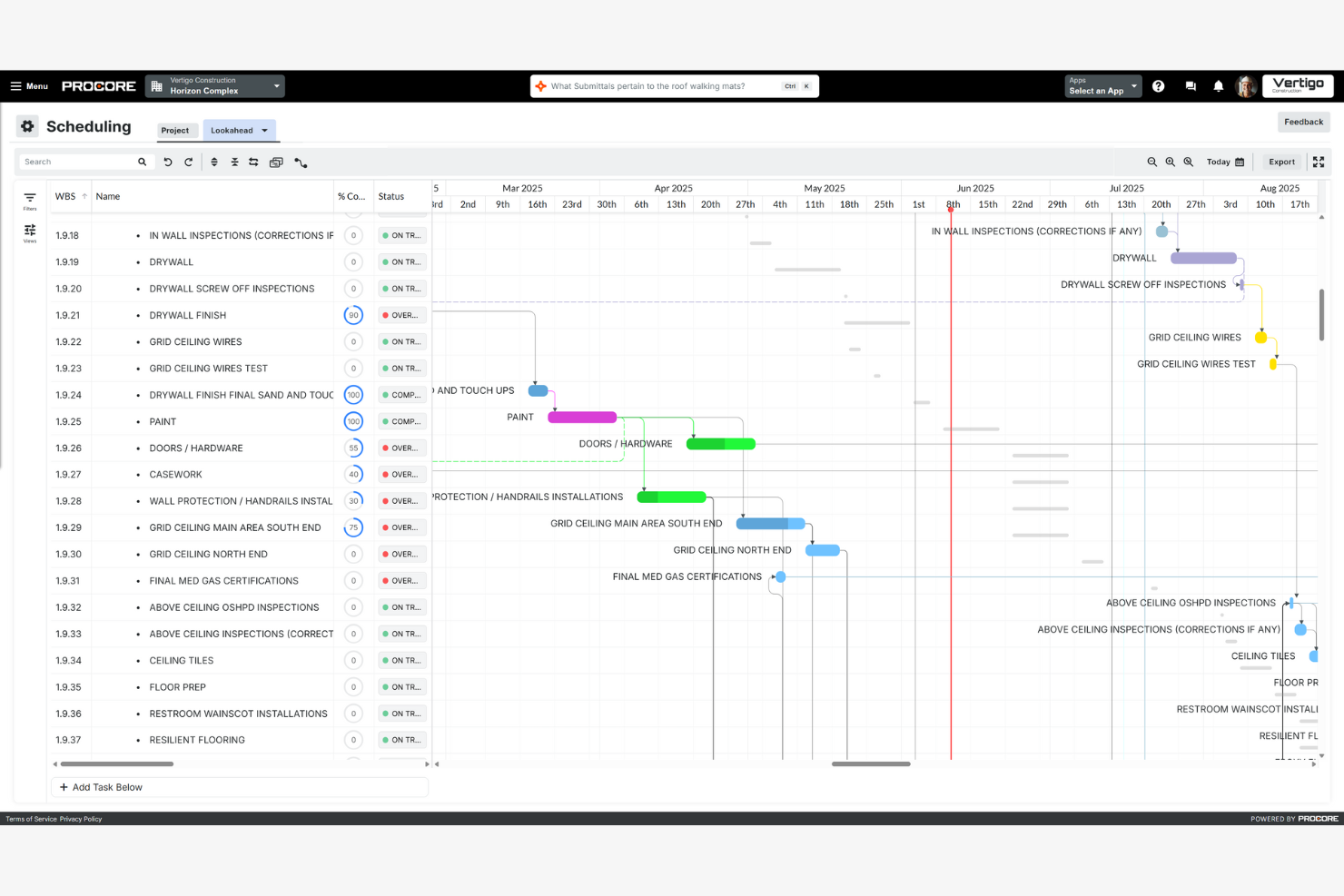
Procore is a construction management platform aimed at large-scale projects. It helps teams manage schedules, documents, and communication across complex projects.
Why I picked Procore: Procore is ideal for large projects, offering features that accommodate extensive project management needs and critical path methods. You can manage schedules with precision, helping your team stay on track. The platform provides tools for document management, making it easy to keep all project information organized. Its ability to handle complex projects makes it a valuable tool for large teams needing detailed oversight.
Standout Features and Integrations:
Features include advanced reporting tools that give you insights into project performance and profitability. You can also use the platform's bidding tools to manage and track bids efficiently. Additionally, Procore offers a daily log feature, helping you document daily activities and issues.
Integrations include Microsoft 365, Bluebeam, Docusign, and more.
Pros and Cons
Pros:
- Detailed document management
- Unlimited users and data storage
- Handles complex project needs
Cons:
- Limited flexibility with dashboards
- Cost based on annual construction volume

Fieldwire
Best for field management
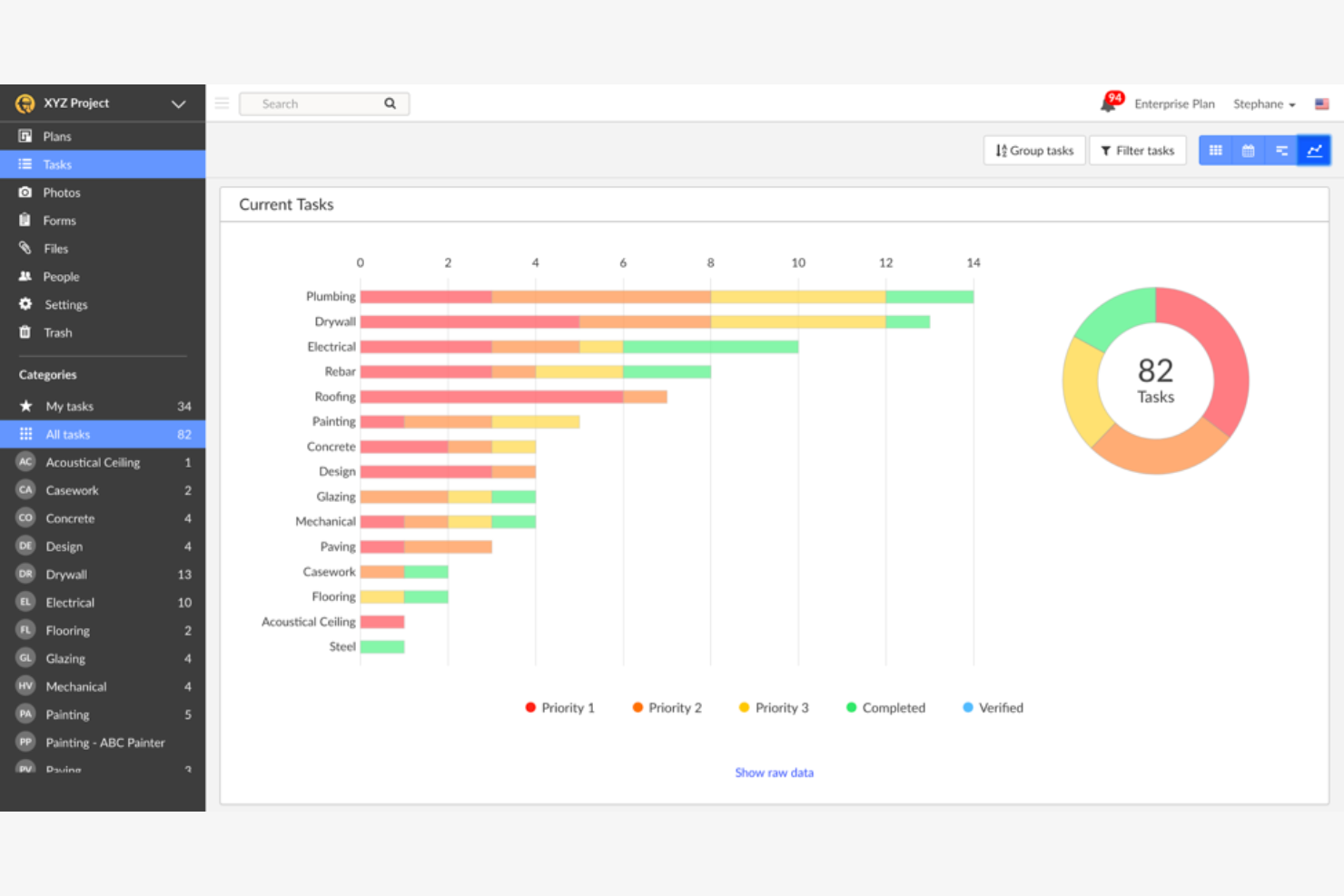
Fieldwire is a construction scheduling tool aimed at teams needing effective field management. It provides solutions for task coordination and site inspections, focusing on real-time collaboration.
Why I picked Fieldwire: Fieldwire excels in managing tasks directly on the field, making it a great choice for teams that require on-the-ground coordination. You can assign tasks and track progress in real time, keeping your team aligned. The software's blueprint markup feature allows you to annotate plans directly on-site, which helps with communication. Its emphasis on field management makes it a suitable option for teams working across multiple sites.
Standout Features and Integrations:
Features include punch list management, which helps you track and resolve issues promptly. It also offers document storage, ensuring your team has access to important files anytime. Additionally, Fieldwire supports daily reports, providing insights into day-to-day activities.
Integrations include Box, Dropbox, and more.
Pros and Cons
Pros:
- Supports multiple site coordination
- Effective punch list management
- Blueprint markup tool
Cons:
- Minimal design flexibility
- Limited cost management features
Diğer İnşaat Planlama Yazılımları
Kısa listeme girmeyen ancak yine de göz atmaya değer bazı ek inşaat planlama yazılımı seçenekleri şunlardır:
- Planera
For project forecasting
- Workyard
For payroll integration
- Outbuild
For resource allocation
- SmartPM
For analytics and automated reporting
- Buildxact
For residential builders
- GanttPRO
For Gantt chart focus
- Buildertrend
For client communication
- Autodesk Construction Cloud
For integration capabilities
- Houzz Pro
For residential projects
- JobTread
For budget management
- Kahua
For enterprise solutions
- Touchplan
For collaborative planning
- Phoenix Project Manager
For critical path analysis


How I Evaluate Construction Scheduling Software
I look at construction scheduling tools in two layers: the CPM, field access, and progress tracking basics that qualify a tool, and the differentiators that make one worth picking over another.
Core Functionality (Table Stakes For This List)
When I'm selecting tools for my list, I rank each one on a scale from 0 (does not offer the functionality) to 5 (excels in this area) for each core functionality listed below. Then, I calculate the tool's total score into a percentage. Each tool needs to achieve a minimum total score of 65% to be considered for inclusion.
- CPM Scheduling & Gantt Charts: I check whether a tool supports true Critical Path Method logic with dependency types, lag/lead times, and milestones—not just a visual Gantt with drag-and-drop bars.
- Resource & Crew Management: Assigning subs, crews, and equipment to individual tasks matters, but I also look for leveling tools that flag conflicts across concurrent jobsites.
- Baseline & Progress Tracking: I evaluate how each platform handles baseline comparisons and variance reporting—for example, whether a super can log actual progress that updates the schedule in real time.
- Look-Ahead & Pull Planning: Short-interval planning is how field teams actually run their weeks, so I look for dedicated 3- or 6-week look-ahead views and any pull planning features with constraint tracking.
- Field Collaboration & Mobile Access: A scheduler sitting in a trailer shouldn't be the only person updating the schedule. I look for mobile apps that let field crews view tasks, post updates, and attach photos on-site.
- Construction-Specific Integrations: The tool needs to connect with the platforms construction teams already use. I check for native integrations with tools like Procore, Autodesk Construction Cloud, or Primavera P6.
Once I have a list of tools that meet this criteria, I consider what sets each platform apart.
Differentiating Factors (What Sets Vendors Apart)
Here's how I compare and contrast different vendors:
Standout Features
4D BIM scheduling is a major differentiator. I look for tools that link tasks to 3D models so teams can simulate build sequences and spot clashes before they reach the field. Submittal and procurement linking also carries real weight—a delayed material delivery can derail even a solid CPM schedule. Weather intelligence is worth evaluating too, especially for teams managing outdoor trades across seasons, where auto-adjusted timelines save hours of manual rework each week.
Beyond Features
Pricing structure matters a lot in this space. Some vendors charge per user, others per project, and a few offer unlimited seats with tiered modules. For a GC with dozens of field users who only need view access, the wrong model can inflate costs fast. I also evaluate implementation and training support—construction schedulers often have deep CPM expertise but limited patience for clunky software rollouts. Audit trails and version history are worth checking too, since scheduled records frequently become evidence in delay claims and disputes.
İnşaat Planlama Yazılımı Nasıl Seçilir?
Uzun özellik listeleri ve karmaşık fiyatlandırma yapıları arasında kaybolmak kolaydır. Kendinize özgü yazılım seçim süreciniz üzerinde çalışırken odaklanmanızı korumanıza yardımcı olmak için aklınızda bulundurmanız gereken faktörlerin bir kontrol listesi aşağıdadır:
| Faktör | Dikkate Alınması Gerekenler |
|---|---|
| Ölçeklenebilirlik | Yazılım işletmenizle birlikte büyüyebilir mi? Büyük maliyet artışları olmadan artan proje boyutlarını ve ek kullanıcıları destekleyip desteklemediğini değerlendirin. |
| Entegrasyonlar | Mevcut araçlarınızla entegre oluyor mu? Planlama yazılımınız ile güvendiğiniz mevcut sistemler arasında sorunsuz veri akışı sağlayan çözümleri arayın. |
| Özelleştirilebilirlik | Yazılımı iş akışlarınıza göre uyarlayabilir misiniz? Ekibinizin kendine özgü süreçlerine ve proje ihtiyaçlarına uyacak değişikliklere izin verip vermediğini değerlendirin. |
| Kullanım kolaylığı | Arayüz ekibiniz için sezgisel mi? Yeni kullanıcıların kapsamlı bir eğitim almadan hızlıca öğrenebildiğinden emin olun. |
| Uygulama ve işe alıştırma | Başlamak ne kadar sürüyor? Kurulum için gereken zamanı ve kaynakları ve sağlayıcının yeterli destek sunup sunmadığını değerlendirin. |
| Maliyet | Fiyatlandırma bütçenize uygun mu? Uzun vadeli harcamalarınızı etkileyebilecek gizli ücretler veya kademeli planlar da dahil olmak üzere sağlayıcılar arasındaki maliyetleri karşılaştırın. |
| Güvenlik önlemleri | Verileriniz güvende mi? Hassas bilgileri korumak için şifreleme, düzenli güncellemeler ve sektör standartlarına uyumluluk gibi özellikleri arayın. |
İnşaat Planlama Yazılımı Nedir?
İnşaat planlama yazılımı, görevleri ve zaman çizelgelerini düzenleyerek inşaat projelerini yönetmeye ve planlamaya yardımcı olmak üzere tasarlanmış bir araçtır. Bu araçlar, şantiyelerde verimliliği ve koordinasyonu artırmak için proje yöneticileri, yükleniciler ve mühendisler tarafından yaygın olarak kullanılır.
Görev planlama, kaynak tahsisi ve zaman çizelgesi yönetimi özellikleri, ekiplerin programa bağlı kalmasına ve son teslim tarihlerine uymasına yardımcı olur. Genel olarak bu araçlar, proje kontrolünü ve iş birliğini destekleyerek daha başarılı proje sonuçlarına ulaşılmasını sağlar.
Özellikler
İnşaat planlama yazılımı seçerken aşağıdaki temel özelliklere dikkat edin:
- Görev planlama: Görevleri düzenlemenize ve ekip üyelerine atamanıza olanak tanıyarak herkesin sorumluluklarını ve son teslim tarihlerini bilmesini sağlar.
- Kaynak tahsisi: İş gücü ve malzemeler gibi kaynakların dağıtımını yönetmeye yardımcı olarak proje boyunca bunların kullanımını optimize eder.
- Zaman çizelgesi yönetimi: Proje ilerlemesini izlemek ve son teslim tarihlerine uymak için gerektiğinde programları ayarlamak üzere görsel bir zaman çizelgesi sunar.
- İş birliği araçları: Ekip iletişimini ve belge paylaşımını sağlayarak projelerde daha iyi koordinasyonu ve ekip çalışmasını teşvik eder.
- Gerçek zamanlı analizler: Proje performansına ilişkin içgörüler sunarak bilinçli kararlar almanıza ve iyileştirme alanlarını belirlemenize yardımcı olur.
- Mobil erişim: Ekip üyelerinin proje bilgilerine ve güncellemelere hareket halindeyken erişmesini sağlayarak her zaman bilgilendirilmelerini garanti eder.
- Özelleştirilebilir şablonlar: Belirli proje ihtiyaçlarınıza uyacak şekilde değiştirebileceğiniz, önceden hazırlanmış şablonlar sunarak kurulum süresinden tasarruf sağlar.
- Entegrasyon özellikleri: Diğer araçlara ve yazılımlara bağlanarak veri akışını ve iş akışı verimliliğinin artırılmasını kolaylaştırır.
- Risk yönetimi: Olası proje risklerini erkenden belirleyerek sorunların projeyi etkilemeden önce azaltılmasına olanak tanır.
- Bütçe takibi: Proje giderlerini gerçek zamanlı olarak izleyerek bütçe içinde kalmanıza ve mali sürprizlerden kaçınmanıza yardımcı olur.
Avantajlar
İnşaat planlama yazılımını uygulamak, ekibiniz ve işletmeniz için çeşitli avantajlar sağlar. Yararlanabileceğiniz avantajlardan bazıları şunlardır:
- Artan verimlilik: Görev planlama ve kaynak tahsisinin otomatikleştirilmesi, ekibinizin daha verimli çalışmasına yardımcı olur ve manuel hataları azaltır.
- Gelişmiş iş birliği: İş birliği araçları ve mobil erişim, herkesin bağlantıda ve bilgilendirilmiş kalmasını sağlayarak ekip çalışmasını ve iletişimi geliştirir.
- Daha iyi karar verme: Gerçek zamanlı analizler ve risk yönetimi özellikleri, bilinçli kararlar almanıza ve olası sorunları erkenden ele almanıza yardımcı olan içgörüler sunar.
- Zamandan tasarruf: Özelleştirilebilir şablonlar ve zaman çizelgesi yönetimi, proje planlamasını destekleyerek kurulum ve ayarlamalar için harcanan zamandan tasarruf sağlar.
- Maliyet kontrolü: Bütçe takibi, giderleri yakından izlemenize yardımcı olarak bütçe içinde kalmanızı ve beklenmedik maliyetlerden kaçınmanızı sağlar.
- Artan şeffaflık: Entegrasyon özellikleri, verilerin araçlar arasında sorunsuz bir şekilde akmasına yardımcı olarak proje ilerlemesini ve performansını net bir şekilde görmenizi sağlar.
- Proaktif sorun çözme: Risk yönetimi ve gerçek zamanlı güncellemeler gibi özellikler, sorunların projeyi etkilemeden önce öngörülmesine ve çözülmesine olanak tanır.
Maliyetler ve Fiyatlandırma
İnşaat planlama yazılımı seçmek, mevcut çeşitli fiyatlandırma modellerinin ve planların anlaşılmasını gerektirir. Maliyetler özelliklere, ekip büyüklüğüne, eklentilere ve daha fazlasına göre değişir. Aşağıdaki tablo, inşaat planlama yazılımı çözümlerinde yaygın olarak sunulan planları, ortalama fiyatlarını ve tipik özelliklerini özetlemektedir:
İnşaat Planlama Yazılımı için Plan Karşılaştırma Tablosu
| Plan Türü | Ortalama Fiyat | Yaygın Özellikler |
|---|---|---|
| Ücretsiz Plan | $0 | Temel görev planlama, sınırlı kullanıcı sayısı ve minimum destek. |
| Kişisel Plan | $4-$39/kullanıcı/ay | Görev planlama, kaynak tahsisi, zaman çizelgesi yönetimi ve temel analizler. |
| İşletme Planı | $40-$370/kullanıcı/ay | Gelişmiş planlama, iş birliği araçları, mobil erişim ve entegrasyon seçenekleri. |
| Kurumsal Plan | $509-$2,000/kullanıcı/ay | Özelleştirilebilir özellikler, premium destek, güvenlik önlemleri ve gelişmiş raporlama. |
İnşaat Planlama Yazılımı SSS
İnşaat planlama yazılımı hakkında sık sorulan soruların bazı yanıtları şunlardır:
İnşaat planlama yazılımının temel amacı nedir?
İnşaat planlama yazılımının temel amacı, inşaat projelerinin zaman çizelgelerini, inşaat öncesi aşama da dahil olmak üzere, yönetmenize ve düzenlemenize yardımcı olmaktır. Görevler atamanıza, kaynakları tahsis etmenize ve ilerlemeyi takip etmenize olanak tanıyarak projelerinizin zamanında ilerlemesini sağlar. Bu yazılım, proje aşamalarına ve teslim tarihlerine ilişkin net bir genel bakış sunarak gecikmeleri azaltmaya yardımcı olur ve ekibinizle ve taşeronlarınızla koordinasyon kurmanızı kolaylaştırır.
Dijital proje yöneticileri ekiplerle iş birliği yapmak için inşaat planlama yazılımını nasıl kullanır?
Dijital proje yöneticileri görevler atamak, teslim tarihleri belirlemek ve tamamlanma durumunu takip etmek için inşaat yönetimi yazılımını kullanır. Yerleşik iletişim özellikleri anlık güncellemelere olanak tanır ve paylaşılan panolar herkese proje zaman çizelgelerini canlı olarak görüntüleme imkânı sunar. Bu, iletişim hatalarını azaltır ve kaynakları daha verimli yönetmenize yardımcı olur
İnşaat planlama yazılımı diğer araçlarla entegre olabilir mi?
Evet, çoğu inşaat planlama yazılımı diğer araçlarla entegre olabilir. Entegrasyon özellikleri, yazılımı hâlihazırda kullandığınız proje yönetimi, muhasebe ve diğer inşaat işletmesi araçlarına bağlamanıza olanak tanır. Bu, bilgilerin sorunsuz bir şekilde aktarılmasını destekler ve yinelenen veri girişine duyulan ihtiyacı azaltır. Mevcut sistemlerinizle uyumluluğu kontrol etmek için belirli entegrasyon seçeneklerini tedarikçilere danışın.
İnşaat planlama yazılımı proje gecikmelerini en aza indirmeye nasıl yardımcı olabilir?
İnşaat planlama yazılımı ilerlemeyi takip ederek, bağımlılıkları öne çıkararak ve çakışmalar ya da kaçırılan kilometre taşları hakkında sizi uyararak gecikmeleri en aza indirmeye yardımcı olur. Zaman çizelgelerini hızlıca ayarlayabilir ve değişiklikleri paydaşlara, uzman yüklenicilere ve taşeronlara anında iletebilirsiniz. Bu, herkesin sorumluluklarını yerine getirmesine ve zaman çizelgelerinin şeffaf olmasına yardımcı olur.
İnşaat planlama yazılımını kullanmak için eğitim gerekli midir?
Evet, inşaat planlama yazılımını etkili bir şekilde kullanmak için genellikle bazı eğitimler gerekir. İnşaat sektöründeki birçok tedarikçi, sizin ve ekibinizin çalışmaya başlamasına yardımcı olmak için web seminerleri, video eğitimleri ve kullanıcı kılavuzları gibi eğitim kaynakları sunar. Bu kaynaklardan yararlanmak işe alıştırma sürecini hızlandırabilir ve ekibinizin yazılımın özelliklerinden en iyi şekilde yararlanmasına yardımcı olabilir.
İnşaat planlama yazılımını benimserken karşılaşılan yaygın zorluklar nelerdir?
Yaygın zorluklar arasında değişime direnç, elektronik tablo verilerinin taşınmasıyla ilgili sorunlar ve eğitim gereksinimleri bulunur. İşe alıştırma için bütçe ayırın ve ekibinize uygulamalı eğitim verin. Yazılımı kuruluşunuz genelinde kullanıma sunmadan önce özellikleri test etmek ve sorunlu noktaları ele almak için bir pilot projeyle başlayın.