

2026’da İncelenen En İyi 10 Basit Zaman Takip Aracı

10 En İyi Basit Zaman Takipçileri Kısa Listesi


Bir projeyi yönetmek, aynı anda çok fazla görevi dengelemeye çalışmak gibi hissettirebilir. Ekibinizin üretken olmasını istersiniz, ancak zamanı takip etmek zahmetli ve dikkat dağıtıcı olabilir. Basit zaman takipçileri tam da bu noktada devreye girer. Ekstra uğraş eklemeden çalışma saatlerini takip etmenize yardımcı olurlar.
Deneyimlerime göre doğru aracı seçmek büyük bir fark yaratabilir. Sizin için en iyi seçenekleri bulmak amacıyla çeşitli zaman takipçilerini inceledim. Özellikler, kullanılabilirlik ve avantajlar hakkında tarafsız bilgiler edineceksiniz.
Bu liste yazısında sizi en iyi seçenekler arasında yönlendireceğim. Her aracın ekibinizin ihtiyaçlarına nasıl uyabileceğini ve proje yönetiminizi nasıl geliştirebileceğini öğreneceksiniz. Haydi başlayalım ve sizin için en iyi çözümü bulalım.
Why Trust Our Software Recommendations
Our team has been testing and reviewing software since 2012. As project managers ourselves, we know how difficult—and important—it is to choose the right software.
For this guide, we evaluated tools using hands-on testing and independent research, scoring tools using our selection criteria. We also draw on insights from industry thought leaders and practicing project management experts.
Our reviews reflect our human editorial judgment, not a sales pitch.
Expert reviewers:
Basit Zaman Takipçileri Karşılaştırma Tablosu
Aşağıdaki tablo, en iyi basit zaman takipçisi seçimlerimin fiyatlandırma ayrıntılarını karşılaştırır.
Score legend (out of 5)
- Excellent 4.5–5
- Good 4–4.4
- Average 3–3.9
- Below average 2–2.9
- Poor 1–1.9
| Tool | Starting Price | Website | |||||||
|---|---|---|---|---|---|---|---|---|---|
| Best for browser extension support | 4.8 out of 5 | 5 | 5 | 5 | 5 | 5 | 4 | $4.99/user/month Free plan + 7-day trial + demo available | Website |
| Best for payroll integration | 3.5 out of 5 | 4 | 3 | 4 | 3 | 3 | 4 | $20/month + $10/user/month 30-day free trial | Website |
| Best for AI time tracking | 3.8 out of 5 | 5 | 2 | 4 | 4 | 5 | 3 | $9/user/month Free 14-day trial + free demo available | Website |
| Best for project-based tracking | 4.5 out of 5 | 5 | 4 | 5 | 5 | 4 | 4 | $5/user/month Free plan + 14-day free trial + free demo available | Website |
| Best for automatic time tracking | 4.8 out of 5 | 4 | 5 | 5 | 5 | 5 | 5 | $3.99/user/month Free plan + free trial + free demo available | Website |
| Best for productivity insights | 3.2 out of 5 | 3 | 2 | 3 | 3 | 4 | 4 | $7/month 14-day free trial available | Website |
| Best for remote teams | 4.3 out of 5 | 5 | 4 | 4 | 5 | 4 | 4 | $3.75/user/month Free plan + free demo + 14-day free trial available | Website |
| Best for HR features in time tracking | 4.3 out of 5 | 5 | 4 | 5 | 4 | 4 | 4 | $5.50/user/month Free plan available | Website |
| Best for expense tracking | 4.2 out of 5 | 5 | 4 | 3 | 5 | 4 | 4 | $9/seat/month Free plan + 30-day free trial available | Website |
| Best for project invoicing | 4.2 out of 5 | 4 | 4 | 4 | 5 | 4 | 4 | $9.90/month Free plan + 15-day free trial available | Website |
En İyi Basit Zaman Takipçileri İncelemesi
Aşağıda, kısa listeme giren en iyi basit zaman takipçilerine ilişkin ayrıntılı özetlerimi bulabilirsiniz. İncelemelerim, her aracın temel özelliklerine, artılarına ve eksilerine, entegrasyonlarına ve ideal kullanım alanlarına ayrıntılı bir bakış sunarak sizin için en iyi aracı bulmanıza yardımcı olur.

Clockify
Best for browser extension support
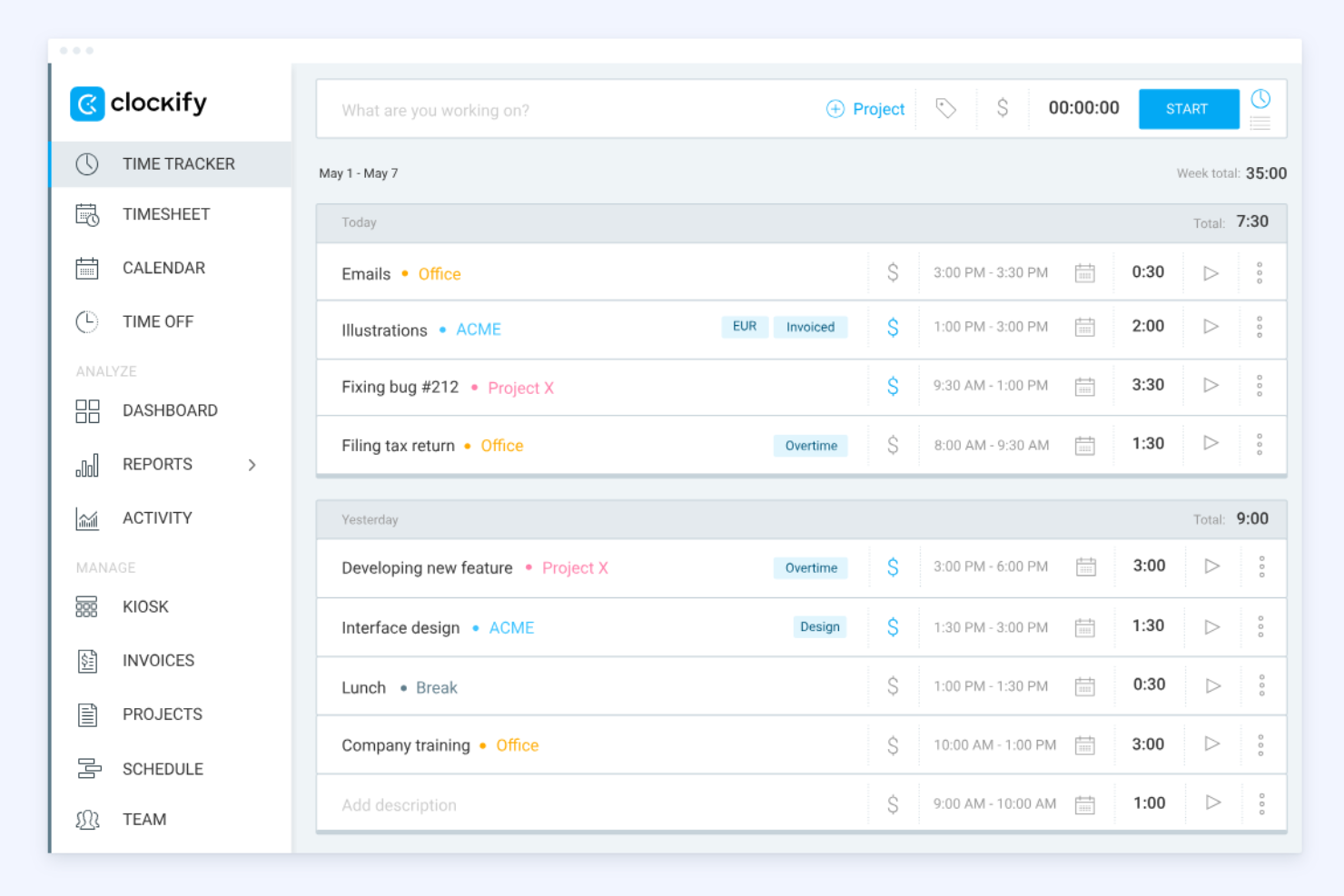
Clockify is a time tracking tool widely used by freelancers and businesses of all sizes. It helps users track billable hours and manage projects efficiently.
Why I picked Clockify: The browser extension support is a standout feature, letting you track time directly from your browser without switching web apps. It's perfect for those who work across multiple web applications and need quick access. Clockify offers detailed reporting tools to analyze time usage effectively. You can also set up reminders to help your team log their hours consistently.
Standout Features and Integrations:
Features include easy time tracking through timers and timesheets, plus project and billing tools that let you set rates and generate reports or invoices. It also supports team management with features such as attendance tracking, scheduling, and timesheet approvals.
Integrations include Trello, Asana, Atlassian Jira, Slack, and more.
Pros and Cons
Pros:
- Five users on free plan
- Mobile tracking capabilities
- Strong browser extension support
Cons:
- Limited project and task management
- No auto-scheduling or shift swaps

Best for payroll integration

QuickBooks Time is a time tracking solution tailored for businesses that need to efficiently manage employee hours and payroll processes. It serves small to medium-sized businesses looking to improve their time management and reduce payroll errors.
Why I picked QuickBooks Time: Payroll integration is a key feature, making it simple to sync employee hours directly with payroll systems. This helps reduce manual entry and minimizes errors in your payroll process. You can track time using GPS location, which is beneficial for teams on the move. Additionally, QuickBooks Time offers customizable alerts to ensure your team stays on schedule.
Standout Features and Integrations:
Features include flexible time tracking with mobile clock-ins, scheduling and shift management tools, and intuitive scheduling with powerful real-time reporting and payroll integrations to help manage teams and projects efficiently.
Integrations include Salesforce, Procore, ADP, Square Payroll, Paychex, Google Drive, and more.
Pros and Cons
Pros:
- No credit card needed for free trial
- GPS tracking for mobile teams
- Efficient payroll integration
Cons:
- Requires an active QuickBooks Online subscription
- Charges a monthly base fee

Timely
Best for AI time tracking
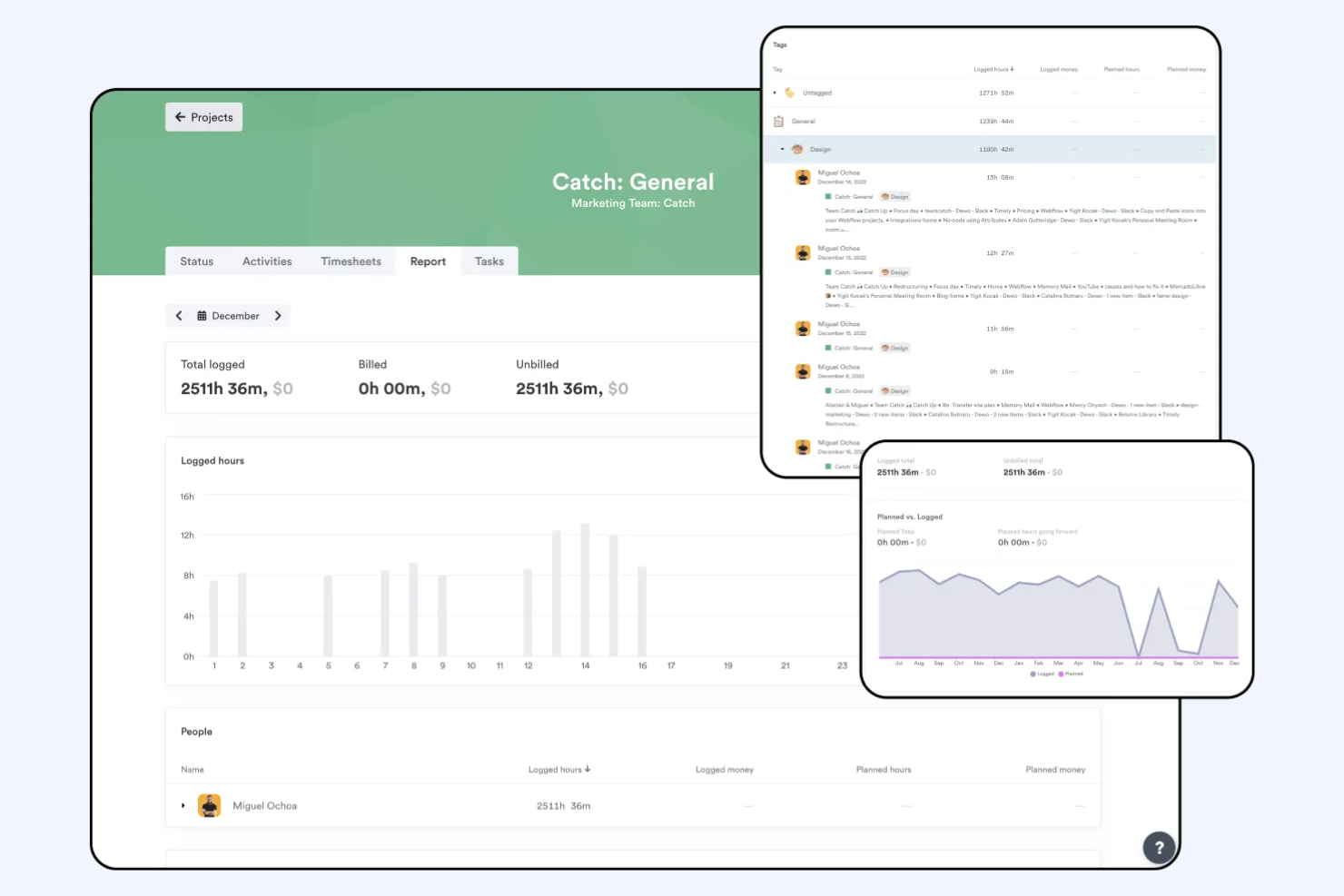
Timely is a time tracking app that uses AI to help teams and individuals accurately log work hours and manage productivity. It's aimed at businesses and professionals wanting to minimize manual time entry and maximize focus on their tasks.
Why I picked Timely: AI time tracking is a core feature, reducing the need for manual entries and ensuring accurate time logs. This helps your team focus more on work and less on tracking hours. Timely provides automatic activity tracking, capturing time spent on different tasks. You can also review project timelines to see where time is allocated and adjust as needed.
Standout Features and Integrations:
Features include AI-assisted timesheets and reporting, as well as a project dashboard to help you monitor project performance, utilization, and profitability. It also includes project and team management tools that aid collaboration and workload allocation. Additionally, Timely is a desktop app as well as a mobile app, increasing flexibility.
Integrations include Google Calendar, Outlook, Zapier, Asana, Trello, and more.
Pros and Cons
Pros:
- Occasional sync delays
- Automatic activity tracking
- Reduces manual time entry
- AI-driven time tracking
Cons:
- AI memory can be inaccurate

My Hours
Best for project-based tracking

My Hours is a time tracking tool tailored for project managers and small teams. It helps users track work hours and manage projects with precision.
Why I picked My Hours: Project-based tracking is a key feature, allowing you to organize tasks by project and client. This makes it easier for your team to allocate time efficiently. Additionally, My Hours provides detailed reports to help you track project performance and allows you to set and monitor budgets for each project.
Standout Features and Integrations:
Features include the ability to set hourly rates and project budgets, and to assign tasks to team members to organize and manage work efficiently. You can also create recurring tasks for ongoing work and export timesheets in multiple formats for easy reporting and billing.
Integrations include QuickBooks, Asana, Microsoft Teams, Google Calendar, and more.
Pros and Cons
Pros:
- Budget setting for projects
- Detailed performance reports
- Effective project-based tracking
Cons:
- No overtime and break tracker
- No automatic start/stop triggers

TimeCamp
Best for automatic time tracking

TimeCamp is a time tracking tool designed for freelancers and businesses seeking to automate their time management. It helps users monitor work hours and improve productivity with minimal manual input.
Why I picked TimeCamp: Automatic time tracking software is a standout feature, letting you capture time spent on tasks without constant manual entry. This ensures accurate data and saves your team time. You can categorize time entries by project, making it easy to see where efforts are focused. Additionally, TimeCamp offers visual timesheets to help you quickly review logged hours.
Standout Features and Integrations:
Features include manual and automatic time tracking, detailed reports and dashboards for analyzing productivity, team performance, and project costs, and reporting tools for performance insights.
Integrations include Trello, Asana, Slack, QuickBooks, Jira, and more.
Pros and Cons
Pros:
- Easy project categorization
- Visual timesheets available
- Automatic time tracking
Cons:
- Complicated time-off requests
- Geofence doesn't work

Best for productivity insights
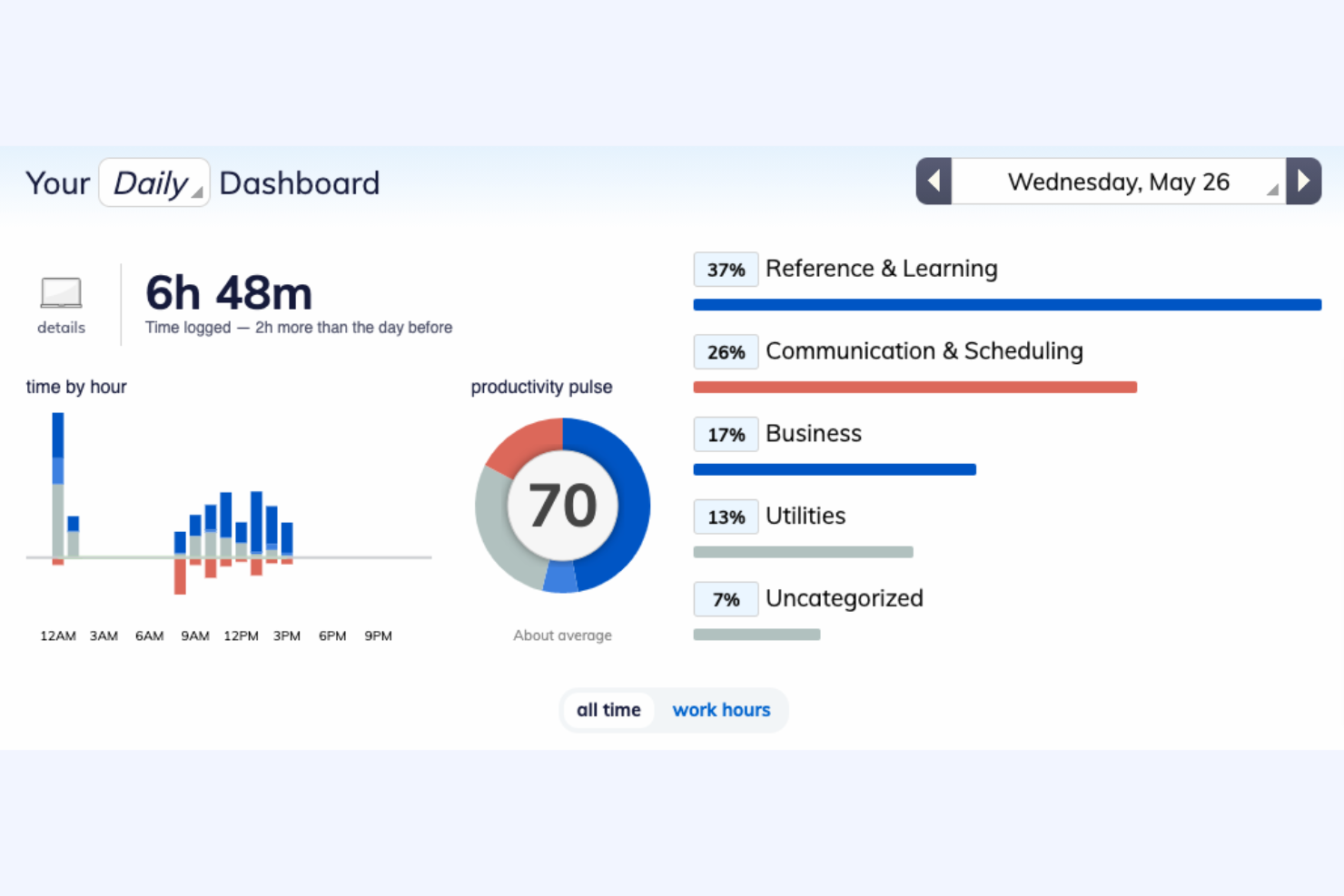
RescueTime is a time management tool that helps users understand their daily habits and improve productivity. It is designed for individuals and teams who want to track their focus and optimize work efficiency.
Why I picked RescueTime: Productivity insights are a key feature, allowing you to see detailed reports on how you spend your time. This helps you identify distractions and focus on what matters most. You can set goals to improve your work habits and receive notifications when you're off track. Additionally, RescueTime provides a distraction-free mode to help you concentrate better.
Standout Features and Integrations:
Features include activity tracking in the background across apps and websites, turning that time tracking data into detailed productivity insights and reports with goals and alerts. It also offers Focus Sessions to block distractions and advanced analytics to optimize your workflow.
Integrations include Slack, Google Calendar, Outlook, Trello, Asana, GitHub, and more.
Pros and Cons
Pros:
- Distraction-free mode
- Goal-setting capabilities
- Detailed productivity insights
Cons:
- No geolocation tracking
- Automatic categorization is imperfect

Best for remote teams
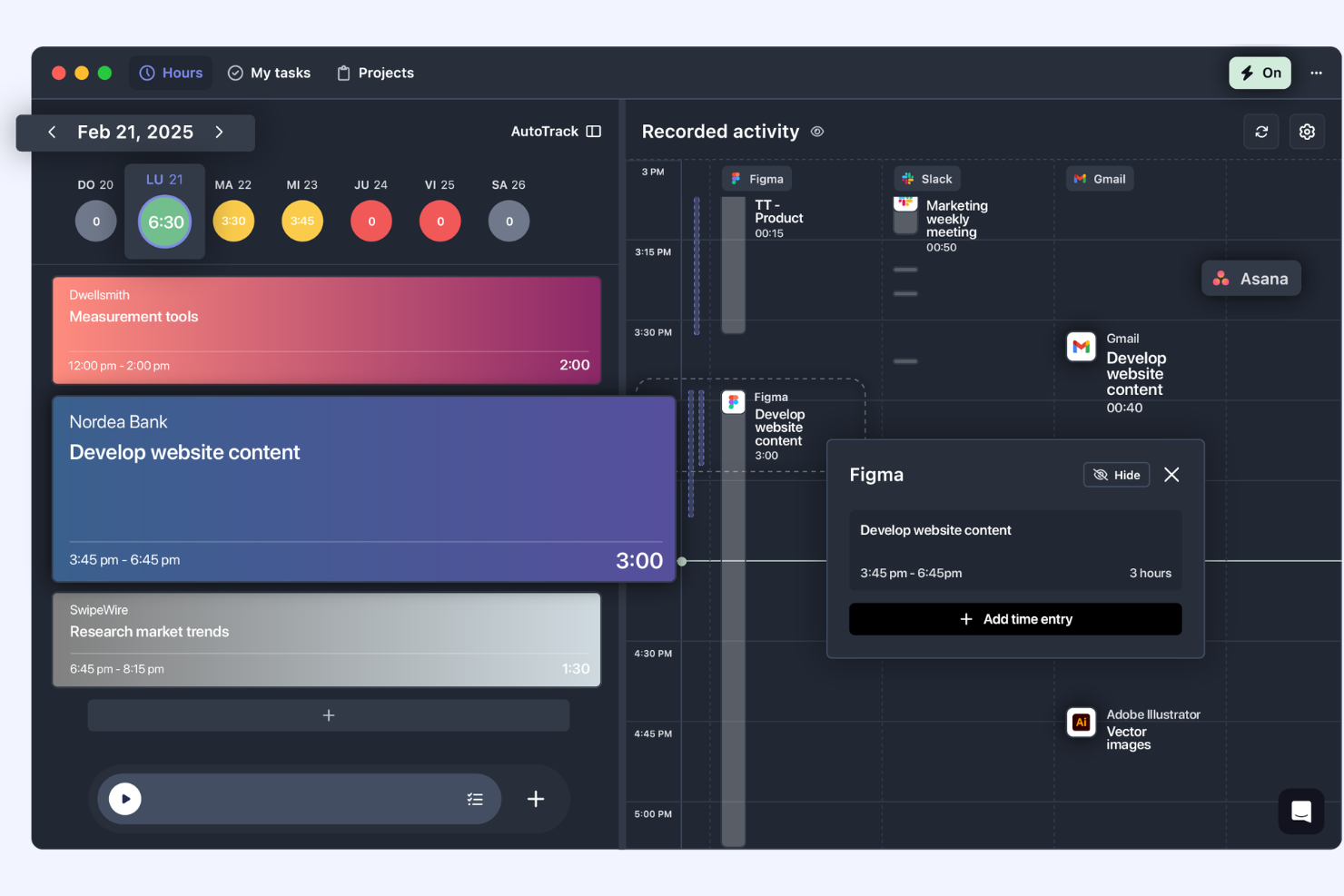
TrackingTime is a time management tool designed to help remote teams track work hours and manage projects more effectively. It caters to businesses and freelancers needing to keep track of billable hours and improve productivity across distributed teams.
Why I picked TrackingTime: Remote teams benefit from its ability to track time across different projects and clients smoothly. You can monitor team productivity and performance from anywhere. The tool offers real-time updates, making it easier to coordinate with your team. Additionally, TrackingTime provides detailed reports to help you analyze work patterns, adjust strategies, and save your team's time.
Standout Features and Integrations:
Features include real-time updates for employee monitoring, automatic background tracking to capture work accurately, the ability to manage employee time off and attendance, and set budgets and billing rates.
Integrations include Asana, Trello, Slack, Google Calendar, Microsoft Teams, and more.
Pros and Cons
Pros:
- Detailed reporting features
- Real-time performance updates
- Effective for remote team management
Cons:
- No PTO tracking
- No offline mode

Best for HR features in time tracking
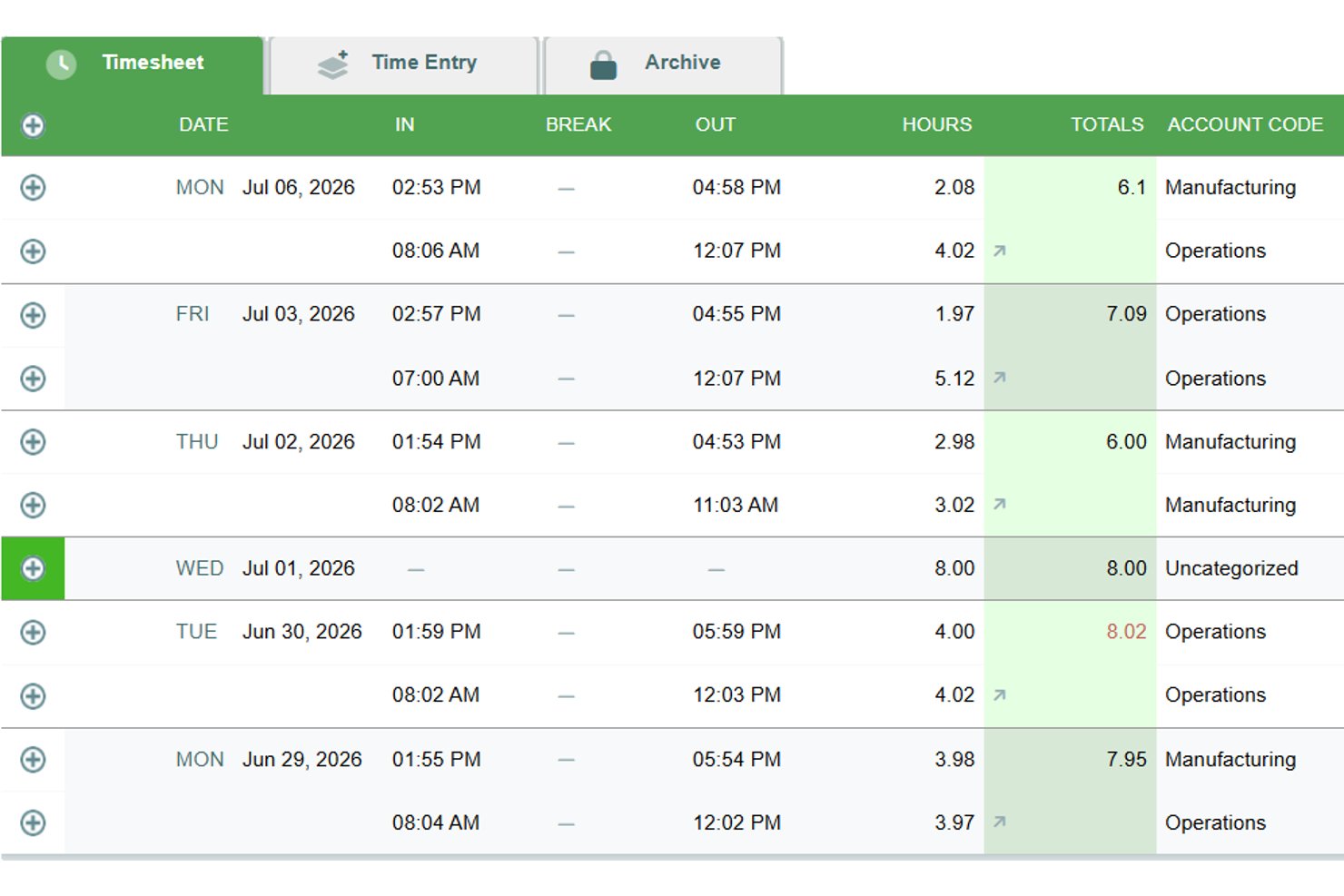
Timesheets.com is a browser-based time tracking platform that combines payroll timesheets, billable hour logging, project-level job costing, scheduling, expense tracking, and an HR document suite in one tool.
Who Is Timesheets.com Best For?
Timesheets.com is a strong fit for small teams that need time tracking, scheduling, and HR document management under one roof.
Why I Picked Timesheets.com
I've included Timesheets.com in my top picks because its HR feature set goes well beyond what most simple time trackers offer. The built-in HR document suite handles W-4s, I-9s, performance reviews, and disciplinary templates, all tied directly to the same platform where employees log hours. I also like that PTO accrual rules, including caps, rollover, and use-it-or-lose-it policies, are configurable without a separate HR tool.
Timesheets.com Key Features
- Multi-level billing rates: Set distinct bill and cost rates at the employee, project, or task level to support accurate client invoicing and job costing.
- Simultaneous project timers: Run multiple live timers at once, making it easy to switch between tasks without losing tracked time.
- Payroll and accounting exports: Push timesheet data directly to QuickBooks, Gusto, ADP, Paychex, and other payroll systems via built-in exports.
- Mileage and expense tracking: Log mileage with odometer images and submit expenses with receipt photos directly alongside time entries.
Timesheets.com Integrations
Timesheets.com offers native integrations with QuickBooks Online, QuickBooks Desktop, Gusto, ADP, Paychex, SurePayroll, Sage, Ceridian, Microsoft Dynamics, and Heartland. Its API supports custom integrations, but it doesn’t offer native project management tool integrations.
Pros and Cons
Pros:
- Multi-level billable rates support job costing
- Configurable PTO accrual rules
- HR documents alongside time tracking
Cons:
- Approval-heavy edits slow corrections
- Browser-only mobile experience feels dated

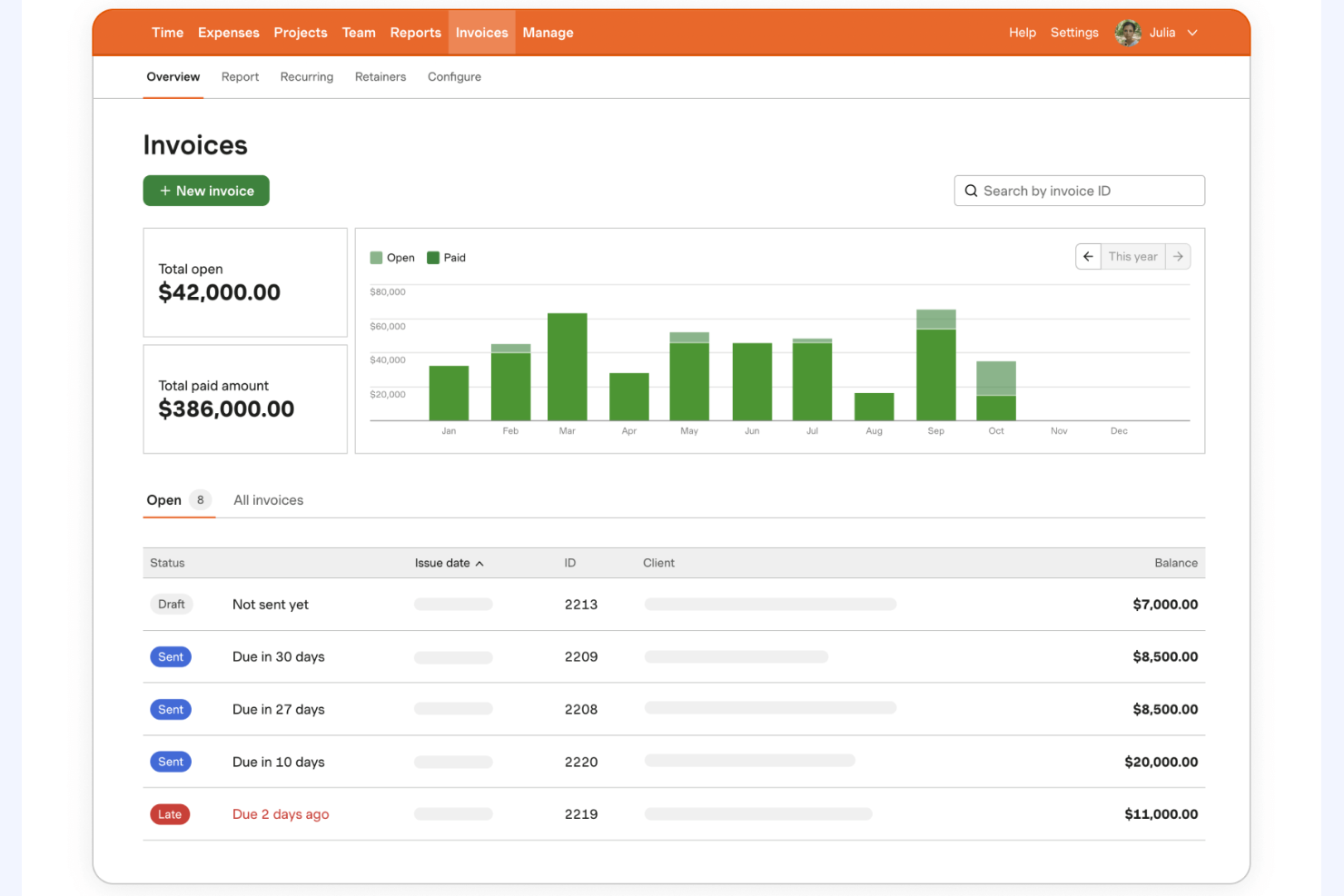
Harvest is a time tracking and expense management tool designed for small to medium-sized businesses. It helps users track billable hours and manage project budgets efficiently.
Why I picked Harvest: Expense tracking is a highlight of Harvest, allowing you to capture and manage costs alongside your time entries. This feature is particularly useful for teams needing detailed financial oversight. You can attach receipts to expenses and generate detailed reports for better budget management. Additionally, Harvest offers invoicing capabilities to streamline your billing process.
Standout Features and Integrations:
Features include user-friendly timers and timesheets that work across web and mobile. It also generates professional invoices from tracked time and expenses and provides visual reporting and analytics so you can see project budgets, team capacity, and profitability at a glance.
Integrations include QuickBooks, Xero, Asana, Slack, Trello, Basecamp, and more.
Pros and Cons
Pros:
- Invoicing capabilities included
- In-depth budget management
- Effective expense tracking
Cons:
- Basic project management features
- Notifications are easily missed

Paymo
Best for project invoicing

Diğer Basit Zaman Takipçileri
İşte kısa listeme giremeyen ancak yine de göz atmaya değer bazı ek basit zaman takipçisi seçenekleri:
- Buddy Punch
For employee scheduling
- Jibble
For attendance monitoring
- Scoro
For all-in-one solutions
- ClockShark
For field teams
- Deputy
For shift planning
- Memtime
For memory aids
- Chrometa
For passive time tracking
- ATracker
For mobile users
- EARLY
For focus tracking
- Simple Time Tracker
For daily time logs
- TimeTrace
For freelancers
- Replicon
For compliance tracking
- Easy Time Clock
For small businesses


How I Evaluate Simple Time Tracker
I split my evaluation into two layers: baseline must-haves (like a one-click timer and billable tracking for client work) and the differentiators that make a tool the right fit for a specific team.
Core Functionality (Table Stakes For This List)
When I'm selecting tools for my list, I rank each one on a scale from 0 (does not offer the functionality) to 5 (excels in this area) for each core functionality listed below. Then, I calculate the tool's total score into a percentage. Each tool needs to achieve a minimum total score of 65% to be considered for inclusion.
- One-Click Timer: I check whether you can start tracking immediately from the main interface—no digging through menus or configuring fields before the clock starts running.
- Manual Time Entry: Teams forget to hit start. I look for flexible backfilling options, like adding entries by duration or start/end time for any past date.
- Project & Task Assignment: Every entry should be taggable to a client, project, or task so time doesn't end up in an unassigned black hole at month's end.
- Timesheet View: I evaluate whether tracked time rolls up into a clean daily or weekly grid that's easy to review, edit, and submit before a reporting deadline.
- Time Reporting & Export: Pulling a CSV of last month's hours by project for a client invoice is a baseline scenario I look for in every tool I consider.
- Billable Hours Tracking: Marking entries as billable with assigned rates matters—especially for agency leads juggling multiple client retainers at different price points.
Once I have a list of tools that meet this criteria, I consider what sets each platform apart.
Differentiating Factors (What Sets Vendors Apart)
Here's how I compare and contrast different vendors:
Standout Features
Calendar sync is a big one—tools that pull meetings from Google Calendar or Outlook and convert them into time entries save project managers from logging half their day manually. I also look for idle detection and smart reminders, which catch forgotten timers before they turn into guesswork. Automatic time tracking takes this further by logging app and document activity in the background, which is especially useful for consultants who shift between tasks frequently.
Beyond Features
A free tier that actually works matters here—freelance consultants and small teams need to track time from day one without budget approval. I also evaluate how quickly someone can go from signup to running their first timer. The best simple trackers require almost zero configuration. Integrations with tools like Jira, Asana, and Trello are worth checking too, since embedding a timer directly inside your PM tool means fewer context switches and more accurate entries across distributed teams.
Basit Bir Zaman Takipçisi Nasıl Seçilir?
Uzun özellik listeleri ve karmaşık fiyatlandırma yapıları içinde kaybolmak kolaydır. Kendinize özgü yazılım seçimi sürecinizde ilerlerken odaklanmanıza yardımcı olmak için aklınızda bulundurmanız gereken faktörlerin bir kontrol listesini burada bulabilirsiniz:
| Faktör | Dikkate Alınması Gerekenler |
| Ölçeklenebilirlik | Araç ekibinizle birlikte büyüyebilir mi? Performansta düşüş olmadan artan kullanıcı ve proje sayısını destekleyip desteklemediğini değerlendirin. |
| Entegrasyonlar | Mevcut araçlarınıza bağlanabiliyor mu? İş akışlarını geliştirmek için proje yönetimi, muhasebe ve iletişim platformlarınızla uyumluluğunu kontrol edin. |
| Özelleştirilebilirlik | Aracı ihtiyaçlarınıza göre uyarlayabilir misiniz? Panoları, raporları ve kullanıcı izinlerini ekibinizin süreçlerine uyacak şekilde ayarlama seçeneklerini arayın. |
| Kullanım kolaylığı | Arayüz sezgisel mi? Her teknik seviyedeki ekip üyelerinin kapsamlı bir eğitim veya kafa karışıklığı yaşamadan arayüzde gezinebildiğinden emin olun. |
| Uygulama ve kullanıma alıştırma | Ne kadar hızlı kullanmaya başlayabilirsiniz? Kurulum sürecini, sunulan eğitim kaynaklarını ve ilk uygulama aşamasında sağlanan desteği değerlendirin. |
| Maliyet | Bütçenize uygun mu? Fiyatlandırma planlarını karşılaştırın ve özellikler veya destek için alınabilecek ek ücretler de dahil olmak üzere toplam sahip olma maliyetini değerlendirin. |
| Güvenlik önlemleri | Verileriniz ne kadar güvende? Şifreleme standartlarını, veri yedekleme prosedürlerini ve GDPR gibi gizlilik düzenlemelerine uyumluluğu arayın. |
| Destek erişilebilirliği | Gerektiğinde yardım alabilir misiniz? Sağlayıcının 7/24 destek, canlı sohbet veya yardım için özel bir müşteri yöneticisi sunup sunmadığını kontrol edin. |
Basit Bir Zaman Takip Aracı Nedir?
Basit bir zaman takip aracı, kullanıcıların çalışma saatlerini verimli bir şekilde kaydetmesine ve yönetmesine yardımcı olan bir araçtır. Serbest çalışanlar, proje yöneticileri ve uzaktan çalışan ekipler gibi profesyoneller, üretkenliği artırmak ve faturalandırılabilir saatleri takip etmek için bu araçları kullanır. Zaman kaydı, raporlama ve proje yönetimi gibi özellikler, kullanıcıların görevlerini düzenlemesini ve iş akışlarını optimize etmesini destekler. Genel olarak bu araçlar, zamanın nasıl kullanıldığı konusunda netlik sağlar ve zaman yönetimini geliştirir.
Özellikler
Basit bir zaman takip aracı seçerken aşağıdaki temel özelliklere dikkat edin:
- Zaman kaydı: Faturalandırılabilir zamanın doğru şekilde takip edilmesini sağlamak için çalışma saatlerini otomatik veya manuel olarak kaydedin.
- Raporlama: Projeler genelindeki üretkenliği ve zaman dağılımını analiz etmek için ayrıntılı raporlar oluşturun.
- Proje yönetimi entegrasyonu: İş akışını ve görev yönetimini iyileştirmek için mevcut proje yönetimi araçlarıyla senkronizasyon sağlayın.
- Mobil erişim: Uzaktan çalışan veya seyahat eden ekip üyelerine esneklik sağlamak için mobil uygulamalarla hareket hâlindeyken zaman takibi yapın.
- Faturalandırma ve fatura oluşturma: Müşteriler için faturalandırma sürecini basitleştirmek üzere kaydedilen zamana dayalı faturalar oluşturun.
- Özelleştirilebilir uyarılar: Projeleri plan doğrultusunda sürdürmek için zaman kaydı yapılması gerektiğinde hatırlatıcılar ayarlayın veya yaklaşan son tarihler hakkında kullanıcıları bilgilendirin.
- GPS konum takibi: Saha çalışmaları için doğru zaman takibi sağlamak amacıyla mobil ekiplerin konumunu izleyin.
- Görsel zaman çizelgeleri: Kullanıcıların zaman kullanımlarını hızlıca değerlendirmesine yardımcı olmak için kaydedilen saatlere ilişkin net bir genel bakış sunun.
- Otomatik etkinlik takibi: Hataları en aza indirmek ve zamandan tasarruf etmek için görevlere harcanan zamanı manuel giriş gerektirmeden kaydedin.
- Güvenlik önlemleri: Kullanıcı verilerini şifreleme ve GDPR gibi gizlilik düzenlemelerine uyumlulukla koruyun.
Avantajlar
Basit bir zaman takip aracını uygulamak, ekibiniz ve işletmeniz için çeşitli avantajlar sağlar. Yararlanabileceğiniz avantajlardan bazıları şunlardır:
- Artan üretkenlik: Çalışma saatlerini ve etkinlikleri takip ederek ekipler zaman kaybettiren görevleri belirleyebilir ve gerçekten önemli olan işlere odaklanabilir.
- Doğru faturalandırma: Otomatik zaman kaydı ve fatura oluşturma özellikleri, müşterilerin çalışılan saatler için doğru şekilde faturalandırılmasını sağlamaya yardımcı olur.
- Daha iyi proje yönetimi: Proje yönetimi araçlarıyla entegrasyon, görevlerin verimli şekilde koordine edilmesini ve son tarihlerin yönetilmesini sağlar.
- Daha yüksek hesap verebilirlik: Zaman takibi, ekip üyeleri arasında şeffaflığı ve sorumluluğu teşvik ederek görevlerine odaklanmalarını sağlar.
- Bilgiye dayalı karar alma: Ayrıntılı raporlar ve analizler, zaman dağılımı hakkında içgörüler sunarak yöneticilerin verilere dayalı kararlar almasına yardımcı olur.
- Esnek çalışma düzenlemeleri: Mobil erişim ve GPS takibi, uzaktan çalışanların ve saha ekiplerinin herhangi bir konumdan zaman kaydı yapmasına olanak tanıyarak bu çalışma biçimlerini destekler.
- Maliyet tasarrufu: Zaman yönetimini optimize ederek işletmeler fazla mesai maliyetlerini azaltabilir ve genel verimliliği artırabilir.
Maliyetler ve Fiyatlandırma
Basit bir zaman takip aracı seçmek, mevcut çeşitli fiyatlandırma modellerinin ve planların anlaşılmasını gerektirir. Maliyetler özelliklere, ekip büyüklüğüne, eklentilere ve daha fazlasına göre değişir. Aşağıdaki tablo, basit zaman takip aracı çözümlerinde yaygın planları, ortalama fiyatlarını ve genellikle sunulan özellikleri özetlemektedir:
Basit Zaman Takip Araçları için Plan Karşılaştırma Tablosu
| Plan Türü | Ortalama Fiyat | Yaygın Özellikler |
| Ücretsiz Plan | $0 | Temel zaman takibi, sınırlı sayıda proje ve temel raporlama. |
| Kişisel Plan | $2.99-$12/ay | Zaman takibi, proje yönetimi entegrasyonu, mobil erişim ve temel raporlama. |
| İşletme Planı | $15-$30/ay | Gelişmiş raporlama, fatura oluşturma, özelleştirilebilir uyarılar ve öncelikli destek. |
| Kurumsal Plan | $30-$50/ay | Özel entegrasyonlar, özel hesap yöneticisi, gelişmiş güvenlik özellikleri ve kapsamlı analizler. |
Basit Zaman Takip Aracı SSS
Basit zaman takip araçları hakkında sık sorulan soruların bazı yanıtları:
Ekibim için doğru basit zaman takip aracını nasıl seçerim?
Proje yönetimi entegrasyonu veya mobil erişim gibi ekibinizin ihtiyaçlarını değerlendirerek başlayın. Ekibinizin büyüklüğünü ve ihtiyaç duyduğunuz raporlama düzeyini göz önünde bulundurun. Ekibinizin hangi arayüzü tercih ettiğini görmek için birkaç aracı ücretsiz denemelerle test edin. Bütçenize göre fiyatlandırma planlarını karşılaştırmayı unutmayın.
Basit zaman takip araçları mevcut yazılımlarımla entegre olabilir mi?
Evet, birçok basit zaman takip aracı proje yönetimi ve muhasebe yazılımları gibi popüler araçlarla entegrasyon sunar. Desteklenen entegrasyonların listesi için aracın web sitesini kontrol edin. Kullandığınız yazılımla entegre olmuyorsa özel bağlantılar oluşturmak için Zapier gibi bir araç kullanmayı değerlendirin.
Basit zaman takip araçlarında veri güvenliği endişe kaynağı mıdır?
Evet, veri güvenliği öncelik olmalıdır. Şifreleme, düzenli veri yedekleme ve GDPR gibi gizlilik düzenlemelerine uyumluluk sunan araçları arayın. Tedarikçilere güvenlik önlemlerini sorun ve verileri nasıl koruduklarını görmek için incelemeleri okuyun.
Basit zaman takip araçları çevrimdışı çalışır mı?
Bazı basit zaman takip araçları çevrimdışı işlevsellik sunarak internet bağlantısı olmadan saatleri kaydetmenize olanak tanır. Yeniden bağlandığınızda veriler otomatik olarak senkronize edilir. Özellikle ekibinizin bağlantının sınırlı olduğu bölgelerde çalıştığı durumlarda çevrimdışı erişimin kullanılabilir olduğundan emin olmak için aracın özellikler listesini kontrol edin.
Basit bir zaman takip aracını uygulamak ne kadar sürer?
Uygulama süresi araca ve ekibinizin büyüklüğüne bağlı olarak değişir. Bazı araçlar etkileşimli ürün tanıtımları ve şablonlarla hızlı kurulum sunar. Çoğu tedarikçi başlamanıza yardımcı olacak eğitim kaynakları sağlar. Ekibinizin eğitimi de dahil olmak üzere tam uygulama için birkaç gün ile bir hafta arasında bir süre bekleyin.