

2026’da 10 Kurumsal Bilgi Tabanı Yazılımı

En İyi Kurumsal Bilgi Bankası Yazılımları Kısa Listesi


Kurumsal bilgi bankası, büyük kuruluşların ekipler arasındaki dahili bilgileri optimize etmesine, depolamasına ve paylaşmasına yardımcı olan dijital bir platformdur. En iyi kurumsal bilgi bankası yazılımını arıyorsanız muhtemelen bilgi silolarını azaltmak, işe alıştırma sürecini kolaylaştırmak ve ekiplerinizin ihtiyaç duyduğu yanıtlara hızlıca erişebilmesi için arama işlevlerini geliştirmek istiyorsunuz. Doğru aracı seçmek, belgeleri güncel tutmanıza, iş birliğini desteklemenize ve şirketiniz büyüyüp değişirken herkesin aynı doğrultuda kalmasını sağlamanıza yardımcı olabilir. Bu kılavuzda, her biri farklı kurumsal ihtiyaçlara uyacak kendine özgü güçlü yönlere sahip en iyi çözümlerden özenle hazırlanmış bir kısa liste bulacaksınız.
Why Trust Our Software Recommendations
Our team has been testing and reviewing software since 2012. As project managers ourselves, we know how difficult—and important—it is to choose the right software.
For this guide, we evaluated tools using hands-on testing and independent research, scoring tools using our selection criteria. We also draw on insights from industry thought leaders and practicing project management experts.
Our reviews reflect our human editorial judgment, not a sales pitch.
Expert reviewers:
En İyi Kurumsal Bilgi Bankası Yazılımları Karşılaştırma Tablosu
Bu karşılaştırma tablosu, en iyi kurumsal bilgi bankası yazılımı seçimlerim için fiyatlandırma ayrıntılarını özetlemektedir:
| Tool | Starting Price | Website | |
|---|---|---|---|
| Best for advanced content versioning | 4.7 out of 5 | Pricing upon request 14-day free trial + free demo available | Website |
| Best for UK-hosted HR and staff operations | 4.5 out of 5 | Pricing upon request Free demo available | Website |
| Best for video-based SOP knowledge search | — | $40/month 10-day free trial + free demo available | Website |
| Best for collaborative team documentation | 4.7 out of 5 | $10/user/month 14-day free trial + free demo available | Website |
| Best with real-time editing for fast-moving teams | 4.7 out of 5 | $6/user/month Free plan available | Website |
| Best with AI-powered search capabilities | 4.6 out of 5 | Pricing upon request Free demo available | Website |
| Best for multi-format content publishing | 4.6 out of 5 | $185/month Free trial + free demo available | Website |
| Best for integration with Atlassian tools | 4.3 out of 5 | $5.78/user/month Free plan + 7-day trial available | Website |
| Best for API documentation management | 4.6 out of 5 | $80/month 14-day free trial available | Website |
| Best for Slack-integrated knowledge sharing | 4.4 out of 5 | $8/user/month 30-day free trial | Website |
Kurumsal Bilgi Bankası Yazılımı İncelemeleri
Aşağıda, kısa listeme giren en iyi kurumsal bilgi bankası yazılımları hakkındaki ayrıntılı özetlerimi bulabilirsiniz. İncelemelerim, size en uygun seçeneği bulmanıza yardımcı olmak için her platformun özelliklerine, entegrasyonlarına ve en iyi kullanım alanlarına ayrıntılı bir bakış sunar.

Best for advanced content versioning

Document360 is a knowledge base platform built for product teams, SaaS companies, and customer support teams who need to create, manage, and publish detailed documentation for both internal and external audiences.
Who Is Document360 Best For?
Large product and support teams in SaaS or tech who need granular control over documentation versions and workflows.
Why I Picked Document360
I picked Document360 as one of the best because I can track every change with advanced versioning, making it easy to roll back or compare edits across multiple documentation projects. I like that my team can set up step-by-step, granular workflows for content review and publishing, so nothing goes live without the right approvals. Document360 also gives me a clear record of who changed what and when, which is essential for compliance and accountability.
Document360 Key Features
- Category manager: Organize articles into nested categories for easy navigation.
- Custom branding: Apply your company’s logo, colors, and domain to your knowledge base.
- AI-powered search: Surface relevant articles quickly with intelligent search suggestions.
- Private documentation: Restrict access to internal knowledge bases with user roles and permissions.
Document360 Integrations
Document360 offers native integrations with Slack, Microsoft Teams, Zendesk, Freshdesk, Intercom, Google Analytics, Disqus, Segment, and Zapier. An API is available for custom integrations.
Pros and Cons
Pros:
- Markdown editor supports technical documentation needs
- Article templates speed up content creation
- Advanced versioning tracks every document change
Cons:
- Search relevance can be inconsistent for large bases
- Limited analytics for article engagement
New Product Updates from Document360

Document360 Adds Feedback APIs, MCP Tools, and Zendesk Authentication
Document360 adds feedback APIs, expanded MCP tools, Zendesk account authentication, and the ability to reopen closed feedback. These updates help teams manage feedback, automate knowledge base tasks, and control integration access. For more information, visit Document360’s official site.
 .

Hub
Best for UK-hosted HR and staff operations
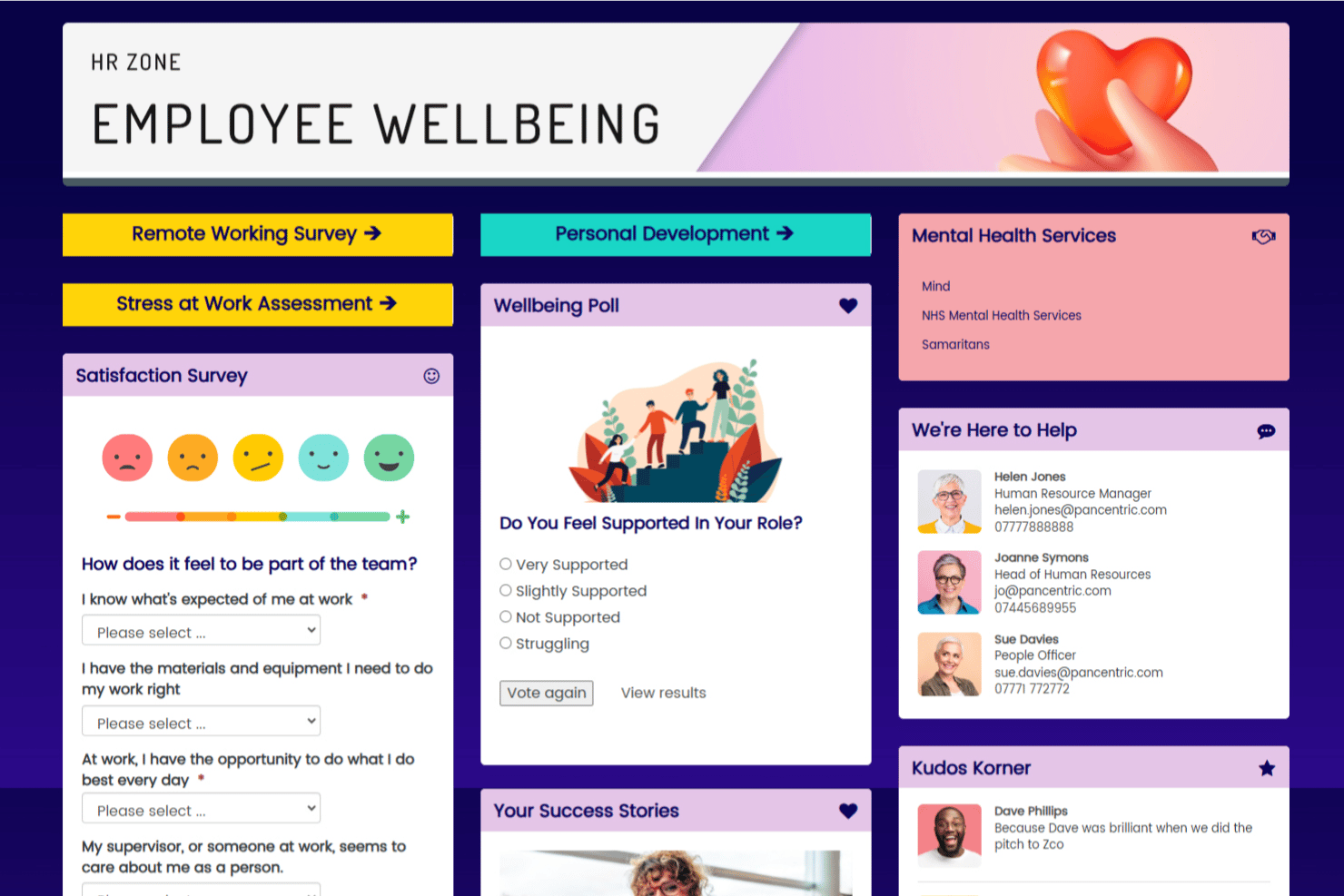
HUB is an employee intranet and knowledge management platform that centralizes company resources, documents, and communications in a single searchable workspace, with built-in content governance, federated search across cloud drives, and digital workplace tools.
Who Is HUB Best For?
HUB is a strong fit for UK-based HR and operations teams that need a governed, compliance-ready intranet with built-in people tools and ISO 27001-certified UK data hosting.
Why I Picked HUB
I picked HUB as one of the best because it's purpose-built for UK-based organisations that need their data to stay on home soil. All content is hosted in Google Cloud UK data centres in London, backed up nightly to Dublin, and covered by ISO 27001 certification. I particularly like the content governance layer: owners can set expiry dates on pages and receive notifications four weeks before they lapse, which keeps policy libraries and HR documentation accurate without relying on manual audits.
HUB Key Features
- Federated search: Search across HUB content, attached documents, and connected cloud drives—including SharePoint, OneDrive, Google Drive, Box, and Confluence—without moving files into HUB.
- Role-based access control: Configure access using more than 100 permissions, with page-level owners, editors, and viewers, plus separate development, staging, and live environments.
- Data collections: Build structured lists—such as supplier directories or product catalogs—directly within HUB for organized, searchable reference content.
- AI writing assistant: Suggests news headlines, teasers, and content improvements, with tone-of-voice controls and auto-corrections built into the editor.
HUB Integrations
HUB offers native integrations with SharePoint, OneDrive, Google Drive, Box, Confluence, Jira, Slack, Microsoft Teams, Zendesk, and Microsoft 365. SSO and user sync support includes Microsoft Entra ID, Google, OneLogin, and Okta; API availability isn’t stated.
Pros and Cons
Pros:
- Expiry alerts support policy review cycles
- Version rollback preserves document history
- Reviewers praise centralized policy repositories
Cons:
- Large content libraries may slow performance
- Search can miss relevant internal guidance

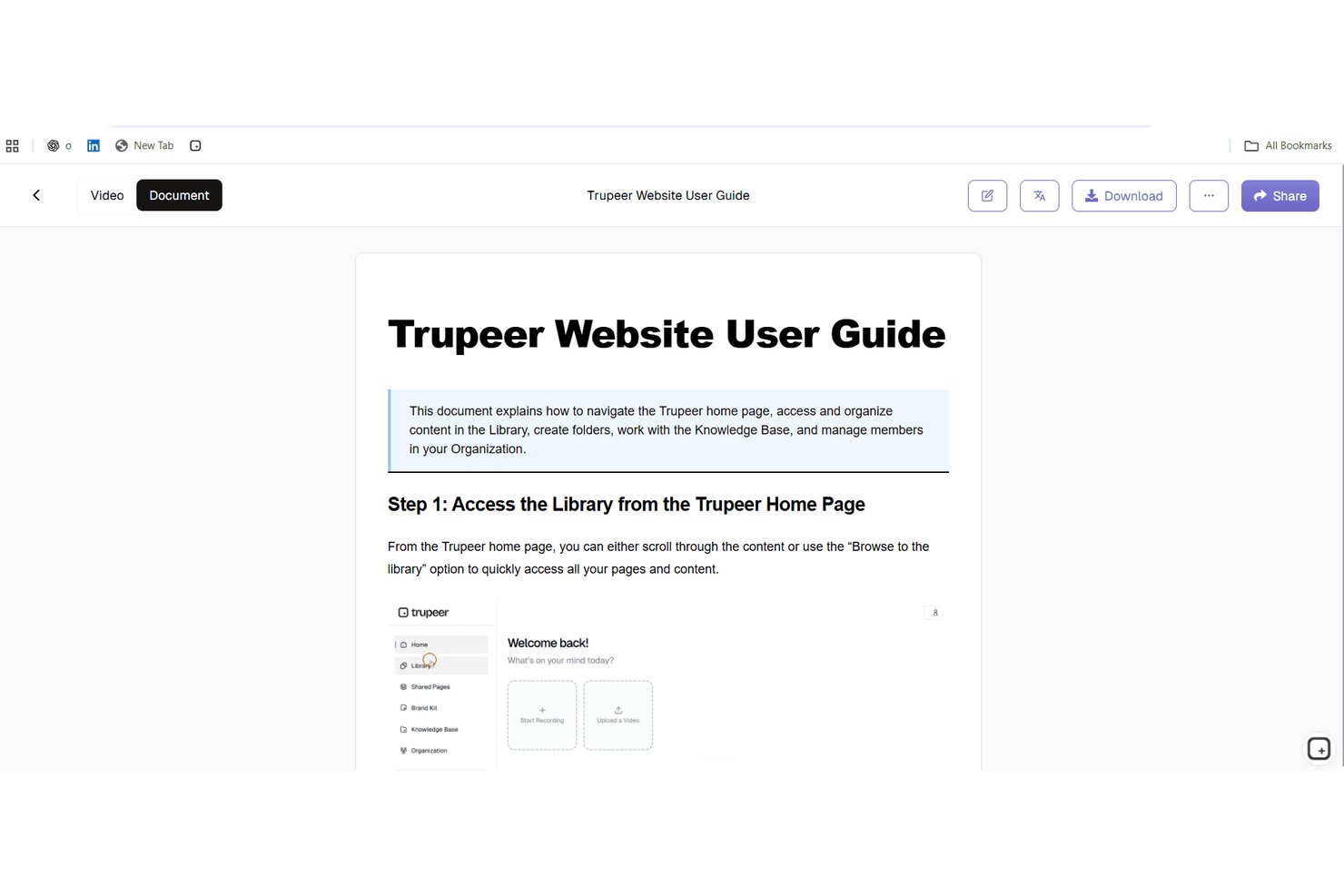
Trupeer is a video-first knowledge base platform that converts screen recordings into searchable SOPs, step-by-step guides, and AI-indexed video documentation.
Who Is Trupeer Best For?
Trupeer suits operations-focused teams that document processes heavily through screen recordings and need those videos instantly searchable alongside written SOPs.
Why I Picked Trupeer
Trupeer earns its spot on my shortlist because of how it handles video-based SOP search: ask a natural language question and it surfaces the exact timestamped clip from within your recorded walkthroughs, not just the document title. I picked it specifically for teams that store institutional knowledge in screen recordings, where a recorded onboarding session or process demo becomes fully searchable without any manual tagging. The AI auto-indexes every imported Loom or Zoom recording on upload, so your library of past retrospectives and training videos is immediately queryable.
Trupeer Key Features
- Approval workflow: Routes content through a structured review and sign-off process before articles or guides are published to the knowledge base.
- AI translation: Automatically dubs and subtitles content in 65+ languages from a single source recording, with bulk translation across 100+ languages on Enterprise.
- Content health checks: Monitors published knowledge base content for accuracy and freshness, flagging items that may need updating.
- Smart Blur PII redaction: Automatically detects and redacts personal information—names, emails, and dates of birth—from videos and documents before they're published.
Trupeer Integrations
Trupeer offers native integrations with Slack, Notion, Jira, and Confluence, plus Loom and Zoom imports. Enterprise customers can build custom integrations through the REST API, while MCP connects Trupeer with Claude and ChatGPT.
Pros and Cons
Pros:
- Native multilingual dubbing and subtitles included
- Converting screen recordings into SOPs is instant
- AI search surfaces exact video timestamps
Cons:
- Structure limits traditional wiki-style page hierarchies
- Lacks deep project management tool connectors

Slite
Best for collaborative team documentation
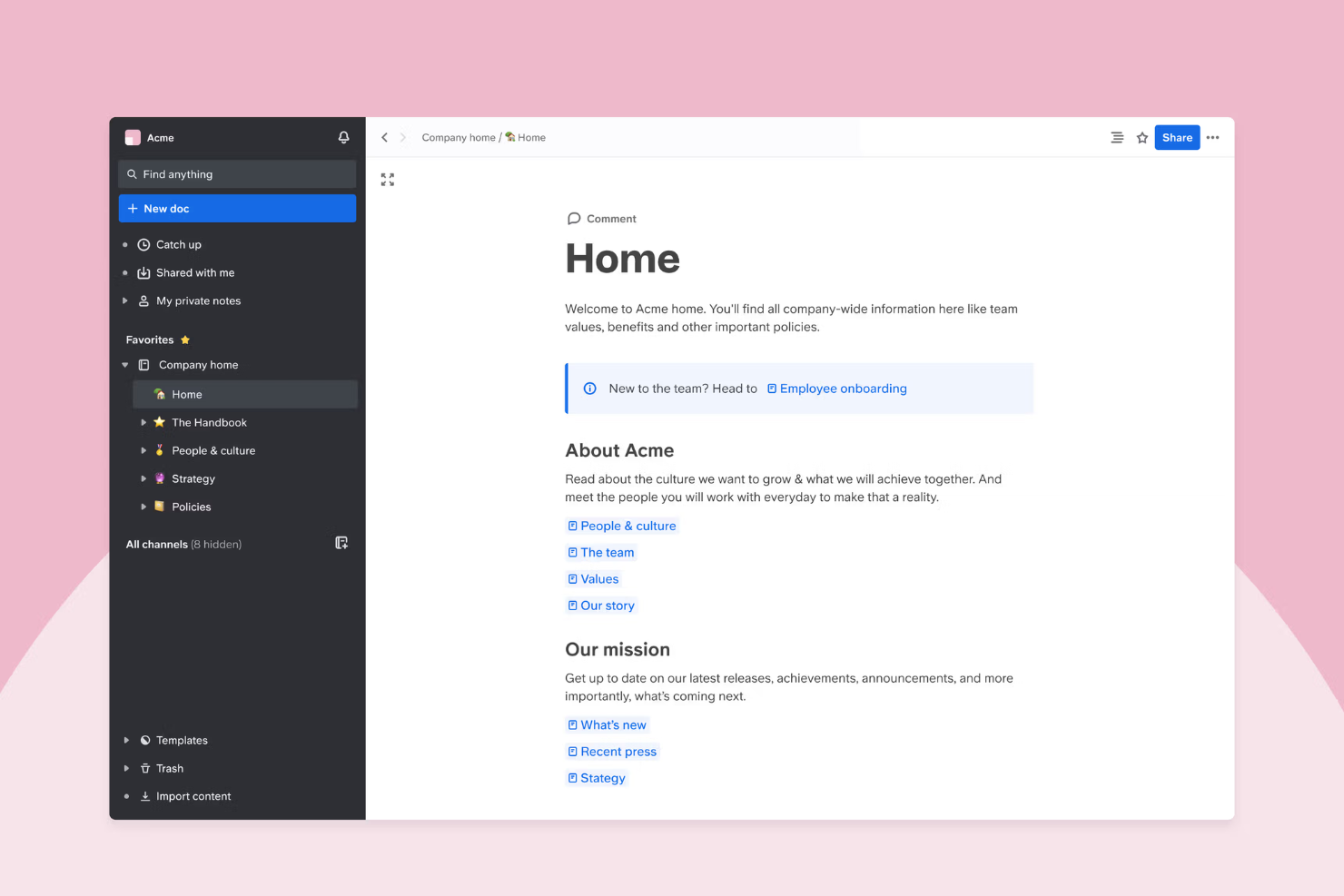
Slite is a knowledge base platform designed for fast-growing teams and enterprises that need a central place to capture, organize, and share internal documentation as their business scales.
Who Is Slite Best For?
Distributed teams and remote-first companies that need to keep documentation accessible and collaborative.
Why I Picked Slite
I picked Slite as one of the best knowledge management systems because it’s built for teams that need to co-author and update documentation together in real time. I like how channels and threads keep conversations tied to specific docs, so my team never loses context. Collaborative editing and commenting make it easy for everyone to contribute and refine knowledge as projects evolve, and version control means details don’t get lost with updated versions. This makes it easy to find related docs that can act as a single source of truth when troubleshooting, and for self-service, as team members can type in natural language to find related documentation when they need a quick answer or to look up company policies.
Slite Key Features
- Knowledge base templates: Choose from a library of ready-made templates for policies, onboarding, and project docs.
- Advanced search: Quickly find documents, pages, or keywords across your entire workspace.
- Access permissions: Set granular permissions for teams, guests, or individuals to control who can view or edit content.
- Version history: Track changes and restore previous versions of any document.
Slite Integrations
Slite offers native integrations with Slack, Google Drive, GitHub, Figma, Loom, and Zapier. An API is available for custom integrations.
Pros and Cons
Pros:
- User-friendly templates for onboarding and policies
- Threaded comments keep discussions organized in docs
- Real-time collaborative editing for distributed teams
Cons:
- No built-in workflow automation for approvals
- Limited advanced analytics for content usage

Nuclino
Best with real-time editing for fast-moving teams
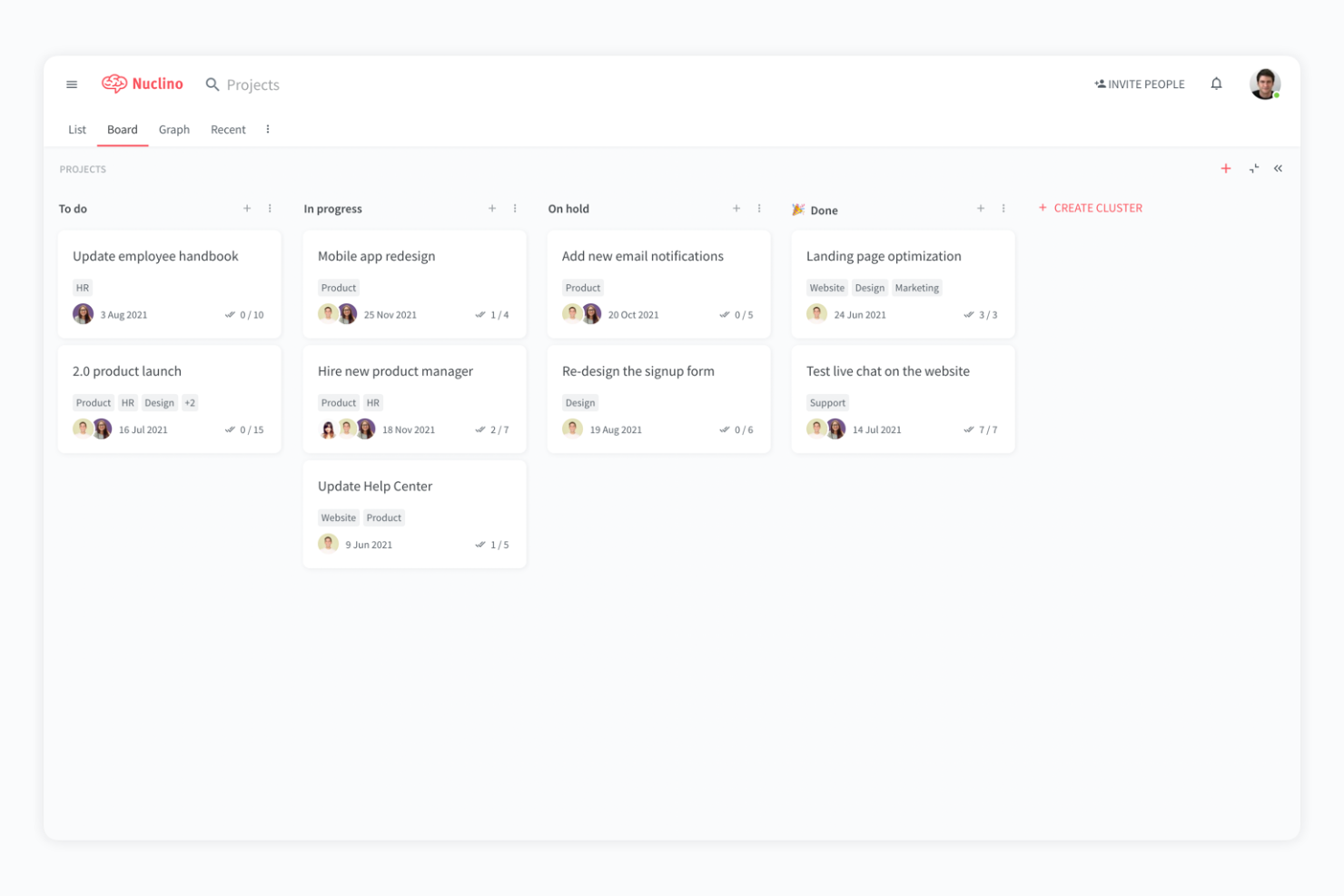
Nuclino is a unified workspace for teams in tech, product, and operations who need to organize knowledge, manage projects, and collaborate on documentation without the clutter of traditional wikis or the complexity of legacy intranets.
Who Is Nuclino Best For?
Fast-growing tech teams and startups that need to capture, update, and share knowledge as projects evolve.
Why I Picked Nuclino
I picked Nuclino as one of the best because I can watch my team edit and update content together in real time, which is essential when we’re moving fast on product launches or sprint planning. I like how every page auto-saves and instantly syncs changes, so there’s never confusion about which version is current. The visual graph view helps us map out relationships between topics, making it easy to connect related knowledge as our documentation grows.
Nuclino Key Features
- Hierarchical workspace organization: Structure content in workspaces, clusters, and items for clear navigation.
- Markdown support: Format text quickly using markdown syntax within every document.
- Instant search: Find pages, files, or keywords across all workspaces in seconds.
- Access permissions: Set granular read or edit rights for teams and individuals.
Nuclino Integrations
Nuclino offers native integrations with Google Drive, Slack, Microsoft Teams, YouTube, Vimeo, Miro, Lucidchart, Figma, and Zapier. An API is available for custom integrations.
Pros and Cons
Pros:
- Threaded comments keep discussions organized in docs
- Visual graph view maps knowledge relationships
- Real-time editing supports fast-paced collaboration
Cons:
- Fewer native integrations than major competitors
- Limited analytics for content engagement tracking

Best with AI-powered search capabilities
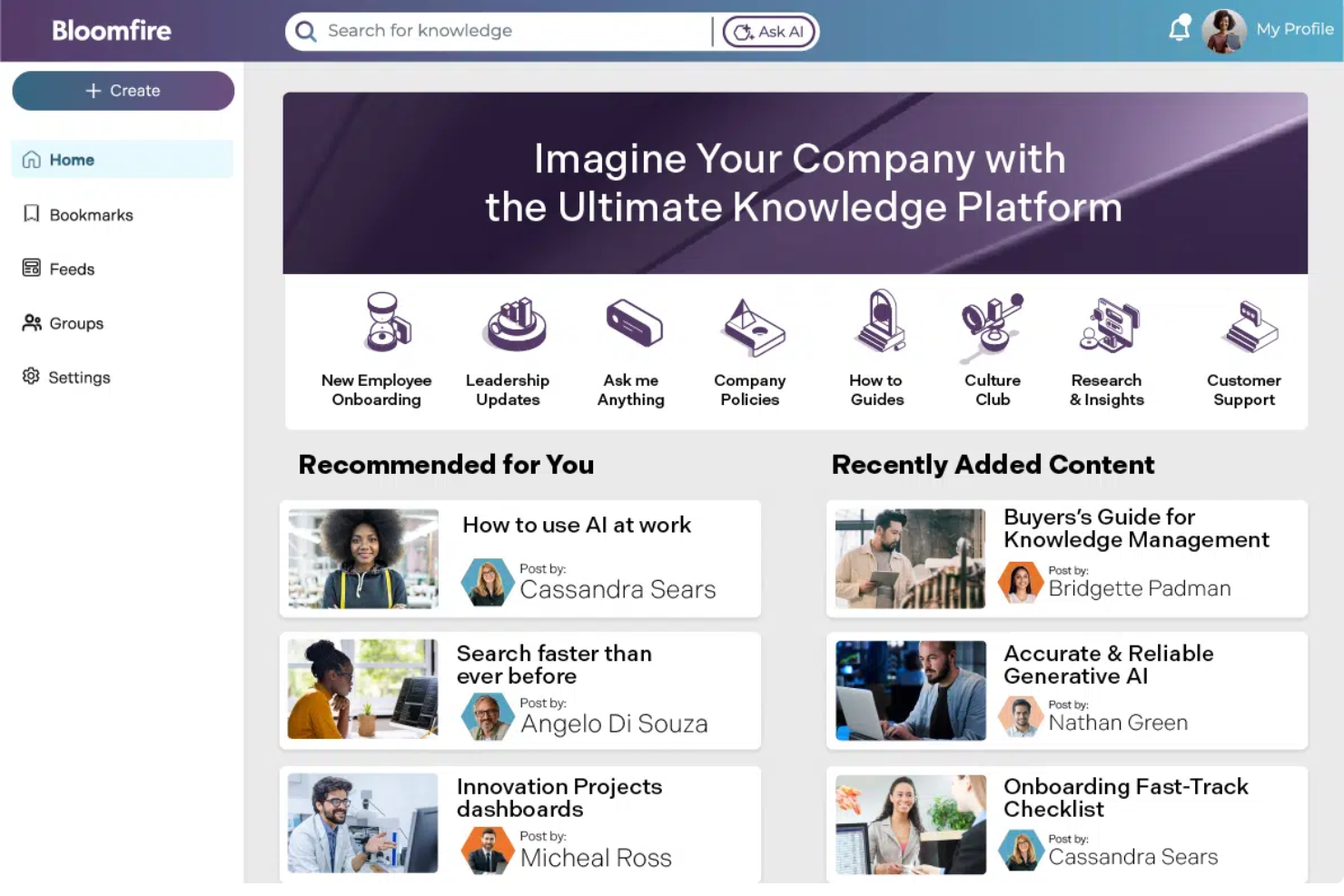
Bloomfire is an enterprise knowledge base platform built for customer support, sales, and operations teams who need to centralize company knowledge, make information easily searchable, and keep content organized as their business grows.
Who Is Bloomfire Best For?
Large customer support and operations teams who need fast, AI-driven access to company knowledge.
Why I Picked Bloomfire
I picked Bloomfire as one of the best because I can rely on its AI-powered search to surface relevant answers from across our knowledge base, even in video and audio files. I like using the automated tagging and content recommendations to keep information organized as our library grows. My team uses Bloomfire’s Q&A feature to capture tribal knowledge and make it accessible for everyone.
Bloomfire Key Features
- Content scheduling: Schedule posts to publish at specific times for planned knowledge sharing.
- Custom branding: Apply your company’s logo, colors, and themes to the knowledge base.
- Analytics dashboard: Track user engagement and content performance with built-in analytics.
- Permission management: Set granular access controls for users and groups.
Bloomfire Integrations
Bloomfire offers native integrations with Slack, Salesforce, Microsoft Teams, Google Drive, Dropbox, Box, Zendesk, and Zapier. An API is available for custom integrations.
Pros and Cons
Pros:
- Automated tagging improves content organization
- Q&A module captures tribal knowledge
- AI search indexes video, audio, and text
Cons:
- Limited export options for content migration
- No built-in workflow automation tools

Best for multi-format content publishing
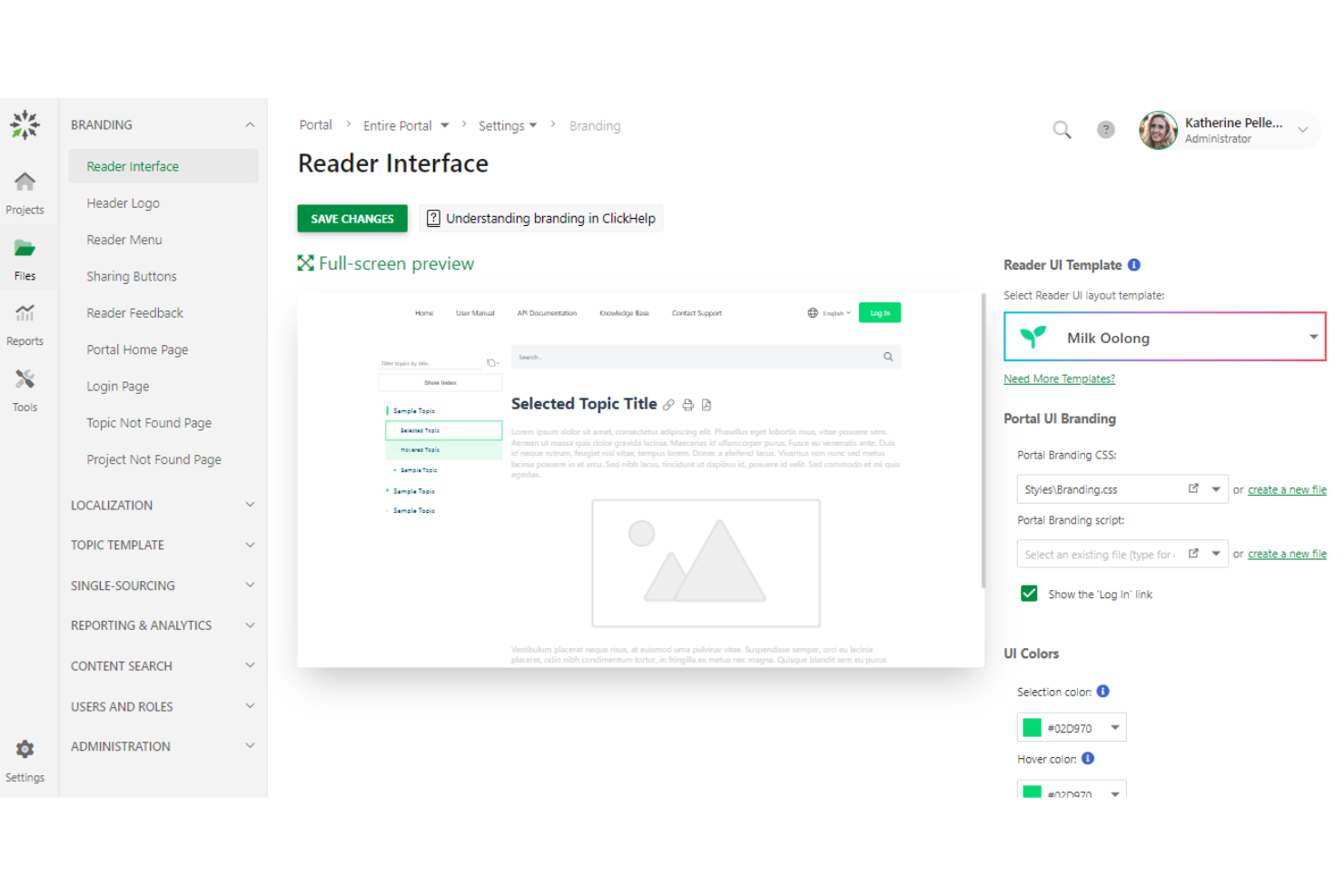
ClickHelp is a cloud-based documentation platform designed for technical writers, software companies, and support teams who need to create, manage, and publish knowledge bases and user guides for both internal and external audiences.
Who Is ClickHelp Best For?
Technical writers and documentation teams in software, SaaS, and IT companies needing to publish content in multiple formats.
Why I Picked ClickHelp
I picked ClickHelp because my team needs to publish knowledge base content in multiple formats like HTML5, PDF, and Word without extra conversion steps. I like that we can manage single-source content and push updates across all formats at once. In practice, that means we keep our documentation consistent for both internal and external users, no matter how they access it.
ClickHelp Key Features
- Role-based access control: Assign user roles and permissions for secure collaboration.
- Context-sensitive help widgets: Embed interactive help directly into your web applications.
- Versioning and branching: Manage multiple documentation versions and track changes over time.
- Full-text search: Enable users to quickly find relevant content across all documentation.
ClickHelp Integrations
ClickHelp offers native integrations with Google Analytics, Zendesk, Salesforce, Freshdesk, and Jira, and connects with Zapier. An API is available for custom integrations.
Pros and Cons
Pros:
- Context-sensitive help delivers support within applications
- Single-source authoring keeps content consistent across outputs
- Multi-format publishing supports diverse documentation needs
Cons:
- Customization options can be restrictive for advanced layouts
- Interface feels dated compared to newer tools
Best for integration with Atlassian tools
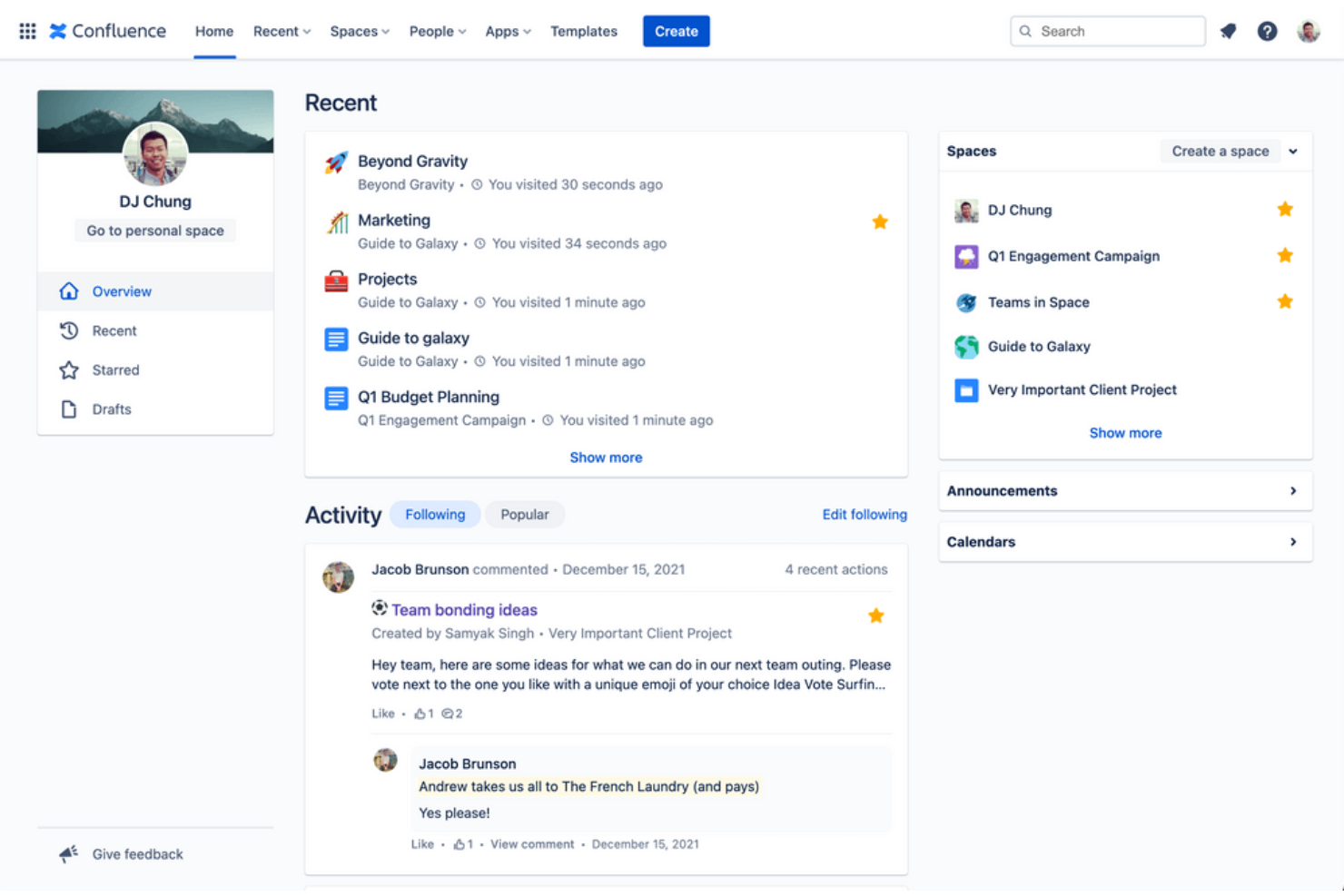
Confluence is a collaborative workspace used by product, engineering, and IT teams to organize, document, and share knowledge across fast-moving organizations that need a centralized, searchable knowledge base.
Who Is Confluence Best For?
Large product and engineering teams who need a centralized knowledge base tightly integrated with their project management tools.
Why I Picked Confluence
I picked Confluence because my team relies on its deep integration with Jira and Trello to keep project documentation and tickets tightly linked. I like that we can embed Jira issues directly into knowledge base pages and automate updates as work progresses. In practice, that means our documentation always reflects the latest project status without manual updates.
Confluence Key Features
- Page version history: Track and restore previous versions of any page.
- Advanced permissions: Set granular access controls for spaces, pages, and users.
- Templates library: Use pre-built templates for meeting notes, product requirements, and more.
- Inline comments: Add feedback and questions directly on specific sections of a page.
Confluence Integrations
Confluence offers 3,000+ native integrations through the Atlassian Marketplace, including Jira, Trello, Slack, Microsoft Teams, Google Drive, Dropbox, GitHub, Salesforce, ServiceNow, and Zapier. An API is available for custom integrations.
Pros and Cons
Pros:
- Extensive template library accelerates documentation creation
- Granular permissions support controlled content access
- Deep connection with project workflows keeps documentation relevant
Cons:
- Requires ongoing maintenance to prevent content sprawl
- Interface can feel cluttered for non-technical users

Archbee
Best for API documentation management

Archbee is a documentation platform built for software teams and SaaS companies who need to centralize technical knowledge, onboard developers, and manage complex product documentation in one place.
Who Is Archbee Best For?
Software teams and SaaS companies that need to document APIs, onboarding guides, and technical processes for internal or external audiences.
Why I Picked Archbee
I picked Archbee because my team needs a knowledge base that handles API documentation with built-in Swagger/OpenAPI support and live code samples. I like that we can embed interactive API explorers directly into our docs, so developers can test endpoints without leaving the page. In practice, that means our technical documentation is always up to date and actionable for both internal and external users.
Archbee Key Features
- Custom doc portals: Publish branded, public, or private documentation sites for your organization.
- Real-time collaboration: Multiple users can edit and comment on docs simultaneously.
- Granular access controls: Set permissions at the workspace, collection, or document level.
- Content blocks: Use pre-built blocks for diagrams, tables, code, and rich media in documentation.
Archbee Integrations
Archbee offers native integrations with Slack, GitHub, Google Analytics, Figma, Loom, and Zapier. An API is available for custom integrations.
Pros and Cons
Pros:
- Custom portals allow flexible documentation publishing
- Real-time collaboration enables faster content updates
- Built-in API documentation tools support technical teams
Cons:
- UI can feel limited for non-developer documentation needs
- Better suited for technical teams than general business users

Tettra
Best for Slack-integrated knowledge sharing
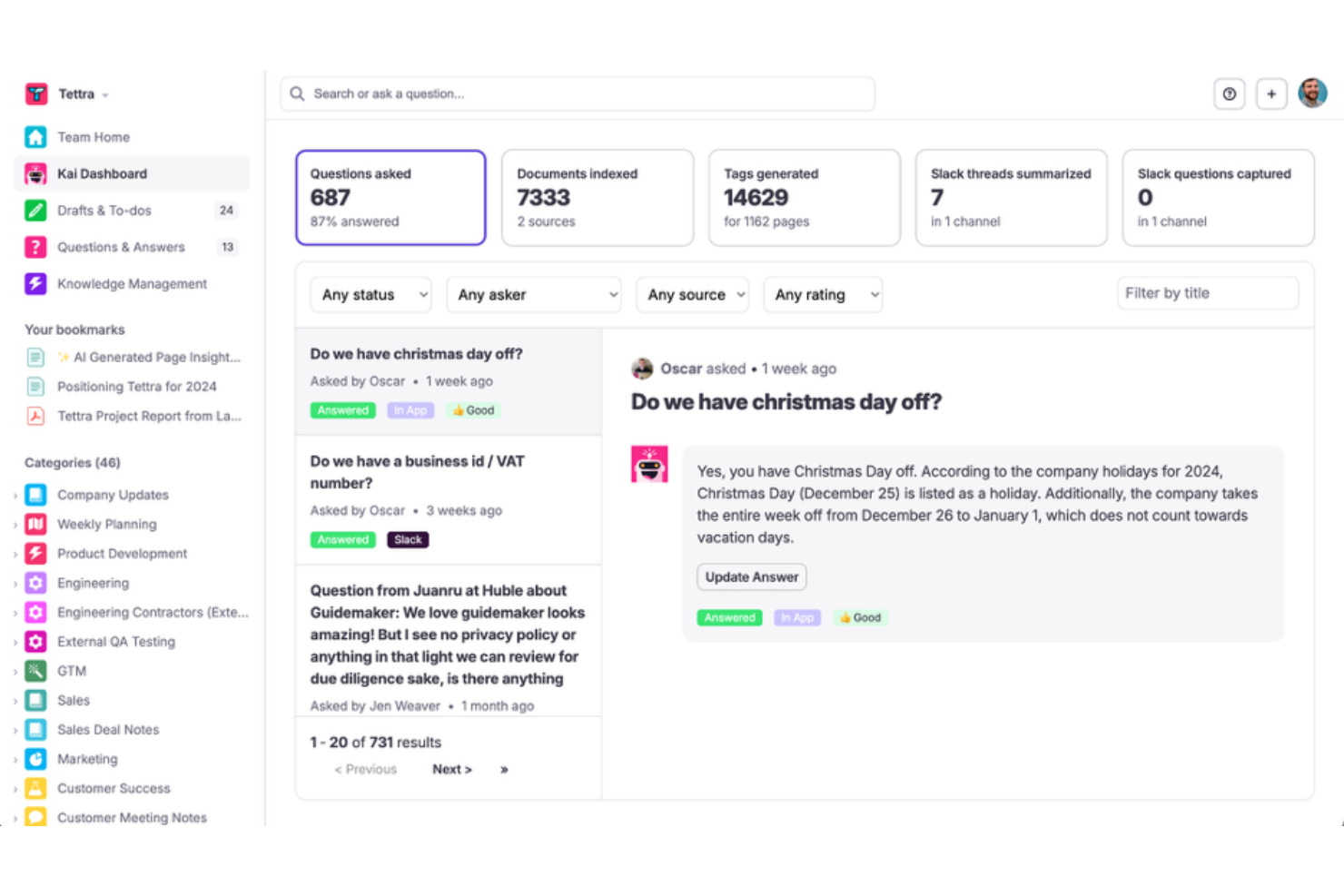
Tettra is a knowledge management platform designed for fast-moving teams who want to document, organize, and share company knowledge directly within their existing chat and collaboration workflows.
Who Is Tettra Best For?
Small to midsize teams who rely on Slack for daily communication and knowledge sharing.
Why I Picked Tettra
I picked Tettra as one of the best because I can answer questions from Slack and turn them into reusable knowledge articles without leaving the chat. I like how Tettra’s Slack integration lets my team quickly search, suggest, and update content right from our daily workflow. I also use the built-in knowledge request feature to crowdsource answers from subject matter experts when gaps come up.
Tettra Key Features
- Page version history: Track and restore previous versions of any knowledge page.
- Content verification: Assign experts to review and verify information for accuracy.
- Permissions management: Control access to spaces and pages by user or group.
- Templates library: Use pre-built templates to standardize documentation across your team.
Tettra Integrations
Tettra offers native integrations with Slack, Google Workspace, Microsoft Teams, GitHub, Zapier, and provides an API for custom integrations.
Pros and Cons
Pros:
- Knowledge requests streamline expert Q&A
- Content verification workflow supports information accuracy
- Slack integration enables instant knowledge sharing
Cons:
- Export options for content are limited
- Limited analytics for content engagement tracking
Diğer Kurumsal Bilgi Bankası Yazılımları
Kısa listeme giremeyen ancak yine de göz atmaya değer bazı ek kurumsal bilgi bankası yazılımı seçenekleri şunlardır:
- SharePoint
For Microsoft 365 ecosystem compatibility
- KnowledgeOwl
For customizable access permissions
- Guru
With browser extension for instant answers
- Slab
For structured knowledge organization
- Knowmax
With AI-powered content migration
- Helpjuice
For multilingual article management
- XWiki
For open-source extensibility


How I Evaluate Enterprise Knowledge Base Software
I split my evaluation into two layers: the baseline each tool must clear and the differentiators that separate a solid PMO wiki from a truly enterprise-grade knowledge platform.
Core Functionality (Table Stakes For This List)
When I'm selecting tools for my list, I rank each one on a scale from 0 (does not offer the functionality) to 5 (excels in this area) for each core functionality listed below. Then, I calculate the tool's total score into a percentage. Each tool needs to achieve a minimum total score of 65% to be considered for inclusion.
- Centralized Content Repository: I look for structured, multi-level workspaces where PMOs can organize playbooks, SOPs, and project templates by portfolio, program, or team.
- Enterprise Search: Finding a specific retrospective in a sea of project docs matters, so I evaluate full-text search quality, filtering by tags, and AI-assisted retrieval.
- Access Controls & Permissions: I check for granular RBAC, SSO/SAML support, and audit trails—especially how well a tool locks down sensitive program data from guest users.
- Collaborative Authoring & Versioning: Real-time co-editing and version history are key, like when multiple PMs update a shared RAID log and need to track who changed what.
- PM Tool Integrations: The knowledge base should connect with platforms like Jira, Asana, or Monday so teams can link project artifacts without constant context-switching.
- Content Governance & Analytics: I evaluate whether tools support review cycles, content ownership, and expiration alerts to prevent stale process docs from misleading teams.
Once I have a list of tools that meet the criteria, I consider what sets each platform apart.
Differentiating Factors (What Sets Vendors Apart)
Here's how I compare and contrast different vendors:
Standout Features
An AI knowledge assistant can save PMs hours by answering process questions directly from stored docs instead of forcing them to dig through nested pages. I also look for prebuilt template libraries—things like project charters, RAID logs, and retrospective formats—that help PMOs standardize delivery practices without building everything from scratch. Automated content verification matters too, since stale runbooks quietly become a liability across large programs.
Beyond Features
Security and compliance certifications like SOC 2 Type II and ISO 27001 carry real weight when a PMO handles sensitive program data across business units. I also evaluate licensing models closely—specifically whether a vendor offers read-only or guest seats for external stakeholders like contractors or sponsors who need visibility but not editing access. Implementation support is another factor I consider, especially migration tooling for teams moving off legacy wikis or SharePoint into a new platform.
Kurumsal Bilgi Bankası Yazılımı Nasıl Seçilir?
Uzun özellik listeleri ve karmaşık fiyatlandırma yapıları içinde kaybolmak kolaydır. Kendinize özgü yazılım seçim sürecinizi yürütürken odağınızı korumanıza yardımcı olmak için göz önünde bulundurmanız gereken faktörleri içeren bir kontrol listesi hazırladık:
| Faktör | Dikkat Edilmesi Gerekenler |
|---|---|
| Ölçeklenebilirlik | Platform, performans sorunları yaşamadan belge hacminizi ve kullanıcı sayısındaki zaman içindeki artışı karşılayabilecek mi? |
| Entegrasyonlar | Temel araçlarınıza (ör. bilet sistemi, CRM, SSO) yerel olarak bağlanabiliyor mu, yoksa geçici çözümler mi gerekiyor? |
| Özelleştirilebilirlik | İş akışlarını, markalamayı ve izinleri kuruluşunuzun yapısına ve ihtiyaçlarına uyacak şekilde düzenleyebilir misiniz? |
| Kullanım kolaylığı | Ekipleriniz bunu hızlı bir şekilde benimseyecek mi, yoksa eğitim ve destek kaynaklarınızı sürekli tüketen bir yük mü olacak? |
| Uygulama ve işe alıştırma | İçeriği taşımak, kullanıcıları ayarlamak ve ekipleri verimli hâle getirmek ne kadar sürecek? Taşıma araçları veya hizmetleri mevcut mu? |
| Maliyet | Kullanımınız arttıkça fiyatlandırma katmanları açık ve öngörülebilir mi? Gizli ücretlere veya kullanıcı bazlı fiyatlandırma artışlarına dikkat edin. |
| Güvenlik önlemleri | Araç, uyumluluk gereksinimlerinizi karşılamak için SSO, şifreleme ve denetim günlükleri gibi kurumsal düzeyde güvenlik özellikleri sunuyor mu? |
| Destek erişilebilirliği | Çalışma saatleriniz boyunca ve tercih ettiğiniz kanallarda hızlı yanıt veren desteğe erişiminiz olacak mı? |
Kurumsal Bilgi Bankası Yazılımı Nedir?
Kurumsal bilgi bankası yazılımı, kuruluşların dahili veya harici belgeleri geniş ölçekte oluşturmasına, düzenlemesine ve paylaşmasına yardımcı olan dijital bir platformdur. Bu sistemler; ekiplerin ve müşterilerin doğru bilgilere hızlıca ulaşabilmesini sağlamak için birden fazla kullanıcı rolünü, gelişmiş izinleri ve gelişmiş arama özelliklerini destekler. Büyük miktarda içeriği, karmaşık iş akışlarını ve diğer iş sistemleriyle entegrasyonu yönetmek üzere tasarlanmıştır.
Kurumsal Bilgi Tabanı Yazılımının Özellikleri
Kurumsal bilgi tabanı yazılımı seçerken aşağıdaki temel özelliklere dikkat edin:
- Role dayalı erişim denetimi: Hassas içeriği korumak ve iş birliğini yönetmek için yazarlar, editörler ve okuyucular gibi kullanıcılara farklı izinler atayın.
- Tam metin araması: Kullanıcıların ekler ve meta veriler de dahil olmak üzere tüm içerikte arama yaparak ilgili makaleleri veya belgeleri hızlıca bulmasını sağlayın.
- Sürüm geçmişi: Makalelerde zaman içinde yapılan değişiklikleri izleyin, önceki sürümleri geri yükleyin ve uyumluluk ile kalite kontrolü amacıyla belirli düzenlemeleri kimin yaptığını denetleyin.
- Çoklu formatta yayımlama: Farklı kitle ihtiyaçlarını ve dağıtım kanallarını karşılamak için içeriği HTML, PDF ve Word gibi çeşitli formatlarda yayımlayın.
- İçerik kategorilendirme: Kullanıcıların bilgilere göz atmasını ve bunları bulmasını kolaylaştırmak için makaleleri kategoriler, etiketler veya klasörler halinde düzenleyin.
- Analiz ve raporlama: Bilgi eksikliklerini belirlemek ve belgeleri iyileştirmek için kullanım modellerini, arama sorgularını ve makale performansını izleyin.
- İş akışı yönetimi: İçeriğin yayımlanmadan önce doğruluğunu ve tutarlılığını sağlamak için inceleme, onay ve yayımlama iş akışları oluşturun.
- Entegrasyon özellikleri: Bilgi paylaşımını kolaylaştırmak için bilet sistemleri, CRM platformları veya sohbet uygulamaları gibi diğer iş araçlarına bağlanın.
- Özel markalama: Bilgi tabanınızın görünümünü ve kullanım deneyimini kuruluşunuzun marka kimliği ve kullanıcı deneyimi standartlarıyla uyumlu hale getirin.
- Bağlama duyarlı yardım: Yardım bileşenlerini veya araç ipuçlarını doğrudan uygulamalarınıza yerleştirerek kullanıcılara ihtiyaç duydukları yerde ilgili bilgileri sunun.
Kurumsal Bilgi Tabanı Yazılımının Faydaları
Kurumsal bilgi tabanı yazılımını uygulamak, ekibiniz ve işletmeniz için çeşitli faydalar sağlar. Yararlanabileceğiniz birkaç fayda şunlardır:
- Bilgilere daha hızlı erişim: Tam metin araması ve içerik kategorilendirme, kullanıcıların e-postaları veya dosyaları tek tek incelemek zorunda kalmadan ihtiyaç duydukları yanıtları hızlıca bulmasına yardımcı olur.
- Tutarlı belgeler: Sürüm geçmişi ve iş akışı yönetimi, kuruluşunuz genelinde yalnızca onaylanmış ve güncel içeriğin yayımlanmasını sağlar.
- Geliştirilmiş iş birliği: Role dayalı erişim denetimi ve çok kullanıcılı düzenleme, ekiplerin belgeleri güvenli bir şekilde birlikte yazmasını ve incelemesini kolaylaştırır.
- Ölçeklenebilir bilgi paylaşımı: Çoklu formatta yayımlama ve entegrasyon özellikleri, işletmeniz büyüdükçe bilgileri birden fazla kanal ve platform üzerinden dağıtmanıza olanak tanır.
- Eyleme dönüştürülebilir içgörüler: Analiz ve raporlama özellikleri bilgi eksikliklerini ve popüler konuları öne çıkararak belgelerinizi sürekli olarak iyileştirmenize yardımcı olur.
- Gelişmiş güvenlik: Gelişmiş izinler ve denetim izleri, hassas bilgileri korur ve iç ve dış standartlara uyumluluğu destekler.
- Daha iyi kullanıcı deneyimi: Özel markalama ve bağlama duyarlı yardım, kullanıcıların ihtiyaç duyduğu yerde ilgili bilgileri tanıdık ve erişilebilir bir formatta sunar.
Kurumsal Bilgi Tabanı Yazılımının Maliyetleri ve Fiyatlandırması
Kurumsal bilgi tabanı yazılımı seçmek, sunulan çeşitli fiyatlandırma modellerinin ve planların anlaşılmasını gerektirir. Maliyetler özelliklere, ekip büyüklüğüne, eklentilere ve diğer unsurlara göre değişir. Aşağıdaki tablo, kurumsal bilgi tabanı yazılımı çözümlerinde yaygın planları, bu planların ortalama fiyatlarını ve genellikle sunulan özellikleri özetlemektedir:
Kurumsal Bilgi Tabanı Yazılımı İçin Plan Karşılaştırma Tablosu
| Plan Türü | Ortalama Fiyat | Yaygın Özellikler |
|---|---|---|
| Ücretsiz Plan | $0 | Temel makale oluşturma, sınırlı depolama, basit arama ve topluluk desteği. |
| Kişisel Plan | $5-$15/kullanıcı/ay | Tek kullanıcı erişimi, temel analizler, sınırlı entegrasyonlar ve e-posta desteği. |
| İşletme Planı | $15-$40/kullanıcı/ay | Çok kullanıcılı iş birliği, gelişmiş izinler, iş akışı yönetimi, entegrasyonlar ve raporlama araçları. |
| Kurumsal Plan | $40-$100/kullanıcı/ay | Özel markalama, SSO, API erişimi, gelişmiş güvenlik, özel destek ve uyumluluk özellikleri. |
Kurumsal Bilgi Tabanı Yazılımı SSS
Kurumsal bilgi tabanı yazılımı hakkında sık sorulan soruların bazı yanıtları:
Kurumsal bilgi tabanı yazılımı büyük kuruluşları nasıl destekler?
Kurumsal bilgi tabanı yazılımı, gelişmiş izinler, ölçeklenebilir içerik yönetimi ve diğer iş sistemleriyle entegrasyon sunarak büyük kuruluşları destekler. Bu sayede ekipler yüksek miktarda dokümantasyonu yönetebilir, erişimi denetleyebilir ve departmanlar arasında tutarlılığı koruyabilir.
Mevcut dokümantasyonu kurumsal bilgi tabanı yazılımına taşıyabilir misiniz?
Evet, çoğu kurumsal bilgi tabanı yazılımı içe aktarma araçları veya geçiş hizmetleri sunar. Bunlar, makaleleri, dosyaları ve meta verileri eski sistemlerden ya da diğer platformlardan aktarmanıza yardımcı olur; böylece geçiş sırasında manuel iş yükünü azaltır ve kesinti süresini en aza indirir.
Kurumsal bilgi tabanı yazılımında hangi güvenlik özelliklerini aramalıyım?
SSO, role dayalı erişim denetimi, şifreleme ve denetim günlükleri gibi özellikleri arayın. Bunlar hassas bilgileri korumaya, yalnızca yetkili kullanıcıların belirli içeriklere erişebilmesini sağlamaya ve kurum içi ve kurum dışı standartlara uyumu desteklemeye yardımcı olur.
Entegrasyonlar kurumsal bilgi tabanı yazılımının değerini nasıl artırır?
Entegrasyonlar, bilgi tabanınızı destek taleplerini yönetme sistemleri, CRM platformları ve sohbet uygulamaları gibi araçlara bağlar. Bu, iş akışlarını kolaylaştırır, yinelenen işleri azaltır ve bilgilerin ekiplerinizin hâlihazırda çalıştığı yerlerden erişilebilir olmasını sağlar.
Kurumsal bilgi tabanının görünümünü ve tarzını özelleştirmek mümkün mü?
Evet, çoğu kurumsal bilgi tabanı platformu özel markalama seçenekleri sunar. Kuruluşunuzun kimliğiyle uyumlu olması ve tutarlı bir kullanıcı deneyimi sağlaması için logoları, renkleri ve yerleşimleri ayarlayabilirsiniz. Platformun kendisi üzerinde daha kapsamlı denetim ihtiyacı olan ekipler \u003ca href=\u0022https://thedigitalprojectmanager.com/tools/best-open-source-knowledge-base-software/\u0022\u003eaçık kaynaklı bilgi tabanı seçeneklerini\u003c/a\u003e de değerlendirebilir.