

2026 İçin En İyi 10 Serbest Çalışan Proje Yönetimi Yazılımı

10 En İyi Serbest Çalışan Proje Yönetimi Yazılımları Kısa Listesi


Serbest çalışan olarak projeleri yönetmek; çoğu zaman eksiksiz bir proje yönetimi ekibinin desteği olmadan birden fazla müşteri, teslim tarihi ve iş akışıyla aynı anda ilgilenmek anlamına gelir. Ancak serbest çalışanlara yönelik proje yönetimi yazılımları bu durumu daha az bunaltıcı hâle getirir. Bu araçlar; görev yönetimini, müşteri iş birliğini ve faturalandırmayı kolaylaştırarak ayrıntıların peşinden koşmak yerine harika işler sunmaya odaklanmanıza yardımcı olur. Ancak bu kadar çok seçenek varken doğru olanı nasıl seçebilirsiniz?
Serbest çalışanlar için en iyi çözümleri belirlemek amacıyla çeşitli araçları test ettim ve bunların zaman takibi, görev otomasyonu ve sorunsuz iletişim gibi temel özellikleri sunduğundan emin oldum.
Why Trust Our Software Recommendations
Our team has been testing and reviewing software since 2012. As project managers ourselves, we know how difficult—and important—it is to choose the right software.
For this guide, we evaluated tools using hands-on testing and independent research, scoring tools using our selection criteria. We also draw on insights from industry thought leaders and practicing project management experts.
Our reviews reflect our human editorial judgment, not a sales pitch.
Expert reviewers:
Serbest Çalışan Proje Yönetimi Yazılımları Karşılaştırma Tablosu
Genel bakışlarda az önce ele aldığımız araçları karşılaştırabileceğiniz bir tabloyu burada bulabilirsiniz.
Score legend (out of 5)
- Excellent 4.5–5
- Good 4–4.4
- Average 3–3.9
- Below average 2–2.9
- Poor 1–1.9
| Tool | Starting Price | Website | |||||||
|---|---|---|---|---|---|---|---|---|---|
|
Best for small teams with a limited budget |
3.2
out of 5
|
4 | 2 | 4 | 4 | 3 | 2 |
Pricing upon request Free plan + 15-day trial + demo available |
Website |
|
Best for client work with built-in billing |
4.0
out of 5
|
4 | 3 | 5 | 4 | 4 | 4 |
$9.99/user/month Free plan + 14-day free trial + free demo available |
Website |
|
Best for freelancers managing client work end-to-end |
4.0
out of 5
|
4 | 4 | 4 | 4 | 4 | 4 |
$9/user/month 7-day free trial |
Website |
|
Best for businesses seeking features on a tight budget |
3.7
out of 5
|
4 | 4 | 4 | 4 | 3 | 3 |
$3.5/user/month 14-day free trial + free demo available |
Website |
|
Best for freelancers billing clients from tracked time |
4.0
out of 5
|
4 | 5 | 5 | 2 | 4 | 4 |
$19/month 7-day free trial |
Website |
|
Best for freelancers managing proposals to payment |
3.7
out of 5
|
4 | 4 | 4 | 3 | 4 | 3 |
$10/month Free demo + 14-day free trial available |
Website |
|
Best for client-facing project collaboration |
2.7
out of 5
|
3 | 1 | 4 | 2 | 3 | 3 |
$19/month 14-day free trial available |
Website |
|
Best for customizable project views |
3.3
out of 5
|
4 | 1 | 5 | 3 | 4 | 3 |
$10/user/month Free plan + free demo available |
Book Demo |
|
Best for growing from solo to small agency |
4.0
out of 5
|
5 | 4 | 5 | 4 | 3 | 3 |
$9.90/month Free plan + 15-day free trial available |
Website |
|
Best for agency-scale financial tracking |
4.3
out of 5
|
5 | 4 | 5 | 5 | 4 | 3 |
$10/user/month 14-day free trial |
Book Demo |


En İyi 10 Serbest Çalışan Proje Yönetimi Yazılımına Genel Bakış
Aşağıda, serbest çalışanlar için en iyi proje yönetimi yazılımlarını inceliyorum. Her biri için ekran görüntülerine, öne çıkan özelliklere, entegrasyonlara, fiyatlandırma ve deneme süresi bilgilerine, ayrıca artı ve eksilerine yer verdim.

Best for small teams with a limited budget
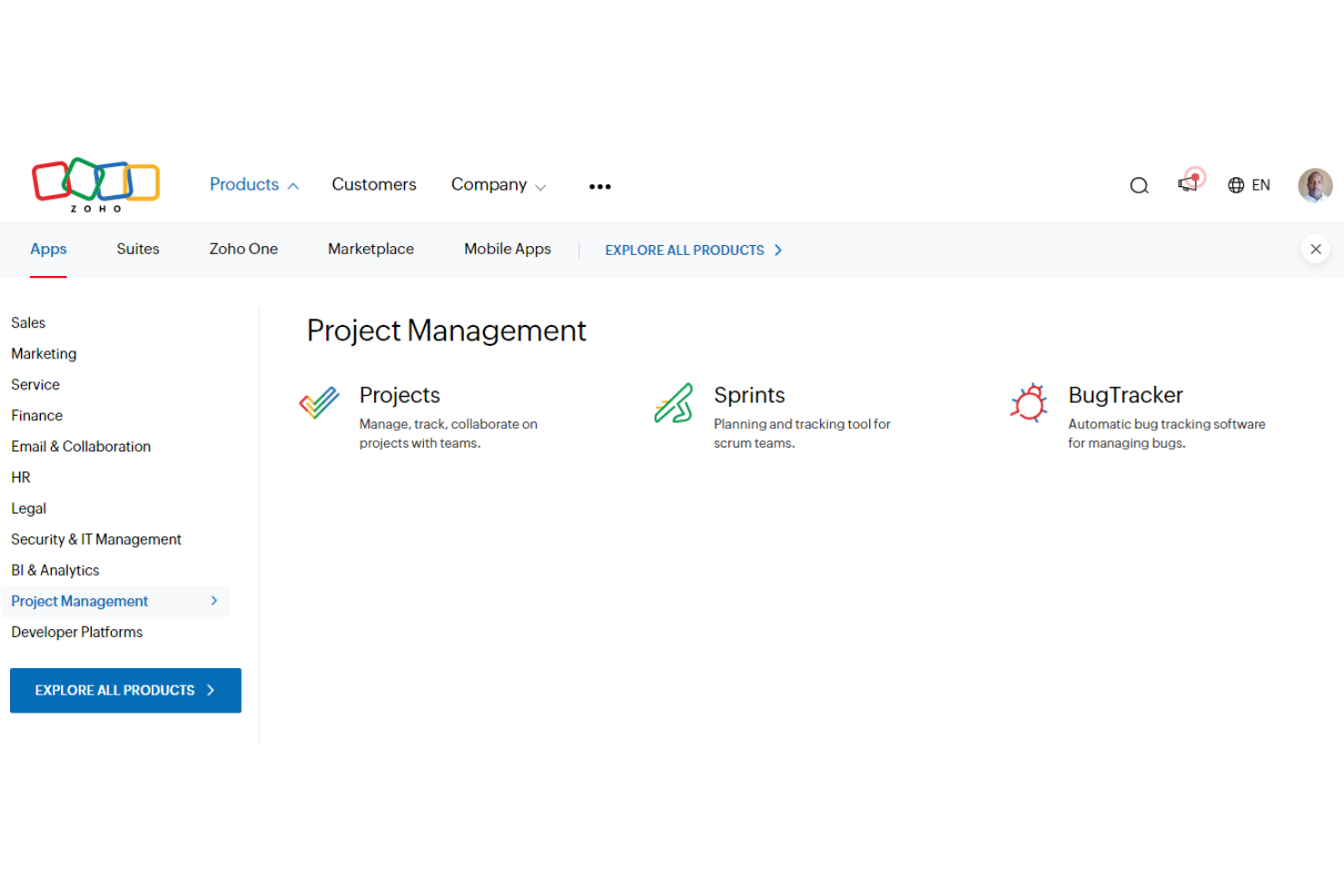
Zoho Projects is a project management platform that enables project managers to organize and budget their projects. This includes creating tasks, assigning them to team members, estimating costs, and tracking progress.
Why I picked Zoho Projects: Zoho Projects is one of the top-notch simple project management software that streamlines upcoming work and tasks. It provides all the essential tools for project management, such as Gantt charts, resource management tools, and timesheets at an affordable cost.
Zoho Projects is easy to use, but it may take a while to understand all its features fully. I found this platform to be an ideal choice for small teams with limited funds.
Zoho Projects Standout Features and Integrations
Standout features include time-tracking, Gantt charts for visualizing data, file management systems, and extensive integration capabilities. Zoho project stood out as one of the simple and easy-to-use platforms to organize tasks and projects with a single click.
Integrations include Google Calendar, Google Tasks, Google Spreadsheets, Google Drive, Microsoft Excel, OneDrive, Outlook Calendar, Office 365, Microsoft Teams, Dropbox, and Slack. There is also an integration with Zapier that you can use to connect to thousands of additional applications (at an additional cost).
Pros and Cons
Pros:
- Task and project tracking is effective.
- Billing and time-tracking capabilities are great functionalities
- The pricing is reasonable and convenient
Cons:
- The functionality of the dashboard lacks quality
- Searching for tasks requires improvement
New Product Updates from Zoho Projects

Zoho Projects Adds QuickBooks Online and Xero Integrations
Zoho Projects now connects with QuickBooks Online and Xero, bringing project work and accounting workflows closer together. Manage project-related billing and financial tasks with fewer app switches. For more information, visit Zoho Projects’ official site.
 .
Best for client work with built-in billing
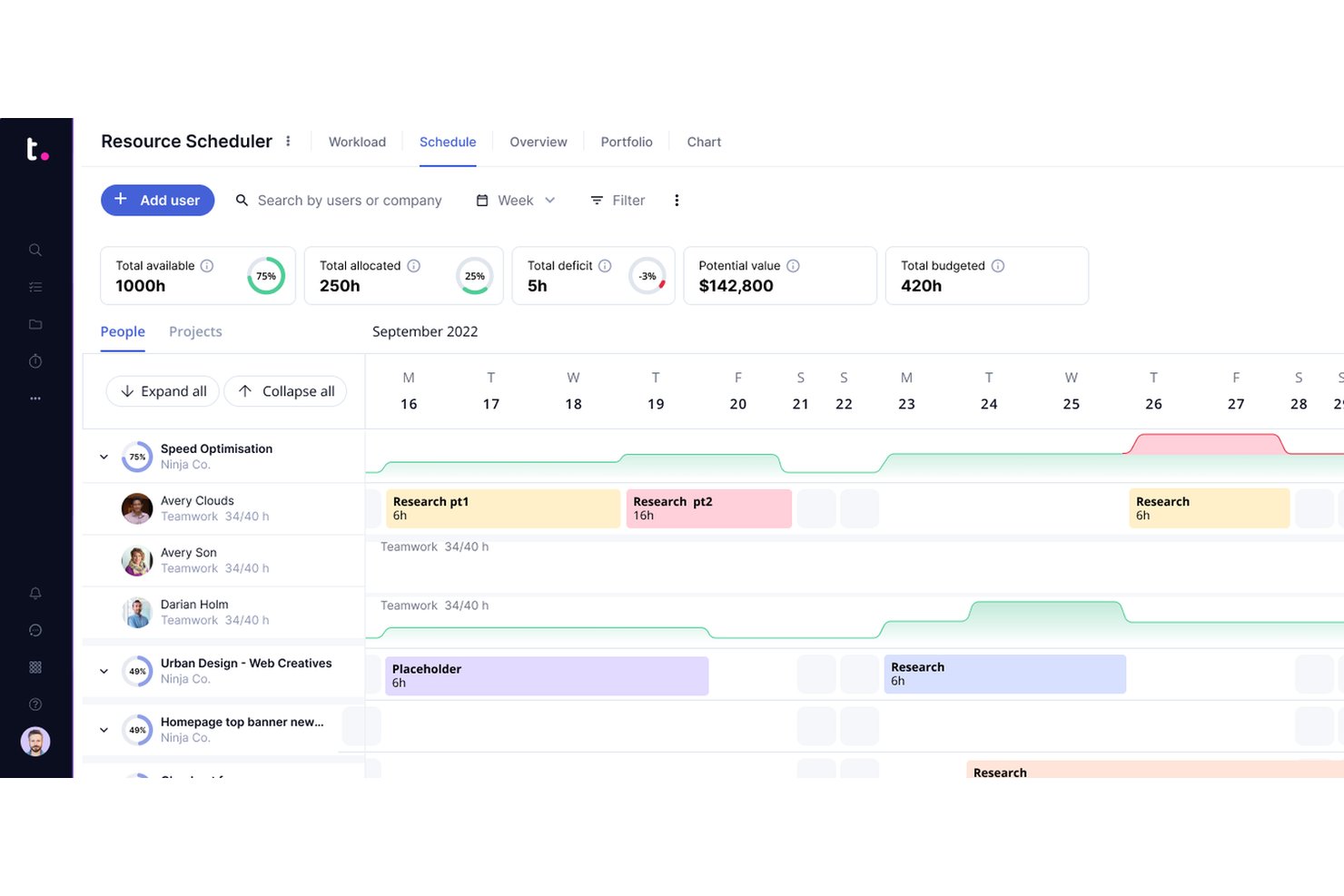
Teamwork.com is a client work management platform that combines project organization, time tracking, invoicing, budget management, and client collaboration tools.
Who Is Teamwork.com Best For?
Teamwork.com is a strong fit for small agencies and client-facing teams that need to track billable hours, manage multiple client projects, and generate invoices from logged time—all in one place.
Why I Picked Teamwork.com
I picked Teamwork.com as one of the best because it's purpose-built for client work, with billing baked directly into the project layer. I love that you can log billable hours against specific tasks, then build an invoice from those exact time entries without ever leaving the platform. The Proofs feature is also genuinely useful: clients can review deliverables, leave feedback, and sign off on revisions in a structured approval workflow that keeps everything on the project record.
Teamwork.com Key Features
- Workload and capacity planning: View your team's workload across projects and reassign tasks to manage bottlenecks before they affect delivery.
- Automation builder: Set up trigger-based automations to move tasks through workflow stages, send notifications, or create follow-up tasks automatically.
- Project templates: Save existing projects as reusable templates so you can spin up new client engagements with consistent structure.
- Resource forecasting: Plan and allocate resources to upcoming projects, including tentative work, before deals are confirmed.
Teamwork.com Integrations
Teamwork.com offers 150+ integrations, including Slack, Harvest, Xero, QuickBooks, FreshBooks, Google Drive, Dropbox, HubSpot, and Zapier. An API and webhooks support custom integrations.
Pros and Cons
Pros:
- Budget reports reveal project profitability
- Client proofs keep approvals with deliverables
- Billable time ties directly to client projects
Cons:
- Invoices lack integrated online payment collection
- Paid plans require multiple seats

Bonsai
Best for freelancers managing client work end-to-end
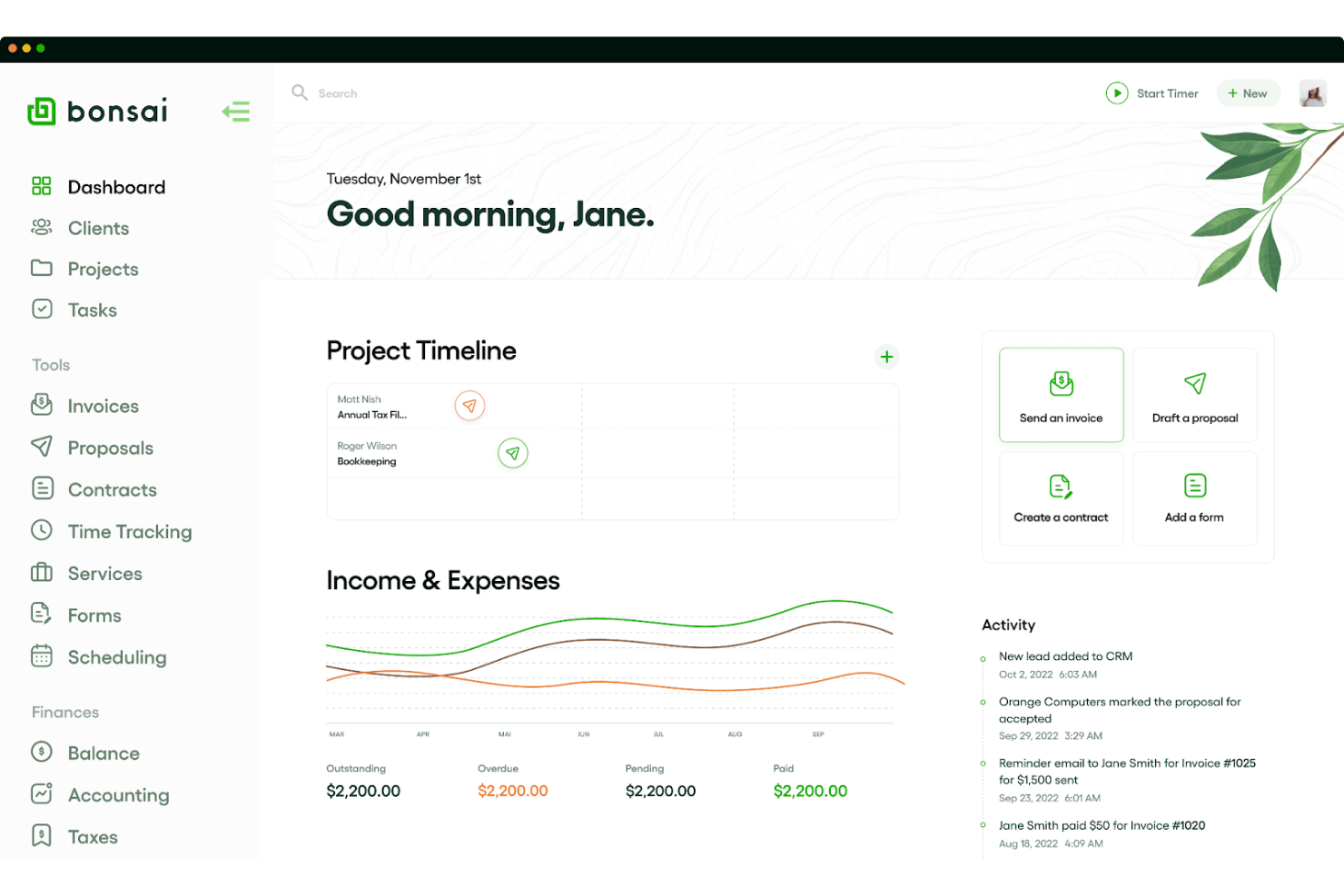
Bonsai is a robust tool used by over 500,000 freelancers and agencies. It is an all-inclusive workflow management solution that enables self-employed people to monitor clients, create invoices, receive payments, and handle tax-related matters.
Why I picked Bonsai: This tool has user-friendly time tracking and workflow features that streamline and automate business operations. It is particularly best for freelancers and small agencies to help them create and manage their businesses.
For me, I found this tool so easy to use and might save a lot of time when managing invoices. Using this tool definitely makes it easier to focus on projects.
Bonsai Standout Features and Integrations
Standout features that make this platform stand out from competitors include CRM features, which help track leads and existing clients. In the client's menu, add your contacts and tag them as clients or leads. You can also easily track their progress in your workflow.
Integrations include ClickUp, Gmail, Google Sheets, Google Drive, Trello, QuickBooks Online, Google Calendar, Slack, HubSpot CRM, Xero, and more. Additionally, you can access thousands of apps using a paid subscription with Zapier. And if you are interested in building custom integrations, it has an API available for it too.
Pros and Cons
Pros:
- Multiple payment and payout alternatives
- Use client portals to provide user-friendly interfaces for clients
- Easily handle projects and tasks
- Create and send professional proposals and invoices to potential clients
Cons:
- Automated expense tracking limited to US and Canada
- Payment options depend on the location
- Limited only in the English language

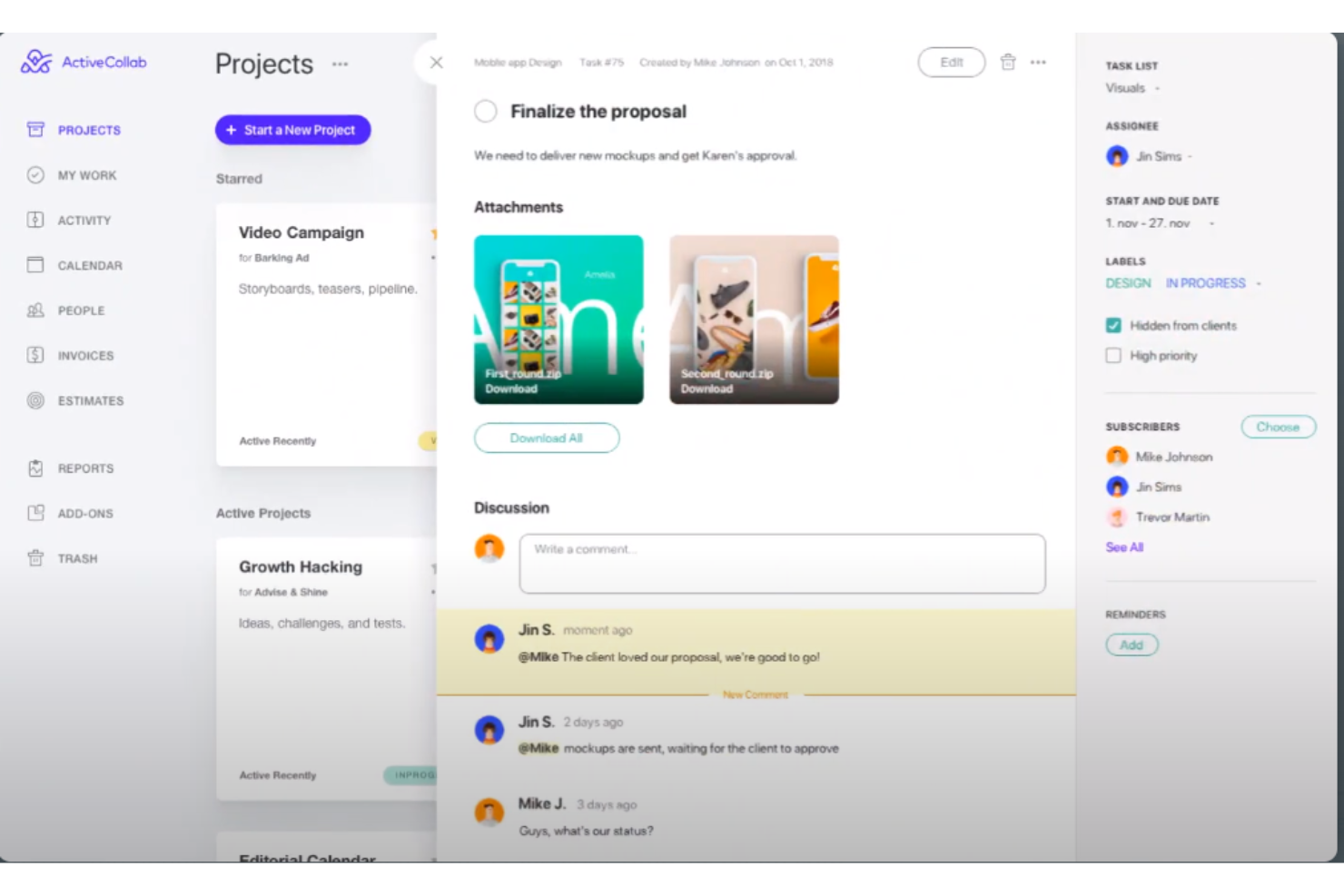
ActiveCollab is an integrated project management software that automates busy work and helps you arrange your work into tasks and subtasks, establish priorities, and work together with your team and clients in real-time.
Why I picked ActiveCollab: I picked ActiveCollab for its extensive features and easy-to-use interface. It provides the flexibility to create unlimited projects, enabling freelancers to handle multiple projects simultaneously, regardless of the number of clients.
In addition, this tool provides robust task management capabilities where freelancers can create tasks, assign them to team members or clients, set due dates, and track progress. One thing I like most about this platform is the quality of service versus the cost. I found it to be one of the best on the market for its easy-to-use and time-tracking features.
ActiveCollab Standout Features and Integrations
Standout features include tracking time, generating reports, in-app chat, task dependencies management, automatic rescheduling, supporting real-time communication, and file-sharing. For me, what stood out from this platform is the appealing user-interface features that minimize distractions and enable efficient work.
Integrations include tools like TrackingTime, QuickBooks, Online Advanced, TimeCamp, Google Drive, Hubstaff, Xero, Paypal, Basecamp, and Asana. You can also access more apps via Zapier, but it will require a paid subscription.
Pros and Cons
Pros:
- Enable users to assign tasks for easy filtering and organization
- Users can upload files to tasks and share relevant documents
- Allows users to receive notifications whenever someone comments on tasks
Cons:
- Tasks cannot have their own hours and deadlines
- Staff members cannot work part-time

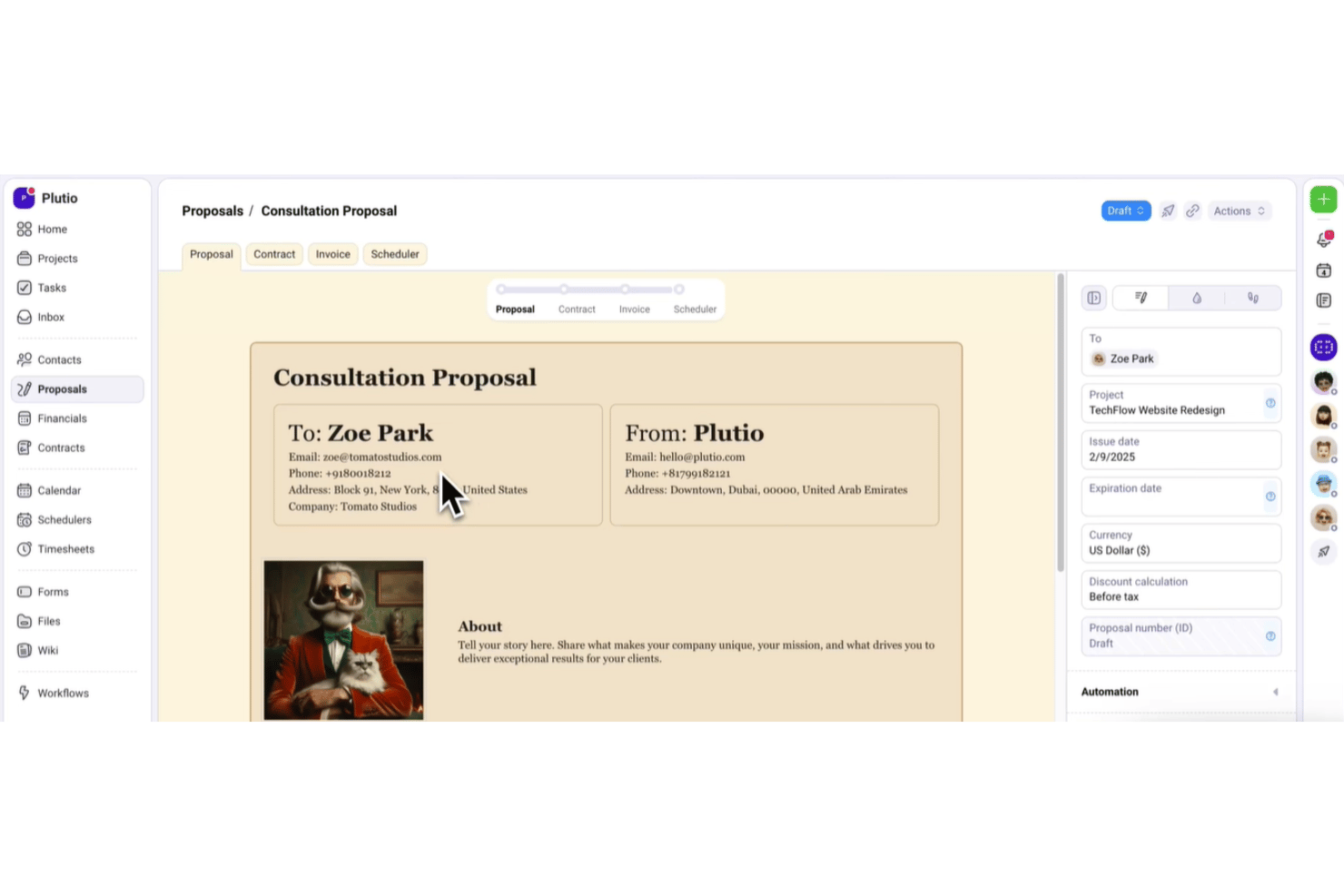
Plutio is an all-in-one freelance business management platform that brings together project management, task tracking, time tracking, client portals, proposals, contracts, and invoicing in a single workspace.
Who Is Plutio Best For?
Plutio suits independent freelancers and solo consultants who need to track billable hours across multiple clients and turn that time directly into client invoices.
Why I Picked Plutio
I picked Plutio as one of the best because it closes the loop between working and getting paid in a way few tools actually do. You start a timer on a task, mark the hours as billable, and when the project wraps, those entries convert directly into invoice line items, complete with task descriptions and your preset billing rate. I also like that you can set different rates by client or project, so if you're juggling a retainer at one rate and a one-off engagement at another, Plutio keeps them separate without manual math.
Plutio Key Features
- Client portal access: Clients can view shared projects, tasks, files, and linked invoices or proposals through a branded portal without needing a Plutio subscription.
- Proposal builder: A drag-and-drop editor lets you create proposals with optional or required items, packages, and electronic signatures.
- No-code automation builder: Visual workflows connect triggers and actions across projects, proposals, invoices, and forms to automate repetitive steps.
- Recurring task scheduling: Tasks can repeat on daily, weekly, monthly, or custom intervals, with details and subtasks carried forward automatically.
Plutio Integrations
Plutio offers 10 documented native integrations, including Stripe, PayPal, Square, Xero, Outlook, Zoom, and Google Meet. It also supports a REST API with OAuth and webhooks, plus 5,000+ apps through Zapier.
Pros and Cons
Pros:
- Shared portals keep client work visible
- Separate boards organize concurrent client projects
- Billable hours flow into invoice line items
Cons:
- Profitability reporting lacks budget-versus-actual analysis
- Automation falls short for complex workflows

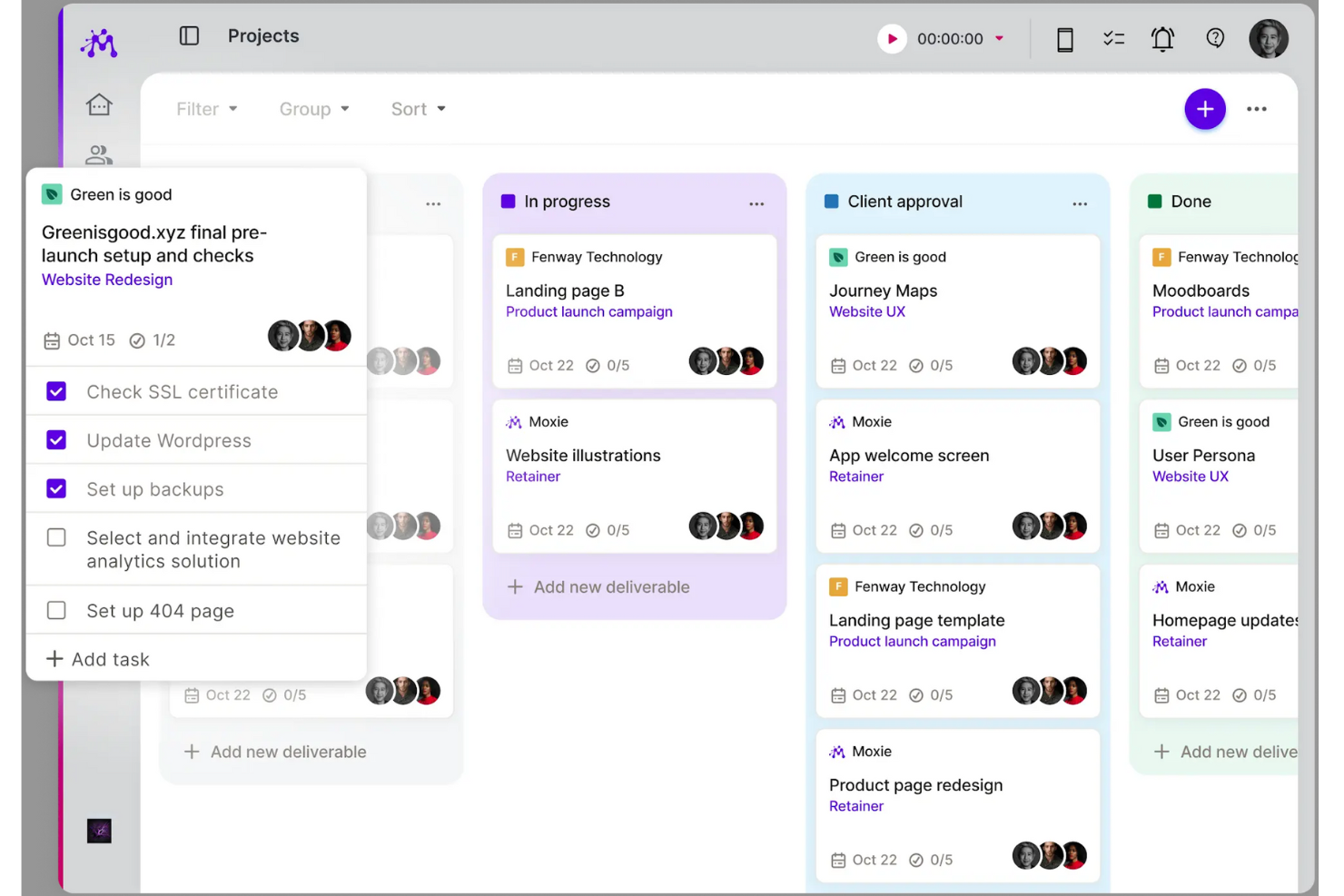
Moxie is a customizable personal app curated to streamline workflow and boost productivity. It offers features such as task creation, task assignment, and time tracking.
Why I picked Moxie: By using this platform, freelancers can simplify their workflow and be more productive. It enables you to organize all your work in a central location. With this software, I could merge multiple web browser windows with multiple user accounts and apps into one window with one account. This allows me to manage my business more effectively.
Moxie Standout Features and Integrations
Standout features include project management, client management, time tracking, invoicing, and customizable apps. These features are user-friendly and suitable for both new and experienced freelancers.
Integrations include FreeAgent, Trello, Asana, Basecamp, Slack, Microsoft Teams, Google Calendar and more. These integrations enable you to manage all aspects of your business on a single platform.
Pros and Cons
Pros:
- Easy to use and navigate
- Offers affordable pricing
- It combines all you need in one location
Cons:
- It doesn’t go too deep into some features it supports
- Various features may be ''too simple'' for some users

Best for client-facing project collaboration
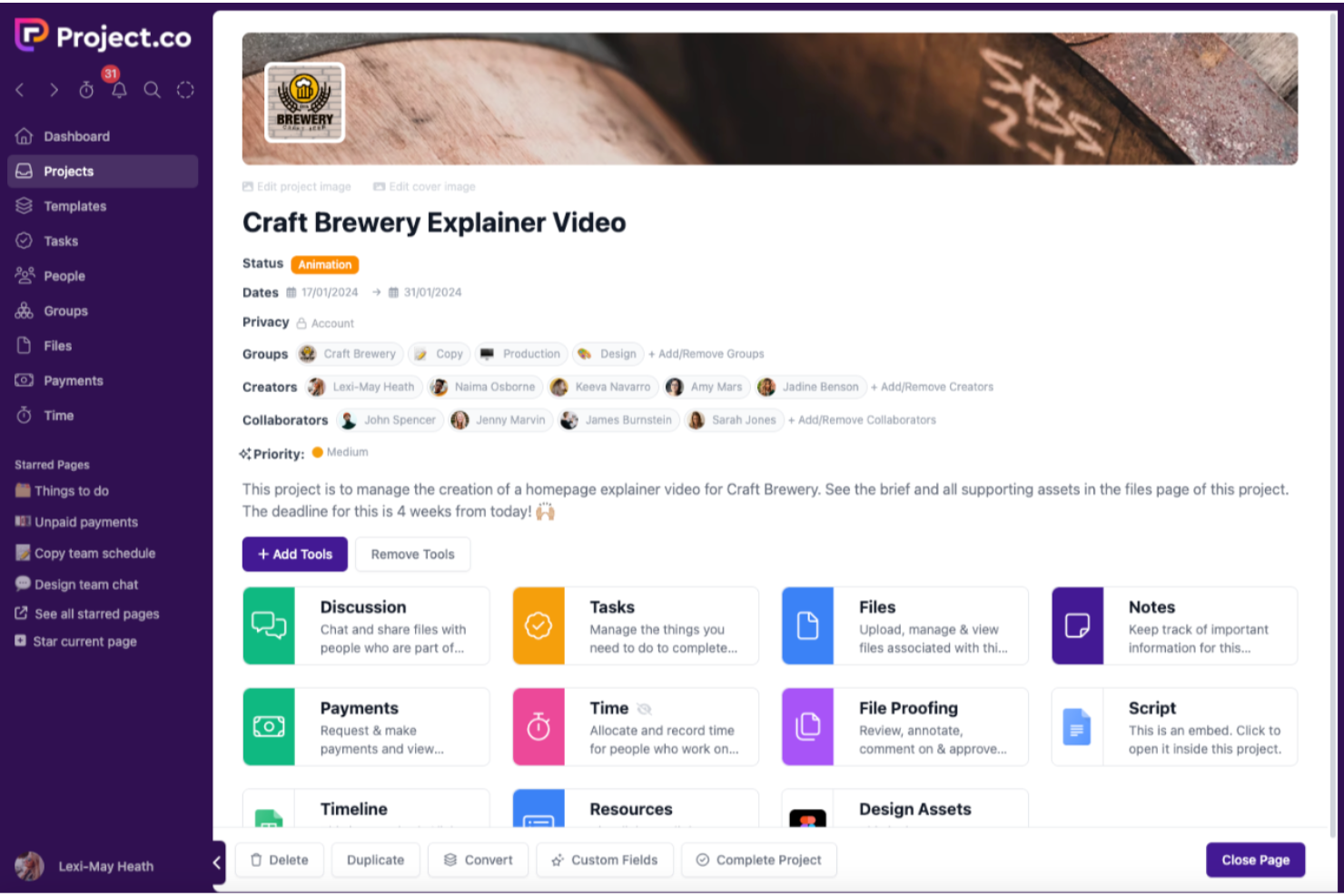
Project.co is a user-friendly yet robust project management software. Its freemium plan offers a comprehensive feature suite, making it a solid option for freelancers.
Why I picked Project.co: I added this platform to my list because of its suitability for freelancers as well as its generous freemium plan. It covers the important basics of project management features: task lists, various project views, timelines, etc., but it also offers built-in communication tools for keeping up with clients.
Every project has a discussion board that enables communication between users and clients. Whether you work independently or with a team, you’ll be able to have chats or keep notes both internally and externally with your clients. Role-based permissions keep client and team data secure and well-governed.
Project.co Standout Features & Integrations
Features include four different views (list, calendar, Kanban, and scheduler), in-app chat, notes, recurring tasks, time management, and payment capabilities supporting multiple currencies.
Integrations can be set up with a paid Zapier account.
Pros and Cons
Pros:
- Intuitive and user-friendly interface
- Brings client communication into project management
- Public feedback forum to request new features
Cons:
- Mobile app has some usability issues
- Limited customization options

ClickUp
Best for customizable project views
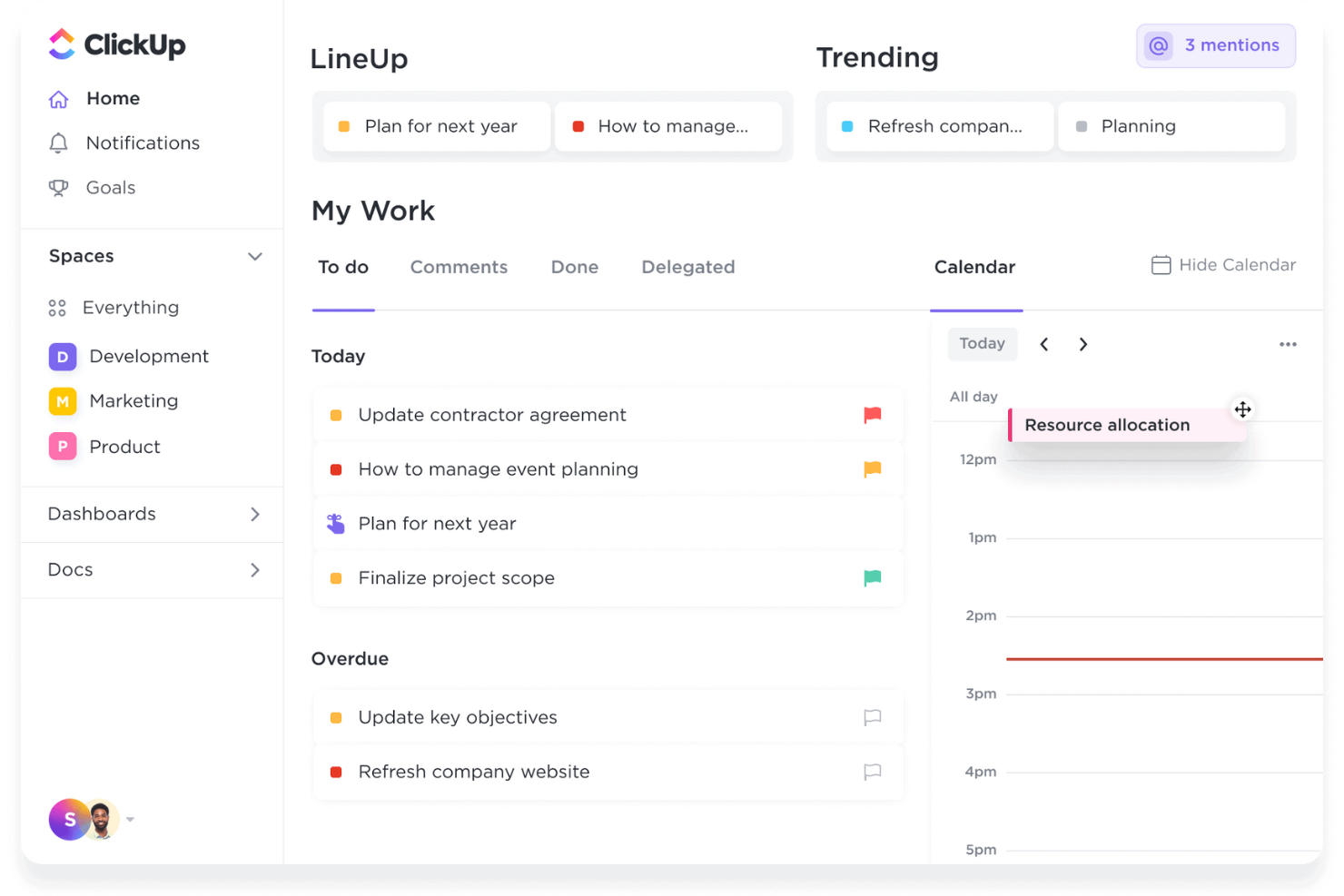
ClickUp is a comprehensive productivity platform designed to enhance team efficiency and collaboration by consolidating tasks, documents, and project management into a single application.
Why I picked ClickUp: One of the most significant advantages of ClickUp is its customizable project views, which include list, Kanban, table, and Gantt chart views. These views allow freelancers to visualize their work in the most effective way for their specific needs. For instance, the Gantt Chart view is particularly useful for scheduling tasks, tracking project progress, and managing deadlines. I also like that ClickUp allows users to automate repetitive tasks such as task creation, status updates, and priority adjustments.
ClickUp Standout Features and Integrations
Standout features include customizable dashboards that provide a powerful tool for visualizing project progress and key metrics, aiding in better tracking and reporting. Additionally, ClickUp's real-time document collaboration feature allows teams to draft plans and share knowledge.
Integrations include Slack, GitHub, GitLab, Webhooks, HubSpot, Everhour, Toggl, Harvest, Google Drive, OneDrive, Dropbox, Outlook, Google Calendar, Google, Microsoft, Okta, Figma, Vimeo, and YouTube.
Pros and Cons
Pros:
- Good collaboration tools
- Comprehensive project management features
- Highly customizable platform
Cons:
- The hierarchy of spaces, folders, lists, and tasks can be confusing
- Extensive features may be overwhelming
New Product Updates from ClickUp
ClickUp Adds List Automations, Time Off Scheduling, and Org Charts
ClickUp adds template-based List automations, personal time off scheduling, a unified picker, automatic task date syncing, and Org Charts. These updates help teams automate project setup, manage availability, and organize work. For more information, visit ClickUp’s official site.

Paymo
Best for growing from solo to small agency
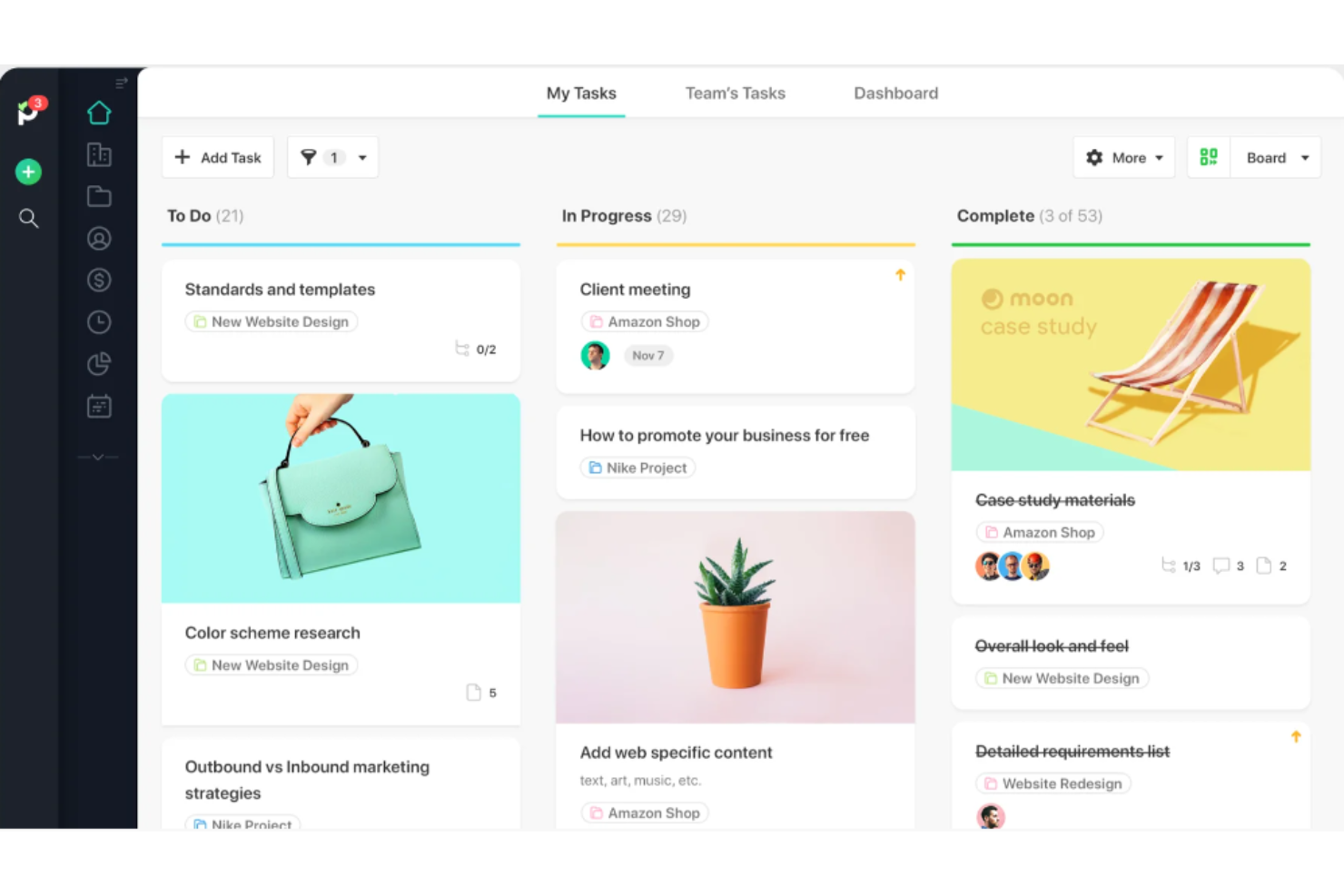
Paymo is a software for managing projects that provides a comprehensive solution for the entire project life cycle, from start to finish.
Why I picked Paymo: I chose Paymo because it's easy to use and can be customized, making it a cost-effective option for freelancers aiming to improve workflows and increase profits. What stood out for me was its customization capability that allows you to simplify workflow and improve organization. You don't need to separate apps for different project management tasks.
Paymo Standout Features and Integrations
Standout features include task project management, time tracking, resource management, invoicing, online payments, customization, and integration. Paymo stands out for its scalable solution, which accommodates the growth of businesses and adapts to their changing needs.
Integrations include Google, Google Calendar, Xero, Slack, JotForm, Typeform, Pomodone, and more. You can access thousands of additional apps via Zapier (requires paid subscription).
Pros and Cons
Pros:
- Offers robust task management capabilities
- Provides a web and desktop timer that lets users track time spent on tasks
- Team members collaborate in real-time, share files, and communicate effectively
Cons:
- Tedious learning curve
- Limited customization

Productive
Best for agency-scale financial tracking
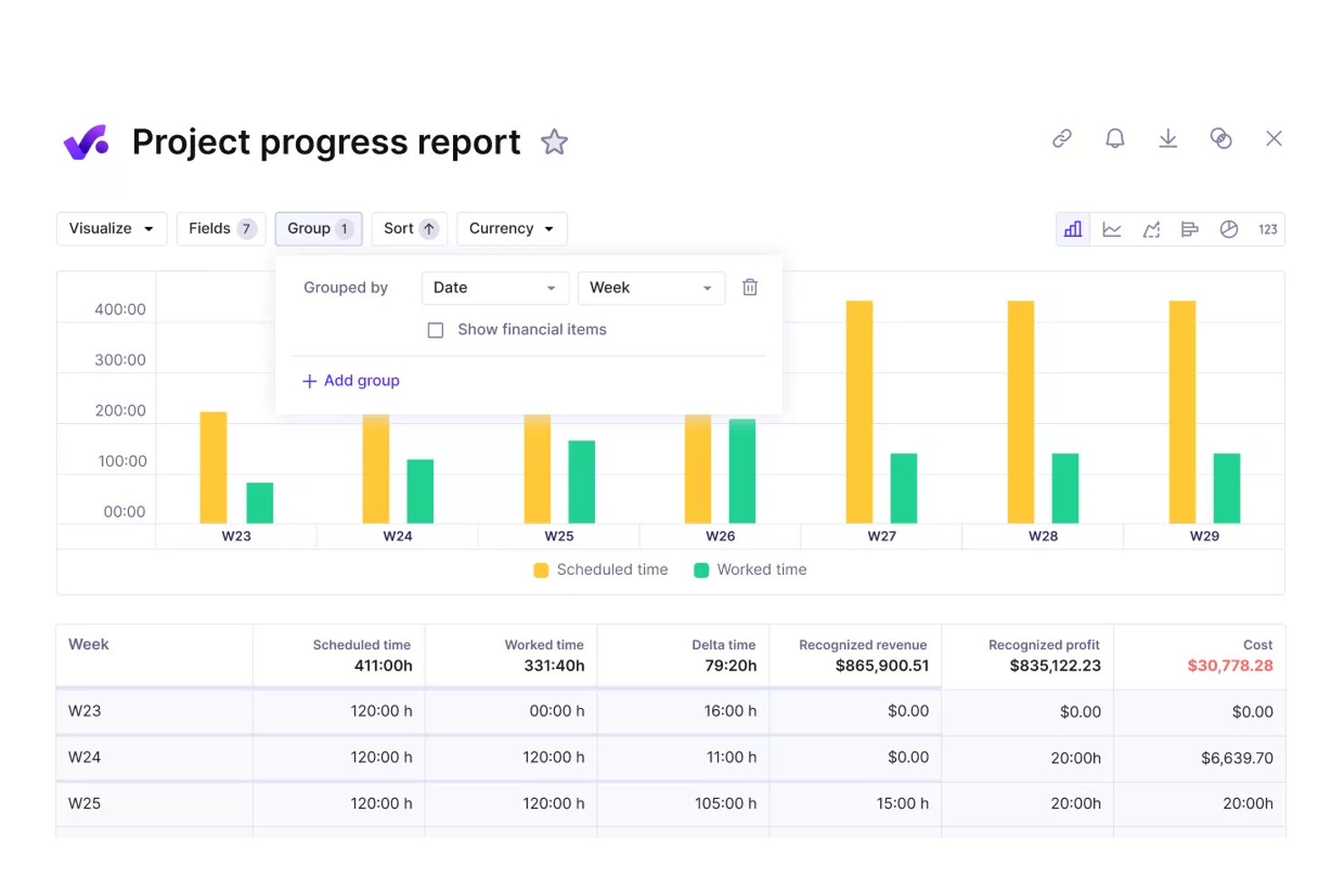
Productive is an all-in-one agency operations platform that brings together project management, time tracking, budgeting, invoicing, resource planning, and financial reporting for client-based work.
Who Is Productive Best For?
Productive is a strong fit for small agencies and consultancies that need to connect project delivery, team resourcing, and client finances in one place.
Why I Picked Productive
I picked Productive as one of the best because its financial tracking runs deeper than most tools in this category. Budget and profitability charts pull together actual time, scheduled bookings, revenue, and profit in a single view, so I can see at a glance whether a client engagement is on track financially. I also like that milestone invoicing lets me set up multiple future-dated draft invoices tied to specific budget phases, which keeps billing organized across longer projects.
Productive Key Features
- Resource planning: View team availability, schedule bookings by person or project, and manage utilization across active client engagements.
- CRM with deal-to-project conversion: Track client deals through a sales pipeline and convert won deals directly into projects or budgets.
- Project templates: Build reusable templates with tasks, docs, dependencies, and custom fields to spin up repeat client projects quickly.
- Timesheet approvals: Submit, review, and approve time entries before they're applied to budgets or invoices.
Productive Integrations
Productive offers native integrations with Jira, QuickBooks, Xero, Google Calendar, Slack, HubSpot, Microsoft Outlook, and Office 365. It also provides an Open API, webhooks, and integrations via Zapier.
Pros and Cons
Pros:
- Reuses project templates with tasks and dependencies
- Forecasts project profitability against scheduled work
- Connects billable hours directly to client budgets
Cons:
- Task bulk editing can require extra steps
- Agency workflows can feel oversized for solo freelancers
New Product Updates from Productive
Productive Adds Email and Calendar Integrations for Agents
Productive adds Gmail, Outlook, Google Calendar, and Outlook Calendar connectors for its AI agents. These integrations let agents manage emails and create calendar events directly within Productive. For more information, visit Productive’s official site.
Serbest Çalışan Proje Yönetimi Yazılımları İçin Diğer Seçenekler
İlk kısa listeme giremeyen ancak değerlendirmenize değer birkaç alternatif daha şöyle:
-
Scoro
For quote-to-invoice project billing
-
Hive
For freelancing teams managing multiple clients
-
GoodDay
For workload and capacity planning
-
Wrike
For client management and project organization
-
MeisterTask
For Kanban-based task and deadline tracking
-
17hats
For solo service businesses with client portals
-
Indy
For freelance contracts and client sign-off
-
Worksuite
For a complete freelancer management solution
-
HoneyBook
For all-in-one client management solution
-
Dubsado
For collecting client payments on projects


How I Evaluate Freelance Project Management Software
I split my evaluation into three parts, giving the most weight to core functions: organize client projects and track billable hours. Next, I look for differentiators such as client portals for sharing files and progress. Finally, I consider solo-friendly setup, responsive support, and pricing that can grow with a small agency.
Core Functionality (Table Stakes For This List)
When I'm selecting tools for my list, I score each one on a scale from 0 (does not offer the functionality) to 5 (excels in this area) for each core functionality listed below. I then convert the total into a percentage to help assess each tool's overall fit, with extra weight on any functionalities I’ve deemed essential.
- Task & Project Organization (Essential): I look for project-level tasks, subtasks, owners, due dates, and views that keep overlapping client deliverables visible.
- Time Tracking (Essential): A useful fit logs billable and non-billable time by client or task, then makes it easy to compare hours with estimates.
- Client Separation: Separate client spaces, permissions, and file access help me assess whether a contractor can share progress without exposing another client's work.
- Invoicing & Billing: I check whether tracked hours or milestones can feed invoices, and whether payment status stays visible through client closeout.
- Client Communication & Files: For review cycles, I look for client comments, file exchange, and approvals tied to the relevant deliverable rather than scattered across email.
- Budget & Profitability: I assess whether project budgets can be compared with actual hours and costs, so scope changes or overruns surface before closeout.
Once I have a list of tools that meet the criteria, I consider what sets each platform apart.
Differentiating Factors (What Sets Vendors Apart)
Here's how I compare and contrast different vendors:
Standout Features
Client portals matter when you're juggling multiple accounts. I look for branded spaces where clients view progress, files, and invoices without seeing another client's data. Proposal and contract tools also save real time. Instead of switching to a separate app for e-signatures, platforms like HoneyBook and Dubsado let you send a proposal, collect a signature, and trigger onboarding tasks in one flow. I also check for no-code automations that handle repeatable admin—like moving a task to "awaiting review" and notifying the client automatically.
Beyond Features
I check how quickly a solo operator can go from sign-up to running a real project. Templates and setup wizards matter here because freelancers don't have an IT team to configure workspaces. Pricing scalability is just as important—I look for plans that let you add a contractor or client guest seat without jumping to an enterprise tier. I also evaluate whether you can export time logs, invoices, and client data in standard formats, so you're never locked into a platform you've outgrown.
Serbest Çalışan Proje Yönetimi Yazılımı Nasıl Seçilir?
Uzun özellik listeleri ve karmaşık fiyatlandırma yapılarına kendinizi kaptırmanız kolaydır. Size özgü yazılım seçim sürecinizde ilerlerken odağınızı korumanıza yardımcı olmak için göz önünde bulundurmanız gereken faktörleri aşağıda bir kontrol listesi hâlinde sıraladım:
| Faktör | Dikkat Edilmesi Gerekenler |
|---|---|
| Ölçeklenebilirlik | Aracın işletmenizle birlikte büyüyebildiğinden emin olun. Serbest çalışma faaliyetlerinizi genişletmeyi veya daha büyük projeler üstlenmeyi planlıyorsanız yazılımın daha büyük iş yüklerini destekleyip desteklemediğini kontrol edin. |
| Entegrasyonlar | Google Drive, Slack veya Trello gibi hâlihazırda kullandığınız araçlarla bağlantı kurabilen yazılımları tercih edin. Sorunsuz entegrasyon size zaman kazandırabilir ve iş akışınızın aksamadan ilerlemesini sağlayabilir. |
| Özelleştirilebilirlik | İş akışlarını ve panoları özel ihtiyaçlarınıza uyacak şekilde düzenlemenize olanak tanıyan bir araç seçin. Bu esneklik, üretkenliği ve proje yönetimini geliştirebilir. |
| Kullanım Kolaylığı | Kapsamlı bir eğitim gerektirmeyen, kullanıcı dostu bir arayüzü tercih edin. Dik bir öğrenme eğrisiyle karşılaşmadan hızlıca çalışmaya başlamanız gerekiyorsa bu özellikle önemlidir. |
| Bütçe | Mali kısıtlamalarınızı göz önünde bulundurun. İhtiyacınız olan özellikleri karşılayabileceğiniz bir fiyata sunan yazılımları arayın ve gizli maliyet veya ücret olup olmadığını kontrol edin. |
| Güvenlik Önlemleri | Şifreleme ve düzenli güncellemeler gibi güçlü güvenlik önlemlerine sahip bir yazılım seçerek müşteri verilerinizi koruyun. Bu, güveni sürdürmek için vazgeçilmezdir. |
| Destek | Güvenilir müşteri desteği büyük fark yaratabilir. 7/24 yardım, canlı sohbet veya kapsamlı yardım belgeleri sunan sağlayıcıları arayın. |
| Mobil Erişim | Hareket hâlinde çalışıyorsanız, projeleri her yerden yönetebilmeniz için yazılımın bir mobil uygulamaya veya duyarlı bir tasarıma sahip olduğundan emin olun. |
Açıkçası, sindirmesi gereken çok şey var ve doğru seçimi yapmak için üzerinizde büyük bir baskı olabilir. Bu nedenle, sizin ve kuruluşunuzun özel ihtiyaçlarına uygun proje yöneticisi araçlarını kısa listeye almanıza yardımcı olması için proje yönetimi yazılımı danışmanlığı hizmetimizden yararlanmanızı öneririm.
Serbest Çalışan Proje Yönetimi Yazılımlarındaki Trendler
Araştırmam sırasında, farklı serbest çalışan proje yönetimi yazılımı sağlayıcılarından sayısız ürün güncellemesi, basın bülteni ve sürüm günlüğü derledim. Takip ettiğim yeni ortaya çıkan trendler şunlar:
- Yapay Zekâ Destekli İçgörüler: Yapay zekâ, proje verilerini analiz etmek ve uygulanabilir içgörüler sunmak için kullanılıyor. Bu, serbest çalışanların bilinçli kararları hızlı bir şekilde almasına ve proje iş akışlarını optimize etmesine yardımcı oluyor. Bazı sağlayıcılar, proje risklerini tahmin etmek ve azaltma stratejileri önermek için yapay zekâyı entegre ediyor.
- Uzaktan İş Birliği Araçları: Uzaktan çalışma norm hâline geldikçe, sanal iş birliğini kolaylaştıran araçlar daha fazla ilgi görüyor. Sanal beyaz tahtalar ve gerçek zamanlı sohbet gibi özellikler, küresel müşterilerle çalışan serbest çalışanları desteklemek üzere geliştiriliyor.
- Sürdürülebilirlik Özellikleri: Sağlayıcılar, projelerin çevresel etkisini takip etmeye ve azaltmaya yardımcı olan özellikler ekliyor. Buna karbon ayak izlerinin izlenmesi ve sürdürülebilir uygulamaların teşvik edilmesi dâhil olup, bu özellikler çevreye duyarlı serbest çalışanlara hitap ediyor.
- Geliştirilmiş Güvenlik Protokolleri: Veri gizliliğine ilişkin endişeler arttıkça, yazılım sağlayıcıları güvenlik önlemlerini güçlendirmeye odaklanıyor. Uçtan uca şifreleme ve çok faktörlü kimlik doğrulama gibi özellikler, hassas müşteri bilgilerini korumak için standart hâle geliyor.
- Özel İş Akışı Oluşturucuları: Daha fazla araç, serbest çalışanların özel proje süreçleri oluşturmasına olanak tanıyan sürükle ve bırak özellikli iş akışı oluşturucuları sunuyor. Bu esneklik, yazılımı belirli proje ihtiyaçlarına göre uyarlamaya yardımcı oluyor ve genel üretkenliği artırıyor.
Serbest Çalışanlar İçin Proje Yönetimi Yazılımı Nedir?
Serbest çalışanlar için proje yönetimi yazılımı, birden fazla bağımsız proje üzerinde çalışan serbest çalışanların işlerini kolaylaştırmak ve optimize etmek üzere tasarlanmış özelliklere sahip çevrim içi bir serbest çalışma aracıdır. Serbest çalışanlara yönelik proje yönetimi araçları ile görevleri düzenleyip takip edebilir, müşteriler ve ekip üyeleriyle iş birliği yapabilir, son tarihler belirleyebilir ve proje ilerlemesini izleyebilirsiniz.
Serbest çalışanlar için proje yönetimi yazılımının özellikleri arasında görev yönetimi, iletişim araçları, dosya paylaşımı, zaman takibi ve raporlama olanakları bulunur. Bu özellikler proje iş akışlarını kolaylaştırır, üretkenliği artırır ve projelerin etkili bir şekilde teslim edilmesini sağlar.
Serbest Çalışanlar İçin Proje Yönetimi Yazılımının Özellikleri
Serbest çalışanlar için proje yönetimi yazılımı seçerken aşağıdaki temel özelliklere dikkat edin:
- Görev yönetimi - Etkili görev yönetimi özellikleri, projeleri daha küçük ve yönetilebilir görevlere ayırmanıza olanak tanır. Yapılacaklar listeleri oluşturabilir, öncelikleri belirleyebilir, son teslim tarihlerini atayabilir ve ilerlemeyi takip edebilirsiniz; böylece hiçbir son tarih veya teslimat gözden kaçmaz. Gelişmiş özellikler arasında görev bağımlılıkları, yinelenen görevler ve iş akışını kolaylaştırmak için otomasyon yer alabilir.
- Zaman takibi - Entegre zaman takip araçları, ücretlendirilebilir ve ücretlendirilemeyen saatleri doğru şekilde kaydetmenize yardımcı olur. Bu özellik, müşteri faturalandırmasında şeffaflık sağlar, zamanın daha iyi tahsis edilmesine olanak tanır ve üretkenlik hakkında içgörüler sunar. Bazı araçlar, faturalandırmayı kolaylaştırmak için otomatik zamanlayıcılar ve zaman çizelgesi dışa aktarma seçenekleri de sunar.
- Müşteri iletişimi - Merkezi bir iletişim sistemi, dağınık e-posta yazışmalarını ve kaçırılan mesajları ortadan kaldırır. Doğrudan mesajlaşma, tartışma dizileri ve gerçek zamanlı iş birliği özellikleri sunan yazılımları tercih edin. Bu, müşterilerle açık ve düzenli bir iletişimin sürdürülmesine yardımcı olarak proje boyunca beklentilerin uyumlu olmasını sağlar.
- Dosya paylaşımı - Genellikle birden fazla belge, sözleşme ve yaratıcı içerikle ilgilenirsiniz. Güvenli bir dosya paylaşımı özelliği, projeyle ilgili tüm dosyaların erişilebilir tek bir konumda saklanmasını sağlar. Sürüm denetimi, bulut depolama entegrasyonu ve izin ayarları, hassas verileri korurken iş birliğini geliştirebilir.
- Proje planlama - Gantt şemaları veya takvim görünümleri gibi görsel bir planlama arayüzü, projeleri verimli bir şekilde planlamanıza yardımcı olur. Bu özellik; son tarihleri takip etmenizi, kilometre taşları belirlemenizi ve iş yükünü dengelemenizi sağlayarak projelerin programa uygun ilerlemesini ve kaynakların etkili bir şekilde tahsis edilmesini mümkün kılar.
- Özelleştirilebilir iş akışları - Her serbest çalışanın projeleri yönetmek için kendine özgü bir yöntemi vardır. Özelleştirilebilir iş akışları; otomasyon, kişiselleştirilmiş görev durumları ve iş akışı şablonları oluşturarak yazılımı özel ihtiyaçlarınıza uyarlamanıza olanak tanır. Bu esneklik, verimliliği artırmaya ve manuel çalışmayı azaltmaya yardımcı olur.
- Faturalandırma - Müşterileri verimli bir şekilde faturalandırmak, serbest çalışmanın önemli bir parçasıdır. Yerleşik faturalandırma araçları; fatura oluşturmanıza, ödemeleri takip etmenize ve hatta yinelenen faturalandırma ayarlamanıza olanak tanıyarak süreci kolaylaştırır. Bazı sistemler muhasebe yazılımlarıyla entegre olur veya eksiksiz finansal yönetim için gider takibi sunar. Ayrıca bütçelerinizi verimli bir şekilde yönetmenize yardımcı olan maliyet yönetimi yazılımları da bulunur.
- Raporlama araçları - Analizlere ve raporlara erişebilmek, performansınızı ve proje ilerlemenizi değerlendirmenize yardımcı olur. Bu araçlar; harcanan süre, görev tamamlama oranları, kârlılık ve iş yükü dağılımı hakkında içgörüler sunar. Özelleştirilebilir panolar, stratejik karar almaya yardımcı olmak için gerçek zamanlı güncellemeler sağlayabilir.
- İş birliği araçları - Alt yüklenicilerle veya projelere doğrudan erişim gerektiren müşterilerle çalışan serbest çalışanlar için iş birliği özellikleri büyük önem taşır. Bunlar; paylaşılan çalışma alanlarını, gerçek zamanlı düzenlemeyi, yorum yapmayı ve ekip görev atamalarını içerebilir ve kusursuz ekip çalışması ile geri bildirim döngülerinin sürdürülmesini sağlar.
- Güvenlik önlemleri - Müşteri verilerini işlemek güçlü güvenlik önlemleri gerektirir. Hassas bilgileri yetkisiz erişime karşı korumak için veri şifreleme, role dayalı izinler, çok faktörlü kimlik doğrulama ve güvenli bulut depolama sunan yazılımları tercih edin.
Doğru serbest çalışma proje yönetimi yazılımını seçmek; görevleri verimli bir şekilde yönetebilmenizi, zamanı takip edebilmenizi, müşterilerle iletişim kurabilmenizi ve iş akışınızı kolaylaştırabilmenizi sağlar. Bunu yaparken projelerinizi programa uygun tutabilir ve mali durumunuzu düzenli yönetebilirsiniz. Doğru özellik bileşimine sahip bir araç seçerek düzenli kalabilir, üretkenliğinizi artırabilir ve yüksek kaliteli işleri güvenle teslim edebilirsiniz.
Serbest Çalışma Proje Yönetimi Yazılımının Faydaları
Serbest çalışma proje yönetimi yazılımını uygulamak, ekibiniz ve işletmeniz için çeşitli faydalar sağlar. Yararlanabileceğiniz birkaç fayda şunlardır:
- Geliştirilmiş Organizasyon: Görev yönetimi araçları tüm görevlerin, son tarihlerin ve sorumlulukların açıkça yapılandırılmasını sağlarken, entegre dosya paylaşım sistemleri önemli belgelerin erişilebilir ve düzenli kalmasını sağlar. Bu, kaybolan dosyaları, gözden kaçan görevleri ve gereksiz karşılıklı iletişimi en aza indirir.
- Artırılmış Verimlilik: Zaman takibi, planlama ve iş akışı otomasyonu, serbest çalışanların iş yüklerini verimli bir şekilde yönetmelerine yardımcı olur. Son tarihleri görselleştirerek ve görevlere harcanan zamanı izleyerek önceliklerinizi etkili bir şekilde belirleyebilir, dikkat dağıtıcı unsurları en aza indirebilir ve günlük iş akışınızı optimize edebilirsiniz.
- Daha İyi Müşteri İlişkileri: Merkezi bir iletişim sistemi, geri bildirimleri, görüşmeleri ve güncellemeleri tek bir yerde bir araya getirerek müşteri etkileşimlerini kolaylaştırır. Bu, yanlış anlaşılmaları azaltır, müşterileri bilgilendirir ve şeffaflığı teşvik eder—böylece daha güçlü ve güvene dayalı profesyonel ilişkiler kurulmasını sağlar.
- Doğru Faturalandırma: Entegre faturalandırma ve zaman takibi özellikleri, serbest çalışanların faturalandırılabilir saatleri doğru bir şekilde takip etmelerine ve faturaları sorunsuzca oluşturmalarına yardımcı olur. Bu, ödemelerle ilgili anlaşmazlıkları azaltır, nakit akışını iyileştirir ve çalışılan her saatin hesaba katılmasını sağlar.
- Veriye Dayalı Kararlar: Raporlama ve analiz araçları, proje ilerlemesi, kaynak tahsisi ve kârlılık hakkında değerli bilgiler sağlar. Temel performans göstergelerini (KPI'lar) analiz ederek iyileştirme alanlarını belirleyebilir, süreçlerinizi optimize edebilir ve bilinçli iş kararları alabilirsiniz.
- Artırılmış Esneklik: Özelleştirilebilir iş akışları, serbest çalışanların ister Çevik metodolojileri izlesin, ister birden fazla müşteriyi yönetsin veya farklı proje türlerini ele alsın, yazılımı kendi özel ihtiyaçlarına göre uyarlamalarına olanak tanır. Bu uyarlanabilirlik, benzersiz çalışma tarzınızla uyumlu süreçleri kolaylaştırarak verimliliği artırır.
- Güvenli Veri Yönetimi: Hassas müşteri verileri söz konusu olduğunda şifreleme, role dayalı erişim denetimleri ve çok faktörlü kimlik doğrulama gibi güçlü güvenlik özellikleri, kritik bilgilerin korunmasına yardımcı olur. Bu, veri koruma standartlarına uyumu sağlar ve müşterilerin profesyonelliğinize duyduğu güveni artırır.
Serbest Çalışan Proje Yönetimi Yazılımı Maliyetleri ve Fiyatlandırması
Serbest çalışanlara yönelik proje yönetimi yazılımını seçmek, mevcut çeşitli fiyatlandırma modellerinin ve planların anlaşılmasını gerektirir. Maliyetler özelliklere, ekip büyüklüğüne, eklentilere ve daha fazlasına göre değişir. Aşağıdaki tablo, serbest çalışanlara yönelik proje yönetimi yazılımı çözümlerinde yaygın olarak sunulan planları, bunların ortalama fiyatlarını ve tipik özelliklerini özetlemektedir:
Serbest Çalışan Proje Yönetimi Yazılımı İçin Plan Karşılaştırma Tablosu
| Plan Türü | Ortalama Fiyat | Yaygın Özellikler |
|---|---|---|
| Ücretsiz Plan | $0 | Temel görev yönetimi, sınırlı depolama ve temel iş birliği araçları. |
| Kişisel Plan | $5-$15/kullanıcı/ay | Görev yönetimi, zaman takibi, dosya paylaşımı ve temel raporlama. |
| İşletme Planı | $20-$50/kullanıcı/ay | Gelişmiş raporlama, artırılmış güvenlik, entegrasyonlar ve özelleştirilebilir iş akışları. |
| Kurumsal Plan | $50-$100/kullanıcı/ay | Kurumsal düzeyde güvenlik, özel destek, API erişimi ve gelişmiş özelleştirme seçenekleri. |
Serbest Çalışan Proje Yöneticisi Yazılımı SSS
Bu konu hakkında diğer insanların sorduğu yaygın soruların yanıtlarını bulun.
Proje yönetiminde serbest çalışma nedir?
Proje yönetiminde serbest çalışma, farklı müşteriler veya kuruluşlar için sözleşme temelinde proje yöneticisi olarak çalışma uygulamasını ifade eder. Serbest çalışan proje yöneticileri bağımsız çalışır ve belirli projeler ile görevler için işe alınır.
Serbest çalışan olarak nasıl proje bulabilirim?
- Güçlü bir profesyonel ağ oluşturun: Sektör etkinliklerine katılın, çevrim içi topluluklara dahil olun ve alanınızdaki profesyonellerle bağlantı kurun.
- Etkileyici bir portföy oluşturun: Geçmiş projelerinizi, sertifikalarınızı ve ilgili deneyiminizi bir portföyde sergileyin. Uzmanlığınızı göstermek için önceki projeler sırasında elde ettiğiniz başarıları ve sonuçları öne çıkarın.
- Doğrudan teklif sunun: Proje yönetimi hizmetlerinizden yararlanabilecek işletmeleri veya kuruluşları belirleyin. Özel zorluklarını nasıl çözebileceğinizi açıklayan kişiselleştirilmiş teklifler hazırlayın.
Proje yönetiminde serbest çalışmanın faydaları nelerdir?
- Esneklik ve özerklik: Serbest çalışan proje yöneticisi pozisyonları, kendi programınızı, konumunuzu ve çalışma tarzınızı belirleme esnekliği sunar. Profesyonel yaşamınızdaki bu özgürlük, hem iş memnuniyetinizi hem de genel refahınızı artırır.
- İş birliği seçenekleri: Tam zamanlı bir proje yönetimi işi ile serbest çalışan bir pozisyonu karşılaştırdığınızda, serbest çalışma ağınızı genişletme ve büyüme için daha fazla fırsat elde etme şansı sunar. Yeni insanlarla tanışmanıza ve yönetmek üzere ek projeler üstlenmenize olanak tanıdığı için bu fırsat hem profesyonel kariyerinizi hem de kişisel yaşamınızı geliştirebilir.
- Finansal bağımsızlık: Serbest çalışan bir proje yöneticisi olarak kazançlarınız üzerinde tam kontrole sahip olur ve tüm kârı elinizde tutarsınız. Ne kadar çok proje yürütürseniz o kadar çok para kazanırsınız. Ödemenizin sabit olduğu geleneksel 9’dan 5’e proje yönetimi işlerinin aksine, serbest çalışma daha yüksek gelir potansiyeli sunar.
- Müşterilerinizi seçme: Proje yönetiminde serbest çalışma, tercihlerinize göre müşteri seçme avantajı sağlar. Hangi projelerde çalışacağınıza ve hangi müşterilerle iş birliği yapacağınıza karar verme özgürlüğüne sahip olursunuz.
Serbest çalışmak için proje yöneticisi portföyüne ihtiyacım var mı?
Bir proje yöneticisi portföyüne sahip olmak, serbest çalışırken değerli bir avantaj olabilir ancak her zaman kesin bir gereklilik değildir. Serbest çalışan bir proje yöneticisi olarak portföye ihtiyacınız olup olmadığı; hedef müşterileriniz ve serbest çalışmanızın niteliği de dahil olmak üzere çeşitli faktörlere bağlıdır. İşte dikkate almanız gereken birkaç nokta:
- Hedeflediğiniz müşteri türü, portföyün gerekli olup olmadığını etkileyebilir.
- Proje yönetiminde güçlü bir itibarınız ve kapsamlı deneyiminiz varsa müşterileriniz portföyden ziyade referanslarınıza, müşteri görüşlerinize ve sektördeki itibarınıza daha fazla güvenebilir.
- Bazı sektörler bunu gerektirebilir. Örneğin, web geliştirme projelerinin yönetiminde uzmanlaşıyorsanız başarılı web projelerini sergileyen bir portföye sahip olmak önemli bir avantaj sağlayabilir.
- Bir portföy, proje yöneticisi olarak kişisel markanızı oluşturmanıza ve sergilemenize yardımcı olabilir.