

2026 İçin En İyi 10 Akıllı Süreç Otomasyonu Yazılımı

En İyi Akıllı Süreç Otomasyonu Yazılımları Kısa Listesi


En iyi akıllı süreç otomasyonu (IPA) yazılımları, tekrarlayan görevleri otomatikleştirerek, manuel hataları azaltarak ve ekipler genelinde süreç verimliliğini artırarak işletmelerin operasyonlarını kolaylaştırmasına yardımcı olur. Bu araçlar, kural tabanlı iş akışlarını yönetmek ve değişen iş ihtiyaçlarına uyum sağlamak için robotik süreç otomasyonunu (RPA), makine öğrenimini ve yapay zekâyı bir araya getirir; böylece daha stratejik çalışmalar için zaman kazandırır.
Hız, ölçeklenebilirlik ve entegrasyon kolaylığı açısından gerçekten sonuç veren araçları belirlemek için önde gelen akıllı süreç otomasyonu çözümlerini test edip inceledim. İster onay süreçlerini, ister belge işleme süreçlerini veya müşteri hizmetleri iş akışlarını otomatikleştiriyor olun, bu rehber işletmeniz için doğru IPA yazılımını bulmanıza yardımcı olacak.
Why Trust Our Software Recommendations
Our team has been testing and reviewing software since 2012. As project managers ourselves, we know how difficult—and important—it is to choose the right software.
For this guide, we evaluated tools using hands-on testing and independent research, scoring tools using our selection criteria. We also draw on insights from industry thought leaders and practicing project management experts.
Our reviews reflect our human editorial judgment, not a sales pitch.
Expert reviewers:
Akıllı Süreç Otomasyonu Yazılımları Karşılaştırma Tablosu
\u003cp data-start=\u0022168\u0022 data-end=\u0022552\u0022\u003eEn iyi akıllı süreç otomasyonu yazılımı seçimlerimi yan yana incelemek için bu karşılaştırma tablosunu kullanın.\u003c/p\u003e
| Tool | Starting Price | Website | |
|---|---|---|---|
| Best for intelligent document processing | 4.8 out of 5 | Pricing upon request Free demo available | Website |
| Best for predictive analytics & modular workflows | 4.7 out of 5 | Pricing upon request Free demo available | Website |
| Best for low-code/no-code workflow design | 4.6 out of 5 | $10,000 Free trial available | Website |
| Best with 1,000+ prebuilt app connectors | — | Pricing upon request 30-day free trial available | Website |
| Best for AI-powered business automation | 4.6 out of 5 | $25/month Free plan available | Website |
| Best for enterprise iPaaS and app integrations | 4.7 out of 5 | $75/month Free plan + free demo available | Website |
| Best for AI-powered cloud services | 4.6 out of 5 | Pricing upon request Free demo available | Website |
| Best for all-in-one digital modernization | 4.8 out of 5 | Pricing upon request Free demo available | Website |
| Best for scalable intelligent automation | 4.5 out of 5 | Pricing upon request 30-day free trial | Website |
| Best for low-code process automation and mining | 4.4 out of 5 | Pricing upon request Free plan + demo available | Website |
En İyi Akıllı Süreç Otomasyonu Yazılımları İncelemeleri
En iyi akıllı süreç otomasyonu yazılımı seçimlerimin derinlemesine bir analizini burada bulabilirsiniz; her bir yazılımın artılarını ve eksilerini, temel özelliklerini ve en uygun kullanım alanlarını ele alıyorum.
Best for intelligent document processing

Klippa DocHorizon is an AI-powered platform designed to automate document processing tasks. It helps you extract, classify, convert, and verify data from various documents using technologies like OCR and machine learning.
Why I picked Klippa DocHorizon: One of the standout features of Klippa DocHorizon is its ability to handle over 50 types of documents, including invoices, receipts, ID cards, and passports. This versatility allows your team to automate the processing of diverse documents, reducing the need for manual intervention. Additionally, the platform offers customizable workflows, enabling you to define specific data fields for extraction and set up approval processes tailored to your business needs.
Standout features & integrations:
Features include advanced fraud detection, which automatically identifies altered or fraudulent documents. Additionally, Klippa DocHorizon has automated document classification, which uses machine learning algorithms to categorize documents based on their content, improving organization and retrieval. The platform also offers data anonymization tools, allowing you to mask sensitive information to comply with privacy regulations.
Integrations include Google Workspace, Dropbox, Zoho, Xero, Odoo, Microsoft Teams, Slack, Discord, OpenAI, Jira, monday.com, and Stripe.
Pros and Cons
Pros:
- Supports processing of over 50 document types, including custom docs
- Combines AI with human-in-the-loop automation for better data accuracy
- Masks sensitive information to comply with GDPR and other privacy regulations
Cons:
- Setting up custom workflows might be complex for non-technical users
- No option to try the software before buying
New Product Updates from Doxis AI.dp.
Doxis AI.dp Adds Zero-Shot Classification and Natural-Language Search
Doxis AI.dp adds zero-shot classification, image classification, natural-language Inbox Search, expanded financial outputs, and Active Learning improvements. These updates help teams classify documents, find information, and process financial data. For more information, visit Doxis AI.dp’s official site.
 .

Best for predictive analytics & modular workflows

RunMyJobs by Redwood is designed for enterprises seeking to automate complex workflows across hybrid and multi-cloud environments. It appeals to IT professionals and business leaders in industries like finance, retail, and manufacturing, who need to enhance operational efficiency and real-time decision-making. By integrating seamlessly with existing systems, it addresses the challenge of managing diverse applications and data, providing a unified platform for intelligent automation.
Why I Picked RunMyJobs by Redwood
I picked RunMyJobs by Redwood for its ability to automate intricate workflows with predictive analytics and modular workflows that cater to both IT and business users. The platform's capability to support hybrid architectures and full stack connectivity makes it an ideal choice for organizations transitioning to more efficient processes. Its self-service automation empowers end-users with comprehensive visibility into business operations, directly addressing the need for streamlined and transparent processes.
RunMyJobs by Redwood Key Features
Some other features that stand out include:
- Event-Driven Orchestration: Enables automation of tasks based on specific events, allowing for responsive and dynamic workflows.
- Real-Time Monitoring: Provides continuous oversight of processes and performance, ensuring timely interventions when necessary.
- Predictive SLA Notifications: Alerts users of potential service level agreement breaches, enabling proactive management.
- No-Code Integration: Allows seamless connectivity with various enterprise applications without requiring coding expertise.
RunMyJobs by Redwood Integrations
Integrations include SAP ERP S/4HANA, ServiceNow, Databricks, Amazon EC2, Azure Automation, IBM AIX and AS/400, AWS DataSync, Apache Groovy, HP-UX, and Informatica Cloud.
Pros and Cons
Pros:
- Predictive SLA monitoring improves uptime
- Handles complex hybrid workflows reliably
- Strong SAP and ERP integration
Cons:
- Steep learning curve initially
- Pricing not publicly available

Best for low-code/no-code workflow design

In a world where efficiency is key, ActiveBatch stands out as a tool designed to automate and orchestrate complex IT and business processes. Ideal for IT departments and businesses across various industries, this platform can alleviate the cumbersome task of manual scheduling and process management. By integrating seamlessly with existing technology stacks, ActiveBatch empowers your team to focus on strategic initiatives rather than routine tasks.
Why I Picked ActiveBatch
I picked ActiveBatch for its ability to facilitate intelligent process automation through its low-code/no-code functionality, which allows teams to design workflows without extensive coding knowledge. This feature is complemented by its event-driven job scheduling, enabling tasks to be executed based on specific triggers, which is crucial for timely and efficient process management. Additionally, ActiveBatch's customizable reporting offers visibility into automated processes, allowing you to make informed decisions and optimize workflows.
ActiveBatch Key Features
In addition to its standout features, I also found several other capabilities that make ActiveBatch an ideal choice for intelligent process automation:
- Job Steps Library: Provides a comprehensive set of pre-built actions that users can drag and drop into workflows, reducing the time spent on manual coding.
- SLA Management: Ensures that all processes meet the required service level agreements by providing real-time monitoring and alerts.
- Dynamic Failover: Automatically reroutes workflows to backup systems in case of failure, ensuring uninterrupted operations.
- Change Management: Offers tools for synchronizing objects and configurations across different environments, simplifying updates and modifications.
ActiveBatch Integrations
Integrations include Microsoft SQL Server, ServiceNow, SharePoint, Oracle EBS, VMware, Microsoft Azure, and various ERP/business systems. An API is also available for custom integrations.
Pros and Cons
Pros:
- Broad enterprise system integrations
- Event-driven scheduling flexibility
- Low-code workflow automation design
Cons:
- Complex setup for small teams
- Steep learning curve initially

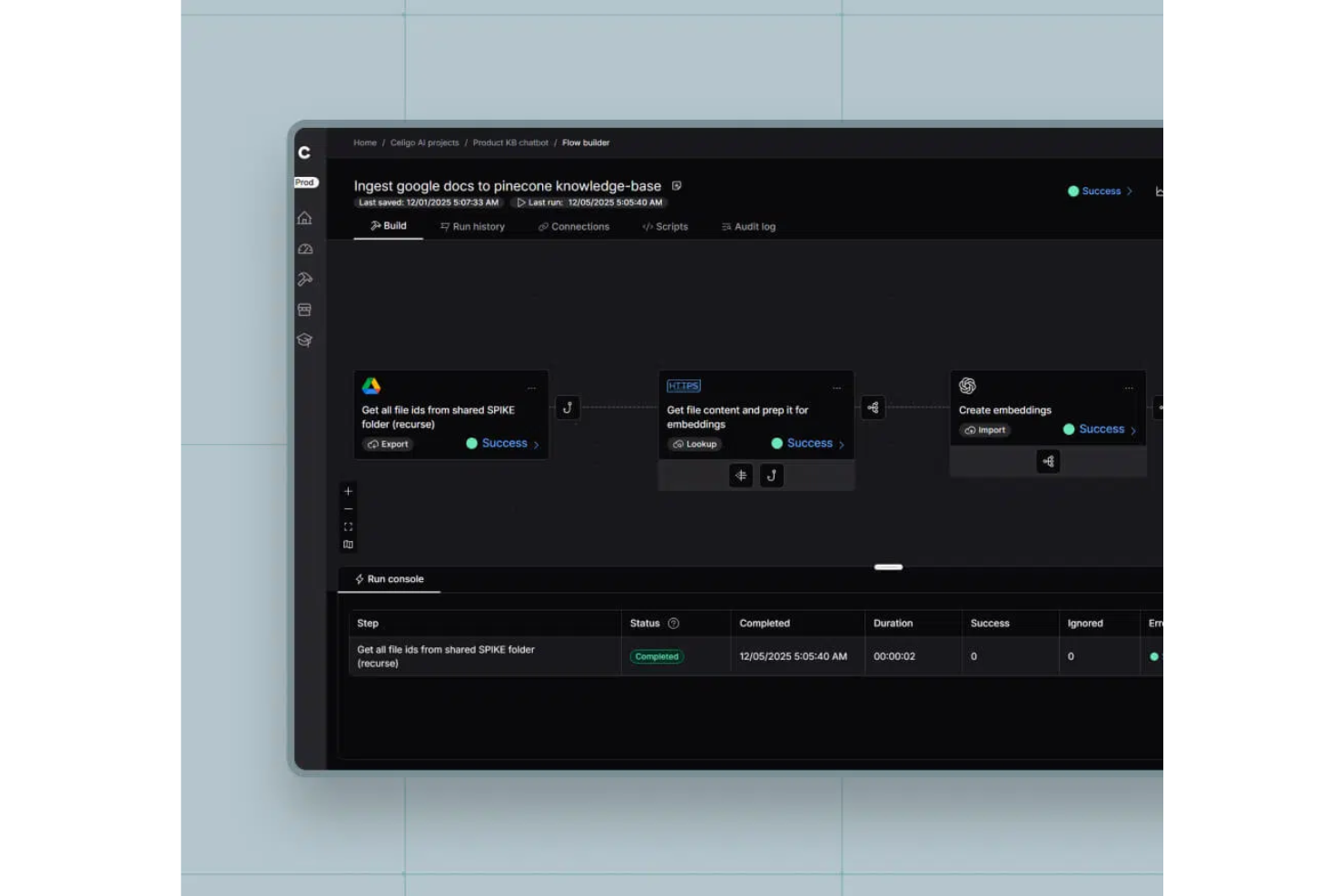
Celigo is an intelligent process automation platform that connects cloud applications, automates workflows, manages APIs, and handles data integration across business systems.
Who Is Celigo Best For?
Celigo suits IT teams and operations leaders at mid-sized to large businesses that need to automate and connect multiple cloud applications.
Why I Picked Celigo
I picked Celigo as one of the best because I can automate complex workflows across dozens of cloud apps without building custom integrations from scratch. My team uses the library of 1,000+ prebuilt connectors to quickly link systems like Salesforce, NetSuite, and Shopify. In practice, that means we can launch new automations in days instead of weeks.
Celigo Key Features
- Visual flow builder: Design and manage automation workflows using a drag-and-drop interface.
- Advanced data mapping: Transform and map data fields between different applications with built-in tools.
- Error management dashboard: Monitor, troubleshoot, and resolve integration errors from a centralized dashboard.
- Role-based access controls: Set permissions and manage user access for different automation projects.
Celigo Integrations
Celigo offers 1,000+ native integrations, including Shopify, NetSuite, Salesforce, Microsoft Dynamics 365, SAP, QuickBooks, HubSpot, Jira, Slack, Google Sheets, and Snowflake. An API is available for custom integrations.
Pros and Cons
Pros:
- Features robust error handling and monitoring tools
- Supports complex, multi-step automation workflows
- Includes dedicated training and certification programs
Cons:
- Limited offline or on-premises deployment options
- Some connectors require additional configuration
New Product Updates from Celigo
Celigo Expands Storage, Data Imports, and Connection Management
Celigo adds a standalone storage connector, optimized Azure Synapse imports, NetSuite OAuth 2.0, flexible file templates, and expanded MCP access controls. These updates help teams manage files, process data, and secure integrations. For more information, visit Celigo’s official site.
 .

UiPath
Best for AI-powered business automation

UiPath is a business automation platform with significant artificial intelligence (AI) capabilities that help organizations automate and optimize their processes. It’s designed to streamline operations, improve efficiency, and transform work through advanced automation tools.
Why I picked UiPath: This software stands out for how it leverages AI in its process mining, task mining, and intelligent document processing features to enhance automation capabilities. Users can build complex automations quickly with its low-code development environment, which is ideal for companies that want to implement sophisticated automation solutions but lack extensive programming skills.
Standout features & integrations:
Features include tools for process mining, task mining, and communications mining, which help users identify and optimize processes for better performance. UiPath's low-code development environment allows users to create custom automations easily, even for complex scenarios. Additionally, its intelligent document processing uses specialized AI to handle document-intensive tasks efficiently.
Integrations include SAP, Microsoft Azure, Google Workspace, Salesforce, ServiceNow, Amazon Web Services, Oracle, IBM, Slack, and Workday.
Pros and Cons
Pros:
- Extensive process mining capabilities
- Low-code development environment
- Scalable AI-powered automation
Cons:
- Requires dedicated support for initial setup
- Potentially overwhelming feature set

Workato
Best for enterprise iPaaS and app integrations

Workato is an enterprise integration platform as a service (iPaaS) that enables businesses to automate workflows and integrate applications across their organization. It’s designed for enterprises looking to connect various apps and automate complex processes to improve operational efficiency.
Why I picked Workato: This platform’s pre-built connectors and customizable automation recipes make it ideal for enterprises that need advanced iPaaS and app integrations. The software enables teams to automate data flows between multiple applications without requiring extensive coding knowledge, making it accessible for different user groups. Its ability to handle real-time data synchronization ensures seamless operations across platforms.
Standout features & integrations:
Features include customizable automation recipes that allow users to easily build workflows tailored to their needs. Workato also offers real-time data synchronization, ensuring that information is always up-to-date across integrated systems. The platform’s intuitive interface allows for easy management and monitoring of all automated processes.
Integrations are not listed publicly by the provider.
Pros and Cons
Pros:
- Real-time data integration
- Good logging functionality for troubleshooting
- Easy onboarding and setup
Cons:
- Requires understanding of API and data management techniques
- Limited customization options

Oracle
Best for AI-powered cloud services

Oracle provides a suite of software and services designed for businesses looking to leverage AI-powered cloud solutions. Its services help businesses migrate, build, and run IT environments, whether for existing workloads or new cloud-native applications.
Why I picked Oracle: This software’s infrastructure integrates generative AI capabilities across various business processes. Oracle provides tools for building and deploying AI models, helping businesses enhance their decision-making and automate workflows. The cloud services are designed to be highly secure and compliant, which is essential for enterprise businesses in regulated industries.
Standout features & integrations:
Features include AI-powered analytics for enhanced data insights, a secure and compliant cloud infrastructure for regulated industries, and tools for building and deploying AI models seamlessly. Oracle's cloud platform also supports high-performance computing and scalable storage options.
Integrations include Microsoft Azure, Google Cloud, SAP, Salesforce, and VMware, providing a wide range of connectivity options for businesses using Oracle's cloud services.
Pros and Cons
Pros:
- Scalable cloud infrastructure
- Wide range of AI tools
- Strong compliance for regulated industries
Cons:
- Resource-intensive for larger deployments
- Requires specific technical knowledge

Comidor
Best for all-in-one digital modernization
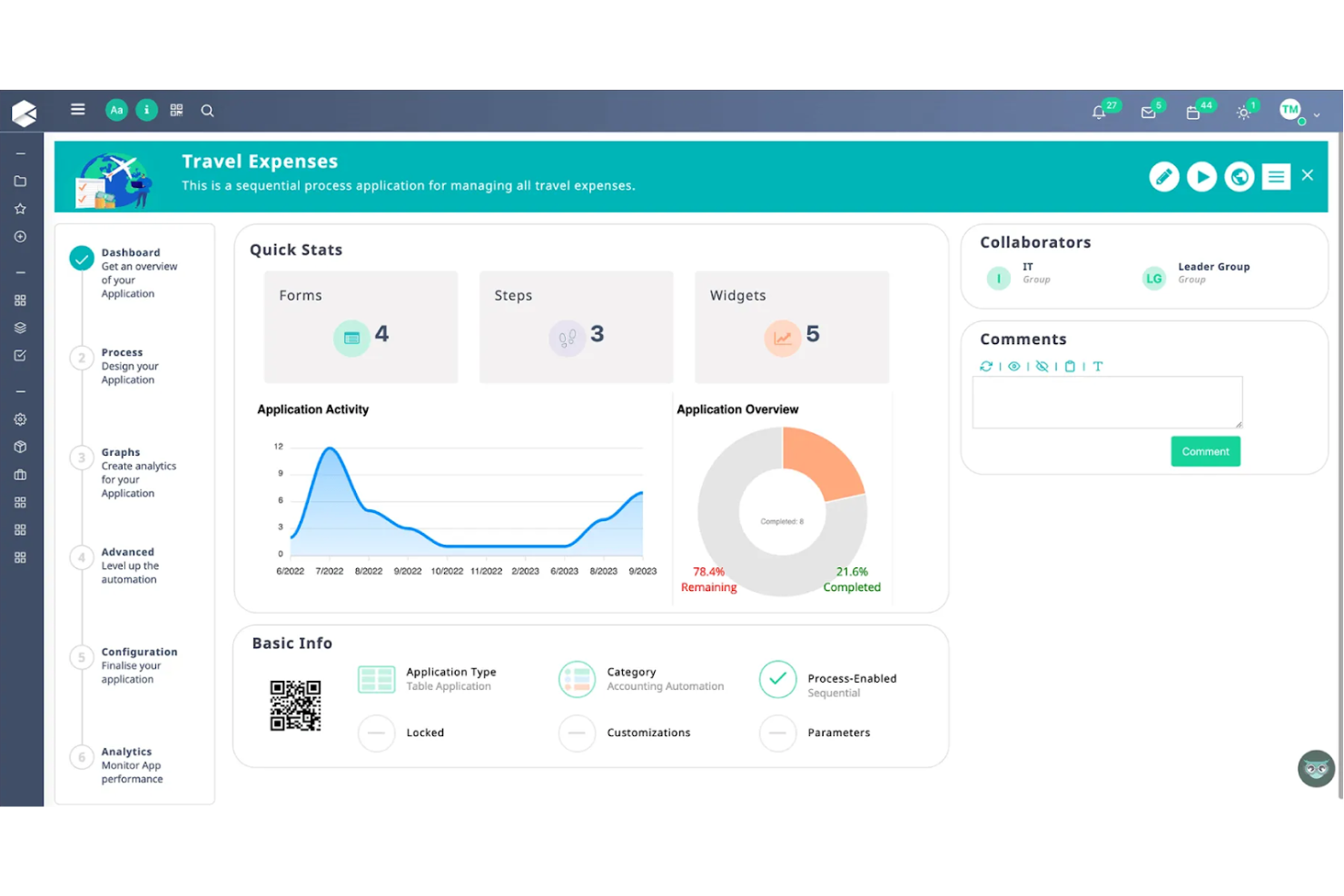
Comidor is a digital transformation platform designed for organizations that want to modernize and automate their business processes. It caters primarily to enterprises that need a comprehensive solution for managing workflows, projects, and collaboration in one unified platform.
Why I picked Comidor: I included this software because it offers a range of features for project management, business process automation, and workflow management all in one platform. This all-in-one approach makes it easier for teams to collaborate and automate repetitive tasks. Comidor's flexibility allows users to customize their workflows to meet specific business needs, enhancing efficiency and productivity. Meanwhile, its built-in analytics help organizations monitor performance and optimize their processes continuously.
Standout features & integrations:
Features include the ability to automate and manage complex workflows with drag-and-drop functionality using the BPMN 2.0 Comidor Workflow Designer. Users can also create custom forms and fields, which makes it easy to tailor workflows to specific business needs. Comidor also provides a range of RPA and AI components, including sentiment analysis and text classification, to enhance automation capabilities.
Integrations include RESTful Web Service, Message Queue, Teams Integration, Google Integration, Zoho Projects API, Zoho CRM, Freshdesk API, and Salesforce API.
Pros and Cons
Pros:
- Real-time analytics and reporting
- Strong customization capabilities
- Efficient low-code development
Cons:
- Challenging to configure some integrations
- Steep learning curve initially

Best for scalable intelligent automation

Blue Prism is an enterprise automation platform designed to provide organizations with a scalable digital workforce. It focuses on helping businesses automate repetitive manual tasks and manage workflows efficiently, freeing up human workers to focus on higher-value tasks.
Why I picked Blue Prism: I chose this platform for its focus on scalable intelligent automation. It supports enterprise businesses along their large-scale automation journey with a centralized control room that allows users to manage and monitor digital workers, ensuring consistent performance and reliability. The platform's security and compliance features ensure that all automated processes are governed and auditable, providing peace of mind for organizations in highly regulated industries.
Standout features & integrations:
Features include a no-code drag-and-drop design studio for creating automation workflows and advanced security features that provide governance and compliance for automated processes. Blue Prism also offers tools for business process management and orchestration, helping companies automate complex workflows across different departments.
Integrations include Microsoft, AWS, ABBYY, EY, and Deloitte.
Pros and Cons
Pros:
- No-code design studio simplifies automation
- Centralized control for digital workers
- Highly scalable for large organizations
Cons:
- May need specialized support for setup and deployment
- Requires ongoing management and monitoring

Appian
Best for low-code process automation and mining

Appian is a platform that automates business processes through a combination of low-code development and process mining capabilities. It helps businesses unify their data and improve operations, leading to better growth and enhanced customer experiences.
Why I picked Appian: This software enables users to build applications quickly without extensive coding. Its process mining tools offer insights into business processes, helping organizations identify bottlenecks and improve efficiency. The software also supports end-to-end automation, allowing businesses to automate repetitive tasks and focus on higher-value work. Its ability to unify data across different systems makes it easier to create comprehensive and effective business applications.
Standout features & integrations:
Features include low-code development for rapid application building, process mining capabilities, and end-to-end process automation that helps streamline operations. Appian also offers data unification across systems, which enhances the power and reach of applications built on its platform.
Integrations include Salesforce, SAP, Microsoft Azure, Amazon Web Services, Google Cloud, and Oracle.
Pros and Cons
Pros:
- Scalable for large enterprises
- Unified data across systems
- Supports end-to-end automation
Cons:
- Customization can be limited
- Requires technical expertise for advanced features
Diğer Akıllı Süreç Otomasyonu Yazılımları
Aşağıda kısa listeme aldığım ek akıllı süreç otomasyonu yazılımlarının bir listesi yer alıyor. İlk 10’a girememiş olsalar da hâlâ değerliler ve daha fazla araştırılmaya değerler.
- IBM
For hybrid cloud and AI integration
- Fortra
For cybersecurity-focused automation
- Pega
For AI decisioning automation
- Automation Anywhere
For versatility and flexibility
- Tungsten Automation
For AI-powered workflow automation
- Bizagi
For low-code process automation
- DocuPipe
For custom document field extraction
- Nintex
For document and process management
- Tonkean
For human-in-the-loop automation
- JIFFY.ai
For automating complex workflows
- Ushur
For automating customer communications


İlgili Yazılım İncelemeleri
Burada aradığınızı hâlâ bulamadıysanız, test edip değerlendirdiğimiz şu diğer araçlara göz atın:
- Proje Yönetimi Yazılımı
- Kaynak Yönetimi Yazılımı
- İş Akışı Otomasyonu Yazılımı
- Zaman Takibi Yazılımı
- Görev Yönetimi Yazılımı
- İş Birliği Araçları
- Gantt Şeması Oluşturucuları
- Verimlilik Araçları
- Akıllı Belge İşleme Yazılımı
How I Evaluate Intelligent Process Automation Software
I split my evaluation into two layers: core capabilities a tool must have to qualify—like workflow orchestration and AI decisioning—and the differentiators that separate the top choices.
Core Functionality (Table Stakes For This List)
When I'm selecting tools for my list, I rank each one on a scale from 0 (does not offer the functionality) to 5 (excels in this area) for each core functionality listed below. Then, I calculate the tool's total score into a percentage. Each tool needs to achieve a minimum total score of 65% to be considered for inclusion.
- Workflow Automation Engine: I evaluate whether the platform offers a visual builder for designing multi-step flows—like routing a project intake request through approval, resourcing, and kickoff automatically.
- AI/ML Decisioning: Tools that embed machine learning for things like auto-classifying incoming tickets by priority or predicting project timeline slippage stand out from those offering static rules alone.
- System Integrations: I check for prebuilt connectors to common PM and collaboration tools like Jira, Asana, Slack, and major ERP platforms, plus a well-documented API for custom connections.
- Robotic Process Automation (RPA) & Task Bots: Whether a platform supports attended and unattended bots matters—especially for repetitive tasks like syncing timesheets across systems or pulling data from legacy tools.
- Process Mining & Discovery: I look for the ability to analyze workflow logs and surface bottlenecks, such as identifying where approval cycles consistently stall across a project portfolio.
- Document & Data Intelligence: Platforms should handle unstructured data extraction—like pulling key dates and deliverables from contracts or SOWs using OCR, NLP, or intelligent document processing.
Once I have a list of tools that meet the criteria, I consider what sets each platform apart.
Differentiating Factors (What Sets Vendors Apart)
Here's how I compare and contrast different vendors:
Standout Features
A generative AI copilot can save hours—I look for platforms where you describe a workflow in plain language and the system drafts it for you. Predictive project analytics matter too, especially dashboards that flag budget overruns or resource conflicts before they derail a sprint. I also evaluate whether a platform ships with reusable automation templates for common PM scenarios like project intake or change requests, since these cut setup time dramatically.
Beyond Features
Governance matters a lot here. I evaluate whether a platform offers a centralized control tower for monitoring live bots and workflows, plus audit trails and role-based access—especially for PMOs managing regulated project portfolios. Implementation speed is another factor I weigh; sandbox environments and guided onboarding can mean the difference between a weeks-long pilot and a months-long rollout. I also check pricing transparency, since per-bot versus per-user licensing can dramatically shift total cost as your automation scales across teams.
Akıllı Süreç Otomasyonu Yazılımı Nasıl Seçilir?
Uzun özellik listeleri ve karmaşık fiyatlandırma yapıları arasında kaybolmak kolaydır. Kendinize özgü yazılım seçim sürecinizde ilerlerken odağınızı korumanıza yardımcı olmak için aklınızda bulundurmanız gereken faktörleri içeren bir kontrol listesi hazırladım:
| Etken | Dikkat Edilmesi Gerekenler |
|---|---|
| Ölçeklenebilirlik | Yazılım, işletmenizin ihtiyaçlarıyla birlikte büyüyebilir mi? |
| Entegrasyonlar | Mevcut araçlarınızla entegre oluyor mu? |
| Özelleştirilebilirlik | Yazılımı süreçlerinize uyacak şekilde özelleştirebilir misiniz? |
| Kullanım Kolaylığı | Yazılım, ekibinizin kullanabileceği kadar sezgisel mi? |
| Bütçe | Mali kısıtlarınıza uyuyor mu? |
| Güvenlik Önlemleri | Yazılım güçlü veri koruması sunuyor mu? |
| Destek | Güvenilir müşteri desteği mevcut mu? |
| Raporlama | Ayrıntılı analizler ve raporlar sunuyor mu? |
Akıllı Süreç Otomasyonu Yazılımındaki Eğilimler
Akıllı süreç otomasyonu yazılımı teknolojisinde fark ettiğim bazı eğilimler ve bunların gelecek için ne anlama gelebileceği şöyle. En önemli içgörüleri ortaya çıkarmak için sayısız ürün güncellemesini, basın bültenini ve sürüm kaydını inceledim.
- Yapay zekâ destekli karar verme: Daha fazla platform, işletmelerin veriye dayalı içgörüler doğrultusunda daha iyi kararlar almasına yardımcı olmak için yapay zekâyı entegre ediyor. Bu eğilim, manuel karar verme süreçlerini azaltmak ve sonuçları öngörüp süreçleri optimize etmek için yapay zekâya güvenmek isteyen şirketler açısından yararlıdır. Yapay zekâ görev yöneticisi yazılımı gibi diğer araçlar da bu özelliği sunar.
- Süreç madenciliği yetenekleri: Mevcut iş akışlarını analiz ederek verimsizlikleri keşfedip belirleyebilen ve iyileştirmeler önerebilen araçlara giderek daha fazla odaklanılıyor. İşletmeler tahminde bulunmadan süreçlerini optimize etmeye ve maliyetleri azaltmaya çalıştıkça bu özellik giderek daha önemli hâle geliyor.
- Hiper otomasyon: Bu kavram, mümkün olduğunca çok sayıda iş sürecini otomatikleştirmek için birden fazla otomasyon aracını ve teknolojisini bir araya getirir. Operasyonlarını tamamen dijitalleştirmeyi ve rutin görevlerde insan müdahalesine olan bağımlılığı azaltmayı hedefleyen şirketler için özellikle caziptir. Örneğin Workato, entegrasyonu ve otomasyonu tek bir platformda birleştirerek işletmelerin kod yazmadan karmaşık, uçtan uca iş akışları oluşturmasını sağlar.
- Düşük kodlu/kodsuz geliştirme: Daha fazla tedarikçi, otomasyonu geliştirici olmayan kişilerin de kullanabilmesini sağlamak için düşük kodlu veya kodsuz platformlar sunuyor. Bu eğilim, özel geliştiriciler işe almadan süreçleri hızlıca otomatikleştirmesi gereken küçük ve orta ölçekli işletmeler için özellikle önemlidir.
- Kullanıcı deneyimine odaklanma: Otomasyon yazılımlarını daha sezgisel ve kullanıcı dostu hâle getirmeye yönelik belirgin bir değişim var. Tedarikçiler, ekiplerin yazılımı en az eğitimle benimseyebilmesini sağlamak için sade ve kolay gezilebilir arayüzlere öncelik veriyor.
Akıllı Süreç Otomasyonu Yazılımı Nedir?
Akıllı süreç otomasyonu (IPA) yazılımı, iş süreçlerini kolaylaştırmak ve manuel çalışmayı azaltmak için yapay zekâ, makine öğrenimi ve otomasyon kullanan bir araçtır.
Genellikle operasyon, finans, insan kaynakları, tedarik zinciri ve BT alanlarında kullanılan bu araçlar, doğruluğu artırmak, verimliliği yükseltmek ve süreç iyileştirmelerini ortaya çıkarmak için robotik süreç otomasyonunu (RPA) yapay zekâ destekli karar verme ile birleştirir. Süreç madenciliği, düşük kodlu iş akışları ve akıllı botlar gibi özellikler ekiplerin zaman kazanmasına ve stratejik görevlere odaklanmasına yardımcı olur.
Akıllı Süreç Otomasyonu Yazılımının Özellikleri
Akıllı süreç otomasyonu yazılımı seçerken aşağıdaki temel özelliklere dikkat edin:
- Yapay zekâ destekli karar verme: Verileri analiz etmek ve önerilerde bulunmak için yapay zekâyı kullanır; işletmelerin hızlı bir şekilde bilinçli kararlar almasına yardımcı olur.
- Süreç madenciliği: Verimsizlikleri belirlemek ve iyileştirmeler önermek için mevcut iş akışlarını analiz eder, genel operasyonları optimize eder.
- Düşük kodlu geliştirme: Kullanıcıların minimum düzeyde kodlama ile otomasyon iş akışları oluşturmasına olanak tanır ve geliştirici olmayan kişiler için erişilebilir olmasını sağlar.
- Makine öğrenimi yetenekleri: Zaman içinde otomasyon süreçlerini iyileştirmek, verimliliği ve doğruluğu artırmak için veri örüntülerinden öğrenir.
- Gerçek zamanlı analiz: Süreç performansına ilişkin anlık içgörüler sunarak işletmelerin veriye dayalı düzenlemeler yapmasını sağlar.
- Güçlü güvenlik önlemleri: Tüm otomatikleştirilmiş süreçlerin ve veri işlemenin güvenlik standartlarına uygun olmasını sağlayarak hassas bilgileri korur.
- Ölçeklenebilirlik: Artan veri hacimlerini ve daha karmaşık iş akışlarını kolayca yöneterek büyüyen işletme ihtiyaçlarını destekler ve büyümeyi desteklemek için öngörücü analizler sunar.
- Özelleştirilebilir iş akışları: Kullanıcıların otomasyon süreçlerini belirli işletme gereksinimlerine uyacak şekilde düzenlemesine olanak tanıyarak çeşitli operasyonlar için uygun bir çözüm sunar.
- Mevcut sistemlerle entegrasyon: Diğer yazılım araçlarına sorunsuz bir şekilde bağlanarak iş akışı sürekliliğini ve veri paylaşımını geliştirir.
- Kullanıcı dostu arayüz: Gezinmesi kolay, sezgisel bir tasarım sunarak yeni kullanıcıların öğrenme sürecini kısaltır.
- İş süreci modelleme: Ekiplerin otomasyondan önce iş süreçlerini görsel olarak tasarlamasını, haritalandırmasını ve optimize etmesini sağlar.
Akıllı Süreç Otomasyonu Yazılımının Faydaları
Akıllı süreç otomasyonu yazılımını uygulamak, ekibiniz ve işletmeniz için çeşitli faydalar sağlar. Yararlanabileceğiniz bazı avantajlar şunlardır:
- Zaman Alan Görevlerin Otomatikleştirilmesi: Çalışanlar, tekrarlayan görevleri otomatikleştirerek stratejik çalışmalara odaklanabilir.
- Hataların ve Tutarsızlıkların Azaltılması: Süreçlerin otomasyon araçlarıyla standartlaştırılması, insan hatalarını en aza indirir.
- Geliştirilmiş Karar Verme: Gerçek zamanlı analizler ve yapay zekâ destekli içgörüler, daha iyi ve daha hızlı karar vermeyi destekler.
- Geliştirilmiş Operasyonel Verimlilik: Optimize edilmiş iş akışları ve darboğazların belirlenmesi, operasyonların daha sorunsuz yürütülmesini sağlar.
- Artan Çalışan Verimliliği: Otomasyon ve kolaylaştırılmış süreçler, çalışanların daha üretken olmasına yardımcı olur.
- Güvenlik ve Uyumluluk: Güçlü veri koruma özellikleri ve otomatik denetim izleri, güvenliği ve uyumluluğu sağlar.
- Geliştirilmiş Müşteri Memnuniyeti: Daha hızlı yanıt süreleri ve doğru bilgi işleme, müşteri deneyimlerini geliştirir.
Akıllı Süreç Otomasyonu Yazılımının Maliyetleri ve Fiyatlandırması
Akıllı süreç otomasyonu yazılımını seçmek, mevcut çeşitli fiyatlandırma modellerinin ve planların anlaşılmasını gerektirir. Maliyetler özelliklere, ekip büyüklüğüne, eklentilere ve daha fazlasına bağlı olarak değişir. Aşağıdaki tablo, yaygın planları, ortalama fiyatlarını ve akıllı süreç otomasyonu yazılımı çözümlerinde genellikle sunulan özellikleri özetlemektedir:
Akıllı Süreç Otomasyonu Yazılımı İçin Plan Karşılaştırma Tablosu
| Plan Türü | Ortalama Fiyat | Yaygın Özellikler |
| Ücretsiz Plan | $0 | Temel otomasyon araçları, sınırlı entegrasyonlar, topluluk desteği |
| Kişisel Plan | $5-$25/kullanıcı/ay | Tek kullanıcı erişimi, temel süreç otomasyonu, sınırlı analiz |
| İşletme Planı | $30-$75/kullanıcı/ay | Çok kullanıcılı erişim, gelişmiş iş akışı otomasyonu, analiz ve raporlama, öncelikli destek |
| Kurumsal Plan | $100+/kullanıcı/ay | Sınırsız kullanıcı, tüm yapay zekâ özellikleri, özel entegrasyonlar, özel destek, güvenlik ve uyumluluk özellikleri |
Akıllı Süreç Otomasyonu Yazılımı Hakkında SSS
Akıllı süreç otomasyonu yazılımı hakkında sık sorulan bazı soruların yanıtları:
Akıllı süreç otomasyonu araçları mevcut sistemlerle nasıl entegre olur?
Akıllı süreç otomasyonu (IPA) araçları, mevcut çok çeşitli sistemlerle sorunsuz bir şekilde entegre olacak biçimde tasarlanmıştır. Bu, CRM, ERP ve diğer iş uygulamaları gibi çeşitli yazılım platformlarına bağlanabilecekleri ve verilerin bunlar arasında sorunsuz bir şekilde akmasını sağlayabilecekleri anlamına gelir. Bu entegrasyon, tutarlılığın korunmasına ve manuel veri girişi ihtiyacının azaltılmasına yardımcı olarak genel iş akışı verimliliğini artırır.
Akıllı süreç otomasyonu yazılımı yapılandırılmamış verileri işleyebilir mi?
Evet, birçok IPA aracı doğal dil işleme (NLP) ve makine öğrenimi gibi gelişmiş özellikler sayesinde yapılandırılmamış verileri işleyebilir. Bu yetenekler, yazılımın e-postalar, belgeler ve diğer yapılandırılmamış girdiler gibi çeşitli kaynaklardan gelen verileri yorumlamasına ve bunlara göre işlem yapmasına olanak tanır. Böylece karmaşık veri analizi ve karar verme görevlerinde kullanışlı olur.
Akıllı süreç otomasyonundan en çok hangi işletme türleri yararlanır?
Her büyüklükteki ve sektördeki işletme IPA’dan yararlanabilir; ancak yüksek hacimli tekrarlayan görevlere ve veriye dayalı süreçlere sahip işletmeler için özellikle değerlidir. Finans, sağlık, perakende ve imalat gibi sektörler, büyük miktarda veriyle çalıştıkları ve kesin, verimli iş akışlarına ihtiyaç duydukları için genellikle en önemli kazanımları elde eder.
Akıllı süreç otomasyonu uyumluluk ve güvenliği nasıl destekler?
IPA yazılımı, tüm süreçlerin belgelenmesini ve izlenebilir olmasını sağlayarak uyumluluğu ve güvenliği önemli ölçüde artırabilir. Verilerin önceden tanımlanmış kural ve standartlara göre işlenmesini otomatikleştirir; bu da insan hatalarının en aza indirilmesine ve mevzuata uyumluluğun korunmasına yardımcı olur. Ayrıca IPA araçları, hassas bilgileri korumak için genellikle şifreleme ve erişim denetimleri gibi güvenlik özellikleri içerir.
Akıllı süreç otomasyonu ile robotik süreç otomasyonu arasındaki fark nedir?
Hem IPA hem de robotik süreç otomasyonu (RPA) görevleri otomatikleştirmeyi amaçlasa da IPA, bilişsel yetenekleri bünyesine katarak basit görev otomasyonunun ötesine geçer. IPA; yapılandırılmamış verileri anlamak, yorumlamak ve bunlara dayanarak karar vermek için makine öğrenimi ve NLP gibi yapay zekâ teknolojilerini kullanır. Bu da onu, esas olarak kurallara dayanan ve tekrarlayan görevleri otomatikleştirmeye odaklanan geleneksel RPA’ya kıyasla daha çok yönlü ve uyarlanabilir hâle getirir.
En iyi akıllı süreç otomasyonu (IPA) yazılımı; tekrarlayan görevleri otomatikleştirerek, manuel hataları azaltarak ve ekipler genelinde süreç verimliliğini artırarak işletmelerin operasyonlarını kolaylaştırmasına yardımcı olur. Bu araçlar; kurallara dayalı iş akışlarını yönetmek ve değişen iş ihtiyaçlarına uyum sağlamak için robotik süreç otomasyonu (RPA), makine öğrenimi ve yapay zekâyı bir araya getirir; böylece daha stratejik çalışmalar için zaman kazandırır.
En iyi akıllı süreç otomasyonu çözümlerini test edip inceleyerek hız, ölçeklenebilirlik ve entegrasyon kolaylığı açısından gerçekten sonuç veren araçları belirledim. İster onay süreçlerini, ister belge işlemeyi veya müşteri hizmetleri iş akışlarını otomatikleştiriyor olun, bu rehber işletmeniz için doğru IPA yazılımını bulmanıza yardımcı olacaktır.