Os 10 melhores softwares de gestão de clientes analisados em 2026

10 Lista restrita do melhor software de gestão de clientes


O software de gestão de clientes ajuda as equipas a manterem-se organizadas, responsivas e consistentes, centralizando as informações dos clientes, acompanhando as interações e simplificando a comunicação. Se está a gerir emails, atualizações de projetos e expectativas dos clientes em diferentes plataformas, a ferramenta certa pode fazer uma grande diferença na facilidade com que gere as suas relações com os clientes.
Com base em testes práticos e investigação, analisei as principais plataformas de software de gestão de clientes para destacar ferramentas que melhoram efetivamente a visibilidade, a colaboração entre equipas e a satisfação dos clientes. Desde o acompanhamento de potenciais clientes à gestão de relações, estas ferramentas foram concebidas para apoiar tanto equipas pequenas como empresas em crescimento.
Neste guia, encontrará o melhor software de gestão de clientes disponível, juntamente com informações sobre aquilo que cada ferramenta faz melhor e como escolher a opção certa para as suas necessidades.
Why Trust Our Software Recommendations
Our team has been testing and reviewing software since 2012. As project managers ourselves, we know how difficult—and important—it is to choose the right software.
For this guide, we evaluated tools using hands-on testing and independent research, scoring tools using our selection criteria. We also draw on insights from industry thought leaders and practicing project management experts.
Our reviews reflect our human editorial judgment, not a sales pitch.
Expert reviewers:
Tabela de comparação de software de gestão de clientes
Esta tabela de comparação resume os detalhes de preços das minhas principais escolhas de software de gestão de clientes:
| Tool | Best For | Trial Info | Price | ||
|---|---|---|---|---|---|
| 1 | Best for billing tracked project time | Free plan available | From $12/user/month (billed annually) | Website | |
| 2 | Best for customizable pipelines | 14-day free trial + free demo available | From $12/user/month (billed annually) | Website | |
| 3 | Best for shared inbox collaboration | 30-day free trial + free demo available | From $14/user/month (billed annually) | Website | |
| 4 | Best for an all-in-one solution | 14-day free trial | From $19/month | Website | |
| 5 | Best for law firms | Free trial available | From £79/user/month | Website | |
| 6 | Best for creative professionals | 30-day free trial | From $29/month (billed annually) | Website | |
| 7 | Best for process automation | Not available | From $15/user/month | Website | |
| 8 | Best for sales teams | 14-day free trial | From $14/user/month (billed annually) | Website | |
| 9 | Best for client portals | Free trial + free demo available | From $39/month (billed annually) | Website | |
| 10 | Best for project management | Free plan + 14-day free trial + free demo available | From $9.99/user/month (billed annually) | Website |


Análises do melhor software de gestão de clientes
Seguem-se os meus resumos detalhados do melhor software de gestão de clientes que entrou na minha lista restrita. As minhas análises apresentam uma visão detalhada das principais funcionalidades, vantagens e desvantagens, integrações e casos de utilização ideais de cada ferramenta, para o ajudar a encontrar a melhor opção para si.

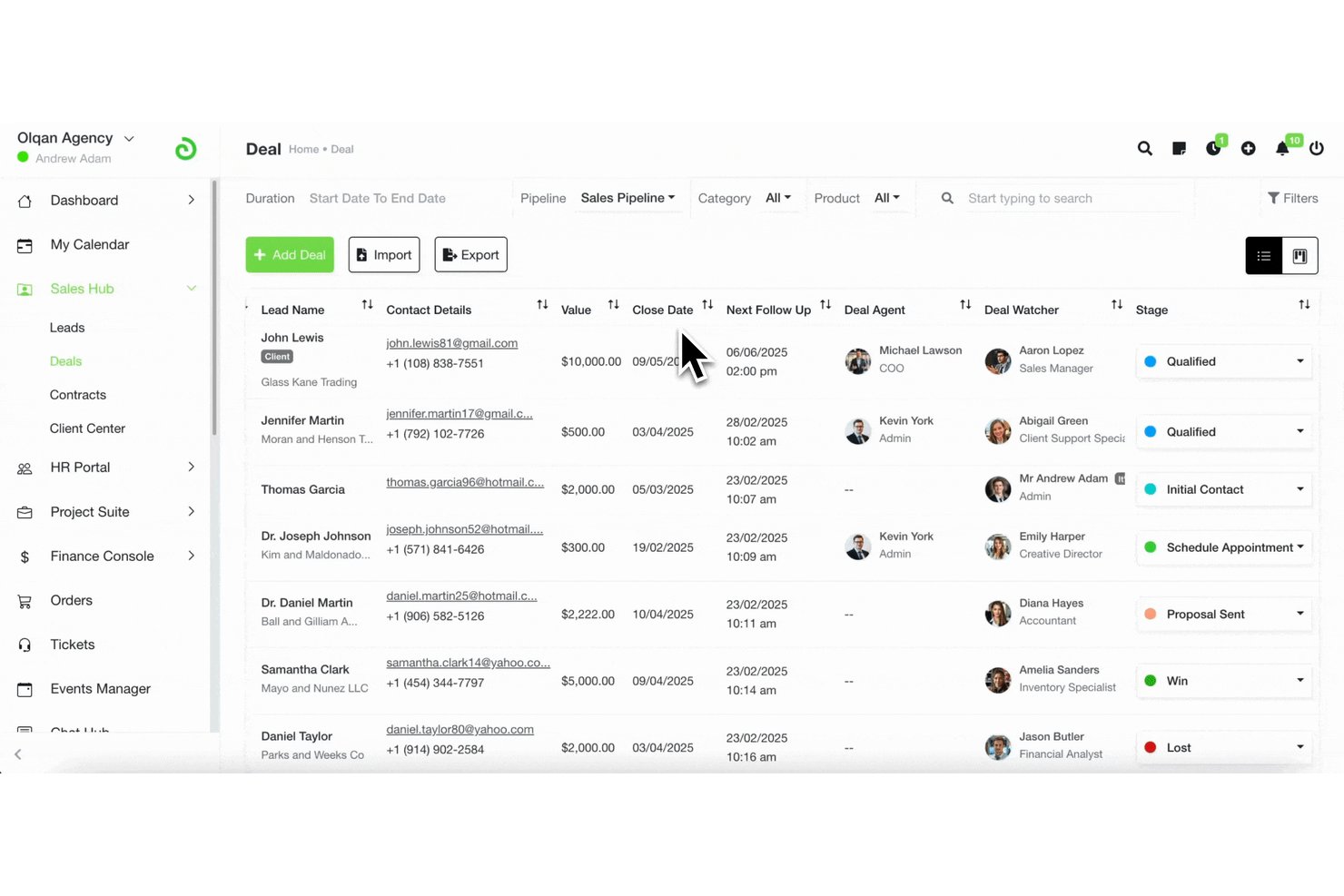
Olqan is an all-in-one business operating system that combines client management, project delivery, sales pipelines, time tracking, and invoicing in a single platform.
Who Is Olqan Best For?
Olqan is a good fit for agencies and consultancies that need to manage projects, track billable time, and invoice clients from one place.
Why I Picked Olqan
I picked Olqan as one of the best because it closes the gap between doing the work and getting paid for it. Once my team logs time against a project and task, I can generate an invoice directly from those time log entries, selecting the date range and billing details to produce an accurate client bill without rebuilding hours from scratch. The Advanced Dashboard's Client tab also shows client-wise earnings and time logs side by side, so I always know which projects are generating revenue.
Olqan Key Features
- Sales pipeline tracking: Manage leads through customizable deal stages, with deal value, probability, expected close dates, and activity history logged per opportunity.
- Client portal access: Give clients a dedicated login to view their projects, invoices, files, and communications in one place.
- Project budget vs. actuals: Compare planned budgets against real spending and analyze profitability at the project level.
- Contract templates: Search, filter, and apply pre-built contract templates that auto-populate a new contract form with client and project details.
Olqan Integrations
Olqan offers native integrations with QuickBooks, Google Calendar, Slack, Microsoft Teams, Stripe, and PayPal.
Pros and Cons
Pros:
- Shows client earnings alongside time logs
- Builds client invoices from selected time logs
- Connects client records to project task tracking
Cons:
- Client file access permissions remain unclear
- No documented synced client communication timeline
Best for customizable pipelines

monday CRM is a customizable client management software designed to help you track leads, manage contacts, and oversee your entire sales pipeline. It centralizes customer data, communication, and activities in one place, making it easier to stay organized and responsive. As consultant Fred Baker notes from his own experience, “I've transitioned clients from Salesforce to Monday for simpler project tracking solutions,” highlighting how the platform can serve as an accessible alternative to more complex systems.
Why I picked monday CRM: I picked monday CRM for its focus on pipeline management, which lets you customize and manage multiple pipelines and edit stages easily. This flexibility allows you to tailor sales and communication processes to fit your unique business needs, ensuring that you can track every stage of your client interactions. Additionally, the tool offers contact and lead management features that help you organize and nurture your leads, improving your chances of converting them into clients.
Standout Features & Integrations:
Features include project tracking, which helps you keep tabs on ongoing projects and deadlines to ensure timely delivery. The tool also provides real-time dashboards that allow you to monitor client status and team performance at a glance, so you're always informed.
Integrations include NetSuite, Salesforce, HubSpot, Slack, Microsoft Dynamics CRM, Microsoft Teams, Zendesk, Jira Software Cloud, Google Sheets, Gmail, Google Drive, and Mailchimp.
Pros and Cons
Pros:
- Mobile CRM experience for on-the-go access
- Custom dashboards and client pipelines
- Automates repetitive tasks to save time
Cons:
- Limited native communication tools
- Reporting features may lack depth for some users
New Product Updates from monday CRM

monday CRM Adds Meta Conversions API Integration
monday CRM now lets you connect Meta Conversions API and sync lead status back to Meta, improving targeting and conversions via a new Meta integration automation recipe. For more information, visit monday CRM's official site.
Missive
Best for shared inbox collaboration
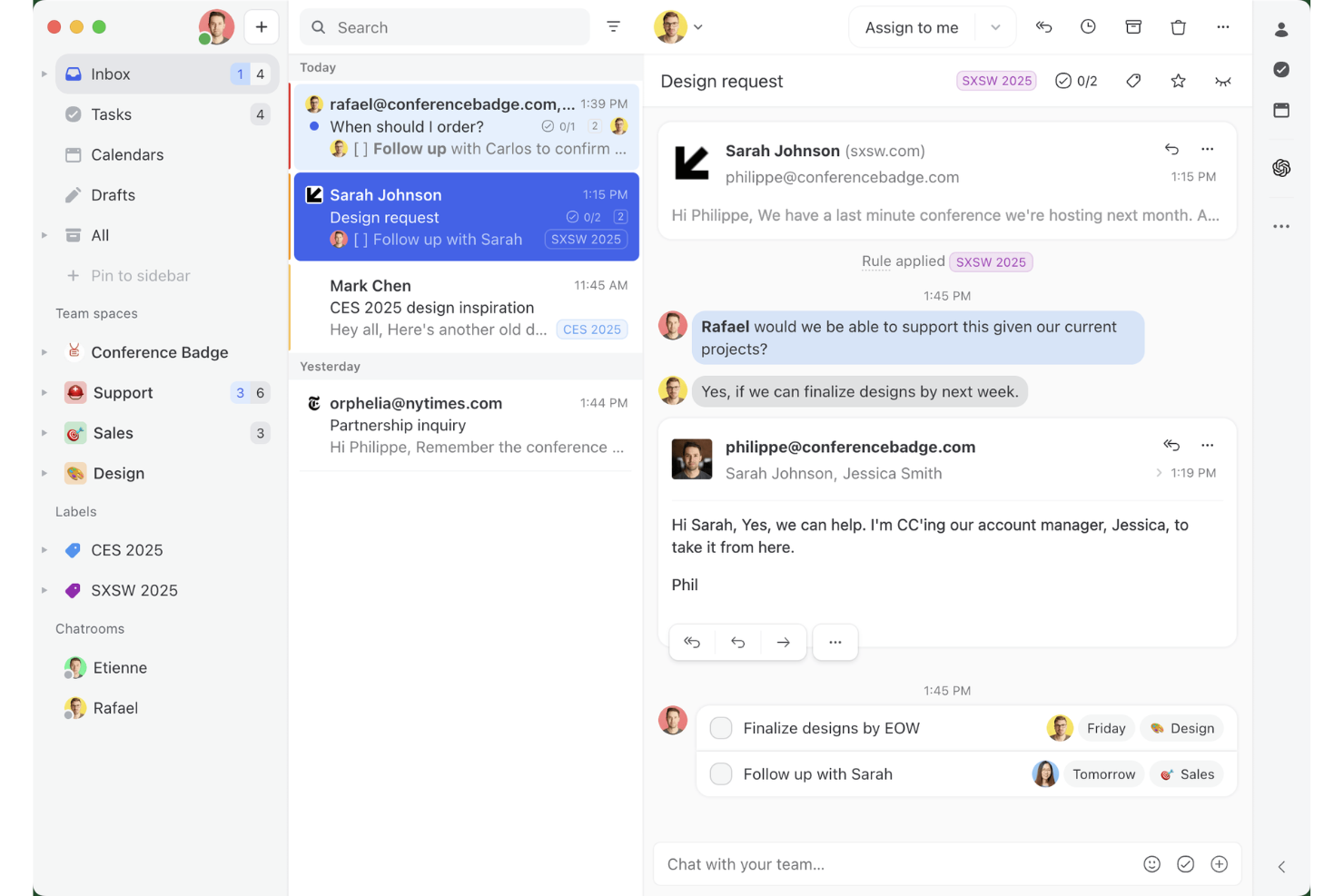
Missive is a shared inbox and team email collaboration tool that unifies email, SMS, WhatsApp, and social messaging channels into one workspace, with built-in task management, internal threads, and contact management.
Who Is Missive Best For?
Missive suits client-facing teams at agencies or service businesses that manage high volumes of multi-channel client conversations and need tighter internal coordination around those threads.
Why I Picked Missive
I've included Missive in my top picks because no other tool on this list handles shared inbox collaboration the way it does. I love that internal threads let your team talk around a client email without the client ever seeing it, and real-time collaborative drafting means two people can co-author a reply simultaneously. When a client messages across three different channels, everything lands in one workspace with a full audit trail of who touched what and when.
Missive Key Features
- Shared inbox rules engine: Automatically route, label, assign, and follow up on incoming conversations based on custom trigger conditions.
- CRM sidebar integrations: Surface client records from HubSpot, Salesforce, Pipedrive, and Close directly alongside email threadswithout switching tabs.
- Guest access for external collaborators: Invite clients or contractors into specific conversation threads at no extra seat cost.
- Multi-channel inbox consolidation: Manage email, SMS, WhatsApp, Facebook Messenger, Instagram DMs, and livechat from a single workspace.
- Missive MCP Server: Connect external AI tools (like Claude or ChatGPT) to query client management threads, check calendars, and draft replies—while keeping agent review required before sending.
Missive Integrations
Missive offers native integrations with HubSpot, Salesforce, Pipedrive, Close, Asana, ClickUp, Trello, Google Drive, Dropbox, and Shopify. It also provides an open REST API, supports Zapier, and includes its new MCP Server on Productive and Business plans (requires admin activation).
Pros and Cons
Pros:
- Real-time team drafting on every channel
- Internal threads let teams discuss client emails privately
- Unifies email, SMS, and social messages
Cons:
- Lacks billing, invoicing, and client onboarding tools
- No client portal or project dashboards
New Product Updates from Missive

Missive Adds Multi-Step Automations With Timed Rules
Missive adds time-based rule steps that let automations run through multiple stages on the same conversation. This helps teams build follow-ups and SLA escalations without creating separate rules. For more information, visit Missive’s official site.
 .

Best for an all-in-one solution

Suitedash is an all-in-one client management platform designed for businesses that need to manage projects, invoicing, and client communication in one place. It's ideal for small-to-medium-sized businesses looking for comprehensive functionality without the need for multiple tools.
Why I picked Suitedash: Suitedash combines project management, CRM, and invoicing into a single platform, making it a versatile choice for businesses. You can manage client interactions, track project progress, and handle billing seamlessly. The platform is also customizable, allowing you to tailor it to your specific business needs. Furthermore, its all-in-one approach reduces the need for multiple subscriptions, which saves you time and money.
Standout Features & Integrations:
Features include a client portal that simplifies communication and collaboration with clients. The invoicing tool allows you to create and send invoices directly from the platform, streamlining your billing process. The software’s project management features can additionally help you keep track of tasks, deadlines, and team responsibilities.
Integrations include QuickBooks, Stripe, PayPal, Zapier, Google Calendar, Braintree, WordPress, Zoom, Twilio, and Authorize.Net.
Pros and Cons
Pros:
- Reduces need for multiple tools
- Customizable features
- Versatile project tools
Cons:
- Limited advanced features
- Complex initial setup

Clio
Best for law firms
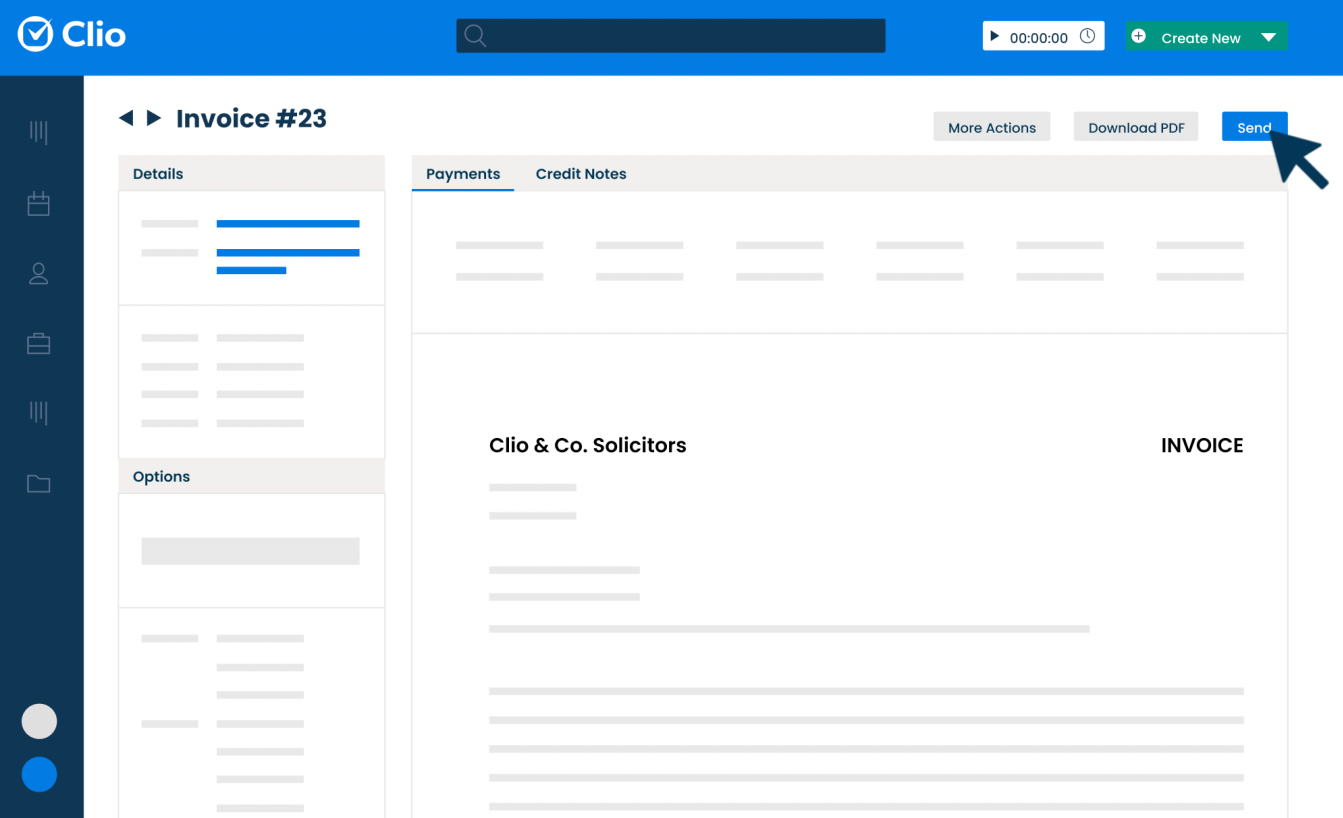
Clio is a cloud-based software platform built to support the everyday operations of legal practices. It helps professionals organize their cases, manage client communications, and handle administrative tasks like billing and scheduling. For attorneys like Mark Chatow, who has relied on Clio for more than a decade to run his practice, the platform has proven indispensable: “I've used Clio for 10+ years and they are phenomenal at anticipating what attorneys need and adding it—usually at no additional cost. From client intake to document automation to payment processing, and from smart court rule calendaring to integration with InfoTrack, Clio does it all—with a user-friendly interface and outstanding customer service.”
Why I picked Clio: Clio is made specifically for legal professionals, so everything is built around how a law office works. You can track time directly from case files, manage documents within specific matters, and send invoices that match legal billing formats. Clio Grow helps you handle client intake, while Clio Manage keeps ongoing casework organized. Furthermore, if you need to stay compliant or follow industry billing codes, the system is set up for that too.
Standout Features & Integrations:
Features include task management tools that let you assign and monitor case-related work, built-in calendars to keep track of court dates and meetings, and document automation tools so you can generate standard legal documents faster. You can also log phone calls and emails directly into client records. There’s an option to collect e-signatures through the platform as well.
Integrations include Microsoft 365, Google Workspace, QuickBooks Online, Dropbox, Zoom, Fastcase, DocuSign, LawPay, NetDocuments, and Albato.
Pros and Cons
Pros:
- Mobile app available
- Effective document management
- Strong compliance support
Cons:
- Complex for first-time users
- Can be pricey for small firms

Best for creative professionals

Honeybook is a client management platform designed for creative entrepreneurs and freelancers. It manages projects, contracts, and payments to help you focus on your craft. For small business owners like Madisen Saglibene, who has run her catering company with HoneyBook for over five years, the platform has been transformative: “HoneyBook’s evolving AI features have been a game changer…helping to keep me organized, saving time, and giving my clients the experience they deserve they honestly may not have gotten from me as a small business otherwise.”
Why I picked Honeybook: Honeybook is tailored for creative professionals, making it easy to manage the business side of your projects. You can send proposals, manage contracts, and handle invoices all in one place. Its user-friendly interface saves you time, allowing you to focus on your creative work. The automation of administrative tasks also makes it a valuable, time-saving tool for artists and freelancers.
Standout Features & Integrations:
Features include customizable templates that allow you to create branded proposals and contracts quickly. The client portal also provides a central place for your clients to view and interact with project details. Additionally, the time-tracking feature helps you keep track of billable hours and manage your time effectively.
Integrations include QuickBooks, Calendly, Zapier, Meta Leads, Pic-Time, Zoom, Prismm, and Canva.
Pros and Cons
Pros:
- Time-tracking feature
- Client portal available
- Customizable templates
Cons:
- Limited scalability for large teams
- Can be complex for beginners

Creatio
Best for process automation

Creatio is a platform that combines customer relationship tools with low-code technology to help businesses automate workflows and manage operations across departments. It’s built for teams looking to run both customer-facing and internal processes from a single system.
Why I picked Creatio: Creatio gives your team a way to automate both client interactions and behind-the-scenes workflows without writing code. You can use visual editors to set up process flows, manage pipelines, and build dashboards to track performance. The system connects customer data with tasks, approvals, and follow-ups so nothing gets missed. Its low-code studio lets you create apps to handle more complex or unique workflows. That flexibility makes it easier to manage long or layered client journeys.
Standout Features & Integrations:
Features include a dynamic case management tool that adjusts workflows based on client needs, analytics dashboards you can build with drag-and-drop tools, and a business rule designer that lets you set conditions to trigger actions. There’s also a mobile app builder so your team can create tools for field or remote work.
Integrations include OneLogin, Google Calendar, Microsoft 365, Webitel, Asterisk, Cisco Finesse, TAPI, CallWay, Infinity, and Avaya.
Pros and Cons
Pros:
- Handles both internal and client work
- Good support for layered automation
- Low-code platform for customization
Cons:
- Setup needs strong planning upfront
- Performance can slow under heavy use

Best for sales teams

Less Annoying CRM is a simple client management tool designed for small teams. It helps manage contacts, track leads, and organize tasks in a user-friendly way.
Why I picked Less Annoying CRM: Less Annoying CRM is designed with simplicity in mind, making it easy for you and your team to learn and use without needing a lot of training. You can manage contacts, schedule tasks, and keep notes all in one place. The platform also offers team permissions, so each user sees only what they need. This helps small teams stay organized without getting overwhelmed.
Standout Features & Integrations:
Features include easy contact management with a simple interface that lets you track all your leads and clients. You can customize your pipeline to fit your sales process, helping you stay organized. The calendar integration also allows you to sync tasks and appointments, keeping your schedule in one place.
Integrations include Mailchimp, Google Calendar, Outlook Calendar, Zapier, Simplii, JustCall, Calendly, Google Contacts, Nusii, and Crankwheel.
Pros and Cons
Pros:
- Customizable sales stages
- Supports goal setting
Cons:
- Limited marketing automation features
- Deal stages aren’t always flexible

Assembly
Best for client portals

Copilot is a client portal software designed for tech-enabled service businesses like accounting firms, marketing agencies, and freelancers. It focuses on secure messaging, file sharing, invoicing, and forms to enhance client experience.
The platform’s flexibility has also proven valuable outside of these traditional sectors. For example, Miguel Angel Gongora Meza, Founder & Director of Evolution Treks Peru, shared how Copilot streamlined his tourism business: “In tourism, I needed to discover something that would enable me to work with complex schedules, quick changeover, local payments and group management of guides, porters, and cooks. Copilot was a success with us since it allowed our guests a clean view of what was important while we were able to manage more complex information behind the scenes. We store PDF park permits on it, load maps of the hiking tracks, and get updates without flooding other people with notifications.”
Why I picked Copilot: Copilot is tailored for businesses needing a customizable client portal. You get features like a CRM, notification center, and automation capabilities, which help consolidate your tech stack. The platform’s white-label option also ensures you can create a branded client portal experience.
Standout Features & Integrations:
Features include a secure messaging system that keeps communication private and organized. The invoicing feature lets you manage billing directly within the portal, which reduces the need for separate tools. Automation capabilities can additionally help you save time by streamlining repetitive tasks.
Integrations include Airtable, Calendly, QuickBooks, Google Docs, Databox, ClickUp, Jotform, Notion, monday.com, and Loom.
Pros and Cons
Pros:
- Enhances client communication
- White-label options
- Customizable client portal
Cons:
- Initial configuration complexity
- Limited out-of-the-box templates

Teamwork.com
Best for project management

Teamwork.com is a project management platform built to help teams plan, track, and deliver client work. It’s used by service-based businesses to manage everything from tasks and deadlines to resources and billing. For Celina Moreno, Owner and CEO of Luna Marketing Services, Teamwork.com stood out for how it enhanced collaboration with clients: “Teamwork is a comprehensive tool: not only because of its client management capabilities, but also due to its versatility and completeness. We appreciated the fact that it allowed us to involve our clients in the projects, which made communication more streamlined and accessible for all our team members.”
Why I picked Teamwork.com: Teamwork.com is built to support project-heavy teams that work with clients on a regular basis. You can manage client projects across timelines, assign tasks, and track workloads in real time. The platform also includes budgeting tools so you can monitor billable hours and project profitability. Time tracking is also built in, which makes it easier to report on client work. Everything connects back to helping your team deliver projects on time and within budget.
Standout Features & Integrations:
Features include built-in templates that help your team launch repeatable projects faster, a client-facing dashboard so your clients can follow along with progress, and resource management tools to balance workloads. You can use portfolio views to get a big-picture look at ongoing projects. The platform also offers a built-in document editor for real-time collaboration.
Integrations include Slack, Microsoft Teams, Google Calendar, Dropbox, HubSpot, QuickBooks Online, OneDrive, Harvest, Xero, and Zapier.
Pros and Cons
Pros:
- Portfolio views help manage multiple clients
- Easy to copy and reuse project templates
- Supports large teams
Cons:
- Hard to manage recurring tasks efficiently
- Needs better bulk editing tools
Outro software de gestão de clientes
Eis alguns sistemas adicionais de gestão de clientes que não entraram na minha lista restrita, mas que ainda vale a pena conhecer:
- ActiveCampaign
For CRM and customer insights
- Insightly
For integrations
- Odoo
For lead management
- CiviCRM
For non-profits
- Lone Wolf Relationships
For real estate agents
- Less Annoying CRM
For small teams
- Salesforce CRM
For comprehensive client profiles
- Zoho CRM
For versatile client relationship management
- monday.com
For task assignment
- ClickUp
For task management integration
- Zendesk
For customer support teams


How I Evaluate Client Management Software
I evaluate client management tools in two layers: the baseline must-haves—client portals, project-linked billing, intake workflows—and the differentiators that set top picks apart.
Core Functionality (Table Stakes For This List)
When I'm selecting tools for my list, I rank each one on a scale from 0 (does not offer the functionality) to 5 (excels in this area) for each core functionality listed below. Then, I calculate the tool's total score into a percentage. Each tool needs to achieve a minimum total score of 65% to be considered for inclusion.
- Client Database & Profiles: I look for centralized client records with custom fields, tags, and activity timelines—so you can pull up a client and see every project, note, and interaction in one place.
- Project-Client Linking: Each tool should connect clients to their projects, tasks, and deliverables. I check whether you can view all active engagements for a single client from one dashboard.
- Client Portal & Collaboration: I evaluate whether clients get a dedicated space to review deliverables, leave feedback, and approve work without needing to dig through email threads.
- Communication Tracking: Tools should log emails, meetings, and messages against client records automatically. I look at whether platforms sync with Gmail or Outlook to capture conversations.
- Billing & Invoicing: I check for invoicing tied to tracked time and project milestones—like converting logged hours on a retainer project directly into an invoice for the client.
- Onboarding & Intake Workflows: Good onboarding tools let you build repeatable intake sequences with forms, welcome emails, and task triggers that kick off every time you sign a new client.
Once I have a list of tools that meet this criteria, I consider what sets each platform apart.
Differentiating Factors (What Sets Vendors Apart)
Here's how I compare and contrast different vendors:
Standout Features
White-label branding is a big differentiator—agencies that present a branded client portal build more trust than those sending generic login links. I also look for built-in e-signature and contract workflows, which let you move from proposal to signed agreement without bouncing clients to a separate tool. Automated client reporting matters just as much. The strongest tools let you schedule branded progress reports that pull live project data, saving you from manually building slide decks every week.
Beyond Features
Integrations matter more than most buyers realize—I check whether a tool connects natively with the project management and accounting platforms your team already uses, like Jira, Asana, QuickBooks, or Xero. Pricing structure is equally important. Some vendors charge per client seat, which gets expensive fast when you're managing dozens of accounts. I also evaluate industry fit, since a tool built for creative agencies often handles retainer workflows differently than one designed for consulting firms.
Como escolher um software de gestão de clientes
É fácil ficar atolado em listas extensas de funcionalidades e estruturas de preços complexas. Para o ajudar a manter o foco enquanto percorre o seu processo específico de seleção de software, eis uma lista de verificação dos fatores a ter em conta:
| Fator | O que considerar |
| Escalabilidade | Certifique-se de que o software pode crescer com a sua empresa. Considere se consegue gerir mais clientes, utilizadores e dados à medida que a sua equipa cresce. |
| Integrações | Verifique se o software se liga às ferramentas que a sua equipa já utiliza, como plataformas de e-mail, calendários e redes sociais. |
| Personalização | Procure opções para adaptar o software aos seus processos. Isto pode incluir campos personalizados, painéis ou fluxos de trabalho. |
| Facilidade de utilização | Avalie se a sua equipa consegue aprender rapidamente a utilizar e navegar no software. Uma interface intuitiva poupa tempo e reduz a frustração. |
| Orçamento | Considere o custo em relação ao seu orçamento. Procure taxas ocultas ou preços por escalões que possam afetar o seu investimento total. |
| Medidas de segurança | Verifique se o software dispõe de medidas de segurança robustas, como encriptação de dados e autenticação de utilizadores, para proteger as informações dos clientes. |
| Suporte | Avalie a disponibilidade e a qualidade do suporte ao cliente. Um suporte fiável pode ser crucial durante a implementação e a resolução de problemas. |
| Funcionalidades | Identifique as funcionalidades essenciais para o sucesso da sua equipa, como ferramentas de elaboração de relatórios, automatização ou acesso móvel, e certifique-se de que respondem às suas necessidades. |
Tendências no software de gestão de clientes
Na minha investigação, consultei inúmeras atualizações de produtos, comunicados de imprensa e registos de lançamentos de diferentes fornecedores de software de gestão de clientes. Eis algumas das tendências emergentes que estou a acompanhar:
- Informações baseadas em IA: A IA está a ser utilizada para analisar dados de clientes e prever tendências, ajudando as empresas a tomar decisões informadas. Alguns fornecedores disponibilizam recomendações baseadas em IA para melhorar as relações com os clientes ou otimizar as estratégias de vendas.
- Funcionalidades de comandos de voz: Os comandos de voz estão a ganhar popularidade, uma vez que permitem aos utilizadores interagir com o software sem utilizar as mãos. Isto é especialmente útil quando realizam várias tarefas em simultâneo ou quando estão em movimento.
- Ferramentas de colaboração remota: À medida que o trabalho remoto cresce, são cada vez mais procuradas ferramentas que melhorem a colaboração das equipas virtuais. Funcionalidades como espaços de trabalho partilhados e integrações com videoconferência estão, por isso, a tornar-se essenciais.
- Portais de autosserviço para clientes: Atualmente, mais software disponibiliza portais onde os clientes podem aceder às suas informações, efetuar atualizações e comunicar diretamente com as empresas. Esta tendência dá mais autonomia aos clientes e reduz a carga de trabalho dos membros das equipas de atendimento ao cliente.
- Ferramentas de visualização de dados: Os painéis visuais e as ferramentas de elaboração de relatórios estão a evoluir para fornecer informações mais claras sobre as interações com os clientes e os dados de vendas. Os fornecedores estão a concentrar-se em tornar os dados mais acessíveis e acionáveis através de elementos visuais intuitivos.
O que é o software de gestão de clientes?
O software de gestão de clientes é uma ferramenta que ajuda as empresas a acompanhar, organizar e otimizar as interações com clientes atuais e potenciais.
Utilizado pelas equipas de vendas, suporte e gestão de contas, centraliza os dados de contacto, agenda tarefas e fornece informações para melhorar a comunicação com os clientes, o processo de integração de clientes e a satisfação. Estas ferramentas simplificam a gestão de relações, melhoram a eficiência das equipas e apoiam a tomada de decisões baseada em dados.
Funcionalidades do software de gestão de clientes
Ao selecionar um software de gestão de clientes, esteja atento às seguintes funcionalidades essenciais:
- Gestão de contactos e recursos de clientes: Organize e armazene informações dos clientes para acompanhar as interações e construir relações mais sólidas.
- Agendamento de tarefas: Planeie e atribua tarefas para garantir acompanhamentos atempados e uma gestão eficiente dos fluxos de trabalho.
- Visualização de dados: Utilize painéis visuais para obter informações sobre as interações com os clientes e o desempenho das vendas.
- Portais de autosserviço para clientes: Permita que os clientes acedam e atualizem as suas informações, reduzindo a carga de trabalho da sua equipa.
- Automatização do marketing por e-mail: Automatize campanhas de e-mail para contactar os clientes com mensagens personalizadas e melhorar o envolvimento.
- Classificação de potenciais clientes: Dê prioridade aos potenciais clientes com base na probabilidade de conversão, ajudando a sua equipa a concentrar-se nas oportunidades mais promissoras.
- Painéis personalizáveis: Adapte a sua interface aos processos e às preferências específicas da sua empresa.
- Informações baseadas em IA: Tire partido da IA para analisar dados e fornecer recomendações acionáveis para melhorar as relações com os clientes.
- Ferramentas de colaboração remota: Facilite o trabalho em equipa com funcionalidades que apoiam a comunicação virtual e a gestão de projetos.
Funcionalidades comuns de IA no software de gestão de clientes
O software moderno de gestão de clientes inclui frequentemente funcionalidades baseadas em IA concebidas para aumentar a produtividade e melhorar as relações com os clientes. Eis algumas capacidades comuns de IA a procurar:
- Introdução automática de dados: A IA pode analisar e-mails, formulários e documentos para atualizar automaticamente os registos dos clientes, poupando-lhe tempo na introdução manual.
- Lembretes e agendamento inteligentes: Os assistentes inteligentes podem sugerir os horários ideais para reuniões, enviar lembretes automáticos de acompanhamento e ajudar a evitar conflitos de agendamento.
- Análise preditiva: A IA analisa as interações e os comportamentos dos clientes para prever quais poderão necessitar de atenção, ajudando-o a dar prioridade aos contactos e a melhorar a retenção.
- Análise de sentimentos: As ferramentas de IA podem avaliar o tom dos e-mails ou mensagens dos clientes, alertando-o para preocupações urgentes ou oportunidades de melhorar a satisfação.
- Comunicação personalizada: Gere modelos de e-mail e respostas personalizados com base no histórico e nas preferências dos clientes, tornando os seus contactos mais relevantes e cativantes.
- Classificação de potenciais clientes: A IA avalia os potenciais clientes e classifica-os com base na probabilidade de conversão, para que possa concentrar os seus esforços onde terão maior impacto.
- Fluxos de trabalho automatizados: Configure automatizações baseadas em IA que desencadeiem tarefas, atribuam membros à equipa ou façam avançar os clientes no seu funil com base nas respetivas ações ou estado.
- Chatbots e assistentes virtuais: Forneça apoio e respostas imediatas às questões dos clientes, mesmo fora do horário de funcionamento, melhorando a capacidade de resposta e a experiência do cliente.
Vantagens do software de gestão de clientes
A implementação de software de gestão de clientes proporciona várias vantagens à sua equipa e à sua empresa. Eis algumas que pode esperar:
- Melhores relações com os clientes: Mantenha todas as interações com os clientes organizadas e acessíveis, facilitando a criação e a manutenção de relações sólidas.
- Maior eficiência: Automatize tarefas repetitivas, como o marketing por e-mail e os acompanhamentos, libertando tempo para trabalhos mais importantes.
- Melhor tomada de decisões: Utilize a visualização de dados e informações baseadas em IA para tomar decisões informadas com base em dados em tempo real.
- Colaboração otimizada: As ferramentas de colaboração remota e os painéis partilhados ajudam a sua equipa a trabalhar em conjunto de forma eficaz, independentemente do local onde se encontrem.
- Prioridade aos esforços de vendas: A classificação de potenciais clientes ajuda a sua equipa a concentrar-se nos contactos com maior potencial, melhorando as taxas de conversão.
- Redução da carga de trabalho: Os portais de autosserviço para clientes permitem-lhes gerir as suas próprias informações, reduzindo a carga sobre a sua equipa de apoio.
- Comunicação personalizada: A automatização de e-mails permite-lhe enviar mensagens direcionadas que correspondem às necessidades de cada cliente, melhorando o envolvimento.
Custos e preços do software de gestão de clientes
A seleção de software de gestão de clientes requer uma compreensão dos vários modelos de preços e planos disponíveis. Os custos variam entre ferramentas gratuitas de gestão de clientes e centenas de dólares por mês, consoante as funcionalidades, a dimensão da equipa, os complementos e outros fatores. A tabela abaixo resume os planos comuns, os respetivos preços médios e as funcionalidades normalmente incluídas nas soluções de software de gestão de clientes:
Tabela de comparação de planos de software de gestão de clientes
| Tipo de plano | Preço médio | Funcionalidades comuns |
| Plano gratuito | $0 | Gestão básica de contactos, apoio limitado e integração de e-mail. |
| Plano pessoal | $5-$25/ utilizador/mês | Gestão avançada de contactos, agendamento de tarefas e ferramentas básicas de elaboração de relatórios. |
| Plano empresarial | $30-$60/ utilizador/mês | Funcionalidades completas de CRM, funcionalidades de automatização e painéis personalizados. |
| Plano empresarial avançado | $70-$150/ utilizador/mês | Análise avançada, informações baseadas em IA, medidas de segurança reforçadas e apoio premium. |
Perguntas frequentes sobre software de gestão de clientes
\u003cspan style=\u0022font-weight: 400\u0022\u003eEis algumas respostas a perguntas frequentes sobre software de gestão de clientes:\u003c/span\u003e
Como pode o software de gestão de clientes ajudar-me a acompanhar mais facilmente as comunicações com os clientes?
O software de gestão de clientes centraliza os e-mails, as chamadas, as notas de reuniões e outras interações de cada cliente, permitindo-lhe consultar todo o histórico num único local. Isto facilita a tarefa de evitar perder mensagens ou repetir conversas. Muitas plataformas também disponibilizam notificações em tempo real sobre novas atividades — como e-mails abertos ou documentos assinados — para que tenha sempre as atualizações mais recentes ao seu alcance, sem ter de procurar em várias ferramentas.
Quais são alguns exemplos de software de gestão de clientes?
Alguns exemplos populares de software de gestão de clientes para gestores de contas incluem o HubSpot CRM, o Salesforce, o Zoho CRM, o Microsoft Dynamics 365 e o Less Annoying CRM. Cada uma destas ferramentas ajuda a organizar as informações dos clientes, acompanhar as interações, gerir os acompanhamentos e automatizar as tarefas diárias. Algumas plataformas também disponibilizam relatórios, partilha de documentos e integração com aplicações de e-mail e calendário para aumentar a sua eficiência.
O software de gestão de clientes pode integrar-se com as ferramentas que já utilizo, como plataformas de e-mail ou de contabilidade?
Sim. A maioria das plataformas de gestão de clientes integra-se com ferramentas populares como o Gmail, o Outlook, o Slack, o QuickBooks e aplicações de calendário. Estas integrações permitem sincronizar facilmente comunicações, contactos e faturas, reduzindo a necessidade de alternar entre diferentes aplicações. A configuração é normalmente simples — muitas vezes, basta efetuar alguns cliques nas definições do software —, o que facilita a ligação às ferramentas de que já depende diariamente.
Que funcionalidades devem os gestores de contas priorizar no software de gestão de clientes?
\u003cp data-start=\u00221138\u0022 data-end=\u00221706\u0022\u003eOs gestores de contas devem procurar uma gestão centralizada de contactos, um acompanhamento detalhado da atividade, lembretes automatizados e partilha segura de documentos. Os painéis personalizáveis e os relatórios completos são valiosos para acompanhar a satisfação e o desempenho dos clientes. A integração com o e-mail e o calendário é essencial para poupar tempo e tornar os fluxos de trabalho mais eficientes. Além disso, considere plataformas que disponibilizem acesso móvel, para poder gerir as relações com os clientes a partir de qualquer lugar sem perder visibilidade.\u003c/p\u003e
Existem preocupações de segurança relacionadas com o software de gestão de clientes?
Sim. Uma vez que o software de gestão de clientes armazena informações sensíveis, é importante garantir a existência de medidas de segurança robustas. Procure funcionalidades como encriptação, cópias de segurança regulares e autenticação de dois fatores. Pergunte aos fornecedores se cumprem normas como o RGPD, a HIPAA ou a SOC 2, consoante o seu setor de atividade. Deve também estabelecer protocolos internos para as permissões dos utilizadores e o acesso aos dados, de modo a proteger ainda mais as informações confidenciais dos clientes.
O software de gestão de clientes pode automatizar lembretes para acompanhamentos e prazos?
Sim. Muitas ferramentas de gestão de clientes permitem automatizar lembretes para reuniões, prazos e acompanhamentos, garantindo que nunca perde um contacto importante. Pode definir alertas recorrentes para verificações regulares ou marcos do projeto. Esta automatização mantém os fluxos de trabalho organizados, reduz a necessidade de acompanhamento manual e fortalece as relações com os clientes, garantindo uma comunicação consistente e atempada sem depender da memória ou do agendamento manual.
A Microsoft disponibiliza software de gestão de clientes?
Sim, a Microsoft disponibiliza software de gestão de clientes através do Microsoft Dynamics 365. O Dynamics 365 combina ferramentas de gestão das relações com os clientes (CRM) e de planeamento dos recursos empresariais (ERP). Enquanto gestor de contas, pode utilizá-lo para gerir os contactos dos clientes, acompanhar as comunicações, automatizar os acompanhamentos e gerar relatórios. Também se integra com o Microsoft Outlook, o Teams e outras ferramentas do Microsoft 365 para simplificar o seu fluxo de trabalho.