

Os 10 melhores softwares de agendamento de serviços profissionais analisados em 2026

Lista restrita do melhor software de agendamento de serviços profissionais


Gerir horários e marcações pode parecer como fazer malabarismo com tochas em chamas. Quer concentrar-se no que realmente importa: os seus projetos, a sua equipa e os seus clientes. É aqui que entra o software de agendamento de serviços profissionais. Ajuda-o a manter tudo organizado, para que possa respirar um pouco mais tranquilamente.
Com base na minha experiência, a ferramenta certa pode fazer uma grande diferença. Testei e analisei de forma independente várias opções para o ajudar a encontrar a solução mais adequada às suas necessidades. Este artigo irá guiá-lo pelas principais opções, destacando o que cada uma oferece e como podem resolver problemas comuns relacionados com o agendamento.
Terá uma análise imparcial das funcionalidades, vantagens e desvantagens de cada ferramenta, para que possa tomar uma decisão informada para a sua equipa. Vejamos.
Why Trust Our Software Recommendations
Our team has been testing and reviewing software since 2012. As project managers ourselves, we know how difficult—and important—it is to choose the right software.
For this guide, we evaluated tools using hands-on testing and independent research, scoring tools using our selection criteria. We also draw on insights from industry thought leaders and practicing project management experts.
Our reviews reflect our human editorial judgment, not a sales pitch.
Expert reviewers:
Tabela comparativa de software de agendamento de serviços profissionais
A tabela abaixo compara os detalhes de preços das minhas principais escolhas de software de agendamento de serviços profissionais.
| Tool | Best For | Trial Info | Price | ||
|---|---|---|---|---|---|
| 1 | Best for end-to-end PS firm resourcing | 14-day free trial | From $17/user/month | Website | |
| 2 | Best for client bookings | 7-day free trial | From $20/month | Website | |
| 3 | Best for meeting scheduling | Free plan + demo available | From $10/user/month (billed annually) | Website | |
| 4 | Best for time zone support | Free plan + 14-day trial + demo available | Pricing upon request | Website | |
| 5 | Best for small businesses | Free plan available | From $19.99/month (billed annually) | Website | |
| 6 | Best for custom bookings | Free plan + 14-day free trial + free demo available | From $13.90/month | Website | |
| 7 | Best for field services | Free demo available | Pricing upon request | Website | |
| 8 | Best for payment integration | Free plan + 30-day free trial available | From $49/month | Website | |
| 9 | Best for open-source users | 14-day free trial + free plan + free demo available | From $12/user/month (billed annually) | Website | |
| 10 | Best for project tracking | 14-day free trial | From $10/user/month (billed annually) | Website |


Análise do melhor software de agendamento de serviços profissionais
Abaixo encontrará os meus resumos detalhados do melhor software de agendamento de serviços profissionais que integrou a minha lista restrita. As minhas análises apresentam uma visão detalhada das principais funcionalidades, vantagens e desvantagens, integrações e casos de utilização ideais de cada ferramenta, para o ajudar a encontrar a melhor opção para si.

Scoro
Best for end-to-end PS firm resourcing
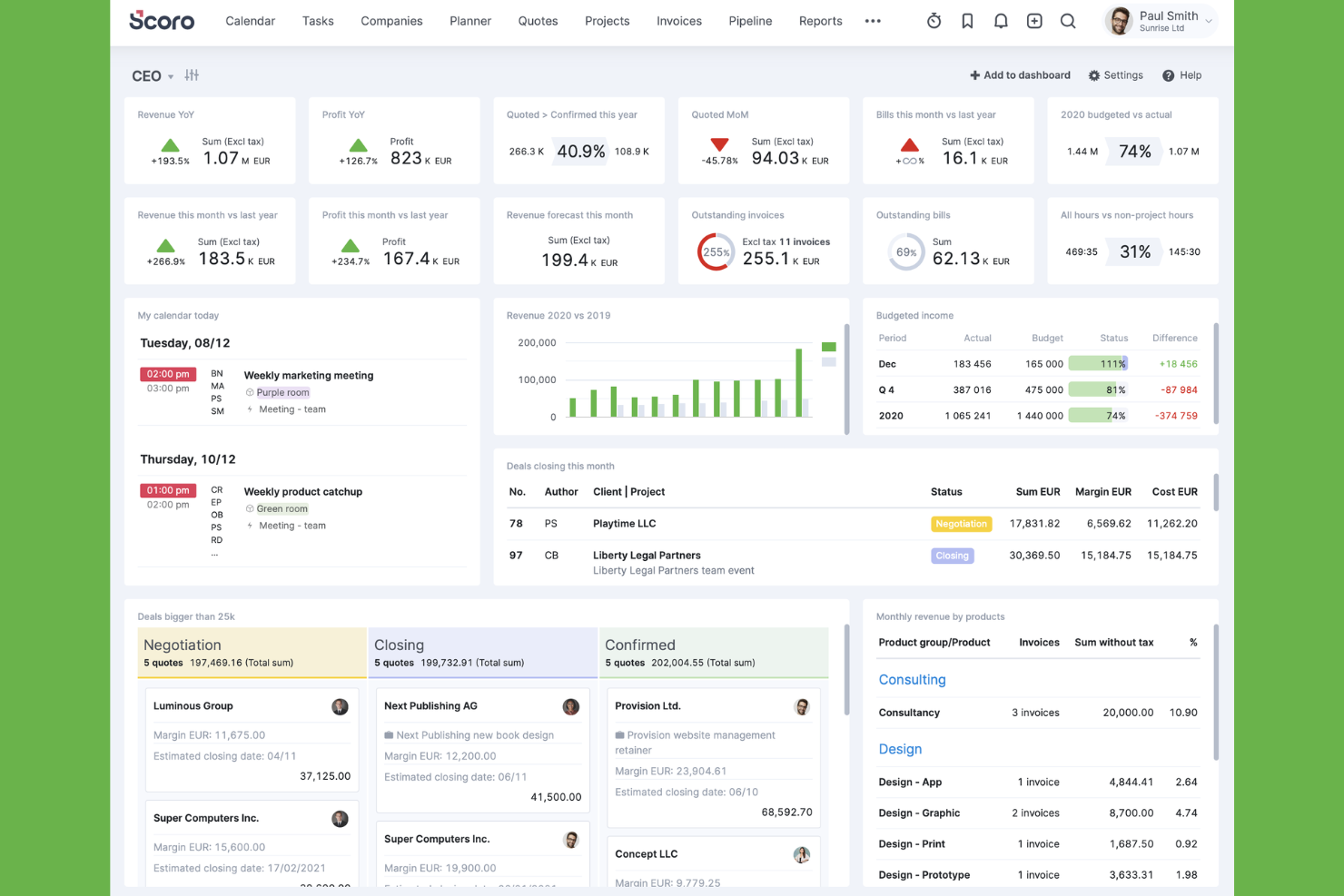
Scoro is a PSA platform built specifically for professional services firms that unifies resource scheduling, project delivery, time tracking, quoting, and financial reporting in a single system.
Who Is Scoro Best For?
Scoro is a strong fit for consulting firms, agencies, and IT services businesses that need to manage the full project lifecycle—from pipeline and resourcing to invoicing—in one place.
Why I Picked Scoro
Scoro earns its spot on my shortlist because it covers the entire PS firm workflow, from pipeline to invoicing, without requiring a stack of separate tools. What I particularly like is the quote estimation matrix, which breaks project deliverables down by role, effort, cost, and margin before a single hour is logged, so profitability is baked in from the sales stage. The Bookings module then carries that context forward, letting you assign confirmed or soft (tentative) bookings against real capacity data that already accounts for leave and public holidays.
Scoro Key Features
- 360° time usage view: Shows planned, booked, and logged time side by side across individuals, roles, and projects in a single view.
- WIP reporting: Surfaces unbilled time and uninvoiced costs so you can forecast revenue and cost completion before a project closes.
- Utilization heatmaps: Color-coded capacity indicators flag overloaded and underutilized team members across your scheduling view in real time.
- ELI AI assistant: Lets you query project and billing data in plain language and automate data capture from receipts and documents.
Scoro Integrations
Scoro offers native integrations with Salesforce, HubSpot, Google Calendar, Microsoft 365, Jira, BambooHR, Xero, QuickBooks, and Slack. Its open API supports custom integrations, with Azure Active Directory available for SSO.
Pros and Cons
Pros:
- Quote estimation links role effort to profitability
- 360° time view shows real-time utilization
- Bookings module supports tentative and confirmed assignments
Cons:
- Mobile app has fewer features than desktop
- Initial setup can be time consuming
New Product Updates from Scoro

Scoro Adds Time Mobile App and ELI Improvements
Scoro adds the Scoro Time mobile app for iOS/Android to track time anywhere and expands ELI with attachments, smarter filtering, and trigger-based actions. For more information, visit Scoro's official site.

Best for client bookings
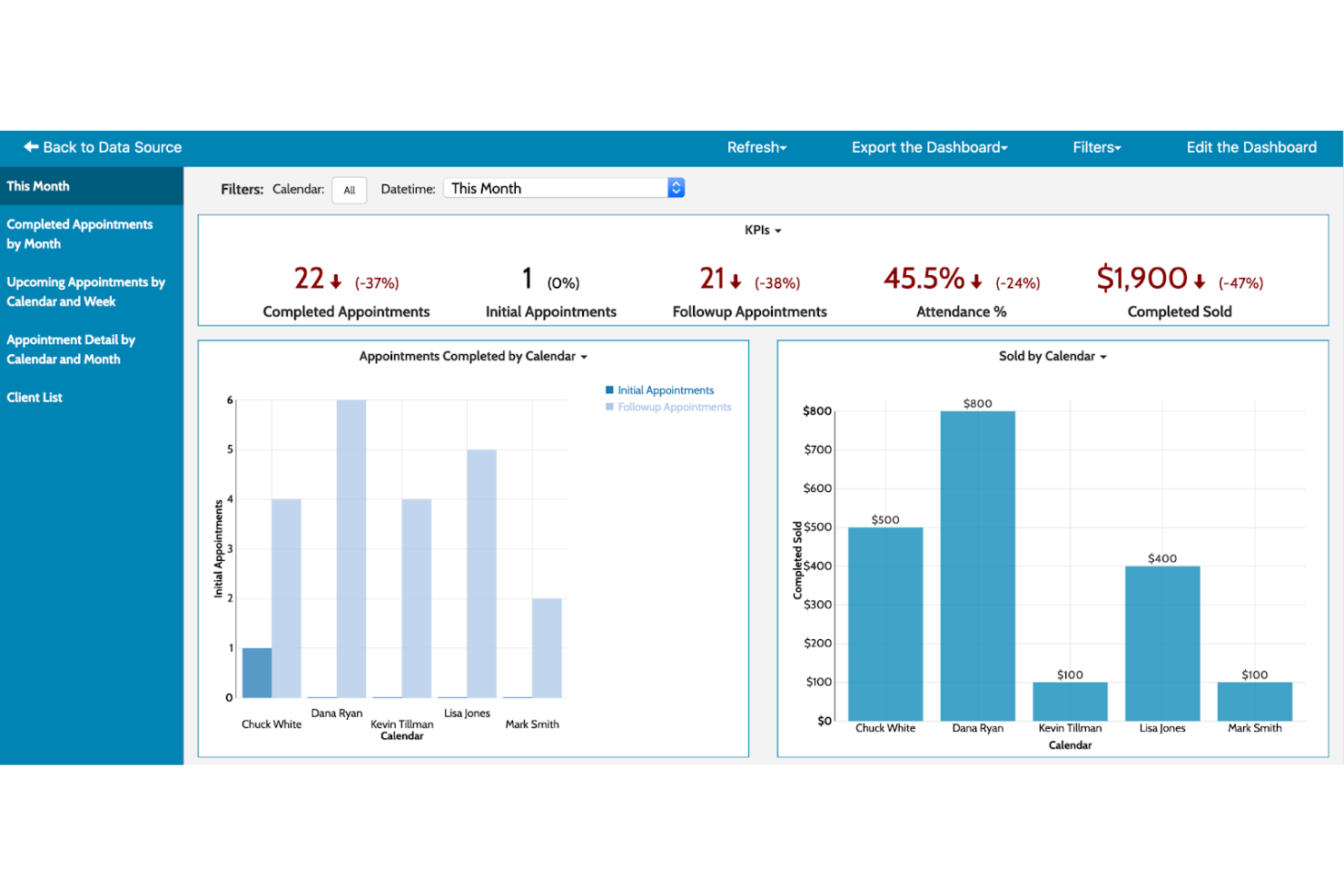
Acuity Scheduling is an online appointment scheduling software designed for businesses that require efficient client booking management. It automates client bookings, reminders, and payments to ensure smooth operations.
Why I picked Acuity Scheduling: It's tailored for client bookings with features that automate scheduling and client management. You can customize appointment types to fit your business needs. The platform supports automatic time zone adjustments, ensuring clients book at the right time. It also provides intake forms to gather client information before appointments.
Standout Features and Integrations:
Features include appointment packages, which allow you to sell bundled services, and gift certificates for an added revenue stream. You can also block off personal time to ensure your schedule reflects your availability accurately. The software's reporting tools help you analyze booking trends.
Integrations include Google Calendar, Zoom, Mailchimp, QuickBooks, PayPal, Stripe, and more.
Pros and Cons
Pros:
- Offers intake forms
- Supports appointment packages
- Automatic time zone adjustments
Cons:
- Requires internet connection
- Limited customization for branding

Calendly
Best for meeting scheduling

Calendly is an online scheduling tool designed primarily for individuals and teams needing efficient meeting management. It simplifies the process of scheduling meetings without the back-and-forth emails.
Why I picked Calendly: It's ideal for scheduling meetings with ease and efficiency. Calendly allows you to set your availability and share your link, letting others book appointments and meetings at times that work for you. You can customize meeting types to suit different needs. It also automatically adjusts for time zones, which is great for global teams.
Standout Features and Integrations:
Features include buffer times between meetings, helping you manage your schedule without overlaps. You can also set daily limits on the number of meetings to prevent burnout and promote wellness in your team. Additionally, Calendly offers group scheduling options for team meetings.
Integrations include Google Calendar, Outlook, Zoom, Microsoft Teams, Slack, HubSpot, and more.
Pros and Cons
Pros:
- Customizable meeting types
- Automatic time zone adjustments
- Easy to share scheduling links
Cons:
- Poor support for group polls
- Restrictive branding controls

Best for time zone support

YouCanBookMe is an online scheduling tool primarily used by professionals who need to manage appointments across different time zones. It simplifies booking processes, allowing users to avoid the hassle of time zone conversions.
Why I picked YouCanBookMe: It excels in handling time zone differences, ensuring accurate scheduling for global teams. You can set your availability and let clients book at their convenience. The tool automatically adjusts for time zone changes, reducing errors. It also offers customizable booking pages to fit your brand.
Standout Features and Integrations:
Features include email and SMS reminders to reduce no-shows, ensuring your schedule stays on track. You can also set buffer times between appointments to manage your workload effectively. The tool supports group bookings, making it easy to coordinate meetings with multiple participants.
Integrations include Google Calendar, Outlook, Zoom, Microsoft Teams, Slack, Zapier, and more.
Pros and Cons
Pros:
- Supports group bookings
- Customizable booking pages
- Handles multiple time zones
Cons:
- Basic features on free plan
- Mobile app is not available

Appointy
Best for small businesses
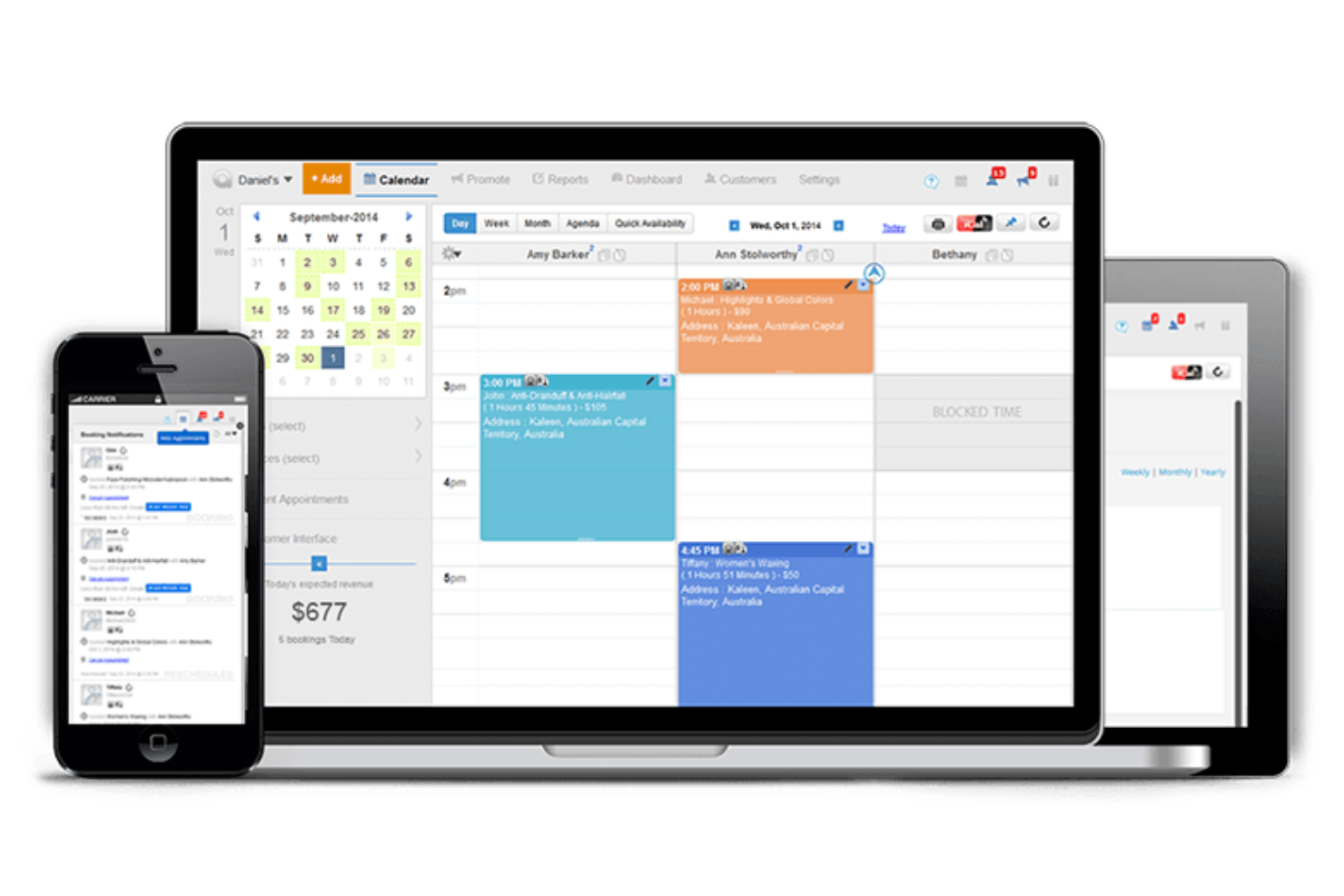
Appointy is an online scheduling software tailored for small businesses. It helps manage appointments, automate reminders, and simplify client bookings.
Why I picked Appointy: It's ideal for small businesses looking for easy scheduling solutions. Appointy offers automated reminders and online payments, which are essential for small business efficiency. Customizable booking pages cater to specific business needs. Its simple interface allows even non-tech-savvy users to navigate pages smoothly.
Standout Features and Integrations:
Features include the ability to manage multiple locations, offer membership deals, and create recurring appointments. You can set buffer times between appointments to keep your schedule running smoothly and improve customer experience. The software also supports class and event bookings.
Integrations include Google Calendar, Zoom, Stripe, PayPal, WordPress, Facebook, and more.
Pros and Cons
Pros:
- Handles online payments
- Automates reminder messages
- Customizable booking pages
Cons:
- Outdated UI/UX design
- Occasional sync issues

Best for custom bookings

SimplyBook.me is an online booking system aimed at businesses that need customizable scheduling solutions. It helps manage appointments, client bookings, and service offerings efficiently.
Why I picked SimplyBook.me: It's perfect for businesses seeking custom booking options with features that let you tailor the booking experience. You can create personalized booking pages that reflect your brand. The tool supports a variety of service offerings, allowing you to cater to different client needs. It also provides tools for managing promotions and discounts, improving client engagement.
Standout Features and Integrations:
Features include automated reminders to reduce no-shows, ensuring your schedule stays on track. You can also manage memberships and packages, offering clients more flexible options. The software supports payment processing, allowing you to handle transactions with minimal stress.
Integrations include Google Calendar, Facebook, Instagram, WordPress, Stripe, PayPal, and more.
Pros and Cons
Pros:
- Manages promotions and discounts
- Supports memberships and packages
- Highly customizable booking pages
Cons:
- Costs add up with ‘Custom Features'
- Dated admin interface design

Best for field services
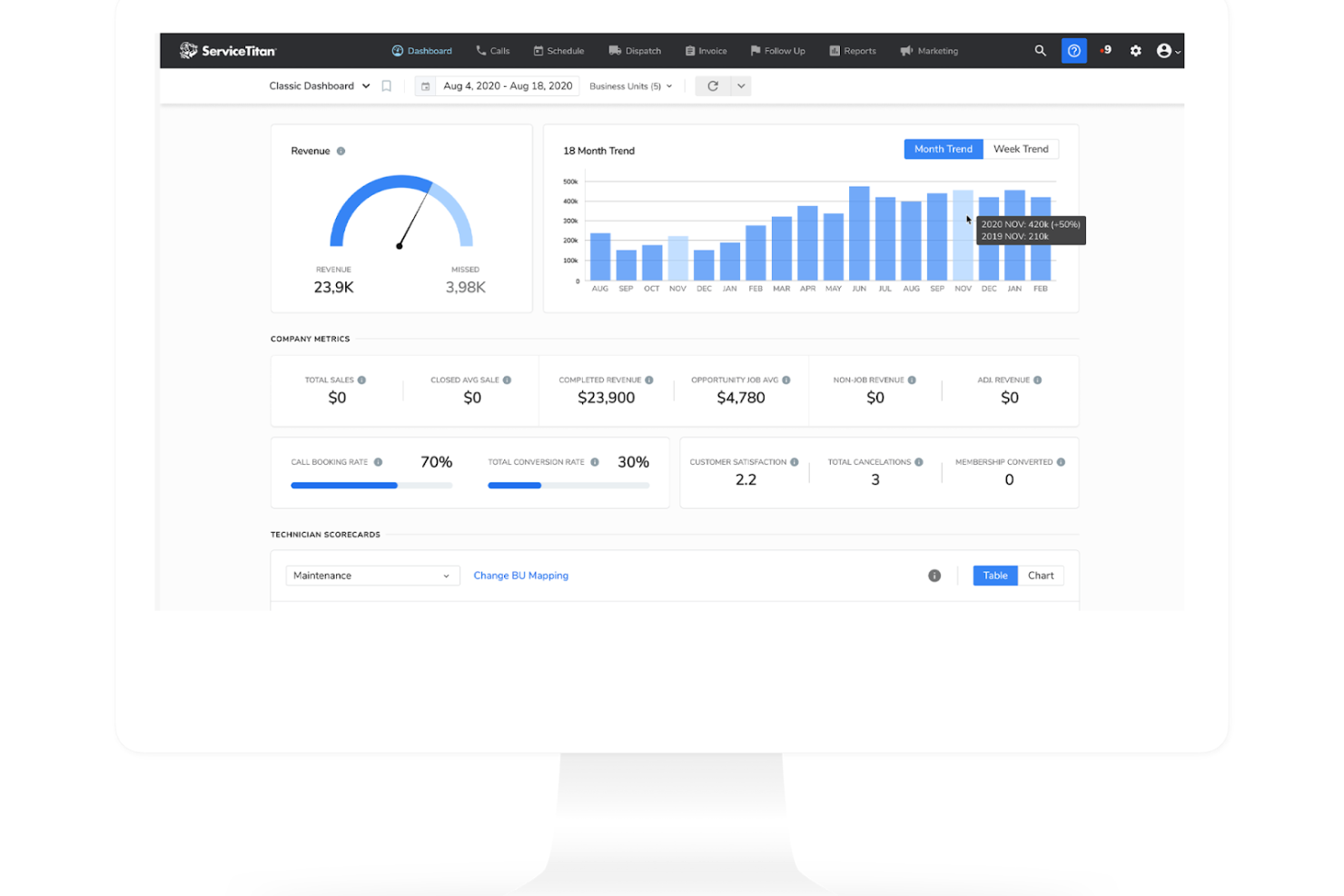
ServiceTitan is a field service management software designed for businesses in the home and commercial service sectors. It offers tools for scheduling, dispatching, and managing field operations effectively.
Why I picked ServiceTitan: It's tailored for field services, providing features that simplify scheduling and dispatching tasks. You can track field technicians in real time, ensuring jobs are completed efficiently. The software supports easy invoicing and payment processing directly from the field. It also offers customer relationship management (CRM) tools that help maintain strong client communications and development.
Standout Features and Integrations:
Features include advanced reporting tools that give insights into your business performance. You can also automate marketing campaigns to engage customers and grow your business. The software supports inventory management, helping you keep track of supplies and equipment.
Integrations include QuickBooks, Salesforce, Intuit, Google Calendar, Microsoft Outlook, and more.
Pros and Cons
Pros:
- Supports inventory management
- CRM tools
- Real-time technician tracking
Cons:
- Frequent software glitches
- Very high subscription cost

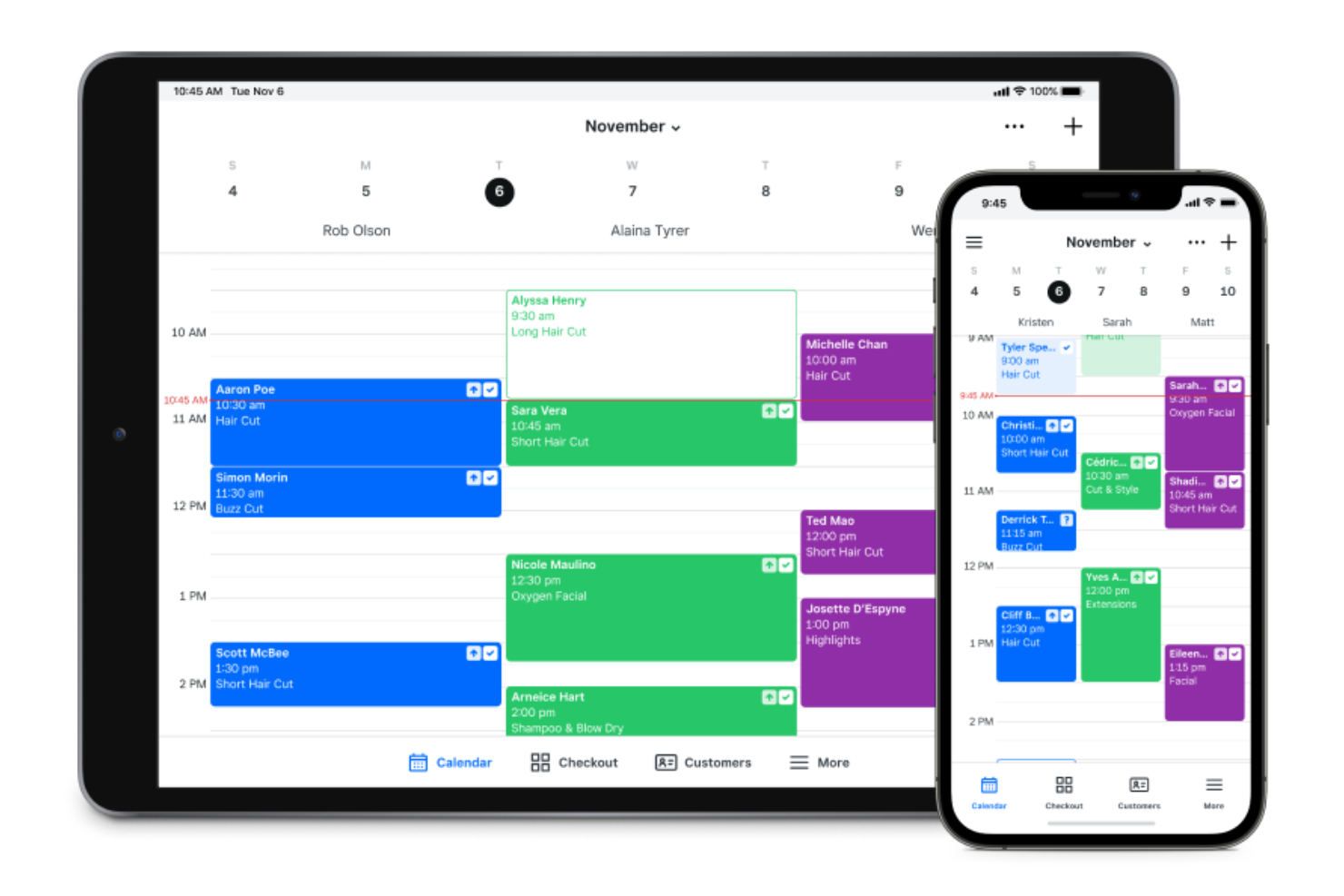
Square Appointments is an online scheduling software tailored for businesses that need integrated payment solutions. It serves small to medium-sized businesses, supporting appointment bookings and payment processing.
Why I picked Square Appointments: It offers smooth payment integration with Square's payment processing system, making transactions straightforward. You can manage bookings and payments within a single platform. The software supports automated reminders through text messages to reduce last-minute no-shows. It also provides a user-friendly interface that suits businesses of all sizes.
Standout Features and Integrations:
Features include the ability to manage staff schedules, allowing you to oversee real-time availability and allocate resources efficiently. You can set up recurring appointments for regular clients, which simplifies ongoing scheduling. The platform also offers reporting tools to track business performance.
Integrations include Google Calendar, Instagram, QuickBooks, Wix, Weebly, WordPress, and more.
Pros and Cons
Pros:
- Supports staff scheduling
- Automated reminders for clients
- Integrated payment processing
Cons:
- High processing fees
- Basic intake forms

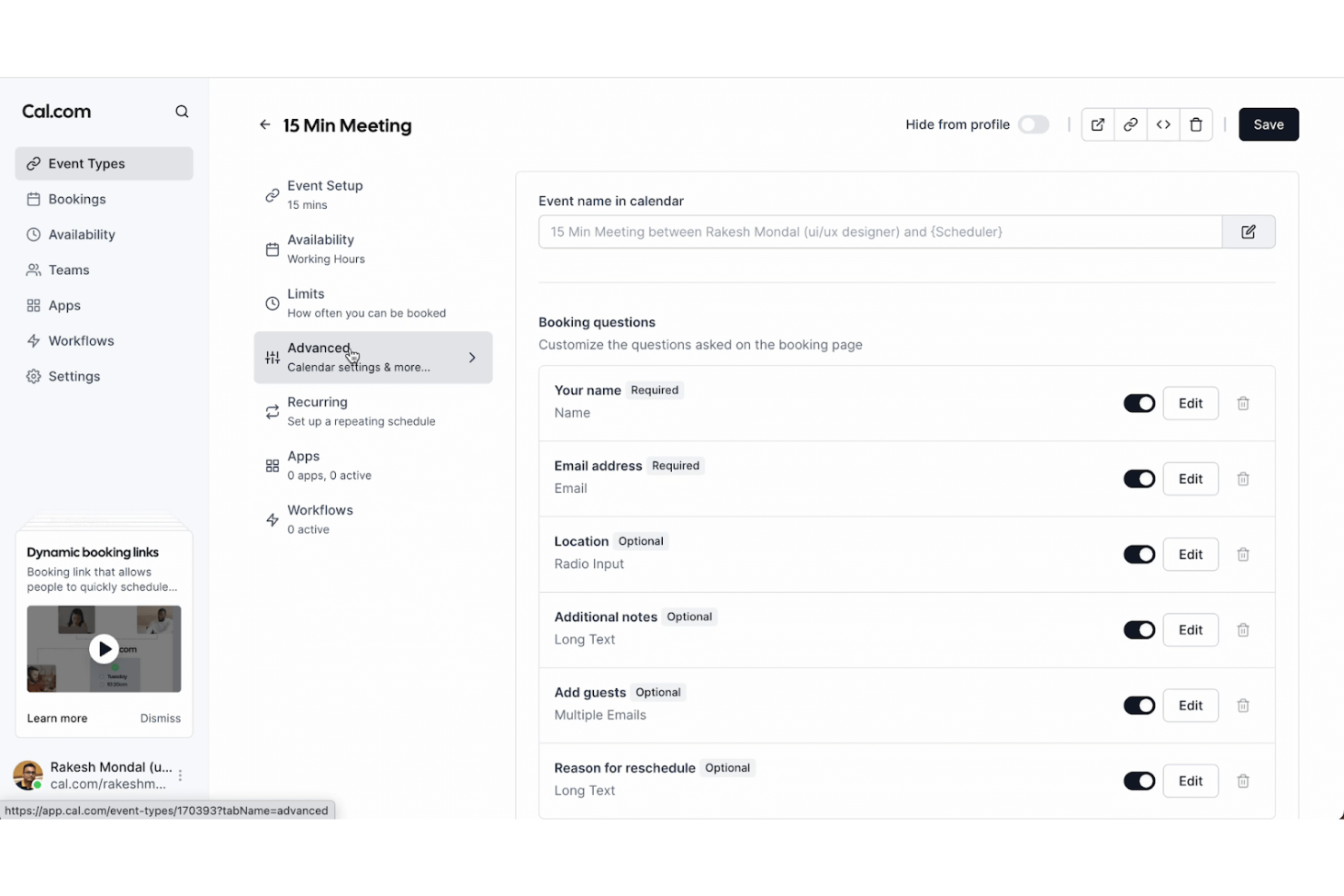
Cal.com is an open-source scheduling tool that caters to developers and businesses looking for customizable solutions. It provides scheduling capabilities with a focus on flexibility and adaptability.
Why I picked Cal.com: It offers an open-source platform, allowing users to customize and modify the tool according to their needs. You can integrate it with various systems and permissions to adapt it to fit your team's workflow. The tool supports multiple scheduling options, making it versatile for different use cases. It's ideal for tech-savvy users who want to build and expand on its core functionalities.
Standout Features and Integrations:
Features include customizable booking pages that let you tailor the user experience. You can also set custom availability to reflect your specific schedule needs. The software supports group scheduling, making it easy to coordinate with multiple participants.
Integrations include Google Calendar, Zoom, Microsoft Teams, Slack, Zapier, and more.
Pros and Cons
Pros:
- Open-source flexibility
- Supports multiple scheduling options
- Highly customizable for developers
Cons:
- Regular updates needed for stability
- Limited out-of-the-box features

Productive
Best for project tracking
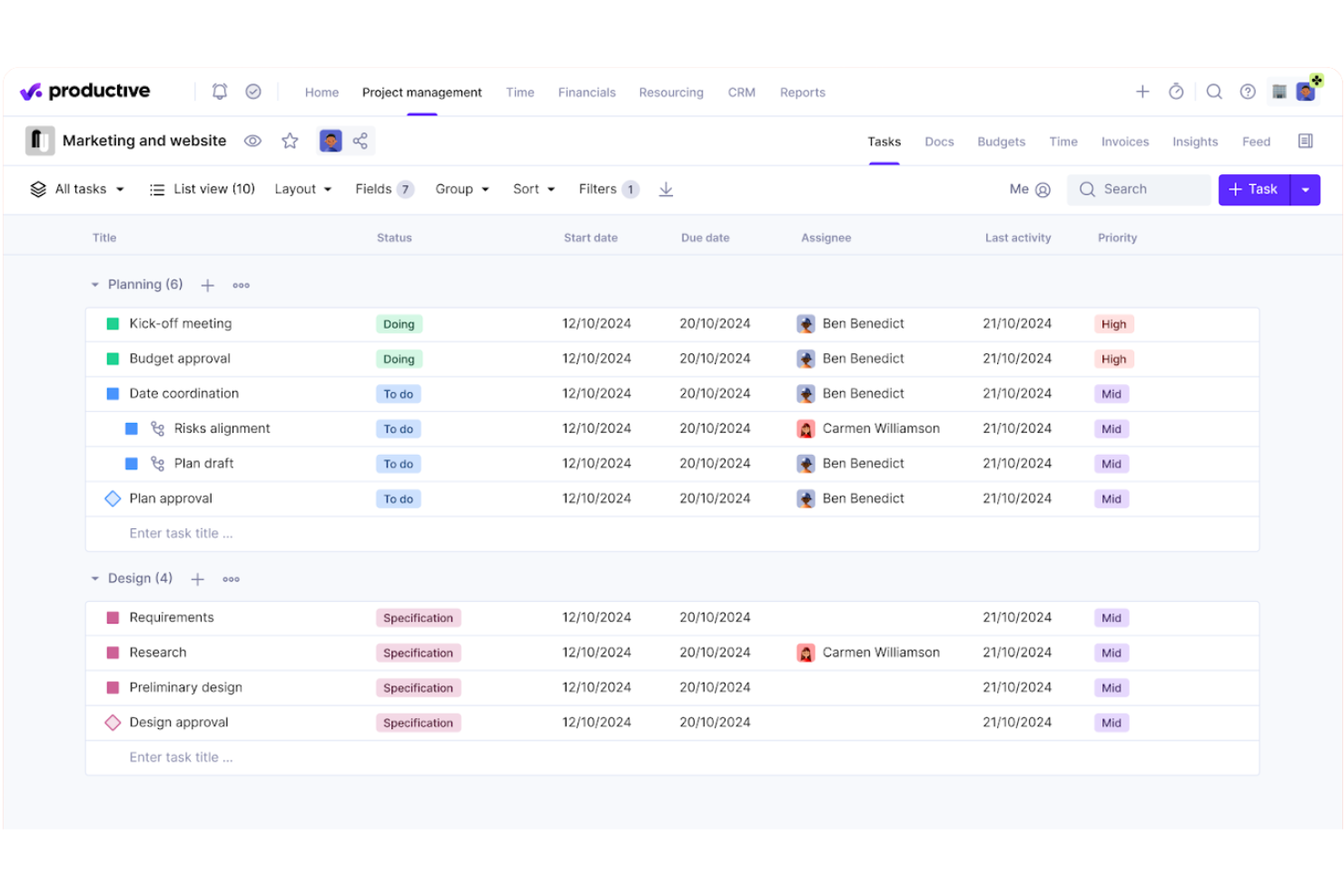
Productive is a professional services scheduling software built to align team capacity with project demands. It centralizes resource allocation, real-time availability, and workload balancing to help firms maintain a steady and sustainable pace.
Why I picked Productive: It excels in resource scheduling and provides a high-level view of team bandwidth and upcoming gaps. You can manage shifts, time-off requests, and billable utilization within a single interface, ensuring no one is overbooked. The tool offers visual heatmaps to identify which consultants are under-taxed or at risk of burnout. It also includes integrated forecasting features, allowing you to see how today’s schedule impacts your firm's long-term profitability and hiring needs.
Standout Features and Integrations:
Features include budget management tools, which help you keep projects on track financially. You can also create detailed reports to analyze team performance. The software supports task management, allowing you to assign and prioritize tasks.
Integrations include Slack, QuickBooks, Xero, Google Calendar, Asana, Trello, and more.
Pros and Cons
Pros:
- Includes resource planning
- Customizable dashboards
- Detailed project profitability insights
Cons:
- Occasional UI lag
- Limited custom reporting
New Product Updates from Productive
Productive Adds Voice Dictation, Slack Connector, Proposals, and Overtime
Productive adds voice dictation, a Slack Connector, proposal controls, and overtime tracking. These updates support faster AI interactions, client proposals, and time management. For more information, visit Productive’s official site.
Outro software de agendamento de serviços profissionais
Eis algumas opções adicionais de software de agendamento de serviços profissionais que não entraram na minha lista restrita, mas que vale a pena consultar:
- Connecteam
For mobile teams
- Kantata
All-in-one solution
- Housecall Pro
For home services
- monday AI Workspace
For visual project tracking
- Setmore
For appointment-based businesses
- Jobber
For automated client communication


How I Evaluate Professional Services Scheduling Software
I split my evaluation into what a tool must do—like matching consultants to pipeline deals by skills and availability—and what separates the best options from the rest.
Core Functionality (Table Stakes For This List)
When I'm selecting tools for my list, I rank each one on a scale from 0 (does not offer the functionality) to 5 (excels in this area) for each core functionality listed below. Then, I calculate the tool's total score into a percentage. Each tool needs to achieve a minimum total score of 65% to be considered for inclusion.
- Resource Scheduling & Allocation: I evaluate how each tool handles assigning consultants to engagements—whether it offers visual, drag-and-drop scheduling or relies on static task lists.
- Capacity & Availability Management: Real-time workload views matter here, especially how well a tool surfaces PTO, part-time schedules, and overbooked team members.
- Skills & Role-Based Matching: I check whether you can tag resources by certification, seniority, or skill set and then filter by those attributes when staffing a new engagement.
- Utilization & Billable Hours Tracking: Each tool needs to distinguish billable from non-billable time and report utilization rates at the individual, team, and project level.
- Project & Timeline Management: I look at how projects are structured—whether the tool supports phases, milestones, dependencies, and deadline tracking tied to staffed resources.
- Forecasting & Demand Planning: Pipeline-aware forecasting is key, so I evaluate whether the tool lets you project future resource needs against confirmed and probable engagements.
Once I have a list of tools that meet this criteria, I consider what sets each platform apart.
Differentiating Factors (What Sets Vendors Apart)
Here's how I compare and contrast different vendors:
Standout Features
Scenario planning is a major differentiator—I look for tools that let you model what happens to your bench and utilization if a deal closes next month or a key consultant rolls off early. A CRM-to-resourcing bridge adds real value here, pulling pipeline opportunities so you can soft-book people before contracts are signed. I also evaluate AI staffing recommendations that surface the best-fit consultant based on skills, availability, and past project history.
Beyond Features
Integration depth matters a lot here. I evaluate whether a tool connects natively to your PSA suite, finance system, and HRIS so availability and billing data stay in sync without manual exports. Reporting is another area I weigh heavily—pre-built utilization and bench dashboards save PMO leads from building reports from scratch in external BI tools. Implementation speed also factors in, especially how well a vendor supports migrating historical data from spreadsheets or a legacy system.
Como escolher software de agendamento de serviços profissionais
É fácil ficar perdido em listas extensas de funcionalidades e estruturas de preços complexas. Para o ajudar a manter-se concentrado enquanto percorre o seu processo específico de seleção de software, eis uma lista de verificação dos fatores a ter em conta:
| Fator | O que considerar |
|---|---|
| Escalabilidade | O software acompanhará o crescimento da sua empresa? Verifique se consegue suportar mais utilizadores e marcações à medida que expande. Evite ferramentas que limitem o crescimento futuro. |
| Integrações | Funciona com as suas ferramentas atuais? Certifique-se de que se liga aos seus calendários, e-mail e outro software de que depende diariamente. |
| Personalização | Pode adaptá-lo às suas necessidades? Procure opções para personalizar páginas de marcação e fluxos de trabalho de modo a corresponderem aos seus processos. |
| Facilidade de utilização | A interface é intuitiva? Teste-a pessoalmente ou leia avaliações de utilizadores para verificar se o sistema é fácil de navegar sem formação extensiva. |
| Implementação e integração | Com que rapidez pode começar? Considere o tempo e os recursos necessários para a configuração e a formação, de modo a garantir uma transição tranquila para a sua equipa. |
| Custo | O preço enquadra-se no seu orçamento? Compare os custos entre ferramentas, considerando tanto as taxas iniciais como as despesas contínuas. Procure testes gratuitos para avaliar o valor. |
| Medidas de segurança | Como protege os seus dados? Verifique as normas de encriptação e as medidas de proteção de dados para manter as suas informações seguras. |
| Disponibilidade do suporte | Quando pode contactar o suporte? Verifique se está disponível 24 horas por dia, 7 dias por semana, e se existem vários métodos de contacto para garantir que obtém ajuda quando dela precisa. |
O que é o software de agendamento para serviços profissionais?
O software de agendamento para serviços profissionais é uma ferramenta que ajuda as empresas a gerir marcações e agendamentos de forma eficiente. Normalmente utilizado por consultores, agências e prestadores de serviços, oferece valor ao organizar agendas e reduzir conflitos de marcação. Funcionalidades como lembretes automatizados, sincronização de calendários e opções de marcação personalizáveis ajudam a gerir o tempo de forma eficiente e a melhorar a satisfação dos clientes. De um modo geral, estas ferramentas apoiam a produtividade ao simplificar as tarefas de agendamento e melhorar as interações com os clientes.
Funcionalidades
Ao selecionar software de agendamento para serviços profissionais, procure as seguintes funcionalidades essenciais:
- Lembretes automatizados: Envie notificações aos clientes e colaboradores para reduzir as faltas e manter todos dentro do horário.
- Sincronização de calendários: Integra-se com aplicações de calendário populares para garantir que todas as marcações e eventos estão atualizados e visíveis.
- Páginas de marcação personalizáveis: Permitem às empresas criar experiências de marcação personalizadas e alinhadas com os seus serviços e as necessidades dos clientes.
- Ajustes de fuso horário: Ajustam automaticamente os horários das marcações para clientes em diferentes fusos horários, evitando marcações duplicadas e erros de agendamento.
- Processamento de pagamentos: Permite realizar transações seguras diretamente através da plataforma de agendamento, simplificando a faturação e a cobrança de pagamentos.
- Agendamento de grupos: Facilita as marcações para vários participantes em simultâneo, sendo ideal para reuniões de equipa ou sessões de grupo.
- Disponibilidade de aplicação móvel: Permite aceder às funcionalidades de agendamento em qualquer lugar, garantindo flexibilidade às equipas móveis.
- Ferramentas de relatórios: Fornecem informações sobre as tendências de agendamento e o desempenho da empresa, ajudando a reduzir cancelamentos e reagendamentos através de um planeamento estratégico.
- Gestão de recursos: Gere a disponibilidade dos colaboradores e os recursos para otimizar o agendamento e a prestação de serviços.
- Gestão de clientes: Armazena informações e histórico dos clientes, melhorando o serviço personalizado e a comunicação.
Benefícios
A implementação de software de agendamento para serviços profissionais proporciona vários benefícios à sua equipa e à sua empresa. Eis alguns dos que pode esperar:
- Maior eficiência: Automatize tarefas de agendamento, como lembretes e sincronização de calendários, libertando tempo para que a sua equipa se concentre noutras responsabilidades.
- Maior satisfação dos clientes: Disponibilize opções de marcação personalizáveis e ajustes de fuso horário, garantindo uma experiência de marcação simples e personalizada para os clientes.
- Redução de faltas: Envie lembretes automatizados aos clientes, reduzindo significativamente a taxa de marcações não realizadas e os conflitos de agendamento.
- Processamento de pagamentos simplificado: Integre opções de pagamento diretamente na plataforma de agendamento, tornando as transações fáceis e seguras para si e para os seus clientes.
- Melhor gestão de recursos: Gira a disponibilidade dos colaboradores e os recursos, otimizando a forma como as marcações são agendadas e os serviços são prestados.
- Informações valiosas: Disponibilize ferramentas de relatórios que fornecem informações sobre as tendências de agendamento e o desempenho da empresa, contribuindo para a tomada de decisões estratégicas.
- Maior flexibilidade: A disponibilidade de uma aplicação móvel permite à sua equipa aceder às funcionalidades de agendamento em qualquer lugar, apoiando o trabalho remoto e as operações móveis.
Custos e preços
A seleção de software profissional de agendamento de serviços requer uma compreensão dos vários modelos de preços e planos disponíveis. Os custos variam consoante as funcionalidades, o tamanho da equipa, os complementos, entre outros fatores. A tabela abaixo resume os planos comuns, os respetivos preços médios e as funcionalidades normalmente incluídas nas soluções de software profissional de agendamento de serviços:
Tabela de comparação de planos para software profissional de agendamento de serviços
| Tipo de plano | Preço médio | Funcionalidades comuns |
|---|---|---|
| Plano gratuito | $0 | Agendamento básico, sincronização limitada do calendário e lembretes essenciais. |
| Plano pessoal | $7-$49/utilizador/mês | Páginas de reserva personalizáveis, integrações alargadas com calendários e ferramentas básicas de elaboração de relatórios. |
| Plano empresarial | $30-$60/utilizador/mês | Opções avançadas de agendamento, processamento de pagamentos e capacidades de reservas de grupo. |
| Plano empresarial avançado | $70-$100/utilizador/mês | Relatórios detalhados, suporte dedicado, personalização avançada e integração completa de funcionalidades. |
Perguntas frequentes sobre software profissional de agendamento de serviços
Eis algumas respostas a perguntas frequentes sobre software profissional de agendamento de serviços:
O que devo considerar ao escolher um software de agendamento?
Ao escolher um software de agendamento, considere a forma como este se integra com as ferramentas que já utiliza, o nível de personalização que oferece e a sua capacidade de expansão para acompanhar o crescimento da sua empresa. Avalie também a facilidade de utilização e a qualidade do apoio ao cliente disponível. Certifique-se de que o software está alinhado com as suas necessidades e fluxos de trabalho específicos. Testar algumas opções através de períodos experimentais gratuitos pode ajudar a perceber qual funciona melhor para a sua equipa.
O software de agendamento pode melhorar a comunicação com os clientes?
Sim, um software como o Jobber pode apoiar a comunicação com os clientes através da automatização de lembretes e confirmações de marcações. Também pode disponibilizar aos clientes opções de reserva autónoma, facilitando o agendamento e a gestão de marcações. Uma comunicação clara reduz as faltas e aumenta a satisfação dos clientes, o que é benéfico para manter relações sólidas com os clientes.
A segurança dos dados é uma preocupação com o software de agendamento?
Sim, a segurança dos dados é uma preocupação e é importante escolher um software que ofereça encriptação robusta e medidas de proteção de dados. Procure ferramentas que cumpram as normas e os regulamentos do setor, como o RGPD ou a HIPAA, quando aplicável. Informe-se sempre sobre as funcionalidades de segurança do software e leia as avaliações dos utilizadores para garantir que os seus dados estão seguros.
Posso utilizar software de agendamento para equipas remotas?
Sim, o software de agendamento é excelente para gerir equipas remotas, uma vez que permite a todos aceder a horários e marcações a partir de qualquer lugar. Funcionalidades como a disponibilidade de uma aplicação móvel e os ajustes de fuso horário facilitam a ligação dos trabalhadores remotos. Esta flexibilidade apoia uma colaboração eficiente entre os membros da equipa, independentemente da sua localização.