

As 10 Melhores Ferramentas de Registo de Tempo para Arquitetos Analisadas em 2026

Melhor software de controlo de tempo para arquitetos: seleção


Gerir projetos de arquitetura significa equilibrar plantas, orçamentos e expectativas dos clientes ao mesmo tempo. Num minuto está a esboçar conceitos; no seguinte, está a responder a pedidos de revisão, a coordenar-se com engenheiros e, de alguma forma, a tentar garantir que as horas coincidem efetivamente com o processamento salarial. O controlo de tempo raramente é a parte mais divertida do trabalho, mas é uma das poucas coisas que mantém os projetos rentáveis e as equipas equilibradas.
É aqui que o software de controlo de tempo se torna mais do que algo simplesmente útil. A ferramenta certa ajuda-o a separar o trabalho faturável do não faturável, a acompanhar todas aquelas revisões de design que os clientes pedem “rapidamente” e a manter o processamento salarial rigoroso, sem ter de vasculhar e-mails antigos ou tentar adivinhar quem fez o quê e quando.
Testei e analisei as principais ferramentas criadas para arquitetura e equipas orientadas para projetos, para que não tenha de perder tempo com opções que não se adequam ao seu fluxo de trabalho. O meu objetivo é ajudá-lo a encontrar um sistema que apoie a forma como os arquitetos realmente trabalham, e não apenas a forma como as empresas de software pensam que trabalham.
Neste artigo, encontrará as minhas principais escolhas de software de controlo de tempo para arquitetos, juntamente com informações sobre funcionalidades, facilidade de utilização e sobre como cada opção pode ajudá-lo a cumprir prazos, manter-se dentro do orçamento e poupar à sua equipa algumas dores de cabeça pelo caminho.
Why Trust Our Software Recommendations
Our team has been testing and reviewing software since 2012. As project managers ourselves, we know how difficult—and important—it is to choose the right software.
For this guide, we evaluated tools using hands-on testing and independent research, scoring tools using our selection criteria. We also draw on insights from industry thought leaders and practicing project management experts.
Our reviews reflect our human editorial judgment, not a sales pitch.
Expert reviewers:
Tabela comparativa de software de controlo de tempo para arquitetos
A tabela abaixo compara os detalhes de preços das minhas principais escolhas de software de controlo de tempo para arquitetos.
| Tool | Best For | Trial Info | Price | ||
|---|---|---|---|---|---|
| 1 | Best for multi-office architecture firm billing | 14-day free trial | From $17/user/month | Website | |
| 2 | Best for AI-powered resource planning | 14-day free trial | From $10/user/month (billed annually) | Website | |
| 3 | Best with custom reporting dashboards | Free plan available; 30-day free trial; Free demo available | From $9/user/month | Website | |
| 4 | Best for project and budget tracking | Free plan + Free trial + Free demo available | From $6/user/month | Website | |
| 5 | Best with integrated resource and phase planning | Free demo available | Pricing upon request | Website | |
| 6 | Best for billable architect project hours | Free plan + 7-day trial + demo available | From $3.99/user/month (billed annually) | Website | |
| 7 | Best for remote teams | Free plan + free trial + free demo available | From $3.99/user/month (billed annually) | Website | |
| 8 | Best for budgeting | Free demo available | From $45/month | Website | |
| 9 | Best for contract work | 7-day free trial | From $9/user/month (billed annually) | Website | |
| 10 | Best for payroll | Free plan available | From $5.50/user/month | Website |


Análises do melhor software de controlo de tempo para arquitetos
Abaixo encontram-se os meus resumos detalhados do melhor software de controlo de tempo para arquitetos que integrou a minha seleção. As minhas análises apresentam uma visão detalhada das principais funcionalidades, vantagens e desvantagens, integrações e casos de utilização ideais de cada ferramenta, para o ajudar a encontrar a melhor opção para si.

Scoro
Best for multi-office architecture firm billing
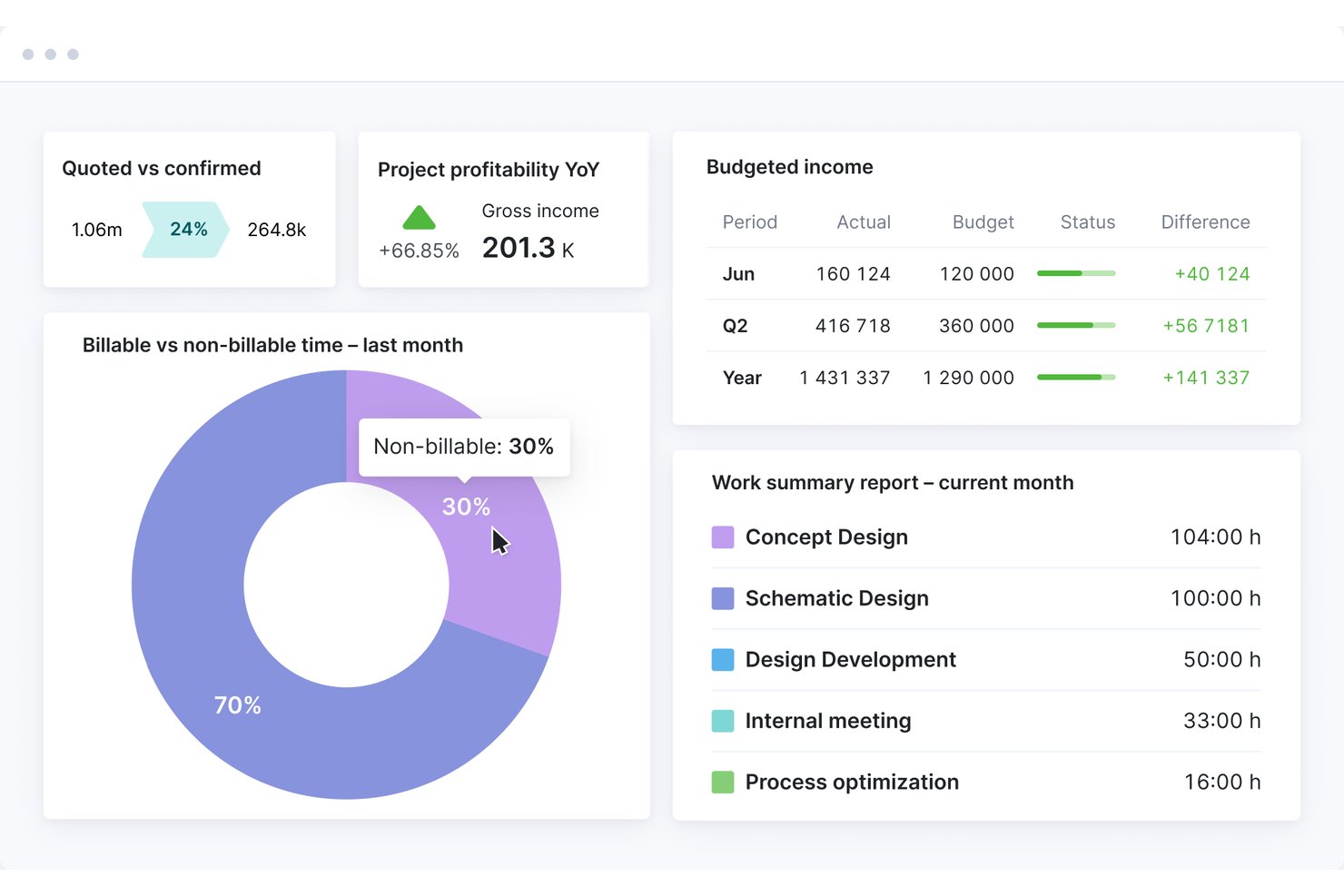
Scoro is a professional services automation (PSA) platform that combines time tracking, project and phase management, resource planning, budget burn monitoring, WIP reporting, and invoicing in a single system.
Who Is Scoro Best For?
Scoro suits growing and mid-size architecture firms that manage multiple offices, sub-consultants, and complex billing across concurrent projects.
Why I Picked Scoro
I've included Scoro in my top picks because it handles multi-office billing complexity better than most tools in this category. Across concurrent projects, it tracks quoted versus actual costs at the phase and role level in real time, so you always know where fee burn stands before it becomes a problem. I also like its PO tracking for sub-consultants, which keeps external spending visible inside the same budget dashboard.
Scoro Key Features
- Role-based labor costing: Assign different cost rates to each team role so every time entry automatically carries the correct labor cost across your projects.
- ELI AI assistant: Query live project and financial data in plain language to pull filtered reports, chase missing timesheets, or surface budget alerts.
- Multi-level timesheet approval: Route submitted timesheets through manager review before any time is invoiced, with time locking to prevent edits after approval.
- Visual capacity planner: See confirmed and tentative bookings for your full team in a single view, with waiting-list flags for staff booked beyond capacity.
Scoro Integrations
Scoro offers documented integrations with Xero, QuickBooks Online, Sage Intacct, Exact, Expensify, Salesforce, HubSpot, Google Calendar, Microsoft Outlook, and Slack. It also provides an open REST API and Zapier, but no native Revit, AutoCAD, or BIM 360 integrations.
Pros and Cons
Pros:
- AI assistant for live project reporting
- Visual capacity planning for multi-office teams
- Real-time budget burn tracking at phase level
Cons:
- Mobile app is unreliable for time entry
- No native AIA invoice format support
New Product Updates from Scoro

Scoro Adds Time Mobile App and ELI Improvements
Scoro adds the Scoro Time mobile app for iOS/Android to track time anywhere and expands ELI with attachments, smarter filtering, and trigger-based actions. For more information, visit Scoro's official site.

Best for AI-powered resource planning
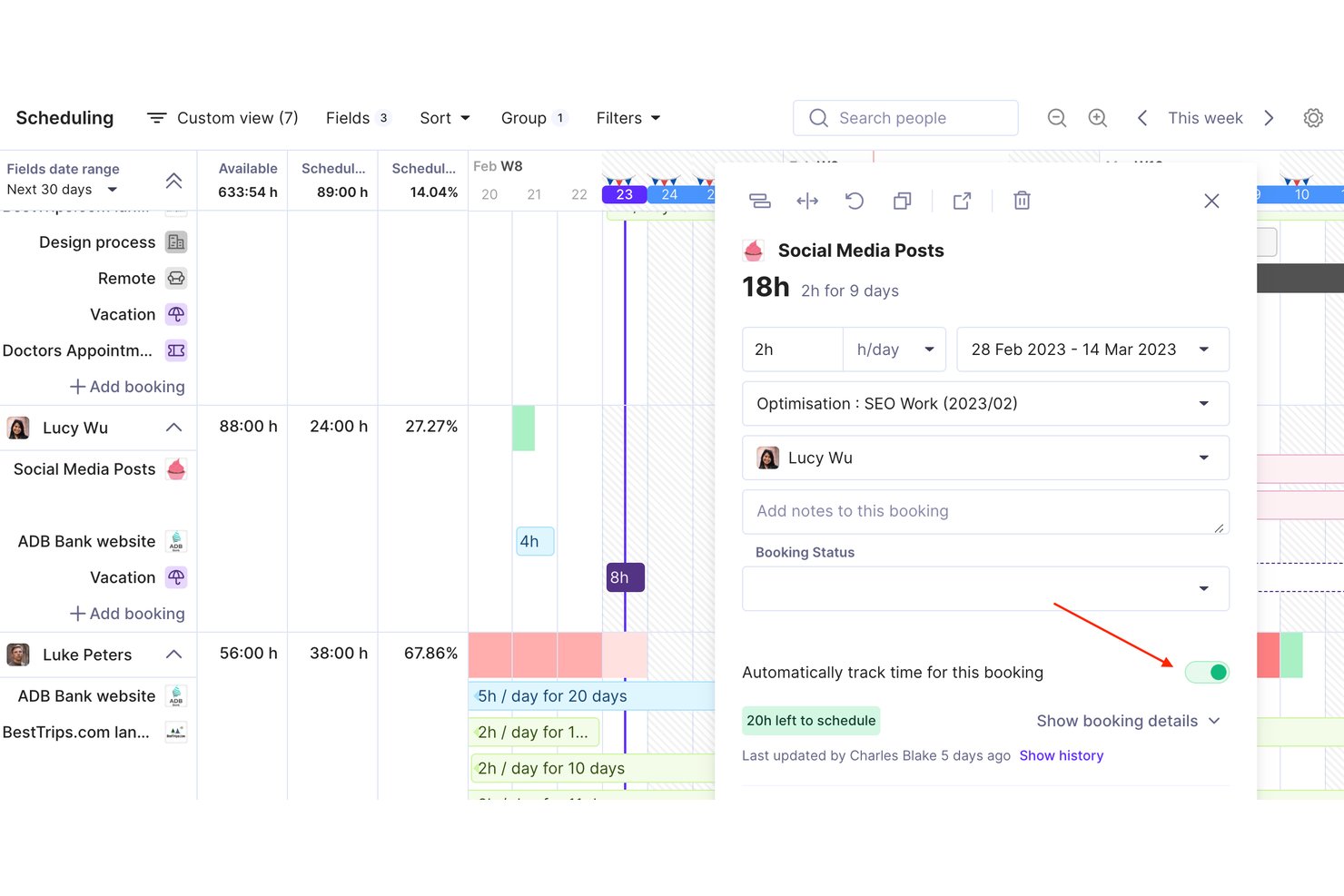
Productive is an agency and professional services management platform that combines time tracking, resource planning, project budgeting, and invoicing in a single tool built for billable-hour businesses like architecture firms.
Who Is Productive Best For?
Productive suits architecture and engineering studios that manage multi-phase projects across mixed teams and need one place to connect time, budgets, and billing.
Why I Picked Productive
I picked Productive as one of the best because its AI-powered resource planning connects directly to time tracking in a way most tools don't. The AI Time Tracking feature suggests time entries based on existing resource bookings, so I'm not chasing my team for missing timesheets at week's end. On top of that, the Scenario Builder lets me stress-test staffing decisions before locking a project plan, which is especially useful when balancing architects across overlapping SD and CD phases.
Productive Key Features
- Rate cards: Set different billing rates by project, client, or team member for precise fee calculations.
- Multi-level project budgeting: Track budgets at the project, phase, and service level.
- Time off management: Capture planned absences and holidays for accurate resource planning.
- Integrated invoicing: Generate and send invoices directly within the platform, linked to actual billable hours.
Productive Integrations
Productive offers native integrations with GitHub, Slack, HubSpot, Notion, Amplitude, Stripe, Linear, Xero, Sage, Jira, and more. It also connects with Zapier, and has an API for custom integrations.
Pros and Cons
Pros:
- Project-level profitability and utilization insights
- Visual resource planning across projects and phases
- AI time tracking suggests entries automatically
Cons:
- US-based retainage billing format not supported
- No prebuilt AIA phase templates
New Product Updates from Productive
Productive Adds Voice Dictation, Slack Connector, Proposals, and Overtime
Productive adds voice dictation, a Slack Connector, proposal controls, and overtime tracking. These updates support faster AI interactions, client proposals, and time management. For more information, visit Productive’s official site.
Toggl
Best with custom reporting dashboards
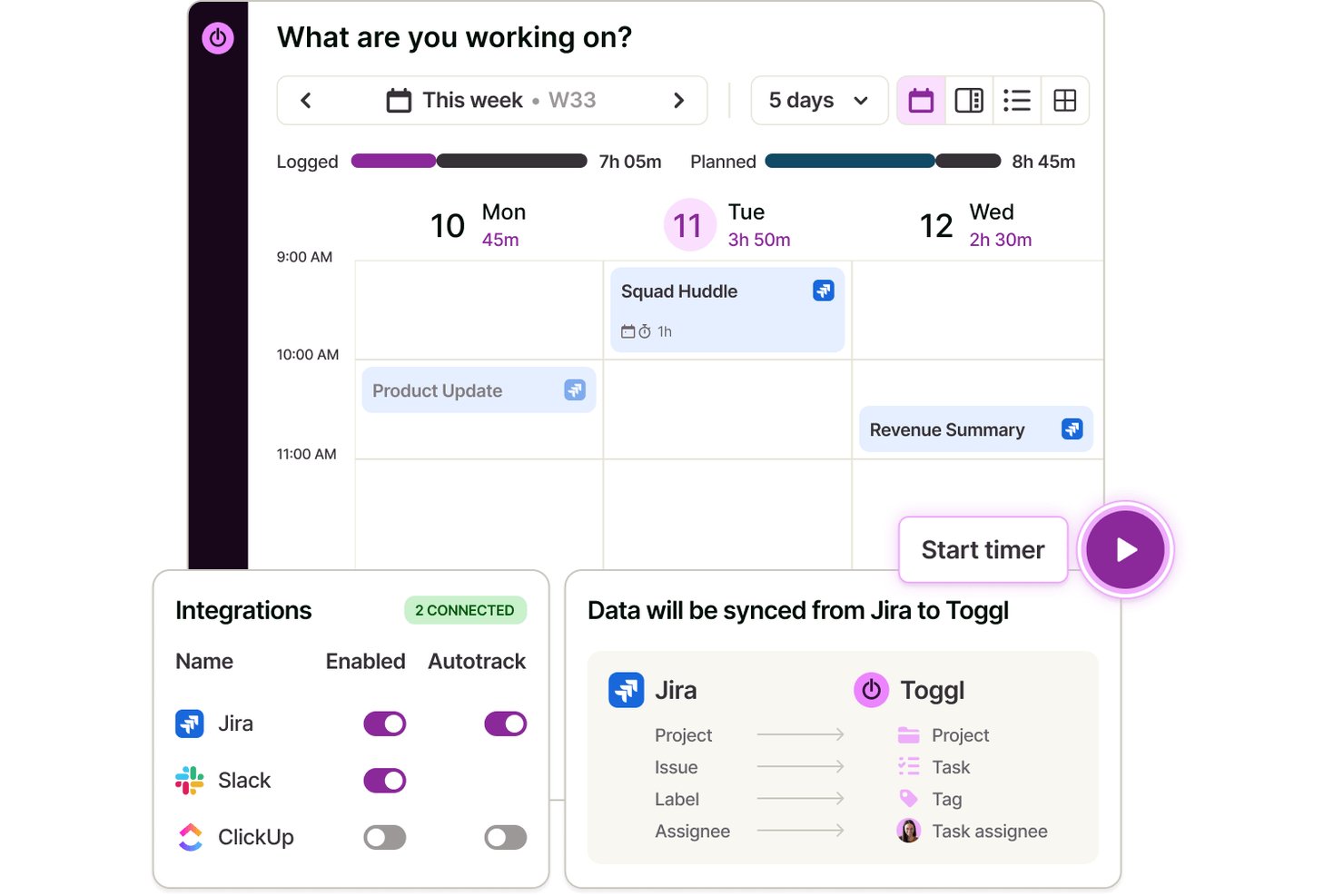
Toggl is a time tracking and capacity planning platform for architects that lets you manage tasks and projects, log billable hours, schedule work across teams, track budgets, and create detailed reports for architectural workflows.
Who Is Toggl Best For?
Architectural firms and studios needing a flexible, cloud-based tool to track project time, capacity, budgets, and staff hours across multiple clients and phases.
Why I Picked Toggl
I picked Toggl as one of the best because I can build custom reporting dashboards that break down time by project, phase, and team member. I use this flexibility to generate visual reports that support precise client billing and resource planning.
Toggl Key Features
- Real-time timer tracking: Log time as you work across devices and platforms.
- Multi-project and client management: Organize and assign hours to specific projects and clients.
- Billable rates and labor cost gates: Set unique rates for roles, users, or project types.
- Approval workflows for timesheets: Managers can review and approve timesheets before submission.
Toggl Integrations
Toggl offers integrations with Asana, Jira, Outlook Calendar, Google Calendar, and Todoist, and connects with Zapier. It also provides an API for custom integrations and an MCP for connecting to AI assistants.
Pros and Cons
Pros:
- Supports team-based timesheet approvals
- Flexible project and phase time tracking
- Drag-and-drop calendar event time tracking
Cons:
- Lacks built-in AIA billing support
- No native architecture phase templates

actiTIME
Best for project and budget tracking
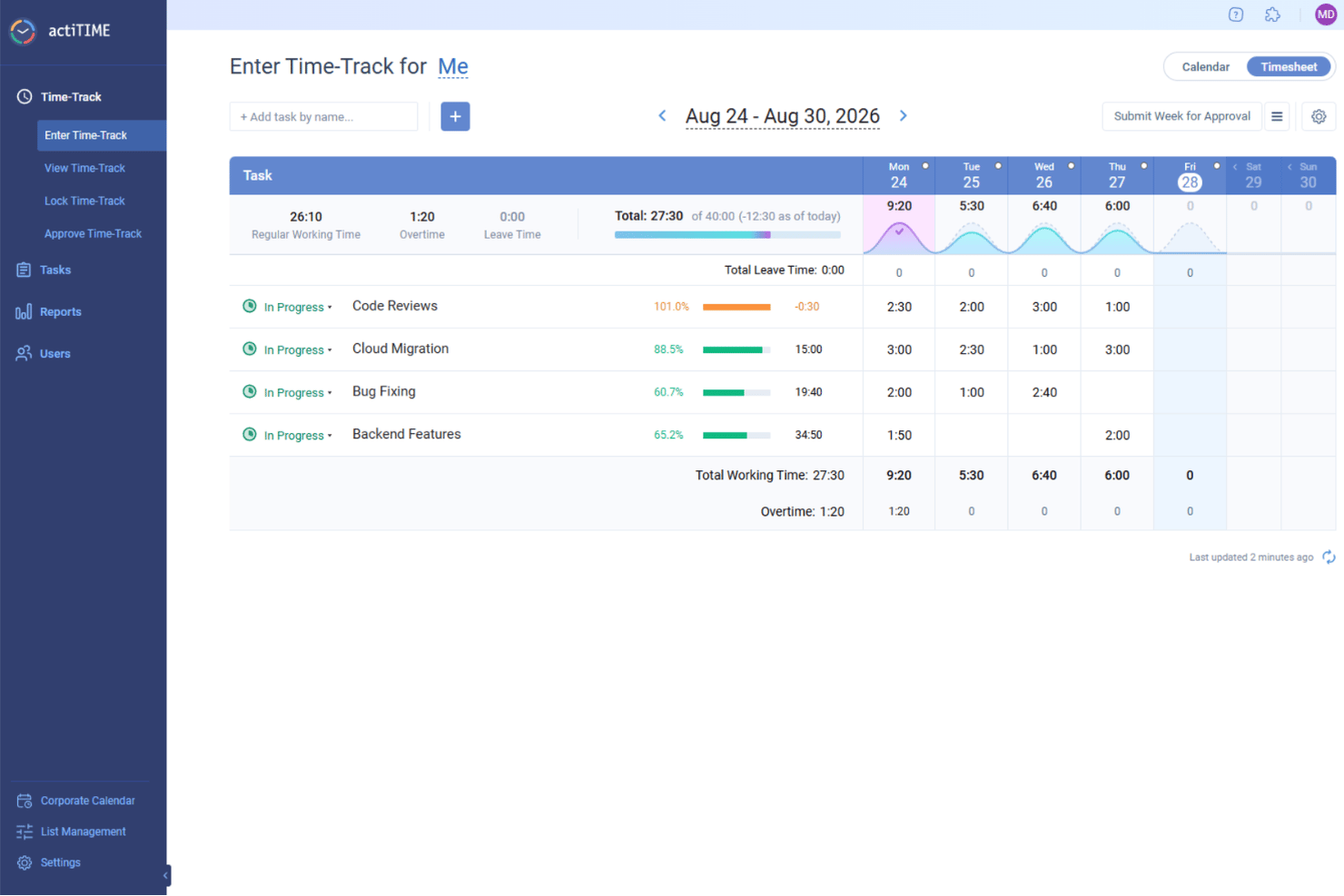
For architects seeking a reliable time tracking solution, actiTIME stands out as a versatile tool that caters to the unique demands of project management within the architecture industry. It offers an array of features designed to streamline workflows, manage budgets, and ensure efficient time allocation, addressing the complex needs of architectural projects. Architects and design professionals can benefit from its robust capabilities in tracking project progress and managing resources, helping to maintain timelines and foster client satisfaction.
Why I Picked actiTIME
I picked actiTIME because it excels in providing detailed project and budget tracking, which are crucial for architects managing multiple projects and resources. Its time tracking feature allows you to record time spent on various tasks, offering insights into project timelines and resource allocation. Additionally, the software’s budget management capabilities enable you to monitor project expenses and compare them against initial estimates, helping to keep projects financially on track. These features address the critical need for precise time and budget oversight in architectural projects.
actiTIME Key Features
In addition to its project and budget tracking capabilities, I also found several other features valuable for architects:
- Reporting: Generate comprehensive reports on time usage and project progress, which are essential for assessing project status and making informed decisions.
- Billing: Create accurate billing reports and client invoices based on tracked time and services, ensuring transparency and accountability in client relationships.
- Team Management: Assign tasks, monitor team performance, and coordinate efforts to enhance collaboration and efficiency within your architectural team.
- Leave Management: Automate PTO tracking and manage leave policies, ensuring seamless team operations and resource availability.
actiTIME Integrations
Integrations include actiPLANS, QuickBooks, and Zapier. An API is also available for custom integrations.
Pros and Cons
Pros:
- Reporting provides detailed project insights
- Project management organizes complex tasks
- Time tracking improves task accuracy
Cons:
- No automatic time tracking feature
- Mobile app lacks offline functionality
New Product Updates from actiTIME

actiTIME Visual Hour Indicator and Time-Track Report Redesign
actiTIME adds a wave-style hour indicator to the Timesheet and Calendar views and refreshes the Time-Track report for smoother navigation and clearer visuals. For more information, visit actiTIME's official site.

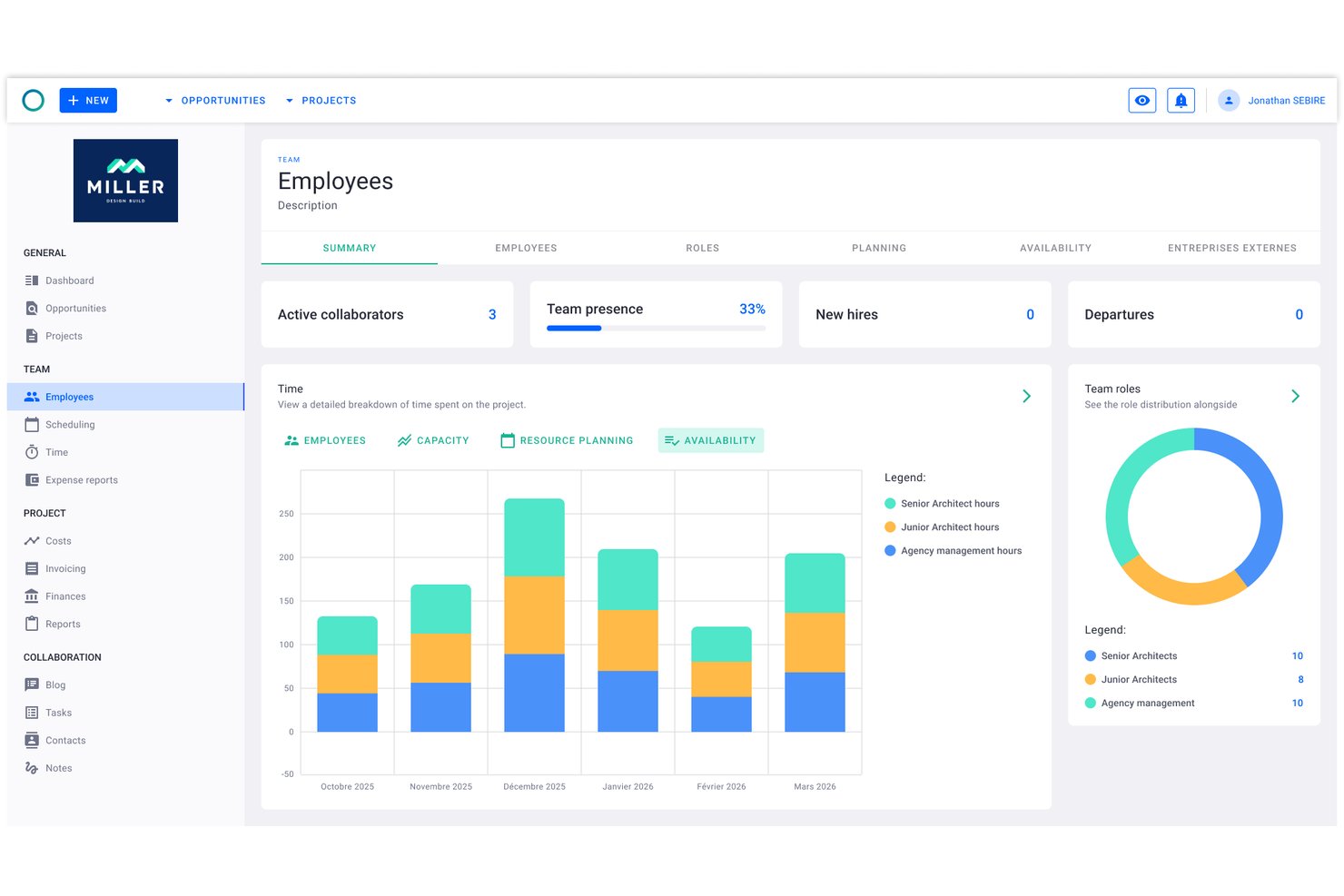
Project Flow by Milient is a project management and time tracking platform built for architecture and engineering firms, combining phase-based project planning, timekeeping, resource management, and invoicing in one system.
Who Is Project Flow by Milient Best For?
Architectural and engineering studios of any size will find it well-suited, particularly those outgrowing spreadsheets and needing connected time, budget, and resource tracking in one place.
Why I Picked Project Flow by Milient
Project Flow by Milient earns its spot on my shortlist because of how tightly it connects phase-level project planning with resource allocation and time tracking. I can break a project into detailed phases, assign team members to each one, and watch hours logged against budgeted time in real time. The live budget vs. actuals dashboard means I'm not waiting until month-end to find out a project has gone over fee.
Project Flow by Milient Key Features
- Resource planning & management: Assign team members to projects and visualize workload across concurrent phases.
- Customizable reporting suite: Generate project hours, utilization, and forecasting reports tailored for architectural practices.
- Integrated invoicing module: Convert tracked time and project data directly into client-ready invoices.
- Mobile time tracking app: Record work hours and manage project tasks from iOS and Android devices.
Project Flow by Milient Integrations
Project Flow by Milient offers native integrations with Xero, QuickBooks, Sage, Visma, Fortnox, Tripletex, and Microsoft Business Central. An API is available for custom integrations.
Pros and Cons
Pros:
- Resource planning synced with project phase timelines
- Invoicing generated directly from tracked project hours
- Phase-level time and budget tracking combined
Cons:
- Mobile app lacks full desktop functionality
- Limited name recognition outside Scandinavian markets

Clockify
Best for billable architect project hours

Clockify is a time tracking software that caters to freelancers, small businesses, and larger organizations. It allows users to track work hours, manage projects, and analyze productivity without any cost barriers.
Why I picked Clockify: I selected Clockify because it provides architects and firm leads with precise control over phase-by-phase project tracking and billable hourly rates. Architectural workflows rely heavily on tracking fixed-fee and hourly milestones across distinct phases like Schematic Design, Construction Documentation, and Contract Administration. Clockify makes it easy to set custom hourly rates per principal, architect, or draftsman, monitor real-time phase burn rates against overall project caps, and export detailed time breakdowns to maintain healthy profit margins.
Standout Features & Integrations
Features include project tracking that allows you to categorize and manage your work efficiently. Customizable reports let you analyze time usage in detail. The tool also provides a time audit feature to ensure accuracy in your logged hours.
Integrations include Trello, Asana, Jira, Monday.com, GitHub, Google Calendar, and Notion.
Pros and Cons
Pros:
- Detailed reporting features
- Budget-friendly
- Allows free time tracking for up to five users
Cons:
- Fewer customization options
- Requires manual entry

TimeCamp
Best for remote teams
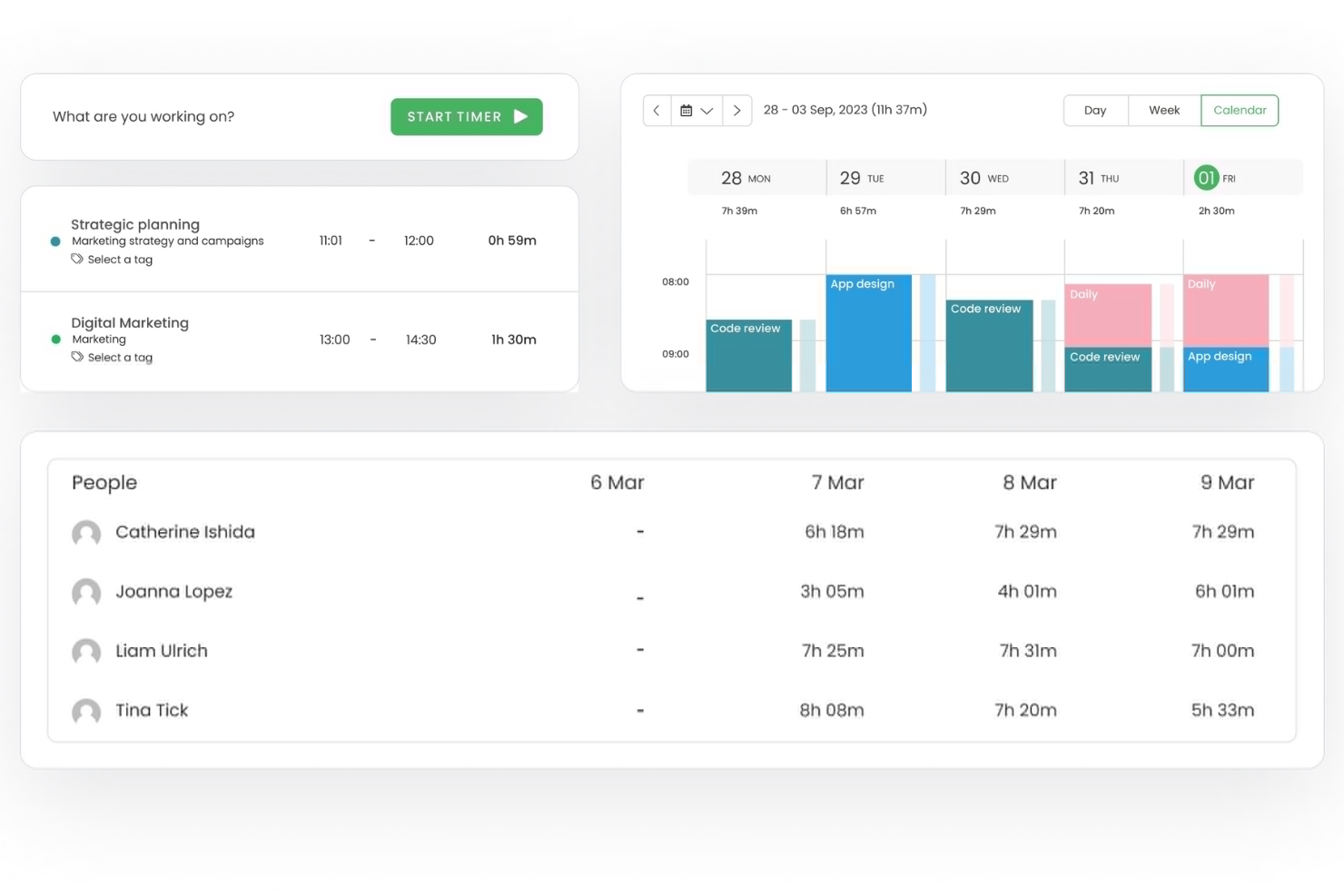
TimeCamp is a time tracking software tailored for remote teams and freelancers. It provides tools for tracking billable hours, managing projects, and generating reports to boost productivity and accountability.
Why I picked TimeCamp: It's ideal for remote teams, offering features that facilitate remote work management and collaboration. Automatic time tracking ensures your team stays productive without constant oversight. You can categorize time entries to track billable and non-billable hours effectively. Its reporting capabilities offer insights into how your team spends their time, helping you make informed decisions.
Standout Features & Integrations
Features include GPS tracking to monitor remote work locations, productivity tracking to assess team performance, and invoicing to streamline client billing. These features help you manage remote teams efficiently and maintain productivity.
Integrations include Trello, Asana, Slack, Jira, monday.com, QuickBooks, Xero, Salesforce, Microsoft Teams, and Google Calendar.
Pros and Cons
Pros:
- GPS location monitoring
- Detailed productivity tracking
- Automatic time tracking
Cons:
- Limited offline functionality
- Limited customization options

Best for budgeting
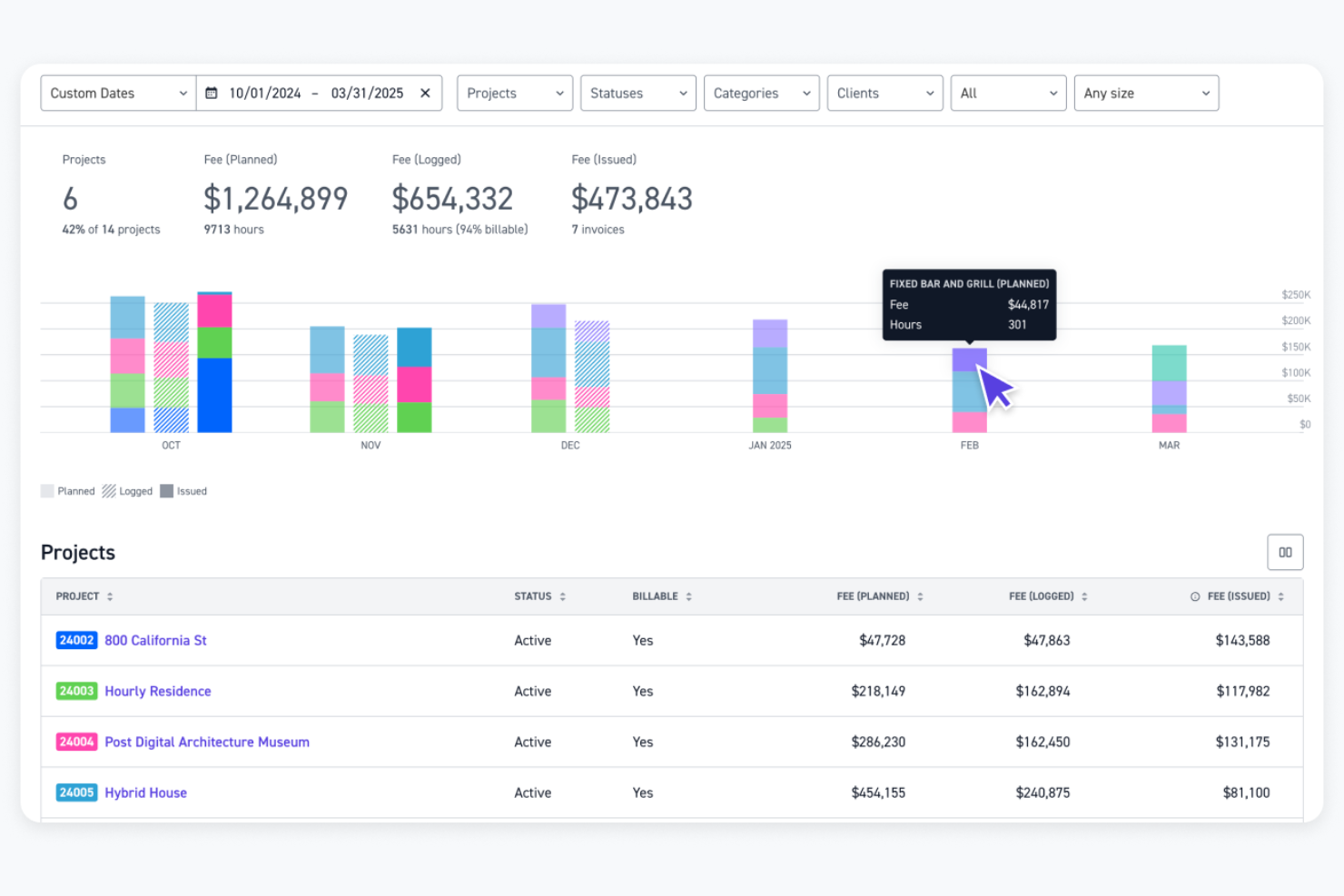
Monograph is a project management software designed specifically for architects and engineers. It helps users with budgeting, staff assignment, project tracking, and accounting.
Why I picked Monograph: It focuses on the needs of architects, offering features like trackable phase budgets and automatic staff assignment to timesheets. This specialization ensures your team can manage projects efficiently. The platform also provides performance forecasting and consultant collaboration, enhancing project outcomes. Its design-centric reports aid in making informed decisions.
Standout Features & Integrations
Features include project tracking for instant visibility, performance forecasting for future planning, and consultant collaboration to manage timelines and deliverables. These tools help you stay on top of your projects and improve overall efficiency.
Integrations include QuickBooks Online, Google Workspace, and Outlook.
Pros and Cons
Pros:
- Includes performance forecasting tools
- Facilitates consultant collaboration
- Intuitive Gantt and visual scheduling
Cons:
- Limited integrations
- Plan options feel expensive for smaller A&E firms

Bonsai
Best for contract work
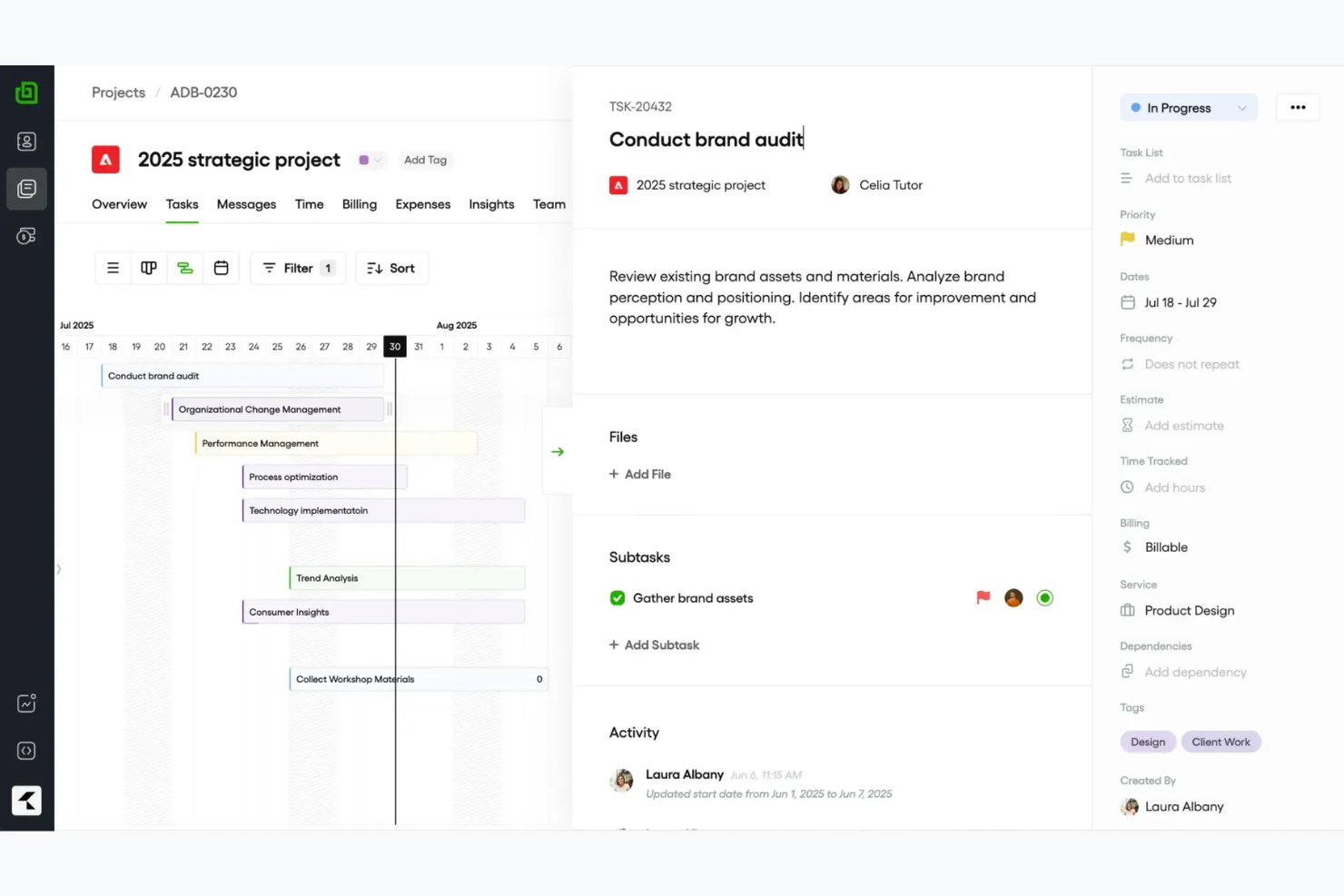
Bonsai is an all-in-one business management software designed for freelancers and small agencies. It offers tools for contract management, invoicing, and time tracking to help users manage their business operations efficiently.
Why I picked Bonsai: It's ideal for contract work, providing features like customizable contract templates and e-signatures. These tools make it easy for you to manage agreements and ensure everything is legally sound. Bonsai also includes time tracking and invoicing capabilities, allowing you to keep track of billable hours and send professional invoices. Additionally, its user-friendly interface simplifies the process of managing multiple projects.
Standout Features & Integrations
Features include customizable proposals to tailor your offerings to clients, automated reminders to ensure timely payments, and a client portal to keep communication organized. These features help you manage your business operations smoothly and maintain strong client relationships.
Integrations include QuickBooks, Xero, Zapier, Calendly, and HiBob.
Pros and Cons
Pros:
- Simplifies project management
- Automated payment reminders
- Strong contract management tools
Cons:
- Limited scalability for large teams
- Basic time-tracking and project reports

Best for payroll

Timesheets.com is a time tracking and payroll management tool designed for small to medium-sized businesses. It helps users track employee hours, manage attendance, and handle payroll tasks efficiently.
Why I picked Timesheets.com: It's especially useful for payroll management, providing features that simplify processing and ensure accuracy. You can track employee hours and manage attendance seamlessly. The tool also offers features to handle overtime calculations, making payroll processing straightforward. Additionally, its reporting capabilities help you gain insights into workforce management.
Standout Features & Integrations
Features include GPS tracking for remote employees, expense tracking to monitor project costs, and detailed reporting for workforce analysis. These features help you manage time and payroll tasks efficiently.
Integrations include QuickBooks, Sage, Paychex, and SurePayroll.
Pros and Cons
Pros:
- Detailed reporting options
- Supports overtime calculations
- Effective payroll management
Cons:
- Lacks advanced features for complex workflows
- Interface can feel dated
Outro software de controlo de tempo para arquitetos
Eis algumas opções adicionais de software de controlo de tempo para arquitetos que não integraram a minha seleção, mas que ainda assim vale a pena conhecer:
- Deltek Replicon Time
For compliance
- TimeTracker
For small firms
- Houzz Pro
For design projects
- Harvest
For integrations
- Xero
For accounting integration
- Teamhood
For Agile teams
- TimeClick
For desktop tracking
- CMap
For project forecasting


How I Evaluate Time Tracking Software for Architects
I evaluate these tools in two layers: core features like phase-based billing and timesheet approvals that every tool must have, then the differentiators that matter most to architectural studios.
Core Functionality (Table Stakes For This List)
When I'm selecting tools for my list, I rank each one on a scale from 0 (does not offer the functionality) to 5 (excels in this area) for each core functionality listed below. Then, I calculate the tool's total score into a percentage. Each tool needs to achieve a minimum total score of 55% to be considered for inclusion.
- Project & Phase Time Tracking: I check whether hours can be logged against specific project phases like SD, DD, CD, and CA rather than just top-level project names.
- Billable Hours & Rate Configuration: Each tool should let you set different billing rates by role, project, or client so a principal's time bills differently than a junior designer's.
- Timesheet Submission & Approval: I look for structured timesheet workflows where staff submit entries and managers review them before hours flow into billing or payroll.
- Budget & Fee Monitoring: Tracking fee burn against a fixed project budget matters here—I evaluate how clearly each tool shows where a project stands relative to its contracted fee.
- Invoicing & Billing Export: Whether it's a native invoice generator or a sync with QuickBooks or Xero, the tool should move billable time into client invoices without manual re-entry.
- Reporting & Utilization Insights: Good reporting means more than hour totals—I look for views into staff utilization, project profitability, and allocation across active engagements.
Once I have a list of tools that meet this criteria, I consider what sets each platform apart.
Differentiating Factors (What Sets Vendors Apart)
Here's how I compare and contrast different vendors:
Standout Features
Resource forecasting is a big one—I look for visual capacity planning that shows who's available across upcoming projects so principals can staff new work without overloading their team. Mobile time capture also matters because architects split time between the studio, job sites, and client meetings, and offline entry keeps timesheets accurate. I also evaluate whether a tool includes pre-built AIA phase templates, which save setup time on every new project.
Beyond Features
Integration with accounting platforms like QuickBooks, Xero, or Sage Intacct is one of the first things I check, because a tool that can't sync billable hours into your invoicing workflow creates double entry. I also evaluate firm size fit—a five-person studio needs something lean, while a 200-person multi-office practice needs role-based permissions and cost center separation. Compliance with AIA billing formats matters too, especially for firms that submit percent-complete invoices on public or institutional projects.
Como escolher software de controlo de tempo para arquitetos
É fácil ficar preso a longas listas de funcionalidades e estruturas de preços complexas. Para o ajudar a manter-se concentrado enquanto avança no seu processo específico de seleção de software, eis uma lista de verificação dos fatores a ter em conta:
| Fator | O que considerar |
|---|---|
| Escalabilidade | A ferramenta pode crescer com a sua empresa? Considere se suporta utilizadores e projetos adicionais à medida que o seu negócio se expande. Procure planos flexíveis que acompanhem o crescimento. |
| Integrações | Está ligada às suas ferramentas atuais? Verifique se integra software como CAD, aplicações de gestão de projetos e aplicações financeiras para reduzir a introdução manual de dados. |
| Personalização | Pode adaptá-la aos seus fluxos de trabalho? Avalie se a ferramenta permite personalizar relatórios, painéis e definições de acordo com as suas necessidades específicas. |
| Facilidade de utilização | É fácil de adotar pela sua equipa? Procure uma interface intuitiva e instruções claras para reduzir o tempo de formação e melhorar a satisfação dos utilizadores. |
| Implementação e integração inicial | Com que rapidez pode começar? Avalie a disponibilidade de materiais de formação, assistência na configuração e suporte para garantir uma transição tranquila. |
| Custo | Enquadra-se no seu orçamento? Compare os planos de preços e considere custos ocultos, como atualizações ou suplementos, que possam afetar a sua despesa total. |
| Medidas de segurança | Os seus dados estão protegidos? Certifique-se de que a ferramenta dispõe de encriptação, cópias de segurança regulares e controlos de acesso para proteger informações sensíveis. |
| Requisitos de conformidade | Cumpre as normas do setor? Verifique se o software está em conformidade com os regulamentos relevantes, especialmente se operar em regiões com leis rigorosas relativas aos dados. |
O que é um software de controlo do tempo?
O software de controlo do tempo é uma ferramenta que ajuda a gerir e registar o tempo despendido em vários projetos. Os arquitetos, designers e gestores de projetos utilizam geralmente estas ferramentas para acompanhar as horas faturáveis, gerir os orçamentos dos projetos e garantir uma afetação eficiente dos recursos. Funcionalidades como o acompanhamento de projetos, a geração de folhas de horas e a monitorização do orçamento ajudam a registar o tempo com precisão e a gerir as finanças. De um modo geral, estas ferramentas fornecem informações valiosas que ajudam a melhorar a eficiência e a rentabilidade dos projetos.
Funcionalidades
Ao selecionar um software de controlo do tempo para arquitetos, tenha em atenção as seguintes funcionalidades essenciais:
- Acompanhamento de projetos: Permite monitorizar o progresso de cada projeto, garantindo o cumprimento dos prazos e dos orçamentos.
- Geração de folhas de horas: Compila automaticamente as horas trabalhadas em folhas de horas completas, facilitando o processamento salarial e a faturação.
- Monitorização do orçamento: Ajuda a acompanhar as despesas dos projetos e a manter-se dentro do orçamento, evitando gastos excessivos.
- Relatórios personalizáveis: Fornece informações detalhadas sobre a utilização do tempo e a produtividade, adaptadas às suas necessidades específicas.
- Capacidades de integração: Liga-se a outras ferramentas, como software CAD e aplicações de gestão de projetos, para simplificar os fluxos de trabalho.
- Acompanhamento por GPS: Permite acompanhar os locais de trabalho remoto, garantindo transparência e responsabilização.
- Ferramentas de comunicação com clientes: Facilitam a colaboração e mantêm os clientes informados sobre o progresso e as atualizações dos projetos.
- Acompanhamento de despesas: Monitoriza os custos relacionados com os projetos e simplifica o processo de faturação.
- Capacidades de faturação: Gera faturas profissionais com base nas horas e despesas registadas, acelerando os processos de pagamento.
- Medidas de segurança: Protege os dados sensíveis com encriptação e controlos de acesso, garantindo a conformidade com as normas do setor.
Vantagens
A implementação de um software de controlo do tempo para arquitetos proporciona várias vantagens à sua equipa e à sua empresa. Eis algumas que pode esperar:
- Melhor gestão de projetos: Ao acompanhar o tempo e os orçamentos, pode garantir que os projetos se mantêm dentro do prazo e dos limites financeiros.
- Maior produtividade: Com relatórios detalhados sobre a utilização do tempo, pode identificar ineficiências e otimizar o fluxo de trabalho da sua equipa.
- Faturação precisa: As folhas de horas e as faturas geradas automaticamente garantem que os clientes são faturados corretamente pelas horas trabalhadas.
- Comunicação melhorada com os clientes: As ferramentas que facilitam as atualizações e a colaboração mantêm os clientes informados e satisfeitos.
- Controlo de custos: A monitorização das despesas ajuda a evitar gastos excessivos e mantém os seus projetos rentáveis.
- Segurança dos dados: Com encriptação e controlos de acesso, os dados sensíveis dos seus projetos permanecem protegidos e em conformidade com as normas do setor.
- Fácil integração: A ligação às ferramentas existentes simplifica os seus processos e reduz a introdução manual de dados.
Custos e preços do software de controlo do tempo para arquitetos
Selecionar um software de controlo de tempo para arquitetos requer compreender os vários modelos de preços e planos disponíveis. Os custos variam consoante as funcionalidades, o tamanho da equipa, os complementos, entre outros fatores. A tabela abaixo resume os planos comuns, os respetivos preços médios e as funcionalidades normalmente incluídas nas soluções de software de controlo de tempo para arquitetos:
Tabela de comparação de planos para software de controlo de tempo
| Tipo de plano | Preço médio | Funcionalidades comuns |
|---|---|---|
| Plano gratuito | $0 | Controlo de tempo básico, relatórios limitados e integrações essenciais. |
| Plano pessoal | $5-$15/utilizador/mês | Controlo de tempo, gestão de projetos, faturação e relatórios básicos. |
| Plano empresarial | $20-$40/utilizador/mês | Relatórios avançados, acompanhamento do orçamento, gestão de despesas e integrações melhoradas. |
| Plano empresarial de grande dimensão | $50-$100/utilizador/mês | Funcionalidades personalizáveis, suporte dedicado, segurança avançada e análises abrangentes. |
Perguntas frequentes sobre software de controlo de tempo para arquitetos
Eis algumas respostas a perguntas comuns sobre software de controlo de tempo para arquitetos:
É difícil implementar software de controlo de tempo?
Não, a maioria dos softwares de controlo de tempo para arquitetos foi concebida para ser fácil de utilizar e ter uma implementação simples. Procure ferramentas que disponibilizem recursos de formação, tutoriais e apoio ao cliente para ajudar a sua equipa a familiarizar-se rapidamente com a ferramenta. Um processo de integração simples pode minimizar as interrupções e garantir que a sua equipa se sente confortável a utilizar a nova ferramenta.
O software de controlo de tempo pode integrar-se com outras ferramentas?
Sim, muitas soluções de controlo de tempo oferecem integrações com ferramentas populares de gestão de projetos, contabilidade e comunicação. Antes de selecionar o software, verifique se este se integra com as ferramentas que já utiliza, como software CAD ou plataformas de contabilidade, para melhorar os seus processos e reduzir a introdução manual de dados.
Quão seguro é o software de controlo de tempo?
\u0026nbsp;
O software de controlo de tempo para arquitetos inclui normalmente medidas de segurança, como encriptação e controlos de acesso, para proteger os seus dados. Ao avaliar as opções, informe-se sobre os protocolos de segurança do fornecedor e a conformidade com as normas do setor. Escolher uma ferramenta com funcionalidades de segurança avançadas garante que as suas informações sensíveis permanecem seguras.