

As 10 melhores ferramentas de gestão de ativos digitais com IA analisadas em 2026

Seleção das melhores ferramentas DAM com IA


Gerir ativos digitais pode ser uma dor de cabeça. Tem de lidar com inúmeros ficheiros, garantir que todas as pessoas da sua equipa têm acesso e tentar manter tudo organizado. É fácil sentir-se sobrecarregado.
É aqui que entram as ferramentas DAM com IA. Ajudam a gerir os seus ativos digitais de forma eficiente, poupando-lhe tempo e ajudando-o a categorizar e pesquisar conteúdos em grande escala. Na minha experiência, estas ferramentas podem transformar a forma como a sua equipa trabalha.
Testei e analisei muitas soluções de software e estou aqui para partilhar as minhas principais escolhas. Encontrará uma análise imparcial e bem fundamentada das melhores ferramentas DAM com IA disponíveis no mercado. Vamos analisar as funcionalidades, as vantagens e as ofertas exclusivas de cada uma, para que possa encontrar a solução certa para a sua equipa.
Why Trust Our Software Recommendations
Our team has been testing and reviewing software since 2012. As project managers ourselves, we know how difficult—and important—it is to choose the right software.
For this guide, we evaluated tools using hands-on testing and independent research, scoring tools using our selection criteria. We also draw on insights from industry thought leaders and practicing project management experts.
Our reviews reflect our human editorial judgment, not a sales pitch.
Expert reviewers:
Tabela de comparação das ferramentas DAM com IA
Esta tabela de comparação resume os detalhes de preços das minhas principais seleções de ferramentas DAM com IA:
| Tool | Best For | Trial Info | Price | ||
|---|---|---|---|---|---|
| 1 | Best for AI-powered DAM workflows | Free demo available | Pricing upon request | Website | |
| 2 | Best for templated content creation | Not available | Pricing upon request | Website | |
| 3 | Best for custom AI tagging | Free plan + free trial available | From $250/month (billed annually) | Website | |
| 4 | Best for AI-driven asset tagging | Free plan + 14-day free trial + demo available | From $99/month | Website | |
| 5 | Best for AI-powered tagging and review | 30-day free trial available | From $29/month | Website | |
| 6 | Best for AI-powered content search | Free plan + demo available | From $900/month (billed annually) | Website | |
| 7 | Best for centralized product data management | 14-day free trial | Pricing upon request | Website | |
| 8 | Best for small businesses | Free demo available | Pricing upon request | Website | |
| 9 | Best for marketing teams | Free demo available | Pricing upon request | Website | |
| 10 | Best for cloud-native solutions | Free demo available | Pricing upon request | Website |

Análises das melhores ferramentas DAM com IA
Seguem-se os meus resumos detalhados das melhores ferramentas DAM com IA que entraram na minha seleção. As minhas análises apresentam uma visão detalhada das principais funcionalidades, vantagens & desvantagens, integrações e casos de utilização ideais de cada ferramenta, para o ajudar a encontrar a melhor opção para si.

Best for AI-powered DAM workflows
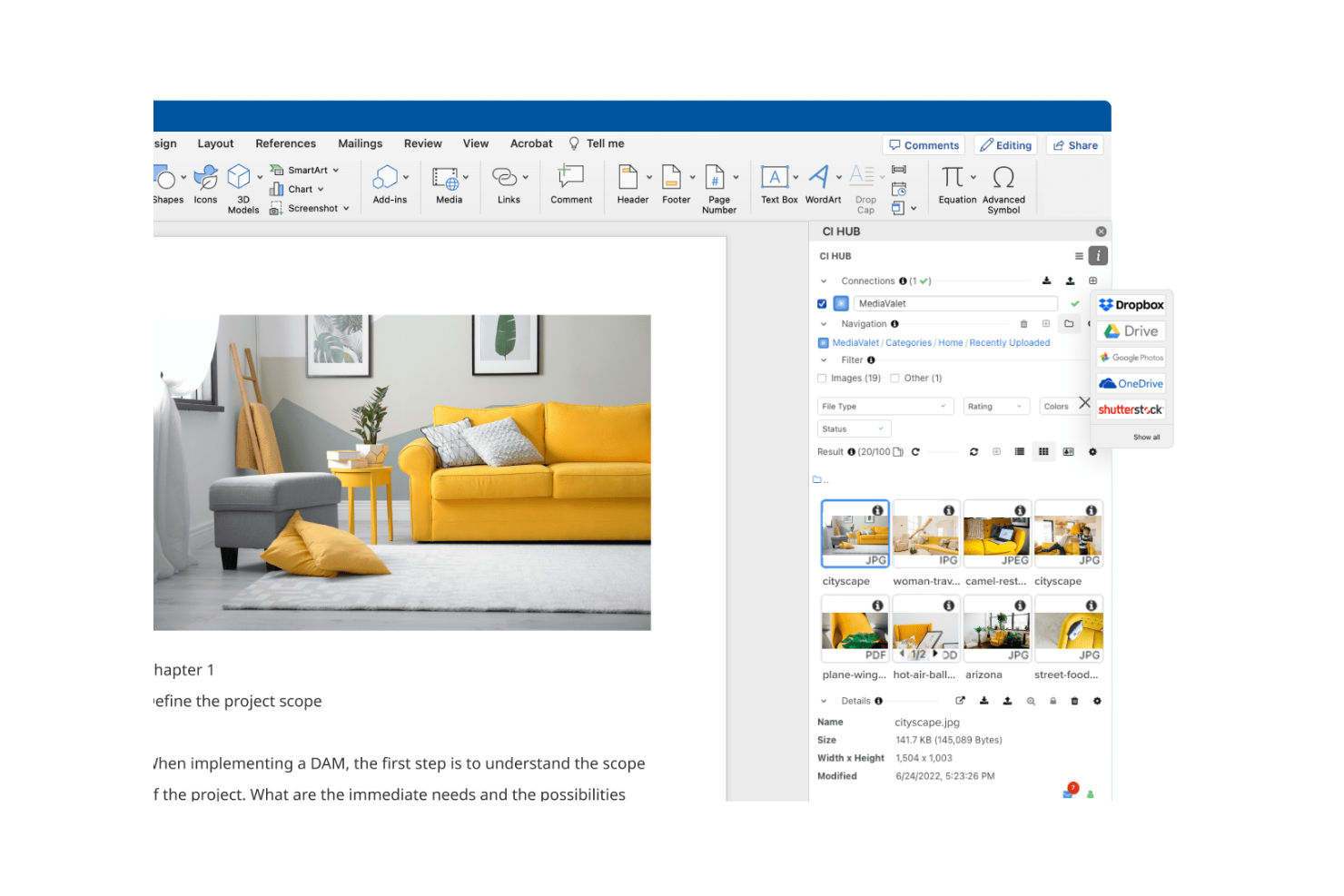
MediaValet is a Digital Asset Management (DAM) solution that caters to organizations looking for seamless Microsoft integration. It focuses on asset organization and distribution, making it ideal for teams that rely heavily on Microsoft tools.
Why I picked MediaValet: MediaValet is built for teams that rely heavily on Microsoft tools. You get direct integration with Office 365 and SharePoint, making your workflows smoother. Since it’s cloud-based, your team can access and collaborate on assets from anywhere. With strong security and data protection, it fits well if your company needs to keep information safe.
Standout Features & Integrations
Features include advanced search capabilities that help your team find assets quickly with metadata and keywords. Automated workflows streamline repetitive tasks, saving your team time and effort. The platform's scalability ensures that it grows with your organization, adapting to increasing demands.
Integrations include Microsoft Office 365, SharePoint, Adobe Creative Cloud, Slack, Box, Dropbox, Salesforce, Hootsuite, WordPress, and Google Analytics.
Pros and Cons
Pros:
- Focus on security and protection
- Automated workflow features
- Strong Microsoft integration
Cons:
- Dependence on the Microsoft ecosystem
- Requires training for new users

Papirfly
Best for templated content creation

Papirfly is an AI-driven DAM tool best known for its templated content creation, helping teams produce brand-ready assets quickly and consistently. It works well for industries like automotive, pharma, and retail that require strict brand consistency across multiple markets. With automated features like asset tagging and content translation, Papirfly reduces manual work, shortens time-to-market, and helps teams stay aligned with global brand standards.
Why I Picked Papirfly
I picked Papirfly for its templated content creation, which helps teams produce consistent, on-brand materials without relying heavily on design resources. Its AI-driven metadata tagging also streamlines the organization and retrieval of digital assets, reducing manual effort. Together, these features allow teams to maintain brand accuracy while improving the speed and efficiency of their creative workflows.
Papirfly Key Features
In addition to templated content creation, Papirfly offers:
- Campaign Management: This feature allows your team to plan, execute, and analyze marketing campaigns within a unified platform.
- Brand Portal: It provides a centralized space for storing and accessing brand guidelines and assets, ensuring consistency across all materials.
- GDPR Compliance: Papirfly ensures that all data handling processes meet regulatory standards, crucial for maintaining trust and legality.
- Data Analytics: This tool offers insights into asset usage and campaign performance, helping refine marketing strategies.
Papirfly Integrations
Papirfly integrates with Adobe Creative Cloud, Microsoft Office 365, Google Workspace, Salesforce, HubSpot, Marketo, Sitecore, WordPress, Drupal, and an API is available for custom integrations.
Pros and Cons
Pros:
- Supports multiple languages for global reach
- Auto-tags assets to speed up organization
- Easy to manage large libraries of assets
Cons:
- Some users experience slow loading at times
- Templates can be limiting or require adjustments
New Product Updates from Papirfly

Papirfly Prove Enterprise Adds Analytics Agent
Papirfly Prove Enterprise adds Analytics Agent for asking data questions in plain language and generating figures or charts. This helps users explore analytics without setting up filters or queries. For more information, visit Papirfly’s official site.
 .
Best for custom AI tagging

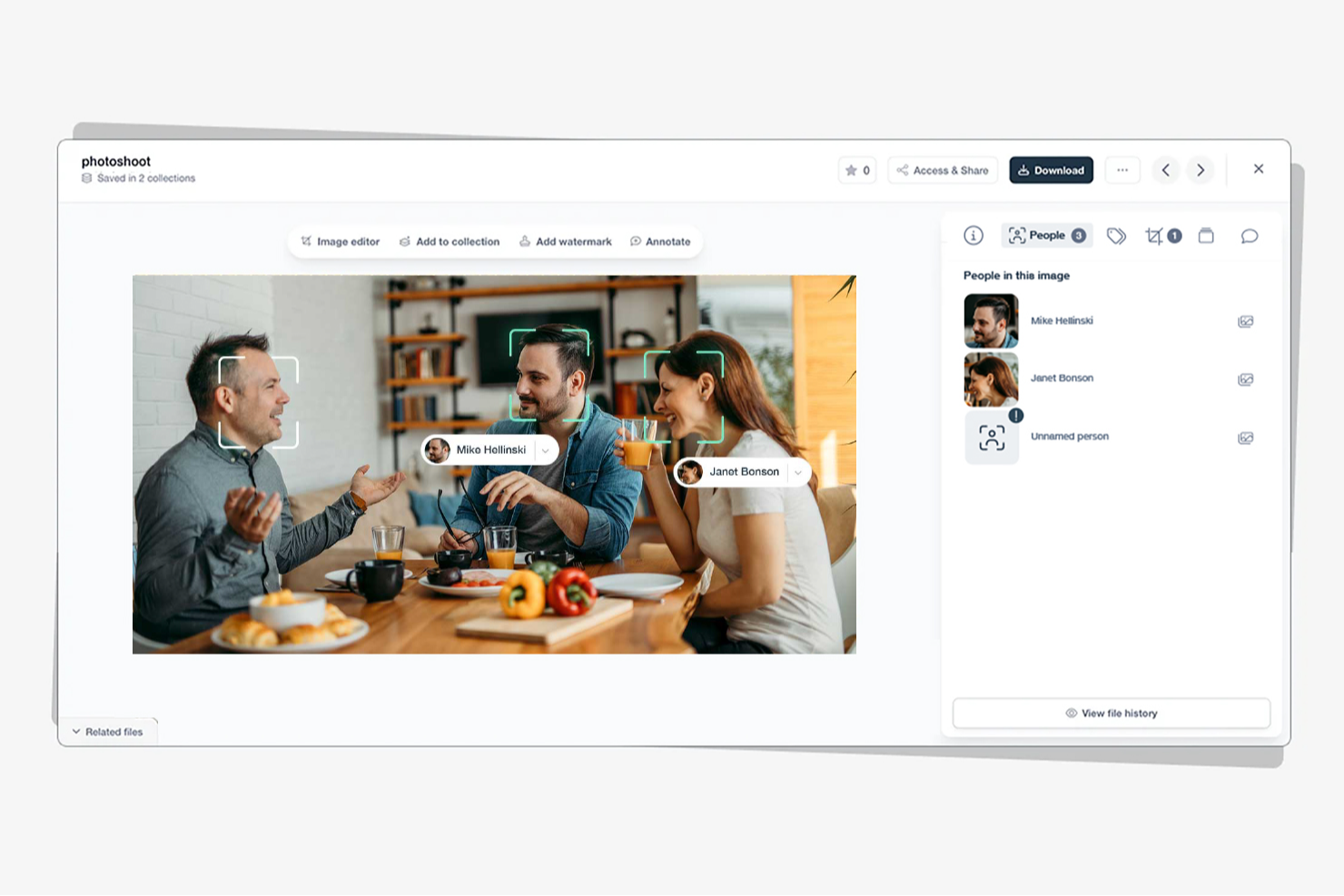
Tagbox is an AI-powered digital asset management platform built for teams in retail, events, nonprofits, and creative agencies. It helps businesses organize large media libraries using features like semantic search, face recognition, and automated tagging. By turning scattered assets into searchable libraries, Tagbox improves collaboration and long-term media management.
Why I Picked Tagbox
I picked Tagbox for its practical use of AI in media organization. Its semantic search makes it easy to find visuals based on people, objects, or context, saving teams time. Automated tagging further reduces manual work, making Tagbox a strong choice for teams managing growing asset libraries.
Tagbox Key Features
In addition to its core functionalities, Tagbox offers several other features that enhance its utility for digital asset management:
- Face Recognition: This feature allows your team to identify and categorize images based on facial data, improving organization.
- Custom AI Tagging: You can train an AI to detect your specific products, locations or other visual elements.
- Collaborative Tools: Facilitate teamwork and client interaction through media sharing and management.
- User-Friendly Interface: The intuitive design ensures that your team can easily navigate and utilize the tool without extensive training.
Tagbox Integrations
Connect Tagbox.io through Tagbox Desktop (drag-and-drop into any app), Zapier, Make, and a REST API. Custom workflows are available for Enterprise.
Pros and Cons
Pros:
- Custom tagging for video libraries
- Face recognition improves asset discovery
- AI-powered video asset organization
Cons:
- Limited offline access options
- No built-in video editing

Best for AI-driven asset tagging
Stockpress is a digital asset management (DAM) tool that uses artificial intelligence to help teams organize, find, and share files more efficiently. It’s designed for companies of all sizes that want to simplify asset management without limiting user access or paying per seat.
Why I picked Stockpress: I picked Stockpress because its AI tagging and search capabilities make it incredibly easy for you to locate the right asset fast. The platform automatically applies intelligent metadata to your files, saving your team time on manual tagging and organization. You also get version control and duplicate detection tools, helping your team maintain clean, up-to-date asset libraries without confusion. What really stands out is how Stockpress combines collaboration and control—you can annotate, comment, and securely share files, all within an intuitive dashboard.
Stockpress standout features & integrations
Features include AI-driven tagging and visual search to improve asset discoverability, version control with duplicate detection to maintain file integrity, and customizable share links with user permissions for secure collaboration.
Integrations include Figma, Photoshop, Mailchimp, Slack, Dropbox, Google Drive, Okta, WordPress, Azure, Webflow, and Klaviyo.
Pros and Cons
Pros:
- Secure file access control
- Advanced tagging customization
- User-friendly interface
Cons:
- Few analytics tools
- Limited mobile support

Filecamp
Best for AI-powered tagging and review

Filecamp is a versatile digital asset management (DAM) tool designed to meet the needs of marketing teams and professionals across various industries, including media, non-profits, and web agencies. It offers a user-friendly platform that enhances workflow efficiency and brand consistency, making it an ideal choice for those looking to streamline asset management processes. With features like online proofing, customizable branding, and version control, Filecamp addresses the challenges of organizing and managing digital assets effectively.
Why I Picked Filecamp
I picked Filecamp for its robust online proofing tools and version control capabilities that are essential for managing digital assets in today's fast-paced environment. These features allow you to review and approve files seamlessly, ensuring that your team stays on the same page and maintains brand consistency. Additionally, the platform's secure file sharing ensures that sensitive information is protected while facilitating collaboration among remote teams. These functionalities make Filecamp a reliable choice for businesses looking to optimize their digital asset management processes.
Filecamp Key Features
In addition to its standout online proofing and version control, Filecamp offers several other features that enhance its usability as an AI DAM tool.
- Customizable Branding: Tailor the platform to match your brand’s identity, ensuring consistency across all digital assets.
- Secure File Sharing: Share files securely within your team or with external partners, maintaining control over access and permissions.
- Google Cloud Hosting: Benefit from data security and compliance with a platform hosted on Google Cloud, protecting your assets.
- Unlimited Users and Bandwidth: Manage your digital assets without worrying about user or bandwidth limitations, making it scalable for growing teams.
Filecamp Integrations
Native integrations are not currently listed by Filecamp.
Pros and Cons
Pros:
- Strong version control capabilities
- Unlimited users on all plans
- Built-in online proofing workflows
Cons:
- AI search is less advanced
- No native integrations available
New Product Updates from Filecamp
Filecamp Adds Analytics, AI Thumbnails, and CDN Embed Links
Filecamp adds Analytics, AI-powered thumbnails, and CDN-backed Embed links. These updates give teams more visibility into asset usage, improve thumbnail presentation, and make embedded images easier to manage. For more information, visit Filecamp’s official site.
 .

Air
Best for AI-powered content search

Air is a platform designed to manage and scale creative operations, providing a central hub for all your digital assets. It allows you to combine feedback, approvals, formatting, and licensing in one place, eliminating the need to jump between multiple tools.
Why I picked Air: I picked Air because its AI-powered search helps you find digital assets the way you think, recognizing colors, objects, faces, and dialogue. This capability means your creative team can focus more on producing content instead of manually tagging and sorting assets. I also like its facial recognition tool, which automatically detects and tags people in photos, making visual asset organization much faster. Air’s visual interface and collaboration tools make it especially effective for teams managing large volumes of creative content.
Air standout features & integrations
Features include AI-powered search and tagging that make it easy to locate assets based on visual or contextual cues, visual scrubbable previews that let you see inside design files and videos without opening them, and automatic video and audio transcription to make media content searchable. Its desktop sync feature gives you instant access to assets directly from your desktop.
Integrations include Slack, Salesforce, Canva, Zapier, Figma, Adobe Premiere Pro, NetSuite, HubSpot, Google Sheets, ClickUp, Shopify, and ChatGPT (OpenAI).
Pros and Cons
Pros:
- Convenient desktop sync
- Facial recognition tagging
- AI-powered visual search
Cons:
- May experience delays with large files
- Limited customization options
New Product Updates from Air

Air Showcases Introduces Custom Branding, Content Blocks, and Sub-Pages
Air Showcases now support custom branding, content blocks, sub-pages, and saved default layout settings, plus more control over removing items and branding options for Enterprise. For more information, visit Air's official site.

Best for centralized product data management

4ALLPORTAL is built for businesses that need an AI-driven way to manage digital assets while keeping product data centralized. It’s used across industries such as e-commerce and healthcare, offering modular tools that support consistent product information and media management. With AI-enhanced search and auto-tagging, 4ALLPORTAL helps teams organize and distribute digital assets more efficiently across channels.
Why I Picked 4ALLPORTAL
I picked 4ALLPORTAL for its ability to centralize product data alongside digital assets in one AI-enabled system. This makes it easier to manage product information, images, and documents consistently across teams and channels. Features like natural-language search and auto-tagging reduce manual work by helping your team find and organize assets faster. Its built-in translation support also helps teams manage multilingual product content without relying on separate tools.
4ALLPORTAL Key Features
In addition to centralized product data management, 4ALLPORTAL offers:
- Modular and Scalable Solutions: The platform offers flexibility to scale and customize according to your business needs, ensuring it grows with your organization.
- User-Friendly Interface: The intuitive design makes it easy for teams to navigate and utilize the platform’s full capabilities without extensive training.
- Seamless Integrations: 4ALLPORTAL integrates smoothly with existing systems, reducing the need for disruptive changes in your current workflow.
4ALLPORTAL Integrations
Integrations include Adobe Photoshop, Adobe InDesign, Microsoft Office, Dropbox, Amazon S3, Shopify, WordPress, Salesforce, SAP, and Jira.
Pros and Cons
Pros:
- Reduces duplicate assets across product libraries
- Versioning helps track product data changes
- Combines DAM and PIM for unified product workflows
Cons:
- Reporting options are more operational than visual
- Software updates occasionally disrupt workflow continuity
Canto
Best for small businesses

Canto is a Digital Asset Management (DAM) software designed for small businesses, focusing on simplifying asset organization and sharing. It offers features that help teams manage their digital content efficiently, making it a valuable tool for businesses with limited resources.
Why I picked Canto: Canto is built for small teams that want a simple way to manage digital assets. You get tools like visual search and smart albums, so your team can quickly find and organize files. The setup is fast and easy, which makes it practical if you don’t have extra time or resources. With a central space for sharing, your team can collaborate without digging through scattered folders.
Standout Features & Integrations
Features include a visual search that helps your team locate assets quickly using image recognition. Smart albums automatically organize assets based on metadata, saving time and effort. The customizable branding feature lets you personalize the platform to match your company's identity.
Integrations include Adobe Creative Cloud, Microsoft Office, Slack, Dropbox, Box, Google Drive, Salesforce, WordPress, Zapier, and Shopify.
Pros and Cons
Pros:
- Customizable branding options
- Visual search capabilities
- Quick setup process
Cons:
- May require initial training
- Pricing transparency issues

Aprimo
Best for marketing teams

Aprimo is a Digital Asset Management (DAM) platform designed for marketing teams, focusing on content management and campaign coordination. It helps teams organize, distribute, and optimize their marketing assets efficiently.
Why I picked Aprimo: Aprimo is built for marketing teams that need better control over campaigns and content distribution. You can set up workflows that match how your team operates instead of sticking to rigid processes. Its analytics tools give you clear insight into how content performs, so you can shape strategies around real data. With strong collaboration features, your team can stay connected and work together no matter where they’re located.
Standout Features & Integrations
Features include a content calendar that helps your team plan and track marketing campaigns. The version control feature ensures that your team always works with the most up-to-date assets. Collaboration tools support communication and coordination among team members, making it easier to manage projects.
Integrations include Adobe Creative Cloud, Salesforce, SAP, Microsoft Dynamics 365, Workfront, Sitecore, Marketo, Hootsuite, Drupal, and Optimizely.
Pros and Cons
Pros:
- Effective version control
- Strong analytics capabilities
- Tailored for marketing workflows
Cons:
- Requires training for full use
- Pricing transparency issues


Acquia is a Digital Asset Management (DAM) platform designed for businesses seeking cloud-native solutions, offering tools for content management and collaboration. It helps teams manage and distribute digital assets efficiently in a cloud environment.
Why I picked Acquia: Acquia is designed for cloud-native teams that need scalability and flexibility as they grow. Your team gets a central asset repository that keeps everything in one place and easy to access. You can set up customizable workflows that match how your team works instead of forcing a fixed process. With a strong focus on security and compliance, it’s a solid option if you’re in an industry with strict data rules.
Standout Features & Integrations
Features include a centralized asset repository that ensures your team can access files from anywhere. Customizable workflows allow you to design processes that suit your team's needs. Enhanced security features protect your assets and ensure compliance with industry standards.
Integrations include Adobe Creative Cloud, Drupal, Salesforce, Marketo, Sitecore, WordPress, Optimizely, Google Drive, Microsoft Teams, and Slack.
Pros and Cons
Pros:
- Suitable for compliance-focused industries
- Customizable workflows
- Strong security features
Cons:
- Learning curve for new users
- Complex initial setup
Outras ferramentas DAM com IA
Eis algumas opções adicionais de ferramentas DAM com IA que não entraram na minha seleção, mas que vale a pena conhecer:
- Frontify
For brand consistency
- Brandkit
For brand management
- Orange Logic
For large enterprises
- Storyteq
For dynamic content
- Dash
For ecommerce asset publishing workflows
- Pics.io
For Google Drive users
- Bynder
For creative teams
- Connecter Suite
For instant access to local files
- Brandfolder
For visual asset management
- OpenAsset
For architecture and engineering
- Iconik
For cloud-based content collaboration


How I Evaluate AI DAM Tools
I look for AI that actually saves project teams time—auto-tagging thousands of assets on upload or surfacing the right file from a natural language query, not just a rebranded keyword search. From there, I split my evaluation into core functionality every AI DAM tool needs to qualify and differentiating factors that separate good options from great ones.
Core Functionality (Table Stakes For This List)
When I'm selecting tools for my list, I rank each one on a scale from 0 (does not offer the functionality) to 5 (excels in this area) for each core functionality listed below. Then, I calculate the tool's total score into a percentage. Each tool needs to achieve a minimum total score of 65% to be considered for inclusion.
- AI-Driven Auto-Tagging: I check whether the tool generates accurate metadata on upload across file types—think tagging a batch of 500 campaign images with usable keywords instead of dumping them into a folder.
- AI-Powered Asset Search: Search should go beyond filenames. I evaluate whether teams can run natural language or visual queries to find assets, like searching "person on a rooftop at sunset" and getting relevant results.
- Centralized Asset Repository: The platform needs to house all major file types—images, video, PDFs, design files—in a structured library with custom metadata schemas and scalable taxonomy.
- Version Control & Approval Workflows: I look for clear version histories and configurable approval routing, so a designer can push a revised banner ad through a multi-stage review without losing the original.
- Permissions & Rights Management: Role-based access and license tracking matter here. I evaluate how well a tool handles asset expiration dates, usage restrictions, and access scoping across internal and external users.
- PM & Creative Tool Integrations: The DAM should connect to the tools project teams already use. I look for native integrations with platforms like Asana, Monday, Adobe Creative Cloud, or Figma.
Once I have a list of tools that meet the criteria, I consider what sets each platform apart.
Differentiating Factors (What Sets Vendors Apart)
Here's how I compare and contrast different vendors:
Standout Features
AI brand compliance is a major differentiator—I look for tools that flag off-brand assets before they reach a client, saving project managers from catching those issues manually during review. Automated workflow triggers also add real value, especially when an asset approval can kick off downstream tasks like notifying stakeholders or updating project status. Generative AI capabilities matter too. Auto-resizing a hero image across multiple deliverable formats helps teams handling high-volume creative output move faster.
Beyond Features
I evaluate how well each platform handles external collaboration—agency partners and clients need guest access with expiring links and rights-aware sharing, not workarounds. Security and compliance also weigh heavily. I check for SOC 2 Type II certification, SSO support, and clear policies on how the vendor handles data used to train its AI models. Implementation timelines matter for project-driven teams too. A tool that offers migration support and taxonomy consulting gets teams to value faster than one that leaves you building metadata schemas from scratch.
Como escolher ferramentas DAM com IA
É fácil perder-se em listas extensas de funcionalidades e estruturas de preços complexas. Para o ajudar a manter-se concentrado enquanto percorre o seu processo específico de seleção de software, eis uma lista de verificação dos fatores a ter em conta:
| Fator | O que considerar |
|---|---|
| Escalabilidade | Considere se a ferramenta pode crescer com a sua equipa. Pergunte sobre os limites de utilizadores e a capacidade de armazenamento. Certifique-se de que consegue lidar com um maior volume de dados à medida que a sua organização cresce. |
| Integrações | Verifique se a ferramenta se integra com o software que já utiliza. Procure integrações nativas com ferramentas como o Adobe Creative Cloud, o Slack e o Google Drive para evitar falhas nos fluxos de trabalho. |
| Possibilidade de personalização | Avalie se a ferramenta pode ser adaptada às suas necessidades específicas. Procure modelos e fluxos de trabalho personalizáveis que correspondam aos processos da sua equipa. |
| Facilidade de utilização | Teste a interface de utilizador para verificar se é intuitiva. Certifique-se de que os membros da equipa conseguem navegar sem necessitarem de formação extensa. Procure um esquema limpo e simples que corresponda ao nível de competência tecnológica da sua equipa. |
| Implementação e integração inicial | Avalie a facilidade de começar a utilizar a ferramenta. Pergunte sobre os recursos de formação disponíveis, como vídeos ou tutoriais. Garanta uma transição suave, com o mínimo de perturbações nas operações diárias. |
| Custo | Compare os planos de preços com o seu orçamento. Procure transparência nos preços e eventuais taxas ocultas. Considere os custos a longo prazo, incluindo quaisquer encargos relativos a utilizadores ou funcionalidades adicionais. |
| Medidas de segurança | Verifique se a ferramenta cumpre os seus padrões de segurança. Procure funcionalidades como encriptação de dados, permissões de utilizador e atualizações de segurança regulares para proteger os seus ativos. |
| Disponibilidade do suporte | Certifique-se de que o fornecedor oferece suporte fiável. Procure vários canais de suporte e tempos de resposta rápidos. Considere a disponibilidade de recursos de autoatendimento para resolver rapidamente problemas. |
O que são ferramentas DAM com IA?
As ferramentas DAM com IA são sistemas de gestão de ativos digitais aperfeiçoados com inteligência artificial para organizar, armazenar e recuperar ativos digitais de forma eficiente. Profissionais como especialistas de marketing, designers e criadores de conteúdos utilizam estas ferramentas para gerir os seus conteúdos multimédia digitais, garantindo um acesso rápido e a colaboração.
Funcionalidades como a etiquetagem de metadados, a pesquisa inteligente e os fluxos de trabalho automatizados ajudam a organizar os ativos, a melhorar a produtividade e a manter a consistência da marca. De um modo geral, estas ferramentas proporcionam aos utilizadores uma gestão eficiente dos ativos e uma colaboração simplificada.
Funcionalidades das ferramentas DAM com IA
Ao selecionar ferramentas DAM com IA, esteja atento às seguintes funcionalidades essenciais:
- Etiquetagem de metadados: Etiqueta automaticamente os ativos com metadados relevantes, facilitando a pesquisa e a organização de ficheiros digitais.
- Pesquisa inteligente: Utiliza a IA para localizar rapidamente ficheiros com base em palavras-chave ou etiquetas, poupando tempo e aumentando a produtividade.
- Controlo de versões: Gere diferentes versões dos ativos para garantir que as equipas trabalham com os ficheiros mais atualizados.
- Fluxos de trabalho personalizáveis: Permite que as equipas adaptem os processos às suas necessidades específicas, melhorando a eficiência e a colaboração.
- Ferramentas de colaboração: Permite que os membros da equipa partilhem, revejam e deem feedback sobre os ativos, reforçando o trabalho em equipa.
- Biblioteca de ativos centralizada: Disponibiliza um único local para armazenar e aceder a todos os ativos digitais, garantindo consistência e acesso fácil.
- Medidas de segurança: Protege os ativos digitais com funcionalidades como encriptação e permissões de utilizador, garantindo a segurança dos dados.
- Fluxos de trabalho automatizados: Simplifica as tarefas repetitivas, libertando tempo para trabalho mais estratégico.
- Análise e relatórios: Oferece informações sobre a utilização e o desempenho dos ativos, ajudando as equipas a tomar decisões baseadas em dados.
- Distribuição multicanal: Facilita a partilha de conteúdos em várias plataformas, garantindo um alcance amplo e consistência.
Vantagens das ferramentas DAM com IA
A implementação de ferramentas DAM com IA proporciona várias vantagens para a sua equipa e para a sua empresa. Eis algumas das que pode esperar:
- Melhor organização: A etiquetagem de metadados orientada por IA e a pesquisa inteligente ajudam a manter os ativos digitais bem organizados e fáceis de encontrar.
- Colaboração melhorada: Funcionalidades como bibliotecas de ativos centralizadas e ferramentas de colaboração facilitam o trabalho conjunto das equipas e a partilha de feedback.
- Poupança de tempo: Os fluxos de trabalho automatizados e a pesquisa inteligente reduzem o tempo despendido em tarefas repetitivas e na localização de ficheiros.
- Consistência: O controlo de versões e a gestão centralizada de ativos garantem que todos os membros da equipa utilizam os ativos da marca mais atuais e consistentes.
- Segurança dos dados: As medidas de segurança protegem os seus ativos digitais contra acessos não autorizados e potenciais violações de dados.
- Decisões informadas: A análise e os relatórios fornecem informações sobre o desempenho dos ativos, ajudando as equipas a tomar decisões baseadas em dados.
- Maior alcance: As funcionalidades de distribuição multicanal garantem que os seus conteúdos são partilhados de forma consistente em várias plataformas.
Custos e preços das ferramentas DAM com IA
A seleção de ferramentas de DAM com IA exige uma compreensão dos vários modelos de preços e planos disponíveis. Os custos variam consoante as funcionalidades, a dimensão da equipa, os complementos e muito mais. A tabela abaixo resume os planos comuns, os respetivos preços médios e as funcionalidades normalmente incluídas nas soluções de ferramentas de DAM com IA:
Tabela de comparação de planos para ferramentas de DAM com IA
| Tipo de plano | Preço médio | Funcionalidades comuns |
|---|---|---|
| Plano gratuito | $0 | Armazenamento básico, acesso limitado dos utilizadores e etiquetagem de metadados essencial. |
| Plano pessoal | $5-$25/utilizador/mês | Armazenamento ampliado, ferramentas básicas de colaboração e capacidades de pesquisa padrão. |
| Plano empresarial | $30-$75/utilizador/mês | Colaboração avançada, fluxos de trabalho personalizáveis e funcionalidades de segurança reforçadas. |
| Plano para empresas | $100+/utilizador/mês | Armazenamento ilimitado, suporte completo para integrações e análise abrangente. |
Perguntas frequentes sobre ferramentas de DAM com IA
Eis algumas respostas a perguntas frequentes sobre ferramentas de DAM com IA:
Como é que o DAM melhora a colaboração da equipa?
As ferramentas de DAM melhoram a colaboração da equipa ao simplificarem a comunicação entre os membros. A sua equipa pode aceder aos recursos necessários, comentar e aprovar as versões finais diretamente no sistema. Este acesso unificado e a possibilidade de fornecer feedback em tempo real ajudam a sua equipa a trabalhar em conjunto de forma mais eficiente.
Como é que o DAM melhora a consistência da marca?
Um DAM baseado na nuvem garante a consistência da marca ao proporcionar a todos acesso aos recursos de marca mais recentes. A sua equipa de marca pode gerir e atualizar facilmente os recursos, eliminando materiais desatualizados. Este controlo ajuda a manter uma imagem de marca consistente em todos os canais e materiais.
O que devo ter em conta ao escolher ferramentas de DAM com IA?
Ao escolher ferramentas de DAM com IA, tenha em conta fatores como a escalabilidade e a integração com os sistemas existentes. Avalie o grau de personalização da plataforma para responder às necessidades da sua equipa. Analise também a facilidade de utilização e a qualidade do apoio ao cliente para garantir uma implementação simples.
As ferramentas de DAM com IA conseguem lidar com grandes volumes de dados?
Sim, as ferramentas de DAM com IA foram concebidas para lidar eficazmente com grandes volumes de dados. Utilizam pesquisa inteligente e etiquetagem de metadados para organizar e recuperar rapidamente os recursos. Ao avaliar uma ferramenta, verifique se consegue acompanhar o crescimento das suas necessidades de dados, de modo a evitar limitações futuras.
As ferramentas de DAM com IA são seguras?
As ferramentas de DAM com IA dão prioridade à segurança, disponibilizando funcionalidades como encriptação de dados e permissões de utilizador. Ao selecionar uma ferramenta, certifique-se de que cumpre os padrões de segurança da sua organização e atualiza regularmente os respetivos protocolos de segurança para proteger os seus recursos digitais contra acessos não autorizados.
Como é que as ferramentas de DAM com IA se integram com outro software?
As ferramentas de DAM com IA disponibilizam frequentemente integrações com software popular, como o Adobe Creative Cloud, o Slack e o Google Drive. Estas integrações ajudam a manter um fluxo de trabalho simples entre diferentes plataformas. Verifique as capacidades de integração da ferramenta para garantir a compatibilidade com os seus sistemas existentes.