

22 ferramentas de automação com IA selecionadas para 2026

Lista restrita de ferramentas de automação com IA


As ferramentas de automação com IA são plataformas de software que utilizam inteligência artificial para automatizar tarefas repetitivas, gerir fluxos de trabalho e coordenar atividades de projetos entre equipas. Se está à procura das melhores ferramentas de automação com IA, provavelmente pretende reduzir o trabalho manual, melhorar a visibilidade dos projetos e acompanhar a evolução das prioridades.
Com tantas opções disponíveis, é difícil saber quais as ferramentas que realmente se adequam às necessidades da sua equipa e que se integram nos seus processos existentes. Esta lista irá ajudá-lo a comparar rapidamente as principais soluções, compreender as suas funcionalidades únicas e escolher a plataforma certa para apoiar os seus objetivos de entrega de projetos em 2026.
Why Trust Our Software Recommendations
Our team has been testing and reviewing software since 2012. As project managers ourselves, we know how difficult—and important—it is to choose the right software.
For this guide, we evaluated tools using hands-on testing and independent research, scoring tools using our selection criteria. We also draw on insights from industry thought leaders and practicing project management experts.
Our reviews reflect our human editorial judgment, not a sales pitch.
Expert reviewers:
Tabela de comparação de ferramentas de automação com IA
Esta tabela de comparação resume os detalhes de preços das minhas principais seleções de ferramentas de automação com IA.
| Tool | Best For | Trial Info | Price | ||
|---|---|---|---|---|---|
| 1 | Best for creative and marketing workflows | Free demo available | Pricing upon request | Website | |
| 2 | Best for AI workflow orchestration | 30-day free trial available | Pricing upon request | Website | |
| 3 | Best for Copilot-assisted planning in Microsoft 365 | 30-day free trial available | From $10.00 | Website | |
| 4 | Best for AI-structured workflows built on relational data | Free plan + free trial + free demo available | From $20/user/month (billed annually) | Website | |
| 5 | Best for lightweight AI-style automation on Kanban boards | Free plan + free trial available | From $5/user/month (billed annually) | Website | |
| 6 | Best for AI-powered client service delivery | Free plan + 14-day free trial + free demo available | From $9.99/user/month (billed annually) | Website | |
| 7 | Best for AI-driven agile execution | Free plan + 7-day free trial available | From $8.48/user/month | Website | |
| 8 | Best for AI-unifying tasks, docs, and knowledge in one workspace | Free plan + 14-day free trial + free demo available | From $7/user/month (billed annually) | Website | |
| 9 | Best for AI-powered docs + databases | Free plan + trial available | From $10/user/month | Website | |
| 10 | Best for AI-assisted workflow orchestration | Free plan available | From $10.99/user/month (billed annually) | Website |

Avaliações de ferramentas de automação com IA
Seguem-se os meus resumos detalhados das ferramentas de automação com IA que entraram na minha lista restrita. As minhas avaliações analisam detalhadamente as funcionalidades, os melhores casos de utilização e as integrações de cada plataforma, para o ajudar a encontrar a melhor opção para si.

Best for creative and marketing workflows
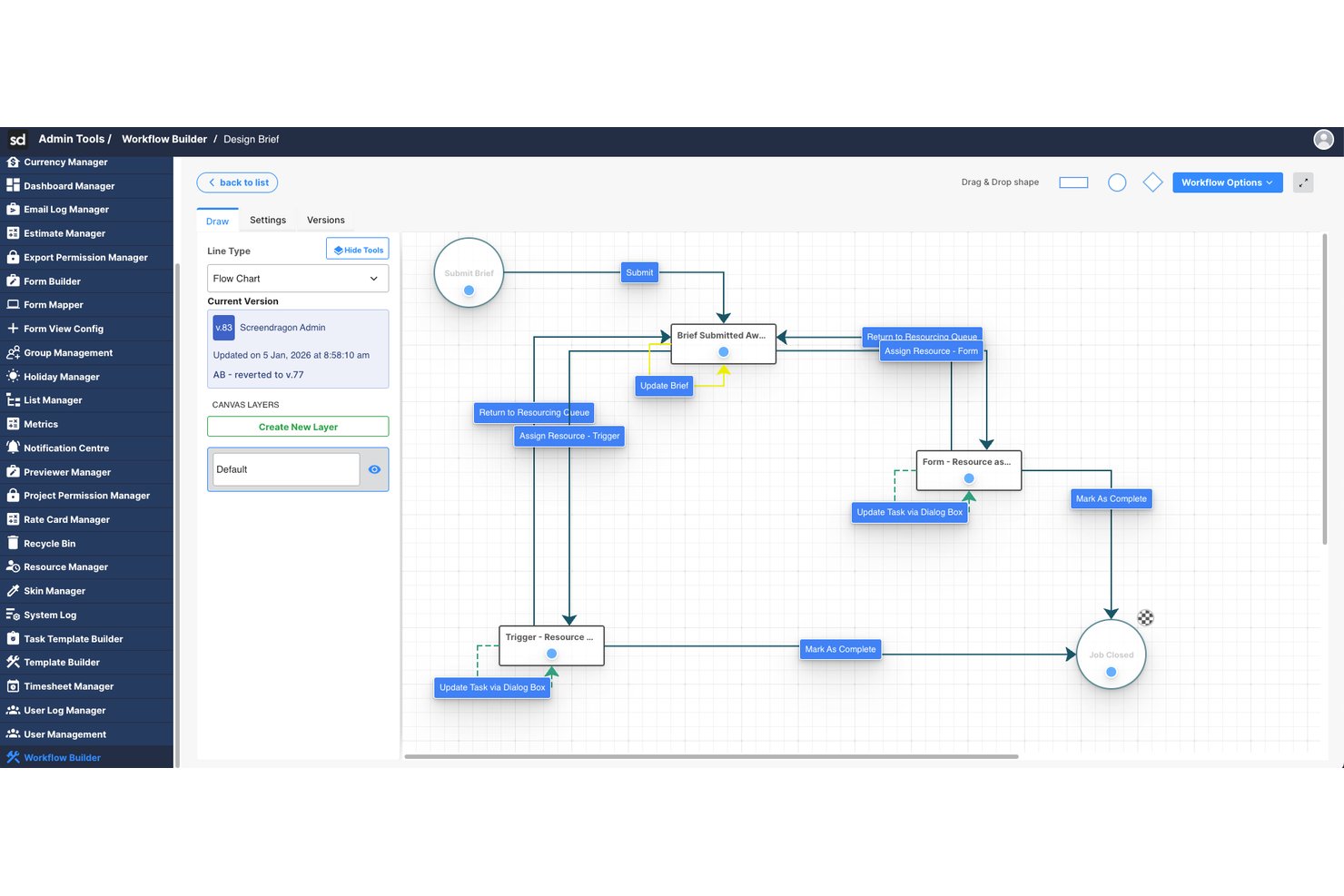
Screendragon is an enterprise work management platform that uses AI agents and no-code workflow automation to orchestrate creative and marketing operations, including approvals, resource management, and project execution.
Who Is Screendragon Best For?
Screendragon is a strong fit for enterprise marketing teams and creative agencies managing high-volume, multi-stakeholder workflows across departments or global business units.
Why I Picked Screendragon
Screendragon earns its spot on my shortlist because of how deeply AI is woven into the creative production process. I particularly like the AI Hub, which lets my team deploy governance-controlled AI agents directly inside live marketing workflows. In practice, that means brief generation, compliance reviews, and brand-aligned copy localization all happen automatically, without anyone chasing approvals or formatting documents manually.
Screendragon Key Features
- No-code workflow builder: Create and customize multi-step marketing workflows without writing any code.
- Dynamic forms: Build custom intake forms that trigger automated routing and approvals.
- Integrated resource management: Allocate, schedule, and balance teams across complex creative projects.
- Granular permissions and governance: Set detailed user access controls to secure data and workflows across regions or departments.
Screendragon Integrations
Screendragon offers native integrations with HubSpot, Microsoft Power BI, Ziflow, Brandfolder, Workato, and Smartsheet. An API is available for custom integrations.
Pros and Cons
Pros:
- Strong resource management across large portfolios
- Built-in governance controls for AI-driven actions
- Automates complex creative approval workflows
Cons:
- Reporting customization is limited for advanced users
- Mainly suited to marketing and creative teams
New Product Updates from Screendragon
Screendragon Unveils New AI Hub
Screendragon introduced AI Hub, a new capability that lets teams build and manage AI agents directly within workflows. The update helps marketing teams automate tasks, maintain governance controls, and scale AI-driven operations more efficiently. For more information, visit Screendragon's official site.


Celigo is an AI-powered automation platform built for teams that need to connect disconnected systems and reduce manual work across complex business processes. It helps IT, operations, and business teams automate workflows, sync data across cloud and on-premise apps, and manage integrations at scale. Its strength lies in combining low-code integration tools with AI-assisted automation for more efficient cross-system orchestration.
Who Is Celigo Best For?
Celigo is a good fit for IT teams and operations leaders at mid-sized to large businesses that need to automate and connect multiple business applications.
Why I Picked Celigo
I picked Celigo because it gives your team the tools to orchestrate AI-driven workflows across multiple business systems from one platform. You can use its prebuilt connectors and low-code builder to connect apps like Salesforce, NetSuite, and Shopify without starting from scratch. I also like that Celigo supports AI agents and workflow automation, which helps you reduce manual steps and keep data moving between systems. This makes it a good fit if your team needs to manage complex processes across a growing software stack.
Celigo Key Features
Some other features in Celigo support teams managing AI-driven automation across connected business systems:
- AI-guided integration builder: Uses AI-driven suggestions to help your team build and customize integrations more efficiently
- Error management dashboard: Gives you a central place to monitor, diagnose, and resolve integration issues
- Role-based access controls: Lets you set user permissions to manage integrations securely across teams
- Audit logs: Tracks workflow activity and system changes for better visibility and troubleshooting
Celigo Integrations
Integrations include NetSuite, Salesforce, Shopify, SAP, Snowflake, HubSpot, Jira, Slack, QuickBooks, and Google Sheets.
Pros and Cons
Pros:
- Scheduled and on-demand flows support flexible workflow automation needs
- Error dashboards help teams identify and resolve failed flows faster
- Prebuilt connectors speed up automation across common business systems
Cons:
- Error messages could be more descriptive during troubleshooting
- Custom field mapping can be difficult for more complex logic
New Product Updates from Celigo
Celigo Adds Agent Groups, Redshift, and Network Policies
Celigo adds on-premise agent groups, Amazon Redshift data ingestion, and network policies for webhooks and APIs. These updates improve availability, data syncing, and access control. For more information, visit Celigo’s official site.
 .

Best for Copilot-assisted planning in Microsoft 365
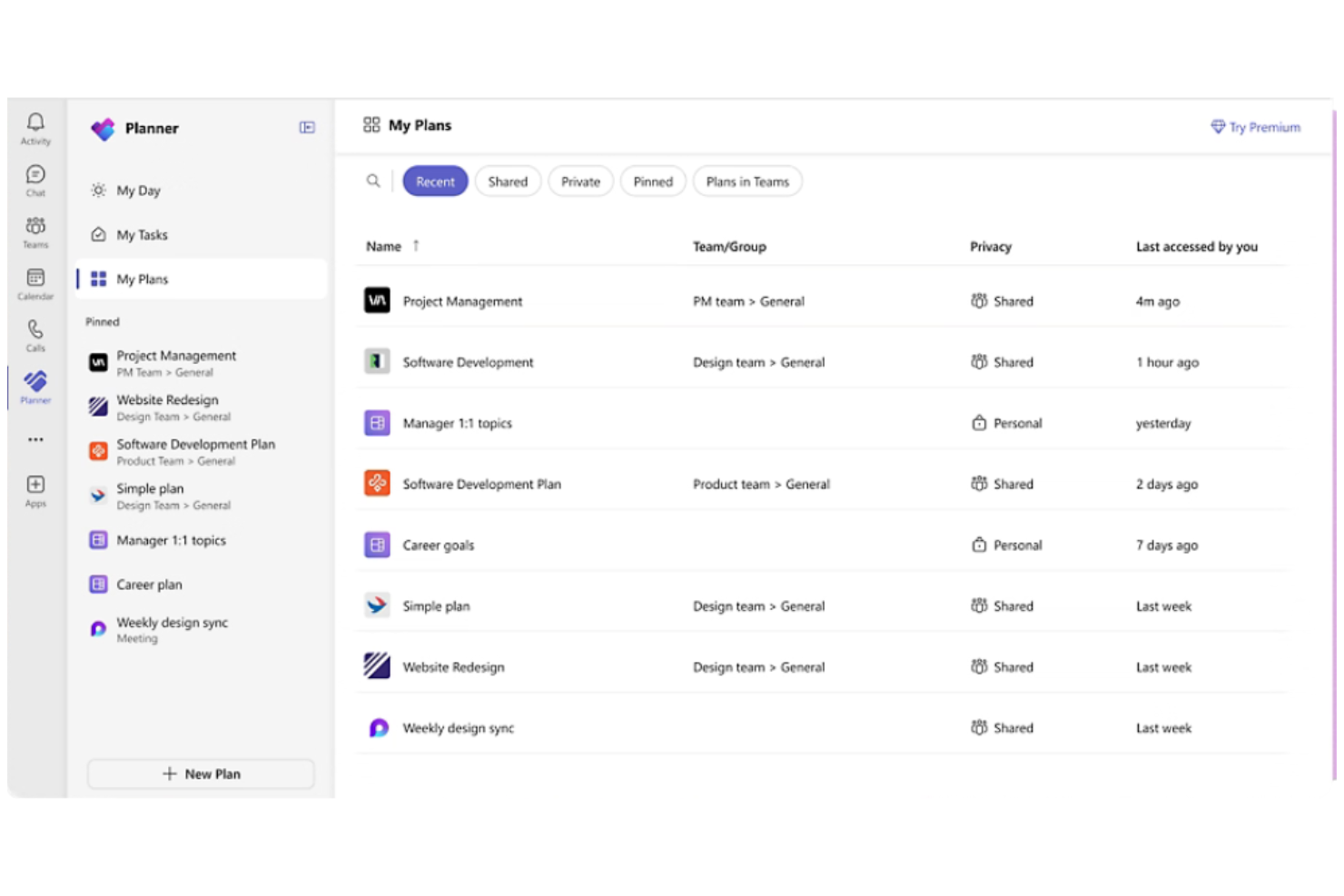
If your team already relies on Microsoft 365, Microsoft Planner offers a way to automate task management directly within your existing workflows. It’s designed for organizations that want to connect project planning, file sharing, and communication across Outlook, Teams, and OneDrive. Planner’s integration with Microsoft Copilot brings AI-powered task suggestions and automated updates to help teams keep projects on track.
Why I Picked Microsoft Planner
Because Microsoft Planner is built into the Microsoft 365 ecosystem, it’s a natural fit for teams that want to automate project tasks without leaving their familiar tools.
Its integration with Microsoft Copilot means you can use AI to generate task lists, assign work, and receive automated project updates right inside Teams or Outlook. I appreciate how Planner automatically syncs with other Microsoft 365 apps, so files, conversations, and deadlines stay connected across your workspace. For organizations already using Microsoft 365, Planner’s AI-driven automation features help centralize and simplify project management.
Features
Some other features that make Microsoft Planner useful for automation and project tracking include:
- Task Buckets: Organize tasks into customizable columns for different project stages or categories.
- Due Date Reminders: Automatically send notifications to team members as deadlines approach.
- Progress Tracking: Visualize task status with built-in charts and dashboards.
- Attachment Support: Add files and documents directly to tasks for easy reference.
Integrations
Integrations include Microsoft Teams, Outlook, OneDrive, SharePoint, Microsoft To Do, Microsoft Loop, Viva Goals, Power Automate, Microsoft Project, and Excel.
Pros and Cons
Pros:
- Power Automate enables advanced workflow automation
- Task updates sync across Microsoft 365 apps
- Copilot generates automated task suggestions
Cons:
- Limited automation outside the Microsoft ecosystem
- No AI-driven workflow approvals available

Airtable
Best for AI-structured workflows built on relational data
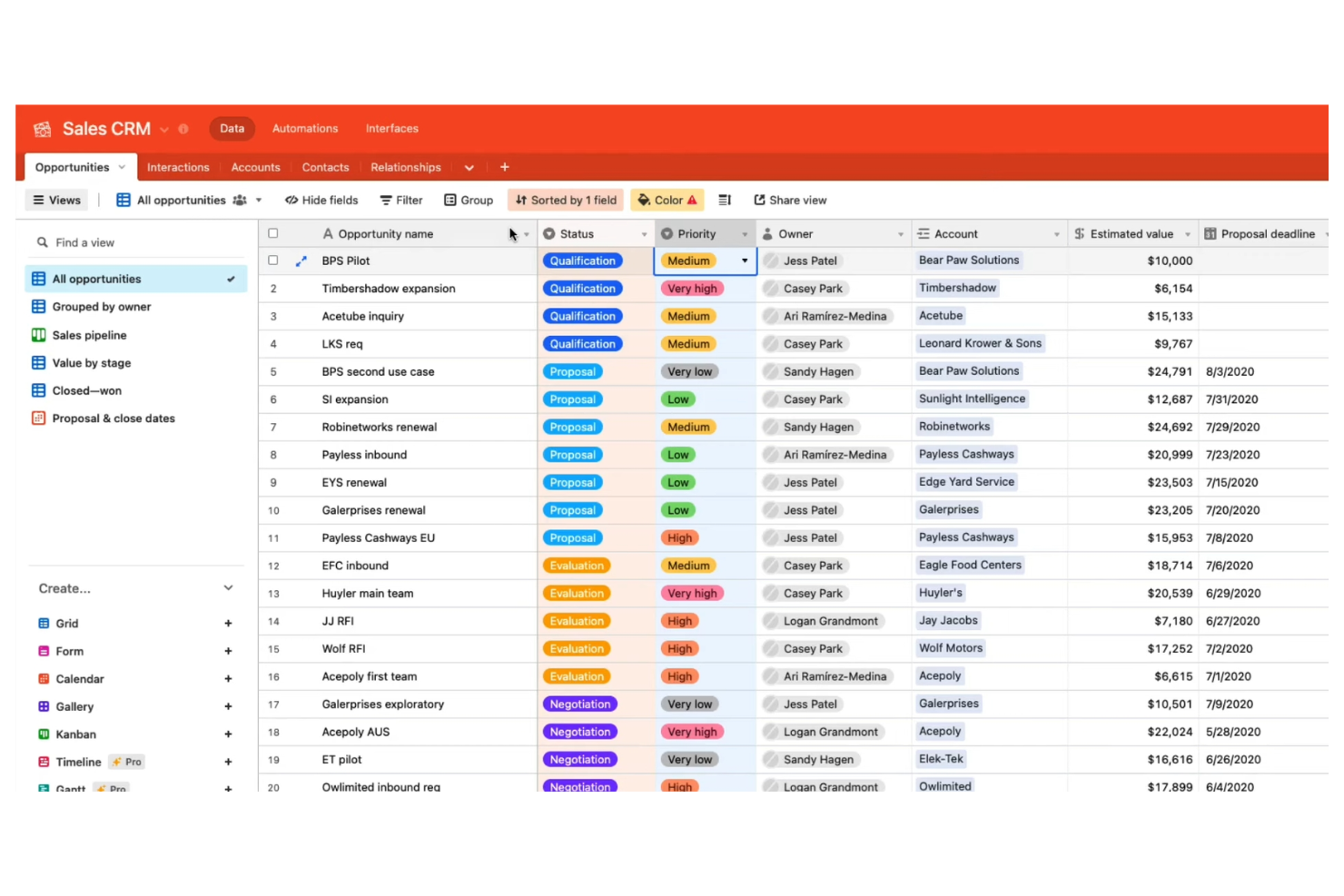
Airtable stands out for teams that need to automate workflows built on complex, relational data. It’s a strong fit for product managers, marketing teams, and operations leads who want to connect databases, trigger actions, and manage projects in a highly customizable environment. Airtable’s automation features let you build logic-driven workflows that update records, send notifications, and integrate with other tools—all from a flexible database interface.
Why I Picked Airtable
What sets Airtable apart is its database-driven approach to project tracking, which is especially valuable for teams managing complex, interconnected data. You can design custom tables with linked records, then use built-in automation to trigger actions like updating fields, sending notifications, or creating tasks based on changes in your data.
I appreciate how Airtable’s automation builder lets you set up multi-step workflows that respond to specific conditions within your database. For project managers who need granular control over data and workflow automation, Airtable offers a flexible and scalable solution.
Features
Some other features that make Airtable useful for automation and project management include:
- Interface Designer: Build custom dashboards and visual interfaces for your data without coding.
- AI Field Type: Add AI-powered fields to generate summaries, categorize data, or extract insights directly in your tables.
- Sync: Automatically sync data between different Airtable bases or with external sources.
- Revision History: Track changes to records and revert to previous versions when needed.
Integrations
Integrations include Google Drive, Salesforce, Slack, Jira, Zendesk, Box, Dropbox, GitHub, Gmail, and ChatGPT.
Pros and Cons
Pros:
- Interface Designer builds custom dashboards for automations
- Automations trigger multi-step workflows from changes
- AI fields generate summaries and categorize data
Cons:
- AI features require higher-tier plans
- Automation runs are limited per workspace

Trello
Best for lightweight AI-style automation on Kanban boards
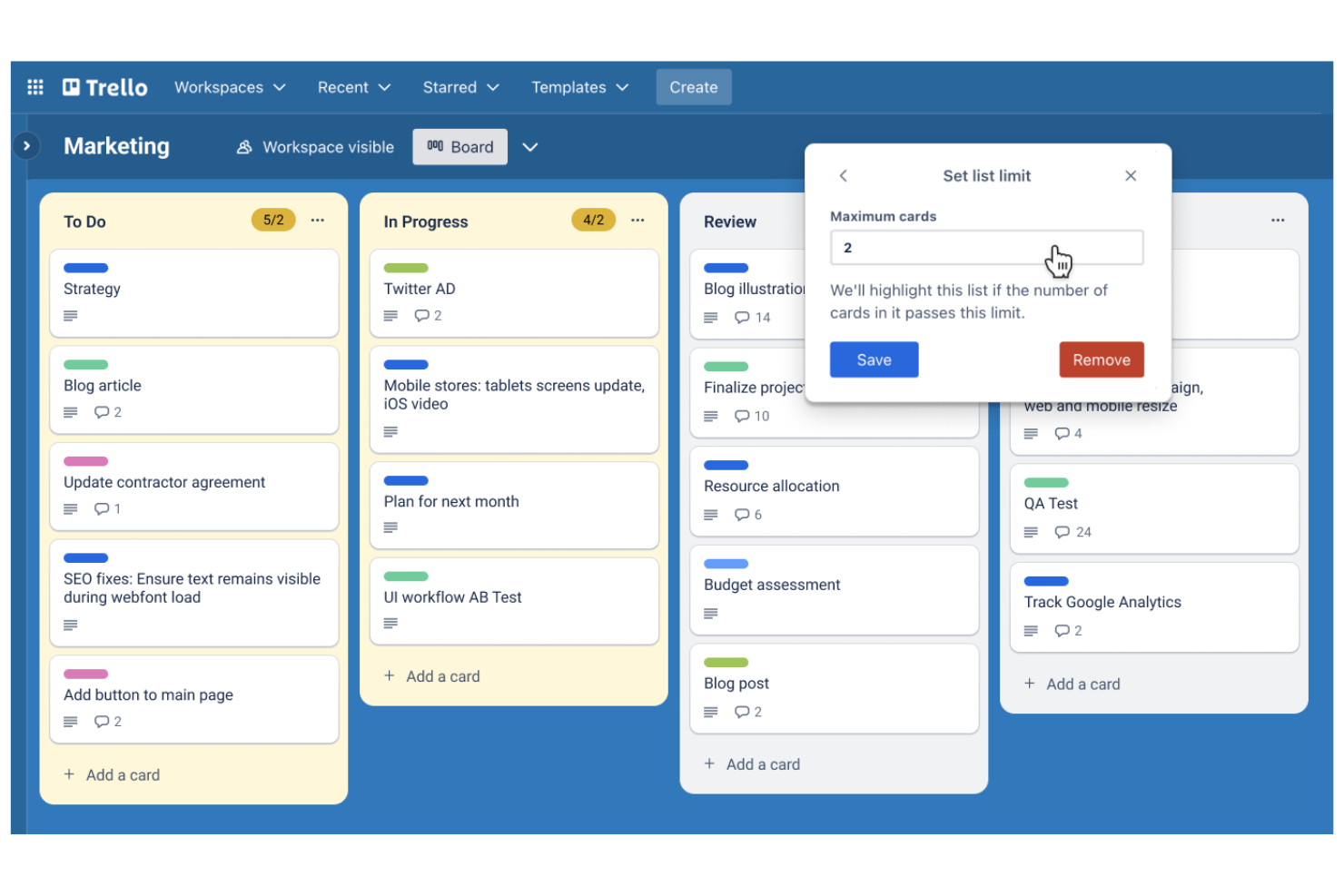
Trello brings AI-powered automation to kanban-style project boards, making it a fit for teams that want visual task management with minimal setup. It’s especially useful for marketing, product, and operations teams that need to automate repetitive card actions and keep workflows moving. With built-in automation for card sorting, due date reminders, and rule-based triggers, Trello helps teams manage projects without manual board updates.
Why I Picked Trello
For teams that rely on kanban-style project boards, Trello stands out by embedding automation directly into its visual workflow. Its built-in automation tool, Butler, lets you set up rules that move cards, assign tasks, or send reminders based on board activity. I like that you can automate recurring actions, such as sorting cards by due date or tagging items when they reach certain columns. These features make Trello a strong choice for anyone looking to add AI-driven automation to a kanban board without extra complexity.
Features
Some other features in Trello that support automation and project management include:
- Custom Card Templates: Create reusable templates for common task types or workflows.
- Calendar Power-Up: Visualize cards with due dates on a calendar view for better scheduling.
- Advanced Checklists: Add checklists with assignable items and due dates to individual cards.
- Card Aging Automation: Automatically highlight or fade cards that haven’t been updated in a set period.
Integrations
Integrations include Slack, Jira, Miro, GitLab, Dropbox, Evernote, Pipedrive, Egnyte, Testmo, and Pastel.
Pros and Cons
Pros:
- AI can suggest due dates for tasks
- Rule-based triggers automate repetitive board actions
- Butler automates card movement and notifications
Cons:
- No native AI for document summarization
- AI automation is limited to board-level actions

Best for AI-powered client service delivery
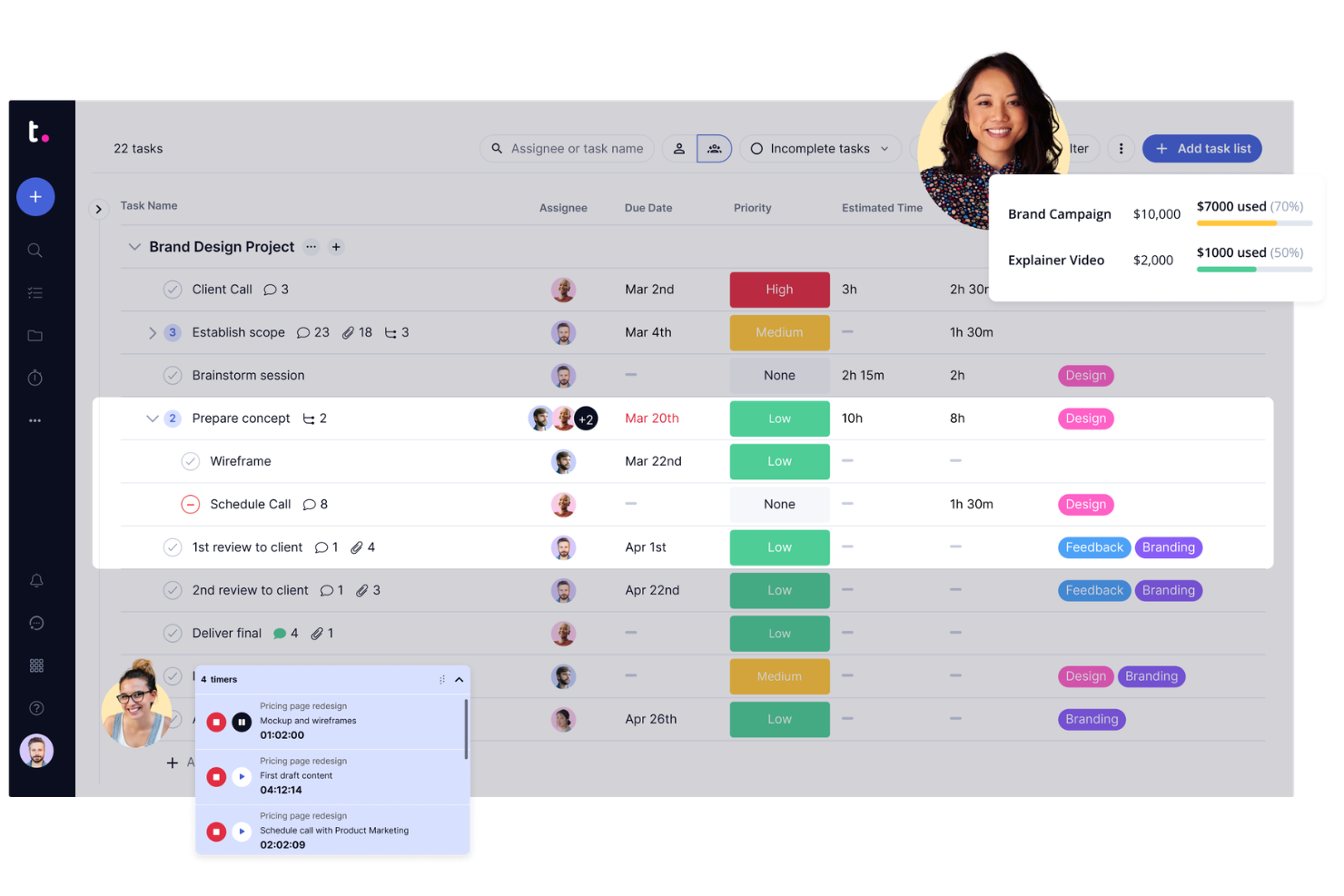
If your team manages projects for clients and needs automation built for transparency, Teamwork.com is worth a look. Agencies and service providers use it to automate client communications, approvals, and billing while keeping project data accessible to both internal and external stakeholders. Its client-facing features and workflow automation help teams reduce manual updates and keep clients in the loop without extra effort.
Why I Picked Teamwork.com
Unlike many project management platforms, Teamwork.com is designed with client collaboration and visibility at its core. I picked it because its automation features—like automated client status updates and approval workflows—help agencies and service teams keep clients informed without manual follow-up.
The platform also supports automated billing and time tracking, so you can connect project progress directly to client invoices. These features make Teamwork.com a strong choice for teams that need to automate both internal processes and client-facing interactions.
Features
Some other features that make Teamwork.com useful for project teams include:
- Task Automation Triggers: Set up rules to automatically assign, update, or move tasks based on project activity.
- Project Templates: Create and reuse project templates to automate the setup of recurring client projects.
- Workload Planner: Visualize and balance team capacity with drag-and-drop workload planning.
- Integrated Chat: Communicate with team members and clients directly within the platform using built-in chat.
Integrations
Integrations include Slack, Microsoft Office, Harvest, Xero, HubSpot, Google Drive, Dropbox, QuickBooks, ChatGPT, and Stripe.
Pros and Cons
Pros:
- Task triggers can assign or escalate work
- Supports automated invoice and billing workflows
- Automates client status updates and reminders
Cons:
- No AI-driven document summarization features
- No built-in AI for meeting transcription

Jira
Best for AI-driven agile execution
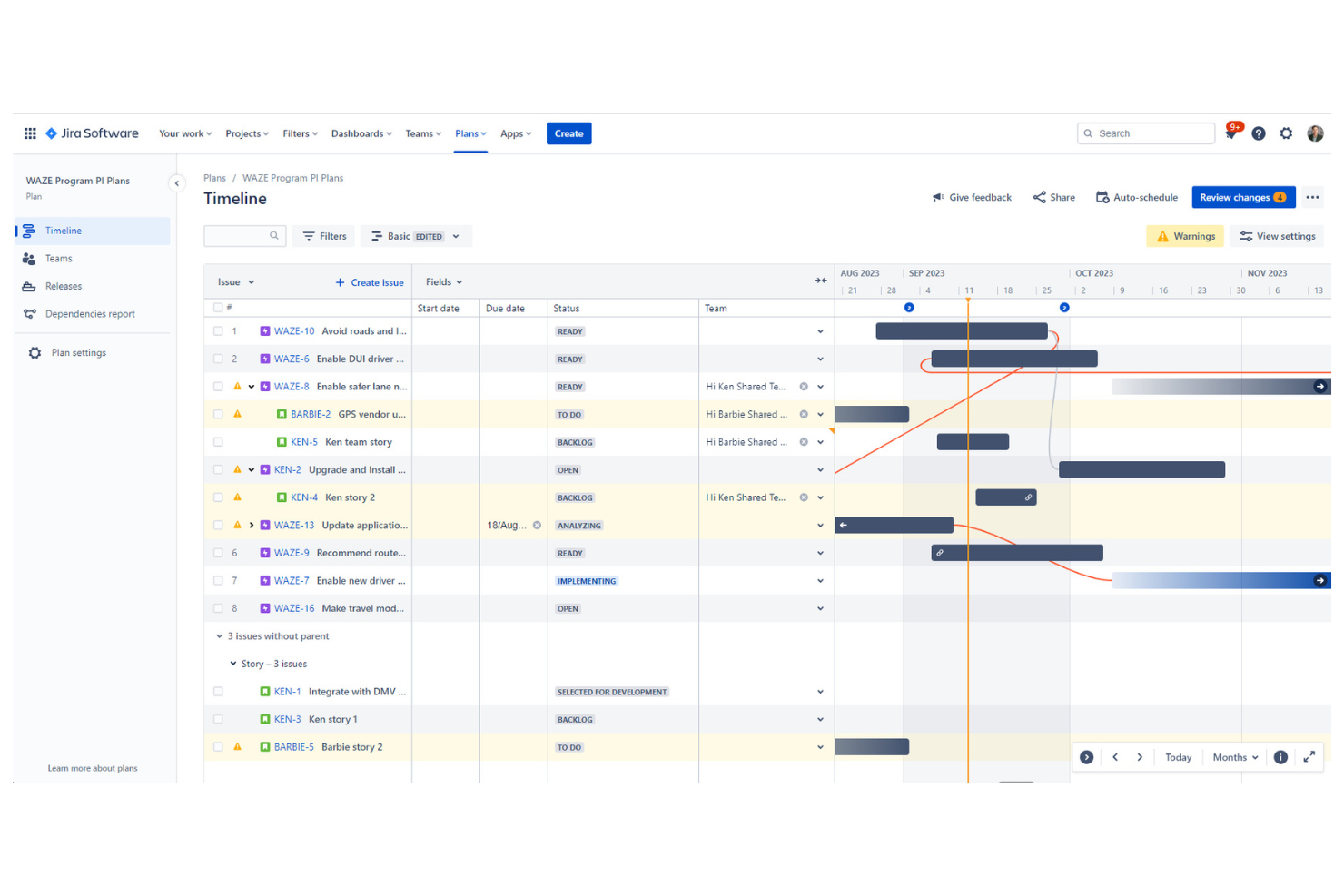
Jira is purpose-built for teams managing agile projects and sprint cycles, especially in software development and IT. It appeals to project managers and scrum masters who need automation for backlog grooming, sprint planning, and tracking work across distributed teams. With built-in AI features for issue triage and workflow automation, Jira helps teams prioritize tasks and keep projects moving without manual intervention.
Why I Picked Jira
When it comes to agile sprint planning, Jira offers automation features that directly support fast-moving development teams. Its AI-powered issue triage helps prioritize and assign tasks based on urgency and workload, which is essential for keeping sprints on track. I appreciate how Jira’s automation rules can update statuses, trigger notifications, and move issues between boards without manual input.
These capabilities make Jira a strong choice for teams that want to automate repetitive sprint management tasks and focus on delivering value.
Features
Some other features in Jira that support automation and agile workflows include:
- Custom Workflow Designer: Build and modify workflows with drag-and-drop tools to match your team’s processes.
- Advanced Roadmaps: Visualize project timelines, dependencies, and resource allocation across multiple teams.
- Bulk Issue Actions: Update, transition, or assign multiple issues at once using batch operations.
- Automation Template Library: Access pre-built automation templates for common agile and project management scenarios.
Integrations
Integrations include Slack, Microsoft Teams, Google Drive, Figma, Zoom, GitHub, Salesforce, Miro, QMetry, and Google Docs.
Pros and Cons
Pros:
- Bulk actions automate repetitive backlog management
- Automation rules support multi-step sprint workflows
- AI auto-triages and assigns incoming issues
Cons:
- Workflow automation setup can require admin access
- No native AI for code review automation


ClickUp brings together tasks, docs, goals, and automation in a single workspace, making it a strong fit for teams looking to consolidate their tools. Operations leads and project managers can use ClickUp to automate repetitive processes, centralize project communication, and manage everything from sprints to documentation. Its flexible structure and built-in AI features help teams reduce context switching and keep all work in one place.
Why I Picked ClickUp
For teams aiming to bring all their work into one place, ClickUp stands out with its all-in-one workspace consolidation. The platform combines task management, document collaboration, and AI-powered automation within a single environment, so you don’t have to juggle multiple tools.
I like that ClickUp’s AI features can generate summaries, automate routine updates, and assist with content creation directly inside your workflows. This unified approach helps project managers and operations leads keep everything organized and automate processes without leaving the platform.
Features
Some other features in ClickUp that support automation and workspace management include:
- Custom Automations Builder: Set up multi-step automations using triggers, conditions, and actions tailored to your workflows.
- Whiteboards: Visualize ideas, map out processes, and connect whiteboard elements directly to tasks.
- Goal Tracking: Set, track, and update progress on goals with automated status updates.
- Workload View: Monitor team capacity and task allocation with a visual workload dashboard.
Integrations
Integrations include Slack, GitHub, GitLab, HubSpot, Google Drive, Outlook, Figma, Zoom, Microsoft Teams, and Dropbox.
Pros and Cons
Pros:
- AI can rewrite or expand task descriptions
- Custom automation builder supports complex logic
- Whiteboards link directly to automated tasks
Cons:
- No native AI for image or file analysis
- AI suggestions sometimes miss project-specific context

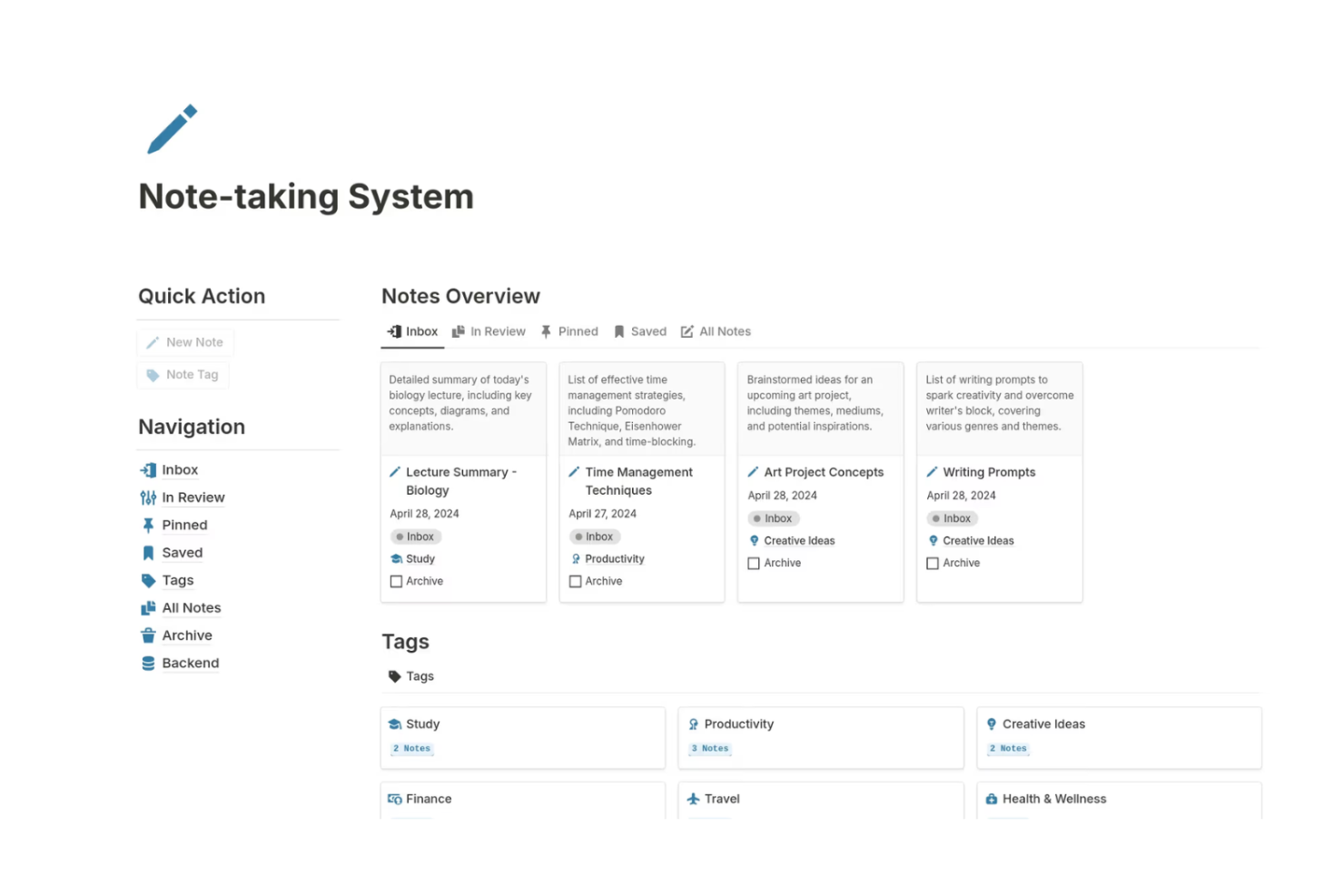
Notion brings together note-taking, project management, and AI-powered automation in a single workspace. It’s especially useful for product teams, content creators, and startups that want to connect meeting notes, tasks, and documentation with AI features like auto-summarization and smart task suggestions. Notion’s flexible databases and AI blocks help teams automate routine work while keeping everything organized in one place.
Why I Picked Notion
Notion stands out for teams that want to combine notes, project tasks, and AI automation in a single workspace. Its AI blocks let you generate summaries, draft content, and automate repetitive documentation tasks directly within your notes and project boards.
I like how you can link databases so that meeting notes, tasks, and project timelines all update together, making it easier to keep information connected and actionable. For teams looking to automate knowledge management and task tracking without switching between tools, Notion offers a unified and flexible solution.
Features
Some other features that make Notion valuable for automation and project management include:
- Custom Templates: Create and reuse templates for recurring project workflows or documentation.
- API Access: Connect Notion to other tools and automate data flows using its public API.
- Permissions and Sharing: Set granular access controls for pages, databases, and workspaces.
- Version History: Review and restore previous versions of any page or database.
Integrations
Integrations include Slack, Jira, GitHub, Asana, Google Drive, Figma, Trello, GitLab, Typeform, and Webex.
Pros and Cons
Pros:
- Page mentions enable automated cross-linking of tasks
- Custom templates support repeatable automation workflows
- AI autofill generates content for project docs
Cons:
- Limited native automation triggers compared to competitors
- Bulk automation actions are not natively supported
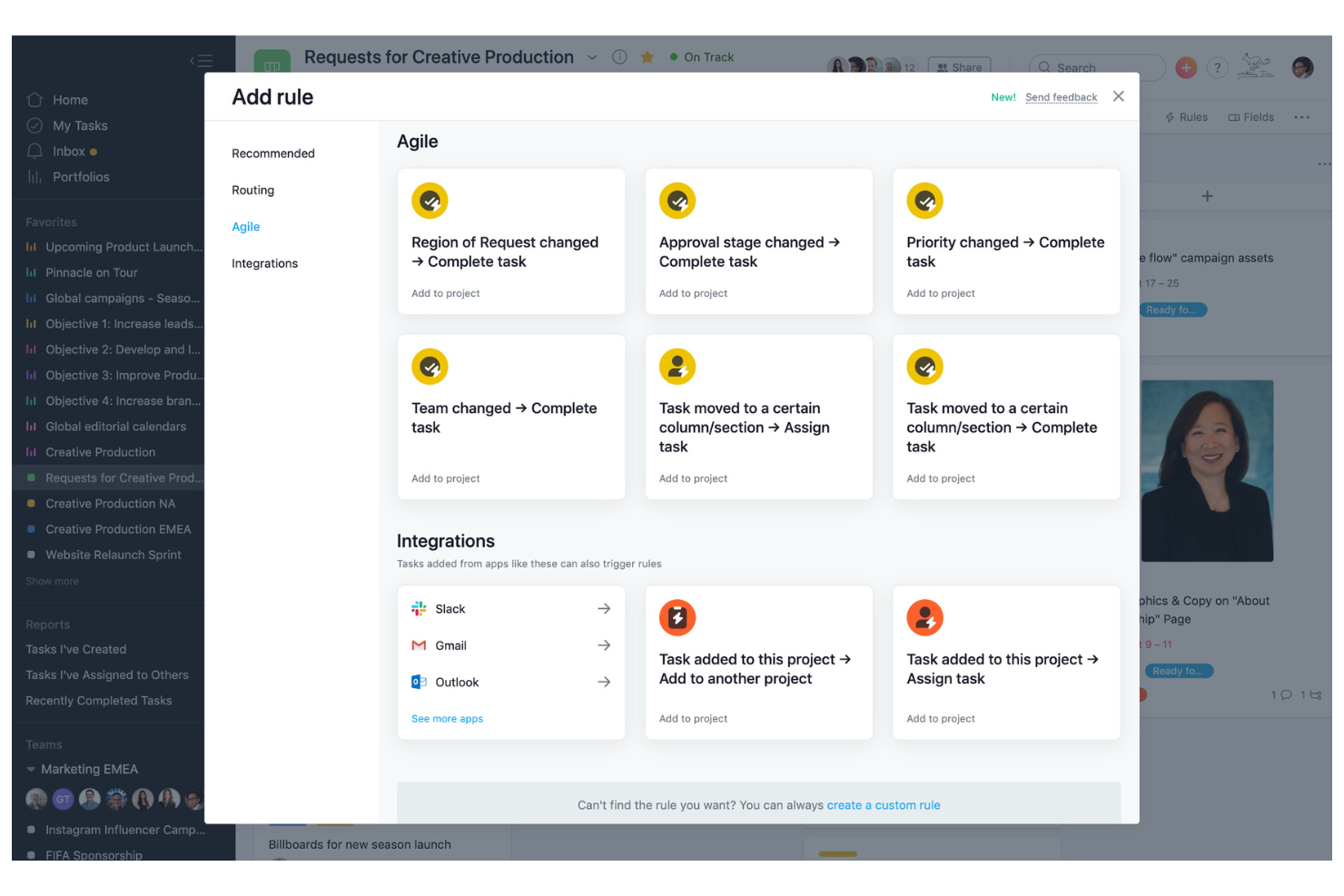
Asana offers a platform built for flexible workflow automation and detailed process customization, with AI features that help teams run those workflows with less manual oversight. Project managers and cross-functional teams use it to automate task assignments, approvals, and status updates, while Asana AI can draft project status updates and summarize work so it’s easier to spot blockers and next steps. Its rule-based automation reduces manual coordination and keeps complex projects moving forward.
Why I Picked Asana
I chose Asana for its strong focus on workflow customization, which is essential for teams looking to automate unique processes—and its growing layer of AI assistance that turns project activity into clear, actionable updates. Asana’s rule builder lets you set up automated triggers for task assignments, status changes, and notifications based on project needs.
I also like that Asana AI can generate smart status updates and surface key changes through summaries, which helps reduce the time spent chasing updates across stakeholders. Combined with custom templates and multi-step workflow automation, these capabilities help teams reduce manual work and keep projects aligned with their preferred processes.
Features
Some other features in Asana that support automation and project management include:
- Timeline View: Visualize project schedules and dependencies with a drag-and-drop Gantt chart interface.
- Workload Management: Monitor team capacity and balance assignments to avoid overloading team members.
- Milestone Tracking: Mark key project milestones to track progress and highlight important deadlines.
- Forms Automation: Collect and route requests or project inputs automatically using customizable forms.
Integrations
Integrations include Slack, Google Drive, Microsoft Teams, Salesforce, Tableau, Jira, Zoom, Dropbox, GitHub, and Outlook.
Pros and Cons
Pros:
- Visual timeline for tracking dependencies
- Custom templates for unique workflow needs
- Rule-based automation for recurring tasks
Cons:
- Workflow automation is limited to the project level only
- Limited AI-driven suggestions for process optimization
Outras ferramentas de automação com IA
Eis algumas opções adicionais de ferramentas de automação com IA que não entraram na minha lista restrita, mas que vale a pena conhecer:
- Smartsheet
For AI-enhanced spreadsheet-style project work
- Wrike
For AI-powered cross-team workflows
- Zoho Projects
For AI-assisted time + project delivery
- monday.com
For AI-powered visual work tracking
- cloudsquid
For financial document workflows
- Hootsuite
For AI-assisted social media management at scale
- Kantata
Teams with billable services that want AI-assisted planning and workflow automation
- Forecast
For resource allocation powered by AI-driven insights
- Scoro
With integrated billing tools
- Hive
For using AI prompts to create structured project plans and tasks
- Motion
With AI-powered scheduling
- ChatGPT
For conversational AI task automation
- OpenAI
For building custom AI agents and automation workflows
- Zapier
For no-code AI workflow automation across apps
- Gemini
For AI-powered automation inside Google Workspace


How I Evaluate AI Automation Tools
Every tool here earns its spot by delivering real AI value—drafting plans, flagging risks, or rebalancing workloads without manual input. I evaluate in two layers: the core functionality a tool needs to make the list and the differentiators that set one option apart from another.
Core Functionality (Table Stakes For This List)
When I'm selecting tools for my list, I rank each one on a scale from 0 (does not offer the functionality) to 5 (excels in this area) for each core functionality listed below. Then, I calculate the tool's total score into a percentage. Each tool needs to achieve a minimum total score of 65% to be considered for inclusion.
- AI Workflow Automation: I look for AI that triggers and runs multi-step workflows—like auto-escalating overdue tasks or routing approvals when a sprint scope changes.
- Intelligent Task Management: Each tool should use AI to create, assign, and reprioritize tasks based on project context, team capacity, and dependencies.
- Generative Project Content: I evaluate whether the AI can draft real project artifacts like status reports, kickoff briefs, or sprint summaries from existing data.
- Predictive Analytics & Forecasting: Tools earn higher marks when their AI flags delivery risks or forecasts resource gaps before they become blockers.
- Natural Language Interface: I check whether users can query project data or build automations by typing plain-language requests instead of navigating complex menus.
- Integrations & Data Sync: The tool should connect with widely used PM, communication, and developer platforms to pull and push data across the stack.
Once I have a list of tools that meet this criteria, I consider what sets each platform apart.
Differentiating Factors (What Sets Vendors Apart)
Here's how I compare and contrast different vendors:
Standout Features
Autonomous AI agents are a big differentiator—I look for tools where AI can independently plan and execute a sequence of tasks, like spinning up a project timeline after a kickoff without manual prompting. Meeting intelligence is another feature I value, especially when it auto-extracts action items from recorded calls and syncs them into the task board. I also evaluate resource optimization AI, which recommends staffing adjustments and flags burnout risks across a portfolio before managers spot the trend.
Beyond Features
AI trust and governance matter a lot when automations touch live project data. I evaluate whether a tool lets managers review and override AI decisions before execution—like approving a recommended scope change before it reshuffles the sprint. Data privacy is closely tied to this; I check for enterprise certifications and clear policies on whether customer data trains shared models. I also consider time-to-value, looking at whether a platform offers guided setup, pre-built automation recipes, and onboarding support that gets teams running within days, not months.
Como escolher uma ferramenta de automação com IA
É fácil perder-se em listas extensas de funcionalidades e estruturas de preços complexas. Para o ajudar a manter o foco enquanto analisa o seu processo específico de seleção de software, eis uma lista de fatores a ter em consideração:
| Fator | O que deve considerar |
|---|---|
| Escalabilidade | A ferramenta acompanhará o crescimento da sua equipa e o aumento das necessidades de automação ao longo do tempo? Verifique os limites de utilizadores, fluxos de trabalho e dados. |
| Integrações | A ferramenta liga-se nativamente aos seus sistemas existentes (CRM, ERP, chat, armazenamento de ficheiros)? Liste as integrações indispensáveis antes de criar a sua lista restrita. |
| Personalização | Pode adaptar as regras de automação, os fluxos de trabalho e as notificações aos processos da sua equipa? Evite ferramentas que imponham modelos rígidos. |
| Facilidade de utilização | A sua equipa adotará rapidamente a ferramenta ou será necessário um período de formação extenso? Procure uma navegação clara e um número reduzido de passos de configuração. |
| Implementação e integração inicial | Quanto tempo será necessário para começar a utilizar a ferramenta? Informe-se sobre o apoio à migração, os recursos de integração inicial e o tempo habitual até obter resultados para equipas semelhantes. |
| Custo | Os escalões de preços são transparentes e previsíveis à medida que cresce? Tenha atenção a taxas ocultas, custos por automação ou complementos obrigatórios. |
| Medidas de segurança | A ferramenta oferece encriptação, controlos de acesso e conformidade com as normas do seu setor? Confirme a localização dos dados e o registo de auditoria, se necessário. |
| Disponibilidade do apoio | Terá acesso a ajuda atempada caso surjam problemas? Verifique se existe chat em direto, apoio telefónico e garantias quanto aos tempos de resposta, especialmente se as automações forem essenciais para o negócio. |
O que são ferramentas de automação com IA?
As ferramentas de automação com IA são plataformas de software que utilizam inteligência artificial para automatizar tarefas repetitivas, fluxos de trabalho e processos de tomada de decisão em várias operações empresariais. Estas ferramentas ajudam as equipas a reduzir o trabalho manual, melhorar a precisão e obter informações através da aplicação de aprendizagem automática, processamento de linguagem natural ou análise preditiva.
Os gestores de projetos, as equipas de TI e os líderes empresariais utilizam ferramentas de automação com IA para simplificar processos, aumentar a eficiência e apoiar a tomada de decisões baseada em dados em ambientes dinâmicos.
Funcionalidades
Ao avaliar uma plataforma de automação com IA, procure ferramentas que combinem configuração sem código com modelos de IA inteligentes para apoiar processos empresariais reais em grande escala. O sistema adequado deve facilitar a conceção, a automatização e a melhoria dos fluxos de trabalho sem exigir conhecimentos técnicos.
- Construtor de fluxos de trabalho: Um construtor de fluxos de trabalho sem código permite conceber, visualizar e gerir processos com várias etapas utilizando ferramentas de arrastar e largar ou lógica baseada em regras. Isto facilita a implementação de agentes de IA que tratam de etapas repetitivas e mantêm o trabalho a avançar automaticamente.
- Atribuição de tarefas: Atribua tarefas automática ou manualmente a membros ou grupos específicos da equipa com base nas necessidades do projeto. Os modelos de IA podem ajudar a estabelecer prioridades nas atribuições com base na carga de trabalho ou nos prazos, garantindo uma melhor coordenação.
- Notificações e alertas: Envie atualizações em tempo real sobre alterações nas tarefas, prazos ou progresso dos fluxos de trabalho através de e-mail, mensagens na aplicação ou notificações push. Os agentes de IA podem acionar alertas quando são detetados padrões de risco ou atrasos.
- Controlo de acesso baseado em funções: Defina permissões e restrinja o acesso a dados ou ações sensíveis com base nas funções dos utilizadores. Isto permite uma automação segura entre departamentos e protege processos empresariais críticos.
- Registos de auditoria: Acompanhe e registe todas as ações dos utilizadores e alterações nos fluxos de trabalho, criando um histórico transparente para efeitos de conformidade e resolução de problemas.
- Centro de integrações: Ligue-se a outras ferramentas e plataformas empresariais para que os dados fluam entre sistemas e reduzam a introdução manual de dados. Uma plataforma de automação robusta garante que os seus fluxos de trabalho se estendem para além de uma única aplicação.
- Painel de relatórios: Consulte métricas de desempenho, taxas de conclusão de tarefas e estrangulamentos dos processos em tempo real. Nos sistemas mais avançados, a IA gera resumos e informações a partir dos seus dados para destacar tendências e riscos emergentes.
- Biblioteca de modelos: Aceda a modelos pré-criados de fluxos de trabalho e tarefas que podem ser personalizados e reutilizados em processos recorrentes, ajudando a reduzir o tempo de configuração e a encurtar a curva de aprendizagem.
- Vista de calendário: Apresente tarefas, prazos e marcos do projeto num formato de calendário visual para facilitar o agendamento e o planeamento.
- Acesso móvel: Gira fluxos de trabalho, aprove tarefas e receba notificações a partir de qualquer dispositivo, apoiando equipas remotas e a tomada de decisões em movimento.
Benefícios
A adoção de ferramentas de automação com IA pode melhorar significativamente a forma como a sua organização gere o trabalho e executa os processos empresariais.
- Redução da carga de trabalho manual: Os agentes de IA automatizam tarefas repetitivas e fluxos de trabalho de IA baseados em regras, permitindo que a sua equipa se concentre em iniciativas estratégicas e de maior valor.
- Maior precisão: Os processos automatizados seguem uma lógica consistente de cada vez, reduzindo o erro humano e melhorando a fiabilidade de dados de elevada qualidade em todos os sistemas.
- Entrega mais rápida dos projetos: O encaminhamento automatizado de tarefas, as notificações e os acionadores de fluxos de trabalho mantêm os projetos em avanço sem atrasos desnecessários, fornecendo resultados táticos em menos tempo.
- Melhor alocação de recursos: Os modelos de IA analisam dados sobre a carga de trabalho e os cronogramas dos projetos para apoiar previsões e planeamento da carga de trabalho mais inteligentes.
- Maior visibilidade: Os painéis em tempo real, os registos de auditoria e as informações geradas por IA proporcionam clareza sobre o estado dos projetos, as lacunas de desempenho e os riscos operacionais.
- Conformidade reforçada: Os controlos de acesso baseados em funções e os registos de auditoria ajudam a aplicar políticas de governação e requisitos regulamentares.
- Operações escaláveis: À medida que a sua organização cresce, uma plataforma de automação flexível adapta-se ao aumento das cargas de trabalho, a fluxos de trabalho mais complexos e à evolução dos processos empresariais sem acrescentar entraves operacionais.
Custos e preços
A seleção de ferramentas de automação com IA exige uma compreensão dos vários modelos de preços e planos disponíveis. Os custos variam consoante as funcionalidades, o tamanho da equipa, os complementos e outros fatores. A tabela abaixo resume os planos comuns, os respetivos preços médios e as funcionalidades normalmente incluídas nas soluções de ferramentas de automação com IA:
Tabela de comparação de planos para ferramentas de automação com IA
| Tipo de plano | Preço médio | Funcionalidades comuns |
|---|---|---|
| Plano gratuito | $0 | Automatização básica de fluxos de trabalho, integrações limitadas, acesso para um único utilizador e apoio da comunidade. |
| Plano pessoal | $5-$15/utilizador/mês | Fluxos de trabalho com várias etapas, relatórios básicos, notificações por e-mail e opções de personalização limitadas. |
| Plano empresarial | $20-$40/utilizador/mês | Automatização avançada, ferramentas de colaboração em equipa, centro de integrações, registos de auditoria e apoio prioritário. |
| Plano empresarial de grande dimensão | $400+ por utilizador/mês (varia muito) | Fluxos de trabalho personalizados, segurança avançada, integração inicial dedicada, funcionalidades de conformidade e apoio de excelência. |
Perguntas frequentes sobre ferramentas de automatização com IA
Eis algumas respostas a perguntas frequentes sobre ferramentas de automatização com IA:
Em que diferem as ferramentas de automatização com IA do software de automatização tradicional?
As ferramentas de automatização com IA utilizam aprendizagem automática e análise de dados para tomar decisões, adaptar fluxos de trabalho e fornecer recomendações, enquanto o software de automatização tradicional depende de regras fixas e configuração manual. Isto permite que as ferramentas de IA lidem com processos mais complexos e dinâmicos e melhorem ao longo do tempo à medida que aprendem com os dados.
As ferramentas de automatização com IA podem integrar-se com sistemas antigos?
Sim, muitas ferramentas de automatização com IA disponibilizam opções de integração com sistemas antigos através de APIs, software intermédio ou conectores personalizados. Antes de escolher uma ferramenta, verifique se esta é compatível com a sua pilha de software atual e se a integração exigirá desenvolvimento adicional ou serviços de terceiros.
Que considerações de segurança devo ter em conta ao utilizar ferramentas de automatização com IA?
Deve procurar funcionalidades como encriptação de dados, controlos de acesso, registos de auditoria e certificações de conformidade. Certifique-se de que a ferramenta está alinhada com as políticas de privacidade de dados da sua organização e com os regulamentos do setor, e pergunte aos fornecedores sobre as respetivas práticas de resposta a incidentes e residência dos dados.
Quanto tempo demora a implementar uma ferramenta de automatização com IA?
O tempo de implementação varia consoante a complexidade dos seus fluxos de trabalho e o nível de personalização necessário. Configurações simples podem demorar alguns dias, enquanto integrações e processos de integração inicial mais complexos podem demorar várias semanas. Peça aos fornecedores os prazos habituais e os recursos de integração inicial disponíveis.
Existem custos ocultos associados às ferramentas de automatização com IA?
Sim, algumas ferramentas podem cobrar valores adicionais por integrações premium, funcionalidades avançadas ou limites de utilização mais elevados. Reveja sempre os detalhes dos preços, pergunte sobre taxas adicionais e esclareça o que está incluído em cada plano antes de tomar uma decisão.
E agora?
Se está a pesquisar ferramentas de automatização com IA, contacte gratuitamente um consultor da SoftwareSelect para obter recomendações.
Preenche um formulário e tem uma breve conversa na qual são analisadas as suas necessidades específicas. Depois, receberá uma lista restrita de opções de software para avaliar. Também terá apoio durante todo o processo de compra, incluindo as negociações de preços.