

19 Melhores Softwares Gratuitos de Controlo de Versões de Documentos em 2026

Lista restrita do melhor software gratuito de controlo de versões de documentos


O software gratuito de controlo de versões de documentos permite-lhe acompanhar, gerir e organizar alterações aos seus documentos sem pagar uma licença ou subscrição. Se procura formas de manter o histórico de versões claro, colaborar em ficheiros e evitar substituições dispendiosas — sem ultrapassar o seu orçamento — é essencial saber quais as ferramentas que oferecem um plano ou período de avaliação verdadeiramente gratuitos.
Neste guia, encontrará a minha análise das opções mais relevantes, para poder comparar funcionalidades, avaliar o que funciona para a sua equipa e escolher uma solução que se adapte realmente ao seu fluxo de trabalho diário.
Why Trust Our Software Recommendations
Our team has been testing and reviewing software since 2012. As project managers ourselves, we know how difficult—and important—it is to choose the right software.
For this guide, we evaluated tools using hands-on testing and independent research, scoring tools using our selection criteria. We also draw on insights from industry thought leaders and practicing project management experts.
Our reviews reflect our human editorial judgment, not a sales pitch.
Expert reviewers:
Tabela comparativa de software gratuito de controlo de versões de documentos
Esta tabela comparativa destaca os detalhes de preços das minhas principais escolhas de software gratuito de controlo de versões de documentos.
| Tool | Best For | Trial Info | Price | ||
|---|---|---|---|---|---|
| 1 | Best for real-time document editing | Free plan + trial available | From $7/user/month (billed annually) | Website | |
| 2 | Best for built-in document co-editing tools | Free plan available | Pricing upon request | Website | |
| 3 | Best for tracking PDF versions | 7-day free trial | From $19.99/user/month (billed annually) | Website | |
| 4 | Best for task management integration | Free plan + 15-day trial + demo available | From €69/month | Website | |
| 5 | Best for familiar editing interface | Free plan available | Pricing upon request | Website | |
| 6 | Best for team file collaboration | Free plan available | From $9.99/month | Website | |
| 7 | Best for advanced metadata organization | Free demo available | From $65/user/month | Website | |
| 8 | Best for centralized team file storage | Free plan available | From CAD $3/user/month (billed annually) | Website | |
| 9 | Best for customizable workflow automation | Free and open-source | Free and open-source | Website | |
| 10 | Best for scalable open-source deployments | Free to use | Free to use | Website |
Análises de software gratuito de controlo de versões de documentos
Segue-se a minha análise detalhada do software gratuito de controlo de versões de documentos que integrou a minha lista restrita. As minhas análises apresentam uma visão detalhada das funcionalidades, dos melhores casos de utilização e das integrações de cada plataforma, para o ajudar a encontrar a melhor opção para si.

Best for real-time document editing
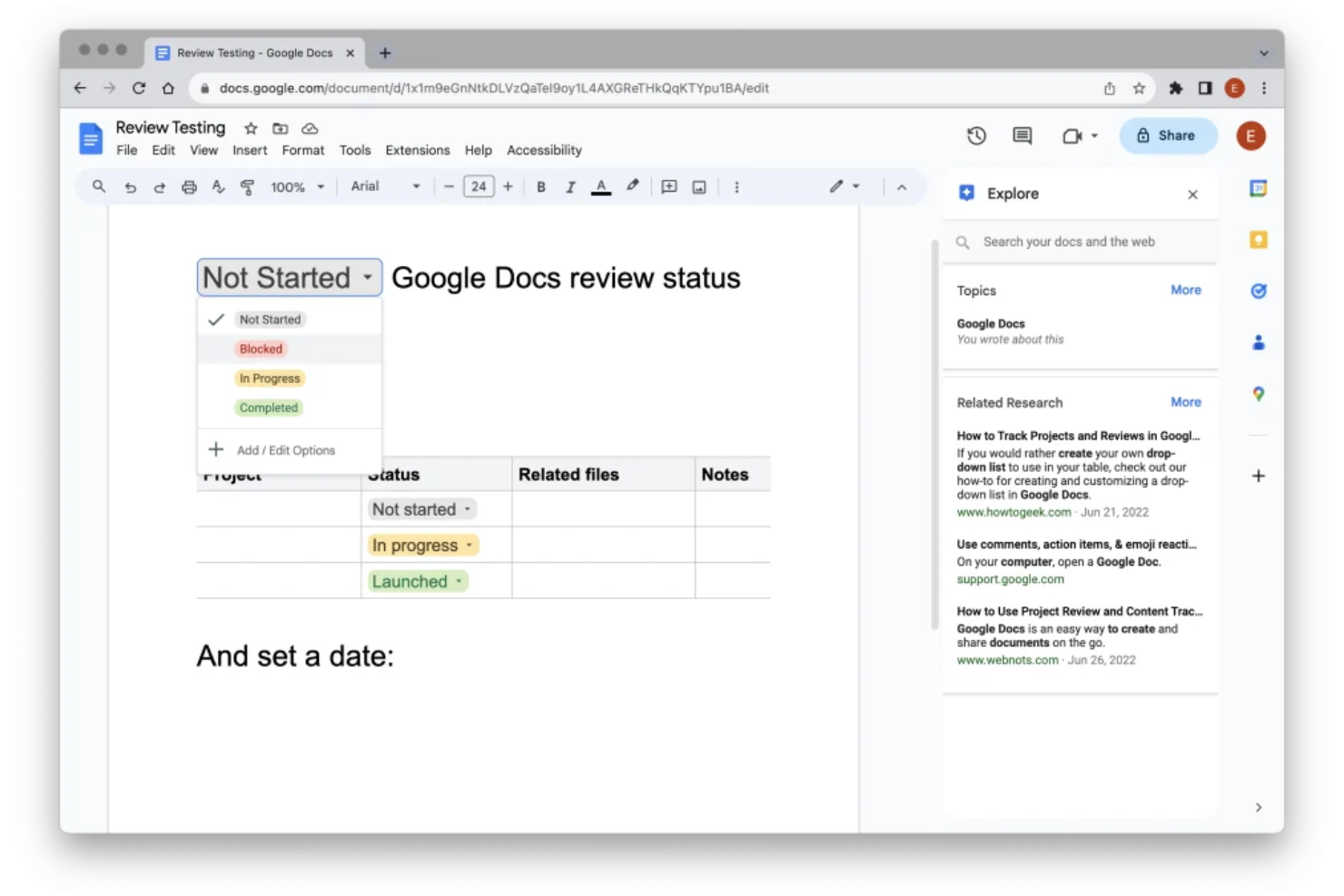
Google Docs is a cloud-based document editing and collaboration platform that enables individuals and teams to create, share, comment, and manage document versions in real time.
Who Is Google Docs Best For?
Google Docs is a good fit for distributed teams and small businesses that need to collaborate on documents online from anywhere.
Why I Picked Google Docs
I picked Google Docs as one of the best because I rely on its real-time editing and multi-user collaboration, where everyone can contribute and comment simultaneously. Version history lets my team track changes and restore past work with ease.
Google Docs Key Features
- Offline editing: Work on documents without an internet connection and sync changes later.
- Comment threading: Add, resolve, and track conversations linked to specific document text.
- Access permission controls: Limit who can view, edit, or comment on each file.
- File export options: Download documents as PDF, Word, or other formats for sharing outside Google Docs.
Google Docs Integrations
Google Docs offers native integrations with Google Drive, Google Sheets, Google Slides, Google Forms, and Gmail, and can connect to third-party apps through Google Workspace Marketplace. An API is also available for custom integrations.
What's Free?
Google Docs offers a free-forever plan for anyone with a Google Account. Some advanced features, like joining a Meet call from within Docs, require a paid Google Workspace plan.
Pros and Cons
Pros:
- Cloud-based with easy access from any device
- Automatic version history and change tracking
- Real-time collaboration for unlimited users
Cons:
- Limited offline editing functionality
- Formatting issues when importing from Word

Best for built-in document co-editing tools
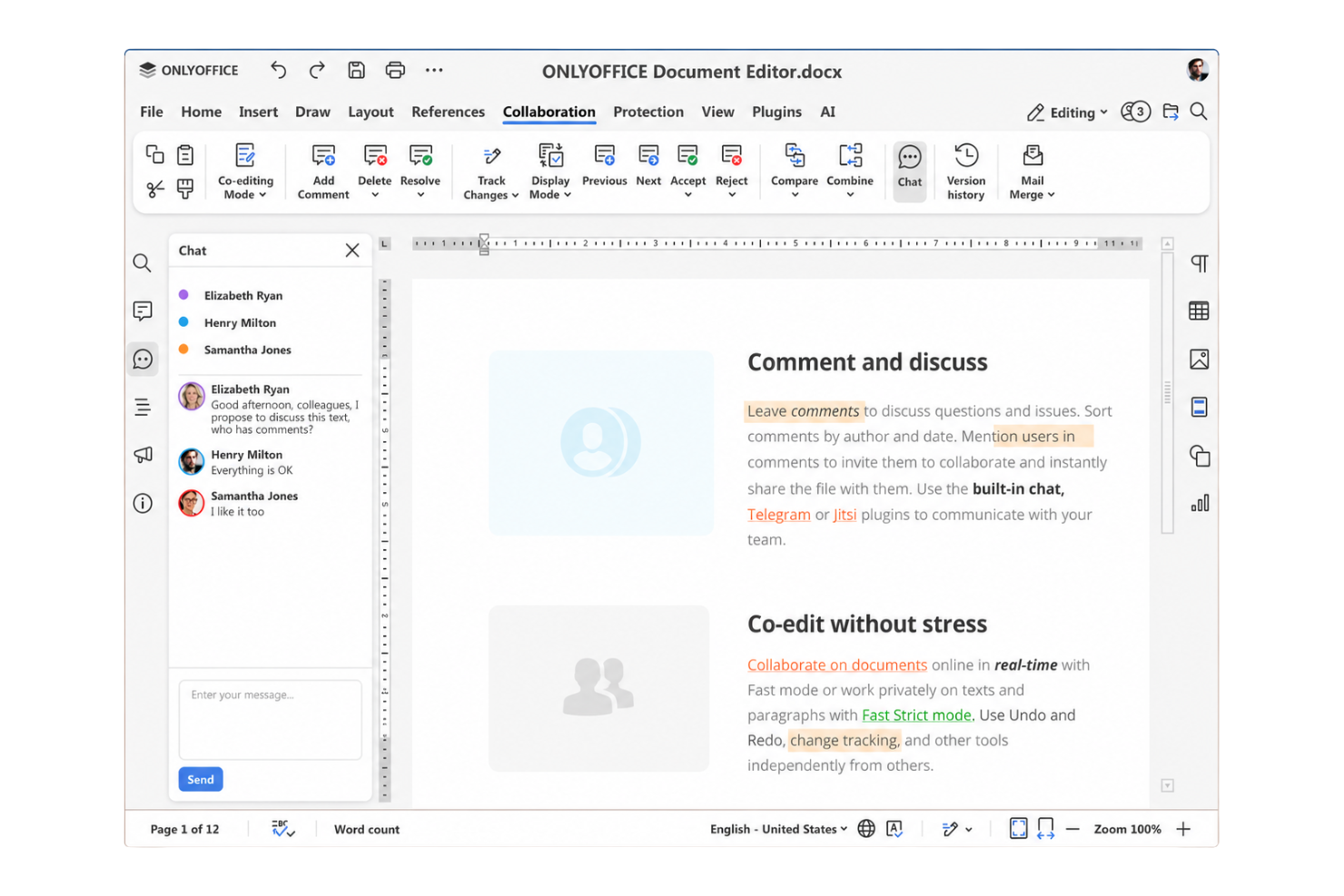
ONLYOFFICE Docs is a document management software and editing platform that provides teams with integrated word processing, spreadsheet, and presentation tools, plus advanced permission controls and real-time editing capabilities for multi-user document collaboration.
Who Is ONLYOFFICE Docs Best For?
ONLYOFFICE Docs is a solid choice for distributed teams and organizations that need collaborative editing and document control across offices or remote environments.
Why I Picked ONLYOFFICE Docs
I picked ONLYOFFICE Docs because my team can edit documents together in real time using both fast and strict co-editing modes, track document version history, and set custom sharing permissions within the same workspace. The built-in editors feel better than most alternatives.
ONLYOFFICE Docs Key Features
- Content control: Prevents content copying, printing, or screenshotting in sensitive documents.
- Multi-format support: Edits and manages DOCX, XLSX, PPTX, and other file types.
- Document comparison: Highlights and displays differences between file versions.
- Integration with storage platforms: Connects with Google Drive, Dropbox, Nextcloud, and others.
ONLYOFFICE Docs Integrations
ONLYOFFICE Docs offers native integrations with Nextcloud, ownCloud, Seafile, Alfresco, Confluence, SharePoint, Moodle, Redmine, and Jira. An API is available for custom integrations.
What's Free?
ONLYOFFICE Docs offers a free desktop version for Windows, Linux, and macOS, as well as a free community server build for self-hosting. Free plans may have some limitations compared to enterprise editions.
Pros and Cons
Pros:
- Multi-format document support
- Strong version history and permission controls
- Real-time collaborative document editing tools
Cons:
- Server setup requires technical knowledge
- Interface can feel outdated to some users

Best for tracking PDF versions

Adobe Acrobat is a document management solution for creating, editing, and organizing PDF files, with built-in tools for file comparison, commenting, and workflow management tailored to teams handling PDF-based version control.
Who Is Adobe Acrobat Best For?
Adobe Acrobat is a strong choice for legal, finance, and compliance teams that manage multiple versions of sensitive PDF documents.
Why I Picked Adobe Acrobat
I picked Adobe Acrobat as one of the best because I rely on its detailed PDF version tracking and audit trails. I like using the compare files tool to quickly spot every change between document versions. Its commenting and collaborative review features keep my team aligned.
Adobe Acrobat Key Features
- E-signature workflows: Collect signatures and approvals directly within PDF documents.
- Password protection: Restrict access to PDFs with password security settings.
- Redaction tools: Permanently remove sensitive information from files before sharing.
- Bulk file conversion: Convert multiple formats to PDF in one workflow.
Adobe Acrobat Integrations
Adobe Acrobat offers native integrations with Microsoft 365, Google Drive, Box, and Dropbox, enabling users to work with files stored in these platforms. An API is available for custom integrations.
What's Free?
Adobe’s free tier is called Adobe Acrobat Reader (available on desktop and mobile) alongside Acrobat Web (accessed via a browser). The free tier allows for viewing, commenting on, filling out, and signing PDFs, along with 2GB of cloud storage. Advanced features like editing text, merging files, and converting formats require a paid Acrobat subscription.
Pros and Cons
Pros:
- Advanced redaction for confidential documents
- Supports layered comments and annotations
- Detects every change between PDF versions
Cons:
- Limited collaboration options
- Only tracks version history for PDFs

Bitrix24
Best for task management integration
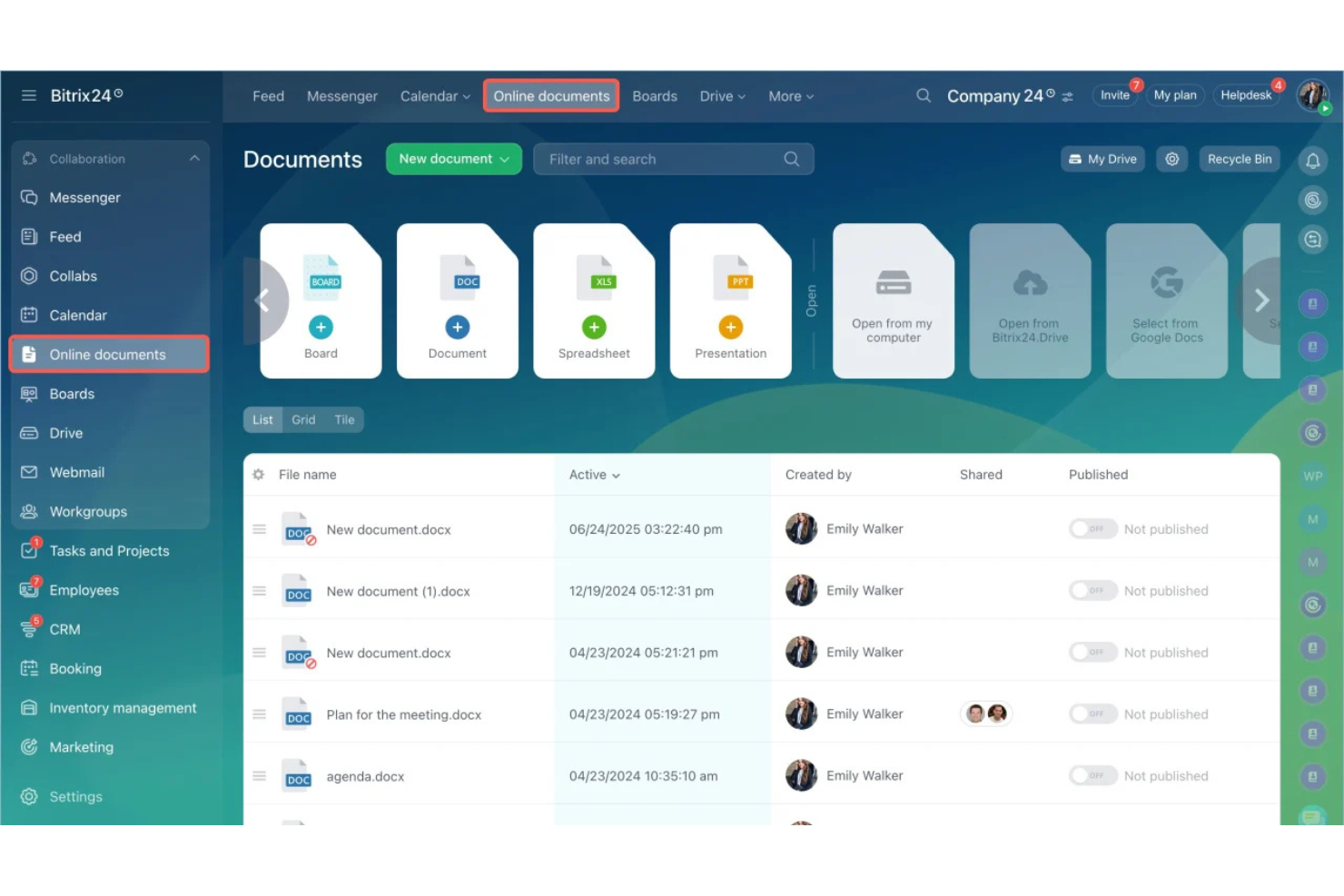
Bitrix24 is a project management platform that features document storage, editing, sharing, and automatic version control for teams needing free document management alongside collaboration and workflow tools.
Who Is Bitrix24 Best For?
Bitrix24 is a strong choice for small to midsize teams that need integrated document handling with project and task management in a single workspace.
Why I Picked Bitrix24
I picked Bitrix24 because its document version control ties closely with task tracking, so my team can link files to specific tasks and monitor updates in context. I also like the built-in change history and collaborative editing features.
Bitrix24 Key Features
- Document locking: Prevents multiple users from editing a document at the same time.
- Access permissions: Lets you assign granular read or edit rights to documents.
- Audit trails: Tracks a detailed activity log for every document.
- Cloud storage integration: Connects documents with Google Drive, Dropbox, and OneDrive.
Bitrix24 Integrations
Bitrix24 offers native integrations with Google Drive, Dropbox, Microsoft 365, OneDrive, Mailchimp, Xero, and Facebook, and provides an API for custom integrations.
What's Free?
Bitrix24 offers a free-forever plan for unlimited users. The free plan includes basic document management, task management, and collaboration tools, but limits storage and advanced features.
Pros and Cons
Pros:
- Granular access rights for document folders
- Document editing is integrated with tasks
- Supports multiple team collaborators
Cons:
- Large file uploads can be slow
- Strict five gigabyte storage cap
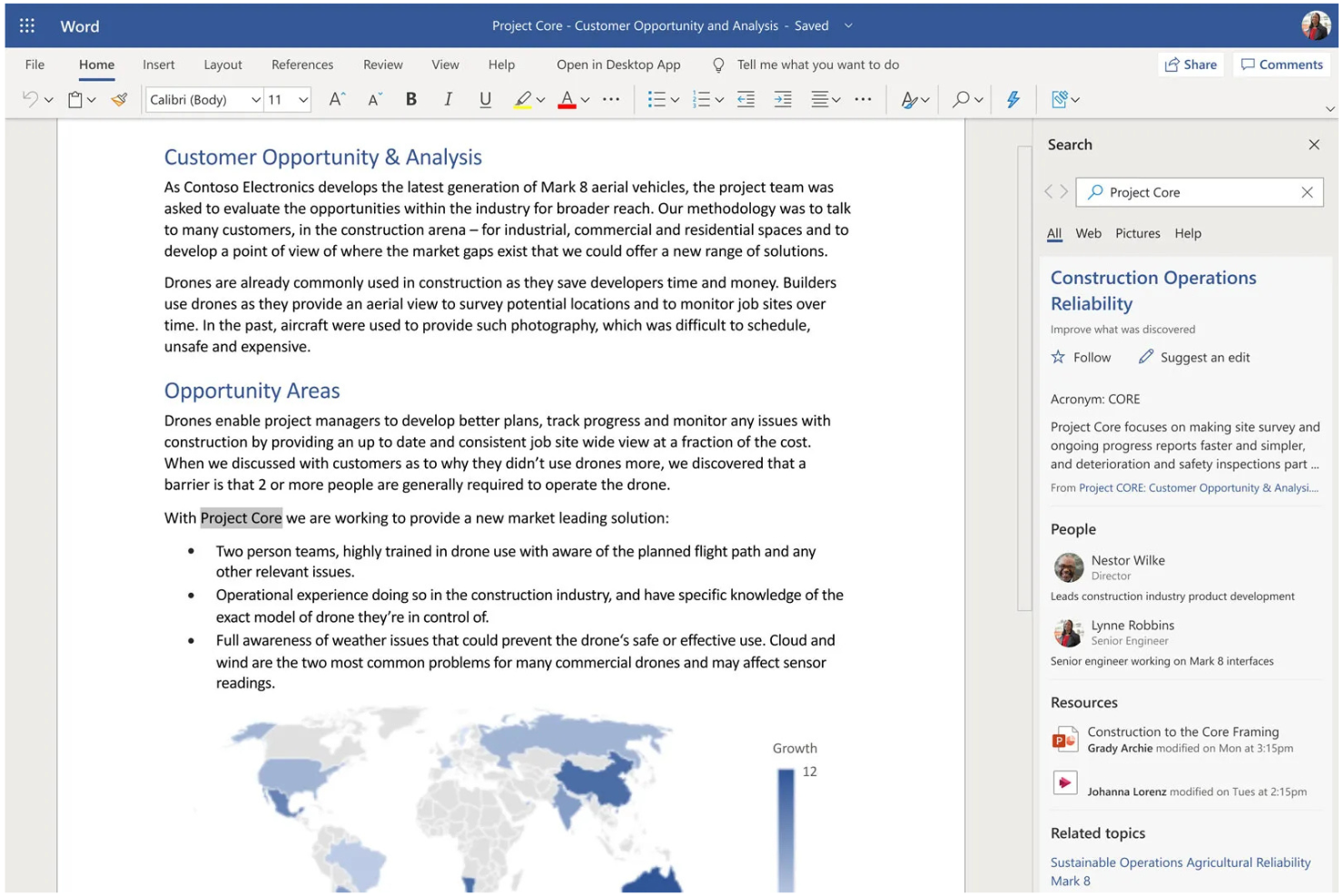
Microsoft Word is a document creation and editing platform that gives teams built-in version history, real-time collaboration, commenting, and easy access to files across devices using Microsoft 365 or the free online version.
Who Is Microsoft Word Best For?
Microsoft Word is a good fit for individuals and teams in any industry who need a widely recognized document editing and version control tool.
Why I Picked Microsoft Word
I picked Microsoft Word as one of the best because its familiar editing interface helps my team collaborate efficiently on docs everyone already knows. I rely on real-time co-authoring, tracked changes, and its extensive version history for document control.
Microsoft Word Key Features
- Templates gallery: Choose from a wide range of prebuilt templates for business, education, or reports.
- Password protection: Secure files with document-level encryption and access controls.
- Comments and annotations: Leave threaded feedback or notes directly within documents.
- Auto-save with OneDrive: Files save automatically when stored in OneDrive, reducing the risk of data loss.
Microsoft Word Integrations
Microsoft Word has native integrations across the Microsoft ecosystem, including Microsoft 365 and Azure. An API is available for custom integrations.
What's Free?
Microsoft Word offers a free online version with basic editing features and real-time collaboration for users with a Microsoft account. Advanced features and offline access require a paid Microsoft 365 subscription.
Pros and Cons
Pros:
- Offers extensive template selection
- Reliable version history with easy restore
- Real-time document co-authoring for teams
Cons:
- Collaboration requires Microsoft account
- Limited approval workflow options

Dropbox
Best for team file collaboration

Dropbox is a document version control platform where teams can upload, organize, sync, and track changes to files across devices with cloud-based collaboration and shared folder management.
Who Is Dropbox Best For?
Dropbox is a strong choice for distributed teams and organizations that need a central hub for file collaboration and version tracking across devices.
Why I Picked Dropbox
I included Dropbox in my shortlist because I rely on its shared folders, live comment threads, and granular file permissions to coordinate edits and feedback between multiple contributors. In practice, my team can review, update, and recover prior versions without confusion.
Dropbox Key Features
- Automatic version history: Saves past document versions and allows you to restore previous states easily.
- File activity feed: Shows a detailed log of changes, uploads, and user actions for each document.
- Link-based sharing: Lets you generate unique sharing links for specific files and folders with adjustable access settings.
- Desktop and mobile sync: Keeps document changes up to date across devices through native apps.
Dropbox Integrations
Dropbox offers native integrations with Google Workspace, Microsoft 365, Slack, Zoom, Trello, Adobe Creative Cloud, DocuSign, Canva, Okta, and Salesforce. An API is available for custom integrations.
What's Free?
Dropbox offers a free-forever plan with up to 2 GB of storage. The free plan is for individual use and includes basic file sharing and version history features, but advanced collaboration tools and more storage require a paid plan.
Pros and Cons
Pros:
- Syncs file changes across multiple devices
- Tracks collaboration history for each document
- Restores deleted or previous file versions easily
Cons:
- Cannot host on self-managed servers
- Free storage space is limited

M-Files
Best for advanced metadata organization

M-Files is a document management platform that centralizes file storage, automates version control, supports advanced metadata tagging, and enables secure collaboration for teams handling a wide range of business documents.
Who Is M-Files Best For?
M-Files is a good fit for midsize and large organizations managing high document volumes and requiring complex metadata and compliance controls.
Why I Picked M-Files
I picked M-Files as one of the best because I can organize documents around advanced metadata, not just folders. I often rely on its automatic versioning and permission controls to manage sensitive documents across complex workflows.
M-Files Key Features
- Automated workflow routing: Set up document review, approval, and publishing workflows tailored to your organization.
- Mobile document access: View, edit, and share documents securely from iOS and Android devices.
- Outlook integration: Save and manage emails and attachments directly from Microsoft Outlook.
- Audit logging: Track document access, changes, and history for security and compliance auditing.
M-Files Integrations
M-Files offers native integrations with Salesforce, Microsoft 365, Google Workspace, SharePoint, Microsoft Teams, Outlook, DocuSign, and Adobe Sign, and provides an API for custom integrations.
What's Free?
M-Files offers a free 30-day trial with no credit card required, and unlimited colleagues can be added. The trial includes all core features but does not provide access to all integrations or advanced industry configurations.
Pros and Cons
Pros:
- Detailed audit trails for compliance tracking
- Automated document workflows and permissions
- Metadata-based document search and retrieval
Cons:
- Limited mobile editing capabilities
- Complex initial configuration for administrators

Best for centralized team file storage

Zoho WorkDrive is a cloud-based document management system (DMS) designed for file versioning, team document collaboration, access controls, and centralized storage for business teams.
Who Is Zoho WorkDrive Best For?
Zoho WorkDrive suits small to midsize businesses that need organized, secure document storage and collaborative access for distributed project teams.
Why I Picked Zoho WorkDrive
I picked Zoho WorkDrive because I like how it brings every team file into a single space with group-level permissions, built-in file version tracking, and granular admin controls for centralized team file storage.
Zoho WorkDrive Key Features
- Activity timeline: Track actions, edits, and views on every document.
- File locking: Prevents simultaneous edits by locking files in use.
- Team folders: Organize files by projects, departments, or groups.
- Document request: Collect files or documents directly from stakeholders.
Zoho WorkDrive Integrations
Zoho WorkDrive offers native integrations across the Zoho ecosystem, including Zoho CRM, Zoho Projects, Zoho Mail, Zoho Cliq, and Zoho Sign, plus Google Workspace and Microsoft 365. An API is available for custom integrations.
What's Free?
Zoho WorkDrive offers a free forever plan for up to 3 users with 10 GB total storage. Some advanced features, admin controls, and higher storage limits are only available on paid plans.
Pros and Cons
Pros:
- Built-in document request feature
- Team folders for project-based organization
- Unlimited file version history included
Cons:
- No real-time co-editing like Google Docs
- Restrictive external sharing permissions


LogicalDOC Community Edition is an open-source document management platform that lets you organize, version, search, and share digital documents, with a focus on supporting team-based file access and control.
Who Is LogicalDOC Community Edition Best For?
Small to medium teams who want open-source document control with workflow customization options.
Why I Picked LogicalDOC Community Edition
I picked LogicalDOC Community Edition as one of the best because I can build custom workflow automations and set up granular document version history. My team uses its flexible rule-based engine to automate document approvals and organize complex folder hierarchies.
LogicalDOC Community Edition Key Features
- Document check-in/check-out: Prevents overwrites by allowing users to lock documents when editing.
- Full-text search: Lets you quickly find documents by searching file content and metadata.
- Multi-language support: Offers interface and OCR options in multiple languages.
- Role-based access control: Assigns specific permissions to users and groups for document security.
LogicalDOC Community Edition Integrations
LogicalDOC Community Edition offers an API for custom integrations.
What's Free?
LogicalDOC Community Edition is a free open-source document management system with no user or document limits. It does not include technical support or some advanced enterprise features.
Pros and Cons
Pros:
- Supports advanced indexing and full-text search
- Custom workflow automation for document processes
- Open-source and self-hosted option available
Cons:
- No built-in mobile app support
- Lacks advanced collaboration features

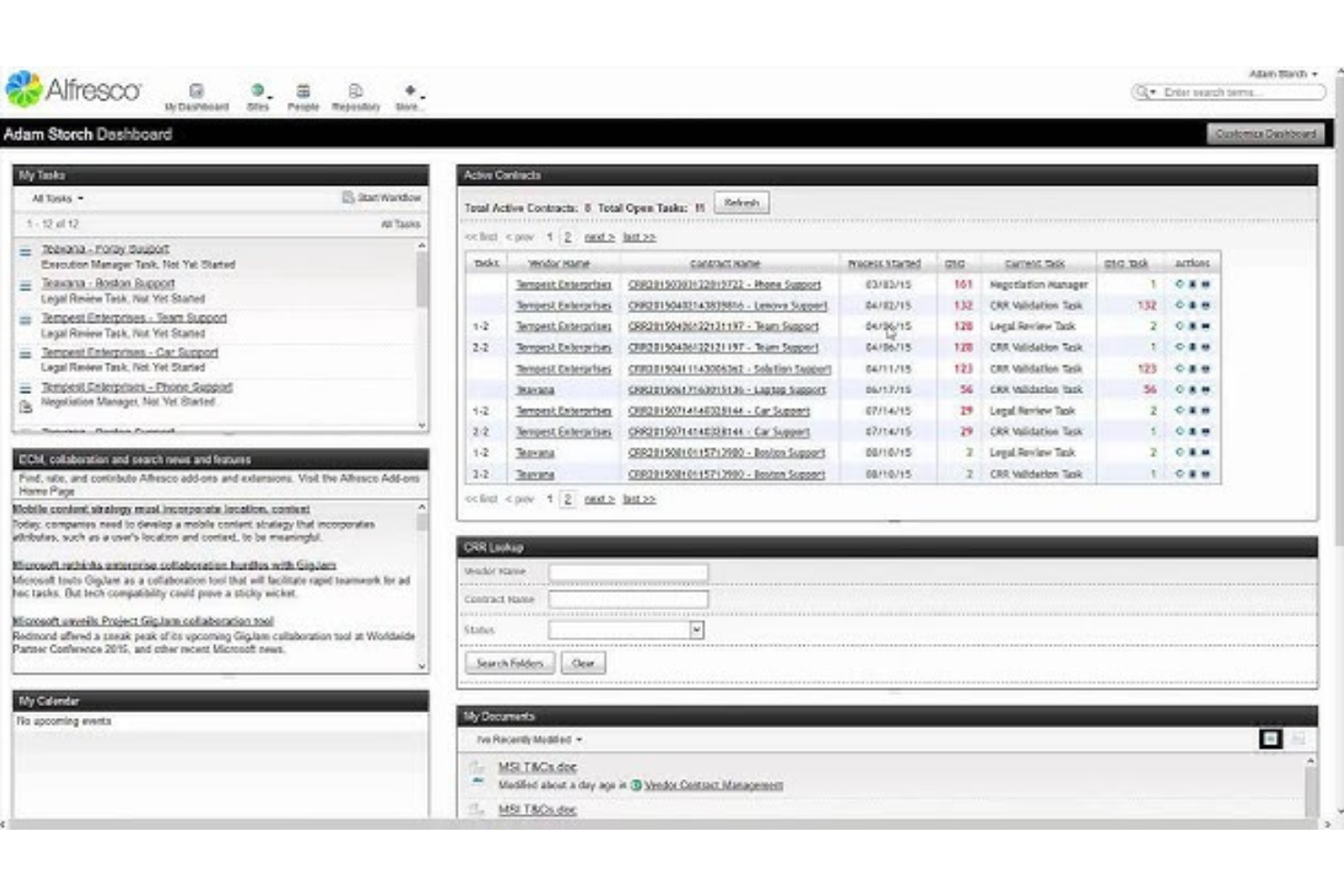
Hyland Alfresco is an enterprise content management platform that provides document version control, workflow automation, collaboration features, and extensive support for large-scale, open-source deployments.
Who Is Hyland Alfresco Community Edition Best For?
Hyland Alfresco is a strong choice for IT teams at large enterprises and government organizations seeking open-source document management with complex workflow needs.
Why I Picked Hyland Alfresco Community Edition
I picked Hyland Alfresco as one of the best because I can deploy it at scale through open-source components and automate complex business processes. I use its granular version control settings and workflow tools to manage enterprise documents securely across large teams.
Hyland Alfresco Community Edition Key Features
- Content repository: Store, organize, and retrieve documents in a central system.
- Metadata management: Tag documents with custom metadata for easy search.
- Document preview: View documents in-browser without downloading files.
- Permission controls: Define access levels by user, group, or role.
Hyland Alfresco Community Edition Integrations
Hyland Alfresco offers an API for custom integrations.
What's Free?
Hyland Alfresco offers a free open-source Community Edition with core document management, workflow automation, and open APIs for self-hosted deployment. High-availability clustering, commercial database support, official technical patches, and dedicated corporate support require a paid Enterprise license.
Pros and Cons
Pros:
- Scalable architecture for high-volume environments
- Supports custom metadata and smart folders
- Open-source deployment options for enterprises
Cons:
- Community support is less responsive than paid plans
- Configuration requires significant technical expertise
Outro software gratuito de controlo de versões de documentos
Eis algumas opções adicionais de software gratuito de controlo de versões de documentos que não integraram a minha lista restrita, mas que ainda vale a pena conhecer:
- FormKiQ
For API-driven document automation
- Box
For granular document access controls
- Lark
For integrated chat within documents
- Notion
For combining documents with team wikis
- Simul Documents
For managing multiple document versions
- Git
For distributed file version tracking
- Collabora Online
For on-premise editing
- Mayan EDMS
For self-hosted document archiving
- Paperless-ngx
For automated document import and tagging


How I Evaluate Free Document Version Control Software
First, I define what counts as free. For document version control software—where PMs track spec revisions across months-long projects—that means a free-forever plan, not a trial. I then evaluate two layers: the core functionality a tool must have to make the list, and the differentiators that separate vendors.
Core Functionality (Table Stakes For This List)
In addition to my free offer requirements, I also use a scoring system to select tools for my list. Here's how it works:
I rank each one on a scale from 0 (does not offer the functionality) to 5 (excels in this area) for each core functionality listed below. Then, I calculate the tool's total score into a percentage. Each tool needs to achieve a minimum total score of 65% to be considered for inclusion.
- Version History Tracking: I check whether the tool automatically logs each saved revision with author names and timestamps, so a project coordinator can trace exactly who edited a contract draft and when.
- Version Restoration & Rollback: A good rollback lets you revert a policy document to last Tuesday's version without losing today's draft—I look for one-click restore that preserves the current state as a new entry.
- Change Comparison (Diff View): I evaluate how clearly the tool highlights what changed between two versions, especially for text-heavy files like SOWs or compliance policies where a single deleted clause can shift risk.
- Free Tier Availability: The free plan needs to actually include version control features for a usable number of collaborators and documents—I look past trial-only models and check what's truly available at no cost.
- Access Controls & Permissions: I look for role-based settings that let an ops manager grant view-only access to external reviewers while keeping edit rights limited to internal team members at the document or folder level.
- Check-In/Check-Out or Edit Locking: When multiple people touch the same deliverable, conflicting saves destroy work. I evaluate whether the tool offers file locking, formal check-out workflows, or real-time co-authoring with conflict resolution.
- Audit Trail & Activity Log: Compliance officers need to know who viewed, downloaded, or restored a file. I look for searchable activity logs that go beyond basic edit tracking to cover the full range of document interactions.
- Multi-Format File Support: Most teams don't work in a single file type, so I check whether version control applies across Word docs, spreadsheets, PDFs, and Google Workspace files rather than just native formats.
Once I have a list of tools that meet this criteria, I consider what sets each platform apart.
Differentiating Factors (What Sets Vendors Apart)
Here's how I compare and contrast different vendors:
Standout Features
Approval workflows matter a lot when your team needs formal sign-off before a document moves from draft to final—think compliance policies or client-facing proposals. I also look for automated version numbering, where the tool assigns labels like v1.0 or v2.1 based on approval milestones rather than forcing someone to rename files manually. Real-time co-editing is another differentiator I evaluate, since it lets distributed teams collaborate without waiting on file locks.
Beyond Features
Free plan limits deserve close attention—I check how many users and how much storage the free tier actually supports, because a five-person cap won't work if your project team has twelve contributors reviewing deliverables. Integration coverage also matters. I evaluate whether the tool connects to PM platforms like Jira or Asana and to file ecosystems like Google Workspace or Microsoft 365, since version control that lives outside your daily workflow gets ignored. Finally, I consider the upgrade path, making sure teams can scale into paid plans without losing version history or migrating files.
Como escolher software gratuito de controlo de versões de documentos
É fácil perder-se em listas extensas de funcionalidades e estruturas de preços complexas. Para o ajudar a manter-se concentrado enquanto analisa o seu processo específico de seleção de software, eis uma lista de verificação dos fatores a ter em conta:
| Fator | O que deve considerar |
|---|---|
| Escalabilidade | A solução conseguirá suportar um aumento do número de utilizadores ou de documentos armazenados à medida que a sua equipa ou organização cresce? Considere os limites conhecidos relativos a utilizadores, armazenamento ou tipos de documentos. |
| Integrações | O software funciona com as ferramentas essenciais da sua equipa (correio eletrónico, conjuntos de ferramentas de produtividade, aplicações de fluxo de trabalho)? Tenha atenção às opções de ligação limitadas ou a passos de configuração adicionais. |
| Possibilidade de personalização | É possível adaptar fluxos de trabalho, permissões e tipos de documentos ao seu processo? Algumas soluções gratuitas limitam o acesso dos utilizadores às funcionalidades de personalização. |
| Facilidade de utilização | A interface é clara e intuitiva para todos os membros da equipa? Teste o carregamento, o controlo de versões e a restauração de documentos para verificar se existe complexidade desnecessária. |
| Implementação e integração inicial | Com que rapidez pode a sua equipa começar a trabalhar? Procure opções de importação/exportação, guias de integração inicial e apoio à migração de dados de documentos antigos. |
| Custo | Existem custos ocultos de atualização ou armazenamento mais tarde? Compreenda os limites de armazenamento ou de utilizadores que poderão exigir compras futuras. |
| Medidas de segurança | Que medidas existem para o controlo de acesso, a encriptação ou os registos de auditoria? Avalie se as funcionalidades de segurança estão alinhadas com as necessidades de proteção de dados da sua equipa. |
| Disponibilidade de apoio | Que canais de ajuda existem se ficar bloqueado — fóruns, conversação ou correio eletrónico? As ferramentas gratuitas podem ter um apoio mais lento ou baseado na comunidade, em vez de serviços de assistência dedicados. |
O que é o software gratuito de controlo de versões de documentos?
O software gratuito de controlo de versões de documentos é uma ferramenta que lhe permite armazenar, acompanhar e gerir diferentes versões dos seus documentos digitais sem pagar taxas de subscrição.
Estas plataformas ajudam indivíduos e equipas a organizar, aceder e restaurar revisões de documentos, controlando também quem pode visualizar ou alterar ficheiros. Esta abordagem evita a perda de dados e melhora a colaboração.
Funcionalidades
Vejamos as funcionalidades habitualmente presentes no software de controlo de versões de documentos e quais são normalmente incluídas nos planos gratuitos e pagos.
Funcionalidades normalmente gratuitas do software de controlo de versões de documentos
- Histórico de versões: Disponibiliza um arquivo de versões anteriores dos ficheiros, permitindo aos utilizadores acompanhar alterações e recuperar rapidamente rascunhos anteriores.
- Check-in e check-out: Permite aos utilizadores bloquear documentos para edição, para que mais ninguém substitua as alterações até que os ficheiros atualizados sejam novamente registados.
- Permissões de utilizador: Permite definir controlos de acesso básicos, para que possa restringir quem pode visualizar ou modificar determinados documentos no seu sistema de ficheiros.
- Pesquisa de ficheiros: Disponibiliza uma barra de pesquisa simples para encontrar documentos pelo nome, metadados ou detalhes do carregamento dentro do sistema.
- Pré-visualização de documentos: Permite aos utilizadores visualizar tipos de ficheiros compatíveis na plataforma sem terem de os descarregar separadamente.
- Registo de auditoria básico: Regista ações simples, como carregamentos, transferências ou edições, criando um histórico visível para a supervisão de documentos.
- Organização de pastas: Permite criar diretórios ou pastas aninhadas para manter os ficheiros devidamente categorizados para utilização pessoal ou da equipa.
Funcionalidades normalmente pagas do software de controlo de versões de documentos
- Automatização de fluxos de trabalho: Permite o encaminhamento automatizado de documentos, cadeias de aprovação e notificações, simplificando processos repetíveis de revisão ou publicação.
- Controlos de segurança avançados: Adiciona conjuntos detalhados de permissões, encriptação de conteúdos, autenticação multifator e controlos de acesso mais rigorosos para conteúdos sensíveis.
- Integração de assinatura eletrónica: Permite recolher assinaturas eletrónicas dentro da plataforma para contratos ou aprovações que exigem validação jurídica.
- Pesquisa de texto integral e OCR: Permite aos utilizadores pesquisar em PDFs digitalizados ou ficheiros de imagem graças ao reconhecimento ótico de caracteres e à indexação da pesquisa.
- Políticas de retenção de documentos: Automatiza a definição de regras para a gestão do ciclo de vida dos documentos, como o arquivamento automático, a eliminação ou a retenção legal.
- Etiquetagem personalizada de metadados: Permite aos utilizadores adicionar etiquetas ou atributos personalizados para categorização, ordenação e elaboração de relatórios avançados sobre conteúdos armazenados.
- Acesso através de aplicações móveis: Disponibiliza aplicações móveis dedicadas para gerir, partilhar e acompanhar alterações a documentos em qualquer lugar.
- API e integrações avançadas: Permite a ligação a outros sistemas empresariais, incluindo CRM, ERP ou ferramentas de fluxos de trabalho, para facilitar a partilha de dados.
- Expansão de ficheiros grandes ou do armazenamento: Disponibiliza maior capacidade de armazenamento e suporte para ficheiros maiores, para além dos limites dos planos gratuitos.
- Suporte prioritário ou dedicado: Inclui assistência acelerada, gestores de conta dedicados ou formação para clientes pagantes que necessitem de apoio avançado.
Vantagens
A implementação de software gratuito de controlo de versões de documentos proporciona várias vantagens à sua equipa e à sua empresa. Eis algumas que pode esperar:
- Menor risco de perda de dados: Armazenar versões anteriores e manter registos de auditoria significa que eliminações ou edições acidentais podem ser sempre recuperadas.
- Colaboração melhorada: Várias pessoas podem trabalhar em documentos com confiança, sabendo que as suas alterações são acompanhadas e podem ser recuperadas.
- Poupança de custos: Os planos gratuitos permitem às equipas gerir o controlo de documentos sem pagar taxas de licenciamento ou subscrição.
- Maior visibilidade dos processos: Os controlos de acesso, o controlo de versões e os registos de auditoria facilitam o acompanhamento de quem fez o quê e a manutenção da responsabilização.
- Recuperação mais rápida de documentos: As ferramentas de pesquisa, as pastas e os metadados ajudam os utilizadores a localizar rapidamente o documento ou a versão pretendida.
- Integração mais simples: A maioria das soluções gratuitas oferece uma configuração rápida, fluxos de trabalho intuitivos e suporte baseado na comunidade ou na documentação para novos utilizadores.
- Escalabilidade para equipas em crescimento: Muitas ferramentas gratuitas suportam utilizadores ou documentos ilimitados, permitindo expandir a utilização à medida que as suas necessidades mudam.
Custos e preços
Reconheço que veio a este artigo à procura das melhores opções de software de controlo de versões de documentos disponíveis gratuitamente. No entanto, uma vez que os planos gratuitos oferecem apenas funcionalidades limitadas, é bastante provável que precise de aumentar o seu plano no futuro.
A tabela abaixo resume os planos comuns, os respetivos preços médios e as funcionalidades normalmente incluídas no software de controlo de versões de documentos:
Tabela de comparação de planos para software de controlo de versões de documentos
| Tipo de plano | Preço médio | Funcionalidades comuns |
|---|---|---|
| Plano gratuito | $0 | Controlo básico de versões, permissões de utilizador, pesquisa, pré-visualização de documentos, organização de pastas e armazenamento limitado. |
| Plano pessoal | $5–$10/utilizador/mês | Mais armazenamento, partilha de documentos, acesso à aplicação móvel, pesquisa melhorada e suporte prioritário por e-mail. |
| Plano empresarial | $15–$25/utilizador/mês | Automatização de fluxos de trabalho, controlos de segurança avançados, ferramentas de colaboração, registos de auditoria e opções de integração. |
| Plano empresarial avançado | $30–$50/utilizador/mês | Metadados personalizados, SSO, acesso à API, ferramentas de conformidade, armazenamento ilimitado e suporte dedicado ao cliente. |
Perguntas frequentes sobre software gratuito de controlo de versões de documentos
Eis algumas respostas a perguntas comuns sobre software gratuito de controlo de versões de documentos:
Qual é a diferença entre software gratuito e pago de controlo de versões de documentos?
As versões gratuitas incluem normalmente elementos essenciais, como o controlo de versões e permissões básicas, mas limitam frequentemente o armazenamento, as integrações e as funcionalidades de automatização. Os planos pagos oferecem segurança reforçada, mais integrações, automatização, opções de suporte e armazenamento para equipas maiores ou em crescimento, de modo a responder às necessidades empresariais em expansão.
É possível utilizar software gratuito de controlo de versões de documentos para documentos sensíveis ou confidenciais?
Sim, mas deve verificar cuidadosamente as salvaguardas de segurança, os controlos de acesso e as capacidades de conformidade antes de armazenar informações sensíveis. A maioria dos DMS (sistemas de gestão documental) gratuitos limita as funcionalidades de segurança avançadas e os processos de aprovação, podendo não estar em conformidade com requisitos regulamentares rigorosos.
Como migrar documentos para um sistema gratuito de controlo de versões?
Normalmente, carrega os ficheiros manualmente ou utiliza ferramentas de importação integradas, caso estejam disponíveis. Algumas plataformas permitem importar pastas, código-fonte ou documentos em massa para partilhar ficheiros, mas a assistência avançada à migração ou integração requer frequentemente um plano pago.
Os sistemas gratuitos de controlo de versões de documentos são adequados para equipas grandes?
As ferramentas gratuitas podem funcionar para equipas grandes se a plataforma permitir utilizadores e documentos ilimitados. No entanto, as limitações nos controlos avançados de permissões e nas funcionalidades de colaboração podem tornar-se um problema à medida que as equipas crescem.
O que acontece se atingir o limite de armazenamento de um plano gratuito?
A maioria dos softwares restringe carregamentos adicionais, solicita a atualização do plano ou bloqueia temporariamente algumas funcionalidades. Poderá ter de arquivar ou eliminar ficheiros, ou comprar mais armazenamento, para continuar a controlar novos documentos.