

10 melhores geradores de faturas com IA em 2026

Melhor lista de geradores de faturas com IA


Um gerador de faturas com IA é um software que utiliza inteligência artificial para automatizar a criação, personalização e gestão de faturas da sua empresa. Se está à procura do melhor gerador de faturas com IA, provavelmente pretende acelerar a faturação, reduzir a introdução manual de dados e diminuir os erros ao tratar de faturas recorrentes ou complexas. Com tantas opções disponíveis, encontrar uma que corresponda ao seu fluxo de trabalho e orçamento pode parecer uma tarefa avassaladora. Este guia analisa as principais ferramentas, destaca o que torna cada uma única e ajuda-o a identificar a solução certa para as necessidades e objetivos da sua equipa.
Why Trust Our Software Recommendations
Our team has been testing and reviewing software since 2012. As project managers ourselves, we know how difficult—and important—it is to choose the right software.
For this guide, we evaluated tools using hands-on testing and independent research, scoring tools using our selection criteria. We also draw on insights from industry thought leaders and practicing project management experts.
Our reviews reflect our human editorial judgment, not a sales pitch.
Expert reviewers:
Tabela comparativa de geradores de faturas com IA
Esta tabela comparativa resume os detalhes de preços das minhas principais escolhas de geradores de faturas com IA.
| Tool | Best For | Trial Info | Price | ||
|---|---|---|---|---|---|
| 1 | Best for contract and payment integration | 7-day free trial | From $9/user/month (billed annually) | Website | |
| 2 | Best for multi-user team permission controls | Free plan + free demo available | From $8/month (billed annually) | Website | |
| 3 | Best for client portal and feedback features | 7-day free trial | From $19/month | Website | |
| 4 | Best for agency-centric invoice tools | 14-day free trial | From $10/user/month (billed annually) | Website | |
| 5 | Best for end-to-end business management | 14-day free trial | From $17/user/month | Website | |
| 6 | Best for time tracking and billing integration | Free plan + 30-day free trial available | From $9/seat/month (billed annually) | Website | |
| 7 | Best for multi-currency invoice generation | Free plan available | From $14/month (billed annually) | Website | |
| 8 | Best for fast invoice creation from email data | 7-day free trial | From $29.99/user/month | Website | |
| 9 | Best for one-click invoice automation | Free plan available | Pricing upon request | Website | |
| 10 | Best for freelancers needing flexible templates | Free plan available | From $20/month | Website |


Avaliações dos melhores geradores de faturas com IA
Apresento abaixo os meus resumos detalhados dos melhores geradores de faturas com IA que entraram na minha lista de opções. As minhas avaliações oferecem uma análise detalhada das funcionalidades, dos melhores casos de utilização e das integrações de cada ferramenta, para o ajudar a encontrar a melhor opção para si.

Bonsai
Best for contract and payment integration
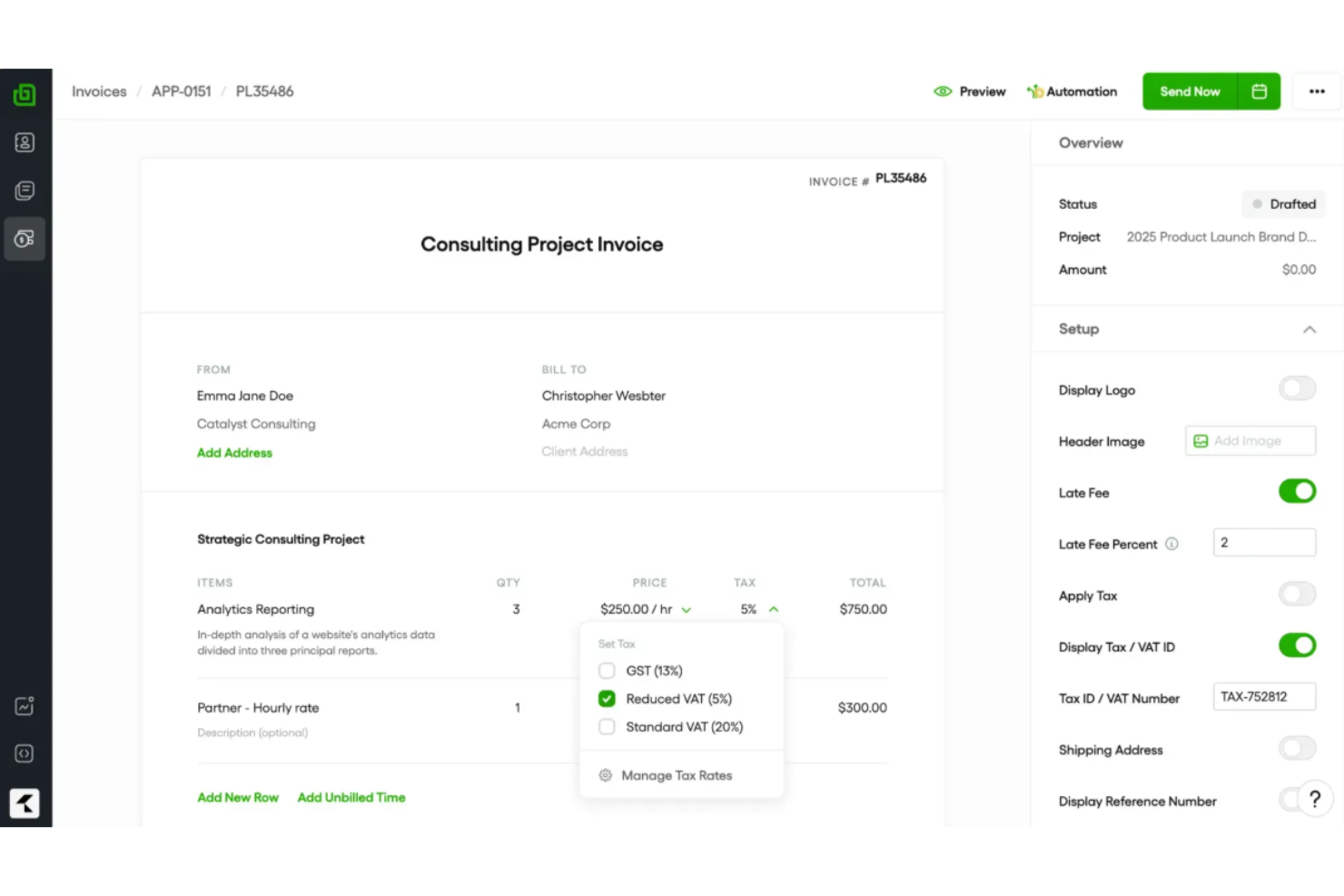
Bonsai is a client management platform for freelancers and small businesses that offers AI-powered invoice generation, contract creation, payments, proposals, and workflow automation in one place.
Who Is Bonsai Best For?
Bonsai is ideal for freelancers and small business owners who need integrated tools for contracts, invoicing, and payment management in one platform.
Why I Picked Bonsai
I picked Bonsai as one of the best because I can generate AI-powered invoices directly tied to contracts, get clients to e-sign documents, and then trigger payment requests from a single workspace. I like having proposals, contracts, and invoicing so tightly connected.
Bonsai Key Features
- AI-powered invoice creation: Generate invoices automatically from tracked hours and billable tasks.
- Recurring payment scheduling: Set up and manage automated recurring invoices for repeat clients.
- Expense tracking: Categorize and monitor project-related expenses within the same workspace.
- Tax reports dashboard: Access downloadable tax summaries and financial reports for every client and project.
Bonsai Integrations
Bonsai offers native integrations with QuickBooks, PayPal, Stripe, and Zapier. An API is also available for custom integrations.
Pros and Cons
Pros:
- Contracts, proposals, and invoicing in one system
- AI reads tracked hours for invoice creation
- Generates invoices directly from contracts
Cons:
- Few workflow automation capabilities
- No built-in file or asset proofing mechanisms


Refrens is an online invoicing platform for teams that offers invoicing, estimate management, purchase orders, expense tracking, and payment collection in one system.
Who Is Refrens Best For?
Refrens is a strong fit for small to midsize businesses that need multi-user invoicing, approval processes, and expense management for distributed teams.
Why I Picked Refrens
I picked Refrens because I can set detailed user permissions for billing, finance, and sales roles—controlling who can create, approve, or edit invoices. I like having dedicated approval flows and audit logs for every edit or action on invoices.
Refrens Key Features
- Invoice generator: Quickly create GST-compliant invoices with customizable fields.
- Expense tracking: Log and categorize expenses directly within the platform.
- Quotation and estimate tools: Build and send sales quotes or estimates to clients.
- Recurring billing: Automate invoice generation for repeat clients or subscriptions.
Refrens Integrations
Refrens offers native integrations with Razorpay, PayPal, and Google Sheets. An API is available for custom integrations.
Pros and Cons
Pros:
- Built-in client portal for invoice sharing
- Approval workflows for invoice edits
- Multi-level team and role permissions
Cons:
- No built-in OCR for document scanning
- Limited third-party software connections


Plutio is an all-in-one business management platform with invoicing, proposals, contracts, time tracking, and task management for teams and freelancers.
Who Is Plutio Best For?
Freelancers, agencies, and small creative teams who need an integrated system for handling client work, invoicing, and communication.
Why I Picked Plutio
I picked Plutio because I can invite clients into a secure, branded portal, collect invoice feedback, and enable clients to approve or reject line items. I also like managing project conversations and payment tracking all in one place.
Plutio Key Features
- Custom invoice templates: Create branded invoices with adjustable fields and layouts.
- Multi-currency support: Issue invoices and accept payments in multiple currencies.
- Automated payment reminders: Send scheduled follow-ups when invoices remain unpaid.
- Partial payments: Allow clients to pay invoices in multiple installments.
Plutio Integrations
Plutio offers native integrations with Stripe, PayPal, and Zapier. An API is available for custom integrations.
Pros and Cons
Pros:
- Built-in commenting and feedback for each invoice
- Supports partial payments and installment scheduling
- Invoices and payment status visible in client portal
Cons:
- Invoice templates have few customization options
- Automations for invoices are limited

Best for agency-centric invoice tools
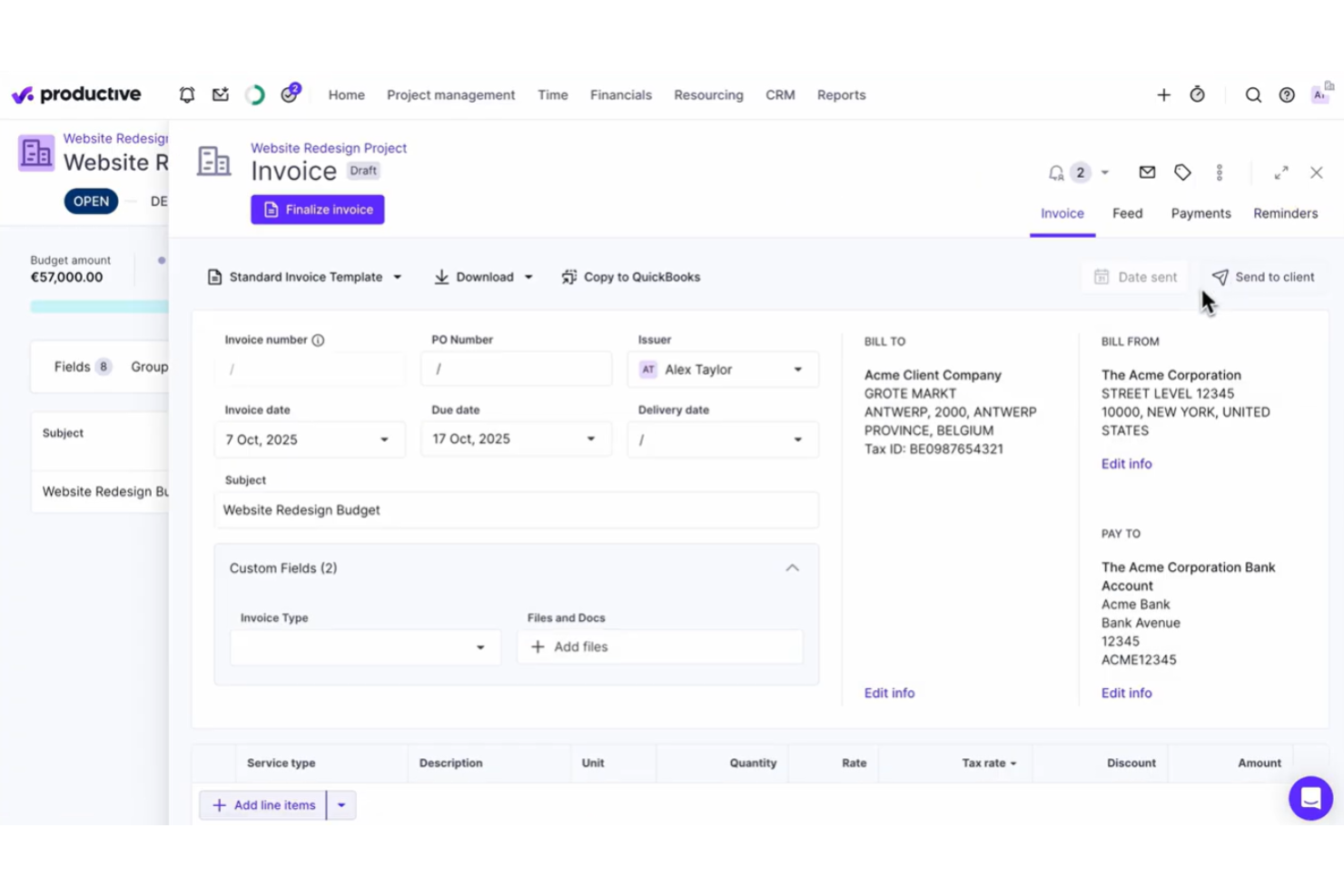
Productive is a work management and invoicing platform designed for agencies that need project budgeting, time tracking, real-time reporting, and automated invoice generation in one system.
Who Is Productive Best For?
Productive suits digital agencies and consultancies that need project-based invoicing, resource planning, and integrated time tracking in one platform.
Why I Picked Productive
I picked Productive as one of the best because I create invoices directly from tracked time, budgets, or project milestones, which is ideal for agencies with complex billing models. I also like using custom templates to match client expectations.
Productive Key Features
- Automated invoice notifications: Send automated reminders and updates to clients for outstanding invoices.
- Multi-currency support: Generate invoices and handle payments in multiple currencies for international clients.
- Integrated expense management: Attach billable expenses to invoices directly from tracked project costs.
- Batch invoice creation: Create and send multiple invoices at once for recurring or repeat work.
Productive Integrations
Productive offers native integrations with Xero, QuickBooks Online, Slack, Google Calendar, and Jira, and provides an API for custom integrations.
Pros and Cons
Pros:
- Supports multi-currency invoicing and client portals
- Links projects, budgets, and invoices automatically
- Built for agency workflows and billing models
Cons:
- Invoicing features require time tracking setup
- Invoice customization is somewhat limited
New Product Updates from Productive
Productive Adds Voice Dictation, Slack Connector, Proposals, and Overtime
Productive adds voice dictation, a Slack Connector, proposal controls, and overtime tracking. These updates support faster AI interactions, client proposals, and time management. For more information, visit Productive’s official site.

Scoro
Best for end-to-end business management
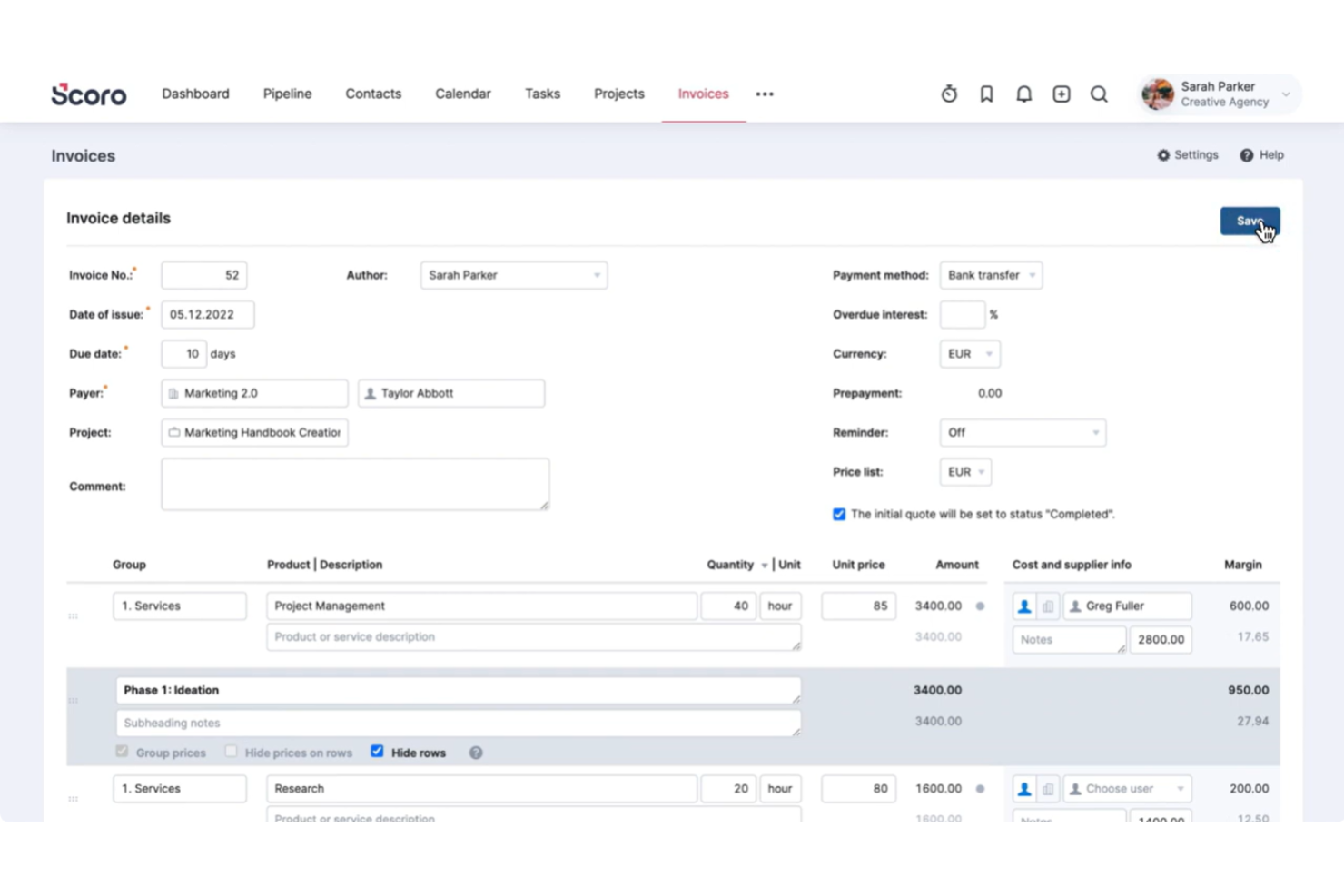
Scoro is a unified business management platform for invoicing, quoting, billing, and automation that combines financial management with project tracking and workflow automation tools.
Who Is Scoro Best For?
Scoro is a good fit for mid-sized agencies and consultancies that need integrated invoicing, project management, and workflow tools in one platform.
Why I Picked Scoro
I picked Scoro as one of the best because I can issue invoices, manage recurring payments, and track overdue accounts, all while tying them directly to projects and quotes. I like viewing business performance and invoicing data from a single dashboard.
Scoro Key Features
- Customizable invoice templates: Create and save branded templates with pre-configured fields.
- Product and service catalogue: Add items directly to invoices from a searchable catalogue.
- Multi-currency support: Generate invoices in multiple currencies for global clients.
- Automated tax calculations: Apply regional taxes automatically during invoice creation.
Scoro Integrations
Scoro offers native integrations with Xero, QuickBooks, Mailchimp, Google Calendar, Outlook, and Dropbox, and it provides an API for custom integrations.
Pros and Cons
Pros:
- Offers built-in approval workflows for invoices
- Handles recurring billing and subscription invoicing
- Connects invoices directly to tracked projects
Cons:
- Custom invoice fields are only partly configurable
- Time tracking must be enabled for invoicing
New Product Updates from Scoro

Scoro Adds Time Mobile App and ELI Improvements
Scoro adds the Scoro Time mobile app for iOS/Android to track time anywhere and expands ELI with attachments, smarter filtering, and trigger-based actions. For more information, visit Scoro's official site.

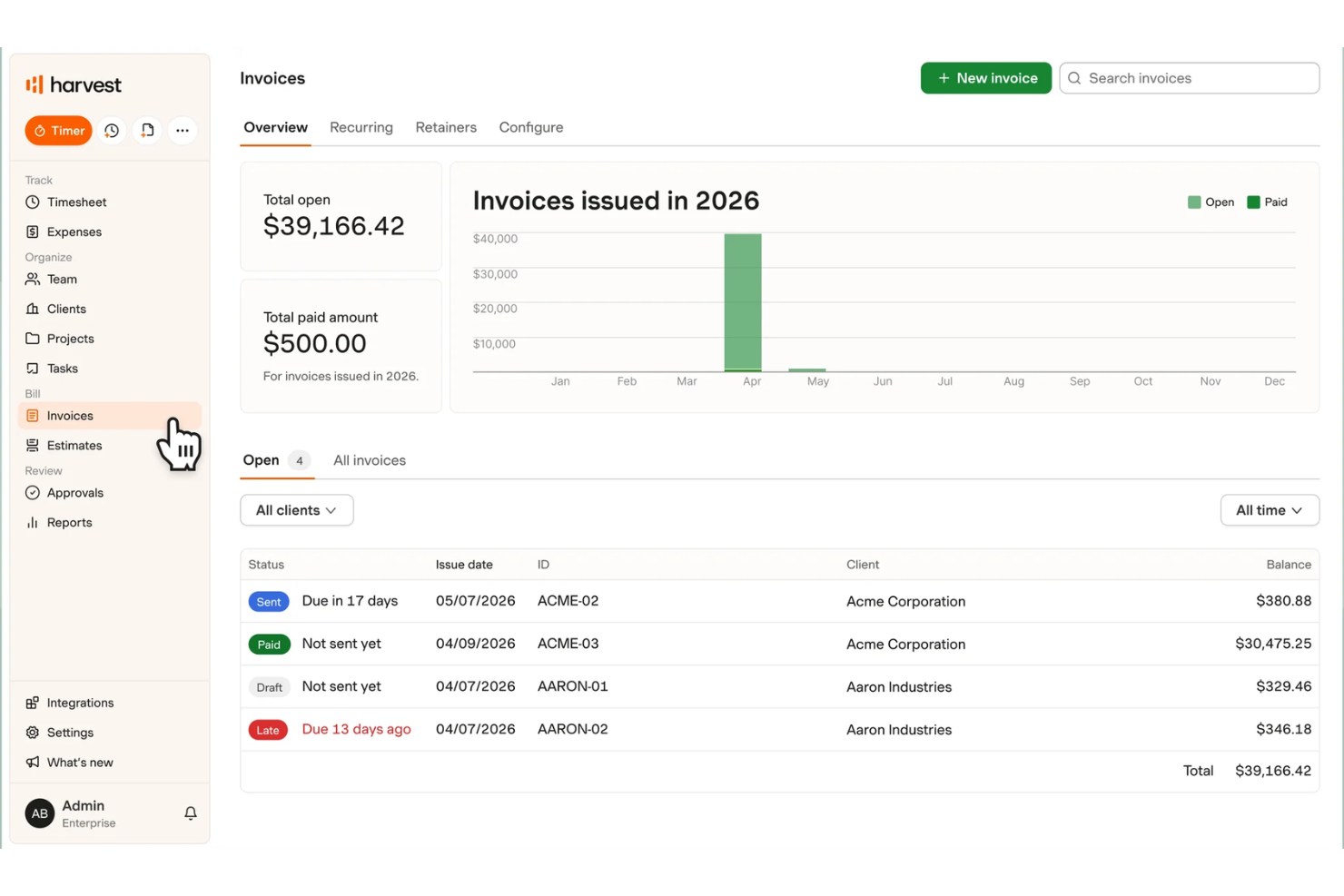
Harvest is a time tracking and invoicing platform that brings together project timesheets, AI-powered invoice generation, expenses management, and billing workflows for teams and freelancers.
Who Is Harvest Best For?
Harvest is a strong fit for agencies and service-based businesses that need combined time tracking and invoicing in one platform.
Why I Picked Harvest
I picked Harvest because I can turn tracked billable hours into AI-powered invoices, all linked within ongoing projects. I like how the tool pulls accurate time, expense, and rate data from timesheets into professional invoice templates with almost no manual entry.
Harvest Key Features
- Multiple currency support: Send invoices in over 160 currencies for global clients.
- Custom invoice fields: Add custom notes, tax rates, and payment terms to each invoice.
- Invoice status tracking: Monitor which invoices are sent, viewed, and paid in real time.
- Payment integration: Accept online payments directly through PayPal and Stripe.
Harvest Integrations
Harvest offers native integrations with QuickBooks Online, Xero, Stripe, PayPal, Asana, Trello, Google Workspace, Slack, and Jira. An API is available for custom integrations.
Pros and Cons
Pros:
- Supports multiple currencies in invoices
- Tracks time, expenses, and projects together
- AI-generated invoices from tracked billable hours
Cons:
- Does not automate recurring payment reminders
- AI suggestions limited to invoice creation

Eonebill
Best for multi-currency invoice generation
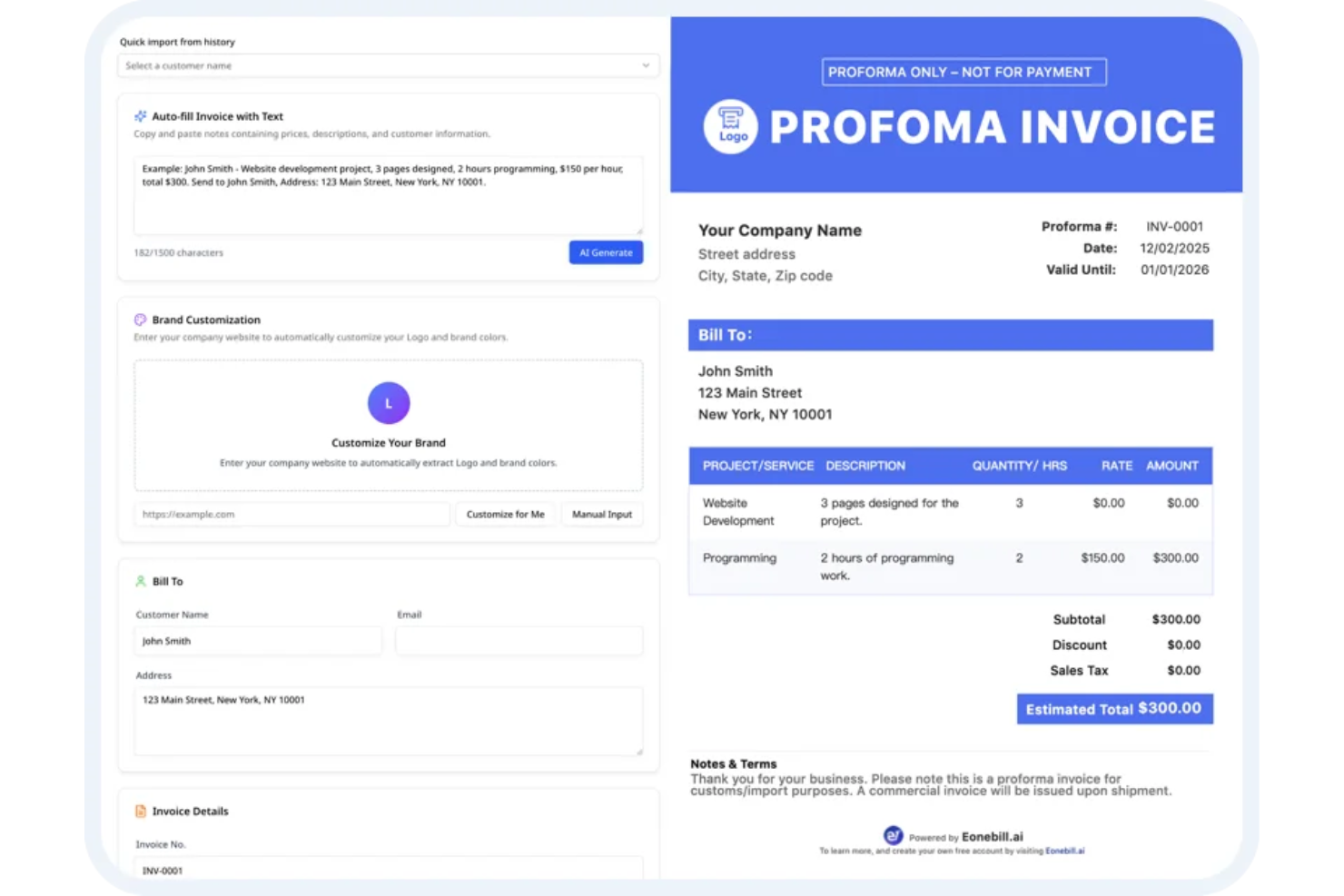
Eonebill is an AI invoice generator platform for businesses that supports invoice creation, automated payment collection, GST and tax compliance, expense tracking, and global client management.
Who Is Eonebill Best For?
Eonebill is a good fit for finance teams or small businesses managing international clients and needing built-in multi-currency invoicing functionality.
Why I Picked Eonebill
I picked Eonebill because I can create invoices in multiple currencies with real-time exchange rates and auto-convert totals. I like being able to send AI-powered invoices to international clients and track GST, VAT, and other taxes automatically.
Eonebill Key Features
- Automated payment reminders: Schedule and send payment follow-up messages to clients automatically.
- Expense tracking: Log and categorize business expenses inside the platform for financial oversight.
- GST and tax compliance tools: Generate GST, VAT, and other compliance reports directly from invoices.
- Multi-user access: Allow team members to collaborate and manage invoices under one account.
Eonebill Integrations
It provides an API for custom integrations.
Pros and Cons
Pros:
- AI-assisted invoice creation from tracked hours
- Automated GST and VAT compliance features
- Multi-currency invoice generation with real-time conversion
Cons:
- Invoice template customization options are basic
- Limited native integrations for workflow automation

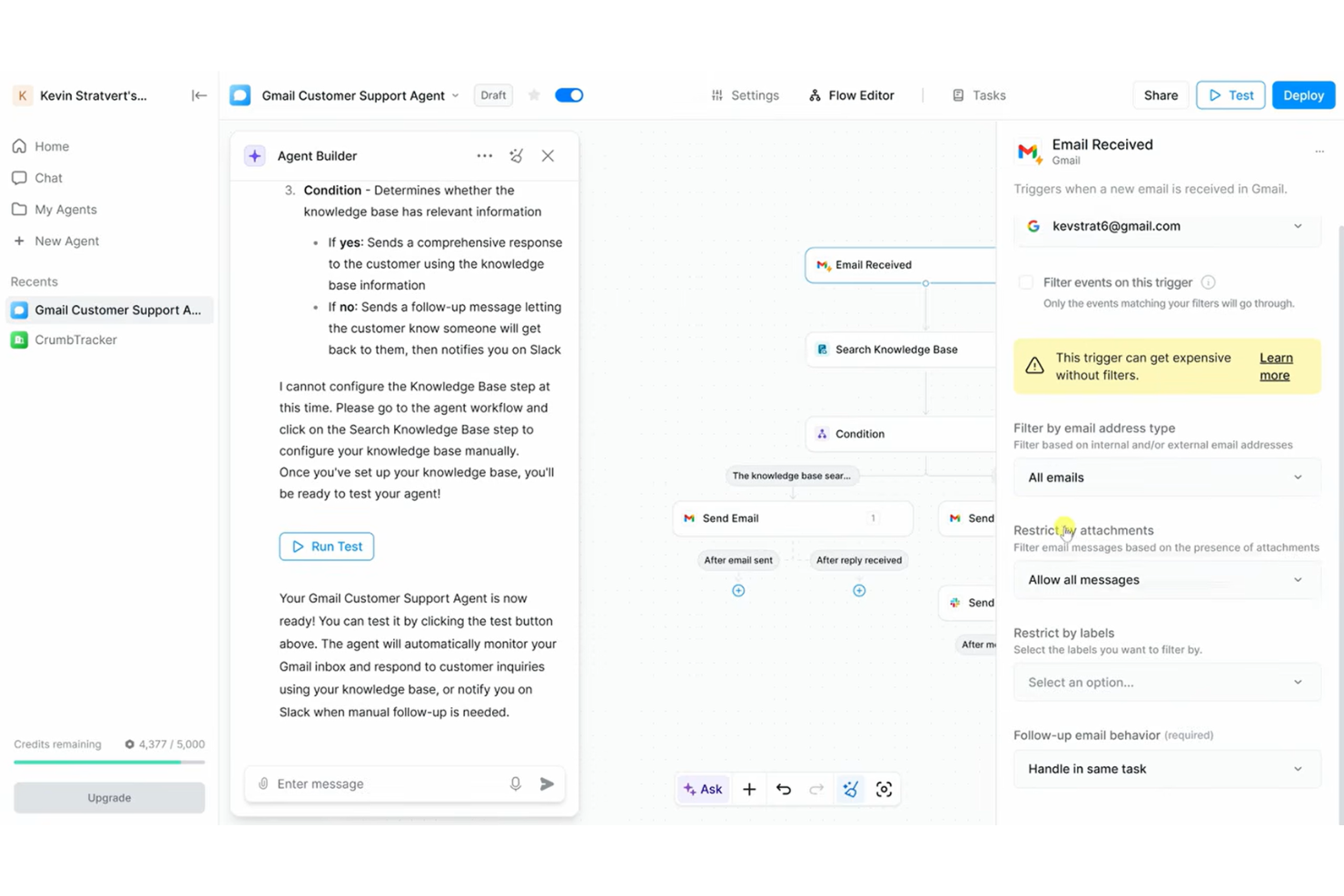
Lindy is an AI invoice generator platform that uses automation and email parsing to help teams create, manage, and customize invoices directly from communication data.
Who Is Lindy Best For?
Small businesses and finance teams that manage high volumes of invoice requests by email.
Why I Picked Lindy
I picked Lindy as one of the best because I can extract invoice details straight from email threads, automatically generate draft invoices, and handle frequent, ad hoc billing requests without switching between tools.
Lindy Key Features
- Custom invoice templates: Create and save templates to match your branding and client needs.
- Automated data extraction: Pull line item details from attached files and forms.
- Batch invoice processing: Generate and send multiple invoices in bulk with a single action.
- Real-time invoice tracking: Monitor invoice status updates within the dashboard.
Lindy Integrations
Integrations include Google Sheets, Gmail, Slack, Google Drive, HubSpot, Calendly, Airtable, Salesforce, Amazon, and Adobe Photoshop.
Pros and Cons
Pros:
- Scales high-volume billing capacity
- Handles high volumes of billing requests quickly
- Captures invoice details directly from email content
Cons:
- Advanced customization options are limited
- Base tier limits number of connected mailboxes
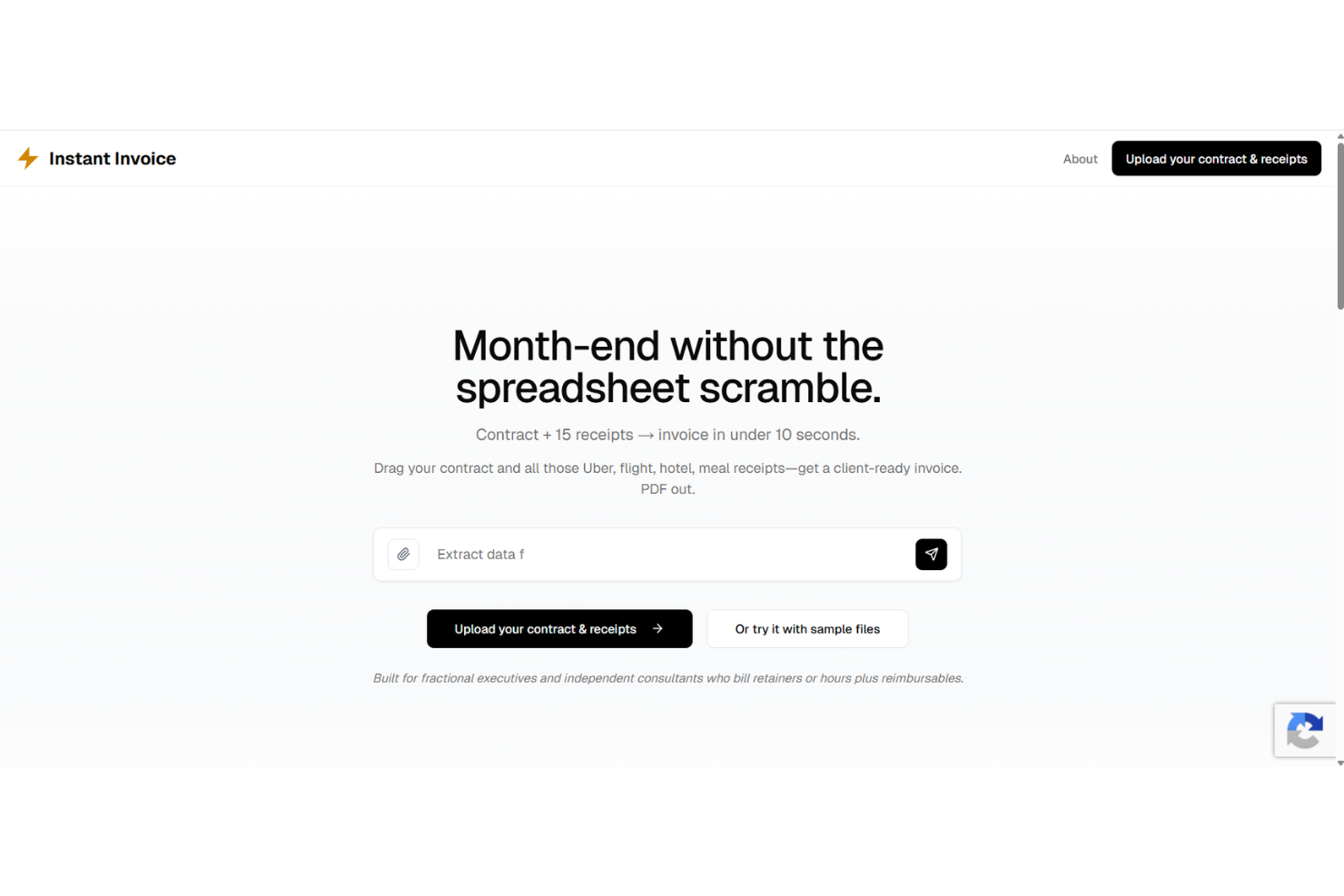
Instant Invoice is an AI invoice generator that uses automation and smart template matching to let you create, customize, and send invoices with minimal manual steps.
Who Is Instant Invoice Best For?
Freelancers and small business owners who need to automate invoice creation and delivery with minimal manual work.
Why I Picked Instant Invoice
I included Instant Invoice in my shortlist because I can auto-populate invoice fields from client data and trigger invoice creation with one click. I like being able to set up recurring invoice workflows and manage drafts in a centralized dashboard.
Instant Invoice Key Features
- Custom invoice templates: Choose from pre-built designs or create your own styles.
- Smart data extraction: Automatically recognize and input details from uploaded files.
- Multi-currency support: Issue invoices in different currencies for global clients.
- Audit trail tracking: Keep a record of invoice edits and user actions.
Instant Invoice Integrations
An API is available for custom integrations.
Pros and Cons
Pros:
- Extracts invoice details using AI parsing
- Handles batch invoice creation requests
- One-click invoice generation from email content
Cons:
- Relies on preset format structures
- No mobile app available for iOS or Android

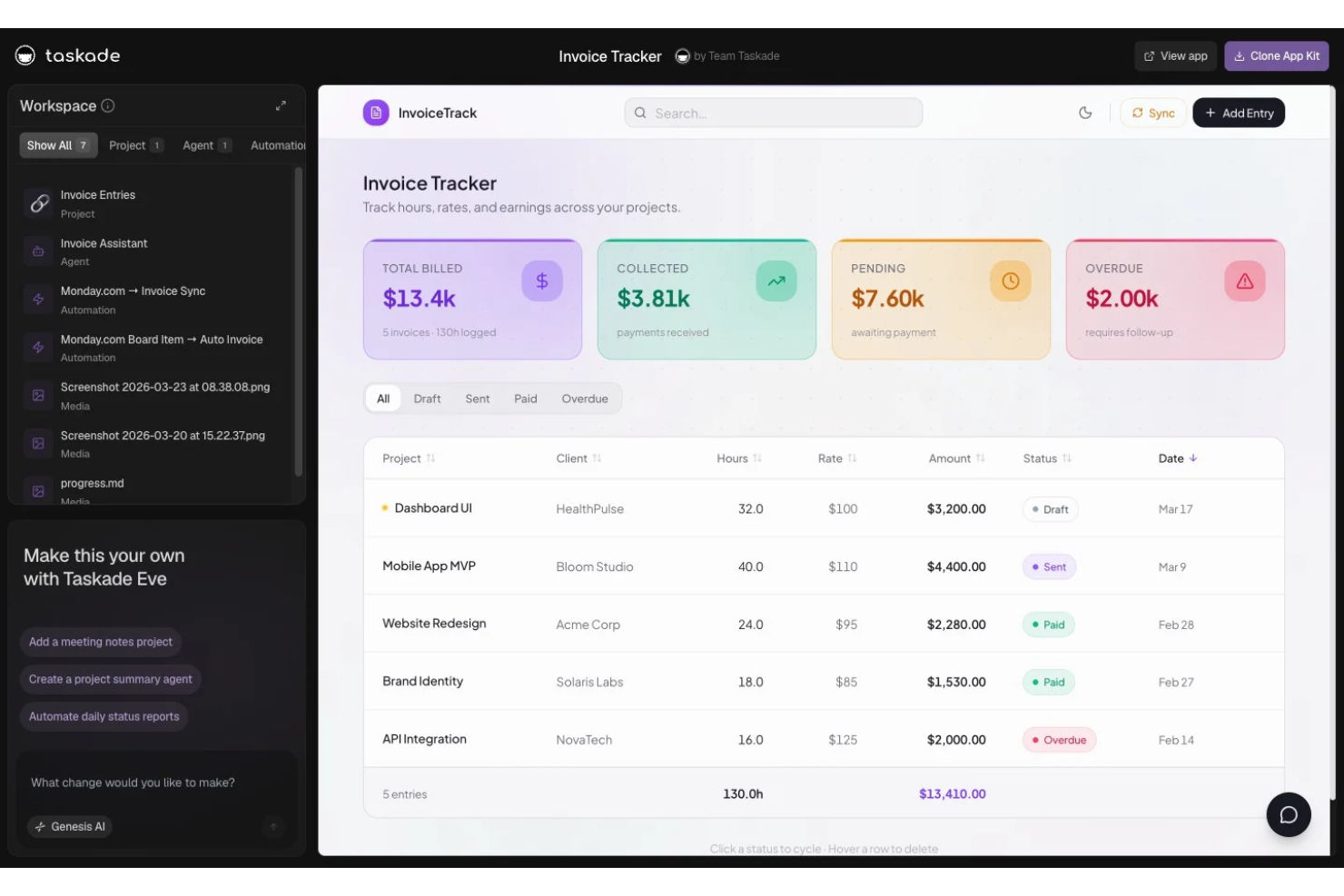
Taskade Genesis is an AI-powered invoice generator that offers customizable invoice templates, automated field population, and document creation tools designed for freelancers and small business owners.
Who Is Taskade Genesis Best For?
Freelancers and solo professionals who need to generate invoices from flexible AI-powered templates for a variety of projects or client types.
Why I Picked Taskade Genesis
I picked Taskade Genesis as one of the best because I can instantly generate AI-powered invoices using a wide range of customizable templates. I like being able to edit fields for each project and save reusable formats tailored to my freelancing work.
Taskade Genesis Key Features
- AI content generation: Automatically fills invoice fields based on prompts or project data.
- Template gallery: Access a library of invoice templates for different freelancing needs.
- Collaborative editing: Multiple users can edit and update invoices in real time.
- Multi-format export: Export completed invoices as PDF, DOCX, or markdown files.
Taskade Genesis Integrations
Integrations include Slack, Gmail, Stripe, GitHub, Shopify, HubSpot, Salesforce, Pipedrive, Discord, and Microsoft Teams.
Pros and Cons
Pros:
- Unlimited invoice generation for freelancers
- Large selection of editable invoice templates
- Supports AI-driven invoice text suggestions
Cons:
- Cannot schedule recurring invoices
- No automated payment tracking features
Outros geradores de faturas com IA
Eis algumas opções adicionais de geradores de faturas com IA que não entraram na minha lista de opções, mas que vale a pena conhecer:
- Kantata
For project-based financial workflows
- FreshBooks
For expense tracking integration
- Invoice Ninja
For open-source customization
- Zoho Invoice
For automated payment reminders
- Hiveage
For team collaboration features
- Invoice Quickly
With integrated service library storage
- Bookipi
For mobile-first invoicing solutions


How I Evaluate AI Invoice Generators
Every tool on this list needs to do more than slap an AI label on a standard invoicing form—I look for platforms that actually turn project data, time logs, or SOWs into ready-to-send invoices. I split my evaluation into core functionality every tool must deliver and differentiating factors that separate the best fits from the rest.
Core Functionality (Table Stakes For This List)
When I'm selecting tools for my list, I rank each one on a scale from 0 (does not offer the functionality) to 5 (excels in this area) for each core functionality listed below. Then, I calculate the tool's total score into a percentage. Each tool needs to achieve a minimum total score of 55% to be considered for inclusion.
- AI-Driven Invoice Generation: I look for tools that draft invoices from real inputs—like a prompt describing a completed sprint or uploaded time logs—rather than just auto-filling a blank form.
- Project & Time Data Integration: The tool should pull billable hours, tasks, or milestones from PM and time-tracking tools so a completed project phase flows into an invoice draft.
- Line Item Extraction & Structuring: I evaluate whether the AI can parse an uploaded SOW or contract into structured line items with descriptions, quantities, and rates intact.
- Client & Rate Management: Each tool should store client profiles with per-project rates, currencies, and tax rules so a multi-client agency doesn't re-enter billing details every cycle.
- Customizable Invoice Templates: I check whether AI-populated invoices land in branded, editable templates that stay consistent whether you're billing a retainer client or a one-off engagement.
- Invoice Delivery & Export: Tools should let you send, export to PDF, or sync finalized invoices to accounting platforms like QuickBooks or Xero without leaving the interface.
Once I have a list of tools that meet this criteria, I consider what sets each platform apart.
Differentiating Factors (What Sets Vendors Apart)
Here's how I compare and contrast different vendors:
Standout Features
Smart data extraction is a major differentiator. I look for AI that pulls line items from uploaded contracts or timesheets via OCR and NLP, skipping manual re-entry. Recurring invoice intelligence also matters—tools that detect billing patterns and flag anomalies like a missing line item before a retainer invoice ships save real headaches. Automated payment follow-ups round things out, where AI personalizes reminder timing and tone based on each client's payment history to reduce DSO.
Beyond Features
I evaluate how well each tool connects to the accounting and payment stack your team already uses—syncing invoices to QuickBooks or Xero and collecting payments through Stripe or PayPal without a manual export step. The client-facing experience matters too, especially for agencies: branded portals and mobile-friendly views make it easier for clients to review and pay. I also consider onboarding speed. A project manager should be able to generate a first invoice within minutes, not after a week-long setup.
Como escolher um gerador de faturas com IA
É fácil ficar preso a longas listas de funcionalidades e estruturas de preços complexas. Para o ajudar a manter-se focado enquanto percorre o seu processo específico de seleção de software, eis uma lista de fatores a ter em conta:
| Fator | O que considerar |
| Escalabilidade | A plataforma consegue acompanhar o crescimento da sua empresa, um maior número de utilizadores e volumes de faturação mais elevados sem interrupções ou atualizações significativas? |
| Integrações | A ferramenta liga-se aos seus sistemas de contabilidade, CRM ou plataformas de pagamentos? Verifique se existem ligações imediatas ou através de API. |
| Personalização | É possível adaptar os modelos de faturas, os fluxos de trabalho e as regras de automatização às suas necessidades específicas de faturação e à identidade da sua marca? |
| Facilidade de utilização | Os utilizadores das áreas financeira, comercial e operacional conseguirão gerar faturas rapidamente e resolver problemas com um mínimo de formação? |
| Implementação e integração inicial | Com que facilidade pode a sua equipa começar, migrar os dados existentes e aceder a recursos de formação ou apoio durante a transição? |
| Custo | Analise o custo total para a utilização prevista, incluindo os utilizadores e quaisquer encargos relativos a funcionalidades adicionais ou a um nível de apoio superior. |
| Medidas de segurança | Os dados financeiros e dos clientes, que são sensíveis, estão encriptados quando armazenados e durante a transferência? As permissões dos utilizadores e os controlos de acesso são suficientemente granulares para as suas necessidades de conformidade? |
| Capacidades internacionais | O sistema suporta as moedas, regras fiscais, formatos regionais e idiomas necessários para a faturação transfronteiriça? |
O que é um gerador de faturas com IA?
Um gerador de faturas com IA é um tipo especializado de software de faturação que utiliza inteligência artificial para automatizar a criação de faturas. Extrai dados de faturação, formata faturas e, frequentemente, trata de tarefas como cálculos, regras fiscais ou verificação de erros. Estas plataformas podem poupar tempo ao reduzir a introdução manual de dados, minimizar os erros e acelerar as tarefas de faturação recorrente ou de grande volume.
Funcionalidades do gerador de faturas com IA
Ao selecionar um gerador de faturas com IA, tenha em atenção as seguintes funcionalidades principais:
- Criação automatizada de faturas: Gera faturas instantaneamente, obtendo dados de orçamentos, registos de projetos ou recibos, sem necessidade de introdução manual.
- Modelos personalizáveis: Permite adaptar o formato da fatura, a marca, os itens, a moeda e os campos fiscais às necessidades da sua empresa.
- Extração de dados com IA: Lê e converte informações de documentos carregados ou e-mails em campos prontos para faturas, exigindo uma introdução mínima para que possa utilizar a IA no preenchimento dos dados.
- Suporte para várias moedas: Trata da faturação de clientes em diferentes países, com seleção automática da moeda e gestão das taxas de câmbio.
- Lembretes de pagamento automatizados: Envia lembretes agendados por e-mail ou SMS aos clientes relativamente a pagamentos pendentes ou em atraso, antes de passar a data de vencimento.
- Motor de cálculo de impostos: Aplica os impostos corretos com base na localização geográfica, nas regras fiscais ou nas categorias dos itens, sem necessidade de associação manual.
- Faturação recorrente: Agenda e envia automaticamente faturas aos clientes com ciclos de faturação regulares e repetidos.
- Painel de controlo do acompanhamento de pagamentos: Monitoriza o estado das faturas, regista os pagamentos recebidos, como uma transação com cartão de crédito ou uma transferência bancária, e assinala os saldos em atraso numa única vista.
- Acesso de utilizadores baseado em funções: Atribui permissões específicas para criar, aprovar ou editar faturas a diferentes membros da sua equipa.
- Registo do histórico de auditoria: Mantém um registo detalhado de quem criou, editou ou aprovou cada fatura, para verificações internas ou necessidades de conformidade.
Vantagens do gerador de faturas
A implementação de um gerador de faturas com IA proporciona várias vantagens à sua equipa e à sua empresa. Eis algumas das que pode esperar:
- Ciclos de faturação mais rápidos: Os fluxos de trabalho automatizados e a extração de dados com IA reduzem a introdução manual e aceleram a criação de faturas, permitindo uma faturação mais rápida.
- Menos erros humanos: As verificações de validação integradas e os modelos de faturas gratuitos ajudam a minimizar erros nos cálculos, nas regras fiscais e nos dados dos clientes.
- Melhoria na cobrança de pagamentos: Os lembretes automatizados e as funcionalidades de acompanhamento de pagamentos facilitam o contacto de seguimento, reduzem as faturas em atraso e permitem que os clientes descarreguem faturas instantaneamente.
- Maior conformidade regulamentar: Os históricos de auditoria, os cálculos de impostos e a manutenção segura de registos simplificam a conformidade com a legislação local e as políticas internas.
- Colaboração melhorada: Os controlos de acesso baseados em funções permitem que equipas de qualquer dimensão deleguem tarefas, aprovem edições e mantenham o controlo sem confusão.
- Escalabilidade para o crescimento: O suporte para várias moedas, a faturação recorrente e as importações de dados permitem que o sistema acompanhe as necessidades da sua empresa à medida que esta cresce.
- Informações mais úteis: Os painéis de controlo em tempo real e o acompanhamento do estado dos pagamentos proporcionam uma visão clara do fluxo de caixa e dos valores a receber pendentes.
Custos e preços do gerador de faturas com IA
A seleção de um gerador de faturas com IA exige uma compreensão dos vários modelos de preços e planos disponíveis. Os custos variam consoante as funcionalidades, a dimensão da equipa, os complementos e outros fatores. A tabela abaixo resume os planos comuns, os seus preços médios e as funcionalidades normalmente incluídas nas soluções de geradores de faturas com IA:
Tabela de comparação de planos para geradores de faturas com IA
| Tipo de plano | Preço médio | Funcionalidades comuns |
| Plano gratuito | $0 | Criação básica de faturas, modelos limitados, relatórios básicos e acesso para um único utilizador. |
| Plano pessoal | $5-$15/utilizador/mês | Opções de modelos personalizados, automatização básica, integrações limitadas, suporte para várias moedas e suporte prioritário por e-mail. |
| Plano empresarial | $20-$40/utilizador/mês | Automatização avançada, permissões de equipa, lembretes de pagamento, análise avançada, várias integrações e capacidade de faturação recorrente. |
| Plano empresarial avançado | $50-$100/utilizador/mês | Personalização da marca, acesso baseado em funções, acesso à API, início de sessão único, registos de auditoria, segurança avançada e gestão dedicada da conta. |
Perguntas frequentes sobre geradores de faturas com IA
Aqui estão algumas perguntas frequentes sobre a escolha de um gerador de faturas com IA ou de um software de faturação:
Os geradores de faturas com IA podem integrar-se com o meu software de contabilidade atual?
Sim, muitos geradores de faturas com IA disponibilizam integrações com plataformas de contabilidade populares. Isto ajuda a automatizar a transferência de dados, reduzir registos duplicados e manter os seus registos financeiros consistentes entre sistemas. Se atualmente acompanha as faturas no Excel, muitas vezes pode exportar esses dados diretamente. Confirme sempre as integrações compatíveis antes de escolher uma ferramenta.
Quão seguros estão os meus dados financeiros com um gerador de faturas com IA?
A maioria das soluções utiliza encriptação e controlos de acesso para manter os seus dados seguros. Procure plataformas que ofereçam práticas de proteção de dados, como encriptação em repouso e em trânsito, funções de utilizador baseadas em permissões e auditorias ou certificações de segurança regulares. Os dados sensíveis da sua empresa e as informações de contacto dos clientes permanecem protegidos por estas camadas de segurança.
Os geradores de faturas com IA funcionam para trabalhadores independentes e equipas grandes?
Sim, estas ferramentas foram concebidas tanto para utilizadores individuais como para equipas em crescimento. Muitas plataformas têm preços flexíveis que se adaptam à dimensão da sua empresa, permissões de equipa para colaboração e funcionalidades por níveis para diferentes necessidades. Quer esteja a enviar uma única fatura de serviços ou a gerir centenas, o sistema acompanha o seu crescimento.
Que funcionalidades de IA ajudam realmente no processo de faturação?
A IA permite funcionalidades como a extração automática de dados de recibos, sugestões de itens para as linhas das faturas, cálculos de impostos e lembretes de pagamento inteligentes. As ferramentas avançadas de IA podem preencher automaticamente campos recorrentes, como o nome da sua empresa, o número da fatura e a morada de faturação do cliente. Estas funcionalidades podem poupar-lhe tempo, reduzir erros e acelerar os ciclos de faturação.
É difícil configurar um gerador de faturas com IA para a minha equipa?
A configuração envolve normalmente a importação de listas de clientes, a seleção de modelos e a ligação de contas. Pode personalizar o formato da fatura para corresponder às cores da sua marca, de modo a adequá-lo à identidade da sua empresa. Muitas ferramentas oferecem integração interativa, artigos de ajuda e assistentes de migração para que possa começar a trabalhar num ou dois dias.
Posso emitir faturas em diferentes moedas e idiomas?
Sim, a maioria dos geradores de faturas com IA suporta faturação em várias moedas e disponibiliza opções de idioma. O sistema calcula automaticamente o subtotal, o montante total e o montante final a pagar com base na legislação fiscal local. Isto é especialmente útil para equipas com clientes internacionais ou necessidades de faturação transfronteiriça. Verifique sempre a cobertura disponível antes de escolher uma solução.