

10 najlepszych prostych narzędzi do śledzenia czasu — przegląd na 2026 rok

10 Lista najlepszych prostych narzędzi do rejestrowania czasu


Zarządzanie projektem może przypominać próbę żonglowania zbyt wieloma zadaniami jednocześnie. Chcesz, aby Twój zespół był produktywny, ale śledzenie czasu może być żmudne i rozpraszające. Właśnie tutaj przydają się proste narzędzia do rejestrowania czasu. Pomagają monitorować liczbę przepracowanych godzin bez dodatkowych komplikacji.
Z mojego doświadczenia wynika, że wybór odpowiedniego narzędzia może wiele zmienić. Przeanalizowałem szeroką gamę narzędzi do rejestrowania czasu, aby znaleźć najlepsze z nich dla Ciebie. Otrzymasz bezstronne informacje na temat funkcji, łatwości obsługi i korzyści.
W tym zestawieniu przedstawię Ci najlepsze propozycje. Dowiesz się, jak każde narzędzie może odpowiadać potrzebom Twojego zespołu i usprawnić zarządzanie projektami. Przejdźmy do tego i znajdźmy idealne rozwiązanie dla Ciebie.
Why Trust Our Software Recommendations
Our team has been testing and reviewing software since 2012. As project managers ourselves, we know how difficult—and important—it is to choose the right software.
For this guide, we evaluated tools using hands-on testing and independent research, scoring tools using our selection criteria. We also draw on insights from industry thought leaders and practicing project management experts.
Our reviews reflect our human editorial judgment, not a sales pitch.
Expert reviewers:
Tabela porównawcza prostych narzędzi do rejestrowania czasu
Poniższa tabela porównuje szczegóły cenowe moich najlepszych propozycji prostych narzędzi do rejestrowania czasu.
| Tool | Best For | Trial Info | Price | ||
|---|---|---|---|---|---|
| 1 | Best for browser extension support | Free plan + 7-day free trial available | From $4.99/user/month | Website | |
| 2 | Best for payroll integration | 30-day free trial | From $20/month + $10/user/month | Website | |
| 3 | Best for AI time tracking | Free 14-day trial + free demo available | From $9/user/month (billed annually) | Website | |
| 4 | Best for project-based tracking | Free plan + 14-day free trial + free demo available | From $4/user/month (billed annually) | Website | |
| 5 | Best for automatic time tracking | 14-day free trial + free plan + free demo available | From $3.99/user/month (billed annually) | Website | |
| 6 | Best for productivity insights | 14-day free trial available | From $7/month (billed annually) | Website | |
| 7 | Best for remote teams | Free plan + free demo + 14-day free trial available | From $3.75/user/month (billed annually) | Website | |
| 8 | Best for HR features in time tracking | Free plan available | From $5.50/user/month | Website | |
| 9 | Best for expense tracking | Free plan + 30-day free trial available | From $9/seat/month (billed annually) | Website | |
| 10 | Best for project invoicing | Free plan + 15-day free trial available | From $9.90/month | Website |
Przegląd najlepszych prostych narzędzi do rejestrowania czasu
Poniżej znajdują się moje szczegółowe podsumowania najlepszych prostych narzędzi do rejestrowania czasu, które trafiły na moją listę. W recenzjach szczegółowo omawiam najważniejsze funkcje, zalety i wady, integracje oraz idealne zastosowania każdego narzędzia, aby pomóc Ci znaleźć najlepsze rozwiązanie.

Clockify
Best for browser extension support
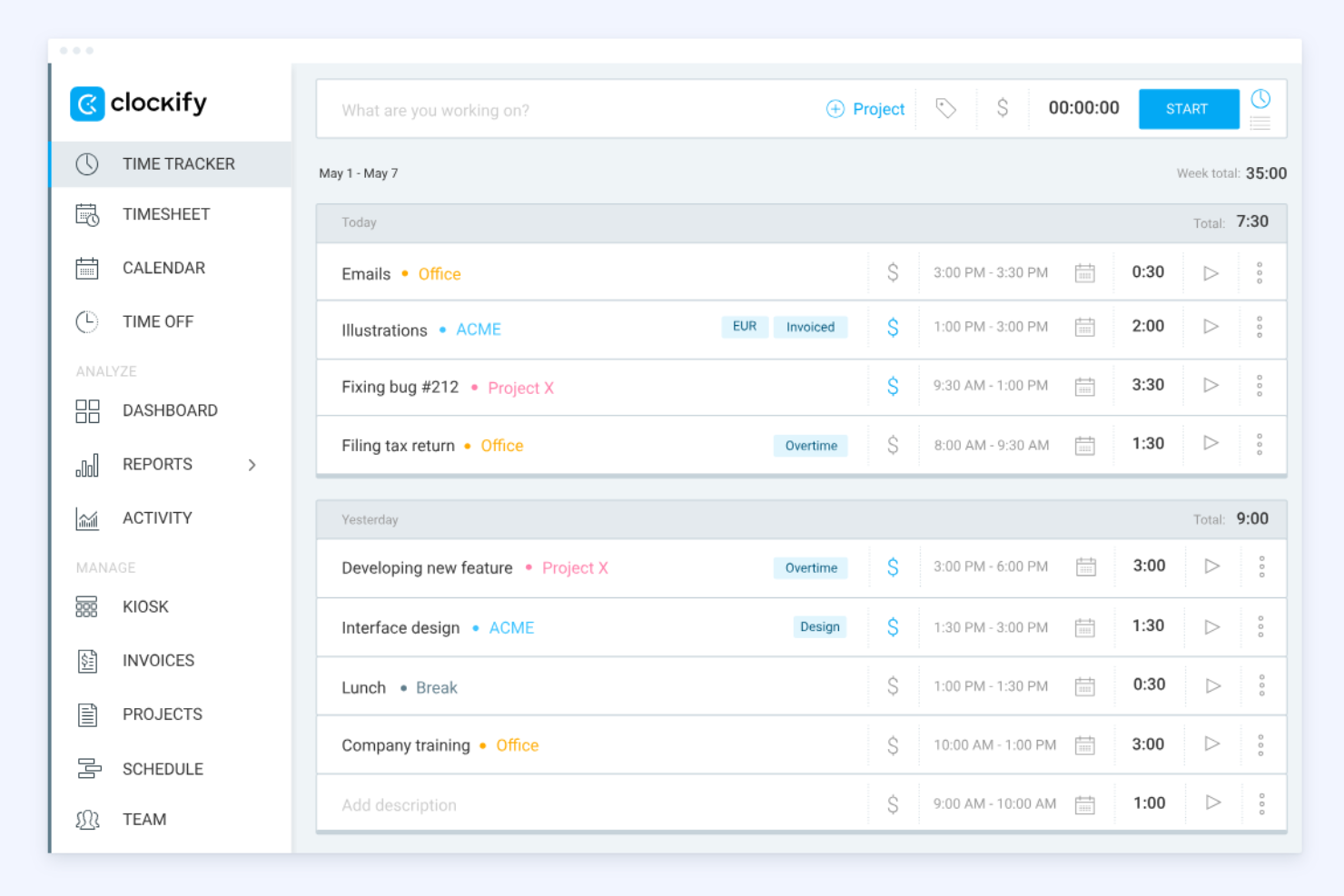
Clockify is a time tracking tool widely used by freelancers and businesses of all sizes. It helps users track billable hours and manage projects efficiently.
Why I picked Clockify: The browser extension support is a standout feature, letting you track time directly from your browser without switching web apps. It's perfect for those who work across multiple web applications and need quick access. Clockify offers detailed reporting tools to analyze time usage effectively. You can also set up reminders to help your team log their hours consistently.
Standout Features and Integrations:
Features include easy time tracking through timers and timesheets, plus project and billing tools that let you set rates and generate reports or invoices. It also supports team management with features such as attendance tracking, scheduling, and timesheet approvals.
Integrations include Trello, Asana, Atlassian Jira, Slack, and more.
Pros and Cons
Pros:
- Five users on free plan
- Mobile tracking capabilities
- Strong browser extension support
Cons:
- Limited project and task management
- No auto-scheduling or shift swaps

Best for payroll integration

QuickBooks Time is a time tracking solution tailored for businesses that need to efficiently manage employee hours and payroll processes. It serves small to medium-sized businesses looking to improve their time management and reduce payroll errors.
Why I picked QuickBooks Time: Payroll integration is a key feature, making it simple to sync employee hours directly with payroll systems. This helps reduce manual entry and minimizes errors in your payroll process. You can track time using GPS location, which is beneficial for teams on the move. Additionally, QuickBooks Time offers customizable alerts to ensure your team stays on schedule.
Standout Features and Integrations:
Features include flexible time tracking with mobile clock-ins, scheduling and shift management tools, and intuitive scheduling with powerful real-time reporting and payroll integrations to help manage teams and projects efficiently.
Integrations include Salesforce, Procore, ADP, Square Payroll, Paychex, Google Drive, and more.
Pros and Cons
Pros:
- No credit card needed for free trial
- GPS tracking for mobile teams
- Efficient payroll integration
Cons:
- Requires an active QuickBooks Online subscription
- Charges a monthly base fee

Timely
Best for AI time tracking
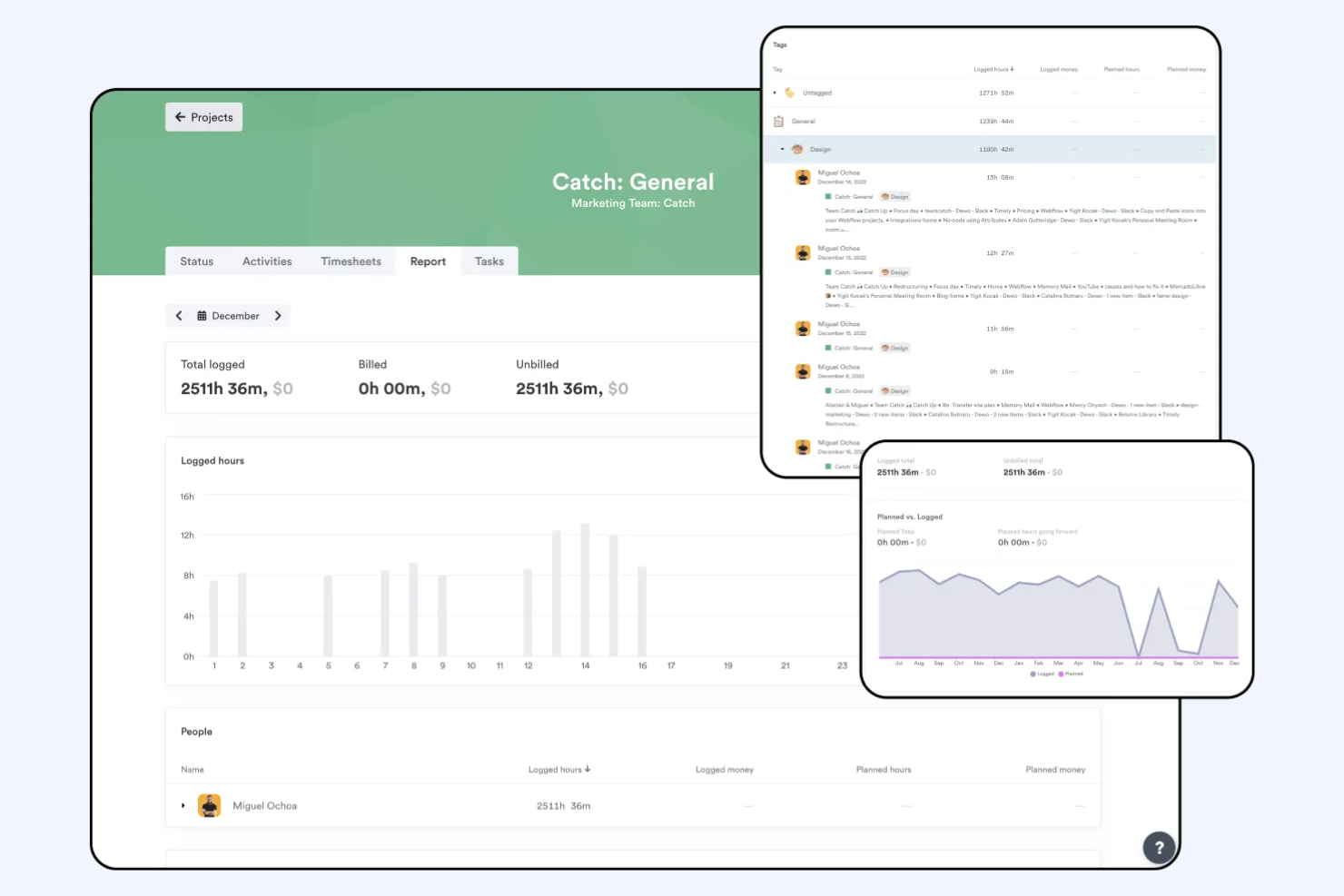
Timely is a time tracking app that uses AI to help teams and individuals accurately log work hours and manage productivity. It's aimed at businesses and professionals wanting to minimize manual time entry and maximize focus on their tasks.
Why I picked Timely: AI time tracking is a core feature, reducing the need for manual entries and ensuring accurate time logs. This helps your team focus more on work and less on tracking hours. Timely provides automatic activity tracking, capturing time spent on different tasks. You can also review project timelines to see where time is allocated and adjust as needed.
Standout Features and Integrations:
Features include AI-assisted timesheets and reporting, as well as a project dashboard to help you monitor project performance, utilization, and profitability. It also includes project and team management tools that aid collaboration and workload allocation. Additionally, Timely is a desktop app as well as a mobile app, increasing flexibility.
Integrations include Google Calendar, Outlook, Zapier, Asana, Trello, and more.
Pros and Cons
Pros:
- Occasional sync delays
- Automatic activity tracking
- Reduces manual time entry
- AI-driven time tracking
Cons:
- AI memory can be inaccurate

My Hours
Best for project-based tracking

My Hours is a time tracking tool tailored for project managers and small teams. It helps users track work hours and manage projects with precision.
Why I picked My Hours: Project-based tracking is a key feature, allowing you to organize tasks by project and client. This makes it easier for your team to allocate time efficiently. Additionally, My Hours provides detailed reports to help you track project performance and allows you to set and monitor budgets for each project.
Standout Features and Integrations:
Features include the ability to set hourly rates and project budgets, and to assign tasks to team members to organize and manage work efficiently. You can also create recurring tasks for ongoing work and export timesheets in multiple formats for easy reporting and billing.
Integrations include QuickBooks, Asana, Microsoft Teams, Google Calendar, and more.
Pros and Cons
Pros:
- Budget setting for projects
- Detailed performance reports
- Effective project-based tracking
Cons:
- No overtime and break tracker
- No automatic start/stop triggers

TimeCamp
Best for automatic time tracking

TimeCamp is a time tracking tool designed for freelancers and businesses seeking to automate their time management. It helps users monitor work hours and improve productivity with minimal manual input.
Why I picked TimeCamp: Automatic time tracking software is a standout feature, letting you capture time spent on tasks without constant manual entry. This ensures accurate data and saves your team time. You can categorize time entries by project, making it easy to see where efforts are focused. Additionally, TimeCamp offers visual timesheets to help you quickly review logged hours.
Standout Features and Integrations:
Features include manual and automatic time tracking, detailed reports and dashboards for analyzing productivity, team performance, and project costs, and reporting tools for performance insights.
Integrations include Trello, Asana, Slack, QuickBooks, Jira, and more.
Pros and Cons
Pros:
- Easy project categorization
- Visual timesheets available
- Automatic time tracking
Cons:
- Complicated time-off requests
- Geofence doesn't work

Best for productivity insights
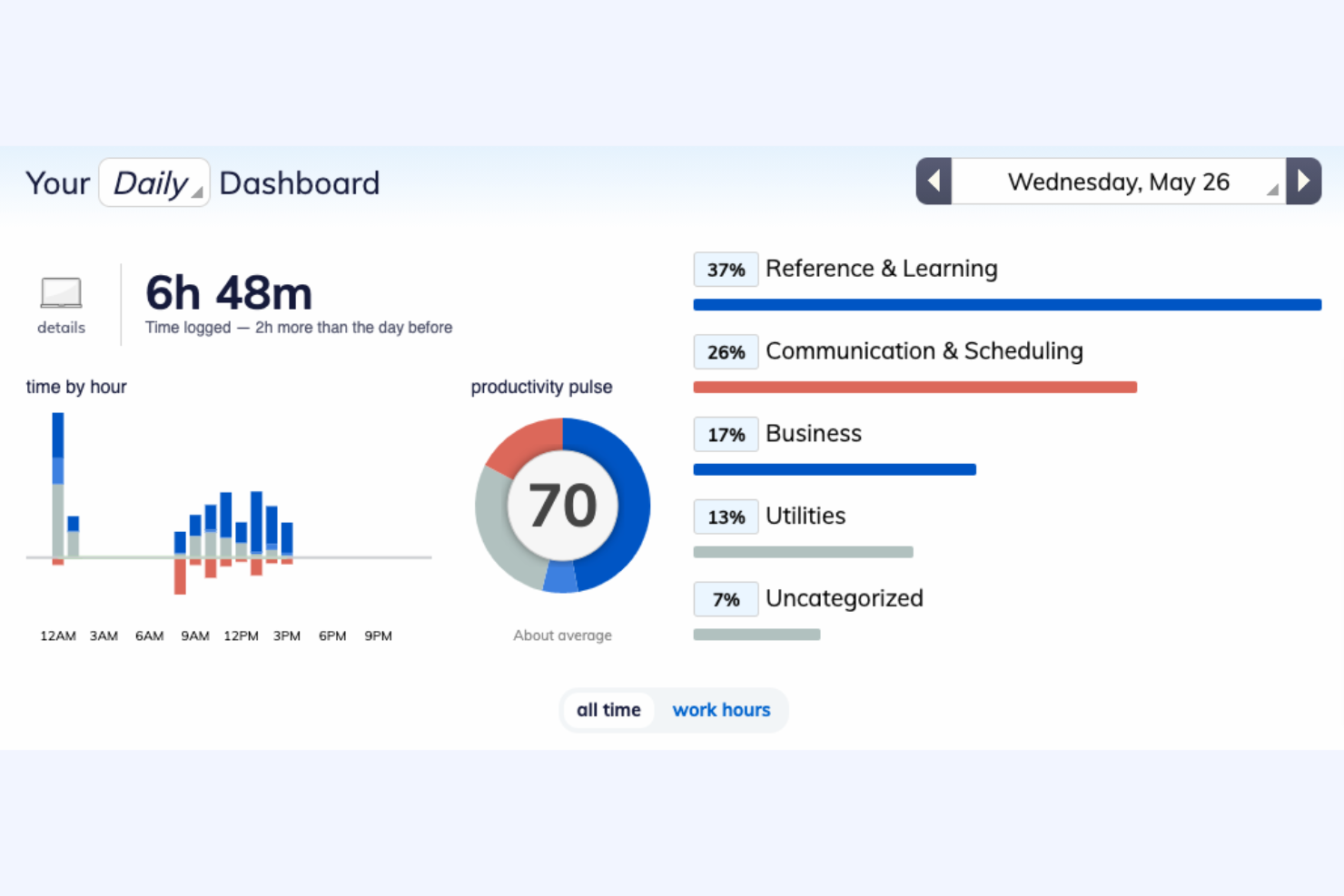
RescueTime is a time management tool that helps users understand their daily habits and improve productivity. It is designed for individuals and teams who want to track their focus and optimize work efficiency.
Why I picked RescueTime: Productivity insights are a key feature, allowing you to see detailed reports on how you spend your time. This helps you identify distractions and focus on what matters most. You can set goals to improve your work habits and receive notifications when you're off track. Additionally, RescueTime provides a distraction-free mode to help you concentrate better.
Standout Features and Integrations:
Features include activity tracking in the background across apps and websites, turning that time tracking data into detailed productivity insights and reports with goals and alerts. It also offers Focus Sessions to block distractions and advanced analytics to optimize your workflow.
Integrations include Slack, Google Calendar, Outlook, Trello, Asana, GitHub, and more.
Pros and Cons
Pros:
- Distraction-free mode
- Goal-setting capabilities
- Detailed productivity insights
Cons:
- No geolocation tracking
- Automatic categorization is imperfect

Best for remote teams
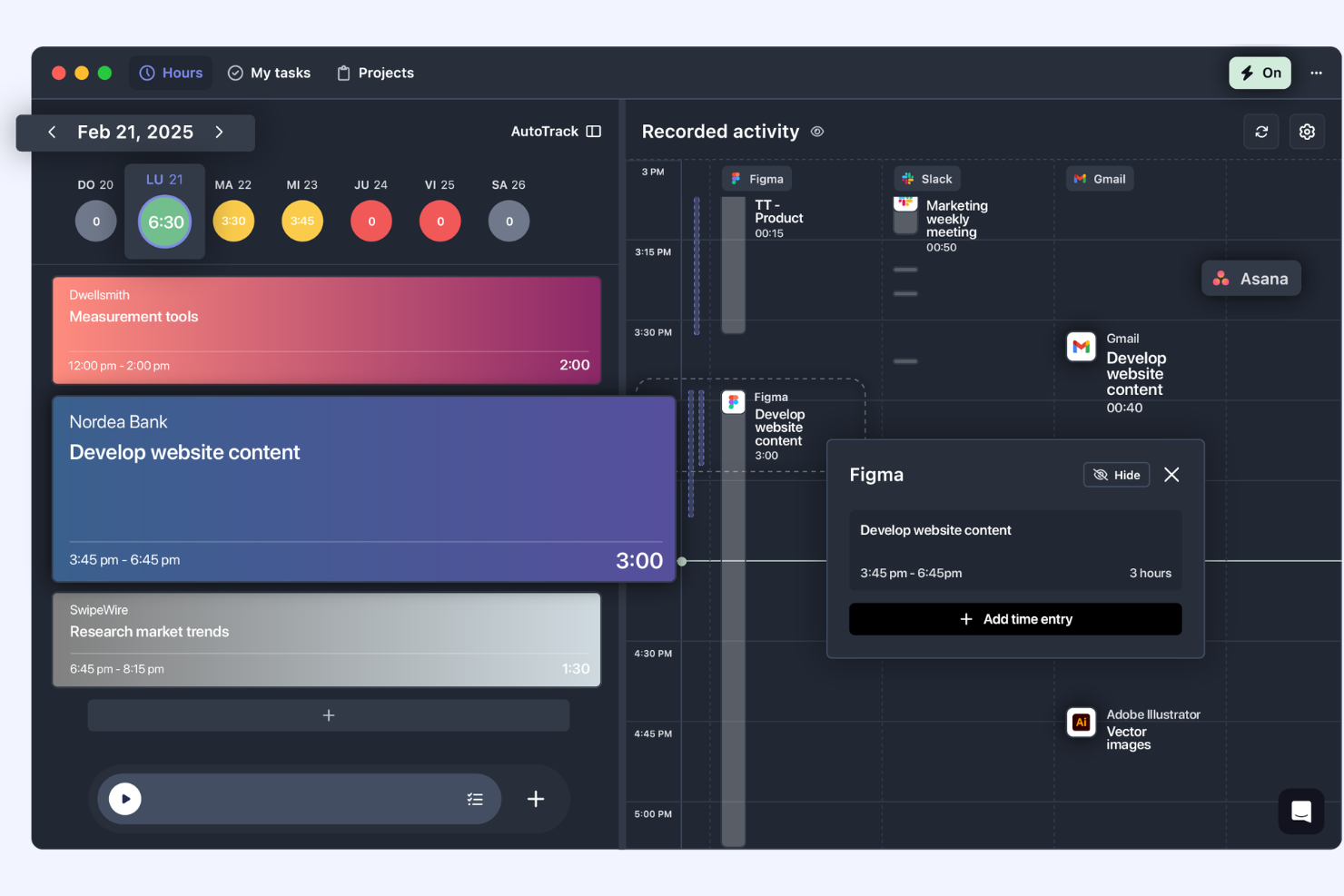
TrackingTime is a time management tool designed to help remote teams track work hours and manage projects more effectively. It caters to businesses and freelancers needing to keep track of billable hours and improve productivity across distributed teams.
Why I picked TrackingTime: Remote teams benefit from its ability to track time across different projects and clients smoothly. You can monitor team productivity and performance from anywhere. The tool offers real-time updates, making it easier to coordinate with your team. Additionally, TrackingTime provides detailed reports to help you analyze work patterns, adjust strategies, and save your team's time.
Standout Features and Integrations:
Features include real-time updates for employee monitoring, automatic background tracking to capture work accurately, the ability to manage employee time off and attendance, and set budgets and billing rates.
Integrations include Asana, Trello, Slack, Google Calendar, Microsoft Teams, and more.
Pros and Cons
Pros:
- Detailed reporting features
- Real-time performance updates
- Effective for remote team management
Cons:
- No PTO tracking
- No offline mode

Best for HR features in time tracking
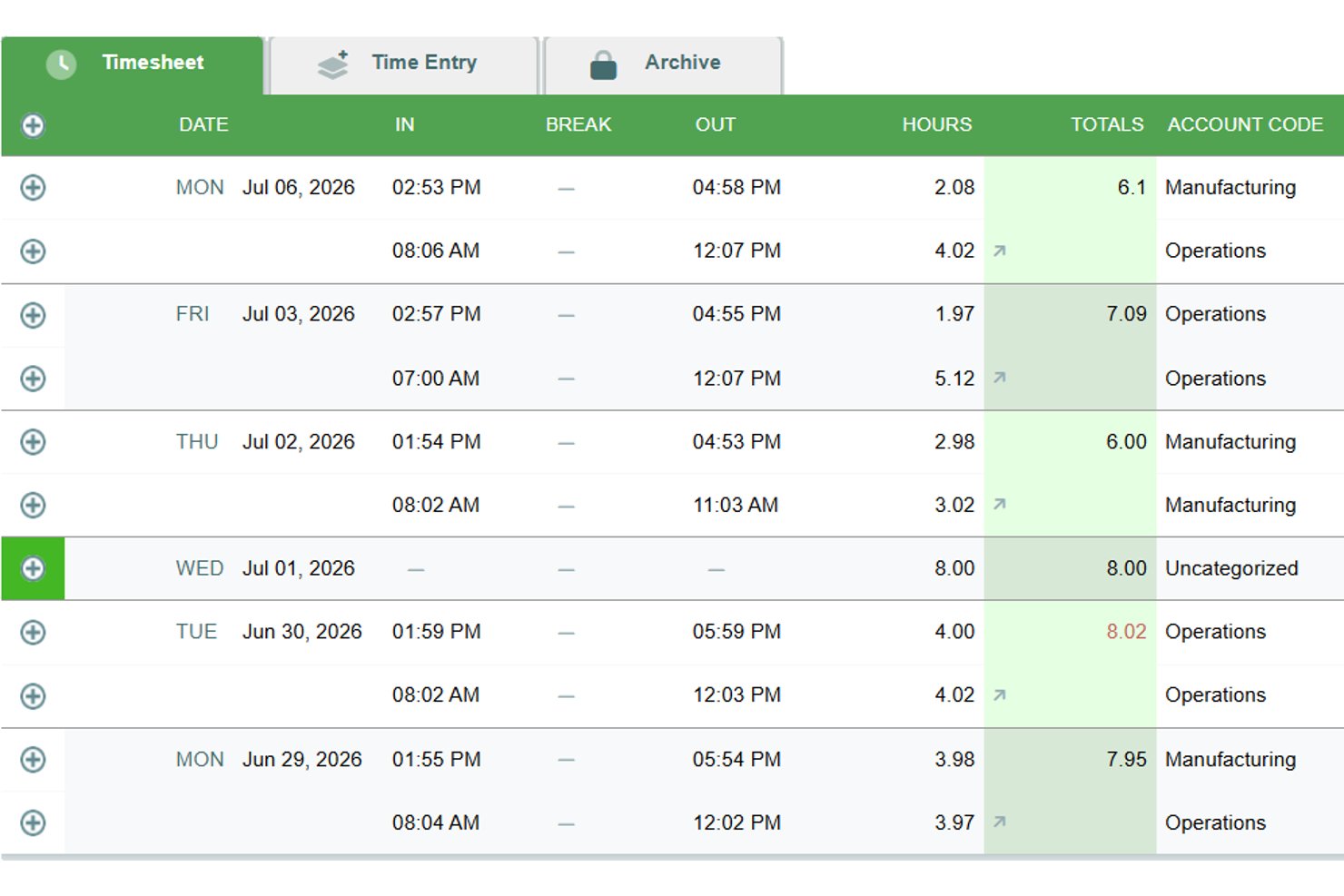
Timesheets.com is a browser-based time tracking platform that combines payroll timesheets, billable hour logging, project-level job costing, scheduling, expense tracking, and an HR document suite in one tool.
Who Is Timesheets.com Best For?
Timesheets.com is a strong fit for small teams that need time tracking, scheduling, and HR document management under one roof.
Why I Picked Timesheets.com
I've included Timesheets.com in my top picks because its HR feature set goes well beyond what most simple time trackers offer. The built-in HR document suite handles W-4s, I-9s, performance reviews, and disciplinary templates, all tied directly to the same platform where employees log hours. I also like that PTO accrual rules, including caps, rollover, and use-it-or-lose-it policies, are configurable without a separate HR tool.
Timesheets.com Key Features
- Multi-level billing rates: Set distinct bill and cost rates at the employee, project, or task level to support accurate client invoicing and job costing.
- Simultaneous project timers: Run multiple live timers at once, making it easy to switch between tasks without losing tracked time.
- Payroll and accounting exports: Push timesheet data directly to QuickBooks, Gusto, ADP, Paychex, and other payroll systems via built-in exports.
- Mileage and expense tracking: Log mileage with odometer images and submit expenses with receipt photos directly alongside time entries.
Timesheets.com Integrations
Timesheets.com offers native integrations with QuickBooks Online, QuickBooks Desktop, Gusto, ADP, Paychex, SurePayroll, Sage, Ceridian, Microsoft Dynamics, and Heartland. Its API supports custom integrations, but it doesn’t offer native project management tool integrations.
Pros and Cons
Pros:
- Multi-level billable rates support job costing
- Configurable PTO accrual rules
- HR documents alongside time tracking
Cons:
- Approval-heavy edits slow corrections
- Browser-only mobile experience feels dated

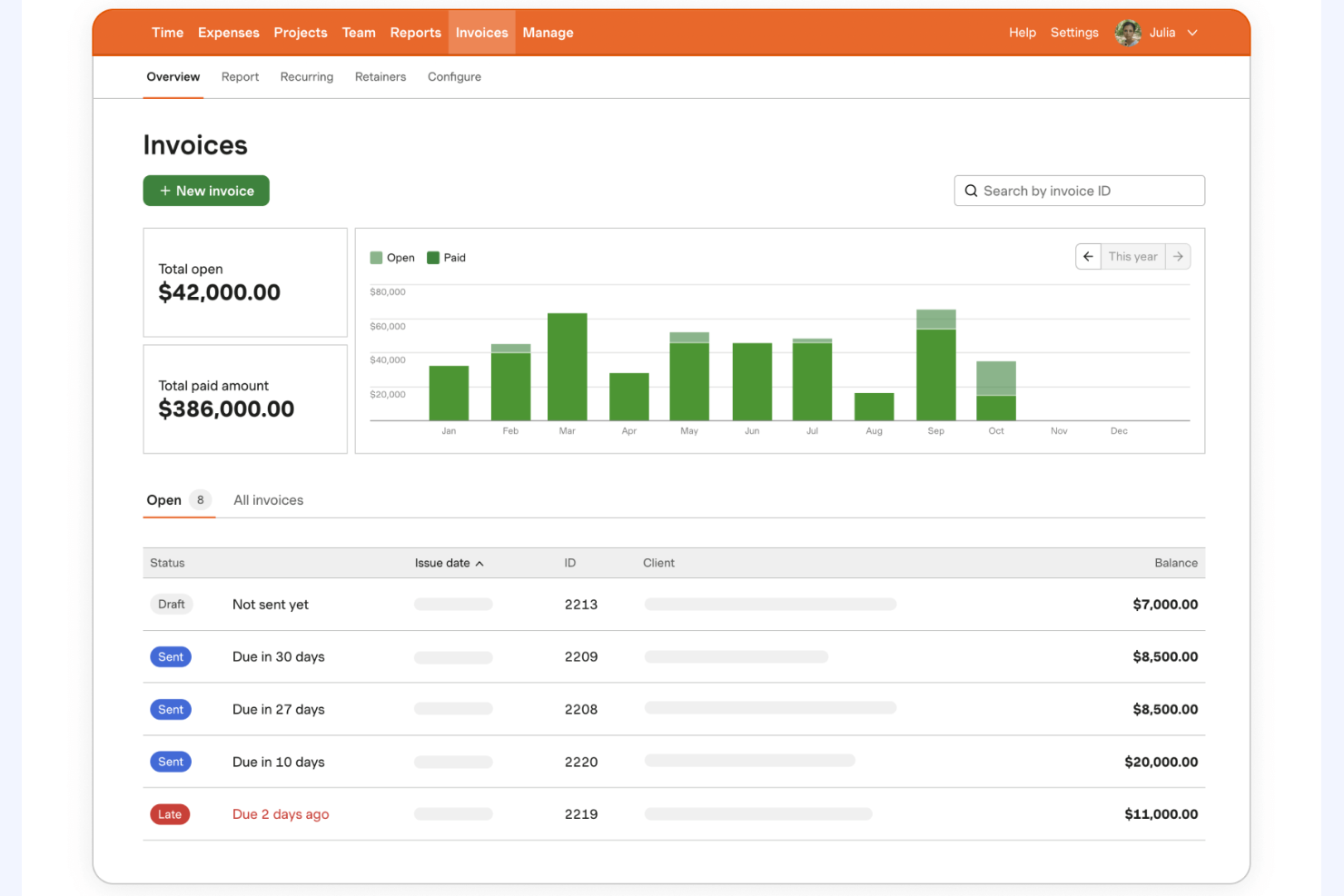
Harvest is a time tracking and expense management tool designed for small to medium-sized businesses. It helps users track billable hours and manage project budgets efficiently.
Why I picked Harvest: Expense tracking is a highlight of Harvest, allowing you to capture and manage costs alongside your time entries. This feature is particularly useful for teams needing detailed financial oversight. You can attach receipts to expenses and generate detailed reports for better budget management. Additionally, Harvest offers invoicing capabilities to streamline your billing process.
Standout Features and Integrations:
Features include user-friendly timers and timesheets that work across web and mobile. It also generates professional invoices from tracked time and expenses and provides visual reporting and analytics so you can see project budgets, team capacity, and profitability at a glance.
Integrations include QuickBooks, Xero, Asana, Slack, Trello, Basecamp, and more.
Pros and Cons
Pros:
- Invoicing capabilities included
- In-depth budget management
- Effective expense tracking
Cons:
- Basic project management features
- Notifications are easily missed

Paymo
Best for project invoicing

Inne proste narzędzia do rejestrowania czasu
Oto kilka dodatkowych prostych narzędzi do rejestrowania czasu, które nie trafiły na moją listę, ale nadal warto się z nimi zapoznać:
- Buddy Punch
For employee scheduling
- Jibble
For attendance monitoring
- Scoro
For all-in-one solutions
- ClockShark
For field teams
- Deputy
For shift planning
- Memtime
For memory aids
- Chrometa
For passive time tracking
- ATracker
For mobile users
- EARLY
For focus tracking
- Simple Time Tracker
For daily time logs
- TimeTrace
For freelancers
- Replicon
For compliance tracking
- Easy Time Clock
For small businesses


How I Evaluate Simple Time Tracker
I split my evaluation into two layers: baseline must-haves (like a one-click timer and billable tracking for client work) and the differentiators that make a tool the right fit for a specific team.
Core Functionality (Table Stakes For This List)
When I'm selecting tools for my list, I rank each one on a scale from 0 (does not offer the functionality) to 5 (excels in this area) for each core functionality listed below. Then, I calculate the tool's total score into a percentage. Each tool needs to achieve a minimum total score of 65% to be considered for inclusion.
- One-Click Timer: I check whether you can start tracking immediately from the main interface—no digging through menus or configuring fields before the clock starts running.
- Manual Time Entry: Teams forget to hit start. I look for flexible backfilling options, like adding entries by duration or start/end time for any past date.
- Project & Task Assignment: Every entry should be taggable to a client, project, or task so time doesn't end up in an unassigned black hole at month's end.
- Timesheet View: I evaluate whether tracked time rolls up into a clean daily or weekly grid that's easy to review, edit, and submit before a reporting deadline.
- Time Reporting & Export: Pulling a CSV of last month's hours by project for a client invoice is a baseline scenario I look for in every tool I consider.
- Billable Hours Tracking: Marking entries as billable with assigned rates matters—especially for agency leads juggling multiple client retainers at different price points.
Once I have a list of tools that meet this criteria, I consider what sets each platform apart.
Differentiating Factors (What Sets Vendors Apart)
Here's how I compare and contrast different vendors:
Standout Features
Calendar sync is a big one—tools that pull meetings from Google Calendar or Outlook and convert them into time entries save project managers from logging half their day manually. I also look for idle detection and smart reminders, which catch forgotten timers before they turn into guesswork. Automatic time tracking takes this further by logging app and document activity in the background, which is especially useful for consultants who shift between tasks frequently.
Beyond Features
A free tier that actually works matters here—freelance consultants and small teams need to track time from day one without budget approval. I also evaluate how quickly someone can go from signup to running their first timer. The best simple trackers require almost zero configuration. Integrations with tools like Jira, Asana, and Trello are worth checking too, since embedding a timer directly inside your PM tool means fewer context switches and more accurate entries across distributed teams.
Jak wybrać proste narzędzie do rejestrowania czasu
Łatwo ugrzęznąć w długich listach funkcji i skomplikowanych strukturach cenowych. Aby pomóc Ci zachować koncentrację podczas przechodzenia przez skomplikowany proces wyboru oprogramowania, przygotowałem listę czynników, o których warto pamiętać:
| Czynnik | Na co zwrócić uwagę |
| Skalowalność | Czy narzędzie może rozwijać się wraz z Twoim zespołem? Sprawdź, czy obsługuje rosnącą liczbę użytkowników i projektów bez pogorszenia wydajności. |
| Integracje | Czy łączy się z używanymi przez Ciebie narzędziami? Sprawdź zgodność z platformami do zarządzania projektami, księgowości i komunikacji, aby usprawnić przepływy pracy. |
| Możliwość dostosowania | Czy możesz dostosować narzędzie do swoich potrzeb? Poszukaj opcji modyfikowania pulpitów, raportów i uprawnień użytkowników, aby dopasować je do procesów stosowanych w Twoim zespole. |
| Łatwość obsługi | Czy interfejs jest intuicyjny? Upewnij się, że członkowie zespołu o różnym poziomie zaawansowania technologicznego mogą korzystać z narzędzia bez rozbudowanych szkoleń i niepotrzebnych trudności. |
| Wdrożenie i rozpoczęcie pracy | Jak szybko możesz rozpocząć pracę? Oceń proces konfiguracji, dostępne materiały szkoleniowe oraz wsparcie na początkowym etapie wdrożenia. |
| Koszt | Czy narzędzie mieści się w Twoim budżecie? Porównaj plany cenowe i weź pod uwagę całkowity koszt posiadania, w tym dodatkowe opłaty za funkcje lub wsparcie. |
| Zabezpieczenia | Jak bezpieczne są Twoje dane? Zwróć uwagę na standardy szyfrowania, procedury tworzenia kopii zapasowych danych oraz zgodność z przepisami dotyczącymi prywatności, takimi jak RODO. |
| Dostępność wsparcia | Czy możesz uzyskać pomoc, gdy jej potrzebujesz? Sprawdź, czy dostawca oferuje całodobowe wsparcie, czat na żywo lub dedykowanego opiekuna klienta. |
Czym jest prosty rejestrator czasu?
Prosty rejestrator czasu to narzędzie, które pomaga użytkownikom skutecznie rejestrować i zarządzać godzinami pracy. Z narzędzi tych korzystają profesjonaliści, tacy jak freelancerzy, kierownicy projektów i zespoły zdalne, aby zwiększać produktywność i śledzić godziny podlegające rozliczeniu. Funkcje takie jak rejestrowanie czasu, raportowanie i zarządzanie projektami pomagają użytkownikom organizować zadania i optymalizować przepływ pracy. Ogólnie rzecz biorąc, narzędzia te zapewniają przejrzystość w zakresie alokacji czasu i poprawiają zarządzanie czasem.
Funkcje
Wybierając prosty rejestrator czasu, zwróć uwagę na następujące kluczowe funkcje:
- Rejestrowanie czasu: Automatyczne lub ręczne rejestrowanie godzin pracy w celu zapewnienia dokładnego śledzenia czasu podlegającego rozliczeniu.
- Raportowanie: Generowanie szczegółowych raportów umożliwiających analizę produktywności i alokacji czasu w poszczególnych projektach.
- Integracja z zarządzaniem projektami: Synchronizacja z istniejącymi narzędziami do zarządzania projektami w celu usprawnienia przepływu pracy i zarządzania zadaniami.
- Dostęp mobilny: Śledzenie czasu w podróży za pomocą aplikacji mobilnych, zapewniające elastyczność członkom zespołu pracującym zdalnie lub przemieszczającym się.
- Rozliczenia i fakturowanie: Tworzenie faktur na podstawie zarejestrowanego czasu w celu uproszczenia procesu rozliczeń z klientami.
- Konfigurowalne alerty: Ustawianie przypomnień o rejestrowaniu czasu lub powiadamianie użytkowników o zbliżających się terminach, aby projekty przebiegały zgodnie z planem.
- Śledzenie lokalizacji GPS: Monitorowanie lokalizacji zespołów mobilnych w celu zapewnienia dokładnego rejestrowania czasu pracy w terenie.
- Wizualne karty czasu pracy: Zapewnianie przejrzystego zestawienia zarejestrowanych godzin, aby użytkownicy mogli szybko ocenić sposób wykorzystania czasu.
- Automatyczne śledzenie aktywności: Rejestrowanie czasu poświęconego na zadania bez ręcznego wprowadzania danych w celu zminimalizowania błędów i oszczędności czasu.
- Zabezpieczenia: Ochrona danych użytkowników za pomocą szyfrowania i zgodności z przepisami dotyczącymi prywatności, takimi jak GDPR.
Korzyści
Wdrożenie prostego rejestratora czasu zapewnia zespołowi i firmie wiele korzyści. Oto kilka z nich:
- Większa produktywność: Śledząc godziny pracy i aktywności, zespoły mogą identyfikować zadania pochłaniające czas i koncentrować się na tym, co naprawdę ma znaczenie.
- Dokładne rozliczenia: Funkcje automatycznego rejestrowania czasu i fakturowania pomagają zapewnić prawidłowe rozliczanie klientów za przepracowane godziny.
- Lepsze zarządzanie projektami: Integracja z narzędziami do zarządzania projektami umożliwia skuteczną koordynację zadań i zarządzanie terminami.
- Większa odpowiedzialność: Śledzenie czasu pracy zwiększa przejrzystość i odpowiedzialność członków zespołu, zachęcając ich do skupienia się na zadaniach.
- Świadome podejmowanie decyzji: Szczegółowe raporty i analizy dostarczają informacji na temat alokacji czasu, pomagając menedżerom podejmować decyzje oparte na danych.
- Elastyczne formy pracy: Dostęp mobilny i śledzenie GPS wspierają pracę zdalną oraz zespoły pracujące w terenie, umożliwiając im rejestrowanie czasu z dowolnej lokalizacji.
- Oszczędności: Dzięki optymalizacji zarządzania czasem firmy mogą ograniczyć koszty nadgodzin i poprawić ogólną efektywność.
Koszty i ceny
Wybór prostego rejestratora czasu wymaga zrozumienia różnych dostępnych modeli cenowych i planów. Koszty różnią się w zależności od funkcji, wielkości zespołu, dodatków i innych czynników. Poniższa tabela przedstawia podsumowanie typowych planów, ich średnich cen oraz standardowych funkcji dostępnych w prostych rozwiązaniach do rejestrowania czasu:
Tabela porównawcza planów dla prostych rejestratorów czasu
| Rodzaj planu | Średnia cena | Typowe funkcje |
| Plan bezpłatny | $0 | Podstawowe śledzenie czasu, ograniczona liczba projektów i podstawowe raportowanie. |
| Plan osobisty | $2.99-$12/miesiąc | Śledzenie czasu, integracja z zarządzaniem projektami, dostęp mobilny i podstawowe raportowanie. |
| Plan biznesowy | $15-$30/miesiąc | Zaawansowane raportowanie, fakturowanie, konfigurowalne alerty i priorytetowa pomoc. |
| Plan dla przedsiębiorstw | $30-$50/miesiąc | Niestandardowe integracje, dedykowany opiekun klienta, zaawansowane funkcje bezpieczeństwa i rozbudowane analizy. |
Najczęściej zadawane pytania dotyczące prostego rejestrowania czasu
Oto odpowiedzi na często zadawane pytania dotyczące prostych narzędzi do rejestrowania czasu:
Jak wybrać odpowiednie proste narzędzie do rejestrowania czasu dla mojego zespołu?
Zacznij od oceny potrzeb swojego zespołu, takich jak integracja z zarządzaniem projektami lub dostęp z urządzeń mobilnych. Weź pod uwagę wielkość zespołu i zakres potrzebnych raportów. Przetestuj kilka narzędzi w ramach bezpłatnych wersji próbnych, aby sprawdzić, który interfejs preferuje Twój zespół. Nie zapomnij porównać planów cenowych na podstawie swojego budżetu.
Czy proste narzędzia do rejestrowania czasu można zintegrować z obecnym oprogramowaniem?
Tak, wiele prostych narzędzi do rejestrowania czasu oferuje integracje z popularnymi narzędziami, takimi jak oprogramowanie do zarządzania projektami i księgowości. Sprawdź stronę internetową narzędzia, aby zobaczyć listę obsługiwanych integracji. Jeśli nie integruje się ono z Twoim oprogramowaniem, rozważ skorzystanie z narzędzia takiego jak Zapier w celu utworzenia niestandardowych połączeń.
Czy bezpieczeństwo danych jest problemem w przypadku prostych narzędzi do rejestrowania czasu?
Tak, bezpieczeństwo danych powinno być priorytetem. Poszukuj narzędzi oferujących szyfrowanie, regularne tworzenie kopii zapasowych danych oraz zgodność z przepisami dotyczącymi prywatności, takimi jak RODO. Zapytaj dostawców o stosowane przez nich środki bezpieczeństwa i przeczytaj opinie, aby dowiedzieć się, jak chronią dane.
Czy proste narzędzia do rejestrowania czasu działają offline?
Niektóre proste narzędzia do rejestrowania czasu oferują funkcję pracy offline, umożliwiając rejestrowanie godzin bez połączenia z internetem. Po ponownym połączeniu dane są automatycznie synchronizowane. Sprawdź listę funkcji narzędzia, aby upewnić się, że dostęp offline jest dostępny, zwłaszcza jeśli Twój zespół pracuje w miejscach o ograniczonej łączności.
Ile trwa wdrożenie prostego narzędzia do rejestrowania czasu?
Czas wdrożenia zależy od narzędzia i wielkości Twojego zespołu. Niektóre narzędzia oferują szybką konfigurację z interaktywnymi prezentacjami produktu i szablonami. Większość dostawców udostępnia materiały szkoleniowe, które ułatwiają rozpoczęcie pracy. Pełne wdrożenie, obejmujące przeszkolenie zespołu, zajmuje zwykle od kilku dni do tygodnia.