Jeg testet 10 rapporteringsverktøy: Mine toppvalg for 2026

10 Liste over de beste rapporteringsverktøyene


Det finnes tilsynelatende utallige rapporteringsverktøy, så det er vanskelig å finne ut hvilket som passer best for deg. Du ønsker å dele data med teamet ditt på den mest tilgjengelige og nøyaktige måten som mulig, men må finne ut hvilket verktøy som passer best. Jeg hjelper deg!
I dette innlegget gjør jeg ting enkelt. Med utgangspunkt i min erfaring med en rekke ulike rapporteringsverktøy for prosjektstyring, fra store prosjekter til forretningsvekst, gir jeg deg denne kortlisten over de beste rapporteringsverktøyene.
Hvorfor du kan stole på våre programvareanbefalinger
Teamet vårt har testet og anmeldt programvare siden 2012. Vi er selv prosjektledere, så vi vet hvor vanskelig og hvor viktig det er å velge riktig programvare.
I denne guiden har vi vurdert verktøyene gjennom praktisk testing og uavhengig research og gitt dem poeng ut fra våre utvelgelseskriterier. Vi bygger også på innsikt fra ledende eksperter i bransjen og erfarne prosjektledere.
Anmeldelsene våre bygger på vår egen redaksjonelle vurdering. De er ikke et salgsargument.
Ekspertanmeldere:
Sammenligningstabell for rapporteringsverktøy
Denne sammenligningstabellen oppsummerer prisopplysningene for mine beste utvalgte rapporteringsverktøy:
| Tool | Best For | Trial Info | Price | ||
|---|---|---|---|---|---|
| 1 | Best reporting tool for easy-to-read charts | 15-day free trial | From $30/month (billed annually) | Website | |
| 2 | Best for automated reporting without an analyst | Free plan available | From $29/month | Website | |
| 3 | Best reporting software for small business accounting | Free plan + 30-day free trial available | From $38/month | Website | |
| 4 | Unlimited users, data sources, and integrations in all plans. | 14-day free trial + free demo available | From $44/month (billed annually) | Website | |
| 5 | Best reporting tool for agile teams | Free trial + free plan + free demo available | From $13/user/month (billed annually) | Website | |
| 6 | Best reporting dashboards that promote collaboration | Free plan available | From $7/user/month (billed annually) | Website | |
| 7 | Best for easy PowerPoint reports | Free plan available | Pricing upon request | Website | |
| 8 | Best reporting software for embedded analytics | 14-day free trial | Pricing upon request | Website | |
| 9 | Best for quickly generating digital marketing dashboards and reports | 3 days free trial | From $14.50/month | Website | |
| 10 | Best for BI tool integration | Free demo available | Pricing upon request | Website |


Oversikt over de beste rapporteringsverktøyene
Nedenfor finner du en beskrivelse av hvert verktøy, hvordan det håndterer rapportgenerering, og hvorfor det ble valgt ut til denne listen. Jeg har lagt til skjermbilder av verktøyet, slik at du får et inntrykk av hvordan det ser ut fra en brukers perspektiv.

Best reporting tool for easy-to-read charts
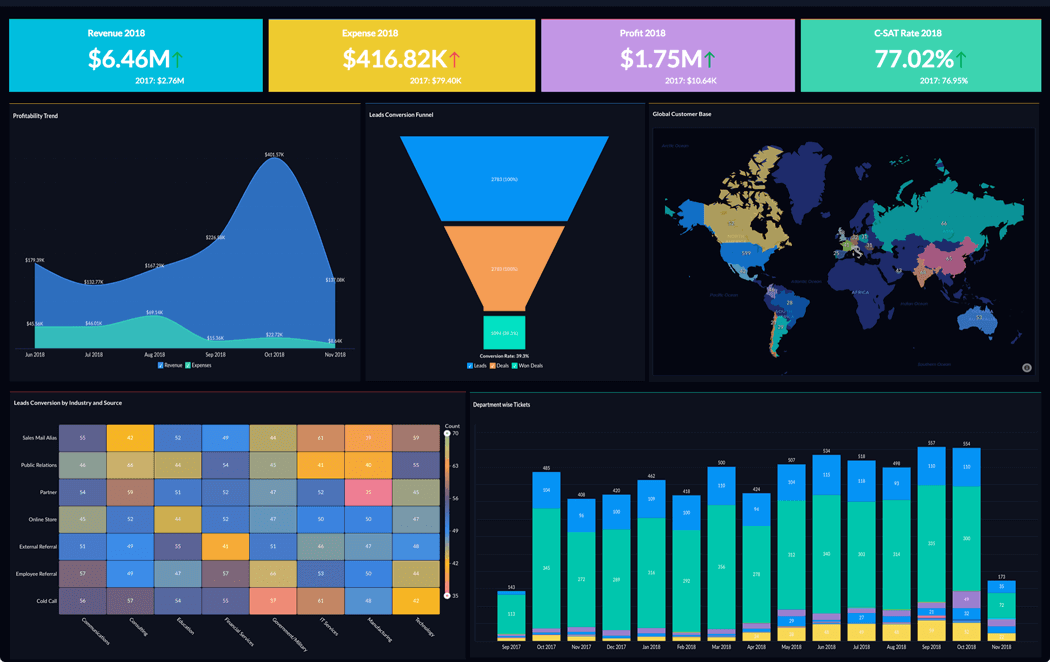
Zoho Analytics is an analytics and reporting tool to help you convert raw business data into comprehensive reports and dashboards. You can use it to collect, enrich, and filter data to make it easier to analyze. It has an AI assistant feature to help you generate insights, spot patterns, and forecast trends. Zoho Analytics has a mobile app version that works on iOS and Android.
Zoho Analytics lets you use charts, widgets, and pivot tables ensuring you can present data in the best possible way. Zoho Analytics allows you to collaborate with other users to build and share custom reports and dashboards. Its user permission settings give you control over who can view and edit your data according to need and/or authority.
Zoho Analytics cost starts at $24/month/up to 2 users. They offer a 15-day free trial.
New Product Updates from Zoho Analytics

Zoho Analytics Adds Exogenous Variables to Multivariate Forecasting
Zoho Analytics introduces exogenous variables for multivariate forecasting using the VARX model. This helps forecasts account for external drivers such as marketing spend, discounts, and seasonality. For more information, visit Zoho Analytics’ official site.
 .
.
Signara
Best for automated reporting without an analyst
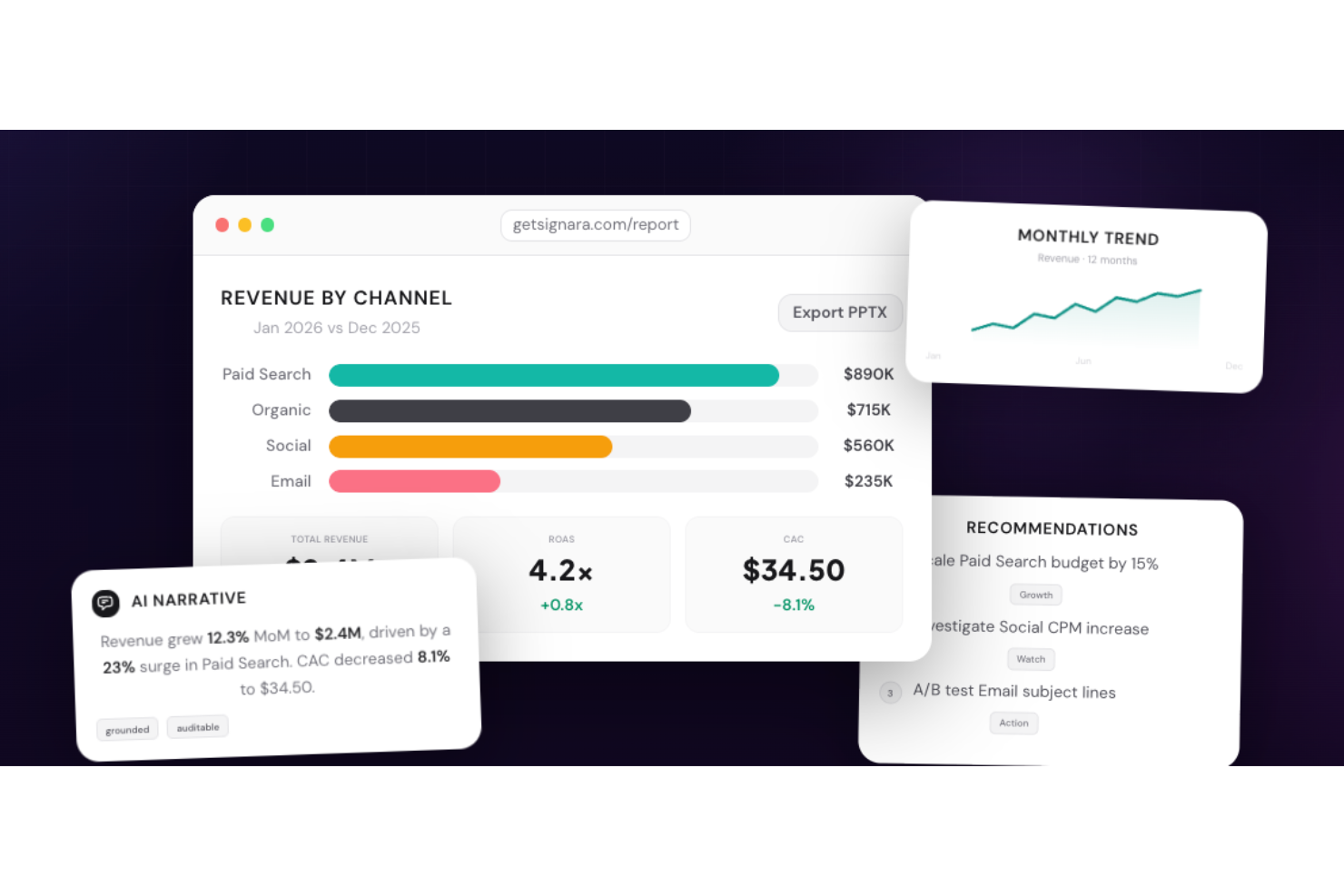
Signara is an AI-powered analytics reporting tool for marketing teams that automatically generates interactive dashboards and PPTX reports—complete with KPI calculations, driver analysis, and AI-written narratives—directly from connected data sources.
Who Is Signara Best For?
Signara is a good fit for marketing analysts and performance teams who need automated, presentation-ready reports without manual data wrangling.
Why I Picked Signara
I've included Signara in my top picks because its interactive dashboards make it easy to display any marketing KPI set in a format that's genuinely ready to share publicly. I can configure which metrics surface, how channels are grouped, and how period comparisons appear, so every display reflects the exact data story I want to tell. The AI-generated narratives also add context automatically, explaining what changed and why, which means public-facing dashboards don't just show numbers.
Signara Key Features
- PPTX report export: Generate a fully formatted, presentation-ready PowerPoint deck directly from your dashboard output in one click.
- Driver analysis: Signara's agent layer identifies what moved, why, and by how much across your marketing channels before the report is ever built.
- Deterministic KPI engine: Every metric is calculated using locked, auditable formulas in code, so no KPI is ever guessed or approximated.
- AI-generated recommendations: Alongside narrative summaries, Signara surfaces prioritized next steps, such as scaling a channel budget or investigating a CPM spike.
Signara Integrations
Signara offers native integrations with HubSpot, Snowflake, BigQuery, Databricks, PostgreSQL, MySQL, Google Sheets, and Google Analytics (GA4), and also supports drag-and-drop uploads for Excel and CSV files. An API is available for connecting additional data sources.
Pros and Cons
Pros:
- Reports generate without analyst involvement
- No raw data stored on platform
- AI narratives explain what changed and why
Cons:
- No mobile app for on-the-go access
- Limited to marketing and finance use cases

Best reporting software for small business accounting
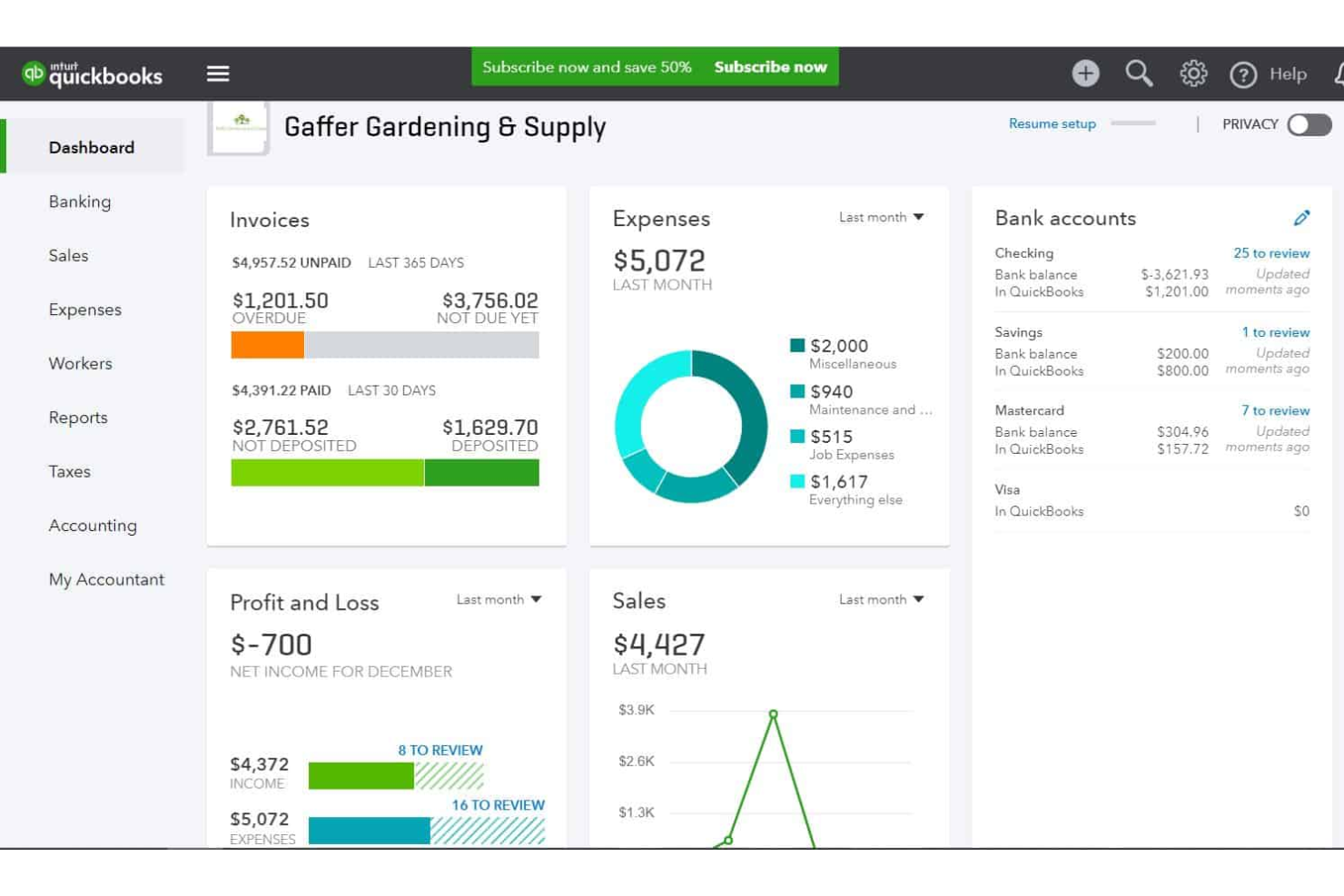
QuickBooks is an accounting solution that helps small businesses track their expenses, manage their invoicing, and report on their financials. The software tracks your transaction details, helping you keep accurate records. Based on the finances you track in the system, you can view how much you're spending in each expense category from your dashboard.
The platform offers a simple, low-cost expense reporting solution for small- and medium-sized businesses. Receipts are sorted automatically, and you can reclassify transactions in bulk. You can also generate invoices, and even set up recurring invoices for repeat clients or customers.
QuickBooks Online integrates with over 450 business apps like Square, Stripe, Paychex, Insightly CRM, Mailchimp, Shopify, eBay, BigCommerce, Magento, Squarespace, Etsy, Katana, and ProjectWorks. Pricing starts from $30 per month, and a 30-day free trial is available.
New Product Updates from QuickBooks Online

QuickBooks Adds Vendor Credits, Payroll Uploads, and Job Costing Controls
QuickBooks adds vendor credits in Bill Pay, spreadsheet payroll uploads, and service-item tracking for employee hours. These updates help teams manage payments, prepare payroll, and allocate labor costs with less manual work. For more information, visit QuickBooks Online’s official site.

DashThis
Unlimited users, data sources, and integrations in all plans.

DashThis is an automated marketing reporting tool that lets you bring multiple platforms into one, co-create powerful dashboards, and automate their delivery. The features included in the product can help anyone from freelancers to world-renowned agencies like DDB.
The first thing I immediately liked about this product is that all their plans have unlimited users, data sources, and integrations. The difference comes in the number of dashboards you can create and the level of customization in white-label reports.
Since reporting can be one of our most time-consuming activities, DashThis has prepared a bunch of templates that help you get started right away. You just have to select the template you prefer, plug in your data, and run the report on your preferred time periods. Once you find your perfect report, you can clone it, export it, or generate and share it automatically via email to your clients every month.
DashThis has over 34 useful integrations that will help you bring all your marketing data into one place and extract comprehensive reports. These integrations include social media platforms, Google Analytics, SEMrush, Mailchimp, Perfect Audience, TikTok Ads, and more.
DashThis starts at $38/month (paid annually) for 3 dashboards and comes with a free 15-day trial (10 dashboards).
New Product Updates from DashThis
DashThis Adds Spotify Ads Integration
DashThis adds a Spotify Ads integration for bringing campaign spend, reach, impressions, clicks, and video views into dashboards. This helps teams report on audio campaigns alongside other advertising channels. For more information, visit DashThis’s official site.
 .
.
Best reporting tool for agile teams

MeisterTask is a task and project management tool designed primarily for agile teams. The tool offers a variety of reporting features for monitoring team productivity, as well as custom dashboards and the ability for team members to create personal agendas organized to fit their way of working. MeisterTask is intuitive and simple to use, with a clean interface
Users can view progress reports, time reports, and safety reports. View and download reports showing tasks that are completed, overdue, or upcoming. Project managers and team leads can also get reports on how much time team members are tracking, as well as reports related to data security, privacy, and compliance.
MeisterTask integrates with sister software MindMeister as well as Gmail, Outlook, Slack, Microsoft Teams, GitHub, Zendesk, Google Drive, and more.
MeisterTask costs from $8.25/user/month. They also offer a freemium plan.

ClickUp
Best reporting dashboards that promote collaboration

ClickUp is a project management software that is popular amongst DPMs. Why? Because of the range of features that it offers in one tool. ClickUp has reporting features that you will be amazed by because of its customization and how information-rich they can be.
Normally, we are used to dashboards that only display graphs. However, ClickUp’s dashboards are widget-based and can pull information from anywhere in your projects. For example, you can add a text block to display lists or a chat window to start a conversation over a specific graph.
The best part is that you can rearrange all these elements according to your needs with a simple drag and drop.
ClickUp offers native integrations with Slack, G Suite, Dropbox, and many more tools, as well as over 1,000+ integrations through Zapier.
ClickUp is free with limited storage for an unlimited number of users. Paid plans start at $5/user/month and offer a free trial.
New Product Updates from ClickUp
ClickUp Adds Meetings Hub, Super Agent Templates, and ZoomInfo Integration
ClickUp adds a searchable Meetings Hub, new ways to clone and template Super Agents, and a ZoomInfo integration through the App Center. These updates improve meeting retrieval, agent reuse, and access to sales intelligence. For more information, visit ClickUp’s official site.

Best for easy PowerPoint reports
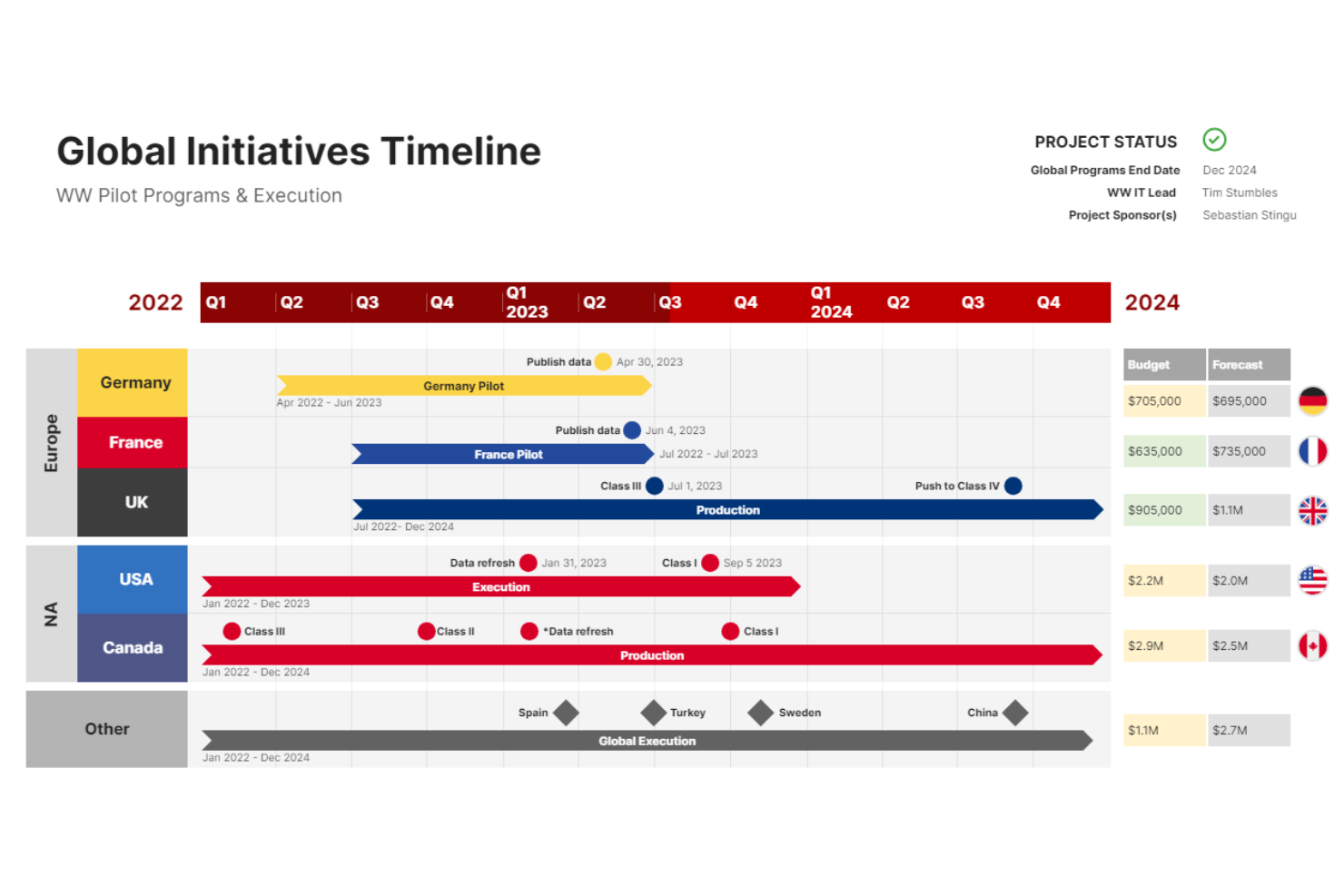
Office Timeline stands out as a reporting tool by offering a unique solution for transforming complex project information into easy-to-understand, visually appealing timelines and Gantt charts within Microsoft PowerPoint. This integration is particularly valuable for professionals who need to communicate project status, milestones, and deliverables to stakeholders in a clear and concise manner.
mary function of timeline creation, Office Timeline excels in its ability to facilitate communication and understanding among project teams and stakeholders. The tool's customizable templates and styles enable users to highlight key project dates, dependencies, and progress in a format that is immediately accessible and interpretable by audiences, regardless of their project management expertise. This capability is especially useful in environments where quick decision-making is critical, as it provides a visual snapshot of project health and trajectory.
Office Timeline costs from $99/year.

Tableau
Best reporting software for embedded analytics

Tableau is a visual analytics platform for exploring, understanding, and managing business data. It uses a drag and drop method to create reports using the available data visualizations and widgets.Tableau uses interactive data visualizations so you can create visually-compelling reports that viewers can click to explore.
If you need to build powerful dashboards quickly, Tableau is the best reporting tool for you because of its embedded analytics features. The embedded analytics are customizable through an API so you can insert data collection and reporting functionality into your pre-existing workflow. This can also help you personalize your customers’ data experience.
Tableau integrates with other business tools, including Google Cloud, Microsoft SQL Server, Google Sheets, Hive, and SAP.
Tableau pricing starts at $12/user/month, and they offer a 14-day free trial.

Reportei
Best for quickly generating digital marketing dashboards and reports

Reportei generates digital marketing reports quickly, focusing on social media data and analytics. This tool is great for agencies, freelancers, and digital marketing professionals that need to save time on reporting and spend more time on analysis.
Reportei also offers a marketing timeline feature, allowing users to add events and milestones throughout the project to the timeline and categorize them to keep track of overall project progress.
Integrations include Facebook, Instagram, LinkedIn, YouTube, Facebook Ads, Instagram Ads, Google Ads, Google Analytics, and other channels.
Pricing starts at $14.50/month.

Adverity
Best for BI tool integration
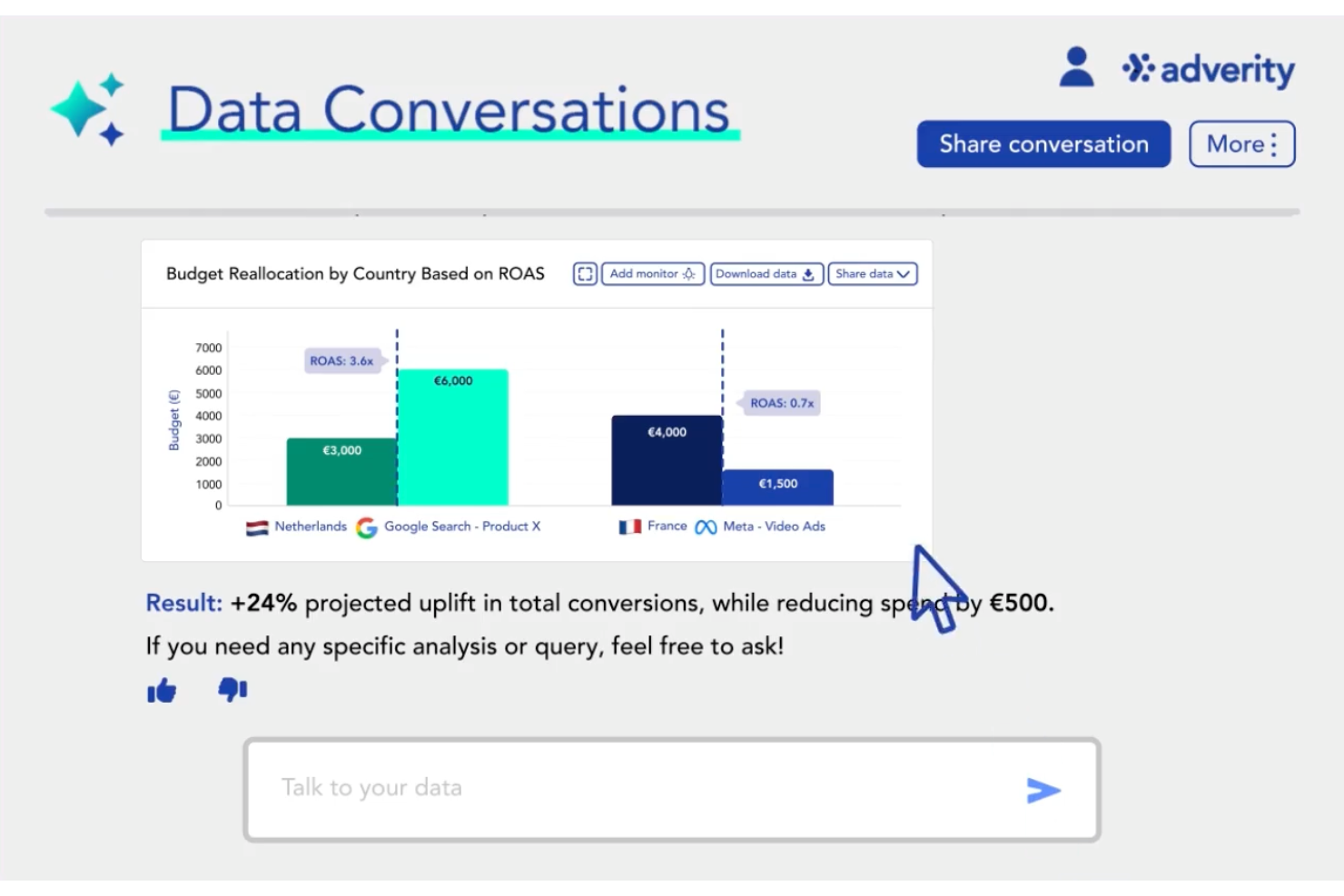
Adverity stands out as a versatile marketing intelligence platform tailored for businesses seeking to streamline their data management and reporting processes. It supports teams that rely on BI tool integration, helping connect marketing data pipelines with reporting platforms for analysis and visualization. If you're in a marketing or data analytics role, you might find Adverity particularly appealing for its ability to integrate data from a variety of sources, automate data workflows, and deliver insights that support more informed decision-making.
Why I Picked Adverity
I picked Adverity for its BI tool integration, which allows teams to connect marketing data pipelines with reporting and analytics platforms. Its library of data connectors helps gather data from multiple marketing and analytics sources into a single environment. The platform also includes automated data transformation and quality checks that help keep datasets consistent for reporting and analysis.
Adverity Key Features
In addition to its strong data integration capabilities, Adverity offers:
- Data Orchestration: Automates the process of cleaning, harmonizing, and monitoring data quality.
- Workflow Automation: Facilitates the automation of repetitive tasks, allowing your team to focus on strategic decision-making.
- Collaboration Tools: Enables team members to collaborate effectively on data analysis and reporting.
Adverity Integrations
Integrations include Google Analytics, Google Ads, Facebook Ads, Instagram Insights, LinkedIn Ads, Mailchimp, Salesforce, HubSpot, Adobe Analytics, and Microsoft Excel.
Pros and Cons
Pros:
- Responsive support team helps resolve integration and pipeline configuration issues
- Reliable cross-platform data transfers for large marketing and advertising datasets
- Pre-built connectors simplify integrating marketing and analytics data sources
Cons:
- Managing large-scale pipelines can become time-consuming during setup
- Complex onboarding process for configuring connectors and data pipelines
New Product Updates from Adverity
Adverity Enhances Connectors and Adds TikTok GMV Max
Adverity updates connectors for Amazon Ads, SmartNews Ads, Indeed, and monday.com, and introduces the TikTok GMV Max connector. These updates improve data accuracy, control, and performance across integrations. For more information, visit Adverity’s official site.
 .
.Andre rapporteringsverktøy for dashbord
Her er noen flere verktøy for automatisk rapportering som ikke kom med på topplisten. Hvis du trenger flere forslag til det praktiske ad hoc-rapportverktøyet, kan du ta en titt på disse.
- Whatagraph
Reporting tool for marketing agencies
- Xero
For reporting on project quotes, time, and financials
- Jira
Reporting tool for agile teams
- Bonsai Agency Software
For real-time agency performance reporting
- Supermetrics
Reporting tool for integrating over 150 data sources
- Adobe Customer Journey Analytics
For unified cross-channel customer insights
- Google Data Studio
For sharing & collaboration
- Power BI for Office 365
Reporting platform for scaling organizations
- ThoughtSpot
Reporting tool for beginners
- Coefficient
For integrating Google Sheets and Excel
- SegMetrics
Reporting tool for marketing and sales teams
- Octoboard
Reporting software for automated reporting
- FanRuan Software
Reporting software for enterprises
- Rippling Spend
For expense reporting
- Celoxis
Reporting tool for data-driven PPM decisions
- Hive
Reporting tool with interactive dashboards
- Wrike
For collaboration on project reporting
- Smartsheet
Connect and integrate with tools and apps you already use to glean real-time insights into the work that teams are doing across the organization.
- Mixpanel
Behavioral analytics tool to analyze website site user engagement, monitor KPIs, and easily generate reports.
- Sisense
API-first cloud technology with interactive dashboards, self-service analytics, and white-labeled BI apps for your use.
- Planview AdaptiveWork
Capture and track all your project and team data in real-time, including effort, status, issues, and change requests.
- Klipfolio
Connect hundreds of data sources, including spreadsheets, files, databases, and web services applications to build data visualizations.
- Domo
Works with your data lakes, data warehouses, ETL tools, and more, to deliver data insights with built-in collaboration and productivity tools.
- Funnel
Automatically collect all the data you need from any data source and feed it directly to your data warehouse, dashboard solution, or any other tool you’re using.
- Looker
Connect with Redshift, Snowflake, BigQuery, as well as 50+ supported SQL dialects to build embedded visualizations and data science workflows.
- Qlik
Combines all your data and makes it analysis-ready for everyone to freely explore, amplified by machine intelligence for better results.
- Supermetrics
Centralize all your marketing data in their marketing data warehouse, build dashboards and reports with ad-hoc analysis.
- Board
Explore your data, run effective analysis, build interactive dashboards, and create impactful reports.
- TapClicks
Marketing report tool (TapReports) and marketing performance analytics (TapAnalytics) with a clean, streamlined UI.
- ProWorkflow
Reporting software for graphical data reports


How I Evaluate Reporting Tools
I split my evaluation into baseline must-haves—like portfolio roll-ups and scheduled reports—and the differentiators that separate true PMO tools from basic dashboards.
Core Functionality (Table Stakes For This List)
When I'm selecting tools for my list, I rank each one on a scale from 0 (does not offer the functionality) to 5 (excels in this area) for each core functionality listed below. Then, I calculate the tool's total score into a percentage. Each tool needs to achieve a minimum total score of 65% to be considered for inclusion.
- Project Dashboards: I evaluate whether dashboards show real-time project health with customizable widgets—things like burn rate, milestone progress, and team workload in a single view.
- Pre-Built Report Templates: A solid template library saves hours of setup, so I look for ready-made formats like status reports, Gantt charts, burndown charts, and budget summaries.
- Portfolio-Level Reporting: For PMO leads managing dozens of initiatives, I check whether the tool can roll up KPIs across projects and programs into a consolidated executive view.
- Data Integrations: Most teams run on tools like Jira, Asana, or Smartsheet, so I evaluate native connectors, API access, and the depth of data sync each platform supports.
- Automated Report Scheduling: I look for the ability to schedule recurring reports to stakeholders via email or shareable links, with control over cadence and recipient lists.
- Custom Report Builder: The best reporting happens when you can slice data your way, so I check for custom filters, calculated fields, and drill-down capabilities beyond preset views.
Once I have a list of tools that meet the criteria, I consider what sets each platform apart.
Differentiating Factors (What Sets Vendors Apart)
Here's how I compare and contrast different vendors:
Standout Features
Cross-tool data aggregation matters when your portfolio spans Jira, Asana, and Smartsheet. I look for tools that normalize data from multiple platforms into one unified report. AI-powered insights add another layer by flagging risks or forecasting delays before they surface in a standup. I also evaluate stakeholder-facing portals where execs or clients can view live reports with permission-based access instead of waiting on a weekly PDF.
Beyond Features
I check how quickly a team can go from setup to first report. Some tools offer pre-configured PMO templates, while others require weeks of custom configuration. Methodology fit also matters—an agile team tracking velocity and sprint burndown needs different reporting defaults than a waterfall team measuring earned value. For teams handling sensitive financial or client data, I evaluate role-based access controls, SSO support, and compliance certifications like SOC 2, which can be a deciding factor for enterprise PMOs.
Slik velger du rapporteringsverktøy
Det er lett å gå seg vill i lange funksjonslister og kompliserte prisstrukturer. For å hjelpe deg med å holde fokus mens du går gjennom den unike prosessen din for valg av programvare, får du her en sjekkliste over faktorer du bør ha i tankene:
| Faktor | Hva du bør vurdere |
| Skalerbarhet | Sørg for at verktøyet kan vokse med virksomheten din. Se etter alternativer som håndterer økende datamengder og antall brukere uten å bli tregere. |
| Integrasjoner | Kontroller om verktøyet integreres sømløst med eksisterende systemer som CRM-er, ERP-systemer eller programvare for prosjektstyring. |
| Tilpasningsmuligheter | Vurder hvor mye du kan tilpasse rapporter, dashbord og måleverdier slik at de passer teamets unike arbeidsflyter og KPI-er. |
| Brukervennlighet | Se etter et intuitivt grensesnitt som lar teamet ditt generere innsikt raskt uten omfattende opplæring eller teknisk støtte. |
| Budsjett | Sammenlign prisstrukturene med budsjettet ditt. Vær oppmerksom på skjulte kostnader, som ekstra gebyrer for flere brukere, datalagring eller avanserte funksjoner. |
| Sikkerhetstiltak | Bekreft at verktøyet inkluderer kryptering, tilgangskontroller for brukere og samsvar med regelverk som GDPR, slik at sensitive data beskyttes. |
| Støtte | Vurder nivået på kundestøtten som er tilgjengelig, for eksempel assistanse døgnet rundt eller dedikerte kundeansvarlige for feilsøking og opplæring. |
| Datavisualisering | Se etter visualiseringsalternativer som diagrammer, grafer og dashbord, som gjør dataene enkle å tolke og omsette til handling for teamet ditt. |
Trender innen rapporteringsverktøy for 2026
I researcharbeidet mitt hentet jeg inn utallige produktoppdateringer, pressemeldinger og lanseringslogger fra ulike leverandører av rapporteringsverktøy. Her er noen av trendene som er på vei frem, og som jeg følger med på:
- AI-drevne innsikter: Mange plattformer bruker nå AI-verktøy for rapportering til å analysere datamønstre og foreslå handlingsrettet innsikt. Dette sparer brukerne for tid og hjelper dem med å ta bedre beslutninger. Noen verktøy flagger for eksempel avvik i økonomiske rapporter eller anbefaler hvilke måltall som bør følges, basert på historiske data.
- Spørringer med naturlig språk: Brukere kan nå stille spørsmål på vanlig språk for å generere rapporter. Dette gjør rapportering tilgjengelig for teammedlemmer uten teknisk bakgrunn. En bruker kan for eksempel skrive «Hva var salget forrige kvartal?» og umiddelbart få et svar i form av et diagram.
- Innebygd analyse: Flere verktøy tilbyr innebygd analyse, slik at virksomheter kan integrere rapporter direkte i sin egen programvare eller kundeportaler. Dette er nyttig for SaaS-selskaper som tilbyr analyse til kundene sine.
- Funksjoner for datafortelling: Verktøy får funksjoner som gjør rådata om til fortellinger med automatiske bildetekster og fremhevede punkter. Dette hjelper team med å dele funn mer effektivt under presentasjoner eller oppdateringer.
- Forbedret personvern for data: Leverandører utvikler flere personvernkontroller for å oppfylle strengere regler som GDPR og CCPA. Noen verktøy tilbyr for eksempel nå anonymisering av data eller begrenser tilgangen til sensitive måltall basert på brukerroller.
Disse trendene er ikke begrenset til frittstående rapporteringsplattformer. Mange av dem finner også veien inn i andre programvarekategorier. For eksempel integrerer programvare for visuell prosjektstyring i økende grad avanserte rapporteringsfunksjoner som sanntidsdashbord, AI-generert innsikt og tilpassbare datavisualiseringer, slik at team kan følge prosjektresultater på en mer intuitiv måte.
Hva er rapporteringsverktøy?
Rapporteringsverktøy er programvare som hjelper virksomheter med å samle inn, behandle og presentere data i et organisert og forståelig format. De henter data fra ulike kilder, som databaser og regneark, og gjør dem om til rapporter som viser trender, mønstre og innsikt. Disse rapportene kan bestå av tabeller, diagrammer, grafer og dashbord, noe som gjør komplekse data enklere å forstå ved første øyekast.
Programvare for rapportering er uvurderlig når beslutninger skal tas, fordi den gir ledere og interessenter informasjonen de trenger for å forstå resultater, identifisere forbedringsområder og planlegge fremtidige tiltak. Dette kan føre til mer informerte strategier, effektiv drift og bedre lønnsomhet.
Funksjoner
Når du velger rapporteringsverktøy, bør du se etter følgende viktige funksjoner:
- Tilpassbare dashbord: Lar deg organisere og vise dataene som er mest relevante for teamet ditt, i et format som passer arbeidsflyten din. Hvis du ønsker merkevaretilpasning med minimalt behov for programmering, kan du se nærmere på dashbordverktøy med egen merkevare.
- Sanntidsrapportering: Oppdaterer rapporter automatisk når nye data kommer inn, slik at du kan ta beslutninger basert på den mest oppdaterte informasjonen.
- Alternativer for datavisualisering: Tilbyr diagrammer, grafer og varmekart som gjør komplekse data enklere å tolke og dele med interessenter.
- Planlagte rapporter: Lar deg automatisere generering og distribusjon av rapporter, noe som sparer tid og sikrer jevnlige oppdateringer for teamet ditt.
- Rollebaserte tilgangskontroller: Begrenser tilgangen til sensitive rapporter eller data basert på brukerroller for å styrke sikkerhet og etterlevelse av regelverk.
- Mulighet for detaljvisning: Gjør det mulig å klikke seg inn på spesifikke måltall for å få dypere innsikt, slik at du kan forstå hva som driver tallene.
- Integrasjon med flere datakilder: Kombinerer data fra ulike plattformer og verktøy i én enkelt rapport for å gi et mer helhetlig bilde.
- Eksportalternativer: Lar deg eksportere rapporter i ulike formater som PDF, Excel eller CSV, slik at de enkelt kan deles og analyseres videre.
- Verktøy for trendanalyse: Fremhever mønstre i dataene dine over tid, slik at du kan forutsi fremtidige resultater og planlegge deretter.
- Merknadsverktøy: Lar brukere legge til kommentarer eller notater direkte i rapporter for bedre samarbeid og deling av kontekst.
Fordeler
Implementering av rapporteringsverktøy gir flere fordeler for teamet og virksomheten din. Her er noen av fordelene du kan se frem til:
- Bedre beslutningstaking: Gir teamet ditt sanntidsinnsikt og tydelige visualiseringer som grunnlag for beslutninger basert på nøyaktige og oppdaterte data.
- Tidsbesparelser: Automatiserer generering av rapporter og oppdatering av data, slik at det frigjøres tid til andre viktige oppgaver.
- Bedre samarbeid: Lar team dele dashbord og legge til kommentarer direkte i rapporter, noe som gjør det enklere å samkjøre seg om viktig innsikt.
- Økt datanøyaktighet: Reduserer manuell dataregistrering og beregningsfeil ved å hente informasjon direkte fra integrerte systemer.
- Større ansvarlighet: Sporer viktige resultatindikatorer og fordeler ansvar med måltall som er enkle å overvåke og rapportere.
- Raskere identifisering av trender: Analyserer mønstre i dataene dine for å hjelpe deg med å oppdage muligheter og utfordringer tidlig.
- Skalerbar rapportering: Tilpasser seg dine økende behov, slik at du over tid kan håndtere større datasett og mer komplekse analyser.
Kostnader og priser
Når du velger rapporteringsverktøy, må du ha en forståelse av de ulike prismodellene og tilgjengelige abonnementene. Kostnadene varierer basert på funksjoner, teamstørrelse, tillegg og mer. Tabellen nedenfor oppsummerer vanlige abonnementer, gjennomsnittsprisene deres og typiske funksjoner som er inkludert i løsninger for rapporteringsverktøy:
Sammenligningstabell for rapporteringsverktøy
| Abonnementstype | Gjennomsnittspris | Vanlige funksjoner |
| Gratisabonnement | $0 | Grunnleggende rapportering, begrensede dashbord, dataeksport i CSV og tilgang for én bruker. |
| Personlig abonnement | $5-$25/user/month | Avanserte dashbord, tilpassbare maler, rapportering via e-post og prioritert kundestøtte. |
| Bedriftsabonnement | $30-$75/user/month | Tilgang for flere brukere, rollebaserte tillatelser, integrasjoner med populære verktøy og trendanalyse. |
| Virksomhetsabonnement | $100+/user/month | Ubegrenset antall brukere, avansert analyse, API-tilgang, tilpasset profilering og dedikert kundestøtte. |
Vanlige spørsmål
Finn svar på vanlige spørsmål andre stiller om dette emnet.
Hvilke typer rapporteringsverktøy finnes?
Det finnes mange typer rapporteringsverktøy, for eksempel instrumentpanelprogramvare, datavisualiseringsprogramvare, målstyringsverktøy og verktøy for å skrive ad hoc-rapporter.
Instrumentpanelprogramvare lar deg plassere rapportene som betyr mest for deg, i sentrum. Datavisualiseringsprogramvare gjør data om til noe visuelt som brukerne enkelt kan lese.
Målstyringsverktøy handler om resultatdata. Dermed vet du hvem som presterer best. Til slutt lager verktøy for å skrive ad hoc-rapporter ulike typer rapporter i øyeblikket for selskaper med behov som stadig endrer seg.
Hva er programvare for forretningsinnsikt?
BI-programvare er et kritisk verktøy for å samle inn rådata, analysere dem og presentere dem på en brukervennlig måte for å støtte informerte beslutninger. BI-programvare samler og behandler data fra ulike kilder, og gir prosjektledere en omfattende og helhetlig oversikt over prosjektets resultater. Den gjør det mulig for dem å identifisere trender, overvåke sentrale resultatindikatorer (KPI-er) og ta datadrevne beslutninger som bidrar til vellykket gjennomføring av prosjekter.
Ser du ikke etter rapporteringsprogramvare akkurat nå?
Se våre andre lister over prosjektstyringsverktøy du kanskje kan ha nytte av:
- Se på verktøy for prosjektporteføljestyring. De kan hjelpe deg med å utarbeide og kommunisere rapportene dine på et høyere nivå og på tvers av prosjekter.
- Kommunikasjon, kommunikasjon, kommunikasjon. Hvis du ikke har fått dette på plass, kan du egentlig ikke begynne på noe annet. Prøv disse 10 beste verktøy og programvare for kommunikasjon.
- Finn et prosjektrapporteringsverktøy i annen programvare, for eksempel i listen min over den beste programvaren for markedsføringsprosjektstyring.