

De 10 beste programvarene for administrasjon av skyressurser vurdert i 2026

Kortliste over den beste programvaren for administrasjon av skyressurser


Programvare for administrasjon av skyressurser samler kontrollen over de skybaserte ressursene dine på ett sted og forenkler administrasjonsoppgavene. Den gir bedre oversikt over og kontroll over skyinfrastrukturen din.
Det kan imidlertid være utfordrende å finne riktig programvare for administrasjon av skyressurser for virksomheten din. Etter å ha vurdert dusinvis av prosjektstyringsprogrammer kan jeg trygt hjelpe deg med å finne de beste alternativene, slik at du kan finne det som passer best for deg og teamet ditt.
Hvorfor du kan stole på våre programvareanbefalinger
Teamet vårt har testet og anmeldt programvare siden 2012. Vi er selv prosjektledere, så vi vet hvor vanskelig og hvor viktig det er å velge riktig programvare.
I denne guiden har vi vurdert verktøyene gjennom praktisk testing og uavhengig research og gitt dem poeng ut fra våre utvelgelseskriterier. Vi bygger også på innsikt fra ledende eksperter i bransjen og erfarne prosjektledere.
Anmeldelsene våre bygger på vår egen redaksjonelle vurdering. De er ikke et salgsargument.
Ekspertanmeldere:
Sammenligningstabell for programvare for administrasjon av skyressurser
Denne sammenligningstabellen oppsummerer prisopplysningene for mine beste utvalg av programvare for administrasjon av skyressurser:
| Tool | Best For | Trial Info | Price | ||
|---|---|---|---|---|---|
| 1 | Best for sharing GPU capacity across clouds | Not available | Pricing upon request | Website | |
| 2 | Best for private and public cloud FinOps | Free demo available | Pricing upon request | Website | |
| 3 | Best for cloud cost and workload performance | Free plan available | From $15/month (billed annually) | Website | |
| 4 | Best for balancing SLOs and cloud costs | 30-day free trial | Pricing upon request | Website | |
| 5 | Best for cross-domain IT spend decisions | Free demo available | Pricing upon request | Website | |
| 6 | Best for cloud and AI spend attribution | Free trial + free demo available | Pricing upon request | Website | |
| 7 | Best for gradual VMware-to-HVM migration | 60-day free trial + demo available | From $600/CPU socket/year (billed annually) | Website | |
| 8 | Best for cloud and wider tech cost visibility | Not available | Pricing upon request | Website | |
| 9 | Best for self-service with expiry controls | Free trial + free demo available | Pricing upon request | Website | |
| 10 | Best for outsourced infrastructure operations | Free demo available | Pricing upon request | Website |
Anmeldelser av den beste programvaren for administrasjon av skyressurser
I hver av de følgende anmeldelsene ser vi på fordeler og ulemper, priser samt funksjoner og integrasjoner for å hjelpe deg med å velge programvaren som passer best til organisasjonens behov og mål.
CAST AI
Best for sharing GPU capacity across clouds
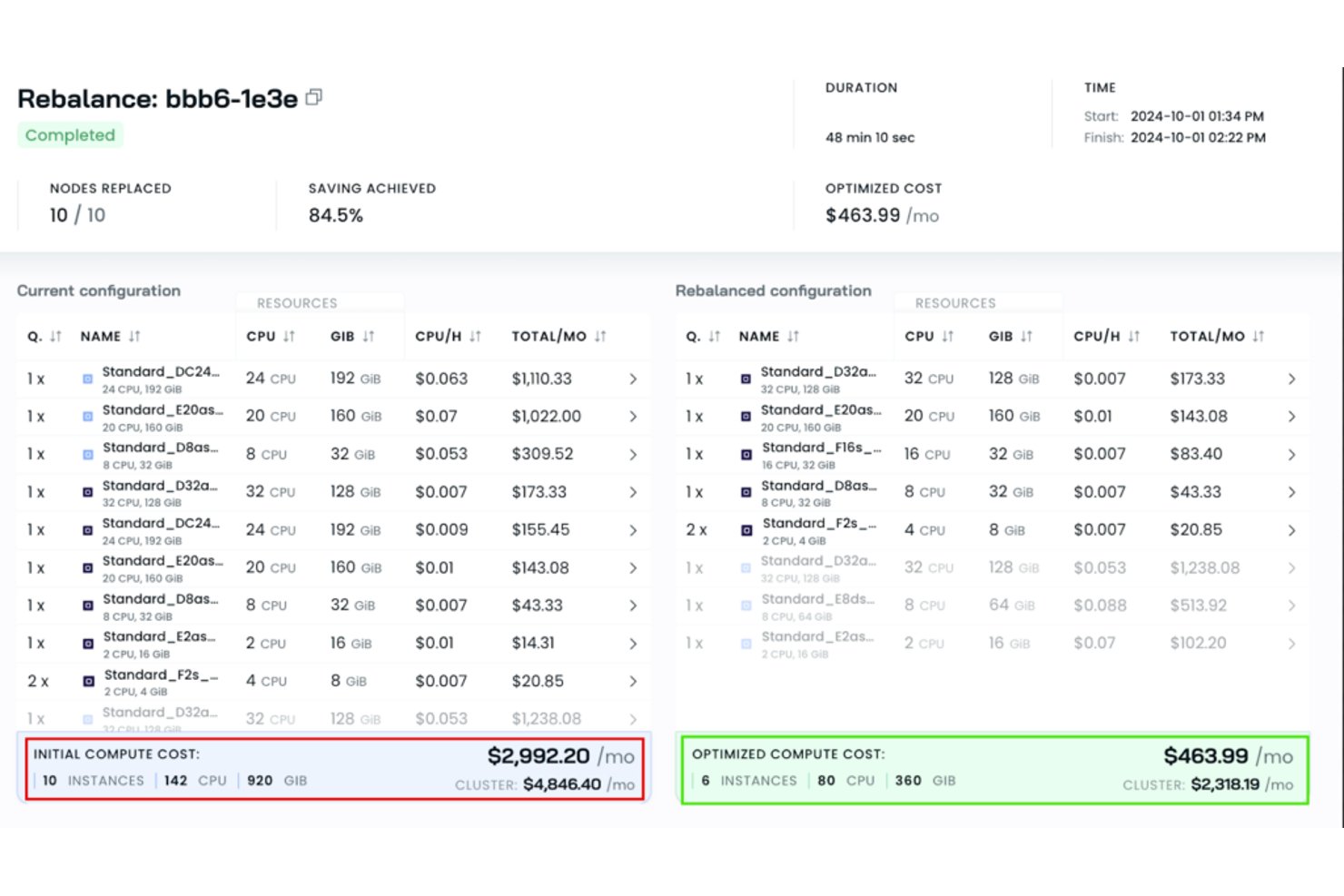
Cast AI is a Kubernetes-focused cloud resource management platform that automates workload rightsizing, node consolidation, autoscaling, and GPU capacity sharing across cloud environments.
Who Is Cast AI Best For?
Cast AI is a strong fit for DevOps and FinOps teams running Kubernetes workloads across multiple cloud providers who need automated cost optimization without constant manual intervention.
Why I Picked Cast AI
Cast AI earns its spot on my shortlist because of how it handles GPU capacity sharing across cloud environments, which is genuinely rare. Through OMNI Compute, I can connect GPU nodes from separate clouds or private infrastructure into a single Kubernetes cluster, then share individual GPUs across workloads using time-slicing or MIG partitioning on A100, H100, and A30 hardware. It also tracks GPU utilization per workload and flags idle capacity, so nothing sits unused.
Cast AI Key Features
- Workload rightsizing: Automatically adjusts CPU and memory requests for each workload based on observed usage data.
- Node consolidation: Bin-packs workloads across nodes and deprovisions underused ones to reduce idle compute spend.
- Allocation groups: Divides cluster costs by labels and namespaces so you can attribute spend to specific teams or applications.
- Cost anomaly notifications: Sends alerts for compute cost spikes, CPU/RAM overprovisioning, and network egress through Slack, webhooks, or the UI.
CAST AI Integrations
CAST AI integrates with Terraform, Prometheus, Grafana, Slack, Jira, Helm, Pulumi, Crossplane, and OpenTelemetry. It also provides a REST API and webhooks for custom integrations.
Pros and Cons
Pros:
- Cross-cloud GPU sharing pools scarce capacity
- Workload cost breakdowns support team allocation
- Reviewers report lower spend after rightsizing
Cons:
- Cost reports sometimes need billing cross-checks
- Aggressive rebalancing can trigger pod churn
Nutanix
Best for private and public cloud FinOps
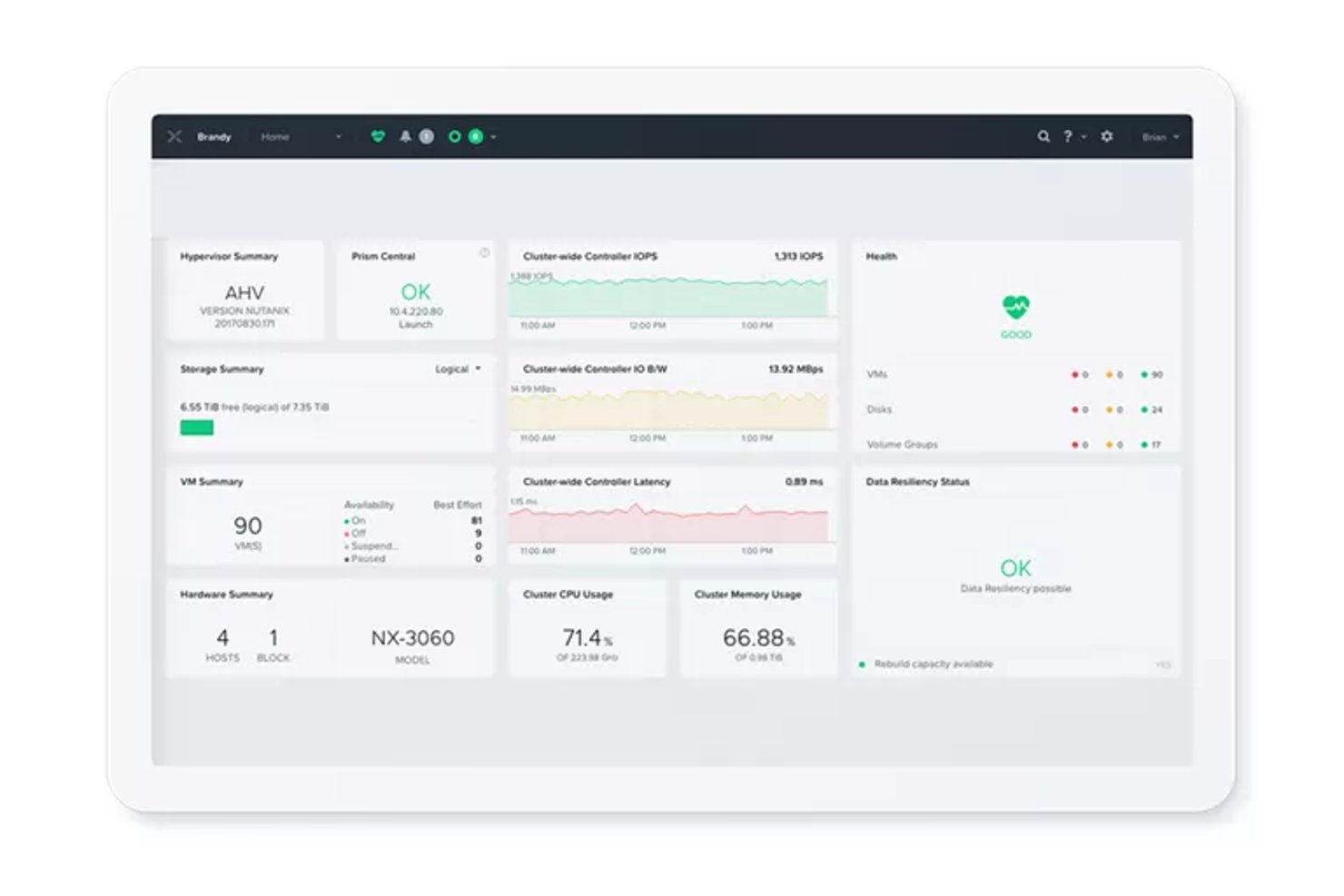
Nutanix Cloud Manager is a hybrid multicloud management platform that spans intelligent operations, self-service provisioning, cost governance, and security monitoring across private, public, and hybrid cloud environments.
Who Is Nutanix Best For?
Nutanix Cloud Manager suits IT and infrastructure teams managing hybrid environments who need unified cost governance, self-service provisioning, and operations monitoring across private and public clouds.
Why I Picked Nutanix
Nutanix Cloud Manager earns its spot on my shortlist because its Cost Governance module gives IT and FinOps teams a single place to track spend across Nutanix, AWS, Azure, and Google Cloud, with AI-powered anomaly detection and rightsizing recommendations that surface waste before it compounds. I also like that private-cloud metering accounts for hardware, software, facilities, and personnel costs, so total cost of ownership modeling reflects what running on-premises infrastructure actually costs. On top of that, tag-based chargeback maps spend directly to business units and cost centers, which makes financial accountability across hybrid environments genuinely actionable.
Nutanix Key Features
- Intelligent Operations monitoring: Tracks health, performance, and capacity across Nutanix and VMware environments with automated anomaly detection and remediation triggers.
- Self-service blueprint marketplace: Lets users provision, scale, and decommission VMs and multi-tier applications through a governed catalog without involving IT directly.
- Security Central compliance auditing: Audits workloads against CIS, NIST CSF, PCI-DSS, and HIPAA frameworks and automates incident response using Nutanix Playbooks.
- Reserved-instance purchase recommendations: Analyzes current usage to surface break-even analysis and buying guidance for reserved instances across supported cloud providers.
Nutanix Cloud Manager Integrations
Nutanix Cloud Manager offers native integrations with AWS, Azure, Google Cloud, VMware, ServiceNow, Jira, Microsoft Teams, and PagerDuty. It supports CI/CD workflows through the marketplace-based Nutanix Jenkins plugin and connects with HYCU for application backup operations.
Pros and Cons
Pros:
- Blueprints automate application provisioning and scaling
- Flags spend anomalies and underused resources
- Centralizes hybrid infrastructure monitoring and alerts
Cons:
- Reviewers want more detailed inventory reporting
- Remote-domain onboarding requires careful preparation
Datadog
Best for cloud cost and workload performance
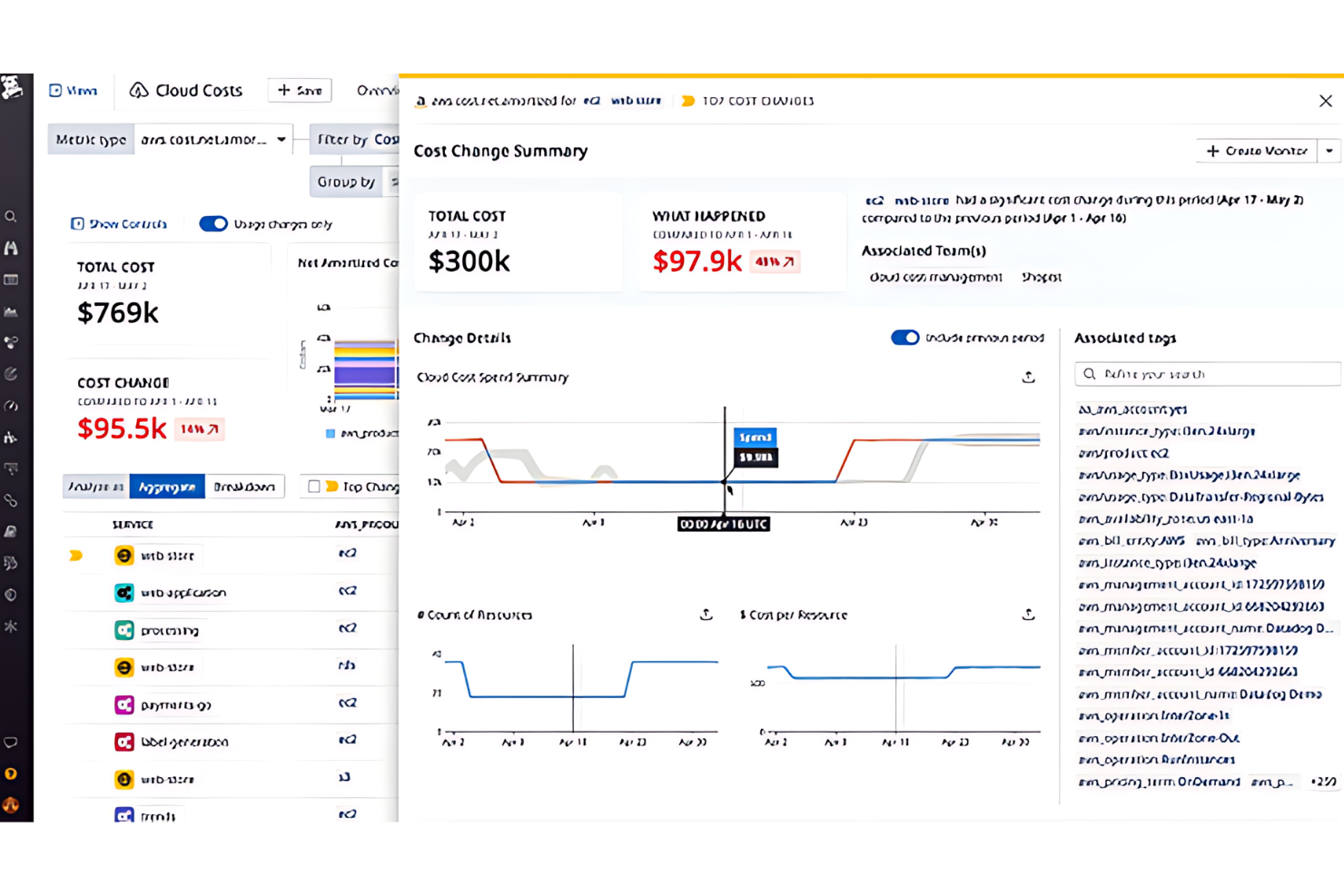
Datadog Cloud Cost Management is a cloud cost and observability platform that unifies spend data from AWS, Azure, Google Cloud, and OCI with performance metrics to support cost tracking, allocation, anomaly detection, and rightsizing recommendations.
Who Is Datadog Best For?
Datadog Cloud Cost Management is a strong fit for engineering and FinOps teams that need cloud cost data alongside real-time performance metrics in a single platform.
Why I Picked Datadog
I picked Datadog as one of the best because it's the only tool on this list that puts cloud cost data and real-time workload performance metrics in the same view. I love how its daily cost recommendations combine observability signals with billing data to flag orphaned, over-provisioned, or idle resources with risk ratings and estimated savings attached. Its Resource Catalog ties resource metadata, ownership, and cost recommendations together, so you can act on a rightsizing signal without jumping between tools.
Datadog Key Features
- Tag Pipelines: Standardizes cost attribution by adding, aliasing, or mapping tags across cloud cost data, dashboards, monitors, and recommendations.
- Cost Optimization Automations: Runs scheduled cost-saving actions on selected recommendations, scoped by account, region, and tags, with optional Slack or Teams approval.
- Hierarchical budgets: Organizes spend limits across parent and child levels, such as departments and teams, with monitors that alert when actual or forecast spending approaches a threshold.
- Audit Trail: Logs API requests and product-specific events with filters for actor, method, and event name, and supports CSV export and dashboard integration.
Datadog Integrations
Datadog has documented native integrations with AWS, Azure, Google Cloud, Oracle Cloud Infrastructure, OpenAI, Anthropic, and Jira. It also offers REST and client-library APIs for custom integrations.
Pros and Cons
Pros:
- Resource catalog connects ownership and metadata
- Team and service spend allocation
- Cost data shares context with workload performance
Cons:
- Automation covers selected recommendations, not general lifecycle tasks
- Recommendations refresh daily, not continuously
Best for balancing SLOs and cloud costs
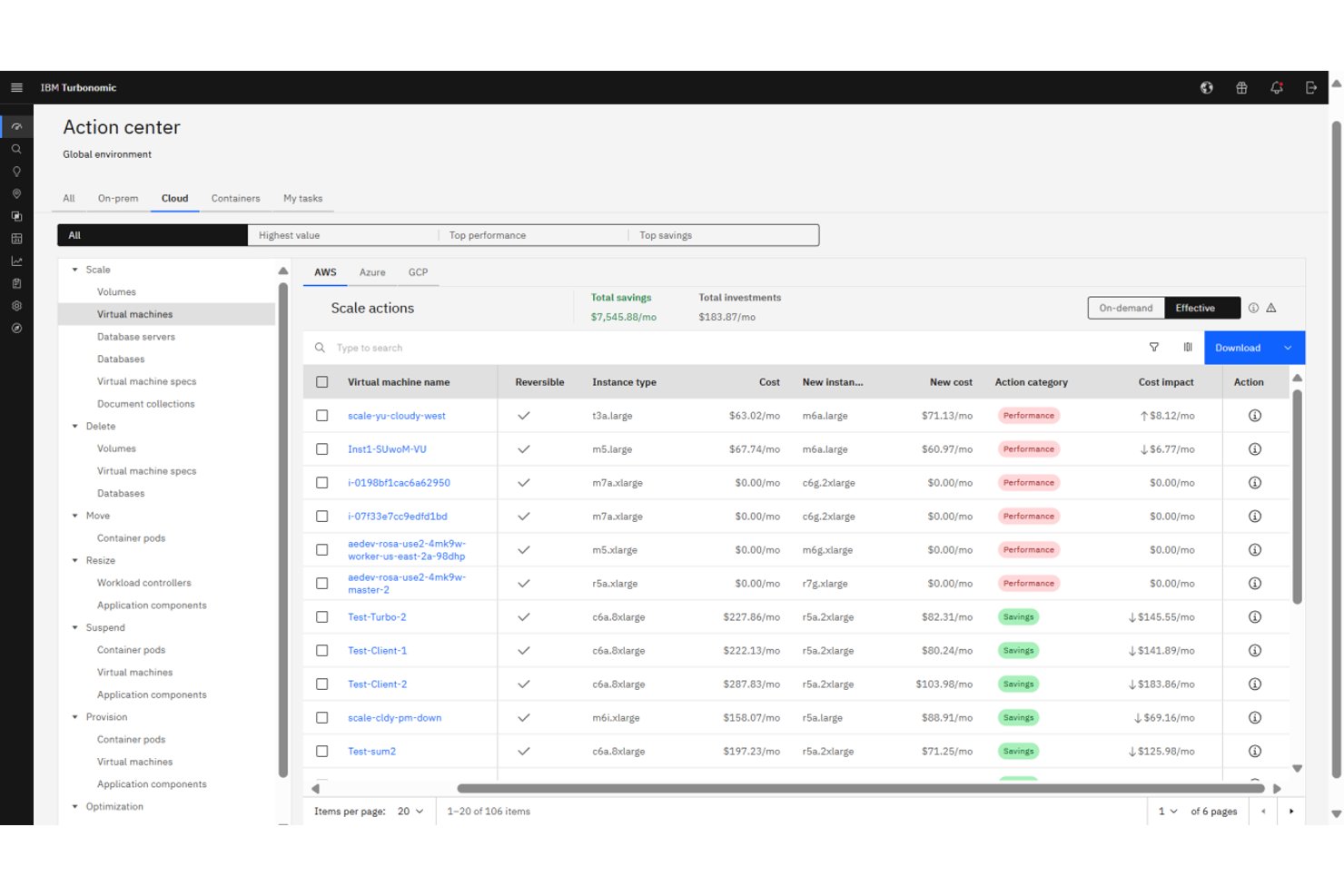
IBM Turbonomic is a cloud resource management platform that continuously analyzes and automates compute, storage, and network resource decisions across hybrid and multicloud environments, including AWS, Azure, Google Cloud, and on-premises infrastructure.
Who Is IBM Turbonomic Best For?
IBM Turbonomic is a strong fit for cloud and IT operations teams in mid-to-large enterprises managing complex hybrid or multicloud environments where keeping application performance within SLOs while controlling costs is a daily challenge.
Why I Picked IBM Turbonomic
IBM Turbonomic earns its spot on my shortlist because it's one of the few tools that treats SLO compliance and cost control as a single, continuous problem rather than two separate workstreams. I love that it ingests real-time demand data and automatically selects VM instance types based on live workload needs, pricing, and discount inventory, so your team isn't manually reconciling performance data against a cost spreadsheet. Its workload parking automation stops and starts idle cloud resources using utilization trends and configurable schedules, which is where I've seen teams recover the most wasted spend without touching SLO targets.
IBM Turbonomic Key Features
- Full-stack dependency mapping: Continuously maps resource flows and dependencies across applications, containers, VMs, and infrastructure to surface performance and efficiency risks.
- Kubernetes rightsizing and placement: Analyzes CPU, memory, and I/O usage at the container, pod, and node levels and generates executable actions to adjust resource requests, scale replicas, and rebalance workloads.
- Policy-based automation controls: Lets you define action, operational, utilization, and scaling constraints with schedules and approval workflows to govern when and how resources are adjusted.
- Cloud migration planning: Runs what-if scenarios for lift-and-shift or optimized migrations, letting you rightsize workloads before and after moving from private datacenters to public cloud.
IBM Turbonomic Integrations
IBM Turbonomic offers documented native integrations with AWS, Microsoft Azure, Google Cloud, Oracle Cloud Infrastructure, Kubernetes, Red Hat OpenShift, VMware vCenter, Prometheus, ServiceNow, and HashiCorp Terraform. It also supports REST APIs, webhooks, and Kubernetes API connectivity for custom automation.
Pros and Cons
Pros:
- Automates scaling and placement to reduce manual work
- Aligns resource decisions with SLOs and costs
- Corrects overprovisioning while protecting application performance
Cons:
- Automated sizing needs careful policy tuning
- Target and policy setup can take time


Flexera One is a SaaS platform for managing IT spend and risk across hybrid environments, combining cloud cost optimization, IT asset management, SaaS discovery, and FinOps capabilities across AWS, Azure, and Google Cloud alongside on-premises infrastructure.
Who Is Flexera One Best For?
Flexera One is a strong fit for enterprise IT and FinOps teams managing spend across a mix of cloud providers, on-premises infrastructure, and SaaS applications.
Why I Picked Flexera One
I picked Flexera One as one of the best because no other tool on this list ties together cloud, on-premises, SaaS, and hardware spend into a single view the way it does. When your team is trying to make a procurement or renewal call that touches AWS costs, on-prem license positions, and SaaS contracts at once, Flexera One's cross-domain visibility is where it earns its place. I also find its 90-plus out-of-the-box optimization policies genuinely useful for surfacing idle or oversized resources across AWS, Azure, and Google Cloud without requiring custom engineering work.
Flexera One Key Features
- Unified hybrid inventory: Discovers and normalizes hardware, software, SaaS, and cloud assets into a single inventory using the Technopedia catalog.
- AI-powered cost anomaly detection: Analyzes cloud spend by provider, account, service, or resource type using Bollinger Bands or an AI-based windowed forecast method.
- Cost allocation rules: Routes cloud spend to billing centers using cloud tags, accounts, tag values, or Azure resource groups.
- SaaS discovery and usage tracking: Identifies managed and shadow SaaS applications and analyzes license usage to surface underused subscriptions and overlap.
Flexera Integrations
Flexera One has documented integrations with AWS, Microsoft Azure, Google Cloud, ServiceNow, SAP Concur, and Coupa. It also offers queryable inventory APIs for custom integrations.
Pros and Cons
Pros:
- Allocates costs across teams and business units
- Surfaces actionable idle-resource savings recommendations
- Unifies cloud, on-premises, and SaaS spend
Cons:
- Resource-level cost detail loses granularity over time
- Scheduled instance actions can require manual intervention

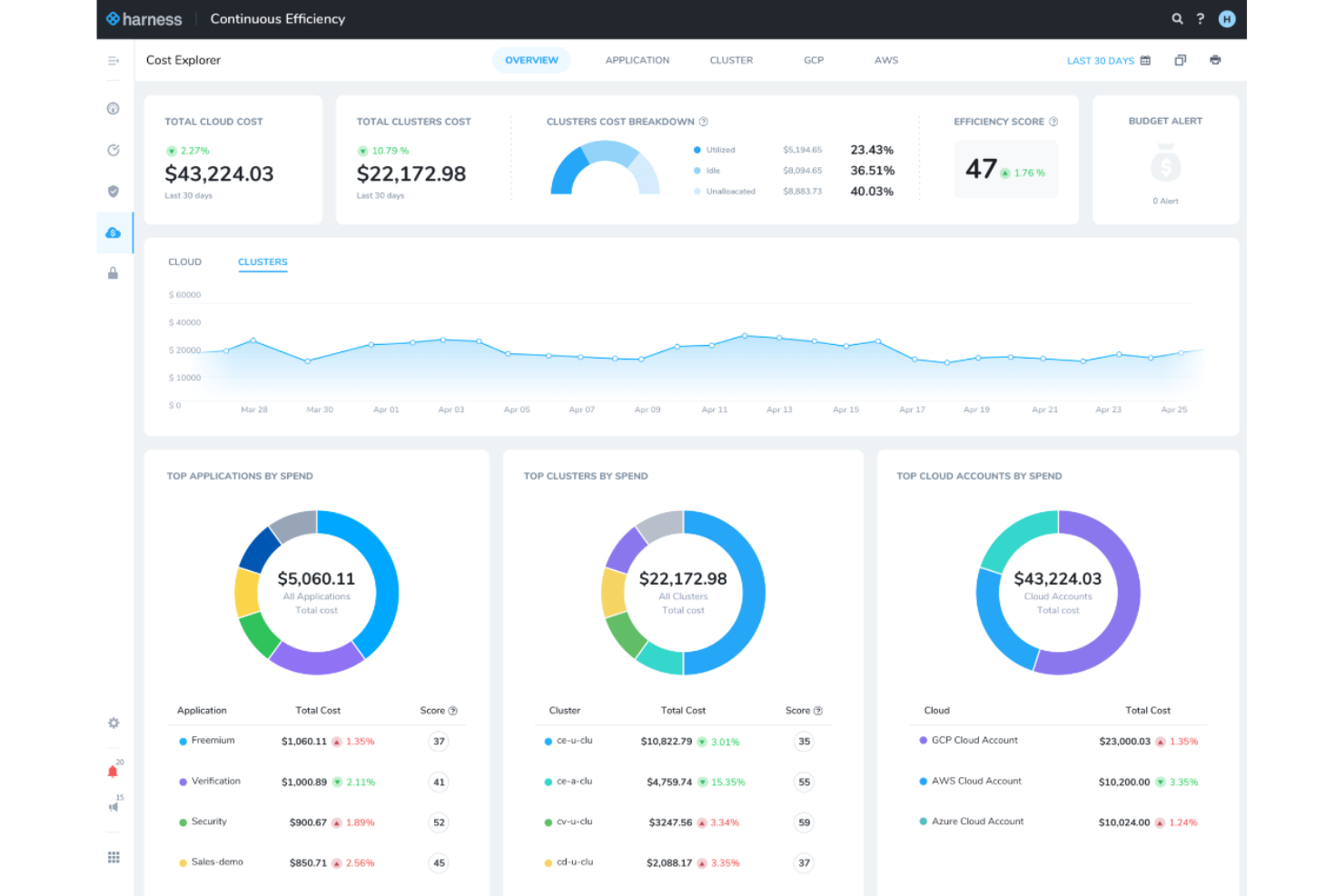
Harness Cloud AI Cost Management is a cloud cost management platform that consolidates spend visibility, attribution, optimization, and governance across AWS, Azure, GCP, Kubernetes, and AI providers like OpenAI and Anthropic.
Who Is Harness Cloud AI Cost Management Best For?
Harness Cloud AI Cost Management is a strong fit for FinOps analysts at mid-to-large organizations managing significant cloud and AI spend across AWS, Azure, GCP, and Kubernetes.
Why I Picked Harness Cloud AI Cost Management
I picked Harness Cloud AI Cost Management because it's one of the few tools that handles spend attribution across both cloud infrastructure and AI providers in a single platform. I find its AI spend attribution especially compelling: it traces costs down to individual tokens, requests, and sessions across OpenAI, Anthropic, AWS Bedrock, and Vertex AI, then rolls those costs up to teams and business units. Its AutoStopping feature also stands out, automatically shutting down idle VMs and containers and restarting them on demand without manual intervention.
Harness Cloud AI Cost Management Key Features
- Commitment Orchestrator: Automates the purchase, renewal, and coverage optimization of Reserved Instances and Savings Plans across cloud providers.
- Chargeback and showback reporting: Generates internal billing reports allocated by team or business unit, with support for the FinOps FOCUS specification.
- Natural-language policy authoring: Converts governance rules written in plain English into enforced cloud cost policies.
- Anomaly detection: Flags unusual spend spikes across cloud and AI providers and sends alerts via email or Slack.
Harness Cloud Cost Management Integrations
Harness documents 100+ Cost Management Agent integrations, including AWS, Microsoft Azure, Google Cloud Platform, Kubernetes, OpenAI, Anthropic, AWS Bedrock, Vertex AI, Jira, and ServiceNow. It also provides REST and SDK integrations for custom AI-trace data.
Pros and Cons
Pros:
- Unifies cloud and Kubernetes cost visibility
- AutoStopping targets idle VMs and containers
- Traces AI spend to tokens and teams
Cons:
- Hybrid and on-prem resource coverage remains limited
- Daily refresh and reporting gaps hinder analysis

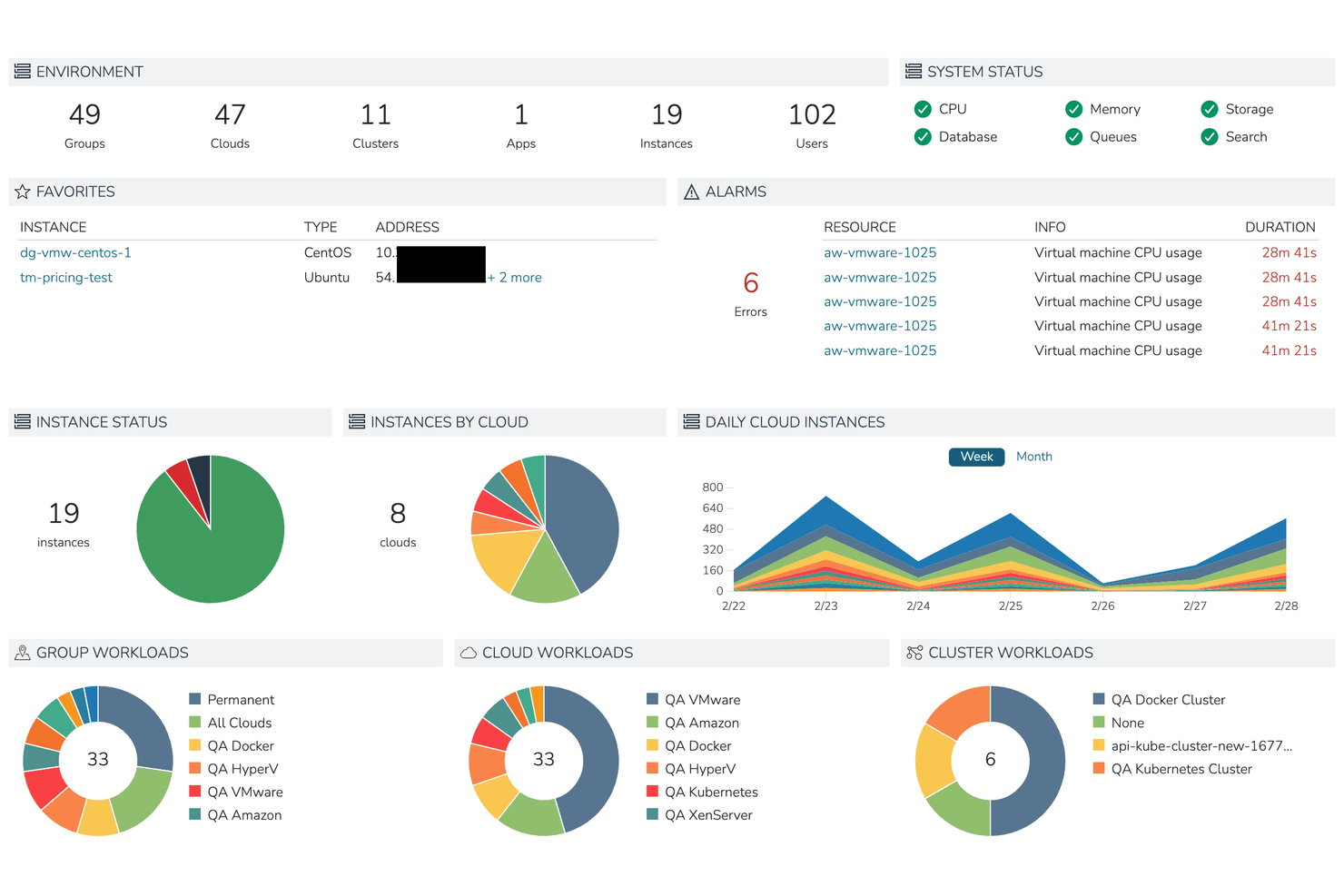
HPE Morpheus Software is a hybrid cloud management platform that unifies VM provisioning, lifecycle automation, multi-cloud governance, and self-service resource catalogs across on-premises and public cloud environments.
Who Is Morpheus Best For?
HPE Morpheus Software is a strong fit for enterprise IT and operations teams managing mixed VMware and KVM environments who need a single control plane for governance, provisioning, and gradual workload migration.
Why I Picked Morpheus
I picked Morpheus as one of the best because it's built specifically for teams that can't afford a hard cutover from VMware—it lets VMware and KVM-based HVM run side by side, so you can migrate workloads incrementally on your own timeline. I like that built-in blueprints and self-service catalogs handle provisioning across both hypervisors from a single control plane, cutting what once took days down to minutes. The policy engine also enforces quotas, approvals, and expiration rules across both environments simultaneously.
Morpheus Key Features
- Multi-tenant governance engine: Configures role-based access, resource quotas, approval workflows, and expiration policies across teams and tenant environments from a single admin interface.
- Hybrid cost reporting dashboard: Aggregates month-to-date spend, projected monthly totals, and per-cloud cost breakdowns filterable by cloud, group, tenant, and tag.
- Audit logging with SIEM export: Records all UI and API actions in Common Event Format with SHA-256 tamper detection and supports forwarding to external SIEM platforms.
- Self-service resource catalog: Lets users provision VMs, containers, and bare-metal resources on demand using pre-approved templates and blueprints without manual IT intervention.
Morpheus Integrations
Morpheus documents 90+ codeless integrations, including AWS, Azure, Google Cloud Platform, VMware vCloud, Kubernetes, Ansible, Jenkins, Jira, and ServiceNow. It also provides API and CLI access for custom provisioning and automation workflows.
Pros and Cons
Pros:
- Tenant policies support quotas and chargeback
- Templates cut provisioning from days to minutes
- Unified visibility across cloud and on-premises
Cons:
- Failed workflow tasks can halt subsequent steps
- FinOps analytics lack deeper optimization
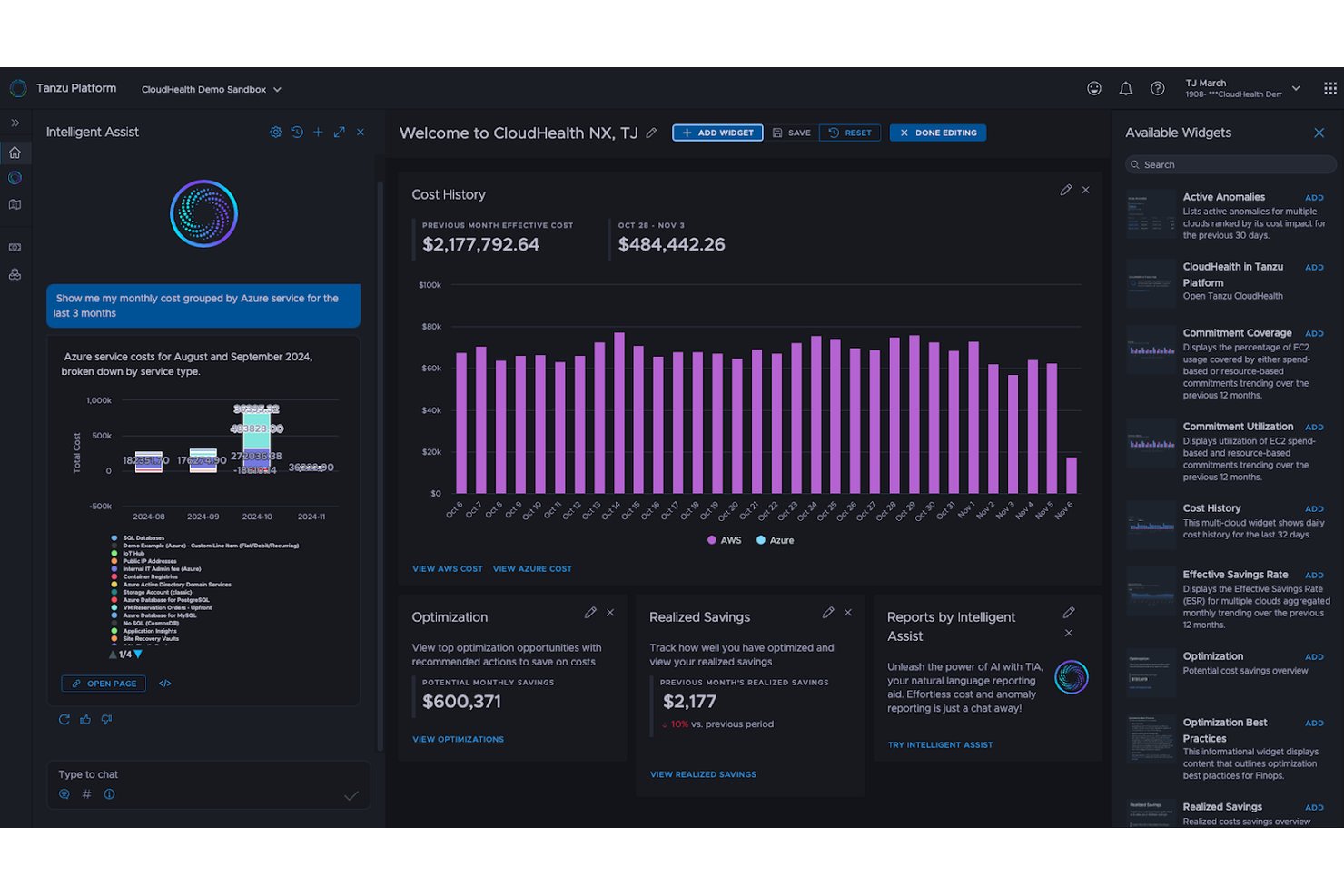
CloudHealth is a multi-cloud FinOps platform by Broadcom that provides cost visibility, spending analysis, resource optimization, and governance across AWS, Azure, Google Cloud, Alibaba Cloud, and VMware vSphere environments.
Who Is CloudHealth Best For?
CloudHealth is a strong fit for FinOps analysts and cloud finance teams managing spend across AWS, Azure, Google Cloud, and on-premises VMware environments.
Why I Picked CloudHealth by VMware
CloudHealth earns its spot on my shortlist because it pulls cost visibility beyond just public cloud, connecting AWS, Azure, Google Cloud, Alibaba Cloud, and VMware vSphere into a single view. I particularly like the Data Connect feature, which ingests SaaS and custom cost data alongside cloud billing so you can see your total technology spend in one place. The FOCUS-aligned reporting then normalizes all of that billing data into a unified schema, making it easy to compare costs across providers without manual reconciliation.
CloudHealth Key Features
- Perspectives: A dynamic grouping tool that segments your cloud resources by team, project, cost center, or any custom logic you define, then applies those groupings across reports and policies.
- FlexOrgs: An organizational hierarchy manager that assigns role-based access across AWS accounts, Azure subscriptions, and GCP projects with granular read, write, update, and delete permissions per user group.
- Policy-based automation: A rule engine that monitors cost, performance, and security conditions and can automatically start, stop, or resize EC2, RDS, GCP compute, and Azure virtual machine resources.
- Intelligent Assist: A GenAI copilot built into the platform that lets you ask questions, generate reports, and surface optimization recommendations in natural language.
CloudHealth Integrations
CloudHealth connects to AWS, Microsoft Azure, Google Cloud, Alibaba Cloud, Kubernetes, and VMware vSphere data sources. GraphQL and REST APIs support custom integrations.
Pros and Cons
Pros:
- Allocates spending by teams and projects
- Highlights idle and underused resources
- Consolidates cloud costs across providers
Cons:
- Policy checks typically run daily
- Billing data can arrive late


Snow Commander is a hybrid cloud management platform from Flexera that combines self-service provisioning, agentless multi-cloud resource discovery, VM lifecycle controls, and cost analytics across public and private cloud environments.
Who Is Snow Commander Best For?
Snow Commander is a good fit for IT and cloud operations teams managing hybrid environments who need governed self-service provisioning without giving end users direct infrastructure access.
Why I Picked Snow Commander
Snow Commander earns its spot on my shortlist because of how well it balances self-service access with genuine lifecycle control. I love that users can request and deploy VMs through a portal without ever touching the underlying infrastructure, and that expiry policies automatically decommission resources before sprawl sets in. Users also get notified before a VM expires and can request extensions, which keeps workloads alive without bypassing governance.
Snow Commander Key Features
- Agentless multi-cloud discovery: Automatically detects and inventories resources across AWS, GCP, Azure, Kubernetes, VMware vSphere, and Microsoft Hyper-V SCVMM without requiring an agent on each host.
- Rightsizing recommendations: Analyzes VM and guest OS performance data to surface resize recommendations that you can apply immediately, schedule, or submit as a change request.
- Organization quotas: Lets administrators cap vCPU, RAM, storage, or daily VM costs at the global, destination, or per-user level and enforce those limits through approval workflows.
- ServiceNow integration: Routes service requests and approvals through ServiceNow before triggering provisioning actions in Snow Commander.
Snow Commander Integrations
Snow Commander integrates with AWS, Google Cloud Platform, Kubernetes, Microsoft Azure, Microsoft Hyper-V SCVMM, and VMware vSphere. ServiceNow can route requests and approvals before deployments, while a REST API supports custom integrations.
Pros and Cons
Pros:
- Rightsizing insights help uncover oversized resources
- Expiry policies curb VM sprawl automatically
- Controlled self-service keeps users away from infrastructure
Cons:
- Initial configuration and reporting can feel complex
- Extending automation can require scripting expertise

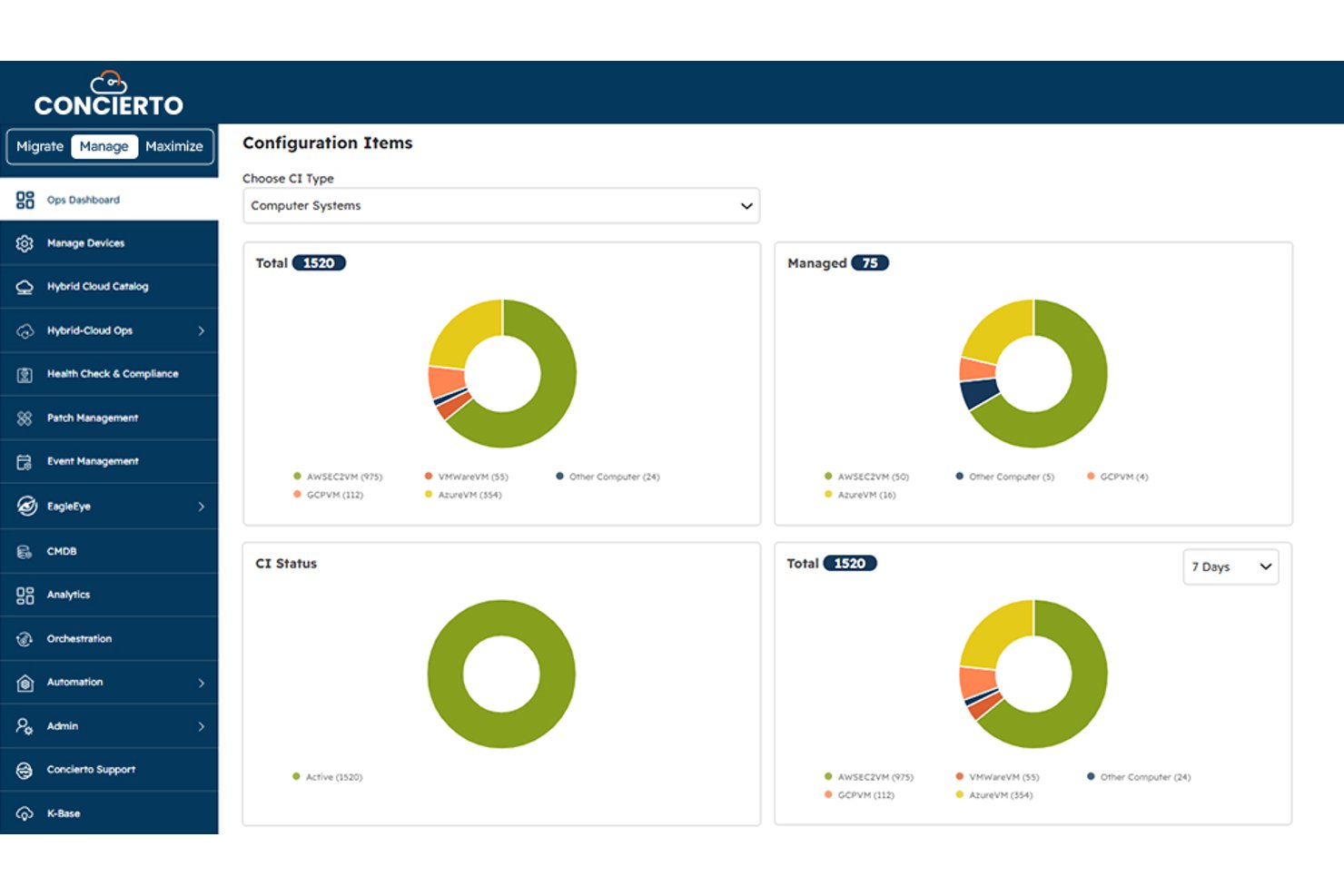
Concierto MANAGE is a hybrid and multi-cloud infrastructure management platform that centralizes resource visibility, automated provisioning, compliance governance, and operational analytics across AWS, Azure, GCP, and on-premises environments.
Who Is Concierto Cloud Best For?
Concierto MANAGE is a strong fit for enterprises running hybrid and multi-cloud environments that want a managed services team to handle day-to-day infrastructure operations.
Why I Picked Concierto Cloud
I picked Concierto MANAGE because it's built around the idea that your infrastructure operations shouldn't require a dedicated internal team to run well. The platform pairs a near-real-time hybrid cloud CMDB across AWS, Azure, GCP, and on-premises environments with a catalog of 1,000+ automations, so provisioning, decommissioning, and compliance remediation happen without manual intervention. I particularly like that tenant-level compliance blueprints include automated gap analysis and remediation, which is exactly what teams need when managing governance across mixed environments.
Concierto Cloud Key Features
- Automated patch management: Scans Windows and Unix servers, then sequences and executes patches automatically, with built-in alerts for failures.
- Incident and event management: Deduplicates and correlates events, then supports automated prioritization, root-cause analysis, and one-click remediation.
- Self-service provisioning catalog: Offers 1,000+ out-of-the-box automations for deploying and decommissioning infrastructure across AWS, Azure, GCP, and on-premises environments.
- Federated SSO and MFA: Supports federated single sign-on authentication, group-based access, and multi-factor authentication for centralized identity management.
Concierto Cloud Integrations
Concierto MANAGE lists 10 plug-and-play integrations, including ServiceNow, BMC, Datadog, AppDynamics, Dynatrace, New Relic, Prometheus, StatusCake, SCCM, and BigFix. Custom integrations are available as needed, but API availability isn't documented.
Pros and Cons
Pros:
- Automated compliance gap remediation
- 1,000+ cross-environment automation catalog
- Unified hybrid-cloud inventory and visibility
Cons:
- Scaling rules and schedules aren’t documented
- Idle-resource detection methods remain undocumented
Annen programvare for administrasjon av skyressurser
Nedenfor finner du en liste over annen programvare for administrasjon av skyressurser som jeg valgte ut. Selv om de ikke kom med blant de 10 beste, er de fortsatt nyttige og verdt å undersøke nærmere.
- Turbonomic
For balancing app performance and spend
- Hyperglance
For self-hosted cloud visibility
- Turbo360
For turning Azure cost findings into tasks
- ServiceNow ITOM
For tracing cloud changes to services
- CloudHealth
For FinOps across cloud, AI, and SaaS spend
- Spectro Cloud Palette
For disconnected edge Kubernetes
- Flexera One
For cloud, SaaS and license costs
- Vantage
For tracing AI costs by team and feature
- IBM Kubecost
For Kubernetes cost allocation by team


How I Evaluate Cloud Resource Management Software
I split my evaluation into three parts, weighting core functionality most: inventory cloud assets and usage, track spend, and flag waste. Next, I look for differentiators like roadmap-based capacity forecasts. Finally, I consider cross-functional onboarding and project-based pricing.
Core Functionality (Table Stakes For This List)
When I'm selecting tools for my list, I score each one on a scale from 0 (does not offer the functionality) to 5 (excels in this area) for each core functionality listed below. I then convert the total into a percentage to help assess each tool's overall fit, with extra weight on any functionalities I’ve deemed essential.
- Resource Visibility (Essential): I look for searchable, current asset inventories across providers, with configuration details that help teams trace project environments.
- Cost Tracking (Essential): I evaluate spend breakdowns, forecasts, and idle-resource or rightsizing recommendations to spot cost changes before they affect delivery plans.
- Provisioning Automation: I check for templates, policies, and schedules that can provision, scale, or retire project and production environments.
- Multi-Cloud Support: I assess how consistently teams can view and manage resources across public clouds and hybrid or on-prem environments.
- Usage Monitoring: I look for utilization metrics and configurable alerts that flag anomalies, thresholds, or policy violations before they disrupt work.
- Governance Controls: I evaluate project-level permissions, budgets, and policy enforcement, including whether teams can review changes through audit trails.
Once I have a list of tools that meet the criteria, I consider what sets each platform apart.
Differentiating Factors (What Sets Vendors Apart)
Here's how I compare and contrast different vendors:
Standout Features
I look for forecasted capacity planning that models future cloud spend against project roadmaps and historical burn rates—without it, quarterly planning is guesswork. Budget variance alerts matter just as much, since real-time notifications let PMO leads catch spend overruns before they force scope trade-offs. I also evaluate automated tagging engines, because inconsistent resource tags are the fastest way to break chargeback accuracy across a multi-project portfolio.
Beyond Features
I evaluate whether licensing scales by tracked projects or cost centers, since per-resource pricing can spike unpredictably when a portfolio grows. Cross-functional onboarding support matters just as much—vendors that offer guided rollouts for mixed DevOps and PMO teams cut weeks off time-to-value. I also check for audit trails that map resource changes to specific projects, which is essential when regulated programs need SOC 2 or HIPAA evidence tied to individual delivery streams.
Slik velger du programvare for administrasjon av skyressurser
Det er lett å gå seg vill i lange funksjonslister og kompliserte prismodeller. For å hjelpe deg med å holde fokus mens du går gjennom den unike prosessen med å velge programvare, har jeg laget en sjekkliste over faktorer du bør ha i bakhodet:
| Faktor | Hva du bør vurdere |
|---|---|
| Skalerbarhet | Vil programvaren vokse med virksomheten din? Vurder om den kan håndtere økt arbeidsmengde og flere brukere uten ytelsesproblemer. |
| Integrasjoner | Kan den kobles til de eksisterende verktøyene dine? Kontroller at den er kompatibel med systemene du bruker nå, for å unngå driftsforstyrrelser. |
| Tilpasningsmuligheter | Kan du tilpasse den etter behovene dine? Vurder hvor enkelt du kan justere innstillinger og arbeidsflyter slik at de passer til teamets prosesser. |
| Brukervennlighet | Er den intuitiv for teamet ditt? Se etter et oversiktlig grensesnitt som krever minimalt med opplæring, slik at den raskt tas i bruk. |
| Implementering og oppstart | Hvor lang tid vil oppsettet ta? Vurder hvilke ressurser og hvor mye tid som kreves for å få programvaren i drift, inkludert opplæring og datamigrering. |
| Kostnad | Passer den inn i budsjettet ditt? Sammenlign prismodeller, skjulte gebyrer og valuta for pengene for å sikre at løsningen passer til de økonomiske rammene dine. |
| Sikkerhetstiltak | Er dataene og driften din beskyttet? Se etter kryptering, samsvar med bransjestandarder og regelmessige sikkerhetsoppdateringer. |
| Tilgjengelig kundestøtte | Er det enkelt å få hjelp når du trenger det? Vurder hvor tilgjengelig og rask kundestøtten er, inkludert alternativer utenom vanlig åpningstid og støtte via flere kanaler. |
Trender innen programvare for administrasjon av skyressurser
Programvare for administrasjon av skyressurser fortsetter å vokse og endre seg, drevet av den økende kompleksiteten og skalaen til skymiljøer.
Her er noen trender jeg la merke til da jeg gjennomgikk programvare for administrasjon av skyressurser.
- Større vekt på kostnadsstyring: Programvaren blir stadig bedre til å kontrollere kostnader, og sanntidsanalyse kan hjelpe virksomheter med å overvåke og justere ressurser for å styre utgiftene. Denne trenden bidrar til å maksimere avkastningen på skyinvesteringer.
- Integrasjon med kunstig intelligens: Kunstig intelligens integreres i administrasjonsverktøy, ettersom KI-algoritmer forutsier etterspørsel og automatiserer ressursallokering. Denne integrasjonen er avgjørende for å forbedre effektiviteten og redusere behovet for manuell overvåking.
- Forbedrede sikkerhetsfunksjoner: Sikkerheten i programvare for skyadministrasjon blir stadig bedre. Avansert trusseldeteksjon og automatiserte samsvarskontroller blir standard. Denne trenden er avgjørende for å beskytte data i et stadig mer fiendtlig digitalt landskap.
- Bærekraft gjennom ressursoptimalisering: Bærekraft får stadig større oppmerksomhet, og det meste av programvaren inkluderer nå funksjoner som minimerer energiforbruk og karbonavtrykk. Dette er viktig for virksomheter som ønsker å ta miljøansvar.
- Overgang til strategier med flere skyer: Verktøyene tilpasses nå for å administrere flere skymiljøer samtidig, noe som gir større fleksibilitet og reduserer risiko. Overgangen til nettbaserte løsninger er betydelig for virksomheter som ønsker å unngå leverandørbinding.
Ved å ta i bruk denne utviklingen kan virksomheter forvente å forbedre driftseffektiviteten og fremme innovasjon og vekst i årene som kommer.
Hva er programvare for administrasjon av skyressurser?
Programvare for administrasjon av skyressurser er en digital plattform utviklet for å administrere, tildele og utnytte ressurser innen nettskybasert databehandling. IT-fagfolk og organisasjoner bruker den til å overvåke og kontrollere skytjenester. Dette sikrer effektiv bruk av datakraft, lagring og nettverksfunksjoner for virksomheter og interessenter.
Programvaren balanserer ressursbehov og tilgjengelighet, og forhindrer overdimensjonering og underutnyttelse, som er vanlige utfordringer i skymiljøer.
Funksjoner
Når du velger programvare for administrasjon av skyressurser, bør du se etter følgende nøkkelfunksjoner:
- Kostnadsoptimalisering: Hjelper med å spore og administrere skyutgifter, slik at ressursene brukes effektivt og budsjettene overholdes.
- Sikkerhetsvurderinger: Gir innsikt i sårbarheter og samsvar med bransjestandarder, slik at skymiljøet holdes sikkert.
- Automatisert klargjøring: Gjør det mulig å distribuere ressurser raskt, reduserer manuell inngripen og fremskynder prosjektplanene.
- Samsvarssporing: Sikrer overholdelse av regulatoriske krav og minimerer risikoen for sanksjoner ved manglende samsvar.
- Støtte for flere skyer: Administrerer ressurser på tvers av ulike skyleverandører, noe som gir fleksibilitet og reduserer leverandørbinding.
- Tilpassbare oversikter: Tilbyr tilpassede visninger av nøkkeltall, slik at brukerne kan fokusere på den mest kritiske informasjonen.
- Sanntidsvarsler: Varsler brukerne om endringer eller problemer i skymiljøet, slik at de raskt kan håndtere potensielle problemer.
- Livssyklusadministrasjon: Automatiserer oppdateringer og sikkerhetsoppdateringer, slik at ressursene alltid er oppdaterte og fungerer optimalt.
Fordeler
Implementering av programvare for administrasjon av skyressurser gir flere fordeler for teamet og virksomheten din. Her er noen av fordelene du kan se frem til:
- Kostnadsbesparelser: Ved å optimalisere ressursbruken og spore utgiftene kan du redusere unødvendige kostnader og holde deg innenfor budsjettet.
- Forbedret sikkerhet: Regelmessige sikkerhetsvurderinger og samsvarssporing bidrar til å beskytte dataene dine og sikre overholdelse av bransjestandarder.
- Økt effektivitet: Automatisert klargjøring og livssyklusadministrasjon fremskynder distribusjonsprosesser, slik at teamet ditt kan fokusere på andre oppgaver.
- Fleksibilitet: Støtte for flere skyer gjør det mulig å administrere ressurser på tvers av ulike plattformer, noe som reduserer avhengigheten av én enkelt leverandør.
- Bedre beslutningstaking: Tilpassbare oversikter og sanntidsvarsler gir innsikt og tidsriktig informasjon, slik at du kan ta informerte beslutninger.
- Regulatorisk samsvar: Samsvarssporing sikrer at driften oppfyller juridiske krav og bransjekrav, og minimerer risikoen for sanksjoner.
- Ressursoptimalisering: Ved å overvåke ytelse og bruk kan du fordele ressursene effektivt og forbedre den samlede produktiviteten.
Kostnader og priser
Ved valg av programvare for styring av skyressurser er det nødvendig å forstå de ulike prismodellene og tilgjengelige abonnementene. Kostnadene varierer basert på funksjoner, teamstørrelse, tillegg og mer. Tabellen nedenfor oppsummerer vanlige abonnementer, gjennomsnittspriser og typiske funksjoner som inngår i programvareløsninger for styring av skyressurser:
Sammenligningstabell for abonnementer for programvare for styring av skyressurser
| Abonnementstype | Gjennomsnittspris | Vanlige funksjoner |
|---|---|---|
| Gratisabonnement | $0/bruker/måned | Grunnleggende overvåking, begrenset brukerstøtte og tilgang til fellesskapet. |
| Personlig abonnement | $5-$25/bruker/måned | Kostnadssporing, grunnleggende analyse og brukerstøtte via e-post. |
| Bedriftsabonnement | $30-$50/bruker/måned | Avansert analyse, støtte for flere skyer og brukerstøtte via telefon. |
| Virksomhetsabonnement | $60-$100/bruker/måned | Tilpassbare dashbord, dedikert kundeansvarlig og brukerstøtte døgnet rundt, alle dager. |
Vanlige spørsmål om programvare for styring av skyressurser
Her er noen vanlige spørsmål jeg får om programvare for styring av skyressurser.
Er programvare for styring av skyressurser enkel å bruke?
Hvor enkel programvare for styring av skyressurser er å bruke, er en viktig vurdering. Det er viktig å evaluere hvordan oppgaver utføres i verktøyet, og hvor mange trinn som kreves for kritiske operasjoner. Utformingen av brukergrensesnittet, interaktive funksjoner og leverandørens tilgjengelighet for opplæring kan alle påvirke hvor brukervennlig programvaren er. Velg et verktøy som er intuitivt og gjør det mulig for teamet ditt å ta det i bruk med minimal opplæring.
Er programvare for styring av skyressurser intuitiv og egnet for samarbeid?
Programvare for styring av skyressurser bør være intuitiv for å redusere opplæringstiden og gjøre det enklere for teamet å tilpasse seg raskt. Samarbeidsfunksjoner er dessuten avgjørende for at teammedlemmer på ulike steder skal kunne arbeide effektivt sammen. Se etter programvare som tilbyr et sentralisert nettbasert område for deling av data og beslutningstaking.
Tillater programvare for styring av skyressurser ulike tilgangsnivåer?
Programvare som tilbyr ulike tilgangsnivåer, kan være nyttig for forskjellige roller i en organisasjon. Ved å angi ulike tillatelser kan prosjektledere, teammedlemmer og kunder få tilgang til informasjonen og funksjonaliteten som er relevant for dem. Dette kan forbedre åpenheten og engasjementet rundt verktøyet.
Er det mulig å lage rapporter med programvare for styring av skyressurser?
Rapportering er en viktig funksjon i programvare for ressursstyring. Kontroller om standardrapporter er tilgjengelige, og om de kan tilpasses etter behovene dine. Noen verktøy, for eksempel eResource Scheduler, tilbyr grafiske rapporteringsfunksjoner og omfattende dashbord, noe som er viktig for overvåking og beslutningstaking.
Kan programvare for styring av skyressurser håndtere hele prosjektets livssyklus?
Programvare for styring av skyressurser bør støtte hele prosjektets livssyklus, fra prosjektplanlegging til levering. Den bør muliggjøre risikostyring, oversikt over ressurstilgjengelighet og -tildeling, tidsregistrering og andre viktige prosjektstyringsfunksjoner. Sørg for at verktøyet du velger, kan håndtere alle aspekter ved prosjektene dine på en effektiv måte.
Vil programvare for styring av skyressurser støtte måten virksomheten din drives på?
Programvaren bør være kompatibel med virksomhetens arbeidsmåter og støtte de eksisterende strukturene dine. Den bør også kunne tilpasses for å håndtere fremtidige forbedringer og oppdateringer. Når du velger et verktøy, bør du vurdere hvor godt det integreres med forretningsprosessene dine, og om leverandøren tilbyr hjelp med tilpasning.
Tilbyr leverandøren brukerstøtte etter implementeringen av programvaren for styring av skyressurser?
Etter at ny programvare er implementert, er brukerstøtte etter implementeringen avgjørende for en smidig overgang. Spør om leverandørens brukerstøttetjenester, inkludert opplæring av nye brukere og hjelp med feilsøking. Kontroller om brukerstøttekostnadene er inkludert i den årlige lisensavgiften, og om brukerstøtteteamet er tilgjengelig i tidssonen din eller tilbyr hjelp døgnet rundt, alle dager.