

De 10 beste programmene for AI-dokumentstyring vurdert i 2026

10 Beste programvare for AI-dokumentstyring – kortliste


Det kan være et mareritt å administrere dokumenter, særlig når du håndterer flere prosjekter samtidig. Du trenger en løsning som organiserer, sikrer og gjør dokumentene tilgjengelige for teamet ditt. Det er her programvare for AI-dokumentstyring kommer inn.
Tradisjonelle verktøy for dokumenthåndtering hjelper deg med å lagre og dele filer – men AI tar det et skritt videre. Disse verktøyene bruker maskinlæring til å automatisere versjonskontroll, oppdage duplikater, hente ut viktig informasjon og til og med forutsi hvilke dokumenter teamet ditt vil trenge neste gang. Kort sagt gjør AI dokumenthåndtering fra en manuell oppgave til et intelligent system som lærer av hvordan du arbeider.
I denne veiledningen ser vi nærmere på den beste programvaren for AI-dokumentstyring som er tilgjengelig i dag – med særlig fokus på funksjoner, brukervennlighet og fremtredende fordeler. Du får vite hvordan AI-drevne verktøy skiller seg fra standardalternativer, og hvilket som passer best til arbeidsflyten i teamet ditt.
Why Trust Our Software Recommendations
Our team has been testing and reviewing software since 2012. As project managers ourselves, we know how difficult—and important—it is to choose the right software.
For this guide, we evaluated tools using hands-on testing and independent research, scoring tools using our selection criteria. We also draw on insights from industry thought leaders and practicing project management experts.
Our reviews reflect our human editorial judgment, not a sales pitch.
Expert reviewers:
Sammenligningstabell for programvare for AI-dokumentstyring
Denne sammenligningstabellen oppsummerer prisopplysningene for mine beste utvalgte programmer for AI-dokumentstyring:
| Tool | Best For | Trial Info | Price | ||
|---|---|---|---|---|---|
| 1 | Best for multilingual document search | Free demo available | Pricing upon request | Website | |
| 2 | Best for contract management | Free demo available | Pricing upon request | Website | |
| 3 | Best for secure document storage | Free demo available | From $73/user/month (billed annually) | Website | |
| 4 | Best for small to medium businesses | Free demo available | Pricing upon request | Website | |
| 5 | Best for compliance with data regulations | Free demo available | From $65/user/month | Website | |
| 6 | Best for legal industry professionals | Free demo available | Pricing upon request | Website | |
| 7 | Best for team collaboration | Free demo + 15-day free trial available | From CAD $3/user/month (billed annually) | Website | |
| 8 | Best for scalability in enterprises | Free demo available | From $25/user/month | Website | |
| 9 | Best for IT documentation | Free trial + free demo available | Pricing upon request | Website | |
| 10 | Best for life sciences compliance | Free demo available | Pricing upon request | Website |
Anmeldelser av den beste programvaren for AI-dokumentstyring
Nedenfor finner du mine detaljerte sammendrag av den beste programvaren for AI-dokumentstyring som kom med på kortlisten. Anmeldelsene mine gir en detaljert gjennomgang av de viktigste funksjonene, fordelene & ulempene, integrasjonene og ideelle bruksområdene for hvert verktøy, slik at du kan finne det beste alternativet for deg.
Doxis
Best for multilingual document search
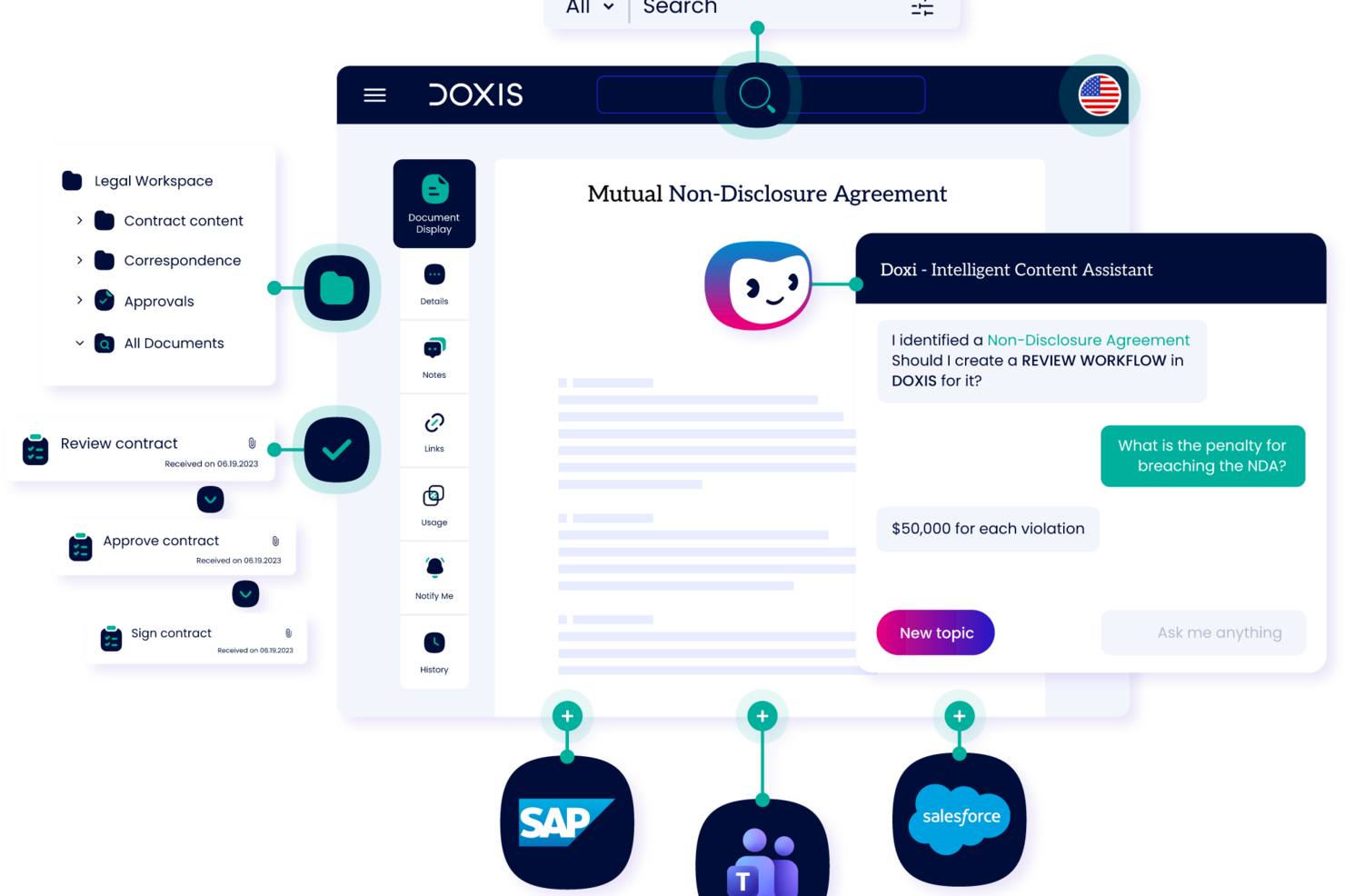
Doxis is an AI-powered enterprise content management platform that handles document capture, automated classification, metadata extraction, version control, workflow routing, and compliance-driven archiving for large organizations.
Who is Doxis Best For?
Doxis suits large enterprises in regulated industries that need centralized document control across multiple departments and systems.
Why I Picked Doxis
I picked Doxis as one of the best for multilingual document search because of how it handles cross-language retrieval at enterprise scale. The search filter lets you narrow results by language alongside document type, author, and processor, which is genuinely useful when your document library spans multiple regions and languages. On top of that, the content federation feature pulls in metadata from external sources automatically, so documents stored across different systems get surfaced in the right context, regardless of the language they're written in.
Doxis Key Features
- AI-powered document classification: Doxis AI.dp identifies and categorizes incoming documents by type, reducing manual sorting across large document volumes.
- Audit-proof archiving: Documents are stored with tamper-proof audit trails and configurable retention periods to support regulatory compliance requirements.
- Version management: Doxis tracks every document revision with a full version history, so you always know what changed, when, and by whom.
- No-code workflow configuration: Doxis Business Studio lets you build and modify document workflows and content apps without writing code.
Doxis Integrations
Doxis offers native integrations with SAP, Salesforce, and various Microsoft services, including Microsoft 365, Microsoft Teams, Microsoft Outlook, Microsoft SharePoint, and Microsoft Dynamics 365. It uses vendor-specific connectors like Doxis SmartBridge for Salesforce and certified SAP interfaces to provide deep, bidirectional integration within those environments. A REST API is also available for custom integrations. Zapier support is not documented.
Pros and Cons
Pros:
- Processes documents in multiple languages natively
- Tamper-proof archiving with retention controls
- AI classifies and routes documents automatically
Cons:
- Cloud hosting outages reported by users
- Geared toward large enterprise deployments

Juro
Best for contract management

Juro is a contract management platform tailored for legal teams and businesses looking to streamline their contract workflows. Its main users are legal professionals and operations teams who need to create, manage, and store contracts efficiently.
Why I picked Juro: It offers an intuitive interface that simplifies contract creation and management for legal teams. The platform includes features like automated contract templates and real-time collaboration, which facilitate smoother contract workflows.
Juro's in-browser editing allows your team to make quick changes without leaving the platform. Its focus on contract management makes it a go-to solution for legal departments looking to optimize their processes.
Standout features & integrations:
Features include automated contract templates that save time in document creation, in-browser editing for quick updates, and real-time collaboration to enhance teamwork on contract management.
Integrations include Salesforce, Slack, Google Drive, Microsoft 365, HubSpot, Box, Dropbox, Docusign, Zapier, and Greenhouse.
Pros and Cons
Pros:
- Real-time collaboration
- Automated contract templates
- Intuitive contract management
Cons:
- Occasional performance lags
- Limited customization options

Best for secure document storage

Laserfiche is a document management and automation platform designed for organizations that require secure storage and management of large volumes of documents. Its main users include government agencies, educational institutions, and financial services firms looking for secure and efficient document handling.
Why I picked Laserfiche: Laserfiche offers advanced security features, including encryption and access controls, which are essential for secure document storage. It also offers document automation workflows that enhance productivity by reducing manual processes.
With its comprehensive audit trail capabilities, your team can track document access and modifications. Laserfiche's focus on security makes it a reliable choice for organizations with strict data protection needs.
Standout features & integrations:
Features include a built-in audit trail system to track document changes, workflow automation to streamline repetitive tasks, and advanced search options to quickly locate documents.
Integrations include Microsoft 365, Salesforce, Docusign, SAP, SharePoint, QuickBooks, Dropbox, Google Workspace, Adobe Sign, and Box.
Pros and Cons
Pros:
- Efficient document retrieval
- Strong support for compliance
- Flexible workflow automation
Cons:
- Occasional performance issues
- Complex setup process

DocuWare
Best for small to medium businesses

DocuWare is a document management and workflow automation tool designed for small to medium-sized businesses that need efficient document handling. Its main users include administrative teams and departments that require organized document storage and retrieval.
Why I picked DocuWare: DocuWare offers streamlined document workflows that help small businesses manage their documents effectively. The platform features include electronic signatures and cloud storage, facilitating secure document management.
With its user-friendly interface, your team can quickly adapt to the system. DocuWare's focus on small to medium businesses makes it a practical choice for teams with limited resources.
Standout features & integrations:
Features include electronic signatures to streamline document approvals, cloud storage for secure and accessible document management, and workflow automation to reduce manual tasks.
Integrations include Microsoft 365, Salesforce, SAP, QuickBooks, Sage, Google Workspace, Oracle, Outlook, Dropbox, and Box.
Pros and Cons
Pros:
- Effective workflow automation
- Strong cloud storage options
- Electronic signature capabilities
Cons:
- Occasional performance lags
- Requires training for new users

M-Files
Best for compliance with data regulations

M-Files is a Document Management System (DMS) designed for businesses needing to manage compliance and secure document handling. It's particularly suited for industries like accounting, engineering, and scientific research.
Why I picked M-Files: M-Files offers AI-driven document automation and metadata-driven architecture, allowing efficient document retrieval and management. It excels in compliance with data regulations by providing robust security features and audit trails.
The platform also integrates with major platforms like Microsoft 365 and Google Workspace, ensuring your team can work within familiar environments. Its focus on compliance makes it a reliable choice for industries with strict regulatory requirements.
Standout features & integrations:
Features include automated workflows that streamline document approval processes, metadata-driven organization for easy document retrieval, and advanced security measures to protect sensitive information.
Integrations include Microsoft 365, Google Workspace, Salesforce, SAP, SharePoint, Docusign, Adobe Sign, QuickBooks, HubSpot, and Slack.
Pros and Cons
Pros:
- Metadata-driven organization
- Strong compliance support
- AI-driven document management
Cons:
- Customization can be challenging
- Requires ongoing maintenance

iManage
Best for legal industry professionals

iManage is a document and email management system designed for legal professionals who seek efficient management of documents and communications. Its main users include law firms and corporate legal departments that need secure and organized document handling.
Why I picked iManage: iManage offers specialized features for legal professionals, including document version control and email management. It offers advanced security measures, ensuring your sensitive legal documents are protected.
With its intuitive search capabilities, your team can quickly locate critical documents and emails. iManage's focus on the legal industry makes it an ideal choice for firms needing tailored document management solutions.
Standout features & integrations:
Features include document versioning to track changes, email management for organizing communications, and advanced search options to quickly locate necessary documents and emails.
Integrations include Microsoft Office, Microsoft 365, Salesforce, Adobe Acrobat, Docusign, NetDocuments, Workshare, Microsoft Teams, Outlook, and SharePoint.
Pros and Cons
Pros:
- Intuitive search capabilities
- Secure email management
- Tailored for legal professionals
Cons:
- Frequent updates needed
- Steep learning curve

Best for team collaboration

Zoho WorkDrive is a cloud-based document management system designed for businesses that need efficient document collaboration. Its primary users include small to medium-sized teams looking for a shared workspace to manage their documents.
Why I picked Zoho WorkDrive: Zoho WorkDrive offers real-time collaboration features that enhance teamwork by allowing multiple users to work on documents simultaneously. It provides a shared workspace where your team can organize, store, and access documents securely.
The tool’s advanced search functionalities make it easy to find documents quickly. With its focus on collaboration, Zoho WorkDrive is ideal for teams that need to work together efficiently and effectively.
Standout features & integrations:
Features include team folders that allow you to organize documents and control access, real-time notifications to keep your team updated, and version history to track changes and restore previous versions.
Integrations include Zoho CRM, Zoho Projects, Slack, Microsoft Teams, Zapier, Microsoft 365, Google Workspace, Trello, Dropbox, and Asana.
Pros and Cons
Pros:
- Version history tracking
- Real-time editing
- Easy document sharing
Cons:
- Basic reporting tools
- Occasional sync issues

Best for scalability in enterprises

AmpleLogic EDMS is an electronic document management system designed for large enterprises that require scalable solutions for managing extensive document workflows. It caters to industries like pharmaceuticals, manufacturing, and healthcare, providing a centralized platform for document storage and compliance management.
Why I picked AmpleLogic EDMS: AmpleLogic EDMS offers extensive scalability features that support the growing needs of large enterprises. It includes workflow automation to streamline document processes and ensure compliance with industry standards.
The software’s customizable dashboards allow your team to tailor the interface according to specific business needs. With its scalable architecture, AmpleLogic EDMS easily adapts to your expanding document management requirements.
Standout features & integrations:
Features include customizable dashboards that let you tailor the user interface, workflow automation to improve document processes, and compliance management tools to meet industry standards.
Integrations include Microsoft Office, SharePoint, SAP, Oracle, Salesforce, Google Drive, Dropbox, Box, IBM FileNet, and Docusign.
Pros and Cons
Pros:
- Efficient workflow automation
- Customizable user interface
- Highly scalable architecture
Cons:
- Customization requires IT support
- Limited mobile access

NinjaOne
Best for IT documentation
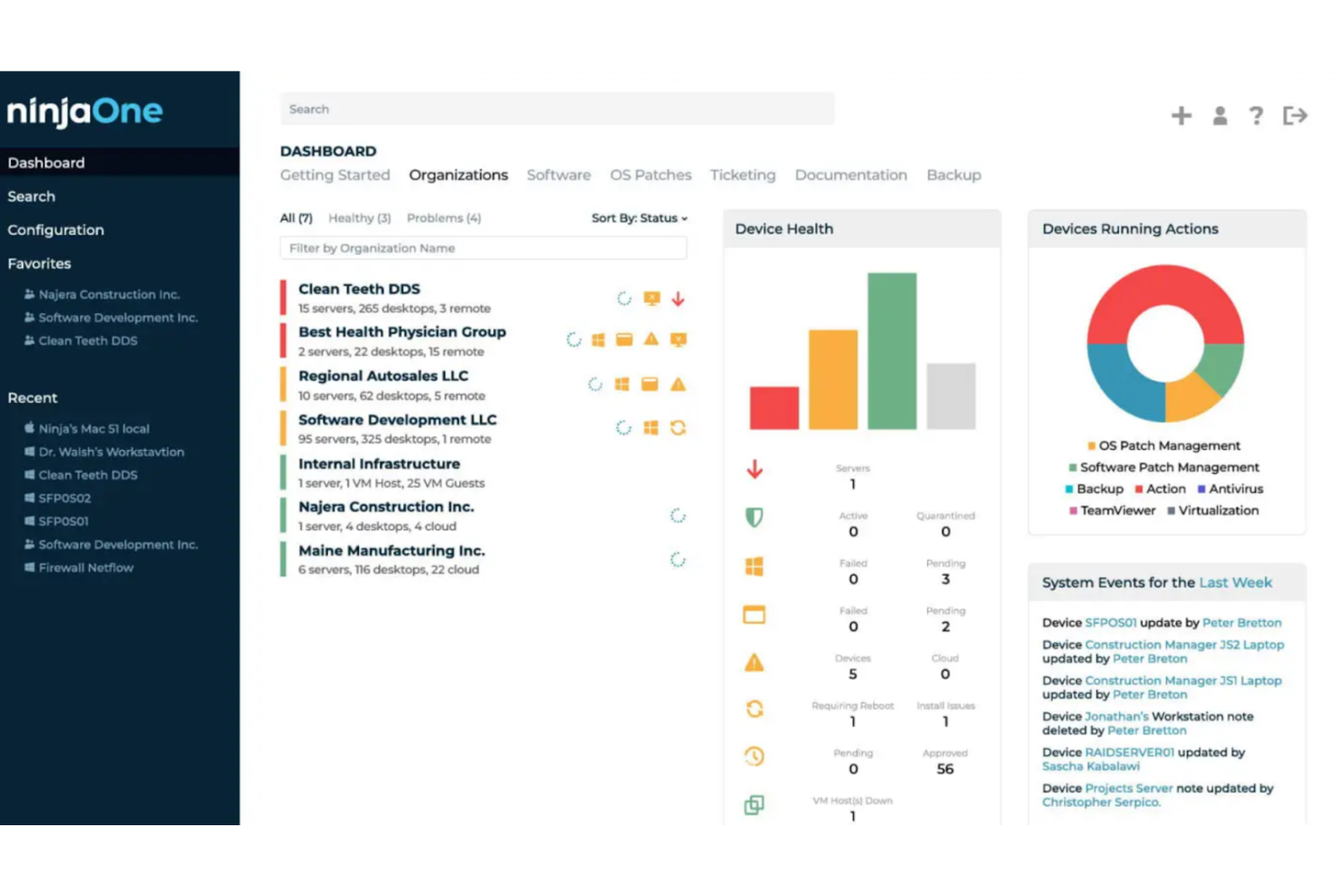
NinjaOne is an IT documentation and management platform designed for IT teams that need efficient management of their documentation and assets. Its main users include IT professionals and managed service providers who require organized documentation and streamlined IT operations.
Why I picked NinjaOne: NinjaOne offers specialized features for IT documentation, including automated asset tracking and ticketing. It includes centralized documentation storage, ensuring your team can access critical information quickly.
With its intuitive interface, your team can manage IT documentation without hassle. NinjaOne's focus on IT needs makes it a practical solution for IT departments seeking to increase efficiency.
Standout features & integrations:
Features include automated asset tracking that keeps your inventory up-to-date, centralized documentation storage for easy access, and ticketing systems to manage IT requests efficiently.
Integrations include Microsoft 365, Google Workspace, Slack, Salesforce, Zendesk, QuickBooks, Dropbox, Box, Docusign, and Adobe Sign.
Pros and Cons
Pros:
- Intuitive user interface
- Efficient ticketing system
- Automated asset tracking
Cons:
- Limited mobile access
- Learning curve for advanced features

MasterControl is a quality and document management software designed for life sciences companies needing to comply with strict regulatory standards. Its primary users include pharmaceutical, biotech, and medical device companies that require efficient document control and quality management.
Why I picked MasterControl: MasterControl provides features that help life sciences companies meet compliance requirements like FDA regulations. It includes document version control and audit trails, ensuring your team can maintain compliance.
The platform offers training management capabilities to keep your staff updated on compliance protocols. MasterControl's focus on life sciences compliance helps it stand out as a solid option for companies in regulated industries.
Standout features & integrations:
Features include document control that tracks changes and maintains compliance, audit trails that provide a clear record of document history, and training management to ensure your team is up-to-date with industry standards.
Integrations include SAP, Oracle, Salesforce, Microsoft Dynamics, Docusign, Adobe Sign, QuickBooks, SharePoint, Box, and Dropbox.
Pros and Cons
Pros:
- Requires extensive training
- Includes training management
- Strong compliance focus
Cons:
- Performance issues with large datasets
- Tailored for regulated industries
Annen programvare for AI-dokumentstyring
Her er noen flere alternativer for programvare for AI-dokumentstyring som ikke kom med på kortlisten min, men som likevel er verdt å sjekke ut:
- eShare.ai
For AI-driven document insights
- Document360
For knowledge base creation
- Bynder
For digital asset management
- Box
For secure file storage
- Dropbox
For easy file sharing
- ComplianceQuest
For quality management compliance
- Google Workspace
For team collaboration tools
- OneDrive
For integration with Windows


How I Evaluate AI Document Control Software
Every tool on this list needs to deliver AI that actually saves time—whether that's auto-classifying submittals or surfacing the right revision in seconds, not just slapping a chatbot on a file browser. I split my evaluation into two layers: core functionality a tool must have to qualify, and differentiating factors that separate the best fit from the rest.
Core Functionality (Table Stakes For This List)
When I'm selecting tools for my list, I rank each one on a scale from 0 (does not offer the functionality) to 5 (excels in this area) for each core functionality listed below. Then, I calculate the tool's total score into a percentage. Each tool needs to achieve a minimum total score of 65% to be considered for inclusion.
- AI-Powered Document Classification: I evaluate how well the AI auto-tags and categorizes uploads—like sorting RFIs from submittals or matching drawings to project phases without manual input.
- Version Control & Audit Trail: Every revision, rollback, and stakeholder action should be logged in a traceable history that holds up during audits or dispute resolution.
- Intelligent Search & Retrieval: I check whether the search goes beyond keywords, letting users find a buried spec sheet by describing its content in plain language or scanning OCR'd files.
- Automated Approval Workflows: The tool should route documents to the right reviewers based on project stage and role, so a design package reaches the lead engineer before the client.
- Access Control & Permissions: I look at how granular the permissions model is—whether you can restrict a subcontractor to one drawing set while giving internal PMs full portfolio visibility.
- Compliance & Retention Management: Tools should enforce retention schedules, capture e-signatures, and generate export-ready compliance reports aligned with standards like ISO or SOC 2.
Once I have a list of tools that meet the criteria, I consider what sets each platform apart.
Differentiating Factors (What Sets Vendors Apart)
Here's how I compare and contrast different vendors:
Standout Features
A generative AI assistant adds real value when it can summarize a 200-page spec or answer questions about contract clauses without opening the file. I also look for predictive risk flagging—tools that alert you to missing submittals or stalled approvals before they delay a milestone. For AEC-heavy teams, drawing and BIM integration with AI-driven sheet comparison can save hours of manual redline review across revision sets.
Beyond Features
Integrations matter a lot here. I evaluate whether a tool connects natively with the PM platforms your team already uses—Procore, Primavera, Jira, or SharePoint—so documents stay linked to the right tasks and milestones. Security and compliance posture is another key factor, especially for teams handling regulated deliverables; I check for SOC 2, ISO 27001, and data residency options. I also consider how well a vendor supports implementation, since migrating thousands of legacy files demands hands-on guidance.
Slik velger du programvare for AI-dokumentstyring
Det er lett å gå seg vill i lange funksjonslister og komplekse prisstrukturer. For å hjelpe deg med å holde fokus mens du arbeider deg gjennom den unike prosessen med å velge programvare, får du her en sjekkliste over faktorer du bør ha i bakhodet:
| Faktor | Hva du bør vurdere |
|---|---|
| Skalerbarhet | Kan programvaren vokse sammen med teamet ditt? Vurder hvor mange brukere den støtter, og hvor enkelt du kan legge til flere. Unngå verktøy som begrenser utvidelser. |
| Integrasjoner | Kan den kobles til verktøyene du allerede bruker? Kontroller kompatibiliteten med de eksisterende systemene dine, for eksempel CRM-, ERP- eller samarbeidsplattformer. |
| Tilpasningsmuligheter | Kan du tilpasse programvaren til arbeidsflytene dine? Se etter alternativer for å justere dashbord, felt og tillatelser slik at de passer til prosessene dine. |
| Brukervennlighet | Hvor raskt kan teamet ditt begynne å bruke den? Velg intuitive grensesnitt som krever minimalt med opplæring. Unngå unødvendig komplekse verktøy. |
| Implementering og innføring | Hvor lang tid vil det ta å sette den opp? Sørg for at leverandøren tilbyr støtte, opplæring og ressurser som hjelper deg godt i gang. |
| Kostnad | Holder den seg innenfor budsjettet ditt? Sammenlign prisplaner, skjulte gebyrer og valuta for pengene. Vurder langsiktige kostnader, ikke bare startkostnadene. |
| Sikkerhetstiltak | Hvordan beskytter den dataene dine? Se etter kryptering, tilgangskontroller og samsvar med regelverk for databeskyttelse. |
| Etterlevelseskrav | Oppfyller den bransjestandardene? Kontroller at programvaren er i samsvar med eventuelle regulatoriske krav som gjelder spesifikt for fagområdet ditt, for eksempel GDPR eller HIPAA. |
Hva er AI-programvare for dokumentstyring?
AI-programvare for dokumentstyring er et verktøy som bruker kunstig intelligens til å administrere, lagre og spore dokumenter. Fagpersoner som prosjektledere, juridiske team og IT-avdelinger bruker disse verktøyene til å organisere dokumenter effektivt og sikre etterlevelse av regelverk. Automatiserte arbeidsflyter, intelligent søk og tilgangskontroller bidrar til organisering, gjenfinning og sikkerhet. Disse verktøyene sparer tid og reduserer feil ved å forbedre prosessene for dokumenthåndtering.
Funksjoner i AI-programvare for dokumentstyring
Når du velger AI-programvare for dokumentstyring, bør du se etter følgende viktige funksjoner:
- Dokumentlagring: Tilbyr sikker og organisert lagring for enkel gjenfinning og administrasjon av dokumenter.
- Versjonskontroll: Sporer endringer i dokumenter og opprettholder en historikk over redigeringer for å forhindre feil og forvirring.
- Tilgangskontroller: Gir tillatelsesinnstillinger som styrer hvem som kan se eller redigere dokumenter, og forbedrer sikkerheten.
- Automatiserte arbeidsflyter: Effektiviserer prosesser ved å automatisere repetitive oppgaver, spare tid og redusere manuelle feil.
- Intelligent søk: Bruker AI til raskt å finne dokumenter ved hjelp av nøkkelord eller metadata, noe som forbedrer effektiviteten.
- Revisjonsspor: Opprettholder en detaljert logg over dokumenttilgang og endringer for å sikre etterlevelse og ansvarlighet.
- Etterlevelsesstyring: Sikrer at dokumenter oppfyller bransjereguleringer, som GDPR eller HIPAA, og reduserer dermed juridisk risiko.
- Samarbeidsverktøy: Gjør det mulig for flere brukere å arbeide med dokumenter samtidig, noe som forbedrer teamets produktivitet.
- Tilpassbare kontrollpaneler: Lar brukerne tilpasse grensesnittet for en mer intuitiv og effektiv arbeidsflyt.
- Opplæringsstyring: Tilbyr ressurser som holder teamene oppdatert på etterlevelse og beste praksis.
Fordeler med AI-programvare for dokumentstyring
Implementering av AI-programvare for dokumentstyring gir flere fordeler for teamet og virksomheten din. Her er noen av fordelene du kan se frem til:
- Forbedret effektivitet: Automatiserte arbeidsflyter og funksjoner for intelligent søk gjør dokumenthåndteringen raskere, reduserer manuelle oppgaver og skaper effektive forretningsprosesser.
- Forbedret sikkerhet: Tilgangskontroller og revisjonsspor beskytter sensitiv informasjon og sikrer etterlevelse av regelverk.
- Bedre samarbeid: Redigering i sanntid og delt tilgang støtter teamarbeid og gjør det mulig for flere brukere å arbeide sammen på en smidig måte.
- Færre feil: Versjonskontroll forhindrer feil ved å holde oversikt over endringer i dokumenter og opprettholde nøyaktigheten.
- Kostnadsbesparelser: Automatiserte prosesser og færre manuelle feil kan føre til lavere driftskostnader.
- Sikret etterlevelse: Verktøy for etterlevelsesstyring bidrar til å oppfylle bransjestandarder og reduserer risikoen for juridiske problemer.
- Økt produktivitet: Enkel gjenfinning og administrasjon av dokumenter frigjør tid til viktigere oppgaver og øker den samlede produktiviteten.
Kostnader og priser for AI-programvare for dokumentstyring
Valg av AI-programvare for dokumentstyring krever en forståelse av de ulike prismodellene og abonnementene som er tilgjengelige. Kostnadene varierer basert på funksjoner, teamstørrelse, tillegg og mer. For eksempel kan engangsavgifter for oppsett og implementering raskt bli høye ($7,000 til $35,000), så sørg for å spørre leverandørene om eventuelle tilleggskostnader. Tabellen nedenfor oppsummerer vanlige abonnementer, gjennomsnittsprisene deres og typiske funksjoner som er inkludert i løsninger for AI-programvare for dokumentstyring:
Sammenligningstabell for abonnementer for AI-programvare for dokumentstyring
| Abonnementstype | Gjennomsnittspris | Vanlige funksjoner |
|---|---|---|
| Gratisabonnement | $0 | Grunnleggende lagring, begrenset antall brukere og grunnleggende samarbeidsverktøy. |
| Personlig abonnement | $5-$60/bruker/måned | Utvidet lagring, tilgang for én bruker og grunnleggende sikkerhetsfunksjoner. |
| Bedriftsabonnement | $30-$80/bruker/måned | Avansert samarbeid, versjonskontroll og verktøy for etterlevelse. |
| Virksomhetsabonnement | $60-$250/bruker/måned | Tilpassede integrasjoner, avansert sikkerhet og dedikert brukerstøtte. |
Vanlige spørsmål om AI-programvare for dokumentkontroll
Her er svar på vanlige spørsmål om AI-programvare for dokumentkontroll:
Hvordan brukes AI i dokumenthåndtering?
AI i dokumenthåndtering analyserer tekst i dokumenter. Gjennom datauttrekking fanger og kategoriserer teknologien opp relasjoner på tvers av ulike felt for å generere strukturerte data. Denne prosessen gir mer effektiv innholdshåndtering for teamet ditt ved å automatisere dataregistrering og redusere manuelle oppgaver.
Hvilke typer dokumenter kan AI-dokumentprogramvare behandle?
De fleste dokumentkontrollsystemer kan håndtere strukturerte data, for eksempel regneark, samt ustrukturerte data, inkludert e-poster og kontrakter, og semistrukturerte dokumenter, som skjemaer og fakturaer. Denne allsidigheten gjør det mulig for teamet ditt å håndtere et bredt utvalg av spesifikke dokumenter, noe som forbedrer den generelle effektiviteten.
Hvor nøyaktig er dokumentkontrollprogramvare?
AI-basert dokumentlesing er vanligvis 90–99 % nøyaktig, avhengig av dokumenttypen og datakvaliteten. Strukturerte dokumenter, som fakturaer, oppnår en nøyaktighet på nesten menneskelig nivå, mens ustrukturerte eller håndskrevne tekster kan være mindre pålitelige. Det er viktig å ta hensyn til disse faktorene når du vurderer AI-løsninger.
Hvordan forbedrer AI dokumentsikkerheten?
AI forbedrer dokumentsikkerheten ved å tilby avanserte tilgangskontroller og overvåkingsfunksjoner. Teknologien kan oppdage uvanlige mønstre og varsle teamet ditt om potensielle sikkerhetsbrudd. Sørg selvfølgelig for å undersøke med programvareleverandørene om verktøyene deres oppfyller bransjens og myndighetenes krav til samsvar. Alt i alt kan AI-verktøy bidra til å beskytte sensitiv informasjon og sikre samsvar med regelverket for databeskyttelse.
Kan AI-programvare for dokumentkontroll integreres med eksisterende systemer?
Ja, mange AI-drevne løsninger for dokumenthåndtering kan integreres med eksisterende systemer som CRM, ERP og samarbeidsplattformer. Denne integrasjonen hjelper teamet ditt med å opprettholde en smidig arbeidsflyt og sikrer at verdifulle data deles på tvers av verktøy, noe som forbedrer den generelle effektiviteten.