

10 Buildertrend-alternative verktøy for byggebransjen i 2026

De beste Buildertrend-alternativene – kortliste


Å velge riktig programvare for prosjektstyring i byggebransjen er avgjørende for å holde teamet organisert, holde tidsplanen og være klar til å håndtere selv de mest komplekse byggeprosjektene. Selv om Buildertrend er et populært valg, dekker det kanskje ikke alle behovene i virksomheten din. Derfor er det viktig å undersøke de beste alternativene.
I denne artikkelen går jeg gjennom de beste alternativene til Buildertrend – hva de tilbyr, hva de utmerker seg på, og hvordan de står seg mot hverandre – slik at du trygt kan velge løsningen som passer best til arbeidsflyten i teamet ditt.
Hva er Buildertrend?
Buildertrend er en programvare for prosjektstyring i byggebransjen som hjelper med å administrere prosjekter fra start til slutt. Den brukes ofte av entreprenører, byggefirmaer og oppussingsfirmaer som trenger å holde prosjektene organiserte og på rett spor.
Funksjoner for planlegging, budsjettering og kommunikasjon bidrar til å redusere forsinkelser, holde seg innenfor budsjettet og forbedre samarbeidet. Buildertrends samlede verdi ligger i evnen til å forenkle komplekse arbeidsflyter i byggeprosjekter for teamet ditt.
Why Trust Our Software Recommendations
Our team has been testing and reviewing software since 2012. As project managers ourselves, we know how difficult—and important—it is to choose the right software.
For this guide, we evaluated tools using hands-on testing and independent research, scoring tools using our selection criteria. We also draw on insights from industry thought leaders and practicing project management experts.
Our reviews reflect our human editorial judgment, not a sales pitch.
Expert reviewers:
Sammenligningstabell for Buildertrend-alternativer
Denne sammenligningstabellen oppsummerer prisdetaljene for mine beste utvalgte alternativer til Buildertrend:
| Tool | Best For | Trial Info | Price | ||
|---|---|---|---|---|---|
| 1 | Best for digital document capture | Free demo available | From $50/project | Website | |
| 2 | Best for switching from Buildertrend | Free 7-day trial + free demo available | From $225/month (billed annually) | Website | |
| 3 | Best for client selections and warranty tracking | Free demo available | From $199/month (billed annually) | Website | |
| 4 | Best for large-scale projects | Free demo available | Pricing upon request | Website | |
| 5 | Best for affordability | 30-day free trial | From $49/month (billed annually) | Website | |
| 6 | Best for residential construction | Free demo available | Pricing upon request | Website | |
| 7 | Best for interior designers | 30-day free trial + free demo available | From $99/month | Website | |
| 8 | Best for project efficiency | Free demo available | From $199/month | Website | |
| 9 | Best for team collaboration | 10-day free trial + free demo available | Pricing upon request | Website | |
| 10 | Best for project collaboration | Free demo available | Pricing upon request | Website |
Anmeldelser av de beste Buildertrend-alternativene
Nedenfor finner du mine detaljerte sammendrag av de beste alternativene til Buildertrend som kom med på kortlisten min. Anmeldelsene mine gir en detaljert gjennomgang av de viktigste funksjonene, fordelene & ulempene, integrasjonene og ideelle bruksområdene for hvert verktøy, slik at du kan finne det som passer best for deg.

Best for digital document capture
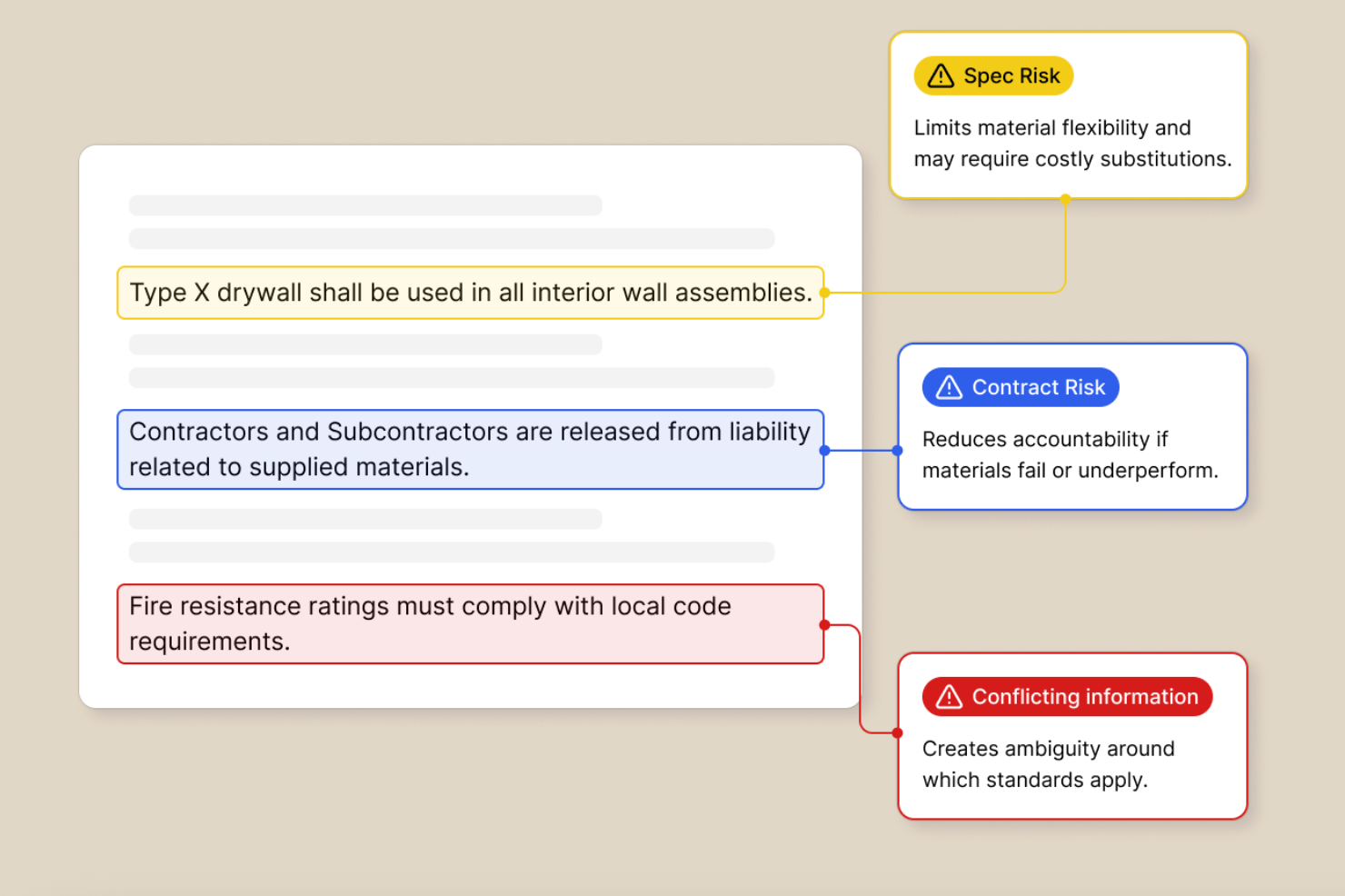
Provision is an AI-powered pre-construction platform that helps general contractors and subcontractors analyze drawings, specs, and contracts to catch scope gaps and risks before breaking ground.
Who Is Provision Best For?
Provision is a strong fit for general contractors and subcontractors in the commercial construction space who want to reduce pre-construction risk through AI-driven document analysis.
Why Provision Is a Good Buildertrend Alternative
I've included Provision in my top picks because of how it handles construction document ingestion at the pre-construction stage. Where Buildertrend focuses on managing projects in motion, Provision captures and processes drawings, specs, and contracts the moment they're uploaded, using its Scope Agent to extract scope items directly from raw document data. Its Chat Agent then lets you query those captured documents in plain language, with cited source references so nothing gets lost or misread.
Provision Key Features
- Risk review: Automatically scans contracts and specs to flag risky clauses and generate redlines or RFIs before a project starts.
- Cross-document conflict detection: Identifies contradictions between drawings, specs, and contracts across an entire document set.
- RFI generation: Produces draft RFIs directly from flagged issues found during document analysis.
- Export tools: Sends scope and risk outputs to PDF, Word, Excel, Procore, or Autodesk without manual reformatting.
Provision Integrations
Provision offers a small set of native integrations, including Procore, Autodesk, and SharePoint, and exports scope packages to PDF, Word, and Excel. API support and Zapier availability are not clearly documented.
Pros and Cons
Pros:
- Searches across full document sets simultaneously
- 99.5% accuracy on pre-built risk checklists
- AI-generated scope packages from uploaded documents
Cons:
- Limited native integration options available
- Focused on pre-construction, not field execution

Buildern
Best for switching from Buildertrend
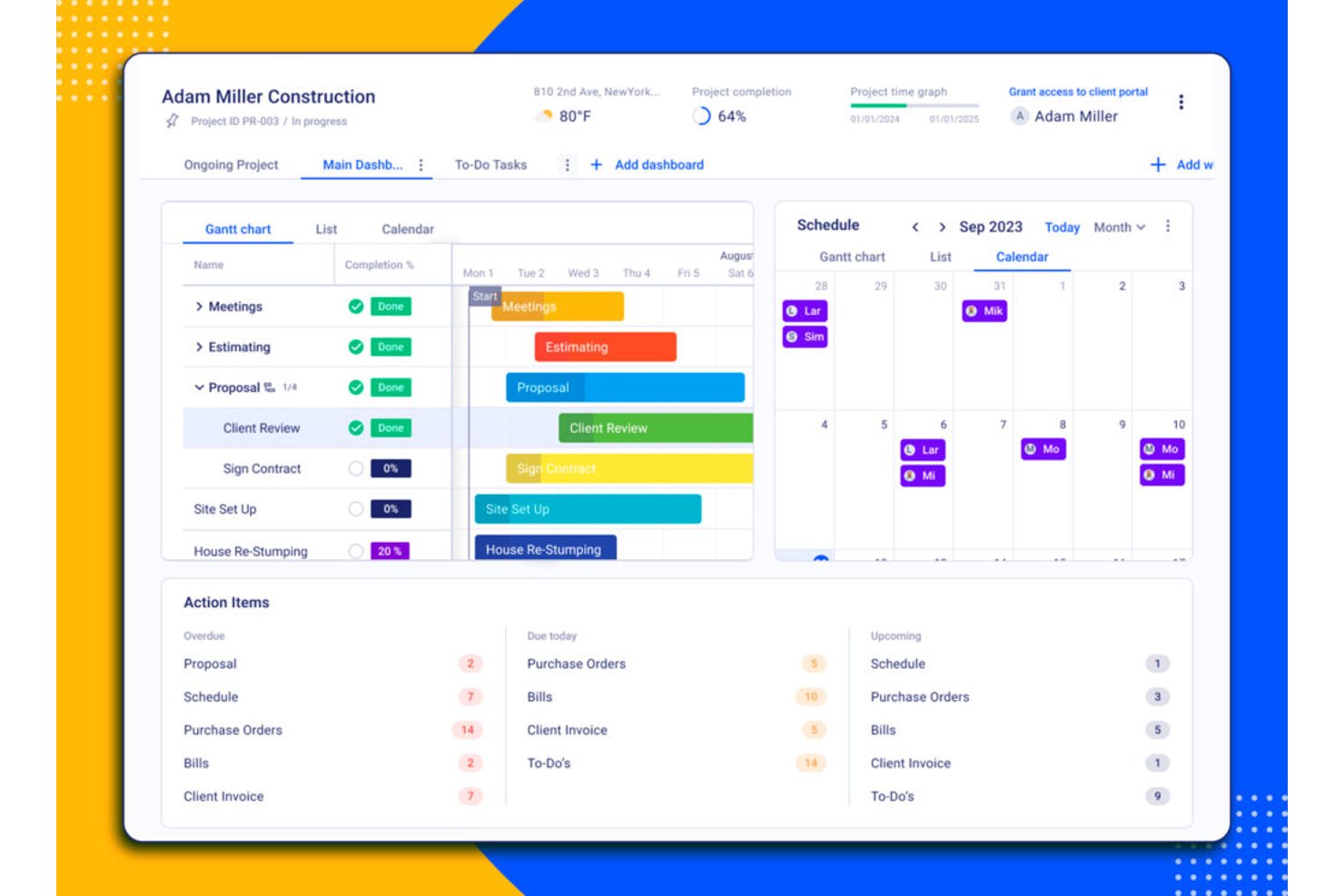
Buildern is construction project management software for residential builders and remodelers who need one place to coordinate schedules, budgets, tasks, and client communication across active jobs.
Who Is Buildern Best For?
Buildern suits residential contractors and remodelers looking to replace Buildertrend while coordinating schedules, budgets, and client communication in one system.
Why I Picked Buildern
I picked Buildern for “Best for switching from Buildertrend” because it supports migration of estimates, budgets, contacts, project data, and cost catalogs. I also like that change orders update budgets and schedules, so approved scope changes are reflected in job costs and timelines.
Buildern Key Features
- Daily reports: Log site activity, weather, labor hours, delays, and incidents with photos or voice notes.
- Client portal: Share selected updates and documents, and let clients review approvals and send messages.
- Subcontractor portal: Give subcontractors access to assignments, RFIs, and required documents.
- AI bill capture: Extract bill details and line items from uploaded or forwarded invoices to create draft bills.
Buildern Integrations
Buildern offers direct integrations with QuickBooks and Xero, an Open API for custom integrations, and a Zapier connection.
Pros and Cons
Pros:
- Client and subcontractor portals centralize updates
- Integrated takeoffs feed estimates and budgets
- Buildertrend migration preserves estimates and budgets
Cons:
- Multi-project trade scheduling needs improvement
- Mobile app trails desktop functionality
Projul
Best for client selections and warranty tracking
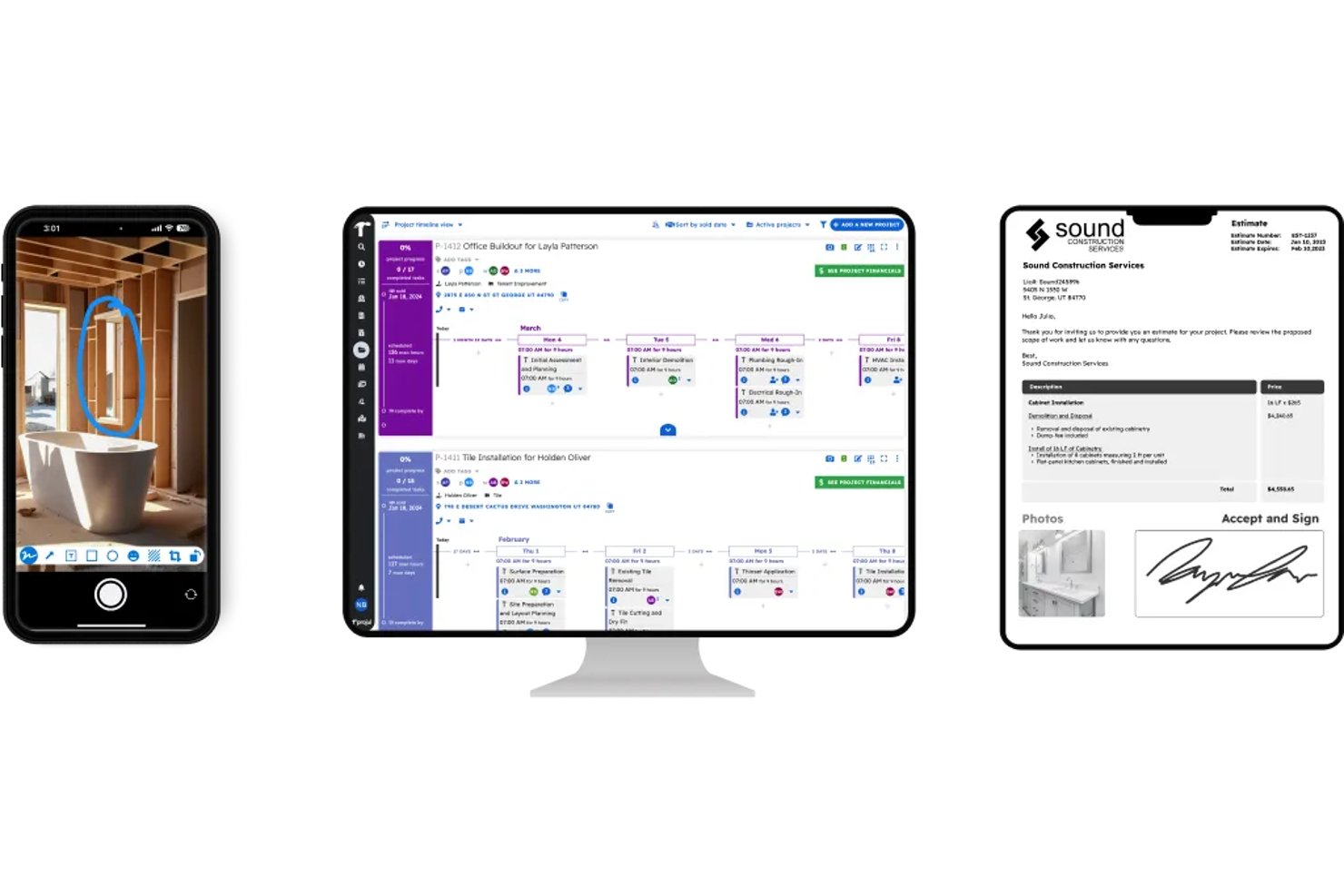
For residential contractors weighing Buildertrend alternatives, Projul is construction project management software that helps coordinate jobs, teams, and project information in one place.
Who Is Projul Best For?
Projul suits residential builders and remodelers who need to manage homeowner selections and track warranty requests after projects are complete.
Why I Picked Projul
I picked Projul for client selections and warranty tracking, two details that can get lost between project handoff and homeowner follow-up. You can organize selections by category, set allowances and deadlines, and let clients review and approve choices through the portal. Warranty items link back to their original projects, with punch-list tasks to assign repairs and track due dates.
Projul Key Features
- Gantt scheduling: Arrange project phases, durations, and dependencies in a visual timeline.
- GPS time tracking: Record crew hours with geofenced job-site clock-ins and overtime alerts.
- Estimating: Build estimates with reusable templates and assemblies, then collect e-signatures.
- Change orders: Create and track change orders alongside project work.
Projul Integrations
Projul supports integrations with QuickBooks Online and Desktop, CompanyCam, JustiFi, and material suppliers SRS, Beacon, GAF, and ABC Supply, and it connects with Zapier. Projul AI Connect provides API access for custom connections.
Pros and Cons
Pros:
- Crew schedules support quick mobile rescheduling
- Warranty tasks stay tied to original projects
- Homeowners approve selections through the client portal
Cons:
- Crew adoption can require extra training
- Mobile users report glitches and lost text

Procore
Best for large-scale projects
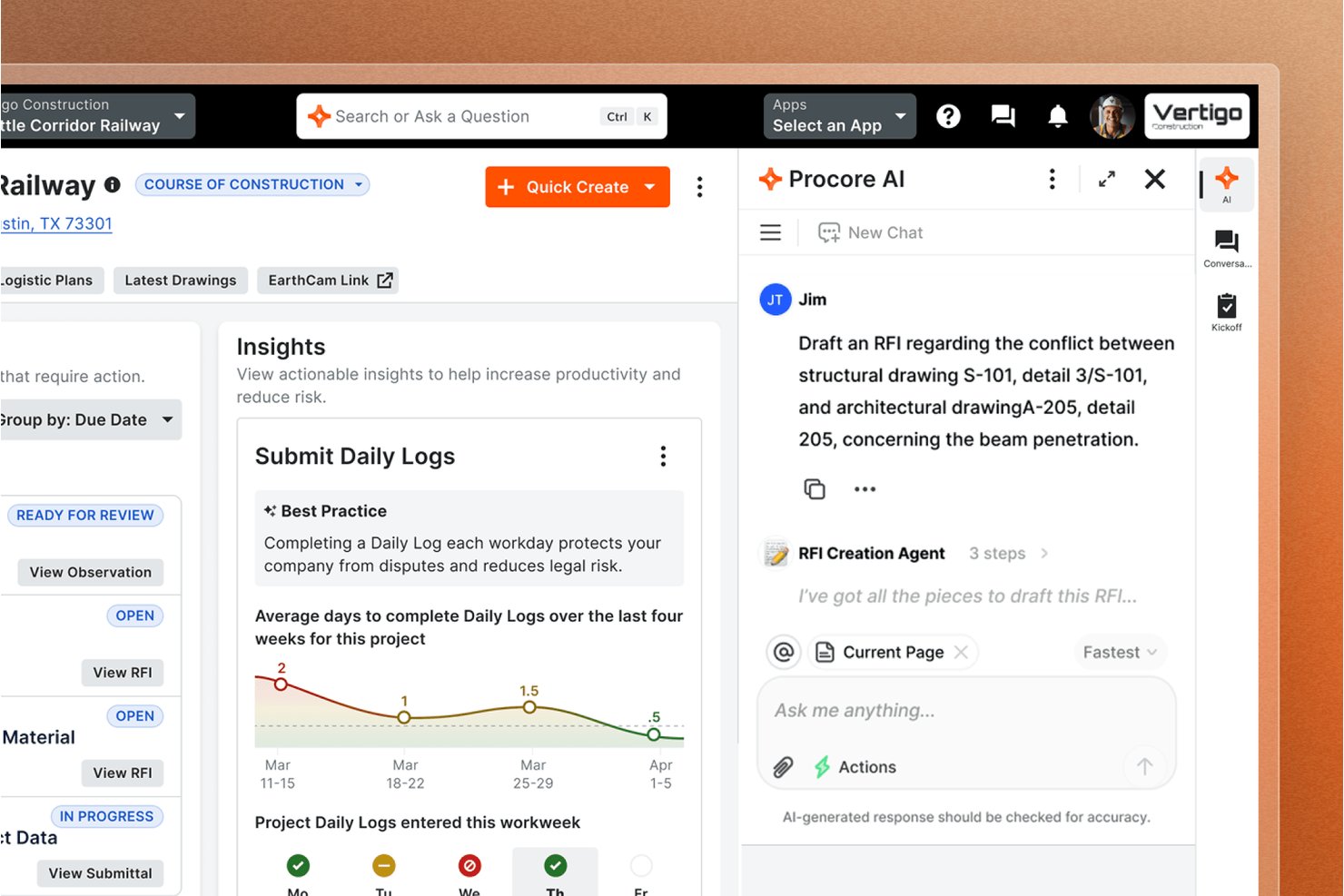
Procore is construction project management software for contractors and owners who need to coordinate field teams, project documents, schedules, and budgets across complex builds.
Who Is Procore Best For?
Procore suits general contractors and owners overseeing large construction programs with multiple teams, subcontractors, and project sites.
Why I Picked Procore
I picked Procore as a Buildertrend alternative because “Best for large-scale projects” fits its linked RFI, submittal, and drawing workflows. I like that field teams can access current plans and log daily reports on mobile, while managers track labor, commitments, and budgets as jobsite changes affect costs.
Procore Key Features
- Schedule updates: Share project schedule changes and look-ahead reports with field teams.
- Punch lists: Create and assign items for tracking unfinished work.
- Meeting tools: Record meeting details and follow-up items.
- Directory permissions: Set access permissions for project directory contacts.
Procore Integrations
Procore documents 14 supported ERP integrations, including QuickBooks Online and Desktop, Sage 300 CRE, Sage Intacct, Sage 100 Contractor, Trimble Spectrum and Vista, NetSuite, Acumatica, and Xero; its marketplace lists 500+ apps and includes Zapier. Procore also offers an API for custom integrations.
Pros and Cons
Pros:
- Supports large, multi-team project oversight
- Links field updates to project budgets
- Centralizes drawings, RFIs, and submittals
Cons:
- Mobile performance slows with large files
- Navigation can require too many clicks

Best for affordability
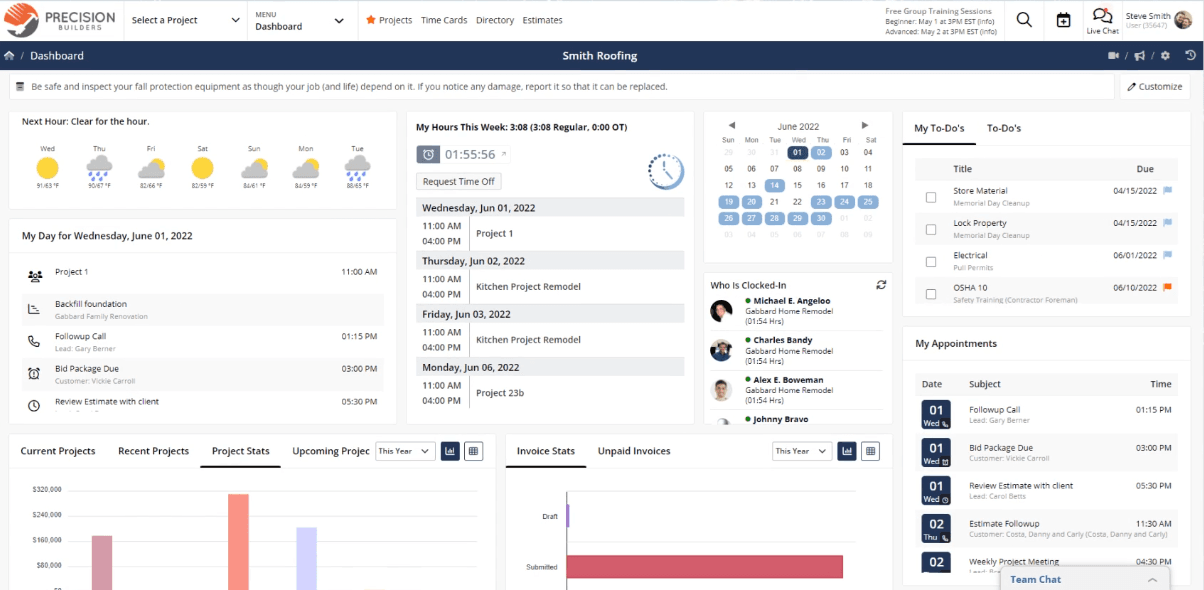
Contractor Foreman is a construction management software designed for contractors and builders, providing tools for project management, financial tracking, and scheduling. It serves small to medium-sized construction businesses looking to enhance operational efficiency.
Why it's a good Buildertrend alternative: Contractor Foreman is an affordable way to manage your construction projects, especially for smaller teams. Unlike Buildertrend, it includes estimating, invoicing, and contract management without extra fees. You also get safety management and client portals, all in one place. If you need a budget-friendly option with the right tools, it’s worth a look.
Standout features & integrations:
Features include a comprehensive safety management module that ensures compliance, client portals that facilitate communication, and robust reporting tools that provide insights into project progress. The software also offers time tracking and resource management to help you optimize operations.
Integrations include QuickBooks, Xero, Google Drive, Dropbox, Microsoft OneDrive, Asana, Trello, Slack, Procore, and DocuSign.
Pros and Cons
Pros:
- Strong safety management
- All-in-one solution
- Affordable pricing
Cons:
- Limited advanced features
- Learning curve for new users

Best for residential construction

BuildBook is a residential construction management software tailored for custom home builders and remodelers. It helps you manage projects, client communication, and sales pipelines with ease.
Why it's a good Buildertrend alternative: BuildBook is simple and quick to use, so your team can manage projects without long training. Unlike Buildertrend, it’s built for residential construction, giving custom home builders and remodelers the right tools. With project management, communication features, and QuickBooks integration, you can stay on top of jobs and keep clients in the loop.
Standout features & integrations:
Features include project management tools that keep your projects on track, communication tools that enhance client interactions, and a user-friendly interface that doesn't require extensive training. BuildBook also offers sales pipeline management, helping you track leads and convert them into projects.
Integrations include QuickBooks, Google Calendar, Dropbox, Zapier, Slack, Asana, Trello, Microsoft Outlook, DocuSign, and Xero.
Pros and Cons
Pros:
- Fast setup process
- Focus on residential construction
- Easy to use
Cons:
- May not suit commercial projects
- Limited advanced features

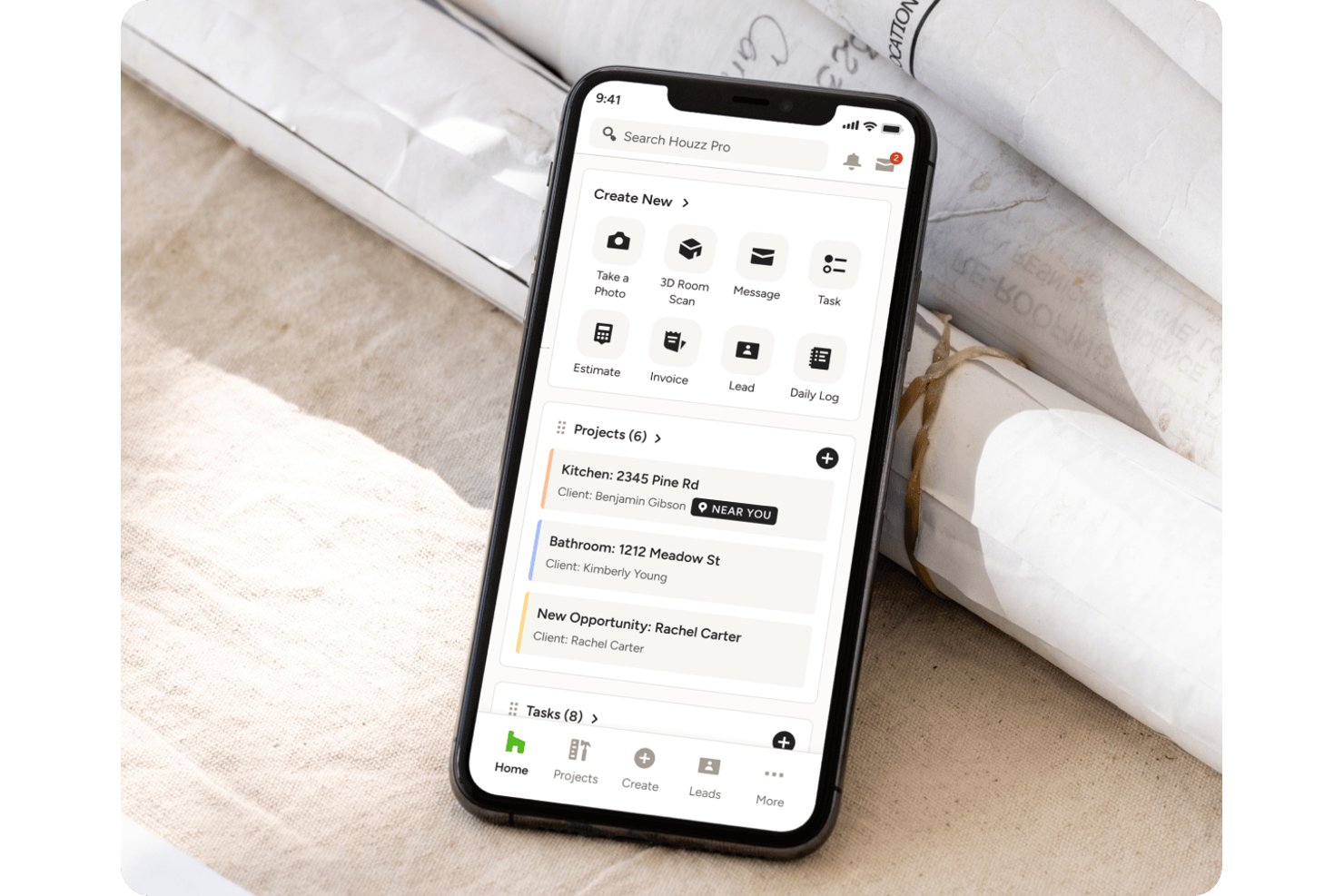
Houzz Pro is project management and business software for residential construction and design teams, helping interior designers coordinate projects, client updates, and day-to-day work in one place.
Who Is Houzz Pro Best For?
Houzz Pro suits residential interior designers who need one place to coordinate client communication, project details, and day-to-day business tasks.
Why I Picked Houzz Pro
I picked Houzz Pro as a Buildertrend alternative because “Best for interior designers” fits its residential design workflow. I like that designers can share product selections through a client dashboard and use 3D floor plans to review layouts with clients before construction decisions are finalized.
Houzz Pro Key Features
- Project schedules: Organize work into phases, items, milestones, dates, and tasks.
- Plan takeoffs: Calculate areas and material quantities from uploaded plans.
- Time tracking: Log project hours by team member and activity.
- Purchase orders: Create purchase orders from estimate, proposal, or invoice line items.
Houzz Pro Integrations
Houzz Pro integrates with QuickBooks Online and Google Drive, and supports Google Calendar, iCloud, Office 365, Exchange, and Outlook. It also supports Google Meet, Zoom, Microsoft Teams, 8x8, GoTo Meeting, a Gmail extension, and Zapier.
Pros and Cons
Pros:
- Estimates, schedules, and invoices share one workflow
- Client approvals keep selections and decisions visible
- 3D floor plans help clients review layouts
Cons:
- Job-costing and expense tools feel limited
- Mobile app lacks purchase-order access


JobTread is a construction management software tailored for contractors and builders, offering tools for budgeting, project management, and communication. It serves small to medium-sized businesses aiming to enhance project efficiency and financial control.
Why it's a good Buildertrend alternative: JobTread helps you stay on top of your projects with budgeting and cost tracking. Unlike Buildertrend, it gives you detailed job costing and reports, so your team can keep a close eye on finances. You can also use customizable templates to fit your project needs. If you want a simple way to manage costs and stay organized, it’s a good fit.
Standout features & integrations:
Features include comprehensive job costing that ensures accurate budget tracking, customizable templates that adapt to your project needs, and detailed reporting tools that provide insights into project performance. JobTread also offers scheduling and task management to keep your team organized.
Integrations include QuickBooks, Xero, Google Calendar, Dropbox, Microsoft OneDrive, Slack, Asana, Trello, DocuSign, and Zapier.
Pros and Cons
Pros:
- Good for small to medium businesses
- Customizable templates
- Strong job costing tools
Cons:
- Limited offline access
- Learning curve for new users

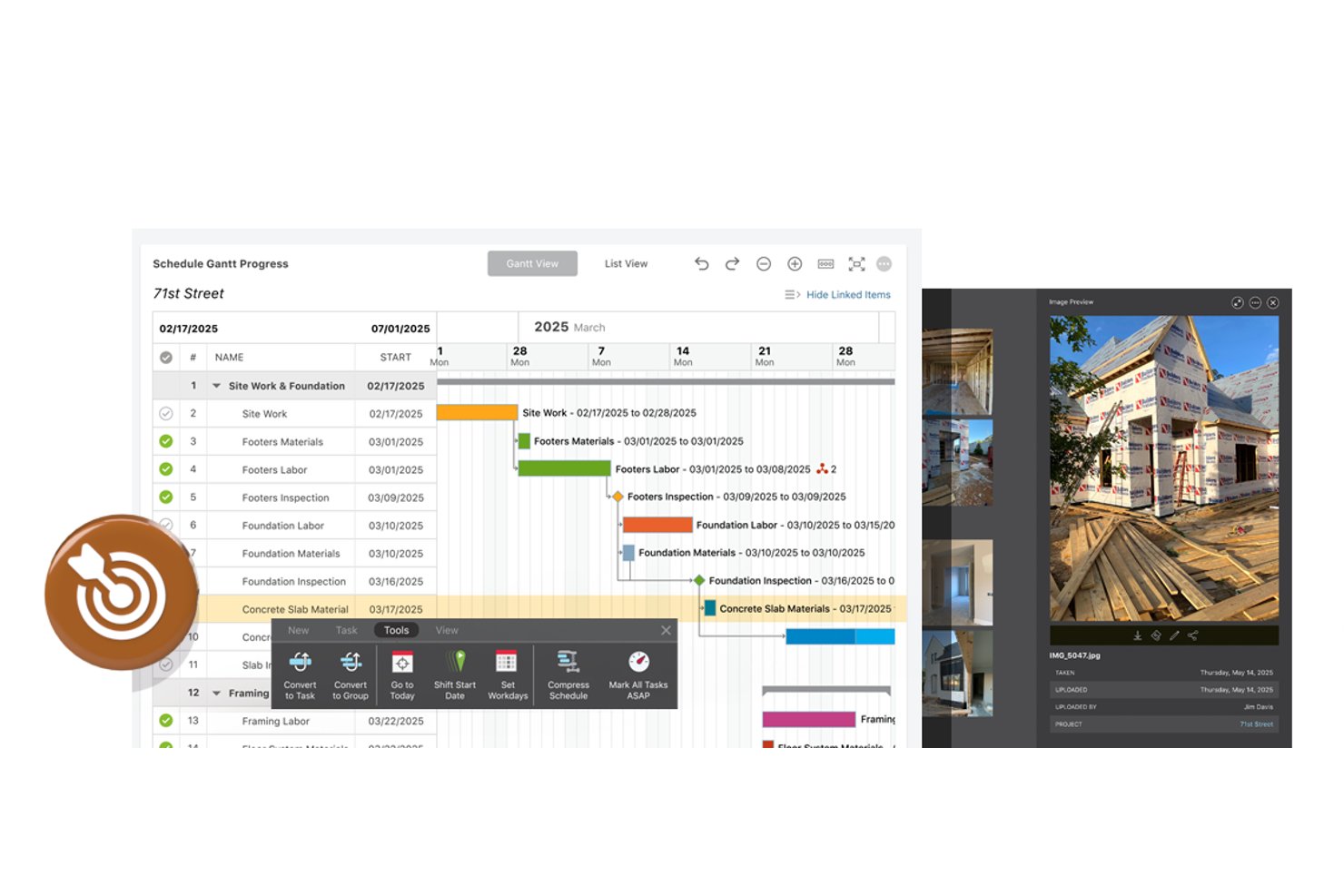
For builders comparing Buildertrend alternatives, ConstructionOnline is a project management platform for residential, commercial, specialty, and multifamily work, with scheduling, job costing, documentation, and client tools in one place.
Who Is ConstructionOnline Best For?
ConstructionOnline suits construction teams that need to coordinate schedules, documents, and client communication across office and field staff.
Why I Picked ConstructionOnline
I picked ConstructionOnline because its collaboration tools connect office and field work across construction projects. I like that teams can coordinate schedules and share project documents, so field staff can check current plans while the office tracks job progress. Client tools also keep project communication tied to the work.
ConstructionOnline Key Features
- Construction estimating: OnCost creates detailed estimates and connects them to project financials.
- Time tracking: Record employee hours, work locations, shift notes, and jobsite photos.
- Daily logging: Create custom logs and set required entries for project records.
- Purchase orders: Create purchase orders from estimates, selections, and change orders.
ConstructionOnline Integrations
ConstructionOnline integrates with QuickBooks Online, Google Calendar, Microsoft Outlook 365, Google Drive, OneDrive, Dropbox, Box, DocuSign, and HubSpot, and connects with Zapier. It also offers an API for custom integrations; API access is available with Business and Enterprise subscriptions.
Pros and Cons
Pros:
- Responsive support helps teams resolve setup issues
- Client approvals connect selections and change orders
- Office-field updates keep project communication together
Cons:
- Sync delays can disrupt field updates
- Mobile and desktop workflows differ noticeably


RedTeam is a construction management software designed for general contractors, offering tools for project management, financial tracking, and collaboration. It helps construction teams manage their projects and workflows effectively.
Why it's a good Buildertrend alternative: RedTeam helps your team work together with easy project collaboration tools. Unlike Buildertrend, it includes contract and change order management to keep your budget on track. Its document management tools keep all your project files in one place. If you need a better way to handle teamwork and contracts, it’s a solid choice.
Standout features & integrations:
Features include financial tracking that helps you manage budgets and expenses, document management that keeps all project files organized, and contract management that ensures all agreements are clear. RedTeam also offers change order management to handle project adjustments smoothly.
Integrations include QuickBooks, Sage 300, Procore, Viewpoint Vista, CMiC, Foundation, PlanGrid, Bluebeam, Autodesk BIM 360, and DocuSign.
Pros and Cons
Pros:
- Effective document organization
- Comprehensive contract management
- Strong project collaboration
Cons:
- Limited customization options
- Learning curve for new users
Andre Buildertrend-alternativer
Her er noen flere alternativer til Buildertrend som ikke kom med på kortlisten min, men som likevel er verdt å undersøke:
- BuildTools
For custom home builders
- Sage Construction Management
For financial controls in construction
- Simpro
For field service management
- Knowify
For trade contractors
- AccuLynx
For roofing-specific job costing
- Autodesk Construction Cloud
For design integration
- Oracle Aconex
For multi-org document control at scale
- CMiC
For defect management
- Buildxact
For estimate-to-invoice cost tracking
- Ontraccr
For customizable workflows


How I Evaluate Buildertrend Alternatives
I look for two things: the baseline a residential builder expects from day one—job costing, scheduling, change orders, client portals—and the differentiators that set one platform apart.
Core Functionality (Table Stakes For This List)
When I'm selecting tools for my list, I rank each one on a scale from 0 (does not offer the functionality) to 5 (excels in this area) for each core functionality listed below. Then, I calculate the tool's total score into a percentage. Each tool needs to achieve a minimum total score of 65% to be considered for inclusion.
- Project Scheduling: I look for construction-aware scheduling with task dependencies and crew assignment, not just a basic calendar with drag-and-drop events.
- Budgeting & Job Costing: Each tool should let you track estimated vs. actual costs at the line-item level so you can spot budget overruns mid-project, not after closeout.
- Client & Subcontractor Portals: I check whether homeowners and subs get their own login to view updates, approve selections, or confirm schedules without back-and-forth emails.
- Change Order Management: When a client wants to swap countertops or add a window, I evaluate how the tool handles creating, approving, and pushing that change to the budget and timeline.
- Document & Plan Management: Construction plans go through multiple revisions, so I look for version control, markup tools, and centralized storage rather than basic file uploads.
- Mobile Field Access: Field crews need to log hours, snap progress photos, and pull up plans from the job site, so I evaluate whether the mobile app covers those daily workflows or just mirrors a stripped-down dashboard.
Once I have a list of tools that meet this criteria, I consider what sets each platform apart.
Differentiating Factors (What Sets Vendors Apart)
Here's how I compare and contrast different vendors:
Standout Features
Client selection management is a big one. When a homeowner needs to pick tile, fixtures, and paint colors, I want a tool that lets them browse options and approve choices with pricing that flows straight into the budget. I also evaluate whether a platform includes digital takeoff and estimating so you can build proposals without jumping to a separate tool. Warranty and punch list tracking matters too, especially for builders who handle post-construction service requests.
Beyond Features
Accounting integration is one of the first things I check. If your job costs don't sync with QuickBooks or Xero, you end up with double entry and mismatched numbers. I also evaluate how well a platform fits your specific trade—a tool built for custom home builders handles workflows differently than one designed for commercial GCs. Pricing structure matters here too. Some platforms charge per project, others per user, and that difference can shift your costs significantly as your team or project volume grows.
Hvorfor se etter et alternativ til Buildertrend?
Selv om Buildertrend er et godt valg av prosjektstyringsprogramvare for byggebransjen, finnes det flere grunner til at noen brukere ser etter alternative løsninger. Det kan hende du ser etter et alternativ til Buildertrend fordi …
- Det er for dyrt for budsjettet ditt
- Du trenger funksjoner for større prosjekter
- Teamet ditt synes det er vanskelig å bruke
- Det mangler lokal støtte i landet ditt
- Du trenger tilgang uten nett
- Tilpasningsmulighetene er begrensede
Viktige funksjoner i Buildertrend
Her er noen av de viktigste funksjonene i Buildertrend, slik at du kan sammenligne hva alternative løsninger tilbyr:
- Prosjektstyring: Administrer daglige logger, endringsordrer, planlegging og mer for å holde prosjektene dine på rett spor.
- Salgsstyring: Registrer potensielle kunder, opprett tilbud og gjennomfør e-postmarkedsføring for å styrke salgsarbeidet ditt.
- Kundestyring: Forbedre kontakten og kommunikasjonen med kundene dine for å avklare forventningene.
- Økonomistyring: Følg opp budsjetter, administrer utgifter og optimaliser tilbud for å opprettholde en sunn økonomi.
- Materialstyring: Hold oversikt over lagerbeholdningen og administrer leverandørforhold effektivt.
- Kommunikasjonsstyring: Bruk chat, kundeportaler og meldinger for å sikre god kommunikasjon i teamet ditt.
- Tidsregistrering: Hold oversikt over arbeidstimer og prosjektplaner for å øke produktiviteten.
- Budsjettering og fakturering: Håndter økonomien enkelt, fra budsjettering til oppretting av fakturaer.
- Oppgavestyring: Organiser oppgaver og gjøremålslister for å sikre at alle prosjektelementer blir ferdigstilt i tide.
- Dokumentlagring: Lagre og administrer viktige prosjektdokumenter på ett tilgjengelig sted. Er det noe annet du ønsker å vite, eller er det en bestemt oppgave du trenger hjelp med? Bare spør!