

10 beste programvarer for kostnadsberegning i byggebransjen – vurdert i 2026

Kortliste over den beste programvaren for kostnadsberegning i byggebransjen


Det kan være overveldende å administrere byggeprosjekter, med budsjetter, tidsplaner og team som skal koordineres. Programvare for kostnadsberegning i byggebransjen kan hjelpe ved å gi nøyaktig kostnadsinnsikt, redusere feil og forbedre budsjetteringsprosessen, slik at du kan fokusere på å levere vellykkede prosjekter.
Jeg har testet og vurdert den beste programvaren for kostnadsberegning i byggebransjen for å hjelpe deg med å finne det beste alternativet for teamet ditt. Vurderingene mine er uavhengige, så du kan stole på at de hjelper deg med beslutningen.
I denne artikkelen får du en objektiv gjennomgang av funksjoner, brukervennlighet og hva som skiller hvert verktøy fra de andre. Les videre for å se hvilken programvare for kostnadsberegning i byggebransjen som kan forenkle prosjektplanleggingen og øke effektiviteten.
Why Trust Our Software Recommendations
Our team has been testing and reviewing software since 2012. As project managers ourselves, we know how difficult—and important—it is to choose the right software.
For this guide, we evaluated tools using hands-on testing and independent research, scoring tools using our selection criteria. We also draw on insights from industry thought leaders and practicing project management experts.
Our reviews reflect our human editorial judgment, not a sales pitch.
Expert reviewers:
Sammenligningstabell for programvare til kostnadsberegning i byggebransjen
Denne sammenligningstabellen oppsummerer prisopplysningene for mine beste utvalg av programvare til kostnadsberegning i byggebransjen:
| Tool | Best For | Trial Info | Price | ||
|---|---|---|---|---|---|
| 1 | Best for complex capital project controls | Free demo available | Pricing upon request | Website | |
| 2 | Best for integrated accounting features | Free demo available | Pricing upon request | Website | |
| 3 | Best for custom builds | Free 7-day trial + free demo available | From $225/month (billed annually) | Website | |
| 4 | Best for team collaboration features | Free demo available | Pricing upon request | Website | |
| 5 | Best for cloud access | Free demo + free trial available | From $2,599/user/year | Website | |
| 6 | Best for financial tools | Free demo available | Pricing upon request | Website | |
| 7 | Best for large firms | Free consultation available | Pricing upon request | Website | |
| 8 | Best for small businesses | Free 30-day trial | From $59/month (billed annually) | Website | |
| 9 | Best for cost data | Free trial available | Pricing upon request | Website | |
| 10 | Best for digital plans | 14-day free trial available | From $2,000/year | Website |
Gjennomgang av den beste programvaren for kostnadsberegning i byggebransjen
Nedenfor finner du mine detaljerte sammendrag av den beste programvaren for kostnadsberegning i byggebransjen som kom med på kortlisten min. Vurderingene mine gir en detaljert gjennomgang av de viktigste funksjonene, fordelene og ulempene, integrasjonene og de ideelle bruksområdene for hvert verktøy, slik at du kan finne det beste alternativet for deg.

InEight
Best for complex capital project controls
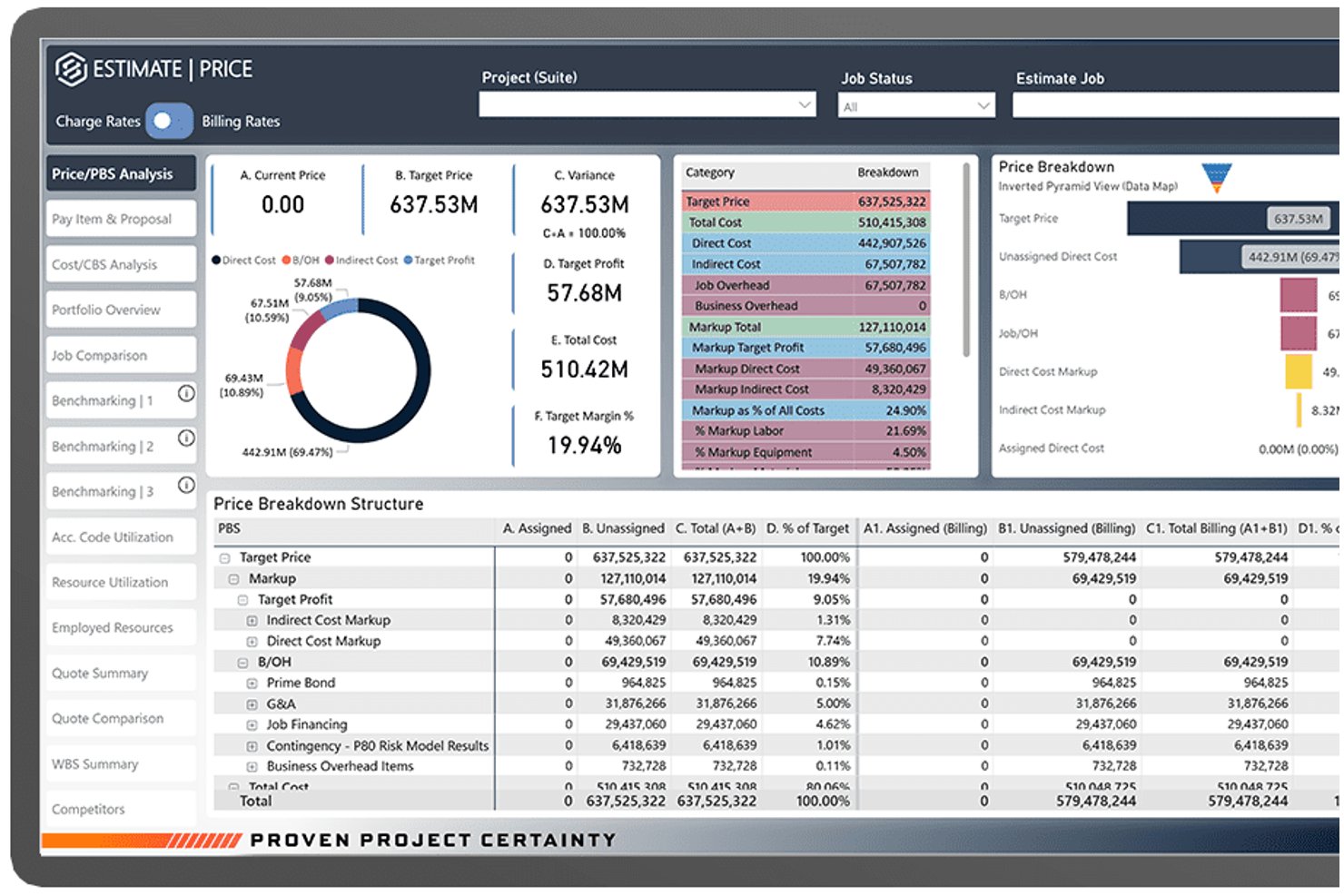
InEight Estimate is an enterprise construction estimating platform that combines parametric assemblies, resource-based cost modeling, historical benchmarking, subcontractor quote management, and bid generation for large-scale capital projects.
Who Is InEight Best For?
InEight is built for enterprise contractors, EPCs, and capital project owners managing large-scale infrastructure, energy, or industrial construction programs.
Why I Picked InEight
InEight earns its spot on my shortlist because it's the only estimating tool I've used that handles capital project cost complexity at this scale. I love the built-in benchmarking feature, which compares new estimate line items against historical projects in real time to surface variances early. The parametric assembly engine lets my team model crew compositions and productivity rates at a granular level, which matters when pricing large infrastructure or industrial programs.
InEight Key Features
- Quote management: Centralizes vendor and subcontractor quotes within the estimating workflow for direct comparison and selection.
- Excel interoperability: Lets users link live Excel spreadsheets to estimates and sync data between platforms.
- Customizable reporting: Generates configurable reports that can be tailored for internal teams or client presentations.
- Integration with ERP systems: Supports connections with enterprise ERPs like SAP and Oracle for seamless project cost data flow.
InEight Integrations
InEight offers native integrations with Primavera P6, Bluebeam Revu, SAP, Oracle, Microsoft Dynamics 365, and Sage 300 Construction and Real Estate. An open API is available for custom integrations.
Pros and Cons
Pros:
- Real-time collaboration for distributed estimating teams
- Historical cost benchmarking for complex projects
- Parametric assemblies support highly detailed estimates
Cons:
- Interface can overwhelm occasional or new users
- Native takeoff tools require separate integration
CMiC
Best for integrated accounting features
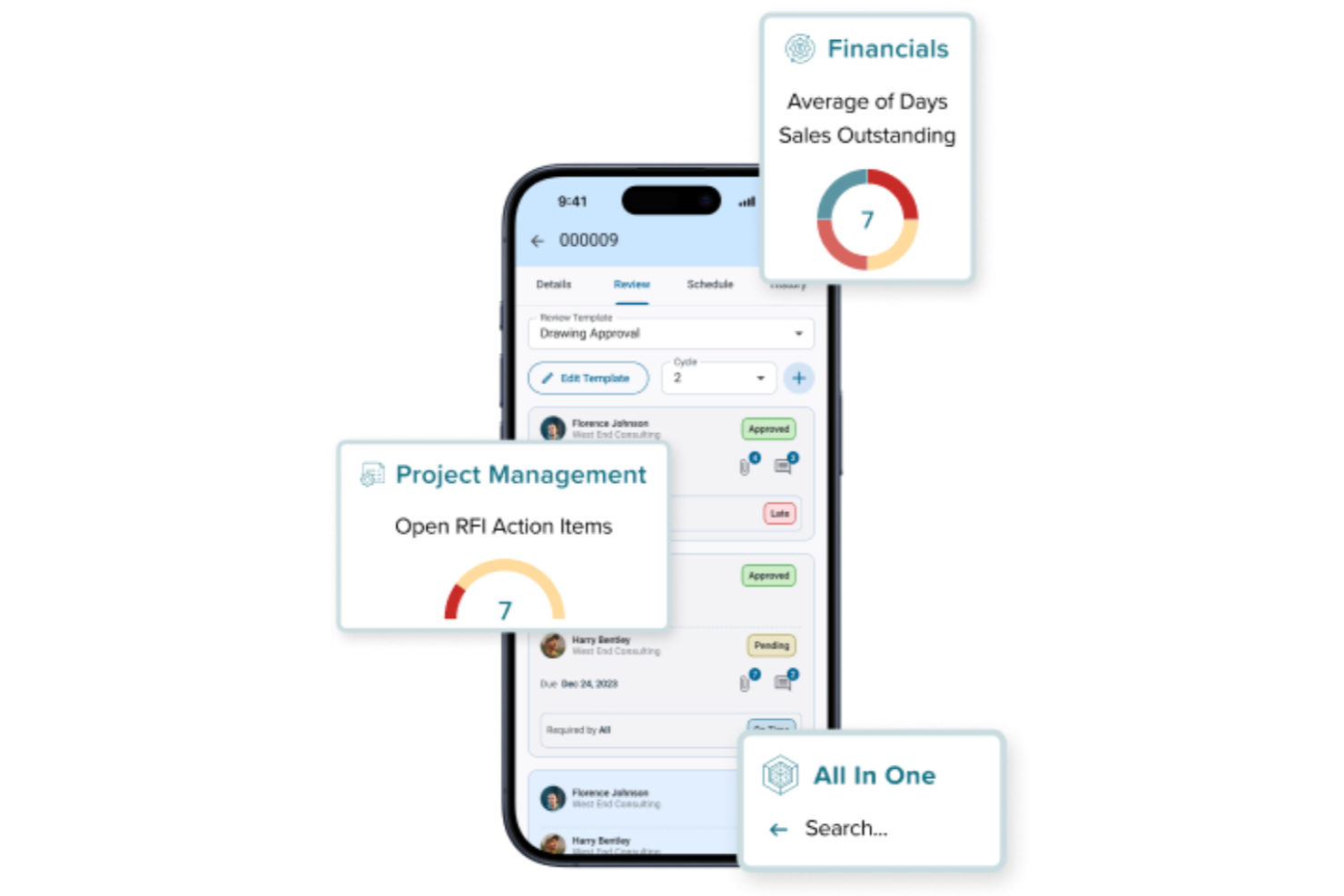
CMiC is a construction ERP built on a single database platform that connects cost estimating, job costing, project controls, construction accounting, procurement, and subcontractor management in one system.
Who Is CMiC Best For?
CMiC is a strong fit for mid-to-large general contractors and construction firms that need a unified system spanning estimating, financials, and project delivery.
Why I Picked CMiC
I've included CMiC in my top picks because its accounting layer is genuinely built into the estimating and project delivery workflow, not bolted on. What I like most is that every financial transaction flows into both the general ledger and job costing simultaneously, so there's no manual reconciliation or duplicate data entry when an estimate becomes a budget. The accounts payable, accounts receivable, and consolidated GL are all construction-specific, meaning they handle things like retainage, progress billing, and subcontract cost tracking natively rather than through workarounds.
CMiC Key Features
- Bid management: Create and send invitations to bid, track subcontractor responses, and level bids side-by-side to compare costs across submissions.
- Change order management: Generate, route, and approve change orders with cost and schedule impact calculations tied directly to the project budget.
- Cost forecasting: Project final costs at completion using real-time actuals, committed costs, and remaining budget data across active work items.
- Procurement management: Manage subcontracts, purchase orders, and material requisitions from a single interface connected to project budgets.
CMiC Integrations
CMiC offers both CMiC-built and partner-built integrations with construction-specific tools including DocuSign, Procore, ProEst, Clearstory, HammerTech, GCPay, Oracle Textura, hh2, SmartBarrel, and EarthCam. An API is available for custom integrations, with documented endpoints spanning financials, project controls, HCM, and materials management.
Pros and Cons
Pros:
- Built-in certified payroll and lien tracking
- Handles multi-entity construction project accounting
- Financials and job costing share one database
Cons:
- Frequent hotfixes disrupt daily operations
- Interface feels outdated and slow to navigate

Buildern
Best for custom builds

Buildern is on my list because it handles custom builds with a detail-first approach you don’t see everywhere. I recommend it when you need flexible estimate creation and want to map line items to each unique phase or spec.
What stands out is how you create, edit, and save detailed templates for different project types. I appreciate that you can upload plans, tie estimates directly to real specs, and handle client changes.
Buildern’s Best For
- Custom home builders who manage unique project specs
- Estimators needing detailed templates for each build
Buildern’s Not Great For
- Contractors focused on repetitive, standardized projects
- Firms needing out-of-the-box templates for basic builds
What sets Buildern apart
Buildern expects every project to start from scratch, with details built around your specific plans instead of a template library. This works well for builders handling custom homes or high-variation projects. Unlike Procore or Buildertrend, it structures estimates so you map to real, evolving specs, not just broad categories.
In practice, you build out estimates by phase or section based on exact client needs rather than a pre-set sequence.
Tradeoffs with Buildern
Buildern optimizes for flexibility in custom builds, but that means you spend more time setting up each project and can’t rely on out-of-the-box templates or quick-start options.
Pros and Cons
Pros:
- Effective timeline management
- Detailed estimate creation
- Tailored for custom build projects
Cons:
- Requires heavy daily data input
- UI inconsistency

Procore
Best for team collaboration features
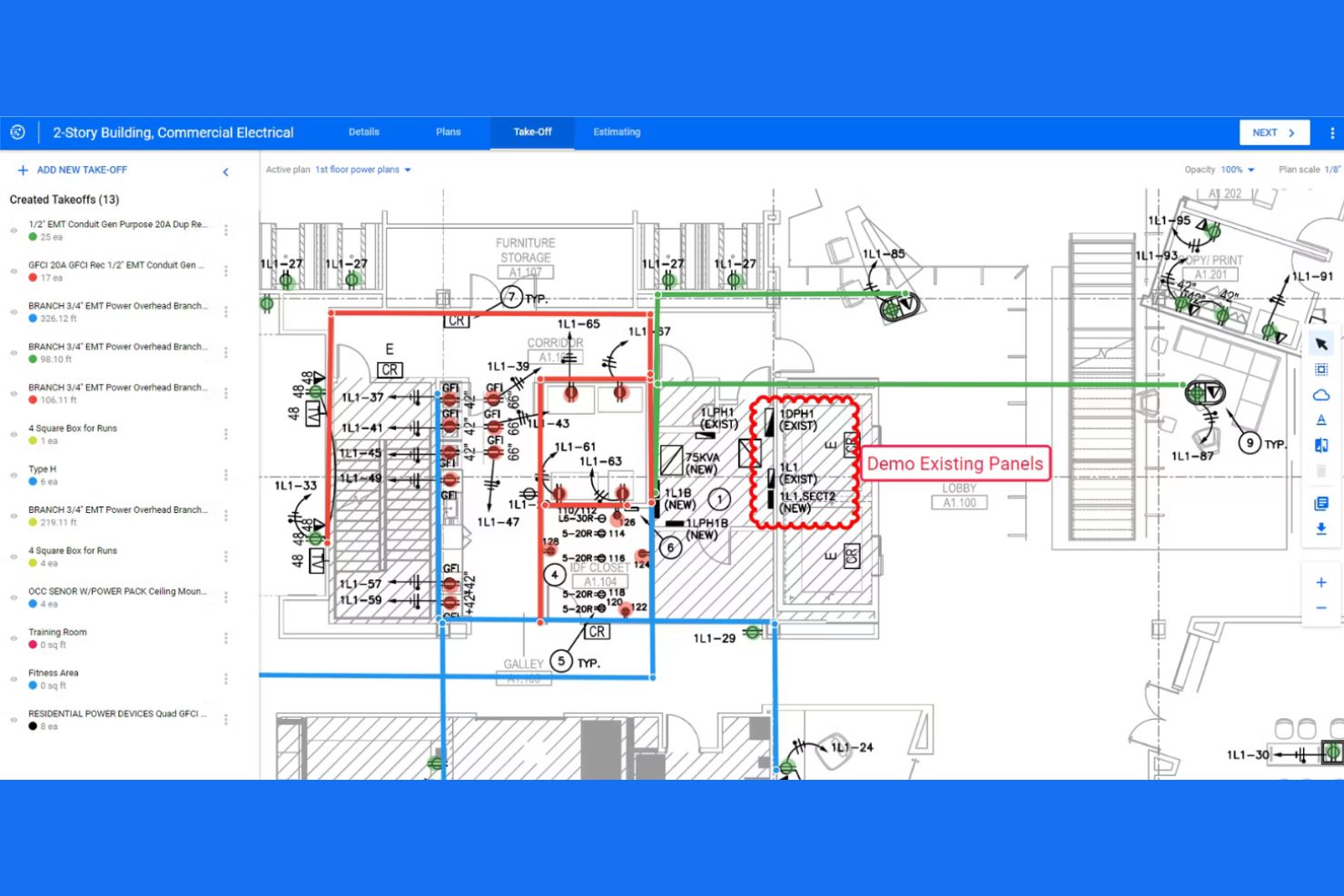
Procore earns a spot on my list because it puts field and office teams together in a live shared workspace, so you don’t lose details to email or phone calls. I recommend you check it out when you need all project documents, drawings, and change orders accessible to everyone on the job. What I appreciate is how conversations and markups are tied directly to estimates, which cuts down so much confusion.
Procore’s Best For
- Construction teams needing real-time collaboration and centralized project data
- Firms managing multiple projects with a high degree of documentation
Procore’s Not Great For
- Solo contractors or small firms with basic estimating needs
- Teams seeking lightweight or low-cost estimating solutions
What sets Procore apart
Procore stands out for treating every construction project as a live, shared hub where everyone—from the office to the field—accesses the same documents, markups, and conversations. Unlike tools like Bluebeam or standalone spreadsheets, I see that Procore expects everyone in your workflow (estimators, subs, PMs) to collaborate directly in real time. This works best when you’re coordinating across many roles on large, documentation-heavy builds.
Tradeoffs with Procore
Procore optimizes for unified project collaboration, but that means you get more complexity and cost than basic estimating tools. In practice, small teams or those only needing quick takeoffs find it heavy for simple bids.
Pros and Cons
Pros:
- Built-in estimating templates
- User-friendly interface
- Supports real-time collaboration
Cons:
- Requires an administrator to manage permissions and integrations
- Module Fragmentation

STACK
Best for cloud access
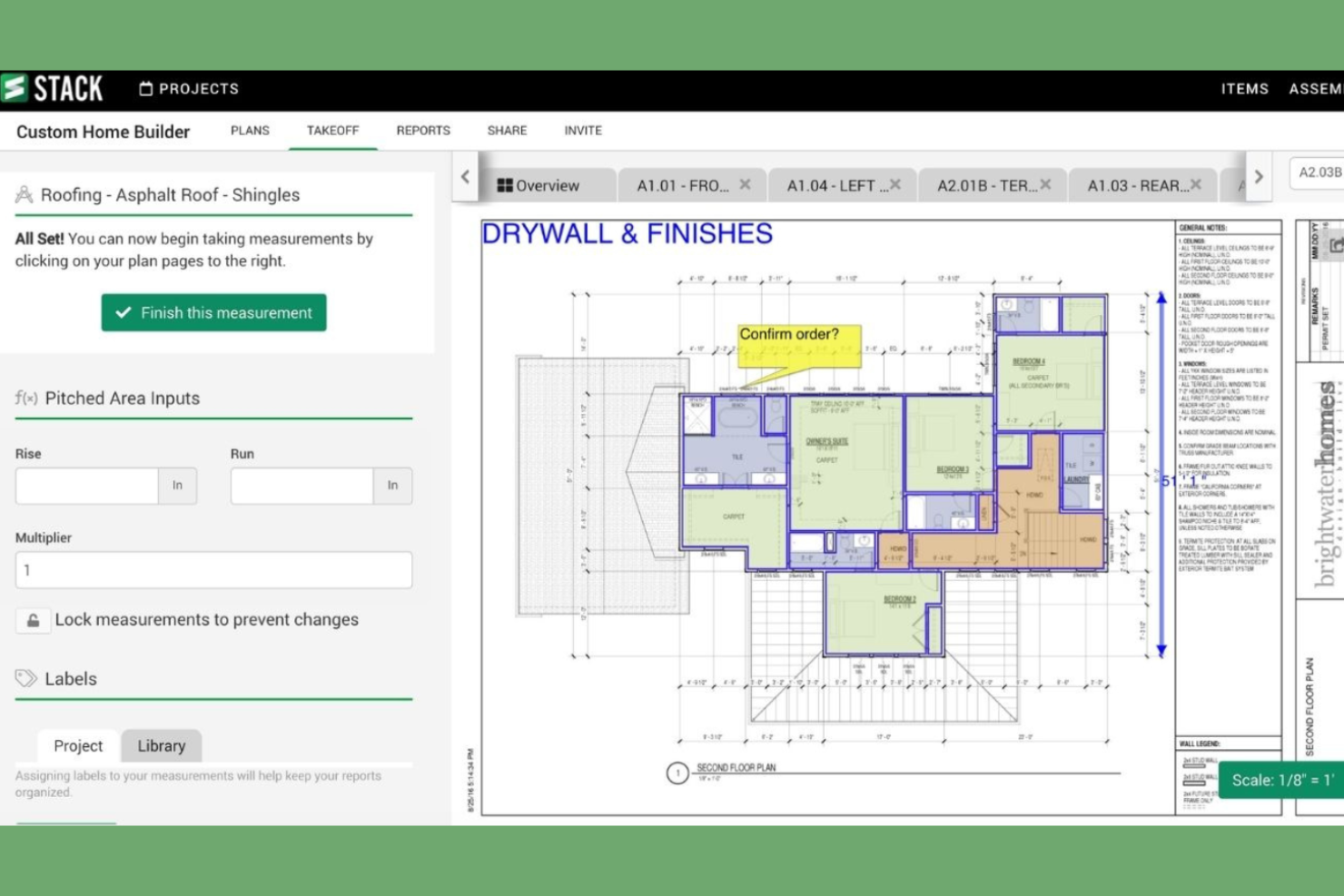
STACK earns a spot on this list as a go-to solution for teams who need remote access to accurate construction takeoff and estimating. When I’ve tested its cloud-based platform, collaborating with distributed estimators is immediate and version control isn’t an issue. I appreciate being able to pull up measurements, markups, and project data from anywhere without being tethered to a desktop. It stands out for real-time quantity takeoff and shared access to up-to-date blueprints.
STACK’s Best For
- Estimators who need remote access to takeoff and project data
- Construction businesses with distributed or field-based teams
STACK’s Not Great For
- Firms who require detailed cost databases or assemblies
- Teams wanting offline access or on-premise installations
What sets STACK apart
STACK is built for estimators who want access from anywhere, not just a single office. Unlike desktop estimating tools like PlanSwift, everything is cloud-based, so you and your team see live changes and never worry about outdated files.
You can move between project sites and the office without losing any data. Collaboration is direct and immediate, which changes the pace for distributed teams.
Tradeoffs with STACK
STACK optimizes for mobility and live collaboration, but you lose detailed cost database features and offline access that some desktop platforms provide. That makes it trickier for teams who rely on preloaded assemblies or offline workflows.
Pros and Cons
Pros:
- Customizable workflows
- Extensive material database
- Easy cloud access
Cons:
- Complex Material Mapping
- Limited Mobile Editing

Best for financial tools

Buildertrend earns a spot here because it brings together budgeting, estimates, and invoicing into a single view designed specifically for construction teams. When I set up the project financials module, I found the real-time cost tracking and change order management make budget control less painful. I appreciate that you can connect estimates right to purchase orders and customer billing, which most platforms don’t handle this tightly.
Buildertrend’s Best For
- Construction companies focused on integrated budgeting and estimating
- Project managers who need real-time financial tracking
Buildertrend’s Not Great For
- Small contractors who prefer basic spreadsheets
- Teams not needing in-depth project financial management
What sets Buildertrend apart
Buildertrend focuses on bringing financial management, estimates, and project visibility into one workflow that feels purpose-built for construction. Unlike ClickUp or monday.com, it expects you to work with client-facing proposals, budget updates, and cost controls side by side with scheduling and subcontractor tasks. This setup works best when your projects require ongoing change order approvals and clear audit trails for every dollar.
Tradeoffs with Buildertrend
Buildertrend is optimized for construction financial workflows, which means the general project management features are less flexible for teams outside this industry or for projects that don’t need built-in estimation and billing.
Pros and Cons
Pros:
- Integrated payment processing
- Real-time expense tracking
- Effective financial management tools
Cons:
- Requires ongoing updates
- No shift scheduling

Best for large firms

Sage Estimating makes this list because I see large construction firms rely on it for detailed, quantity-driven cost estimates at scale. I recommend it when teams are wrangling complex project requirements, custom assemblies, and need to standardize bidding across many sites or project types.
What I appreciate is the way Sage Estimating handles labor, materials, alternates, and markups—its cost databases and takeoff features really accommodate high-volume estimating without sacrificing accuracy.
Sage Estimating’s Best For
- Large construction firms managing complex, multi-site bids
- Teams needing standardized, database-driven cost estimating
Sage Estimating’s Not Great For
- Small contractors or firms with simple estimating needs
- Teams wanting lightweight, visual, or highly flexible estimating tools
What sets Sage Estimating apart
Sage Estimating is designed for organizations running a large, structured estimating operation. Unlike spreadsheet-based approaches or lighter tools like Procore Estimating, it expects you to work from standardized cost databases and detailed quantity takeoff. That approach supports consistency in bidding across multiple projects, making it easier to compare costs over time.
Sage assumes you want centralized controls and repeatable processes, instead of the flexibility and visual workflow tracking you might get with something like Buildertrend.
Tradeoffs with Sage Estimating
Sage Estimating optimizes for formal estimating and database-driven control, so you lose speed and agility if you want quick, visual estimates or informal workflows. This shift means small teams or those looking for a simple setup will often find it too complex for their needs.
Pros and Cons
Pros:
- Scalable for big projects
- Detailed cost breakdowns
- Handles large data volumes
Cons:
- Rigid Proposal Design
- Resource Intensive

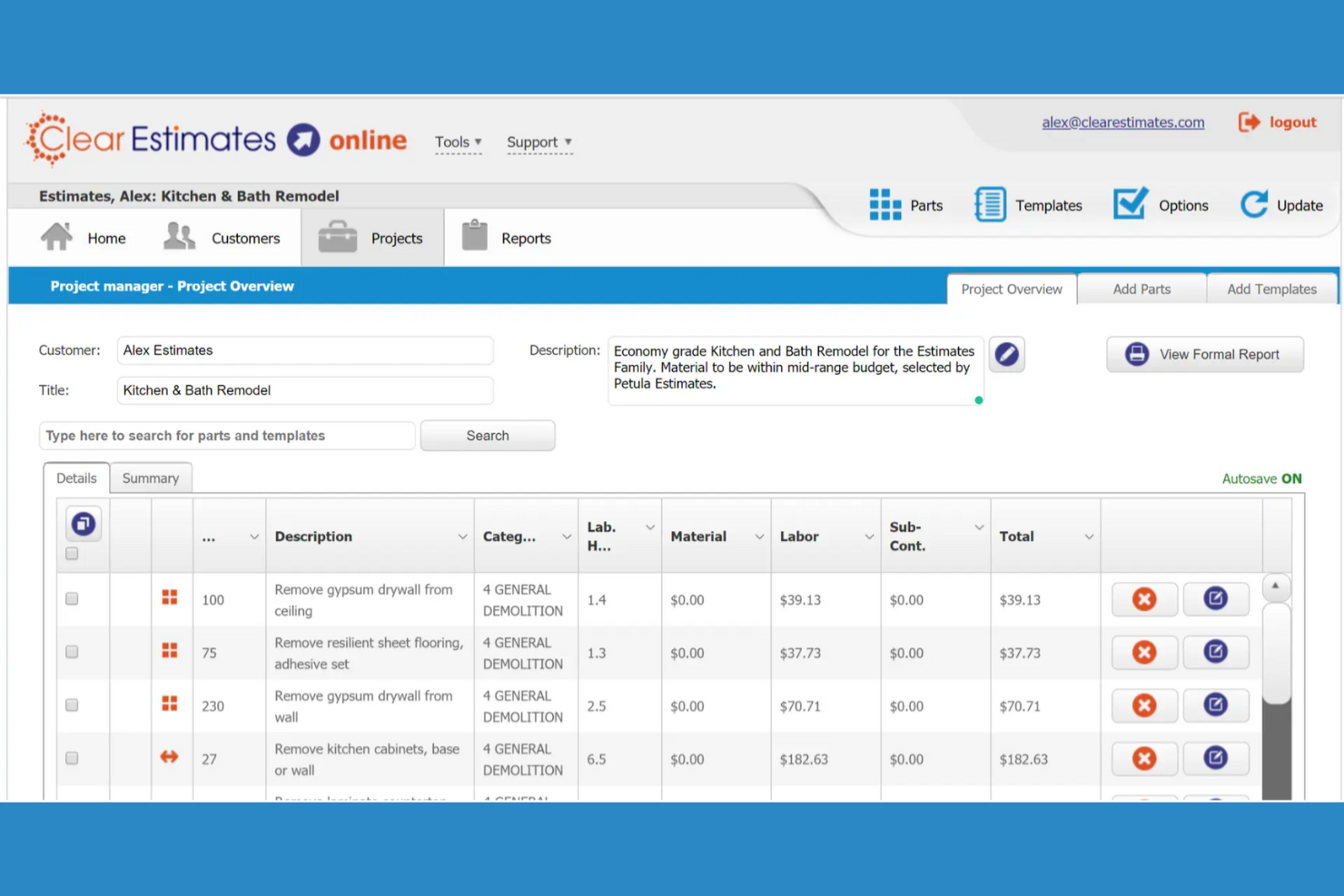
Clear Estimates works best for small contracting businesses that need simple, fast job quoting with cost tracking. I picked it because the pre-built line item database with localized pricing is such a time-saver for remodelers and service trades. I appreciate how you can generate detailed estimates and proposals from templates without getting bogged down in feature overload.
What stands out for me is how well it handles common job components: when you’re doing kitchen remodels, decks, or additions, it speeds up quoting while keeping estimates accurate and easily editable.
Clear Estimates' Best For
- Small contractors creating remodeling and service estimates fast
- Businesses that want localized pricing and job cost templates
Clear Estimates' Not Great For
- Large general contractors managing complex, multi-phase projects
- Teams that need deep integration with accounting or ERP systems
What Sets Clear Estimates Apart
Clear Estimates keeps estimating straightforward by letting you build detailed quotes from a library of common job components and local cost data. Instead of working like Excel or an enterprise tool such as Procore, it expects you to start from templates and edit as you go. This works well when you handle repeatable projects and don’t want to reconstruct every estimate from scratch.
Tradeoffs with Clear Estimates
Clear Estimates optimizes for quick, templated quoting, but you give up advanced scheduling and project tracking. If you handle complex builds or need a hub for deep collaboration, you’ll run into limits.
Pros and Cons
Pros:
- Helpful pre-loaded templates
- Accurate cost databases
- Easy setup for small teams
Cons:
- Collaboration Gaps
- No Accounting Sync

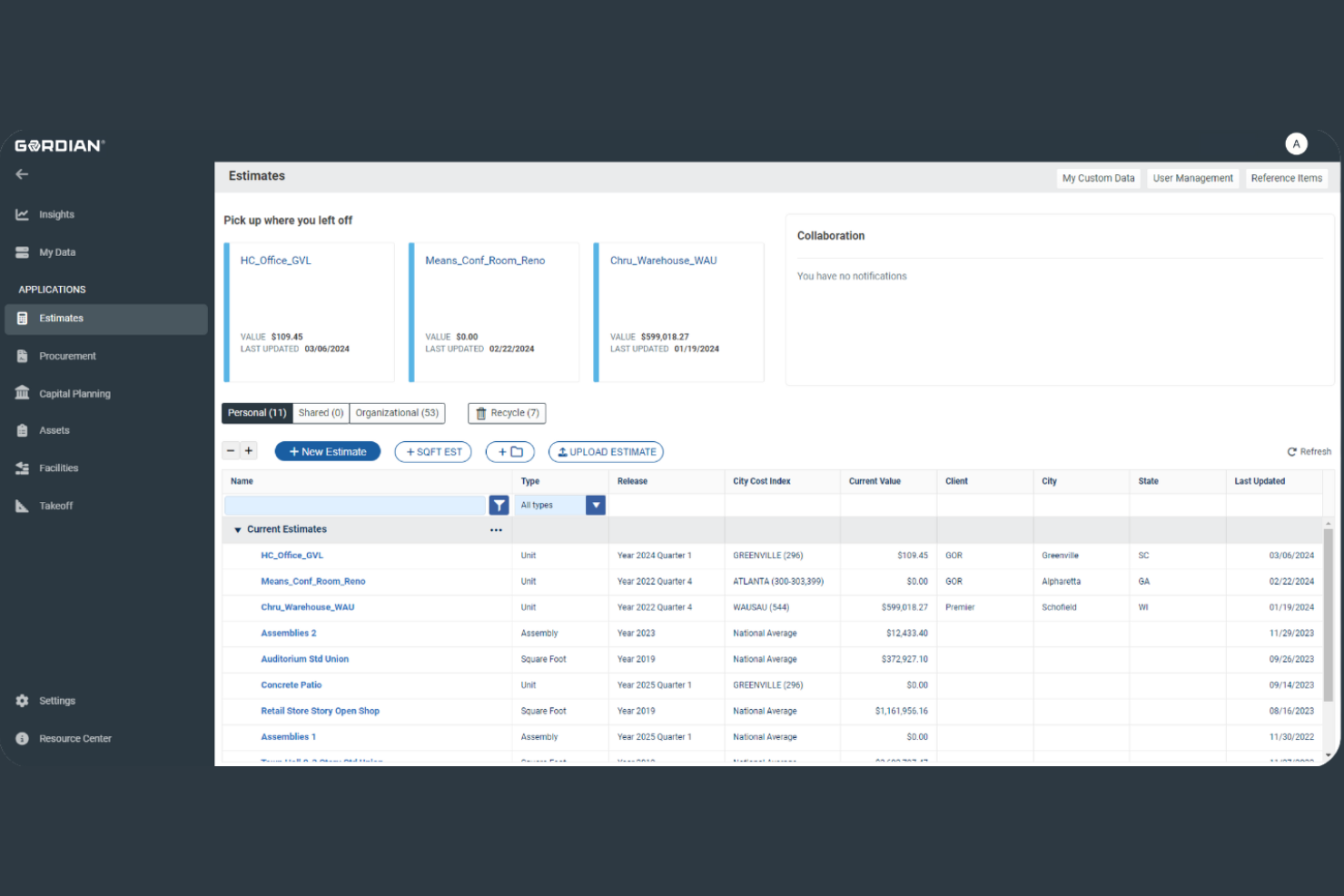
RSMeans Data Online lands on my list because it provides the most reliable construction cost data I’ve worked with. I like having access to its national and localized pricing databases, which get updated regularly so teams can estimate with actual market numbers. I usually recommend this for estimating when cost precision drives project feasibility, especially on bids or budgets that can’t afford surprises.
RSMeans Data Online's Best For
- Estimators and contractors who need up-to-date construction costs
- Firms bidding on complex, multi-region or union projects
RSMeans Data Online's Not Great For
- Small builders who only need basic estimating
- Teams wanting integrated project scheduling or field management
What sets RSMeans Data Online apart
RSMeans Data Online works from the assumption that cost estimation starts with access to real market data, not just templates or sample assemblies. I see it built for pros who need national, regional, and even union-specific costs without doing their own research or calling suppliers. Compared to ProEst or STACK, which focus more on workflow or blueprint markup, RSMeans expects you to come with your own process and pull the data you need as a source of truth.
Tradeoffs with RSMeans Data Online
RSMeans optimizes for high-confidence costing, but you give up integrated project management or field tracking. That means you need to rely on other tools for workflows, assignments, and tracking ongoing site work.
Pros and Cons
Pros:
- Detailed cost breakdowns
- Historical cost tracking
- Extensive cost database
Cons:
- Regional accuracy lag
- Data-only logic


PlanSwift makes my shortlist because digital plan takeoff is its core strength. I recommend it when you need to measure and annotate directly on PDF and CAD files without manual transfers. I especially appreciate how you can auto-calculate areas, lengths, and counts right from digital blueprints, which really speeds up quantity estimating in practice.
PlanSwift’s Best For
- Estimators working directly with digital construction drawings
- Contractors who need fast, accurate quantity takeoff from PDF/CAD
PlanSwift’s Not Great For
- Teams relying on highly customized or integrated estimating workflows
- Firms looking for built-in bid management or advanced reporting
What sets PlanSwift apart
PlanSwift is centered on digital takeoff, letting you measure, annotate, and calculate quantities right on your plans. Unlike traditional takeoff tools where you print or trace on paper, PlanSwift expects you to stay on digital drawings from start to finish. This tends to work well when you want to avoid error-prone manual entry or extra conversions, especially if your workflow is already file-based.
Tradeoffs with PlanSwift
PlanSwift optimizes for direct digital takeoff, but that focus means it lacks the deeper estimating workflows or bid tracking features you get from heavier, all-in-one platforms.
Pros and Cons
Pros:
- Flexible custom assemblies
- Supports 2D and 3D takeoffs
- Excellent for digital takeoffs
Cons:
- Frequent crashes
- Manual point counting
Annen programvare for kostnadsberegning i byggebransjen
Her er noen flere alternativer for programvare til kostnadsberegning i byggebransjen som ikke kom med på kortlisten min, men som likevel er verdt å se nærmere på:
- Estimator360
For project tracking
- Estimating Edge
For specialty trades
- Buildxact
For builders
- Archdesk
For flexible workflows


How I Evaluate Construction Estimating Software
My evaluation splits into two layers: baseline capabilities like takeoffs and cost databases, and differentiators that tell me if a tool fits a GC versus a specialty trade estimator.
Core Functionality (Table Stakes For This List)
When I'm selecting tools for my list, I rank each one on a scale from 0 (does not offer the functionality) to 5 (excels in this area) for each core functionality listed below. Then, I calculate the tool's total score into a percentage. Each tool needs to achieve a minimum total score of 65% to be considered for inclusion.
- Cost Database & Pricing: I check whether the tool includes a prebuilt cost database or only supports manual entry—and whether users can customize unit costs for their region and trades.
- Digital Takeoff Tools: On-screen measurement from uploaded plans matters here, so I look for scaling, area/length tools, and count features that reduce manual quantity work.
- Bid & Proposal Generation: The tool should turn estimate data into polished, client-ready bid documents with customizable formatting, not just raw spreadsheet exports.
- Assemblies & Templates: I evaluate whether estimators can build reusable assemblies—like a concrete footing kit with rebar, formwork, and labor—and apply them across future projects.
- Subcontractor Bid Management: For GCs juggling multiple subs per trade, I look at how the tool handles bid invitations, quote collection, and side-by-side bid leveling.
- Estimate-to-PM/Accounting Integration: Winning a bid means converting an estimate into a project budget, so I check for connections to platforms like Procore, Sage, or QuickBooks.
Once I have a list of tools that meet this criteria, I consider what sets each platform apart.
Differentiating Factors (What Sets Vendors Apart)
Here's how I compare and contrast different vendors:
Standout Features
Historical cost analytics is a major differentiator—I look for tools that let you benchmark past project data to sharpen margins on future bids. Conceptual estimating also matters, especially when a client needs a ballpark before drawings exist. Real-time collaboration separates solo-estimator tools from team-ready platforms where multiple users can work the same estimate without overwriting each other's line items.
Beyond Features
Trade specialization is a big one—an electrical estimator needs conduit and wire-fill calculations, while a GC needs broad CSI division coverage. I also evaluate how well the tool scales. A solo estimator doesn't need enterprise role permissions, and a 50-person preconstruction team can't run on a single-seat desktop license. Deployment matters too; cloud-based tools suit distributed teams, but some estimators still prefer desktop apps with offline access for jobsite walkthroughs.
Slik velger du programvare for kostnadsberegning i byggebransjen
Det er lett å gå seg vill i lange funksjonslister og komplekse prismodeller. For å holde fokus mens du går gjennom den unike prosessen med å velge programvare, kan du bruke denne sjekklisten over faktorer du bør ha i bakhodet:
| Faktor | Hva du bør vurdere |
|---|---|
| Skalerbarhet | Kan programvaren vokse med virksomheten din? Ta hensyn til fremtidig prosjektvolum og teamstørrelse. Se etter verktøy som håndterer økende datamengder og flere brukere uten ytelsestap. |
| Integrasjoner | Kan den kobles til de eksisterende verktøyene dine? Kontroller at den synkroniseres med regnskap, prosjektstyring og andre viktige systemer for å unngå datasiloer. |
| Tilpasningsmuligheter | Kan du tilpasse programvaren til arbeidsflytene dine? Se etter muligheter til å endre maler, rapporter og kontrollpaneler slik at de samsvarer med de spesifikke prosessene dine. |
| Brukervennlighet | Er grensesnittet intuitivt for teamet ditt? En bratt læringskurve kan forsinke innføringen. Se etter et ryddig design og brukervennlig navigasjon. |
| Implementering og opplæring | Hvor raskt kan teamet ditt komme i gang? Ta hensyn til tilgjengelige opplæringsressurser, brukerstøtte og tiden som trengs for å ta i bruk programvaren på en effektiv måte. |
| Kostnad | Passer prisene budsjettet ditt? Se utover den opprinnelige kostnaden – ta hensyn til løpende avgifter, skjulte kostnader og den samlede verdien programvaren tilbyr. |
| Sikkerhetstiltak | Hvordan beskytter programvaren dataene dine? Kontroller krypteringsstandarder, tilgangskontroller og samsvar med bransjereguleringer for å opprettholde datasikkerheten. |
| Tilgjengelig brukerstøtte | Hvilke alternativer for brukerstøtte tilbyr leverandøren? Ta hensyn til tilgjengelighet døgnet rundt, responstider og kvaliteten på hjelpen du kan forvente når det oppstår problemer. |
Hva er programvare for kostnadsberegning i bygg og anlegg?
Programvare for kostnadsberegning i bygg og anlegg er et verktøy som brukes til å beregne kostnader for byggeprosjekter. Entreprenører, kalkulatører og prosjektledere bruker vanligvis disse verktøyene for å øke nøyaktigheten og effektiviteten. Funksjoner for kostnadsberegning, tilbudshåndtering og prosjektsporing bidrar til effektiv budsjettering, planlegging og gjennomføring av prosjekter. Alt i alt sparer disse verktøyene tid og reduserer feil i prosjektplanleggingen.
Funksjoner
Når du velger programvare for kostnadsberegning i bygg og anlegg, bør du se etter følgende viktige funksjoner:
- Kostnadsberegning: Gi nøyaktige beregninger av prosjektkostnader, slik at du kan budsjettere effektivt.
- Tilbudshåndtering: Håndter og organiser tilbud for å øke sjansene dine for å vinne prosjekter.
- Digitale mengdeuttak: Utfør målinger direkte fra digitale tegninger, slik at du sparer tid og reduserer feil.
- Prosjektsporing: Følg med på prosjektfremdrift og kostnader for å holde alt i rute og innenfor budsjettet.
- Rapporteringsverktøy: Generer detaljerte rapporter som gir innsikt i prosjektets resultater og økonomiske situasjon.
- Integrasjonsmuligheter: Koble til andre verktøy, for eksempel programvare for regnskap og prosjektstyring, for å sikre en smidig dataflyt.
- Tilpasningsmuligheter: Endre maler og rapporter slik at de dekker virksomhetens spesifikke behov.
- Samarbeid i sanntid: Teammedlemmer kan samarbeide om beregninger, noe som forbedrer kommunikasjonen og effektiviteten.
- Verktøy for kundekommunikasjon: Legg til rette for kontakt med kundene, slik at de holdes informert og engasjert gjennom hele prosjektet.
- Ressursstyring: Følg med på materialer og arbeidskraft for å optimalisere bruken og redusere svinn.
Fordeler
Implementering av programvare for kostnadsberegning i bygg og anlegg gir flere fordeler for teamet og virksomheten din. Her er noen av fordelene du kan se frem til:
- Bedre nøyaktighet: Bidra til presise kostnadsberegninger og reduser risikoen for budsjettoverskridelser.
- Tidsbesparelser: Automatiser beregninger og prosesser, slik at du får mer tid til andre oppgaver.
- Bedre prosjektstyring: Følg med på fremdrift og kostnader, slik at du holder deg til tidsplanen og budsjettet.
- Bedre samarbeid: La teammedlemmer samarbeide om beregninger, noe som forbedrer kommunikasjonen og effektiviteten.
- Økt konkurranseevne: Forbedre tilbudshåndteringen og øk sjansene for å vinne prosjekter.
- Bedre beslutningsgrunnlag: Tilby detaljerte rapporter og innsikt som kan bidra til planlegging og gjennomføring av prosjekter.
Kostnader og priser
Valg av programvare for kostnadsberegning i bygg og anlegg krever en forståelse av de ulike prismodellene og abonnementene som er tilgjengelige. Kostnadene varierer basert på funksjoner, teamstørrelse, tillegg og mer. Tabellen nedenfor oppsummerer vanlige abonnementer, gjennomsnittsprisene deres og typiske funksjoner som er inkludert i løsninger for kostnadsberegning i bygg og anlegg:
Sammenligningstabell for abonnementer for programvare for kostnadsberegning i bygg og anlegg
| Plantype | Gjennomsnittspris | Vanlige funksjoner |
|---|---|---|
| Gratisplan | $0 | Grunnleggende kostnadsberegning, begrenset prosjektoppfølging og minimal brukerstøtte. |
| Personlig plan | $20-$50/bruker/måned | Kostnadsberegning, digitale mengdeberegninger og grunnleggende rapporteringsverktøy. |
| Bedriftsplan | $50-$100/bruker/måned | Avansert rapportering, anbudsadministrasjon og integrasjon med andre verktøy. |
| Virksomhetsplan | $100+/bruker/måned | Tilpasningsmuligheter, samarbeid i sanntid, avansert analyse og dedikert kundestøtte. |
Vanlige spørsmål om programvare for byggekostnadsberegning
Her er noen svar på vanlige spørsmål om programvare for byggekostnadsberegning:
Hvilke typer prosjekter kan den beregne?
Programvare for byggekostnadsberegning støtter bolig-, nærings-, industri- og infrastrukturprosjekter. Dette omfatter renoveringer, nybygg, anleggsarbeid og spesialiserte fagområder. De fleste verktøy gjør det mulig å justere beregningene basert på prosjektets størrelse og kompleksitet.
Kan programvare for byggekostnadsberegning integreres med systemene jeg bruker nå?
Ja, de fleste programmer for byggekostnadsberegning tilbyr integrasjoner med andre systemer, for eksempel regnskaps-, prosjektstyrings- og CRM-verktøy. Sjekk programmets liste over integrasjoner for å bekrefte kompatibilitet med systemene du bruker nå. Dette kan hjelpe deg med å opprettholde en smidig arbeidsflyt og unngå datasiloer. Hvis integrasjon er viktig, bør du prioritere programvare som tilbyr API-tilgang for tilpassede tilkoblinger.
Hvor sikre er dataene mine i programvare for byggekostnadsberegning?
De fleste leverandører av programvare for byggekostnadsberegning innfører sikkerhetstiltak som datakryptering, tilgangskontroller og regelmessige sikkerhetsoppdateringer. Før du velger et verktøy, bør du undersøke sikkerhetsfunksjonene og samsvarssertifiseringene det tilbyr. Sørg for at programvaren er i tråd med organisasjonens retningslinjer for databeskyttelse, slik at sensitiv informasjon beskyttes.
Finnes det opplæring for nye brukere?
Ja, mange programvareleverandører tilbyr opplæringsressurser som veiledninger, webinarer og brukermanualer. Noen tilbyr også støtte ved oppstart for å hjelpe teamet ditt i gang. Før du kjøper, bør du spørre om hvilke opplæringsalternativer som er tilgjengelige, og vurdere verktøy som tilbyr interaktive produktomvisninger eller demonstrasjoner for å gjøre læringskurven enklere.