

10 beste programvarer for etterlevelseskalender i 2026

10 Beste programvare for samsvarskalendere


Programvare for samsvarskalendere hjelper deg med å organisere, følge opp og administrere regulatoriske frister og samsvarsoppgaver i hele virksomheten. Hvis du ser etter den beste programvaren for samsvarskalendere, leter du etter måter å redusere stresset rundt frister, samle krav på ett sted og forbedre revisjonsberedskapen på. Hvis du ikke leverer en regulatorisk rapport eller gjennomfører en policygjennomgang i tide, kan det få reelle konsekvenser for virksomheten. Derfor er det viktig å velge riktig plattform.
Denne veiledningen fokuserer på de beste verktøyene for prosjektledere, risikoleder og tverrfunksjonelle team som trenger oversikt og kontroll over komplekse krav. Les videre for å finne samsvarsløsninger som passer arbeidsflyten og tidsplanene dine, støtter samarbeid og hjelper deg med å unngå kostbare forglemmelser.
Hvorfor du kan stole på våre programvareanbefalinger
Teamet vårt har testet og anmeldt programvare siden 2012. Vi er selv prosjektledere, så vi vet hvor vanskelig og hvor viktig det er å velge riktig programvare.
I denne guiden har vi vurdert verktøyene gjennom praktisk testing og uavhengig research og gitt dem poeng ut fra våre utvelgelseskriterier. Vi bygger også på innsikt fra ledende eksperter i bransjen og erfarne prosjektledere.
Anmeldelsene våre bygger på vår egen redaksjonelle vurdering. De er ikke et salgsargument.
Ekspertanmeldere:
Sammenligningstabell for programvare for samsvarskalendere
Denne sammenligningstabellen oppsummerer prisopplysningene for mine best utvalgte programmer for samsvarskalendere:
| Tool | Best For | Trial Info | Price | ||
|---|---|---|---|---|---|
| 1 | Best for collaborative compliance documentation | Free demo available | Pricing upon request | Website | |
| 2 | Best for workflow automation at scale | Free demo available | Pricing upon request | Website | |
| 3 | Best for audit-ready compliance reporting | Free demo available | Pricing upon request | Website | |
| 4 | Best for scalable enterprise compliance programs | Free demo available | Pricing upon request | Website | |
| 5 | Best for proactive regulatory change alerts | Free demo available | Pricing upon request | Website | |
| 6 | Best for real-time task evidence collection | Free demo available | Pricing upon request | Website | |
| 7 | Best for customizable workflow automation | Free demo available | Pricing upon request | Website | |
| 8 | Best for tech stack integration flexibility | Free demo available | Pricing upon request | Website | |
| 9 | Best for integrated expert compliance guidance | Free demo available | Pricing upon request | Website | |
| 10 | Best for AI-driven compliance automation | Free demo available | Pricing upon request | Website |
Anmeldelser av den beste programvaren for samsvarskalendere
Nedenfor finner du mine detaljerte sammendrag av den beste programvaren for samsvarskalendere som kom med på kortlisten min. Anmeldelsene mine gir en grundig gjennomgang av funksjonene, de beste bruksområdene og integrasjonene til hver plattform, slik at du kan finne den som passer best for deg.
Workiva
Best for collaborative compliance documentation
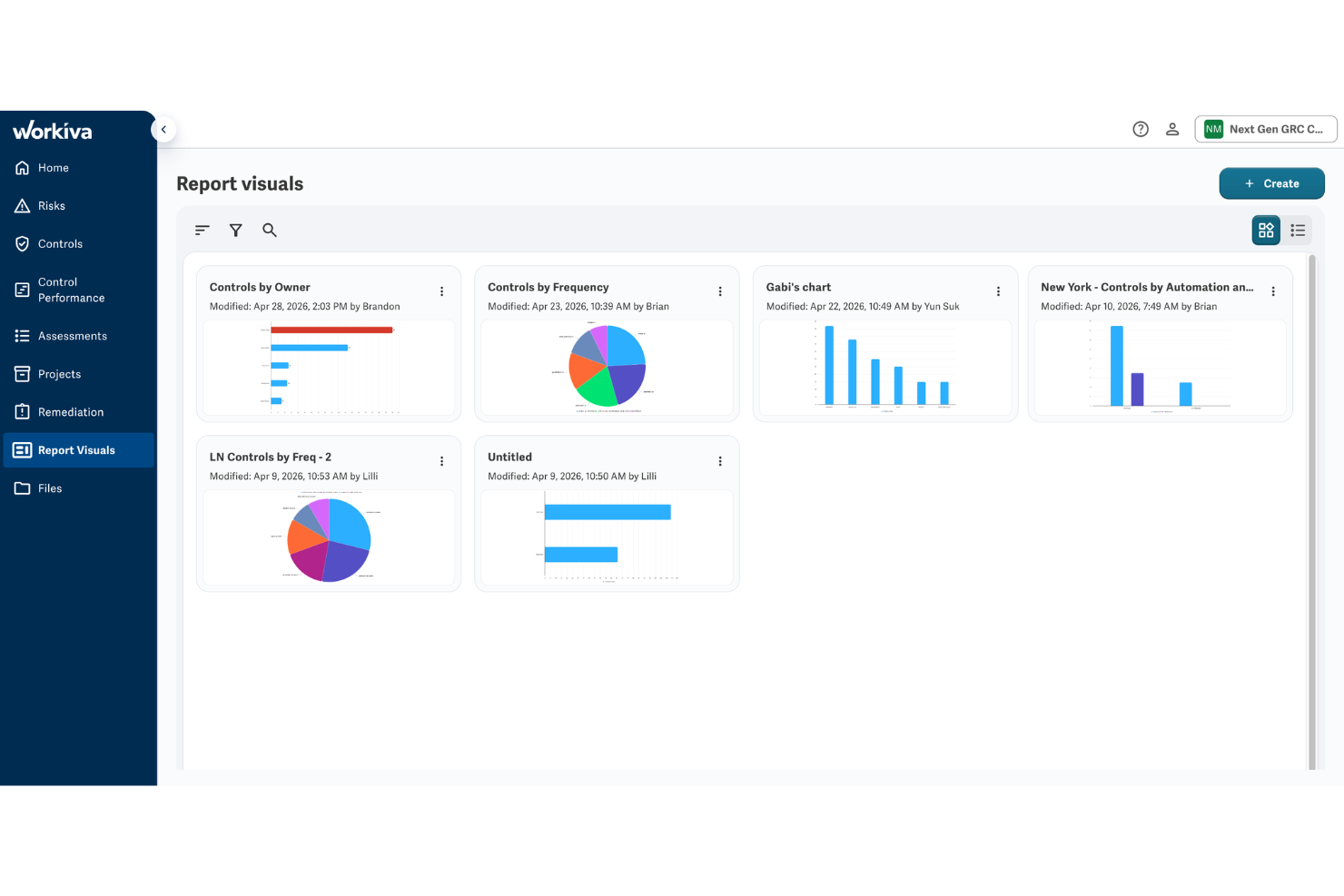
Workiva is a GRC platform that connects internal audit, risk management, controls testing, and compliance documentation inside a single connected workspace for enterprise teams.
Who Is Workiva Best For?
Workiva is a strong fit for compliance and internal audit teams at publicly traded or heavily regulated enterprises.
Why I Picked Workiva
Workiva earns its spot on my shortlist because the real-time co-authoring feature lets multiple compliance owners edit the same policy or control document simultaneously, without version conflicts. I also like that linked data means updating a control description in one place cascades across every connected report and framework mapping automatically. In practice, my team avoids the back-and-forth of emailing document drafts across stakeholders entirely.
Workiva Key Features
- Compliance framework mapping: Map controls directly to frameworks like SOX, COSO ERM, and CMMC 2.0 within the platform
- Risk assessment tools: Score and prioritize risks using built-in assessment templates tied to your control environment
- Audit management workflows: Manage audit scoping, fieldwork, and reporting inside structured project workflows
- Compliance dashboards: View control status, open issues, and remediation progress across the full compliance program
Workiva Integrations
Workiva connects to on-premises and cloud applications through its Wdata connectors, including Google Sheets, Microsoft Excel, Microsoft SharePoint, Oracle EPM, Salesforce, and SFTP, while premium connectors cover SAP, NetSuite, Workday, Snowflake, Power BI, ServiceNow, Anaplan, and many Oracle products. An API is available for custom integrations.
Pros and Cons
Pros:
- Built-in AI flags control coverage gaps
- Linked data auto-updates across all reports
- Real-time multi-user document co-authoring
Cons:
- Primarily built for enterprise-scale organizations
- Setup and onboarding require significant resources

Best for workflow automation at scale

Built on the Now Platform, ServiceNow GRC is an enterprise compliance and risk management platform covering integrated risk management, continuous compliance monitoring, third-party risk, business continuity, and privacy management.
Who Is ServiceNow Best For?
ServiceNow GRC is well suited to global enterprises that already run IT operations on the Now Platform and want compliance and risk management embedded in the same environment.
Why I Picked ServiceNow
I've included ServiceNow on this list because no other platform matches its ability to automate compliance workflows at enterprise scale. Its Integrated Risk Management module lets you map controls to obligations and trigger automated evidence collection tasks, so recurring deadlines don't depend on someone remembering to chase them. I also like that continuous compliance monitoring runs in real time on the Now Platform, flagging control failures and routing remediation tasks automatically without a manual review cycle in between.
ServiceNow Key Features
- Pre-built regulatory content library: Access pre-mapped control frameworks for standards like ISO 27001, SOC 2, and NIST out of the box.
- Issue and exception management: Log compliance exceptions, assign owners, set due dates, and track resolution status in a structured workflow.
- Attestation management: Collect and record stakeholder sign-offs on control performance at scheduled intervals.
- Performance analytics dashboards: View real-time metrics on control health, open issues, and compliance posture across business units.
ServiceNow Integrations
Native integrations are not publicly listed. An API is available for custom integrations.
Pros and Cons
Pros:
- Now Assist AI cuts repetitive GRC work
- CMDB links risks to specific IT assets
- Change tickets auto-generate compliance evidence
Cons:
- Fewer pre-built compliance frameworks than competitors
- Limited value without broader ServiceNow adoption

Resolver
Best for audit-ready compliance reporting

Resolver is a GRC platform that centralizes regulatory obligations, controls, policies, compliance testing, and audit evidence, with AI-assisted workflows for regulatory change tracking and audit preparation.
Who Is Resolver Best For?
Resolver is a strong fit for organizations in heavily regulated industries, like financial services or healthcare, where audit cycles are frequent and evidence requirements are strict.
Why I Picked Resolver
Resolver earns its spot on my shortlist because its regulatory obligation mapping connects specific rules directly to the controls built to address them, so nothing falls through during an audit. I also like how control testing workflows schedule and log each testing activity, giving auditors a clear record of what was tested, when, and by whom. When gaps appear, the issue tracking feature assigns owners and monitors fixes, so nothing sits unresolved.
Resolver Key Features
- Regulatory change tracking: Monitors updates to relevant regulations and routes changes into review workflows for assessment.
- Evidence repository: Stores and organizes compliance evidence, linked directly to the controls and audits it supports.
- Board-ready dashboards: Displays compliance status by framework, risk area, or region in a filterable visual format.
- Policy review scheduling: Tracks policy review cycles and sends automated reminders when reviews are due.
Resolver Integrations
Native integrations are not publicly listed. An API is available for custom integrations.
Pros and Cons
Pros:
- Tracks multi-region compliance in one platform
- AI drafts controls from the regulatory context
- Maps obligations directly to controls automatically
Cons:
- Narrow third-party integration options available
- Initial setup and configuration are time-consuming

Best for scalable enterprise compliance programs

MetricStream is an enterprise GRC platform with a dedicated compliance management product that centralizes regulatory obligations, certificate renewals, policy management, control testing, risk assessments, and incident tracking across large organizations.
Who Is MetricStream Best For?
MetricStream is a strong fit for compliance officers and risk teams at large enterprises managing complex, multi-framework regulatory programs across multiple business units.
Why I Picked MetricStream
I've included MetricStream on my shortlist because it's one of the few compliance platforms built to scale across large, multi-entity organizations without losing structural integrity. I like how the Compliance Environment and Process Design feature lets you map regulations, risks, controls, and policies into a single hierarchy across business units and locations. The Regulatory Intelligence capability automatically maps incoming regulatory updates to existing controls and policies, so my team isn't manually chasing changes across frameworks.
MetricStream Key Features
- Enhanced control testing: Design control tests and self-assessments as surveys or questionnaires, assign samples to control owners, and upload results in bulk via Excel or individually.
- Intelligent issue and action management: Uses AI/ML to automatically identify duplicate issues and recommend issue classifications and action plans.
- Compliance certifications: Lets business unit heads submit certifications and sub-certifications confirming their departments have addressed specific control concerns.
- Regulatory engagement management: Tracks examinations, regulator meetings, and information requests through automated workflows, with centralized storage of findings and action plans.
MetricStream Integrations
MetricStream offers marketplace integrations with BitSight, BMC, Cube, Dow Jones, Dun & Bradstreet, Jira, Qualys, Rapid7, ServiceNow, and Tenable. It also supports REST and Kafka-based connectors with 200+ built-in GRC APIs for custom integrations.
Pros and Cons
Pros:
- Centralized regulatory change tracking workflows
- Modular setup across risk and compliance
- AI flags duplicate issues automatically
Cons:
- Navigation buries tasks under layered menus
- Custom reports often need vendor support

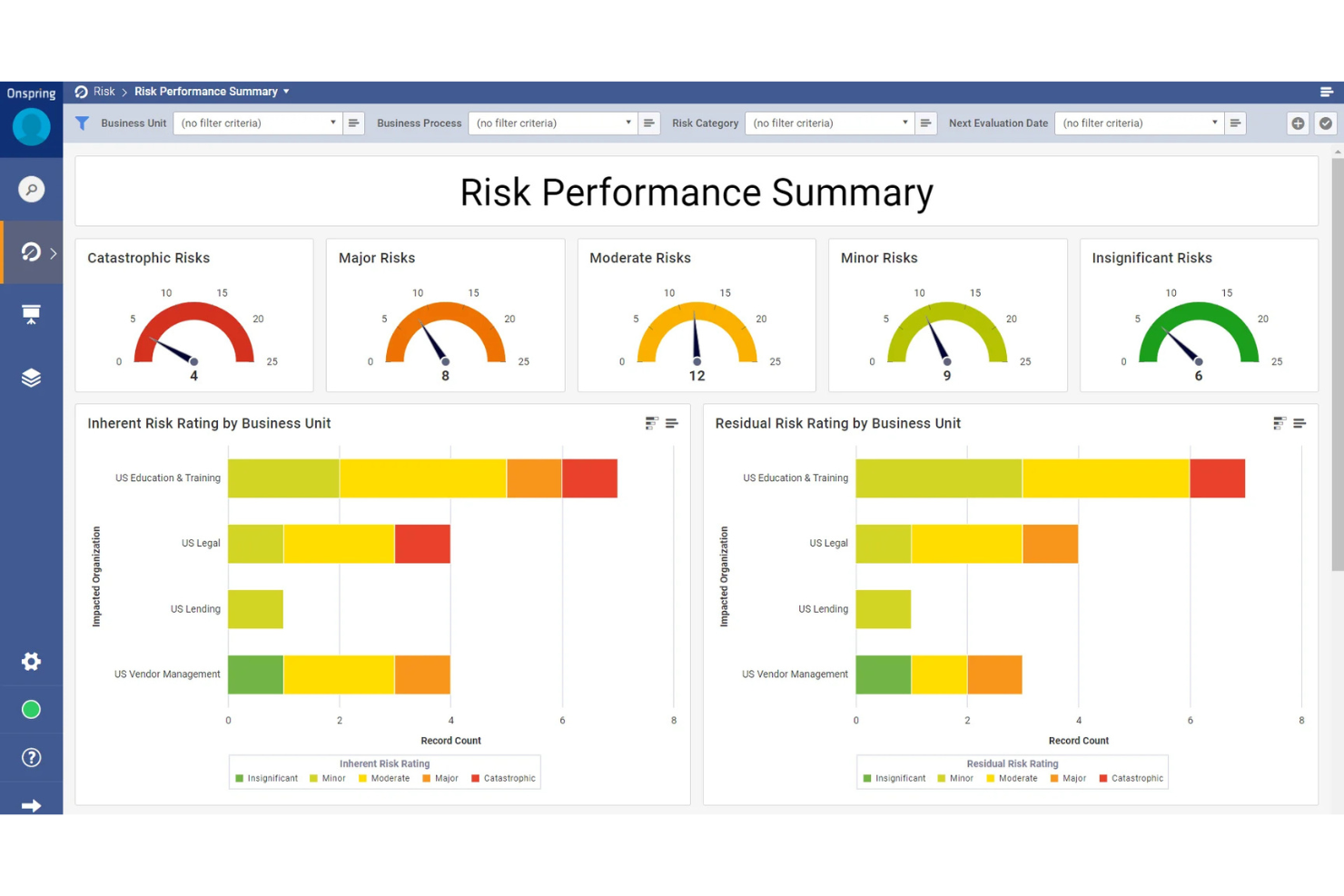
Onspring is a regulatory change management platform that maps incoming regulatory updates to controls, policies, and procedures, with AI-assisted impact assessments, automated review workflows, and one-click compliance reporting.
Who Is Onspring Best For?
Onspring suits mid-to-large enterprises with dedicated compliance teams who need to monitor, assign, and close out regulatory changes across multiple business units or frameworks.
Why I Picked Onspring
Onspring earns its spot on my shortlist because its horizon scanning pulls regulatory updates from global and local sources before changes take effect. I like that every incoming rule gets mapped directly to affected controls and procedures inside the rules register, so my team immediately knows what needs updating. The proactive alert system flags upcoming changes before deadlines arrive, keeping the compliance calendar accurate without relying on manual monitoring.
Onspring Key Features
- AI-assisted impact assessment: Automatically scores incoming regulatory changes and recommends the right analyst for triage and review.
- Multi-level review workflows: Routes change tasks through sequential approval stages with automated notifications at each step.
- Audit trail logging: Records every action taken on a regulatory change from initial alert through final sign-off.
- Compliance dashboard: Displays real-time status across all active regulatory changes in a single view.
Onspring Integrations
Onspring integrates with Jira, DocuSign, OneDrive, Google Drive, Microsoft Entra ID, Slack, Microsoft 365, and Azure DevOps, and an API is available for custom integrations.
Pros and Cons
Pros:
- Real-time rule change alerts from regulators
- AI matches regulatory controls across frameworks
- Drag-and-drop compliance workflow creation without coding
Cons:
- No sandbox environment for testing configurations
- Reporting visuals feel clunky to customize

Best for real-time task evidence collection
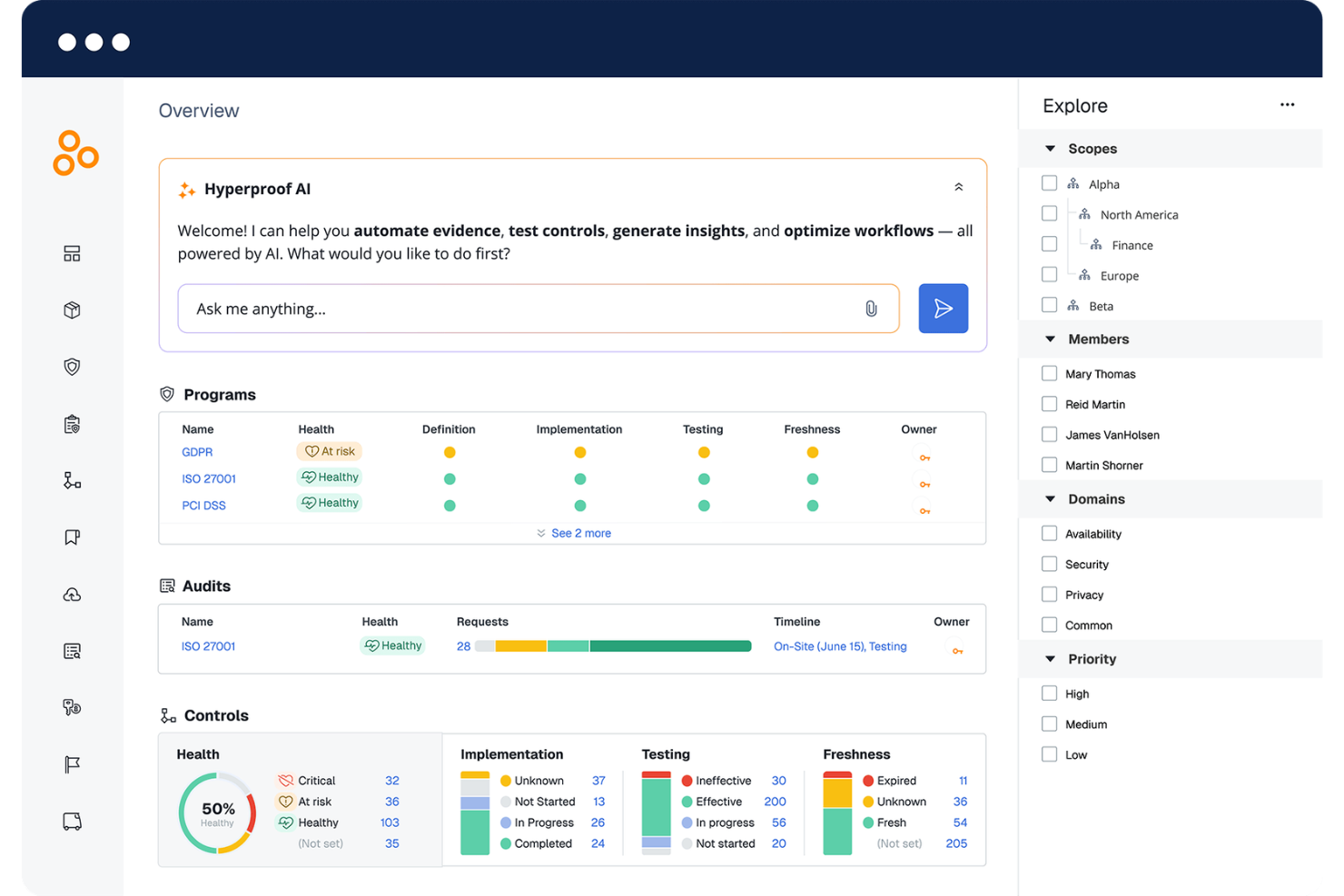
Hyperproof is an AI-powered compliance and task management platform that centralizes control mapping, evidence collection, audit preparation, and policy version management across multiple frameworks.
Who Is Hyperproof Best For?
Hyperproof is a strong fit for compliance, security, and risk teams at mid-size to enterprise companies managing multiple overlapping regulatory frameworks.
Why I Picked Hyperproof
Hyperproof is one of my top picks because I love how it handles real-time evidence collection at the task level. When my team assigns a control owner, Hyperproof auto-creates tasks based on test status and can automatically pull in evidence without waiting for manual uploads. I also rely on the audit dashboard to see exactly which requests are pending, in progress, or complete, so nothing slips through during crunch time.
Hyperproof Key Features
- Cross-framework control mapping: Map and reuse a shared set of controls across multiple compliance frameworks to reduce duplicate work.
- Policy version management: Create, store, and manage organizational policies in one centralized location with built-in version control.
- User access reviews: Adjust and verify user permissions in real time, with visibility into review status across your organization.
- Auditor collaboration workspace: Invite external auditors into a dedicated audit space where they can access only the information relevant to their review.
Hyperproof Integrations
Hyperproof offers native integrations with AWS, Azure, Google Drive, SharePoint, Dropbox, Amazon S3, Confluence, Jira, Asana, ServiceNow, and more. It also provides a Hypersync API for building custom integrations.
Pros and Cons
Pros:
- Built-in audit dashboard tracks request status
- Automated Hypersyncs collect evidence without manual uploads
- Reuses evidence across multiple compliance frameworks
Cons:
- Navigation gets difficult with large control lists
- Dashboards and analytics lack advanced customization

Best for customizable workflow automation
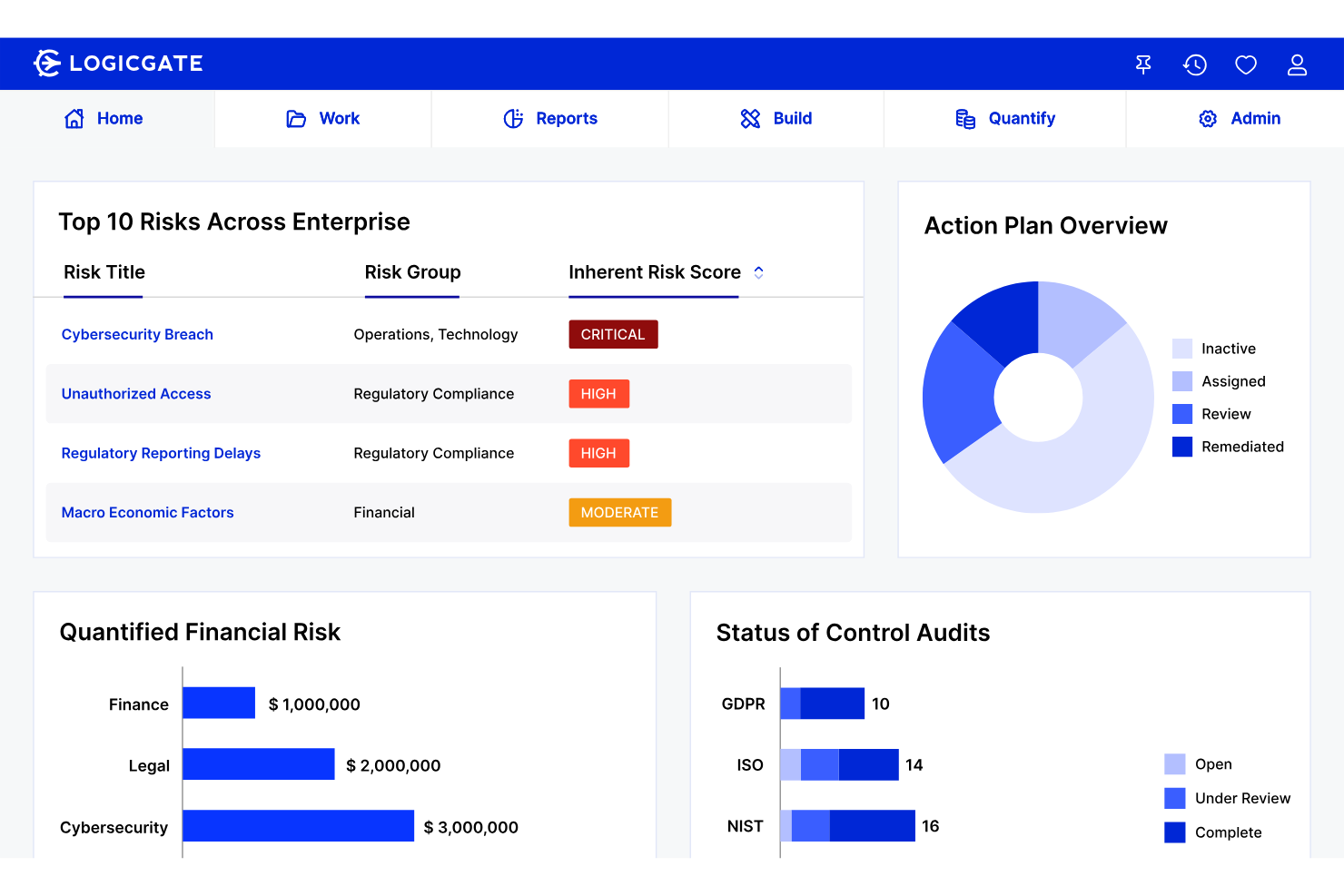
LogicGate Risk Cloud is a GRC platform that centralizes compliance management, audit workflow automation, multi-framework control mapping, and regulatory tracking across your organization.
Who Is LogicGate Best For?
LogicGate is a strong fit for compliance and audit teams at mid-to-large enterprises that need to build and customize their own GRC workflows without relying on vendor configuration.
Why I Picked LogicGate
I've included LogicGate in my top picks because its no-code workflow builder gives my team direct control over how compliance processes are designed and triggered. Instead of working around a vendor's fixed audit templates, I can build custom remediation workflows that route findings to the right owner automatically. I also use its regulatory compliance module to link obligations directly to assessments and findings, so nothing falls through the cracks between scheduled reviews.
LogicGate Key Features
- Multi-framework control mapping: Map and manage compliance across frameworks like SOC 2, ISO 27001, and NIST from a single unified view.
- Automated evidence collection: Automatically gather and organize audit evidence to reduce manual collection effort across assessments.
- Internal audit management: Plan, track, and close internal audits with built-in tools for due diligence, evidence gathering, and stakeholder reporting.
- Data privacy workflow management: Track personal data usage, handle data subject requests, and automate responses to maintain consistent privacy compliance.
LogicGate Integrations
LogicGate offers 200+ native integrations, including Jira, Slack, Microsoft 365, UKG, Snowflake, Asana, HubSpot, Hive, Power BI, and Zendesk. An open RESTful API is available for custom integrations.
Pros and Cons
Pros:
- Adapts workflows to any regulatory framework
- Links cross-module audit and risk data
- No-code workflow builder needs zero coding
Cons:
- AI capabilities trail behind competing GRC tools
- Advanced reporting needs heavy custom configuration

OneTrust
Best for tech stack integration flexibility
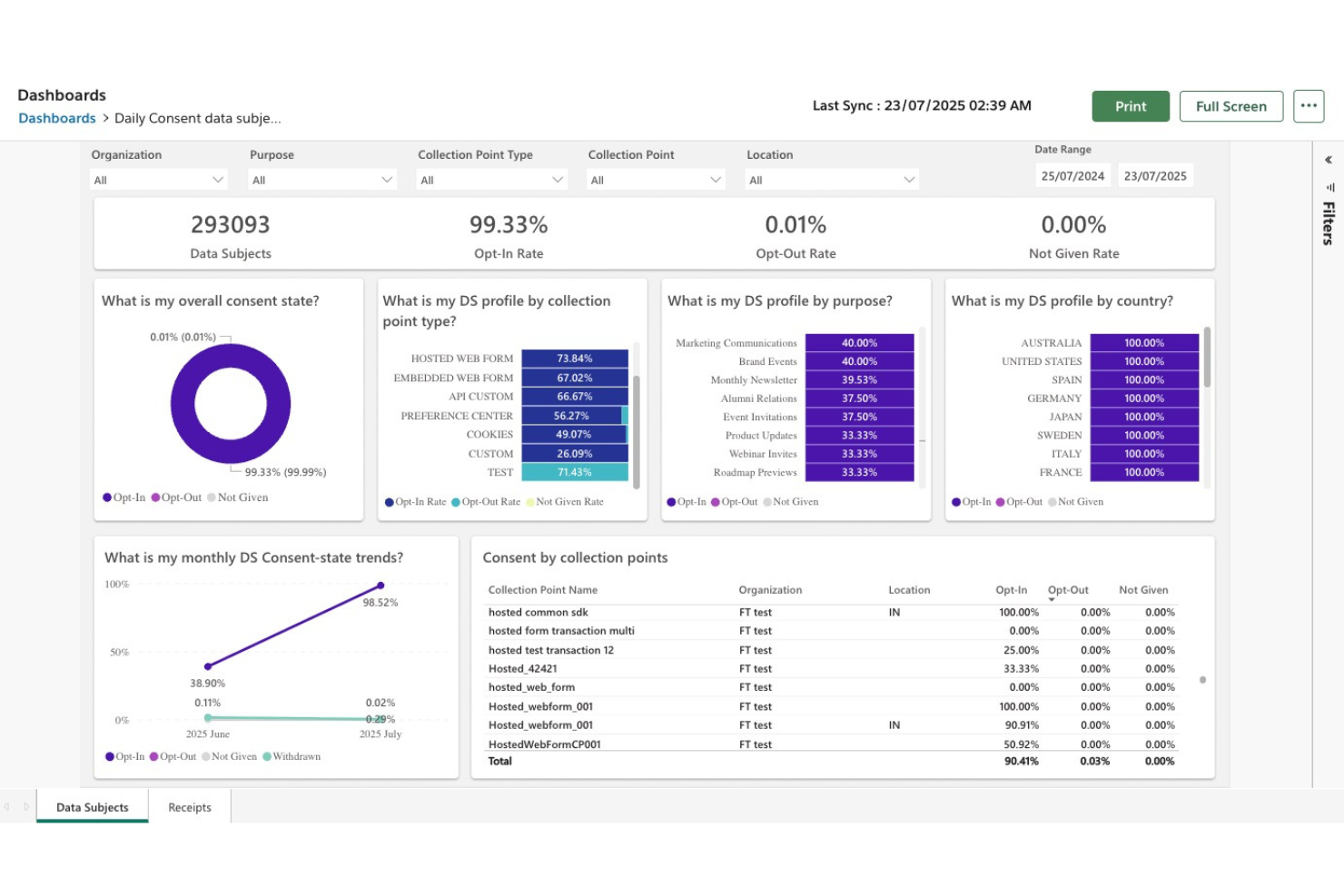
OneTrust is a GRC platform built for IT and security teams that combines compliance automation, IT risk management, policy tracking, and control monitoring across 55+ frameworks.
Who Is OneTrust Best For?
OneTrust fits enterprise security and compliance teams that need to manage IT risk across interconnected systems and multiple regulatory frameworks simultaneously.
Why I Picked OneTrust
I picked OneTrust as one of the best because of how well it connects compliance work to the tools your team already uses. The integrations gallery includes 500+ pre-built system connectors, and you can build new ones with a visual builder that doesn't need IT involvement. I also like that it uses pre-architected collectors to pull evidence directly from your tech stack, which cuts out a lot of manual work when you're tracking controls across multiple systems.
OneTrust Key Features
- Scoping survey: Run an initial survey to define your compliance scope and surface areas of overlap across frameworks before any controls work begins.
- Policy attestation tracking: Distribute policies through a centralized employee portal and track attestations and exceptions with automated follow-up reminders.
- Shared evidence framework: Map controls and evidence tasks once, then automatically apply that work across 50+ overlapping compliance frameworks.
- Real-time risk dashboards: Monitor your compliance and risk posture through dynamic dashboards that update continuously as new data and incidents come in.
OneTrust Integrations
OneTrust offers 50+ integrations including Workday, Zendesk, Snowflake, Salesforce, Box, Power BI, Okta, Slack, Tableau, and Twilio. An API is available for custom integrations.
Pros and Cons
Pros:
- Modular setup lets you scale gradually
- Regulatory guidance across 300+ jurisdictions
- Pre-mapped controls across 50+ frameworks
Cons:
- Some modules feel disconnected from others
- Initial setup is complex and time-consuming

Diligent is a practitioner-led compliance program that pairs in-house expert guidance with Diligent's GRC platform to support effective compliance, program assessments, regulatory risk analysis, policy modernization, and multi-year compliance roadmapping.
Who Is Diligent Best For?
Diligent is a strong fit for enterprise compliance teams that need outside expert counsel alongside their internal GRC program, particularly during regulatory change or program buildouts.
Why I Picked Diligent
I picked Diligent as one of the best because no other tool on this list pairs in-house compliance practitioners directly with a GRC platform the way Diligent does. Its CCEPA methodology benchmarks your program against DOJ, UK, and ISO standards, then produces a prioritized, multi-year roadmap. I also use it to configure reporting dashboards and monitoring frameworks directly within the platform, so strategic guidance and day-to-day compliance execution stay connected.
Diligent Key Features
- Speak-up systems: Design and configure internal reporting programs and investigation protocols for employee-reported compliance concerns.
- Third-party risk management: Build vendor risk assessment frameworks to identify and monitor supply chain compliance exposure.
- Code and policy modernization: Review, draft, and manage the full lifecycle of your compliance policy framework.
- Board reporting: Develop executive communication strategies and define effectiveness metrics for compliance program reporting.
Diligent Integrations
The Diligent One Platform integrates with 100+ third-party systems, including Salesforce, SAP, Oracle, and Microsoft. It also integrates with ServiceNow, Jira, GitHub, Qualys, and major BI platforms. An API is available to automate interactions with the platform, build reporting, and integrate with other systems.
Pros and Cons
Pros:
- Maps programs to DOJ and ISO benchmarks
- Tracks regulatory changes across 130+ countries
- Practitioner-led advisory with in-house compliance experts
Cons:
- Dashboard access controls lack granular permissions
- Policy Manager feels inconsistent with other modules

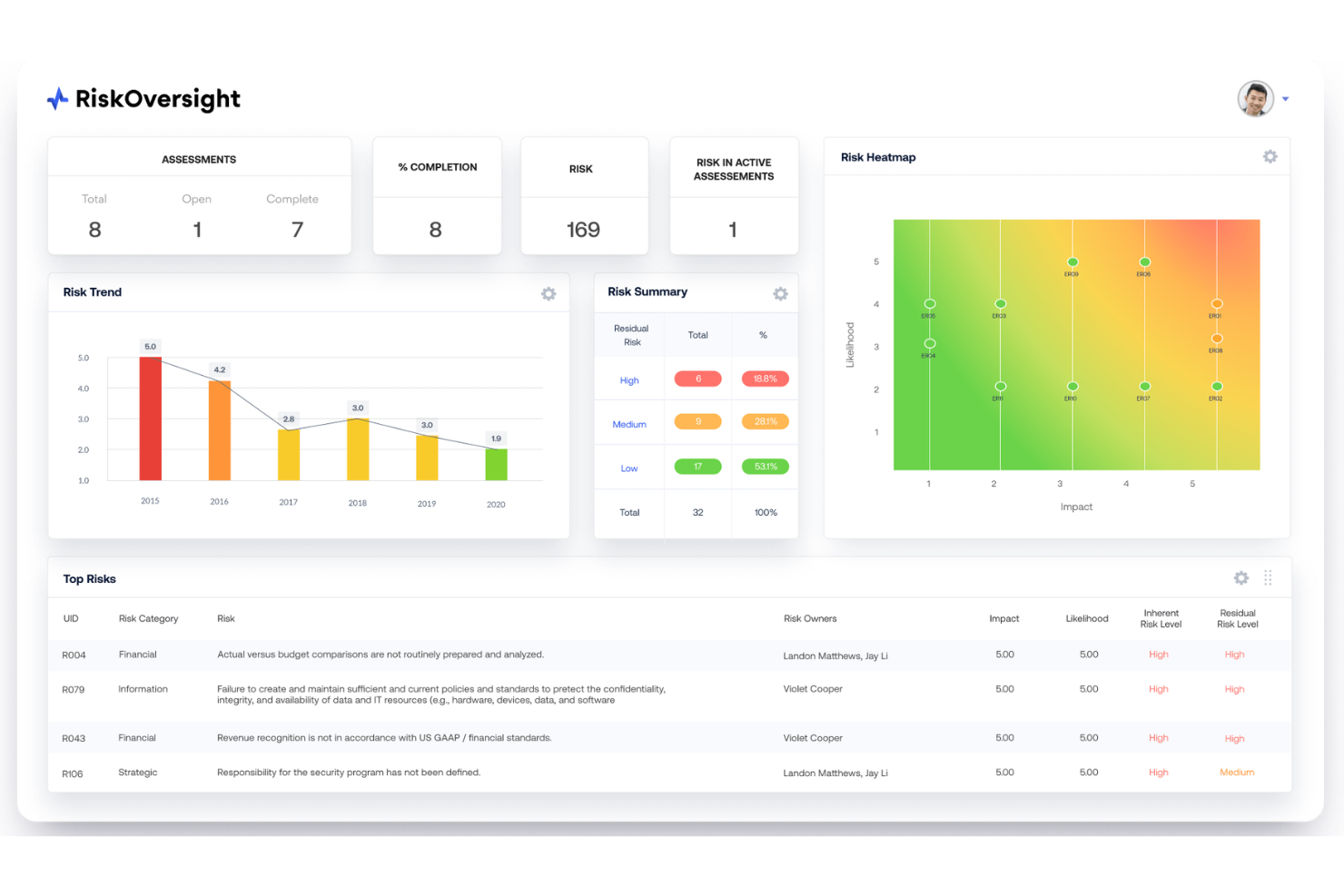
Optro is an AI-powered IT risk and compliance management platform that provides a clear outlook on multi-framework control mapping, continuous monitoring, automated evidence collection, and AI governance across auditable entities.
Who Is Optro Best For?
Optro is a strong fit for IT risk and security teams at large enterprises managing complex, multi-framework cybersecurity compliance programs across multiple auditable entities.
Why I Picked Optro
Optro earns its spot on my shortlist because of how far its AI-driven automation goes inside a compliance workflow. I rely on its AI-powered gap assessments to instantly surface control deficiencies across frameworks like ISO 27001, SOC 2, and NIST CSF, without manual cross-referencing. Optro's automated evidence collection then ties directly into those gaps, so my team isn't chasing down proof after the fact. The continuous monitoring templates give us a live compliance posture rather than a point-in-time snapshot.
Optro Key Features
- Multi-entity compliance management: Manage separate compliance programs for each auditable entity within a single platform, with distinct scopes per entity.
- Control self-assessments: Run structured self-assessments against mapped controls to verify effectiveness across active compliance frameworks.
- Risk and compliance bridging: Connect policies, issues, and exceptions directly to cyber risk data to support risk-driven decision-making.
- AI governance module: Map and track compliance against emerging AI frameworks to manage responsible AI adoption across your organization.
Optro Integrations
Optro offers integrations with Jira, ServiceNow, Azure DevOps, Microsoft Teams, Slack, Google Drive, Microsoft Office, Oracle NetSuite, Workday, Paylocity, and more. An API is available for custom integrations.
Pros and Cons
Pros:
- Shared evidence eliminates redundant collection work
- AI suggests audit procedures and staffing
- Maps controls across multiple frameworks simultaneously
Cons:
- Reporting capabilities lack depth and flexibility
- Creating custom ad hoc audits feels limited
Annen programvare for samsvarskalendere
Her er noen flere alternativer for programvare for samsvarskalendere som ikke kom med på kortlisten min, men som likevel er verdt å se nærmere på:
- NAVEX
For essential regulatory controls coverage
- SAI360
For global regulatory requirement tracking
- LexComply
For automated legal entity management
- Archer
For centralizing policy and risk tasks
- IBM OpenPages
For AI-powered regulatory mapping
- Corporater
For aligning compliance with strategy
- MyComplianceOffice
For conflict of interest monitoring
- Regology (Reggi)
For intelligent global regulation search
- Ncontracts
For financial institution oversight needs
- Star Compliance
For employee conduct tracking


How I Evaluate Compliance Calendar Software
I evaluate every tool on two levels: the core scheduling, tracking, and audit-log functionality it needs to qualify, and what distinguishes it for multi-jurisdiction GRC teams.
Core Functionality (Table Stakes For This List)
When I'm selecting tools for my list, I rank each one on a scale from 0 (does not offer the functionality) to 5 (excels in this area) for each core functionality listed below. Then, I calculate the tool's total score as a percentage. Each tool needs to achieve a minimum total score of 65% to be considered for inclusion.
- Regulatory deadline tracking: I check whether the calendar supports multi-jurisdiction views with filtering, so teams handling filings across several regulatory bodies aren't toggling between systems.
- Recurring obligation scheduling: I look for recurrence logic that accounts for business days, fiscal periods, and holiday shifts rather than just basic monthly or quarterly repeats.
- Task assignment and ownership: I evaluate whether tasks can be assigned to individuals or teams with status tracking and approval chains that mirror real compliance sign-off workflows.
- Automated notifications and escalations: Multi-channel alerts matter here. I look for tiered reminders and supervisor escalation paths, not just a single email notification.
- Audit trail and reporting: I consider whether the tool logs completions with timestamps and evidence attachments, and whether reports can be exported in formats auditors expect.
- Regulatory content library: Pre-built obligation templates or regulatory feeds save significant setup time. I look at how broad the coverage is and how often content is updated.
Once I have a list of tools that meet this criteria, I consider what sets each platform apart.
Differentiating Factors (What Sets Vendors Apart)
Here's how I compare and contrast different vendors:
Standout Features
Automated regulatory update feeds are a major differentiator. Some platforms pull amended deadlines directly from regulatory agencies, which saves your team from manually monitoring changes. I also look at configurable alert cadences—tiered reminders at 90, 60, 30, and 7 days out, with escalation to supervisors for overdue items to give teams real breathing room to act before a deadline becomes a crisis. An evidence and document repository matters just as much, since attaching filings and proof of completion directly to calendar events keeps your audit trail intact without chasing files across shared drives.
Beyond Features
Industry specialization matters a lot here. I check whether a vendor pre-loads regulatory content for specific sectors like financial services or healthcare, and how often that content is updated. Implementation support is another factor I weigh—some vendors assign dedicated managers to migrate your existing obligations and historical filings, while others leave that work to your team. I also evaluate integration depth, especially native connections with document management and communication tools your compliance team already uses daily.
Slik velger du programvare for samsvarskalendere
Det er lett å gå seg vill i lange funksjonslister og komplekse prismodeller. For å hjelpe deg med å holde fokus mens du arbeider deg gjennom den unike programvareutvelgelsesprosessen din, finner du her en sjekkliste over faktorer du bør ha i tankene:
| Faktor | Hva du bør vurdere |
| Skalerbarhet | Vil løsningen fortsatt passe hvis teamet ditt dobles i størrelse eller regelverksområdet utvides til nye jurisdiksjoner? |
| Integrasjoner | Kan den kobles til dokumentstyringssystemet, GRC-verktøyene og kommunikasjonsplattformene teamet ditt er avhengig av? |
| Tilpasningsmuligheter | Kan påminnelsesfrekvenser, arbeidsflyter for oppgaver og brukerroller tilpasses den unike samsvarsmodellen din? |
| Brukervennlighet | Kan brukere på tvers av samsvars-, juridisk- og revisjonsteam lære systemet raskt med minimalt behov for opplæring? |
| Implementering og innføring | Hvor lang tid vil migreringen ta, og vil leverandørens ansatte hjelpe med å legge inn historiske frister eller tilby praktisk opplæring? |
| Kostnad | Finnes det skjulte gebyrer for brukerlisenser, regulatorisk innhold eller modulutvidelser som kan påvirke budsjettet ditt? |
| Sikkerhetstiltak | Tilbyr programvaren nødvendige sertifiseringer og fleksibel datalagring som er i tråd med de interne retningslinjene dine? |
| Behov for interne ressurser | Vil teamet ditt trenge løpende administrasjons- eller IT-støtte etter lansering, eller kan vedlikeholdet håndteres av de ansatte dere allerede har? |
Hva er programvare for samsvarskalendere?
Programvare for samsvarskalendere er en spesialisert plattform som hjelper virksomheter med å følge opp regulatoriske frister, tildele og overvåke samsvarsoppgaver og opprettholde revisjonsklar dokumentasjon. Disse verktøyene samler innleveringsforpliktelser i en felles kalender, automatiserer påminnelser og støtter tilbakevendende planlegging på tvers av jurisdiksjoner eller regelverk. Samsvarsteam bruker dem til å øke ansvarligheten, redusere manuell oppfølging og forberede dokumentasjon til revisjoner eller regulatoriske gjennomganger.
Funksjoner
Ved valg av programvare for etterlevelseskalender bør du se etter følgende viktige funksjoner:
- Visning av regelverkskalender: Viser alle kommende frister for innleveringer og forpliktelser i en lettlest, sentralisert kalender som støtter filtrering etter tema, enhet eller jurisdiksjon.
- Motor for tilbakevendende planlegging: Automatiserer opprettelsen av etterlevelsesoppgaver med egendefinerte regler for årlig, kvartalsvis eller månedlig gjentakelse, inkludert unntak for helligdager eller regnskapsmessige frister.
- Oppgavetildeling og statussporing: Lar deg tildele ansvar for oppgaver til enkeltpersoner eller team, følge fremdriften og se statusendringer gjennom hele etterlevelsesforløpet.
- Automatiske påminnelser og eskaleringer: Sender varsler i rett tid og konfigurerbare eskaleringer via e-post eller andre kanaler for å holde interessenter oppdatert og forhindre oversittede frister.
- Revisjonsspor og dokumentasjon: Opprettholder en detaljert og uforanderlig logg over fullførte oppgaver, vedlagte bevis og brukerhandlinger for enkel forberedelse til og gjennomføring av revisjoner.
- Bibliotek med regelverksinnhold: Tilbyr maler for forpliktelser, innebygde regulatoriske krav eller lenker til oppdatert lovgivning, noe som reduserer manuell dataregistrering og forbedrer nøyaktigheten.
- Egendefinerte rapporteringsverktøy: Gjør det mulig for brukere å generere eksporterbare rapporter som oppsummerer etterlevelsesstatus, fullførte handlinger og utestående punkter etter periode eller kategori.
- Dokument- og bevisarkiv: Lagrer støttedokumenter, innleveringer og dokumentasjon på fullføring direkte i hver kalenderoppføring for sikker, sentralisert tilgang.
- Støtte for flere jurisdiksjoner: Gjør det mulig å spore og administrere etterlevelseskrav på tvers av ulike regioner, regelverk eller forretningsenheter.
- Brukertillatelser og tilgangskontroller: Lar administratorer konfigurere roller, privilegier og tilgangsnivåer for å beskytte konfidensielle etterlevelsesdata og administrere arbeidsflyter for godkjenning.
Fordeler
Implementering av programvare for etterlevelseskalender gir flere fordeler for teamet og virksomheten din. Her er noen av fordelene du kan se frem til:
- Redusert risiko for oversittede frister: Automatiske påminnelser og sentralisert sporing bidrar til å sikre at ingen kritiske innleveringer eller etterlevelsesfrister blir oversett.
- Forbedret ansvarlighet: Funksjoner for oppgavetildeling og statuss sporing tydeliggjør ansvaret, slik at det blir enkelt å se hvem som er ansvarlig for hver forpliktelse.
- Revisjonsberedskap: Uforanderlige logger og bevisarkiv effektiviserer forberedelsene til revisjoner ved å dokumentere alle etterlevelseshandlinger og tilhørende filer.
- Effektivisert håndtering av flere jurisdiksjoner: Samlede kalendervisninger og regelverksfiltrering gjør det enkelt å følge krav på tvers av land eller regioner.
- Mindre manuelt arbeid: Innebygde biblioteker med regelverksinnhold og automatisert planlegging reduserer behovet for manuell registrering og gjentakende administrativt arbeid.
- Raskere opplæring av nye teammedlemmer: Tydelige kalendere, arbeidsflyter og rollebaserte tillatelser gjør det mulig for nye medarbeidere å komme raskt inn i det pågående etterlevelsesarbeidet.
- Bedre samarbeid: Delte kalendere og arbeidsflyter for eskalering fremmer bedre samarbeid og kommunikasjon på tvers av juridiske team, risikoteam og etterlevelseteam.
Kostnader og priser
Ved valg av programvare for etterlevelseskalender er det nødvendig å forstå de ulike prismodellene og tilgjengelige abonnementene. Kostnadene varierer basert på funksjoner, teamstørrelse, tillegg og mer. Tabellen nedenfor oppsummerer vanlige abonnementer, gjennomsnittsprisene deres og typiske funksjoner som er inkludert i løsninger for programvare til etterlevelseskalendere:
Sammenligningstabell for programvare til etterlevelseskalendere
| Abonnementstype | Gjennomsnittspris | Vanlige funksjoner |
| Gratisabonnement | $0 | Grunnleggende kalendervisning, begrenset oppgavetildeling, manuelle påminnelser og minimal dokumentlagring. |
| Personlig abonnement | $10-$25/bruker/måned | Tilgang for én bruker, standard kalenderfunksjoner, automatiske e-postpåminnelser, grunnleggende rapportering og filvedlegg. |
| Bedriftsabonnement | $30-$60/bruker/måned | Støtte for flere brukere, teamtildeling, tilbakevendende planlegging, revisjonslogger, tilpassbare varsler og et regelverksbibliotek. |
| Virksomhetsabonnement | $70-$150/bruker/måned | Avanserte integrasjoner, SSO, rollebaserte tilgangskontroller, dedikert brukerstøtte, bransjespesifikt innhold og avansert rapportering. |
Vanlige spørsmål om programvare for samsvarskalender
Her er svar på vanlige spørsmål om programvare for samsvarskalender:
Hvordan håndterer plattformer for programvare for samsvarskalender endringer i frister?
De fleste plattformer lar deg redigere eller planlegge oppgaver på nytt uten å miste oversikten over den opprinnelige forpliktelsen, og logger eventuelle endringer i frister i revisjonssporet. Se etter verktøy som sender ut nye påminnelser når du gjør oppdateringer, slik at teamet ditt holder seg synkronisert.
Kan programvare for samsvarskalender hjelpe med internasjonale regulatoriske krav?
Ja, enkelte løsninger støtter sporing på tvers av flere jurisdiksjoner. De lar deg filtrere frister etter region eller tilsynsmyndighet – noe som er nyttig hvis du håndterer rapportering på tvers av flere land eller regulatoriske miljøer.
Hva bør jeg se etter når det gjelder integrasjonsstøtte?
Sjekk om programvaren tilbyr innebygde tilkoblinger til verktøyene dine for dokumenthåndtering, GRC og kommunikasjon. Gode API-muligheter lar deg automatisere oppdateringer og synkronisere data med de eksisterende systemene dine, noe som reduserer manuell registrering og mulige feil.
Tilbyr disse verktøyene dokumentasjon som er klar for revisjon?
Ja, de fleste plattformer for programvare for samsvarskalender inkluderer revisjonsspor med tidsstempler og vedlegg som dokumenterer fullføring. Dette legger til rette for effektive eksterne revisjoner eller forespørsler fra tilsynsmyndigheter ved å vise nøyaktig hvem som fullførte hva, når det ble gjort, og hvilken støttedokumentasjon som forelå.
Hvor vanskelig er det å få samsvarsteamet mitt i gang?
Implementeringen varierer. Noen leverandører tilbyr støtte til migrering og opplæring, mens andre krever at du registrerer forpliktelsene manuelt. Du bør finne ut om oppsettstiden vil forstyrre pågående samsvarsaktiviteter, eller om veiledet implementering er tilgjengelig.
Er samsvarsdataene mine sikre på disse plattformene?
De fleste leverandører følger gode sikkerhetsrutiner, for eksempel SOC 2-sertifisering, kryptering og detaljerte brukertillatelser. Sjekk likevel alltid om plattformens sikkerhetssertifiseringer og alternativer for datalagring er kompatible med virksomhetens interne samsvarskrav.