

10 beste programmer for BIM-prosjektstyring gjennomgått i 2026

Kortliste over den beste programvaren for BIM-prosjektstyring


Det er krevende å administrere byggeprosjekter. Du møter stadig utfordringer med koordinering, tidsstyring og kostnadskontroll. Programvare for BIM-prosjektstyring kan hjelpe deg med å overvinne disse hindringene ved å forbedre samarbeidet og effektiviteten.
Jeg har testet og vurdert flere BIM-verktøy for å finne de beste alternativene for deg og teamet ditt. Etter min erfaring kan det ha stor betydning for hvor smidig prosjektene dine gjennomføres, at du velger riktig programvare.
Denne artikkelen veileder deg gjennom mine beste anbefalinger, med fokus på styrkene til hvert verktøy og hvordan de kan dekke dine spesifikke behov. Målet mitt er å gi deg objektiv og grundig undersøkt informasjon, slik at du kan ta velinformerte beslutninger når du velger ditt neste verktøy.
Hvorfor du kan stole på våre programvareanbefalinger
Teamet vårt har testet og anmeldt programvare siden 2012. Vi er selv prosjektledere, så vi vet hvor vanskelig og hvor viktig det er å velge riktig programvare.
I denne guiden har vi vurdert verktøyene gjennom praktisk testing og uavhengig research og gitt dem poeng ut fra våre utvelgelseskriterier. Vi bygger også på innsikt fra ledende eksperter i bransjen og erfarne prosjektledere.
Anmeldelsene våre bygger på vår egen redaksjonelle vurdering. De er ikke et salgsargument.
Ekspertanmeldere:
Sammenligningstabell for programvare for BIM-prosjektstyring
\u003cspan style=\u0022font-weight: 400;\u0022\u003eDenne sammenligningstabellen oppsummerer prisdetaljene for mine beste utvalgte programmer for BIM-prosjektstyring:\u003c/span\u003e
| Tool | Best For | Trial Info | Price | ||
|---|---|---|---|---|---|
| 1 | Best for large construction firm BIM workflows | Free demo available | Pricing upon request | Website | |
| 2 | Best for ISO 19650-certified CDE compliance | Free demo available | From $58/user/month | Website | |
| 3 | Best for structural steel detailing workflows | Free demo available | Pricing upon request | Website | |
| 4 | Best for model-linked cost tracking | Free demo available | Pricing upon request | Website | |
| 5 | Best for Trimble ecosystem BIM coordination | Free plan available OR 30-day free trial | From $29.08/user/month (billed annually) | Website | |
| 6 | Best for architects doing BIM authoring | Free demo available | Pricing upon request | Website | |
| 7 | Best for 5D BIM cost and schedule analysis | Free demo available | From $537/year | Website | |
| 8 | Best for ISO 19650-compliant infrastructure CDEs | 10-day free trial | From $312/user/year (billed annually) | Website | |
| 9 | Best for AR-assisted BIM verification on site | Free plan available OR Free demo available | From DKK 49/user/month | Website | |
| 10 | Best for cloud-native automated clash detection | Not available | From $70/user/month | Website |
Vurdering av den beste programvaren for BIM-prosjektstyring
\u003cspan style=\u0022font-weight: 400\u0022\u003eNedenfor finner du mine detaljerte sammendrag av den beste programvaren for BIM-prosjektstyring som kom med på kortlisten min. Vurderingene mine gir en detaljert gjennomgang av de viktigste funksjonene, fordeler \u0026 ulemper, integrasjoner og ideelle bruksområder for hvert verktøy, slik at du kan finne det beste alternativet for deg.\u003c/span\u003e

Procore
Best for large construction firm BIM workflows

Procore is a construction project management platform that combines BIM coordination, document management, RFIs, submittals, scheduling, and financial tracking in a single cloud environment.
Who Is Procore Best For?
Procore fits large construction firms managing complex, multi-discipline projects where unified BIM coordination, field operations, and financial tracking need to live in one place.
Why I Picked Procore
Procore earns its spot on my list because no other platform combines BIM coordination and full construction project management at this scale. I love that RFIs, submittals, and coordination issues can be pinned directly to model elements, keeping field teams and project managers working from the same source. Its unlimited-user model means every subcontractor and site crew member can access live models without extra licensing costs, which is a real advantage on large, multi-discipline builds.
Procore Key Features
- Augmented reality field overlay: Field teams can superimpose 3D BIM models onto the physical jobsite through iOS devices to verify as-built conditions and log coordination issues on the spot.
- 4D/5D BIM simulation: Model elements link directly to construction schedules and cost data, letting teams visualize build sequencing and track budget impact over time.
- Automated clash grouping: The Procore BIM Plugin intelligently groups related clash issues and attaches multiple viewpoints to a single coordination issue, reducing duplicate entries.
- Offline mobile model access: Native iOS and Android apps cache models and project data locally, syncing all changes automatically once connectivity is restored.
Procore Integrations
Procore offers native BIM integrations with Autodesk Revit, Navisworks, Civil 3D, AutoCAD, and Inventor, plus Primavera P6 connectivity. Its marketplace includes QuickBooks, Sage, Viewpoint, Microsoft Project, Smartsheet, OpenSpace, and Matterport, while its open API supports custom integrations.
Pros and Cons
Pros:
- AR-based field model visualization for site teams
- ISO 19650-aligned CDE workflows built in
- Unlimited users and mobile access included
Cons:
- No native BIM authoring or design tools
- Clash detection depends on Navisworks plugin

Aconex
Best for ISO 19650-certified CDE compliance
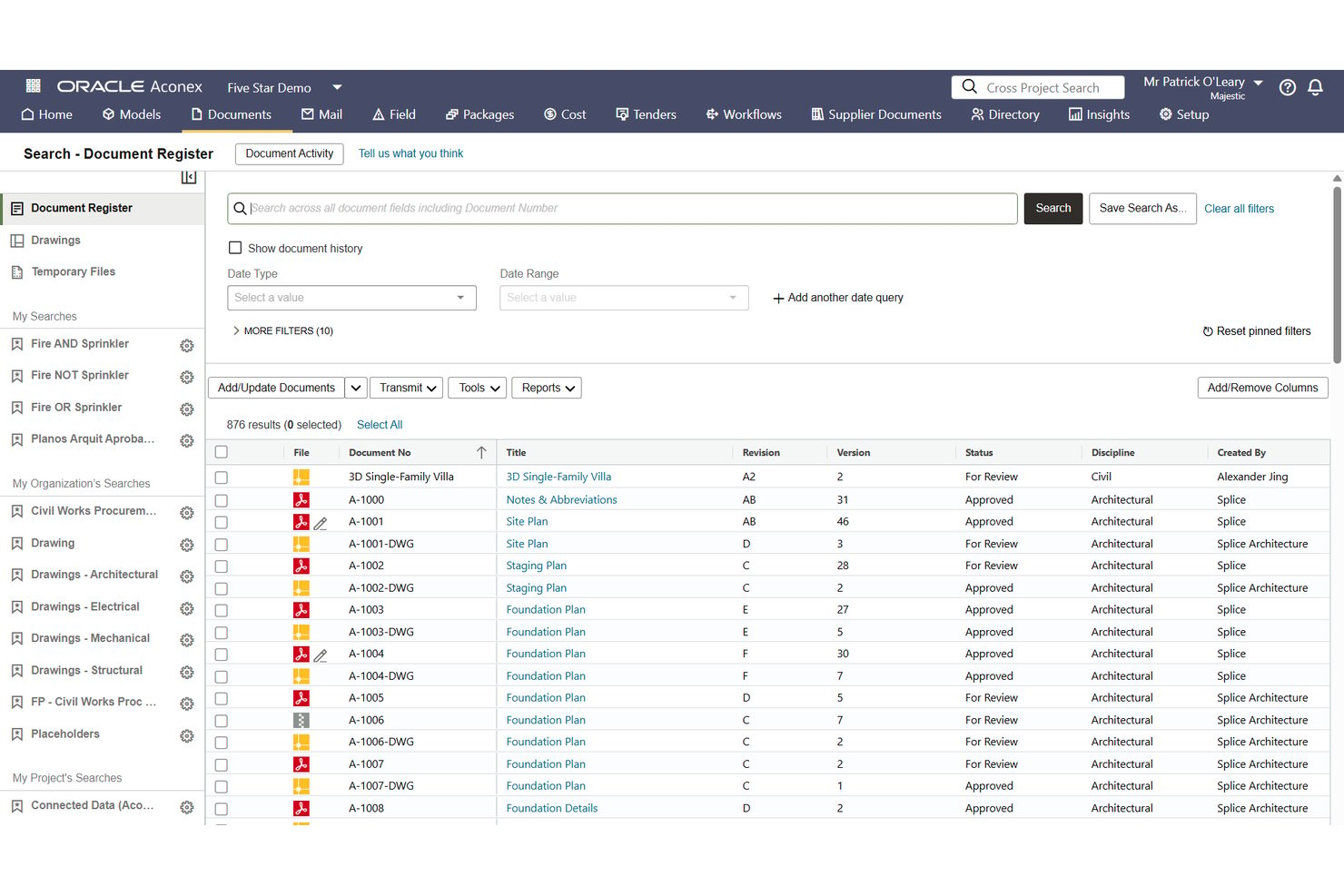
Oracle Aconex is an enterprise BIM project management platform built around a certified common data environment, offering document control, model coordination, clash detection, RFIs, submittals, and field inspection tools across large-scale, multi-organization construction projects.
Who Is Aconex Best For?
Aconex is a strong fit for enterprise construction teams on large, multi-organization projects where ISO 19650 CDE compliance and contractual-grade audit trails are non-negotiable.
Why I Picked Aconex
Aconex earns its spot on my list because its BSI-certified CDE is one of the few formally verified against both ISO 19650 and DIN SPEC 91391, which matters on projects where contractual-grade compliance isn't optional. I particularly value its unalterable audit trail: every document action, correspondence, and approval is permanently logged, so nothing gets disputed after the fact. Its Clash in the Cloud feature auto-reruns clash detection every time a model updates, keeping federated coordination current without manual intervention.
Aconex Key Features
- Automated Review Matrix: Routes documents to the correct approvers automatically based on document metadata, removing the need for manual review assignment.
- Aconex Field mobile app: Lets site teams run safety walks, quality checks, punch lists, and daily reports from iOS and Android devices.
- BCF issue exchange: Supports BCF 2.0, 2.1, and 3.0 for two-way issue sync with Revit, Navisworks, and Solibri.
- Oracle Primavera Cloud integration: Links Aconex document packages directly to Primavera Cloud schedule activities for bi-directional project controls data sharing.
Aconex Integrations
Aconex offers native integrations with Oracle Primavera Cloud, Primavera P6, Primavera Unifier, Oracle Fusion Cloud ERP, Textura, Revit, Navisworks, and Solibri. It also supports BCF 2.0, 2.1, and 3.0, plus a REST API for custom integrations.
Pros and Cons
Pros:
- Automated document approval routing with metadata
- Unalterable audit trail for all project data
- Certified ISO 19650 and DIN SPEC 91391 CDE
Cons:
- No native side-by-side model comparison
- No automatic model update notifications

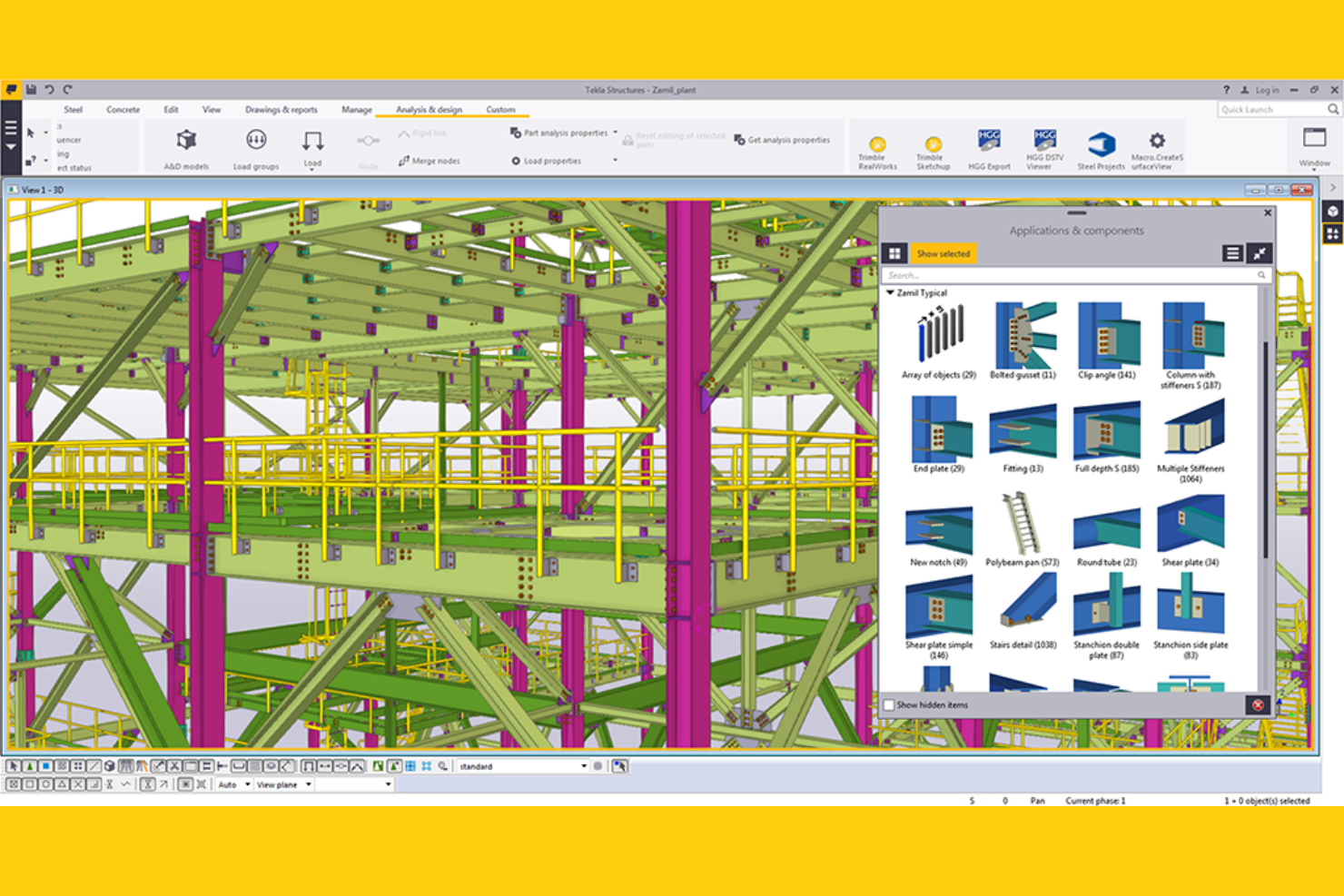
Tekla Structures is a structural BIM platform from Trimble that combines high-LOD 3D modeling, model version control, multi-user collaboration, and fabrication-ready detailing outputs across steel, concrete, timber, and light metal framing.
Who Is Tekla Structures Best For?
Tekla Structures is a strong fit for structural engineers, steel detailers, and fabricators who need fabrication-ready BIM outputs and precise, multi-user model collaboration across complex structural projects.
Why I Picked Tekla Structures
Tekla Structures earns its spot on my shortlist because no other tool I've tested comes close to its fabrication-ready structural detailing, particularly for steel. I love how the Diamond tier produces CNC-ready outputs that go directly to machines from Ficep, Voortman, and Peddinghaus, cutting out manual translation steps between design and the shop floor. Tekla Model Sharing's patented sync also lets distributed detailing teams work offline and merge changes without conflicts, which I've found invaluable on projects spanning multiple fabrication yards.
Tekla Structures Key Features
- Trimble Connect CDE: A cloud-based common data environment bundled with every subscription, supporting 45+ file types, unlimited project creation, and role-based access across browser, mobile, and desktop.
- 4D sequencing and logistics planning: Carbon and Graphite tiers let you define erection sequences, visualize construction phases, and plan site logistics directly from the structural model.
- Live Collaboration (Preview): A 2025 feature that enables real-time, model-based progress reviews within Trimble Connect or Tekla Structures, replacing drawing-based coordination.
- AI Cloud Fabrication Drawing Service: An AI-powered tool that automates fabrication drawing creation by cloning from thousands of stored project drawings, reducing manual drafting time.
Tekla Structures Integrations
Integrations include Autodesk Revit, Tekla PowerFab, Trimble ProjectSight, Trimble Viewpoint, Asta, Bentley STAAD.Pro, SAP2000, and ArchiCAD. Tekla Open API supports custom integrations, while IFC and formats such as SDNF and CIS/2 support model exchange.
Pros and Cons
Pros:
- Direct fabrication-ready modeling for CNC machines
- Patented offline-capable multi-user model collaboration
- Industry-leading steel and precast detailing outputs
Cons:
- Core project management tools require additional platforms
- Limited native RFI and submittal workflows

RIB
Best for model-linked cost tracking
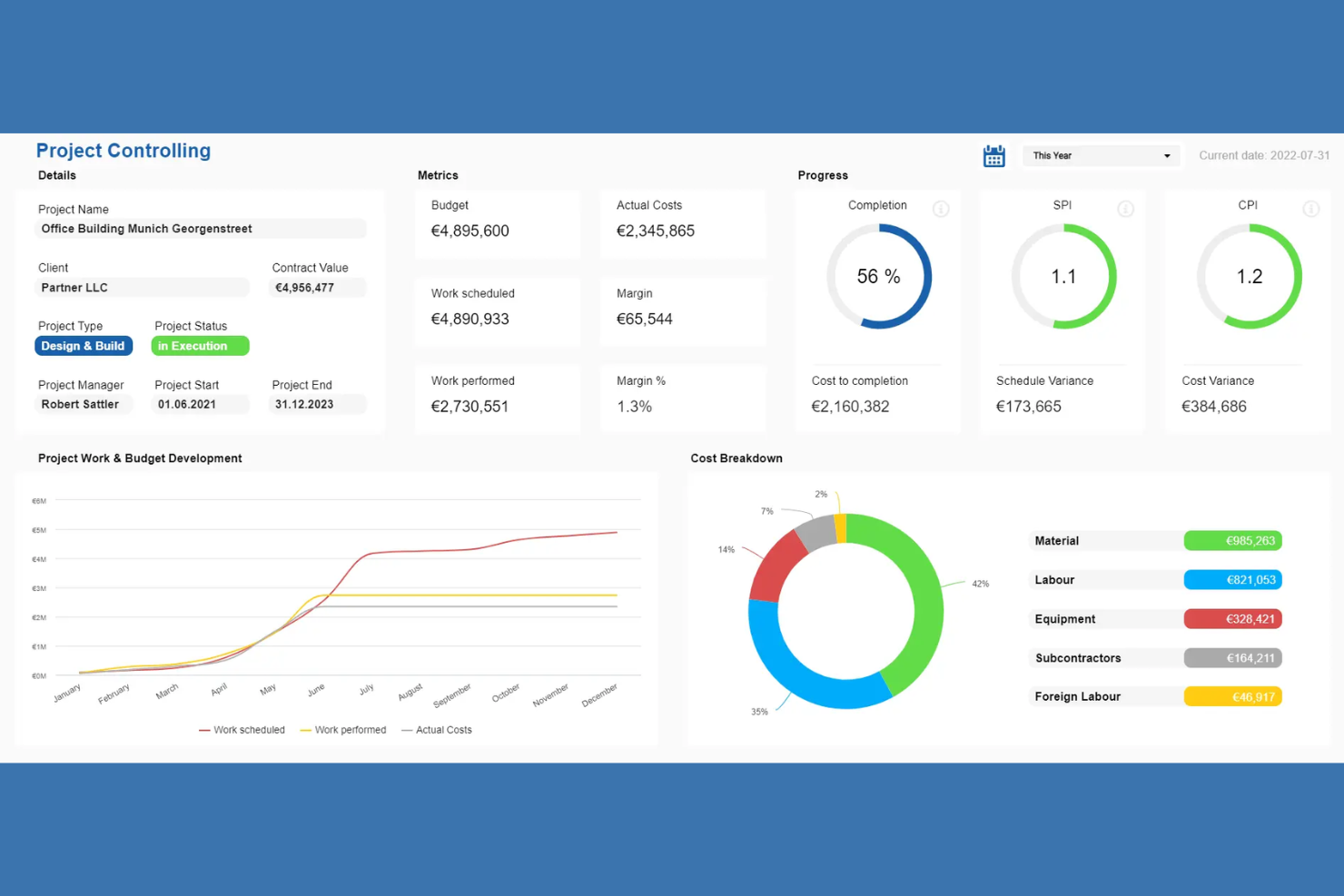
RIB BIM Manager is a suite of integrated BIM and construction project management tools spanning 3D model management, cost estimating, clash detection, document control, and field collaboration across its CostX, CX, Connex, and Project products.
Who Is RIB Best For?
RIB is a strong fit for construction project managers and VDC engineers who need cost, schedule, and 3D model data connected in a single platform.
Why I Picked RIB
I picked RIB because its 5D BIM capabilities genuinely connect 3D models to live cost estimates and scheduling data in a way most BIM platforms don't. CostX's auto-revisioning automatically detects design changes and updates cost estimates in real time, so when a structural revision hits mid-project, the budget impact is visible immediately. I also like that RIB 4.0's browser-based 5D visualization ties procurement and resource planning directly to the model.
RIB Key Features
- 6D BIM carbon calculator: Estimates embodied carbon across project phases using the EC3 carbon rate library from Building Transparency.
- Digital handover module: Collects and validates O&M data during construction, centralizing warranties and maintenance schedules for export to facilities management software.
- BCF-based issue collaboration: Links model issues to specific BIM elements across disciplines using the open BIM Collaboration Format standard.
- Configurable quality inspection plans: Builds inspection and test plans with customizable checklists, due dates, and documented proof of completion via RIB CX.
RIB Integrations
RIB supports documented connectivity with Autodesk Revit, Power BI, and Tableau, plus ERP and CRM systems through the CostX REST API. RIB 4.0 also supports IFC and BCF interoperability, while RIB Connex provides open APIs for custom integrations.
Pros and Cons
Pros:
- True 5D BIM connects models, cost, scheduling
- Supports embodied carbon tracking and reporting
- Auto-revisioning instantly updates cost estimates
Cons:
- Delays when processing large project files
- Complex navigation across separate product modules
Best for Trimble ecosystem BIM coordination
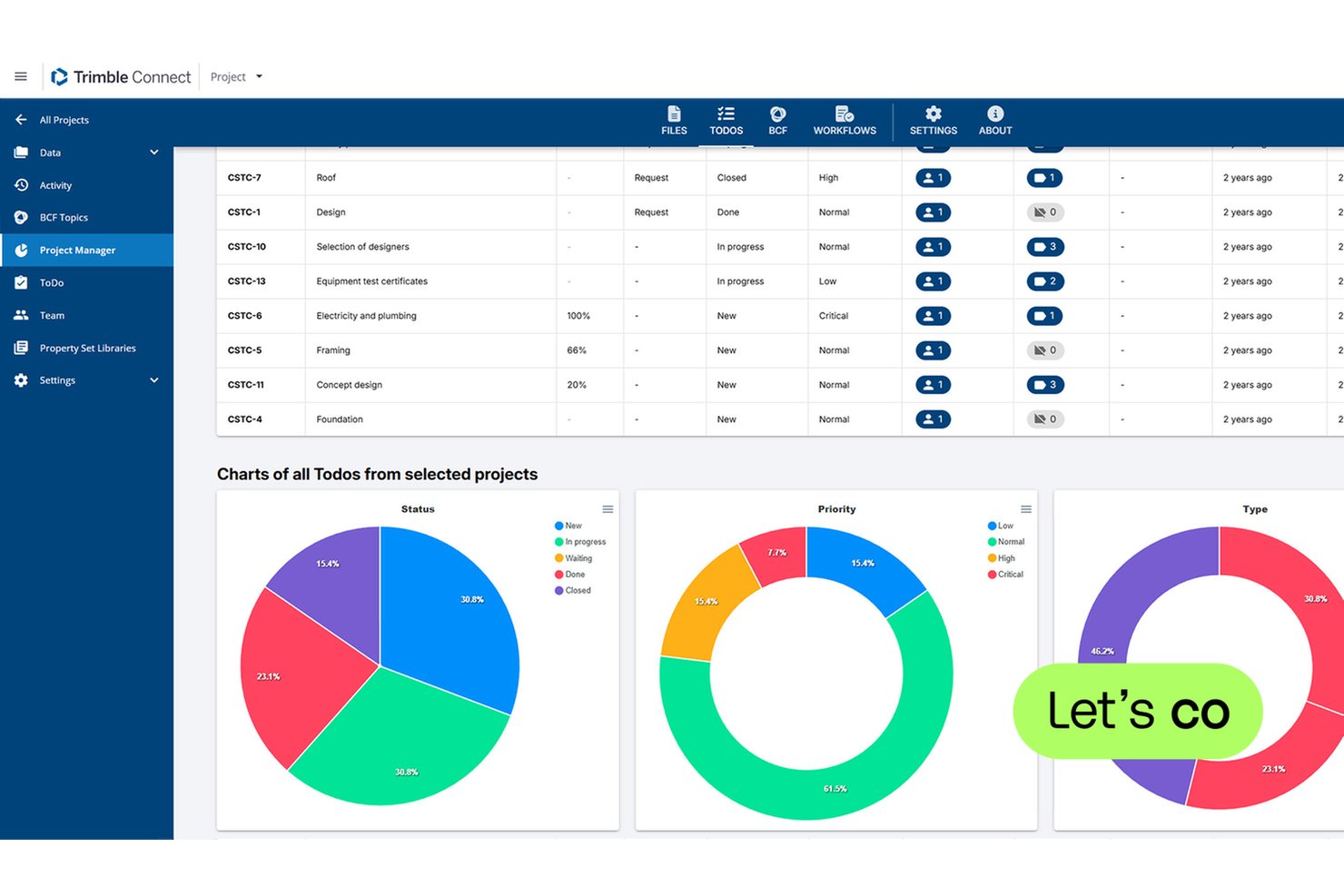
Trimble Connect is a cloud-based BIM common data environment (CDE) that supports multi-discipline model federation, clash detection, BCF-based issue tracking, version control, and AR/MR visualization across 45+ file formats.
Who Is Trimble Connect Best For?
Trimble Connect is the right fit for BIM managers and VDC engineers working within organizations already running Tekla Structures, SketchUp, or other Trimble tools.
Why I Picked Trimble Connect
Trimble Connect earns its spot on my shortlist because it's the most purpose-built BIM coordination environment for teams already running Tekla Structures or SketchUp. I love how Clashsets let you run automated clash detection across federated multi-discipline models and link every identified clash directly to a BCF Topic tied to exact model geometry. On top of that, Connect AR lets field teams overlay live BIM models onto the physical site using a mobile device, turning coordination issues into something you can literally see in place.
Trimble Connect Key Features
- BCF Topics: Create, assign, and track model-based issues with status, priority, and direct links to specific 3D model views and objects.
- Reality capture integration: Stream point cloud data and run scan-to-BIM comparisons with visual heatmaps to verify as-built conditions against the design model.
- Role-based access control: Set granular project-level permissions for internal team members and invite external collaborators at no additional cost.
- Property Sets and Data Table: Attach and query custom metadata attributes on individual BIM model objects directly within the platform.
Trimble Connect Integrations
Trimble Connect offers native integrations with Tekla Structures, SketchUp, Trimble ProjectSight, Trimble Business Center, Trimble Access, Trimble SiteVision, and Trimble RealWorks. Its Connect API, Topics API, and Property Set API support custom integrations, while Trimble Marketplace adds partner extensions.
Pros and Cons
Pros:
- Deep Tekla Structures and SketchUp integration
- BCF Topics link issues to 3D model geometry
- Native AR/MR visualization for on-site review
Cons:
- Storage capped on Pro and Innovate plans
- No offline access for field users

Autodesk Revit is a parametric BIM authoring platform built for architecture, structural, and MEP engineering teams, combining 3D model management, cloud worksharing, documentation automation, and integration with clash detection and construction management tools.
Who Is Autodesk Revit Best For?
Revit is the go-to choice for architecture firms and multidisciplinary AEC teams that need a parametric BIM authoring environment at the center of their design and documentation workflow.
Why I Picked Autodesk Revit
Autodesk Revit earns its spot on my shortlist because no other BIM authoring tool matches its parametric modeling depth for architectural teams. When you change a wall thickness in the model, every associated plan, section, elevation, and schedule updates automatically, which eliminates a whole category of documentation errors. I also rate its Cloud Worksharing highly: multiple architects and MEP engineers can co-author the same central model simultaneously, with Worksets handling element ownership in real time.
Autodesk Revit Key Features
- Generative design: An AI-powered tool that produces multiple design alternatives based on your defined goals and constraints.
- Total carbon analysis: Tracks embodied and operational carbon from early-stage through detailed design via Autodesk Insight.
- Sheet collections: Organizes and searches project sheets within a single structured view for faster document navigation.
- Model Analytics Essentials: Surfaces near real-time Revit model health data in the cloud without opening the model locally.
Autodesk Revit Integrations
Autodesk Revit integrates with Autodesk Docs, Navisworks, Autodesk Build, Autodesk Forma, Autodesk ReCap Pro, AutoCAD, Civil 3D, Plant 3D, Twinmotion, and Autodesk Tandem. Autodesk Platform Services supports custom integrations, with IFC and BCF for openBIM exchange.
Pros and Cons
Pros:
- Parametric changes update all documentation instantly
- Automated multi-discipline clash detection workflows
- Real-time cloud worksharing for design teams
Cons:
- Windows-only application with no Mac support
- Project management features require additional subscriptions

Best for 5D BIM cost and schedule analysis
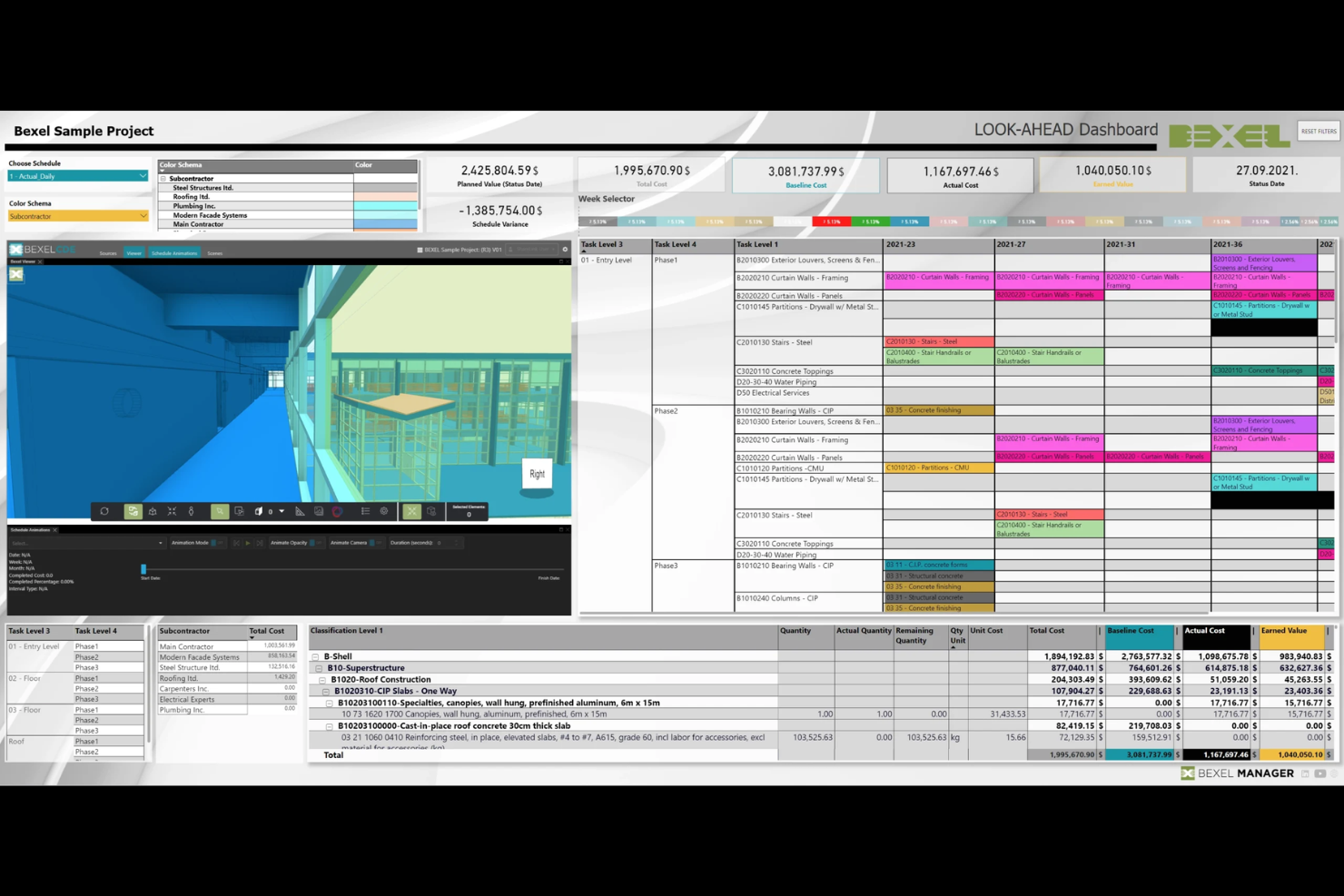
BEXEL Manager is a BIM project management platform that integrates 3D model federation, clash detection, smart scheduling, and 5D cost simulation into a single openBIM environment.
Who Is BEXEL Manager Best For?
BEXEL Manager is a strong fit for construction project managers and VDC engineers who need native 5D cost simulation built directly into their BIM coordination workflow.
Why I Picked BEXEL Manager
BEXEL Manager earns its spot on my shortlist because its 5D BIM capability is genuinely built in, not bolted on. I'm talking about automated cost classification that maps directly to model elements, a live bill of quantities, and cash flow analysis that updates as the schedule shifts. That kind of native cost-to-model integration is rare. The smart scheduling engine, which auto-generates LOB and Takt plans from BIM data, makes it especially valuable on complex construction projects where plan changes ripple across both time and budget.
BEXEL Manager Key Features
- Federated model management: Assemble and manage BIM models from hundreds of separate IFC or BX3 files across multiple disciplines in a single environment.
- Version Compare tool: View model revisions side by side to identify exactly what changed between iterations.
- BCF issue workflows: Create, import, and export BCF-formatted issues directly from clash detection and coordination reviews.
- IDS data checks: Validate BIM model data automatically against predefined Information Delivery Specification rules before handover or review.
BEXEL Manager Integrations
BEXEL Manager offers documented integrations with Autodesk Revit, Autodesk Navisworks, Primavera P6, Microsoft Project, Power BI, Google Earth, IFC, BCF, and IDS. Its API and add-in system support custom ERP and database integrations.
Pros and Cons
Pros:
- Advanced openBIM and multi-format model support
- Automated scheduling directly from BIM models
- Deep native 5D BIM analysis built in
Cons:
- Small base of public user reviews
- Desktop-first experience, not browser-based

Best for ISO 19650-compliant infrastructure CDEs
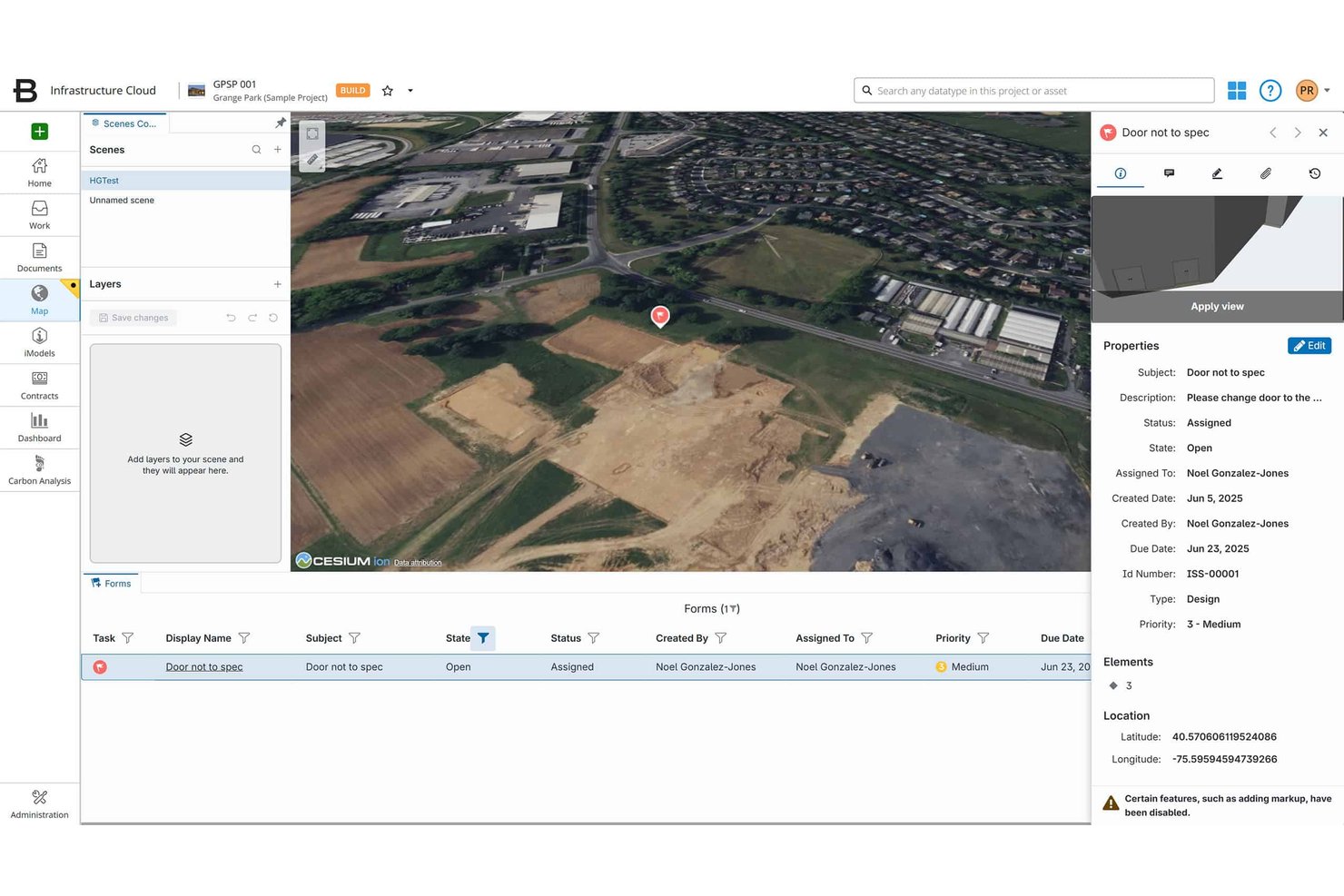
Bentley ProjectWise is a BIM common data environment (CDE) and project collaboration platform built for infrastructure and engineering teams, offering federated model management, ISO 19650-compliant document control, clash detection, and deliverables management across multi-discipline projects.
Who Is Bentley ProjectWise Best For?
ProjectWise is a strong fit for infrastructure and civil engineering teams—think transportation agencies, DOTs, and tier-1 engineering firms—that need a standards-compliant CDE to manage large, multi-discipline project environments.
Why I Picked Bentley ProjectWise
Bentley ProjectWise earns its spot on my list because it's one of the few CDEs genuinely built around ISO 19650 compliance, not just compatible with it. I'm particularly impressed by how the CDE enforces structured workflow states (work-in-progress, shared, published) with automated approvals and granular role-based access, which is exactly what a DOT or tier-1 engineering firm needs when managing multi-discipline deliverables across a federated model environment. The Version Compare tool also stands out to me: it lets teams diff model revisions side-by-side, so coordination issues get caught before they become costly field problems.
Bentley ProjectWise Key Features
- AI-powered search: Surfaces files instantly by extracting title block data, flagging revision documents, and summarizing content without opening individual files.
- Deliverables management: Handles transmittals, submittals, and RFIs within the CDE, linking documentation to project milestones and review/approval cycles.
- Multi-format model support: Accepts 50+ CAD and BIM file formats, including IFC, RVT, DWG, and DGN, for consolidated multi-discipline model storage.
- Project Insights dashboards: Provides interactive KPIs and analytics tracking deliverable status, issue resolution, and overall project progress across teams.
Bentley ProjectWise Integrations
Bentley ProjectWise supports integrations with Revit, AutoCAD, Civil 3D, Microsoft 365, Microsoft Teams, Bluebeam Revu, Primavera P6, and Asta Powerproject. It also supports IFC, BCF, an API/SDK, PowerShell scripting, and Microsoft Power Automate for custom integrations.
Pros and Cons
Pros:
- AI tools flag revisions and extract metadata
- Supports 50+ BIM and CAD file formats
- Excels at ISO 19650-compliant document workflows
Cons:
- Interface setup needs dedicated platform expertise
- Advanced BIM features require separate licenses
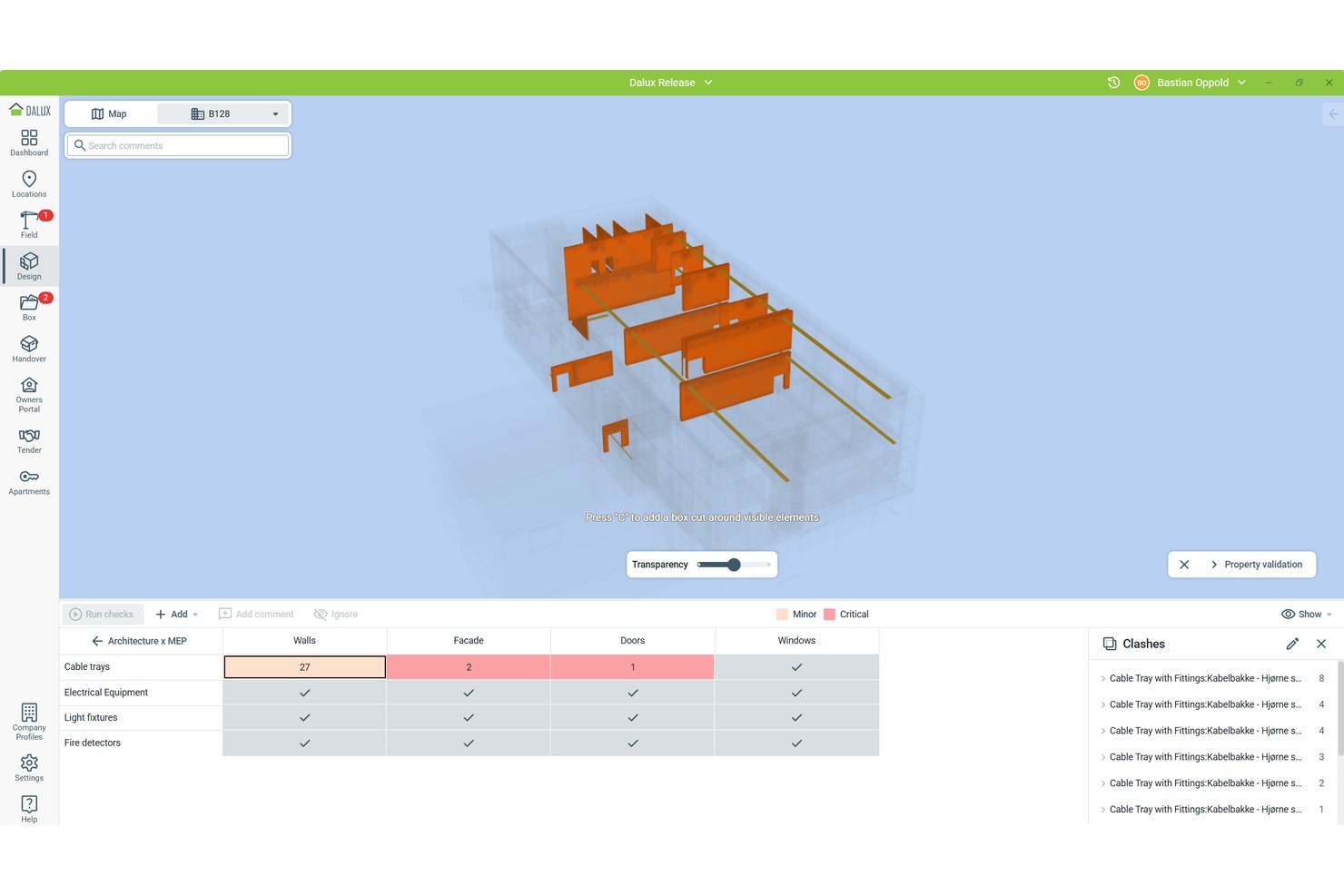
Dalux is a BIM project management platform that combines a high-performance BIM viewer, a CDE, AR-assisted site verification, clash detection, and field issue tracking across desktop and mobile.
Who Is Dalux Best For?
Dalux fits construction project managers and BIM coordinators who need field-ready model access, AR-assisted site verification, and ISO 19650-aligned document control in one platform.
Why I Picked Dalux
I picked Dalux as one of the best because its TwinBIM AR feature does something I haven't seen matched at scale: it lets site workers overlay live BIM models onto the physical environment through a mobile device, so they can see what's behind a wall or above a ceiling before cutting into it. AF Gruppen deployed this across 35,000 workers in Norway, which tells you this isn't a demo feature. Paired with SiteWalk's 360° reality capture, my team can compare as-built conditions against the model without leaving the Dalux environment.
Dalux Key Features
- Model validation: Run automated clash and clearance checks between discipline-based object groups, with configurable tolerances and auto-reprocessing on every new model upload.
- ISO 19650-aligned CDE: Dalux Box enforces file naming conventions, custom metadata, and Shared/Published area workflows to keep document control audit-ready.
- Version comparison tool: Color-coded 2D and 3D side-by-side comparisons highlight additions, removals, and modifications across model revisions.
- Offline field capture: Dalux Field lets site workers log issues, complete inspections, and document tasks without a connection, then syncs automatically when back online.
Dalux Integrations
Dalux offers native integrations with Revit, Navisworks, Tekla, ArchiCAD, Solibri via BCF, Microsoft 365, and Microsoft Entra. Its Open API supports custom integrations, while Project Connect syncs folders between Dalux projects.
Pros and Cons
Pros:
- Unlimited users and tasks in free tier
- Handles very large federated BIM models
- Built-in AR overlays BIM on site
Cons:
- Workflows feel rigid for custom needs
- No built-in 4D schedule simulation
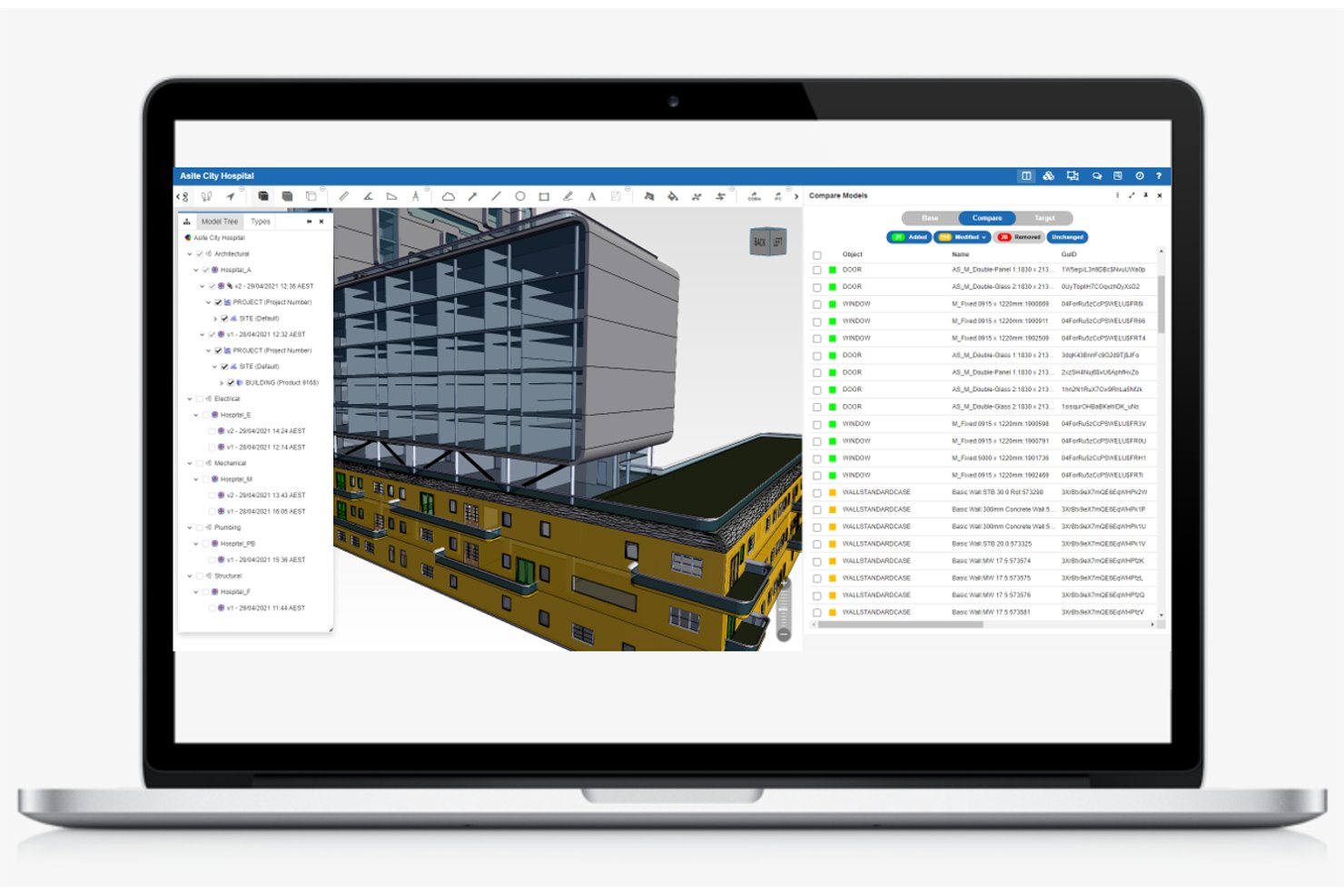
Asite is a cloud-based BIM project management platform that combines a ISO 19650-certified common data environment, 3D model federation, automated clash detection, RFI and submittal tracking, contract management, and a BIM-enabled mobile field app.
Who Is Asite Best For?
Asite is a strong fit for construction project managers and BIM coordinators on large infrastructure or capital projects where ISO 19650 compliance and automated clash detection are non-negotiable.
Why I Picked Asite
Asite earns its spot on my shortlist because its cloud-native automated clash detection sets it apart from tools that still require local model downloads. Cloud Clash runs automatically whenever a new model revision is uploaded, so coordination tickets get generated without anyone manually triggering a rerun. It also delivers ±1mm precision across large infrastructure models, which matters on projects where a small error compounds fast.
Asite Key Features
- ISO 19650-compliant CDE: A cloud-hosted common data environment that enforces ISO 19650 workflow states, including work-in-progress, shared, published, and archived, with mandatory approval sign-offs between transitions.
- Asite Field mobile app: A native iOS and Android app that gives field teams offline access to site tasks, digital forms, snag management, and 3D BIM models, with auto-sync on reconnection.
- Project Financials module: Integrated budget tracking, contract management, commercial change management, and supplier invoice approval workflows with real-time cost visibility against baselines.
- BCF issue management: Full Building Collaboration Format support for encoding and communicating model-based issues across disciplines, with a Revit plugin available via the Autodesk App Store.
Asite Integrations
Asite supports an Autodesk Revit plugin with BCF exchange, Microsoft Power BI, Microsoft Power Platform connectors, and GIS integration. Its public RESTful API supports custom connections using XML or JSON.
Pros and Cons
Pros:
- Mobile app enables offline BIM model access
- Cloud-native clash detection auto-runs on upload
- Holds rare ISO 19650 Kitemark certification
Cons:
- Document search often requires knowing file locations
- No native 4D schedule-linked BIM visualization
Annen programvare for BIM-prosjektstyring
\u003cspan style=\u0022font-weight: 400\u0022\u003eHer er noen flere alternativer for programvare for BIM-prosjektstyring som ikke kom med på kortlisten min, men som likevel er verdt å se nærmere på:\u003c/span\u003e
- usBIM
For openBIM-certified CDE workflows
- Allplan Bimplus
For Nemetschek-stack openBIM coordination
- Revizto
For clash-to-issue automation across all trades
- Newforma
For unified project email and BIM coordination
- BIMcollab
For open-standards BCF issue coordination
- Catenda Hub
For unlimited-user openBIM coordination
- Solibri
For rule-based BIM model quality checks


How I Evaluate BIM Project Management Software
I split my evaluation into two layers: the baseline capabilities a tool must have—like federated model viewing and clash detection—and the differentiators that separate one platform from another.
Core Functionality (Table Stakes For This List)
When I'm selecting tools for my list, I rank each one on a scale from 0 (does not offer the functionality) to 5 (excels in this area) for each core functionality listed below. Then, I calculate the tool's total score into a percentage. Each tool needs to achieve a minimum total score of 65% to be considered for inclusion.
- 3D Model Management: I verify that the platform supports uploading, viewing, and managing common BIM file formats such as IFC and RVT, allowing for smooth navigation, sectioning, and querying of model elements within a centralized repository.
- Clash Detection & Coordination: I assess how well the tool enables federated model overlays and automated clash detection, focusing on rule-based filters, issue grouping, and assignment workflows to streamline multi-discipline coordination.
- Common Data Environment: I ensure the platform provides a robust centralized environment for storing, sharing, and controlling access to all BIM project files, including folder structures, permission settings, and workflow states according to standards like ISO 19650.
- Project Management Tools: I look for integrated features that track RFIs, submittals, issues, and schedules, all directly linked to model elements, avoiding separation between project management and BIM data.
- Model Version Control: I evaluate how the platform manages model revisions with automatic version history, rollback options, comparison tools, and audit trails to maintain a clear record of changes throughout the project lifecycle.
- Multi-User Collaboration: I check that the software supports concurrent multi-discipline collaboration with real-time markups, comments, notifications, and role-based permissions, enabling seamless teamwork across architects, engineers, and contractors.
Once I have a list of tools that meet this criteria, I consider what sets each platform apart.
Differentiating Factors (What Sets Vendors Apart)
Here's how I compare and contrast different vendors:
Standout Features
4D scheduling links model elements to construction sequences, which helps teams visualize build order and spot conflicts before they reach the field. I also look for mobile access that lets superintendents pull up models, log issues, and capture photos on-site from a tablet. Reality capture support is another separator—overlaying drone scans or point clouds onto the BIM model gives you fast as-built verification without manual measurement.
Beyond Features
Integration depth matters a lot here. I evaluate whether a platform connects natively with authoring tools like Revit or ArchiCAD and syncs with scheduling software like Primavera P6. Support for open standards like IFC and BCF is equally telling. I also consider industry fit—some platforms cater to general contractors coordinating trades, while others suit design firms managing model delivery. Compliance with ISO 19650 and security certifications like SOC 2 round out my evaluation, especially for teams handling sensitive infrastructure projects.
Slik velger du programvare for BIM-prosjektstyring
Det er lett å gå seg vill i lange funksjonslister og kompliserte prismodeller. For å hjelpe deg med å holde fokus mens du går gjennom den unike prosessen din for valg av programvare, har jeg satt sammen en sjekkliste over faktorer du bør ha i tankene:
| Faktor | Dette bør du vurdere |
|---|---|
| Skalerbarhet | Vil programvaren vokse sammen med teamet ditt? Ta hensyn til fremtidige prosjektstørrelser og antall brukere. Se etter verktøy som kan håndtere økte datamengder og større kompleksitet uten å bli tregere. |
| Integrasjoner | Kan programvaren kobles til verktøyene du allerede bruker? Kontroller kompatibiliteten med de eksisterende systemene dine for å unngå forstyrrelser i arbeidsflyten. |
| Tilpasningsmuligheter | Kan du tilpasse verktøyet til prosessene dine? Se etter muligheter for å justere arbeidsflyter, dashbord og rapporter slik at de samsvarer med behovene til teamet ditt. |
| Brukervennlighet | Er programvaren intuitiv for teamet ditt? Ta hensyn til læringskurven og vurder om teamet trenger omfattende opplæring, eller om de raskt kan lære å bruke den. |
| Implementering og introduksjon | Hvor lang tid vil det ta å komme i gang? Vurder tiden det tar å sette opp løsningen, tilgangen på veiledninger og støtten i startfasen for å sikre en smidig overgang. |
| Kostnad | Passer prisen budsjettet ditt? Sammenlign kostnaden med funksjonene som tilbys, og ta hensyn til eventuelle skjulte gebyrer. Se etter fleksible prisplaner som passer de økonomiske rammene dine. |
| Sikkerhetstiltak | Er dataene og prosjektene dine sikre? Se etter kryptering, tilgangskontroller og samsvar med bransjestandarder for å beskytte sensitiv informasjon. |
Hva er programvare for BIM-prosjektstyring?
Programvare for BIM-prosjektstyring er et verktøy som brukes til å administrere og koordinere prosesser for bygningsinformasjonsmodellering i byggeprosjekter. Arkitekter, ingeniører og byggeledere bruker vanligvis disse verktøyene for å forbedre samarbeid og effektivitet. Funksjoner som 3D-modellering, dokumenthåndtering og kostnadsberegning hjelper med planlegging og gjennomføring av prosjekter.
Samlet sett forbedrer disse verktøyene kommunikasjonen og reduserer feil i byggeprosjekter.
Funksjoner i programvare for BIM-prosjektstyring
Når du velger programvare for BIM-prosjektstyring, bør du se etter følgende nøkkelfunksjoner:
- 3D-modellering: Gjør det mulig å opprette og bearbeide digitale representasjoner av fysiske strukturer, noe som bidrar til visualisering og nøyaktig utforming.
- Dokumenthåndtering: Organiserer og lagrer prosjektdokumenter og sikrer enkel tilgang og versjonskontroll for alle teammedlemmer.
- Kostnadsberegning: Tilbyr verktøy for å beregne og forutsi prosjektutgifter, noe som bidrar til budsjettplanlegging og økonomistyring.
- Samarbeidsverktøy: Tilrettelegger for kommunikasjon og samarbeid mellom prosjektets interessenter, forbedrer koordineringen og reduserer feil.
- Planlegging: Gjør det mulig å opprette og administrere prosjektplaner og sikrer at milepæler og tidsfrister overholdes.
- Kollisjonskontroll: Identifiserer og løser konflikter i utformingen før byggestart, og forhindrer kostbart omarbeid og forsinkelser.
- Mobil tilgang: Gir mulighet til å få tilgang til prosjektdata og verktøy på byggeplassen via mobile enheter, slik at informasjonen er tilgjengelig overalt.
- Rapportering: Genererer detaljerte rapporter om prosjektets fremdrift og resultater, noe som bidrar til beslutningstaking og åpenhet.
- Sikkerhetstiltak: Beskytter sensitive prosjektdata med kryptering og tilgangskontroller, og sikrer samsvar med bransjestandarder.
- Tilpasning: Tilbyr alternativer for å tilpasse arbeidsflyter og grensesnitt til teamets spesifikke behov og prosesser.
Fordeler med programvare for BIM-prosjektstyring
Implementering av programvare for BIM-prosjektstyring gir flere fordeler for teamet og virksomheten din. Her er noen av fordelene du kan se frem til:
- Forbedret samarbeid: Styrker teamarbeidet ved å tilby verktøy for kommunikasjon og koordinering i sanntid mellom prosjektets interessenter.
- Færre feil: Reduserer feil i byggeprosjekter ved å bruke kollisjonskontroll og 3D-modellering til å identifisere problemer tidlig.
- Kostnadsbesparelser: Bidrar til effektiv budsjettstyring med nøyaktig kostnadsberegning og verktøy for økonomisk planlegging.
- Bedre beslutningstaking: Tilbyr detaljert rapportering og dataanalyse som støtter informerte beslutninger gjennom hele prosjektets livssyklus.
- Økt effektivitet: Forenkler prosjektarbeidsflyter med funksjoner som planlegging og dokumenthåndtering, og sikrer at oppgaver fullføres til rett tid.
- Tilgjengelighet: Gir mobil tilgang til prosjektdata, slik at teammedlemmer kan hente informasjon på byggeplassen eller eksternt.
- Datasikkerhet: Beskytter sensitiv prosjektinformasjon med sikkerhetstiltak som kryptering og tilgangskontroll.
Kostnader og priser for programvare for BIM-prosjektstyring
Valg av programvare for BIM-prosjektstyring krever en forståelse av de ulike prismodellene og abonnementene som er tilgjengelige. Kostnadene varierer basert på funksjoner, teamstørrelse, tillegg og mer. Tabellen nedenfor oppsummerer vanlige abonnementer, gjennomsnittsprisene deres og typiske funksjoner som er inkludert i løsninger for programvare for BIM-prosjektstyring:
Sammenligningstabell for abonnementer for programvare for BIM-prosjektstyring
| Abonnementstype | Gjennomsnittspris | Vanlige funksjoner |
|---|---|---|
| Gratisabonnement | $0 | Grunnleggende 3D-modellering, begrenset dokumenthåndtering og grunnleggende samarbeidsverktøy. |
| Personlig abonnement | $10-$30/bruker/måned | Forbedret 3D-modellering, dokumenthåndtering, planlegging og grunnleggende rapportering. |
| Bedriftsabonnement | $30-$70/ bruker/måned | Avansert 3D-modellering, omfattende dokumenthåndtering, planlegging, rapportering og mobil tilgang. |
| Virksomhetsabonnement | $70-$150/ bruker/måned | Fullstendige 3D-modelleringsfunksjoner, omfattende dokumenthåndtering, avansert rapportering og datasikkerhetsfunksjoner. |
Vanlige spørsmål om BIM-programvare for prosjektstyring
Her er noen svar på vanlige spørsmål om BIM-programvare for prosjektstyring:
Hvordan forbedrer BIM-programvare prosjektplanleggingen?
BIM-programvare forbedrer prosjektplanleggingen ved å integrere tidsdata i modeller, slik at du kan opprette 4D-planer. Dette bidrar til å koordinere ressurser og visualisere prosjektforløpet mer effektivt, noe som reduserer sannsynligheten for forsinkelser og forbedrer den generelle prosjekteffektiviteten.
Kan BIM-programvare føre til kostnadsbesparelser?
Ja, BIM-programvare kan føre til betydelige kostnadsbesparelser ved å minimere omarbeid, redusere materialsvinn og gi nøyaktige kostnadsoverslag. Ved å identifisere potensielle problemer tidlig i designfasen kan du unngå kostbare endringer under byggingen.
Hvordan legger BIM-programvare til rette for samarbeid?
BIM-programvare fremmer samarbeid i sanntid ved å tilby en delt, skybasert modell for alle interessenter. Dette sikrer at alle har tilgang til den nyeste prosjektinformasjonen, effektiviserer kommunikasjonen og reduserer feil.
Hvilken rolle spiller BIM-programvare i byggforvaltning?
BIM-programvare integreres med systemer for byggforvaltning og gir viktige data for drift og vedlikehold av bygninger. Dette hjelper deg med å forvalte bygninger mer effektivt ved å gi innsikt i bygningssystemer og vedlikeholdsplaner.
Hvordan bidrar BIM-programvare til design av brannsikring?
BIM-programvare forbedrer design av brannsikring ved å identifisere feil tidlig i planleggingsprosessen. Den optimaliserer brannsikringssystemer og forbedrer kommunikasjonen mellom designteam, noe som reduserer kostnader og øker sikkerheten.
Kreves det opplæring for å bruke BIM-programvare?
Ja, implementering av BIM-programvare krever vanligvis opplæring i selve programvaren og i samarbeidsbaserte arbeidsflyter. Dette sikrer at teamet ditt kan bruke verktøyene effektivt og maksimere fordelene med BIM i prosjektene deres.