

10 beste MuleSoft-alternativer for API-integrasjon i 2026

Kortliste over MuleSoft-alternativer


Et godt MuleSoft-alternativ tilbyr fleksibel API-administrasjon, pålitelige iPaaS-funksjoner og støtte for komplekse arbeidsflyter på tvers av skybaserte og lokale systemer. Hvis du leter etter MuleSoft-alternativer, vurderer du sannsynligvis løsninger som kan håndtere skiftende integrasjonsbehov, forenkle administrasjon av API-livssyklusen og passe inn i teknologistakken til teamet ditt – uten lisensierings- eller kompleksitetshindringene som noen ganger følger med MuleSoft.
Denne listen hjelper deg med å sammenligne ledende plattformer raskt, fremheve deres unike styrker og finne løsningen som passer best for dine prioriteringer innen integrasjon og API-administrasjon.
Hva er MuleSoft?
MuleSoft er en integrasjonsplattform som kobler sammen applikasjoner, data og enheter på tvers av skybaserte og lokale miljøer. Den tilbyr verktøy for API-administrasjon, datatransformasjon og automatisering av arbeidsflyter, slik at team kan bygge og administrere integrasjoner i stor skala. MuleSoft brukes i stor grad av organisasjoner som trenger å samle komplekse systemer, forenkle dataflyter og støtte brukervennlige initiativer for digital transformasjon med pålitelig tilkobling og sentralisert API-styring.
Sammenligningstabell for MuleSoft-alternativer
Denne sammenligningstabellen oppsummerer prisopplysninger for mine beste utvalgte MuleSoft-alternativer:
| Tool | Best For | Trial Info | Price | ||
|---|---|---|---|---|---|
| 1 | Best with AI-guided integration building | 30-day free trial | Pricing upon request | Website | |
| 2 | Best for workflow automation integrations | Free plan available | From $100/month | Website | |
| 3 | Best for rapid cloud integration deployment | 30-day free trial | From $99/month | Website | |
| 4 | Best for advanced API analytics | 60-day free trial available | From $20/1M API calls | Website | |
| 5 | Best for scalable API traffic management | Free 6-month plan available | Pricing upon request | Website | |
| 6 | Best with enterprise-grade security controls | 30-day free trial + free demo available | Pricing upon request | Website | |
| 7 | Best with native Microsoft ecosystem integration | 30-day free trial available | Pricing upon request | Website | |
| 8 | Best with microservices and Kubernetes support | 30-day free trial + free demo available | Pricing upon request | Website | |
| 9 | API management features are less mature | Not available | Pricing upon request | Website | |
| 10 | Best for hybrid and multi-cloud API routing | Free demo available | Pricing upon request | Website |
Why Trust Our Software Recommendations
Our team has been testing and reviewing software since 2012. As project managers ourselves, we know how difficult—and important—it is to choose the right software.
For this guide, we evaluated tools using hands-on testing and independent research, scoring tools using our selection criteria. We also draw on insights from industry thought leaders and practicing project management experts.
Our reviews reflect our human editorial judgment, not a sales pitch.
Expert reviewers:
Anmeldelser av MuleSoft-alternativer
Nedenfor finner du mine detaljerte oppsummeringer av de beste MuleSoft-alternativene som kom med på kortlisten min. Anmeldelsene mine gir et detaljert innblikk i funksjonene, egenskapene og integrasjonene til hver plattform, slik at du kan finne den som passer best for deg.

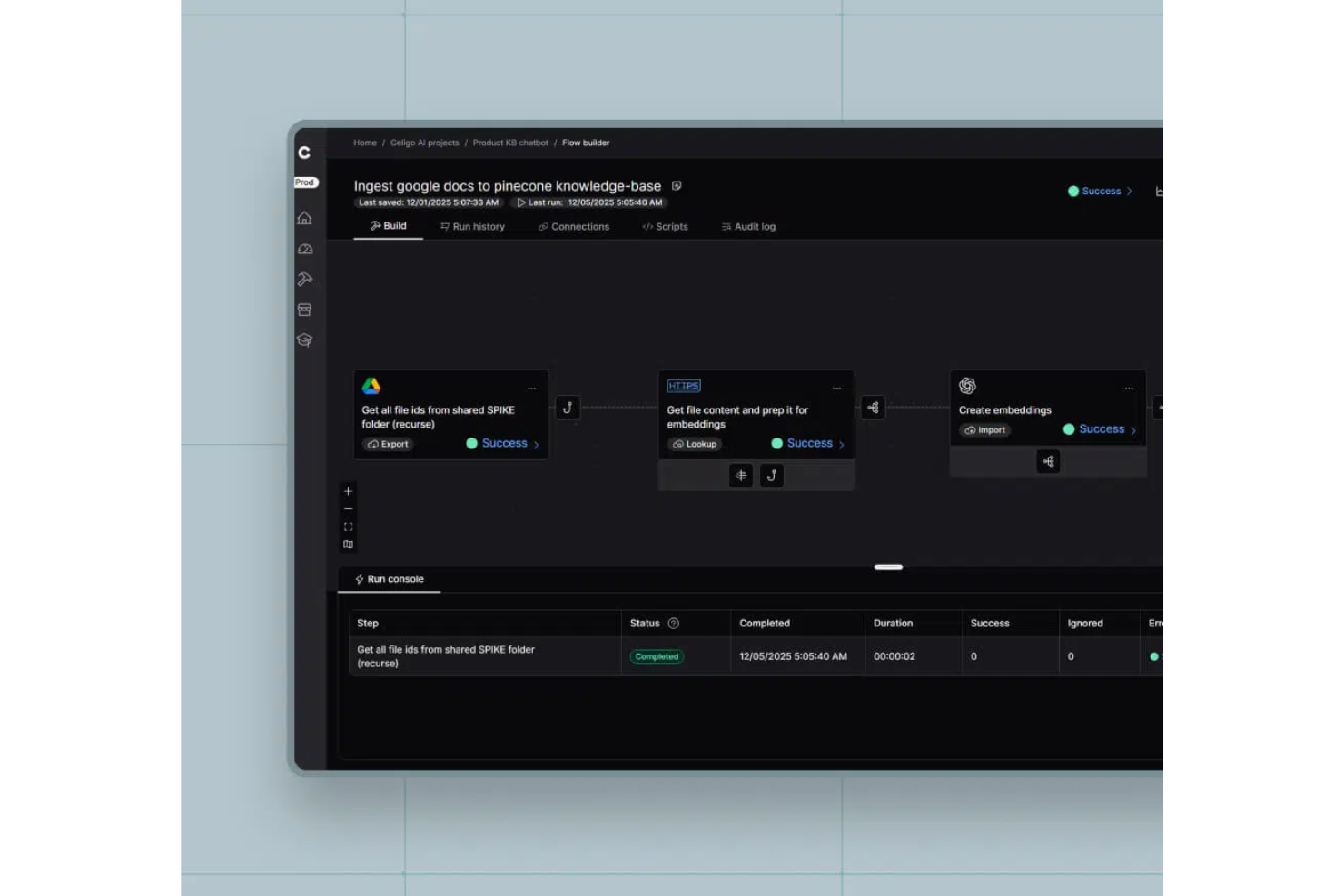
Celigo gives teams a flexible integration platform designed for fast-growing businesses that need to connect cloud apps and automate workflows. If you want to simplify complex integrations without heavy IT involvement, Celigo is built to help you move quickly and adapt as your needs change.
Who Is Celigo Best For?
Mid-sized businesses and IT teams seeking AI-powered integration solutions for automating workflows across cloud applications.
Why Celigo Is a Good mulesoft alternatives
I picked Celigo because its AI-guided integration builder helps my team automate complex workflows without heavy coding. The platform suggests integration steps and mappings, which speeds up our project delivery. I appreciate how the AI identifies potential errors before deployment, reducing troubleshooting time. For teams that want to move fast and minimize manual setup, Celigo’s AI-driven approach stands out among mulesoft alternatives.
Celigo Key Features
- Visual flow designer: Build and manage integrations using a drag-and-drop interface.
- Prebuilt application connectors: Access a library of connectors for popular SaaS and on-premise apps.
- Role-based access controls: Set permissions and manage user access for integration projects.
- Real-time monitoring dashboard: Track integration health and performance with live status updates.
Celigo Integrations
Celigo offers native integrations with Salesforce, NetSuite, Shopify, Amazon, Zendesk, ServiceNow, Jira, Microsoft 365, Google Workspace, and Slack. It also provides an API for custom integrations.
Pros and Cons
Pros:
- Supports both cloud and on-premise integrations
- Error management tools with real-time alerts
- Visual flow designer supports complex workflows
Cons:
- API rate limits may restrict high-volume use
- Limited support for legacy system integrations
New Product Updates from Celigo
Celigo Expands Microsoft Entra Authentication for SQL Connectors
Celigo’s Azure Synapse and MS SQL connectors now support Microsoft Entra service principal authentication via client secrets and certificates, so you can connect securely without relying on SQL credentials. For more information, visit Celigo’s official site.
 .
.
Workato
Best for workflow automation integrations
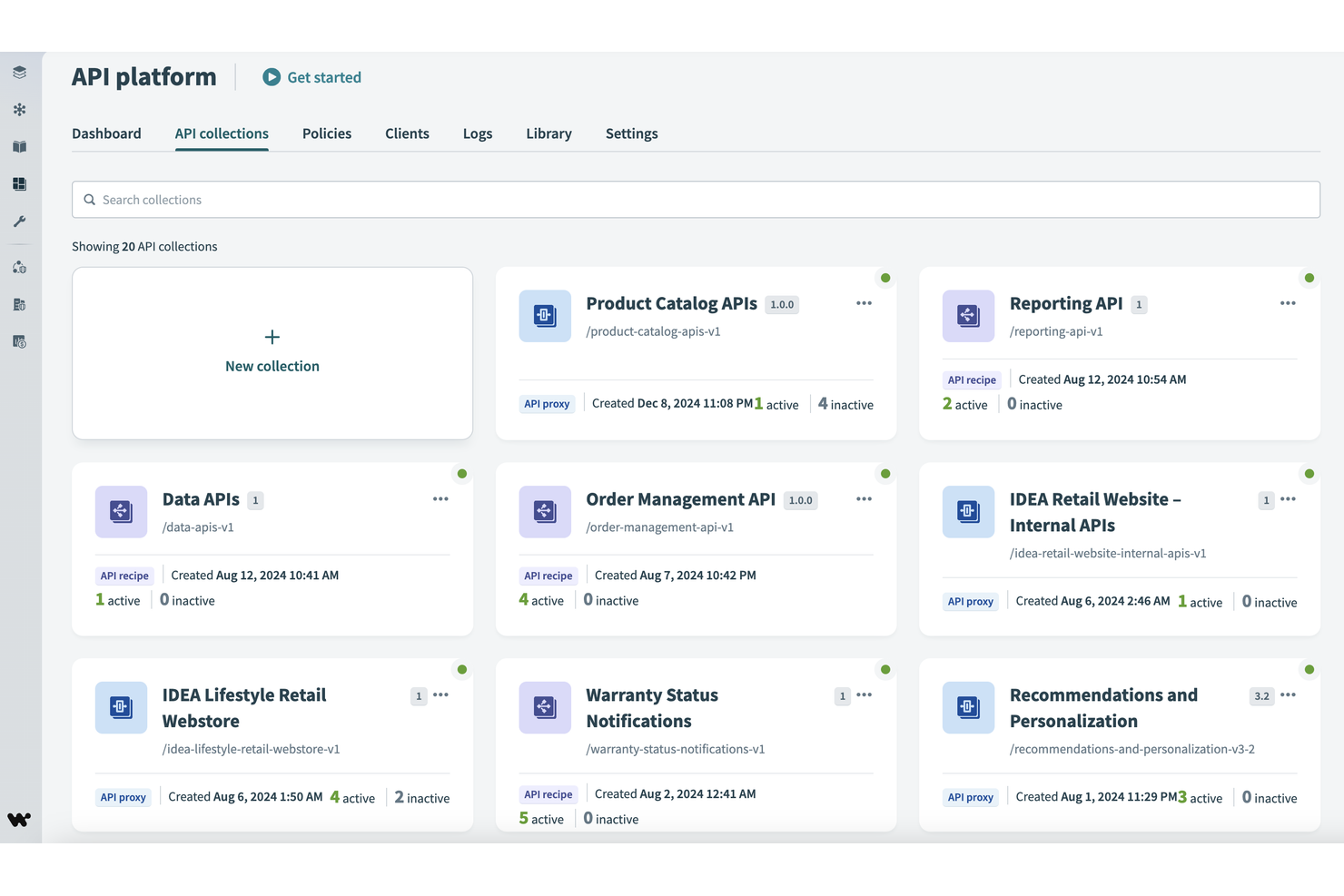
Workato is built for teams that need to automate complex workflows across multiple business apps without heavy coding. Marketing, sales, and operations professionals often choose Workato for its low-code integration platform and extensive library of pre-built connectors. Unlike MuleSoft, Workato emphasizes rapid deployment of workflow automations and supports a wide range of SaaS and on-premises systems.
Why Workato Is a Good MuleSoft Alternative
For teams focused on workflow automation integrations, Workato offers a different approach than MuleSoft. I picked Workato because it lets you build complex, multi-step automations using a low-code interface and a large library of pre-built recipes. Its recipe-based automation engine supports conditional logic, data transformations, and event-driven triggers across cloud and on-premises apps. This makes Workato especially useful for organizations that want to automate business processes quickly without relying on deep developer resources.
Workato Key Features
Some other features that make Workato stand out for integration and automation include:
- API platform: Build, publish, and manage APIs directly within Workato.
- Embedded integration builder: Allow partners or customers to create their own integrations inside your product.
- Role-based access controls: Set granular permissions for users and teams managing automations.
- Real-time monitoring dashboard: Track automation runs, errors, and system health as they happen.
Workato Integrations
Integrations include Salesforce, Asana, Snowflake, NetSuite, ServiceNow, Workday, Slack, Google Sheets, and Box.
Pros and Cons
Pros:
- Embedded integration builder for SaaS vendors
- Low-code automation builder for business users
- Extensive library of pre-built integration recipes
Cons:
- API management features are less mature
- Has a steep learning curve

Boomi
Best for rapid cloud integration deployment
If your team needs a cost-effective way to connect cloud and on-premises applications quickly, Boomi is built for rapid deployment. It’s a strong fit for IT teams and integration specialists who want to automate workflows and data movement across a wide range of platforms. Unlike MuleSoft, Boomi’s low-code interface and prebuilt connectors help you launch integrations in days, not weeks.
Why Boomi Is a Good MuleSoft Alternative
When you need to deploy cloud integrations fast, Boomi stands out for its speed and flexibility. I picked Boomi because its drag-and-drop process builder and extensive library of prebuilt connectors let you create and launch integrations with minimal coding. The platform also supports real-time data synchronization and automated error handling, which helps teams keep systems connected and running smoothly. For organizations that want to accelerate digital transformation without heavy development, Boomi offers a practical alternative to MuleSoft.
Boomi Key Features
Some other features that make Boomi useful for integration projects include:
- Boomi AtomSphere API Management: Manage, monitor, and secure APIs across your integration landscape.
- B2B/EDI management: Handle electronic data interchange and trading partner relationships directly within the platform.
- Master data hub: Centralize and synchronize master data across multiple systems.
- Process library: Access a repository of reusable integration process templates for common use cases.
Boomi Integrations
Integrations include SAP, Salesforce, Oracle NetSuite, ServiceNow, AWS, Slack, Workday, Stripe, Shopify, and Google Drive.
Pros and Cons
Pros:
- Built-in B2B/EDI management tools
- Visual process builder for integration design
- Prebuilt connectors for major SaaS platforms
Cons:
- Requires separate module for API management
- Limited advanced data transformation options
Apigee
Best for advanced API analytics
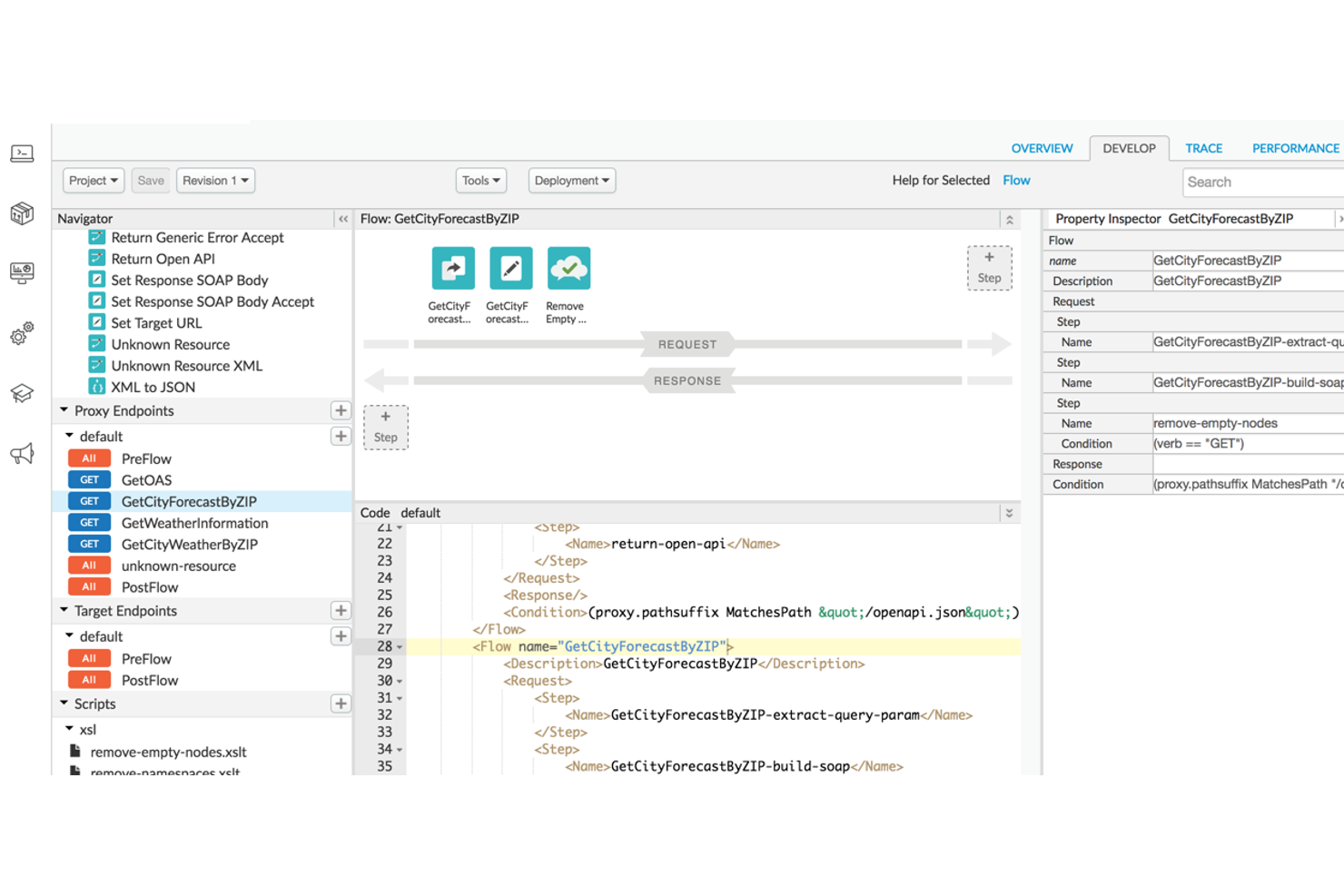
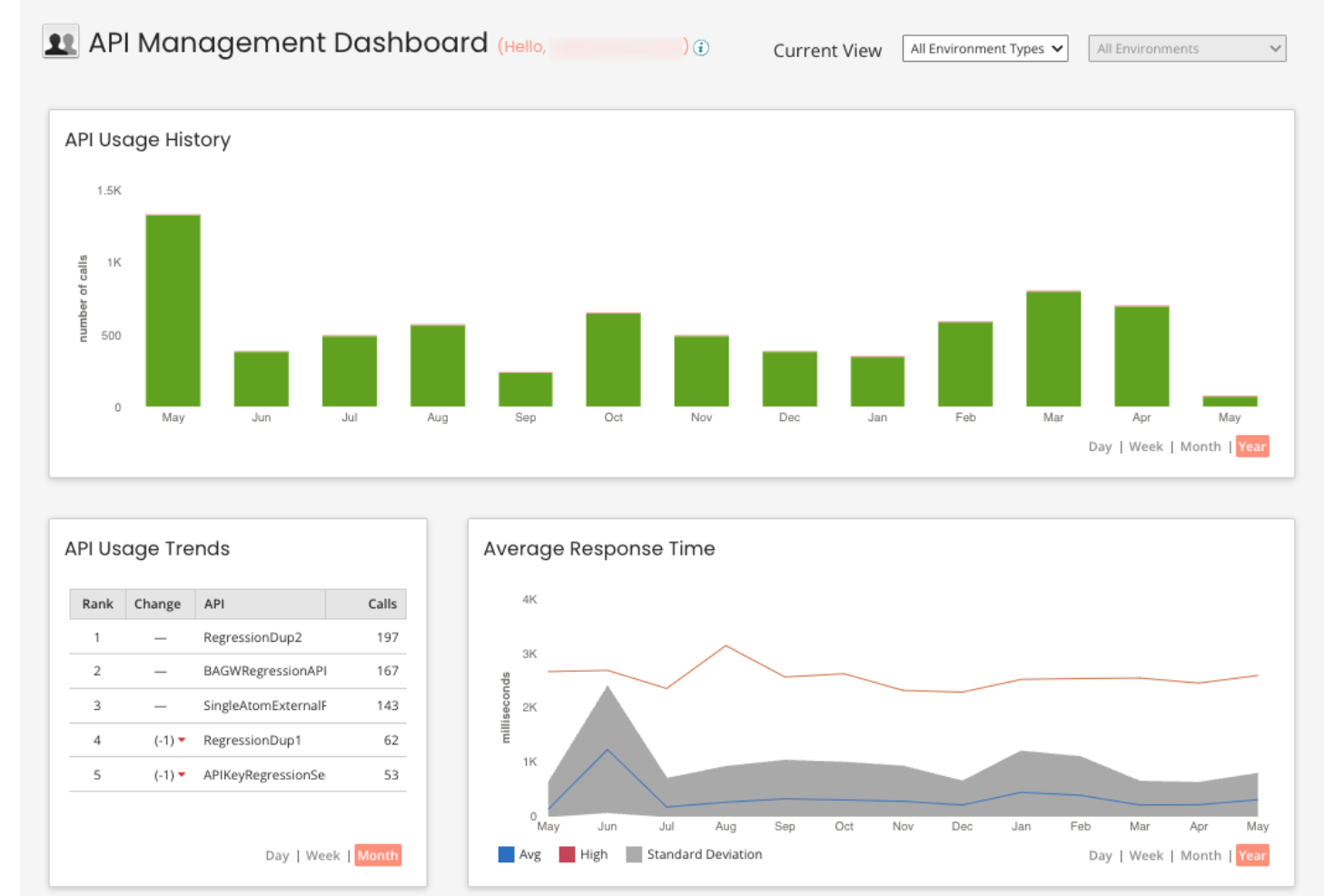
If your team needs deep visibility into API usage and performance, Apigee offers advanced analytics that go beyond standard monitoring. It’s designed for enterprises and digital businesses that want to optimize API strategies with granular data and actionable insights. Compared to MuleSoft, Apigee stands out for its real-time analytics dashboards and built-in anomaly detection for API traffic.
Why Apigee Is a Good MuleSoft Alternative
For teams that need more than basic API monitoring, Apigee delivers advanced analytics capabilities that set it apart from MuleSoft. I picked Apigee because it offers real-time dashboards, customizable reports, and built-in anomaly detection for API traffic. These features help you quickly identify performance issues, usage trends, and security threats across your API ecosystem. If your priority is actionable, data-driven insights for API management, Apigee is a strong alternative to consider.
Apigee Key Features
Some other features that make Apigee appealing for API management include:
- API proxy creation: Build and manage API proxies to abstract backend services and enforce policies.
- Traffic management tools: Set quotas, rate limits, and spike arrest policies to control API consumption.
- Integrated developer portal: Provide a customizable portal for onboarding and supporting API consumers.
- Multi-cloud deployment: Deploy and manage APIs across hybrid and multi-cloud environments.
Apigee Integrations
Integrations include Google Cloud Storage, BigQuery, Google Kubernetes Engine, Vertex AI, Cloud Functions, and more.
Pros and Cons
Pros:
- Multi-cloud deployment support for hybrid environments
- Built-in anomaly detection for API traffic
- Advanced API analytics with real-time dashboards
Cons:
- API proxy deployment can be slow at scale
- Policy configuration requires XML-based scripting

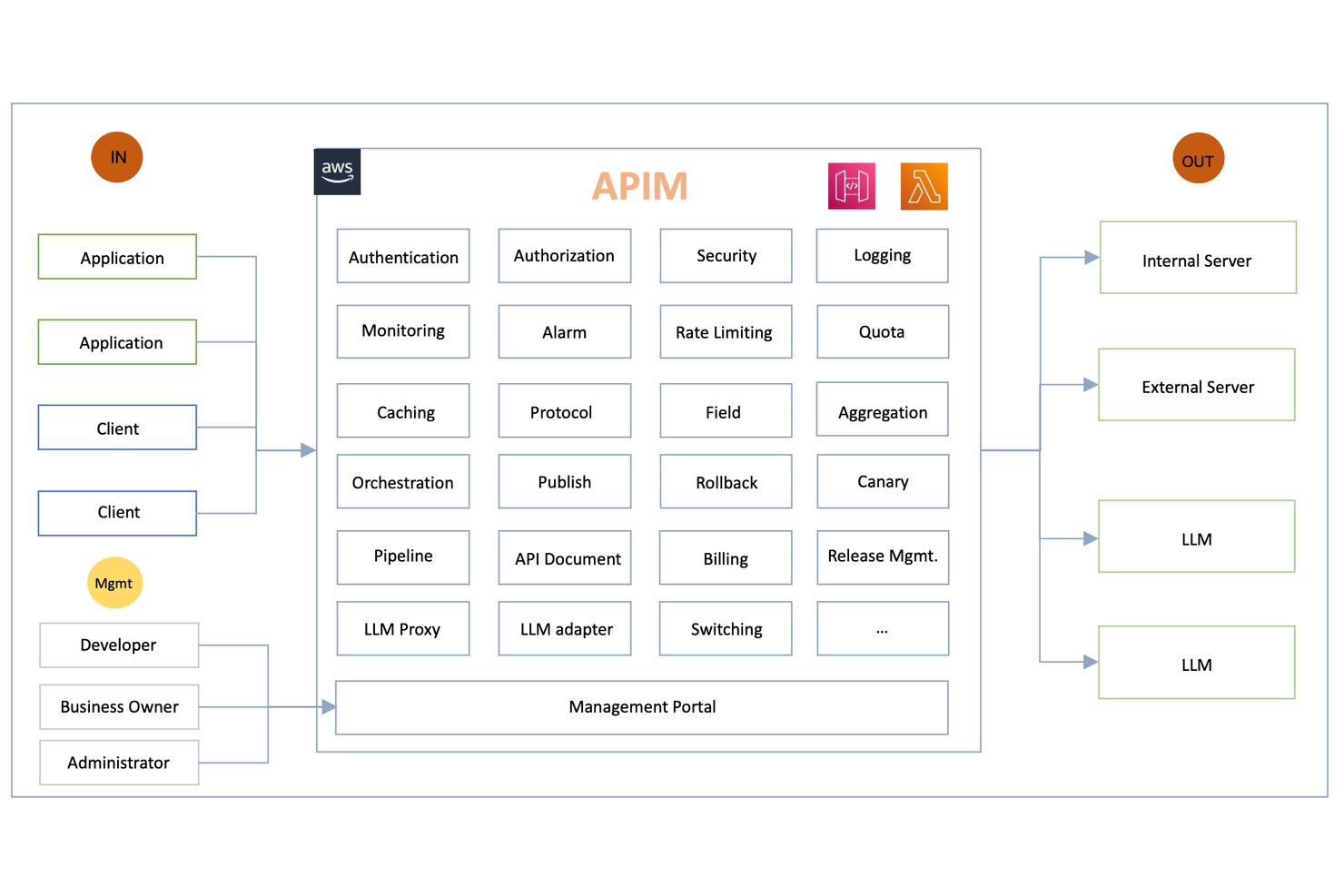
For organizations handling unpredictable or high-volume API traffic, Amazon API Gateway offers a cloud-native solution built for scale. It’s a strong fit for engineering teams and digital businesses that need to manage, secure, and monitor APIs with elastic capacity. Unlike MuleSoft, Amazon API Gateway is tightly integrated with AWS Lambda and other AWS services, making it ideal for serverless and event-driven architectures.
Why Amazon API Gateway Is a Good MuleSoft Alternative
When you need to handle massive or unpredictable API traffic, Amazon API Gateway stands out for its elastic scalability. I picked this tool because it automatically scales to accommodate millions of requests per second without manual intervention. Its built-in throttling and burst control features help protect backend systems from overload, which is essential for high-traffic environments. For teams prioritizing reliable, cloud-native traffic management, Amazon API Gateway offers a level of scalability that’s hard to match.
Amazon API Gateway Key Features
Some other features that make Amazon API Gateway useful for API management include:
- Custom domain support: Map your APIs to your own domain names for branded endpoints.
- API versioning: Manage multiple versions of your APIs simultaneously to support different client needs.
- Request and response transformation: Modify incoming requests and outgoing responses using mapping templates.
- Built-in authorization: Integrate with AWS IAM, Cognito, or Lambda authorizers for secure API access control.
Amazon API Gateway Integrations
Integrations include AWS Lambda, Amazon EC2, AWS Elastic Beanstalk, Amazon ECS, AWS Step Functions, Amazon CloudWatch, and more.
Pros and Cons
Pros:
- Automated DDoS protection with AWS Shield
- Pay-as-you-go pricing for API requests
- Native integration with AWS Lambda functions
Cons:
- No built-in API mocking for testing
- Limited support for non-AWS cloud services

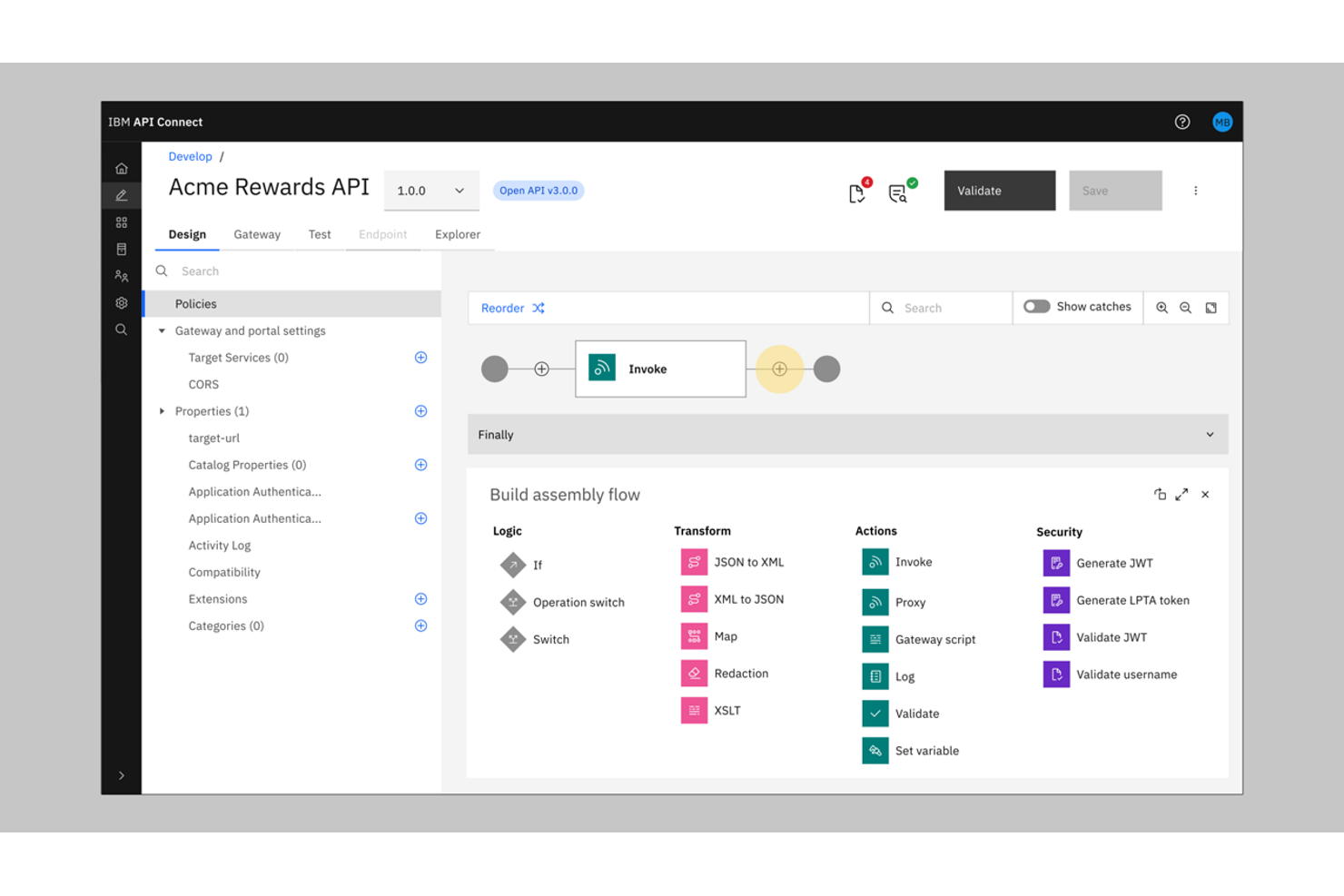
IBM API Connect is an Integration Platform as a Service (iPaaS) built for organizations that need advanced security and governance for their API ecosystem. It’s especially relevant for enterprises in regulated industries, like finance or healthcare, where compliance and access controls are non-negotiable. Unlike MuleSoft, IBM API Connect offers granular security policies and built-in threat protection for every stage of the API lifecycle.
Why IBM API Connect Is a Good MuleSoft Alternative
When enterprise-grade security is a top priority, IBM API Connect offers an integration solution that goes beyond what many integration platforms provide. I picked it for its built-in threat protection, which includes features like OAuth, OpenID Connect, and API key management to secure every API endpoint. The platform also supports detailed access controls and auditing, helping organizations meet strict compliance requirements. These security-focused features make IBM API Connect a strong choice for teams that can’t compromise on data protection or regulatory standards.
IBM API Connect Key Features
Some other features that make IBM API Connect a strong option among integration tools and API management include:
- API analytics dashboard: Users can monitor API usage, performance, and trends through a visual dashboard.
- Developer portal: The platform provides a customizable portal for onboarding and supporting external and internal developers.
- Automated API documentation: API Connect generates and updates interactive documentation for all published APIs.
- Multi-cloud deployment support: Teams can deploy and manage complex integrations and APIs across public, private, and hybrid cloud environments.
IBM API Connect Integrations
Native integrations are not currently listed.
Pros and Cons
Pros:
- Multi-cloud deployment and management support
- Automated API documentation generation
- Built-in threat protection for API endpoints
Cons:
- User interface can feel outdated
- Complex initial setup for enterprise environments

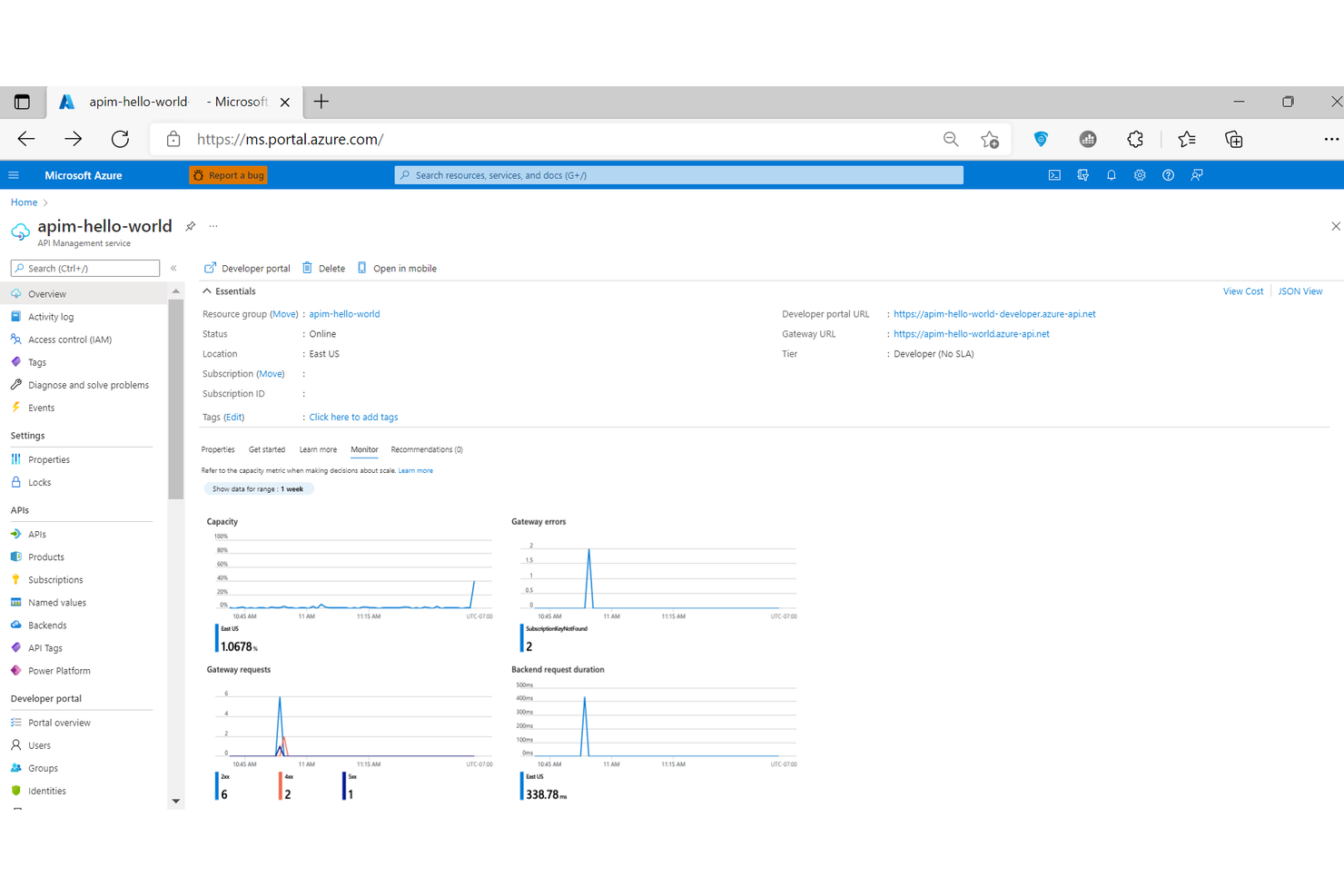
For teams already invested in Microsoft’s cloud stack, Microsoft Azure API Management offers a direct path to unified API governance and integration. It’s especially useful for IT departments and enterprise architects who want to manage, secure, and monitor APIs across Azure and other Microsoft services. Unlike MuleSoft, Azure API Management provides deep, native integration with tools like Azure Active Directory, Logic Apps, and Power Platform.
Why Microsoft Azure API Management Is a Good MuleSoft Alternative
If your organization relies on Microsoft’s cloud ecosystem, Azure API Management is purpose-built for seamless integration with native Microsoft services. I picked this tool because it connects directly with Azure Active Directory for identity management and supports automated workflows through Logic Apps and Power Platform. The platform also enables centralized API policy enforcement and analytics within the Azure portal, making it easier to manage APIs alongside other Microsoft resources. For teams standardizing on Microsoft, this level of native integration is a clear advantage over MuleSoft.
Microsoft Azure API Management Key Features
Some other features that make Azure API Management valuable for integration projects include:
- Developer portal: Customize and publish a branded portal for API documentation and onboarding.
- Multi-region deployment: Deploy API gateways across multiple Azure regions for global availability.
- Versioning and revisions: Manage multiple versions and revisions of APIs without downtime.
- Built-in caching: Improve API performance with configurable response caching at the gateway level.
Microsoft Azure API Management Integrations
Integrations include Azure Logic Apps, Azure Functions, Azure Kubernetes Service, Azure Container Apps, and more.
Pros and Cons
Pros:
- Supports multi-region API deployments
- Automated scaling for high-traffic APIs
- Deep integration with Azure cloud services
Cons:
- No built-in support for B2B/EDI workflows
- Limited non-Microsoft ecosystem integrations

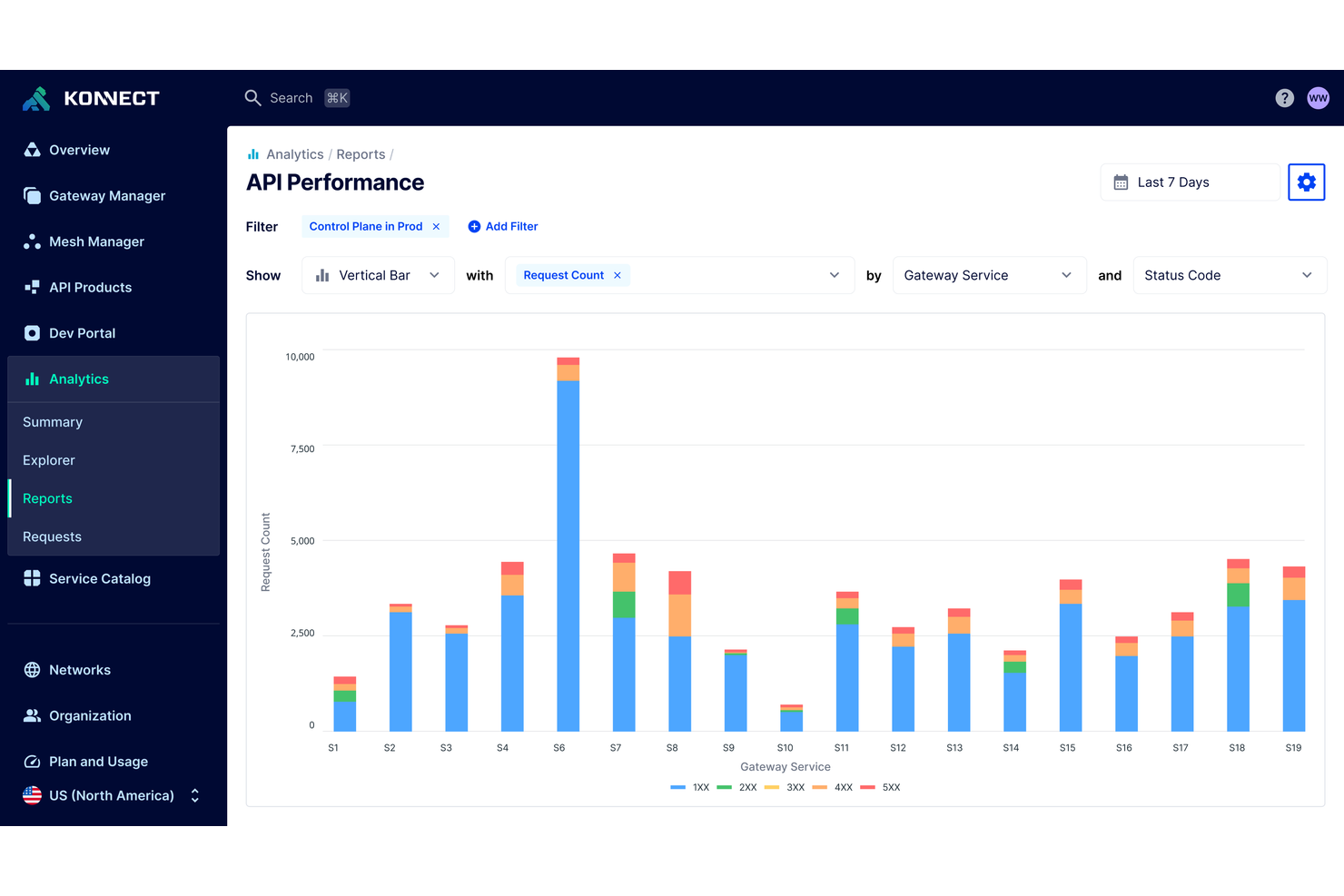
Teams building distributed applications often turn to Kong for its strong microservices and Kubernetes support. It’s a fit for organizations prioritizing API gateway performance and scalability in containerized or cloud-native environments. Unlike MuleSoft, Kong offers native Kubernetes ingress and service mesh capabilities that help you manage APIs across dynamic, modern architectures.
Why Kong Is a Good MuleSoft Alternative
If your team is focused on microservices or Kubernetes-native architectures, Kong offers capabilities that MuleSoft doesn’t match. I picked Kong because it provides native Kubernetes ingress support and a built-in service mesh for managing east-west traffic between services. These features let you deploy, secure, and scale APIs directly within containerized environments. For organizations moving toward cloud-native or distributed systems, Kong’s architecture-first approach is a strong fit.
Kong Key Features
Some other features that make Kong appealing for API management include:
- Plugin architecture: Extend core functionality with a wide range of open-source and enterprise plugins.
- Declarative configuration: Manage API gateway settings and policies using YAML files for version control and automation.
- Role-based access control: Assign granular permissions to users and teams for secure administration.
- API analytics dashboard: Monitor API usage, latency, and error rates through built-in visual dashboards.
Kong Integrations
Integrations include AWS Lambda, Azure Functions, OpenWhisk, Datadog, Prometheus, Zipkin, and more.
Pros and Cons
Pros:
- Declarative configuration with YAML files
- Plugin system for custom gateway functionality
- Native Kubernetes ingress controller support
Cons:
- Plugin compatibility varies by deployment type
- Limited out-of-the-box enterprise connectors

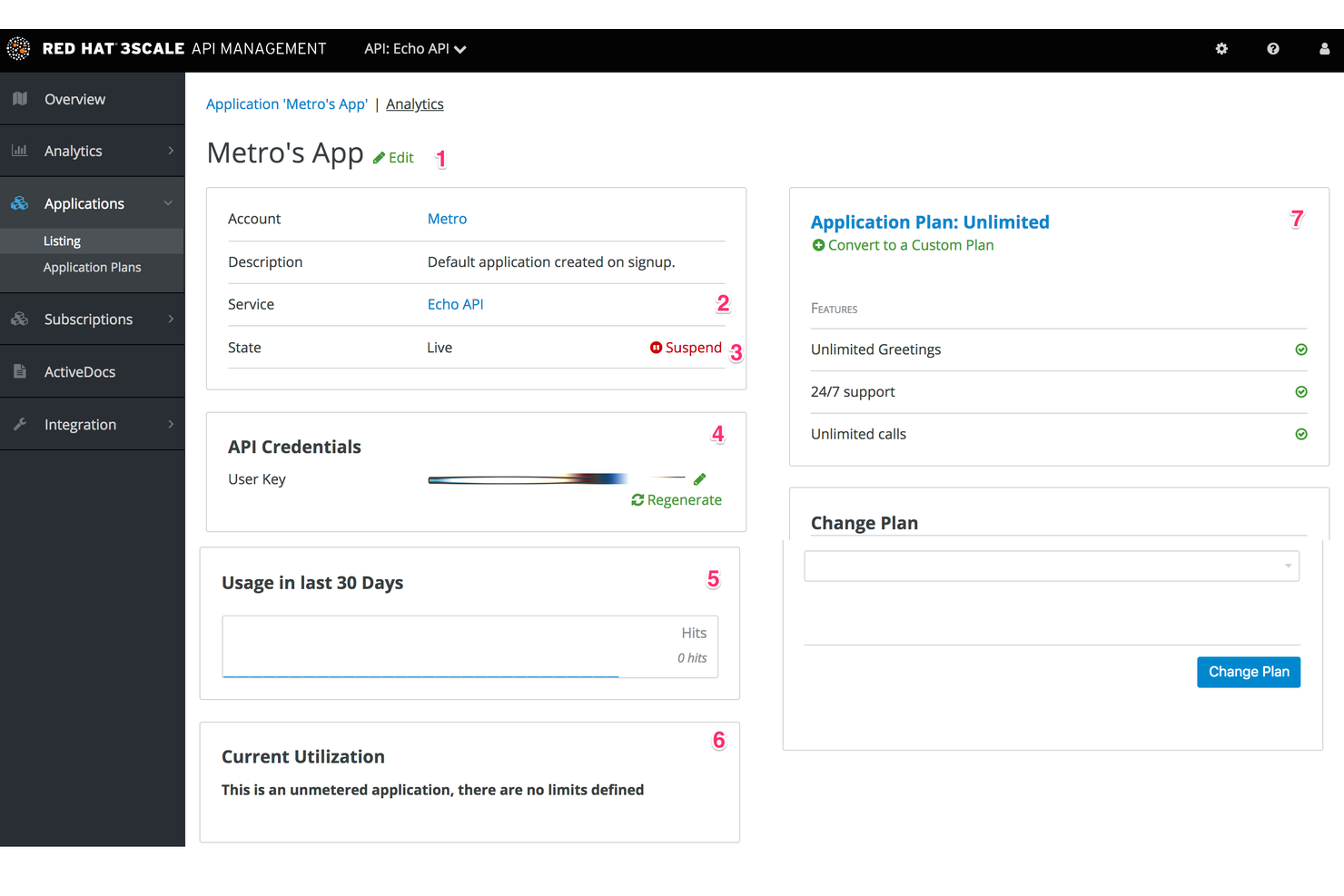
If you need to monetize APIs and manage usage plans, 3Scale by Red Hat offers a specialized platform for API-driven businesses and digital product teams. It’s designed for organizations that want to control access, set pricing tiers, and track API consumption in detail. Unlike MuleSoft, 3Scale puts advanced API monetization and developer portal management at the center of its feature set.
Why I picked 3Scale
I chose 3scale because of its unique hybrid architecture that separates the API manager from the traffic gateway. This allows you to host the management layer in the cloud while keeping the API gateway on-premises or at the edge, which is essential for low-latency performance in hybrid cloud setups. Its native optimization for OpenShift makes it a powerhouse for enterprises already operating in the Red Hat ecosystem.
3Scale Key Features
Some other features that make 3Scale appealing for API management include:
- API gateway deployment options: Choose between cloud-hosted, on-premises, or hybrid gateway setups.
- Analytics and reporting dashboard: Access detailed metrics on API usage, performance, and traffic patterns.
- OAuth and OpenID Connect support: Enable secure authentication and authorization for API consumers.
- Policy management engine: Apply custom rules for traffic control, security, and request transformation.
3Scale Integrations
Integrations include Red Hat OpenShift, Red Hat Ansible Automation Platform, Red Hat Enterprise Linux, and more.
Pros and Cons
Pros:
- Policy engine for custom traffic management
- Built-in developer portal for API consumers
- Monetization tools for API usage and billing
Cons:
- No built-in ETL or data transformation tools
- Limited native integrations outside Red Hat products

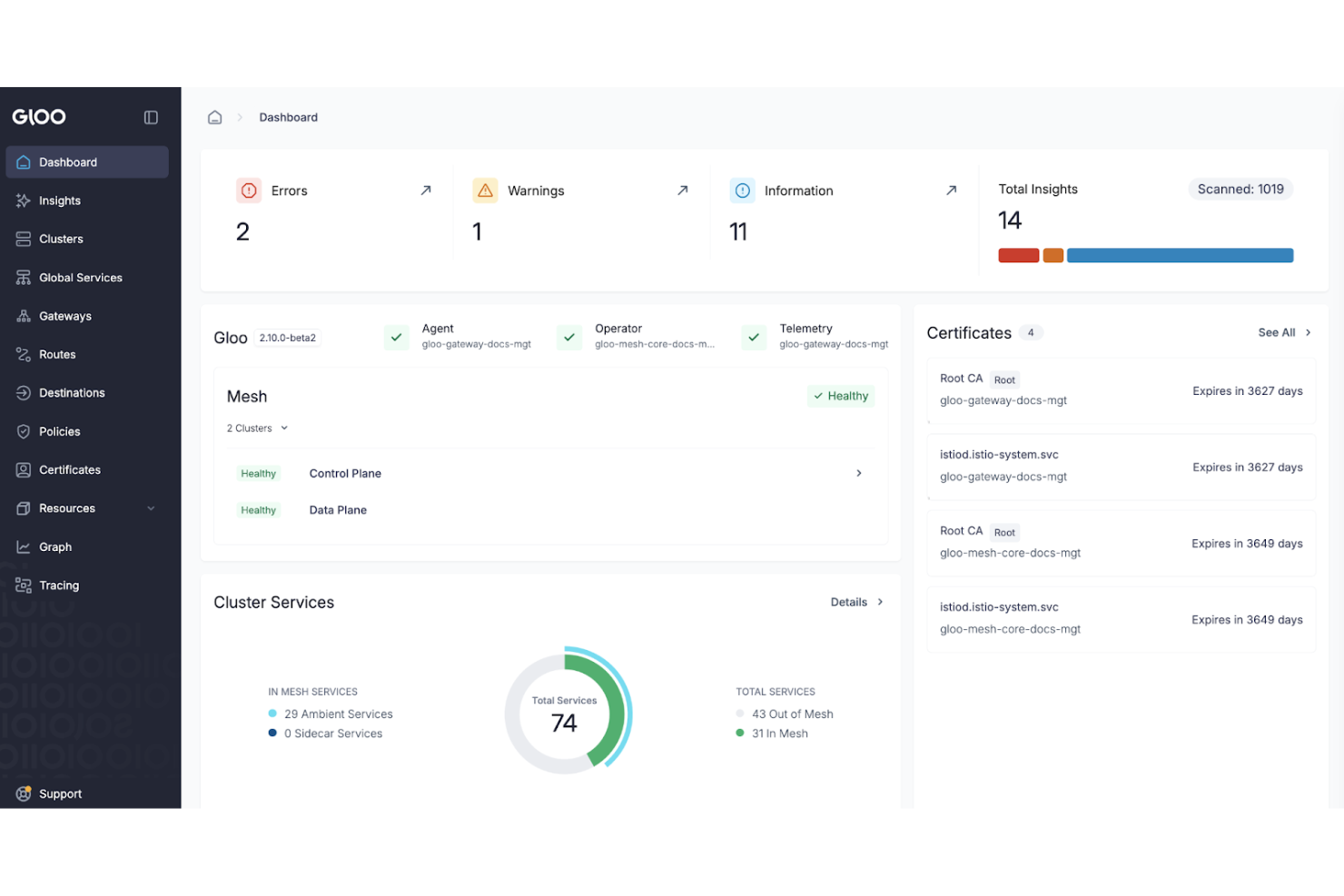
Kgateway by Solo.io is designed for organizations managing APIs across hybrid and multi-cloud environments. This tool is a strong fit for enterprises and platform teams that need advanced API routing, traffic control, and security across distributed infrastructure. Unlike MuleSoft, Gloo Gateway emphasizes cloud-native integration and supports complex routing scenarios for modern architectures.
Why Kgateway Is a Good MuleSoft Alternative
When hybrid and multi-cloud API routing is a top priority, Kgateway offers capabilities that set it apart from MuleSoft. I picked Kgateway because it’s built to handle complex traffic management across Kubernetes, VMs, and multiple cloud providers. Its support for advanced routing, service mesh integration, and granular security policies makes it ideal for distributed, cloud-native environments. This focus on flexible, cloud-agnostic API management is especially valuable for teams modernizing their infrastructure beyond what MuleSoft typically supports.
Kgateway Key Features
Some other features that make Solo.io appealing for API management include:
- API developer portal: Centralize API documentation and onboarding for internal and external developers.
- Integrated API security controls: Apply authentication, authorization, and threat protection policies at the gateway level.
- Traffic shadowing: Test new API versions by mirroring live traffic without impacting production.
- Automated API discovery: Detect and register new services automatically as they are deployed.
Kgateway Integrations
Integrations include Envoy Proxy, Istio, Backstage, kagent, Google Cloud, and more.
Pros and Cons
Pros:
- Automated API discovery for dynamic environments
- Built-in service mesh integration with Istio
- Advanced traffic routing for multi-cloud setups
Cons:
- Pricing details are not publicly available
- Requires strong Kubernetes and cloud expertise
Andre MuleSoft-alternativer
Her er noen flere MuleSoft-alternativer som ikke kom med på kortlisten min, men som likevel er verdt å se nærmere på:
- Tyk
For open-source API gateway flexibility
- Informatica
For enterprise data integration scalability
- Zuplo
For developer-focused API publishing
- WSO2 API Manager
With open-source API lifecycle management
- Jitterbit iPaaS
For rapid EDI and ERP integration


How I Evaluate MuleSoft Alternatives
I split my evaluation into the baseline—API management, pre-built connectors, data transformation—any platform must have, and the differentiators that matter when migrating off MuleSoft.
Core Functionality (Table Stakes For This List)
When I'm selecting tools for my list, I rank each one on a scale from 0 (does not offer the functionality) to 5 (excels in this area) for each core functionality listed below. Then, I calculate the tool's total score into a percentage. Each tool needs to achieve a minimum total score of 65% to be considered for inclusion.
- API Lifecycle Management: I evaluate whether a platform lets you design, version, publish, and monitor APIs—so your PMO can expose project data endpoints to downstream systems like BI dashboards.
- Pre-Built Connector Library: The breadth of connectors matters, especially for PM-adjacent systems like Jira, Salesforce, SAP, and Workday that project teams typically need to sync data across.
- Data Transformation & Mapping: I check how each tool handles schema mismatches—like mapping custom fields from one project tracker's JSON output to another system's XML intake format.
- Workflow Orchestration: Multi-step integration flows with branching, error handling, and retries are what I look for, especially for automating project intake or cross-system status updates.
- Hybrid Deployment Options: Many enterprise teams run a mix of cloud and on-premise systems, so I evaluate whether the platform supports hybrid architectures with unified management.
- Security & Governance Controls: I look at role-based access, encryption standards, audit logging, and compliance certifications relevant to enterprise project environments handling sensitive data.
Once I have a list of tools that meet this criteria, I consider what sets each platform apart.
Differentiating Factors (What Sets Vendors Apart)
Here's how I compare and contrast different vendors:
Standout Features
A low-code or no-code builder is a big deal here—it determines whether your PMO staff can create integrations themselves or need to pull in engineering every time. I also look for AI-assisted integration features like auto-suggested field mappings, which cut setup time when connecting systems with complex schemas. Reusable integration templates matter too, especially pre-built recipes for common PM workflows like syncing Jira tickets to a CRM or pushing project milestones into an ERP.
Beyond Features
Total cost of ownership is the first thing I evaluate—MuleSoft's licensing model is a common reason teams start looking for alternatives, so I compare pricing structures across consumption-based, per-user, and flat-fee models. Implementation speed matters just as much; I check how quickly a team can get a first integration running, since some platforms offer guided onboarding while others assume deep technical expertise. I also consider ecosystem health, like community-built connectors and active forums, because that directly affects how fast your team can troubleshoot issues independently.
Hvorfor se etter et MuleSoft-alternativ?
Selv om MuleSoft er et godt valg blant MuleSoft-alternativene, finnes det flere grunner til at noen brukere ser etter alternative løsninger. Du ser kanskje etter et MuleSoft-alternativ fordi …
- Du trenger mer fleksibel eller transparent prising
- Teamet ditt ønsker enklere eller raskere innføring
- Du trenger innebygde integrasjoner med bestemte plattformer
- Du trenger avanserte funksjoner for API-monetisering
- Organisasjonen din foretrekker åpen kildekode eller alternativer som driftes på egne servere
- Du ønsker en mer lettvektsløsning for mindre prosjekter
- Teamet ditt trenger en enklere læringskurve
Hvis noe av dette høres kjent ut, har du kommet til rett sted. Listen min inneholder flere MuleSoft-alternativer som passer bedre for team som møter disse utfordringene med MuleSoft og ser etter alternative løsninger.
MuleSofts viktigste funksjoner
Her er noen av de viktigste funksjonene i MuleSoft, slik at du kan sammenligne hva alternative løsninger tilbyr:
- Verktøy for administrasjon av API-livssyklusen: MuleSoft Anypoint-plattformen tilbyr et miljø for utforming, bygging og administrasjon av API-er, og legger til rette for integrasjon på tvers av hele virksomheten.
- Visuell designer for integrasjonsflyter: Designeren tilbyr et brukervennlig grensesnitt som forenkler kompleks applikasjonsintegrasjon ved at brukerne kan dra og slippe komponenter for å bygge avansert logikk.
- Ferdigbygde koblinger for populære SaaS-apper og lokalt installerte apper: Disse koblingene forenkler applikasjonsintegrasjon ved å tilby umiddelbar tilkobling til SaaS-applikasjoner og ulike CRM-systemer uten behov for tilpasset kode.
- Sentralisert API-gateway for sikkerhet og trafikkstyring: Denne funksjonen ivaretar sikkerheten ved storskalaimplementeringer, selv om plattformens natur ofte gjenspeiles i en høy kostnad i prismodellen.
- Databehandling i sanntid og i batch: MuleSoft håndterer effektivt ulike arbeidsbelastninger, slik at virksomheter kan bygge datapipelines som håndterer både umiddelbare utløsere og overføring av store datamengder.
- Rollebasert tilgangskontroll og styring: Avanserte styringsfunksjoner gjør løsningen til et foretrukket valg for strategier for hoveddatabehandling (MDM), og sikrer dataintegritet på tvers av alle tilkoblede datavarehus.
- Instrumentpaneler for overvåking og analyse: Detaljerte instrumentpaneler gir god innsikt i integrasjonsfunksjonene, slik at team kan følge med på ytelsen og feilsøke problemer i komplekse scenarier for virksomhetsintegrasjon.
- Støtte for hybride implementeringer og implementeringer i flere skyer: Plattformen støtter fleksible implementeringsmodeller som kan måle seg med konkurrentene, noe som gjør den ideell for moderne, distribuerte skyarkitekturer.
- Innebygde verktøy for datatransformasjon og datatilordning: MuleSoft inkluderer AI-drevne forslag for datatilordning, noe som forenkler prosessen med å konvertere komplekse formater under prosessautomatisering med høyt volum.
- Utviklerportal for API-dokumentasjon og introduksjon: Ved å tilby et sentralisert knutepunkt for dokumentasjon hjelper portalen utviklere med raskt å forstå og bruke API-er, slik at den digitale transformasjonen kan fremskyndes.