

10 beste KI-programvarer for kostnadsberegning i bygg og anlegg gjennomgått i 2026

10 Kortliste over den beste KI-programvaren for kostnadsberegning i byggebransjen


Å lede byggeprosjekter kan være krevende, med komplekse kostnadsberegninger, stramme tidsfrister og til tider upålitelige hovedentreprenører. Disse utfordringene gjør det enda vanskeligere å håndtere tidkrevende og feilutsatte manuelle prosesser. KI-programvare for kostnadsberegning i byggebransjen gjør det derimot enklere å møte disse utfordringene ved å forbedre nøyaktigheten og effektiviteten.
Etter min erfaring kan riktig programvare redusere arbeidsbelastningen for teamet ditt og forbedre beslutningstakingen. Disse verktøyene bruker KI til å analysere prosjektdata, forutsi kostnader og raskt generere kostnadsberegninger, slik at du kan bruke langt mindre tid på å stirre på regneark. Jeg vil lede deg gjennom de beste løsningene for KI-basert kostnadsberegning i byggebransjen, med fokus på deres unike funksjoner og fordeler for prosjekter.
Du får en objektiv og grundig gjennomgang av de beste tilgjengelige alternativene, slik at du kan ta et informert valg.
Hvorfor du kan stole på våre programvareanbefalinger
Teamet vårt har testet og anmeldt programvare siden 2012. Vi er selv prosjektledere, så vi vet hvor vanskelig og hvor viktig det er å velge riktig programvare.
I denne guiden har vi vurdert verktøyene gjennom praktisk testing og uavhengig research og gitt dem poeng ut fra våre utvelgelseskriterier. Vi bygger også på innsikt fra ledende eksperter i bransjen og erfarne prosjektledere.
Anmeldelsene våre bygger på vår egen redaksjonelle vurdering. De er ikke et salgsargument.
Ekspertanmeldere:
Sammenligningstabell for KI-programvare til kostnadsberegning i byggebransjen
Denne sammenligningstabellen oppsummerer prisdetaljene for mine beste utvalgte KI-programmer for kostnadsberegning i byggebransjen.
| Tool | Best For | Trial Info | Price | ||
|---|---|---|---|---|---|
| 1 | Best for automated contract risk review | Free demo available | From $50/project | Website | |
| 2 | Best for large construction firms | Free demo available | Pricing upon request | Website | |
| 3 | Best for detailed cost analysis | Free consultation available | Pricing upon request | Website | |
| 4 | Best for voice-activated estimating and scheduling | 30-day free trial + free demo available | From $99/month | Website | |
| 5 | Best for integrating with BIM | Free demo available | From $108/user/month | Website | |
| 6 | Best for cloud-based takeoffs | Free demo available | From $1,999/user/year (billed annually) | Website | |
| 7 | Best for automatic plan analysis | 7-day free trial available | From $299/user/month (billed annually) | Website | |
| 8 | Best for AI-driven design insights | 7-day free trial available | From $35/user/month (billed annually) | Website | |
| 9 | Best for predictive analytics | Free demo + free trial available | Pricing upon request | Website | |
| 10 | Best for quantity takeoff accuracy | 7-day free trial available | From $25/user/month (billed annually) | Website |
Gjennomgang av den beste KI-programvaren for kostnadsberegning i byggebransjen
Nedenfor finner du mine detaljerte sammendrag av den utvalgte KI-programvaren for kostnadsberegning i byggebransjen. Gjennomgangene mine gir et detaljert innblikk i de viktigste funksjonene, fordelene og ulempene, integrasjonene og ideelle bruksområdene.

Best for automated contract risk review
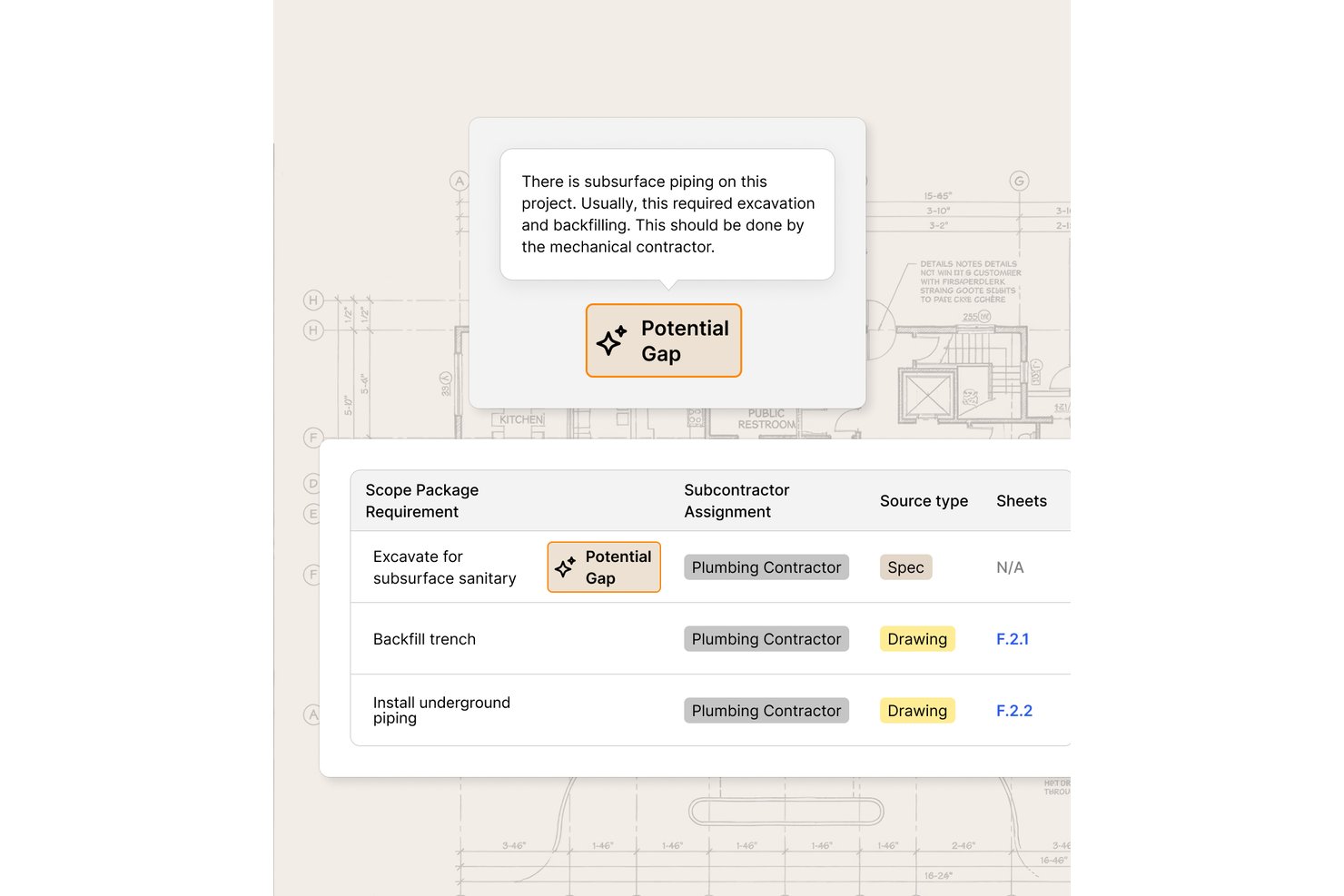
Provision is an AI-driven contract and document analysis tool designed for construction teams who need to review specifications, blueprints, and contracts for risk and scope gaps before bid submission.
Who Is Provision Best For?
Construction legal, risk, and project management teams that regularly review complex contracts and technical documents for errors or exposures.
Why I Picked Provision
I picked Provision as one of the best because I can use its AI to scan thousands of contract and spec pages for risk, flag missing or conflicting scope, and instantly benchmark risky clauses against client standards. It handles locked PDFs and multi-format contract sets for complex construction bid reviews.
Provision Key Features
- Bulk document processing: Review up to 100,000 pages of plans, specs, and contracts at once.
- Collaborative annotation tools: Tag and comment on documents with your whole project team.
- AI-powered multi-document search: Instantly find and reference key terms or clauses across massive file sets.
- Exportable risk reports: Generate detailed audits and export findings to PDF, Word, or Excel.
Provision Integrations
Native integrations are not publicly documented. An API is available for custom integrations.
Pros and Cons
Pros:
- Handles locked and complex PDF documents
- Flags missing or conflicting project scope
- Automates contract and spec risk review
Cons:
- Lacks built-in estimating cost database
- No quantity takeoff automation

Procore
Best for large construction firms

Procore is a construction management software tailored for large construction firms. The platform offers detailed project management features, like AI-driven insights that enhance efficiency and accuracy.
Why I picked Procore: The AI capabilities provide predictive insights that help large construction teams manage complex projects. Procore’s AI tools analyze project data to forecast potential risks and delays, keeping your projects on track. Automated reporting features maintain transparency across teams. In my experience, Procore’s scalability is its best feature, making it ideal for large-scale operations.
Standout Features & Integrations:
Features include document management, real-time project tracking, and mobile accessibility. This means your team can access vital project information anytime, anywhere.
Integrations include QuickBooks, Sage 300 CRE, Microsoft Project, Primavera P6, Docusign, Bluebeam, Smartsheet, Dropbox, OneDrive, and Google Drive.
Pros and Cons
Pros:
- Automated reporting improves transparency
- Scalable for large construction projects
- Predictive insights enhance project planning
Cons:
- Requires initial setup and customization
- Has a steep learning curve

Best for detailed cost analysis

Sage Estimating is a construction estimating software aimed at contractors and construction firms. It provides detailed cost analysis with AI-driven insights to enhance project accuracy and efficiency.
Why I picked Sage Estimating: AI-enhanced capabilities allow your team to perform in-depth cost analysis, making it ideal for projects requiring detailed financial oversight. Machine-learning-generated estimates and forecasts are accurate, reducing the risk of budget overruns. Additionally, you’ll find its cost database helpful for maintaining precise pricing information. In my experience, this level of granularity is ideal for accuracy-obsessed financial teams.
Standout Features & Integrations:
Features include customizable templates, advanced reporting tools, and multi-level cost breakdowns. This means you can help your team create detailed estimates and improve project planning.
Integrations include Sage 300 Construction and Real Estate, Sage 100 Contractor, Microsoft Excel, PlanSwift, eTakeoff, Autodesk Revit, Bluebeam, Procore, Trimble, and On Center Software.
Pros and Cons
Pros:
- Advanced reporting tools enhance decision-making
- Customizable templates for diverse project needs
- Detailed cost breakdowns for accurate budgeting
Cons:
- Complex interface for new users
- May require extensive implementation


Houzz is an AI construction estimating platform that reduces manual scheduling and estimate-building by using natural-language prompts and automated data mapping.
Why I picked Houzz: Houzz offers AI-driven features like AutoMate, which can generate estimates from a simple text prompt, perfect when you want to speed up preconstruction work without sacrificing accuracy. Its AI construction estimating tools also convert estimates into schedules, cutting down on manual data entry. The voice-activated command system is another standout, helping users move through complex tasks faster. In practice, this degree of automation speeds up collaboration and smoother handoffs for any estimating team, no matter the size.
Standout Features & Integrations:
Features include automated estimate generation, voice-activated scheduling, and real-time collaboration tools. All this equates to intuitive software that reduces manual error and helps your team efficiently manage projects.
Integrations include QuickBooks, Xero, Stripe, PayPal, Mailchimp, Google Calendar, Outlook, Dropbox, Slack, and Asana.
Pros and Cons
Pros:
- Real-time collaboration tools
- Voice command-enabled estimate building
- Automated estimate generation simplifies project planning
Cons:
- Limited customization for complex projects
- May require extensive implementation


Autodesk ProEst is a construction estimating software designed for contractors and construction firms. It offers advanced estimating capabilities and AI features that integrate with BIM workflows.
Why I picked Autodesk ProEst: Its integration with BIM allows your team to leverage AI for precise cost estimates directly from 3D models. Autodesk improves accuracy and reduces manual errors through AI project analyses. You’ll also find the cloud-based platform convenient for accessing estimates and project details anytime. In my experience, a built-in BIM integration is extremely handy for firms looking to modernize their estimating process.
Standout Features & Integrations:
Features include digital construction takeoff software tools, cost database management, and real-time collaboration. These features allow your team to efficiently manage project costs and improve communication.
Integrations include Revit, AutoCAD, Navisworks, PlanGrid, Procore, Bluebeam, Microsoft Excel, Smartsheet, Dropbox, and Box.
Pros and Cons
Pros:
- Detailed cost database for accurate pricing
- Cloud-based access enhances flexibility
- Integrates well with BIM for detailed estimates
Cons:
- Initial setup can be time-consuming
- Higher learning curve for new users


STACK is a cloud-based AI construction estimating software designed for contractors and construction industry professionals. It offers key functions such as automatic proposal creation, SAI-enhanced estimation for improved accuracy, and Roof AI, which produces roof takeoffs from aerial imagery.
Why I picked STACK: Its AI-assisted tools facilitate quick and accurate takeoffs, making it perfect for cloud-based operations. STACK automates estimation processes and provides real-time collaboration features that help align team members. In my experience, STACK’s biggest advantage is its ability to handle complex projects through AI-driven insights.
Standout Features & Integrations:
Features include instant plan uploads, customizable reports, and project tracking. These features enable your team to manage projects efficiently and make informed, data-driven decisions.
Integrations include Procore, Autodesk BIM 360, Bluebeam, SmartBid, Dropbox, OneDrive, Google Drive, PlanGrid, Buildertrend, and Box.
Pros and Cons
Pros:
- Real-time updates improve project management
- Quick setup with minimal technical knowledge
- Cloud-based access for remote collaboration
Cons:
- Limited offline capabilities
- Training may be needed for advanced features


Togal.AI is a construction estimating software that caters to contractors and construction firms. AI-generated estimates are highly accurate, saving time and reducing errors.
Why I picked Togal.AI: Its AI-driven plan analysis automatically identifies and measures project areas, making it ideal for rapid estimations. Togal.AI’s machine learning tools boost productivity by removing the need for manual takeoffs. You’ll also find the instant report generation feature essential for fast-paced decision-making. In my professional experience, I’ve found these automations are particularly beneficial for firms tackling multiple simultaneous projects.
Standout Features & Integrations:
Features include automatic plan detection, real-time project updates, and detailed reporting tools. These features ensure your team can efficiently manage project estimates and keep stakeholders informed.
Integrations include Procore, PlanGrid, Bluebeam, Autodesk, Oracle, Primavera, BIM 360, SmartBid, Dropbox, and Box.
Pros and Cons
Pros:
- Real-time updates improve project tracking
- Instant report generation aids decision-making
- Automated plan analysis saves time
Cons:
- Limited customization for unique project needs
- May require training for optimal use


Kreo is an AI construction estimating software designed for architects, engineers, and construction industry professionals. It leverages AI to provide design insights and optimize construction planning, making it valuable for detailed project analysis.
Why I picked Kreo: AI-generated design insights help your team make informed planning decisions. Kreo’s AI capabilities also suggest design improvements and cost efficiencies. What’s more, you’ll find the predictive modeling feature useful for forecasting project outcomes. From my perspective, Kreo’s design insights set it apart in this crowded software marketplace.
Standout Features & Integrations:
Features include predictive modeling, automated design analysis, and cost optimization tools. These features ensure your team can enhance project planning and identify potential improvements.
Integrations include Autodesk Revit, AutoCAD, Navisworks, SketchUp, Microsoft Excel, Primavera P6, Procore, Bluebeam, PlanGrid, and Dropbox.
Pros and Cons
Pros:
- Predictive modeling aids in decision-making
- Enhances project quality through analysis
- Provides AI-driven design insights
Cons:
- Limited customization for unique workflows
- May require technical expertise to use


Beam AI is an AI construction estimating software designed for contractors and project managers. It focuses on providing predictive analytics using AI to enhance decision-making and project planning.
Why I picked Beam AI: AI-driven predictive analytics help your team anticipate project challenges and opportunities. Beam AI aids in strategic planning through its use of AI to analyze historical data and forecast future trends. You’ll also find the risk assessment tools valuable for identifying potential project pitfalls. In my experience, Beam AI’s predictive capabilities are a great fit for teams requiring proactive project management.
Standout Features & Integrations:
Features include real-time data analysis, customizable dashboards, and risk assessment tools. These AI features allow your team to monitor project status and quickly make informed decisions.
Integrations include Procore, Autodesk BIM 360, Bluebeam, PlanGrid, Microsoft Project, Oracle Primavera, Smartsheet, Dropbox, Google Drive, and OneDrive.
Pros and Cons
Pros:
- Risk assessment tools improve decision-making
- Real-time data analysis reveals deep insights
- Predictive analytics enhances project planning
Cons:
- Limited offline functionality
- May require training for advanced features


CountBricks is an AI construction estimating software tailored for contractors and builders. It focuses on delivering precise quantity takeoffs using AI, enhancing the accuracy and efficiency of your project estimates.
Why I picked CountBricks: AI-driven takeoff software capabilities ensure your team achieves high accuracy in its calculations. CountBricks saves time and reduces manual errors by automating counting. Additionally, the intuitive interface helps quickly navigate and manage projects. In my experience, CountBricks is essential for accuracy-obsessed teams.
Standout Features & Integrations:
Features include automated measurement tools, detailed reporting features, and voice-to-estimate, which lets you transcribe project details directly into estimates. This feature set is especially well-suited for managing project estimates while improving productivity.
Integrations include Procore, Bluebeam, PlanGrid, Autodesk Revit, AutoCAD, Microsoft Excel, Dropbox, Google Drive, OneDrive, and Box.
Pros and Cons
Pros:
- Automated measurements save time
- Intuitive interface improves user experience
- Accurate quantity takeoffs reduce errors
Cons:
- May require training for new users
- Limited advanced customization options
Annen KI-programvare for kostnadsberegning i byggebransjen
Her er noen flere alternativer for KI-programvare til kostnadsberegning i byggebransjen som ikke kom med på kortlisten min, men som likevel er verdt å undersøke:
- TakeCost
For fast proposal generation
- ConstructConnect
For market insights
- Handoff
For real-time project updates
- TaksoAi
For AI-driven cost predictions
- Attentive.ai
For automated site inspection
- Operum
For team communication


How I Evaluate AI Construction Estimating Software
Every tool on this list has to do more with AI than slap a label on it—I want to see takeoffs that actually read plans, costs that update without manual busywork, and estimates that get sharper over time. I split my evaluation into two layers: the core functionality a tool needs to qualify and the differentiating factors that separate good options from great ones.
Core Functionality (Table Stakes For This List)
When I'm selecting tools for my list, I rank each one on a scale from 0 (does not offer the functionality) to 5 (excels in this area) for each core functionality listed below. Then, I calculate the tool's total score into a percentage. Each tool needs to achieve a minimum total score of 65% to be considered for inclusion.
- AI-Driven Takeoff: I check whether the AI can detect and measure objects like doors, fixtures, and linear footages across trades from uploaded plan sets.
- Cost Database Access: The tool should connect to built-in or third-party cost libraries so estimators aren't manually pricing every line item from scratch.
- Automated Estimate Output: I look for the ability to turn takeoff quantities into structured, bid-ready estimates with markups and contingencies applied.
- Plan & Document Parsing: Good tools use AI or computer vision to read specs and drawings—pulling scope details without someone retyping each page.
- Bid Management Workflow: I evaluate whether the platform supports creating, comparing, and tracking bids, especially when juggling multiple subcontractor quotes.
- Construction Tool Integrations: Tools should sync with construction platforms so estimates flow into broader project and accounting workflows.
Once I have a list of tools that meet this criteria, I consider what sets each platform apart.
Differentiating Factors (What Sets Vendors Apart)
Here's how I compare and contrast different vendors:
Standout Features
I value tools that learn from past bids—when the AI flags that your concrete costs have consistently run over on recent projects, that insight shapes smarter future estimates. Risk and margin analytics matter too, especially for spotting scope gaps before you submit a bid that eats your profit. I also look for real-time collaboration so estimators, PMs, and subs can mark up the same takeoff without version control headaches.
Beyond Features
AI accuracy and transparency matter a lot here—I check whether the tool lets estimators see why the AI flagged a quantity or cost, so your team can trust and verify outputs instead of blindly accepting them. Implementation speed is another big one. Migrating years of cost libraries and historical bids into a new platform can stall adoption, so I look at how each vendor handles onboarding and data migration. I also evaluate whether the pricing model scales for firms bidding on dozens of projects versus a handful per quarter.
Slik velger du KI-programvare for kostnadsberegning i byggebransjen
Det er lett å gå seg vill i lange lister over funksjoner og komplekse prismodeller. For å hjelpe deg med å holde fokus mens du går gjennom den unike prosessen med å velge programvare, har jeg satt sammen en sjekkliste over faktorer du bør ha i tankene:
| Faktor | Hva du bør vurdere |
| Skalerbarhet | Kan programvaren vokse med virksomheten din? Ta hensyn til hvor mange prosjekter du håndterer nå, og beregn fremtidig vekst. Sørg for at verktøyet kan håndtere økte datamengder og brukerbehov. |
| Integrasjoner | Kan det kobles til de eksisterende verktøyene dine? Se etter sømløs datautveksling med programvare for prosjektstyring, regnskap og design for å unngå manuell dataregistrering og feil. |
| Tilpasningsmuligheter | Kan du tilpasse det til arbeidsflytene dine? Vurder om verktøyet lar deg tilpasse rapporter, oversikter og maler slik at de passer til dine spesifikke behov innen prosjektstyring. |
| Implementering og innføring | Hvor lang tid tar det å komme i gang? Ta hensyn til tiden som trengs til oppsett, datamigrering og opplæring. Se etter leverandører som tilbyr god støtte under innføringen. |
| Brukervennlighet | Er grensesnittet brukervennlig? Sørg for at teamet raskt kan lære seg å bruke verktøyet uten omfattende opplæring. Test demoen for å se om navigeringen føles intuitiv. |
| Kostnad | Er det innenfor budsjettet ditt? Sammenlign prisplanene og sørg for at de samsvarer med de økonomiske rammene dine. Ta hensyn til skjulte kostnader, for eksempel tillegg eller gebyrer for førsteklasses kundestøtte. |
| Sikkerhetstiltak | Er dataene dine beskyttet? Kontroller krypteringsstandarder, tilgangskontroller og samsvar med relevante personvern- og databeskyttelsesforskrifter for å beskytte sensitiv informasjon. |
| Tilgjengelig kundestøtte | Hva slags støtte tilbyr leverandøren? Sørg for at det finnes tilstrekkelig støtte i arbeidstiden din, og vurder kvaliteten på kundeservicen gjennom anmeldelser eller prøveperioder. |
Hva er KI-programvare for kostnadsberegning i bygg og anlegg?
KI-programvare for kostnadsberegning i bygg og anlegg er et verktøy som bruker kunstig intelligens til å automatisere og forbedre prosessen med å beregne kostnader for byggeprosjekter. Disse verktøyene brukes vanligvis av entreprenører, prosjektledere og fagfolk innen bygg og anlegg for å øke nøyaktigheten og effektiviteten i kostnadsoverslagene.
Automatiserte mengdeuttak, prediktiv analyse og funksjoner for samarbeid i sanntid bidrar til å redusere manuelle feil, forutsi prosjektresultater og forbedre kommunikasjonen i teamet. Samlet sett gir slike verktøy betydelige tidsbesparelser og større presisjon i prosjektplanleggingen.
Funksjoner
Når du velger en KI-løsning for kostnadsberegning som skal inngå i arbeidsflyten før byggestart, bør du se etter funksjoner som faktisk støtter kostnadsberegningsteamet ditt og måten bygg- og anleggsvirksomheten din drives på.
- Automatiserte mengdeuttak: Bruk et avansert verktøy for mengdeuttak til å måle og kvantifisere prosjektelementer raskt, slik at nøyaktigheten forbedres for hele arbeidsomfanget og spesifikasjonene dine.
- Prediktiv analyse: Ta i bruk KI-baserte prognoser for kostnader og tidsplaner for å støtte bedre beslutninger gjennom anbudsprosesser, planlegging og oppussingsprosjekter.
- Samarbeid i sanntid: Hold kostnadsberegnere, prosjektledere og underentreprenører samkjørte med umiddelbare oppdateringer og delt tilgang til viktige dokumenter.
- Verktøy for kostnadsoptimalisering: Gå gjennom prosjektdata for å finne muligheter for kostnadsbesparelser uten at det går ut over prosjektkvaliteten eller lønnsomheten.
- Tilpassbare maler: Tilpass kostnadsoverslagsmaler, tilbud og påslag slik at de samsvarer med merkevaren og prosjektkravene dine.
- Verktøy for risikovurdering: Identifiser risikoer tidlig, slik at teamet kan håndtere mulige problemer før byggingen starter.
- Integrasjon med BIM: Koble til BIM-verktøy for bedre visualisering av prosjektet og et mer informert kostnadsberegningsarbeid.
- Talestyrte kommandoer: Få oppgaver unna raskere med taleinndata, noe som er spesielt nyttig for travle team som håndterer flere jobber samtidig.
- Detaljert rapportering: Generer tydelige rapporter som beskriver prosjektfremdrift, kostnader og økonomiske resultater.
- KI-baserte designinnsikter: Få anbefalinger som bidrar til å forbedre planene og de samlede prosjektresultatene.
Fordeler
Implementering av KI-programvare for kostnadsberegning i bygg og anlegg gir flere fordeler for teamet og virksomheten din. Her er noen av fordelene du kan se frem til:
- Økt nøyaktighet: Automatiserte mengdeuttak og AI-drevet analyse minimerer menneskelige feil, noe som gir mer presise estimater.
- Tidsbesparelser: Automatiserte prosesser og samarbeid i sanntid reduserer tiden som brukes på manuelle beregninger og prosjektoppdateringer.
- Bedre beslutningstaking: Prediktiv analyse gir innsikt i prosjektkostnader og tidsplaner, slik at du kan ta informerte valg.
- Kostnadseffektivitet: Verktøy for kostnadsoptimalisering identifiserer muligheter for besparelser uten at det går på bekostning av prosjektkvaliteten.
- Risikostyring: AI-drevne verktøy for risikovurdering hjelper deg med å forutse og redusere potensielle prosjektproblemer.
- Forbedret samarbeid: Oppdateringer i sanntid og delt tilgang holder teamet samkjørt og informert gjennom hele prosjektet.
- Forbedrede designresultater: AI-drevet designinnsikt gir forslag til optimalisering av byggeplaner, noe som fører til bedre prosjektresultater.
Kostnader og priser
For å velge programvare for AI-basert byggestimering må du forstå de ulike prismodellene og planene som er tilgjengelige. Kostnadene varierer basert på funksjoner, teamstørrelse, tillegg og mer. Tabellen nedenfor oppsummerer vanlige planer, gjennomsnittsprisene deres og typiske funksjoner som er inkludert i løsninger for AI-basert byggestimering:
Sammenligningstabell for programvare for AI-basert byggestimering
| Plantype | Gjennomsnittspris | Vanlige funksjoner |
| Gratisplan | $0/user/month | Begrenset tilgang til grunnleggende estimeringsverktøy, brukerstøtte fra fellesskapet og begrenset prosjektlagring. |
| Personlig plan | $15-$30/user/month | Grunnleggende estimeringsfunksjoner, samarbeid i sanntid og støtte via e-post. |
| Bedriftsplan | $50-$100/user/month | Avanserte estimeringsverktøy, integrasjon med BIM og prioritert kundestøtte. |
| Storbedriftsplan | $150-$300/user/month | Tilpassbare dashbord, prediktiv analyse, dedikert kontoadministrasjon og forbedret sikkerhet. |
Vanlige spørsmål om programvare for AI-basert byggestimering
Her er noen svar på vanlige spørsmål om programvare for AI-basert byggestimering:
Kan programvare for AI-basert byggestimering integreres med de eksisterende verktøyene mine?
Ja, de fleste programmer for AI-basert byggestimering kan integreres med populære verktøy for prosjektstyring, regnskap og design. Før du kjøper, bør du kontrollere om programvaren støtter integrasjoner med verktøyene du allerede bruker, for eksempel Procore, Autodesk eller QuickBooks. Dette sikrer sømløs datautveksling og hjelper deg med å unngå manuell dataregistrering, slik at teamet sparer tid og arbeid. Se etter programvare med et åpent API for større fleksibilitet ved tilkobling til ulike systemer.
Hvor sikker er programvare for AI-basert byggestimering?
Programvare for AI-basert byggestimering omfatter vanligvis sikkerhetstiltak som datakryptering, tilgangskontroller og overholdelse av regelverk for databeskyttelse. Når du vurderer alternativene, bør du spørre om programvarens sikkerhetssertifiseringer og praksis. Sørg for at den overholder relevante bransjestandarder, for eksempel GDPR eller CCPA, for å beskytte sensitive prosjektdata. Be om informasjon om hvordan leverandøren håndterer datainnbrudd, og hvilke sikkerhetskopieringssystemer som er på plass.
Er det en bratt læringskurve for nye brukere?
Læringskurven varierer, men mange verktøy for AI-basert byggestimering har brukervennlige grensesnitt og opplæringsressurser. Før du bestemmer deg, bør du prøve demoversjoner eller gratis prøveperioder for å vurdere brukervennligheten. Se etter leverandører som tilbyr støtte ved oppstart, for eksempel veiledninger, webinarer eller interaktive guider, for å gjøre overgangen enklere. Etter min erfaring kan et oversiktlig grensesnitt og gode opplæringsressurser ha stor betydning for hvor raskt teamet tilpasser seg den nye programvaren.