

10 beste alternativer til Linear for problemsporing i 2026

Beste alternativer til Linear – kortliste


De beste alternativene til Linear kombinerer rask oppgavesporing, tydelige samarbeidsfunksjoner og fleksibel tilpasning av arbeidsflyten som oppfyller behovene til produkt- og utviklingsteam i rask bevegelse. Hvis du leter etter alternativer til Linear, ser du sannsynligvis etter programvare for prosjektarbeidsflyt som gir oversikt, holder arbeidet i gang og tilpasser seg skiftende prioriteringer – uten å miste fokuset og hastigheten du har blitt vant til.
Denne veiledningen viser deg raskt hvilke verktøy som lever opp til utfordringen, hvilke situasjoner hvert av dem passer best til, og hvordan den daglige arbeidsflyten din faktisk kan bli bedre ved et bytte.
Hva er Linear?
Linear er et verktøy for prosjektarbeidsflyt som er utviklet for å spore problemer, administrere sprinter og samarbeide på tvers av produkt- og utviklingsteam. Det er kjent for det lynraske grensesnittet, tastaturstyrte kommandoer og fokuset på å hjelpe team med å drive arbeidet fremover uten friksjon. Linear tilbyr funksjoner som oppgavelister, kanban-tavler og integrasjoner med verktøy som GitHub og Slack, og støtter tydelig kommunikasjon og kontinuerlig levering for moderne teknologiteam.
Sammenligningstabell for alternativer til Linear
Denne sammenligningstabellen oppsummerer prisdetaljene for mine beste utvalgte alternativer til Linear:
| Tool | Best For | Trial Info | Price | ||
|---|---|---|---|---|---|
| 1 | Best for a self-hosted option | 14-day free trial + free plan available | From $7.25/user/month (billed annually) | Website | |
| 2 | Best for teams managing code and tasks together | Free plan + 14-day free trial + free demo available | From $4.99/user/month (billed annually) | Website | |
| 3 | Best for agile sprints | Free plan available | From €5/month | Website | |
| 4 | Best for AI-powered issue tracking | Free plan available | From $4.50/user/month (billed annually) | Website | |
| 5 | Best with advanced agile boards | Free plan available | From $7.91/user/month | Website | |
| 6 | Best with threaded project discussions | Free plan available | From $3/user/month | Website | |
| 7 | Best for tracking bugs within product teams | Free plan available | Pricing upon request | Website | |
| 8 | Best for developers already using GitHub | Free plan available | From $4/user/month | Website | |
| 9 | Best for visualizing projects on a timeline | Free plan available | From $19.99/month | Website | |
| 10 | Best for teams needing open source flexibility | Free plan + 14-day free trial + free demo available | From $6/user/month (billed annually) | Website |
Why Trust Our Software Recommendations
Our team has been testing and reviewing software since 2012. As project managers ourselves, we know how difficult—and important—it is to choose the right software.
For this guide, we evaluated tools using hands-on testing and independent research, scoring tools using our selection criteria. We also draw on insights from industry thought leaders and practicing project management experts.
Our reviews reflect our human editorial judgment, not a sales pitch.
Expert reviewers:
Anmeldelser av alternativer til Linear
Nedenfor finner du mine detaljerte sammendrag av alternativene til Linear som kom med på kortlisten min. Anmeldelsene mine gir en grundig gjennomgang av funksjonene, de beste bruksområdene og integrasjonene til hver programvare, slik at du kan finne den som passer best for deg.

Best for a self-hosted option

OpenProject is a modular project management platform designed for organizations that want data control and granular workflow customization. It appeals to teams needing flexible deployment and collaborative tools to manage tasks, timelines, and complex projects.
Who Is OpenProject Best For?
IT departments and project management offices that require on-premises deployment and data sovereignty for their project workflows.
Why OpenProject Is a Good Linear Alternative
I picked OpenProject because it's one of the few project management tools that gives you a genuine self-hosted deployment option, which matters when your organization has strict data residency or compliance requirements. With on-premises installation, my team controls where project data lives, which is something SaaS-only tools like Linear simply can't offer. I also appreciate OpenProject's built-in work package system, which lets us track tasks, bugs, and features with custom fields and workflows in one place. For teams running structured delivery cycles, the Gantt chart and baseline comparison features make it easy to visualize schedule shifts against the original plan.
OpenProject Key Features
- Agile boards: Run Scrum or Kanban sprints with a backlog, sprint planning, and drag-and-drop task management.
- Time tracking: Log time directly on work packages to monitor effort and support project cost reporting.
- Project portfolio overview: View and filter multiple projects from a central dashboard to track status across workstreams.
- Budgets and cost reporting: Set project budgets, track planned versus actual costs, and generate exportable cost reports.
OpenProject Integrations
OpenProject offers native integrations with GitHub, GitLab, Excel, and Microsoft Project, and provides a REST API for custom integrations.
Pros and Cons
Pros:
- Modular design for scalable project management
- Advanced Gantt chart and timeline tools
- Supports on-premises and private cloud hosting
Cons:
- Reporting features are less customizable
- Performance slows with very large projects

Zenhub
Best for teams managing code and tasks together
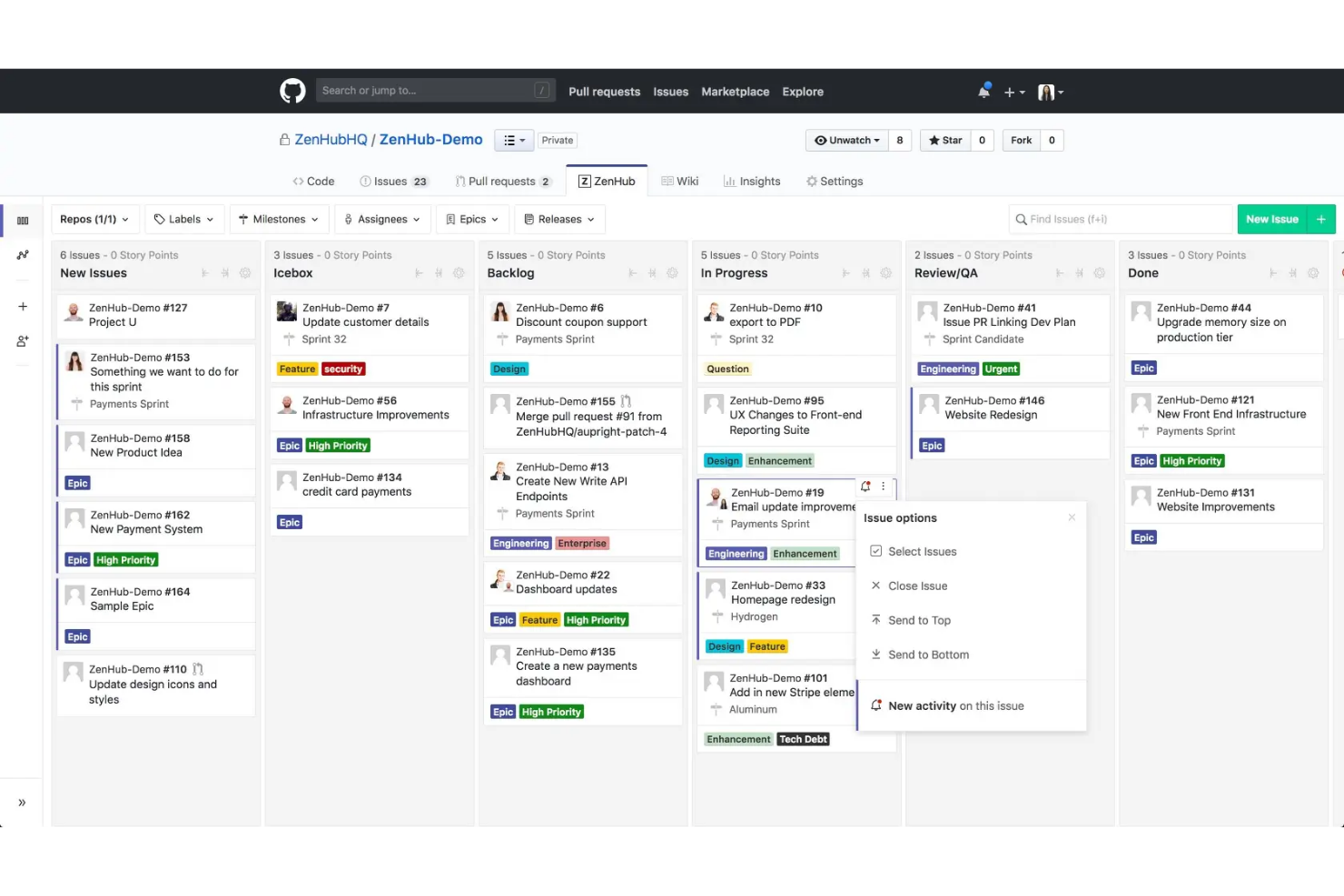
Zenhub delivers all-in-one project management features directly inside GitHub, making it ideal for fast-moving product and engineering teams. If you want to centralize your code, issues, and workflow activity without switching tools, I think Zenhub’s approach is worth considering.
Who Is Zenhub Best For?
Product and engineering teams who want to manage GitHub code, issues, and planning side-by-side.
Why Zenhub Is a Good Linear Alternative
I picked Zenhub specifically because it lives inside GitHub rather than sitting alongside it. My team connects our repositories and manages issues, pull requests, and sprint planning in one place, so there's no context switching between where code lives and where work gets tracked. I particularly like the automated sprint candidates feature, which pulls from prioritized backlog issues to generate sprint plans without manual setup. Zenhub's real-time release reports and burndown charts also update automatically as work closes in GitHub, giving me accurate delivery data without any extra input from the team.
Zenhub Key Features
- Team feed: A live view of what each team member is working on and where they're blocked, updated automatically.
- AI sprint summaries: Generates a human-readable summary of completed sprint issues without manual write-ups.
- Lead and cycle time reports: Measures how long issues take from creation to close, with filters by label, sprint, and assignee.
- Planning poker: A built-in estimation tool for teams to agree on story point values collaboratively.
Zenhub Integrations
Zenhub offers native integrations with GitHub, Slack, Jira, and provides an API for custom integrations.
Pros and Cons
Pros:
- Native estimation with planning poker
- Automated sprint planning features
- Full integration with GitHub workflows
Cons:
- Complex workflows for non-developers
- Limited outside GitHub without browser extension

Taiga
Best for agile sprints

Taiga is an open-source project management platform tailored for product teams and agile practitioners who want flexibility and transparency. With customizable boards and integrated backlog features, it offers a collaborative workspace for tracking complex development tools and workflows.
Who Is Taiga Best For?
Agile teams and product managers in software development who need flexible, open-source workflow tools.
Why Taiga Is a Good Linear Alternative
I picked Taiga because it's built around agile from the ground up, not bolted on as an afterthought. My team uses its sprint planning tools to define sprint goals, assign story points, and track velocity across iterations without needing to configure anything heavily upfront. I also appreciate Taiga's Kanban and Scrum modes, which let us switch between delivery styles depending on the workstream. For teams running structured sprints with real backlog discipline, that native agile scaffolding saves a lot of setup time.
Taiga Key Features
- Issue tracker: Log, assign, and filter bugs or tasks with custom fields and priority levels.
- Epics management: Group related user stories and issues under epics to track large-scale work.
- Wiki: Create and maintain project documentation directly within each project workspace.
- Team roles and permissions: Assign role-based access to control what each team member can view or edit.
Taiga Integrations
Taiga offers native integrations with GitHub, GitLab, Mattermost, Webhooks, and Slack and provides an API for custom integrations.
Pros and Cons
Pros:
- Native backlog and Epics management
- Sprint burndown and velocity charts
- Built-in wiki for internal documentation
Cons:
- Limited automation for repetitive workflows
- UI can feel dated and cluttered
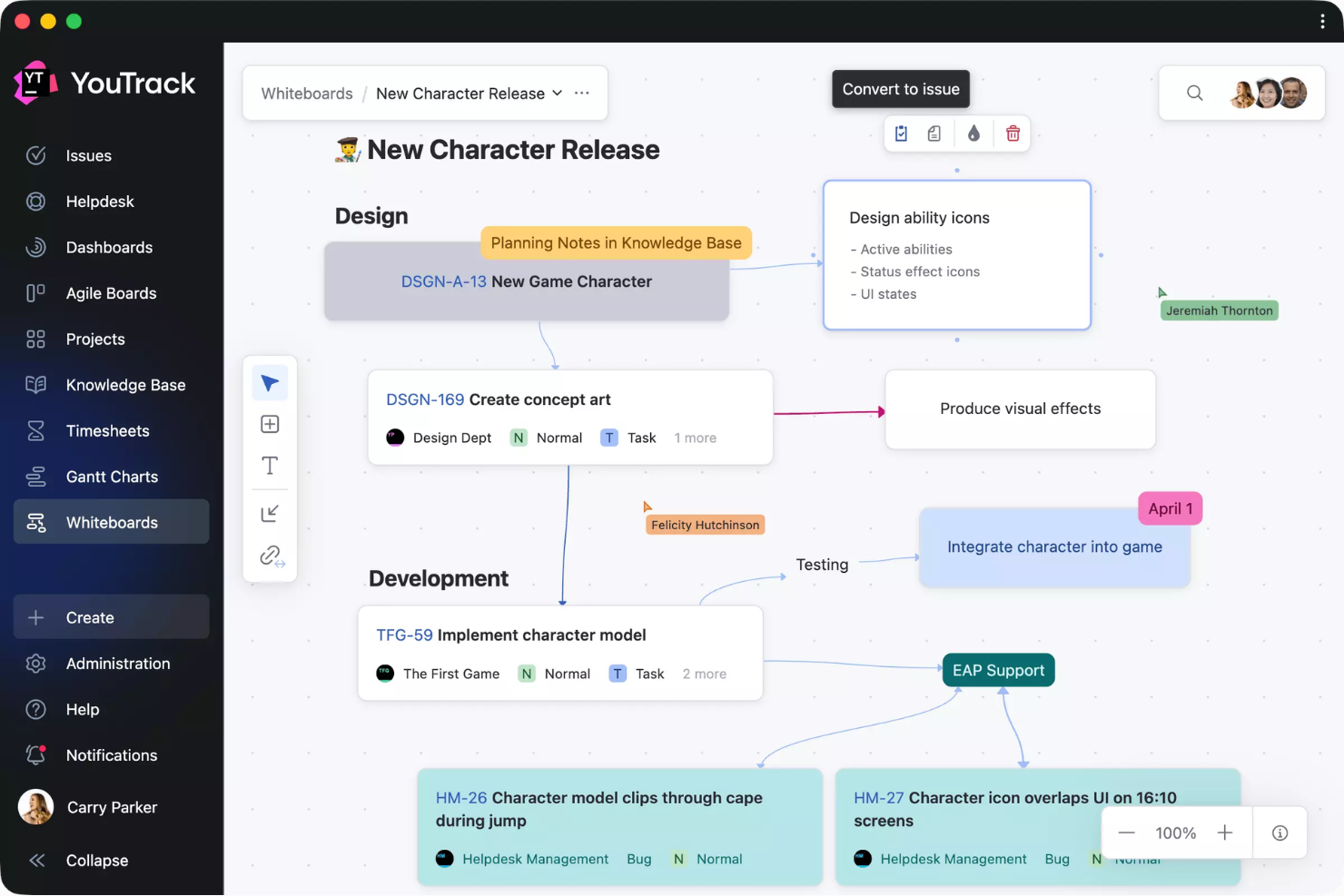
YouTrack is a project and issue tracking tool built for tech teams who need custom workflows and deep configurability. If your team values advanced search, agile boards, and automation beyond standard bug tracking, YouTrack is worth considering.
Who Is YouTrack Best For?
Mid-size and large development teams that need customizable workflows and advanced issue management across software projects.
Why YouTrack Is a Good Linear Alternative
I picked YouTrack because its AI features go deeper than what most issue trackers offer. The Text-to-Issue Transformation feature scans any selected text and turns action items into tasks in one shot—my team uses this during async standups and review threads to log issues without manual entry. I also like that AI Assistant generates summaries of tasks and support tickets regardless of thread length or language, which helps when I'm catching up on a long issue chain. The MCP server connection is a nice touch too, letting my team interact with YouTrack directly from an LLM or IDE agent.
YouTrack Key Features
- Agile boards: Run scrum or kanban boards with configurable swimlanes, estimations, and sprint planning built in.
- Custom workflows: Build automated state transitions and business rules using a built-in workflow editor.
- Smart search and saved queries: Filter issues using attribute-based search syntax and save queries for repeated use.
- Time tracking: Log work directly on issues and report across projects with built-in time management tools.
YouTrack Integrations
YouTrack offers native integrations with GitHub, GitLab, Bitbucket, Slack, Zendesk, Microsoft Teams, and Upsource, with an API available for custom integrations.
Pros and Cons
Pros:
- Built-in time tracking and reporting tools
- Bulk issue editing with advanced search filters
- Automation for bug reporting and description
Cons:
- Mobile apps lack feature parity with web version
- Interface feels cluttered for new users


Jira is project management software designed for teams that follow agile practices and need extensive configuration options. I think it's a strong fit if your business relies on customizable developer workflows and detailed tracking for complex projects.
Who Is Jira Best For?
Enterprise and mid-size product or engineering teams managing complex, collaborative projects with detailed workflow needs.
Why Jira Is a Good Linear Alternative
Jira's agile boards are the reason I keep recommending it to teams managing layered, sprint-based delivery. I particularly like how Jira's scrum boards let you configure columns, swimlanes, and estimation methods at a granular level—something Linear doesn't offer at the same depth. My team also uses Jira's backlog refinement tools to groom issues, assign story points, and sequence work before each sprint. For teams running parallel workstreams, that level of control over sprint planning is hard to match.
Jira Key Features
- Custom workflows: Map issue statuses to your team's actual delivery process using a drag-and-drop workflow editor.
- Advanced roadmaps: Plan and visualize work across multiple teams and projects on a single timeline view.
- Dependency management: Link issues to flag blockers and track relationships between tasks across projects.
- Reporting dashboards: Access built-in reports like velocity charts, burndown charts, and cumulative flow diagrams.
Jira Integrations
Jira offers native integrations with Confluence, Bitbucket, Trello, Slack, GitHub, Microsoft Teams, Google Drive, Dropbox, Zendesk, and Salesforce, plus supports marketplace integrations and provides an API for custom integrations.
Pros and Cons
Pros:
- Scales to large distributed teams
- Rich reporting and dashboard tools
- Advanced workflow automation built-in
Cons:
- Performance slows on large projects
- Setup complexity frustrates smaller teams


Superthread is a project management platform built for teams that want structured communication without sacrificing clarity or context. I think you’ll appreciate it if your business relies on keeping deep project discussions tightly connected to tasks, deadlines, and real-time status.
Who Is Superthread Best For?
Teams in fast-paced product or agency environments that need deep, organized discussions tied directly to project work.
Why Superthread Is a Good Linear Alternative
I picked Superthread because it treats threaded discussions as a first-class feature rather than an afterthought. Each thread is tied directly to a task or project, so when my team debates a design decision or a scope change, that conversation lives exactly where the work lives. I especially like how Pages lets us write detailed briefs or specs inline alongside tasks, which cuts down on the back-and-forth in external docs. For teams where context loss between tools is a real problem, Superthread keeps everything connected in one place.
Superthread Key Features
- Sprints: Plan and run time-boxed sprints with task assignment and progress tracking built in.
- Gantt chart: Visualize task timelines, dependencies, and deadlines across a project in a single view.
- Saved filters: Create and reuse custom task filters to surface the exact work view your team needs.
- AI meeting agent: Transcribe meetings, summarize outcomes, and automatically suggest tasks from discussion notes.
Superthread Integrations
Slack, GitHub, Microsoft Office 365, Google Calendar, and Zapier. An API is available for custom integrations.
Pros and Cons
Pros:
- Unique meeting AI for summaries
- Collaborative docs live alongside tasks
- Offers pay-what-you-want pricing
Cons:
- Lacks advanced board customization
- Limited native integrations


Bugasura is a bug tracking tool designed for product and QA teams who need fast, actionable feedback within digital project workflows. If you want a collaborative, user-friendly platform that cuts down the noise around reporting and resolving issues, Bugasura deserves a look.
Who Is Bugasura Best For?
Product and QA teams at digital-first companies who need an efficient, collaborative way to manage bug reporting and tracking.
Why Bugasura Is a Good Linear Alternative
I picked Bugasura because it's purpose-built for bug tracking in a way that Linear—despite its engineering focus—simply isn't. The reporter tool lets my team capture bugs directly from any browser without switching contexts, which cuts out a lot of manual documentation overhead. I also like the sprint-based bug management, where my team can assign, prioritize, and close bugs within timed cycles that mirror how QA actually works alongside product delivery. For teams where bug tracking is a daily workflow, not an afterthought, Bugasura keeps that process much tighter.
Bugasura Key Features
- AI issue description generation: Upload context documents to auto-generate issue descriptions, severity, type, and business impact for any logged bug.
- Voice note recording: Attach voice comments directly to issues to add context that text fields alone can't capture.
- Visual sprint reports: View sprint-level dashboards that surface top issues, open bug counts, and severity breakdowns in one place.
- Android reporter: Capture and report bugs on any Android app in a single tap, with CSS rulers for pixel-precise feedback.
Bugasura Integrations
Bugasura offers native integrations with Jira, Slack, and GitHub, and provides an API for custom integrations.
Pros and Cons
Pros:
- Voice note support for added context
- AI-powered issue description automation
- Browser-based reporter for instant bug capture
Cons:
- Lacks support for complex project hierarchies
- Limited workflow automation tools

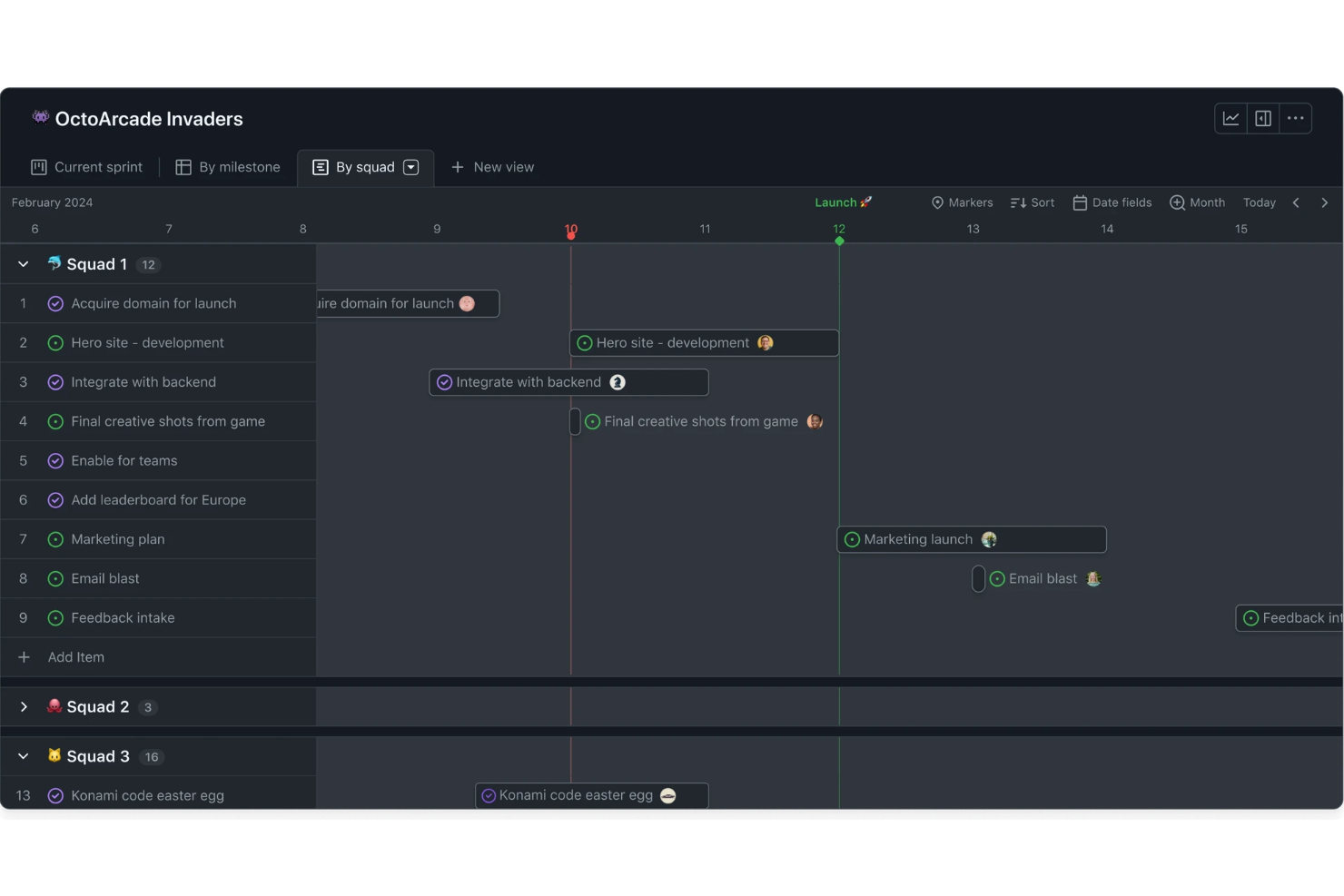
If your team’s already managing code in GitHub, GitHub Issues builds workflow management right into your development platform. It’s made for product and dev teams who want to track issues, plan sprints, and discuss work without constantly switching tools.
Who Is GitHub Issues Best For?
Development teams who already use GitHub to manage their code and want to keep project tracking within the same environment.
Why GitHub Issues Is a Good Linear Alternative
I picked GitHub Issues because it eliminates the gap between where code lives and where work gets tracked. When my team opens an issue, we can link it directly to a pull request, commit, or branch—so progress is visible without manual updates. I also rely on GitHub Projects to build kanban-style boards that sit right alongside our repos. For teams that live in GitHub, that kind of native integration means sprint planning and issue triage actually stay in sync with real development work.
GitHub Issues Key Features
- Sub-issue tracking: Break a large issue into smaller sub-issues and monitor their completion status using built-in progress indicators.
- Custom fields: Add metadata like priority, story points, dates, and iteration cycles directly to issues and projects.
- Project insights and burn-up charts: Track sprint health and identify bottlenecks across your current iteration or milestone.
- Automated workflows: Set up rules to triage issues, update custom field values, or archive items based on project activity.
GitHub Issues Integrations
GitHub Issues offers native integrations across the GitHub ecosystem, including GitHub Actions and GitHub Projects, and provides an API for custom integrations.
Pros and Cons
Pros:
- Built-in kanban boards for projects
- Automated issue linking to commits
- Embedded where developers track code
Cons:
- No dedicated sprint retrospective tools
- Limited reporting compared to Linear

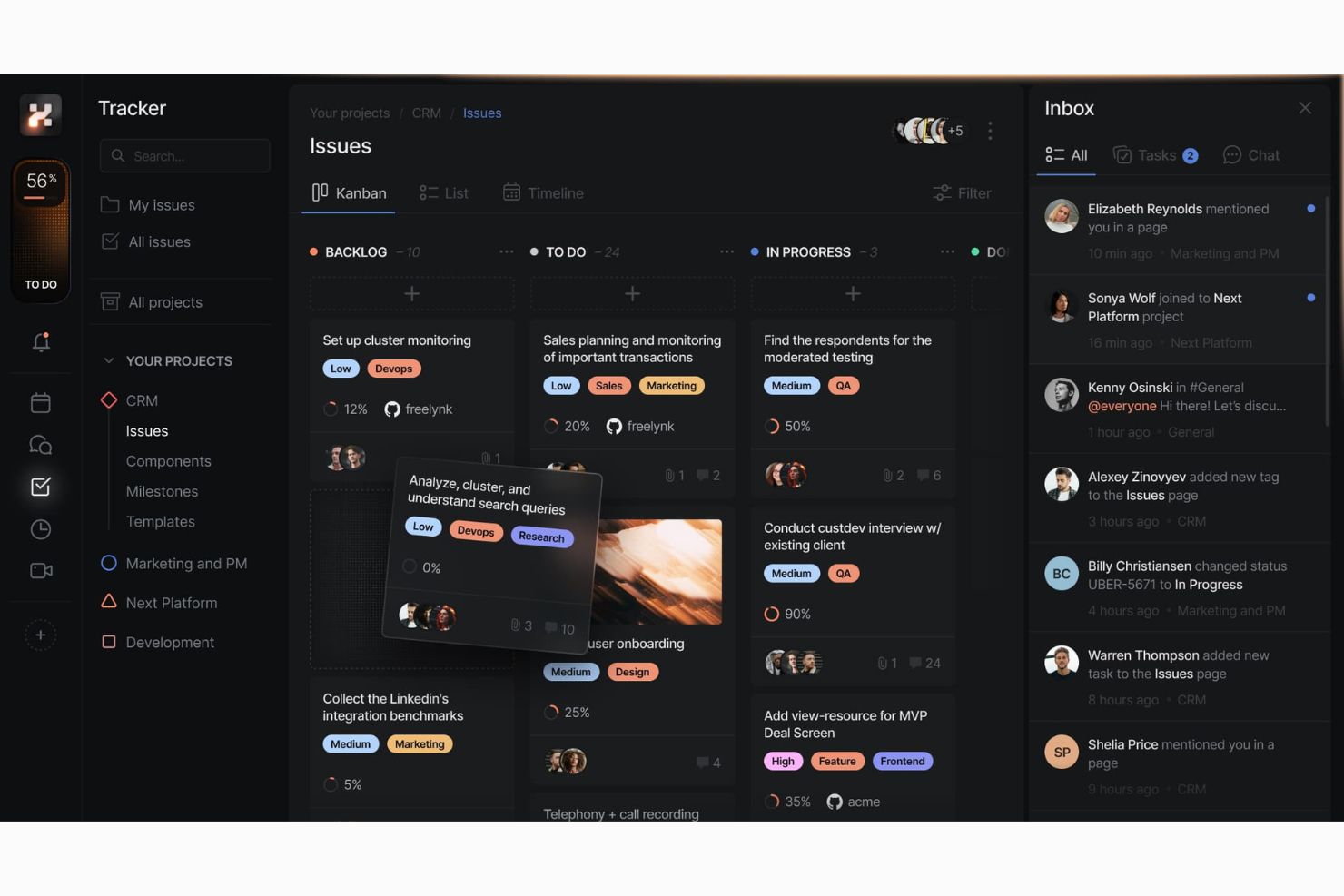
Huly is a visual project tracking platform designed for teams who need a clear view of project timelines and task dependencies. It appeals to managers, stakeholders, and collaborators who want a simple, centralized workspace to map, adjust, and communicate workflows across projects.
Who Is Huly Best For?
Project managers and cross-functional teams who need a centralized way to visualize deadlines, milestones, and dependencies across multiple projects.
Why Huly Is a Good Linear Alternative
I picked Huly because its team planner gives my team a shared calendar view of every scheduled task across projects, broken down by person. When someone drags an action item onto a time slot in their personal planner, it automatically surfaces on the team planner—so I can see who's committed to what, and when, without chasing updates. Milestone tracking layers on top of this, letting me group issues by project phase with set deadlines, which makes it easy to see how individual tasks map to larger delivery goals. For teams that want timeline visibility without a standalone roadmap tool, that combination covers a lot of ground.
Huly Key Features
- Issue tracking: Create, assign, and categorize issues with custom statuses, priorities, and labels across projects.
- Kanban boards: Visualize work in progress using drag-and-drop cards organized by status or assignee.
- Document collaboration tools: Create and edit shared documents alongside project tasks without leaving the platform.
- HR and member management: Manage team member profiles, roles, and department structure within the workspace.
Huly Integrations
Huly offers an API for custom integrations.
Pros and Cons
Pros:
- Milestone tracking links tasks to deadlines
- Team planner shows workload across departments
- Provides real-time project timeline visualization
Cons:
- No dedicated mobile apps currently offered
- Gantt chart view not available


Plane is an open-source project workflow platform designed for teams who want transparency, customization, and full control over their workspace. You’ll find it especially helpful if you need a flexible alternative with a strong community-driven approach to issues, cycles, and roadmapping.
Who Is Plane Best For?
Engineering and product teams who want a self-hosted, open-source platform with complete access to workflow customization.
Why Plane Is a Good Linear Alternative
I picked Plane because it's one of the few project management tools you can fully self-host, giving your team complete control over data residency and infrastructure. For teams with strict security or compliance requirements, that matters more than most cloud-first tools acknowledge. I particularly like Plane's Cycles feature, which mirrors sprint planning but works across any workflow type, not just engineering. The open-source codebase also means my team can extend and modify the platform in ways no SaaS-locked tool would allow.
Plane Key Features
- Intake: Capture and triage incoming requests, then convert them directly into work items without leaving your project.
- Epics and initiatives: Organize work across multiple layers, linking team-level epics up to org-level initiatives with rollup progress tracking.
- Multiple views: Switch between board, spreadsheet, list, and Gantt views to match how different roles on your team prefer to see work.
- Workflows and approvals: Build custom workflow stages with automated handoffs and stage gates without needing third-party plugins.
Plane Integrations
Integrations include GitHub, GitLab, Slack, Discord, and more.
Pros and Cons
Pros:
- Active, engaged community for support
- Advanced cycles and custom workflow builder
- Self-hosting option with data ownership
Cons:
- Limited analytics and reporting functionality
- Workflow automations are still basic
Andre alternativer til Linear
Her er noen flere alternativer til Linear som ikke kom med på kortlisten min, men som likevel er verdt å se nærmere på:
- Atono
With note-driven task management
- GoodDay
For customizable workflows
- Smartsheet
For spreadsheet-style project tracking
- Wrike
With advanced workflow automations
- Shortcut
For fast story-based planning
- Teamwork
For managing client deliverables
- Notion
With integrated wikis and docs
- Asana
For cross-team project collaboration
- ClickUp
For customizable task views


How I Evaluate Linear Alternatives
I consider two layers for each tool: the baseline capabilities—issue tracking, sprint cycles, developer integrations—and the differentiators that shape real team fit.
Core Functionality (Table Stakes For This List)
When I'm selecting tools for my list, I rank each one on a scale from 0 (does not offer the functionality) to 5 (excels in this area) for each core functionality listed below. Then, I calculate the tool's total score into a percentage. Each tool needs to achieve a minimum total score of 65% to be considered for inclusion.
- Issue Tracking: I check for sub-issues, custom fields, and dependencies—things like linking a bug to a parent epic and tracking blockers across teams.
- Sprint & Cycle Management: I look for sprint planning views, backlog grooming, and velocity tracking so teams can forecast delivery with real data.
- Roadmap & Project Planning: Multi-team roadmaps with milestones matter here—I evaluate how well a tool lets PMs tie daily work to quarterly initiatives.
- Multiple Work Views: Teams need Kanban, list, and timeline views at minimum. I check whether saved filters and custom views are available per user.
- Developer Tool Integrations: Native GitHub, GitLab, or Bitbucket connections plus Slack and CI/CD tools keep engineers inside their existing workflows.
- Keyboard Shortcuts & Command Menu: Fast navigation via shortcuts and a command palette is a hallmark of Linear's UX, so I look for comparable speed here.
Once I have a list of tools that meet this criteria, I consider what sets each platform apart.
Differentiating Factors (What Sets Vendors Apart)
Here's how I compare and contrast different vendors:
Standout Features
AI-powered triage is a big differentiator—tools that auto-assign issues or suggest priorities based on past patterns save engineering managers real time during sprint planning. I also look for built-in docs or wikis tied directly to issues, since context scattered across separate tools slows teams down. Custom workflow automations matter too. A no-code rule builder that moves issues between states or notifies the right people on status changes reduces the manual overhead that creeps in as teams scale.
Beyond Features
Performance is a major consideration—Linear set the bar for speed, so I evaluate whether alternatives feel equally fast when navigating large backlogs or searching across thousands of issues. Migration support also weighs heavily. A native importer from Linear, Jira, or GitHub Issues makes switching realistic for teams mid-project. Finally, I look at how pricing scales with team size, since a tool that works for a 10-person startup needs to remain viable at 200 seats without surprise cost jumps.
Hvorfor se etter et alternativ til Linear?
Selv om Linear er et godt valg av programvare for prosjektarbeidsflyt, finnes det flere grunner til at noen brukere ser etter alternative løsninger. Du ser kanskje etter et alternativ til Linear fordi …
- Du trenger en lokal eller selvhostet distribusjon
- Du trenger avanserte tillatelser eller brukerroller
- Teamet ditt håndterer komplekse avhengigheter og tidslinjer
- Du arbeider i en strengt regulert bransje
- Du trenger innebygd budsjettering eller økonomisk sporing
- Organisasjonen din krever omfattende tilpasningsmuligheter
Hvis noe av dette høres kjent ut, har du kommet til rett sted. Listen min inneholder flere alternativer for prosjektarbeidsflyt som passer bedre for team som møter disse utfordringene med Linear og ser etter alternative løsninger.
Viktige funksjoner i Linear
Her er noen av de viktigste funksjonene i Linear, slik at du kan sammenligne hva alternative løsninger tilbyr:
- Oppfølging av saker: Opprett, prioriter og administrer oppgaver, feil og forespørsler om funksjoner i organiserte prosjektstyrer, der teammedlemmer kan tildele ansvar og følge fremdriften i sanntid.
- Automatiserte arbeidsflyter: Bruk automatiseringer til å håndtere repetitive oppgaver, oppdatere statuser og utløse handlinger basert på endringer eller hendelser i arbeidsflyten, slik at prosjektene fortsetter fremover uten manuell inngripen.
- Veikart: Visualiser langsiktige planer, viktige initiativer og kommende sprinter på tvers av flere team for å hjelpe deg med å planlegge, kommunisere og følge den overordnede prosjektretningen.
- Syklusstyring: Organiser arbeidet i ukentlige eller to-ukentlige sykluser, slik at teamene kan planlegge, utføre og gjennomgå arbeidet i håndterbare trinn, med innebygd rapportering om syklusens fremdrift.
- Integrasjoner: Koble til integrasjoner med GitLab, Slack, Figma og GitHub for å holde kode, samtaler og produktdesignarbeid tett knyttet til konkrete prosjektoppgaver.
- Tastatursnarveier: Naviger, oppdater og administrer oppgaver raskt ved hjelp av et komplett utvalg tilpassbare tastatursnarveier, slik at erfarne brukere kan utføre flere handlinger på kortere tid.
- Tilpassede visninger: Filtrer og grupper saker basert på kriterier som ansvarlig, prioritet eller status for å se bare informasjonen som er relevant for arbeidsflyten eller teamstrukturen din.
- Teambaserte tillatelser: Kontroller tilgangen til sensitive prosjekter og data ved å angi ulike tillatelsesnivåer for enkeltpersoner, grupper eller team i arbeidsområdet ditt.
- Samarbeid i sanntid: Kommenter oppgaver, merk teammedlemmer og få umiddelbare varsler om prosjektutviklingen, slik at alle holdes informert og samkjørt.
- API-tilgang: Utnytt Linear sitt API til å bygge tilpassede integrasjoner, automatisere rapportering eller koble prosjektoppdateringer til andre forretningskritiske verktøy i verktøystakken din.