

I 10 migliori software per basi di conoscenza nel 2026

Elenco dei migliori software per basi di conoscenza


Il software per basi di conoscenza consente al tuo team di organizzare, archiviare e condividere le conoscenze aziendali in un hub digitale ricercabile. Se stai cercando la base di conoscenza giusta, probabilmente vuoi ridurre le domande ripetitive, mantenere aggiornata la documentazione dei prodotti e rendere le risposte facili da trovare sia per il tuo team sia per i clienti. Con così tante opzioni disponibili, scegliere lo strumento di gestione della conoscenza perfetto può influire sulla rapidità con cui il tuo team completa l’inserimento dei nuovi membri, gestisce la risoluzione dei problemi e collabora. Questa guida ti aiuterà a confrontare le principali soluzioni, comprenderne i punti di forza e trovare quella più adatta alle tue esigenze nel 2026.
Perché fidarsi dei nostri consigli sui software
Il nostro team testa e recensisce software dal 2012. In quanto project manager noi stessi, sappiamo quanto sia difficile — e importante — scegliere il software giusto.
Per questa guida, abbiamo valutato gli strumenti attraverso test pratici e ricerche indipendenti, assegnando un punteggio agli strumenti in base ai nostri criteri di selezione. Ci basiamo inoltre sulle competenze di leader di pensiero del settore e di professionisti attivi nella gestione dei progetti.
Le nostre recensioni riflettono il nostro giudizio editoriale umano, non un discorso di vendita.
Revisori esperti:
Tabella di confronto: software per basi di conoscenza
Questa tabella di confronto riassume i dettagli sui prezzi delle mie principali selezioni di software per basi di conoscenza.
| Tool | Best For | Trial Info | Price | ||
|---|---|---|---|---|---|
| 1 | Ideale per il controllo delle versioni e il ripristino degli articoli | Prova gratuita di 14 giorni + demo gratuita disponibile | Prezzo su richiesta | Website | |
| 2 | Ideale per guide interattive di assistenza autonoma | Prova gratuita di 14 giorni + demo gratuita disponibile | Prezzi su richiesta | Website | |
| 3 | Ideale per ticketing e automazione dei flussi di lavoro | Prova gratuita di 14 giorni + demo gratuita disponibile | Da $19/utente/mese (fatturato annualmente) | Website | |
| 4 | Ideale per l'integrazione con Microsoft Teams | Prova gratuita di 21 giorni + piano gratuito + demo gratuita disponibile | A partire da $12/agente/mese (fatturazione annuale) | Website | |
| 5 | Ideale per la condivisione della conoscenza aziendale | Demo gratuita disponibile | Prezzi su richiesta | Website | |
| 6 | Ideale per la documentazione collaborativa di team | Prova gratuita di 14 giorni + demo gratuita disponibile | Da $10/utente/mese (fatturati annualmente) | Website | |
| 7 | Ideale per l'organizzazione flessibile dello spazio di lavoro | Piano gratuito + demo gratuita disponibile | Da $10/membro/mese (fatturazione annuale) | Website | |
| 8 | Ideale per la ricerca di contenuti con intelligenza artificiale | Demo gratuita disponibile | Prezzi su richiesta | Website | |
| 9 | Ideale con l'integrazione dell'ecosistema Microsoft 365 | Prova gratuita di 30 giorni disponibile | Da $5.00/utente/mese (fatturazione annuale) | Website | |
| 10 | Ideale per l'integrazione con strumenti di progetto Atlassian | Prova gratuita di 7 giorni + piano gratuito disponibile | From $5.42/user/month | Website |

Recensioni dei migliori software per basi di conoscenza
Di seguito trovi i miei riepiloghi dettagliati dei migliori software per basi di conoscenza inclusi nel mio elenco. Le mie recensioni offrono una panoramica approfondita delle funzionalità, delle integrazioni e dei casi d’uso migliori di ogni piattaforma, per aiutarti a trovare quella più adatta a te.

Ideale per il controllo delle versioni e il ripristino degli articoli
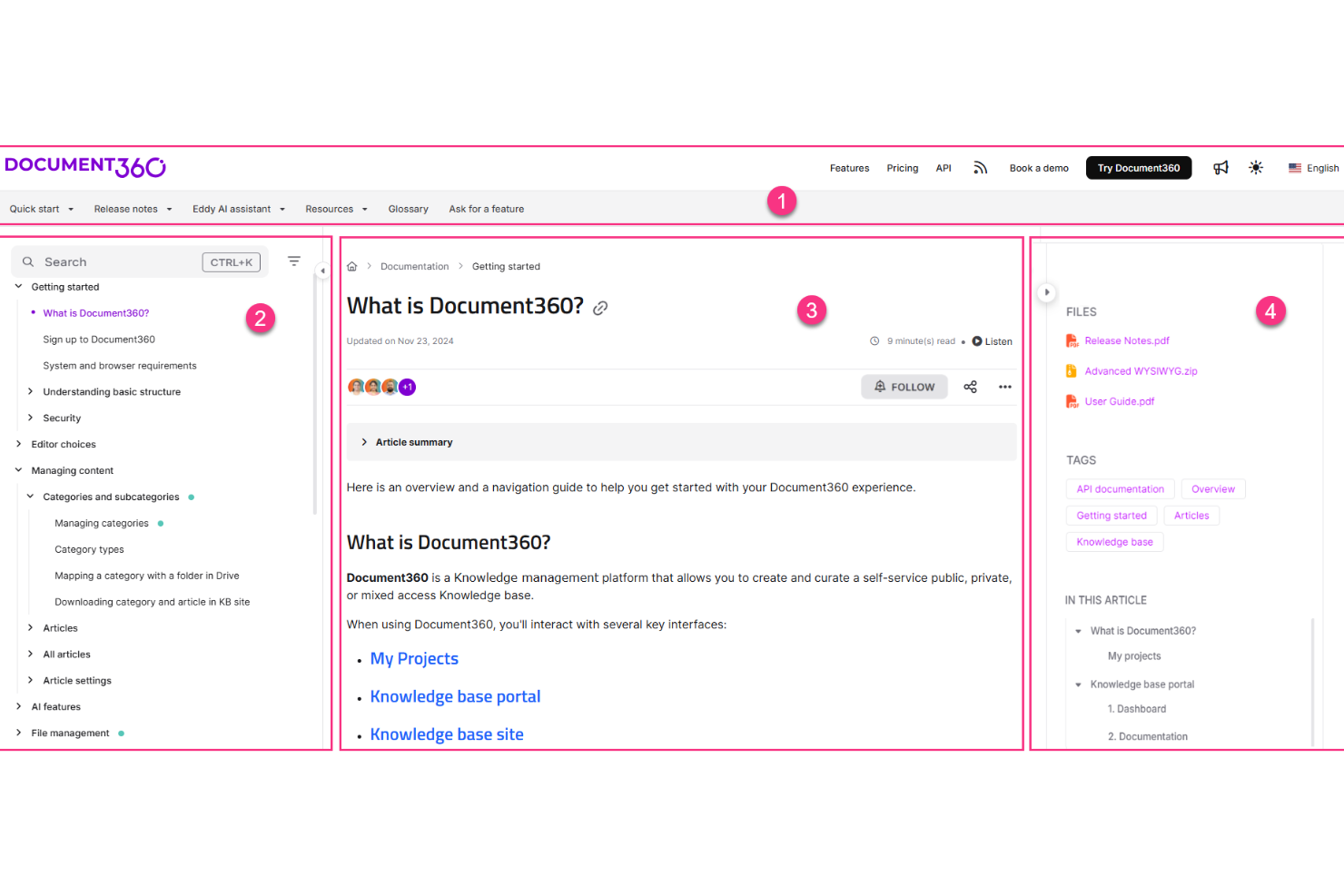
Document360 è una piattaforma dedicata alla gestione della knowledge base, progettata per creare, gestire e pubblicare documentazione self-service, incluse guide di prodotto, SOP, documenti API e wiki interni.
Per chi è ideale Document360?
Document360 è particolarmente adatto a team di prodotto e supporto di aziende SaaS di medie e grandi dimensioni che necessitano di una documentazione strutturata e scalabile.
Perché ho scelto Document360
Ho incluso Document360 tra le mie migliori scelte perché le sue funzionalità di versionamento e ripristino sono tra le più avanzate che abbia mai visto in uno strumento di knowledge base. Ogni articolo mantiene una cronologia completa delle modifiche e posso confrontare le versioni fianco a fianco per vedere esattamente cosa è stato modificato e da chi. Quando un aggiornamento dei contenuti introduce degli errori, tornare a una versione precedente pulita richiede solo pochi secondi, senza bisogno di aprire un ticket di supporto. La cronologia integrata degli audit rende anche facile tenere traccia di chi ha fatto quali modifiche all'interno di un grande team.
Funzionalità principali di Document360
- Ricerca potenziata dall’IA: Fornisce risultati di ricerca intelligenti e contestuali su tutta la knowledge base affinché i lettori trovino le risposte senza dover navigare.
- Gestione delle categorie: Permette di organizzare gli articoli in una gerarchia strutturata e multilivello, mantenendo la documentazione ampia facilmente navigabile.
- Widget per knowledge base: Integra la knowledge base direttamente nel tuo prodotto o sito web sotto forma di pannello di aiuto in-app.
- Flussi di revisione: Fa passare gli articoli attraverso stadi di approvazione definiti prima della pubblicazione, per garantire standard editoriali.
Integrazioni Document360
Le integrazioni includono Slack, Intercom, Zendesk, Salesforce, GitHub, Microsoft Teams e Google Chrome.
Pros and Cons
Pros:
- Supporta sia documentazione interna che esterna
- Flussi di approvazione personalizzati per la pubblicazione dei contenuti
- La ricerca con IA comprende le query in linguaggio naturale
Cons:
- Accesso limitato nelle app mobili
- Limita le metriche multi-workspace a singoli portali
New Product Updates from Document360

Document360 Adds Bulk Mirroring, Eddy AI Citations, and Unified SSO
Document360 adds bulk article mirroring, citations in Eddy AI chatbot responses, and a unified Enterprise SSO setup. These updates improve content reuse, answer verification, and access management. For more information, visit Document360’s official site.
 .
.
Stonly
Ideale per guide interattive di assistenza autonoma
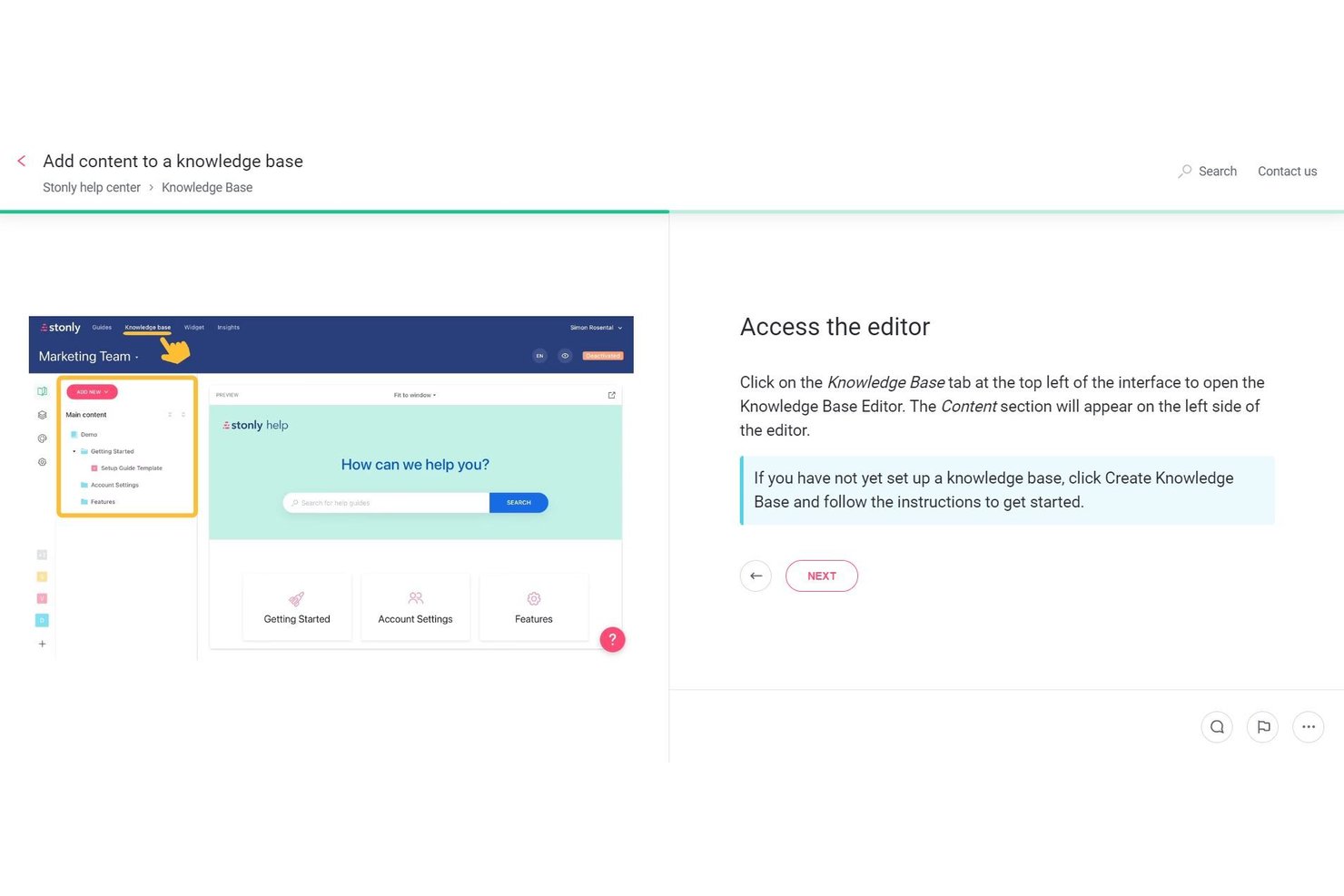
Stonly è una piattaforma per basi di conoscenza basata su guide interattive e ramificate che si adattano agli input degli utenti, combinando un editor WYSIWYG, una ricerca basata sull'AI e l'automazione dei flussi di lavoro per offrire esperienze di assistenza autonoma.
Per chi è più indicato Stonly?
Stonly è particolarmente adatto ai team di assistenza e successo clienti che devono offrire esperienze di assistenza interattive e autonome agli utenti finali.
Perché ho scelto Stonly
Ho scelto Stonly come una delle migliori soluzioni perché il suo formato di guida ramificata e interattiva cambia concretamente il modo in cui gli utenti navigano nell'assistenza autonoma. Invece di scorrere un articolo statico, gli utenti rispondono a domande e seguono un percorso personalizzato in base alla loro situazione. Trovo particolarmente interessante la funzionalità Risposte AI: utilizza contenuti strutturati delle guide e fonti collegate per fornire risposte conversazionali e accurate, con un tasso di accuratezza dichiarato del 92%.
Funzionalità principali di Stonly
- Agenti della base di conoscenza: agenti AI che monitorano continuamente la base di conoscenza alla ricerca di contenuti obsoleti, lacune e duplicati, quindi preparano aggiornamenti suggeriti da sottoporre alla tua revisione.
- Frammenti di contenuto modulari: blocchi di contenuto riutilizzabili che puoi creare una volta e incorporare in più guide per mantenere coerenti le informazioni senza aggiornamenti manuali.
- Analisi dell'intero percorso: monitora come gli utenti avanzano in ogni guida, passo dopo passo, inclusi i punti in cui abbandonano il percorso, così puoi individuare e risolvere gli elementi che creano attrito.
- Ricerca federata: raccoglie contenuti da fonti collegate come Confluence, Notion e Google Docs in un'unica esperienza di ricerca all'interno della tua base di conoscenza.
Integrazioni di Stonly
Stonly documenta le integrazioni con Confluence, Notion, Google Drive, SharePoint, Zendesk, Salesforce e Jira. Supporta inoltre Zapier e un'API per integrazioni personalizzate.
Pros and Cons
Pros:
- Le guide interattive ramificate si adattano agli input degli utenti
- Gli agenti AI monitorano continuamente i contenuti e suggeriscono aggiornamenti
- L'analisi dell'intero percorso rivela i punti in cui gli utenti abbandonano i contenuti
Cons:
- Manca una struttura wiki gerarchica per la documentazione
- Nessun modello o flusso di lavoro per la gestione dei progetti

Ideale per ticketing e automazione dei flussi di lavoro
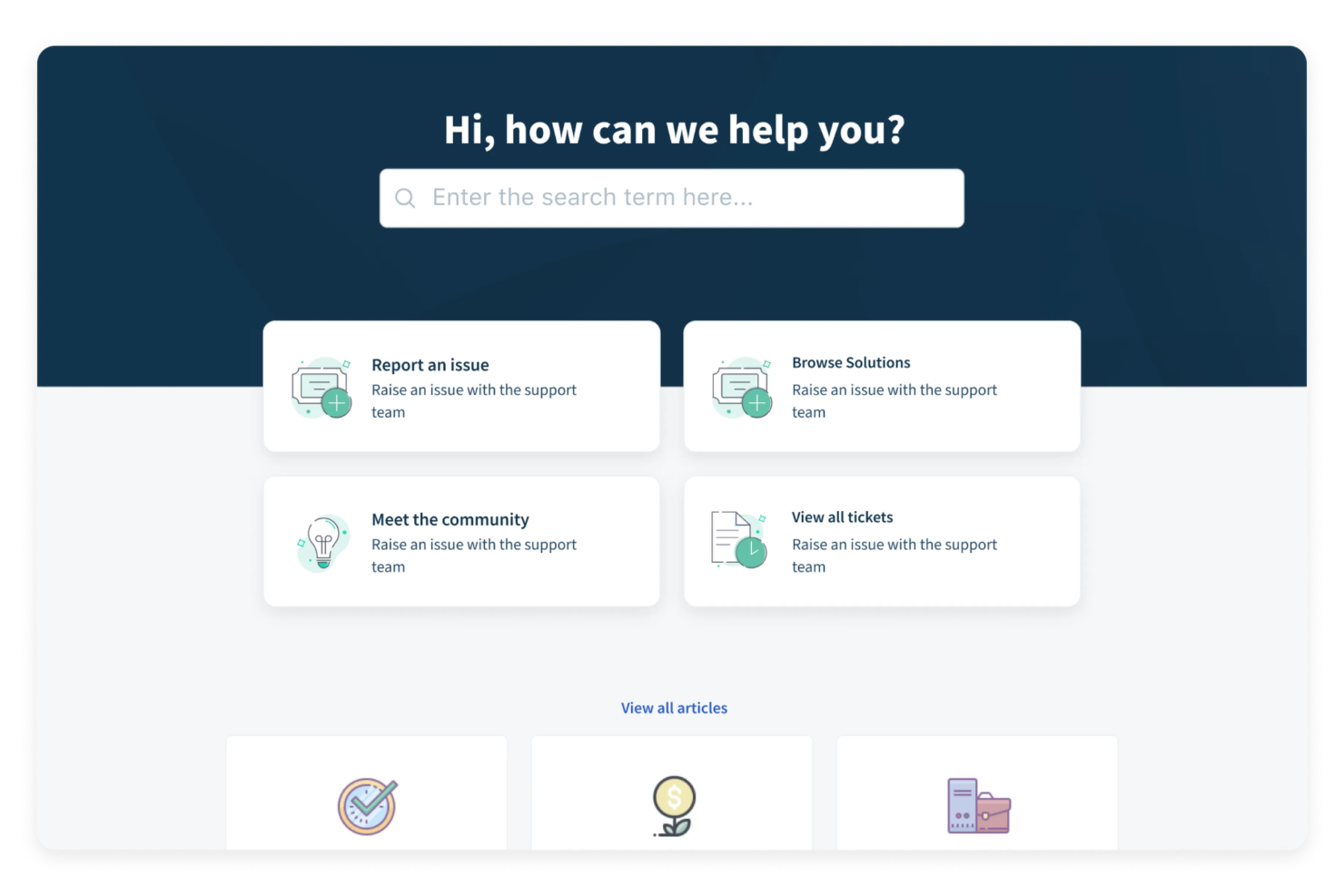
Freshdesk è una suite di assistenza clienti basata su cloud che include una knowledge base integrata, portali self-service personalizzabili, gestione dei ticket, forum della community e pubblicazione di articoli multilingue.
Per chi è ideale Freshdesk?
Freshdesk è ideale per team di assistenza clienti di medie dimensioni che necessitano di una piattaforma unica per gestire ticket, contenuti self-service e i flussi di lavoro degli agenti insieme.
Perché ho scelto Freshdesk
Ho incluso Freshdesk tra le mie scelte migliori perché le sue regole di smistamento dei ticket e automazione offrono ai team di supporto un controllo sul flusso di lavoro difficile da replicare altrove. Mi piacciono in particolare i trigger di automazione basati su eventi e orari: puoi impostare regole per assegnare, escalare e risolvere automaticamente i ticket in base a condizioni specifiche, riducendo il lavoro manuale di triage che gli agenti affrontano ogni giorno. Inoltre, l'instradamento dei ticket basato sulle competenze e le policy SLA multiple garantiscono che il ticket giusto arrivi all'agente giusto senza bisogno di interventi manuali.
Funzionalità principali di Freshdesk
- Editor per articoli della knowledge base: Crea, organizza e pubblica articoli di supporto in cartelle categorizzate con fino a cinque livelli di gerarchia.
- Ottimizzazione SEO: Aggiungi meta title, descrizioni e URL ottimizzati per la SEO agli articoli della knowledge base per migliorarne la visibilità nei motori di ricerca.
- Flussi di approvazione degli articoli: Inoltra gli articoli in bozza in un processo di revisione e approvazione prima della pubblicazione.
- Forum della community: Offri ai clienti uno spazio per porre domande, condividere feedback e trovare risposte dalla community, insieme alla tua knowledge base.
Integrazioni Freshdesk
Freshdesk offre oltre 1.200 app e integrazioni nel marketplace, tra cui Slack, Microsoft Teams, Shopify, Salesforce, Jira, Google Calendar, Google Analytics, Atlassian Jira Plus, Aircall e Freshsales Suite. È disponibile anche su Zapier e fornisce una REST API per integrazioni personalizzate.
Pros and Cons
Pros:
- Helpdesk e knowledge base condividono la stessa interfaccia
- Traduzione multilingue degli articoli integrata in alcuni piani
- Le risposte ai ticket possono essere convertite in articoli della knowledge base
Cons:
- L'editor degli articoli appare datato rispetto agli strumenti standalone
- Le prestazioni della ricerca peggiorano con alti volumi di articoli
New Product Updates from Freshdesk
Freshdesk Adds Analytics Charts to Team Dashboards
Freshdesk now lets teams add existing Analytics report charts to custom team dashboards from the same configuration pane used for live widgets. For more information, visit Freshdesk's official site.

Desk365
Ideale per l'integrazione con Microsoft Teams
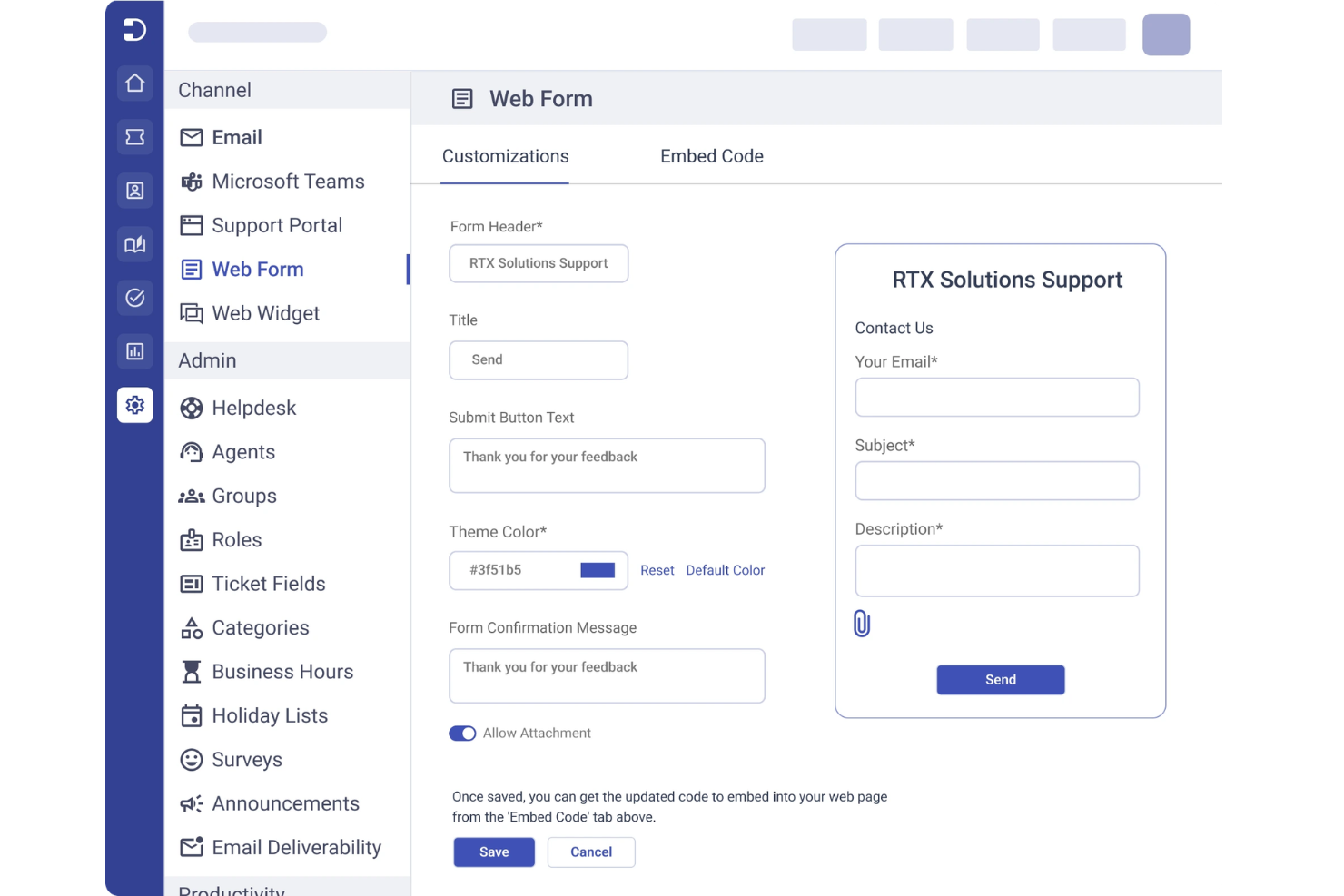
Desk365 è una piattaforma di helpdesk basata su cloud progettata per i team che desiderano gestire il supporto clienti e le richieste interne in un unico posto. È una scelta ideale per le organizzazioni che già utilizzano Microsoft 365 e che vogliono centralizzare la gestione dei ticket, automatizzare i flussi di lavoro e costruire una base di conoscenza facilmente ricercabile. Desk365 aiuta a ridurre i tempi di risposta e mantiene organizzate le informazioni di supporto sia per gli agenti che per gli utenti finali.
Per chi è Desk365?
Desk365 è particolarmente indicato per i team di supporto nelle organizzazioni che si affidano a Microsoft Teams per la comunicazione quotidiana e la gestione dei ticket.
Perché ho scelto Desk365
Ciò che distingue Desk365 è la profonda integrazione con Microsoft Teams, rendendolo una soluzione naturale per le organizzazioni che utilizzano già Teams come principale centro di comunicazione. Ho scelto Desk365 perché permette agli utenti di creare, gestire e cercare articoli della base di conoscenza direttamente all'interno di Teams, così gli agenti di supporto e i dipendenti non devono cambiare piattaforma per trovare risposte o risolvere ticket. La possibilità di automatizzare la creazione dei ticket dalle conversazioni in Teams e di mostrare in tempo reale i contenuti rilevanti della base di conoscenza aiuta a mantenere efficienti i flussi di lavoro di supporto e contestualmente pertinenti. Questo approccio è particolarmente prezioso per le aziende che desiderano mantenere tutte le attività di supporto e gestione della conoscenza all'interno del loro ambiente Microsoft 365 esistente.
Funzionalità chiave di Desk365
Altre funzionalità di Desk365 che gli acquirenti di basi di conoscenza dovrebbero conoscere includono:
- Campi ticket personalizzati: Aggiungi e configura campi personalizzati per raccogliere esattamente le informazioni di cui il tuo team ha bisogno per ogni richiesta di supporto.
- Risposte preimpostate: Crea e gestisci modelli di risposta riutilizzabili per domande e problemi frequenti.
- Portale clienti: Offri un portale self-service con il tuo marchio dove gli utenti possono inviare ticket e consultare articoli della base di conoscenza.
- Gestione SLA: Imposta, monitora e applica gli accordi sui livelli di servizio per garantire risposte e risoluzioni tempestive.
Integrazioni di Desk365
Le integrazioni includono Microsoft Teams, Microsoft 365, Outlook, Power Automate, Azure Active Directory, Jira, Slack, Salesforce, Google Workspace e Zapier.
Pros and Cons
Pros:
- Portale self-service facile da usare
- Prezzi accessibili
- Buona gestione utenti
Cons:
- Analisi della ricerca poco efficaci
- Non adatto a wiki complessi

Hub
Ideale per la condivisione della conoscenza aziendale

Hub è una piattaforma per la gestione della conoscenza e intranet che consente ai team di creare, organizzare e governare contenuti interni tramite pagine, documenti e cloud drive integrati.
Per chi è più adatto Hub?
Hub è ideale per organizzazioni di medie e grandi dimensioni che necessitano di un'intranet centralizzata per gestire la conoscenza interna tra più reparti o sedi.
Perché ho scelto Hub
Ho inserito Hub tra le mie migliori scelte perché adoro come gestisce la condivisione della conoscenza su larga scala in tutta l'organizzazione. La ricerca federata aggrega risultati da pagine intranet, documenti allegati e cloud drive connessi come Google Drive e SharePoint in un'unica query. Utilizzo anche i tag intelligenti (Smart Tags) per garantire che i contenuti giusti siano visibili ai team giusti, evitando che materiali HR affollino la sezione ingegneria, e viceversa.
Funzionalità principali di Hub
- Controllo delle versioni: Monitora le modifiche ai contenuti nel tempo con una cronologia di audit completa e la possibilità di ripristinare versioni precedenti delle pagine.
- Notifiche di scadenza dei contenuti: Imposta date di revisione sulle pagine affinché i proprietari vengano avvisati automaticamente quando è necessario aggiornare o convalidare i contenuti.
- Must Reads: Assegna pagine o documenti come letture obbligatorie e raccogli ricevute di presa visione per confermare l'avvenuto riconoscimento.
- CMS senza codice: Crea e modifica pagine utilizzando template predefiniti di contenuto senza necessità di competenze tecniche.
Integrazioni di Hub
Hub offre integrazioni con Microsoft 365 (inclusi SharePoint, OneDrive e Teams), Google Workspace, Slack, Confluence, Box, BambooHR ed Eventbrite. Supporta anche SSO tramite Microsoft Entra ID, Google, Office 365, OneLogin, OKTA e Duo Mobile. È disponibile un'API per integrazioni personalizzate.
Pros and Cons
Pros:
- La funzione Must Reads traccia la presa visione delle policy
- Gestione dei contenuti multi-sito integrata
- Assistente di scrittura AI per la creazione dei contenuti
Cons:
- La ricerca può non trovare contenuti molto annidati
- Nessuna opzione per una knowledge base per utenti esterni

Slite
Ideale per la documentazione collaborativa di team

Se il tuo team ha bisogno di uno spazio di lavoro per la documentazione collaborativa, Slite merita attenzione. La piattaforma è pensata per team che desiderano organizzare, discutere e aggiornare le conoscenze in un unico posto. È particolarmente utile per i team distribuiti che devono mantenere tutti allineati e informati man mano che i progetti evolvono.
A chi si rivolge principalmente Slite?
Slite è particolarmente adatto a team distribuiti e startup che necessitano di un punto centrale per la documentazione collaborativa e la condivisione delle conoscenze.
Perché ho scelto Slite
Quello che mi ha attirato verso Slite è la sua capacità di permettere la collaborazione in tempo reale sulla documentazione, essenziale per i team che devono co-redigere e aggiornare conoscenze insieme. La piattaforma supporta discussioni organizzate in thread direttamente all'interno dei documenti, così i team possono chiarire dettagli e risolvere questioni senza uscire dallo spazio di lavoro. Apprezzo anche il modo in cui Slite organizza i contenuti in canali e raccolte, facilitando a tutti la ricerca e il contributo alle informazioni giuste. Per i team che danno priorità ai flussi di lavoro collaborativi nella loro knowledge base, queste funzionalità rendono Slite una scelta interessante.
Funzionalità chiave di Slite
Altre funzionalità che rendono Slite utile per la gestione delle conoscenze includono:
- Modelli di documenti: Scegli da una libreria di modelli predefiniti per creare rapidamente note delle riunioni, documenti di progetto e articoli della knowledge base.
- Ricerca avanzata: Usa la ricerca per parola chiave e per filtri per trovare documenti, discussioni o allegati in tutto lo spazio di lavoro.
- Permessi di accesso: Imposta permessi dettagliati per canali, raccolte e singoli documenti per controllare chi può visualizzare o modificare i contenuti.
- Storico delle versioni: Tieni traccia delle modifiche e ripristina le versioni precedenti di qualsiasi documento per garantire accuratezza e responsabilità.
Integrazioni di Slite
Le integrazioni includono Slack, Jira, Google Drive, Figma, Asana, Trello, ClickUp, Notion, Loom e Miro.
Pros and Cons
Pros:
- Co-editing in tempo reale
- Ottimo per team da remoto
- Note giornaliere semplici
Cons:
- Mancano analisi approfondite
- Tipi di blocchi limitati

Notion
Ideale per l'organizzazione flessibile dello spazio di lavoro
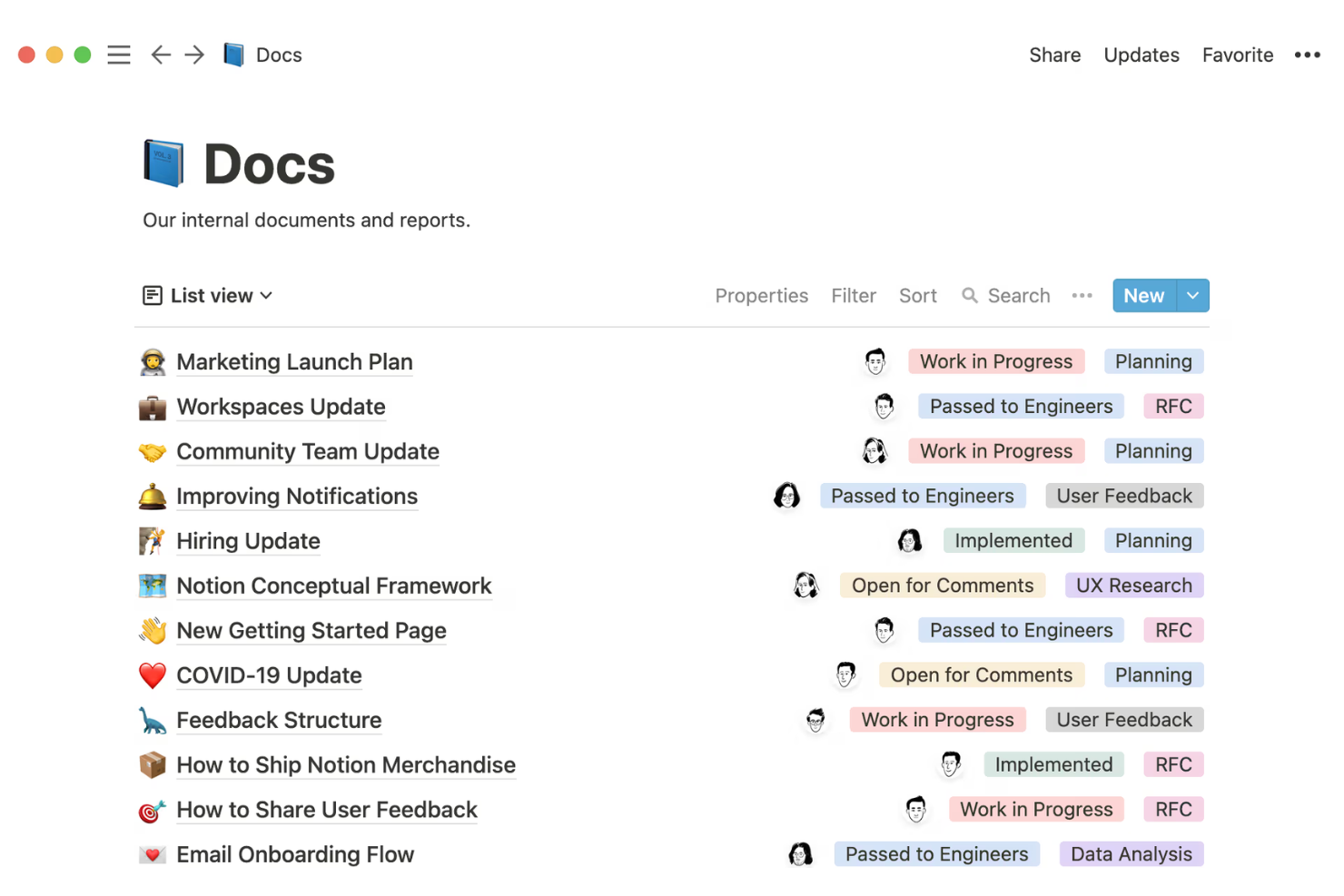
Notion offre una piattaforma altamente personalizzabile per i team che desiderano creare e organizzare la propria knowledge base da zero. È particolarmente apprezzato da startup, agenzie creative e aziende tecnologiche che hanno bisogno di strutture flessibili per la documentazione, le note di progetto e i wiki interni. Se il tuo team dà valore all'adattabilità e alla modifica collaborativa, Notion può aiutarti a centralizzare le informazioni e mantenere tutti allineati.
Per chi è ideale Notion?
Notion è una scelta eccellente per startup e team tecnologici che necessitano di uno spazio di lavoro flessibile e collaborativo per organizzare conoscenze e documentazione interne.
Perché ho scelto Notion
Ciò che distingue Notion tra i software di knowledge base è come permette di organizzare le informazioni in qualsiasi modo si adatti al flusso di lavoro del tuo team. Ho scelto Notion perché puoi creare database personalizzati, pagine nidificate e blocchi di contenuto collegati, così il tuo spazio di lavoro può evolversi con la crescita della documentazione. L'interfaccia drag-and-drop facilita la ristrutturazione dei contenuti, mentre i permessi dettagliati permettono di controllare chi può visualizzare o modificare ogni sezione. Questa flessibilità è particolarmente utile per i team che desiderano adattare la struttura della knowledge base alle mutevoli esigenze.
Funzionalità principali di Notion
Altre funzionalità che rendono Notion utile per la gestione della knowledge base includono:
- Cronologia delle versioni: Tieni traccia delle modifiche alle pagine e ripristina versioni precedenti quando necessario.
- Incorpora di contenuti multimediali: Aggiungi immagini, video, frammenti di codice e file direttamente nelle pagine di documentazione.
- Commenti sulle pagine: Consenti ai membri del team di lasciare feedback o porre domande direttamente su qualsiasi pagina.
- Galleria di template: Accedi a una libreria di template predefiniti per wiki, documenti e documentazione di progetto.
Integrazioni Notion
Le integrazioni includono Slack, Jira, GitHub, Asana, Google Drive, Figma, Trello, Webex, Typeform e Miro.
Pros and Cons
Pros:
- Potenti funzionalità AI
- Ampia galleria di template
- Ottimo rapporto qualità-prezzo
Cons:
- Controlli di accesso deboli
- Formattazione facilmente compromessa

Ideale per la ricerca di contenuti con intelligenza artificiale
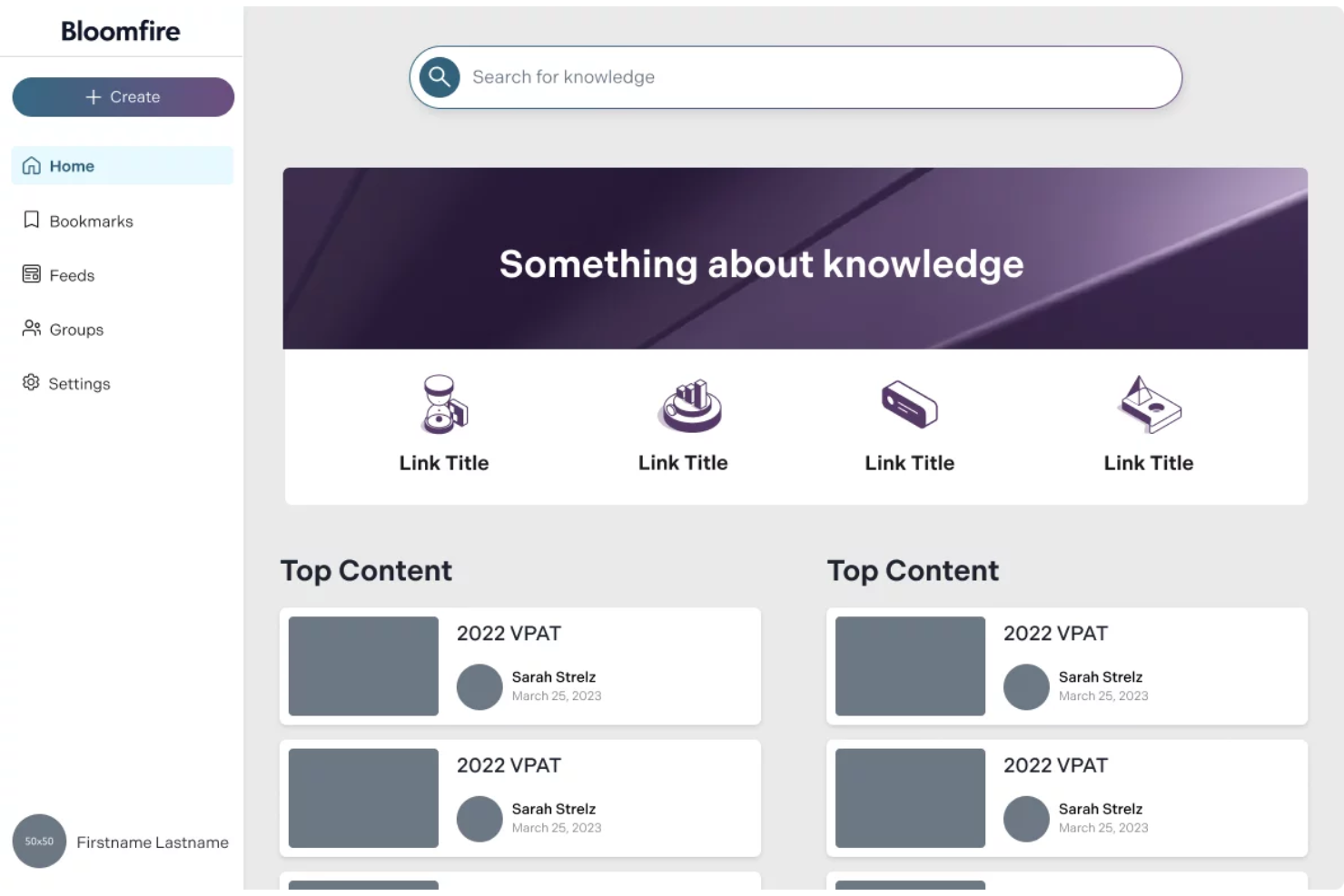
Se il tuo team ha bisogno di una knowledge base che renda la ricerca delle informazioni veloce e intuitiva, vale la pena dare un'occhiata a Bloomfire. La piattaforma è progettata per le organizzazioni che vogliono centralizzare la conoscenza e renderla facilmente ricercabile da parte di dipendenti o clienti. Il suo approccio si rivolge alle aziende che gestiscono grandi volumi di contenuti e hanno la necessità di ridurre il tempo trascorso a cercare risposte.
Per chi è ideale Bloomfire?
Bloomfire è adatto a organizzazioni di medie e grandi dimensioni che devono rendere grandi volumi di conoscenza interna facilmente ricercabili da team distribuiti.
Perché ho scelto Bloomfire
Ciò che mi ha colpito di Bloomfire è il modo in cui utilizza l'intelligenza artificiale per trasformare la ricerca dei contenuti all'interno di una knowledge base. La ricerca avanzata della piattaforma comprende domande formulate in linguaggio naturale, così gli utenti possono digitare le loro richieste come se chiedessero a un collega e ottenere risultati pertinenti. Apprezzo anche il modo in cui Bloomfire tagga e organizza automaticamente i contenuti, rendendo più facile per i team trovare rapidamente le informazioni giuste. Per le organizzazioni in cui una ricerca veloce e accurata è essenziale per la produttività, queste funzionalità rendono Bloomfire un candidato solido.
Caratteristiche principali di Bloomfire
Altre funzionalità che rendono Bloomfire utile per la gestione della conoscenza includono:
- Strumenti di moderazione dei contenuti: Assegna moderatori che revisionano, approvano o rifiutano i post prima che siano pubblicati.
- Supporto per media ricchi: Carica e condividi video, immagini e documenti direttamente all'interno della knowledge base.
- Permessi utente personalizzabili: Imposta controlli di accesso granulari per diversi team, dipartimenti o singoli utenti.
- Funzionalità di domande e risposte: Consenti agli utenti di porre domande e ricevere risposte che vengono archiviate e rese ricercabili per il futuro.
Integrazioni Bloomfire
Le integrazioni includono Salesforce, Slack, Microsoft Teams, Zendesk e Google Drive.
Pros and Cons
Pros:
- Funzionalità di auto-tagging
- Workflow Q&A efficace
- Ottima cura dei contenuti
Cons:
- Troppo avanzato per knowledge base basilari
- Struttura delle cartelle rigida

Ideale con l'integrazione dell'ecosistema Microsoft 365
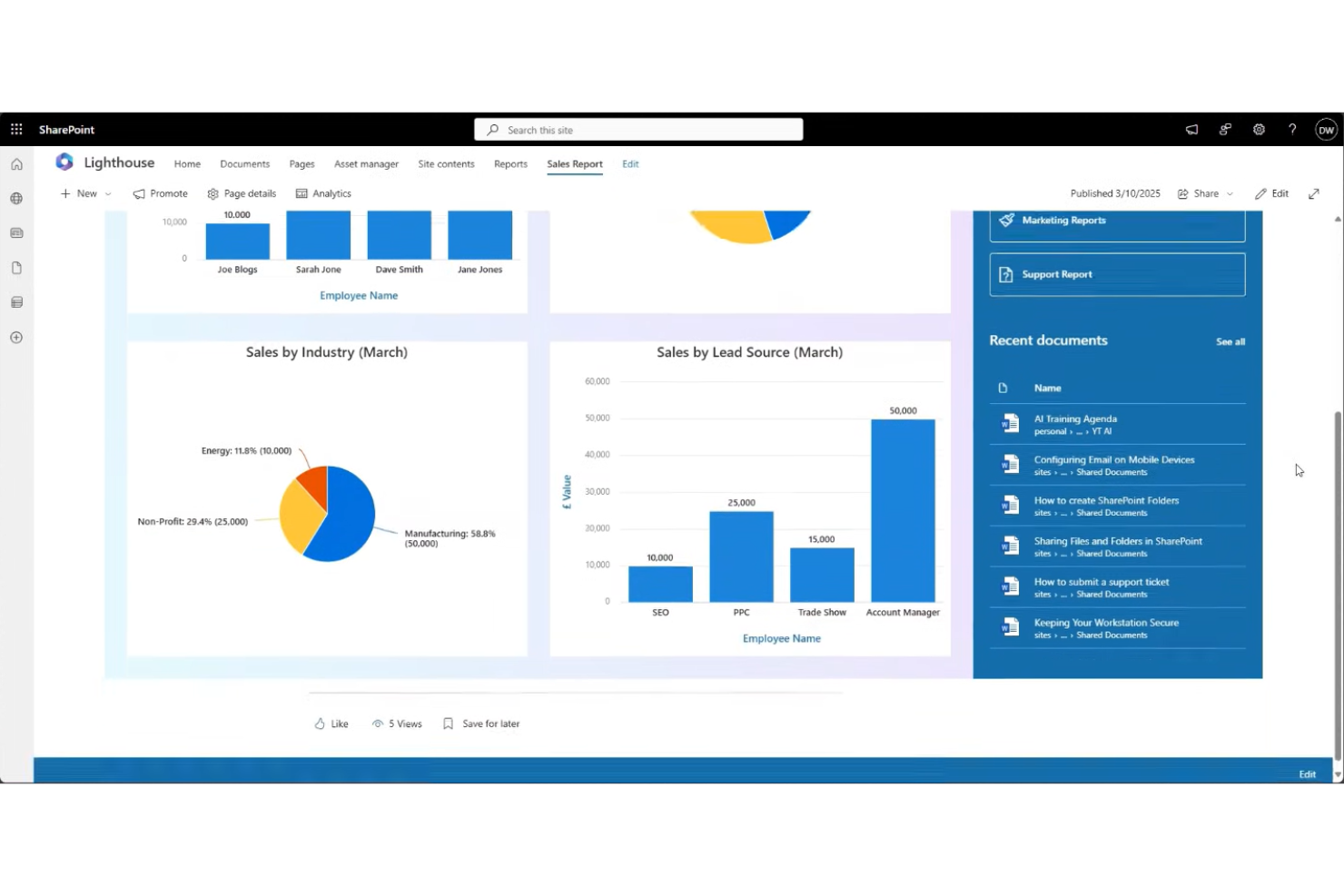
Se la tua organizzazione utilizza già Microsoft 365, Microsoft SharePoint offre un modo familiare per gestire e condividere la conoscenza interna. La piattaforma è progettata per le aziende che necessitano di una gestione sicura dei documenti, siti di team e intranet personalizzabili. SharePoint aiuta a centralizzare le informazioni aziendali e supporta la collaborazione tra reparti e sedi diverse.
A chi è consigliato Microsoft SharePoint?
SharePoint è particolarmente adatto a organizzazioni di medie e grandi dimensioni che richiedono una gestione sicura e centralizzata della conoscenza all'interno dell'ambiente Microsoft 365.
Perché ho scelto Microsoft SharePoint
Ciò che distingue Microsoft SharePoint come software di knowledge base è la sua profonda integrazione con l'ecosistema Microsoft 365. Ho scelto SharePoint perché permette ai team di creare, archiviare e gestire documenti direttamente insieme agli strumenti Microsoft già utilizzati come Teams, Outlook e OneDrive. Questa integrazione consente di incorporare file, automatizzare flussi di lavoro e controllare i permessi utilizzando lo stesso framework di identità e sicurezza su cui la tua organizzazione già fa affidamento. Per le aziende che desiderano una knowledge base perfettamente integrata nelle attività quotidiane e nelle policy IT, l'allineamento con l'ecosistema di SharePoint rappresenta un grande vantaggio.
Funzionalità principali di Microsoft SharePoint
Altre funzionalità che rendono SharePoint utile per la gestione della conoscenza includono:
- Modelli di sito personalizzabili: Crea siti di team, siti di comunicazione o portali di dipartimento su misura per la struttura della tua organizzazione.
- Versioning dei documenti: Tieni traccia delle modifiche e ripristina versioni precedenti dei file per mantenere accuratezza e responsabilità.
- Tagging dei metadati: Organizza e categorizza i documenti con tag personalizzati per facilitare la ricerca e il recupero.
- Funzionalità di ricerca avanzata: Usa filtri, parole chiave e metadati per individuare rapidamente documenti e informazioni all'interno della knowledge base.
Integrazioni di Microsoft SharePoint
Le integrazioni includono Microsoft Teams, OneDrive, Outlook, Microsoft Dynamics 365 e Power BI.
Pros and Cons
Pros:
- Protocollo di sicurezza elevato
- Ampio spazio di archiviazione file
- Capacità intranet
Cons:
- Funzione di ricerca debole
- Richiede l'intervento dell'IT per il deployment

Confluence
Ideale per l'integrazione con strumenti di progetto Atlassian

Confluence è una piattaforma di base di conoscenza progettata per i team che necessitano di documentazione strutturata e collaborativa. È particolarmente indicata per le organizzazioni che già utilizzano prodotti Atlassian o che gestiscono progetti complessi tra più reparti. I team possono utilizzare Confluence per centralizzare le informazioni, ridurre i silos e mantenere la documentazione accessibile mentre i progetti evolvono.
Per chi è ideale Confluence?
Confluence è adatto a project manager e team interfunzionali in organizzazioni di medie e grandi dimensioni che hanno bisogno di una documentazione strutturata e collaborativa.
Perché ho scelto Confluence
Ho scelto Confluence perché offre un'integrazione profonda con gli strumenti Atlassian per la gestione dei progetti, rendendolo una scelta naturale per i team che già utilizzano Jira o Trello. Questa integrazione consente agli utenti di collegare ticket di progetto, incorporare roadmap e fare riferimento alle attività direttamente all'interno degli articoli della base di conoscenza. Trovo questo particolarmente utile per mantenere la documentazione e il lavoro di progetto strettamente connessi, così i team hanno sempre il contesto più aggiornato. Confluence supporta inoltre template di pagina strutturati e permessi, che aiutano a mantenere coerenza e controllo man mano che la base di conoscenza cresce.
Funzionalità principali di Confluence
Altre funzionalità che rendono Confluence una solida piattaforma di base di conoscenza includono:
- Cronologia delle versioni delle pagine: Traccia le modifiche nel tempo e ripristina versioni precedenti di qualsiasi pagina.
- Ricerca avanzata: Utilizza filtri e parole chiave per individuare rapidamente articoli o documentazione rilevante.
- Commenti e feedback in linea: Permette ai membri del team di discutere i contenuti direttamente sulle pagine per una collaborazione in tempo reale.
- Dashboard di analisi: Monitora le visualizzazioni delle pagine, il coinvolgimento e i contenuti più popolari per comprendere come viene utilizzata la base di conoscenza.
Integrazioni di Confluence
Le integrazioni includono Jira, Jira Service Management, Trello, Loom, Bitbucket, Compass, Rovo, Jira Align, Focus e Talent.
Pros and Cons
Pros:
- Ottimo controllo delle versioni
- Ampia libreria di template
- Controlli di accesso avanzati
Cons:
- Tempi di caricamento lenti
- Gerarchia delle pagine disordinata
Altri software per basi di conoscenza
Ecco alcune ulteriori opzioni di software per basi di conoscenza che non sono entrate nel mio elenco, ma che vale comunque la pena prendere in considerazione:
- KnowledgeOwl
Ideale per permessi dettagliati sui contenuti
- Guru
Ideale per acquisire conoscenza tramite estensione browser
- Helpjuice
Ideale per opzioni di personalizzazione avanzata
- KnowledgeBase
Ideale per una configurazione e distribuzione rapide


Come Valuto il Software per la Base di Conoscenza
Scompongo la mia valutazione in due livelli: i requisiti di base che uno strumento deve soddisfare—come l'autorialità strutturata, la ricerca e le integrazioni con i software di gestione progetti (PM)—e i fattori che differenziano le migliori opzioni dal resto.
Funzionalità Core (Requisiti Fondamentali per Questa Lista)
Quando seleziono gli strumenti per la mia lista, valuto ciascuno su una scala da 0 (non offre la funzionalità) a 5 (eccelle in quest'area) per ogni funzionalità core elencata di seguito. Poi calcolo il punteggio totale dello strumento in percentuale. Ogni tool deve raggiungere un punteggio totale minimo del 65% per essere preso in considerazione.
- Creazione di Contenuti e Struttura: Valuto la flessibilità dell’editor e quanto si possono annidare profondamente le pagine—come l'organizzazione di un playbook di sprint in fasi, cerimonie e sottopagine di artefatti senza limiti predefiniti.
- Qualità di Ricerca e Recupero: Trovare una retrospettiva specifica di tre trimestri fa non dovrebbe richiedere più di pochi secondi, quindi verifico la presenza di ricerca full-text, filtri e tagging.
- Controlli di Accesso e Permessi: Esamino se sia possibile proteggere pagine sensibili di progetto (come i documenti di budget) per i leader, lasciando invece i wiki di processo aperti a tutto il team di delivery.
- Collaborazione e Cronologia delle Versioni: La co-modifica in tempo reale è fondamentale quando più PM aggiornano una runbook condivisa, quindi valuto commenti, tracciamento delle modifiche e la capacità di tornare a versioni precedenti.
- Integrazioni con gli Strumenti di Project Management: Strumenti come Jira, Asana e Monday sono centrali nei flussi di lavoro della maggior parte dei PM, perciò controllo le integrazioni native che collegano gli articoli di knowledge base alle attività e alle board attive.
- Template e Formati Riutilizzabili: Template preimpostati per project charter, post-mortem e matrici RACI fanno risparmiare ore nella fase di setup—valuto sia la libreria integrata sia la possibilità di creare template personalizzati.
Una volta che ho una lista di strumenti che soddisfano i criteri, considero ciò che distingue ciascuna piattaforma.
Fattori Differenzianti (Cosa Distingue i Fornitori)
Ecco come confronto i diversi fornitori:
Funzionalità Distintive
Le funzioni basate su intelligenza artificiale sono una grande discriminante—cerco strumenti che possano suggerire documenti rilevanti durante uno sprint o riassumere automaticamente lunghi post-mortem. Anche l’analisi dei contenuti è importante. Sapere quali pagine non vengono mai lette aiuta i PMO a individuare lacune nella conoscenza del team e a ritirare documentazione ormai obsoleta. L’automazione dei flussi di lavoro completa il quadro, grazie a promemoria di revisione automatizzati e archiviazioni programmate che impediscono ai wiki di progetto di diventare obsoleti tra una fase di delivery e l’altra.
Oltre le Funzionalità
Pongo particolare attenzione all’ecosistema di integrazione—la tua knowledge base deve potersi collegare con Slack, Teams e il sistema di file storage, non solo con il tool di project management. Anche il modello di prezzo è un aspetto rilevante, soprattutto se il vendor offre posti “viewer” gratuiti per stakeholder che devono solo consultare i documenti di progetto. Valuto anche il supporto alla migrazione, perché trasferire anni di documentazione da Confluence o SharePoint rappresenta un ostacolo concreto che il fornitore giusto può superare con strumenti dedicati.
Come scegliere il software per basi di conoscenza
È facile perdersi in lunghi elenchi di funzionalità e strutture tariffarie complesse. Per aiutarti a rimanere concentrato mentre affronti il tuo particolare processo di selezione del software, ecco un elenco di fattori da tenere a mente:
| Scalabilità | Cosa considerare |
|---|---|
| Scalabilità | Il software sarà in grado di gestire la crescita dei tuoi contenuti e della tua base utenti? Considera le dimensioni future del team e il volume degli articoli. |
| Integrazioni | Si collega in modo nativo agli strumenti che già utilizzi (ad esempio Slack, Teams o CRM)? Verifica la presenza di integrazioni dirette, non solo dell’accesso tramite API. |
| Personalizzazione | Puoi adattare categorie, branding e autorizzazioni ai tuoi flussi di lavoro e all’identità aziendale? |
| Facilità d’uso | Il tuo team e gli utenti finali lo adotteranno rapidamente? Cerca una navigazione intuitiva e requisiti minimi di formazione. |
| Implementazione e inserimento | Quanto tempo richiederà la configurazione e quali risorse saranno necessarie? Informati sul supporto alla migrazione, sui modelli e sull’assistenza per l’inserimento. |
| Costo | I livelli tariffari sono chiari e prevedibili man mano che cresci? Fai attenzione ai costi nascosti, ai limiti sul numero di utenti o agli addebiti aggiuntivi per le funzionalità fondamentali. |
| Misure di sicurezza | La piattaforma soddisfa i tuoi standard di protezione dei dati? Verifica la crittografia, i controlli di accesso e le certificazioni di conformità. |
| Disponibilità dell’assistenza | Quali canali di assistenza e tempi di risposta vengono offerti? Valuta se hai bisogno di supporto 24 ore su 24, 7 giorni su 7, o di un’assistenza dedicata per l’inserimento. |
Che cos’è il software per basi di conoscenza?
Il software per basi di conoscenza è una piattaforma digitale che consente alle organizzazioni di creare, organizzare e condividere informazioni in un archivio centralizzato e ricercabile. I team lo utilizzano per documentare i processi, rispondere alle domande frequenti e archiviare materiali di riferimento destinati sia al pubblico interno sia a quello esterno. Questo software aiuta a ridurre le richieste ripetitive, favorisce l’autoassistenza e garantisce che informazioni accurate e aggiornate siano sempre accessibili a chi ne ha bisogno.
Funzionalità
Quando selezioni un software per la base di conoscenza, presta attenzione alle seguenti funzionalità chiave:
- Gestione degli articoli: consente di creare, modificare, organizzare e pubblicare articoli, mantenendo le informazioni accurate e facili da aggiornare man mano che l'organizzazione cresce.
- Funzionalità di ricerca: offre agli utenti un modo rapido e intuitivo per trovare articoli o documenti pertinenti utilizzando parole chiave, filtri o tag.
- Organizzazione per categorie: consente di raggruppare gli articoli in cartelle o categorie, facilitando la consultazione e l'individuazione delle informazioni per argomento.
- Autorizzazioni degli utenti: consente di controllare chi può visualizzare, modificare o pubblicare contenuti, supportando sia la condivisione interna sia quella esterna delle conoscenze.
- Cronologia delle versioni: tiene traccia delle modifiche apportate agli articoli nel tempo, consentendo di esaminare, ripristinare o verificare le versioni precedenti secondo necessità.
- Branding personalizzato: consente di adattare l'aspetto e lo stile della base di conoscenza all'identità aziendale, inclusi loghi, colori e dominio.
- Feedback e valutazioni: consente agli utenti di valutare gli articoli o lasciare feedback, aiutando a individuare lacune o aree di miglioramento nella documentazione.
- Supporto multimediale: permette di incorporare immagini, video e allegati negli articoli per migliorarne la chiarezza e fornire spiegazioni più approfondite.
- Analisi e report: offre informazioni sull'utilizzo degli articoli, sulle tendenze di ricerca e sul coinvolgimento degli utenti, permettendo di misurare l'efficacia e individuare gli argomenti più popolari.
- Portale self-service: offre un'interfaccia dedicata in cui gli utenti possono cercare risposte, inviare domande o accedere alle risorse senza contattare l'assistenza.
Funzionalità comuni dell'IA
Oltre alle funzionalità standard dei software per la base di conoscenza elencate sopra, molte di queste soluzioni stanno integrando l'IA con funzionalità come:
- Suggerimenti automatici per gli articoli: utilizza l'IA per consigliare agli utenti articoli pertinenti in base alle loro query di ricerca o alle richieste di assistenza, riducendo il tempo dedicato alla ricerca delle risposte.
- Analisi delle lacune nei contenuti: analizza le ricerche e le interazioni degli utenti per individuare argomenti mancanti o aree poco sviluppate nella base di conoscenza, aiutando a stabilire le priorità per i nuovi contenuti.
- Assistenti conversazionali basati sull'IA: forniscono assistenza immediata e conversazionale rispondendo alle domande degli utenti e indirizzandoli agli articoli più pertinenti mediante l'elaborazione del linguaggio naturale.
- Etichettatura automatica dei contenuti: applica tag intelligenti agli articoli in base al loro contenuto, migliorando la precisione della ricerca e facilitando l'organizzazione di basi di conoscenza di grandi dimensioni.
- Riepilogo degli articoli: utilizza l'IA per generare riepiloghi concisi di articoli lunghi, consentendo agli utenti di cogliere rapidamente i punti chiave senza leggere l'intero documento.
Vantaggi
L'implementazione di un software per la base di conoscenza offre diversi vantaggi al team e all'azienda. Eccone alcuni:
- Accesso più rapido alle informazioni: la ricerca centralizzata e le categorie organizzate aiutano gli utenti a trovare rapidamente le risposte senza attendere l'assistenza.
- Documentazione coerente: il controllo delle versioni e le autorizzazioni garantiscono che tutti facciano riferimento alle informazioni più accurate e aggiornate.
- Riduzione delle richieste ripetitive: i portali self-service e i suggerimenti per gli articoli consentono agli utenti di risolvere autonomamente le domande più comuni.
- Inserimento migliorato: le risorse di formazione, i modelli e i tour guidati aiutano i nuovi membri del team a diventare operativi più rapidamente.
- Maggiore conservazione delle conoscenze: la gestione degli articoli e le analisi preservano il patrimonio di conoscenze aziendali e mettono in evidenza le lacune da colmare in futuro.
- Collaborazione migliorata: le funzionalità di feedback degli utenti, autorizzazione e modifica dei contenuti favoriscono i contributi tra team e la condivisione delle conoscenze.
- Assistenza scalabile: i flussi di lavoro automatizzati e gli strumenti basati sull'IA consentono alla base di conoscenza di crescere insieme all'azienda e alla sua base di utenti.
Costi e prezzi
La scelta di un software per la base di conoscenza richiede la comprensione dei vari modelli e piani tariffari disponibili. I costi variano in base alle funzionalità, alle dimensioni del team, ai componenti aggiuntivi e ad altri fattori. La tabella seguente riassume i piani più comuni, i relativi prezzi medi e le funzionalità tipicamente incluse nelle soluzioni software per la base di conoscenza:
Tabella di confronto dei piani
| Tipo di piano | Prezzo medio | Funzionalità comuni |
|---|---|---|
| Piano gratuito | $0 | Gestione di base degli articoli, spazio di archiviazione limitato, ricerca semplice e assistenza della comunità. |
| Piano personale | $5-$15/user/month | Articoli illimitati, analisi di base, identità del marchio personalizzata e assistenza via e-mail. |
| Piano aziendale | $10-$25/user/month | Autorizzazioni avanzate, integrazioni, cronologia delle versioni, analisi e assistenza prioritaria. |
| Piano per aziende | $20-$50/user/month | SSO, sicurezza avanzata, flussi di lavoro personalizzati, inserimento dedicato e assistenza di livello superiore. |
Domande frequenti sul software per basi di conoscenza
Ecco alcune risposte alle domande frequenti sul software per basi di conoscenza:
Come faccio a sapere se il mio team ha bisogno di un software per basi di conoscenza?
Se il tuo team dedica tempo a rispondere alle stesse domande o ha difficoltà a mantenere la documentazione organizzata e accessibile, probabilmente ha bisogno di un software per basi di conoscenza. Questo software aiuta a centralizzare le informazioni, rendendo più semplice per tutti trovare e aggiornare le risorse.
Il software per basi di conoscenza può essere utilizzato sia per il pubblico interno sia per quello esterno?
Sì, la maggior parte dei software per basi di conoscenza supporta sia l’uso interno sia quello esterno. Puoi impostare le autorizzazioni per controllare chi può visualizzare o modificare i contenuti, consentendoti di condividere le informazioni con dipendenti, clienti o partner secondo necessità. I team che si concentrano specificamente sulle conoscenze rivolte ai dipendenti possono utilizzare un software wiki interno a questo scopo.
Cosa devo cercare quando eseguo la migrazione da un sistema di documentazione esistente?
Cerca strumenti di importazione, supporto alla migrazione e compatibilità con i formati di file attuali. Valuta come il nuovo software gestisce la struttura, i collegamenti e le autorizzazioni degli utenti per evitare perdite di dati o confusione durante la transizione.
Quanto è sicuro il software per basi di conoscenza?
La maggior parte delle soluzioni offre crittografia, controlli degli accessi e certificazioni di conformità. Esamina sempre la documentazione sulla sicurezza del fornitore e chiedi informazioni sulle misure di protezione dei dati, soprattutto se gestisci informazioni sensibili o soggette a normative. Alcune soluzioni a codice aperto per basi di conoscenza supportano anche l’hosting autonomo per i team che desiderano un maggiore controllo sulla distribuzione e sui dati.
Con quale frequenza devo aggiornare i contenuti della mia base di conoscenza?
Aggiorna la tua base di conoscenza ogni volta che cambiano i processi, vengono lanciati nuovi prodotti o noti domande ricorrenti. Revisioni regolari e feedback degli utenti aiutano a mantenere le informazioni accurate e pertinenti per il tuo pubblico.