

18 migliori software di gestione della conoscenza con IA nel 2026

Miglior software di gestione della conoscenza basato sull'AI: selezione


Il software di gestione della conoscenza basato sull'AI utilizza l'intelligenza artificiale per organizzare, recuperare e rendere facilmente accessibili le informazioni contenute nei documenti, negli strumenti e nelle conversazioni del tuo team. Se cerchi un modo per gestire il sovraccarico di informazioni, velocizzare l'inserimento dei nuovi membri o aiutare i team a trovare davvero ciò di cui hanno bisogno, questi strumenti sono pensati per te.
Con così tante soluzioni che promettono ricerche più intelligenti e una collaborazione migliore, è difficile capire quali piattaforme mantengano davvero le loro promesse. Questa guida offre una panoramica chiara delle principali opzioni disponibili nel 2026, così puoi scegliere il software giusto per ottimizzare i flussi di lavoro e mantenere il tuo team connesso e informato.
Perché fidarsi dei nostri consigli sui software
Il nostro team testa e recensisce software dal 2012. In quanto project manager noi stessi, sappiamo quanto sia difficile — e importante — scegliere il software giusto.
Per questa guida, abbiamo valutato gli strumenti attraverso test pratici e ricerche indipendenti, assegnando un punteggio agli strumenti in base ai nostri criteri di selezione. Ci basiamo inoltre sulle competenze di leader di pensiero del settore e di professionisti attivi nella gestione dei progetti.
Le nostre recensioni riflettono il nostro giudizio editoriale umano, non un discorso di vendita.
Revisori esperti:
Tabella comparativa dei software di gestione della conoscenza basati sull'AI
Questa tabella comparativa riassume i dettagli sui prezzi delle mie principali selezioni di software di gestione della conoscenza basato sull’AI.
| Tool | Best For | Trial Info | Price | ||
|---|---|---|---|---|---|
| 1 | Ideale per catturare e condividere la conoscenza delle riunioni | Prova gratuita di 14 giorni + demo gratuita disponibile | Da $10/utente/mese (fatturato annualmente) | Website | |
| 2 | Ideale per automazione integrata dello spazio di lavoro | Prova gratuita + piano gratuito + demo gratuita disponibili | Da $10/membro/mese (fatturato annualmente) | Website | |
| 3 | Ideale per integrare l’AI nelle applicazioni Microsoft | Demo gratuita disponibile | A partire da $18/mese (fatturazione annuale) | Website | |
| 4 | Ideale per informazioni sulla conoscenza orientate alle attività | Piano gratuito disponibile | A partire da $9/utente/mese | Website | |
| 5 | Ideale per la collaborazione documentale tra team | Prova gratuita di 7 giorni + piano gratuito disponibile | Da $5.42/utente/mese | Website | |
| 6 | Ideale per la trascrizione di riunioni potenziata dall'AI | Piano gratuito + demo gratuita disponibile | Da $10/sede/mese (fatturato annualmente) | Website | |
| 7 | Ideale per la verifica della conoscenza in tempo reale | Non disponibile | Prezzo su richiesta | Website | |
| 8 | Ideale per rispondere a domande in linguaggio naturale | Piano gratuito + prova gratis di 30 giorni disponibile | Da $15/utente/mese | Website | |
| 9 | Ideale per integrazione dati su Google Cloud | Demo gratuita disponibile | Prezzo su richiesta | Website | |
| 10 | Ideale per la ricerca di conversazioni nelle chat | Piano gratuito disponibile | Da $7.25/utente/mese (fatturazione annuale) | Website |
Recensioni dei migliori software di gestione della conoscenza basati sull'AI
Di seguito trovi i miei riepiloghi dettagliati dei migliori software di gestione della conoscenza basati sull’AI inclusi nella mia selezione. Le mie recensioni offrono uno sguardo approfondito sulle funzionalità, le integrazioni e i casi d’uso migliori di ciascuna piattaforma, per aiutarti a trovare quella più adatta a te.

Slite
Ideale per catturare e condividere la conoscenza delle riunioni
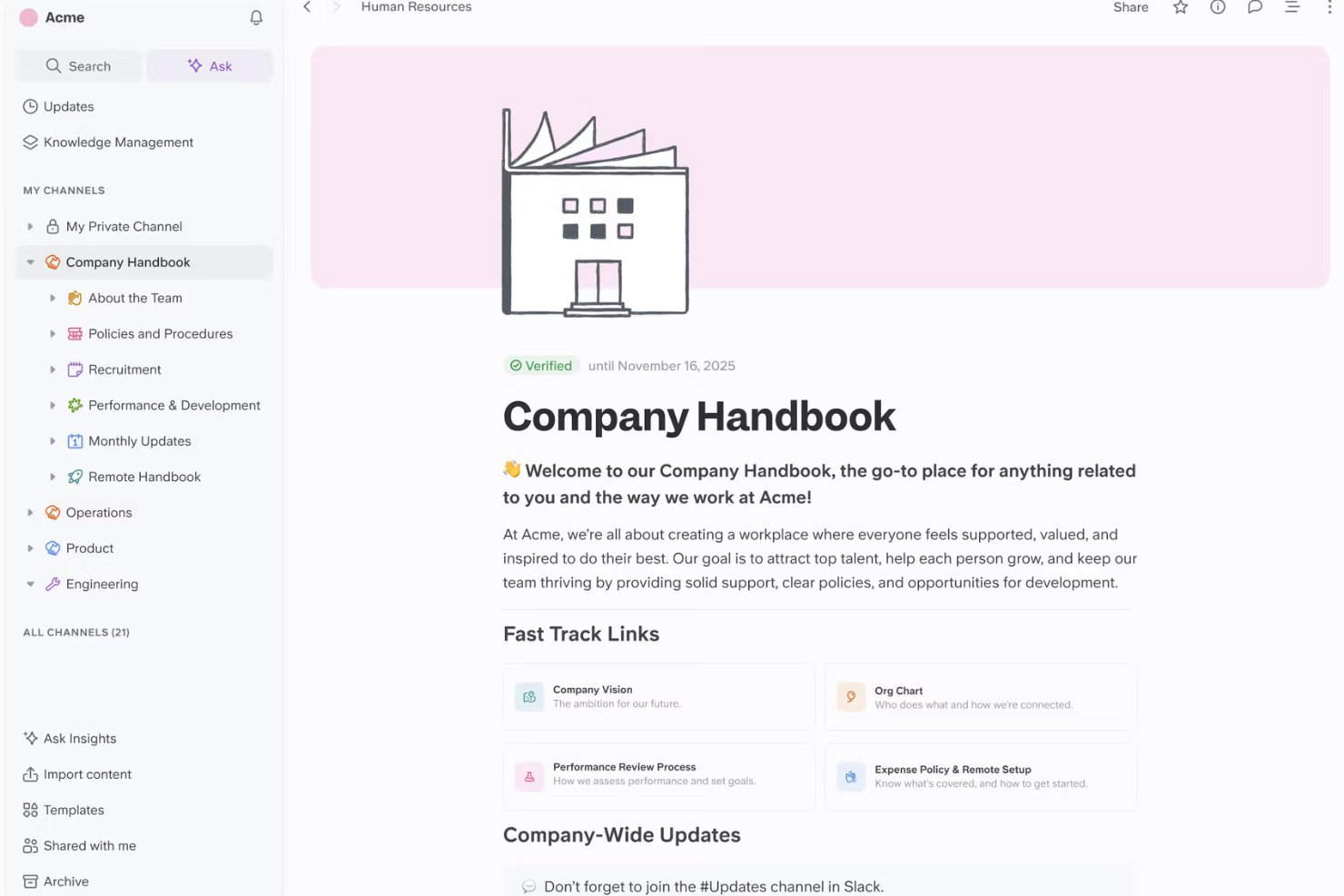
Slite è una piattaforma collaborativa di gestione della conoscenza con funzioni di acquisizione delle note delle riunioni, ricerca assistita dall’intelligenza artificiale e condivisione di documenti, progettata per i team che vogliono organizzare le conoscenze aziendali.
Per chi è Slite?
Slite è indicato per team distribuiti di prodotto o progetto che devono acquisire, organizzare e condividere in tempo reale dettagli e decisioni prese nelle riunioni.
Perché ho scelto Slite
Ho scelto Slite tra i migliori perché posso prendere appunti durante le riunioni in tempo reale, trasformare immediatamente queste note in conoscenza ricercabile e usare l’IA per riassumere o organizzare le decisioni chiave a cui il mio team potrà accedere in seguito.
Funzionalità principali di Slite
- Assistente IA: Genera risposte alle domande utilizzando i contenuti dello spazio di lavoro.
- Verifica dei documenti: Permette di contrassegnare i contenuti come verificati o obsoleti.
- Modelli per base di conoscenza: Fornisce modelli predefiniti per guide e documentazione.
- Permessi di accesso: Controlla chi può visualizzare o modificare documenti specifici.
Integrazioni di Slite
Slite offre integrazioni native con Slack, Google Drive e GitHub, e mette a disposizione un’API per integrazioni personalizzate.
Pros and Cons
Pros:
- Le note delle riunioni si sincronizzano istantaneamente in tutti gli spazi del team
- La verifica IA dei documenti segnala la conoscenza obsoleta
- I commenti in thread permettono discussioni focalizzate nel team
Cons:
- Accesso offline limitato alla documentazione
- Mancano opzioni di esportazione dettagliate per i contenuti
Ideale per automazione integrata dello spazio di lavoro

Notion AI è una piattaforma workspace potenziata dall'intelligenza artificiale che combina creazione di documenti, gestione di basi di conoscenza, generazione automatica di contenuti e modifica collaborativa in un unico ambiente per il tuo team.
Per chi è più indicato Notion AI?
Notion AI si adatta a startup e team interfunzionali che necessitano di uno spazio di lavoro tutto-in-uno per gestire documenti, note di progetto e conoscenze organizzative.
Perché ho scelto Notion AI
Ho scelto Notion AI come uno dei migliori perché utilizzo le sue automazioni per generare, riassumere e organizzare documenti mentre raccogliamo conoscenza in tempo reale, e collego i flussi di lavoro potenziati dall'IA direttamente ai nostri documenti e database.
Funzionalità principali di Notion AI
- Pagine collegate ai database: Collega direttamente le pagine ai database per una gestione unificata delle informazioni.
- Template personalizzati: Crea modelli riutilizzabili per note di riunione, basi di conoscenza o specifiche di progetto.
- Comandi IA inline: Attiva azioni come riscrittura o brainstorming direttamente all'interno di qualsiasi documento Notion.
- Gestione dei permessi: Controlla l'accesso e i diritti di modifica a livello di pagina o workspace.
Integrazioni di Notion AI
Notion AI offre integrazioni native con Slack, GitHub, Jira, Asana, Google Drive, Google Calendar, Figma, Zoom e Microsoft Teams. Si collega con Zapier e fornisce anche una API per integrazioni personalizzate.
Pros and Cons
Pros:
- L'IA riassume e genera contenuti informativi in modo semplice
- Unifica profondamente documenti, wiki e database
- Le automazioni dello spazio di lavoro collegano dati e documenti
Cons:
- Le funzionalità IA richiedono un costo aggiuntivo
- Configurare i permessi avanzati può essere complicato

Ideale per integrare l’AI nelle applicazioni Microsoft

Microsoft 365 Copilot è una soluzione per la produttività e la gestione della conoscenza basata sull'intelligenza artificiale che introduce funzionalità di AI generativa e recupero intelligente dei dati direttamente nelle app di Microsoft 365 come Word, Excel, Outlook, Teams e PowerPoint.
Per chi è ideale Microsoft 365 Copilot?
Microsoft 365 Copilot è particolarmente adatto per utenti aziendali e team enterprise che già lavorano nell'ecosistema Microsoft 365.
Perché ho scelto Microsoft 365 Copilot
Ho scelto Microsoft 365 Copilot perché utilizzo regolarmente l'AI generativa per riassumere email, generare documenti da prompt e recuperare conoscenza contestuale all'interno di Teams e Outlook, senza mai uscire dalle app di Microsoft 365.
Funzionalità principali di Microsoft 365 Copilot
- Integrazione dati con Microsoft Graph: Si collega in modo sicuro a documenti, calendario e dati di comunicazione della tua organizzazione.
- Prompt contestuali in-app: Permette di fare domande e impartire comandi direttamente in Word, Excel e PowerPoint.
- Resoconti automatici delle riunioni: Genera punti salienti, decisioni e azioni dopo le riunioni su Teams.
- Sicurezza dei dati di livello enterprise: Protegge i dati tramite le soluzioni di sicurezza, conformità, privacy di Microsoft 365 e quadri GDPR rafforzati.
Integrazioni di Microsoft 365 Copilot
Microsoft 365 Copilot offre integrazioni native in tutto l'ecosistema Microsoft, incluso Microsoft 365 e Azure. È disponibile una API per integrazioni personalizzate.
Pros and Cons
Pros:
- Integra AI generativa nelle app di Microsoft 365
- Fornisce approfondimenti contestuali utilizzando i dati aziendali
- Automatizza i resoconti delle riunioni e i riepiloghi della conoscenza
Cons:
- Richiede licenza e conformità Microsoft 365
- Personalizzazione limitata oltre l'ecosistema Microsoft
Ideale per informazioni sulla conoscenza orientate alle attività
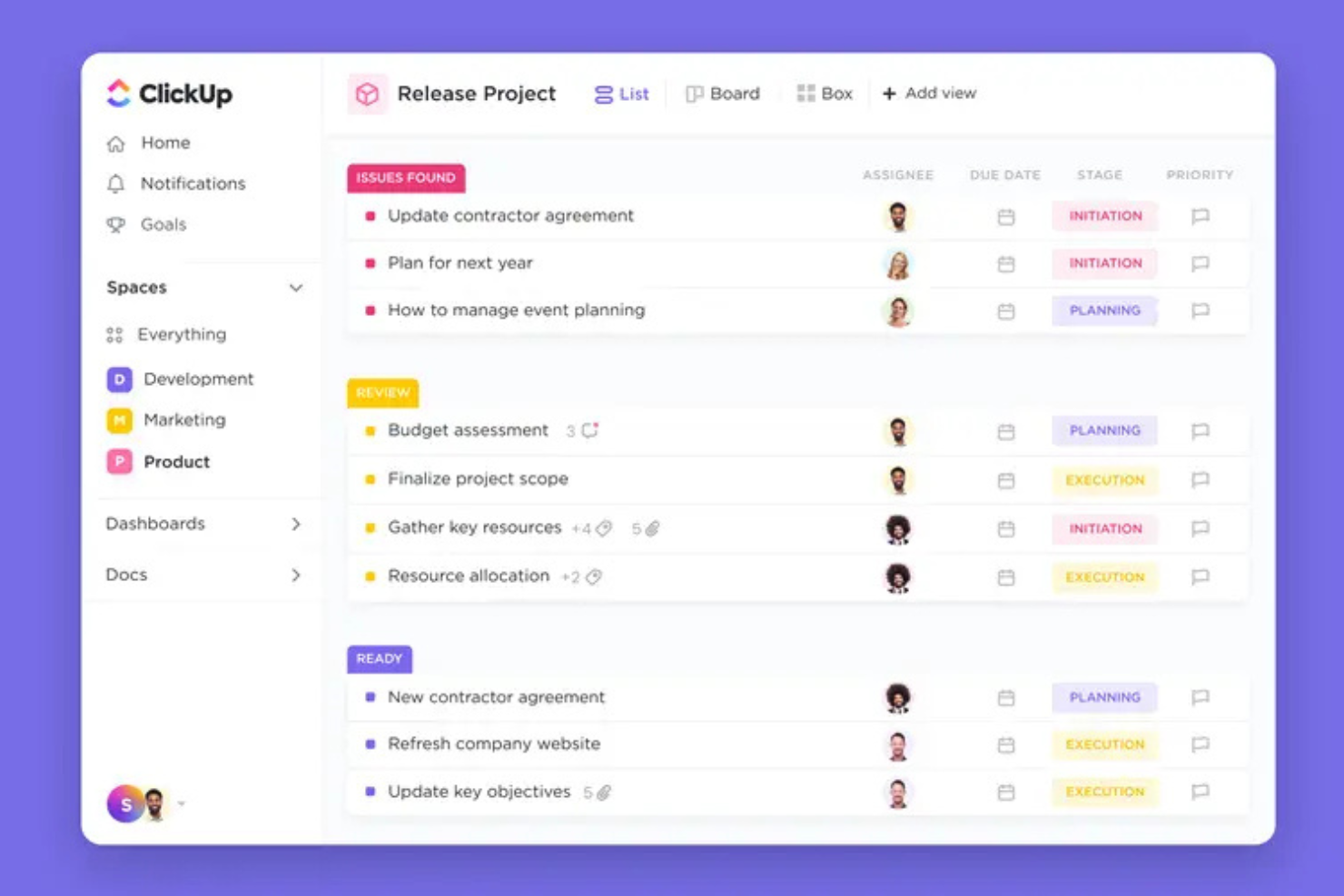
ClickUp Brain è un software di gestione della conoscenza basato sull'IA che riunisce la gestione delle attività, la collaborazione sui documenti e la ricerca basata sull'IA per i team che lavorano in ClickUp.
Per chi è più adatto ClickUp Brain?
ClickUp Brain è adatto ai project manager di team dinamici o startup che necessitano di informazioni su attività e conoscenze basate sull'IA, oltre a solidi strumenti di collaborazione.
Perché ho scelto ClickUp Brain
Ho scelto ClickUp Brain perché mi piace il modo in cui integra l'IA in ogni aspetto della gestione delle attività e dei progetti, permettendomi di individuare le conoscenze chiave direttamente nelle attività e nei documenti. Utilizzo le sue informazioni basate sul contesto per generare rapidamente riepiloghi delle attività o ottenere risposte immediate dai contenuti dello spazio di lavoro.
Funzionalità principali di ClickUp Brain
- Modelli di progetto basati sull'IA: Offrono strutture pronte all'uso per flussi di lavoro e documentazione ricorrenti.
- Ricerca nella base di conoscenza: Consente di interrogare i dati dello spazio di lavoro utilizzando richieste in linguaggio naturale.
- Assistente di scrittura basato sull'IA: Aiuta a redigere e rivedere la documentazione all'interno di attività e documenti.
- Ruoli IA personalizzati: Consente agli amministratori di impostare le autorizzazioni relative a chi può utilizzare le funzionalità IA.
Integrazioni di ClickUp Brain
ClickUp Brain offre integrazioni native con Slack, GitHub, Zoom, Google Drive, Microsoft Teams, Dropbox, Outlook e Calendar. Si collega inoltre a Zapier e fornisce un'API per integrazioni personalizzate.
Pros and Cons
Pros:
- Le risposte dell'IA vengono visualizzate direttamente nelle attività
- I riepiloghi delle attività si aggiornano in tempo reale
- L'assistente IA funziona all'interno dei documenti di progetto
Cons:
- Le risposte a volte non includono il contesto dei campi personalizzati
- Può richiedere molte risorse negli spazi di lavoro più grandi

Ideale per la collaborazione documentale tra team

Confluence è uno spazio di lavoro collaborativo basato su cloud che consente ai team di organizzare, modificare e condividere documenti, gestire note delle riunioni e mantenere basi di conoscenza e informazioni di progetto su un'unica piattaforma centralizzata.
Per chi è Confluence?
Confluence è adatto a team cross-funzionali e project manager che necessitano di uno spazio centrale per modificare documenti in modo collaborativo e condividere la conoscenza in modo organizzato.
Perché ho scelto Confluence
Ho scelto Confluence perché il mio team beneficia della modifica collaborativa in tempo reale, del controllo granulare dei permessi e degli spazi di conoscenza strutturati che ci aiutano a organizzare la documentazione con alberi di pagine, modelli e commenti in linea per ogni progetto.
Funzionalità principali di Confluence
- Ricerca potenziata da IA: Accedi rapidamente a pagine e documenti rilevanti utilizzando un algoritmo di ricerca intelligente che comprende il contesto.
- Tracciamento delle attività: Assegna e monitora attività e azioni direttamente all'interno di pagine e note delle riunioni.
- Storico delle versioni delle pagine: Visualizza, confronta e ripristina versioni passate delle pagine in qualsiasi momento per mantenere l'efficienza operativa del team.
- Libreria di macro: Aggiungi contenuti dinamici come grafici, aggiornamenti di stato e calendari a qualsiasi pagina.
Integrazioni Confluence
Confluence offre integrazioni native con Jira, Trello, Slack, Google Drive, Microsoft 365, Dropbox, GitHub, Salesforce, Zoom e Figma. È disponibile un'API per integrazioni personalizzate.
Pros and Cons
Pros:
- Suggerimenti di contenuti della knowledge base tramite IA
- Permessi granulari per l'accesso a pagine e spazi
- Modelli di pagina per una creazione rapida della documentazione
Cons:
- Automazione limitata per i flussi di lavoro di cura della conoscenza
- La precisione della ricerca può variare in spazi di grandi dimensioni

Ideale per la trascrizione di riunioni potenziata dall'AI

Fireflies.ai è una piattaforma di trascrizione delle riunioni e intelligenza conversazionale basata su AI che registra le chiamate, trascrive l'audio, indicizza i contenuti delle riunioni e consente la ricerca tra i dati delle riunioni per la gestione della conoscenza.
Per chi è ideale Fireflies.ai?
Team di vendita, customer success e operations che hanno bisogno di trascrizioni ricercabili e generate dall'AI di riunioni e chiamate virtuali.
Perché ho scelto Fireflies.ai
Ho scelto Fireflies.ai come uno dei migliori perché registra e trascrive automaticamente le riunioni con un'accuratezza impressionante, individua i punti d'azione e permette al mio team di cercare tra le conversazioni passate. Ciò è particolarmente prezioso per la trascrizione delle riunioni potenziata dall'intelligenza artificiale.
Caratteristiche principali di Fireflies.ai
- Organizzazione del workspace basata su canali: Organizza le registrazioni e le trascrizioni delle riunioni per team o progetti.
- Strumenti di collaborazione: Aggiungi commenti, reazioni ed evidenziazioni direttamente sulle righe della trascrizione.
- Monitoraggio personalizzato degli argomenti: Imposta parole chiave o argomenti da monitorare automaticamente nei report delle riunioni.
- Generazione automatica dei riepiloghi: Genera riepiloghi delle riunioni tramite intelligenza artificiale per una rapida consultazione e condivisione.
Integrazioni di Fireflies.ai
Fireflies.ai offre integrazioni native con Google Meet, Zoom, Microsoft Teams, Slack, Salesforce, HubSpot, Asana, Trello, Dropbox e Zapier. È disponibile un'API per integrazioni personalizzate.
Pros and Cons
Pros:
- Trascrive riunioni multi-partecipante con alta accuratezza
- Archivio ricercabile di tutte le conversazioni registrate
- Genera riepiloghi e monitoraggio degli argomenti tramite intelligenza artificiale
Cons:
- Errori occasionali con vocabolario tecnico
- Funzionalità di modifica limitate per le trascrizioni generate

Guru
Ideale per la verifica della conoscenza in tempo reale

Guru è una piattaforma di gestione della conoscenza basata su intelligenza artificiale, progettata per aiutare i team a catturare, organizzare, verificare e rendere accessibile la conoscenza aziendale direttamente all'interno dei flussi di lavoro quotidiani.
Per chi è più adatto Guru?
Guru è ideale per team distribuiti di assistenza clienti, vendite e operazioni che necessitano di risposte rapide e verificate mentre lavorano su diversi strumenti.
Perché ho scelto Guru
Ho scelto Guru perché mi affido alla sua verifica tramite intelligenza artificiale che mantiene la conoscenza aziendale accurata e aggiornata, grazie alla revisione dei contenuti da parte degli esperti in tempo reale. Utilizzo anche l'estensione browser di Guru per catturare e condividere risposte senza uscire da Slack o Chrome.
Funzionalità chiave di Guru
- Barra di ricerca IA: Trova istantaneamente la conoscenza aziendale utilizzando una ricerca potenziata dall’intelligenza artificiale.
- Organizzazione a schede: Conserva le informazioni in schede sintetiche e facilmente gestibili, a supporto dei processi principali di gestione documentale.
- Trigger di conoscenza: Rendi disponibili automaticamente le risposte sulla base delle attività degli utenti.
- Integrazione con Slack: Accedi e aggiorna la conoscenza direttamente all’interno di Slack.
Integrazioni di Guru
Guru offre integrazioni native con Slack, Microsoft Teams, Chrome, Zendesk, Salesforce e Zapier. È disponibile un’API per integrazioni personalizzate.
Pros and Cons
Pros:
- Workflow di verifica dei contenuti guidato dall’IA
- Avvisi e notifiche sulla conoscenza in tempo reale
- La ricerca fornisce risultati verificati all’istante
Cons:
- Le opzioni di formattazione dei contenuti sono limitate
- Le funzionalità IA richiedono un piano premium
Ideale per rispondere a domande in linguaggio naturale

Atlassian Rovo è una piattaforma AI che combina ricerca avanzata con elaborazione del linguaggio naturale, comprensione dei documenti e connettività dei dati all'interno dell'ecosistema Atlassian.
Per chi è più adatto Atlassian Rovo?
Atlassian Rovo è ideale per i team di prodotto e ingegneria di organizzazioni di medie e grandi dimensioni che già utilizzano Jira, Confluence o altre soluzioni Atlassian.
Perché ho scelto Atlassian Rovo
Ho scelto Atlassian Rovo come uno dei migliori perché utilizzo la sua funzione di risposta a domande in linguaggio naturale per cercare tra Jira e Confluence senza parole chiave, e genera risposte precise e contestuali da documentazione e ticket sparsi.
Funzionalità principali di Atlassian Rovo
- Curazione automatica delle conoscenze: Rovo cura e aggiorna le conoscenze dagli spazi di lavoro di Jira e Confluence.
- Permessi sicuri sui contenuti: Rispetta le impostazioni granulare dei permessi di Atlassian per l'accesso ai dati.
- Integrazione diretta negli spazi di lavoro: Si integra perfettamente nei dashboard esistenti dove l'AI aiuta gli ingegneri a consultare modifiche al codice storico.
- Motore di apprendimento continuo: Migliora la qualità delle risposte per proporre conoscenze rilevanti attraverso l'uso e il feedback continuo del team.
Integrazioni di Atlassian Rovo
Atlassian Rovo offre integrazioni native con Jira, Confluence, Jira Service Management e Trello all'interno dell'ecosistema Atlassian. È disponibile un'API per integrazioni personalizzate.
Pros and Cons
Pros:
- Fornisce risposte in linguaggio conversazionale
- Individua esperti nella tua organizzazione
- Funziona su Jira, Confluence e Trello
Cons:
- Richiede prodotti Atlassian per funzionalità complete
- Connettività limitata a fonti dati esterne

Gemini Enterprise è una piattaforma di intelligenza artificiale generativa per la gestione della conoscenza aziendale che consente di cercare, analizzare e automatizzare i flussi di lavoro utilizzando i modelli di intelligenza artificiale e le integrazioni di Google Cloud.
A chi è destinato Gemini Enterprise?
Gemini Enterprise è adatto a grandi organizzazioni o team tecnici che utilizzano l'infrastruttura di Google Cloud e necessitano di una gestione integrata della conoscenza basata sull'intelligenza artificiale.
Perché ho scelto Gemini Enterprise
Ho scelto Gemini Enterprise perché posso collegare direttamente i dataset di Google Cloud, applicare l'intelligenza artificiale generativa per cercare o riassumere documenti su larga scala e creare flussi di lavoro personalizzati alimentati dai modelli di AI di Google direttamente all'interno della mia infrastruttura esistente.
Funzionalità principali di Gemini Enterprise
- Interfaccia AI conversazionale: consente agli utenti di interrogare dati e documenti aziendali utilizzando il linguaggio naturale.
- Controlli di accesso ai dati: offre permessi granulari per gestire l'accesso a conoscenze sensibili.
- Supporto input multimodale: accetta testo, immagini e codice per l'elaborazione di diversi tipi di contenuto.
- Strumenti di audit e tracciabilità: tiene traccia delle attività e degli output dei modelli per conformità e revisione.
Integrazioni di Gemini Enterprise
Gemini Enterprise offre integrazioni native all'interno dell'ecosistema Google Cloud, tra cui Google Workspace, BigQuery e Vertex AI. È disponibile un'API per integrazioni personalizzate.
Pros and Cons
Pros:
- Si collega direttamente ai servizi Google Cloud
- Gestisce ricerca e analisi di documenti su larga scala
- Controlli di accesso granulari per la gestione della conoscenza
Cons:
- Supporto limitato per piattaforme cloud non Google
- Le funzionalità AI avanzate richiedono una configurazione approfondita


Slack AI è una piattaforma di spazio di lavoro potenziata dall'IA che aggiunge funzionalità di ricerca, riassunti delle conversazioni e automazione per i team che gestiscono la conoscenza aziendale all'interno di chat e canali.
A chi è destinato Slack AI?
Slack AI è adatto a team trasversali in organizzazioni di medie e grandi dimensioni che gestiscono un elevato volume di chat e dipendono dall'accesso rapido alle conversazioni storiche.
Perché ho scelto Slack AI
Ho scelto Slack AI perché mi affido alla sua capacità di individuare rapidamente informazioni nascoste nelle conversazioni passate. La ricerca alimentata dall'IA mi consente di trovare risposte ricche di contesto in pochi secondi e utilizzo i suoi riassunti automatici delle conversazioni per mantenere allineato il mio team senza riepiloghi manuali.
Caratteristiche principali di Slack AI
- Riassunto dei thread: Riassume automaticamente le lunghe discussioni nei canali.
- Richieste di riepilogo canale: Permette di generare su richiesta riepiloghi personalizzati dei canali.
- Supporto multilingue: Gestisce più lingue per la ricerca e il riassunto.
- Redazione messaggi con IA: Suggerisce e redige risposte direttamente nelle conversazioni in chat.
Integrazioni di Slack AI
Slack AI offre migliaia di integrazioni native tramite la Slack App Directory, tra cui Google Workspace, Microsoft Office, Salesforce, HubSpot, Dropbox, Webex Meetings, Zoom, GitHub, Asana e Trello. È disponibile un'API per integrazioni personalizzate.
Pros and Cons
Pros:
- La ricerca AI nelle chat riconosce domande contestuali
- Riassume istantaneamente i thread lunghi in chat
- Funziona direttamente nei canali di comunicazione del team
Cons:
- Perde il contesto nei canali privati o nei messaggi diretti
- Disponibile solo con i piani Business+ a pagamento
Altri software di gestione della conoscenza basati sull'AI
Ecco altre opzioni di software di gestione della conoscenza basato sull’AI che non sono entrate nella mia selezione, ma che vale comunque la pena prendere in considerazione:


How I Evaluate AI Knowledge Management Software
Every tool here needs to prove its AI does real work—like pulling the right lessons learned from past sprints without anyone tagging a thing. I evaluate each option on two layers: core functionality needed to make the list and the differentiating factors that separate one tool from the rest.
Core Functionality (Table Stakes For This List)
When I'm selecting tools for my list, I rank each one on a scale from 0 (does not offer the functionality) to 5 (excels in this area) for each core functionality listed below. Then, I calculate the tool's total score into a percentage. Each tool needs to achieve a minimum total score of 65% to be considered for inclusion.
- AI-Powered Search: I check whether the search goes beyond keywords—can a PM ask "what did we decide about the API migration?" and get a grounded, cited answer?
- Automated Content Organization: Tools should auto-tag and categorize docs, meeting notes, and artifacts so teams aren't manually building folder structures mid-sprint.
- Generative Summarization: I look for on-demand summaries across docs, threads, and meetings—like distilling a 40-page project retrospective into key takeaways.
- Project Tool Integrations: I evaluate native connections to platforms like Jira, Asana, and Confluence, since disconnected knowledge bases defeat the purpose for PM teams.
- Contextual Q&A Assistant: A conversational assistant should answer project-scoped questions using ingested data, not generic responses pulled from public training sets.
- Knowledge Governance & Permissions: Access controls matter—I look for permission-aware AI outputs with source citations so sensitive project data stays within the right teams.
Once I have a list of tools that meet this criteria, I consider what sets each platform apart.
Differentiating Factors (What Sets Vendors Apart)
Here's how I compare and contrast different vendors:
Standout Features
Meeting intelligence is a big differentiator—I look for tools that auto-capture decisions, risks, and action items from standups or steering committees without manual note-taking. Proactive knowledge surfacing also adds real value, where the AI pushes relevant past project docs based on your current task or sprint phase. I evaluate analytics dashboards too, especially ones that flag stale content or unanswered queries across a portfolio, since those gaps often signal where teams are losing time.
Beyond Features
Data security matters here more than in most categories—I check whether vendors guarantee customer data isn't used to train their models and whether they hold SOC 2 Type II or ISO 27001 certifications. AI model transparency is closely tied to this; I want to know which LLMs power the tool and whether teams can deploy privately. Time-to-value is another factor I weigh, especially how fast a tool can ingest existing Confluence or SharePoint repos, since a PMO won't wait months to see results from a new platform.
Come scegliere un software di gestione della conoscenza basato sull'AI
È facile perdersi in lunghi elenchi di funzionalità e strutture tariffarie complesse. Per aiutarti a rimanere concentrato mentre affronti il tuo processo di selezione del software, ecco una lista di fattori da tenere a mente:
| Fattore | Cosa considerare |
| Scalabilità | La piattaforma sarà in grado di gestire più utenti, riunioni e file man mano che il tuo team cresce? Considera il carico di lavoro futuro, la crescita dei dati e gli eventuali limiti relativi agli utenti o allo spazio di archiviazione. |
| Integrazioni | Si collega agli strumenti principali che il tuo team utilizza già, come Slack, Zoom o la tua base di conoscenza esistente? Verifica la disponibilità di opzioni native o di terze parti. |
| Personalizzazione | Puoi adattare flussi di lavoro, tag o pannelli di controllo alle esigenze di gestione della conoscenza della tua azienda? Lo strumento supporta modelli o riepiloghi personalizzati? |
| Facilità d'uso | Con quale rapidità il tuo team può adottare lo strumento? Cerca interfacce intuitive e requisiti di formazione ridotti, soprattutto per il personale non tecnico. |
| Implementazione e inserimento | Quali risorse sono necessarie per la configurazione? Considera la migrazione dei dati, la configurazione degli accessi degli utenti e il tempo necessario affinché il tuo team diventi operativo. |
| Costo | I piani sono strutturati in modo da adattarsi al tuo budget e alle dimensioni della tua organizzazione? Verifica quali funzionalità sono incluse in ogni livello e cerca eventuali costi nascosti o componenti aggiuntivi. |
| Misure di sicurezza | Il software soddisfa i tuoi standard di sicurezza? Informati sulla crittografia dei dati, sulle autorizzazioni degli utenti, sui controlli della privacy e sulla registrazione degli audit. |
| Disponibilità dell'assistenza | Puoi ricevere assistenza rapidamente in caso di problemi? Verifica se sono disponibili chat dal vivo, supporto telefonico e risorse complete per l'autoassistenza. |
Che cos'è un software di gestione della conoscenza basato sull'AI?
Il software di gestione della conoscenza basato sull'AI è una piattaforma digitale che utilizza l'intelligenza artificiale per acquisire, organizzare e rendere facilmente accessibili le informazioni provenienti da riunioni, documenti e comunicazioni. Automatizza attività come la trascrizione, la categorizzazione e il recupero dei contenuti, facilitando ai team la ricerca, la condivisione e l'applicazione della conoscenza collettiva nei diversi flussi di lavoro e progetti.
Funzionalità
Quando selezioni un software di gestione della conoscenza basato sull'IA, presta attenzione alle seguenti funzionalità chiave:
- Trascrizione automatizzata: Converte i contenuti parlati di riunioni e chiamate in testo scritto e ricercabile, per garantire che nulla di importante venga tralasciato o perso durante la conversazione.
- Ricerca basata sull'IA: Utilizza l'apprendimento automatico per comprendere il contesto e recuperare informazioni pertinenti da grandi quantità di note, file e registrazioni.
- Creazione di una base di conoscenza: Consente ai team di archiviare, organizzare e categorizzare documenti, domande frequenti, politiche e note di progetto in un archivio centralizzato e strutturato.
- Etichettatura e categorizzazione dei contenuti: Identifica ed etichetta automaticamente argomenti, parole chiave e temi, facilitando il filtraggio e il raggruppamento delle conoscenze correlate.
- Generazione di riepiloghi delle riunioni: Utilizza l'IA per condensare riunioni o conversazioni lunghe in riepiloghi concisi con punti chiave, attività da svolgere e decisioni.
- Controlli di accesso degli utenti: Fornisce autorizzazioni e accessi basati sui ruoli, in modo che le conoscenze sensibili possano essere limitate ai membri del team o ai gruppi autorizzati.
- Strumenti di collaborazione: Consentono ai membri del team di commentare, annotare o evidenziare direttamente le sezioni pertinenti all'interno della base di conoscenza o delle trascrizioni.
- Integrazione con gli strumenti di lavoro: Si connette facilmente alle app di comunicazione, produttività e gestione dei progetti per acquisire dati o condividere automaticamente le conoscenze.
- Storico delle versioni e registri di controllo: Tiene traccia delle modifiche e degli aggiornamenti apportati a documenti o note, aiutando i team a vedere chi ha aggiornato cosa e quando.
- Modelli personalizzabili: Offre modelli predefiniti per le note delle riunioni, la creazione di contenuti su larga scala o la documentazione tecnica.
Vantaggi
L'implementazione di un software di gestione della conoscenza basato sull'IA offre diversi vantaggi al tuo team e alla tua azienda. Ecco alcuni dei vantaggi che puoi aspettarti:
- Recupero più rapido delle informazioni: Le funzionalità di ricerca e di etichettatura basate sull'IA consentono agli utenti di trovare rapidamente note di riunioni, documenti o discussioni pertinenti senza dover effettuare ricerche manuali.
- Acquisizione automatizzata delle conoscenze: La trascrizione e la categorizzazione automatiche garantiscono che gli approfondimenti importanti emersi da riunioni e comunicazioni vengano sempre registrati e archiviati.
- Collaborazione di team migliorata: Gli strumenti integrati per commentare, etichettare e condividere favoriscono lo scambio di informazioni e riducono i silos di conoscenza.
- Documentazione coerente delle riunioni: I riepiloghi generati dall'IA, le attività da svolgere e le note strutturate forniscono registrazioni standardizzate per tutte le discussioni importanti.
- Maggiore sicurezza delle conoscenze: I controlli di accesso basati sulle autorizzazioni garantiscono che solo gli utenti autorizzati possano visualizzare o modificare le informazioni sensibili.
- Riduzione del carico di lavoro manuale: L'automazione di attività ripetitive come prendere appunti, organizzare ed etichettare libera tempo da dedicare ad attività di maggior valore.
- Migliore processo decisionale: Il facile accesso a conoscenze organizzate e aggiornate consente ai team di prendere decisioni più informate e più rapidamente.
Costi e prezzi
La scelta di un software di gestione della conoscenza basato sull'IA richiede una comprensione dei vari modelli e piani tariffari disponibili. I costi variano in base alle funzionalità, alle dimensioni del team, agli extra e ad altri fattori. La tabella seguente riassume i piani più comuni, i relativi prezzi medi e le funzionalità tipicamente incluse nelle soluzioni software di gestione della conoscenza basate sull'IA:
Tabella comparativa dei piani per software di gestione della conoscenza basato sull'IA
| Tipo di piano | Prezzo medio | Funzionalità comuni |
| Piano gratuito | $0 | Trascrizione di base, spazio di archiviazione limitato, accesso per un singolo utente e funzionalità di ricerca essenziali. |
| Piano personale | $5-$15/user/month | Riepiloghi automatici, maggiore spazio di archiviazione, semplici strumenti di collaborazione e accesso al supporto prioritario. |
| Piano aziendale | $20-$40/user/month | Spazi di lavoro per i team, autorizzazioni avanzate, integrazioni con strumenti diffusi e pannelli di analisi. |
| Piano aziendale avanzato | $50-$100/user/month | Opzioni di sicurezza personalizzate, onboarding dedicato, accesso API, supporto premium e strumenti per la conformità. |
FAQ sul software di gestione della conoscenza basato sull'IA
Ecco alcune risposte alle domande comuni sul software di gestione della conoscenza basato sull’IA:
In che modo il software di gestione della conoscenza basato sull'IA migliora la produttività delle riunioni?
Il software di gestione della conoscenza basato sull’IA trascrive automaticamente le riunioni, riassume le discussioni ed evidenzia le attività da svolgere. Queste funzionalità aiutano il team a rimanere allineato, a rivedere rapidamente i punti chiave e a ridurre la necessità di prendere appunti manualmente o di svolgere attività successive alle riunioni.
Il mio team può utilizzare gli strumenti esistenti con il software di gestione della conoscenza basato sull'IA?
Sì, la maggior parte dei software di gestione della conoscenza basati sull’IA offre integrazioni con strumenti come Slack, Microsoft Teams e piattaforme di gestione dei progetti. Ciò significa che puoi collegare i flussi di lavoro, condividere gli aggiornamenti tra i sistemi ed evitare i silos di dati.
I miei dati sono al sicuro nel software di gestione della conoscenza basato sull'IA?
Sì, le piattaforme affidabili utilizzano la crittografia, controlli di accesso sicuri e registri di controllo per proteggere i tuoi dati. Esamina sempre le pratiche di sicurezza di ciascun fornitore per assicurarti che soddisfino i requisiti della tua organizzazione.
Quale dimensione del team trae maggiori vantaggi dal software di gestione della conoscenza basato sull'IA?
I team di qualsiasi dimensione possono trarne vantaggio, ma l’impatto aumenta con i team più grandi o distribuiti che devono organizzare e rendere rapidamente accessibili le conoscenze. I team più piccoli utilizzano spesso piani di base, mentre le organizzazioni più grandi cercano controlli e integrazioni avanzati.
Qual è la curva di apprendimento tipica per questi strumenti?
La maggior parte dei software di gestione della conoscenza basati sull’IA è progettata per un’adozione rapida, con interfacce intuitive, modelli e procedure guidate per l’inserimento. I team generalmente diventano operativi dopo poche sessioni, anche senza competenze tecniche.
Posso migrare le conoscenze esistenti su una nuova piattaforma?
Sì, molte soluzioni supportano l’importazione di documenti, trascrizioni di riunioni e database esistenti. Quando effettui il passaggio, cerca assistenza per la migrazione e guide all’importazione.