

10 migliori strumenti DAM basati sull’IA recensiti nel 2026

Selezione dei migliori strumenti AI DAM


Gestire le risorse digitali può essere un vero grattacapo. Devi destreggiarti tra innumerevoli file, assicurarti che tutti i membri del tuo team abbiano accesso ai contenuti e cercare di mantenere tutto organizzato. È facile sentirsi sopraffatti.
È qui che entrano in gioco gli strumenti AI DAM. Ti aiutano a gestire in modo efficiente le tue risorse digitali, facendoti risparmiare tempo e aiutandoti a categorizzare e cercare contenuti su larga scala. Nella mia esperienza, questi strumenti possono trasformare il modo in cui lavora il tuo team.
Ho testato e recensito molte soluzioni software e sono qui per condividere le mie migliori scelte. Troverai una recensione imparziale e approfondita dei migliori strumenti AI DAM sul mercato. Analizziamo insieme funzionalità, vantaggi e offerte distintive di ciascuno, così potrai trovare la soluzione più adatta al tuo team.
Perché fidarsi dei nostri consigli sui software
Il nostro team testa e recensisce software dal 2012. In quanto project manager noi stessi, sappiamo quanto sia difficile — e importante — scegliere il software giusto.
Per questa guida, abbiamo valutato gli strumenti attraverso test pratici e ricerche indipendenti, assegnando un punteggio agli strumenti in base ai nostri criteri di selezione. Ci basiamo inoltre sulle competenze di leader di pensiero del settore e di professionisti attivi nella gestione dei progetti.
Le nostre recensioni riflettono il nostro giudizio editoriale umano, non un discorso di vendita.
Revisori esperti:
Tabella di confronto degli strumenti AI DAM
Questa tabella di confronto riassume i dettagli sui prezzi delle mie migliori selezioni di strumenti AI DAM:
| Tool | Best For | Trial Info | Price | ||
|---|---|---|---|---|---|
| 1 | Ideale per flussi di lavoro DAM potenziati dall'IA | Demo gratuita disponibile | Prezzi su richiesta | Website | |
| 2 | Ideale per la creazione di contenuti tramite modelli | Demo gratuita disponibile | Prezzi su richiesta | Website | |
| 3 | Ideale per la catalogazione AI personalizzata | Prova gratuita di 30 giorni disponibile | Da $250/mese (fatturazione annuale) | Website | |
| 4 | Ideale per il tagging delle risorse basato su IA | Piano gratuito disponibile | Da $99/mese (fatturato annualmente) | Website | |
| 5 | Ideale per tagging e revisione con AI | Prova gratuita di 30 giorni | Da $29/utente/mese | Website | |
| 6 | Ideale per le piccole imprese | Demo gratuita disponibile | Prezzo su richiesta | Website | |
| 7 | Ideale per i team di marketing | Demo gratuita disponibile | Prezzo su richiesta | Website | |
| 8 | Ideale per soluzioni cloud-native | Demo gratuita disponibile | Prezzi su richiesta | Website | |
| 9 | Ideale per la coerenza del brand | Demo gratuita disponibile | Prezzo su richiesta | Website | |
| 10 | Ideale per la gestione del brand | Demo gratuita disponibile | Da $30/utente/mese | Website |
Recensioni dei migliori strumenti AI DAM
Di seguito trovi i miei riepiloghi dettagliati dei migliori strumenti AI DAM entrati nella mia selezione. Le mie recensioni offrono uno sguardo approfondito alle funzionalità principali, ai pro & contro, alle integrazioni e ai casi d’uso ideali di ogni strumento, per aiutarti a trovare quello più adatto a te.

Ideale per flussi di lavoro DAM potenziati dall'IA

MediaValet è una soluzione di Gestione delle Risorse Digitali (DAM) rivolta alle organizzazioni che desiderano un'integrazione senza soluzione di continuità con Microsoft. Si concentra sull'organizzazione e distribuzione delle risorse, risultando ideale per i team che fanno ampio affidamento sugli strumenti Microsoft.
Perché ho scelto MediaValet: MediaValet è progettato per i team che dipendono fortemente dagli strumenti Microsoft. Offre integrazione diretta con Office 365 e SharePoint, rendendo i flussi di lavoro più fluidi. Essendo basato su cloud, il tuo team può accedere e collaborare sulle risorse da qualsiasi luogo. Grazie a una solida sicurezza e protezione dei dati, è adatto se la tua azienda deve mantenere le informazioni al sicuro.
Funzionalità principali & Integrazioni
Funzionalità includono capacità di ricerca avanzata che aiutano il tuo team a trovare rapidamente le risorse tramite metadati e parole chiave. I flussi di lavoro automatizzati semplificano le attività ripetitive, facendo risparmiare tempo ed energie al team. La scalabilità della piattaforma assicura che cresca insieme alla tua organizzazione, adattandosi alle crescenti esigenze.
Integrazioni includono Microsoft Office 365, SharePoint, Adobe Creative Cloud, Slack, Box, Dropbox, Salesforce, Hootsuite, WordPress e Google Analytics.
Pros and Cons
Pros:
- Forte integrazione con Microsoft
- Funzionalità di flusso di lavoro automatizzato
- Focus su sicurezza e protezione
Cons:
- Richiede formazione per i nuovi utenti
- Dipendenza dall'ecosistema Microsoft

Papirfly
Ideale per la creazione di contenuti tramite modelli
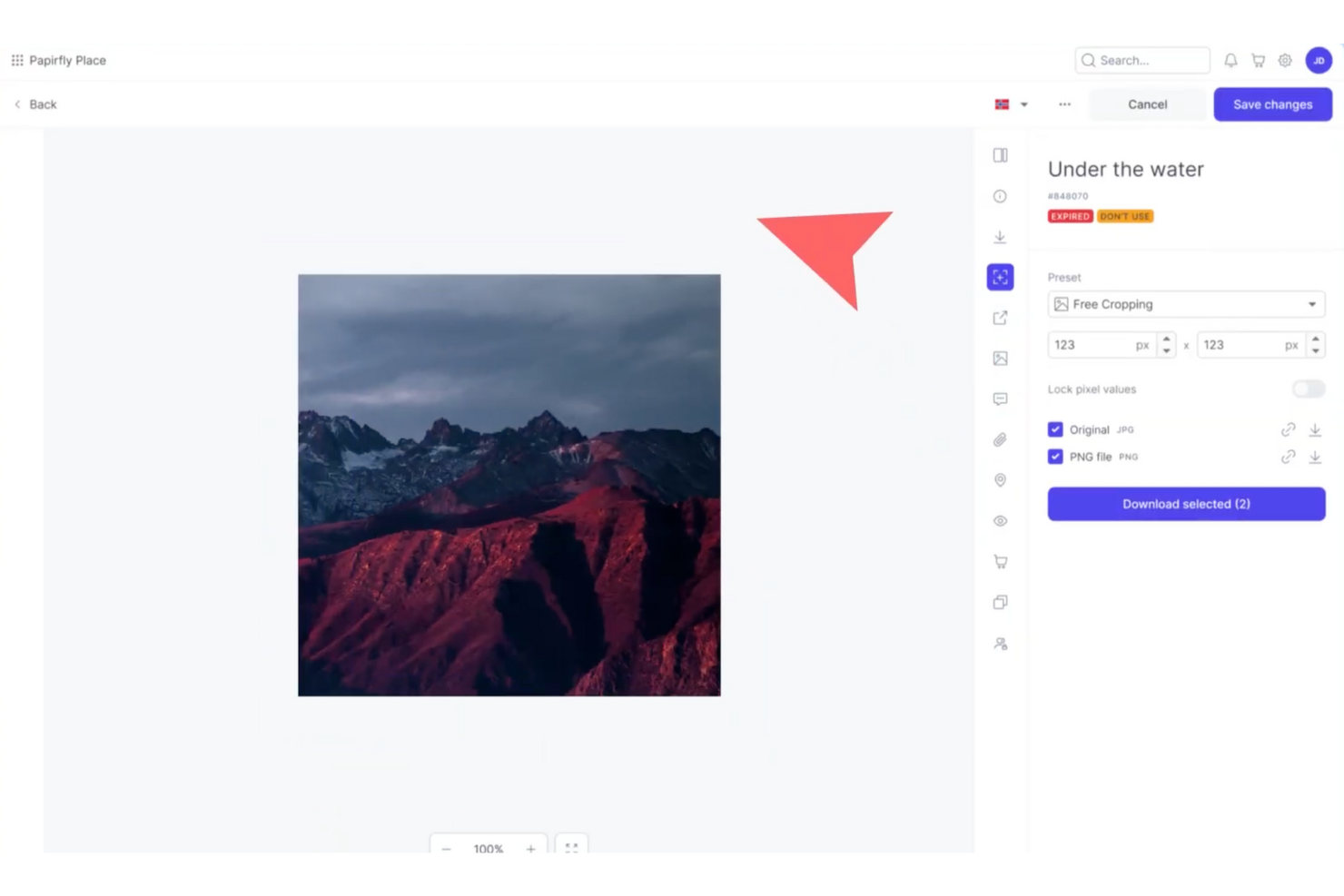
Papirfly è uno strumento DAM alimentato dall'IA, noto soprattutto per la creazione di contenuti tramite modelli, che aiuta i team a produrre rapidamente risorse sempre coerenti con il brand. Funziona bene per settori come l'automotive, il farmaceutico e il retail che richiedono una stretta coerenza del marchio in più mercati. Con funzionalità automatizzate come la catalogazione delle risorse e la traduzione dei contenuti, Papirfly riduce il lavoro manuale, abbrevia il time-to-market e aiuta i team a rimanere allineati agli standard globali del brand.
Perché ho scelto Papirfly
Ho scelto Papirfly per la sua creazione di contenuti tramite modelli, che aiuta i team a produrre materiali coerenti e in linea con il marchio senza dover dipendere fortemente dalle risorse di design. Anche la catalogazione dei metadati gestita dall’IA semplifica l'organizzazione e il recupero degli asset digitali, riducendo lo sforzo manuale. Insieme, queste funzionalità permettono ai team di mantenere precisione nel brand migliorando velocità ed efficienza dei flussi di lavoro creativi.
Caratteristiche principali di Papirfly
Oltre alla creazione di contenuti tramite modelli, Papirfly offre:
- Gestione delle campagne: Questa funzione consente al team di pianificare, eseguire e analizzare le campagne marketing su un’unica piattaforma.
- Portale del marchio: Fornisce uno spazio centralizzato per conservare e accedere a linee guida e asset del brand, assicurando coerenza in tutti i materiali.
- Conformità al GDPR: Papirfly garantisce che tutti i processi di gestione dei dati rispettino gli standard normativi, fondamentale per mantenere fiducia e legalità.
- Analisi dei dati: Questo strumento offre insight sull’utilizzo delle risorse e sulle performance delle campagne, aiutando a perfezionare le strategie di marketing.
Integrazioni di Papirfly
Papirfly si integra con Adobe Creative Cloud, Microsoft Office 365, Google Workspace, Salesforce, HubSpot, Marketo, Sitecore, WordPress, Drupal ed è disponibile un’API per integrazioni personalizzate.
Pros and Cons
Pros:
- Facile gestione di grandi librerie di asset
- Tagga automaticamente le risorse per velocizzare l’organizzazione
- Supporta più lingue per una portata globale
Cons:
- I modelli possono essere limitanti o richiedere aggiustamenti
- Alcuni utenti riscontrano a volte tempi di caricamento lenti
New Product Updates from Papirfly

Papirfly Point Adds Brand Assistant Admin Controls
Papirfly now lets admins configure Brand Assistant directly in Point, including enabling the assistant, accepting AI terms, tuning conversation style, and managing knowledge sources and documents. For more information, visit Papirfly's official site.
 .
.
Ideale per la catalogazione AI personalizzata

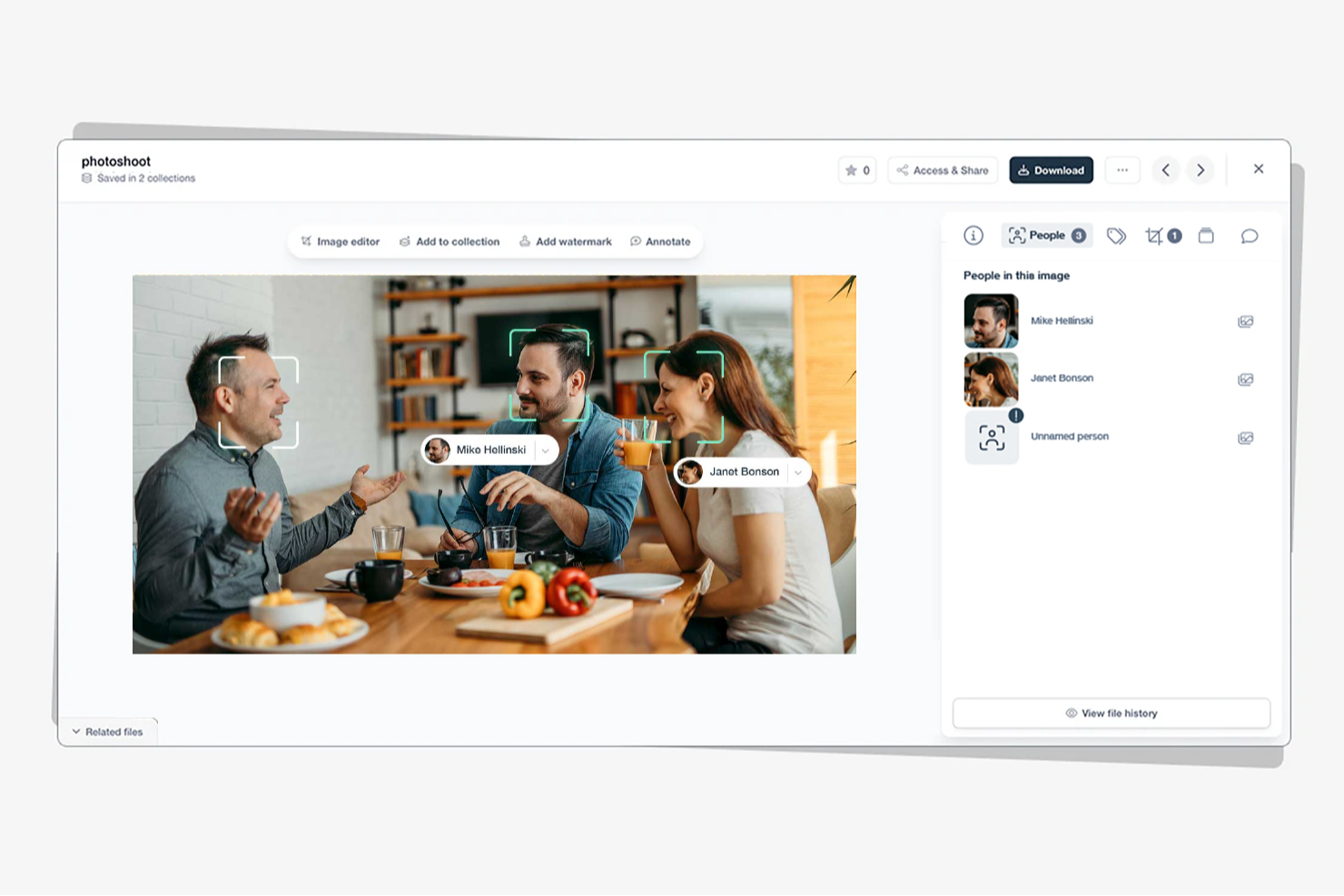
Tagbox è una piattaforma di gestione delle risorse digitali potenziata dall'IA, progettata per team del settore retail, eventi, organizzazioni no profit e agenzie creative. Aiuta le aziende a organizzare ampie librerie di contenuti multimediali con funzioni come la ricerca semantica, il riconoscimento facciale e la catalogazione automatica. Trasformando risorse sparse in librerie facilmente ricercabili, Tagbox migliora la collaborazione e la gestione a lungo termine dei media.
Perché ho scelto Tagbox
Ho scelto Tagbox per il suo utilizzo pratico dell'IA nell'organizzazione dei media. La ricerca semantica rende semplice trovare elementi visivi in base a persone, oggetti o contesti, facendo risparmiare tempo ai team. La catalogazione automatica riduce ulteriormente il lavoro manuale, rendendo Tagbox una scelta solida per i team che gestiscono librerie di risorse in crescita.
Funzionalità principali di Tagbox
Oltre alle sue funzionalità principali, Tagbox offre diverse altre caratteristiche che ne aumentano l'utilità per la gestione delle risorse digitali:
- Riconoscimento facciale: Questa funzionalità permette al tuo team di identificare e categorizzare le immagini basandosi sui dati facciali, migliorando l'organizzazione.
- Catalogazione AI personalizzata: Puoi addestrare un'IA a rilevare i tuoi prodotti, luoghi o altri elementi visivi specifici.
- Strumenti di collaborazione: Facilitano il lavoro di squadra e l'interazione con i clienti tramite la condivisione e la gestione dei media.
- Interfaccia intuitiva: Il design user-friendly garantisce che il tuo team possa navigare e utilizzare lo strumento facilmente, senza formazione approfondita.
Integrazioni di Tagbox
Collega Tagbox.io tramite Tagbox Desktop (trascina e rilascia in qualsiasi app), Zapier, Make e una REST API. Sono disponibili flussi di lavoro personalizzati per le aziende Enterprise.
Pros and Cons
Pros:
- Organizzazione delle risorse video con AI
- Il riconoscimento facciale migliora la ricerca delle risorse
- Catalogazione personalizzata per librerie video
Cons:
- Nessun editor video integrato
- Opzioni di accesso offline limitate

Ideale per il tagging delle risorse basato su IA
Stockpress è uno strumento di gestione delle risorse digitali (DAM) che utilizza l'intelligenza artificiale per aiutare i team a organizzare, trovare e condividere i file in modo più efficiente. È progettato per aziende di tutte le dimensioni che desiderano semplificare la gestione delle risorse senza limitare l'accesso degli utenti o pagare per ogni utente.
Perché ho scelto Stockpress: Ho scelto Stockpress perché le sue capacità di tagging e ricerca tramite IA rendono estremamente facile individuare rapidamente la risorsa giusta. La piattaforma applica automaticamente metadati intelligenti ai tuoi file, facendo risparmiare tempo al team sull'etichettatura e l'organizzazione manuale. Puoi anche usufruire di strumenti per il controllo delle versioni e la rilevazione dei duplicati, aiutando il tuo team a mantenere librerie di risorse ordinate e aggiornate, senza confusione. Ciò che spicca davvero è il modo in cui Stockpress combina collaborazione e controllo: puoi annotare, commentare e condividere file in modo sicuro, tutto all'interno di un dashboard intuitivo.
Caratteristiche e integrazioni principali di Stockpress
Le funzionalità includono tagging e ricerca visiva basate su IA per migliorare la reperibilità delle risorse, controllo delle versioni con rilevazione dei duplicati per mantenere l'integrità dei file, e link di condivisione personalizzabili con permessi utente per una collaborazione sicura.
Le integrazioni includono Figma, Photoshop, Mailchimp, Slack, Dropbox, Google Drive, Okta, WordPress, Azure, Webflow e Klaviyo.
Pros and Cons
Pros:
- Interfaccia intuitiva
- Personalizzazione avanzata dei tag
- Controllo sicuro dell'accesso ai file
Cons:
- Supporto mobile limitato
- Pochi strumenti di analisi

Filecamp
Ideale per tagging e revisione con AI

Filecamp è uno strumento versatile di gestione delle risorse digitali (DAM) progettato per soddisfare le esigenze di team di marketing e professionisti di diversi settori, tra cui media, non-profit e agenzie web. Offre una piattaforma intuitiva che aumenta l'efficienza del flusso di lavoro e la coerenza del brand, rendendolo una scelta ideale per chi desidera semplificare i processi di gestione delle risorse. Con funzionalità come il proofing online, la personalizzazione del branding e il controllo delle versioni, Filecamp affronta le sfide dell'organizzazione e della gestione efficace delle risorse digitali.
Perché ho scelto Filecamp
Ho scelto Filecamp per i suoi robusti strumenti di proofing online e le capacità di controllo delle versioni, fondamentali per gestire le risorse digitali nell'odierno ambiente rapido. Queste funzionalità consentono di revisionare e approvare i file in modo fluido, assicurando che il team rimanga allineato e mantenga la coerenza del brand. Inoltre, la condivisione sicura dei file della piattaforma garantisce la protezione delle informazioni sensibili, facilitando la collaborazione tra team remoti. Queste caratteristiche fanno di Filecamp una scelta affidabile per le aziende che desiderano ottimizzare i processi di gestione delle risorse digitali.
Caratteristiche principali di Filecamp
Oltre al suo eccezionale proofing online e al controllo delle versioni, Filecamp offre diverse altre funzionalità che ne aumentano l'usabilità come strumento DAM con AI.
- Branding personalizzabile: Personalizza la piattaforma per riflettere l'identità del tuo marchio, garantendo coerenza su tutte le risorse digitali.
- Condivisione sicura dei file: Condividi file in modo sicuro all'interno del tuo team o con partner esterni, mantenendo il controllo sugli accessi e sulle autorizzazioni.
- Hosting su Google Cloud: Approfitta della sicurezza dei dati e della conformità con una piattaforma ospitata su Google Cloud, proteggendo le tue risorse.
- Utenti e banda illimitati: Gestisci le risorse digitali senza preoccuparti delle limitazioni su utenti o banda, rendendolo scalabile per team in crescita.
Integrazioni Filecamp
Attualmente Filecamp non indica integrazioni native.
Pros and Cons
Pros:
- Workflow di proofing online integrati
- Utenti illimitati su tutti i piani
- Potenti funzionalità di controllo versione
Cons:
- Nessuna integrazione nativa disponibile
- Ricerca AI meno avanzata
New Product Updates from Filecamp
Filecamp Adds Analytics, AI Thumbnails, and CDN Embed Links
Filecamp adds Analytics, AI-powered thumbnails, and CDN-backed Embed links. These updates give teams more visibility into asset usage, improve thumbnail presentation, and make embedded images easier to manage. For more information, visit Filecamp’s official site.
 .
.
Canto
Ideale per le piccole imprese
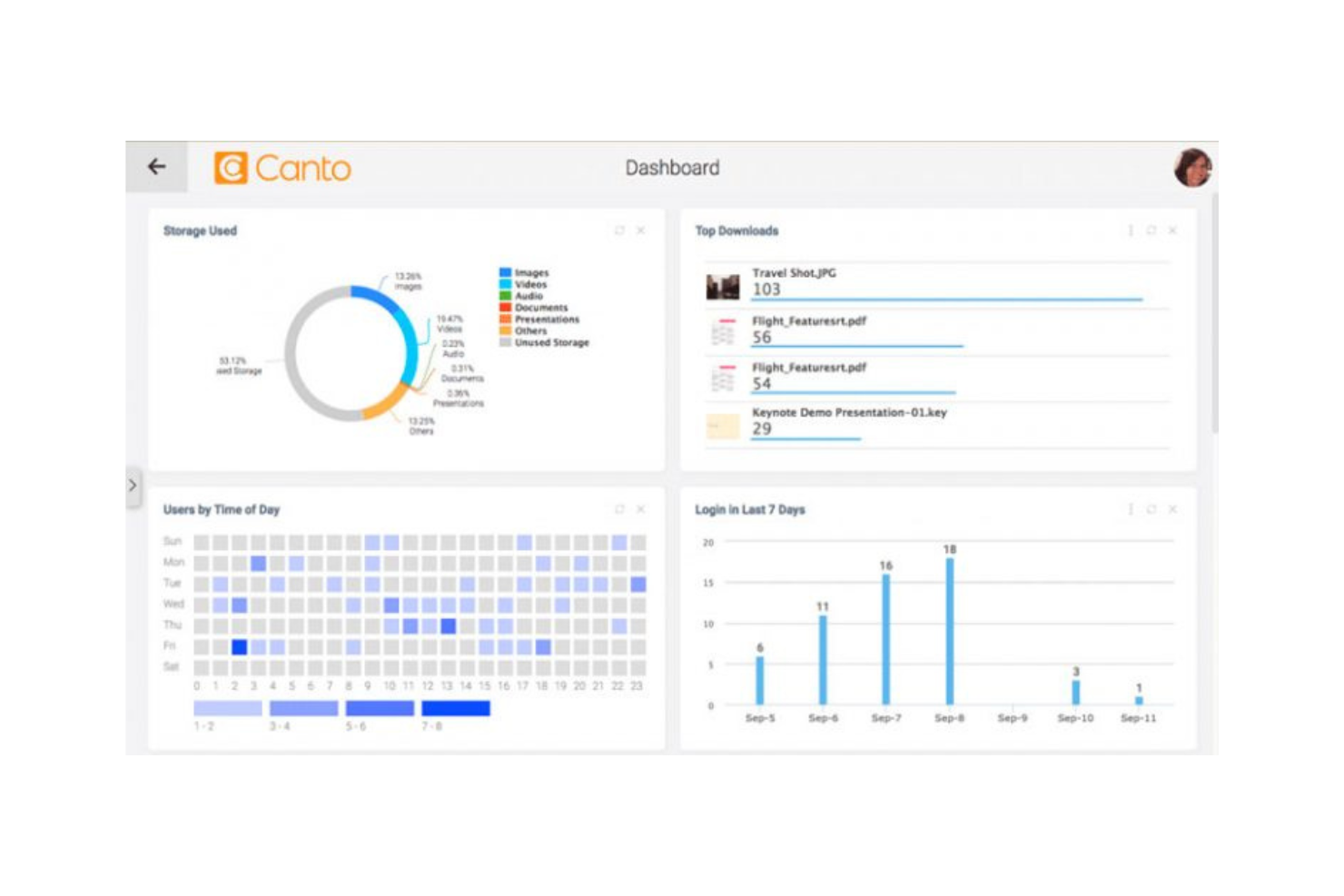
Canto è un software di Gestione delle Risorse Digitali (DAM) pensato per le piccole imprese, con l'obiettivo di semplificare l'organizzazione e la condivisione delle risorse. Offre funzionalità che aiutano i team a gestire in modo efficiente i contenuti digitali, rendendolo uno strumento prezioso per le aziende con risorse limitate.
Perché ho scelto Canto: Canto è pensato per piccoli team che desiderano un modo semplice per gestire le risorse digitali. Avrai a disposizione strumenti come la ricerca visiva e gli album intelligenti, così il tuo team può trovare e organizzare rapidamente i file. L’installazione è rapida e semplice, il che lo rende pratico se non hai tempo o risorse extra. Grazie a uno spazio centrale per la condivisione, il tuo team può collaborare senza dover cercare tra cartelle sparse.
Funzionalità di rilievo & Integrazioni
Funzionalità includono una ricerca visiva che aiuta il team a trovare rapidamente le risorse utilizzando il riconoscimento delle immagini. Gli album intelligenti organizzano automaticamente le risorse in base ai metadati, risparmiando tempo ed energie. La possibilità di personalizzare il branding permette di adattare la piattaforma all'identità della tua azienda.
Integrazioni includono Adobe Creative Cloud, Microsoft Office, Slack, Dropbox, Box, Google Drive, Salesforce, WordPress, Zapier e Shopify.
Pros and Cons
Pros:
- Processo di configurazione rapido
- Ricerca visiva avanzata
- Opzioni di branding personalizzabili
Cons:
- Problemi di trasparenza sui prezzi
- Potrebbe richiedere una formazione iniziale

Aprimo
Ideale per i team di marketing

Aprimo è una piattaforma di Digital Asset Management (DAM) progettata per i team di marketing, con un focus sulla gestione dei contenuti e il coordinamento delle campagne. Aiuta i team a organizzare, distribuire e ottimizzare le risorse di marketing in modo efficiente.
Perché ho scelto Aprimo: Aprimo è pensato per i team di marketing che hanno bisogno di un maggiore controllo sulle campagne e sulla distribuzione dei contenuti. Puoi impostare flussi di lavoro che si adattano al modo in cui opera il tuo team, invece di dover rispettare processi rigidi. I suoi strumenti di analisi offrono chiare informazioni sulle performance dei contenuti, permettendoti di sviluppare strategie basate su dati reali. Grazie alle sue potenti funzionalità collaborative, il tuo team può rimanere connesso e lavorare insieme ovunque si trovi.
Funzionalità principali e integrazioni
Funzionalità includono un calendario editoriale che aiuta il team a pianificare e monitorare le campagne di marketing. La funzione di controllo delle versioni garantisce che il team lavori sempre con le risorse più aggiornate. Gli strumenti di collaborazione facilitano la comunicazione e il coordinamento tra i membri del team, semplificando la gestione dei progetti.
Integrazioni includono Adobe Creative Cloud, Salesforce, SAP, Microsoft Dynamics 365, Workfront, Sitecore, Marketo, Hootsuite, Drupal e Optimizely.
Pros and Cons
Pros:
- Pensato per flussi di lavoro di marketing
- Potenti capacità di analisi
- Controllo delle versioni efficace
Cons:
- Problemi di trasparenza sui prezzi
- Richiede formazione per un utilizzo completo


Acquia è una piattaforma di Gestione delle Risorse Digitali (DAM) progettata per le aziende che cercano soluzioni cloud-native, offrendo strumenti per la gestione dei contenuti e la collaborazione. Aiuta i team a gestire e distribuire efficacemente le risorse digitali in un ambiente cloud.
Perché ho scelto Acquia: Acquia è pensato per team cloud-native che hanno bisogno di scalabilità e flessibilità durante la crescita. Il tuo team dispone di un archivio centralizzato di risorse che mantiene tutto in un unico posto e facilmente accessibile. Puoi impostare flussi di lavoro personalizzabili che si adattano al modo in cui lavora il tuo team invece di imporre processi rigidi. Grazie a un forte focus su sicurezza e conformità, è un'opzione solida se operi in un settore con regole severe sui dati.
Funzionalità e integrazioni principali
Funzionalità includono un archivio centralizzato per le risorse che assicura che il tuo team possa accedere ai file ovunque si trovi. I flussi di lavoro personalizzabili permettono di progettare processi su misura per soddisfare le esigenze del team. Le funzionalità di sicurezza avanzate proteggono le risorse e garantiscono la conformità agli standard del settore.
Integrazioni includono Adobe Creative Cloud, Drupal, Salesforce, Marketo, Sitecore, WordPress, Optimizely, Google Drive, Microsoft Teams e Slack.
Pros and Cons
Pros:
- Solide funzionalità di sicurezza
- Flussi di lavoro personalizzabili
- Adatto a settori con focus sulla conformità
Cons:
- Configurazione iniziale complessa
- Curva di apprendimento per i nuovi utenti

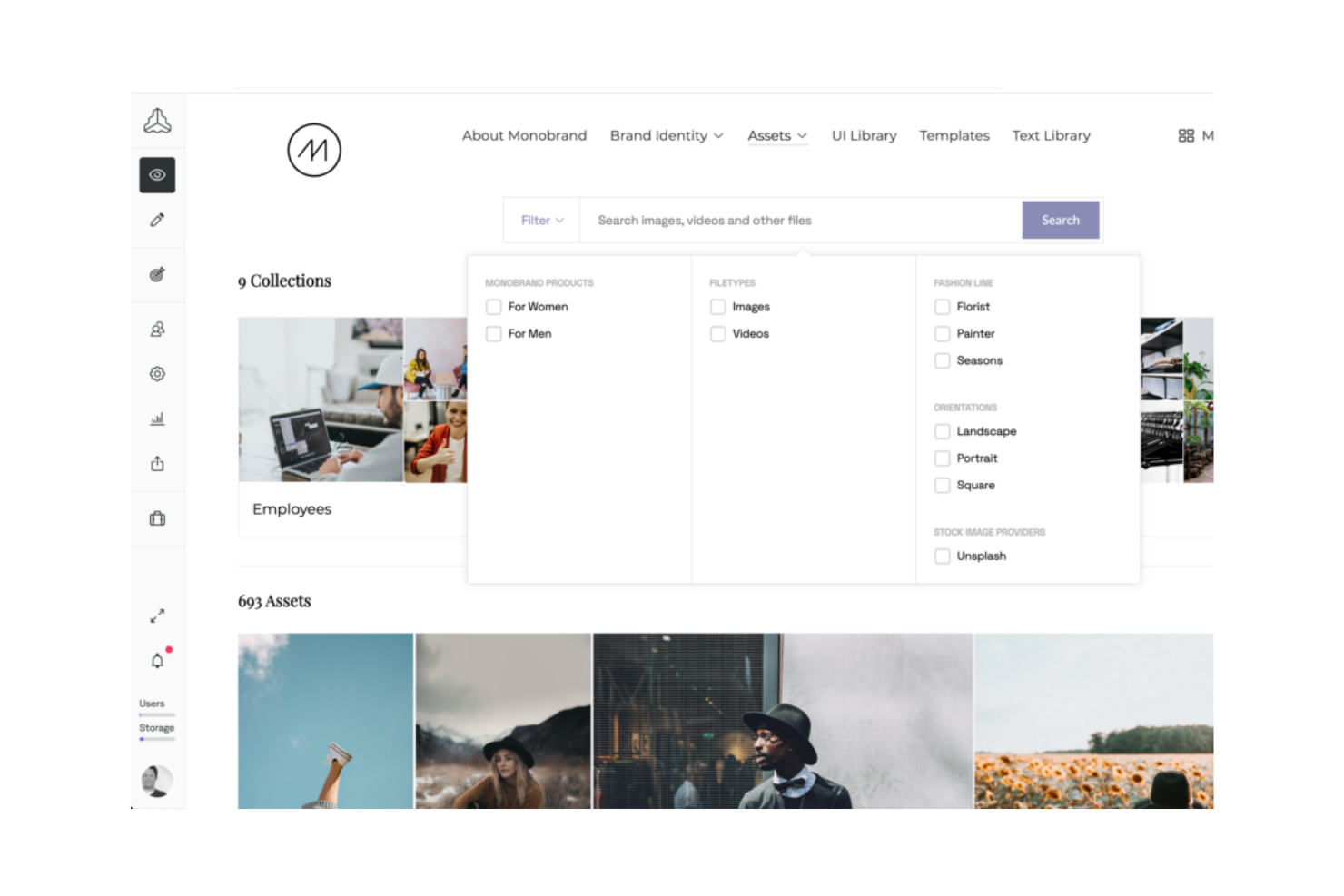
Frontify è una piattaforma di Gestione delle Risorse Digitali (DAM) progettata per le aziende che vogliono mantenere la coerenza del brand. Si rivolge a team di marketing e branding, aiutandoli a gestire efficacemente risorse e linee guida del marchio per garantire una comunicazione coerente del brand.
Perché ho scelto Frontify: Frontify eccelle nel mantenere la coerenza del marchio grazie alla funzione delle linee guida, che mantiene allineata la comunicazione del team. Offre un hub centralizzato per tutte le risorse del brand, facilitando l’accesso e l’uso dei materiali più aggiornati. Gli strumenti di collaborazione della piattaforma permettono un lavoro di squadra efficace nei progetti legati al brand. Il suo focus sulla gestione del marchio assicura che l’identità aziendale rimanga coerente su tutti i canali.
Funzionalità e integrazioni distintive
Funzionalità includono una funzione di linee guida del brand che aiuta il tuo team a mantenere una comunicazione coerente. L’hub centralizzato per le risorse del marchio garantisce un facile accesso ai materiali più recenti. Gli strumenti di collaborazione supportano il lavoro di squadra e la comunicazione, facilitando la gestione dei progetti legati al brand.
Integrazioni includono Adobe Creative Cloud, Sketch, Microsoft Teams, Slack, Figma, Trello, Jira, Dropbox, Google Drive e Asana.
Pros and Cons
Pros:
- Forte attenzione alla coerenza del brand
- Hub centralizzato per le risorse del brand
- Controllo efficiente delle versioni
Cons:
- Poca trasparenza nei prezzi
- Opzioni di personalizzazione di base

Brandkit
Ideale per la gestione del brand
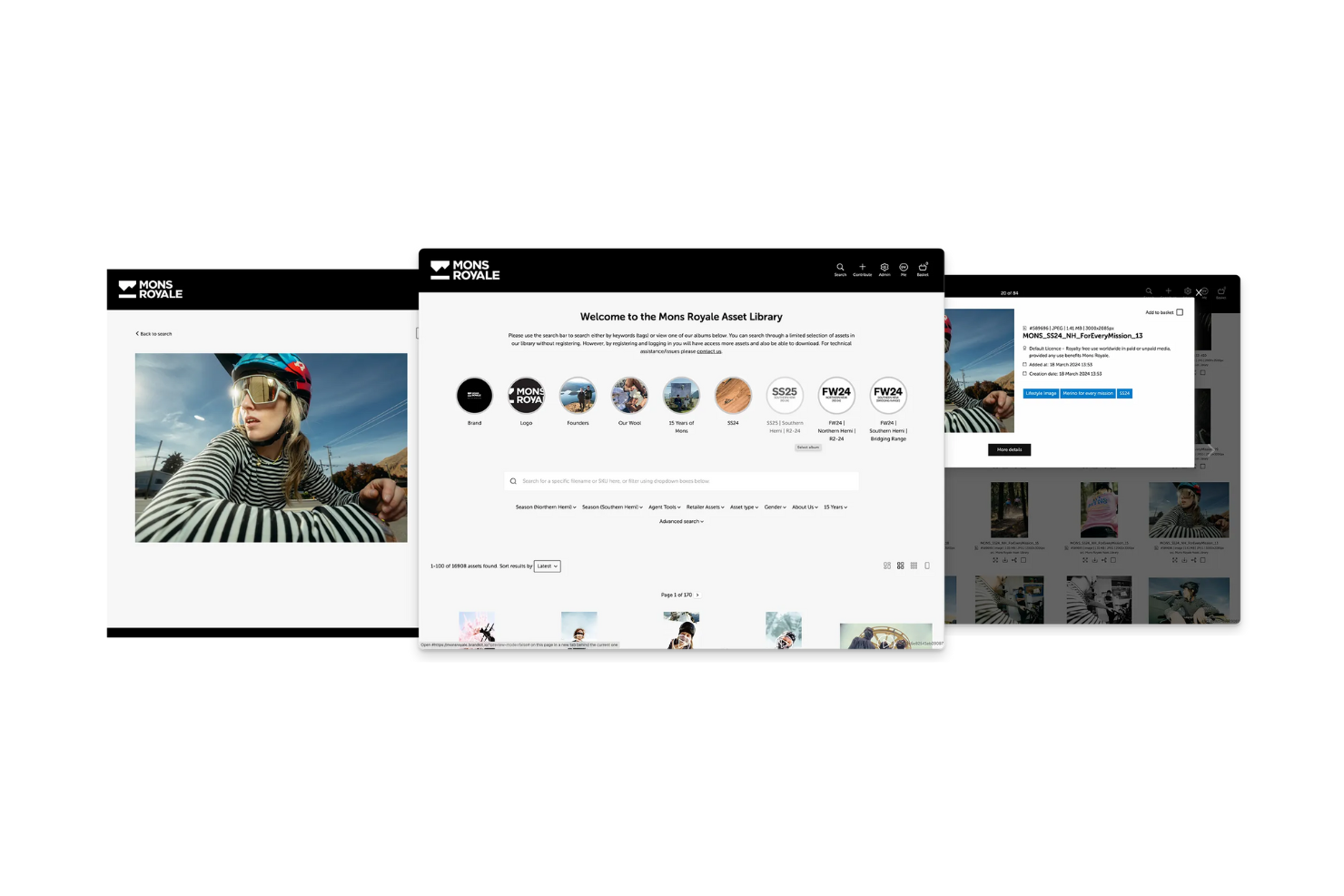
Brandkit è una piattaforma di Digital Asset Management (DAM) focalizzata sulla gestione del marchio, pensata per i team di marketing e branding. Aiuta le squadre a organizzare e distribuire efficacemente le risorse del brand, garantendo messaggi coerenti su tutti i canali.
Perché ho scelto Brandkit: Brandkit è ideale per la gestione del marchio, offrendo funzionalità che mantengono la coerenza del brand su diversi canali. Fornisce strumenti per l'archiviazione centralizzata delle risorse e una facile condivisione, assicurando che il tuo team possa accedere sempre ai materiali più aggiornati. Modelli personalizzabili aiutano il tuo team a rispettare facilmente le linee guida del marchio. La piattaforma facilita la collaborazione, permettendo alle squadre di lavorare insieme in modo più efficace su progetti legati al brand.
Funzionalità e integrazioni principali
Funzionalità includono modelli personalizzabili che aiutano il tuo team a mantenere la coerenza del marchio. La libreria centralizzata delle risorse assicura che tutti abbiano accesso ai materiali più recenti. Le linee guida del brand possono essere gestite e condivise facilmente, mantenendo il messaggio uniforme su tutte le piattaforme.
Integrazioni includono Adobe Creative Cloud, Canva, Slack, Dropbox, Google Drive, Shopify, WordPress, Hootsuite, Mailchimp e Trello.
Pros and Cons
Pros:
- Ottimo per la coerenza del marchio
- Condivisione facilitata delle risorse
- Modelli brand personalizzabili
Cons:
- Richiede formazione per i nuovi utenti
- Opzioni di personalizzazione di base
Altri strumenti AI DAM
Ecco alcune opzioni aggiuntive di strumenti AI DAM che non sono entrate nella mia selezione, ma che vale comunque la pena prendere in considerazione:
- Orange Logic
Ideale per grandi aziende
- Storyteq
Ideale per contenuti dinamici
- Pics.io
Ideale per gli utenti di Google Drive
- Bynder
Ideale per team creativi
- Air
Ideale per la ricerca di contenuti basata su IA
- 4ALLPORTAL
Ideale per la gestione centralizzata dei dati di prodotto
- Connecter Suite
Ideale per l'accesso immediato ai file locali


Come valuto gli strumenti DAM con Intelligenza Artificiale
Cerco soluzioni di IA che facciano davvero risparmiare tempo ai team di progetto—tag automatici su migliaia di asset al caricamento o la capacità di trovare il file giusto tramite una query in linguaggio naturale, non solo una ricerca per parola chiave con un nuovo nome. Da lì, suddivido la mia valutazione in funzionalità di base necessarie per qualsiasi DAM AI e in fattori differenzianti che distinguono le soluzioni buone da quelle eccellenti.
Funzionalità di base (requisiti minimi per questa lista)
Quando seleziono gli strumenti per la mia lista, assegno a ciascuno un punteggio da 0 (non offre la funzionalità) a 5 (eccelle in questo ambito) per ciascuna delle funzionalità di base elencate di seguito. Poi calcolo il punteggio totale dello strumento in percentuale. Ogni strumento deve raggiungere un punteggio totale minimo del 65% per essere preso in considerazione.
- Tag automatici basati su IA: Verifico che lo strumento generi metadati accurati al caricamento, su diversi tipi di file—come il tagging di un lotto di 500 immagini di una campagna con parole chiave utili invece di inserirle tutte in una cartella.
- Ricerca di asset potenziata dall'IA: La ricerca deve andare oltre i nomi dei file. Valuto se i team possono effettuare query in linguaggio naturale o visive per trovare asset, ad esempio cercando "persona su un tetto al tramonto" e ottenendo risultati pertinenti.
- Repository centralizzato di asset: La piattaforma deve ospitare tutti i principali tipi di file—immagini, video, PDF, file di design—in una libreria strutturata con schemi di metadati personalizzati e tassonomie scalabili.
- Controllo delle versioni e workflow di approvazione: Cerco una cronologia delle versioni chiara e percorsi di approvazione configurabili, in modo che un designer possa inviare un banner rivisto attraverso una revisione a più stadi senza perdere l'originale.
- Gestione di permessi e diritti: Qui conta l'accesso basato sui ruoli e il tracciamento delle licenze. Valuto quanto bene uno strumento gestisce le date di scadenza degli asset, restrizioni d'uso e limiti di accesso tra utenti interni ed esterni.
- Integrazioni con strumenti di PM e creativi: Il DAM dovrebbe collegarsi agli strumenti già usati dai team di progetto. Cerco integrazioni native con piattaforme come Asana, Monday, Adobe Creative Cloud o Figma.
Quando ho una lista di strumenti che soddisfano i criteri, considero ciò che distingue ogni piattaforma.
Fattori differenzianti (cosa distingue i fornitori)
Ecco come confronto tra diversi fornitori:
Caratteristiche distintive
La conformità al brand tramite IA è un vero elemento differenziante—cerco strumenti che segnalano asset non in linea con il brand prima che arrivino al cliente, risparmiando ai project manager la fatica di individuare questi problemi manualmente durante la revisione. Anche i trigger di workflow automatici aggiungono valore concreto, soprattutto quando l'approvazione di un asset può avviare attività successive come notificare i portatori di interesse o aggiornare lo stato del progetto. Anche le capacità di IA generativa sono importanti. Il ridimensionamento automatico di un'immagine principale su più formati di consegna aiuta i team creativi che producono grandi volumi a lavorare più velocemente.
Oltre le funzionalità
Valuto quanto bene ogni piattaforma gestisce la collaborazione esterna—partner di agenzia e clienti hanno bisogno di accesso ospite con link a scadenza e condivisioni che rispettano i diritti, non di soluzioni di fortuna. Sicurezza e conformità hanno molto peso. Controllo la certificazione SOC 2 Type II, il supporto SSO e chiare policy su come il fornitore gestisce i dati usati per addestrare i suoi modelli di IA. Anche i tempi di implementazione sono importanti per i team focalizzati sui progetti. Uno strumento che offre supporto alla migrazione e consulenza sulle tassonomie porta più rapidamente valore rispetto a uno che ti lascia costruire da zero gli schemi di metadati.
Come scegliere gli strumenti AI DAM
È facile perdersi in lunghi elenchi di funzionalità e strutture tariffarie complesse. Per aiutarti a rimanere concentrato mentre affronti il tuo specifico processo di selezione del software, ecco una lista di fattori da tenere a mente:
| Fattore | Cosa considerare |
|---|---|
| Scalabilità | Considera se lo strumento può crescere insieme al tuo team. Informati sui limiti per gli utenti e sulla capacità di archiviazione. Assicurati che possa gestire un volume di dati maggiore con l'espansione della tua organizzazione. |
| Integrazioni | Verifica se lo strumento si integra con il software che già utilizzi. Cerca integrazioni native con strumenti come Adobe Creative Cloud, Slack e Google Drive per evitare interruzioni nei flussi di lavoro. |
| Personalizzazione | Valuta se lo strumento può essere adattato alle tue esigenze specifiche. Cerca modelli e flussi di lavoro personalizzabili in linea con i processi del tuo team. |
| Semplicità d'uso | Verifica che l'interfaccia utente sia intuitiva. Assicurati che i membri del team possano navigare senza una formazione approfondita. Cerca un layout chiaro e semplice, adatto al livello di competenza tecnologica del tuo team. |
| Implementazione e onboarding | Valuta la semplicità della fase iniziale. Informati sulle risorse formative disponibili, come video o tutorial. Assicurati una transizione fluida, con interruzioni minime delle attività quotidiane. |
| Costo | Confronta i piani tariffari con il tuo budget. Cerca trasparenza nei prezzi ed eventuali costi nascosti. Considera i costi a lungo termine, inclusi eventuali addebiti per utenti o funzionalità aggiuntive. |
| Misure di sicurezza | Verifica che lo strumento soddisfi i tuoi standard di sicurezza. Cerca funzionalità come la crittografia dei dati, le autorizzazioni degli utenti e gli aggiornamenti di sicurezza regolari per proteggere le tue risorse. |
| Disponibilità dell'assistenza | Assicurati che il fornitore offra un'assistenza affidabile. Cerca più canali di supporto e tempi di risposta rapidi. Considera la disponibilità di risorse self-service per risolvere velocemente i problemi. |
Cosa sono gli strumenti DAM basati sull'IA?
Gli strumenti DAM basati sull'IA sono sistemi di gestione delle risorse digitali potenziati dall'intelligenza artificiale per organizzare, archiviare e recuperare in modo efficiente le risorse digitali. Professionisti come esperti di marketing, designer e creatori di contenuti utilizzano questi strumenti per gestire i propri contenuti multimediali digitali, garantendo un accesso rapido e la collaborazione.
Funzionalità come l'assegnazione di metadati, la ricerca intelligente e i flussi di lavoro automatizzati aiutano a organizzare le risorse, migliorare la produttività e mantenere la coerenza del marchio. Nel complesso, questi strumenti offrono agli utenti una gestione efficiente delle risorse e una collaborazione ottimizzata.
Funzionalità degli strumenti DAM basati sull'IA
Quando scegli gli strumenti DAM basati sull'IA, presta attenzione alle seguenti funzionalità chiave:
- Assegnazione dei metadati: assegna automaticamente alle risorse metadati pertinenti, facilitando la ricerca e l'organizzazione dei file digitali.
- Ricerca intelligente: utilizza l'IA per individuare rapidamente i file in base a parole chiave o tag, risparmiando tempo e aumentando la produttività.
- Controllo delle versioni: gestisce diverse versioni delle risorse per assicurarsi che i team lavorino con i file più aggiornati.
- Flussi di lavoro personalizzabili: consente ai team di adattare i processi alle proprie esigenze specifiche, migliorando l'efficienza e la collaborazione.
- Strumenti di collaborazione: consentono ai membri del team di condividere, esaminare e fornire feedback sulle risorse, migliorando il lavoro di squadra.
- Libreria centralizzata delle risorse: fornisce un'unica posizione per archiviare e accedere a tutte le risorse digitali, garantendo coerenza e facilità di accesso.
- Misure di sicurezza: proteggono le risorse digitali con funzionalità come la crittografia e le autorizzazioni degli utenti, garantendo la sicurezza dei dati.
- Flussi di lavoro automatizzati: semplificano le attività ripetitive, liberando tempo da dedicare a lavori più strategici.
- Analisi e report: offrono informazioni sull'utilizzo e sulle prestazioni delle risorse, aiutando i team a prendere decisioni basate sui dati.
- Distribuzione multicanale: facilita la condivisione dei contenuti su diverse piattaforme, garantendo un'ampia portata e coerenza.
Vantaggi degli strumenti DAM basati sull'IA
L'implementazione di strumenti DAM basati sull'IA offre diversi vantaggi al tuo team e alla tua azienda. Ecco alcuni dei vantaggi che puoi aspettarti:
- Organizzazione migliorata: l'assegnazione dei metadati basata sull'IA e la ricerca intelligente aiutano a mantenere le risorse digitali ben organizzate e facili da trovare.
- Collaborazione avanzata: funzionalità come le librerie centralizzate delle risorse e gli strumenti di collaborazione facilitano il lavoro di squadra e la condivisione dei feedback.
- Risparmio di tempo: i flussi di lavoro automatizzati e la ricerca intelligente riducono il tempo dedicato alle attività ripetitive e alla ricerca dei file.
- Coerenza: il controllo delle versioni e la gestione centralizzata delle risorse assicurano che tutti i membri del team utilizzino le risorse del marchio più aggiornate e coerenti.
- Sicurezza dei dati: le misure di sicurezza proteggono le risorse digitali da accessi non autorizzati e potenziali violazioni dei dati.
- Decisioni informate: le analisi e i report forniscono informazioni sulle prestazioni delle risorse, aiutando i team a prendere decisioni basate sui dati.
- Portata più ampia: le funzionalità di distribuzione multicanale garantiscono che i contenuti vengano condivisi in modo coerente su diverse piattaforme.
Costi e prezzi degli strumenti DAM basati sull'IA
La selezione degli strumenti di AI DAM richiede la comprensione dei diversi modelli e piani tariffari disponibili. I costi variano in base alle funzionalità, alle dimensioni del team, ai componenti aggiuntivi e altro ancora. La tabella seguente riassume i piani più comuni, i relativi prezzi medi e le funzionalità generalmente incluse nelle soluzioni di strumenti di AI DAM:
Tabella comparativa dei piani per gli strumenti di AI DAM
| Tipo di piano | Prezzo medio | Funzionalità comuni |
|---|---|---|
| Piano gratuito | $0 | Spazio di archiviazione di base, accesso limitato degli utenti e applicazione essenziale dei tag ai metadati. |
| Piano personale | $5-$25/utente/mese | Spazio di archiviazione ampliato, strumenti di collaborazione di base e funzionalità di ricerca standard. |
| Piano aziendale | $30-$75/utente/mese | Collaborazione avanzata, flussi di lavoro personalizzabili e funzionalità di sicurezza potenziate. |
| Piano per grandi aziende | $100+/utente/mese | Spazio di archiviazione illimitato, supporto completo per le integrazioni e analisi complete. |
Domande frequenti sugli strumenti di AI DAM
Ecco alcune risposte alle domande comuni sugli strumenti di AI DAM:
In che modo il DAM migliora la collaborazione del team?
Gli strumenti DAM migliorano la collaborazione del team semplificando la comunicazione tra i membri. Il team può accedere alle risorse necessarie, commentare e approvare le versioni finali direttamente all’interno del sistema. Questo accesso unificato e la possibilità di fornire riscontri in tempo reale aiutano il team a lavorare insieme in modo più efficiente.
In che modo il DAM migliora la coerenza del marchio?
Un DAM basato sul cloud garantisce la coerenza del marchio offrendo a tutti l’accesso alle risorse più recenti del marchio. Il team responsabile del marchio può gestire e aggiornare facilmente le risorse, eliminando i materiali obsoleti. Questo controllo contribuisce a mantenere un’immagine coerente del marchio su tutti i canali e in tutti i materiali.
Cosa devo considerare nella scelta degli strumenti di AI DAM?
Nella scelta degli strumenti di AI DAM, considera fattori come la scalabilità e l’integrazione con i sistemi esistenti. Valuta quanto la piattaforma sia personalizzabile per adattarsi alle esigenze del team. Valuta inoltre la facilità d’uso e la qualità dell’assistenza clienti per garantire un’implementazione senza problemi.
Gli strumenti di AI DAM sono in grado di gestire grandi volumi di dati?
Sì, gli strumenti di AI DAM sono progettati per gestire in modo efficiente grandi volumi di dati. Utilizzano la ricerca intelligente e l’applicazione di tag ai metadati per organizzare e recuperare rapidamente le risorse. Durante la valutazione, verifica se lo strumento è in grado di scalare in base alla crescita delle esigenze relative ai dati, così da evitare limitazioni future.
Gli strumenti di AI DAM sono sicuri?
Gli strumenti di AI DAM danno priorità alla sicurezza offrendo funzionalità come la crittografia dei dati e le autorizzazioni degli utenti. Quando selezioni uno strumento, assicurati che soddisfi gli standard di sicurezza della tua organizzazione e che aggiorni regolarmente i propri protocolli di sicurezza per proteggere le risorse digitali da accessi non autorizzati.
Come si integrano gli strumenti di AI DAM con gli altri software?
Gli strumenti di AI DAM offrono spesso integrazioni con software diffusi come Adobe Creative Cloud, Slack e Google Drive. Queste integrazioni contribuiscono a mantenere un flusso di lavoro fluido tra piattaforme diverse. Verifica le funzionalità di integrazione dello strumento per assicurarti che sia compatibile con i sistemi esistenti.