

I 10 migliori software per il monitoraggio del tempo per piccole imprese, recensiti nel 2026

I migliori software di monitoraggio del tempo per le piccole imprese: selezione


Gestire una piccola impresa comporta una serie di sfide specifiche, soprattutto quando si tratta di monitorare il tempo. Ogni minuto conta e tenere traccia del tempo e delle ore lavorate dal proprio team può essere una difficoltà costante. È qui che entra in gioco il software di monitoraggio del tempo, che aiuta a gestire i costi del lavoro e ad aumentare la produttività.
Scegliere lo strumento giusto fa la differenza, quindi abbiamo testato una serie di opzioni per offrirti una panoramica imparziale dei migliori software disponibili.
In questo articolo condividiamo le nostre migliori scelte tra i software di monitoraggio del tempo per le piccole imprese. Troverai informazioni sulle funzionalità, sui vantaggi e su ciò che distingue ciascuna soluzione. Iniziamo e troviamo quella più adatta al tuo team.
Perché fidarsi dei nostri consigli sui software
Il nostro team testa e recensisce software dal 2012. In quanto project manager noi stessi, sappiamo quanto sia difficile — e importante — scegliere il software giusto.
Per questa guida, abbiamo valutato gli strumenti attraverso test pratici e ricerche indipendenti, assegnando un punteggio agli strumenti in base ai nostri criteri di selezione. Ci basiamo inoltre sulle competenze di leader di pensiero del settore e di professionisti attivi nella gestione dei progetti.
Le nostre recensioni riflettono il nostro giudizio editoriale umano, non un discorso di vendita.
Revisori esperti:
Tabella comparativa: monitoraggio del tempo per le piccole imprese
Questa tabella comparativa riassume i dettagli dei prezzi delle mie principali soluzioni di monitoraggio del tempo per le piccole imprese.
| Tool | Best For | Trial Info | Price | ||
|---|---|---|---|---|---|
| 1 | Ideale per team senza postazione fissa | Prova gratuita di 14 giorni + demo gratuita disponibile | A partire da $29/mese (fatturazione annuale) | Website | |
| 2 | Ideale per il monitoraggio delle ore dal preventivo al progetto | Versione dimostrativa gratuita disponibile | A partire da $8/utente/mese | Website | |
| 3 | Ideale per integrare eventi da calendario | Prova gratuita di 14 giorni + demo gratuita disponibile | Da $6.42/utente/mese (fatturati annualmente) | Website | |
| 4 | Ideale per impostare regole di maturazione delle ferie | Demo gratuita + prova gratuita di 14 giorni disponibili | A partire da $4.49/utente/mese | Website | |
| 5 | Ideale per passare rapidamente da un'attività all'altra | Piano gratuito + prova gratuita di 30 giorni + demo gratuita disponibile | A partire da $9/utente/mese (fatturato annualmente) | Website | |
| 6 | Ideale per combinare la gestione del tempo e del budget | Piano gratuito + prova gratuita di 30 giorni + demo gratuita disponibile | A partire da $6/utente/mese (fatturato annualmente) | Website | |
| 7 | Ideale per l'approvazione dei fogli presenze su più livelli | Piano gratuito disponibile e prova gratuita di 30 giorni | A partire da €10/utente/mese | Website | |
| 8 | Ideale per il monitoraggio tramite estensione del browser | Piano gratuito + prova gratuita di 7 giorni disponibile | A partire da $3.99/utente/mese (con fatturazione annuale) | Website | |
| 9 | Ideale per l'integrazione con i sistemi di gestione delle paghe | Prova gratuita e demo gratuita disponibili | A partire da $20/mese + $8/utente/mese (fatturazione annuale) | Website | |
| 10 | Ideale per approfondimenti sul monitoraggio del tempo tramite IA | Prova gratuita di 14 giorni + demo gratuita disponibile | Da $9/utente/mese (fatturato annualmente) | Website |


Recensioni dei migliori software di monitoraggio del tempo per le piccole imprese
Di seguito trovi riepiloghi dettagliati dei migliori software di monitoraggio del tempo per le piccole imprese inclusi nella nostra selezione. Per ciascuno vengono esaminate in dettaglio le funzionalità principali, i pro e i contro, le integrazioni e i casi d’uso ideali, per aiutarti a trovare lo strumento più adatto a te.
Ideale per team senza postazione fissa
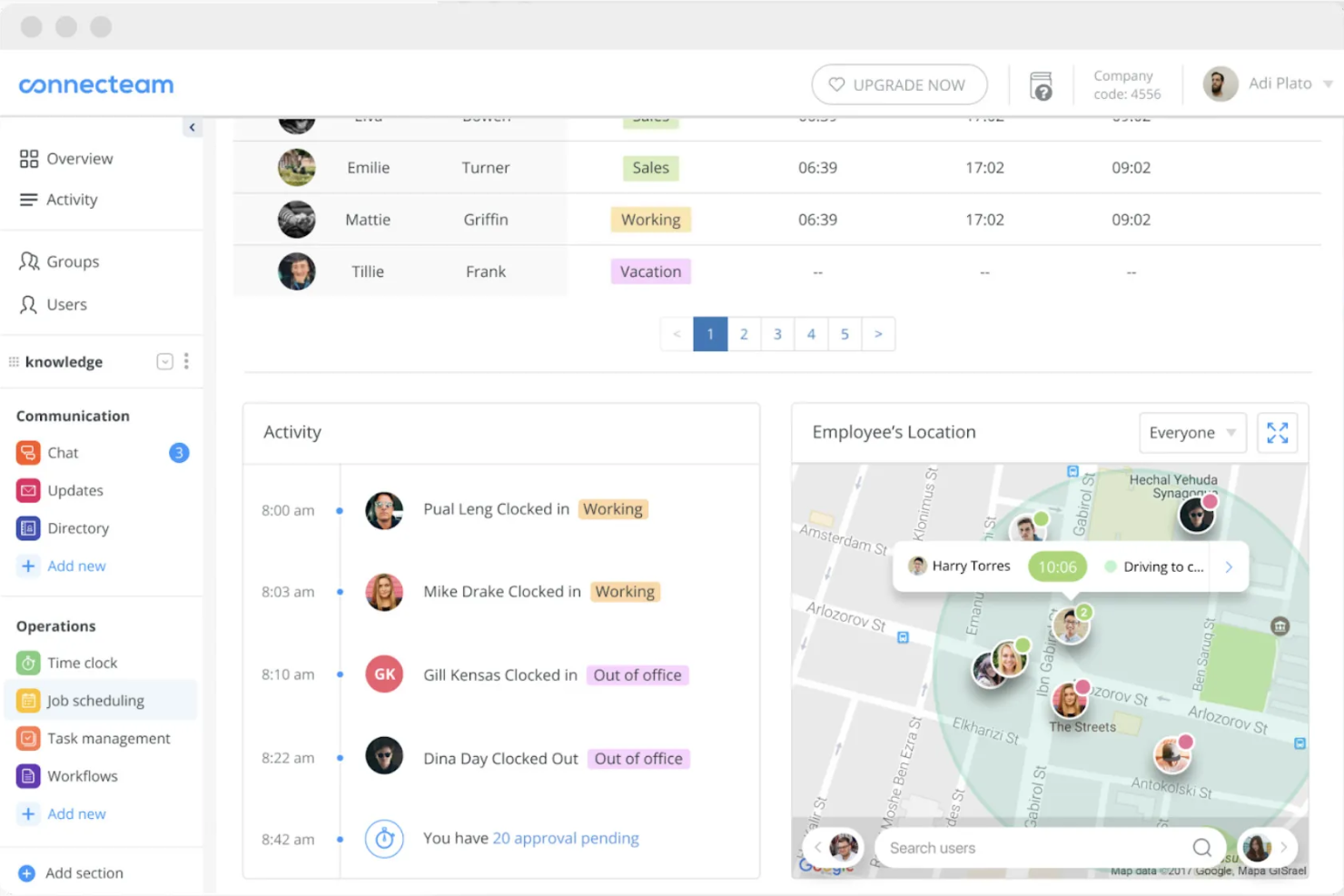
Connecteam è un software di monitoraggio del tempo e gestione della forza lavoro progettato per team senza una postazione fissa in diversi settori. Permette agli utenti di registrare le ore di lavoro, gestire i turni e comunicare in modo efficiente.
Perché ho scelto Connecteam: Si rivolge specificamente ai team senza scrivania, rendendo semplice per la tua squadra timbrare entrata e uscita da qualsiasi luogo. Puoi gestire gli orari e comunicare direttamente con i dipendenti tramite l'app. Lo strumento offre anche il tracciamento GPS, garantendo registrazioni orarie accurate.
Funzionalità e integrazioni principali:
Le funzionalità includono strumenti per la gestione delle attività, utili per assegnare e dare priorità ai compiti in modo efficiente, migliorando la gestione del team. Puoi anche utilizzare gli strumenti di comunicazione per inviare aggiornamenti e messaggi istantanei al team. Connecteam offre la gestione dei turni, consentendo di creare e modificare rapidamente i programmi.
Le integrazioni includono QuickBooks, Xero, Zapier, Wix, Shopify e altri ancora.
Pros and Cons
Pros:
- GPS breadcrumbs mostrano l'intero percorso del turno
- Tutto-in-uno per gestire il lavoro senza scrivania
- Piano gratuito per piccole imprese con gli strumenti principali
Cons:
- Report e analisi restano piuttosto limitati
- L'app ricca di funzionalità può disorientare i nuovi amministratori
New Product Updates from Connecteam

Connecteam Expands Break and Timesheet Controls
Connecteam adds flexible break thresholds, personalized policies, auto-end options, a centralized exceptions report, and improved timesheet issue visibility to help teams manage breaks and timesheets more effectively. For more information, visit Connecteam’s official site.
 .
.
Ideale per il monitoraggio delle ore dal preventivo al progetto
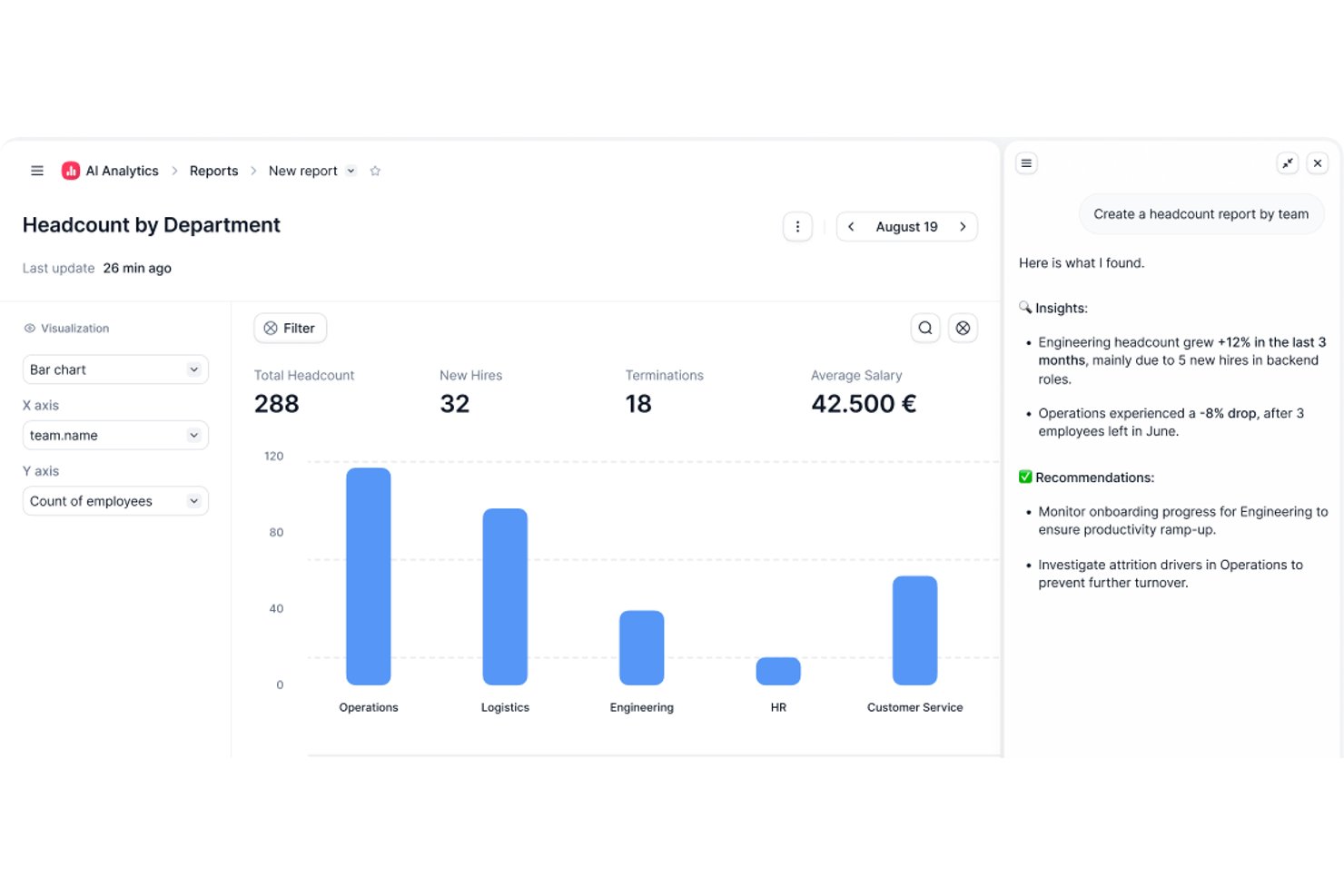
Factorial è una piattaforma HR con monitoraggio integrato delle ore e gestione dei progetti, che include la timbratura dei dipendenti, l'approvazione dei fogli presenze, la pianificazione dei progetti per fasi e il monitoraggio in tempo reale del budget e dei margini.
A chi è più adatto Factorial?
Factorial è adatto ai piccoli team che gestiscono progetti per i clienti e hanno bisogno di una visibilità in tempo reale su budget e margini, oltre alle funzioni HR principali in un unico posto.
Perché ho scelto Factorial
Factorial si è guadagnato un posto nella mia selezione ristretta grazie al modo in cui gestisce l'intero percorso dal preventivo al progetto completato. Mi piace il fatto che sia possibile creare un preventivo strutturato sui costi con tariffe di fatturazione a livello di fase e che, una volta approvato dal cliente, Factorial generi automaticamente il progetto, facendo risparmiare molto tempo nella configurazione. Da quel momento, i margini si aggiornano in tempo reale man mano che vengono registrate le ore, così sai sempre qual è la situazione finanziaria di un progetto senza dover recuperare manualmente i dati.
Funzionalità principali di Factorial
- Timbratura con GPS e georecinzione: I dipendenti possono timbrare l'entrata e l'uscita dall'app mobile utilizzando il rilevamento della posizione o zone geografiche predefinite.
- Acquisizione delle ore con più metodi: Supporta la scansione dei codici QR, l'app mobile, la geolocalizzazione e l'inserimento manuale, così i team distribuiti possono registrare le ore nel modo che preferiscono.
- Tariffe di fatturazione a livello di fase: Le tariffe di fatturazione possono essere configurate in base al ruolo, all'anzianità o alla fase del progetto, per riflettere il valore effettivo del lavoro in ogni fase.
- Resoconti basati sull'IA: L'assistente Factorial One consente di interrogare i dati dei progetti e delle risorse umane usando il linguaggio naturale, per generare resoconti su richiesta.
Integrazioni di Factorial
Il catalogo delle integrazioni di Factorial include Monday.com, Sage, Microsoft Power BI, Slack, Okta, Google Workspace e Microsoft Outlook. Offre inoltre un'API pubblica e Zapier.
Pros and Cons
Pros:
- Monitoraggio in tempo reale del margine e della redditività del progetto
- Registrazione delle ore del progetto tramite dispositivo mobile, GPS e codici QR
- Flusso di conversione intelligente dal preventivo al progetto
Cons:
- Nessuno strumento integrato per la fatturazione ai clienti
- Il monitoraggio delle ore è secondario rispetto alle funzioni HR

DeskTime
Ideale per integrare eventi da calendario
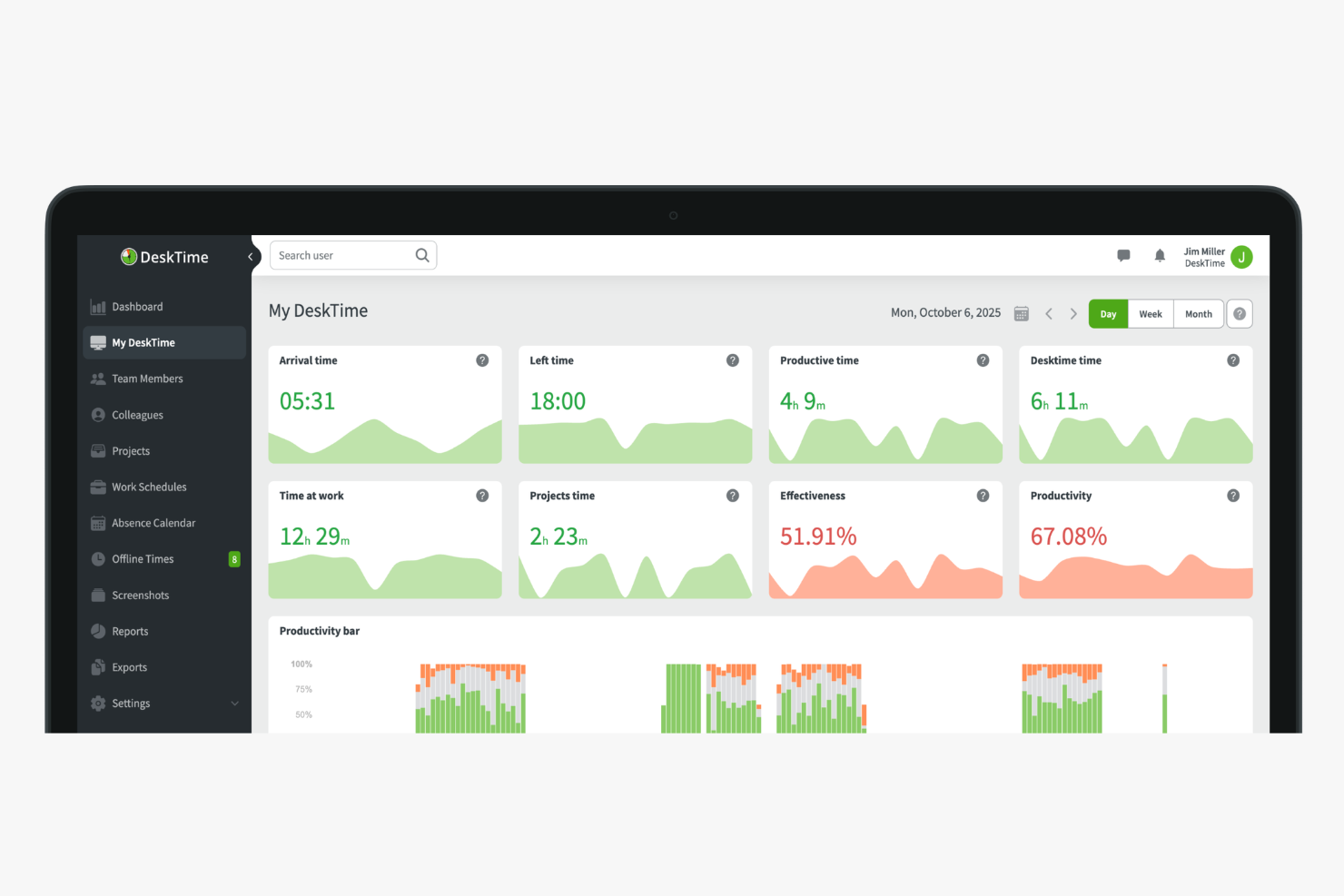
DeskTime è uno strumento di monitoraggio automatico del tempo che registra l'uso di app e URL, tiene traccia delle ore a livello di progetto, calcola la produttività dei dipendenti e gestisce presenze e assenze per piccoli team.
Per chi è ideale DeskTime?
DeskTime è adatto a piccoli imprenditori e responsabili di team che necessitano di un monitoraggio automatico del tempo senza dover affidarsi all'inserimento manuale delle ore da parte dei dipendenti.
Perché ho scelto DeskTime
Ho incluso DeskTime tra le mie migliori scelte perché si collega a Google Calendar e Outlook Calendar per inserire automaticamente le riunioni nella timeline giornaliera. Invece di dover segnare manualmente il tempo speso in uno standup o in una chiamata con un cliente, DeskTime importa direttamente questi eventi. In questo modo, le ore tracciate riflettono davvero come è stata impiegata la giornata, inclusi i momenti di riunione, senza richiedere a nessuno un inserimento dati aggiuntivo. Credo che questo sia molto importante per i piccoli team dove nessuno ha tempo per gestire un secondo sistema.
Funzionalità principali di DeskTime
- Pianificazione dei turni: Pianifica e assegna i turni di lavoro ai membri del team direttamente dalla vista calendario di DeskTime.
- Calcolo dei costi: Assegna tariffe orarie a dipendenti o progetti e lascia che DeskTime calcoli i costi di manodopera in base al tempo registrato.
- Report personalizzati: Filtra i dati su tempo e produttività per dipendente, progetto o intervallo di date ed esporta i risultati.
- Modalità tempo privato: Permetti ai dipendenti di sospendere il monitoraggio per attività personali senza registrare alcuna attività.
Integrazioni DeskTime
Le integrazioni includono Google Calendar, Outlook Calendar, Trello, Gitlab, Asana, Jira e Zapier.
Pros and Cons
Pros:
- Traccia automaticamente il tempo trascorso su app e siti web
- Classifica le attività come produttive o improduttive
- Supporta la registrazione offline e durante le assenze dalla scrivania
Cons:
- L'app mobile ha funzionalità di monitoraggio limitate
- Non dispone di filtro predittivo per categorie web

Ideale per impostare regole di maturazione delle ferie
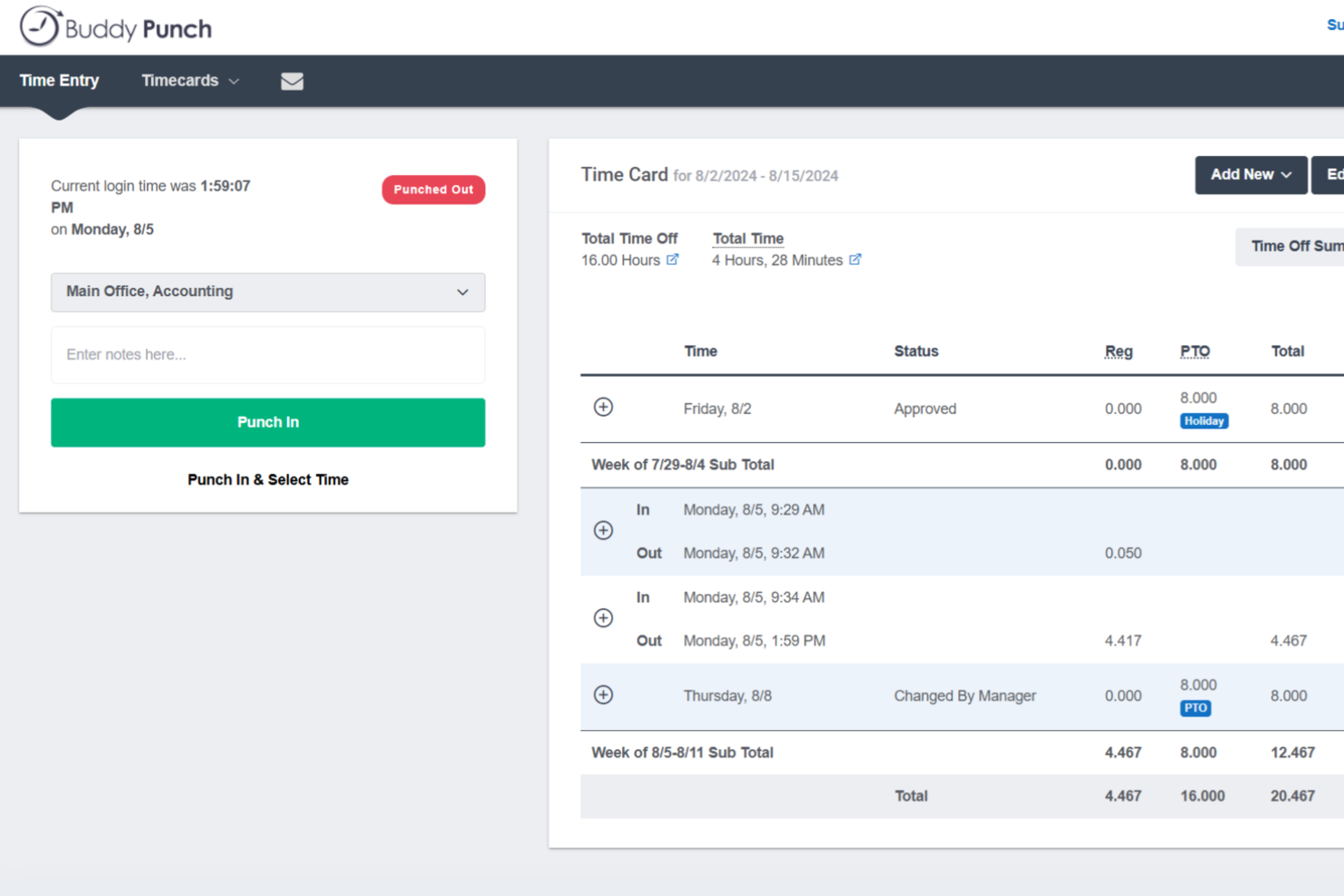
Buddy Punch è una piattaforma di rilevazione delle presenze progettata per le piccole imprese con personale orario, che combina timbratura entrata/uscita dei dipendenti, gestione delle ferie, pianificazione, tracciamento GPS e integrazioni con i sistemi di gestione paghe in un unico posto.
Per Chi è Ideale Buddy Punch?
Buddy Punch è una scelta eccellente per le piccole imprese che gestiscono dipendenti orari, a turni o sul campo in settori come commercio al dettaglio, edilizia, sanità e ospitalità.
Perché Ho Scelto Buddy Punch
Ho incluso Buddy Punch tra le mie scelte migliori perché la sua gestione delle ferie è davvero uno dei sistemi più automatizzati che abbia mai utilizzato. Imposti una sola volta le regole di maturazione, e Buddy Punch aggiunge automaticamente le ore ai saldi dei dipendenti secondo la tua pianificazione. I dipendenti possono verificare in autonomia il proprio saldo e inviare richieste di ferie direttamente dall'app. Quando approvi una richiesta, Buddy Punch deduce automaticamente le ore dal saldo, aggiunge il tempo al cartellino e contrassegna l'assenza nel prossimo calendario delle presenze. Sono tre passaggi manuali che il tuo team non deve più fare.
Caratteristiche Principali di Buddy Punch
- Tracciamento GPS: Registra la posizione di un dipendente al momento della timbratura, così sai sempre da dove stanno timbrando i lavoratori sul campo o da remoto.
- Pianificazione drag-and-drop: Crea e pubblica i turni del personale in modo visivo, con assegnazione dei turni che il team può visualizzare direttamente dall'app mobile.
- Arrotondamento delle timbrature: Arrotonda automaticamente gli orari di entrata e uscita all'intervallo più vicino, riducendo le correzioni manuali ai cartellini alla fine di ogni periodo di paga.
- Avvisi di straordinario: Avvisa i responsabili quando un dipendente si avvicina alla soglia degli straordinari prima che queste ore vengano registrate.
Integrazioni di Buddy Punch
Buddy Punch offre integrazioni native focalizzate sul payroll, tra cui QuickBooks Online, QuickBooks Desktop, ADP Workforce Now, Gusto, Paychex, Paycor, Paylocity, Rippling, Workday e SurePayroll, con oltre 17 integrazioni per la gestione paghe in totale. Si integra anche con Zapier e offre un'API per integrazioni personalizzate, oltre al supporto per single sign-on tramite Google, Apple, Okta e OneLogin.
Pros and Cons
Pros:
- Diversi metodi di timbratura incluso il testo per timbrare
- Recinzione geografica blocca automaticamente la timbratura fuori sede
- Maturazione ferie e calendario delle assenze integrati
Cons:
- Nessuna modalità offline per aree senza connessione internet
- L'app mobile non include tutte le funzioni della versione web

Toggl
Ideale per passare rapidamente da un'attività all'altra
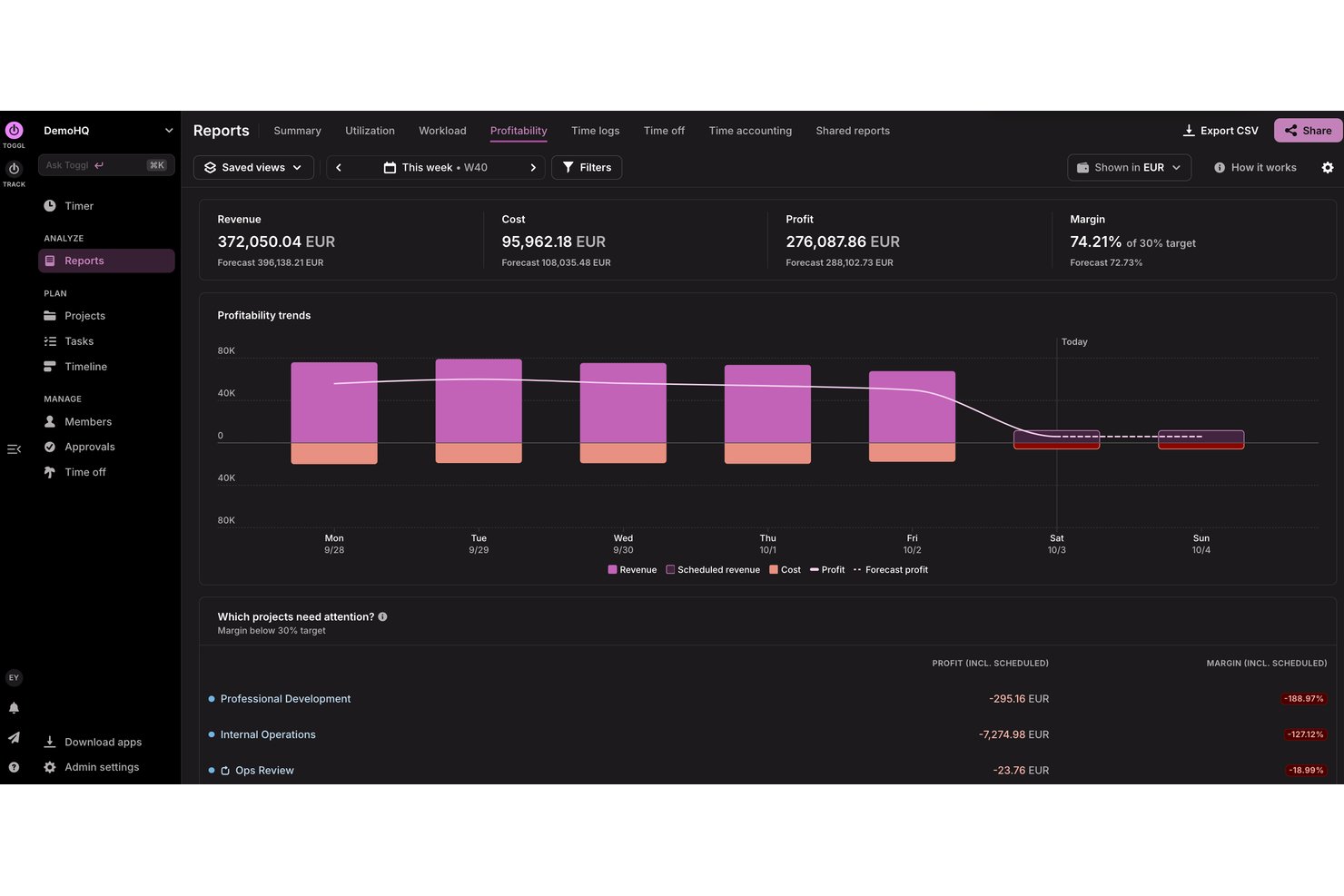
Toggl è uno strumento per freelance e piccole e medie imprese per monitorare il tempo, pianificare la capacità, analizzare la redditività e gestire i progetti con facilità.
Perché ho scelto Toggl: La sua interfaccia semplice consente di iniziare a monitorare il tempo senza una formazione approfondita. Puoi passare rapidamente da un'attività all'altra per mantenere registrazioni accurate del tempo e accedere a report dettagliati che forniscono informazioni sull'utilizzo del tempo. La sua attenzione alla semplicità lo rende un'ottima scelta per i team che apprezzano la facilità d'uso.
Funzionalità e integrazioni distintive:
Le funzionalità includono un timer che consente di monitorare il tempo con un solo clic, oltre al monitoraggio automatico su desktop. Puoi anche utilizzare la funzione di report per ottenere informazioni su come viene impiegato il tempo nei vari progetti, nonché sulla redditività dei progetti e sulla capacità del team. Lo strumento fornisce promemoria e notifiche per aiutarti a tenere sotto controllo le tue attività. Puoi anche utilizzare Toggl AI per ottenere risposte in linguaggio semplice alle domande su come viene impiegato il tempo, quanto tempo ha registrato un team e molto altro
Le integrazioni includono Google Calendar, Outlook, Jira, Asana, Todoist, GitHub e altro
Pros and Cons
Pros:
- Piano gratuito generoso per i piccoli team
- Interfaccia intuitiva apprezzata dai freelance
- La visualizzazione calendario chiarisce i blocchi di tempo giornalieri
Cons:
- I frequenti cambiamenti delle funzionalità confondono gli utenti esistenti
- Nessun monitoraggio GPS o geofencing

actiTIME
Ideale per combinare la gestione del tempo e del budget
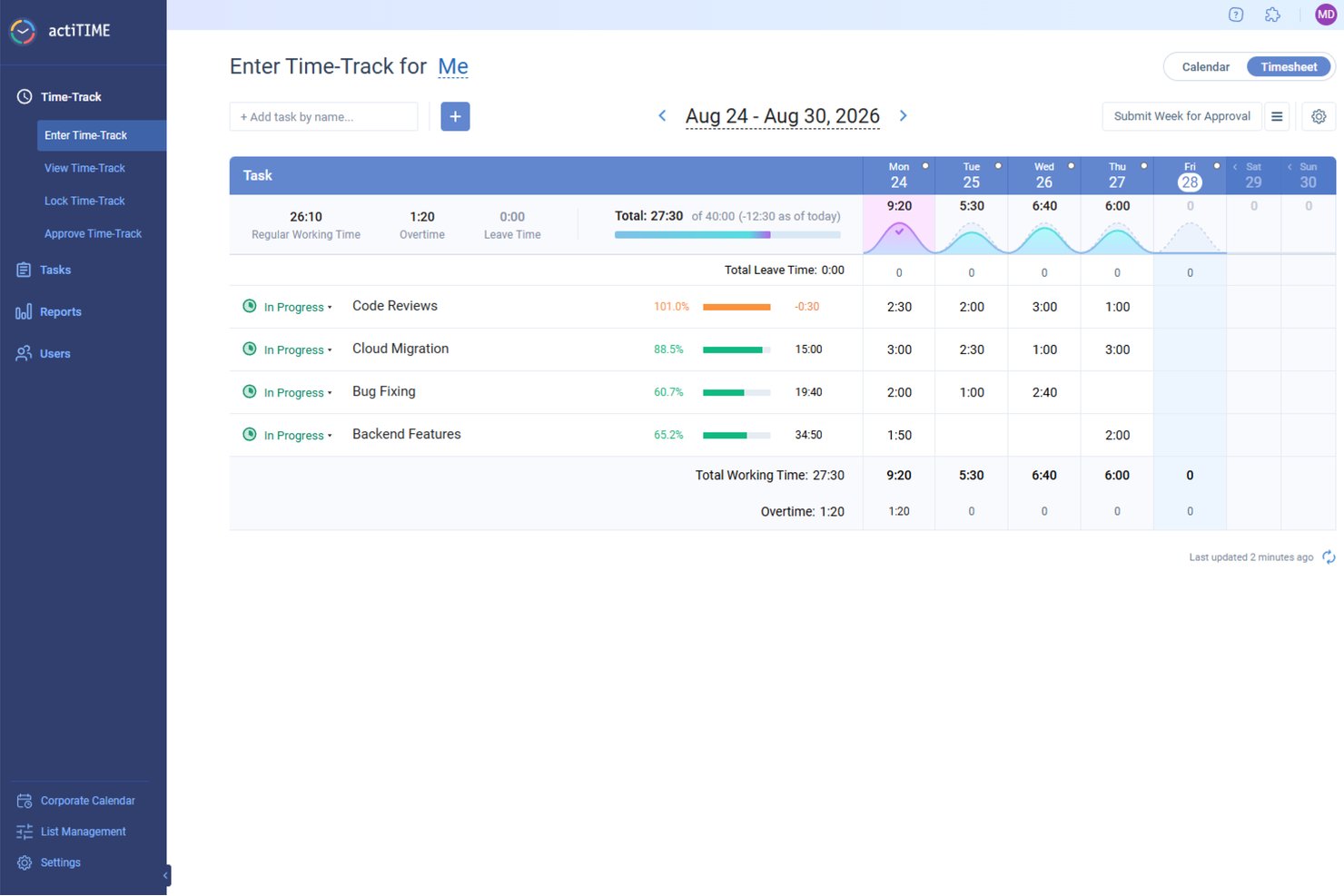
Per le piccole imprese che cercano un modo efficiente per gestire tempo e budget, actiTIME offre una soluzione personalizzata che soddisfa queste esigenze con precisione. Progettato per supportare il monitoraggio dei progetti, la gestione del budget e la collaborazione del team, si rivolge a un'ampia gamma di settori. Integrandosi facilmente con strumenti come QuickBooks, actiTIME garantisce che le tue operazioni non siano solo puntuali, ma anche convenienti, permettendoti di concentrarti sulla fornitura di un lavoro di qualità.
Perché ho scelto actiTIME
Ho scelto actiTIME perché la sua capacità unica di combinare il monitoraggio del tempo con la gestione del budget lo rende molto utile per le piccole imprese. Una caratteristica distintiva è il monitoraggio dei progetti, che consente di assegnare attività, impostare scadenze e monitorare i progressi, assicurando che i progetti vengano completati in tempo. Inoltre, gli strumenti di gestione del budget permettono di monitorare i costi dei progetti e impostare obiettivi finanziari, aiutando il tuo team a rispettare il budget. Grazie a queste funzionalità, actiTIME affronta direttamente le difficoltà legate alla gestione del tempo e del budget, risultando un'ottima scelta per le piccole imprese.
Funzionalità principali di actiTIME
Oltre alle funzionalità di monitoraggio dei progetti e gestione del budget, ho trovato anche diverse altre caratteristiche adatte alle esigenze delle piccole imprese:
- Report e analisi: genera report dettagliati sull'utilizzo del tempo, sull'avanzamento dei progetti e sulle prestazioni del team per prendere decisioni informate.
- Fatturazione ed emissione di fatture: personalizza le tariffe di fatturazione e genera fatture in base al tempo e alle spese registrate.
- Gestione delle assenze: gestisci i permessi retribuiti (PTO) e imposta regole di maturazione per garantire un monitoraggio accurato delle assenze.
- Gestione del team: assegna il lavoro, gestisci i ruoli e monitora le prestazioni del team per ottimizzare la produttività.
Integrazioni di actiTIME
Le integrazioni includono QuickBooks, Zapier e un'API per integrazioni personalizzate.
Pros and Cons
Pros:
- Include app mobili per dispositivi Android e iOS
- Consente report finanziari e sul tempo dettagliati
- Offre flussi di lavoro personalizzabili per la gestione dei progetti
Cons:
- Non dispone di alcune funzionalità avanzate, come il GPS e il riconoscimento facciale
- Il prezzo per utente può aumentare per le imprese più piccole
New Product Updates from actiTIME

actiTIME Visual Hour Indicator and Time-Track Report Redesign
actiTIME adds a wave-style hour indicator to the Timesheet and Calendar views and refreshes the Time-Track report for smoother navigation and clearer visuals. For more information, visit actiTIME's official site.
Beebole
Ideale per l'approvazione dei fogli presenze su più livelli
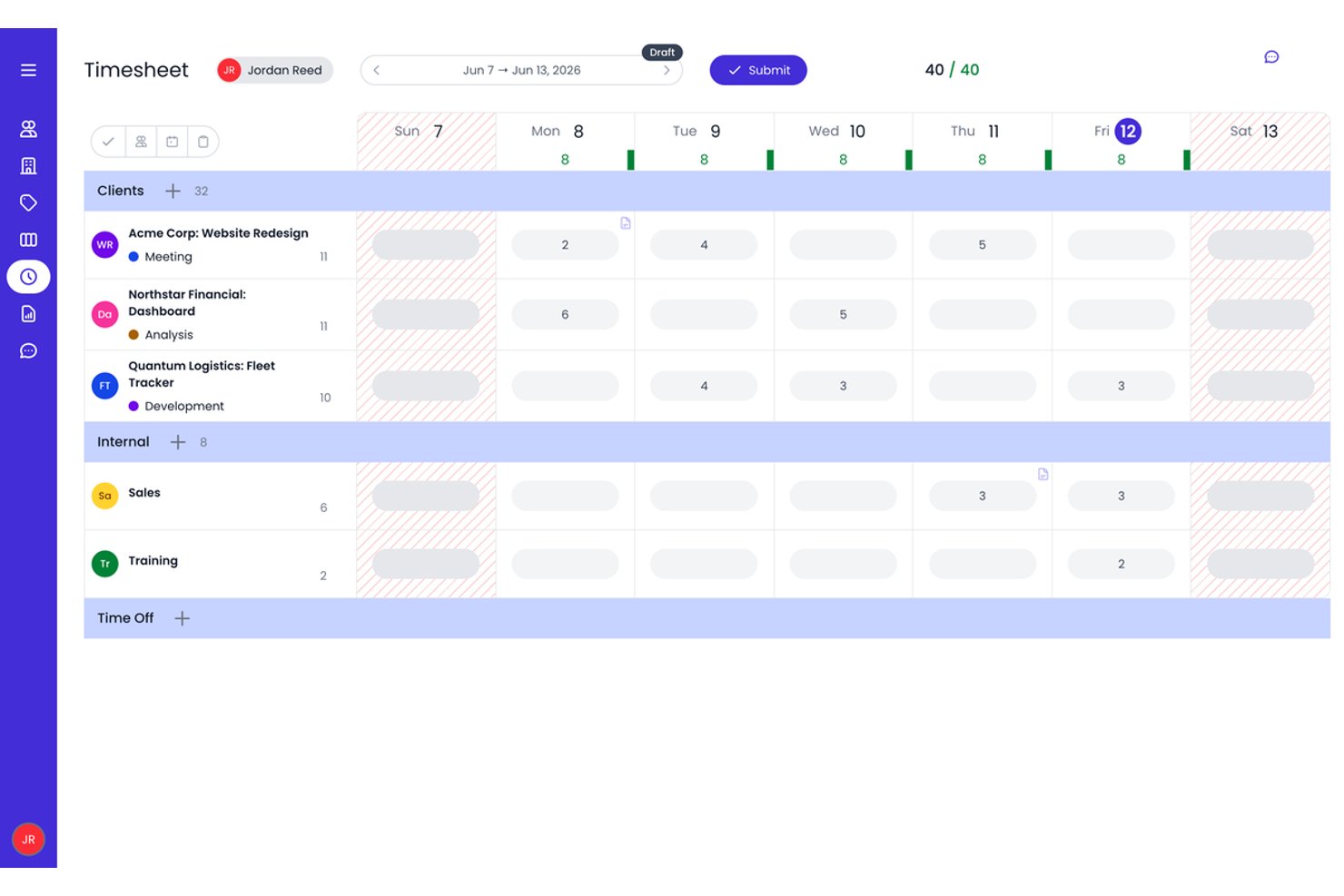
Beebole è una piattaforma per il monitoraggio del tempo dedicata alle piccole imprese, che combina la registrazione delle ore basata sui progetti, l'approvazione dei fogli presenze su più livelli, la pianificazione delle risorse e la reportistica personalizzata.
A chi è più adatto Beebole?
Beebole è una soluzione ideale per i responsabili di progetto di piccole imprese e per i responsabili di agenzie che necessitano di flussi di lavoro strutturati e articolati in più fasi per l'approvazione dei fogli presenze, insieme a controlli sulle tariffe di fatturazione a livello di progetto.
Perché ho scelto Beebole
Beebole è entrato nella mia lista ristretta soprattutto per l'importanza che attribuisce all'approvazione dei fogli presenze. È possibile configurare catene di approvazione in più fasi, così una registrazione delle ore può passare dal responsabile del team al responsabile di reparto fino all'ufficio finanziario prima di essere bloccata: un aspetto che considero prezioso per garantire l'accuratezza della fatturazione ai clienti. Apprezzo anche il fatto che il lavoro pianificato e assegnato nella vista di pianificazione delle risorse confluisca direttamente nei fogli presenze individuali, offrendo una panoramica aggiornata del piano rispetto ai risultati effettivi senza alcuna riconciliazione manuale.
Funzionalità principali di Beebole
- Registrazioni delle ore suggerite dall'AI: Beebole analizza l'attività sul desktop e nel browser per suggerire automaticamente le registrazioni delle ore, riducendo l'inserimento manuale.
- Creazione personalizzata di report: Crea report multidimensionali su 11 tipi di grafici, quindi programma la distribuzione automatica o esportali direttamente in Excel o Google Sheets.
- Tariffe di fatturazione in più valute: Imposta tariffe fatturabili per utente, progetto, cliente o attività in qualsiasi valuta, supportando i team che lavorano con clienti internazionali.
- Pianificazione delle risorse integrata: Visualizza la capacità e il carico di lavoro del team nelle viste Gantt, Kanban e di assegnazione del personale senza uscire dalla piattaforma.
Integrazioni di Beebole
Beebole offre nove integrazioni native, tra cui Asana, Jira, Linear, monday.com, QuickBooks Online, Xero, BambooHR, Google Calendar e Microsoft Outlook Calendar. Supporta inoltre un'API GraphQL, richiami automatici e Zapier.
Pros and Cons
Pros:
- Flussi di lavoro integrati per l'approvazione dei fogli presenze su più livelli
- Le registrazioni delle ore suggerite dall'AI riducono l'inserimento manuale
- Reportistica ed esportazione dei dati altamente personalizzabili
Cons:
- Nessuna app mobile nativa né monitoraggio GPS
- Le funzionalità avanzate sono disponibili solo nel piano più completo

Clockify
Ideale per il monitoraggio tramite estensione del browser
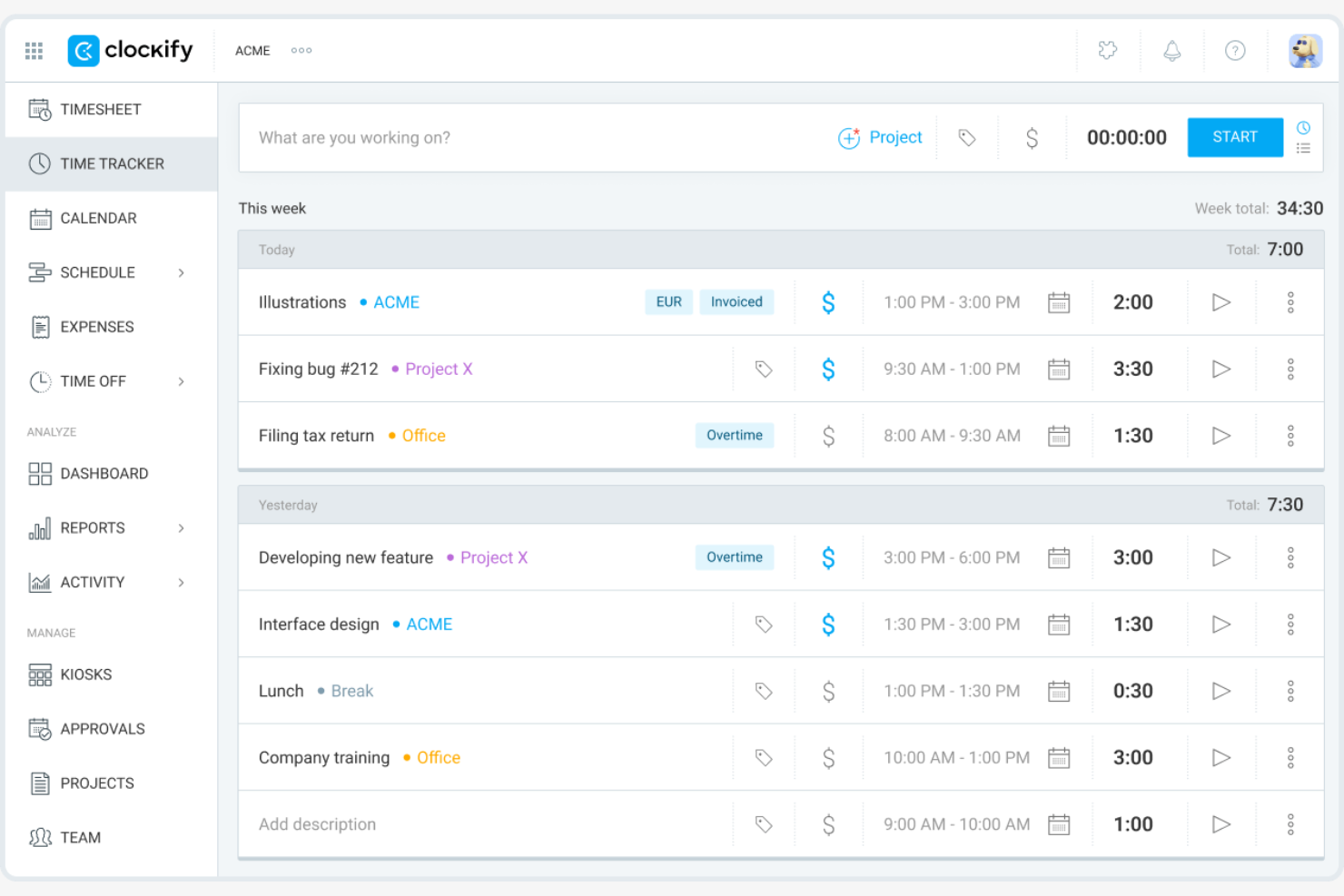
Clockify è un software per il monitoraggio del tempo per team e singoli professionisti in vari settori, inclusi freelance e consulenti. Aiuta gli utenti a monitorare le ore lavorate e a gestire i progetti in modo efficiente.
Perché ho scelto Clockify: offre un'estensione per browser con timer in tempo reale e report dettagliati, rendendo semplice monitorare il tempo e la produttività direttamente nel browser senza passare da un'app all'altra. Questa funzionalità è perfetta per chi trascorre la maggior parte del tempo online e desidera un modo semplice per registrare le ore. Clockify supporta inoltre un numero illimitato di utenti, rendendolo la scelta ideale per i team in crescita.
Funzionalità e integrazioni distintive:
Le funzionalità includono la rilevazione del tempo con timer in tempo reale, report dettagliati sul tempo che forniscono informazioni sulla produttività del team e funzionalità di gestione dei progetti che consentono di organizzare efficacemente attività e scadenze.
Le integrazioni includono Jira, QuickBooks, monday.com, Google Calendar, Notion, GitHub e altro.
Pros and Cons
Pros:
- Report dettagliati per clienti e progetti
- L'estensione per browser semplifica il monitoraggio basato sul web
- Supporta cinque utenti nel piano gratuito senza scadenza
Cons:
- Nessuno strumento integrato per l'elaborazione delle buste paga
- Funzionalità limitate quando viene utilizzato offline

Ideale per l'integrazione con i sistemi di gestione delle paghe

QuickBooks Time è un software di rilevazione delle presenze per una gestione efficiente delle paghe. Serve le piccole e medie imprese monitorando le ore lavorate dai dipendenti e integrandosi con i sistemi di gestione delle paghe.
Perché ho scelto QuickBooks Time: Si distingue per l'integrazione con i sistemi di gestione delle paghe, facilitando la gestione dei salari e il calcolo delle imposte. Lo strumento offre il tracciamento GPS per monitorare i lavoratori da remoto, garantendo registrazioni orarie precise e avvisi personalizzati per entrata e uscita.
Funzionalità principali e integrazioni:
Le funzionalità includono il tracciamento GPS per monitorare efficacemente i lavoratori da remoto. È anche possibile configurare la programmazione di lavori e turni per organizzare il carico di lavoro del team. Lo strumento offre il rilevamento orario da dispositivi mobili, consentendo al team di registrare le ore ovunque si trovi.
Le integrazioni includono ADP, Square, Paychex e altri.
Pros and Cons
Pros:
- Profonda integrazione nativa con il sistema paghe QuickBooks
- Il geofencing riduce i furti di tempo sui lavori
- Potenti strumenti GPS per squadre sul campo
Cons:
- Il prezzo cresce all'aumentare del personale
- Le modifiche all'interfaccia frustrano alcuni utenti di lunga data

Timely
Ideale per approfondimenti sul monitoraggio del tempo tramite IA

Timely è un software di monitoraggio del tempo pensato per piccole imprese, liberi professionisti e team più numerosi che desiderano gestire progetti in modo efficiente e ottimizzare la produttività.
Perché ho scelto Timely: È noto per il suo monitoraggio guidato dall'IA, che registra automaticamente le attività lavorative senza bisogno di inserimento manuale. Questa funzione è adatta ai team che gestiscono più attività e vogliono mantenere un monitoraggio del tempo accurato. Lo strumento offre report dettagliati sui progetti che aiutano a capire come viene impiegato il tempo.
Funzionalità e integrazioni distintive:
Funzionalità includono la pianificazione del budget di progetto per aiutarti a gestire efficacemente le risorse finanziarie. Puoi anche utilizzare la visualizzazione a timeline dello strumento per ottenere una rappresentazione visiva del carico di lavoro del tuo team. La funzione di reportistica offre informazioni sulla produttività e sull'allocazione del tempo.
Integrazioni includono Outlook Calendar, Google Calendar, GitHub, Zoom, Jira e altro ancora.
Pros and Cons
Pros:
- Il tracker AI memory compila automaticamente le schede orarie
- Un'esperienza d'uso fluida incoraggia un monitoraggio del tempo costante
- Solide viste su budget di progetto e redditività
Cons:
- Prezzo più alto rispetto a molti strumenti per piccole imprese
- Le categorizzazioni dell'IA a volte necessitano di correzioni manuali
Altri software di monitoraggio del tempo per le piccole imprese
Ecco alcuni software aggiuntivi di monitoraggio del tempo per le piccole imprese che non sono entrati nella mia selezione, ma che vale comunque la pena esaminare:
- My Hours
Ideale per report personalizzabili
- TimeCamp
Ideale per il monitoraggio automatico del tempo
- RescueTime
Ideale per approfondimenti sulla produttività
- Time Doctor
Ideale per il monitoraggio di team da remoto
- Timesheets.com
Ideale per l'integrazione con sistemi HR
- Harvest
Ideale per la fatturazione del tempo sui progetti
- Insightful
Ideale per analisi in tempo reale e mappatura delle ore
- Homebase
Ideale per la pianificazione dei turni


Come valuto il software di rilevazione delle ore per piccole imprese
Valuto questi strumenti su due livelli: le funzionalità di base che uno strumento deve avere—come timer basati su progetto e monitoraggio delle tariffe fatturabili—e i fattori differenzianti che contano di più per i team delle piccole imprese.
Funzionalità di base (Requisiti minimi per questa lista)
Quando seleziono gli strumenti per la mia lista, assegno a ciascuno un punteggio da 0 (non offre la funzionalità) a 5 (eccelle in quest'area) per ogni funzionalità di base elencata di seguito. Poi, calcolo il punteggio totale dello strumento come percentuale. Ogni strumento deve raggiungere un punteggio minimo totale del 65% per essere preso in considerazione.
- Monitoraggio delle ore su progetti e task: Verifico se è possibile registrare le ore su progetti, task e clienti specifici—utilizzando sia timer in tempo reale che inserimento manuale—poiché è così che la maggior parte dei piccoli team lavora realmente.
- Gestione dei timesheet: Lo strumento dovrebbe consentire ai membri del team di inviare i timesheet e ai responsabili di approvarli o rifiutarli, idealmente con promemoria per evitare di dover rincorrere le persone a fine periodo di paga.
- Configurazione di ore fatturabili e tariffe: Cerco la possibilità di impostare tariffe per utente, progetto o cliente e contrassegnare le registrazioni come fatturabili o non fatturabili, fondamentale per le agenzie che gestiscono più contratti.
- Reportistica e analisi: Una buona reportistica significa più di un semplice riepilogo delle ore. Valuto se puoi filtrare per progetto, membro del team o intervallo di date ed esportare i dati per revisioni di budget interne o da presentare al cliente.
- Gestione del team e degli utenti: Anche i piccoli team hanno bisogno di accessi basati sui ruoli. Controllo come lo strumento gestisce i permessi—ad esempio, se un responsabile di progetto può vedere le ore del proprio team senza accedere ai dati di fatturazione aziendale.
- Integrazioni con PM e contabilità: Valuto le integrazioni native con strumenti come QuickBooks, Xero, Asana, e Jira, oltre alla compatibilità della piattaforma con Zapier o un'API aperta per flussi di lavoro personalizzati su cui il team fa già affidamento.
Una volta che dispongo di un elenco di strumenti che soddisfano questi criteri, considero ciò che distingue ogni piattaforma dall'altra.
Fattori differenzianti (Cosa distingue i vendor)
Ecco come confronto le diverse soluzioni:
Funzionalità uniche
Gli avvisi di budget sono molto importanti quando si gestiscono più progetti per clienti con margini stretti—cerco strumenti che ti avvisano prima che un progetto superi il tetto ore, non dopo. La fatturazione integrata è un altro elemento distintivo, soprattutto per i titolari di agenzie che vogliono passare dalle ore registrate a una fattura pronta per il cliente senza dover esportare i dati in uno strumento di fatturazione separato. Valuto poi anche le funzionalità di pianificazione delle risorse collegate ai dati sulle ore, dato che i piccoli team che gestiscono progetti concomitanti hanno bisogno di vedere chiaramente chi è disponibile e chi è sovraccarico.
Oltre le funzionalità
La struttura dei prezzi è uno dei primi aspetti che controllo. I piccoli team hanno bisogno di prezzi trasparenti per utente senza minimi da grande impresa—e un piano gratuito o di partenza è molto utile quando stai inserendo un team di cinque, non di cinquanta. Anche la rapidità di implementazione è importante: cerco configurazioni self-service con template e assistenza in-app così che un project lead non tecnico possa far iniziare il proprio team a registrare le ore nel giro di una giornata. L’accessibilità multi-piattaforma completa il quadro, dato che i team distribuiti necessitano di soluzioni native per desktop, mobile ed estensioni browser con sincronizzazione offline per avere registrazioni sempre puntuali ovunque lavorino.
Come scegliere un software di monitoraggio del tempo per le piccole imprese
È facile perdersi in lunghi elenchi di funzionalità e strutture tariffarie complesse. Per aiutarti a rimanere concentrato mentre affronti il tuo specifico processo di scelta del software, ecco una lista di fattori da tenere a mente:
| Fattore | Cosa considerare |
|---|---|
| Scalabilità | Lo strumento può crescere insieme alla tua attività? Verifica se supporta un numero maggiore di utenti o funzionalità aggiuntive con la crescita del team. |
| Integrazioni | Funziona con i sistemi che utilizzi attualmente? Verifica che si integri con il sistema paghe, la gestione dei progetti e gli altri strumenti che utilizzi. |
| Personalizzazione | Puoi adattarlo al tuo flusso di lavoro? Cerca opzioni per personalizzare report, dashboard e ruoli degli utenti. |
| Semplicità d'uso | È semplice da adottare per il tuo team? Verifica che l'interfaccia sia intuitiva e consulta le recensioni degli utenti per conoscere i pareri sulla facilità d'uso. |
| Implementazione e onboarding | Quanto tempo occorrerà per iniziare? Valuta la disponibilità di risorse formative come video, webinar o tour del prodotto. |
| Costo | Il prezzo è trasparente e rientra nel budget? Considera il costo totale, incluse eventuali commissioni nascoste o gli sconti per i piani annuali. |
| Misure di sicurezza | Protegge i tuoi dati? Cerca funzionalità di crittografia, controlli degli accessi e conformità alle normative sulla protezione dei dati, come il GDPR. |
| Disponibilità dell'assistenza | Riceverai aiuto quando ne avrai bisogno? Verifica se l'assistenza è disponibile 24 ore su 24, 7 giorni su 7 e tramite più canali, come chat, e-mail o telefono. |
Cos'è il software per il monitoraggio del tempo per le piccole imprese?
Il software per il monitoraggio del tempo per le piccole imprese aiuta a monitorare e registrare le ore di lavoro dei dipendenti. Questi strumenti sono comunemente utilizzati da manager, professionisti delle risorse umane e titolari di piccole imprese per gestire correttamente le paghe e migliorare la produttività. Funzionalità come la registrazione del tempo, la reportistica e le integrazioni con i sistemi paghe supportano una gestione efficiente e l'accuratezza dei dati. Nel complesso, questi strumenti aiutano le aziende a risparmiare tempo e a ridurre gli errori nel monitoraggio delle ore lavorate dai dipendenti.
Funzionalità
Quando scegli un software per il monitoraggio del tempo per una piccola impresa, presta attenzione alle seguenti funzionalità principali:
- Registrazione del tempo: consente ai dipendenti di registrare accuratamente le ore di lavoro utilizzando sistemi di rilevazione delle presenze basati su web, dispositivi mobili o chioschi, supportando paghe e fatturazione precise.
- Reportistica: offre informazioni dettagliate sull'utilizzo del tempo, aiutando i manager ad analizzare la produttività e a individuare le aree di miglioramento.
- Integrazioni: si collega agli strumenti per la gestione delle paghe e dei progetti per supportare le operazioni e ridurre l'inserimento manuale dei dati.
- Monitoraggio GPS: monitora la posizione dei dipendenti che lavorano da remoto, fornendo registrazioni accurate del tempo dedicato al lavoro sul campo.
- Monitoraggio automatico del tempo: registra le attività lavorative senza inserimento manuale per automatizzare la rilevazione del tempo, risparmiando tempo e riducendo gli errori.
- Pianificazione dei turni: aiuta le aziende a pianificare e gestire i turni dei dipendenti, mantenendo tutti informati e organizzati.
- Monitoraggio delle spese: monitora i costi e le spese dei progetti, agevolando la gestione del budget e la pianificazione finanziaria.
- Dashboard personalizzabile: consente agli utenti di adattare l'interfaccia per visualizzare le informazioni più rilevanti in base alle proprie esigenze.
- Accesso da dispositivi mobili: consente ai dipendenti di monitorare il tempo e accedere alle funzionalità ovunque si trovino tramite un browser, un'app desktop o dispositivi iOS e Android, migliorando flessibilità e praticità.
- Misure di sicurezza: protegge i dati sensibili con la crittografia e i controlli degli accessi, supportando la conformità alle normative sulla protezione dei dati.
Vantaggi
L'implementazione di un software per il monitoraggio del tempo per una piccola impresa offre diversi vantaggi al tuo team e alla tua attività. Ecco alcuni dei vantaggi che puoi aspettarti:
- Paghe accurate: offre un calcolo preciso delle retribuzioni dei dipendenti monitorando le ore di lavoro e integrandosi con i sistemi paghe.
- Maggiore produttività: identifica come viene impiegato il tempo, aiutando manager e dipendenti a ottimizzare le abitudini lavorative e a concentrarsi sulle priorità.
- Gestione dei costi: monitora le spese dei progetti e confronta il tempo impiegato con i budget per contribuire a controllare i costi e migliorare la pianificazione finanziaria.
- Maggiore responsabilità: offre trasparenza sulle ore di lavoro dei dipendenti, incoraggiando il senso di responsabilità e la fiducia all'interno dei team.
- Pianificazione flessibile: facilita la pianificazione e la modifica dei turni, mantenendo informati i membri del team e garantendo una gestione fluida degli orari.
- Informazioni basate sui dati: fornisce report e analisi preziosi per supportare decisioni consapevoli e la pianificazione strategica.
- Maggiore praticità: consente ai dipendenti di registrare il tempo e accedere alle funzionalità dai dispositivi mobili, offrendo flessibilità e facilità d'uso.
Costi e prezzi
La selezione di un software per il monitoraggio del tempo per piccole imprese richiede la comprensione dei vari modelli di prezzo e dei piani disponibili. I costi variano in base alle funzionalità, alle dimensioni del team, agli strumenti aggiuntivi e al metodo di fatturazione, ad esempio pagando mensilmente con carta di credito. La tabella seguente riassume i piani più comuni, i relativi prezzi medi e le funzionalità tipicamente incluse nelle soluzioni di monitoraggio del tempo per piccole imprese:
Tabella comparativa dei piani per i software di monitoraggio del tempo per piccole imprese
| Tipo di piano | Prezzo medio | Funzionalità comuni |
|---|---|---|
| Piano gratuito | $0 | Monitoraggio di base del tempo, report limitati e accesso da dispositivi mobili. |
| Piano personale | $5-$10/utente/mese | Monitoraggio del tempo, report di base, accesso da dispositivi mobili e integrazioni limitate. |
| Piano aziendale | $10-$25/utente/mese | Report avanzati, strumenti di gestione dei progetti, integrazioni con i sistemi paghe e dashboard personalizzabili. |
| Piano per grandi aziende | $15+/utente/mese | Report completi, integrazioni complete, assistenza dedicata e funzionalità di sicurezza avanzate. |
Domande frequenti sui software di monitoraggio del tempo per piccole imprese
Ecco alcune risposte alle domande comuni sui software di monitoraggio del tempo per piccole imprese:
Come funziona un software di monitoraggio del tempo?
Un software di monitoraggio del tempo registra il tempo che tu e il tuo team dedicate a diverse attività e progetti. Di solito è necessario avviare un timer quando si inizia un’attività e arrestarlo quando la si conclude. Molti strumenti offrono anche il monitoraggio automatico, che registra il tempo in base all’attività svolta sul computer. Questo aiuta a mantenere accurata la fatturazione e ad analizzare la produttività. Puoi visualizzare e analizzare il tempo registrato tramite i report, aiutandoti a prendere decisioni informate sul flusso di lavoro e sull’efficienza.
Il software di monitoraggio del tempo può integrarsi con gli strumenti di gestione dei progetti?
Molte piattaforme di monitoraggio del tempo offrono integrazioni dirette con strumenti come Asana, Trello, Jira o Monday.com. Questo consente di collegare le ore registrate direttamente ad attività o progetti specifici, facilitando l’analisi della produttività e la gestione dei budget.
Il software di monitoraggio del tempo può essere utilizzato offline?
Alcuni software di monitoraggio del tempo possono essere utilizzati offline. Questi strumenti consentono di registrare le ore offline e sincronizzare i dati una volta tornati online. Questa funzione è particolarmente utile per i team che lavorano in aree remote o in zone con una connettività inaffidabile. Verifica se il software che stai prendendo in considerazione offre la funzionalità offline, poiché questa può variare. Le funzionalità offline consentono di continuare a monitorare il tempo senza interruzioni e di mantenere registrazioni accurate.
In che modo un software di monitoraggio del tempo può aiutare a ridurre gli sforamenti dei progetti?
Il monitoraggio del tempo offre visibilità in tempo reale sulla durata effettiva delle attività. Puoi individuare tempestivamente l’espansione dell’ambito e modificare il carico di lavoro del team o il piano del progetto prima che si verifichino sforamenti. Inoltre, ti aiuta a creare stime più accurate per i progetti futuri.
Il software di monitoraggio del tempo è sicuro?
La maggior parte dei software di monitoraggio del tempo include funzionalità di sicurezza per proteggere i dati. Queste possono includere la crittografia, backup regolari e controlli degli accessi per limitare le informazioni sensibili agli utenti autorizzati. Quando scegli uno strumento, esamina le sue politiche di sicurezza e la conformità alle normative sulla protezione dei dati, come il GDPR. Disporre di misure di sicurezza è importante per proteggere le informazioni aziendali e mantenere la fiducia dei clienti.
Sono necessarie competenze tecniche per configurarlo?
Non sono necessarie competenze tecniche avanzate per configurare la maggior parte dei software di monitoraggio del tempo. Questi strumenti presentano interfacce intuitive e spesso includono guide dettagliate o tutorial per assistere nella configurazione. Molti fornitori offrono assistenza tramite chat, email o telefono per rispondere a eventuali domande. Con un po’ di assistenza iniziale, puoi rendere operativo rapidamente il software e concentrarti sul monitoraggio efficiente del tempo.
