

I 10 migliori software di automazione dei servizi professionali basati sull’IA nel 2026

Software per l'automazione dei servizi professionali con l'IA: selezione


Il software per l'automazione dei servizi professionali con l'IA utilizza l'intelligenza artificiale per aiutare i team a gestire in modo più efficiente progetti complessi, risorse e attività per i clienti. Questi strumenti supportano le società di consulenza e le aziende che offrono servizi migliorando l'efficienza operativa e automatizzando le attività durante l'intero ciclo di vita del progetto. Forniscono dati e analisi aziendali e informazioni dettagliate in tempo reale sugli aspetti finanziari dei progetti, aiutando i team a prendere decisioni basate sui dati e ad allineare meglio il lavoro alle esigenze aziendali. Migliorando la visibilità sulle relazioni con i clienti e sulle prestazioni, queste piattaforme migliorano il processo decisionale complessivo e i risultati dei progetti. In questa guida troverai i migliori strumenti PSA basati sull'IA per il 2026, così potrai confrontarne le funzionalità e scegliere quello più adatto alle esigenze del tuo team.
Perché fidarsi dei nostri consigli sui software
Il nostro team testa e recensisce software dal 2012. In quanto project manager noi stessi, sappiamo quanto sia difficile — e importante — scegliere il software giusto.
Per questa guida, abbiamo valutato gli strumenti attraverso test pratici e ricerche indipendenti, assegnando un punteggio agli strumenti in base ai nostri criteri di selezione. Ci basiamo inoltre sulle competenze di leader di pensiero del settore e di professionisti attivi nella gestione dei progetti.
Le nostre recensioni riflettono il nostro giudizio editoriale umano, non un discorso di vendita.
Revisori esperti:
Tabella comparativa dei software per l'automazione dei servizi professionali con l'IA
Questa tabella comparativa riassume i dettagli sui prezzi delle mie migliori selezioni di software per l’automazione dei servizi professionali con l’IA:
| Tool | Best For | Trial Info | Price | ||
|---|---|---|---|---|---|
| 1 | Ideale per la gestione automatizzata dei contratti | Demo gratuita disponibile | Prezzo su richiesta | Website | |
| 2 | Ideale per lo sviluppo di app no-code basato sull'IA | Demo gratuita disponibile | $40/user/month | Website | |
| 3 | Ottima per strumenti configurabili di previsione delle risorse | Demo gratuita disponibile | Prezzi su richiesta | Website | |
| 4 | Ideale per i flussi di lavoro di onboarding dei clienti | Prova gratuita + demo gratuita disponibili | A partire da $19/utente/mese (fatturati annualmente) | Website | |
| 5 | Ideale per PSA su Salesforce | Demo gratuita disponibile | Prezzo su richiesta | Website | |
| 6 | Ideale per l'automazione dei servizi MSP | Prova gratuita di 14 giorni + demo gratuita disponibile | A partire da $129/utente/mese | Website | |
| 7 | Ideale per la gestione di progetti e finanze | Prova gratuita di 14 giorni + demo gratuita disponibile | Da $19,90/utente/mese (fatturato annualmente) | Website | |
| 8 | Ideale per la pianificazione delle risorse dei progetti tramite IA | Demo gratuita disponibile | Prezzi su richiesta | Website | |
| 9 | Ideale per l'automazione di servizi enterprise | Demo gratuita disponibile | Prezzi su richiesta | Website | |
| 10 | Ideale per la gestione di agenzie e l'analisi dei dati | Prova gratuita di 14 giorni + demo gratuita disponibile | A partire da $10/mese (fatturato annualmente) | Website |


Recensioni dei software per l'automazione dei servizi professionali con l'IA
Di seguito sono riportati i miei riepiloghi dettagliati dei software per l’automazione dei servizi professionali con l’IA inclusi nella mia selezione. Le mie recensioni offrono una panoramica dettagliata delle funzionalità, dei migliori casi d’uso e delle integrazioni di ciascuna piattaforma, per aiutarti a trovare quella più adatta a te.

Accelo
Ideale per la gestione automatizzata dei contratti
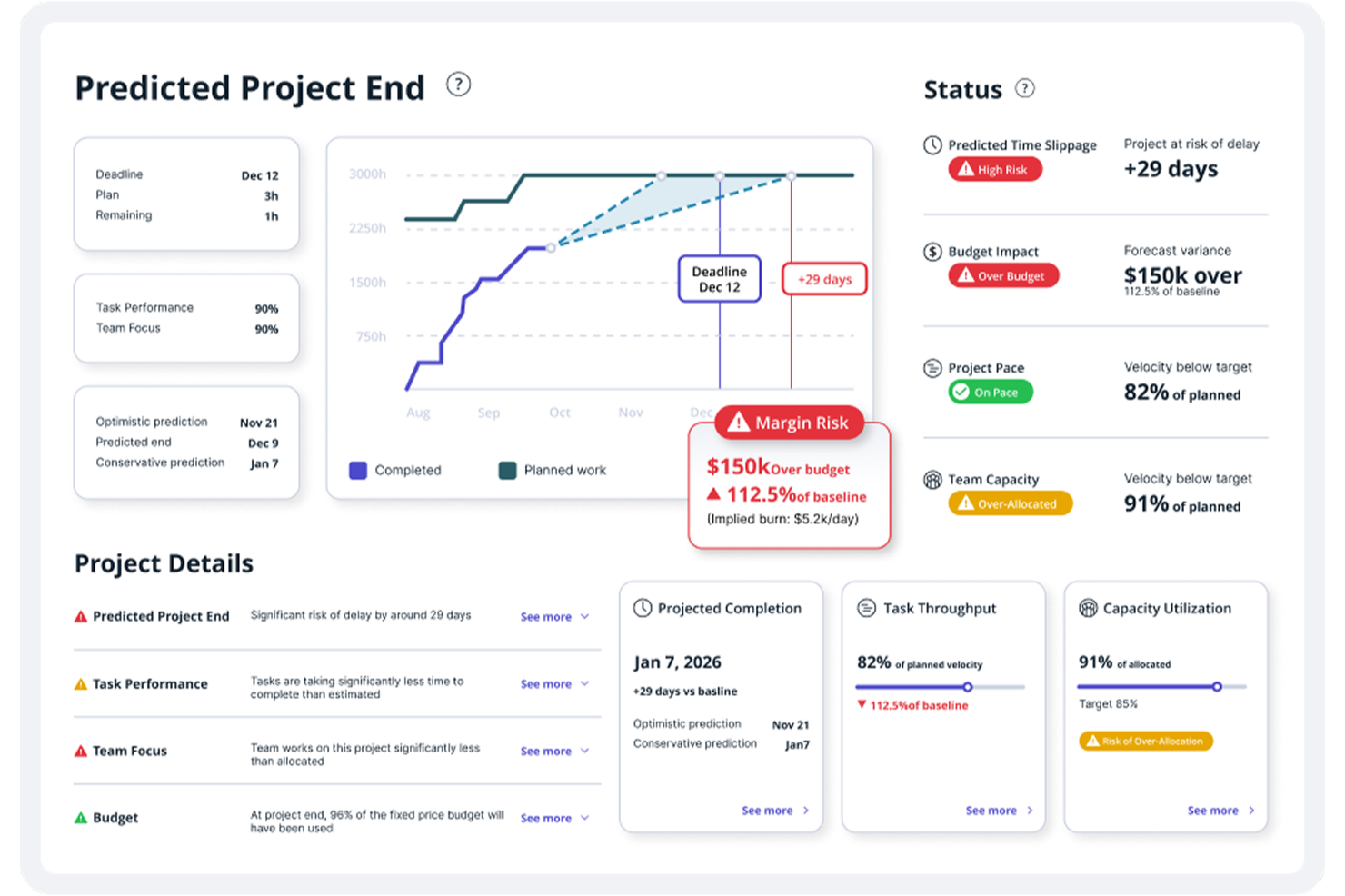
Accelo è una piattaforma di automazione per servizi professionali alimentata dall'AI che unifica gestione dei progetti, pianificazione delle risorse, rilevazione delle ore, gestione dei contratti a canone e fatturazione in un unico sistema connesso.
Per chi è ideale Accelo?
Accelo è particolarmente adatto a medie imprese di servizi professionali nei settori della consulenza, dei servizi IT, della contabilità o alle agenzie che necessitano di una piattaforma unica per gestire il lavoro dei clienti dall'acquisizione fino alla fatturazione.
Perché ho scelto Accelo
Ho scelto Accelo tra i miei preferiti perché adoro il modo in cui la gestione dei contratti è integrata direttamente nell'erogazione dei progetti e nella fatturazione. Il monitoraggio dei contratti a canone si collega ai registri orari in tempo reale, così posso vedere in qualsiasi momento quante ore di un contratto sono state già utilizzate. Ciò che lo distingue veramente è la gestione dello 'scope creep': quando la consegna si discosta dall'ambito contrattuale, Accelo lo evidenzia nel contesto giusto, prima che incida sui margini. La fatturazione automatica genera poi le fatture direttamente dai registri orari, eliminando completamente il passaggio di riconciliazione manuale.
Funzionalità chiave di Accelo
- Pianificazione delle risorse assistita dall'AI: Assegna i membri del team ai progetti in base a competenze, disponibilità e carico di lavoro attuale tramite raccomandazioni AI.
- Segnalazione predittiva dei rischi: Monitora progetti, risorse e situazione finanziaria per rilevare precocemente segnali d'allarme prima che i problemi si aggravino.
- Previsione dei ricavi: Proietta i ricavi e la redditività futuri a livello di commessa utilizzando dati di erogazione aggiornati in tempo reale.
- Gestione delle richieste dei clienti: Centralizza le richieste in arrivo dei clienti e le instrada in flussi di lavoro tracciati e fatturabili.
Integrazioni di Accelo
Accelo offre oltre 30 integrazioni native, incluse Salesforce, HubSpot, Jira, QuickBooks, Xero, Sage Intacct, Slack, GitHub, GitLab e Azure DevOps, con un'ampia connettività nell'ecosistema Microsoft tramite Microsoft 365, Microsoft Teams e Microsoft Entra. Si collega inoltre a Zapier e mette a disposizione una API RESTful per integrazioni personalizzate.
Pros and Cons
Pros:
- La registrazione automatica delle ore riduce le ore fatturabili perse
- Il passaggio dalla vendita al progetto non richiede rielaborazioni
- L'AI segnala gli scostamenti dall'ambito prima che peggiorino
Cons:
- L'app mobile non include tutte le funzionalità desktop
- Manca una sandbox nativa per il test dei trigger

Ideale per lo sviluppo di app no-code basato sull'IA
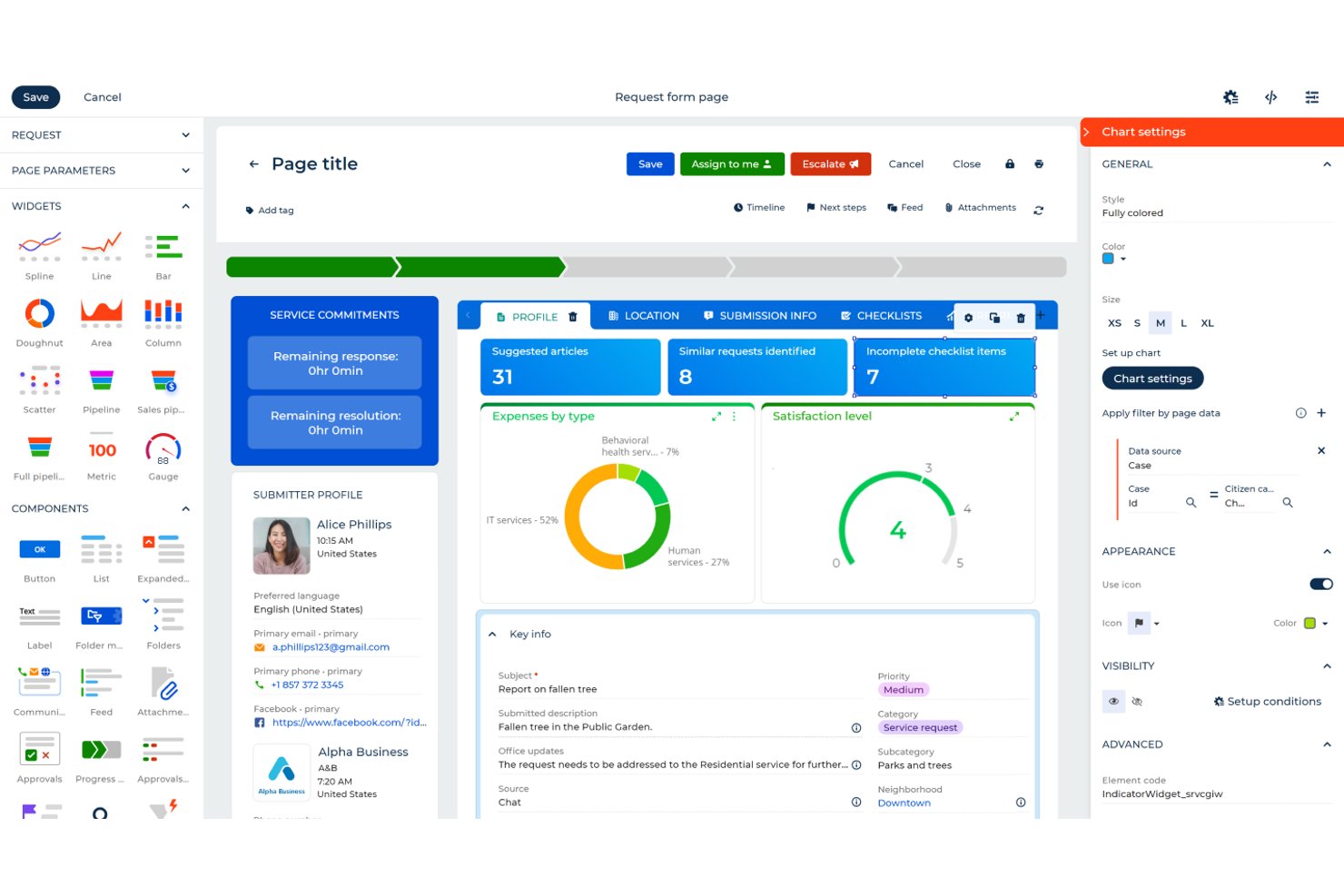
Creatio Studio è una piattaforma no-code nativa dell'IA che consente ai team di creare applicazioni personalizzate, automatizzare flussi di lavoro e configurare processi CRM utilizzando strumenti di progettazione visiva e prompt in linguaggio naturale.
Per chi è ideale Creatio Studio?
Creatio Studio è adatto a società di servizi professionali di medie e grandi dimensioni che necessitano di creare e automatizzare flussi di lavoro su misura senza dipendere da risorse IT o di sviluppo.
Perché ho scelto Creatio Studio
Ho scelto Creatio Studio come uno dei migliori perché la sua generazione di app basata sull'IA è davvero impressionante. Posso descrivere un processo in linguaggio semplice e la piattaforma costruisce automaticamente il modello dati, le viste e gli oggetti. Il mio team riesce inoltre a utilizzare l'architettura componibile no-code per riutilizzare componenti predefiniti, attivando flussi di lavoro per l'onboarding dei clienti o automazioni di fatturazione per step senza toccare codice.
Funzionalità principali di Creatio Studio
- Progettazione visiva dei flussi di lavoro: Crea e modifica processi aziendali automatizzati tramite un'interfaccia drag-and-drop.
- Marketplace di app predefinite: Accedi a una libreria di soluzioni e integrazioni già pronte per un rapido deployment.
- Controlli di accesso granulari: Configura permessi utente e ruoli dettagliati per una collaborazione sicura sui progetti.
- Dashboard di analisi in tempo reale: Monitora metriche di progetti, processi o app con dashboard personalizzabili e in tempo reale.
Integrazioni di Creatio Studio
Creatio Studio offre integrazioni native con Power BI, Microsoft 365, Twilio, WhatsApp, Zoom, Formstack, Avaya e altri. È disponibile un'API per integrazioni personalizzate.
Pros and Cons
Pros:
- Strumenti IA per l'automazione della progettazione dei processi
- Ampia libreria di template di workflow settoriali
- Prototipazione rapida di app tramite linguaggio naturale
Cons:
- Richiede formazione per sviluppatori per personalizzazioni complesse
- Curva di apprendimento inizialmente ripida
New Product Updates from Creatio AI Studio
Creatio Studio Adds AI Automation for Chat Channels
Creatio Studio now supports channel-level Creatio.ai automation for chat channels like Facebook Messenger, Telegram, WhatsApp, and SMS, including out-of-the-box setup, assistant personality selection, and seamless human handoff. For more information, visit Creatio Studio's official site.

Kantata
Ottima per strumenti configurabili di previsione delle risorse
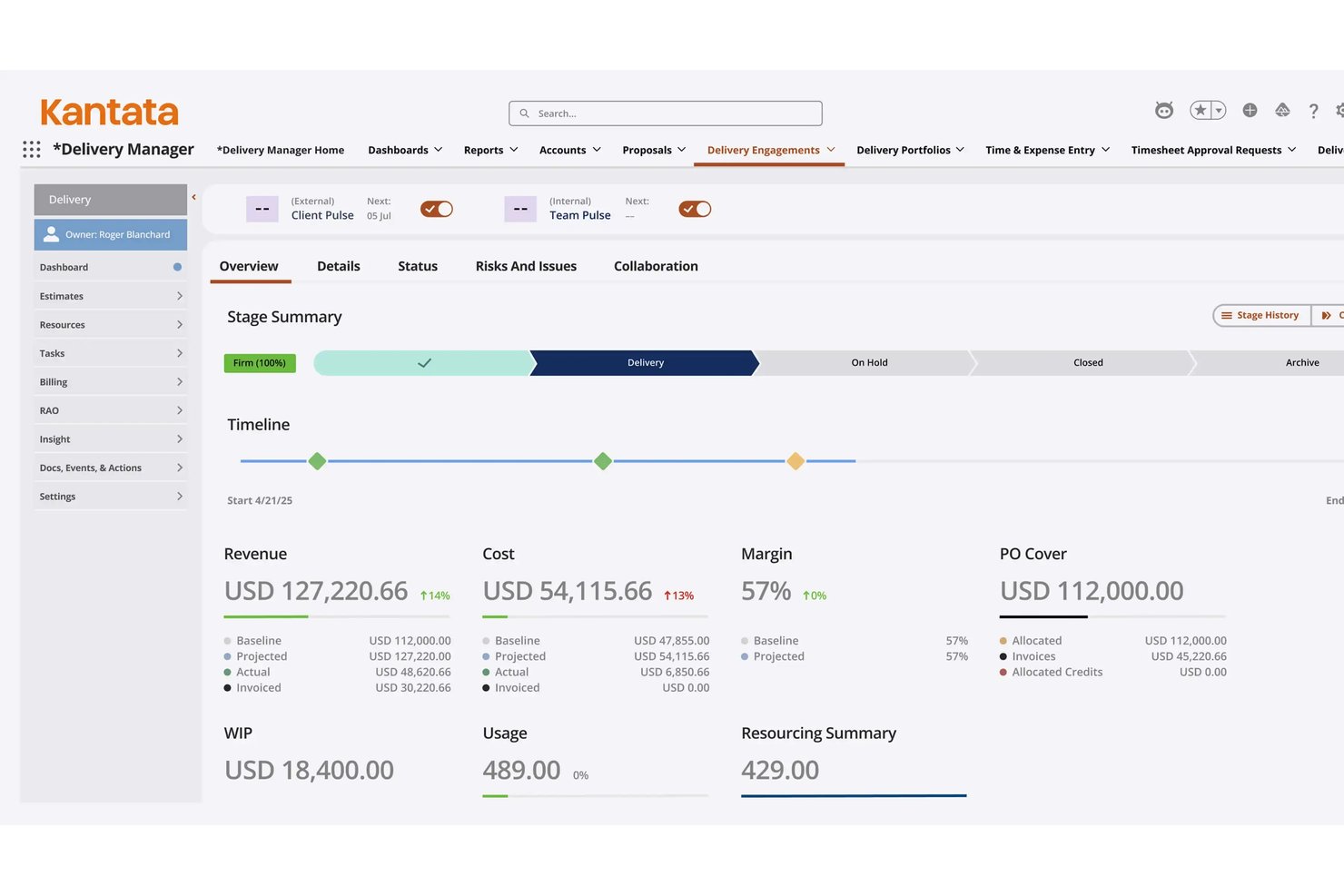
Kantata è una piattaforma AI PSA progettata appositamente che unifica la gestione delle risorse, l'esecuzione dei progetti, il monitoraggio finanziario e la business intelligence per le organizzazioni di servizi professionali.
Per chi è ideale Kantata?
Kantata è adatta ad aziende di servizi professionali di medie e grandi dimensioni — tra cui consulenza IT, consulenza manageriale e servizi software — che devono gestire esigenze complesse di risorse multi-progetto su larga scala.
Perché ho scelto Kantata
Kantata si guadagna un posto nella mia shortlist per il modo in cui l'Expertise Engine affronta la previsione delle risorse. Si basa su un modello proprietario, il Services Language Model, che apprende da ogni progetto, proposta e incarico, così che la previsione diventa più intelligente a ogni ciclo di consegna. Apprezzo anche lo Staffing Optimizer, che valuta le combinazioni di risorse tra progetti simultanei su una scala che la pianificazione manuale non può eguagliare.
Caratteristiche principali di Kantata
- Opzione di implementazione nativa Salesforce: Scegli un'istanza PSA profondamente integrata all'interno del tuo ecosistema Salesforce per un flusso dati e una sicurezza nativi.
- Dashboard finanziari in tempo reale: Accedi a informazioni aggiornate su budget di progetto, redditività e margini di profitto.
- Modulo di collaborazione e feedback: Centralizza le comunicazioni del team e i feedback dei clienti direttamente all'interno della piattaforma.
- Monitoraggio integrato di tempi e spese: Registra ore e spese in contesto con il lavoro di progetto per avere documentazione accurata e pronta per audit.
Integrazioni di Kantata
Kantata offre oltre 1.200 integrazioni native, tra cui Salesforce, Slack, QuickBooks, NetSuite, Sage Intacct, Xero, Microsoft Teams, MuleSoft e Workato. È disponibile un'API per integrazioni personalizzate.
Pros and Cons
Pros:
- Flusso di lavoro avanzato di ottimizzazione delle risorse guidato dall’IA
- Dashboard configurabili per la previsione del portafoglio progetti
- Opzione approfondita di implementazione nativa Salesforce
Cons:
- Configurazione e impostazione richiedono un notevole investimento di tempo
- L'usabilità può essere complicata per i nuovi utenti
New Product Updates from Kantata

Kantata Adds Access Group Change History
Kantata adds Access Groups History, letting account administrators track changes to group details, membership, and permissions in Recent History. The update also makes these events available through the Subscribed Events API for broader monitoring. For more information, visit Kantata’s official site.
 .
.
Ideale per i flussi di lavoro di onboarding dei clienti
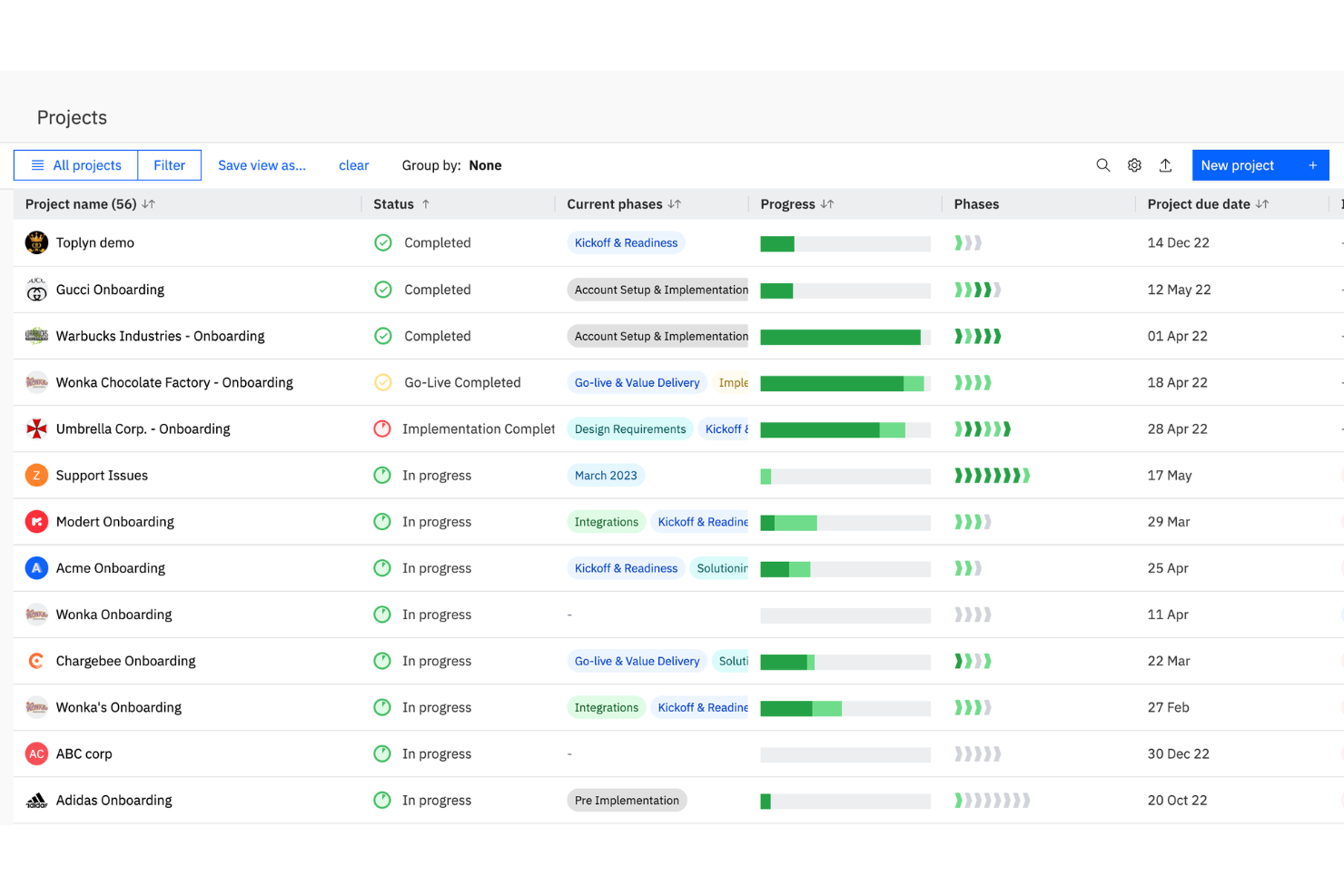
Rocketlane è una piattaforma di automazione dei servizi professionali progettata per i team a contatto con i clienti, che combina gestione dei progetti, pianificazione delle risorse, flussi di lavoro di onboarding e rilevamento del tempo in un unico sistema.
A chi è rivolto Rocketlane?
I team di onboarding clienti e implementazione presso aziende SaaS e fornitori di servizi che necessitano di una gestione unificata di progetti e risorse.
Perché ho scelto Rocketlane
Ho scelto Rocketlane come uno dei migliori perché utilizzo la sua piattaforma di onboarding e PSA progettata ad hoc per gestire ogni progetto di servizi aziendali dalla partenza alla consegna. Mi affido al suo spazio di lavoro unificato invece di destreggiarmi tra diversi fogli di calcolo, mantenendo in un unico luogo piani di progetto, documenti e comunicazioni. La gestione integrata delle risorse e i timesheet migliorano la visibilità sulle attività fatturabili, mentre l'interfaccia pulita migliora l'esperienza utente complessiva sia per il mio team che per i clienti.
Caratteristiche principali di Rocketlane
- Template di progetto personalizzati: Crea e riutilizza template per progetti di onboarding o servizi ripetibili.
- Portale clienti: Consenti ai clienti di accedere a stato dei progetti, documenti e attività tramite un portale personalizzato.
- Promemoria automatici delle attività: Imposta notifiche automatiche per attività imminenti o in ritardo.
- Collaborazione su documenti: Collabora sui documenti di progetto direttamente all'interno della piattaforma.
Integrazioni di Rocketlane
Rocketlane offre integrazioni native con Salesforce, HubSpot, Jira, Slack, Google Calendar, Microsoft Teams e Zapier. È disponibile un'API per integrazioni personalizzate.
Pros and Cons
Pros:
- Notifiche intelligenti su stato e rischi del progetto alimentate da AI
- Onboarding clienti automatizzato e modelli di progetto
- Approfondimenti dettagliati sull'utilizzo delle risorse e sul carico di lavoro
Cons:
- Funzionalità di fatturazione e invoicing limitate
- Nessun CRM integrato per la gestione delle vendite
New Product Updates from Rocketlane

Rocketlane Introduces Governance and Workforce Agents
Rocketlane introduces Governance Agents and Workforce Agents to automate delivery processes and recurring tasks. These updates help teams enforce rules and streamline project execution. For more information, visit Rocketlane’s official site.
 .
.
Certinia
Ideale per PSA su Salesforce
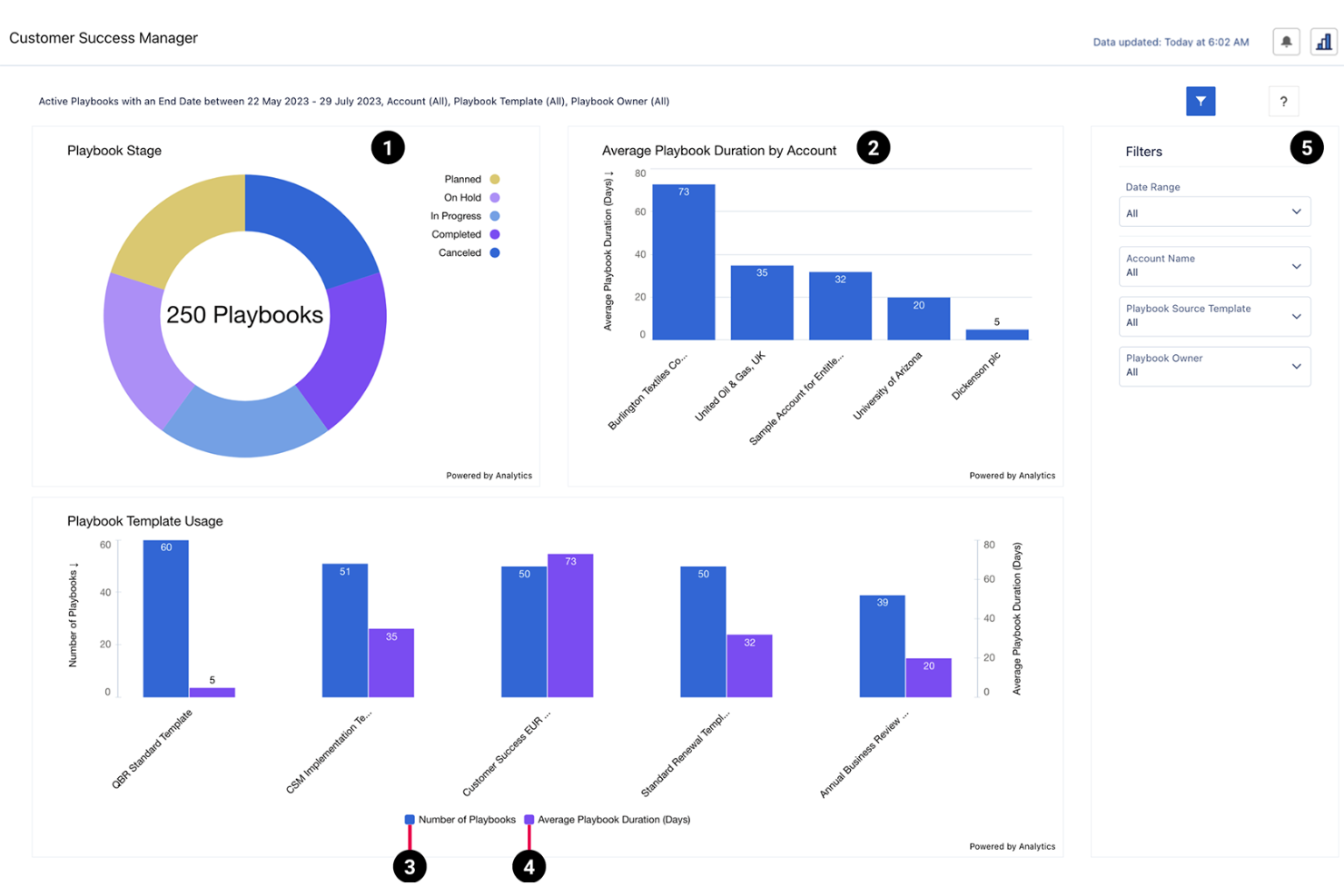
Certinia è una piattaforma di automazione per i servizi professionali basata su Salesforce che unisce gestione delle risorse, contabilità di progetto, rilevazione delle ore lavorate e previsioni avanzate tramite intelligenza artificiale per le organizzazioni di servizi.
Per chi è ideale Certinia?
Certinia è particolarmente indicata per grandi organizzazioni di servizi professionali che già utilizzano Salesforce come piattaforma principale per il proprio business.
Perché ho scelto Certinia
Ho scelto Certinia tra le migliori perché apprezzo come integra le previsioni basate su intelligenza artificiale e la gestione delle risorse direttamente nell'ecosistema Salesforce. Il mio team usa Certinia per collegare la contabilità di progetto, il rilevamento delle ore e la pianificazione delle risorse con i dati del nostro CRM. Mi affido ai suoi insight basati sull'AI per ottimizzare la distribuzione delle risorse nei progetti e prevedere le tendenze dei ricavi.
Funzionalità principali di Certinia
- Flussi di lavoro per richieste di risorse: Indirizza e approva le richieste di risorse all'interno dei team di progetto.
- Fatturazione a milestones: Automatizza la fatturazione in base alle tappe e alle consegne del progetto.
- Gestione delle competenze: Tieni traccia e abbina le competenze del team ai requisiti dei progetti.
- Gestione delle spese: Invia, approva e monitora le spese legate ai progetti in un unico posto.
Integrazioni Certinia
Certinia offre integrazioni native con Salesforce, Slack, DocuSign, Conga e FinancialForce Accounting. È disponibile un'API per integrazioni personalizzate.
Pros and Cons
Pros:
- Automazione dei flussi di lavoro per riconoscimento dei ricavi e fatturazione
- Tracciamento in tempo reale dei margini e della redditività dei progetti
- Processi integrati di approvazione per ore e spese
Cons:
- Meno modelli di fatturazione per contratti complessi
- Nessuna funzionalità di portale clienti incorporata

Syncro è una piattaforma di automazione dei servizi professionali per MSP che combina ticketing, fatturazione, monitoraggio e gestione remota, tracciamento degli asset e automazione dei flussi di lavoro in un unico sistema.
Per chi è ideale Syncro?
Syncro è particolarmente indicato per i fornitori di servizi gestiti (MSP) e le aziende IT che desiderano capacità unificate di PSA e RMM in un'unica piattaforma.
Perché ho scelto Syncro
Ho scelto Syncro tra i migliori perché mi affido alla sua piattaforma unificata PSA e RMM per gestire i ticket, automatizzare la fatturazione e monitorare gli endpoint dei clienti da una sola dashboard. Mi piace che il mio team possa attivare flussi di lavoro automatici in base agli avvisi sui dispositivi e collegare direttamente i ticket di assistenza agli asset. In pratica, ciò significa che gestiamo assistenza clienti, fatturazione e gestione dei dispositivi senza dover passare tra più sistemi.
Caratteristiche principali di Syncro
- Moduli ticket personalizzati: Crea e implementa moduli ticket su misura per i tuoi flussi di lavoro.
- Gestione SLA: Imposta e monitora gli accordi sui livelli di servizio per le richieste dei clienti.
- Tracciamento dell'inventario: Monitora asset hardware e software attraverso le sedi dei clienti.
- Preventivi integrati: Genera e invia preventivi direttamente dalla piattaforma.
Integrazioni Syncro
Syncro offre oltre 50 integrazioni native, tra cui QuickBooks, Xero, CloudRadial, ConnectWise, Domotz, Emsisoft e Worldpay, e mette a disposizione un'API per integrazioni personalizzate.
Pros and Cons
Pros:
- RMM e PSA integrati in un'unica piattaforma
- Instradamento automatico dei ticket e regole di escalation
- Fatturazione integrata con supporto per fatture ricorrenti
Cons:
- Capacità limitate di gestione progetti
- Poche integrazioni con strumenti MSP di nicchia

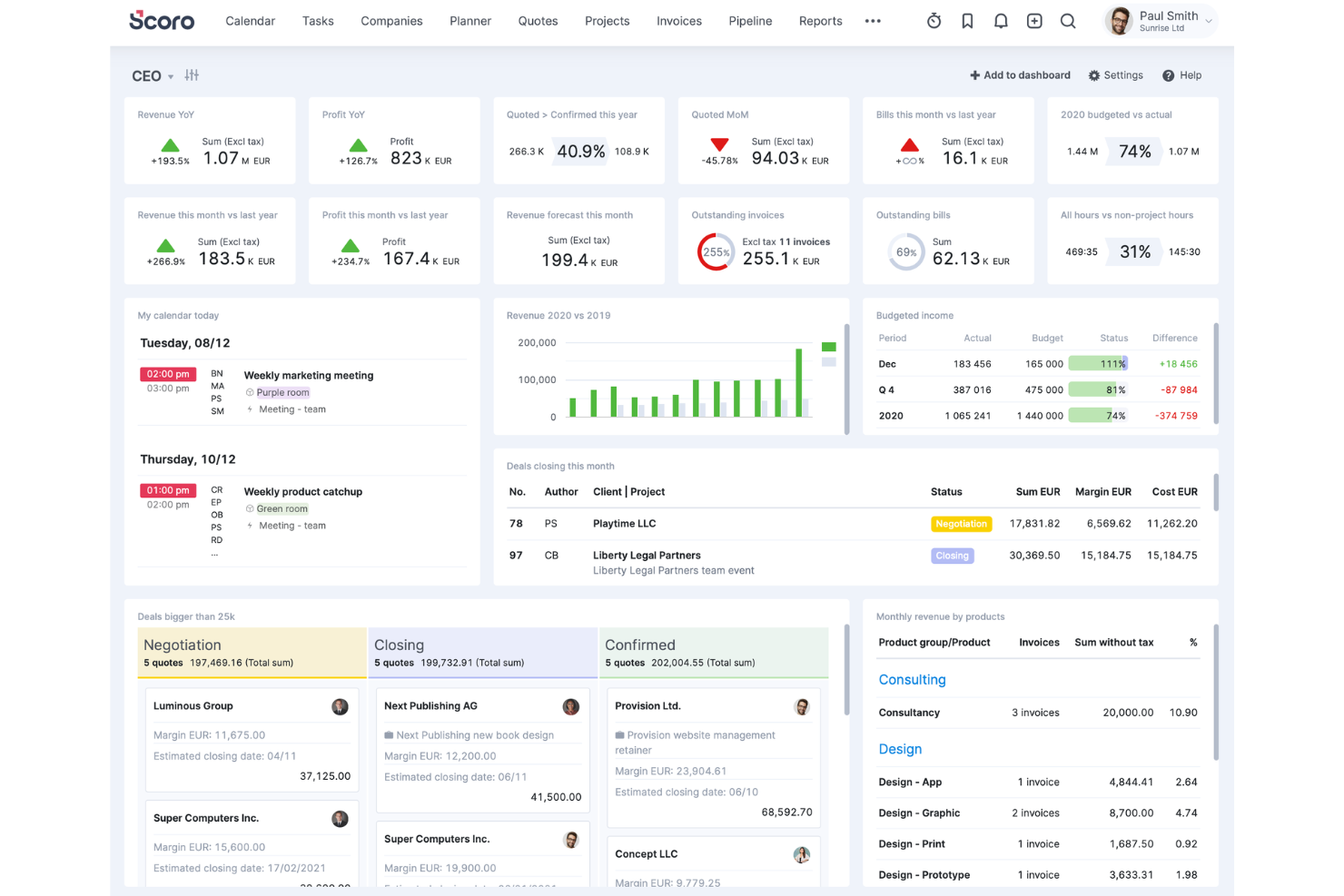
Scoro è una piattaforma di automazione per i servizi professionali rivolta ad agenzie e società di consulenza che riunisce la gestione dei progetti, preventivi, fatturazione, pianificazione delle risorse e reportistica in tempo reale in un unico sistema.
A chi è più indicato Scoro?
Agenzie e società di consulenza che necessitano di una gestione unificata di progetti, fatturazione e risorse su un'unica piattaforma.
Perché ho scelto Scoro
Ho scelto Scoro tra i migliori perché utilizzo la sua gestione del lavoro all-in-one per mantenere strettamente collegati progetti, fatturazione e pianificazione delle risorse per i miei clienti agenzia. Mi affido agli strumenti di preventivazione e fatturazione per gestire i contratti con i clienti e il monitoraggio dei ricavi nello stesso sistema utilizzato per la consegna dei progetti. Le dashboard in tempo reale mi permettono di monitorare lo stato di salute dei progetti e l'utilizzo del team senza dover cambiare piattaforma.
Caratteristiche principali di Scoro
- Automazione delle attività: Automatizza attività e promemoria ricorrenti su più progetti.
- Integrazione del calendario: Sincronizza le pianificazioni dei progetti con i calendari Google e Outlook.
- Modelli di workflow personalizzati: Crea e riutilizza modelli per tipologie di progetto ripetibili.
- Controlli dei permessi: Imposta diritti di accesso dettagliati per utenti e team.
Integrazioni Scoro
Scoro offre integrazioni native con Xero, QuickBooks Online, Zapier, Google Calendar, Outlook, Slack, HubSpot, Mailchimp e Dropbox. È disponibile un'API per integrazioni personalizzate.
Pros and Cons
Pros:
- Monitoraggio della redditività dei progetti con dashboard in tempo reale
- Integrazioni native con i principali strumenti CRM e di contabilità
- Gestione integrata di preventivi e pipeline di vendita
Cons:
- Nessuna IA avanzata per l'allocazione delle risorse
- La funzionalità del diagramma di Gantt è meno flessibile
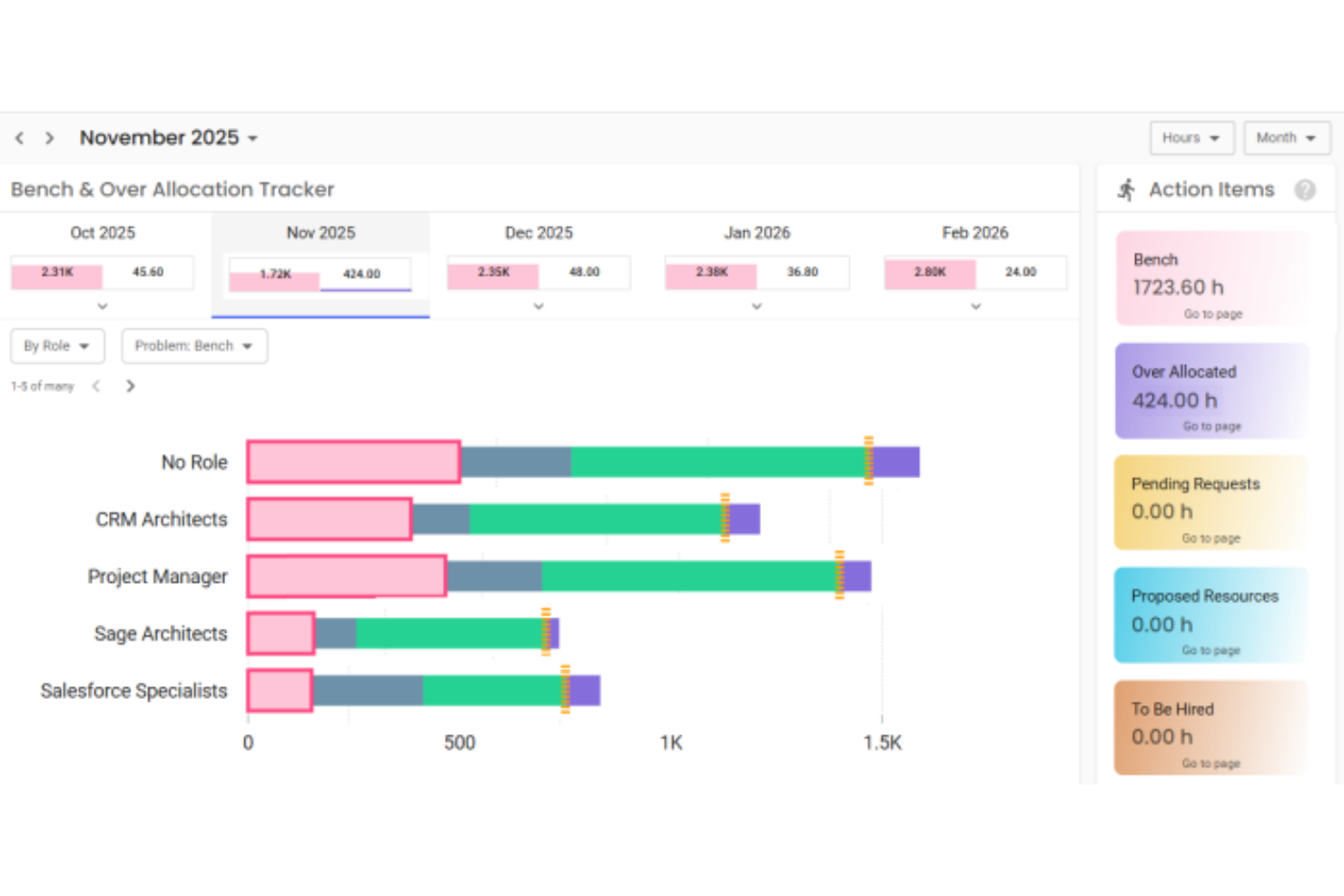
Polaris è una piattaforma di automazione dei servizi professionali basata sull'IA per aziende di consulenza e servizi IT, che offre gestione dei progetti, pianificazione delle risorse, monitoraggio del tempo e fatturazione in un sistema unificato.
A chi è più adatto Polaris?
Aziende di consulenza e servizi IT che necessitano di una gestione dei progetti e delle risorse basata sull'IA.
Perché ho scelto Polaris
Ho scelto Polaris come una delle migliori soluzioni perché utilizzo il suo motore SmartMatch basato sull'IA per automatizzare l'assegnazione delle risorse e la gestione del personale di progetto per i lavori di consulenza IT. Mi affido ai suoi pannelli in tempo reale sullo stato dei progetti e all'analisi predittiva per mantenere i progetti in linea con gli obiettivi. La fatturazione e il monitoraggio del tempo unificati della piattaforma aiutano il mio team a gestire incarichi complessi per i clienti senza dover passare da uno strumento all'altro.
Funzionalità principali di Polaris
- Strumenti per la definizione del budget dei progetti: Definisci, monitora e gestisci i budget dei progetti in tempo reale.
- Automazione personalizzata dei flussi di lavoro: Automatizza i processi di approvazione e l'assegnazione delle attività con flussi di lavoro configurabili.
- Inserimento mobile di tempi e spese: Registra tempi e spese da qualsiasi dispositivo utilizzando l'app mobile.
- Controlli degli accessi basati sui ruoli: Gestisci le autorizzazioni degli utenti e la visibilità dei dati in base al ruolo o al reparto.
Integrazioni di Polaris
Polaris si integra con Slack, Salesforce e altri strumenti e supporta le connessioni con sistemi ERP, CRM, HCM e paghe tramite API e connettori integrati.
Pros and Cons
Pros:
- Gestione e assegnazione delle risorse basate sull'IA
- Definizione avanzata del budget dei progetti con analisi predittiva
- Monitoraggio automatizzato della conformità per la consulenza IT
Cons:
- Supporto limitato per i flussi di lavoro dei servizi non IT
- Le opzioni di automazione personalizzata dei flussi di lavoro sono limitate


Workday PSA è una piattaforma di automazione per i servizi professionali basata su intelligenza artificiale che combina gestione dei progetti, pianificazione delle risorse, rilevamento dei tempi, finanza e risorse umane in un unico sistema.
Per chi è più indicato Workday PSA?
Workday PSA è particolarmente adatto a grandi imprese e organizzazioni di servizi professionali a livello globale che necessitano di una gestione unificata di progetti, finanza e risorse umane.
Perché ho scelto Workday PSA
Ho scelto Workday PSA come uno dei migliori perché apprezzo come integra previsione potenziata da intelligenza artificiale e dati unificati di progetti, finanza e risorse umane in un'unica piattaforma. Il mio team utilizza Workday PSA per automatizzare l'allocazione delle risorse e monitorare in tempo reale la redditività dei progetti. Mi affido alle sue analisi integrate per ottimizzare il personale e gestire l'utilizzo tra team globali.
Funzionalità chiave di Workday PSA
- Strumenti di budgeting di progetto: Definisci, gestisci e monitora in dettaglio i budget dei progetti.
- Tracciamento di tempi e spese: Rileva le ore fatturabili e le spese direttamente nella piattaforma.
- Dashboard basati sui ruoli: Forniscono agli utenti viste personalizzate su dati di progetto e risorse.
- Generazione automatica di fatture: Crea e invia fatture basate su milestone di progetto o registrazioni di tempo.
Integrazioni di Workday PSA
Workday PSA offre integrazioni native nell'ecosistema Workday, inclusi moduli di gestione finanziaria, risorse umane e pianificazione. Sono disponibili ulteriori integrazioni tramite il Workday Marketplace, ed è disponibile un'API per integrazioni personalizzate.
Pros and Cons
Pros:
- Piattaforma dati unificata per progetti, finanza e risorse umane
- Workflow automatici per tempo, spese e fatturazione
- Integrazione nativa approfondita con Workday Financial Management
Cons:
- Integrazioni limitate con piattaforme non-Workday
- Opzioni ridotte per esigenze di settori di nicchia

Productive
Ideale per la gestione di agenzie e l'analisi dei dati

Productive è una piattaforma di gestione per agenzie dedicata ai team di servizi professionali che unisce gestione dei progetti, pianificazione delle risorse, budgeting, rilevazione dei tempi e analisi avanzate in un unico sistema.
Per chi è più indicato Productive?
Agenzie e società di consulenza che necessitano di una gestione unificata di progetti, risorse e aspetti finanziari in un'unica piattaforma.
Perché ho scelto Productive
Ho scelto Productive tra i migliori perché utilizzo i suoi report avanzati per approfondire la redditività dei progetti e l'utilizzo delle risorse nella mia agenzia. Mi affido al suo approccio all-in-one per gestire budget, monitorare le ore fatturabili e gestire la fatturazione senza dover cambiare strumento. Le dashboard personalizzabili della piattaforma mi permettono di visualizzare esattamente le metriche di cui il mio team ha bisogno per revisioni con clienti e sui progetti.
Caratteristiche principali di Productive
- Gestione delle attività: organizza, assegna e monitora le attività di ogni progetto.
- Pianificazione delle risorse: assegna i membri del team ai progetti utilizzando un calendario visivo.
- Archiviazione documenti: archivia e condividi i file di progetto all'interno della piattaforma.
- Portale clienti: consenti ai clienti di accedere agli aggiornamenti di progetto e ai materiali consegnabili.
Integrazioni di Productive
Productive offre integrazioni native con Slack, Xero, QuickBooks, Google Calendar e HubSpot, e fornisce un'API per integrazioni personalizzate.
Pros and Cons
Pros:
- Pipeline delle vendite integrata e monitoraggio dei deal
- Rilevazione automatica dei tempi con flussi di approvazione
- Gestione integrata di documenti e condivisione file
Cons:
- Funzionalità di pianificazione avanzata delle risorse limitate
- Nessun portale integrato rivolto ai clienti
New Product Updates from Productive

Productive Adds Agent Triggers, Teams Integration, and Time Controls
Productive adds automated agent triggers, broader AI file support, Microsoft Teams integration, Resource Planner improvements, and new time entry controls. These updates expand automation while improving scheduling, collaboration, and time tracking. For more information, visit Productive’s official site.
Altri software per l'automazione dei servizi professionali con l'IA
Ecco alcune altre opzioni di software per l’automazione dei servizi professionali con l’IA che non sono state incluse nella mia selezione, ma che vale comunque la pena valutare:


Come Valuto il Software di Automazione dei Servizi Professionali con AI
Ogni strumento qui deve dimostrare che la sua intelligenza artificiale offre un valore reale—come una gestione più intelligente delle risorse, previsioni di margine più accurate o una consegna dei progetti più rapida. Valuto su due livelli: la funzionalità di base che un software deve avere per qualificarsi e i fattori differenzianti che separano le buone scelte dalle migliori.
Funzionalità di Base (Requisiti Fondamentali per Questa Lista)
Quando seleziono gli strumenti per la mia lista, valuto ciascuno su una scala da 0 (non offre la funzionalità) a 5 (eccelle in quest'area) per ogni funzionalità di base elencata qui sotto. Successivamente, calcolo il punteggio totale dello strumento in percentuale. Ogni software deve raggiungere un punteggio totale minimo del 65% per essere preso in considerazione.
- Ottimizzazione delle Risorse Guidata dall'AI: Verifico se la piattaforma utilizza l'intelligenza artificiale per raccomandare allocazioni in base a competenze, disponibilità e carico di lavoro—come abbinare automaticamente un senior cloud architect a un incarico cliente.
- Automazione e Previsione dei Progetti: Ogni software dovrebbe automatizzare la pianificazione dei progetti e usare modelli predittivi per stimare le tempistiche e gli sforzi, non solo offrire Gantt statici o template manuali di attività.
- Automazione di Tempo e Fatturazione: Cerco la registrazione automatica delle ore collegata a regole di fatturazione e contratti cliente, così i consulenti non devono riportare manualmente le ore e la finanza non rincorre i timesheet a fine mese.
- Intelligenza Finanziaria e dei Margini: La piattaforma dovrebbe mostrare dati di profittabilità in tempo reale per progetto o cliente, con previsioni di margine basate su AI che segnalano gli incarichi a rischio prima che erodano i ricavi.
- Analisi e Rischio Predittivo: Valuto se l'analisi va oltre dashboard statiche e segnala proattivamente rischi come cali dell'utilizzo, variazioni di ambito o ritardi nella consegna grazie a modelli di AI.
- Integrazione Unificata del Workflow PSA: Progetti, risorse, finanza e dati CRM dovrebbero convivere in un sistema integrato—con collegamenti a strumenti come Salesforce, NetSuite o QuickBooks per evitare vuoti informativi.
Una volta che ho una lista di software che soddisfano i criteri, considero cosa differenzia ciascuna piattaforma.
Fattori Differenzianti (Cosa Distingue i Fornitori)
Ecco come metto a confronto i diversi player:
Funzionalità Distintive
La pianificazione di scenari è un grande elemento distintivo—cerco strumenti che permettono di modellare cosa succede se un consulente chiave lascia un incarico a metà o se un nuovo contratto viene chiuso in anticipo. Un grafo solido di competenze aggiornato è fondamentale, perché mantiene i profili delle risorse attuali quando ottengono certificazioni o cambiano ruolo. Valuto anche se una piattaforma può generare automaticamente SOW dai dati storici dei progetti, risparmiando ore di stesura sui progetti ripetitivi ai responsabili delivery.
Oltre le Funzionalità
La trasparenza dell'AI è fondamentale in questo campo. Quando una piattaforma raccomanda di spostare un consulente da un progetto a un altro, voglio capirne il motivo—e lo stesso vale per la leadership. Analizzo anche quanto bene uno strumento si integra con lo stack tecnologico esistente, in particolare connessi a CRM e sistemi contabili come Salesforce o NetSuite. I tempi di implementazione sono un altro fattore da valutare, perché i roll-out di PSA per aziende di medie e grandi dimensioni possono bloccarsi senza onboarding guidato e template di servizi preimpostati.
Come scegliere un software per l'automazione dei servizi professionali con l'IA
È facile perdersi in lunghi elenchi di funzionalità e strutture tariffarie complesse. Per aiutarti a rimanere concentrato mentre valuti il tuo particolare processo di selezione del software, ecco un elenco di fattori da tenere a mente:
| Fattore | Cosa considerare |
|---|---|
| Scalabilità | Il software sarà in grado di gestire la crescita del tuo team, nuove linee di servizi o un'espansione globale senza interruzioni significative o aumenti dei costi? |
| Integrazioni | Si connette nativamente ai tuoi sistemi principali come ERP, CRM, risorse umane o contabilità? Sono disponibili API o connettori per flussi di lavoro personalizzati? |
| Personalizzazione | Puoi adattare flussi di lavoro, campi e dashboard per allinearli ai tuoi processi oppure sei vincolato a modelli e strutture rigidi? |
| Facilità d'uso | Il tuo team adotterà rapidamente lo strumento oppure una navigazione complessa e flussi di lavoro poco chiari rallenteranno le operazioni quotidiane e la consegna dei progetti? |
| Implementazione e avvio | Quanto tempo richiede la configurazione e quali risorse sono necessarie? Gli strumenti per la migrazione, la formazione e l'assistenza del fornitore sono inclusi nel processo? |
| Costo | I livelli tariffari sono trasparenti e prevedibili? Fai attenzione ai costi nascosti, ai requisiti minimi di utenti o agli addebiti aggiuntivi per integrazioni e assistenza. |
| Misure di sicurezza | La piattaforma soddisfa i tuoi requisiti in materia di privacy dei dati, controllo degli accessi e audit? Cerca certificazioni e una documentazione chiara sulla sicurezza. |
| Disponibilità dell'assistenza | L'aiuto è disponibile quando ne hai bisogno, soprattutto durante le fasi critiche del progetto? Verifica la disponibilità dell'assistenza 24 ore su 24, 7 giorni su 7, di referenti dedicati e i tempi di risposta. |
Che cos'è un software per l'automazione dei servizi professionali con l'IA?
Il software di automazione dei servizi professionali basato sull'intelligenza artificiale è una piattaforma digitale che utilizza l'intelligenza artificiale per gestire progetti, risorse, monitoraggio del tempo, fatturazione e reportistica per le organizzazioni che offrono servizi. Questi strumenti aiutano i team ad automatizzare le attività di routine, ottimizzare l'allocazione delle risorse e ottenere informazioni in tempo reale sulle prestazioni, sulla redditività e sull'utilizzo dei progetti.
Funzionalità del software di automazione dei servizi professionali basato sull'intelligenza artificiale
Quando scegli il software di automazione dei servizi professionali basato sull'intelligenza artificiale, presta attenzione alle seguenti funzionalità chiave:
- Allocazione delle risorse basata sull'intelligenza artificiale: Utilizza l'apprendimento automatico per abbinare le persone giuste ai progetti giusti in base a competenze, disponibilità e carico di lavoro.
- Monitoraggio automatico del tempo: Acquisisce e registra automaticamente le ore lavorate, riducendo l'inserimento manuale e migliorando la precisione della fatturazione.
- Budget e previsioni dei progetti: Fornisce il monitoraggio del budget in tempo reale e analisi predittive per aiutare i team ad anticipare gli sforamenti e gestire i costi.
- Fatturazione e fatture integrate: Automatizza la creazione e l'invio delle fatture in base alle milestone del progetto, alle registrazioni del tempo o alle spese.
- Analisi dell'utilizzo e della redditività: Offre dashboard e report che mostrano come vengono utilizzate le risorse e quali progetti generano maggiori profitti.
- Automazione dei flussi di lavoro: Semplifica le attività ripetitive come approvazioni, notifiche e instradamento dei documenti, per risparmiare tempo e ridurre gli errori.
- Dashboard personalizzabili: Consente agli utenti di personalizzare visualizzazioni e report per monitorare KPI, stato dei progetti e prestazioni del team a colpo d'occhio.
- Integrazioni native: Si connette direttamente ai sistemi aziendali principali, come le piattaforme ERP, CRM e HR, per una gestione unificata dei dati.
- Accesso da dispositivi mobili: Consente ai membri del team di gestire le attività, registrare il tempo e approvare le spese da qualsiasi dispositivo, supportando il lavoro da remoto e in mobilità.
- Autorizzazioni basate sui ruoli: Controlla l'accesso ai dati e alle funzionalità sensibili, garantendo che le persone giuste possano visualizzare e svolgere solo le attività per cui sono autorizzate.
Vantaggi del software di automazione dei servizi professionali basato sull'intelligenza artificiale
L'implementazione di un software di automazione dei servizi professionali basato sull'intelligenza artificiale offre diversi vantaggi al tuo team e alla tua azienda. Ecco alcuni dei risultati che puoi aspettarti:
- Migliore visibilità sui progetti: Dashboard e analisi in tempo reale offrono una visione chiara dello stato dei progetti, dell'utilizzo delle risorse e delle prestazioni finanziarie.
- Fatturazione più rapida e precisa: Il monitoraggio automatico del tempo e la fatturazione riducono gli errori manuali e accelerano il ciclo di fatturazione.
- Allocazione ottimizzata delle risorse: La pianificazione basata sull'intelligenza artificiale garantisce che le persone giuste vengano assegnate ai progetti giusti in base a competenze e disponibilità.
- Riduzione del carico di lavoro amministrativo: L'automazione dei flussi di lavoro gestisce attività ripetitive come approvazioni e notifiche, liberando il team per attività di maggior valore.
- Previsioni e pianificazione migliori: Le analisi predittive aiutano ad anticipare i rischi dei progetti, gli sforamenti del budget e le carenze di risorse prima che diventino problemi.
- Migliore integrazione dei dati: Le integrazioni native con i sistemi ERP, CRM e HR centralizzano i dati ed eliminano i silos tra i team.
- Maggiore conformità e sicurezza: Le autorizzazioni basate sui ruoli e i registri di audit aiutano a proteggere le informazioni sensibili e a supportare i requisiti normativi.
Costi e prezzi del software di automazione dei servizi professionali basato sull'intelligenza artificiale
La scelta di un software di automazione dei servizi professionali basato sull'intelligenza artificiale richiede la comprensione dei vari modelli e piani tariffari disponibili. I costi variano in base alle funzionalità, alle dimensioni del team, agli elementi aggiuntivi e ad altri fattori. La tabella seguente riassume i piani più comuni, i relativi prezzi medi e le funzionalità tipicamente incluse nelle soluzioni software di automazione dei servizi professionali basate sull'intelligenza artificiale:
Tabella comparativa dei piani per il software di automazione dei servizi professionali basato sull'intelligenza artificiale
| Tipo di piano | Prezzo medio | Funzionalità comuni |
|---|---|---|
| Piano gratuito | $0 | Monitoraggio di base dei progetti, utenti limitati, monitoraggio semplice del tempo e supporto via e-mail. |
| Piano personale | $10-$25/utente/mese | Accesso per un singolo utente, gestione essenziale dei progetti, monitoraggio del tempo e delle spese e reportistica di base. |
| Piano aziendale | $30-$60/utente/mese | Supporto per più utenti, pianificazione delle risorse, fatturazione automatica, integrazioni, analisi avanzate e accesso da dispositivi mobili. |
| Piano enterprise | $70-$150/utente/mese | Flussi di lavoro personalizzati, previsioni basate sull'intelligenza artificiale, sicurezza avanzata, supporto dedicato, accesso API e strumenti per la conformità. |
Domande frequenti sul software di automazione dei servizi professionali basato sull'IA
Ecco alcune risposte alle domande frequenti sul software di automazione dei servizi professionali basato sull’IA:
In che modo l'IA migliora il software di automazione dei servizi professionali?
L’IA migliora il software di automazione dei servizi professionali automatizzando le attività ripetitive, prevedendo il fabbisogno di risorse e fornendo informazioni in tempo reale sulle prestazioni dei progetti. Questo aiuta i team a prendere decisioni migliori, ridurre il lavoro manuale e aumentare l’efficienza complessiva.
Il software di automazione dei servizi professionali basato sull'IA può integrarsi con gli strumenti che già utilizzo?
Sì, la maggior parte dei software di automazione dei servizi professionali basati sull’IA offre integrazioni con i più diffusi sistemi ERP, CRM, HR e di contabilità. Verifica sempre la disponibilità di integrazioni native o di API per assicurarti della compatibilità con il tuo attuale stack tecnologico.
Il software di automazione dei servizi professionali basato sull'IA è adatto ai piccoli team?
Sì, molte soluzioni offrono piani e funzionalità flessibili che si adattano bene ai piccoli team. Cerca piattaforme con una configurazione iniziale semplice, prezzi scalabili e funzionalità essenziali di automazione che non richiedano un team IT dedicato per la gestione.
Quali misure di sicurezza dovrei aspettarmi da queste piattaforme?
Dovresti aspettarti funzionalità come autorizzazioni basate sui ruoli, crittografia dei dati, registri di controllo e conformità agli standard di settore come SOC 2 o GDPR. Esamina sempre la documentazione sulla sicurezza del fornitore prima di prendere una decisione.
Quanto tempo richiede l'implementazione del software di automazione dei servizi professionali basato sull'IA?
I tempi di implementazione variano in base alla piattaforma e alle dimensioni dell’organizzazione. I piccoli team spesso possono iniziare entro pochi giorni, mentre le organizzazioni più grandi potrebbero aver bisogno di diverse settimane per la migrazione dei dati, le integrazioni e la formazione degli utenti.