

I 10 migliori software di gestione dei progetti in sede per il 2026

10 Elenco dei migliori software di gestione dei progetti in sede


sai di aver bisogno di uno strumento di gestione dei progetti, ma i rigorosi requisiti di privacy dei dati e conformità della tua azienda o del tuo settore potrebbero limitare le opzioni disponibili.
Ecco le mie scelte per i migliori software di gestione dei progetti in sede, che ti permetteranno di rispettare le normative e offriranno le funzionalità di gestione dei progetti necessarie per assegnare attività, gestire le risorse e monitorare i progressi. Ho utilizzato la mia esperienza personale nell'implementazione di soluzioni in sede per aiutarti a trovare quella più adatta alla tua organizzazione.
Perché fidarsi dei nostri consigli sui software
Il nostro team testa e recensisce software dal 2012. In quanto project manager noi stessi, sappiamo quanto sia difficile — e importante — scegliere il software giusto.
Per questa guida, abbiamo valutato gli strumenti attraverso test pratici e ricerche indipendenti, assegnando un punteggio agli strumenti in base ai nostri criteri di selezione. Ci basiamo inoltre sulle competenze di leader di pensiero del settore e di professionisti attivi nella gestione dei progetti.
Le nostre recensioni riflettono il nostro giudizio editoriale umano, non un discorso di vendita.
Revisori esperti:
Tabella comparativa dei software di gestione dei progetti in sede
Confronta qui le specifiche di ogni strumento di gestione dei progetti in sede presente nel mio elenco:
| Tool | Best For | Trial Info | Price | ||
|---|---|---|---|---|---|
| 1 | Migliore soluzione on-premise per monitorare i margini di profitto nei progetti | Prova gratuita + demo gratuita disponibile | Da $10/utente/mese (fatturazione annuale) | Website | |
| 2 | Ideale per i team che lavorano nell'ecosistema Microsoft | Prova gratuita di 30 giorni | Da $10/utente/mese (fatturazione annuale) | Website | |
| 3 | Migliore opzione cloud per la sua sicurezza di livello aziendale | Prova gratuita di 14 giorni | Da $1,49/utente/mese (fatturato annualmente) + piano gratuito disponibile | Website | |
| 4 | Miglior software open-source on-premise | Piano gratuito disponibile | Da $7,25/utente/mese (fatturazione annuale) | Website | |
| 5 | Ideale per il lavoro basato su portafoglio con hosting personalizzato | Prova gratuita di 30 giorni | Da $600/mese | Website | |
| 6 | Ideale per i team che devono monitorare il tempo e fatturare ai clienti | Prova gratuita di 14 giorni | A partire da $12.50/mese (fatturato annualmente, fino a 3 utenti) | Website | |
| 7 | Miglior strumento open source on-premise gratuito per team agili | 30 giorni di prova gratuita | Da $7/utente/mese (fatturazione annuale) | Website | |
| 8 | Ideale per team che cercano uno strumento conforme alle linee guida PMBOK | Prova gratuita di 14 giorni | Gratis fino a 2 utenti + a partire da $4/utente/mese | Website | |
| 9 | Ideale per l'estesa prova dello strumento on-premise | Prova gratuita di 14 giorni + demo gratuita disponibile | Da $29/mese (fatturato annualmente) | Website | |
| 10 | Il miglior software on-premise per i suoi plugin extra gratuiti e illimitati | Versione gratuita e demo disponibili | Da $299 per 5 utenti | Website |
Recensioni dei migliori software di gestione dei progetti in sede
Ecco una breve descrizione di ogni strumento, con il relativo caso d’uso principale, le funzionalità distintive e le integrazioni

Celoxis
Migliore soluzione on-premise per monitorare i margini di profitto nei progetti

Celoxis è un software di project portfolio management che offre una versione cloud-based che puoi provare gratuitamente se sei interessato anche all'opzione on-premise.
Perché ho scelto Celoxis: Scegliendo la soluzione on-premise, si ottiene un anno di supporto gratuito. Se è la prima volta che utilizzi una soluzione self-hosted, fidati, ne avrai bisogno. Inoltre, include client e utenti virtuali gratuiti.
Funzionalità e integrazioni principali di Celoxis
Funzionalità includono contabilità di progetto, gestione delle richieste, analisi di simulazione (what-if), pianificazione dei progetti con adattamento automatico alle variabili, gestione delle risorse, portali clienti e dashboard dinamiche.
Integrazioni includono Google Drive, Jira, Salesforce, Active Directory, Evernote, Slack, Trello, Mailchimp e Harvest. È inoltre possibile accedere a migliaia di strumenti aggiuntivi tramite Zapier.

Ideale per i team che lavorano nell'ecosistema Microsoft

Microsoft Project è un software di gestione progetti che esiste da oltre 30 anni ed è noto soprattutto per la sua versione on-premise.
Perché ho scelto Microsoft Project: Questo strumento era utilizzabile solo con licenza o on-premise fino a tempi relativamente recenti. Ora Microsoft offre una versione online del software, pur mantenendo le opzioni self-hosted.
Funzionalità e integrazioni di rilievo di Microsoft Project
Funzionalità includono gestione del portafoglio, app desktop aggiornata, gestione delle attività, reportistica, business intelligence, gestione delle risorse e inserimento dei timesheet.
Integrazioni includono tutti gli strumenti dell'ecosistema Microsoft, come Word, PowerPoint, Excel e Teams.

Migliore opzione cloud per la sua sicurezza di livello aziendale

Freedcamp è un software di gestione progetti basato sul web con un'opzione enterprise che offre analisi avanzate e supporto di livello aziendale.
Perché ho scelto Freedcamp: Anche se si tratta di un software cloud, puoi pagare una tariffa aggiuntiva ogni anno e scegliere dove viene ospitata la tua informazione. Pertanto, puoi informarti sulle loro ubicazioni e selezionare quella in cui ritieni che i tuoi dati saranno meno vulnerabili, ad esempio, ai terremoti.
La versione enterprise di questo software offre funzionalità di sicurezza tali da farti sentire come se lo stessi ospitando personalmente. Ad esempio, puoi avere accesso a snapshot giornalieri di tutti i tuoi dati e controllare l'accesso tramite 2FA.
Caratteristiche e integrazioni distintive di Freedcamp
Caratteristiche includono un prodotto white label, campi personalizzati per i progetti, dashboard personalizzate, crittografia dei dati in transito, condivisione sicura delle password, autorizzazioni flessibili e modifica dei file semplificata.
Integrazioni includono un'API pubblica che puoi utilizzare per costruire integrazioni personalizzate e l'accesso a migliaia di app tramite Zapier.

Miglior software open-source on-premise

Open Project è un software open-source per la gestione dei progetti che garantisce una sicurezza di alto livello per i dati sensibili e critici della tua azienda.
Perché ho scelto Open Project: Questo strumento è un'alternativa open-source ad altri strumenti presenti in questo elenco. Open Project è focalizzato sul miglioramento e sull'offerta sia delle soluzioni basate su cloud che di quelle on-premise. Il deployment on-premise offre due versioni, community ed enterprise.
L'edizione community è una versione gratuita del software che include una vasta gamma di funzionalità oltre a continui sviluppi e manutenzione da parte della community. L'edizione enterprise offre supporto professionale e funzionalità aggiuntive come white-labeling, grafici nelle panoramiche di progetto e notifiche personalizzate.
Funzionalità e integrazioni distintive di Open Project
Funzionalità includono campi personalizzati, utenti segnaposto, testi di aiuto per informazioni aggiuntive sulle funzionalità, un pianificatore di team con informazioni sul carico di lavoro e avanzate bacheche agili.
Le integrazioni possono essere costruite grazie alla sua API. Questo può aiutarti a collegarti a qualsiasi altro strumento presente nel tuo stack tecnologico.

Ideale per il lavoro basato su portafoglio con hosting personalizzato
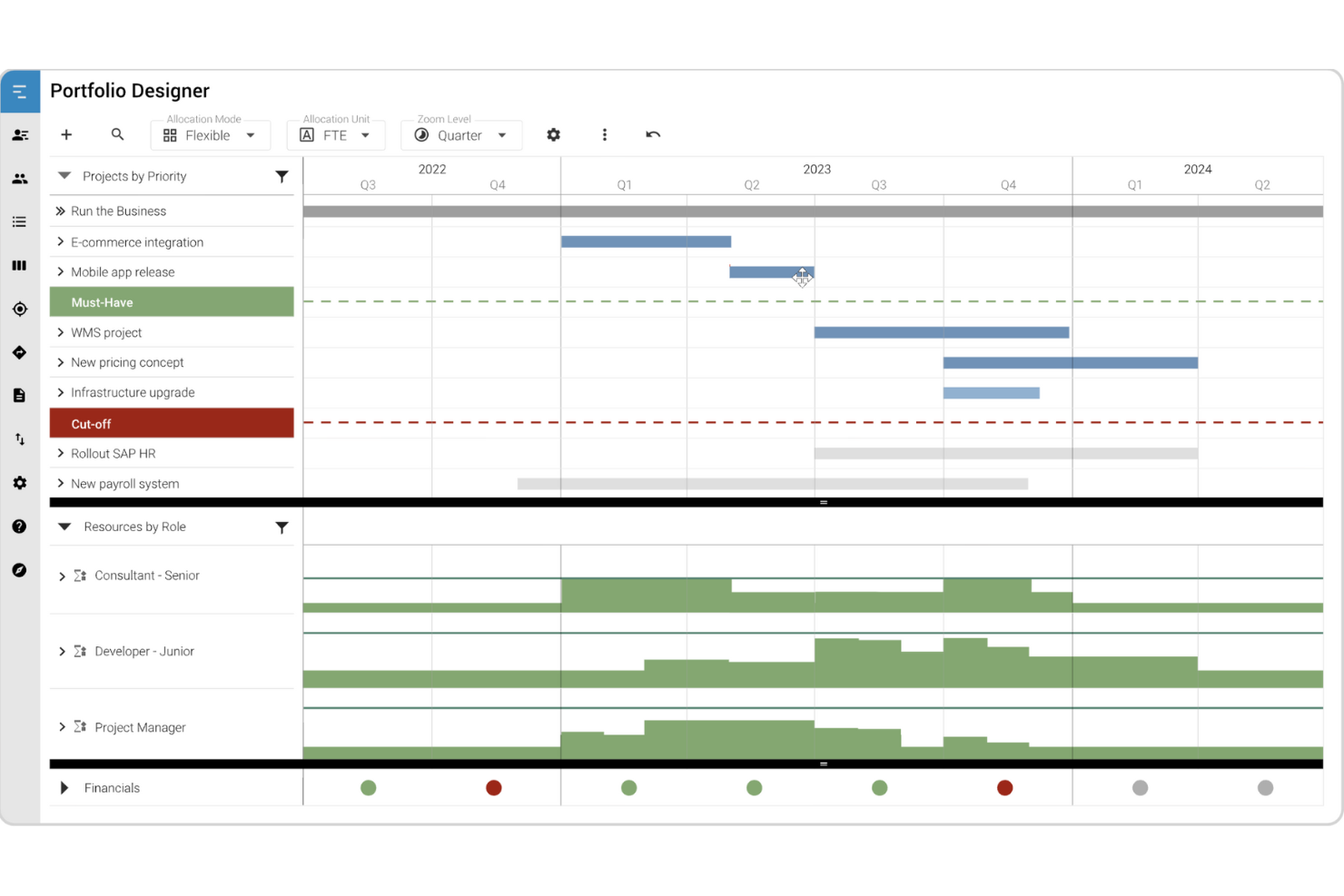
MeisterPlan è un software di gestione delle risorse a livello di portafoglio che supporta sia il lavoro di progetto tradizionale che quello agile.
Perché ho scelto MeisterPlan: Nonostante sia uno strumento online, MeisterPlan consente di scegliere dove ospitare il proprio sistema. Hanno sedi negli Stati Uniti e in Germania. Inoltre, ospitano su AWS e offrono tutte le funzionalità di sicurezza necessarie per mantenere le tue informazioni al sicuro.
L'approccio orientato al portafoglio di MeisterPlan permette di analizzare le risorse, monitorare le finanze, creare roadmap e visualizzare tutte le informazioni sui progetti in elenchi chiari che aiutano a prendere decisioni a livello strategico.
Caratteristiche e integrazioni di spicco di MeisterPlan
Funzionalità includono scenari ipotetici per simulare piani di portafoglio realistici, bacheche portafoglio in stile Kanban, informazioni sulla capacità delle risorse e dashboard utili per decisioni rapide.
Integrazioni includono Jira, Looker Studio, Azure, Power BI, Smartsheet, Tableau e ServiceNow. Inoltre, puoi accedere a migliaia di app tramite Zapier e creare integrazioni personalizzate usando le sue API.

Ideale per i team che devono monitorare il tempo e fatturare ai clienti

ActiveCollab è un software collaborativo per la gestione dei progetti, incentrato sulla semplicità, così puoi portare a termine il lavoro più velocemente.
Perché ho scelto ActiveCollab: Lo strumento offre sia un'implementazione online sia un'implementazione in locale. La versione auto-ospitata del software viene installata sul server che scegli. Il team di ActiveCollab può formare il tuo amministratore di sistema, ma dopo di ciò tutto è nelle tue mani. Lo strumento offre una prova gratuita della versione online, che può darti una buona idea dell'esperienza utente nella versione installata in locale.
Funzionalità distintive e integrazioni di ActiveCollab
Le funzionalità includono dipendenze tra attività, riprogrammazione automatica, collaborazione in tempo reale tramite la chat integrata nell'app, modelli di progetto, gestione del tempo, gestione delle risorse e reportistica.
Le integrazioni includono Hubstaff e Timecamp per il monitoraggio del tempo, oltre a migliaia di app aggiuntive tramite l'integrazione con Zapier.

Taiga.io
Miglior strumento open source on-premise gratuito per team agili

Taiga è una piattaforma open-source per la gestione di progetti agili che offre un'interfaccia utente intuitiva dove i team agili possono collaborare efficacemente.
Perché ho scelto Taiga: La soluzione on-premise dello strumento è gratuita, disponibile in più di 20 lingue e può essere personalizzata secondo le tue esigenze. I team possono utilizzare Taiga per pianificare, eseguire e monitorare i loro progetti seguendo le migliori pratiche agili, il che può aiutarli a ottenere risultati migliori più rapidamente.
Lo strumento offre anche una potente funzionalità di ricerca che consente ai team di trovare e filtrare rapidamente le informazioni, oltre a flussi di lavoro e modelli di progetto personalizzabili. Inoltre, Taiga fornisce notifiche e avvisi in tempo reale, che possono aiutare i membri del team a rimanere aggiornati sugli ultimi sviluppi del progetto.
Funzionalità e integrazioni distintive di Taiga
Funzionalità includono tag e campi personalizzati, ruoli e permessi per il team, dashboard personali, monitoraggio dei problemi, supporto per sprint, uno strumento di stima e corsie swim lane.
Integrazioni includono alcuni degli strumenti più popolari, come GitHub, GitLab, Slack e Trello. Queste integrazioni permettono ai team di sincronizzare i dati tra Taiga e altri strumenti e automatizzare i flussi di lavoro. Inoltre, Taiga offre un'API che consente di costruire integrazioni personalizzate con altri strumenti e piattaforme.

Ideale per team che cercano uno strumento conforme alle linee guida PMBOK

RationalPlan è un software di gestione progetti che ti aiuta a pianificare i progetti, stimare i costi, allocare le risorse e misurare efficacemente il carico di lavoro.
Perché ho scelto RationalPlan: La sua implementazione on-premise comprende diversi piani a seconda delle tue esigenze. Questi vanno da una soluzione per singolo progetto, dove puoi gestire progetti indipendenti, fino a un'opzione project server. Con il server puoi accedere a tutte le funzionalità del prodotto multi-progetto, come la gestione del portafoglio, oltre ad abilitare l'accesso web e desktop, l'uso simultaneo e notifiche email automatiche.
RationalPlan include supporto e aggiornamenti gratuiti per un anno e puoi rinnovare questo pacchetto di manutenzione successivamente.
Caratteristiche principali e integrazioni di RationalPlan
Caratteristiche includono dipendenze, traguardi, attività suddivise, diagrammi di Gantt, accesso simultaneo con permessi limitati, gestione del portafoglio, gestione del carico di lavoro, gestione documentale e reportistica.
Integrazioni includono solo Microsoft Project. Questa integrazione ti permette di aprire e modificare senza problemi qualsiasi file Project.
Ideale per l'estesa prova dello strumento on-premise
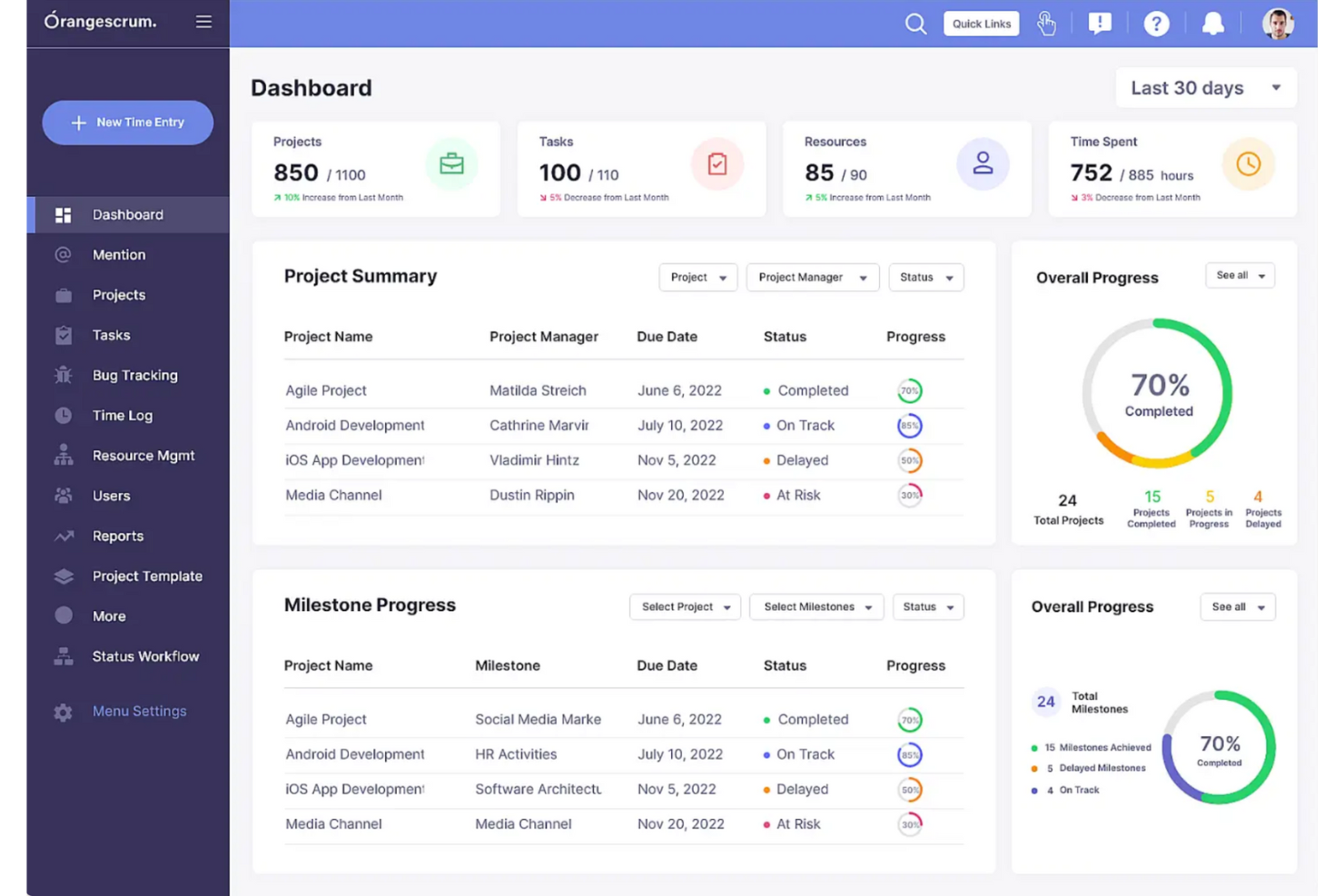
OrangeScrum è un software di gestione progetti e uno strumento di gestione delle attività che rende semplice monitorare e gestire le tue risorse e i tuoi progetti.
Perché ho scelto OrangeScrum: L'edizione enterprise self-hosted offre sicurezza SSO & LDAP, migrazione dati gratuita dalla tua soluzione attuale, formazione gratuita e un anno di aggiornamenti del prodotto.
OrangeScrum offre un'app mobile che permette di revisionare e approvare la documentazione dei progetti e collaborare ovunque ti trovi. Inoltre, lo strumento include funzionalità per supportare sia metodologie di gestione progetti tradizionali che agili.
Funzionalità e integrazioni distintive di OrangeScrum
Funzionalità includono epiche, storie, backlog, story point, viste multiple delle attività, checklist, sotto-attività, disponibilità e assegnazione delle risorse, flussi di lavoro personalizzati, tariffe di fatturazione e reportistica avanzata.
Integrazioni includono Slack, Zoom, Google Drive, Dropbox e GitHub. Include inoltre un'integrazione con Zapier che puoi utilizzare per collegare migliaia di applicazioni aggiuntive.

Il miglior software on-premise per i suoi plugin extra gratuiti e illimitati

Kendo Manager è uno strumento di gestione progetti che offre un modo semplice e intuitivo per i team di pianificare, eseguire e monitorare i loro progetti.
Perché ho scelto Kendo Manager: Kendo offre una variante on-premise del suo software. Questa opzione ti offre la possibilità di una consulenza con il team dello strumento per aiutarti a individuare i flussi di lavoro più adatti a te. Uno dei principali vantaggi dell'utilizzo di Kendo Manager è che offre un'esperienza di gestione progetti visiva e interattiva che rende facile per il tuo team collaborare e rimanere allineato. Lo strumento offre anche un approccio flessibile e personalizzabile alla gestione dei progetti, permettendoti di adattarlo alle esigenze e ai flussi di lavoro specifici.
Kendo Manager offre una vasta gamma di funzionalità che possono aiutarti a gestire i tuoi progetti in modo più efficace. La dashboard fornisce una panoramica dello stato del progetto, oltre a report dettagliati che possono essere utilizzati per monitorare i progressi e individuare aree di miglioramento. Inoltre, Kendo Manager offre un'app mobile che ti consente di accedere allo strumento ovunque ti trovi e di rimanere aggiornato sugli ultimi sviluppi del progetto.
Caratteristiche principali e integrazioni di Kendo Manager
Caratteristiche includono la gestione delle attività, la collaborazione di squadra, le timeline di progetto, i modelli di progetto e i campi personalizzati.
Integrazioni includono Jira, Trello, Asana e Zapier. Quest'ultimo è un servizio di terze parti che ti aiuta a collegare migliaia di app se ti abboni. Inoltre, Kendo Manager offre un'API che consente ai team di creare integrazioni personalizzate con altri strumenti e piattaforme.
Altre opzioni
Ecco altri strumenti che potresti prendere in considerazione se non hai trovato quello che cercavi sopra.
- Zoho Projects
I migliori strumenti per un'allocazione flessibile del lavoro
- OneDesk
Miglior software on-premise per helpdesk e gestione progetti
- monday AI Workspace
Ideale per ottenere informazioni sulle risorse e sui rischi basate sull'intelligenza artificiale
- Height
Ideale per le startup che hanno bisogno di sviluppare prodotti più velocemente


Come Valuto il Software di Project Management On Premise
Divido la mia valutazione in due livelli: i requisiti base che uno strumento deve soddisfare—come il vero deployment self-hosted e il controllo degli accessi basato sui ruoli (RBAC)—e i fattori differenzianti che separano le migliori opzioni dal resto.
Funzionalità Core (Requisiti Fondamentali per Questa Lista)
Quando seleziono gli strumenti per la mia lista, valuto ciascuno su una scala da 0 (non offre la funzionalità) a 5 (eccelle in quest'area) per ogni funzionalità core elencata di seguito. Poi, calcolo il punteggio totale dello strumento in percentuale. Ogni strumento deve raggiungere un punteggio minimo totale del 65% per essere preso in considerazione.
- Opzioni di Deploy Self-Hosted: Controllo se lo strumento si installa sui tuoi server, in data center privati o in infrastrutture cloud private—e se può funzionare in modo indipendente dall'ambiente ospitato dal fornitore.
- Pianificazione & Programmazione Progetti: Valuto grafici Gantt, mappatura delle dipendenze, milestone e visualizzazioni su timeline, poiché i team che gestiscono progetti complessi a cascata o ibridi necessitano di un controllo chiaro sulla pianificazione.
- Gestione Risorse & Carico di Lavoro: Cerco funzionalità di allocazione delle risorse, viste della capacità e strumenti per l'equilibrio del carico che permettano di assegnare le persone giuste su più progetti contemporaneamente.
- Controllo Accessi Basato sui Ruoli: I team enterprise necessitano di permessi granulari, quindi valuto il supporto per gerarchie di ruoli personalizzabili, integrazione con LDAP o Active Directory, e funzionalità SSO.
- Strumenti di Collaborazione del Team: Commenti, condivisione file, notifiche e gestione documentale devono funzionare all'interno dell'ambiente on-premise—strumenti come Redmine e Planview gestiscono questo aspetto in modi diversi, quindi confronto come ogni fornitore lo affronta.
- Reporting & Dashboard di Portafoglio: Verifico se è possibile creare dashboard personalizzate, tracciare KPI e aggregare dati a livello di progetto in viste di portafoglio che diano ai vertici una reale visibilità su avanzamenti e budget.
Una volta che ho una lista di strumenti che soddisfano i criteri, considero ciò che distingue ciascuna piattaforma.
Fattori Differenzianti (Cosa Distingue i Fornitori)
Ecco come confronto e metto a paragone i vari fornitori:
Funzionalità Distintive
Il deployment isolato (air-gapped) è essenziale per team in ambito difesa o infrastrutture critiche in cui i server non possono essere collegati a Internet. Valuto anche l'automazione personalizzata dei workflow—trigger configurabili e catene di approvazione che rispecchiano i reali processi di progetto invece di costringere l’utente in template generici. Il time tracking e la gestione del budget completano il quadro, soprattutto quando i project manager devono collegare le ore registrate direttamente a codici di costo e fatturazione cliente all'interno della stessa istanza on-premise.
Oltre le Funzionalità
La struttura delle licenze è un forte elemento distintivo—verifico se il fornitore offre licenze perpetue o vincola a rinnovi annuali, poiché questo incide sul costo totale di proprietà nel tempo. Anche le certificazioni di sicurezza e conformità hanno molto peso; i team che gestiscono dati sensibili necessitano di allineamento con standard come HIPAA, ISO 27001 o FedRAMP. Valuto infine la compatibilità infrastrutturale, esaminando sistemi operativi supportati, database e la possibilità di deployment containerizzato tramite Docker o Kubernetes, importante per i moderni team DevOps.
Come scegliere un software di gestione dei progetti in sede
È facile perdersi in lunghi elenchi di funzionalità e strutture tariffarie complesse. Per aiutarti a rimanere concentrato mentre affronti il tuo processo di selezione del software, ecco una lista di fattori da tenere a mente:
| Fattore | Cosa considerare |
|---|---|
| Scalabilità | Assicurati che il software possa crescere insieme alla tua azienda. Verifica il supporto per un numero crescente di utenti, progetti più grandi e maggiori esigenze di archiviazione dei dati, senza interruzioni significative. |
| Integrazioni | È probabile che il tuo team si affidi ad altri strumenti, come sistemi ERP o di gestione documentale. Scegli un software che si integri senza problemi con il tuo insieme di strumenti esistente, per evitare difficoltà nei flussi di lavoro. |
| Personalizzazione | Ogni team ha processi unici. Cerca un software che ti permetta di adattare flussi di lavoro, dashboard e autorizzazioni alle tue esigenze specifiche. |
| Facilità d'uso | I sistemi complicati rallentano l'adozione. Assicurati che l'interfaccia sia intuitiva e che il tuo team possa imparare rapidamente a utilizzare e navigare nella piattaforma senza una formazione approfondita. |
| Budget | Considera non solo il costo iniziale, ma anche le spese ricorrenti di manutenzione, aggiornamento e assistenza. Assicurati che sia in linea con i tuoi piani finanziari a lungo termine. |
| Misure di sicurezza | Poiché ospiti autonomamente il software, hai bisogno di solide funzionalità di sicurezza. Cerca la crittografia dei dati, il controllo degli accessi basato sui ruoli, i registri di controllo e la conformità agli standard di settore. |
| Avvio e assistenza | Verifica la disponibilità di assistenza per la configurazione, materiali formativi e un servizio clienti reattivo. Più fluido è l'avvio, più rapidamente il tuo team potrà iniziare a ottenere valore. |
| Prestazioni e affidabilità | Le soluzioni in sede richiedono risorse server. Assicurati che il sistema funzioni in modo efficiente sulla tua infrastruttura e possa gestire carichi di lavoro elevati senza tempi di inattività. |
Che cos'è un software di gestione dei progetti in sede?
Il software di gestione dei progetti in sede si riferisce all'implementazione di software di gestione dei progetti in un'infrastruttura privata, ovvero i tuoi server. In qualità di azienda, acquisti i server, li connetti a Internet, li configuri e installi il software che utilizzerai all'interno della tua organizzazione. Questo ti consente di avere un maggiore controllo e una maggiore sicurezza dei dati.
Il software in sede offre normalmente le stesse funzionalità del software basato sul cloud, con la differenza che il tuo team IT deve occuparsi della manutenzione installando aggiornamenti e correzioni di sicurezza.
Funzionalità del software di gestione dei progetti on-premise
Quando selezioni un software di gestione dei progetti on-premise, presta attenzione alle seguenti funzionalità chiave:
- Gestione delle attività: Organizza, assegna e monitora le attività per assicurarti che i progetti rispettino le scadenze e che i membri del team conoscano le proprie responsabilità.
- Allocazione delle risorse: Gestisci i carichi di lavoro, monitora la disponibilità e ottimizza la distribuzione delle risorse per prevenire colli di bottiglia e sovraccarico.
- Flussi di lavoro personalizzati: Adatta i processi di progetto alle esigenze specifiche del tuo team creando fasi di approvazione personalizzate, dipendenze tra attività e regole di automazione.
- Diagrammi di Gantt e sequenze temporali: Visualizza l’avanzamento dei progetti, le scadenze e le dipendenze per mantenere i team allineati ed evitare conflitti di pianificazione.
- Controlli degli accessi basati sui ruoli: Limita l’accesso ai dati e alle funzionalità sensibili assegnando ruoli e autorizzazioni agli utenti in base alle responsabilità.
- Funzionalità offline: Mantieni il lavoro senza interruzioni consentendo agli utenti di accedere ai dati del progetto e aggiornarli anche quando non sono connessi alla rete.
- Report e analisi: Genera report dettagliati sulle prestazioni del progetto, sull’utilizzo delle risorse e sul completamento delle attività per prendere decisioni basate sui dati.
- Registri di controllo e conformità: Conserva un registro sicuro delle azioni degli utenti e delle modifiche per garantire la conformità normativa e il controllo interno.
- Integrazioni on-premise: Collegati senza problemi al software e ai database esistenti per semplificare i flussi di lavoro senza affidarti a servizi cloud di terze parti.
- Scalabilità e ottimizzazione delle prestazioni: Assicurati che il sistema sia in grado di gestire carichi di lavoro crescenti e possa essere ottimizzato per garantire prestazioni elevate sulla tua infrastruttura interna.
Vantaggi del software di gestione dei progetti on-premise
L’implementazione di un software di gestione dei progetti on-premise offre diversi vantaggi al tuo team e alla tua azienda. Eccone alcuni:
- Maggiore controllo sui dati: Conservando le informazioni sensibili sui progetti nei tuoi server, riduci la dipendenza da fornitori terzi e diminuisci i rischi per la sicurezza.
- Maggiore affidabilità delle prestazioni: Poiché il software funziona sulla tua infrastruttura, non sei soggetto a interruzioni di Internet o a problemi dei servizi esterni.
- Opzioni di configurazione personalizzate: Puoi configurare il software in base alle esigenze specifiche del tuo team, dalle impostazioni di sicurezza all’automazione dei flussi di lavoro e alla reportistica.
- Costi inferiori nel lungo periodo: Evita i costi ricorrenti degli abbonamenti investendo in una licenza una tantum e gestendo aggiornamenti e manutenzione secondo i tuoi tempi.
- Gestione più semplice della conformità: Mantieni il controllo sui protocolli di sicurezza e sulle normative del settore conservando i dati dei progetti all’interno dell’ambiente IT della tua organizzazione.
- Nessun aggiornamento obbligatorio: Decidi quando e come aggiornare il sistema invece di dover gestire aggiornamenti automatici basati sul cloud che potrebbero interrompere i tuoi flussi di lavoro.
- Maggiore flessibilità di integrazione: Collegati agli strumenti e ai database interni senza dipendere da API basate sul cloud o da fornitori di servizi esterni.
Domande frequenti sul software di gestione dei progetti on-premise
Ecco alcune delle domande che altre persone pongono su questo argomento.
Il software on-premise è migliore del software basato sul cloud?
Il software di gestione dei progetti on-premise è migliore del software basato sul cloud in termini di sicurezza, ma non per quanto riguarda il budget.
Le soluzioni autogestite offriranno sempre un controllo migliore sulla sicurezza delle informazioni e sull’accesso alle informazioni critiche. Tuttavia, tutto questo può venir meno se il tuo team non segue le buone pratiche per la manutenzione e l’accesso ai server.
Tuttavia, le soluzioni autogestite richiedono un investimento significativo sia in hardware sia in software. Mentre uno strumento basato sul cloud ti addebita un costo mensile, il tuo software comporterà un canone per lo spazio in cui si trovano i server, gli stipendi del personale che lo mantiene e il costo del software. Pertanto, le soluzioni autogestite sono talvolta troppo costose.