

I 10 migliori software di gestione dei progetti per il settore minerario nel 2026

Il miglior software di gestione dei progetti per il settore minerario: selezione


Il miglior software di gestione dei progetti per il settore minerario aiuta a coordinare le operazioni, controllare i costi, mantenere gli standard di sicurezza e conformità e rispettare le scadenze. I ritardi nei progetti minerari derivano da una cattiva allocazione delle risorse, da una comunicazione inefficace e dalla scarsa visibilità sull'avanzamento. Senza lo strumento giusto, si rischiano sforamenti del budget, tempi di inattività delle apparecchiature e violazioni delle norme di sicurezza.
La piattaforma giusta consente di monitorare l'avanzamento, assegnare manodopera e attrezzature e centralizzare gli aggiornamenti per mantenere il team allineato. Ho testato e confrontato diverse soluzioni per individuare il miglior software di gestione dei progetti per il settore minerario. Trova qui sotto lo strumento giusto per mantenere le tue operazioni efficienti e conformi.
Perché fidarsi dei nostri consigli sui software
Il nostro team testa e recensisce software dal 2012. In quanto project manager noi stessi, sappiamo quanto sia difficile — e importante — scegliere il software giusto.
Per questa guida, abbiamo valutato gli strumenti attraverso test pratici e ricerche indipendenti, assegnando un punteggio agli strumenti in base ai nostri criteri di selezione. Ci basiamo inoltre sulle competenze di leader di pensiero del settore e di professionisti attivi nella gestione dei progetti.
Le nostre recensioni riflettono il nostro giudizio editoriale umano, non un discorso di vendita.
Revisori esperti:
Tabella comparativa dei software di gestione dei progetti per il settore minerario
Confronta nella tabella qui sotto i dettagli sui prezzi delle mie migliori selezioni di software di gestione dei progetti per il settore minerario.
| Tool | Best For | Trial Info | Price | ||
|---|---|---|---|---|---|
| 1 | Ideale per l'allocazione avanzata delle risorse nel settore minerario | Prova gratuita di 14 giorni + demo gratuita disponibile | A partire da $10/utente/mese (con fatturazione annuale) | Website | |
| 2 | Ideale per il controllo integrato di ERP e progetti relativi agli asset | Demo gratuita disponibile | Prezzi su richiesta | Website | |
| 3 | Ideale per il controllo dei documenti di costruzione nel settore minerario | Demo gratuita disponibile | A partire da $995/utente/anno (con fatturazione annuale) | Website | |
| 4 | Ideale per il controllo integrato di costi e pianificazione | Demo gratuita disponibile | Prezzi su richiesta | Website | |
| 5 | Ideale per il controllo di progetti minerari ad alta intensità di capitale | Demo gratuita disponibile | Prezzi su richiesta | Website | |
| 6 | Ideale per la pianificazione dei progetti nativa di Microsoft 365 | Non disponibile | Da $30/utente/mese (fatturato annualmente) | Website | |
| 7 | Ideale per l'esecuzione di progetti di costruzione dall'ufficio al cantiere | Demo gratuita disponibile | Prezzi su richiesta | Website | |
| 8 | Ideale per la programmazione del percorso critico su larga scala | Demo gratuita disponibile | A partire da $125/utente/mese | Website | |
| 9 | Ideale per il controllo dei costi del ciclo di vita delle attività minerarie | Non disponibile | Prezzo su richiesta | Website | |
| 10 | Ideale per la pianificazione con diagrammi di Gantt in stile foglio di calcolo | Prova gratuita di 30 giorni | A partire da $9/utente/mese (con fatturazione annuale) | Website |

Recensioni dei migliori software di gestione dei progetti per il settore minerario
Leggi qui sotto il mio riepilogo di ciascuna delle mie scelte per il miglior software di gestione dei progetti per il settore minerario. Analizzo funzionalità principali, pro e contro, integrazioni e casi d’uso, così puoi trovare la soluzione più adatta.

Celoxis
Ideale per l'allocazione avanzata delle risorse nel settore minerario
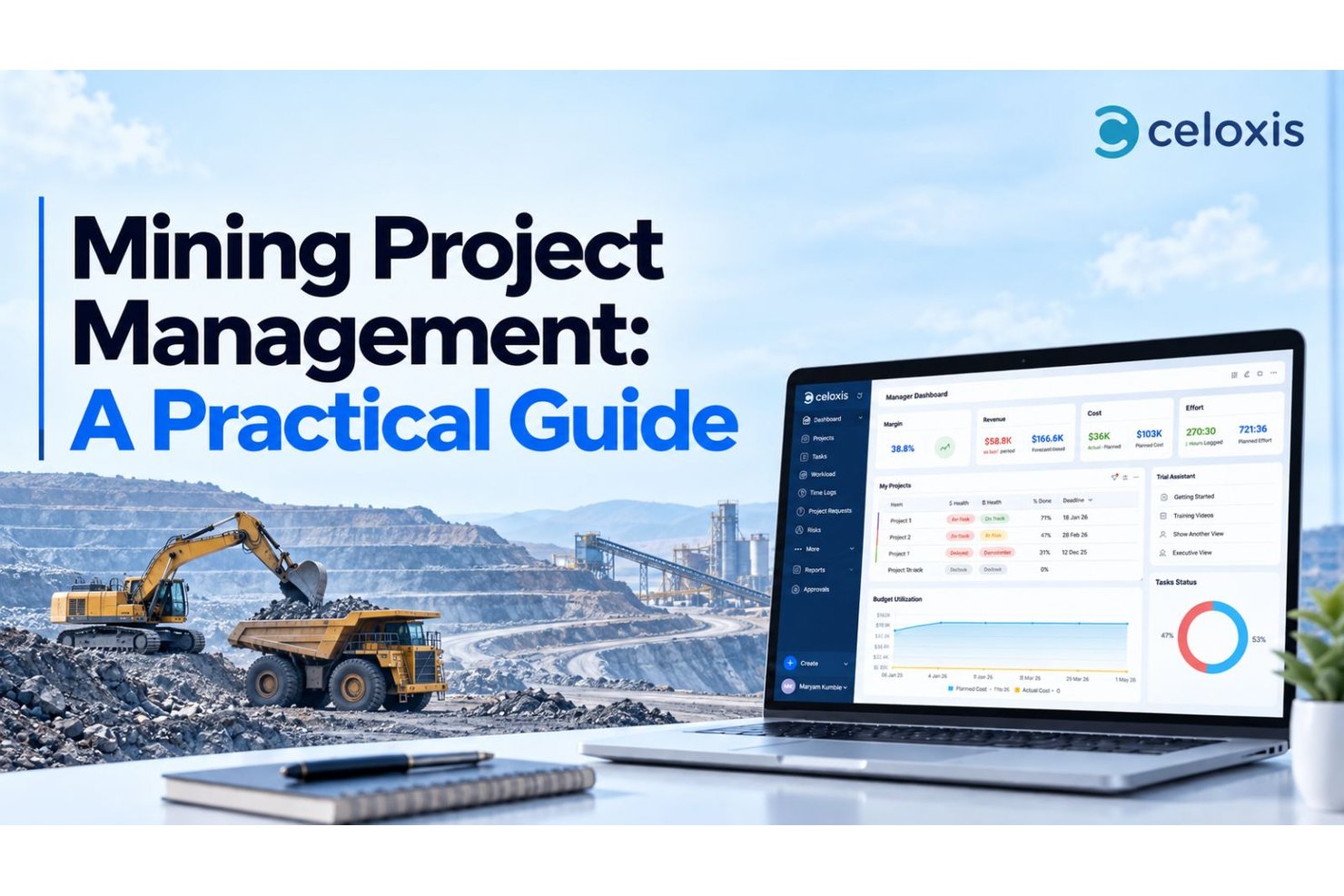
Celoxis è una piattaforma di gestione di progetti e portafogli che include la pianificazione con diagrammi di Gantt, la pianificazione della capacità delle risorse, il monitoraggio di budget e costi, i flussi di lavoro per rischi e problemi e i dashboard di portafoglio in ambienti di progetto distribuiti su più siti.
Per chi è più adatto Celoxis?
Celoxis è adatto ai responsabili di progetti e portafogli che supervisionano programmi minerari articolati in più fasi e necessitano di una solida pianificazione, della gestione della capacità delle risorse e della visibilità sui budget di più siti in un'unica piattaforma.
Perché ho scelto Celoxis
Ho scelto Celoxis come una delle soluzioni migliori perché il suo motore di pianificazione della capacità gestisce esattamente il tipo di complessità delle risorse che i programmi minerari comportano. Quando si gestiscono progetti simultanei in diversi siti, con squadre di perforazione e personale tecnico condivisi tra più sedi e turni, Celoxis evidenzia i sovraccarichi prima che diventino problemi di pianificazione. Mi piace anche il modo in cui le dipendenze tra progetti e l'analisi del percorso critico mantengono affidabili i programmi articolati in più fasi, ricalcolando automaticamente le date delle attività quando un'attività predecessora subisce un ritardo.
Funzionalità principali di Celoxis
- Dashboard del portafoglio: Visualizza lo stato della pianificazione, lo scostamento del budget e i rischi aperti di tutti i progetti attivi in un unico dashboard configurabile.
- Flussi di lavoro configurabili per rischi e problemi: Crea app con flussi di lavoro personalizzati, campi, stati, regole di instradamento e catene di approvazione definiti per rischi, problemi e richieste di modifica.
- Monitoraggio della baseline e del valore acquisito: Imposta le baseline dei progetti e confronta le prestazioni pianificate con quelle effettive utilizzando misure del valore acquisito come CPI e SPI.
- Portale clienti: Consenti agli stakeholder esterni, come appaltatori o clienti, di accedere ai dati di progetto autorizzati senza richiedere una licenza utente standard a pagamento.
Integrazioni di Celoxis
Celoxis offre 21 integrazioni native configurabili all'interno della piattaforma, tra cui Microsoft Project, Microsoft Excel, Google Sheets, Jira, Azure DevOps, QuickBooks Online, Google Drive e Slack. Supporta inoltre oltre 400 app connesse, Zapier e un'API REST per le integrazioni personalizzate.
Pros and Cons
Pros:
- I recensori apprezzano la visibilità sulle dipendenze della pianificazione
- Le viste della capacità aiutano a bilanciare i team dei diversi siti
- I recensori apprezzano la visibilità sui costi dei progetti
Cons:
- Nessuna allocazione delle attrezzature o gestione dell'invio delle flotte
- L'accesso mobile non dispone di una sincronizzazione offline documentata
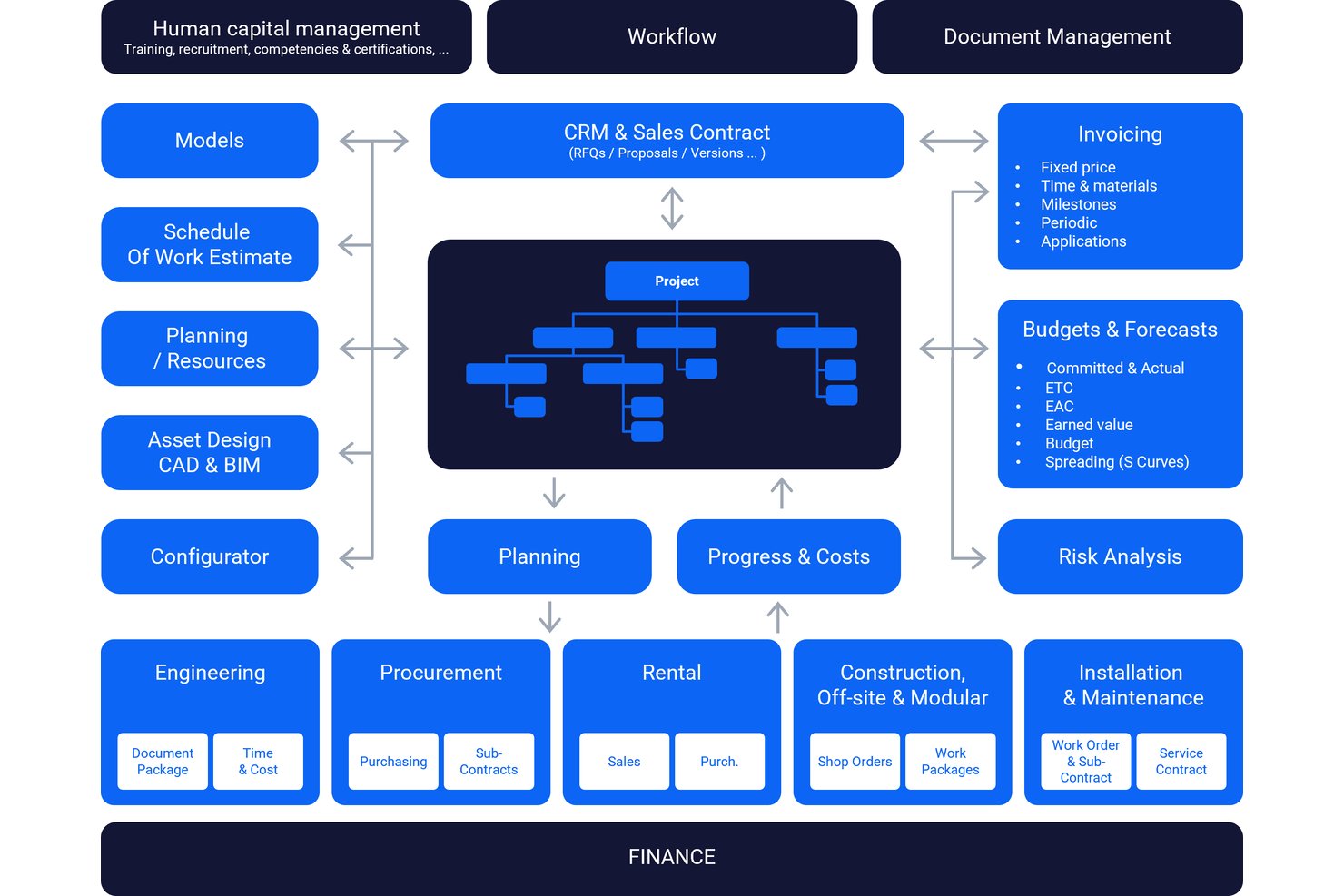
IFS Cloud è una piattaforma ERP aziendale e di gestione degli asset che comprende gestione dei progetti, controllo finanziario, allocazione delle risorse, gestione dei rischi e gestione della catena di approvvigionamento per operazioni industriali complesse, inclusi stabilimenti e attività minerarie.
Per chi è più adatto IFS Cloud?
IFS Cloud è adatto alle grandi aziende industriali che necessitano di ERP, gestione degli asset e gestione finanziaria dei progetti in un'unica piattaforma per operazioni complesse e distribuite su più siti.
Perché ho scelto IFS Cloud
IFS Cloud è entrato nella mia rosa dei candidati perché è una delle poche piattaforme che collega realmente la gestione finanziaria dei progetti, la gestione degli asset e l'ERP in un unico sistema. Per le operazioni minerarie che gestiscono progetti articolati in più fasi, apprezzo in particolare il modo in cui gestisce la definizione del budget di progetto con più versioni delle previsioni, l'analisi degli scostamenti e i valori di stima al completamento, insieme a una pianificazione che tiene traccia simultaneamente delle dipendenze tra attività, del margine temporale e dei percorsi critici. Il modulo integrato per la gestione dei rischi consente ai team di documentare le minacce, valutare la probabilità e l'impatto e assegnare azioni di risposta con scadenze, tutto all'interno della stessa piattaforma che gestisce il budget del progetto.
Funzionalità principali di IFS Cloud
- Budgeting multivaluta: Gestisci budget e previsioni di progetto in valute diverse nelle operazioni globali, con controllo dei costi a livello di struttura di scomposizione del lavoro.
- Monitoraggio del valore acquisito: Genera report sul valore acquisito, sulle ore, sui costi e sui ricavi a livello di attività, con avanzamento calcolato da più metodi di inserimento.
- Autorizzazioni basate sui ruoli e registro di controllo: Configura i controlli degli accessi, le regole di separazione dei compiti e i flussi di approvazione, con registrazione automatica di tutte le azioni degli utenti e delle transazioni.
- Integrazione con Microsoft Project: Importa ed esporta le pianificazioni dei progetti tra IFS Cloud e Microsoft Project per supportare i flussi di pianificazione tra team.
Integrazioni di IFS Cloud
IFS Cloud offre un'integrazione documentata con Microsoft Project per l'importazione e l'esportazione delle pianificazioni dei progetti. Fornisce inoltre API REST per integrazioni personalizzate, ma i collegamenti nativi a Deswik, Maptek, Micromine o ai sistemi di gestione delle flotte minerarie non sono documentati in modo chiaro.
Pros and Cons
Pros:
- Controlli unificati su progetti, asset e finanze
- I recensori apprezzano la visibilità sui dati dei progetti
- Le dipendenze e il margine temporale chiariscono i rischi della pianificazione
Cons:
- I recensori segnalano funzionalità limitate di archiviazione dei documenti
- Nessun flusso di lavoro GIS o per la gestione delle flotte specifico per il settore minerario

Ideale per il controllo dei documenti di costruzione nel settore minerario
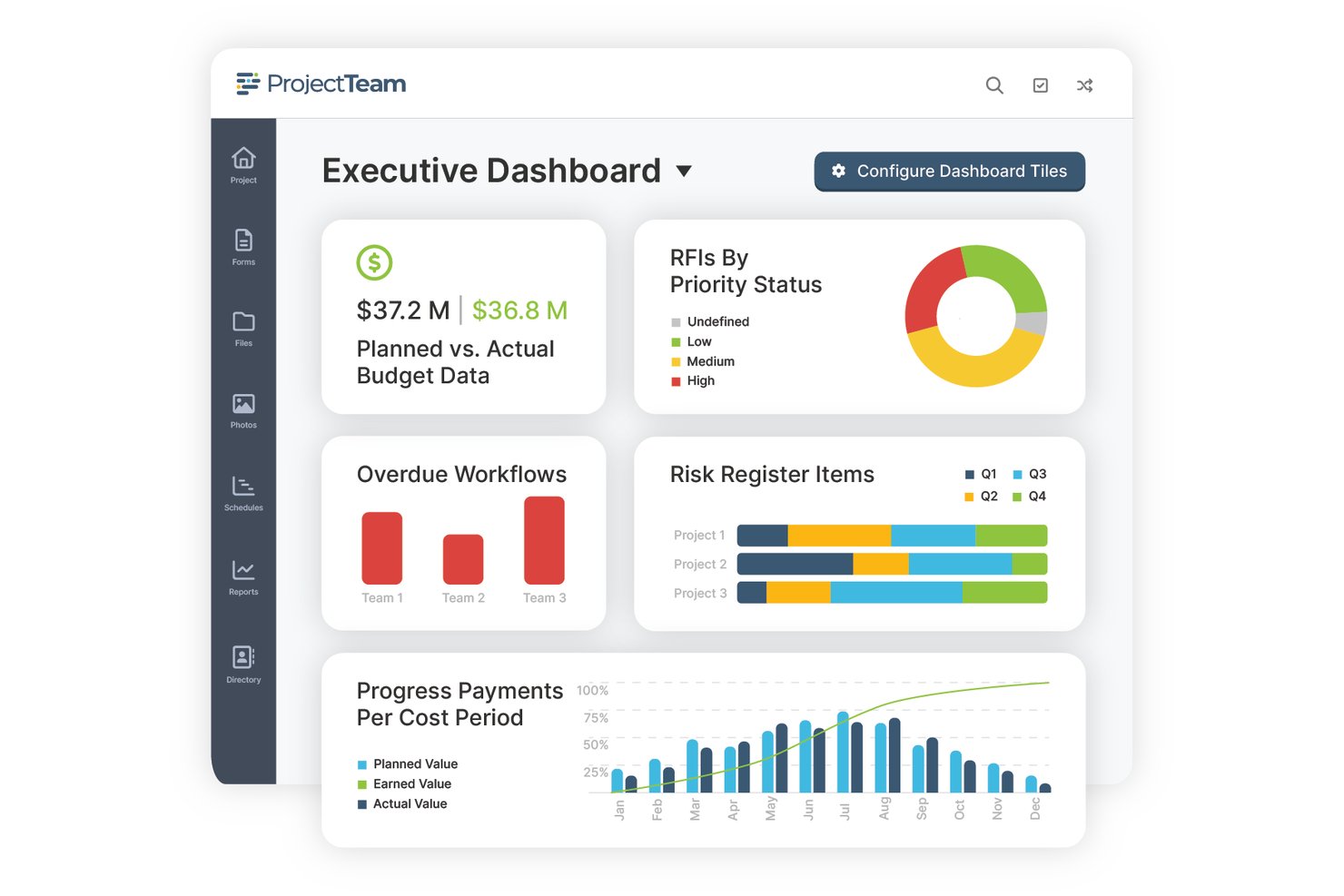
ProjectTeam.com è una piattaforma di gestione delle costruzioni basata sul cloud che centralizza il controllo dei documenti, la pianificazione dei progetti, il monitoraggio dei budget e la collaborazione tra gli stakeholder nei progetti complessi e articolati in più fasi del settore minerario.
Per chi è più adatto ProjectTeam.com?
ProjectTeam.com è adatto alle organizzazioni minerarie e di costruzione che necessitano di un controllo rigoroso dei documenti nei progetti articolati in più fasi, con numerosi stakeholder e collaboratori esterni.
Perché ho scelto ProjectTeam.com
Ho incluso ProjectTeam.com tra le mie scelte migliori perché le sue funzionalità di controllo dei documenti sono davvero efficaci per i progetti minerari, nei quali le revisioni dei disegni, i permessi e i documenti presentati devono rimanere organizzati nell'arco di tempistiche progettuali prolungate. Ogni modulo e documento include una cronologia delle attività con marca temporale, le versioni precedenti rimangono accessibili e le autorizzazioni basate sui ruoli fanno sì che i documenti sensibili siano visibili solo alle persone autorizzate. Apprezzo anche il fatto che i team possano configurare moduli personalizzati e flussi di approvazione senza scrivere una sola riga di codice, un aspetto importante quando il processo di chiusura e ripristino di un sito minerario è completamente diverso da un flusso di approvazione standard per i documenti presentati.
Funzionalità principali di ProjectTeam.com
- Pianificazione con diagrammi di Gantt e analisi del percorso critico: i team possono creare un numero illimitato di pianificazioni Gantt suddivise per fase o cronologia, con collegamenti tra le dipendenze, monitoraggio delle milestone e visualizzazione del percorso critico.
- Report sui costi pianificati rispetto a quelli effettivi: gli utenti possono generare report sulle variazioni dei costi e previsioni di budget insieme al monitoraggio degli ordini di modifica e degli impegni, con una traccia di controllo completa.
- Moduli e flussi di lavoro personalizzati senza codice: gli amministratori possono creare moduli personalizzati, aggiungere campi e configurare flussi di approvazione senza scrivere codice o sostenere costi aggiuntivi.
- Integrazione con la contabilità Sage: ProjectTeam.com si connette a Sage Intacct, Sage 100 Contractor e Sage 300 per sincronizzare budget di progetto, contratti e richieste di pagamento.
Integrazioni di ProjectTeam.com
ProjectTeam.com offre integrazioni con Sage Intacct, Sage 100 Contractor e Sage 300 Construction and Real Estate. La sua API REST basata sugli eventi supporta integrazioni personalizzate, inclusi flussi di dati pianificati o in tempo reale.
Pros and Cons
Pros:
- Centralizza disegni, RFI e documenti presentati
- I report personalizzati supportano le revisioni dell'avanzamento dei progetti
- La condivisione nel cloud collega gli stakeholder dei progetti che lavorano da remoto
Cons:
- I revisori segnalano difficoltà nel trovare le revisioni meno recenti
- Nessun registro dei rischi minerari documentato né accesso offline

Ideale per il controllo integrato di costi e pianificazione
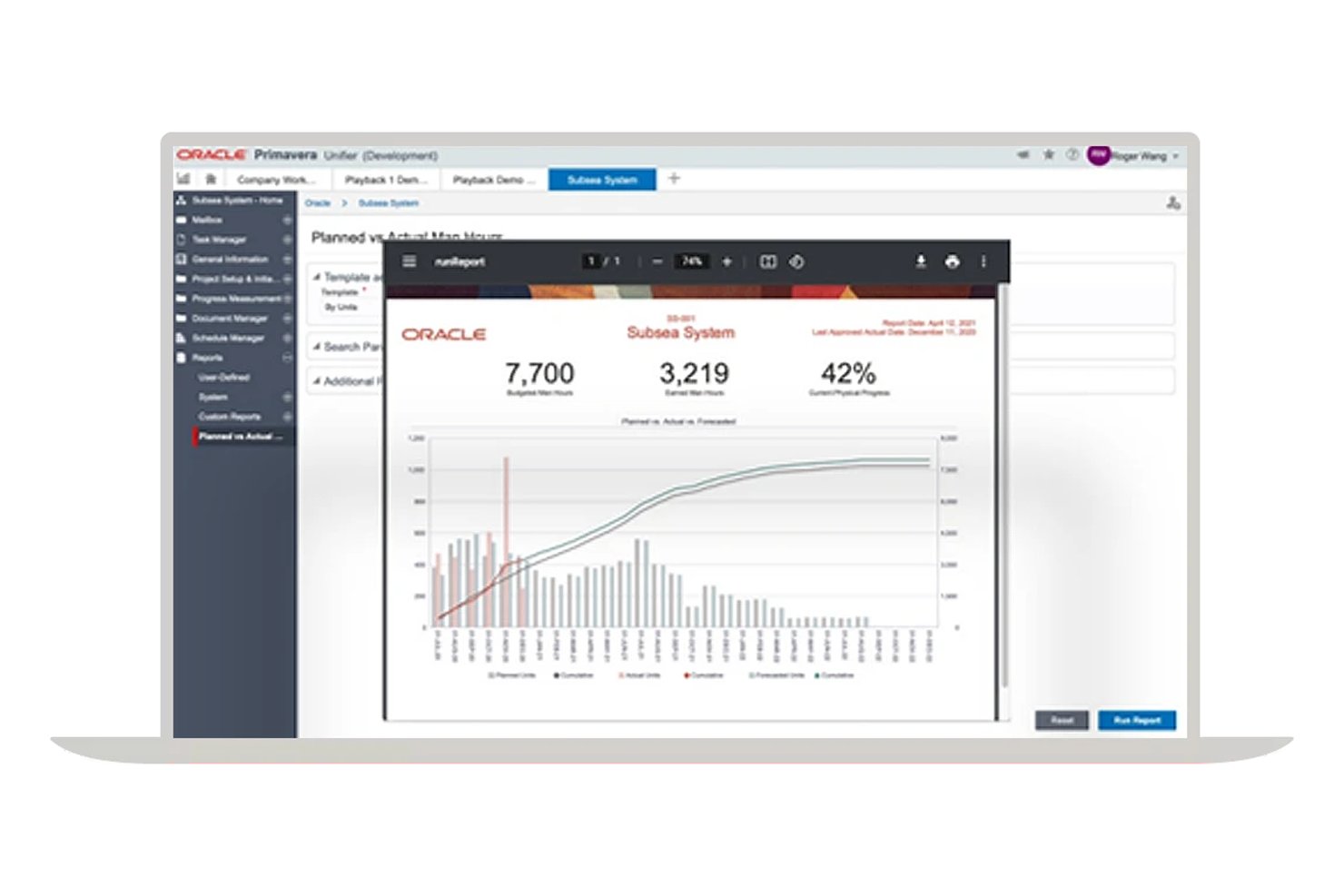
Oracle Primavera Unifier è una piattaforma aziendale per la gestione dei progetti e del ciclo di vita degli asset, progettata per i settori ad alta intensità di capitale, che combina la gestione dei costi, la pianificazione, il controllo dei documenti, la gestione dei contratti e l'automazione dei flussi di lavoro in un unico sistema configurabile.
Per chi è più adatto Oracle Primavera Unifier?
Primavera Unifier è adatto ai team che gestiscono grandi progetti di investimento nel settore delle costruzioni e dell'ingegneria, approvvigionamento e costruzione (EPC), e che necessitano di uno stretto controllo dei costi, della pianificazione e dei contratti in programmi complessi e articolati in più fasi.
Perché ho scelto Oracle Primavera Unifier
Ho scelto Oracle Primavera Unifier come una delle migliori soluzioni perché la sua integrazione tra costi e pianificazione è realmente stretta, in un modo che la maggior parte degli strumenti non riesce a eguagliare. Nei grandi progetti di investimento, posso collegare direttamente le previsioni dei flussi di cassa alle linee di base della pianificazione, così un'attività in ritardo viene immediatamente evidenziata come una varianza dei costi, invece di rappresentare una sorpresa a fine mese. Il modulo di gestione del valore acquisito collega in un'unica vista il valore pianificato, i dati effettivi e l'avanzamento della pianificazione, esattamente ciò che serve per monitorare le infrastrutture minerarie articolate in più fasi rispetto ai budget impegnati.
Funzionalità principali di Oracle Primavera Unifier
- Registro dei rischi: Tiene traccia dei rischi dall'identificazione alla risoluzione, con valutazioni prima e dopo la risposta, assegnazione della responsabilità del rischio e collegamenti alle attività o ai traguardi correlati della pianificazione.
- Automazione dei flussi di lavoro tramite uDesigner: Uno strumento senza codice che consente di creare o modificare processi aziendali, moduli e flussi di approvazione senza sviluppo personalizzato.
- Gestore documenti: Conserva i documenti di progetto con controllo delle versioni, tracciamento separato delle revisioni, blocco al prelievo e supporto alla co-modifica per i team connessi.
- Integrazione con Oracle Fusion Cloud ERP: Sincronizza bidirezionalmente con il sistema ERP i dati di progetto e finanziari, inclusi budget, impegni e richieste di pagamento.
Integrazioni di Oracle Primavera Unifier
Oracle Primavera Unifier dispone di integrazioni native con Oracle Fusion Cloud ERP, Primavera P6, Oracle Primavera Cloud e Oracle Primavera Cloud Portfolio and Capital Planning. Supporta inoltre API RESTful e middleware di terze parti per integrazioni personalizzate.
Pros and Cons
Pros:
- Collega l'avanzamento della pianificazione alle previsioni dei costi
- I revisori apprezzano il monitoraggio di budget e ordini di acquisto
- Mantiene tracciabili i documenti e le revisioni di progetto
Cons:
- Il monitoraggio del personale non include l'assegnazione dei mezzi pesanti
- Nessun GIS nativo per il settore minerario né monitoraggio degli sterili

Ideale per il controllo di progetti minerari ad alta intensità di capitale
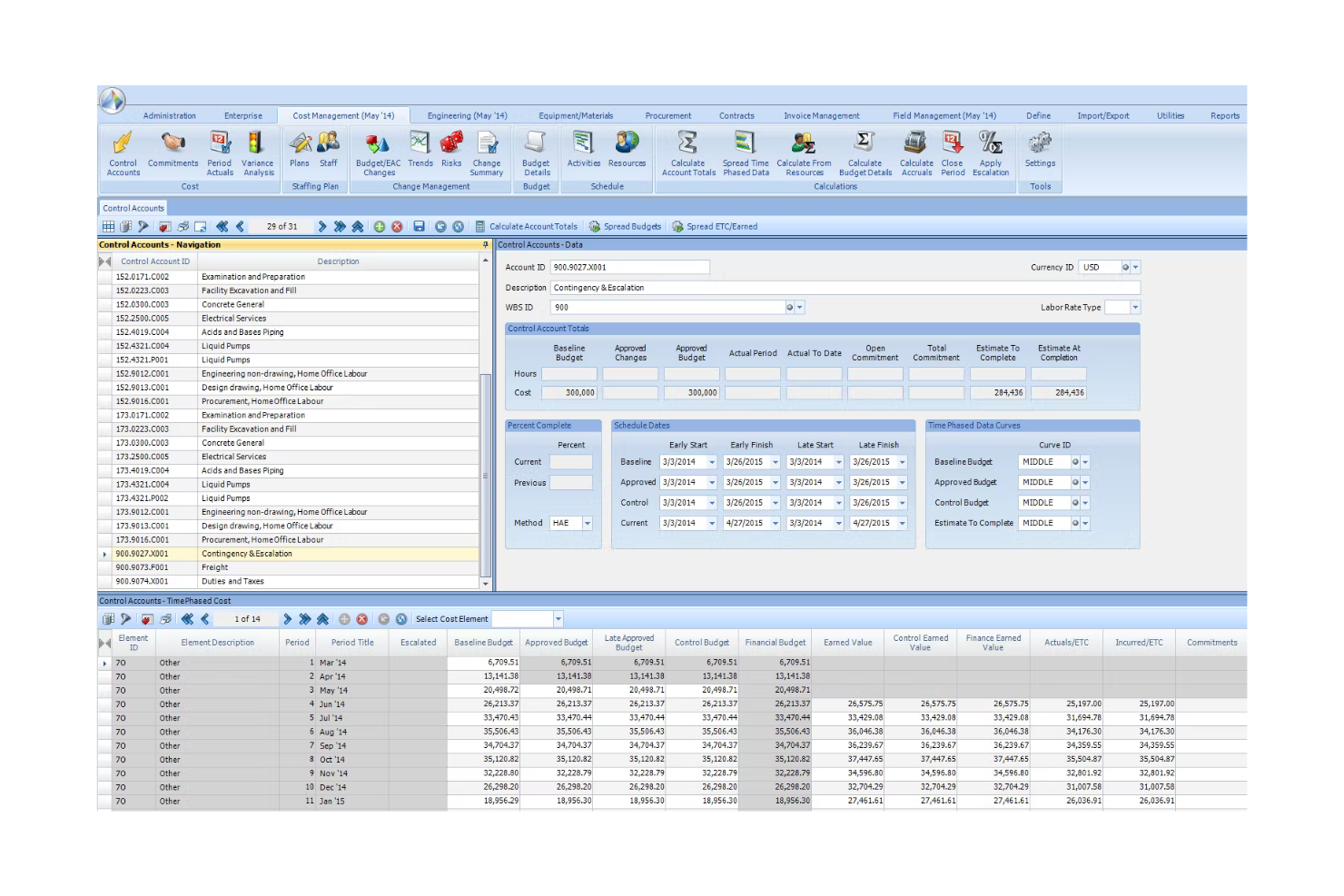
Contruent Enterprise è una piattaforma per il controllo dei progetti di capitale e la gestione dei costi lungo il ciclo di vita, che integra la pianificazione, il monitoraggio dei costi, la gestione del valore acquisito, la gestione delle modifiche e la reportistica del portafoglio per progetti minerari su larga scala.
Per chi è più indicato Contruent?
Contruent Enterprise è particolarmente adatto ai team di controllo dei progetti che gestiscono programmi minerari di grandi dimensioni e ad alta intensità di capitale, nei quali la gestione integrata dei costi, della pianificazione e del valore acquisito è imprescindibile.
Perché ho scelto Contruent
Ho incluso Contruent tra le mie scelte principali perché è una delle poche piattaforme sviluppate specificamente per le esigenze di controllo dei progetti dei programmi minerari ad alta intensità di capitale, con oltre 25 anni di esperienza nel settore minerario e clienti come Rio Tinto, BHP e Anglo American a confermarlo. Apprezzo particolarmente il modo in cui la gestione del valore acquisito è collegata direttamente ai dati relativi a costi e pianificazione: quando un progetto minerario si discosta dalla baseline, è possibile visualizzare in un unico luogo lo scostamento, il relativo impatto sui costi e l'adeguamento delle previsioni. Il modulo di gestione delle modifiche collega ogni ordine di modifica all'ambito, ai costi e alla pianificazione, un aspetto importante nella gestione di progetti di capitale articolati in più fasi, in cui una singola modifica non approvata può ripercuotersi sull'intero budget.
Funzionalità principali di Contruent
- Portale per gli appaltatori: Consente agli appaltatori di accedere in modo controllato per visualizzare i dati di avanzamento, caricare e scaricare modelli e collaborare direttamente all'interno della piattaforma.
- Gestione del valore acquisito conforme allo standard ANSI EIA-748: Monitora CPI, SPI, gli scostamenti dei costi e della pianificazione e la stima al completamento lungo l'intero ciclo di vita del progetto.
- Oltre 200 report predefiniti: Include fin da subito EAC, avanzamento fisico, dati effettivi del periodo, produttività, modifiche, impegni, istogrammi e curve a S.
- Gestione delle offerte e delle RFP: Raccoglie e analizza le offerte, supporta l'analisi configurabile delle offerte e gestisce le RFP all'interno del flusso di lavoro per la gestione dei contratti.
Integrazioni di Contruent
Contruent dispone di adattatori certificati per SAP, Oracle e IBM, oltre a integrazioni con Primavera P6 e Microsoft Project e connessioni a SharePoint. Il fornitore non pubblica il numero totale di integrazioni né la disponibilità di API.
Pros and Cons
Pros:
- I dati sui costi e sulla pianificazione supportano le previsioni
- I riepiloghi del portafoglio collegano i controlli a livello di progetto
- I portali per gli appaltatori supportano team di progetto distribuiti
Cons:
- La personalizzazione dei report può richiedere impegno aggiuntivo
- Non sono documentati flussi di lavoro per flotte o attività sul campo offline
Ideale per la pianificazione dei progetti nativa di Microsoft 365
Pros and Cons
Pros:
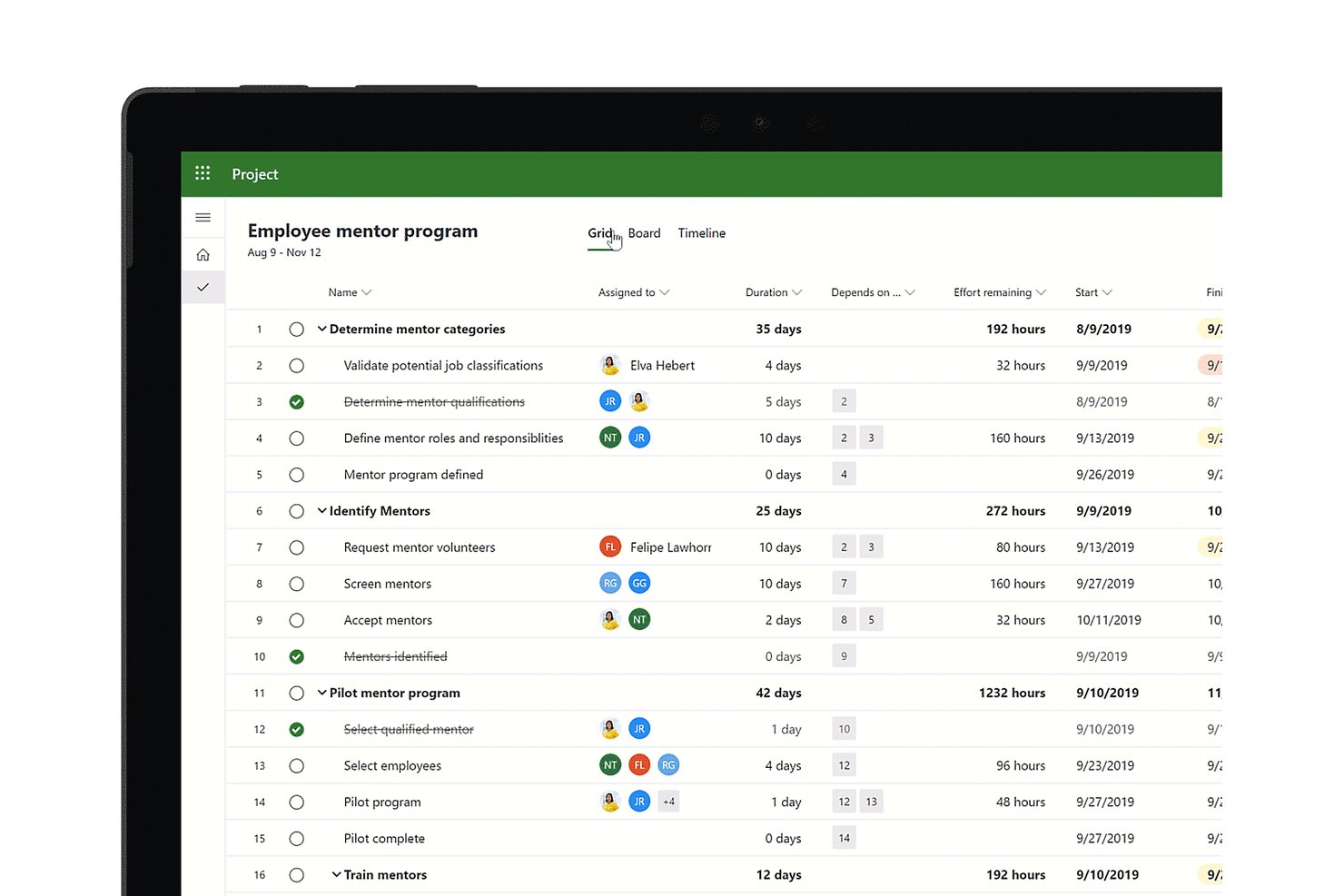
- I percorsi critici tra progetti mappano le dipendenze EPC
- Le assegnazioni delle risorse rivelano i vincoli di capacità tra i progetti
- Le linee di base collegano l'avanzamento fisico al monitoraggio del budget
Cons:
- Nessun flusso di lavoro nativo per la sicurezza mineraria o i sistemi informativi geografici (GIS)
- Il ritiro di Project Online interrompe le implementazioni basate sul cloud

Procore
Ideale per l'esecuzione di progetti di costruzione dall'ufficio al cantiere
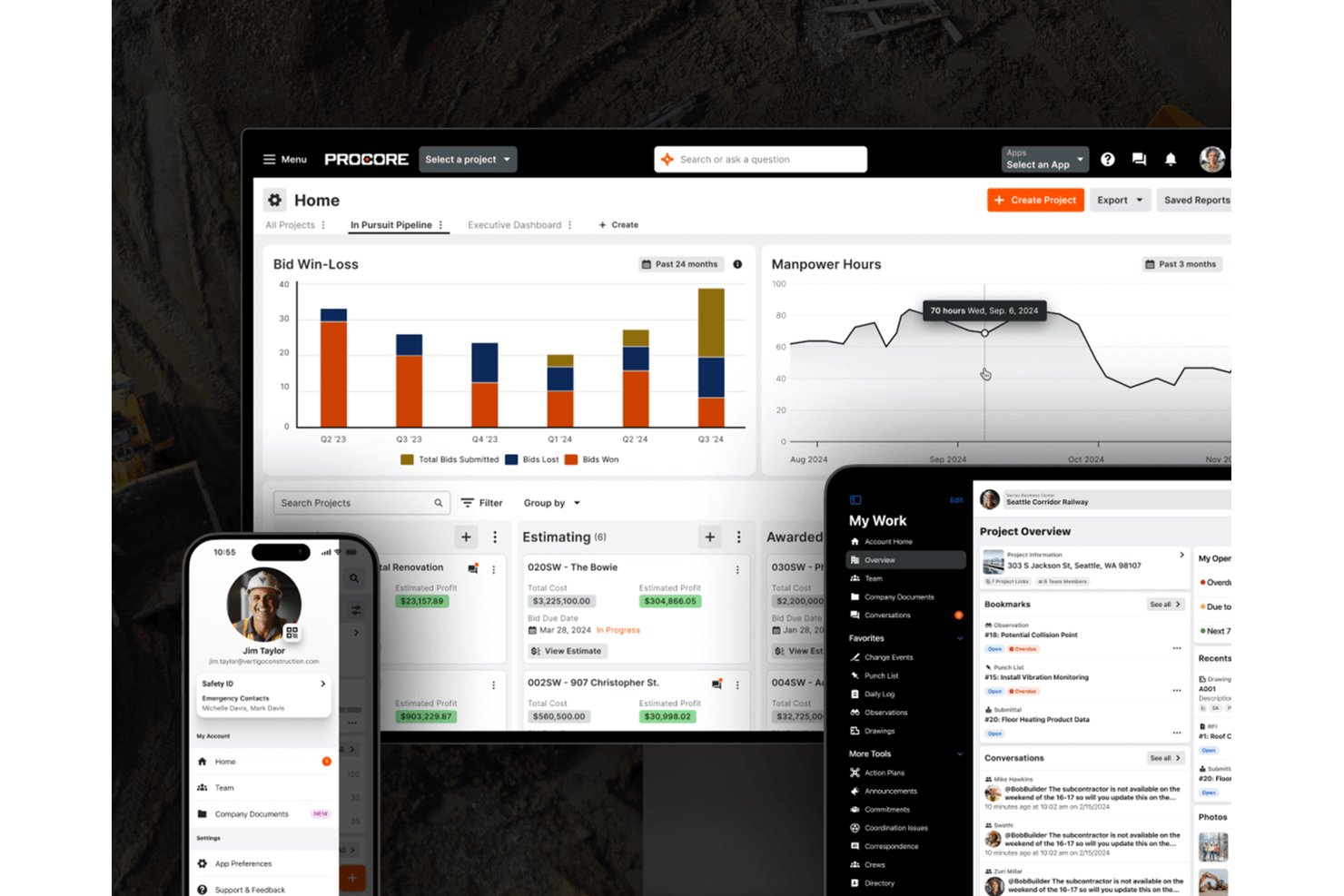
Procore è una piattaforma per la gestione dei progetti di costruzione che collega i team d'ufficio e di cantiere attraverso la pianificazione, il controllo dei documenti, il monitoraggio del budget, la gestione della qualità e della sicurezza e il coordinamento delle attrezzature.
Per chi è più adatto Procore?
Procore è adatto ai team di progetto del settore delle costruzioni e dell'EPC che hanno bisogno di mantenere strettamente collegate le operazioni d'ufficio e di cantiere in più siti attivi.
Perché ho scelto Procore
Ho scelto Procore come una delle soluzioni migliori perché colma davvero il divario tra la pianificazione d'ufficio e l'esecuzione in cantiere, un aspetto estremamente importante nei progetti di costruzione e EPC legati al settore minerario. Mi piace molto il modo in cui la pianificazione basata su Gantt si collega direttamente ai registri giornalieri di cantiere, così quando una squadra segna un'attività come completata sul posto, l'avanzamento confluisce direttamente nelle previsioni dei costi e dei tempi. Il suo modulo Qualità e sicurezza consente di eseguire ispezioni delle attrezzature, registrare gli incidenti con i dettagli sui rischi e assegnare azioni correttive dal cantiere, tutto in un unico posto.
Funzionalità principali di Procore
- Gestione delle offerte: Crea, monitora e confronta le offerte fianco a fianco, quindi converte direttamente l'offerta selezionata in un subappalto o in un ordine di acquisto.
- Visualizzatore di modelli BIM: Visualizza e collabora sui modelli BIM da un dispositivo mobile, con la possibilità di creare e gestire le problematiche di coordinamento in cantiere.
- Piani d'azione: Crea checklist sequenziali delle attività con punti di verifica utilizzando modelli personalizzabili per monitorare i requisiti specifici del progetto.
- Analisi e reportistica: Accedi a oltre 100 report predefiniti e combina i dati di Procore con le informazioni ERP per generare previsioni dei costi delle commesse nell'intero portafoglio.
Integrazioni di Procore
Procore offre oltre 400 integrazioni pronte all'uso nel Marketplace, tra cui Oracle Primavera P6, Microsoft Project, Sage, Bluebeam e DocuSign. Offre inoltre un'API REST per le integrazioni personalizzate.
Pros and Cons
Pros:
- I disegni condivisi mantengono allineati i team di cantiere e d'ufficio
- I record delle attrezzature monitorano le assegnazioni tra progetti
- L'avanzamento giornaliero alimenta le previsioni dei costi
Cons:
- Non sono disponibili flussi di lavoro di ingegneria o produzione specifici per il settore minerario
- Secondo i recensori, la pianificazione può risultare complicata

Ideale per la programmazione del percorso critico su larga scala
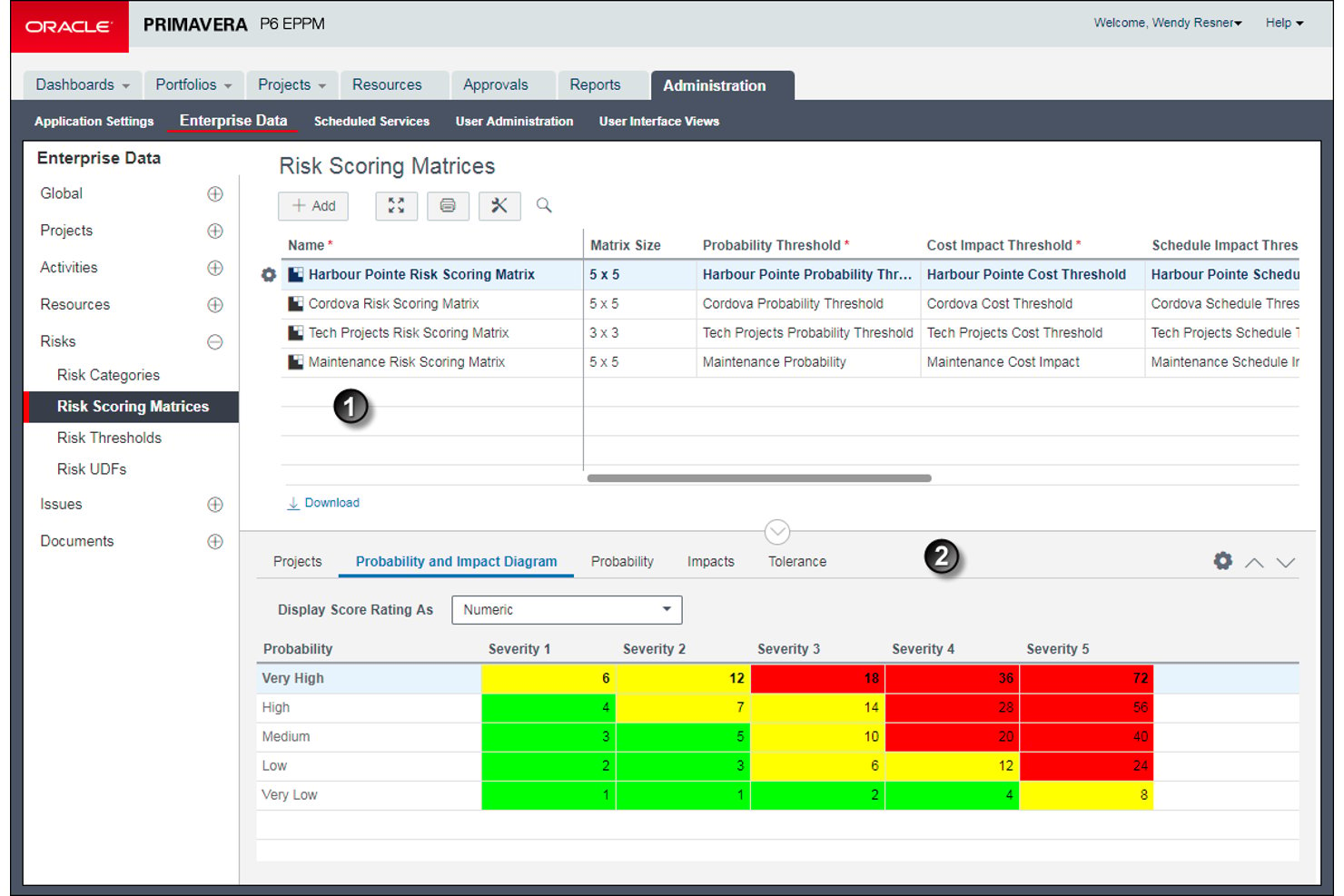
Oracle Primavera P6 è uno strumento aziendale per la gestione del portafoglio progetti, progettato per la pianificazione, la programmazione e il controllo di programmi su larga scala nei settori dell'edilizia, dell'ingegneria e dei progetti di investimento, con programmazione multiutente, gestione delle risorse, monitoraggio dei costi e analisi dei rischi.
Per chi è più indicato Oracle Primavera P6?
Oracle Primavera P6 è particolarmente adatto ai team di controllo dei progetti di edilizia e ingegneria che gestiscono programmi ampi e articolati in più fasi, nei quali la programmazione del percorso critico è la priorità assoluta.
Perché ho scelto Oracle Primavera P6
Oracle Primavera P6 è presente nella mia lista perché il suo motore di programmazione del percorso critico è davvero senza pari per i programmi ampi e articolati in più fasi. Ho lavorato con programmi contenenti decine di migliaia di attività e la funzionalità Trace Logic è ciò che rende tutto gestibile: mostra esattamente quali relazioni di predecessori e successori determinano la tempistica di un'attività, consentendo di individuare i ritardi senza dover fare supposizioni. Mi affido inoltre ai suoi molteplici calcoli del margine di riserva del percorso critico, che permettono di definire la criticità in base al percorso più lungo o al margine di riserva totale massimo, mantenendo visibili i percorsi subcritici prima che diventino problemi reali.
Funzionalità principali di Oracle Primavera P6
- Confronto con la baseline: Memorizza più istantanee statiche del progetto e le confronta con l'avanzamento attuale utilizzando i campi di varianza per evidenziare gli scostamenti di programma e di costo.
- Istogramma delle risorse: Visualizza istogrammi di allocazione basati sul tempo per risorsa, ruolo o team di risorse, con una linea limite tracciata in base ai calendari e alle unità massime per periodo.
- Monitoraggio del valore acquisito: Calcola i costi al completamento utilizzando i costi effettivi più la stima a finire, con la tecnica del valore acquisito configurata a livello di WBS per ogni attività.
- Flussi di lavoro per la revisione dei documenti: Configura cicli di revisione strutturati con tipologie di approvazione, sequenze di revisori e scadenze per gestire le approvazioni dei documenti di progetto tra i vari team.
Integrazioni di Oracle Primavera P6
Oracle Primavera P6 si integra con Oracle E-Business Suite e SAP ERP, mentre Primavera Gateway e Primavera Web Services supportano le connessioni ai sistemi aziendali. La sua API (interfaccia di programmazione delle applicazioni) per l'integrazione delle applicazioni supporta integrazioni personalizzate.
Pros and Cons
Pros:
- Traccia le dipendenze nei programmi minerari di grandi dimensioni
- Tiene traccia delle quantità prodotte, della manodopera e delle ore
- Mappa la domanda di attrezzature nei programmi di progetto
Cons:
- I flussi di lavoro per la conformità nel settore minerario richiedono una configurazione esterna
- I report possono richiedere un'ulteriore preparazione in Excel
Ideale per il controllo dei costi del ciclo di vita delle attività minerarie
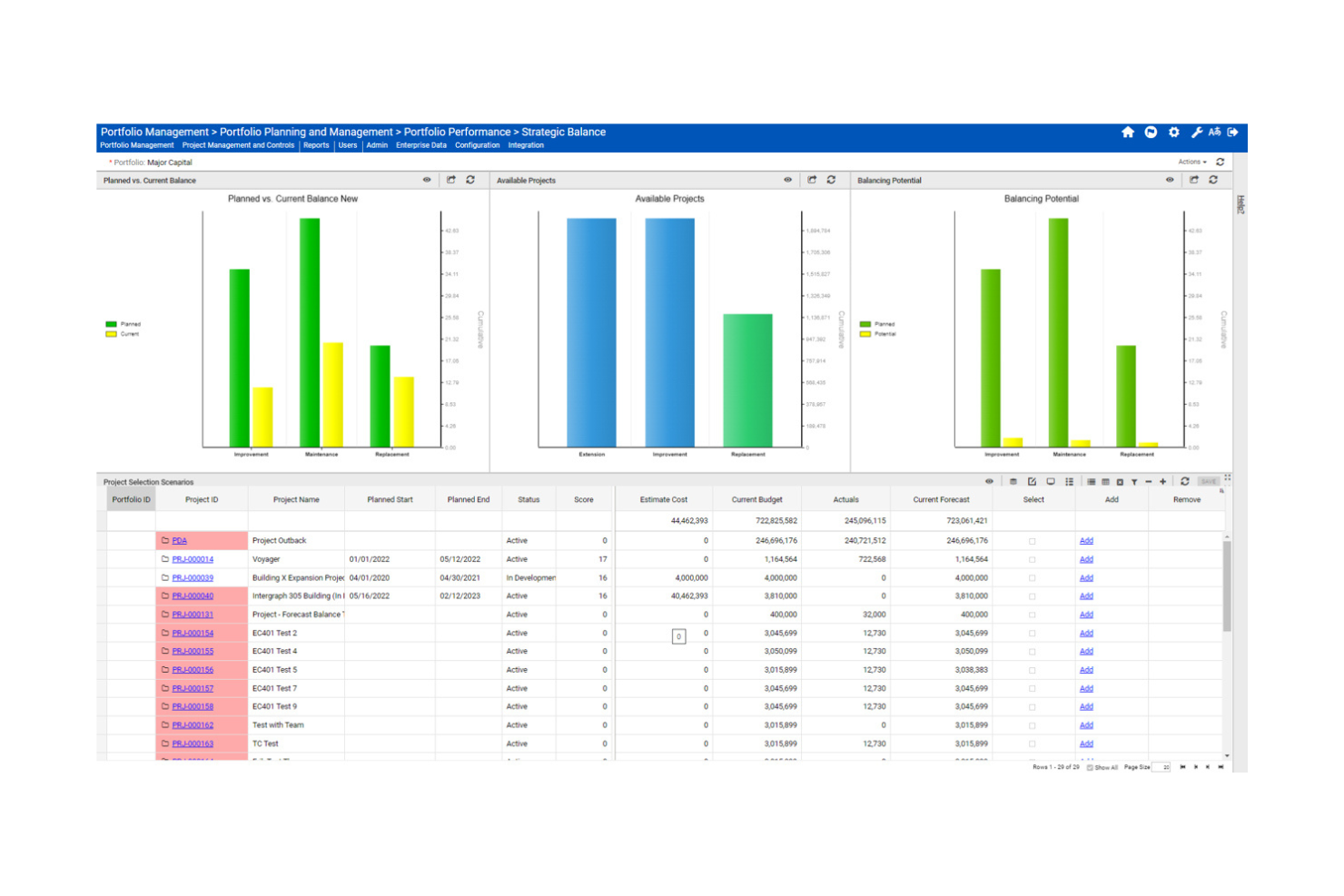
Octave Sequence Enterprise (precedentemente EcoSys) è una piattaforma aziendale per la gestione di progetti e portafogli che combina la pianificazione del capitale, il monitoraggio dei costi, la previsione delle risorse, la gestione del valore acquisito e i controlli dei progetti in più regioni.
Per chi è più adatto Octave Sequence Enterprise?
Octave Sequence Enterprise è particolarmente adatto ai team aziendali che gestiscono progetti di investimento complessi e portafogli di attività articolati in più fasi, in cui il controllo dei costi a lungo termine e la visibilità finanziaria interregionale sono le priorità principali.
Perché ho scelto Octave Sequence Enterprise
Ho incluso Octave Sequence Enterprise tra le mie scelte principali perché è una delle poche piattaforme progettate per gestire l'intera complessità finanziaria di un portafoglio di attività minerarie, dalla pianificazione iniziale degli investimenti fino al ripristino e alla chiusura. Apprezzo in particolare il modo in cui collega in un'unica vista le previsioni continue dei costi, le linee di base dei finanziamenti e la modellazione di scenari ipotetici, così che le variazioni dei costi non colgano di sorpresa a metà progetto. Il supporto all'esecuzione in più valute e regioni fa sì che i siti minerari distribuiti non operino in silos finanziari.
Funzionalità principali di Octave Sequence Enterprise
- Gestione del valore acquisito: monitora l'avanzamento effettivo del progetto rispetto al piano utilizzando metriche EVM standard, tra cui CPI, SPI, BCWP e BCWS.
- Gestione dei contratti con più fornitori: gestisce termini contrattuali, prodotti finali, obblighi e ordini di modifica con collegamenti diretti agli impatti su costi e pianificazione.
- Cruscotti basati sui ruoli: consente a ogni utente di creare cruscotti personalizzati che mostrano i dati sulle prestazioni più pertinenti per il proprio ruolo.
- Accesso mobile fuori linea sul campo: consente ai team sul campo di registrare avanzamenti e aggiornamenti senza connettività, sincronizzando poi automaticamente i dati al ripristino della connessione.
Integrazioni di Octave Sequence Enterprise
Le integrazioni documentate includono SAP, Oracle E-Business Suite, PeopleSoft, JD Edwards, Viewpoint, Oracle Primavera P6 e Microsoft Project. Octave Sequence Enterprise supporta inoltre API per servizi web, connettori preconfigurati e in tempo reale, oltre a importazioni da Excel, testo e XML.
Pros and Cons
Pros:
- I dati di budget e previsione restano collegati
- La visibilità del portafoglio riduce il consolidamento dei fogli di calcolo
- La reportistica fuori linea sul campo supporta i siti remoti
Cons:
- La gestione dei file di progetto ha suscitato critiche da parte dei revisori
- I report complessi possono rallentare i grandi insiemi di dati

Smartsheet
Ideale per la pianificazione con diagrammi di Gantt in stile foglio di calcolo
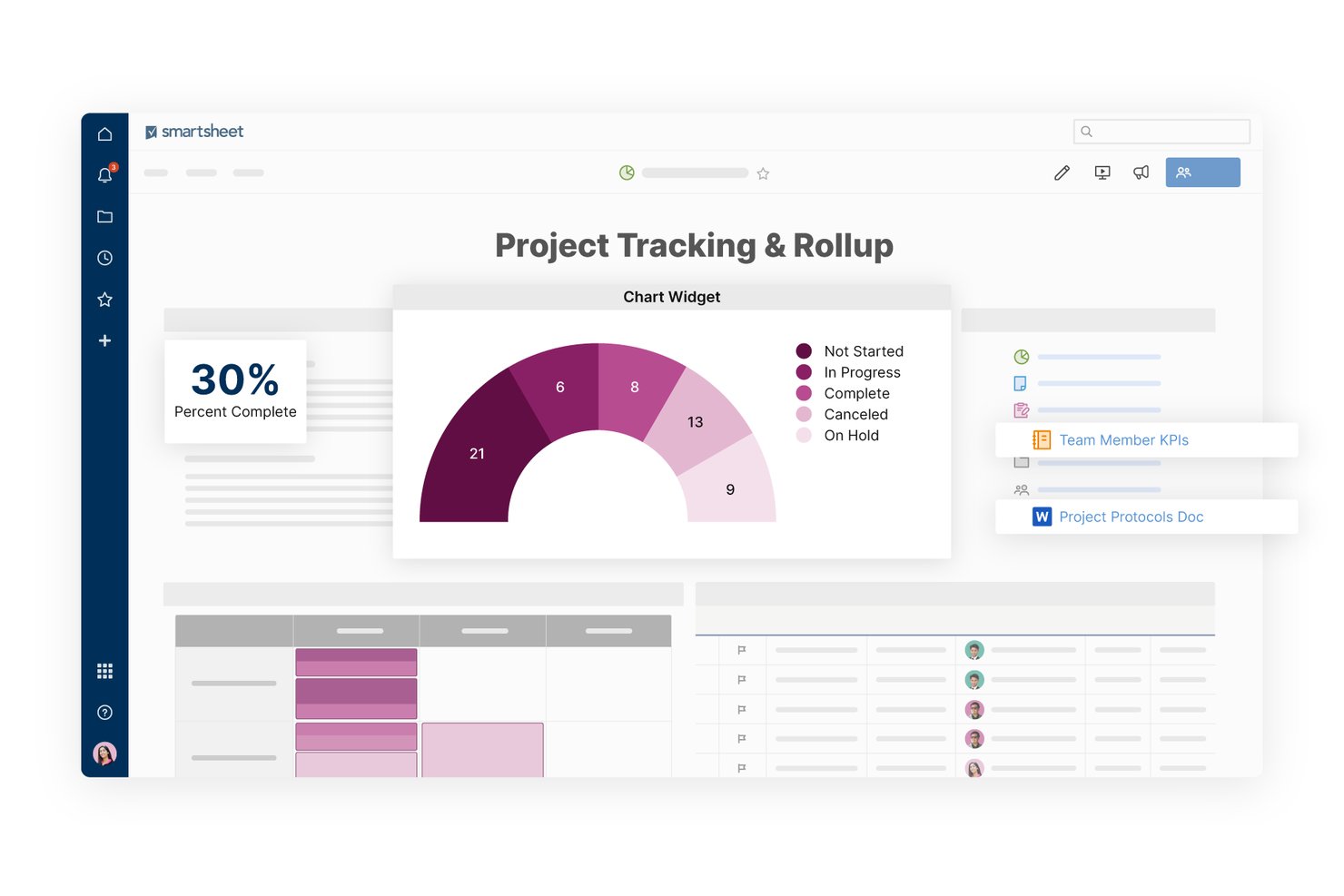
Smartsheet è una piattaforma di gestione del lavoro in stile foglio di calcolo che combina la pianificazione con diagrammi di Gantt, il monitoraggio delle risorse, i cruscotti, i flussi di lavoro automatizzati e la visibilità del portafoglio multi-progetto per gestire progetti complessi e articolati in più fasi.
Per chi è più adatto Smartsheet?
Smartsheet è adatto ai responsabili di progetto delle aziende minerarie che lavorano già con strumenti in stile foglio di calcolo e necessitano di una pianificazione strutturata con diagrammi di Gantt e della visibilità dei cruscotti su più siti senza passare a una piattaforma specializzata.
Perché ho scelto Smartsheet
Ho incluso Smartsheet tra le mie scelte principali perché la sua pianificazione con diagrammi di Gantt in stile foglio di calcolo consente ai responsabili di progetto del settore minerario di delineare facilmente programmi complessi e articolati in più fasi senza rinunciare al familiare formato a griglia con cui già lavorano. Apprezzo in particolare il modo in cui le linee di base dei diagrammi di Gantt consentono di confrontare il piano originale con l'avanzamento effettivo, rendendo immediatamente visibili i ritardi di pianificazione nelle lunghe fasi di estrazione o sviluppo. La pianificazione degli scenari consente inoltre di modellare le modifiche alla tempistica senza intervenire sul piano attivo.
Caratteristiche principali di Smartsheet
- Monitoraggio del registro RAID: Registra rischi, azioni, problemi e decisioni con responsabili assegnati, livelli di priorità, stato, scadenze e misure di mitigazione in un foglio strutturato.
- Generatore di flussi di lavoro automatizzati: Crea flussi di lavoro senza codice che attivano notifiche, approvazioni e promemoria in base a condizioni o pianificazioni.
- Cruscotto del portafoglio: Consolida i dati relativi allo stato, alle condizioni e alle prestazioni dei progetti in più progetti in un'unica visualizzazione del cruscotto condivisibile.
- Vista della capacità di gestione delle risorse: Monitora la disponibilità e l'utilizzo del team per ruolo o area disciplinare, con filtri per progetto e aggiornamenti in tempo reale al variare delle assegnazioni.
Integrazioni di Smartsheet
Smartsheet offre oltre 175 integrazioni, tra cui SAP ERP, SAP BusinessObjects, Power BI, Jira, ServiceNow, Tableau, Microsoft Teams e Slack. Supporta integrazioni personalizzate tramite la sua API REST nei piani Business e superiori, oltre a Zapier.
Pros and Cons
Pros:
- Le linee di base dei diagrammi di Gantt evidenziano i ritardi di pianificazione
- I cruscotti condivisi migliorano la visibilità tra i diversi siti
- I registri RAID assegnano responsabili ai rischi del progetto
Cons:
- Nessuna assegnazione di flotte di attrezzature o materiali
- L'accesso senza connessione si limita ai moduli
New Product Updates from Smartsheet

Smartsheet Adds Non-Plan User Management in Admin Center
Smartsheet adds a Non plan users tab to the Seat types and true-up page in Admin Center. This lets system admins review non-plan users and add them to the plan or remove them from the organization in one place. For more information, visit Smartsheet’s official site.
Altri software di gestione dei progetti per il settore minerario
Ecco alcune ulteriori opzioni di software di gestione dei progetti per il settore minerario che non sono entrate nella mia selezione, ma che vale comunque la pena prendere in considerazione:
- Wrike
La soluzione migliore per la flessibilità nella gestione delle attività
- InEight
Ideale per il controllo dei costi e dei programmi dei progetti di capitale
- GoodDay
Ideale per il monitoraggio delle attività e delle tempistiche in più visualizzazioni
- Autodesk Construction Cloud
Ideale per la previsione dei flussi di cassa collegata alla pianificazione
- Planisware
Ideale per il PPM in portafogli di progetti multi-regione
- Mastt
Ideale per il controllo dei costi dei progetti di investimento
- Spider Project
Ideale per l'analisi dei rischi di pianificazione con risorse limitate
- MineOne
Ideale per la pianificazione delle operazioni minerarie


Come valuto i software di gestione dei progetti per l'industria mineraria
Divido la mia valutazione in tre parti, attribuendo il peso maggiore alle funzionalità fondamentali: pianificare il lavoro suddiviso in fasi con dipendenze e assegnare squadre e attrezzature tra diversi siti. Poi cerco elementi distintivi, come modelli per la pianificazione mineraria o l'accesso offline sul campo. Infine, considero l'assistenza specifica per l'industria mineraria, la fase di onboarding e i prezzi in relazione al numero variabile di appaltatori.
Funzionalità fondamentali (requisiti indispensabili per questo elenco)
Quando seleziono gli strumenti da includere nel mio elenco, assegno a ciascuno un punteggio su una scala da 0 (la funzionalità non è disponibile) a 5 (eccelle in quest'area) per ogni funzionalità fondamentale indicata di seguito. Converto poi il totale in una percentuale per contribuire a valutare l'idoneità complessiva di ciascuno strumento, attribuendo un peso aggiuntivo alle funzionalità che ho considerato essenziali.
- Pianificazione e diagrammi di Gantt (essenziali): cerco tempistiche basate sulle dipendenze, confronti con la linea di riferimento e analisi del percorso critico in grado di monitorare attività suddivise in fasi, come progettazione, costruzione e messa in servizio.
- Risorse e attrezzature (essenziali): valuto se i team possono assegnare e monitorare manodopera, attrezzature e materiali tra diversi siti, inclusa la disponibilità durante attività sovrapposte.
- Monitoraggio di budget e costi: verifico la presenza di report sui costi pianificati rispetto a quelli effettivi e di previsioni collegate ai traguardi, così che i team possano individuare gli scostamenti prima della chiusura delle fasi del progetto.
- Collaborazione tra più siti: cerco viste condivise dei progetti e aggiornamenti tempestivi tra siti remoti, incluso un accesso pratico per i team che coordinano il lavoro sul campo.
- Documenti e conformità: valuto il controllo delle versioni, le autorizzazioni e la gestione organizzata dei documenti relativi a disegni tecnici, permessi, ispezioni e sicurezza.
- Monitoraggio di rischi e problemi: verifico se i team possono registrare, assegnare, valutare e monitorare rischi o problemi fino alla mitigazione e alla risoluzione.
Una volta ottenuto un elenco di strumenti che soddisfano i criteri, considero ciò che distingue ciascuna piattaforma.
Fattori distintivi (ciò che differenzia i fornitori)
Ecco come confronto i diversi fornitori:
Funzionalità di spicco
Cerco l'accesso sul campo da remoto e offline perché i siti minerari perdono regolarmente la connettività, e uno strumento che non riesca a sincronizzare i dati dopo un turno sotterraneo crea pericolose zone d'ombra informative. Anche la visualizzazione GIS e geologica rappresenta un elemento distintivo: verifico se una piattaforma è in grado di sovrapporre le attività ai progetti delle miniere a cielo aperto o alle mappe dei giacimenti, così che i team possano collegare le pianificazioni alla geografia reale del sito. Valuto inoltre l'ottimizzazione della flotta e dei turni, poiché il coordinamento degli autocarri da trasporto e delle rotazioni delle squadre tra più miniere a cielo aperto influisce direttamente sulla capacità di mantenere le fasi nei tempi previsti.
Oltre le funzionalità
Verifico se il modello di licenza di un fornitore può adattarsi alle variazioni del numero di appaltatori, che aumenta durante la costruzione e diminuisce durante le attività a regime. Valuto inoltre il livello di integrazione con strumenti di pianificazione mineraria come Deswik o Maptek, perché una pianificazione che non riesce a importare progetti aggiornati della miniera diventa rapidamente obsoleta. Anche le opzioni di implementazione sono importanti: i siti remoti hanno bisogno di applicazioni mobili progettate innanzitutto per l'utilizzo offline o di un'installazione locale che non si blocchi quando i collegamenti satellitari si interrompono.
Come scegliere il software di gestione dei progetti per il settore minerario
È facile perdersi in lunghi elenchi di funzionalità e strutture tariffarie complesse. Per aiutarti a rimanere concentrato mentre affronti il tuo specifico processo di selezione del software, ecco una lista di fattori da tenere presenti:
| Fattore | Cosa considerare |
|---|---|
| Scalabilità | Il software può crescere insieme alle tue operazioni? Considera l'espansione futura e se lo strumento è in grado di gestire una maggiore quantità di dati e utenti. |
| Integrazioni | Si collega ai sistemi esistenti? Cerca la compatibilità con strumenti come GIS, ERP e software finanziari. |
| Personalizzazione | Puoi adattarlo al tuo flusso di lavoro? Verifica se il software consente di personalizzare dashboard, report e processi. |
| Semplicità d'uso | È facile da usare per il tuo team? Testa l'interfaccia per assicurarti che sia intuitiva e richieda una formazione minima. |
| Implementazione e avvio | Quanto tempo richiederà la configurazione? Valuta il supporto fornito per l'avvio e la disponibilità di materiali formativi. |
| Costo | Rientra nel tuo budget? Confronta i piani tariffari e verifica la presenza di costi nascosti o di requisiti relativi a contratti a lungo termine. |
| Misure di sicurezza | Sono presenti misure per la protezione dei dati? Cerca crittografia, autenticazione degli utenti e conformità agli standard del settore. |
| Disponibilità dell'assistenza | L'aiuto è facilmente accessibile? Considera la disponibilità dell'assistenza clienti e i canali offerti, come chat o telefono. |
Che cos'è il software di gestione dei progetti per il settore minerario?
Il software di gestione dei progetti per il settore minerario è progettato per aiutare a gestire e ottimizzare i progetti minerari, dalla pianificazione all'esecuzione. Questi strumenti vengono utilizzati da project manager, ingegneri e personale operativo per aumentare l'efficienza e mantenere i progetti in linea con i piani.
Le funzionalità di pianificazione, gestione delle risorse e monitoraggio della conformità aiutano a organizzare le attività, gestire le risorse e rispettare le normative. Questi strumenti forniscono supporto per il successo dei progetti nel settore minerario.
Funzionalità del software di gestione dei progetti per il settore minerario
Quando si seleziona un software di gestione dei progetti per il settore minerario, è necessario cercare le seguenti funzionalità principali:
- Pianificazione e monitoraggio: Gestire le tempistiche del progetto e monitorare i progressi per assicurarsi che le attività siano completate nei tempi previsti.
- Gestione delle risorse: Allocare e ottimizzare le risorse in modo efficace per evitare colli di bottiglia e massimizzare la produttività.
- Monitoraggio del budget: Tenere sotto controllo le spese del progetto e le previsioni finanziarie per rimanere entro il budget.
- Monitoraggio della conformità: Mantenere il rispetto delle normative di settore e degli standard di sicurezza per ridurre i rischi.
- Visualizzazione dei dati: Fornire informazioni chiare e accessibili attraverso grafici e diagrammi per supportare il processo decisionale.
- Valutazione dei rischi: Identificare e valutare i potenziali rischi per mitigare i problemi prima che influiscano sul progetto.
- Capacità di integrazione: Collegarsi ai sistemi software esistenti per mantenere un flusso di dati continuo e migliorare l'efficienza.
- Pannelli di controllo personalizzabili: Adattare l'interfaccia alle esigenze e alle preferenze specifiche del progetto per migliorare l'esperienza dell'utente.
- Gestione degli incidenti: Monitorare e gestire gli incidenti di sicurezza per mantenere un ambiente di lavoro sicuro.
- Accesso da dispositivi mobili: Consentire ai membri del team di accedere ai dati e agli strumenti del progetto dal campo per migliorare flessibilità e reattività.
Vantaggi del software di gestione dei progetti per il settore minerario
Ecco alcuni vantaggi principali dell'implementazione di un software di gestione dei progetti per il settore minerario:
- Maggiore efficienza: Automatizzare attività come la pianificazione e l'allocazione delle risorse per risparmiare tempo e aumentare la produttività.
- Migliore conformità: Monitorare e gestire il rispetto delle normative di settore e degli standard di sicurezza, riducendo inoltre i rischi legali.
- Processo decisionale più efficace: Utilizzare strumenti di visualizzazione dei dati per ottenere informazioni utili e prendere rapidamente decisioni consapevoli.
- Controllo dei costi: Monitorare attentamente budget e spese per evitare sforamenti e migliorare i risultati finanziari.
- Mitigazione dei rischi: Identificare tempestivamente i potenziali rischi con funzionalità di valutazione dei rischi che aiutano a evitare ritardi e problemi del progetto.
- Maggiore collaborazione: Consentire ai membri del team di accedere alle informazioni del progetto da qualsiasi luogo per favorire una migliore comunicazione e collaborazione.
- Flussi di lavoro personalizzabili: Adattare il software alle esigenze specifiche del progetto, migliorando così la soddisfazione degli utenti e i risultati del progetto.
Costi e prezzi del software di gestione dei progetti per il settore minerario
I costi del software di gestione dei progetti per il settore minerario variano in base alle funzionalità, alle dimensioni del team, ai componenti aggiuntivi e ad altri fattori. La tabella seguente riepiloga i piani comuni, i relativi prezzi medi e le funzionalità tipicamente incluse nella maggior parte delle soluzioni:
Tabella comparativa dei piani del software di gestione dei progetti per il settore minerario
| Tipo di piano | Prezzo medio | Funzionalità comuni |
|---|---|---|
| Piano gratuito | $0 | Pianificazione di base, utenti limitati e reportistica essenziale |
| Piano personale | $5-$25/utente/mese | Pianificazione, gestione delle risorse e analisi di base. |
| Piano aziendale | $30-$75/utente/mese | Reportistica avanzata, integrazioni e monitoraggio della conformità. |
| Piano per grandi aziende | $100-$200/utente/mese | Flussi di lavoro personalizzati, maggiore sicurezza e supporto dedicato. |
FAQ sul software di gestione dei progetti per il settore minerario
Ecco alcune risposte alle domande comuni sul software di gestione dei progetti per il settore minerario:
In che modo il software di gestione dei progetti aiuta le attività minerarie?
Il software di gestione dei progetti aiuta le attività minerarie con strumenti per la pianificazione, la gestione delle risorse e il monitoraggio del budget. Consente al team di pianificare in modo efficiente, allocare le risorse e monitorare i progressi rispetto alle tempistiche. In questo modo, i progetti rimangono in linea con i piani e il budget.
Il software di gestione dei progetti può integrarsi con i sistemi esistenti?
Sì, molte soluzioni software per la gestione dei progetti offrono funzionalità di integrazione con sistemi esistenti come GIS, ERP e software finanziari. Prima di scegliere uno strumento, verifica la compatibilità con i sistemi attuali per mantenere un flusso di dati continuo e l’efficienza tra le piattaforme.
Quali sono le principali difficoltà nell'implementazione del software di gestione dei progetti nel settore minerario?
L’implementazione del software di gestione dei progetti nel settore minerario può essere impegnativa a causa della complessità dei progetti e della necessità di personalizzazione. Potresti incontrare ostacoli nell’allineamento del software ai flussi di lavoro esistenti e nella formazione del team all’uso efficace dei nuovi strumenti.
In che modo il software di gestione dei progetti può migliorare la conformità in materia di sicurezza?
Il software di gestione dei progetti può migliorare la conformità in materia di sicurezza grazie a funzionalità come il monitoraggio degli incidenti, il controllo della conformità e la reportistica automatizzata. Questi strumenti aiutano il team a mantenere il rispetto degli standard e delle normative di sicurezza e a ridurre il rischio di incidenti e problemi legali.
L'accesso da dispositivi mobili è importante per il software di gestione dei progetti nel settore minerario?
Sì, l’accesso da dispositivi mobili consente al team di accedere ai dati e agli strumenti del progetto direttamente sul campo. Questa flessibilità migliora la comunicazione e la reattività e consente ai membri del team di aggiornare le informazioni e prendere decisioni in tempo reale, un aspetto fondamentale negli ambienti minerari dinamici.