

I 10 migliori software di gestione dei progetti governativi recensiti nel 2026

10 Elenco dei migliori software di gestione dei progetti governativi


Gestire i progetti governativi può essere un lavoro impegnativo tra scadenze, budget e requisiti di conformità. È qui che entra in gioco il software di gestione dei progetti. Ti aiuta a tenere tutto sotto controllo in un unico posto, rendendo la tua vita un po' più semplice.
Ho dedicato del tempo a testare e recensire i migliori strumenti di gestione dei progetti governativi disponibili. Il mio obiettivo è offrirti una panoramica imparziale di ciò che funziona e di ciò che non funziona. Condividerò le scelte migliori per aiutarti ad affrontare le tue sfide.
In questo articolo troverai una panoramica dei software più adatti alle tue esigenze. Che tu stia lavorando con piccoli team o con progetti su larga scala, qui troverai qualcosa per te. Esaminiamo le opzioni che possono fare la differenza per il tuo team.
Perché fidarsi dei nostri consigli sui software
Il nostro team testa e recensisce software dal 2012. In quanto project manager noi stessi, sappiamo quanto sia difficile — e importante — scegliere il software giusto.
Per questa guida, abbiamo valutato gli strumenti attraverso test pratici e ricerche indipendenti, assegnando un punteggio agli strumenti in base ai nostri criteri di selezione. Ci basiamo inoltre sulle competenze di leader di pensiero del settore e di professionisti attivi nella gestione dei progetti.
Le nostre recensioni riflettono il nostro giudizio editoriale umano, non un discorso di vendita.
Revisori esperti:
Riepilogo dei migliori software di gestione dei progetti governativi
Questo grafico di confronto riassume i dettagli sui prezzi delle mie migliori selezioni di software di gestione dei progetti governativi, per aiutarti a trovare quello più adatto al tuo budget e alle esigenze della tua organizzazione.
| Tool | Best For | Trial Info | Price | ||
|---|---|---|---|---|---|
| 1 | Ideale per dashboard di reportistica | Prova gratuita + demo gratuita disponibile | Da $10/utente/mese (fatturato annualmente) | Website | |
| 2 | Ideale per l’allocazione delle risorse | Prova gratuita di 30 giorni + demo gratuita disponibile | Da €22.5/mese (fatturato annualmente) | Website | |
| 3 | Ideale per gli utenti di Office 365 | Prova gratuita disponibile | Da $10/utente/mese (fatturato annualmente) | Website | |
| 4 | Ideale per la pianificazione visiva dei progetti | Piano gratuito + demo gratuita disponibili | Da $3,99/postazione/mese (fatturato annualmente) | Website | |
| 5 | Ideale per la collaborazione tra team | Piano gratuito disponibile | Da $5/utente/mese (fatturato annualmente) | Website | |
| 6 | Ideale per la gestione del ciclo di vita dei progetti | Prova gratuita di 14 giorni + demo gratuita disponibile | A partire da $8/utente/mese (fatturazione annuale) | Website | |
| 7 | Ideale per la pianificazione della capacità | Prova gratuita di 30 giorni | Da $600/mese | Website | |
| 8 | Ideale per progetti di costruzione | Dimostrazione gratuita disponibile | Prezzo su richiesta | Website | |
| 9 | Ideale per i team Agile | Piano gratuito disponibile | Da $7.91/utente/mese | Website | |
| 10 | Ideale per la pianificazione strategica | Demo gratuita disponibile | Prezzi su richiesta | Website |
Recensione dei migliori software di gestione dei progetti governativi
Di seguito trovi i miei riepiloghi dettagliati dei migliori software di gestione dei progetti governativi inclusi nel mio elenco. Le mie recensioni offrono una panoramica dettagliata delle funzionalità principali, dei vantaggi e degli svantaggi, delle integrazioni e dei casi d’uso ideali di ogni strumento, per aiutarti a trovare quello più adatto a te.

Celoxis
Ideale per dashboard di reportistica

Celoxis è una piattaforma di gestione di progetti e portafoglio creata per organizzazioni complesse che necessitano di pianificazione multi-progetto, tracciamento RAID, gestione delle risorse e reportistica configurabile su programmi e flussi di lavoro.
Per chi è più indicato Celoxis?
Celoxis è particolarmente adatto per agenzie governative di medie o grandi dimensioni e organizzazioni del settore pubblico che gestiscono più progetti contemporaneamente con rigorosi requisiti di controllo e conformità.
Perché ho scelto Celoxis
Ho scelto Celoxis come una delle migliori opzioni per la gestione di progetti governativi perché la sua reportistica va ben oltre le visualizzazioni di stato standard. Posso creare grafici interattivi che attingono da campi personalizzati (inclusi campi formula) e poi programmare l'invio automatico di questi report via email a più stakeholder. Per i team governativi che devono presentare regolarmente l'avanzamento del portafoglio a enti di supervisione, questo tipo di reportistica integrata e programmabile elimina gran parte del lavoro manuale di preparazione. Mi piace anche che le dashboard siano completamente personalizzabili con widget ridimensionabili e che gli utenti possano mantenere contemporaneamente più dashboard condivise.
Caratteristiche principali di Celoxis
- Gantt interattivi: Visualizza le tempistiche di progetto con pianificazione delle attività tramite drag-and-drop, mappatura delle dipendenze e monitoraggio del percorso critico su più progetti.
- Tracciamento registro RAID: Registra e monitora rischi, azioni, problemi e decisioni in un registro centralizzato legato direttamente ai singoli progetti.
- Gestione del carico di lavoro delle risorse: Visualizza la capacità del team sui vari progetti e riassegna le attività in base alla disponibilità per evitare sovraccarichi.
- Monitoraggio budget e costi: Tieni traccia dei costi pianificati vs. effettivi a livello di compito, progetto e portafoglio con riepiloghi finanziari in tempo reale.
Integrazioni di Celoxis
Celoxis offre integrazioni native con Google Drive, Microsoft Excel, Microsoft Project, Salesforce, Jira, Zendesk, Slack, QuickBooks Online e altro ancora. Si collega anche con Zapier ed è disponibile un'API per integrazioni personalizzate.
Pros and Cons
Pros:
- Monitoraggio finanziario ed EVM integrati
- Opzioni di implementazione on-premise e cloud
- Registri di rischio e problemi a livello di portafoglio
Cons:
- App mobile limitata alla sola visualizzazione delle attività
- I filtri del database utilizzano una logica AND restrittiva

Epicflow
Ideale per l’allocazione delle risorse

Epicflow è un software di gestione delle risorse di progetto basato sull’intelligenza artificiale progettato per ottimizzare l’allocazione delle risorse e migliorare la consegna dei progetti. I principali utilizzatori sono professionisti dei settori aerospaziale, automobilistico, telecomunicazioni, farmaceutico, manifatturiero, sviluppo software e amministrazione pubblica.
Perché ho scelto Epicflow: Epicflow si distingue nell’allocazione delle risorse grazie al suo approccio guidato dall’IA. Si può fare affidamento su analisi dei dati in tempo reale e analisi predittive per gestire le risorse in modo efficiente.
Le funzionalità di pianificazione e programmazione automatica del software assicurano che il tuo team sia sempre allineato. La capacità di Epicflow di gestire ambienti multi-progetto lo rende una scelta privilegiata per le esigenze complesse di gestione delle risorse.
Funzionalità e integrazioni principali:
Funzionalità includono gestione del carico di lavoro, strumenti IA, analisi predittive e pianificazione automatica. Puoi bilanciare efficacemente i carichi di lavoro e prevedere potenziali rischi per i progetti. Il controllo in tempo reale del flusso di lavoro aiuta a mantenere l’efficienza dei progetti.
Integrazioni includono Jira, MS Project, Oracle Primavera, Salesforce, Asana, Smartsheet, Trello, monday.com, Basecamp e Microsoft Dynamics.
Pros and Cons
Pros:
- Gestione delle risorse guidata dall’IA
- Bilanciamento efficace del carico di lavoro
- Analisi predittiva delle minacce
Cons:
- Potrebbe richiedere conoscenze tecniche
- Le funzionalità possono risultare eccessive
Ideale per gli utenti di Office 365
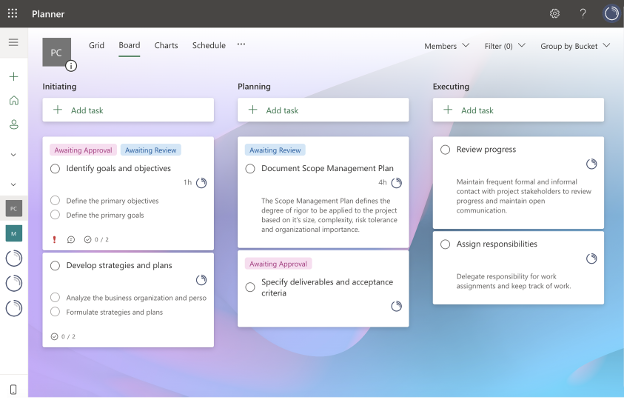
Microsoft Planner è uno strumento di gestione delle attività progettato per i team che utilizzano Microsoft 365. Aiuta gli utenti a organizzare le attività, collaborare sui progetti e monitorare i progressi, rendendolo una scelta adatta per le aziende già integrate nell'ecosistema Microsoft.
Perché ho scelto Microsoft Planner: Microsoft Planner è perfetto per gli utenti di Office 365 grazie alla sua ampia integrazione con altre app Microsoft. È possibile creare e assegnare attività, impostare scadenze e monitorare l'avanzamento dei progetti in un'interfaccia familiare.
La capacità di condividere piani e collaborare in tempo reale aumenta la produttività del team. Inoltre, le sue funzionalità basate sull'IA garantiscono un'ottimizzazione della gestione del tempo su molte piattaforme. L'integrazione dello strumento con Microsoft Teams e SharePoint assicura che il tuo team resti connesso e organizzato.
Funzionalità e integrazioni principali:
Funzionalità includono assegnazione di attività, approfondimenti basati sull’IA, impostazione di scadenze e monitoraggio dei progressi. Puoi organizzare le attività in bacheche e categorie per mantenere i progetti strutturati. La piattaforma supporta la collaborazione con aggiornamenti e notifiche in tempo reale.
Integrazioni includono Microsoft Teams, SharePoint, Outlook, OneDrive, Power Automate, Excel, Word, PowerPoint, OneNote, Copilot e To Do.
Pros and Cons
Pros:
- Funzionalità di collaborazione in tempo reale
- Organizzazione delle attività con bacheche
- Supporta la comunicazione nel team
Cons:
- Opzioni di personalizzazione limitate
- Curva di apprendimento per chi non usa Microsoft

Plaky
Ideale per la pianificazione visiva dei progetti
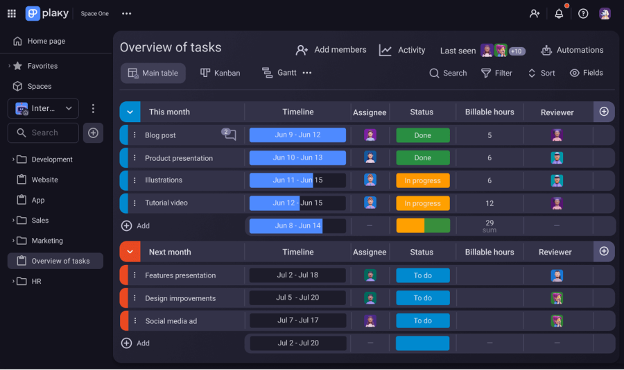
Plaky è un software gratuito di gestione progetti e attività pensato per piccole imprese e organizzazioni senza scopo di lucro. Si concentra sulla gestione delle attività, la collaborazione di squadra e la pianificazione visiva dei progetti, offrendo utenti e progetti illimitati.
Perché ho scelto Plaky: Plaky è ideale per la pianificazione visiva dei progetti grazie alle sue bacheche intuitive e ai campi personalizzati. Puoi monitorare facilmente i progressi con le visualizzazioni delle bacheche e le notifiche.
Le funzionalità di automazione della piattaforma aumentano la produttività riducendo le attività ripetitive. L'integrazione di Plaky con Pumble supporta la comunicazione del team e gli elementi di azione, in linea con il suo punto di forza nella pianificazione visiva.
Caratteristiche e integrazioni principali:
Caratteristiche includono strumenti per la gestione delle attività come bacheche, campi personalizzati e commenti. Puoi monitorare i progressi con le visualizzazioni delle bacheche e le notifiche. La piattaforma offre miglioramenti della produttività come automazioni e modelli.
Integrazioni includono Pumble.
Pros and Cons
Pros:
- Utenti e progetti illimitati
- Forte collaborazione di squadra
- Automazione per attività ripetitive
Cons:
- Opzioni di integrazione basilari
- Richiede connessione internet

Trello
Ideale per la collaborazione tra team
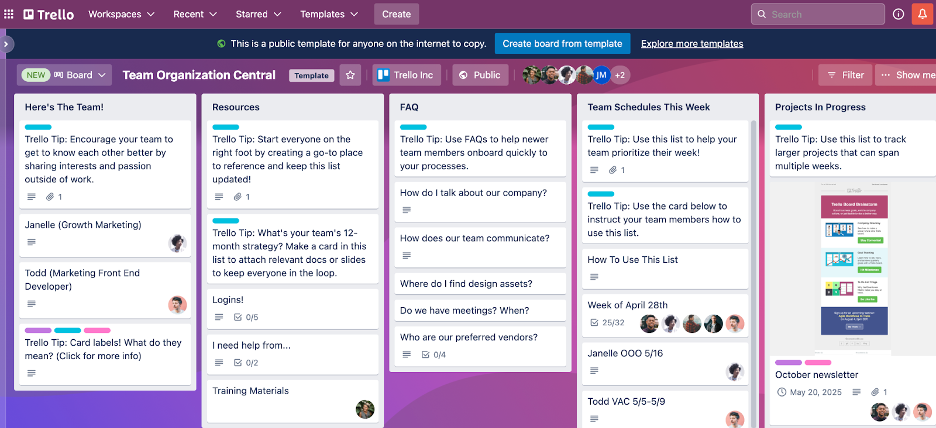
Trello è uno strumento di gestione visiva dei progetti ampiamente utilizzato dai team per organizzare attività e flussi di lavoro. È popolare tra i team di piccole e medie dimensioni che necessitano di un modo semplice per gestire i progetti in modo visuale.
Perché ho scelto Trello: Trello è eccellente per la collaborazione di squadra grazie alla sua interfaccia intuitiva drag-and-drop. Puoi spostare facilmente le attività tra le bacheche, il che lo rende ideale per team dinamici.
Il sistema basato su schede di Trello consente di allegare file, impostare scadenze e aggiungere commenti, migliorando la comunicazione all'interno del team. La sua flessibilità permette di personalizzare le bacheche in base alle esigenze specifiche della tua squadra, rendendolo un'ottima soluzione per la collaborazione di gruppo.
Funzionalità e integrazioni principali:
Funzionalità includono bacheche personalizzabili, flussi di lavoro alimentati dall’intelligenza artificiale, automazione delle attività con Butler e allegati alle schede per condividere facilmente i file. Puoi creare checklist all'interno delle schede per suddividere le attività in passaggi gestibili. La visualizzazione calendario aiuta a tenere traccia delle scadenze e delle date importanti.
Integrazioni includono Slack, Google Drive, Dropbox, Jira, Microsoft Teams, GitHub, Evernote, Salesforce, Zapier e Confluence.
Pros and Cons
Pros:
- Interfaccia drag-and-drop intuitiva
- Creazione semplice delle schede attività
- Monitoraggio visivo delle attività
Cons:
- Manca di strumenti di reportistica dettagliati
- Può diventare disordinato con molte schede

Workzone
Ideale per la gestione del ciclo di vita dei progetti

Navigare tra i progetti governativi richiede uno strumento che equilibri struttura e flessibilità. Workzone risponde a questa esigenza offrendo una configurazione di gestione dei progetti progettata specificamente per i team governativi. Supporta il modo di lavorare delle organizzazioni del settore pubblico, aiutando le squadre a organizzare le attività, collaborare in modo efficiente e rispettare i requisiti normativi e le scadenze.
Perché ho scelto Workzone
Ho scelto Workzone perché pone l'accento su una forte gestione del ciclo di vita dei progetti, fondamentale nel lavoro governativo. La sua visibilità in tempo reale sullo stato dei progetti aiuta il tuo team a mantenere responsabilità e trasparenza in ogni fase. Il sistema centralizzato per la gestione delle richieste e delle approvazioni dei progetti semplifica inoltre i processi di revisione e autorizzazione a più livelli tipici degli ambienti pubblici.
Funzionalità principali di Workzone
Oltre alle sue capacità di gestione del ciclo di vita dei progetti, Workzone offre diverse altre funzionalità che possono avvantaggiare il tuo team:
- Revisioni dei documenti: Questa funzionalità consente al tuo team di revisionare e approvare documenti, riducendo i colli di bottiglia nel processo di approvazione.
- Organizzazione dei file: Con Workzone puoi organizzare i file in modo da garantire accesso e recupero semplici, fondamentale per mantenere la conformità.
- Allocazione delle risorse: La piattaforma ti aiuta ad allocare le risorse, assicurando che il team non sia sovraccaricato e che i progetti restino nei tempi previsti.
- Rilevazione del tempo: Questa funzionalità permette al tuo team di tracciare il tempo impiegato nelle attività, offrendo una panoramica sulla produttività e aiutando nella pianificazione dei progetti futuri.
Integrazioni di Workzone
Le integrazioni native includono Slack, Microsoft Teams, SharePoint, Box, Dropbox, Google Drive, OneDrive e Salesforce. Se hai bisogno di integrazioni personalizzate, Workzone offre anche una API per questo scopo.
Pros and Cons
Pros:
- Solida visibilità in tempo reale dei progetti
- Approvazioni dei documenti integrate
- Formazione illimitata e supporto dal vivo
Cons:
- Funzionalità avanzate di budgeting limitate
- Prezzo meno adatto ai piccoli team
New Product Updates from Workzone

Workzone Enterprise Adds Multi-Stage Approval Workflows
Workzone Enterprise now includes Approval Workflows, enabling multi-stage document approvals to standardize complex processes and reduce manual effort. For more information, visit Workzone's official site.
 .
.
Ideale per la pianificazione della capacità
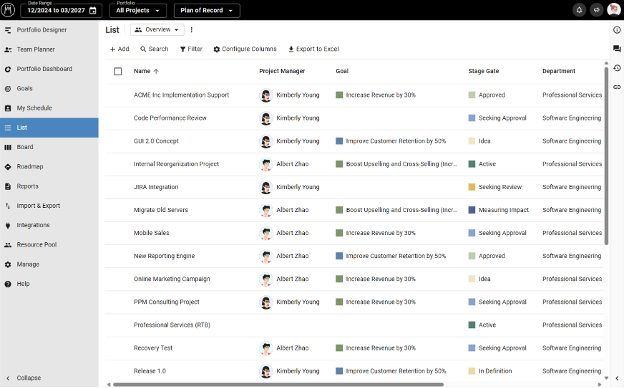
Meisterplan è uno strumento di gestione del portafoglio progetti progettato per le aziende che necessitano di gestire efficacemente risorse e capacità. È pensato per project manager e decisori che hanno bisogno di visibilità sulla distribuzione delle risorse e sulla priorità dei progetti.
Perché ho scelto Meisterplan: Meisterplan si dimostra altamente efficace nella pianificazione della capacità offrendo strumenti che aiutano a bilanciare le risorse su più progetti. Permette di visualizzare l’allocazione delle risorse e prendere decisioni basate sui dati per ottimizzare i risultati dei progetti.
La funzione di pianificazione degli scenari consente di testare diverse pianificazioni progettuali senza interrompere il lavoro in corso. Questo lo rende particolarmente utile per i team che devono adattarsi a priorità e richieste in continuo cambiamento.
Funzionalità principali e integrazioni:
Funzionalità includono pianificazione di scenari, visualizzazione dell'allocazione delle risorse e prioritizzazione dei progetti. Puoi prevedere il fabbisogno di risorse con gli strumenti di pianificazione della capacità. La piattaforma supporta anche il processo decisionale attraverso insight in tempo reale sui dati.
Integrazioni includono Jira, Smartsheet, Microsoft Project, Excel, Salesforce, Google Calendar, Slack, Trello, Asana e Zapier.
Pros and Cons
Pros:
- Efficace visualizzazione dell'allocazione delle risorse
- Supporta la pianificazione di scenari
- Prevede il fabbisogno di risorse
Cons:
- La configurazione iniziale può essere complessa
- Non ideale per team molto piccoli

Procore
Ideale per progetti di costruzione

Procore è un software di gestione delle costruzioni progettato per i professionisti del settore, inclusi project manager, appaltatori e architetti. Facilita la gestione dei progetti, la gestione finanziaria e la pianificazione delle risorse, rendendolo una soluzione competitiva per le operazioni aziendali nell'industria delle costruzioni.
Perché ho scelto Procore: Procore si dimostra particolarmente efficace nella gestione di progetti edili grazie alle sue funzioni dettagliate di monitoraggio e gestione finanziaria. Puoi gestire i documenti di progetto, monitorare le spese e pianificare le attività in modo efficiente.
I suoi strumenti di reportistica dettagliata offrono informazioni approfondite sull'avanzamento dei progetti e sulla solidità finanziaria. La capacità del software di centralizzare la comunicazione e la documentazione lo rende prezioso per i team di costruzione.
Caratteristiche principali & integrazioni:
Caratteristiche: monitoraggio dei progetti, gestione finanziaria e pianificazione delle risorse. Puoi gestire efficacemente i documenti e monitorare le spese di progetto. Il software offre anche strumenti di reportistica per monitorare l'avanzamento dei progetti e lo stato finanziario.
Integrazioni: QuickBooks, Sage 300, Microsoft Project, Dropbox, Bluebeam, DocuSign, Smartsheet, Viewpoint, Autodesk BIM 360 e PlanGrid.
Pros and Cons
Pros:
- Monitoraggio dettagliato dei progetti
- Gestione finanziaria avanzata
- Comunicazione centralizzata
Cons:
- Richiede formazione per un utilizzo completo
- Può essere costoso per piccoli team


Jira è uno strumento di gestione dei progetti progettato principalmente per i team di sviluppo software che adottano metodologie Agile. Supporta la gestione di progetti Agile, il tracciamento dei ticket e la personalizzazione dei flussi di lavoro, diventando così popolare tra i team a vocazione tecnologica.
Perché ho scelto Jira: Jira è pensato per i team Agile, offrendo un forte supporto per le board Scrum e Kanban. È possibile personalizzare i flussi di lavoro per adattarli alle pratiche Agile del team e gestire gli sprint in modo efficiente.
Le capacità di tracciamento dei ticket di Jira aiutano a rimanere aggiornati su attività e bug. Le sue funzionalità di reportistica offrono preziose informazioni sulle prestazioni del team, consentendo un miglioramento continuo.
Funzionalità principali & integrazioni:
Funzionalità includono flussi di lavoro personalizzabili, strumenti AI, report avanzati e prioritizzazione del backlog. Puoi utilizzare board Scrum e Kanban per gestire efficacemente attività e sprint. La piattaforma supporta anche il tracciamento dettagliato dei ticket e la gestione dei rilasci.
Integrazioni includono Slack, GitHub, Bitbucket, Confluence, Microsoft Teams, Dropbox, Google Drive, Google Docs, Trello, Asana e Zendesk.
Pros and Cons
Pros:
- Forte supporto per metodologie Agile
- Tracciamento dettagliato dei ticket
- Gestione efficace degli sprint
Cons:
- Curva di apprendimento ripida
- Richiede configurazione


Envisio è un software di pianificazione strategica e gestione delle performance progettato per enti pubblici e organizzazioni del settore pubblico. Aiuta i team ad allineare i propri obiettivi strategici, monitorare i progressi e gestire efficacemente le performance.
Perché ho scelto Envisio: Envisio è pensato per la pianificazione strategica con funzionalità che supportano l'allineamento degli obiettivi e il monitoraggio delle performance. Puoi definire obiettivi chiari e monitorarli tramite dashboard dettagliate.
Gli strumenti di reportistica di Envisio offrono approfondimenti sui parametri di performance, garantendo che il tuo team resti sulla giusta strada. L'attenzione su trasparenza e responsabilità lo rende ideale per le esigenze del settore pubblico.
Caratteristiche e integrazioni principali:
Caratteristiche includono definizione degli obiettivi, dashboard sulle performance e strumenti di reportistica. Puoi allineare gli obiettivi del team con quelli strategici e monitorare efficacemente i progressi. La piattaforma offre anche funzionalità di trasparenza e responsabilità per supportare i requisiti del settore pubblico.
Integrazioni includono Microsoft Excel, Power BI, Esri, Tableau, Google Sheets, Microsoft Teams, Slack, Zapier, Salesforce e SharePoint.
Pros and Cons
Pros:
- Supporta l'allineamento degli obiettivi
- Solido monitoraggio delle performance
- Funzionalità di reportistica dettagliate
Cons:
- Può essere complessa per i team piccoli
- La piattaforma in evoluzione può presentare una leggera curva di apprendimento
Altri software di gestione dei progetti governativi
Ecco alcune opzioni aggiuntive di software di gestione dei progetti governativi che non sono entrate nel mio elenco, ma che vale comunque la pena prendere in considerazione:
- Orangescrum
Ideale per la gestione delle attività
- Kahua
Ideale per flussi di lavoro personalizzabili
- Cerri Work
Ideale per il monitoraggio della conformità
- Prism PPM
Ideale per la gestione del portafoglio
- monday AI Workspace
Ideale per l'identificazione dei rischi basata sull'IA


Come valuto i software di gestione progetti per il settore pubblico
Quando un ufficio IT di una contea ha bisogno di conformità FedRAMP e di monitoraggio delle sovvenzioni in un unico posto, suddivido la mia valutazione in requisiti di base e fattori differenzianti che separano i buoni strumenti da quelli eccellenti.
Funzionalità di base (requisiti indispensabili per questa lista)
Quando scelgo gli strumenti per la mia lista, valuto ciascuno su una scala da 0 (non offre la funzionalità) a 5 (eccelle in quest'area) per ogni funzionalità di base elencata di seguito. Successivamente, calcolo il punteggio totale dello strumento in percentuale. Ogni strumento deve raggiungere un punteggio minimo totale del 65% per essere considerato per l'inclusione.
- Conformità e sicurezza governativa: verifico se ogni strumento possiede certificazioni come FedRAMP, StateRAMP o FISMA e se supporta ambienti di hosting GovCloud o equivalenti.
- Monitoraggio del budget e delle sovvenzioni: i fondi pubblici hanno vincoli, quindi cerco strumenti che colleghino i budget a specifiche sovvenzioni, monitorino gli impegni e segnalino gli sforamenti per fonte di finanziamento.
- Audit trail e trasparenza: ogni modifica a un piano di progetto o a una voce di budget dovrebbe essere registrata con marca temporale e attribuzione dell'utente, esportabile per revisioni di supervisione o richieste di accesso agli atti pubblici.
- Collaborazione multi-stakeholder: valuto quanto bene ogni strumento gestisce il coordinamento tra agenzie, l'accesso degli appaltatori e l'instradamento delle approvazioni con autorizzazioni basate sui ruoli per diversi livelli di sicurezza.
- Gestione del portafoglio progetti: le agenzie gestiscono dozzine di programmi contemporanei, quindi cerco sintesi di portafoglio, mappatura delle dipendenze tra progetti e viste sull'allocazione delle risorse.
- Reportistica personalizzata e dashboard: considero se uno strumento consente di creare dashboard per pubblici diversi, da un riepilogo del bilancio per il legislatore a un pannello di stato dettagliato per sprint interni.
Una volta che ho una lista di strumenti che soddisfano questi criteri, considero cosa distingue ciascuna piattaforma.
Fattori differenzianti (cosa distingue i fornitori)
Ecco come confronto e contrappongo i diversi fornitori:
Caratteristiche distintive
Il monitoraggio dei contratti e degli approvvigionamenti è molto importante in questo contesto. Strumenti che gestiscono i flussi di lavoro delle richieste di offerta (RFP) e le schede di valutazione dei fornitori evitano alle agenzie di dover usare sistemi separati durante le fasi di gara. Cerco anche registri dei rischi integrati con percorsi di escalation, poiché i progetti pubblici affrontano rischi politici e regolatori unici che richiedono piani di mitigazione documentati. I portali di coinvolgimento dei cittadini sono un altro elemento distintivo da valutare, soprattutto per le agenzie che devono pubblicare aggiornamenti dei progetti per la consultazione pubblica.
Oltre le caratteristiche
Controllo sempre la disponibilità del veicolo di approvvigionamento. Uno strumento presente nel GSA Schedule o in un contratto di acquisto cooperativo statale può ridurre di mesi i tempi di acquisto di un'agenzia. È importante anche l'integrazione con sistemi ERP e finanziari pubblici come SAP o Oracle PeopleSoft, poiché dati di progetto e finanza scollegati creano difficoltà nella riconciliazione a fine anno fiscale. Valuto anche il supporto durante l'implementazione, in particolare se il fornitore offre partner con esperienza nel settore pubblico che comprendono rollout multi-agenzia e gestione del cambiamento per team della pubblica amministrazione.
Come scegliere un software di gestione dei progetti governativi
È facile perdersi in lunghi elenchi di funzionalità e strutture tariffarie complesse. Per aiutarti a rimanere concentrato mentre affronti il tuo processo di selezione del software, ecco una lista di fattori da tenere a mente:
| Fattore | Cosa considerare |
| Scalabilità | Il software può crescere insieme al tuo team? Cerca strumenti che supportino un numero crescente di utenti, progetti e dati senza interruzioni significative o costi aggiuntivi. |
| Integrazioni | Si connette agli strumenti che utilizzi già? Verifica la presenza di integrazioni native con piattaforme come Microsoft Office, Google Workspace o applicazioni specifiche del settore. |
| Personalizzazione | Puoi adattare il software alle tue esigenze? Valuta se puoi modificare flussi di lavoro, dashboard e report in base ai tuoi processi senza ulteriore assistenza. |
| Semplicità d'uso | Il software è intuitivo? Assicurati che i membri del team possano utilizzarlo senza una formazione approfondita. Cerca un'interfaccia chiara e opzioni semplici. |
| Implementazione e onboarding | Quanto velocemente puoi iniziare? Considera il tempo e le risorse necessari per la configurazione e la formazione iniziale. Cerca fornitori che offrano supporto per l'onboarding. |
| Costo | Rientra nel tuo budget? Confronta i piani tariffari e verifica la presenza di costi nascosti. Considera i costi a lungo termine e i potenziali risparmi derivanti da una maggiore efficienza. |
| Misure di sicurezza | Protegge i dati sensibili? Verifica la conformità del software alle normative e agli standard governativi come GDPR o FedRAMP. |
| Requisiti di conformità | Soddisfa le esigenze normative? Assicurati che lo strumento supporti gli standard di conformità necessari per il tuo settore e la tua area geografica, evitando potenziali problemi legali. |
Che cos'è il software di gestione dei progetti governativi?
Il software di gestione dei progetti governativi è uno strumento progettato per aiutare le agenzie governative a pianificare, eseguire e monitorare i progetti in modo efficiente. Questi strumenti vengono generalmente utilizzati da project manager, responsabili di dipartimento e team leader per mantenere i progetti nei tempi previsti e nel rispetto del budget.
Le funzionalità di pianificazione, allocazione delle risorse e monitoraggio della conformità supportano le esigenze specifiche dei progetti governativi. Nel complesso, questi strumenti offrono informazioni preziose e controllo per gestire efficacemente progetti complessi.
Funzionalità del software di gestione dei progetti governativi
Quando selezioni un software di gestione dei progetti governativi, presta attenzione alle seguenti funzionalità principali:
- Pianificazione: consente di pianificare le tempistiche e impostare le scadenze, assicurando che i progetti rispettino il programma.
- Allocazione delle risorse: aiuta ad assegnare le risorse in modo efficiente per evitare un'allocazione eccessiva o carenze di risorse.
- Monitoraggio della conformità: garantisce che i progetti rispettino le normative e gli standard necessari, riducendo i rischi legali.
- Gestione del budget: monitora gli aspetti finanziari per mantenere i progetti entro il budget ed evitare spese eccessive.
- Report e analisi: fornisce informazioni sulle prestazioni del progetto, aiutandoti a prendere decisioni consapevoli.
- Gestione dei documenti: organizza e archivia in modo sicuro i documenti di progetto per facilitarne l'accesso e la collaborazione.
- Gestione delle attività: consente di assegnare e monitorare le attività, assicurando che ogni membro del team conosca le proprie responsabilità.
- Strumenti di collaborazione: facilitano la comunicazione e il coordinamento tra i membri del team, migliorando il lavoro di squadra.
- Flussi di lavoro personalizzabili: consentono di adattare i processi alle esigenze e alle preferenze specifiche del progetto.
- Misure di sicurezza: proteggono i dati sensibili mediante la crittografia e la conformità agli standard di sicurezza.
Vantaggi del software di gestione dei progetti governativi
L'implementazione di un software di gestione dei progetti governativi offre diversi vantaggi al tuo team e alla tua organizzazione. Ecco alcuni dei benefici che puoi aspettarti:
- Maggiore efficienza: automatizza la pianificazione e la gestione delle attività, consentendo al tuo team di concentrarsi su attività più strategiche.
- Conformità migliorata: monitora i requisiti e gli standard normativi, riducendo il rischio di problemi legati alla non conformità.
- Migliore gestione delle risorse: assegna le risorse in modo efficace, garantendone l'utilizzo ottimale ed evitando un'allocazione eccessiva.
- Maggiore trasparenza: offre report e analisi che forniscono informazioni chiare sull'avanzamento e sulle prestazioni del progetto.
- Gestione sicura dei documenti: gestisce e archivia i documenti in modo sicuro, facilitando l'accesso protetto e la collaborazione tra i membri del team.
- Controllo dei costi: monitora attentamente i budget per mantenere i progetti finanziariamente in linea, evitando spese non necessarie.
- Comunicazione migliorata: fornisce strumenti di collaborazione che migliorano il coordinamento del team e la condivisione delle informazioni.
Costi e prezzi del software di gestione dei progetti governativi
La scelta di un software di gestione dei progetti per enti pubblici richiede la comprensione dei vari modelli di prezzo e dei piani disponibili. I costi variano in base alle funzionalità, alle dimensioni del team, ai componenti aggiuntivi e ad altri fattori. La tabella seguente riepiloga i piani più comuni, i relativi prezzi medi e le funzionalità tipicamente incluse nelle soluzioni software di gestione dei progetti per enti pubblici:
Tabella comparativa dei piani per i software di gestione dei progetti per enti pubblici
| Tipo di piano | Prezzo medio | Funzionalità comuni |
| Piano gratuito | $0 | Gestione di base delle attività, numero limitato di utenti e spazio di archiviazione minimo. |
| Piano personale | $5-$25/utente/mese | Gestione delle attività, reportistica di base e integrazioni limitate. |
| Piano aziendale | $30-$60/utente/mese | Pianificazione avanzata, allocazione delle risorse, monitoraggio della conformità e strumenti di collaborazione avanzati. |
| Piano per grandi aziende | $70-$120/utente/mese | Flussi di lavoro personalizzabili, misure di sicurezza avanzate, assistenza dedicata e analisi. |
Domande frequenti sui software di gestione dei progetti per enti pubblici
Ecco alcune risposte alle domande comuni sui software di gestione dei progetti per enti pubblici:
Quanto è sicuro il software di gestione dei progetti per enti pubblici?
Il software di gestione dei progetti per enti pubblici è progettato secondo elevati standard di sicurezza per garantire la protezione dei dati. È necessario assicurarsi che il software sia conforme alle normative pertinenti, come GDPR, NIST AI RMF o FedRAMP. È essenziale verificare che il software offra la crittografia e conduca regolari audit di sicurezza per proteggere le informazioni e limitare le vulnerabilità. Questi fattori sono importanti per creare fiducia nel software e mitigare i rischi.
Il software di gestione dei progetti per enti pubblici può integrarsi con i sistemi esistenti?
Sì, la maggior parte degli strumenti di gestione dei progetti per enti pubblici offre integrazioni con altri sistemi. Verifica che il software possa integrarsi con gli strumenti attuali, come Microsoft Office, Google Workspace o applicazioni specifiche del settore. Questo garantisce un flusso di lavoro fluido e la coerenza dei dati tra le piattaforme.
Quale tipo di assistenza è disponibile per il software di gestione dei progetti per enti pubblici?
L’assistenza varia in base al fornitore, ma molti offrono supporto 24 ore su 24, 7 giorni su 7, attraverso diversi canali. Cerca opzioni come chat dal vivo, assistenza via e-mail e supporto telefonico. È inoltre utile che il fornitore offra un centro assistenza con tutorial, domande frequenti e guide per gli utenti, così da aiutarti a risolvere eventuali problemi.
Quanto è personalizzabile il software di gestione dei progetti per enti pubblici?
I livelli di personalizzazione variano, ma molti strumenti consentono di adattare i flussi di lavoro, i pannelli di controllo e i report. Verifica se puoi modificare il software per adattarlo ai tuoi processi specifici senza richiedere un’assistenza tecnica approfondita. Questa flessibilità può migliorare l’adeguatezza del software alle esigenze del tuo team.
Quale formazione è disponibile per i nuovi utenti?
Le risorse formative sono importanti per garantire un processo di inserimento e un’esperienza utente fluidi. Verifica se il fornitore del software offre video di formazione, webinar, tour interattivi del prodotto o una base di conoscenza simile. Queste risorse aiutano il tuo team a diventare rapidamente operativo e a iniziare a utilizzare lo strumento in modo efficace fin dal primo giorno.
Come posso valutare il rapporto costi-benefici del software di gestione dei progetti per enti pubblici?
La valutazione del rapporto costi-benefici implica il confronto tra i livelli di prezzo e le funzionalità. Considera i costi a lungo termine, i potenziali risparmi derivanti da una maggiore efficienza e la corrispondenza tra le funzionalità e le tue esigenze. È consigliabile verificare l’eventuale presenza di costi nascosti e assicurarsi che il software offra un buon valore per il tuo investimento quando valuti il mantenimento del software.
Qual è il prossimo passo:
Se stai cercando un software di gestione dei progetti per enti pubblici, contatta gratuitamente un consulente SoftwareSelect per ricevere consigli personalizzati.
Compili un modulo e parteciperai a una breve conversazione durante la quale il consulente approfondirà le tue esigenze specifiche. In seguito riceverai una selezione ristretta di software da esaminare. Ti assisterà anche durante l'intero processo di acquisto, comprese le trattative sul prezzo.