

I 10 migliori software di gestione dei clienti basati sull’IA recensiti nel 2026

10 Elenco dei migliori software AI per la gestione dei clienti


Gestire i clienti può essere un vero grattacapo. Devi tenere sotto controllo scadenze, comunicazioni e una quantità infinita di dati. È facile sentirsi sopraffatti. È qui che entra in gioco il software AI per la gestione dei clienti. Ti aiuta a mantenere l'organizzazione e a migliorare le interazioni con i clienti.
Ho dedicato del tempo a testare e recensire diversi strumenti per trovare quello più adatto a te. Il mio obiettivo è offrirti un elenco imparziale e accuratamente studiato delle migliori soluzioni. Metterò in evidenza funzionalità, vantaggi e svantaggi, così potrai prendere una decisione consapevole.
In questo articolo troverai soluzioni pensate per esigenze e dimensioni dei team diverse. Che tu gestisca una piccola startup o una grande azienda, qui troverai qualcosa per te. Iniziamo e troviamo lo strumento giusto per il tuo team.
Perché fidarsi dei nostri consigli sui software
Il nostro team testa e recensisce software dal 2012. In quanto project manager noi stessi, sappiamo quanto sia difficile — e importante — scegliere il software giusto.
Per questa guida, abbiamo valutato gli strumenti attraverso test pratici e ricerche indipendenti, assegnando un punteggio agli strumenti in base ai nostri criteri di selezione. Ci basiamo inoltre sulle competenze di leader di pensiero del settore e di professionisti attivi nella gestione dei progetti.
Le nostre recensioni riflettono il nostro giudizio editoriale umano, non un discorso di vendita.
Revisori esperti:
Tabella di confronto dei software AI per la gestione dei clienti
Questa tabella di confronto riassume i dettagli dei prezzi delle mie migliori selezioni di software AI per la gestione dei clienti:
| Tool | Best For | Trial Info | Price | ||
|---|---|---|---|---|---|
| 1 | Ideale per l'automazione delle campagne email | Prova gratuita disponibile | Da $37.6/mese | Website | |
| 2 | Ideale per la personalizzazione low-code | Demo gratuita + prova gratuita disponibile | Da $40/utente/mese (fatturazione annuale) | Website | |
| 3 | Ideale per l’assistenza clienti omnicanale | Demo gratuita disponibile | Prezzo su richiesta | Website | |
| 4 | Ideale per la gestione proattiva delle relazioni | Demo gratuita disponibile | Da $1,500/utente/anno | Website | |
| 5 | Ideale per la gestione della pipeline di vendita | Prova gratuita di 14 giorni | Da $14/postazione/mese (fatturato annualmente) | Website | |
| 6 | Ideale per la scalabilità nelle grandi imprese | Prova gratuita di 30 giorni + piano gratuito disponibile | Da $25/utente/mese (fatturato annualmente) | Website | |
| 7 | Ideale per generazione di lead e campagne di outreach | Piano gratuito disponibile | Prezzo su richiesta | Website | |
| 8 | Ideale per approfondimenti sulle vendite guidati dall'IA | Demo gratuita disponibile | Prezzo su richiesta | Website | |
| 9 | Ideale per la gestione visuale dei progetti | Piano gratuito disponibile | Da $9/utente/mese (fatturato annualmente) | Website | |
| 10 | Ideale per piccoli team e startup | Prova gratuita di 14 giorni | Da $29/utente/mese (fatturazione annuale) | Website |

Recensioni dei migliori software AI per la gestione dei clienti
Di seguito trovi i miei riepiloghi dettagliati dei migliori software AI per la gestione dei clienti inclusi nel mio elenco. Le mie recensioni offrono un’analisi approfondita delle funzionalità principali, dei vantaggi e degli svantaggi, delle integrazioni e dei casi d’uso ideali di ogni strumento, per aiutarti a trovare quello più adatto a te.

Ideale per l'automazione delle campagne email

Instantly è una piattaforma di automazione delle email pensata per team di marketing e piccole imprese che desiderano potenziare le proprie attività di outreach. Si concentra sull'automatizzazione delle campagne email e sulla gestione della distribuzione su larga scala per migliorare il coinvolgimento e i tassi di conversione.
Perché ho scelto Instantly: Instantly offre funzionalità dettagliate di automazione delle email, rendendolo una scelta ideale per le aziende che vogliono scalare le proprie attività di email marketing. Il suo punto di forza è la capacità di automatizzare e personalizzare le sequenze di email con facilità.
Lo strumento offre test A/B e analisi approfondite per aiutarti a ottimizzare le campagne. Con Instantly, puoi gestire più account email e monitorare le prestazioni in tempo reale.
Caratteristiche e integrazioni principali:
Caratteristiche includono una pianificazione avanzata delle email per garantire una consegna puntuale, analisi in tempo reale per monitorare le performance delle campagne e test A/B per affinare le tue strategie di outreach. Queste funzionalità ti aiutano a ottimizzare le campagne email per ottenere risultati migliori. Instantly offre inoltre modelli personalizzabili per semplificare il processo di creazione delle email.
Integrazioni includono Salesforce, HubSpot, Mailchimp, Zapier, Google Workspace, Microsoft Outlook, Slack, LinkedIn, ActiveCampaign e Pipedrive.
Pros and Cons
Pros:
- Automazione delle email efficace
- Monitoraggio delle performance in tempo reale
- Modelli di email personalizzabili
Cons:
- Problemi occasionali di deliverability
- Richiede monitoraggio costante

Creatio
Ideale per la personalizzazione low-code
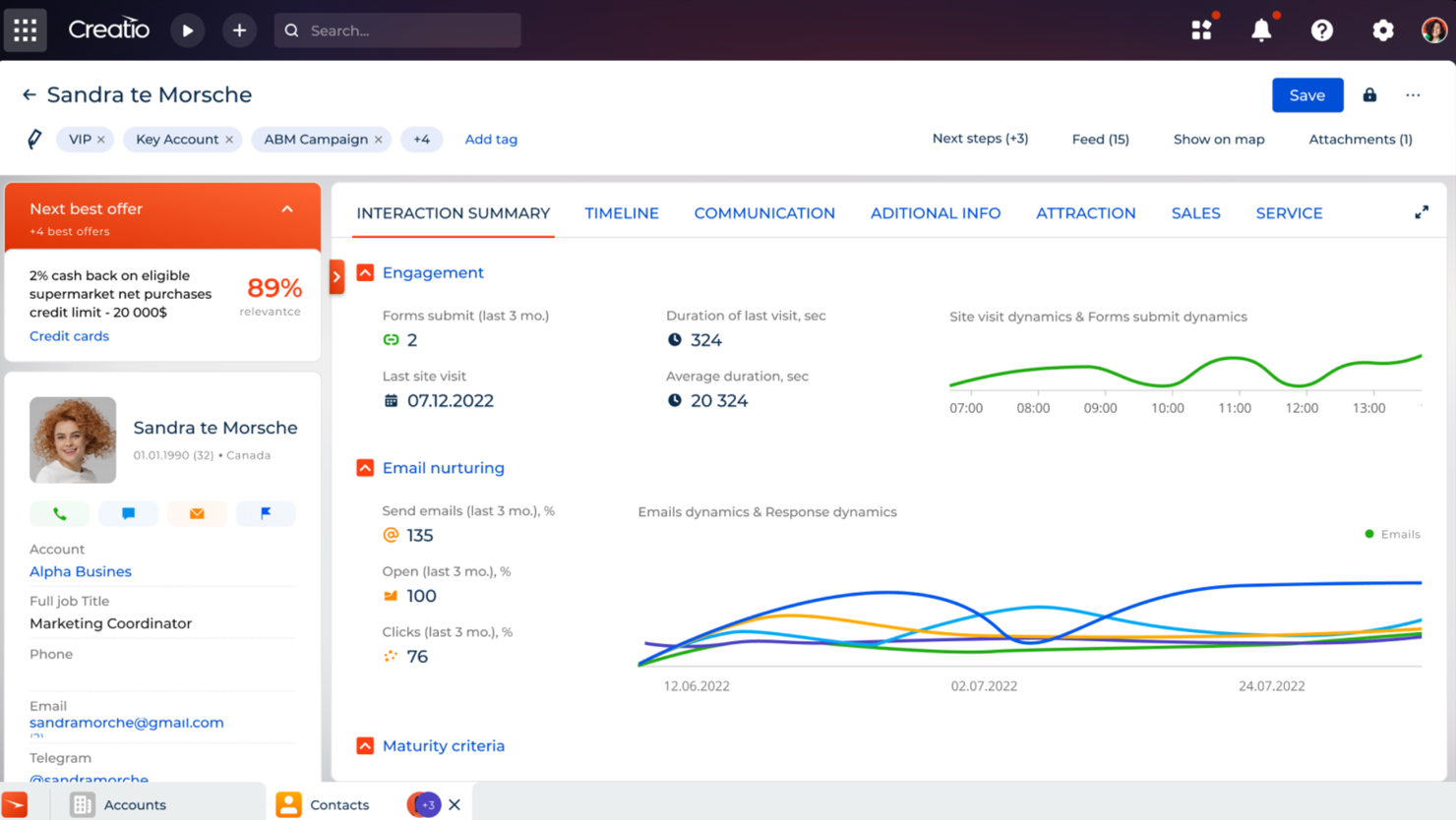
Creatio è una piattaforma low-code progettata per le aziende che desiderano automatizzare i processi di lavoro e le interazioni con i clienti. È molto apprezzata dalle imprese che necessitano di soluzioni personalizzabili per i processi di vendita, marketing e assistenza.
Perché ho scelto Creatio: Creatio offre un ambiente low-code che ti permette di personalizzare facilmente le applicazioni senza conoscenze tecniche approfondite. Il suo punto di forza risiede nelle capacità di personalizzazione, rendendolo ideale per le aziende che necessitano di soluzioni specifiche.
La piattaforma include funzionalità come la modifica drag-and-drop, l'automazione dei processi e analisi basate sull'intelligenza artificiale. Queste funzionalità contribuiscono alla sua capacità distintiva di adattarsi a esigenze aziendali uniche.
Funzionalità e integrazioni principali:
Le funzionalità includono un designer di processi drag-and-drop, raccomandazioni basate sull’intelligenza artificiale e automazione dei flussi di lavoro end-to-end. Queste funzioni aiutano a creare e modificare applicazioni rapidamente, rendendo la piattaforma flessibile per diverse necessità aziendali. Le capacità di IA di Creatio migliorano i processi decisionali fornendo informazioni utili e azionabili.
Le integrazioni includono Microsoft 365, Google Workspace, Mailchimp, Twilio, QuickBooks, Zendesk, HubSpot, Slack, DocuSign e Salesforce.
Pros and Cons
Pros:
- Gestione CRM efficace
- Monitoraggio avanzato dei lead
- Gestione dettagliata dei processi aziendali
Cons:
- Bug minori occasionali
- Difficoltà con gli aggiornamenti di versione

Kustomer
Ideale per l’assistenza clienti omnicanale
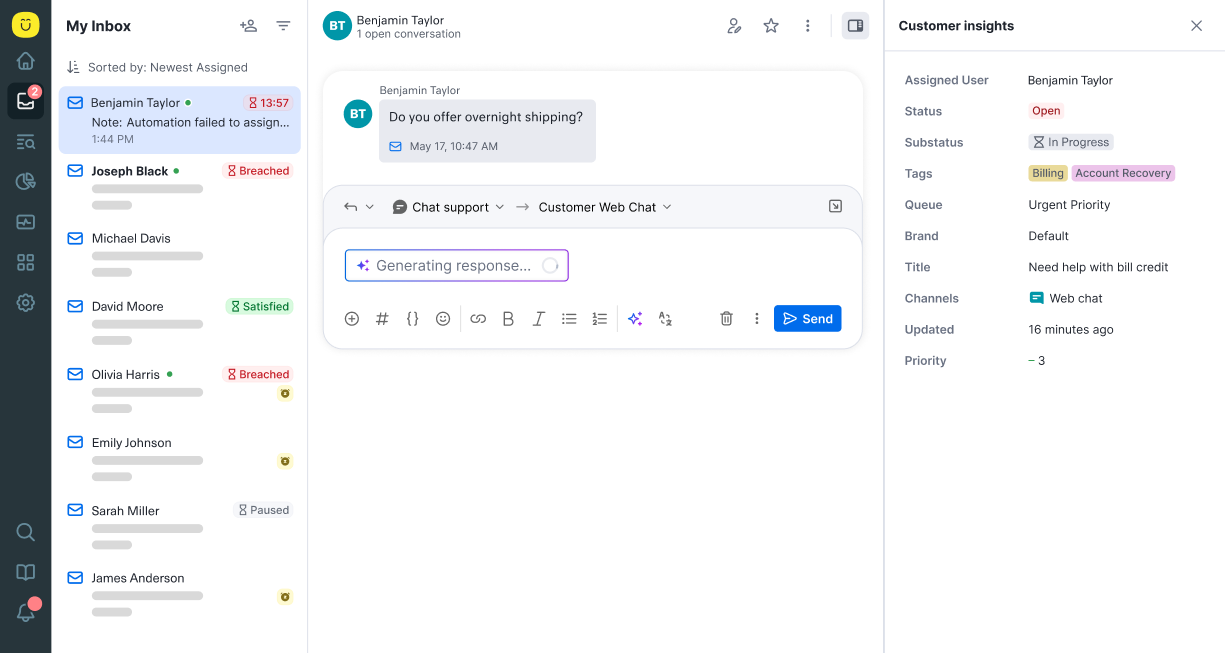
Kustomer è una piattaforma di assistenza clienti rivolta alle aziende che necessitano di gestire le interazioni con i clienti su più canali. Aiuta i team a fornire un supporto personalizzato consolidando i dati e le comunicazioni dei clienti in un unico luogo.
Perché ho scelto Kustomer: Kustomer si distingue nell’offrire un supporto omnicanale, consentendo al tuo team di gestire le interazioni con i clienti senza soluzione di continuità su varie piattaforme. Il suo punto di forza è la capacità di integrare molteplici canali di comunicazione in una singola timeline.
Questa funzionalità garantisce che il tuo team possa fornire risposte coerenti e personalizzate. Con Kustomer, puoi migliorare la soddisfazione del cliente disponendo di una visione completa della storia e delle preferenze di ciascun cliente.
Funzionalità e integrazioni principali:
Funzionalità includono una timeline unificata del cliente per tracciare le interazioni, flussi di lavoro automatizzati per ottimizzare le attività e insight basati sull’intelligenza artificiale per migliorare il processo decisionale. Queste funzionalità aiutano il tuo team a lavorare in modo efficiente e a concentrarsi sulla soddisfazione del cliente. Kustomer offre anche dashboard personalizzabili per adattare le operazioni di supporto.
Le integrazioni comprendono Salesforce, Slack, Shopify, Magento, Zapier, Mailchimp, Jira, Microsoft Teams, Talkdesk e Aircall.
Pros and Cons
Pros:
- Timeline dettagliata del cliente
- Gestione omnicanale efficace
- Dashboard di supporto personalizzabili
Cons:
- La configurazione può essere lunga
- Richiede manutenzione continua

Spiro
Ideale per la gestione proattiva delle relazioni
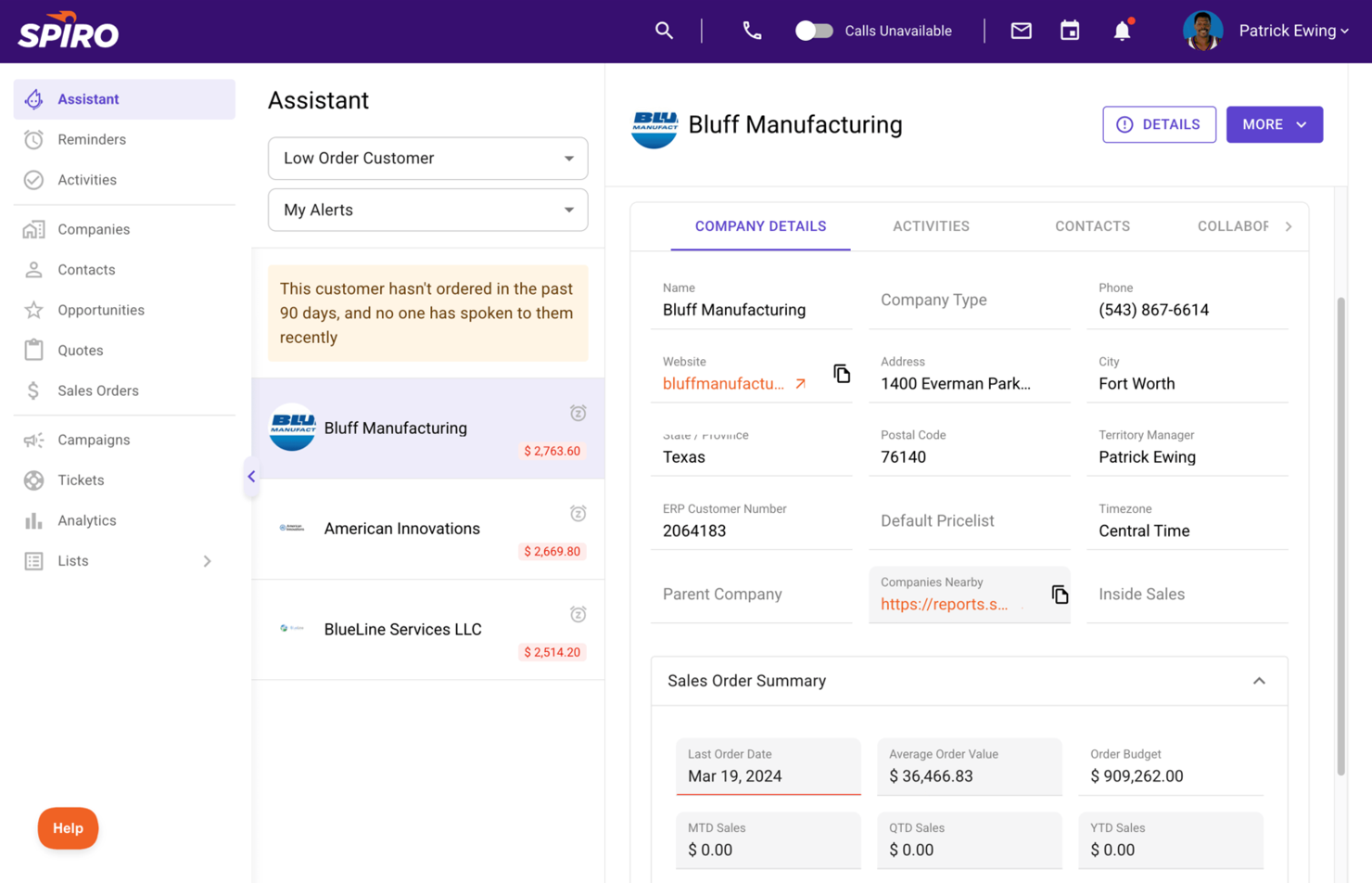
Spiro è una piattaforma di gestione proattiva delle relazioni progettata per i team di vendita che desiderano migliorare le interazioni con i clienti e i processi di vendita. Aiuta gli utenti ad automatizzare l'inserimento dei dati, gestire le pipeline e ottenere informazioni sulle attività di vendita per aumentare la produttività.
Perché ho scelto Spiro: Spiro si concentra sulla gestione proattiva delle relazioni, offrendo funzionalità come la raccolta automatica dei dati e raccomandazioni proattive. Il suo punto di forza è la capacità di anticipare le tue esigenze e fornire suggerimenti attuabili senza input manuale.
L'assistente alle vendite basato su intelligenza artificiale del tool ti aiuta a dare priorità alle attività e ai follow-up. Con Spiro, il tuo team può ridurre il lavoro amministrativo e concentrarsi sulla chiusura delle trattative.
Funzionalità e integrazioni principali:
Funzionalità includono informazioni sulle vendite in tempo reale per tenerti aggiornato, automazione delle attività per minimizzare l'inserimento manuale e visibilità sulla pipeline per monitorare i progressi delle vendite. Queste funzionalità aiutano il tuo team a rimanere organizzato e concentrato sulle attività ad alto valore. Spiro.ai offre anche dashboard personalizzabili per adattare la visualizzazione dei dati di vendita.
Integrazioni includono Salesforce, HubSpot, Microsoft Dynamics 365, Slack, Gmail, Outlook, QuickBooks, Xero, LinkedIn e Mailchimp.
Pros and Cons
Pros:
- Raccomandazioni di vendita proattive
- Inserimento automatico dei dati
- Analisi delle vendite in tempo reale
Cons:
- Opzioni di personalizzazione limitate
- Richiede formazione per sfruttare tutti i vantaggi

Ideale per la gestione della pipeline di vendita
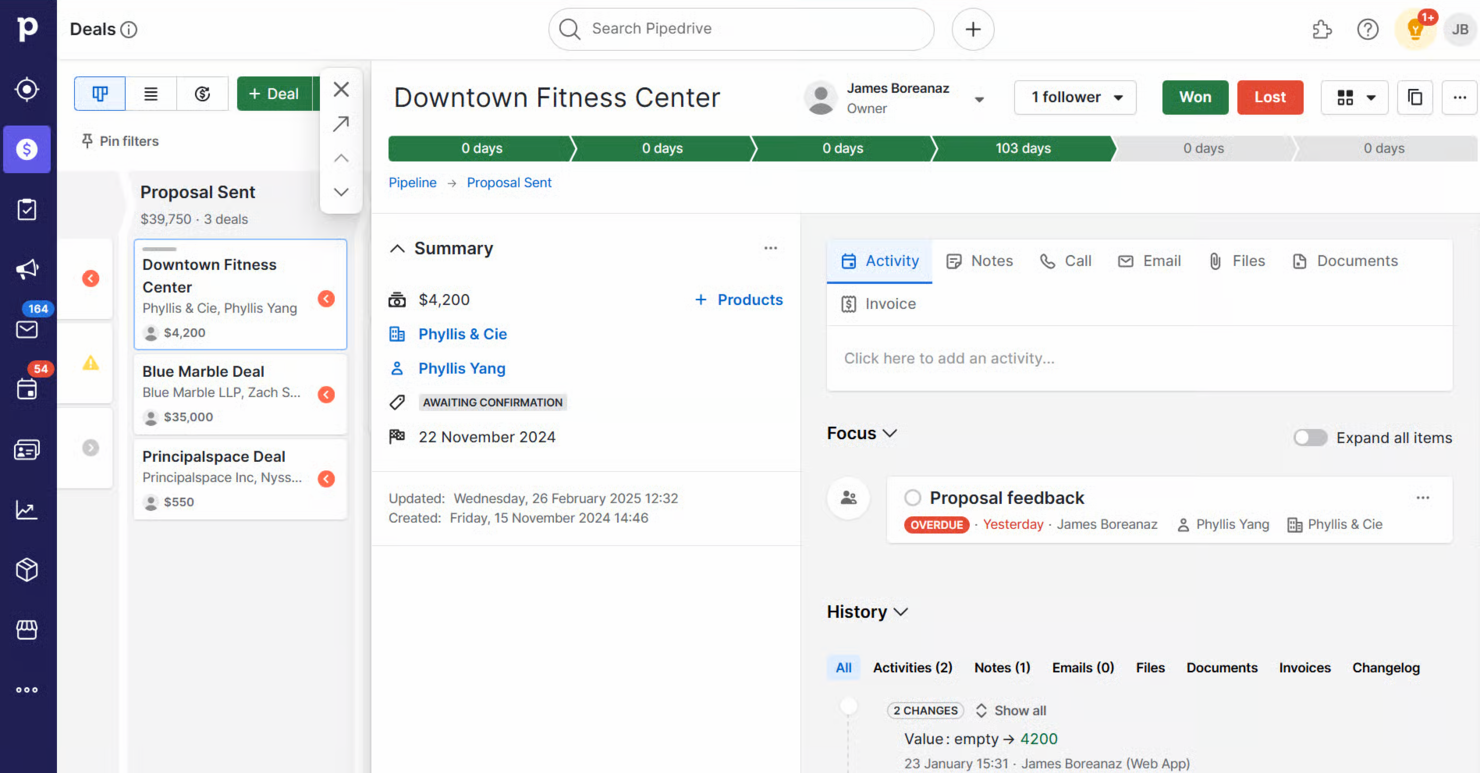
Pipedrive è uno strumento CRM di vendita progettato per i team commerciali che devono gestire efficacemente le proprie pipeline di vendita. Aiuta gli utenti a tracciare i lead, automatizzare le attività ripetitive e visualizzare il processo di vendita per migliorare i tassi di conversione.
Perché ho scelto Pipedrive: Pipedrive è pensato per la gestione delle pipeline di vendita, offrendo funzionalità come una pipeline di vendita visiva e fasi personalizzabili. Il suo punto di forza risiede in un'interfaccia intuitiva che aiuta il tuo team a concentrarsi sulle attività di vendita.
Il software offre strumenti di automazione per automatizzare le attività manuali e funzionalità di previsione per predire i risultati delle vendite. Con Pipedrive puoi ottimizzare il processo di vendita e concludere trattative in modo più efficiente.
Funzionalità principali & integrazioni:
Funzionalità includono report avanzati per analizzare le prestazioni di vendita, impostazione degli obiettivi per motivare il team e tracciamento delle email per monitorare le interazioni con i clienti. Queste funzionalità permettono al team di concentrarsi sulla vendita tenendo monitorati i dati più importanti. Pipedrive offre inoltre un'app mobile per gestire le vendite anche fuori ufficio.
Integrazioni includono Slack, Mailchimp, Trello, Zapier, Google Workspace, Microsoft Outlook, HubSpot, QuickBooks, Xero e Asana.
Pros and Cons
Pros:
- Previsioni affidabili
- App mobile per accesso in mobilità
- Fasi di vendita personalizzabili
Cons:
- Può richiedere supporto durante la configurazione
- Problemi occasionali di sincronizzazione

Ideale per la scalabilità nelle grandi imprese
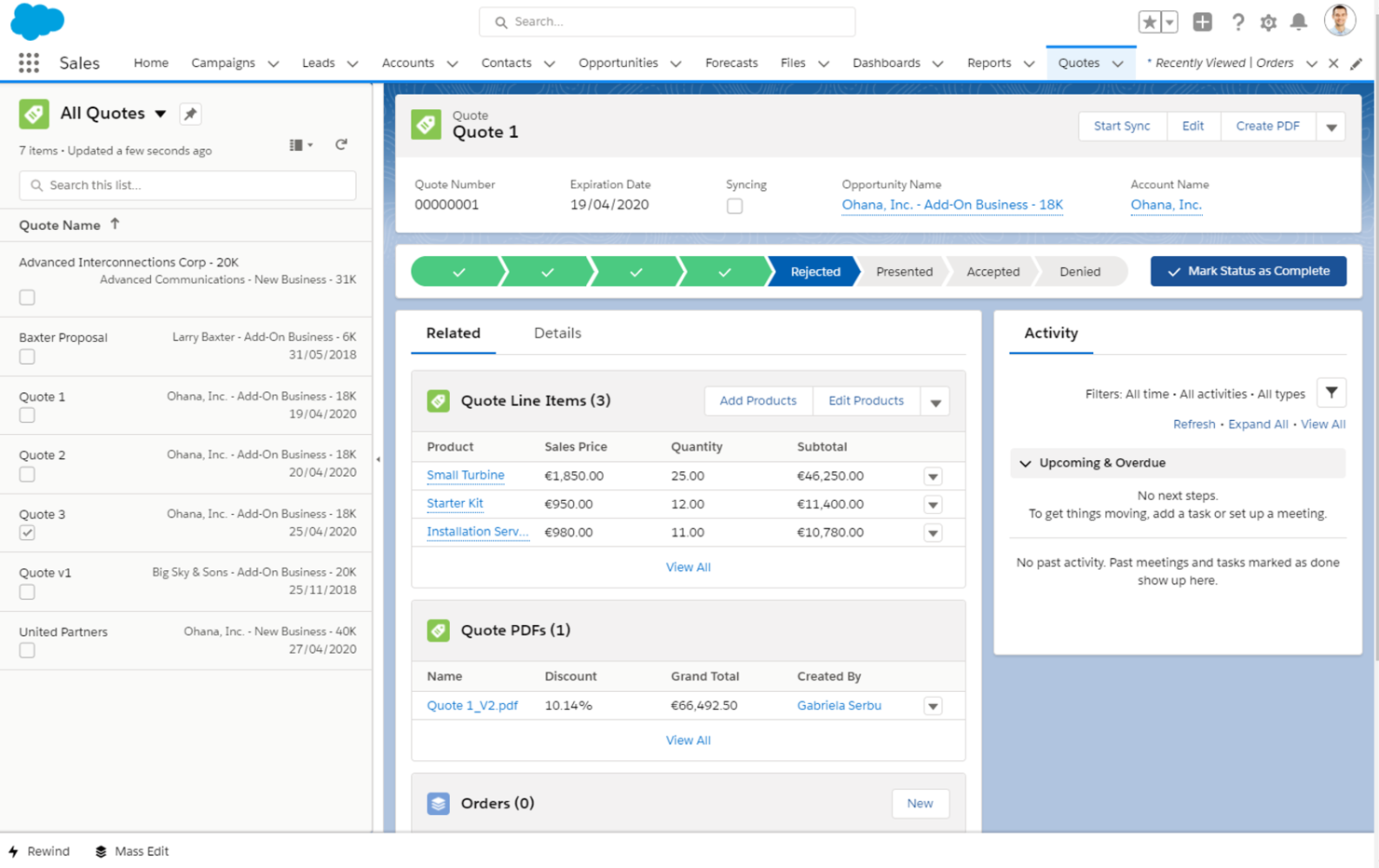
Salesforce è una piattaforma CRM basata su cloud progettata per le imprese che desiderano gestire le relazioni con i clienti e le operazioni aziendali su larga scala. Serve le grandi organizzazioni con strumenti per le vendite, il servizio clienti, il marketing e l'analisi.
Perché ho scelto Salesforce: Salesforce offre ampie possibilità di scalabilità, rendendolo adatto alle aziende con esigenze complesse. Il suo punto di forza è la capacità di crescere insieme alla tua azienda, offrendo funzionalità come dashboard personalizzabili e reportistica avanzata.
L'AppExchange del software offre un'ampia gamma di estensioni per potenziare le funzionalità. Con Salesforce, il tuo team può gestire in modo efficiente le interazioni e i dati dei clienti tra vari reparti.
Funzionalità e integrazioni principali:
Funzionalità includono dashboard personalizzabili per visualizzare i principali indicatori, analisi guidate dall'IA per decisioni più informate e strumenti di automazione per semplificare le attività ripetitive. Queste funzionalità aiutano il tuo team a concentrarsi su attività strategiche. I potenti strumenti di reportistica di Salesforce offrono approfondimenti sul comportamento dei clienti e sulle prestazioni aziendali.
Integrazioni includono Microsoft Outlook, Google Workspace, Slack, Mailchimp, QuickBooks, LinkedIn, Dropbox, Docusign, HubSpot e Zendesk.
Pros and Cons
Pros:
- Ampio marketplace di app
- Forte supporto della community
- Capacità di reportistica avanzata
Cons:
- Gli aggiornamenti frequenti richiedono continui aggiustamenti
- Richiede risorse dedicate per l'amministrazione

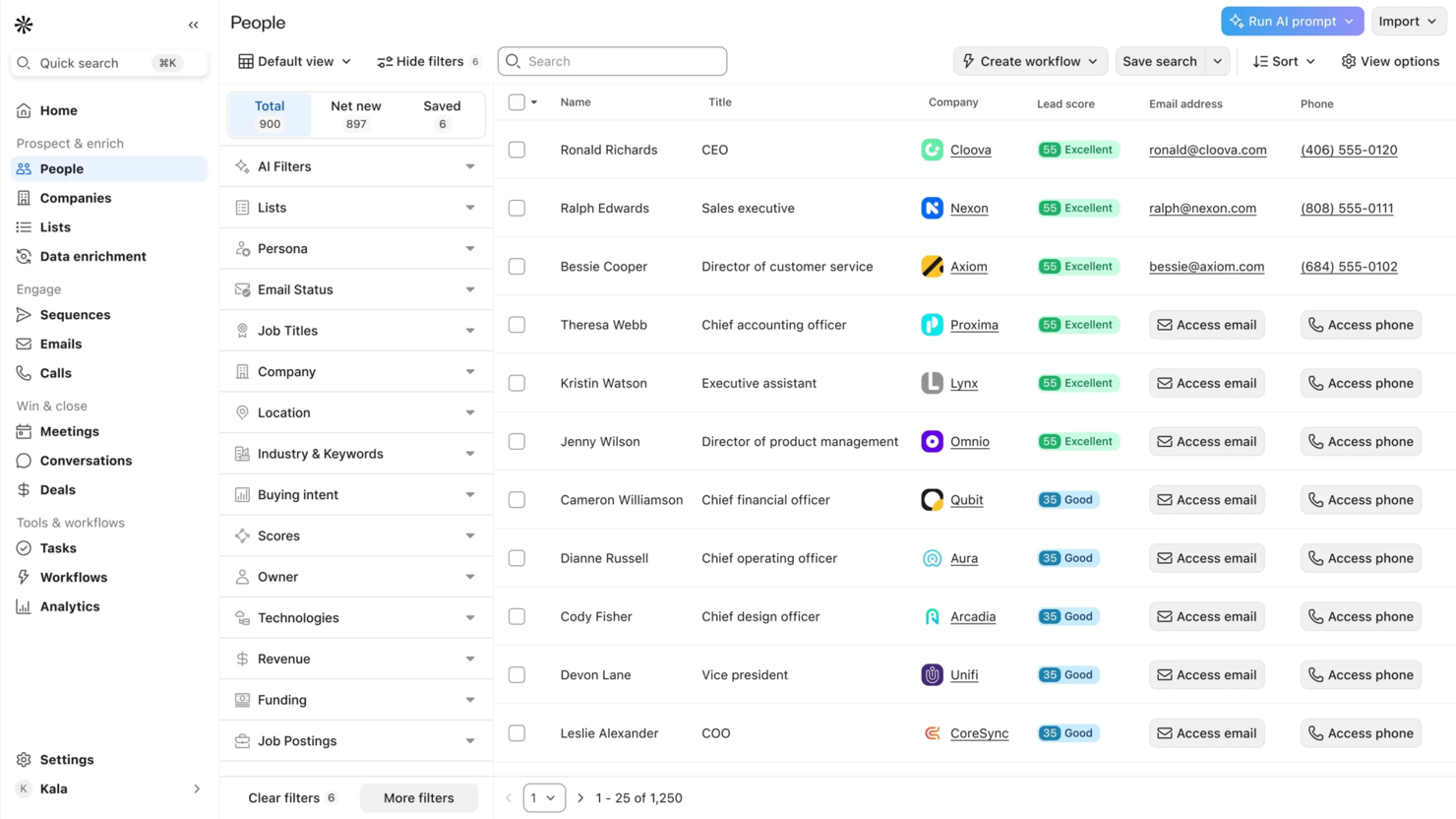
Apollo è una piattaforma guidata dall’IA pensata per i professionisti delle vendite B2B, focalizzata sulla generazione di lead e sulla comunicazione multicanale. Supporta i team di vendita automatizzando la ricerca di potenziali clienti, arricchendo i dati e facilitando la comunicazione per aumentare l’efficienza delle vendite.
Perché ho scelto Apollo: Apollo eccelle nella generazione di lead grazie al suo vasto database di oltre 200 milioni di contatti. Gli strumenti Pipeline Builder e per l’outreach multicanale semplificano la gestione dei prospect e l’automazione dei follow-up.
Gli assistenti IA della piattaforma aiutano a personalizzare le interazioni e migliorare il coinvolgimento. L’arricchimento dei dati di Apollo assicura che il tuo team abbia sempre informazioni precise e aggiornate.
Funzionalità e integrazioni principali:
Funzionalità includono un assistente per le chiamate che semplifica la comunicazione, un calendario per pianificare riunioni e un’estensione Chrome per una maggiore praticità. Queste funzioni permettono al tuo team di mantenere processi di vendita produttivi ed efficienti. Apollo offre inoltre follow-up automatizzati per mantenere i prospect coinvolti.
Integrazioni includono Salesforce, HubSpot, Gmail, Outlook, Slack, Microsoft Teams, Google Calendar, Zapier, LinkedIn e QuickBooks.
Pros and Cons
Pros:
- Ampio database di contatti
- Assistenti IA efficaci
- Outreach multicanale versatile
Cons:
- Curva di apprendimento per i nuovi utenti
- Alcuni dati potrebbero dover essere verificati


Proton è un CRM potenziato dall'intelligenza artificiale progettato specificamente per i team di vendita nel settore della distribuzione che desiderano migliorare i loro processi e l'efficienza commerciale. Si concentra nel fornire approfondimenti utili e migliorare la responsabilità delle vendite, consentendo ai team di aumentare le vendite e migliorare le interazioni con i clienti.
Perché ho scelto Proton: Il punto di forza di Proton risiede nelle sue analisi guidate dall'IA che aiutano i team di vendita a identificare opportunità e prendere decisioni informate. La piattaforma analizza costantemente i dati per fornire raccomandazioni pratiche al tuo team.
La sua attenzione alle vendite per la distribuzione lo rende uno strumento specializzato per il targeting di questo settore. Proton offre anche la conformità SOC 2 Type II, garantendo la sicurezza dei tuoi dati.
Funzionalità e integrazioni principali:
Funzionalità includono analisi dei dati in tempo reale per identificare opportunità di vendita, raccomandazioni dell'IA per guidare la tua strategia e acquisizione automatica dei dati per ridurre l'inserimento manuale. Queste funzionalità permettono al tuo team di concentrarsi sulle attività di vendita strategiche. Proton mette inoltre a disposizione dashboard personalizzabili per adattare le analisi alle esigenze del team.
Integrazioni includono Salesforce, Microsoft Dynamics 365, HubSpot, Gmail, Outlook, QuickBooks, Xero, LinkedIn, Slack e Mailchimp.
Pros and Cons
Pros:
- Approfondimenti sulle vendite guidati dall'IA
- Analisi dei dati in tempo reale
- Conformità SOC 2 Type II
Cons:
- Focus limitato sulle vendite per la distribuzione
- Potrebbe richiedere personalizzazione per benefici completi

Ideale per la gestione visuale dei progetti
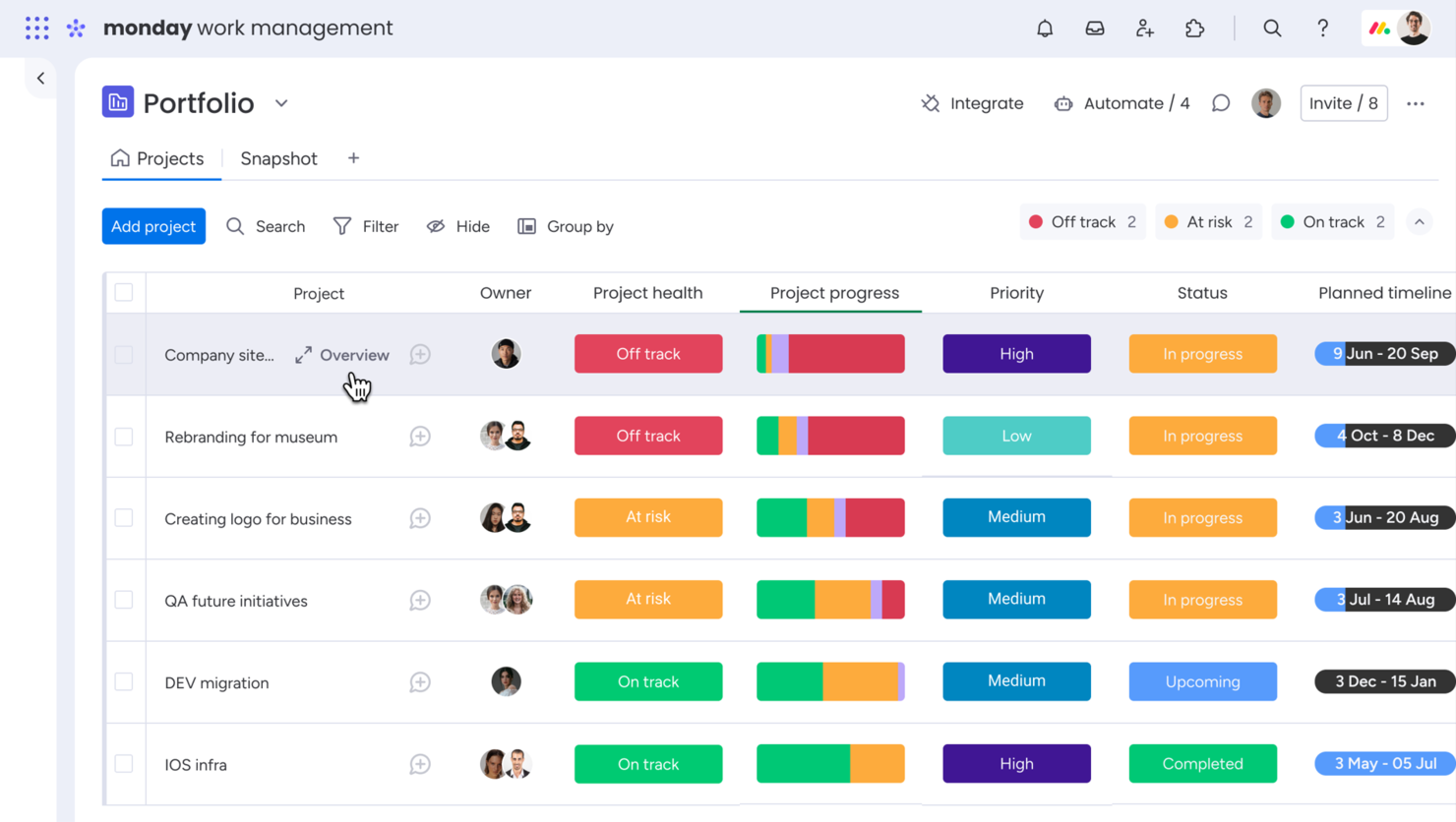
monday.com è un sistema operativo per il lavoro rivolto a team di tutte le dimensioni, che consente di gestire progetti e flussi di lavoro in modo visuale. Offre strumenti per la gestione delle attività, la collaborazione di squadra e il monitoraggio dei progetti, risultando una soluzione preziosa per le organizzazioni che necessitano di un sistema di project management flessibile.
Perché ho scelto monday.com: monday.com si distingue nella gestione visuale dei progetti, offrendo bacheche personalizzabili che aiutano il tuo team a organizzare attività e progetti. Il suo punto di forza è l'interfaccia intuitiva drag-and-drop che semplifica il monitoraggio dei progetti.
La piattaforma offre una serie di modelli che ti aiutano a iniziare rapidamente, adattati alle esigenze specifiche del team. Con monday.com puoi visualizzare facilmente i flussi di lavoro e migliorare la collaborazione tra i membri del team.
Caratteristiche distintive & integrazioni:
Funzionalità includono il monitoraggio del tempo per controllare l'avanzamento dei progetti, l'automazione per ridurre le attività manuali e modelli personalizzabili per diversi casi d'uso. Queste funzionalità assicurano che il tuo team rimanga concentrato e gestisca il tempo in modo efficace. Le dashboard visuali di monday.com offrono una panoramica chiara dello stato dei progetti.
Integrazioni includono Slack, Google Drive, Microsoft Teams, Outlook, Zoom, Dropbox, HubSpot, Trello, Asana e Zendesk.
Pros and Cons
Pros:
- Ampia gamma di modelli
- Gestione visiva dei flussi di lavoro
- Interfaccia drag-and-drop facile da utilizzare
Cons:
- Rallentamenti occasionali con grandi volumi di dati
- Complessità nelle automazioni avanzate
New Product Updates from monday AI Workspace
monday AI Workspace Adds Human Approval Routing
monday AI Workspace adds a human-in-the-loop approval block to AI Workflows, sending approval requests and routing workflow paths based on responses. For more information, visit monday AI Workspace's official site.

Attio
Ideale per piccoli team e startup

Attio è una piattaforma CRM progettata per piccoli team e startup che desiderano migliorare la gestione delle relazioni con i clienti. Si concentra sulla gestione dei dati, sulla personalizzazione dei flussi di lavoro e sul monitoraggio delle pipeline per soddisfare le esigenze delle aziende in crescita.
Perché ho scelto Attio: Attio offre un'interfaccia intuitiva pensata per i piccoli team, rendendo facile la gestione dei dati dei clienti senza complessità tecniche. Il suo punto di forza è l'attenzione alle startup, offrendo funzionalità come flussi di lavoro personalizzabili e filtri avanzati.
Queste funzionalità ti aiutano a organizzare e analizzare le informazioni sui clienti in modo efficiente. Il monitoraggio delle pipeline della piattaforma garantisce una supervisione agevole del processo di vendita.
Caratteristiche principali & integrazioni:
Funzionalità includono automazione intelligente per processi complessi, sincronizzazione dei dati in tempo reale e flussi di lavoro personalizzabili. Queste funzioni aiutano il tuo team a mantenere un database organizzato e accurato. Gli strumenti di reportistica di Attio offrono approfondimenti dettagliati sulle interazioni con i clienti.
Integrazioni includono Gmail, Outlook, Slack, HubSpot, Salesforce, Zapier, Google Calendar, Microsoft Teams, QuickBooks e LinkedIn.
Pros and Cons
Pros:
- Gestione efficiente dei dati
- Flussi di lavoro personalizzabili
- Procedura di configurazione rapida
Cons:
- Alcune integrazioni potrebbero mancare
- Ritardi occasionali nella sincronizzazione
New Product Updates from Attio

Attio Improves Ask Attio With Suggested Actions and Consistent Chat
Attio adds suggested next actions, example prompts, a consistent chat panel, aligned shortcuts, and a minimize option to Ask Attio. These updates make the AI assistant easier to use across different pages. For more information, visit Attio’s official site.
 .
.Altri software AI per la gestione dei clienti
Ecco alcune opzioni aggiuntive di software AI per la gestione dei clienti che non sono entrate nel mio elenco, ma che vale comunque la pena prendere in considerazione:
- Relevance AI
Ideale per approfondimenti sui clienti basati sui dati
- MiClient
Ideale per l'automazione della gestione delle proposte


Come valuto i software di gestione clienti con intelligenza artificiale
Divido la mia valutazione in due livelli: le funzionalità di base che uno strumento deve possedere per qualificarsi—come approfondimenti sui clienti basati sull’IA e flussi di lavoro automatizzati—e i fattori di differenziazione che distinguono il buono dall’eccellente.
Funzionalità di base (requisiti fondamentali per questa lista)
Queste capacità fondamentali servono da criteri di ammissione per l'inclusione nella mia lista di software di gestione clienti con IA:
- Approfondimenti sui clienti basati sull’IA: Valuto se la piattaforma va oltre la reportistica di base, individuando rischi di abbandono, punteggi di coinvolgimento o suggerimenti per la prossima azione migliore a partire dai dati reali dei clienti.
- Database unificato dei clienti: Ogni strumento deve offrire un registro centralizzato che colleghi contatti, comunicazioni, documenti e contesto dei progetti—non solo un semplice elenco di nomi ed email.
- Flussi di lavoro e comunicazioni automatizzati: Cerco automazioni multi-step attivate da azioni dei clienti, come l’invio automatico delle sequenze di onboarding quando si chiude un affare o promemoria quando una milestone si blocca.
- Monitoraggio di progetti e coinvolgimento: Gli strumenti devono collegare direttamente attività, tappe e scadenze alle anagrafiche clienti, così da poter vedere lo stato delle consegne senza dover passare ad un’app di gestione progetti separata.
- Fatturazione, emissione fatture e contratti: Verifico la presenza nativa o l’integrazione profonda con fatturazione, preventivi e firma elettronica—coprendo l’intero ciclo dal preventivo al pagamento nel contesto di ciascun cliente.
- Integrazioni e accesso API: La piattaforma dovrebbe collegarsi agli strumenti già in uso dal tuo team—Google Workspace, Slack, QuickBooks, Stripe—ed offrire un’API aperta per flussi di lavoro personalizzati.
Attribuisco a ciascun fornitore un punteggio da 0 (non offre la funzionalità) a 5 (eccelle in quest’area) per ogni criterio.
I fornitori devono raggiungere una media minima per essere presi in considerazione nella mia lista. Da lì, considero ciò che distingue ciascuna piattaforma.
Fattori di differenziazione (cosa distingue i fornitori)
Dopo aver curato la mia lista, ecco come confronto i diversi operatori nel panorama dei software di gestione clienti con IA:
Caratteristiche distintive
Un assistente conversazionale con IA che consente ai team di interrogare dati dei clienti o avviare follow-up direttamente dall’app può trasformare radicalmente i flussi di lavoro quotidiani. Presto molta attenzione anche agli strumenti di intelligence per riunioni che trascrivono e riassumono automaticamente le chiamate con i clienti, facilitando la puntualità e la chiarezza delle azioni successive. Quando una piattaforma offre un portale clienti personalizzato o funzionalità avanzate di previsione dei ricavi, è un punto a favore importante per le agenzie che vogliono offrire un’esperienza raffinata e programmare il successo dei clienti a lungo termine.
Oltre le caratteristiche
Sicurezza e privacy dei dati sono cruciali qui—soprattutto il modo in cui un fornitore gestisce l’addestramento dell’IA sui dati dei clienti. Valuto se le piattaforme offrono conformità SOC 2 e politiche trasparenti per l’opt-out dall’addestramento dei modelli. La profondità delle integrazioni è un altro fattore chiave, in particolare con strumenti come Slack, Google Workspace e le piattaforme contabili su cui il tuo team fa già affidamento. Considero anche la trasparenza dei prezzi, controllando se le funzionalità di IA sono disponibili solo nei piani superiori o incluse in tutti gli abbonamenti, in modo da poter prevedere i costi man mano che il portafoglio clienti cresce.
Come scegliere il software AI per la gestione dei clienti
È facile perdersi in lunghi elenchi di funzionalità e strutture di prezzo complesse. Per aiutarti a rimanere concentrato mentre affronti il tuo personale processo di selezione del software, ecco un elenco di fattori da tenere a mente:
| Fattore | Cosa considerare |
|---|---|
| Scalabilità | Il software può crescere insieme alla tua azienda? Verifica che supporti l'aumento del numero di clienti e di utenti senza compromettere le prestazioni o la facilità d'uso. |
| Integrazioni | Si collega agli strumenti che già utilizzi? Assicurati che offra l'integrazione con il tuo CRM, la posta elettronica e altre applicazioni aziendali essenziali. |
| Personalizzazione | Puoi adattare il software alle tue esigenze? Cerca opzioni per modificare dashboard, flussi di lavoro e impostazioni senza richiedere un supporto IT esteso. |
| Facilità d'uso | Il tuo team lo troverà intuitivo? Testa l'interfaccia e la navigazione per verificarne la semplicità e garantire una rapida adozione da parte degli utenti. |
| Implementazione e inserimento iniziale | Quanto tempo occorre per iniziare? Valuta il tempo e le risorse necessari per la configurazione, la migrazione dei dati e la formazione. |
| Costo | Rientra nel tuo budget? Confronta i piani tariffari e cerca eventuali costi nascosti. Considera il valore offerto in rapporto al costo. |
| Misure di sicurezza | I tuoi dati e le informazioni dei clienti sono protetti? Verifica la presenza di crittografia, controlli degli accessi e conformità agli standard di settore come GDPR o HIPAA. |
Che cos'è il software di gestione dei clienti basato sull'IA?
Il software di gestione dei clienti basato sull'IA è uno strumento progettato per aiutare le aziende a gestire in modo più efficiente le relazioni e le interazioni con i clienti tramite l'intelligenza artificiale. I professionisti delle vendite, i team del servizio clienti e i responsabili degli account utilizzano in genere questi strumenti per migliorare la comunicazione con i clienti e l'erogazione del servizio.
Le funzionalità di inserimento automatizzato dei dati, analisi predittiva e comunicazione personalizzata facilitano l'organizzazione delle informazioni sui clienti, la previsione delle loro esigenze e la fornitura di esperienze su misura. Questi strumenti offrono un valore significativo perché fanno risparmiare tempo, riducono gli errori e migliorano la soddisfazione dei clienti.
Funzionalità
Quando scegli un software di gestione dei clienti basato sull'IA, presta attenzione alle seguenti funzionalità chiave:
- Inserimento automatizzato dei dati: elimina l'inserimento manuale acquisendo e organizzando automaticamente le informazioni sui clienti, facendo risparmiare tempo e riducendo gli errori.
- Analisi predittiva: analizza i dati per prevedere le esigenze e i comportamenti dei clienti, aiutando i team a prendere decisioni informate.
- Comunicazione personalizzata: adatta messaggi e interazioni in base ai dati dei clienti, migliorando il coinvolgimento e la soddisfazione.
- Pannelli di controllo personalizzabili: consentono agli utenti di modificare la propria interfaccia per visualizzare metriche e informazioni pertinenti, migliorando l'usabilità.
- Supporto omnicanale: integra diversi canali di comunicazione in un'unica piattaforma, garantendo interazioni coerenti con i clienti.
- Informazioni basate sull'IA: fornisce raccomandazioni operative basate sull'analisi dei dati, guidando gli utenti nell'ottimizzazione delle relazioni con i clienti.
- Funzionalità di integrazione: si collega ad altri strumenti aziendali, come i sistemi CRM e di posta elettronica, garantendo un flusso di dati continuo.
- Automazione delle attività: automatizza le attività di routine e i promemoria, liberando tempo per attività a maggior valore aggiunto.
- Misure di sicurezza: protegge i dati dei clienti con crittografia e controlli degli accessi, garantendo la conformità alle normative sui dati.
- Analisi dei dati in tempo reale: offre informazioni aggiornate sulle interazioni con i clienti, consentendo risposte e adeguamenti tempestivi.
Vantaggi
L'implementazione di un software di gestione dei clienti basato sull'IA offre diversi vantaggi al tuo team e alla tua azienda. Eccone alcuni:
- Maggiore efficienza: automatizza le attività di routine e l'inserimento dei dati, consentendo al tuo team di concentrarsi sulle attività strategiche.
- Migliore processo decisionale: offre analisi predittive e informazioni basate sull'IA, aiutando il tuo team a prendere decisioni informate basate sui dati.
- Maggiore coinvolgimento dei clienti: offre comunicazioni personalizzate e supporto omnicanale, garantendo interazioni su misura che aumentano la soddisfazione.
- Maggiore accuratezza dei dati: riduce gli errori attraverso l'acquisizione automatizzata dei dati, garantendo che le informazioni sui clienti siano sempre aggiornate.
- Maggiore sicurezza: garantisce la protezione dei dati dei clienti grazie alla crittografia e alle funzionalità di conformità, offrendoti la tranquillità di sapere che i dati sono al sicuro.
- Integrazione senza interruzioni: si collega agli strumenti esistenti, consentendo un flusso di dati fluido e la collaborazione tra le piattaforme.
- Reattività in tempo reale: offre l'analisi dei dati in tempo reale, consentendo adeguamenti rapidi e risposte tempestive alle esigenze dei clienti.
Costi & prezzi
La selezione di un software di gestione dei clienti con IA richiede la comprensione dei vari modelli e piani tariffari disponibili. I costi variano in base alle funzionalità, alle dimensioni del team, ai componenti aggiuntivi e ad altro ancora. La tabella seguente riassume i piani più comuni, i relativi prezzi medi e le funzionalità tipicamente incluse nelle soluzioni software di gestione dei clienti con IA:
Tabella comparativa dei piani per i software di gestione dei clienti con IA
| Tipo di piano | Prezzo medio | Funzionalità comuni |
|---|---|---|
| Piano gratuito | $0 | Gestione di base dei contatti, spazio di archiviazione dati limitato e assistenza standard. |
| Piano personale | $5-$25/utente/mese | Monitoraggio avanzato dei dati, reportistica di base e integrazioni con la posta elettronica. |
| Piano aziendale | $30-$60/utente/mese | Analisi avanzate, automazione dei flussi di lavoro e pannelli di controllo personalizzabili. |
| Piano per grandi aziende | $70-$150/utente/mese | Funzionalità di sicurezza complete, accesso API, assistenza premium e integrazioni personalizzate. |
Domande frequenti sui software di gestione dei clienti con IA
Ecco alcune risposte alle domande comuni sui software di gestione dei clienti con IA: