

10 migliori alternative a SmartDraw per la creazione di diagrammi nel 2026

10 Elenco delle migliori alternative a Visio


In qualità di project manager, conosci bene i grattacapi che comportano gli strumenti per la creazione di diagrammi. Visio potrebbe essere popolare, ma non è sempre la soluzione più adatta alle esigenze specifiche del tuo team. Forse hai difficoltà a usare la sua interfaccia complessa o ritieni i costi troppo elevati.
Nella mia esperienza, trovare lo strumento giusto può fare una grande differenza in termini di produttività e collaborazione. Ho testato e recensito diverse alternative a Visio per aiutarti a trovare quella più adatta.
Scoprirai strumenti facili da usare, convenienti e pensati per diversi settori. Questo articolo offre una recensione imparziale delle mie scelte migliori, concentrandosi sulle funzionalità che rispondono alle tue esigenze. Troviamo lo strumento perfetto per la creazione di diagrammi per il tuo team.
Che cos'è Visio?
Visio è uno strumento per la creazione di diagrammi utilizzato per realizzare diagrammi di flusso, diagrammi e organigrammi. È popolare tra i professionisti IT, gli ingegneri e gli analisti aziendali che devono rappresentare visivamente dati e processi complessi. L'interfaccia di Visio con funzionalità di trascinamento, l'ampia raccolta di modelli e l'integrazione con Microsoft Office aiutano a creare diagrammi dettagliati e professionali in modo efficiente. Nel complesso, Visio offre un modo strutturato per comunicare visivamente le informazioni all'interno del team.
Tabella comparativa delle alternative a Visio
La tabella seguente confronta i dettagli dei prezzi delle mie migliori alternative a Visio.
| Tool | Best For | Trial Info | Price | ||
|---|---|---|---|---|---|
| 1 | Ideale per design e prototipazione guidati dall'IA | Piano gratuito disponibile | Da $16/utente/mese (fatturato annualmente) | Website | |
| 2 | Ideale per brainstorming in tempo reale con supporto AI | Piano gratuito disponibile | Da $3/utente/mese | Website | |
| 3 | Ideale per whiteboard collaborativi guidati dall'IA | Piano gratuito disponibile | Da $5/utente/mese (fatturato annualmente) | Website | |
| 4 | Ideale per ampia scelta di modelli | Piano gratuito disponibile | Da $41,99/utente/mese (fatturato annualmente) | Website | |
| 5 | Ideale per interfaccia intuitiva | Demo gratuita disponibile | A partire da $9,95/utente/mese (fatturato annualmente) | Website | |
| 6 | Ideale per anteprime in tempo reale basate su IA | Prova gratuita + piano gratuito disponibile | Da $10/utente/mese (fatturato annualmente) | Website | |
| 7 | Ideale per l'archiviazione orientata alla privacy | Gratuito | Gratuito | Website | |
| 8 | Ideale per l'integrazione AI-assistita con Confluence | Piano gratuito disponibile | A partire da $3.80/utente/mese (fatturazione annuale) | Website | |
| 9 | Ideale per la collaborazione sui progetti | Prova gratuita di 14 giorni + piano gratuito disponibile | Da $5/utente/mese (fatturazione annuale) | Website | |
| 10 | Ideale per diagrammi basati su testo | Gratuito | Gratuito | Website |
Perché fidarsi dei nostri consigli sui software
Il nostro team testa e recensisce software dal 2012. In quanto project manager noi stessi, sappiamo quanto sia difficile — e importante — scegliere il software giusto.
Per questa guida, abbiamo valutato gli strumenti attraverso test pratici e ricerche indipendenti, assegnando un punteggio agli strumenti in base ai nostri criteri di selezione. Ci basiamo inoltre sulle competenze di leader di pensiero del settore e di professionisti attivi nella gestione dei progetti.
Le nostre recensioni riflettono il nostro giudizio editoriale umano, non un discorso di vendita.
Revisori esperti:
Recensioni delle migliori alternative a Visio
Di seguito trovi le mie sintesi dettagliate delle migliori alternative a Visio incluse nel mio elenco. Le mie recensioni offrono un’analisi approfondita delle funzionalità principali, dei pro e dei contro, delle integrazioni e dei casi d’uso ideali di ogni strumento, per aiutarti a trovare quello più adatto a te.

Figma
Ideale per design e prototipazione guidati dall'IA
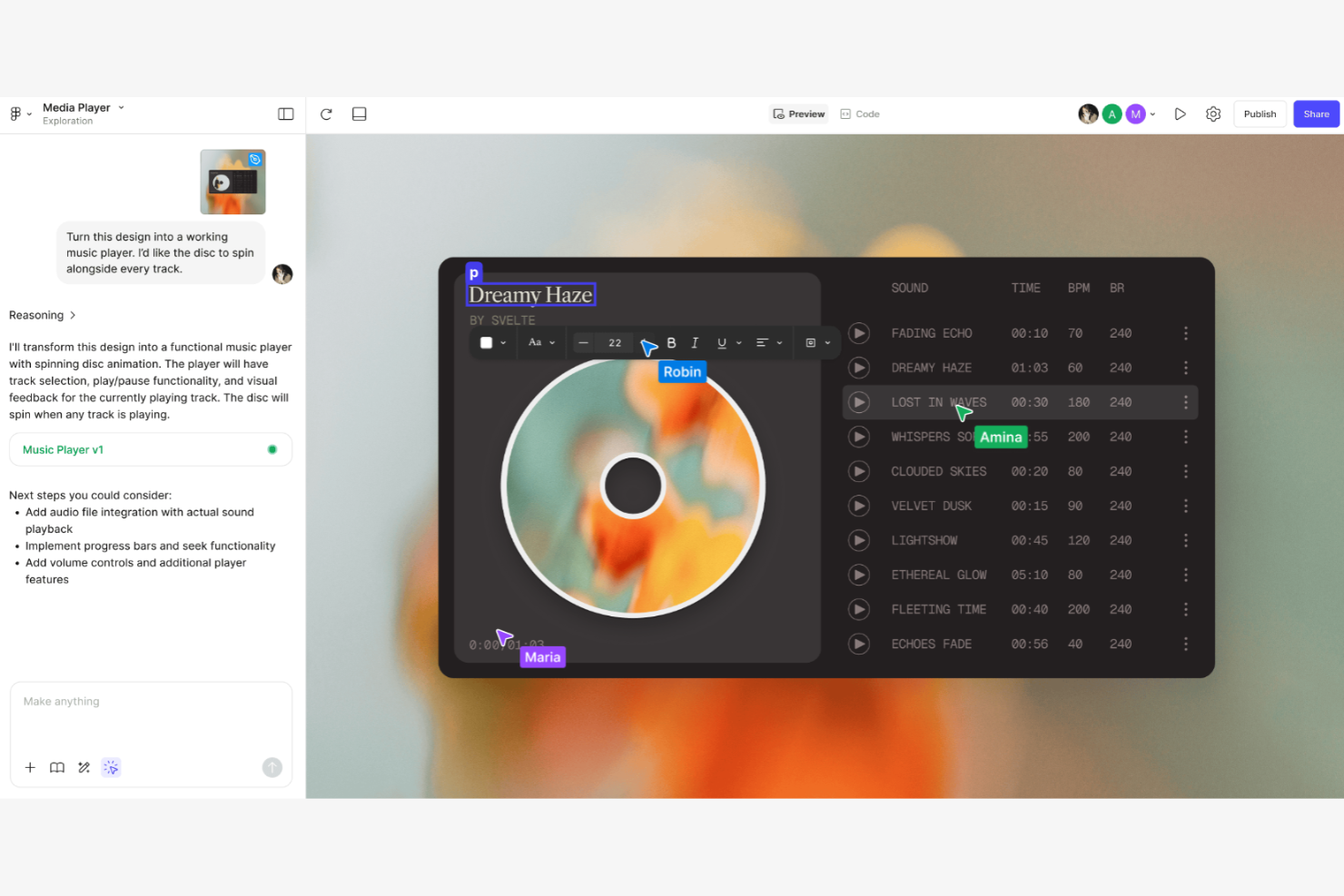
Figma è uno strumento di design basato sul web utilizzato da designer UI/UX e team creativi per progettare e prototipare prodotti digitali. Permette la collaborazione in tempo reale su wireframe, mockup e prototipi.
Perché Figma è una valida alternativa a Visio: Figma offre funzionalità integrate di design e prototipazione che consentono al tuo team di passare senza problemi dalla progettazione al test. La sua natura cloud permette la collaborazione in tempo reale, garantendo che tutti siano sempre allineati. Lo strumento include funzionalità avanzate di progettazione, migliorando precisione e creatività. Utilizza forme e connettori che si agganciano alla griglia per mappare i flussi. A differenza di Visio, Figma si concentra sul design dell'interfaccia utente, rendendolo ideale per i team di prodotti digitali, e dispone di un ecosistema di plugin che ne estende la funzionalità.
Funzionalità e integrazioni principali:
Funzionalità includono l'editing vettoriale, che permette un lavoro di design preciso. Puoi utilizzare le funzionalità di prototipazione per creare prototipi interattivi e cliccabili. Il sistema di componenti di Figma aiuta il tuo team a mantenere coerenza nei progetti di design.
Integrazioni comprendono Slack, Microsoft Teams, Jira, Trello, Dropbox, Notion, e altri ancora.
Pros and Cons
Pros:
- Basato sul web e multipiattaforma
- Design e prototipazione integrati
- Ideale per prodotti digitali
Cons:
- Assenza di una vera modalità di modifica offline
- Rallenta con file molto grandi o complessi

FigJam
Ideale per brainstorming in tempo reale con supporto AI

FigJam è uno strumento di lavagna online progettato per il brainstorming collaborativo e i workshop di gruppo. Serve a designer, team di prodotto ed educatori che hanno bisogno di ideare e pianificare in modo interattivo.
Perché FigJam è una valida alternativa a Visio: FigJam offre funzionalità di brainstorming in tempo reale che permettono al tuo team di collaborare e condividere idee all’istante. Lo strumento include post-it, strumenti di disegno ed emoji per rendere le sessioni più coinvolgenti. La sua tela infinita fornisce flessibilità, permettendoti di esplorare idee senza limiti. A differenza di Visio, FigJam si concentra sulla creatività e sull’interazione, rendendolo perfetto per le sessioni di brainstorming.
Funzionalità distintive e integrazioni:
Funzionalità includono post-it per annotare rapidamente idee durante le riunioni. Puoi utilizzare gli strumenti di disegno per abbozzare concetti direttamente sulla tela. FigJam offre anche funzioni di votazione, aiutando il tuo team a dare priorità alle idee in modo efficace.
Integrazioni disponibili con Slack, Microsoft Teams, Jira, Trello, Zoom, Asana e Airtable.
Pros and Cons
Pros:
- Collaborazione in tempo reale
- Strumenti interattivi di brainstorming
- Tela infinita
Cons:
- Meno modelli rispetto a Miro o Mural
- Costo più elevato per team numerosi

Creately
Ideale per whiteboard collaborativi guidati dall'IA

Creately è uno strumento di collaborazione visiva utilizzato per la creazione di diagrammi e lavagne digitali, ideale per team che operano nell'istruzione, nel design e nella gestione dei progetti. Aiuta gli utenti a mappare i processi, fare brainstorming e creare contenuti visivi in modo collaborativo.
Perché Creately è una valida alternativa a Visio: Creately offre funzionalità di whiteboard collaborativa che permettono al tuo team di lavorare insieme su una tela condivisa. Lo strumento mette a disposizione un'ampia gamma di template e forme che semplificano la creazione di diagrammi. La sua interfaccia intuitiva guidata dall'IA consente anche agli utenti meno tecnici di contribuire efficacemente. A differenza di Visio, l'enfasi di Creately sulla collaborazione lo rende un'opzione più coinvolgente per i progetti di gruppo.
Funzionalità e integrazioni principali:
Funzionalità comprendono la collaborazione in tempo reale, che garantisce che tutti siano aggiornati. La possibilità di aggiungere note e commenti direttamente sulla tela aiuta il team a comunicare idee in modo chiaro. È inoltre possibile tracciare modifiche e revisioni per assicurarsi che tutti siano allineati con gli obiettivi del progetto.
Integrazioni includono Google Drive, Slack, Confluence, Microsoft Teams e altro ancora.
Pros and Cons
Pros:
- Mappe mentali collaborative
- Tracciamento di modifiche e revisioni
- Procedura di onboarding semplice
Cons:
- Rallentamenti con diagrammi complessi e di grandi dimensioni
- Ritardi occasionali nella sincronizzazione per i team

EdrawMax
Ideale per ampia scelta di modelli
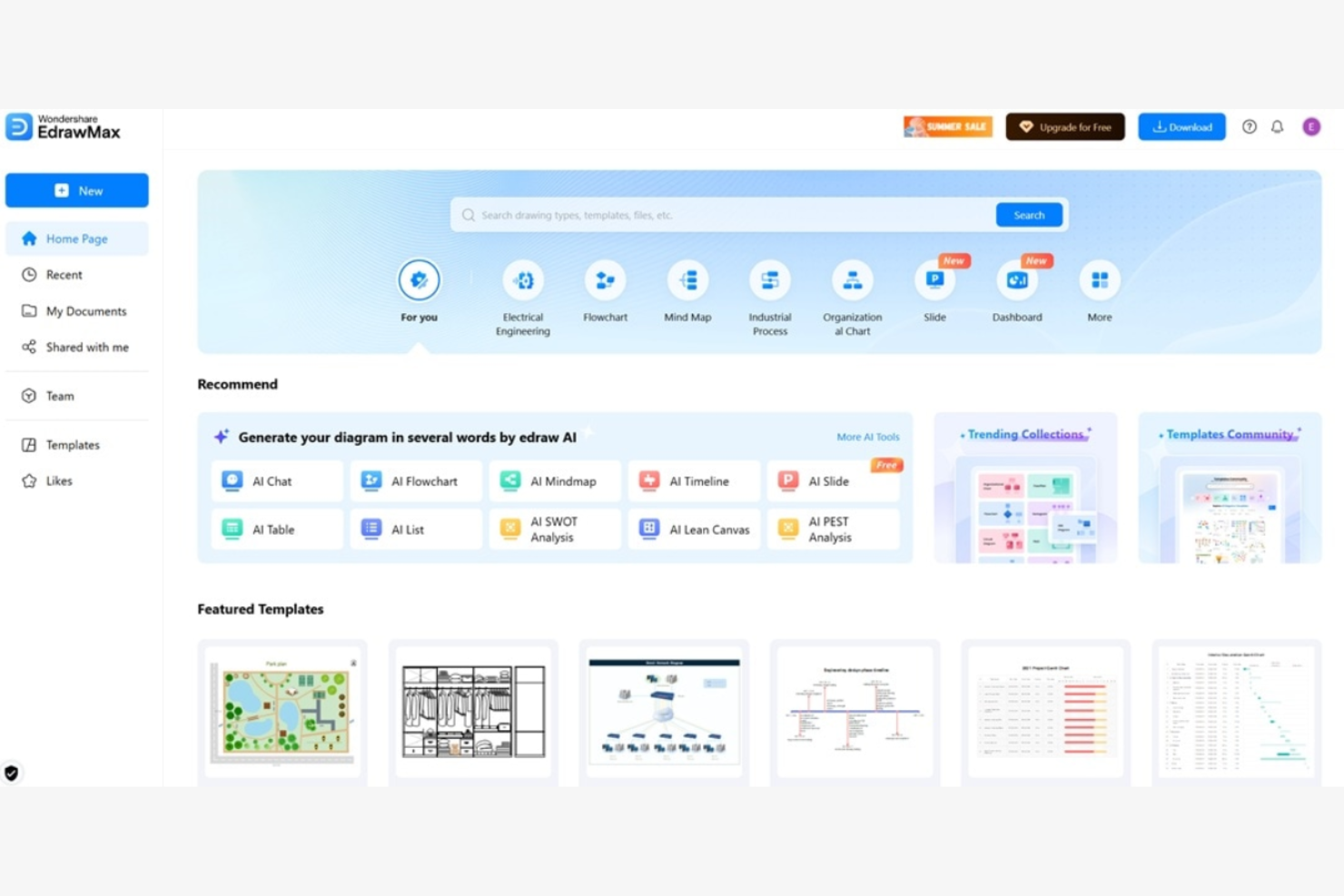
EdrawMax è uno strumento di diagrammazione versatile utilizzato da professionisti nell'ingegneria, nel design e nell'istruzione per creare visualizzazioni dettagliate. Aiuta gli utenti a progettare diagrammi di flusso, mappe mentali e planimetrie in modo efficiente.
Perché EdrawMax è una valida alternativa a Visio: EdrawMax offre un'ampia libreria di modelli e simboli adatti a diversi settori, consentendo al tuo team di iniziare i progetti rapidamente. La sua interfaccia è intuitiva, permettendo anche ai principianti di creare diagrammi complessi. EdrawMax offre più opzioni di personalizzazione rispetto a Visio, aumentando creatività e flessibilità.
Caratteristiche e integrazioni principali:
Caratteristiche includono il disegno basato su vettori, che garantisce chiarezza nei tuoi diagrammi. Puoi utilizzare la funzionalità drag-and-drop per semplificare il processo di creazione dei diagrammi. Il software supporta anche diagrammi multi-pagina, permettendo al tuo team di organizzare informazioni complesse in modo efficace.
Integrazioni includono Microsoft Office, Google Workspace, Dropbox e GitHub.
Pros and Cons
Pros:
- Libreria di modelli molto ampia
- Supporta la grafica vettoriale
- Supporta un'ampia gamma di tipi di diagrammi
Cons:
- Manca di profondità nelle funzionalità specializzate
- Importazione dei file Visio non sempre coerente

Ideale per interfaccia intuitiva

SmartDraw è un software di creazione diagrammi progettato per realizzare flowchart, organigrammi e altri elementi visivi. È rivolto a professionisti aziendali, project manager e architetti che hanno bisogno di visualizzare dati e processi.
Perché SmartDraw è una valida alternativa a Visio: L’interfaccia intuitiva di SmartDraw consente al tuo team di creare rapidamente diagrammi professionali senza necessità di formazione approfondita. SmartDraw offre il miglior importatore di file e stencil Visio permettendo di convertire i file con precisione. SmartDraw è più intuitivo di Visio, rendendolo accessibile agli utenti di qualsiasi livello di esperienza.
Caratteristiche principali e integrazioni:
Funzionalità includono la formattazione intelligente che mantiene ordinati i diagrammi durante la modifica. Puoi accedere a un’ampia libreria di modelli e simboli per avviare rapidamente i tuoi progetti. La possibilità di esportare i diagrammi in diversi formati file rende la condivisione del lavoro semplice.
Integrazioni non sono elencate pubblicamente.
Pros and Cons
Pros:
- Interfaccia facile da usare
- Formattazione intelligente dei diagrammi
- Adatto a tutti i livelli di esperienza
Cons:
- Collaborazione in tempo reale poco efficace
- La versione di prova blocca tutte le esportazioni

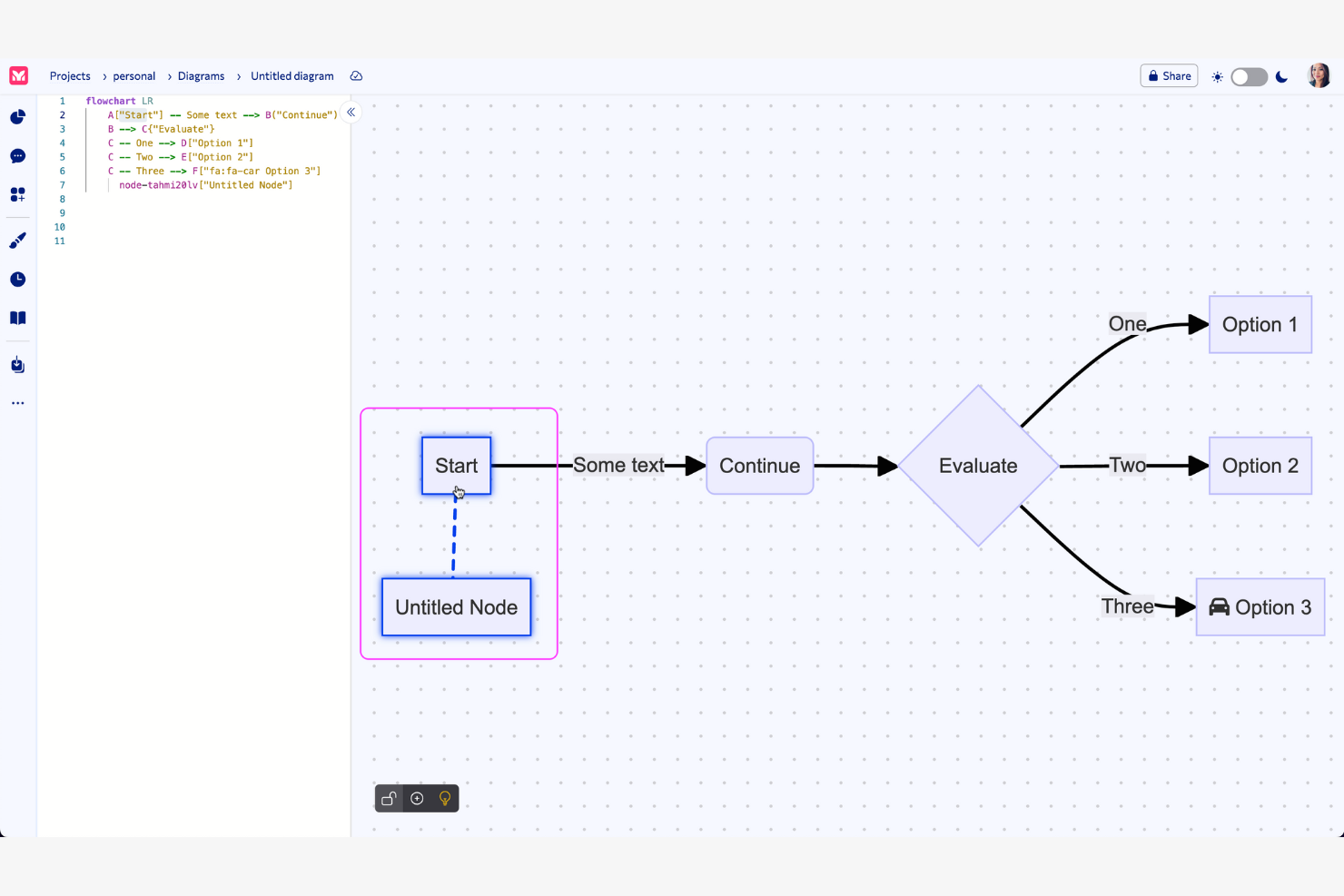
Mermaid è uno strumento di diagrammazione basato su testo utilizzato da sviluppatori e team tecnici per creare diagrammi visivi attraverso semplici definizioni testuali. Facilita la creazione di flowchart, diagrammi di sequenza e altro ancora, trasformando il testo in grafici visivi.
Perché Mermaid è una buona alternativa a Visio: Mermaid semplifica la creazione di visualizzazioni complesse tramite un input testuale semplice. Questo metodo supporta un controllo di versione efficiente e si integra perfettamente nei flussi di lavoro di sviluppo. La semplicità dello strumento consente aggiornamenti rapidi dei diagrammi man mano che i progetti evolvono e offre una funzionalità di anteprima in tempo reale potenziata dall'IA, permettendo di vedere immediatamente le modifiche nel proprio codice. Mermaid è rivolto a chi preferisce scrivere codice piuttosto che utilizzare interfacce grafiche.
Caratteristiche distintive e integrazioni:
Funzionalità includono la possibilità di generare diagrammi da input basati su testo, semplificando il processo di creazione e modifica. È possibile collaborare in tempo reale con il proprio team, aumentando la produttività. Inoltre, Mermaid supporta numerosi tipi di diagrammi, offrendo flessibilità per diverse esigenze progettuali.
Integrazioni includono Visual Studio Code, GitHub, Confluence, Jira, ChatGPT e altri.
Pros and Cons
Pros:
- Crea diagrammi da testo semplice
- Funzionalità di anteprima in tempo reale
- Ideale per flussi di lavoro di programmazione
Cons:
- Stile limitato
- Mancano funzionalità di drag-and-drop


draw.io è uno strumento di diagrammazione online utilizzato da team che hanno bisogno di creare organigrammi, diagrammi di rete e altro ancora. È molto popolare tra i professionisti in ambito IT, ingegneria ed istruzione per visualizzare processi e sistemi.
Perché draw.io è una valida alternativa a Visio: draw.io offre opzioni di archiviazione orientate alla privacy, consentendo al tuo team di scegliere dove salvare i diagrammi. Essendo open-source, garantisce un maggiore controllo sui tuoi dati. draw.io desktop è un'applicazione autonoma e offline disponibile per Windows, macOS e Linux, ideale se desideri la sicurezza di un'applicazione desktop senza dipendere da una connessione a Internet. Lo strumento ha un'interfaccia semplice che non richiede una formazione approfondita. Questa alternativa gratuita a Visio è accessibile per team attenti al budget.
Caratteristiche e integrazioni principali:
Caratteristiche includono un'interfaccia intuitiva drag-and-drop che semplifica la creazione dei diagrammi. È possibile accedere a un'ampia gamma di modelli per avviare rapidamente i progetti. Il controllo delle versioni aiuta il tuo team a tracciare le modifiche e collaborare in modo efficace.
Le integrazioni includono Google Drive, Microsoft OneDrive, Microsoft SharePoint, Dropbox, GitHub e altri.
Pros and Cons
Pros:
- Archiviazione dati orientata alla privacy
- Flessibilità open-source
- Versione gratuita disponibile
Cons:
- L'allineamento manuale delle linee è laborioso
- Prestazioni limitate con diagrammi grandi e complessi

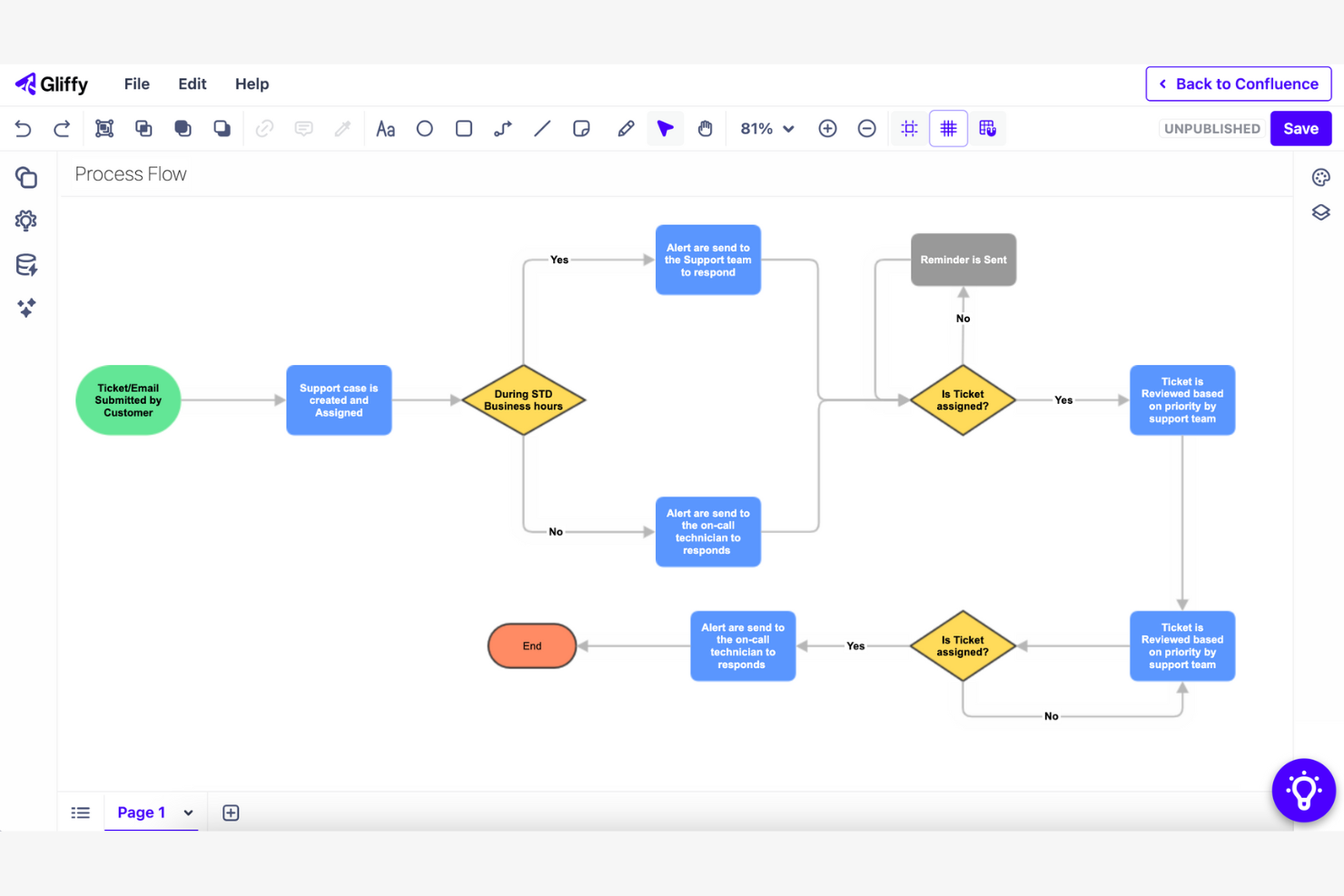
Gliffy è uno strumento di diagrammazione basato sul web che aiuta i team a creare flussogrammi, wireframe e diagrammi di rete. È molto popolare tra project manager, sviluppatori e professionisti IT che hanno bisogno di visualizzare processi e sistemi.
Perché Gliffy è una valida alternativa a Visio: Gliffy si integra con Confluence, consentendo al tuo team di incorporare i diagrammi direttamente nelle pagine di Confluence. Questa funzione migliora la collaborazione mantenendo tutti aggiornati. Lo strumento offre un'interfaccia intuitiva che permette al tuo team di iniziare a creare diagrammi senza la necessità di una formazione approfondita. Gliffy è progettato per funzionare all'interno del tuo ambiente Confluence esistente, semplificando l'integrazione dei flussi di lavoro.
Caratteristiche e integrazioni distintive:
Caratteristiche includono un'interfaccia drag-and-drop che semplifica la creazione dei diagrammi. Puoi utilizzare una varietà di modelli per avviare rapidamente i tuoi progetti. Gliffy offre anche aggiornamenti automatici dei diagrammi, assicurando che le tue visualizzazioni rimangano sempre aggiornate man mano che i progetti evolvono.
Integrazioni includono Confluence, Jira, Slack, Mermaid e altri ancora.
Pros and Cons
Pros:
- Integrazione con Confluence
- Interfaccia drag-and-drop
- Aggiornamenti automatici dei diagrammi
Cons:
- Nessuna app mobile
- Può essere lento con diagrammi complessi


Cacoo è uno strumento di diagrammazione basato su cloud utilizzato dai team di design, marketing e project management per creare e condividere diagrammi. Supporta il lavoro collaborativo su flowchart, wireframe e diagrammi di rete.
Perché Cacoo è una valida alternativa a Visio: Cacoo offre funzionalità di collaborazione su progetti che permettono a più utenti di modificare i diagrammi simultaneamente, garantendo che tutti siano allineati. Grazie all’ampia libreria di modelli, il tuo team può avviare rapidamente nuovi progetti. Lo strumento consente l’esportazione in file PNG, SVG, PDF, PS e PPT. Cacoo punta a potenziare il lavoro di squadra e la comunicazione in tempo reale, rendendolo ideale per ambienti collaborativi.
Funzionalità e integrazioni principali:
Funzionalità includono la collaborazione in tempo reale, che mantiene il team connesso durante la creazione dei diagrammi. È possibile commentare direttamente sui diagrammi, facilitando una comunicazione chiara. Cacoo offre anche la cronologia delle versioni, consentendo di tracciare le modifiche e ripristinare quelle precedenti se necessario.
Integrazioni includono Slack, Google Drive, Google Docs, Dropbox, Adobe Creative Cloud e Visio.
Pros and Cons
Pros:
- Modifica in tempo reale
- Commenti diretti sui diagrammi
- Gestisci il lavoro visivamente con le bacheche Kanban
Cons:
- Interfaccia e elementi UX datati
- Meno adatto a team specializzati


PlantUML è uno strumento per creare diagrammi UML utilizzando una semplice descrizione testuale, rivolto principalmente a sviluppatori e team tecnici. Aiuta a visualizzare sistemi e processi complessi tramite diagrammi per sequenze, casi d'uso e attività.
Perché PlantUML è una valida alternativa a Visio: L'approccio di PlantUML basato su diagrammi testuali permette al tuo team di generare rapidamente diagrammi scrivendo un semplice codice. Questo metodo facilita il controllo di versione e supporta l'integrazione nei flussi di lavoro di sviluppo. Lo strumento è leggero, adatto ad ambienti con risorse limitate. A differenza di Visio, PlantUML è ideale per i team che preferiscono un approccio orientato al codice nella creazione di diagrammi.
Funzionalità principali e integrazioni:
Funzionalità includono la possibilità di creare diagrammi tramite script testuali, semplificando il processo di realizzazione dei diagrammi. Puoi aggiornare e mantenere i diagrammi man mano che i tuoi progetti evolvono. Il software supporta un'ampia gamma di tipi di diagrammi UML, offrendo flessibilità per diverse esigenze progettuali.
Integrazioni includono Visual Studio Code, IntelliJ IDEA, Eclipse, Microsoft Word e altri.
Pros and Cons
Pros:
- Creazione di diagrammi tramite testo
- Software leggero
- Controllo di versione semplice
Cons:
- Richiede conoscenze di codifica
- Personalizzazione visiva limitata
Altre alternative a Visio
Ecco alcune alternative aggiuntive a Visio che non sono state incluse nel mio elenco, ma che vale comunque la pena prendere in considerazione:
- Miro
Ideale per strumenti collaborativi di team basati sull’IA
- Lucidchart
Ideale per diagrammi creati con intelligenza artificiale
- yWorks
Ideale per strumenti di visualizzazione di grafici


Come valuto le alternative a Visio
Quando un PM deve documentare un processo di rilascio o mappare una RACI, lo strumento deve fare più che disegnare forme: valuto innanzitutto ogni opzione in base alle funzionalità fondamentali di diagrammazione, quindi in base a ciò che la distingue.
Funzionalità fondamentali (requisiti imprescindibili per questo elenco)
Quando seleziono gli strumenti per il mio elenco, assegno a ciascuno un punteggio su una scala da 0 (non offre la funzionalità) a 5 (eccelle in quest'area) per ogni funzionalità fondamentale riportata di seguito. Quindi calcolo il punteggio totale dello strumento e lo converto in percentuale. Ogni strumento deve raggiungere un punteggio totale minimo del 65% per essere preso in considerazione.
- Creazione di diagrammi e diagrammi di flusso: valuto quanti tipi di diagrammi supporta ogni strumento, dai diagrammi di flusso di base alle corsie, alle mappe dei processi BPMN e ai diagrammi della topologia di rete.
- Modelli e raccolte di forme: una solida raccolta di modelli è importante quando serve creare rapidamente un flusso di lavoro per uno sprint o un organigramma. Cerco stencil e insiemi di forme specifici per i PM.
- Collaborazione in tempo reale: verifico se più membri del team possono modificare insieme un diagramma, lasciare commenti contestuali e tenere traccia della cronologia delle versioni tra le varie revisioni.
- Compatibilità con i file Visio: i team che migrano da Visio hanno bisogno di un'importazione e di un'esportazione .vsdx affidabili. Valuto quanto bene ogni strumento gestisce la fedeltà nei cicli di importazione ed esportazione con i file Visio esistenti.
- Accessibilità multipiattaforma: l'app desktop di Visio, disponibile solo per Windows, è un motivo comune per cui i team cercano alternative. Cerco l'accesso basato sul Web e il supporto per macOS e Linux.
- Integrazioni con gli strumenti per PM: i diagrammi di progetto fanno parte di flussi di lavoro più ampi, quindi verifico la presenza di collegamenti nativi a strumenti come Jira, Confluence, Microsoft Teams e Google Workspace.
Dopo aver creato un elenco di strumenti che soddisfano questi criteri, valuto ciò che distingue ciascuna piattaforma.
Fattori distintivi (ciò che differenzia i fornitori)
Ecco come confronto i diversi fornitori:
Funzionalità distintive
La diagrammazione assistita dall'IA è un importante fattore di differenziazione. Gli strumenti che generano diagrammi di flusso a partire da richieste testuali o dispongono automaticamente mappe di processi complesse consentono di risparmiare molto tempo durante la pianificazione degli sprint. Cerco anche diagrammi collegati ai dati che recuperano dati aggiornati in tempo reale da fogli di calcolo o database, mantenendo aggiornate le mappe delle risorse e le dashboard di stato senza aggiornamenti manuali. Anche la modalità di presentazione è importante, soprattutto quando occorre illustrare un piano di rilascio alla dirigenza senza esportarlo in una presentazione separata.
Oltre le funzionalità
La struttura dei prezzi è uno dei primi aspetti che valuto. Alcuni strumenti offrono piani gratuiti generosi per i PM individuali, mentre altri richiedono licenze per postazione che si accumulano rapidamente in un PMO. Anche la sicurezza e la conformità hanno un peso significativo: verifico la certificazione SOC 2, il supporto per SSO/SAML e i controlli degli accessi basati sui ruoli, soprattutto per i team aziendali che gestiscono dati di progetto sensibili. Anche gli strumenti di migrazione meritano attenzione. Quando si trasferiscono centinaia di file Visio, valuto quanto bene ogni fornitore supporta le importazioni collettive di file .vsdx e la migrazione delle raccolte.
Perché cercare un'alternativa a Visio?
Sebbene Visio sia una buona scelta come strumento per la creazione di diagrammi, ci sono diversi motivi per cui alcuni utenti cercano soluzioni alternative. Potresti cercare un'alternativa a Visio perché…
- Hai bisogno di un'opzione più conveniente
- Il tuo team desidera strumenti di collaborazione più semplici
- Hai bisogno di una migliore integrazione con altre app
- Preferisci un'interfaccia utente più semplice
- Hai bisogno di uno strumento disponibile su tutti i dispositivi
- Il tuo team ha bisogno di più opzioni di personalizzazione
Se ti riconosci in una di queste situazioni, sei nel posto giusto. Il mio elenco contiene diverse opzioni di strumenti per la creazione di diagrammi più adatte ai team che affrontano queste difficoltà con Visio e cercano soluzioni alternative.
Funzionalità principali di Visio
Ecco alcune delle funzionalità principali di Visio, per aiutarti a confrontare ciò che offrono le soluzioni alternative:
- Creazione di diagrammi: puoi creare vari tipi di diagrammi e salvarli in SharePoint o OneDrive, semplificando l'organizzazione e l'accesso ai tuoi progetti.
- Strumenti di modifica: le numerose opzioni di formattazione per testo e forme, insieme alle funzioni di modifica standard, ti aiutano a personalizzare efficacemente i tuoi diagrammi.
- Incorporamento: puoi incorporare i diagrammi nelle pagine Web e in SharePoint, una funzione utile per condividere contenuti visivi all'interno della tua organizzazione.
- Funzionalità di ricerca: trova rapidamente un testo specifico all'interno dei diagrammi, risparmiando tempo durante la navigazione tra elementi visivi complessi.
- Collaborazione: le funzioni di creazione condivisa e commento in tempo reale facilitano il lavoro di squadra, consentendo a più utenti di lavorare contemporaneamente sui diagrammi.
- Accesso offline: la versione desktop consente di modificare i diagrammi offline, permettendoti di lavorare senza una connessione Internet.
- Condivisione: condividi i diagrammi tramite link per fornire al tuo team un accesso rapido.
- Navigazione: ingrandisci e riduci la visualizzazione e spostati tra le pagine per visualizzare e modificare facilmente i tuoi diagrammi.