

Le 10 migliori alternative a draw.io per i diagrammi di flusso nel 2026

Selezione di alternative a draw.io


Una valida alternativa a draw.io offre funzionalità flessibili per la creazione di diagrammi, collaborazione in tempo reale (e, di conseguenza), collaborazione visiva e un'ampia gamma di modelli adatti al flusso di lavoro del tuo team. Se stai cercando alternative facili da usare a draw.io (ora diagrams.net), come whimsical, probabilmente cerchi strumenti in grado di gestire diagrammi uml complessi, supportare il lavoro di squadra tra diverse funzioni o offrire una curva di apprendimento più breve e una maggiore facilità d'uso. Questo elenco ti aiuterà a confrontare le principali piattaforme, evidenziando ciò che distingue ciascuna di esse, così potrai scegliere quella più adatta ai tuoi progetti di mappatura dei processi e alle esigenze del tuo team.
Che cos'è draw.io?
draw.io è uno strumento basato sul web per la creazione di diagrammi che consente agli utenti di creare diagrammi di flusso, mappe mentali, diagrammi di rete aws, wireframe e altri contenuti visivi. Offre un'interfaccia con funzionalità di trascinamento, un'ampia selezione di forme e l'integrazione con piattaforme come Google Drive, Google Docs, Powerpoint e Microsoft 365. I team utilizzano draw.io per visualizzare i sistemi e collaborare sui diagrammi in tempo reale, rendendolo una scelta popolare sia per gli utenti tecnici sia per quelli non tecnici.
Tabella di confronto delle alternative a draw.io
Questa tabella di confronto riassume i dettagli sui prezzi delle mie principali alternative a draw.io.
| Tool | Best For | Trial Info | Price | ||
|---|---|---|---|---|---|
| 1 | Ideale per sessioni di brainstorming interattive | Piano gratuito disponibile | Da $3/utente/mese | Website | |
| 2 | Ideale per l'integrazione dei flussi di lavoro multi-utente | Piano gratuito disponibile | A partire da $5/utente/mese (fatturato annualmente) | Website | |
| 3 | Ideale con modelli di diagrammi di livello enterprise | Demo gratuita disponibile | A partire da $9.95/utente/mese (fatturazione annuale) | Website | |
| 4 | Ideale per la visualizzazione di roadmap di prodotto | Prova gratuita di 30 giorni + demo gratuita disponibile | Da $9/utente/mese | Website | |
| 5 | Ideale per l'organizzazione di idee in tempo reale | Prova gratuita di 30 giorni + piano gratuito + demo gratuita disponibile | Da $8,33/utente/mese (fatturazione annuale) | Website | |
| 6 | Ideale per la compatibilità con macOS e iOS | Prova gratuita di 14 giorni disponibile | Da $129.99/anno | Website | |
| 7 | Ideale per elementi visivi in stile disegno a mano | Prova gratuita di 14 giorni + piano gratuito disponibile | Da $6/utente/mese (fatturazione annuale) | Website | |
| 8 | Ideale per la creazione di diagrammi basati su testo | Prova gratuita + piano gratuito disponibile | A partire da $10/utente/mese (fatturato annualmente) | Website | |
| 9 | Ideale per il mind mapping strutturato | Piano gratuito disponibile | Da $4.92/mese | Website | |
| 10 | Ideale per la pianificazione visiva dei progetti | Prova gratuita disponibile | Da $99/anno | Website |
Perché fidarsi dei nostri consigli sui software
Il nostro team testa e recensisce software dal 2012. In quanto project manager noi stessi, sappiamo quanto sia difficile — e importante — scegliere il software giusto.
Per questa guida, abbiamo valutato gli strumenti attraverso test pratici e ricerche indipendenti, assegnando un punteggio agli strumenti in base ai nostri criteri di selezione. Ci basiamo inoltre sulle competenze di leader di pensiero del settore e di professionisti attivi nella gestione dei progetti.
Le nostre recensioni riflettono il nostro giudizio editoriale umano, non un discorso di vendita.
Revisori esperti:
Recensioni delle alternative a draw.io
Di seguito trovi i miei riepiloghi dettagliati delle alternative a draw.io incluse nella mia selezione. Le mie recensioni offrono uno sguardo approfondito sulle funzionalità, sui migliori casi d’uso e sulle integrazioni di ciascuno strumento per la creazione di diagrammi, per aiutarti a trovare quello più adatto a te.

FigJam
Ideale per sessioni di brainstorming interattive
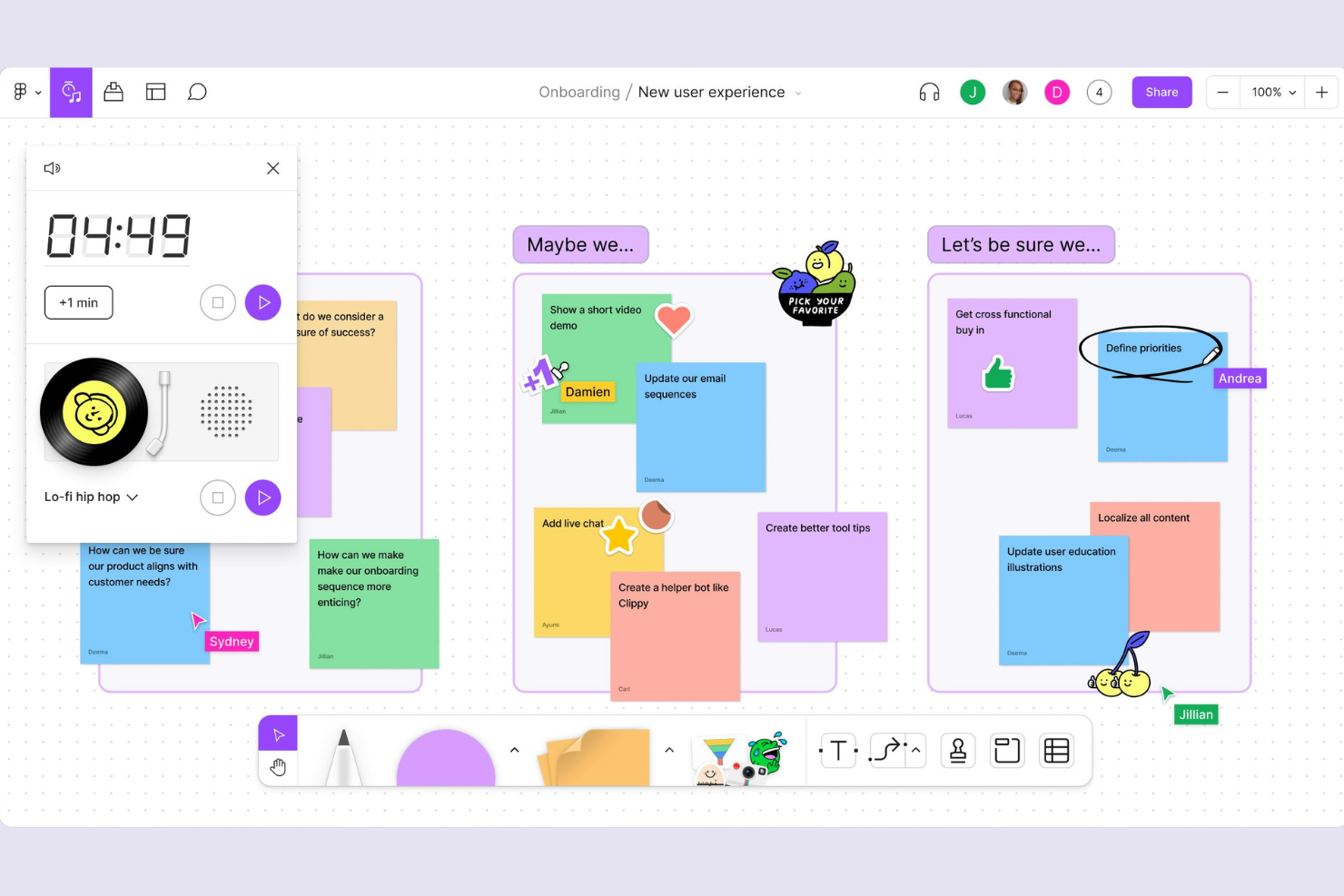
FigJam porta la lavagna interattiva e la collaborazione in tempo reale ai team che hanno bisogno di più di semplici diagrammi statici. È particolarmente utile per i product manager, i designer e i gruppi cross-funzionali che desiderano condurre sessioni di brainstorming, workshop o cerimonie agili in uno spazio digitale condiviso. A differenza dei tradizionali strumenti per i diagrammi, FigJam offre post-it, votazioni e widget ludici che aiutano i team a raccogliere idee e prendere decisioni insieme.
Perché FigJam È una Buona Alternativa a draw.io
Per i team che vogliono andare oltre i diagrammi statici, FigJam offre uno spazio altamente interattivo per brainstorming e workshop. L'ho scelto perché è pensato per la collaborazione in tempo reale, consentendo a tutti di contribuire con idee tramite post-it, reazioni emoji e cursori live. Gli strumenti di voto e i timer di FigJam aiutano i gruppi a dare rapidamente priorità alle idee e a mantenere le sessioni focalizzate. Queste funzionalità lo rendono una scelta valida per i team che devono facilitare incontri dinamici e partecipativi, invece di limitarsi a creare diagrammi.
Funzionalità Principali di FigJam
Oltre agli strumenti di brainstorming interattivo, FigJam include diverse altre funzionalità che supportano la creazione collaborativa di diagrammi:
- Modelli Predefiniti: Scegli da una libreria di modelli per diagrammi di flusso, mappe mentali e cerimonie agili.
- Chat Audio: Avvia conversazioni vocali direttamente all'interno della lavagna per discussioni rapide.
- Integrazione Figma: Inserisci facilmente i design e i componenti di Figma per collegare il brainstorming al lavoro di design.
- Widget Personalizzabili: Aggiungi timer, lettori musicali e sondaggi per adattare le sessioni alle esigenze della tua squadra.
Integrazioni di FigJam
Le integrazioni includono Asana, Jira, GitHub, Slack, Microsoft Teams, Zoom, Notion, Dropbox, Trello e ChatGPT.
Pros and Cons
Pros:
- Chat audio integrate
- Ottimi strumenti per post-it
- Interfaccia moderna e fluida
Cons:
- Richiede account utente
- Set di forme standard meno ampio

Creately
Ideale per l'integrazione dei flussi di lavoro multi-utente
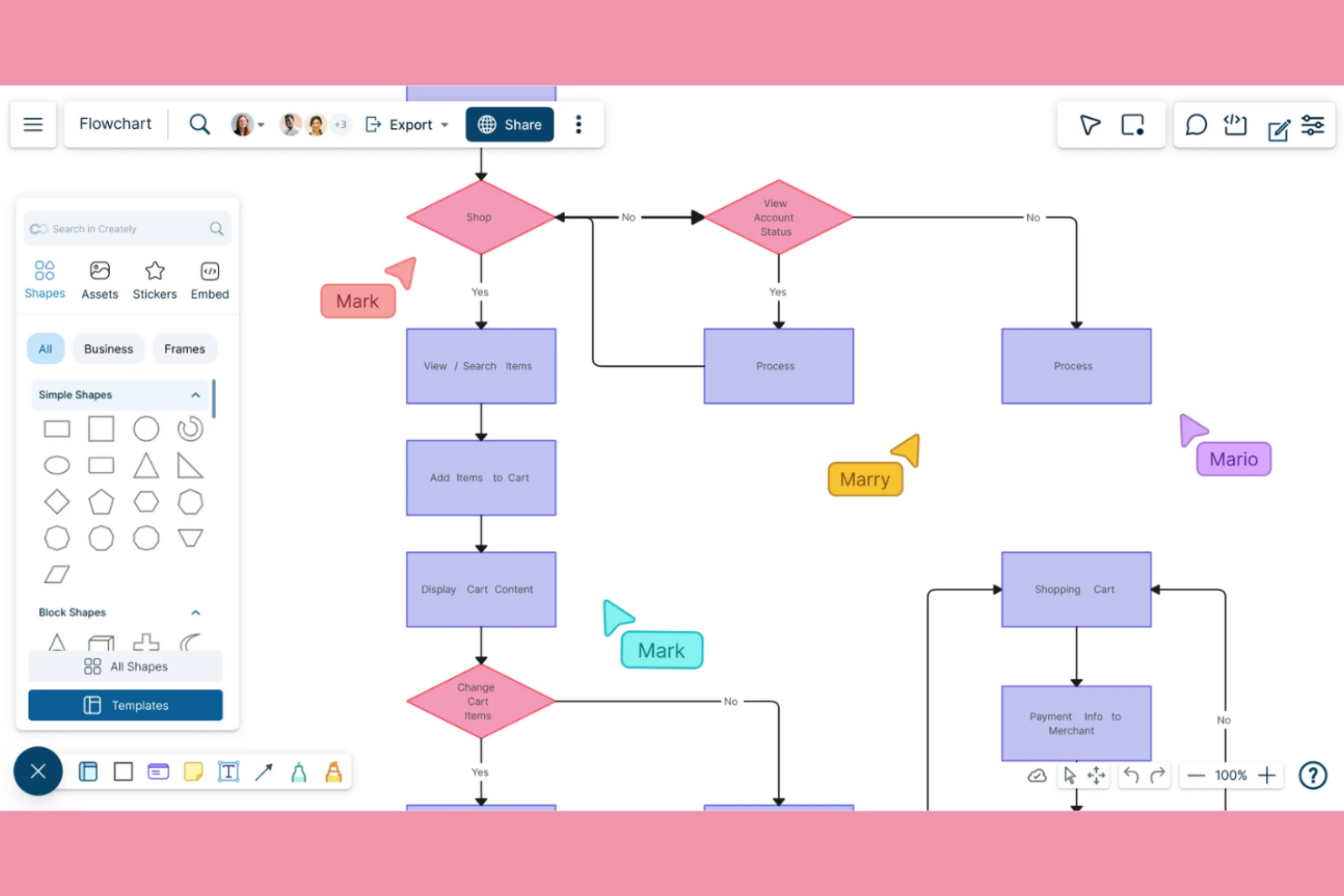
Se il tuo team ha bisogno di uno strumento di diagrammazione che supporti la collaborazione in tempo reale e l'integrazione dei flussi di lavoro, Creately merita attenzione. È stato progettato per team distribuiti e organizzazioni che desiderano collegare i diagrammi direttamente ad attività, note e flussi di lavoro dei progetti. A differenza della maggior parte degli strumenti di diagrammazione, Creately unisce spazi di lavoro visivi a funzionalità di gestione progetti integrate, offrendo un'esperienza di squadra più unificata.
Perché Creately è una valida alternativa a draw.io
A differenza della maggior parte degli strumenti di diagrammazione, Creately è pensato per team che devono collaborare su diagrammi e flussi di lavoro in tempo reale. Ho scelto Creately perché consente a più utenti di co-modificare i diagrammi, allegare attività e note direttamente alle forme e gestire i flussi di lavoro all'interno dello stesso spazio di lavoro. Il canvas visivo della piattaforma è strettamente integrato con bacheche di attività e database, così puoi passare dal brainstorming all'esecuzione senza cambiare strumento. Se il tuo team dà valore all'integrazione dei flussi di lavoro multi-utente, Creately offre un'esperienza più connessa rispetto alle soluzioni di diagrammazione tradizionali.
Funzionalità principali di Creately
Altre caratteristiche che rendono Creately utile per i team includono:
- Libreria di modelli: Accedi a centinaia di modelli predefiniti per diagrammi di flusso, organigrammi, mappe mentali e altro ancora.
- Canvas infinito: Espandi i diagrammi senza limiti per adattarli a progetti grandi o complessi.
- Collegamento dati: Collega le forme a dati attivi provenienti da tabelle o database per visualizzazioni dinamiche.
- Storico delle versioni: Consulta e ripristina versioni precedenti dei diagrammi per monitorare le modifiche nel tempo.
Integrazioni di Creately
Le integrazioni includono Google Drive, Slack, Confluence e Microsoft Teams.
Pros and Cons
Pros:
- Ottimi menu contestuali
- Collaborazione fluida in tempo reale
- Collegamento personalizzato a database
Cons:
- Prestazioni web più pesanti
- Fasce di prezzo poco chiare

Ideale con modelli di diagrammi di livello enterprise
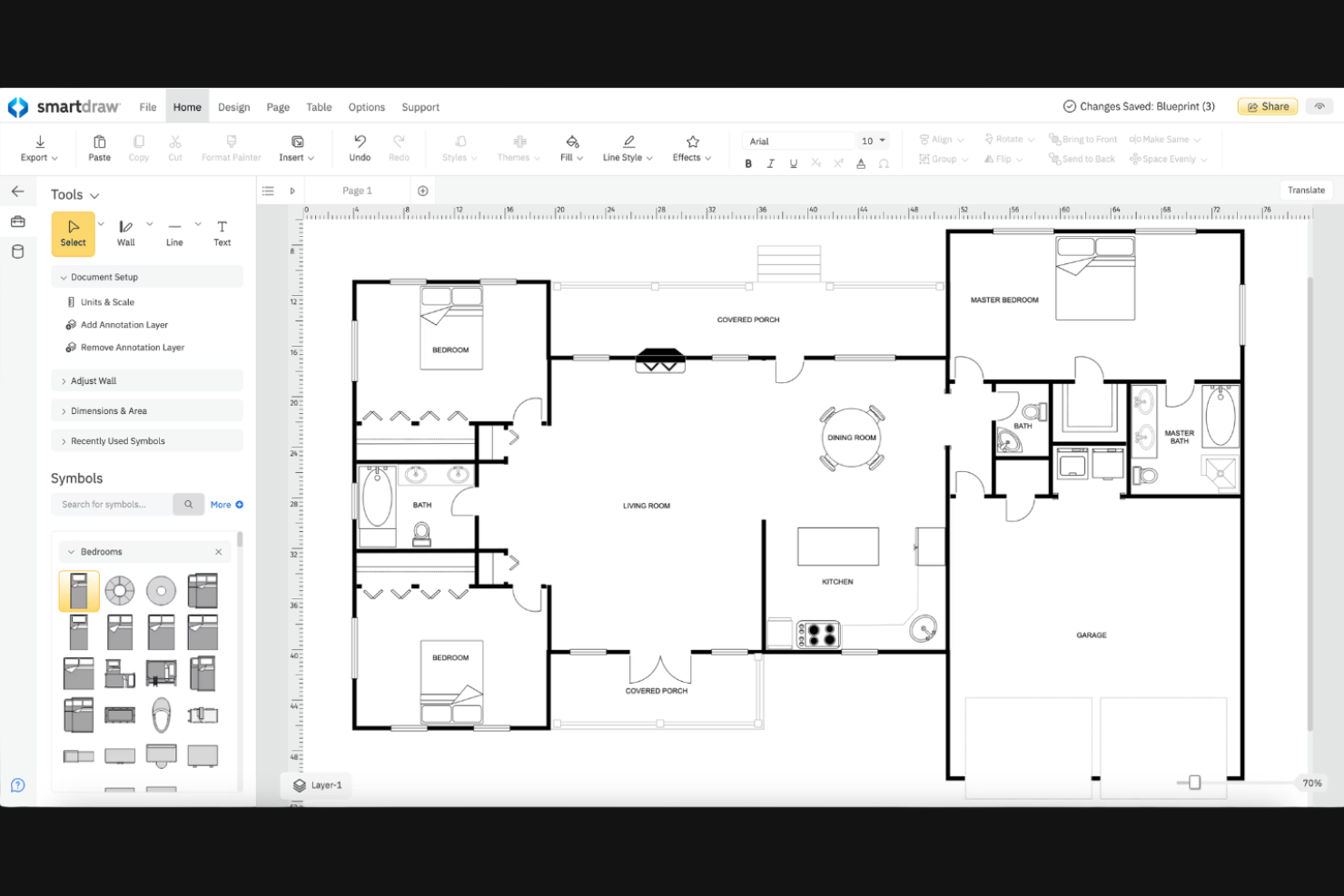
Per i team che necessitano di una vasta gamma di diagrammi professionali già pronti, SmartDraw offre un'estesa libreria di modelli di livello enterprise. È particolarmente utile per grandi organizzazioni, dipartimenti IT e project manager che devono creare visualizzazioni complesse come organigrammi, diagrammi di rete o planimetrie. SmartDraw ti aiuta a standardizzare la creazione di diagrammi in tutta l’azienda con modelli che rispettano i requisiti del settore e delle imprese.
Perché SmartDraw è una valida alternativa a draw.io
Se cerchi uno strumento di diagrammazione con un ampio catalogo di modelli professionali, SmartDraw è da considerare. L’ho scelto per i team che devono produrre diagrammi conformi agli standard del settore o che richiedono formati specializzati, come schemi d’ingegneria o flussi di lavoro per l’ambito sanitario. La libreria di modelli di SmartDraw copre una vasta gamma di esigenze aziendali, dai diagrammi di rete alle linee temporali di progetti. Questo rende più semplice creare visual professionali e ben rifinite senza partire da zero.
Funzionalità principali di SmartDraw
Altre funzionalità di SmartDraw aiutano i team a gestire e condividere i diagrammi in modo più efficiente:
- Formattazione automatica: forme e connettori si allineano e si adattano automaticamente man mano che costruisci i diagrammi.
- Importazione ed esportazione Visio: apri, modifica e salva file Microsoft Visio direttamente in SmartDraw.
- Strumenti di collaborazione: condividi diagrammi con i membri del team e raccogli feedback in tempo reale.
- Single Sign-On (SSO): integra il sistema di autenticazione della tua organizzazione per un accesso sicuro.
Integrazioni SmartDraw
Le integrazioni includono Microsoft Teams, Confluence, Jira, Trello, Google Workspace, Google Drive, OneDrive, SharePoint, Dropbox e Box.
Pros and Cons
Pros:
- Vere funzionalità di disegno CAD
- Ottimo per planimetrie
- Sicurezza di livello enterprise
Cons:
- Nessun piano davvero gratuito
- L’interfaccia risulta molto pesante

Aha!
Ideale per la visualizzazione di roadmap di prodotto
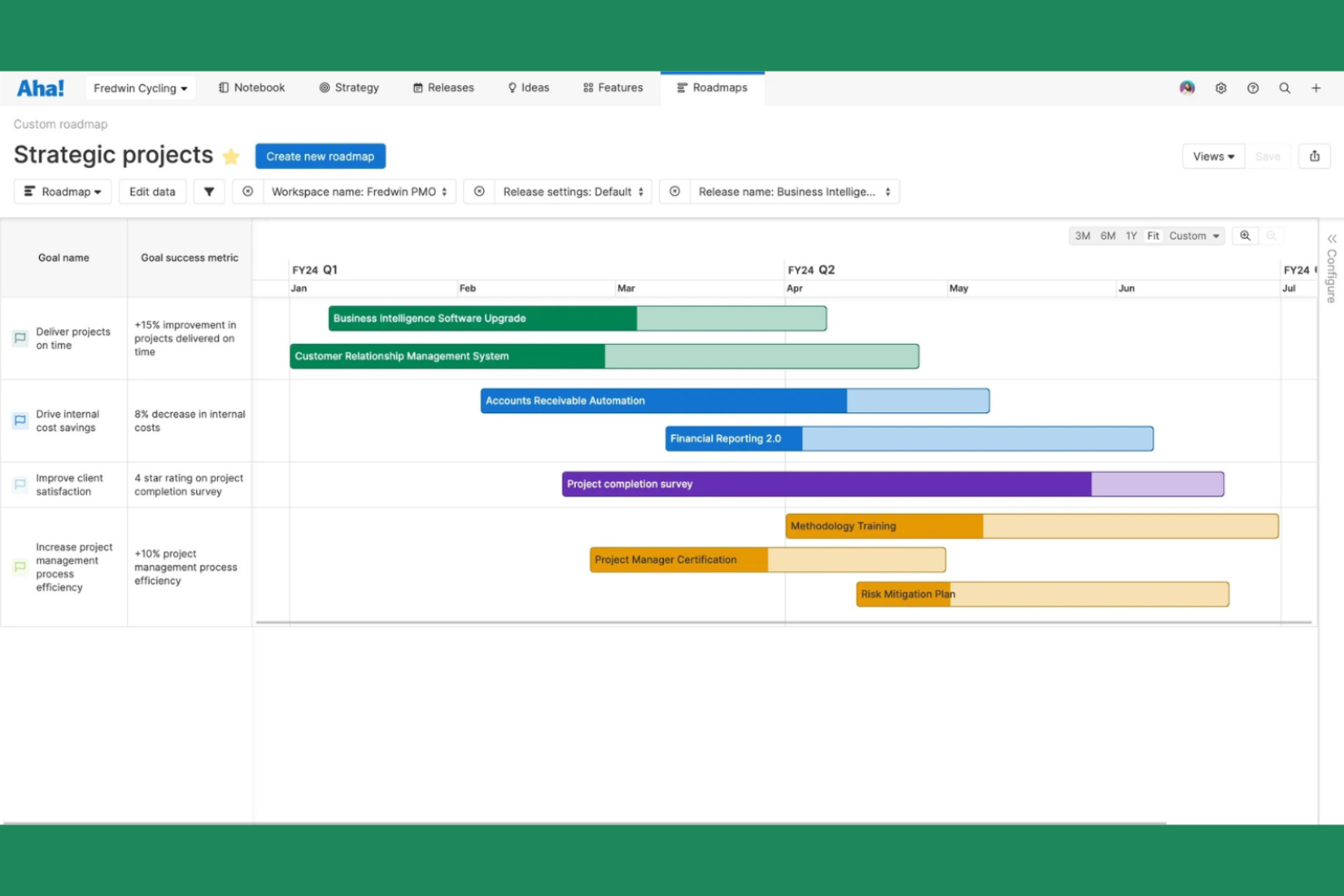
I responsabili di prodotto e i team strategici che desiderano visualizzare roadmap di prodotto complesse possono prendere in considerazione Aha!. La piattaforma è pensata per le organizzazioni che hanno bisogno di collegare la strategia di alto livello con la pianificazione dettagliata, offrendo funzionalità avanzate di roadmap, tracciamento delle dipendenze e degli obiettivi. A differenza dei comuni strumenti di diagrammazione, Aha! consente di collegare iniziative, rilasci e funzionalità direttamente agli obiettivi aziendali per una visione più strategica dei piani di prodotto.
Perché Aha! è una valida alternativa a draw.io
Quando devi visualizzare roadmap di prodotto con maggiore profondità rispetto ai normali strumenti di diagrammazione, Aha! si distingue. Ho scelto Aha! perché permette di creare roadmap interattive che collegano funzionalità, rilasci e obiettivi in una sola vista. La piattaforma supporta una mappatura avanzata delle dipendenze e la visualizzazione delle tempistiche, così puoi vedere come le iniziative si allineano agli obiettivi aziendali. Se il tuo team deve andare oltre i semplici flowchart e costruire piani di prodotto strategici, Aha! offre strumenti specializzati per questo scopo.
Funzionalità principali di Aha!
Altre caratteristiche che rendono Aha! utile per i team di prodotto includono:
- Bacheche di workflow personalizzabili: Configura bacheche che corrispondano al processo del tuo team per tracciare idee, funzionalità e rilasci.
- Portale delle idee: Raccogli, organizza e prioritizza i feedback di stakeholder e clienti in un portale dedicato.
- Pianificazione della capacità: Assegna risorse e visualizza i carichi di lavoro del team su più progetti.
- Presentazione interattiva: Crea e condividi presentazioni dal vivo direttamente dai dati e dalle roadmap di prodotto.
Integrazioni di Aha!
Le integrazioni includono Jira, Azure DevOps, Salesforce, Slack, Zendesk, GitHub, Google Drive, Microsoft Teams, Box e Confluence.
Pros and Cons
Pros:
- Gestione approfondita del backlog
- Ottima pianificazione delle risorse
- Sincronizzazione diretta con sviluppo
Cons:
- Nessun flowchart standard
- Inutile per mappature di reti

Ideale per l'organizzazione di idee in tempo reale
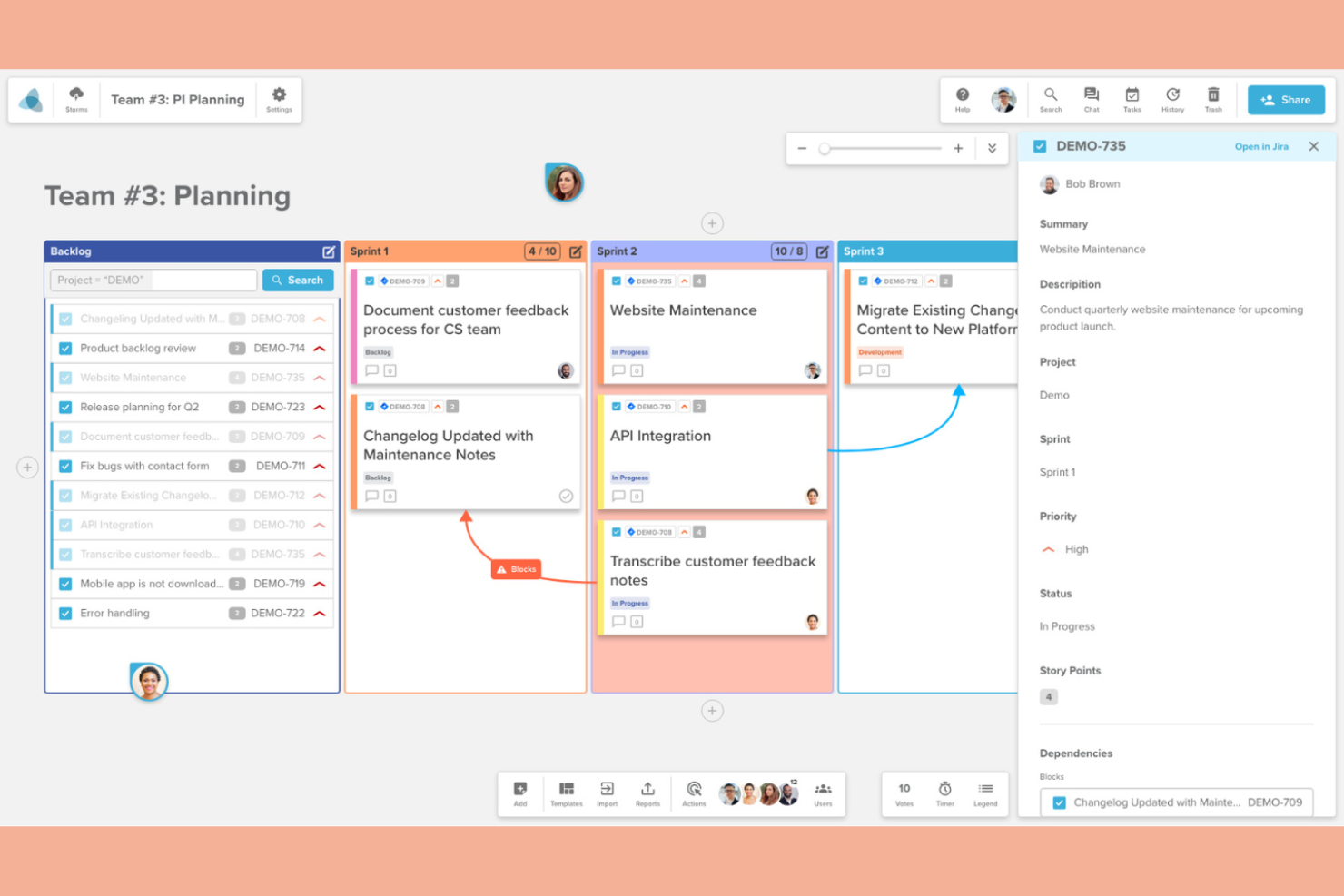
I team che hanno bisogno di organizzare idee e collaborare in tempo reale possono trovare Stormboard particolarmente utile. La piattaforma è pensata per team distribuiti, project manager e facilitatori che desiderano catturare, strutturare e dare priorità agli input durante le sessioni live. A differenza dei tradizionali strumenti di diagrammazione, Stormboard combina post-it digitali, modelli preimpostati e votazioni in tempo reale per aiutare i gruppi a trasformare le sessioni di brainstorming in piani azionabili immediatamente.
Perché Stormboard è una valida alternativa a draw.io
Per i team che devono organizzare idee mentre emergono, Stormboard offre un approccio in tempo reale che lo distingue dai classici strumenti di diagrammazione. Ho scelto Stormboard perché permette agli utenti di aggiungere post-it digitali, immagini e disegni a bacheche condivise collaborando dal vivo con altri membri. I modelli integrati per brainstorming, pianificazione di progetti e cerimonie agile aiutano a strutturare le sessioni e mantenere tutti coordinati. Se cerchi uno strumento che trasformi l'input di gruppo in diagrammi organizzati e azionabili al volo, Stormboard è progettato proprio per questo flusso di lavoro.
Funzionalità principali di Stormboard
Altre funzionalità che rendono Stormboard utile per la diagrammazione collaborativa includono:
- Strumenti di reportistica: genera report strutturati dalle tue bacheche in formati come Word, Excel e PDF.
- Assegnazione dei compiti: assegna attività da svolgere ai membri del team direttamente all'interno dello spazio di lavoro.
- Votazioni e sondaggi: raccogli feedback e dai priorità alle idee usando le funzionalità di voto integrate.
- Integrazione con Microsoft Teams: collabora alle sessioni Stormboard direttamente all'interno di Microsoft Teams.
Integrazioni di Stormboard
Le integrazioni includono Microsoft Teams, Slack, Jira, Azure DevOps e Rally.
Pros and Cons
Pros:
- Generazione automatica dei report
- Voto del team integrato
- Ordinamento semplice dei post-it
Cons:
- Manca la diagrammazione libera
- Collegamenti deboli tra le linee
Ideale per la compatibilità con macOS e iOS
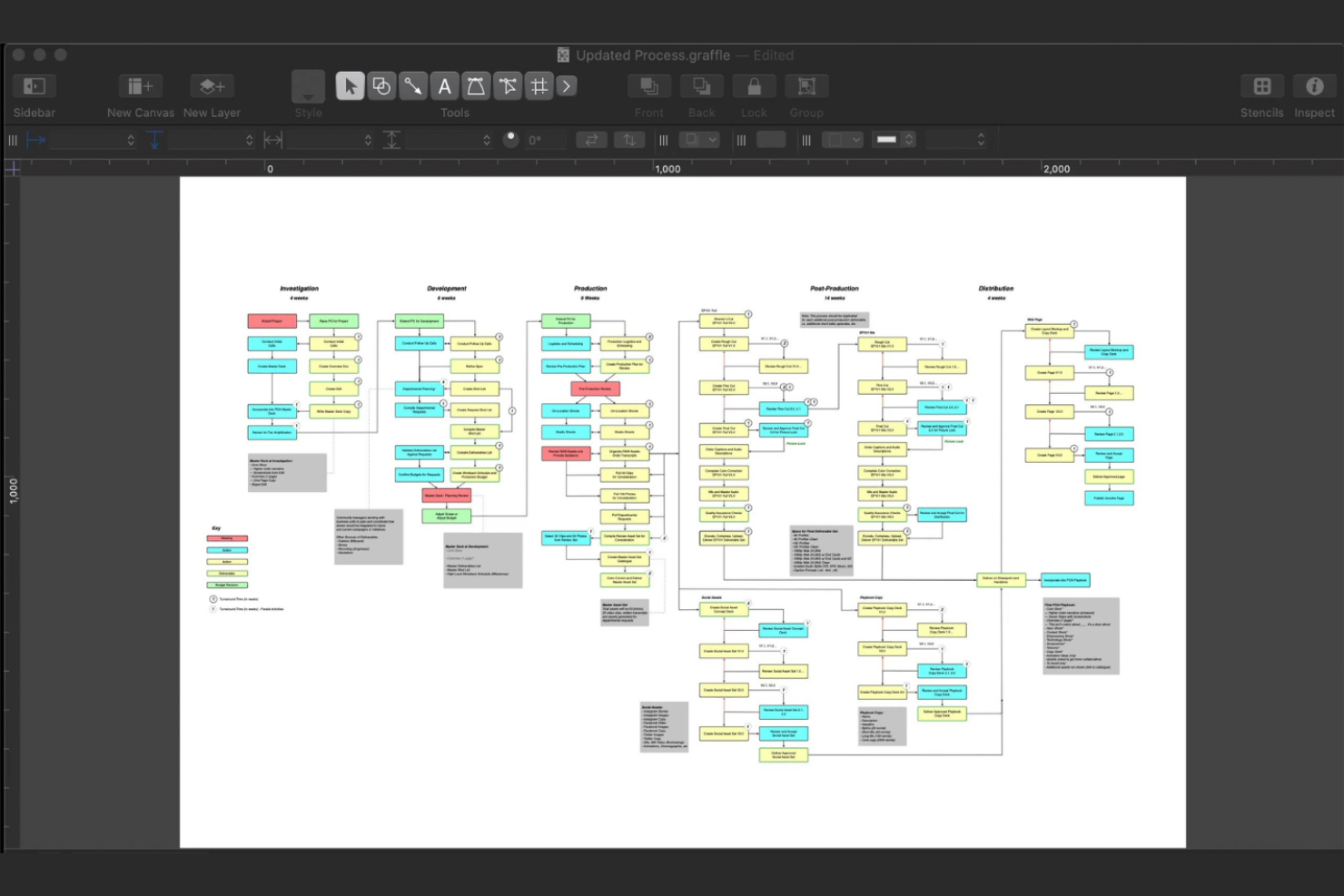
Se stai cercando uno strumento di diagrammazione progettato specificamente per dispositivi Apple, OmniGraffle è pensato per utenti macOS e iOS che necessitano di precisione e prestazioni native. È particolarmente indicato per designer UX, architetti e professionisti tecnici che desiderano controlli avanzati del layout e integrazione con l'ecosistema Apple. A differenza degli strumenti basati sul browser, OmniGraffle offre accesso offline, automazione con AppleScript e un supporto approfondito per le funzionalità di macOS.
Perché OmniGraffle è una valida alternativa a draw.io
A differenza di molti strumenti di diagrammazione, OmniGraffle è progettato appositamente per macOS e iOS, diventando così una scelta ideale se il tuo team lavora esclusivamente su dispositivi Apple. L'ho scelto perché sfrutta appieno le funzioni native Apple, incluso il supporto ad Apple Pencil su iPad e l'automazione con AppleScript. OmniGraffle offre anche accesso offline e controlli avanzati della canvas, particolarmente utili per professionisti che richiedono precisione e affidabilità senza dipendere da un browser web. Queste capacità lo distinguono da draw.io per chi dà priorità a una compatibilità fluida con l'ecosistema Apple.
Funzionalità principali di OmniGraffle
Altre funzionalità che rendono OmniGraffle interessante per la creazione di diagrammi includono:
- Riconoscimento delle forme: Converte istantaneamente gli schizzi approssimativi in forme precise per ottenere diagrammi più puliti.
- Supporto livelli condivisi: Usa livelli condivisi per mantenere la coerenza su più canvas all'interno di un singolo documento.
- Libreria di stencil: Accedi a una libreria integrata di forme e simboli riutilizzabili per creare diagrammi più velocemente.
- Importazione ed esportazione SVG: Importa o esporta diagrammi in formato SVG per la compatibilità con altri strumenti di design.
Integrazioni di OmniGraffle
Le integrazioni includono OmniFocus, OmniPlan, Scorciatoie Apple, Dropbox e iCloud Drive.
Pros and Cons
Pros:
- Automazione AppleScript
- Eccezionali esportazioni in alta risoluzione
- Disegno vettoriale avanzato
Cons:
- Licenza molto costosa
- Manca la collaborazione web


Se desideri uno strumento di diagrammazione che imiti l'aspetto degli schizzi su una lavagna, Excalidraw si distingue. È perfetto per designer, team di prodotto ed educatori che apprezzano uno stile disegnato a mano per brainstorming o presentare idee. Excalidraw ti aiuta a creare elementi visivi che trasmettono informalità e accessibilità, rendendo più semplice comunicare concetti senza la rigidità dei tradizionali strumenti di diagrammazione.
Perché Excalidraw è una buona alternativa a draw.io
Excalidraw è un'ottima scelta se desideri diagrammi che sembrino disegnati a mano e informali. L'ho scelto per i team che hanno bisogno di elementi visivi che assomiglino più a schizzi che a diagrammi di flusso rifiniti. Gli strumenti di disegno libero e le forme dai bordi irregolari di Excalidraw ti aiutano a catturare le idee rapidamente senza i vincoli di modelli rigidi. Questo approccio rende più semplice fare brainstorming, iterare e comunicare concetti in modo accessibile e collaborativo.
Funzionalità principali di Excalidraw
Altre funzionalità di Excalidraw lo rendono una soluzione flessibile per diverse esigenze di diagrammazione:
- Modalità Collaborazione: Più utenti possono disegnare e modificare sulla stessa tela in tempo reale.
- Opzioni di esportazione: Esporta i diagrammi in formato png, svg o immagini pronte per la clipboard per una condivisione facile.
- Librerie personalizzate: Salva e riutilizza le tue forme e componenti tra diversi progetti.
- Modalità scura: Passa a un'interfaccia scura per una visualizzazione confortevole durante le sessioni lunghe.
Integrazioni Excalidraw
Le integrazioni includono Obsidian, Notion, VS Code, GitHub e Jira.
Pros and Cons
Pros:
- Interfaccia senza distrazioni
- Ottimo per schizzi rapidi
- Collaborazione in tempo reale integrata
Cons:
- Non adatto a disegni tecnici
- Formati di esportazione limitati

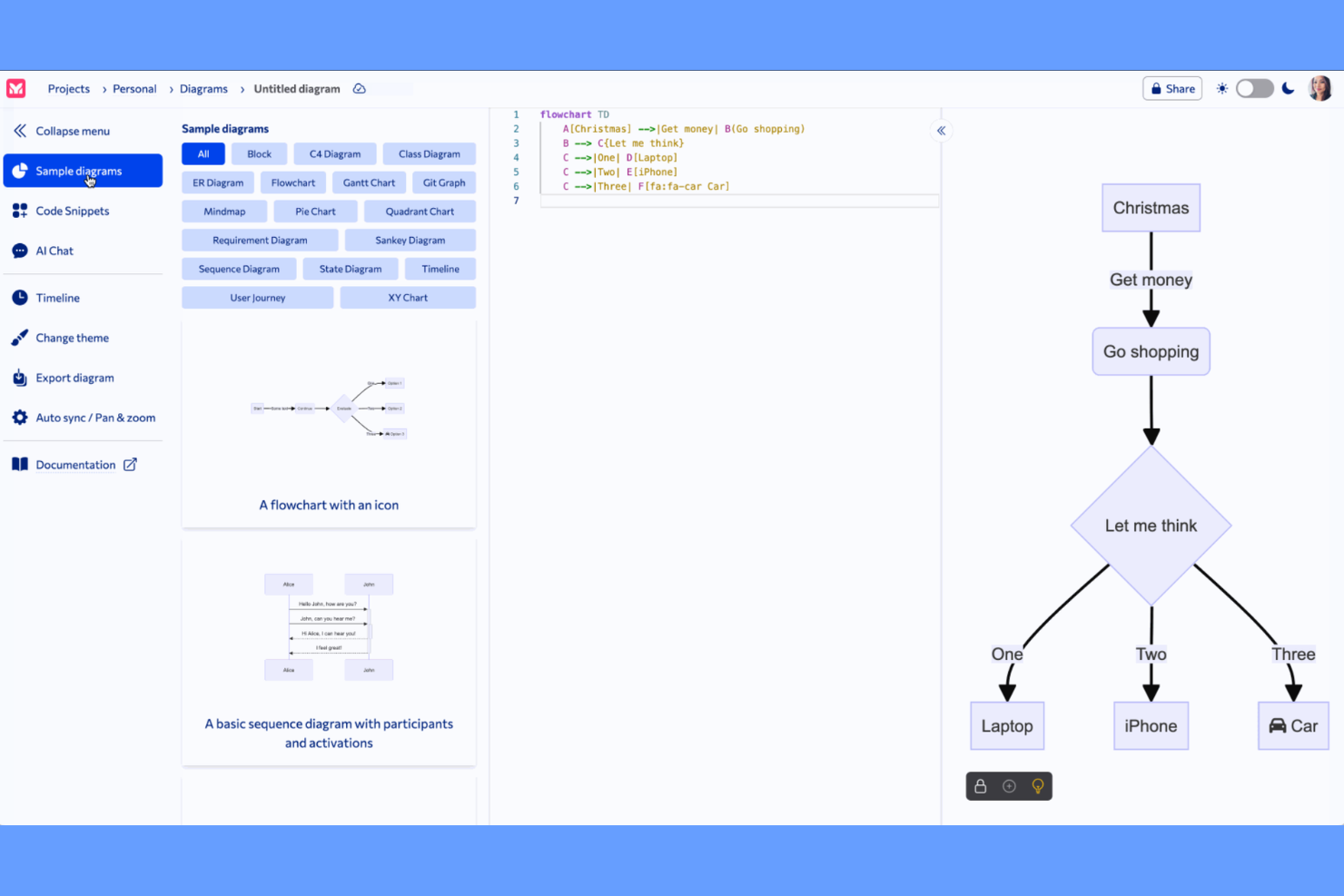
Gli sviluppatori e i team tecnici che preferiscono lavorare con il codice troveranno in Mermaid una soluzione unica per la creazione di diagrammi. Questo strumento consente di creare diagrammi di flusso, diagrammi di sequenza e altro ancora utilizzando una semplice sintassi ispirata al markdown, il che lo rende ideale per integrare diagrammi direttamente nella documentazione o nei repository di codice. Mermaid si distingue dagli strumenti visuali drag-and-drop come draw.io perché permette il controllo delle versioni e aggiornamenti facili tramite modifiche al testo.
Perché Mermaid è una buona alternativa a draw.io
Se vuoi creare diagrammi direttamente dal testo, Mermaid offre un approccio completamente diverso rispetto agli editor visuali come draw.io. Ho scelto Mermaid perché ti permette di definire diagrammi di flusso, diagrammi di Gantt e diagrammi di sequenza utilizzando una sintassi ispirata al markdown, particolarmente utile per sviluppatori e redattori tecnici. Questo metodo basato sul testo consente di versionare i diagrammi insieme al codice e aggiornarli con semplici modifiche testuali. Per i team che danno valore all'automazione e alla documentazione integrata nel codice, l'approccio di Mermaid è particolarmente adatto.
Funzionalità principali di Mermaid
Altre funzionalità che rendono Mermaid interessante per la creazione di diagrammi includono:
- Editor live: Modifica e visualizza in anteprima i diagrammi in tempo reale direttamente nel browser.
- Personalizzazione dei temi: Modifica colori, font e stili utilizzando temi integrati o personalizzati.
- Diagrammi integrabili: Inserisci i diagrammi direttamente in file markdown, wiki e piattaforme di documentazione.
- Opzioni di esportazione: Salva i diagrammi come SVG, PNG o copia il codice per usarli altrove.
Integrazioni di Mermaid
Le integrazioni includono GitHub, GitLab, Notion, Obsidian e Confluence.
Pros and Cons
Pros:
- Nessuna disposizione manuale necessaria
- Genera grafici istantaneamente
- Ottimo per sviluppatori
Cons:
- Layout visivi rigidi
- Personalizzazione dei colori difficile


Se stai cercando uno strumento di mind mapping che enfatizzi struttura e chiarezza, XMind è da prendere in considerazione. È pensato per professionisti e team che hanno bisogno di organizzare idee complesse, flussi di lavoro o strategie in modo visivamente logico. XMind si distingue da altri strumenti di diagrammazione offrendo strutture avanzate per le mappe, modalità outline e opzioni di esportazione pensate per il pensiero strutturato e la presentazione.
Perché XMind è una valida alternativa a draw.io
A differenza degli strumenti di diagrammazione generici, XMind è progettato specificamente per il mind mapping strutturato. Ho scelto XMind perché offre strutture avanzate come schemi logici, diagrammi ad albero e diagrammi a lisca di pesce che ti aiutano a organizzare le informazioni in modo gerarchico e visivo. La modalità outline consente di passare tra visualizzazione mappa e testo, rendendo più semplice perfezionare e presentare idee complesse. Se hai bisogno di uno strumento che sostenga un pensiero disciplinato e un'organizzazione chiara, XMind offre funzionalità pensate appositamente per le mappe strutturate.
Funzionalità principali di XMind
Altre funzionalità che rendono XMind interessante per la diagrammazione strutturata includono:
- Modalità Zen: Concentrati sulla tua mappa mentale senza distrazioni nascondendo tutte le barre degli strumenti e i menu.
- Modalità Pitch: Trasforma la tua mappa mentale in una presentazione a diapositive direttamente all'interno di XMind.
- Libreria di sticker e illustrazioni: Aggiungi elementi visivi alle mappe grazie agli sticker integrati e alle illustrazioni in stile disegno a mano.
- Sincronizzazione multipiattaforma: Accedi e modifica le tue mappe su Windows, macOS, iOS, Android e web.
Integrazioni di XMind
Le integrazioni includono Slack, Zoom, Notion, Dropbox, Google Drive e OneDrive.
Pros and Cons
Pros:
- Navigazione rapida da tastiera
- Modalità presentazione integrata
- Ottimi modelli estetici
Cons:
- La versione gratuita applica watermark
- Non supporta import di forme personalizzate

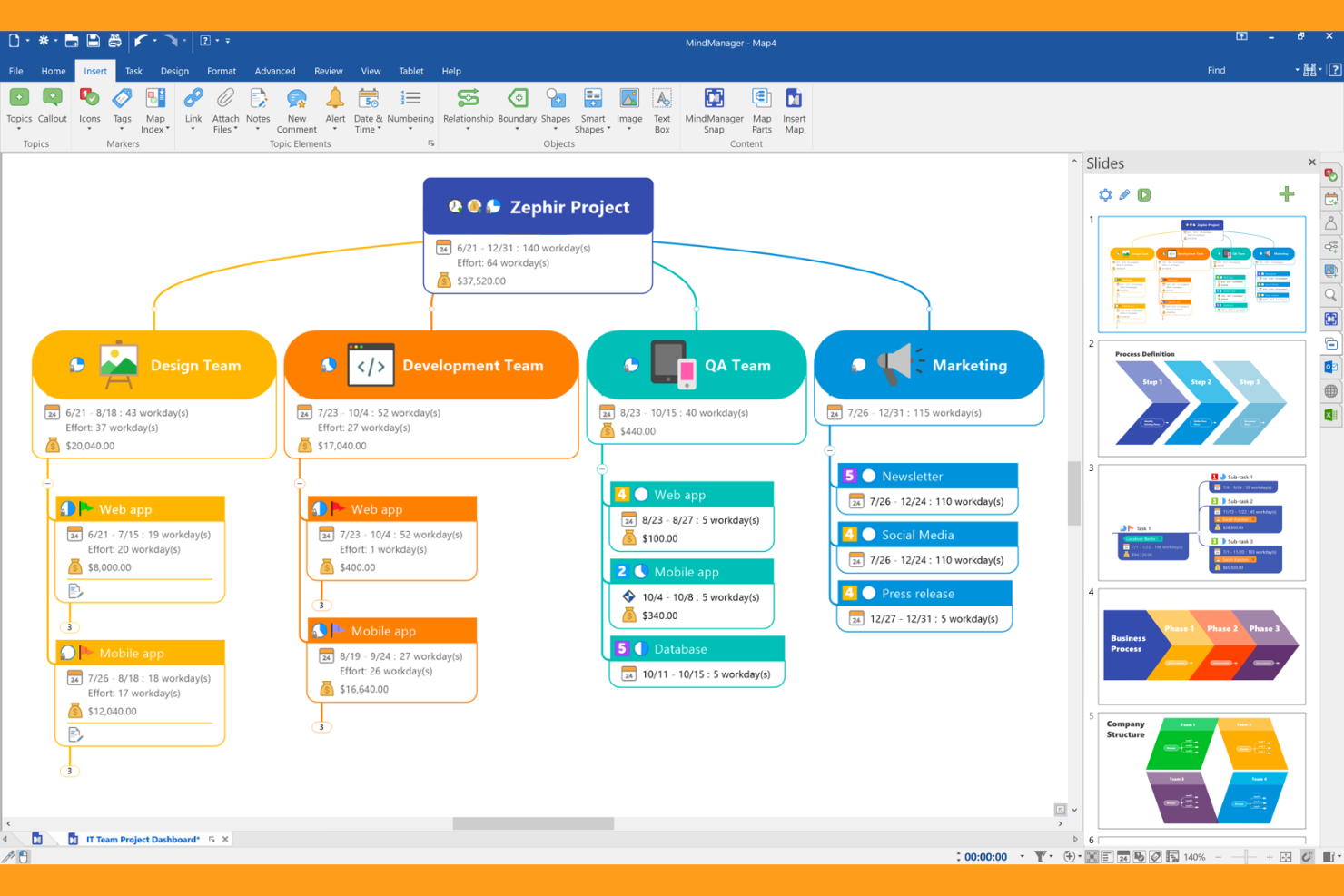
MindManager offre a responsabili di progetto e team aziendali un modo per organizzare visivamente progetti complessi e idee. A differenza degli strumenti di diagrammazione di base, combina funzionalità di mind mapping, creazione di flowchart e pianificazione di progetto in un unico spazio di lavoro. Questo lo rende particolarmente utile per i team che devono connettere attività, tempistiche e dipendenze in una sola visualizzazione interattiva.
Perché MindManager è una buona alternativa a draw.io
Per i team che cercano qualcosa di più rispetto alla semplice diagrammazione, MindManager offre un ambiente dedicato per la pianificazione visiva dei progetti. Ho scelto MindManager perché consente di creare mappe mentali, flowchart e cronologie di progetto tutto in un unico posto, semplificando la connessione tra idee e attività concrete. I suoi diagrammi di Gantt interattivi e strumenti di gestione delle attività aiutano a visualizzare le dipendenze e a monitorare i progressi direttamente all'interno dei diagrammi. Se hai bisogno di passare dal brainstorming all'esecuzione strutturata dei progetti, MindManager integra tutte queste capacità in uno spazio di lavoro unico.
Funzionalità principali di MindManager
Altre funzionalità che rendono MindManager utile per la pianificazione dei progetti includono:
- Automazione SmartRules: Imposta formattazione condizionale e trigger per automatizzare i cambiamenti visivi nei tuoi diagrammi.
- Co-Editing: Collabora in tempo reale con i membri del team sulla stessa mappa o diagramma.
- Modalità Presentazione: Trasforma mappe e diagrammi in presentazioni interattive senza lasciare la piattaforma.
- Opzioni di importazione ed esportazione: Importa dati da Microsoft Project, Excel e Outlook o esporta i diagrammi in diversi formati.
Integrazioni MindManager
Le integrazioni includono Jira, Microsoft Teams, Microsoft Word, Microsoft Excel, Microsoft SharePoint, Microsoft Outlook, Microsoft Project, Microsoft Planner, Microsoft To Do e Box.
Pros and Cons
Pros:
- Collega direttamente alle attività
- Profonda integrazione con MS Office
- Ottimo per i piani di progetto
Cons:
- Strumenti di flowchart deboli
- Non adatto ai diagrammi di rete
Altre alternative a draw.io
Ecco alcune ulteriori alternative a draw.io che non sono entrate nella mia selezione, ma che vale comunque la pena considerare:
- Gliffy
Ideale per la collaborazione rapida del team
- LibreOffice Draw
Ideale per la modifica desktop open-source
- Holori
Ideale per la visualizzazione dell'architettura cloud


Come valuto le alternative a draw.io
Divido la mia valutazione in due livelli: le capacità di base che uno strumento deve avere—come la co-modifica in tempo reale e l'integrazione con Jira—e i fattori che distinguono le migliori opzioni.
Funzionalità fondamentali (requisiti minimi per questa lista)
Quando seleziono gli strumenti per la mia lista, valuto ciascuno su una scala da 0 (non offre la funzionalità) a 5 (eccelle in questa area) per ogni funzionalità fondamentale elencata di seguito. Poi calcolo il punteggio totale dello strumento e lo converto in una percentuale. Ogni strumento deve raggiungere un punteggio totale minimo del 65% per essere considerato per l'inclusione.
- Diagrammi & Flowchart: Valuto le librerie di forme e la logica dei connettori per costruire artefatti PM comuni come workflow a corsie, mappe di dipendenza e diagrammi di rete.
- Modelli di Project Management: I modelli predefiniti per diagrammi di Gantt, matrici RACI e workflow sprint fanno risparmiare tempo di configurazione, quindi controllo la libreria di modelli di ogni strumento per la rilevanza PM.
- Collaborazione in tempo reale: I team distribuiti devono poter co-modificare i diagrammi dal vivo durante le sessioni di pianificazione, quindi cerco la modifica multi-cursore, commenti in linea e indicatori di presenza.
- Integrazioni con strumenti PM: Verifico se i diagrammi si collegano a strumenti come Jira, Confluence, Asana o Monday affinché i team possano collegare i piani visivi ai backlog e alle bacheche attive.
- Compatibilità import/export: La migrazione è fondamentale, quindi valuto il supporto per i formati .drawio, .vsdx, SVG e PDF per assicurare che i team possano trasferire file senza dover rifare il lavoro.
- Controllo degli accessi & condivisione: Permessi basati sui ruoli e link condivisibili sono importanti quando i diagrammi di progetto circolano tra stakeholder, fornitori e leadership.
Una volta che ho una lista di strumenti che soddisfano questi criteri, considero cosa distingue ogni piattaforma.
Fattori differenzianti (cosa distingue i fornitori)
Ecco come paragono e confronto i diversi fornitori:
Funzionalità distintive
La diagrammazione assistita dall'AI è un differenziatore significativo. Strumenti come Miro e Lucidchart consentono di generare flowchart da prompt di testo, velocizzando la mappatura dei processi nelle fasi iniziali. Cerco anche diagrammi collegati ai dati che recuperano informazioni in tempo reale da fonti come le bacheche Jira, mantenendo aggiornate le visualizzazioni senza aggiornamenti manuali. La modalità presentazione è importante quando si deve mostrare un workflow di sprint alla leadership senza esportare tutto in una presentazione separata.
Oltre le funzionalità
La struttura dei prezzi è importante perché draw.io è gratuito, quindi valuto se le alternative offrono un livello gratuito paragonabile o giustificano il costo con funzionalità aggiuntive. La flessibilità di implementazione è un altro fattore che verifico: alcuni team hanno bisogno di opzioni self-hosted o offline, che strumenti come Lucidchart e Miro gestiscono in modo diverso. Considero anche quanto facilmente uno strumento si integri nei flussi di lavoro esistenti, come la possibilità di incorporare i diagrammi direttamente dentro pagine Confluence o documenti Notion anziché dover passare a un'app separata.
Perché cercare un'alternativa a draw.io?
Sebbene draw.io sia una buona scelta tra gli strumenti per la creazione di diagrammi, esistono diversi motivi per cui alcuni utenti cercano soluzioni alternative. Potresti cercare un'alternativa a draw.io perché…
- Hai bisogno di modifiche multiutente in tempo reale e dell'integrazione con i flussi di lavoro
- Il tuo team desidera funzionalità integrate di gestione dei progetti
- Hai bisogno di collegamenti avanzati ai dati o di automazione
- Hai bisogno di una gamma più ampia di integrazioni native
- Desideri un'interfaccia utente più moderna o personalizzabile
- Hai bisogno di un supporto migliore per diagrammi grandi e complessi
Se ti riconosci in una di queste situazioni, sei nel posto giusto. Il mio elenco contiene diverse opzioni di strumenti per la creazione di diagrammi più adatte ai team che affrontano queste difficoltà con draw.io e cercano soluzioni alternative.
Funzionalità principali di draw.io
Ecco alcune delle funzionalità principali di draw.io, per aiutarti a mettere a confronto ciò che offrono le soluzioni alternative:
- Creazione di diagrammi tramite trascinamento
- Ampie librerie di forme e icone
- Collaborazione in tempo reale con modifica condivisa
- Integrazione con Google Drive, OneDrive e Dropbox
- Modelli personalizzabili per vari tipi di diagrammi
- Supporto dei livelli per organizzare diagrammi complessi
- Cronologia delle revisioni e controllo delle versioni
- Opzioni di esportazione in diversi formati di file
- Incorporamento dei diagrammi in Confluence e Jira
- Accesso offline tramite applicazioni desktop