

10 migliori alternative a Caspio per applicazioni di database nel 2026

Selezione di alternative a Caspio


Una valida alternativa a Caspio offre al tuo team un database online tutto-in-uno, flussi di lavoro personalizzabili e una piattaforma senza codice, senza vincolarti a un'unica piattaforma di sviluppo. Se stai cercando la migliore alternativa a Caspio, come Knack, Quickbase, AppSheet o Bubble, probabilmente cerchi opzioni facili da usare che gestiscano integrazioni di dati complesse, supportino la gestione dei progetti e si adattino alle tue esigenze in continua evoluzione per lo sviluppo di applicazioni. Questo elenco ti aiuterà a confrontare le principali piattaforme, così potrai trovare quella più adatta ai requisiti tecnici del tuo team, alla compatibilità con Android e agli obiettivi di distribuzione.
Che cos'è Caspio?
Caspio offre un approccio senza codice per creare applicazioni web personalizzate senza ricorrere a una programmazione estesa. Consente ai team di creare moduli, report e flussi di lavoro dei processi aziendali connessi a un sistema back-end cloud. Caspio viene utilizzato dalle aziende che hanno bisogno di un CRM o di gestire i dati in modo sicuro, soprattutto nel settore sanitario, dove la conformità a HIPAA è fondamentale, o per la gestione dell'inventario. Il suo generatore basato sul trascinamento lo rende popolare per incorporare strumenti o sostituire sistemi legacy come FileMaker, ma i team cercano spesso alternative come Power Apps o Zoho Creator per semplificare le operazioni.
Tabella comparativa delle alternative a Caspio
Questa tabella comparativa riassume i dettagli sui prezzi delle mie migliori alternative a Caspio:
| Tool | Best For | Trial Info | Price | ||
|---|---|---|---|---|---|
| 1 | Ideale per personalizzare visivamente i flussi di lavoro | Piano gratuito disponibile | Da $20/utente/mese (fatturazione annuale) | Website | |
| 2 | Ideale per la gestione di più database in un unico strumento | Prova gratuita di 14 giorni disponibile | Da $25/mese | Website | |
| 3 | Ideale per la collaborazione su app di team | Prova gratuita di 30 giorni + piano gratuito + demo gratuita disponibile | Da $11.20/utente/mese (fatturato annualmente) | Website | |
| 4 | Ideale per funzionalità avanzate di integrità dei dati | Download gratuito disponibile | Gratis (open source) | Website | |
| 5 | Ideale per l'assistenza intelligente nella scrittura di codice SQL | Prova gratuita di 30 giorni + piano gratuito + demo gratuita disponibile | Da $10,90/mese (fatturato annualmente) | Website | |
| 6 | Ideale per dati transazionali ad alto volume | Piano gratuito disponibile | Gratuito | Website | |
| 7 | Ideale per scalabilità aziendale | Disponibile un livello gratuito | Prezzo su richiesta | Website | |
| 8 | Ideale per la creazione rapida di database desktop | Prova gratuita di 30 giorni disponibile | Da $9.99/utente/mese | Website | |
| 9 | Ideale per strumenti di sviluppo database MySQL | Prova gratuita di 30 giorni disponibile | Da $119.95/mese (abbonamento annuale) | Website | |
| 10 | Ideale per migrazione e automazione dei database | Versione di prova gratuita disponibile | Prezzo su richiesta | Website |
Perché fidarsi dei nostri consigli sui software
Il nostro team testa e recensisce software dal 2012. In quanto project manager noi stessi, sappiamo quanto sia difficile — e importante — scegliere il software giusto.
Per questa guida, abbiamo valutato gli strumenti attraverso test pratici e ricerche indipendenti, assegnando un punteggio agli strumenti in base ai nostri criteri di selezione. Ci basiamo inoltre sulle competenze di leader di pensiero del settore e di professionisti attivi nella gestione dei progetti.
Le nostre recensioni riflettono il nostro giudizio editoriale umano, non un discorso di vendita.
Revisori esperti:
Recensioni delle alternative a Caspio
Di seguito trovi i miei riepiloghi dettagliati delle alternative a Caspio incluse nella mia selezione. Le mie recensioni offrono una panoramica approfondita delle funzionalità, dei casi d’uso migliori e delle integrazioni di ciascuna piattaforma, per aiutarti a trovare quella più adatta a te.

Airtable
Ideale per personalizzare visivamente i flussi di lavoro
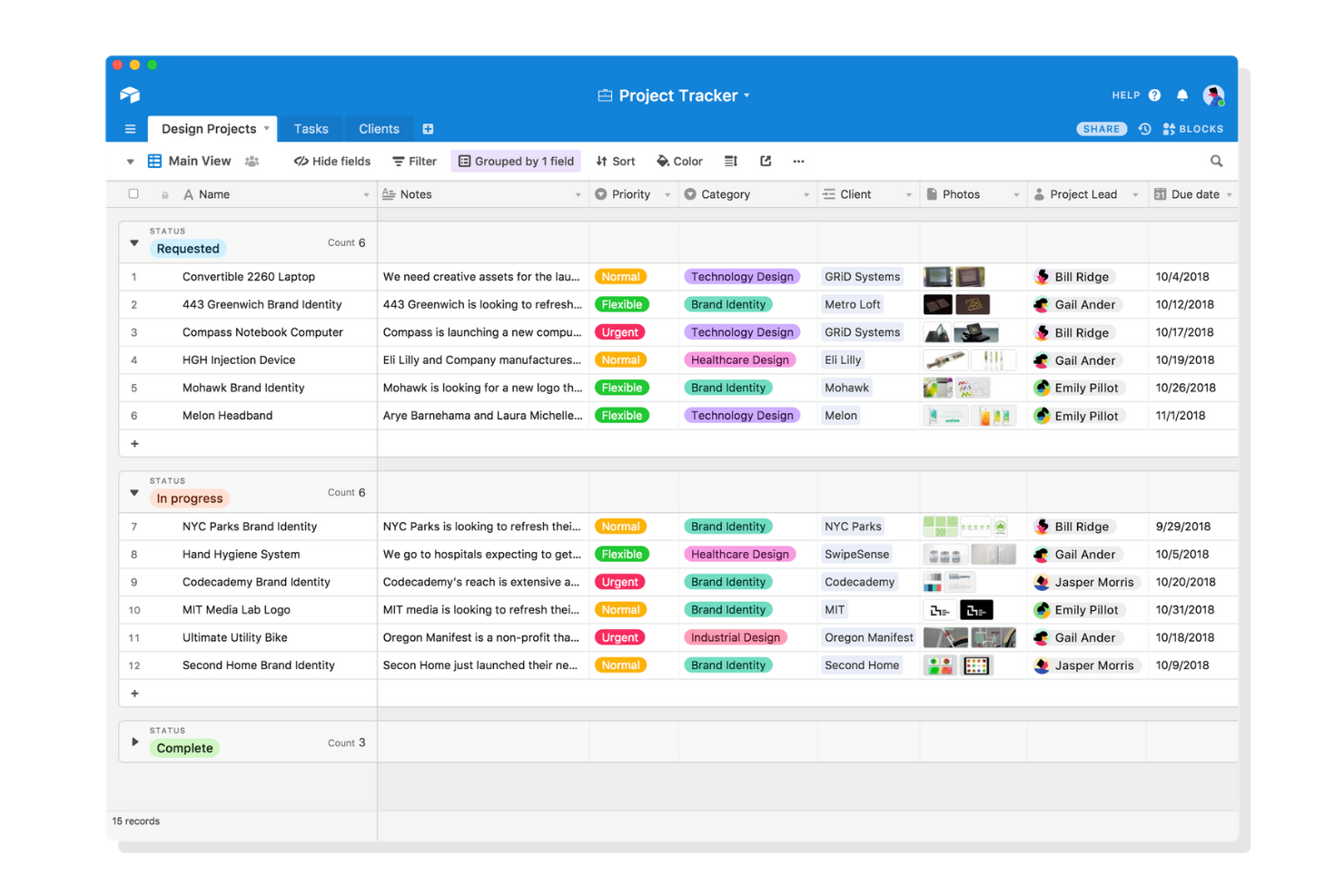
Per i team che desiderano progettare flussi di lavoro personalizzati con un approccio visivo, Airtable offre un'alternativa flessibile a Caspio. È particolarmente utile per project manager, marketer e team di prodotto che hanno bisogno di organizzare, collegare e automatizzare dati in un'interfaccia simile a un foglio di calcolo. Airtable si distingue perché consente di creare database, dashboard e automazioni con strumenti drag-and-drop e molteplici opzioni di visualizzazione.
Perché Airtable è una valida alternativa a Caspio
Se vuoi personalizzare i flussi di lavoro in modo visivo, Airtable offre maggiore flessibilità rispetto a Caspio. Ho scelto Airtable perché permette di creare e modificare database utilizzando campi drag-and-drop, bacheche Kanban e viste calendario. Puoi anche automatizzare compiti ripetitivi grazie agli strumenti di automazione integrati, facilitando così l'adattamento dei processi man mano che cambiano le tue esigenze. Per i team che puntano sull'organizzazione visiva e su regolazioni rapide, Airtable propone un approccio unico alla personalizzazione dei flussi di lavoro.
Funzionalità principali di Airtable
Altre funzionalità di Airtable potrebbero essere utili se stai confrontando alternative a Caspio:
- Interface Designer: Crea interfacce personalizzate per diversi utenti senza scrivere codice.
- Collegamento dei record: Collega record correlati tra diverse tabelle per costruire database relazionali.
- Controlli delle autorizzazioni: Imposta livelli di accesso dettagliati per collaboratori e team.
- Estensioni predefinite: Aggiungi grafici, mappe e altre visualizzazioni direttamente nelle tue basi.
Integrazioni di Airtable
Le integrazioni includono Google Drive, Salesforce, Slack, Jira, Zendesk, Box, Dropbox, GitHub, Gmail e Outlook Calendar.
Pros and Cons
Pros:
- Non richiede conoscenze SQL
- Ottimo generatore di moduli web
- Ampia scelta di tipi di campo
Cons:
- Non è un vero database relazionale
- Autorizzazioni meno approfondite

DBeaver
Ideale per la gestione di più database in un unico strumento

Se cerchi un modo per gestire più database da un'unica interfaccia, DBeaver è stato creato proprio per questa esigenza. Questo strumento è particolarmente utile per amministratori di database, analisti e team IT che lavorano su diverse piattaforme di database. A differenza di Caspio, DBeaver ti permette di connetterti, interrogare e gestire decine di tipi di database fianco a fianco senza dover cambiare strumenti.
Perché DBeaver è una valida alternativa a Caspio
A differenza di Caspio, DBeaver è pensato per i team che hanno bisogno di gestire e interagire con più sistemi di database da un solo posto. Ho scelto DBeaver perché supporta connessioni dirette a un'ampia gamma di database, inclusi MySQL, PostgreSQL, Oracle, SQL Server e molti altri. Puoi eseguire query, modificare dati e confrontare schemi su diverse piattaforme senza cambiare strumento. Per chiunque gestisca diversi database o debba migrare dati tra sistemi, DBeaver offre uno spazio di lavoro unificato che Caspio non offre.
Funzionalità principali di DBeaver
Altre funzionalità di DBeaver possono risultare utili se stai confrontando alternative a Caspio:
- Generazione di diagrammi ER: Visualizza la struttura e le relazioni dei database con diagrammi entità-relazione integrati.
- Editor SQL con completamento automatico: Scrivi e modifica query SQL con evidenziazione della sintassi e suggerimenti di completamento codice.
- Strumenti per esportare e importare dati: Trasferisci dati tra database o formati file utilizzando procedure guidate di esportazione e importazione.
- Temi UI personalizzabili: Personalizza l'aspetto dell'interfaccia con varie opzioni di tema e layout.
Integrazioni di DBeaver
Le integrazioni includono MySQL, PostgreSQL, Oracle, SQL Server e SQLite.
Pros and Cons
Pros:
- Versione open-source gratuita
- Strumenti avanzati per l'editor SQL
- Importazione/esportazione dati semplice
Cons:
- Nessuna funzionalità per moduli web
- Pensato esclusivamente per sviluppatori

Podio
Ideale per la collaborazione su app di team
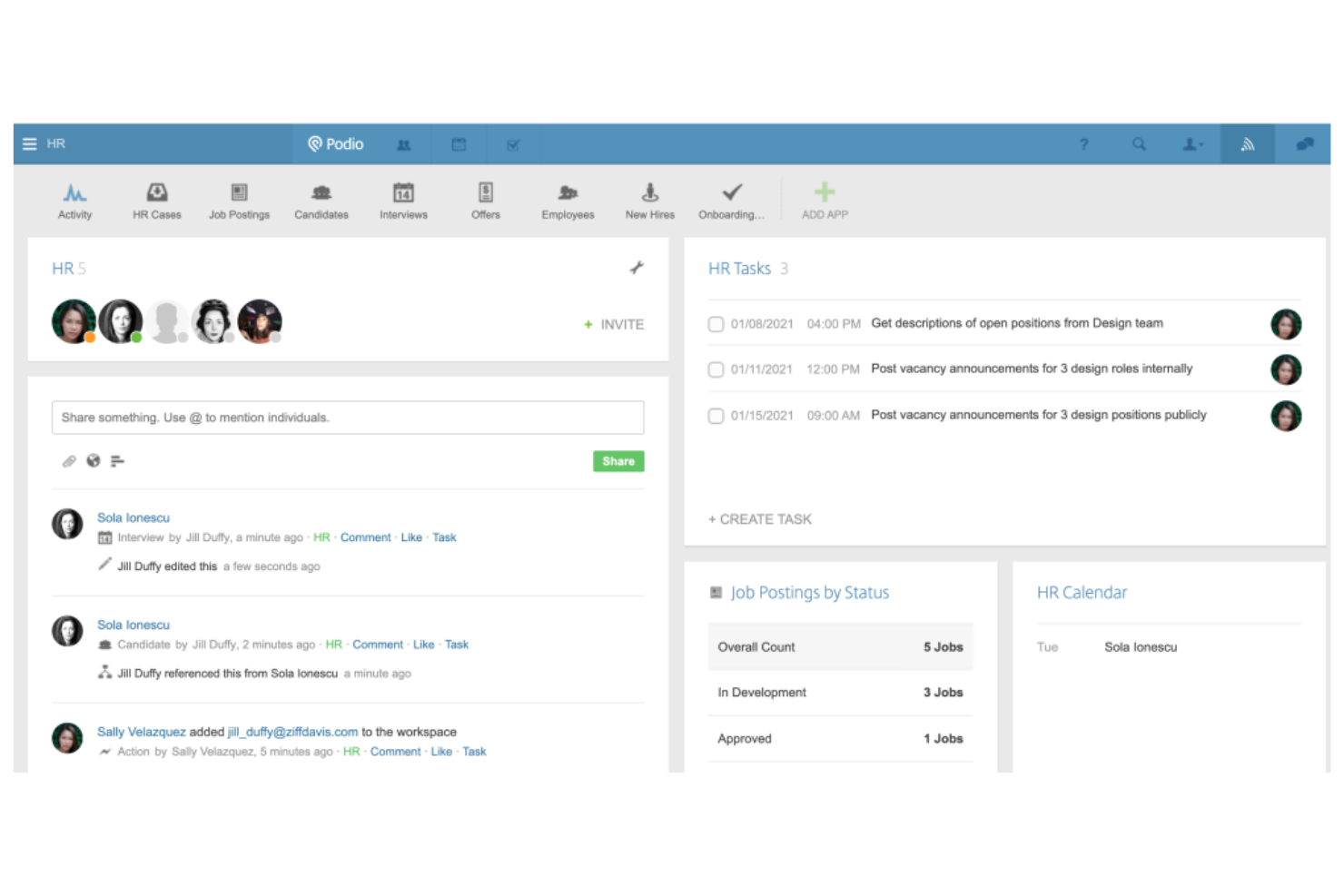
Podio è pensato per i team che devono creare app personalizzate e gestire progetti in modo collaborativo. È una scelta efficace per le organizzazioni che vogliono centralizzare flussi di lavoro, discussioni e dati in un unico luogo senza bisogno di molto codice. Podio si distingue da Caspio perché consente agli utenti di creare, modificare e automatizzare app di team con controlli di autorizzazione flessibili e strumenti di comunicazione integrati.
Perché Podio è una buona alternativa a Caspio
Per i team che vogliono sviluppare e gestire app collaborative, Podio offre un approccio diverso da Caspio. Ho scelto Podio perché permette di creare app personalizzate con moduli drag-and-drop e assegnare permessi dettagliati ai membri del team. La chat integrata e i thread di commenti mantengono la comunicazione di progetto legata direttamente ad attività e registrazioni. Se il tuo team dà valore alla collaborazione in tempo reale e a un design flessibile delle app, Podio è la scelta giusta.
Funzionalità principali di Podio
Alcune altre funzionalità di Podio possono essere utili se stai confrontando alternative a Caspio:
- Automazione dei flussi di lavoro: Automatizza attività ripetitive e approvazioni utilizzando gli strumenti di workflow integrati di Podio.
- Modelli di app personalizzabili: Avvia progetti rapidamente con una libreria di modelli di app predefiniti per diverse esigenze aziendali.
- Condivisione e archiviazione file: Allega, archivia e gestisci file direttamente all'interno di attività e progetti.
- Integrazione calendario: Sincronizza le scadenze e gli eventi di progetto con calendari esterni per una pianificazione migliore.
Integrazioni Podio
Le integrazioni includono ShareFile, Dropbox, Google Drive, Evernote e Zendesk.
Pros and Cons
Pros:
- Logica di workflow integrata
- Interfaccia utente molto intuitiva
- Ottimi moduli web esterni
Cons:
- Più lento rispetto ai veri database
- Applicazione mobile poco intuitiva


Se hai bisogno di una piattaforma database con un'integrità dei dati rigorosa e controlli avanzati, PostgreSQL merita considerazione. Questo database relazionale open source è ideale per i team che gestiscono strutture dati complesse, requisiti normativi o applicazioni mission-critical. A differenza di Caspio, PostgreSQL offre il pieno controllo sul design dello schema, sulle regole di validazione e sulla coerenza transazionale.
Perché PostgreSQL è una buona alternativa a Caspio
Per i team che necessitano di un'integrità avanzata dei dati, PostgreSQL offre funzionalità ben superiori a quelle disponibili nelle tradizionali piattaforme low-code. Ho scelto PostgreSQL perché supporta il controllo di concorrenza multi-versione (MVCC), l’isolamento granulare delle transazioni, e una solida validazione tramite vincoli e trigger. Queste caratteristiche ti aiutano a far rispettare regole aziendali rigorose e a mantenere dati consistenti e affidabili anche in ambienti ad alto volume o soggetti a regolamentazioni. Se i tuoi progetti richiedono un controllo preciso della qualità dei dati e del comportamento transazionale, PostgreSQL è una valida alternativa a Caspio.
Funzionalità principali di PostgreSQL
Ecco alcune altre funzionalità di PostgreSQL che potrebbero risultare utili se stai confrontando alternative a Caspio:
- Tipi di dati estensibili: Crea tipi di dati personalizzati per soddisfare le esigenze specifiche della tua applicazione.
- Ricerca full-text: Esegui query di ricerca testuale avanzate direttamente all’interno del database.
- Supporto JSON e XML: Archivia e interroga dati semi-strutturati utilizzando le funzionalità native per JSON e XML.
- Ripristino point-in-time: Ripristina il tuo database in un momento specifico utilizzando gli strumenti integrati di backup e ripristino.
Integrazioni di PostgreSQL
Le integrazioni includono pgAdmin, Tableau, Apache Kafka, Datadog e AWS.
Pros and Cons
Pros:
- Completamente gratuito
- Scalabilità incredibile
Cons:
- Sicurezza di livello enterprise
- Richiede competenze avanzate di database
- Non offre portali web istantanei


Gli sviluppatori e i professionisti dei dati che necessitano di un supporto avanzato nella scrittura di codice SQL possono trovare in DataGrip una soluzione ideale. Questo strumento si distingue da Caspio offrendo completamento intelligente del codice, analisi in tempo reale e strumenti di refactoring per query SQL complesse. DataGrip è particolarmente utile per i team che gestiscono diversi sistemi di database e desiderano una profonda comprensione del codice, piuttosto che creare app con poco codice.
Perché DataGrip è una valida alternativa a Caspio
Per i team che hanno bisogno di più delle semplici app database low-code, DataGrip offre un’assistenza intelligente nella scrittura di codice SQL che Caspio non fornisce. Ho scelto DataGrip perché offre completamento del codice contestuale, rilevamento degli errori in tempo reale e avanzati strumenti di refactoring per lo sviluppo SQL. Puoi scrivere, analizzare e ottimizzare query complesse su più piattaforme database da un’unica interfaccia. Se il tuo lavoro dipende dalla scrittura e dal mantenimento di SQL di alta qualità, DataGrip porta un livello di intelligenza e produttività che le piattaforme low-code come Caspio non possono eguagliare.
Funzionalità principali di DataGrip
Altre funzionalità di DataGrip potrebbero essere utili se stai confrontando alternative a Caspio:
- Diagrammi dei database: Visualizza strutture e relazioni dei database con diagrammi interattivi.
- Integrazione con il controllo di versione: Collega direttamente dall’interfaccia a sistemi di versionamento come Git, Mercurial e altri.
- Template di codice personalizzabili: Crea e riutilizza frammenti di codice SQL per una scrittura delle query più rapida.
- Editor dati con filtri: Modifica direttamente i dati delle tabelle e applica filtri avanzati per visualizzare record specifici.
Integrazioni di DataGrip
Le integrazioni includono MySQL, PostgreSQL, Oracle, SQL Server e MongoDB.
Pros and Cons
Pros:
- Eccellente sincronizzazione con il controllo di versione
- Fa il refactoring del codice in sicurezza
- Interfaccia pulita con modalità scura
Cons:
- Non ospita i tuoi dati
- Licenza JetBrains a pagamento


MySQL è un database relazionale open-source affidato a team che gestiscono dati transazionali su larga scala e ad alto volume. È una scelta solida per aziende orientate alla tecnologia e team di prodotto che necessitano di coerenza affidabile dei dati e prestazioni di query rapide. Se cerchi un'alternativa a Caspio che supporti operazioni dati complesse e si integri con un'ampia gamma di applicazioni, MySQL si distingue per la sua scalabilità e flessibilità.
Perché MySQL è una buona alternativa a Caspio
Per i team che devono gestire dati transazionali ad alto volume, MySQL offre funzionalità che vanno oltre quelle presenti in Caspio. Ho scelto MySQL perché gestisce query complesse e grandi set di dati con una forte conformità ACID, essenziale per l'integrità dei dati in ambienti esigenti. Il supporto alla replica e al clustering consente di mantenere un'elevata disponibilità e prestazioni man mano che i dati aumentano. Queste caratteristiche rendono MySQL una scelta affidabile per le aziende che non vogliono compromessi su velocità o coerenza.
Caratteristiche principali di MySQL
Altre funzionalità di MySQL possono risultare utili se stai confrontando alternative a Caspio:
- Procedure memorizzate: Automatizza la logica di business complessa direttamente nel database tramite blocchi di codice SQL riutilizzabili.
- Ricerca full-text: Abilita capacità di ricerca avanzata su grandi campi di testo per un recupero dati più flessibile.
- Gestione utenti e controllo accessi: Definisci permessi granulari per utenti e ruoli per controllare chi può visualizzare o modificare dati specifici.
- Partizionamento: Organizza grandi tabelle in segmenti più piccoli e gestibili per migliorare le prestazioni delle query e la manutenzione.
Integrazioni MySQL
Le integrazioni includono Apache, PHP, Tableau, Datadog e AWS.
Pros and Cons
Pros:
- Enorme community di sviluppatori
- Query estremamente veloci
- Schemi altamente flessibili
Cons:
- Richiede hosting manuale
- Richiede conoscenza approfondita di SQL

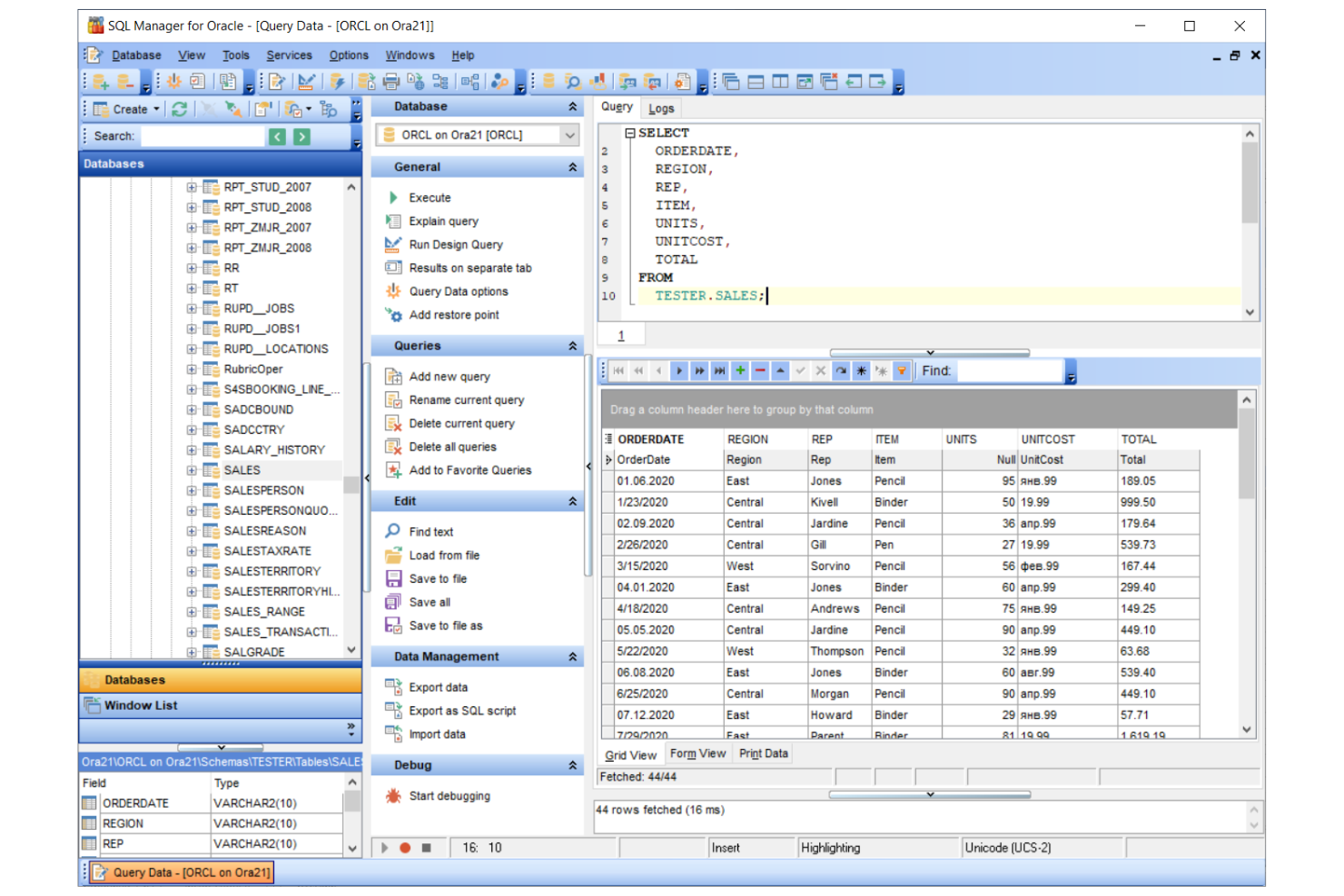
Per le organizzazioni che devono gestire enormi volumi di dati e carichi di lavoro complessi, Oracle Database offre scalabilità e affidabilità di livello aziendale. Questa piattaforma è ideale per grandi imprese, istituzioni finanziarie e team IT che gestiscono applicazioni mission-critical. A differenza di Caspio, Oracle Database supporta clustering avanzato, alta disponibilità e sicurezza multilivello per ambienti esigenti.
Perché Oracle Database è una valida alternativa a Caspio
Se il tuo team necessita di una soluzione in grado di scalare per supportare migliaia di utenti e grandi set di dati, Oracle Database è progettato per questa esigenza. Ho scelto Oracle Database perché offre clustering avanzato e Real Application Clustering (RAC) per garantire alta disponibilità e bilanciamento del carico. Puoi anche sfruttare i suoi controlli di sicurezza multilivello e le funzionalità di backup automatico per proteggere i dati sensibili. Per le organizzazioni in cui l'operatività continua, la scalabilità e l'integrità dei dati sono imprescindibili, Oracle Database offre capacità che vanno ben oltre quanto offerto da Caspio.
Caratteristiche principali di Oracle Database
Alcune altre funzionalità di Oracle Database possono risultare utili se stai valutando alternative a Caspio:
- Supporto PL/SQL: Crea ed esegui procedure memorizzate e trigger complessi direttamente all’interno del database.
- Crittografia avanzata dei dati: Proteggi i dati a riposo e in transito con opzioni di crittografia integrate.
- Gestione automatica dello storage: Gestisci i gruppi di dischi e ottimizza l’allocazione dello storage senza interventi manuali.
- Data Guard: Implementa il disaster recovery e la replica dei dati su siti geograficamente distribuiti.
Integrazioni di Oracle Database
Le integrazioni includono Oracle Cloud Infrastructure, Microsoft Azure, Amazon Web Services, SAP, Salesforce, IBM Cloud, Google Cloud Platform, Tableau, Informatica e MicroStrategy.
Pros and Cons
Pros:
- Strumenti analitici avanzati
- Configurazioni ad alta disponibilità
- Potente linguaggio PL/SQL
Cons:
- Richiede amministratori dedicati
- Eccessivo per le esigenze delle PMI

Se hai bisogno di creare database desktop rapidamente senza dover programmare troppo, Microsoft Access merita attenzione. È progettato per professionisti e piccole imprese che vogliono realizzare soluzioni dati personalizzate su Windows con una configurazione minima. A differenza di Caspio, Access permette di progettare moduli, query e report direttamente dal desktop per prototipi e implementazioni rapide.
Perché Microsoft Access è una buona alternativa a Caspio
Quando hai bisogno di creare rapidamente database desktop, Microsoft Access offre un vantaggio unico rispetto a Caspio. Ho scelto Access perché ti consente di progettare visivamente tabelle, moduli e report, così puoi sviluppare e modificare applicazioni basate sui dati senza dipendere dall’IT. Il suo progettista di query integrato e il generatore di report aiutano a trasformare velocemente i dati grezzi in informazioni utili. Per i team che vogliono prototipare o implementare soluzioni desktop rapidamente, Access offre un set di strumenti mirato allo scopo.
Principali funzionalità di Microsoft Access
Altre funzionalità di Microsoft Access possono essere utili se stai valutando alternative a Caspio:
- Scripting VBA: Automatizza le attività e personalizza i flussi di lavoro utilizzando Visual Basic for Applications direttamente nel tuo database.
- Strumenti di importazione ed esportazione dati: Trasferisci dati dentro e fuori Access tramite connettori integrati per Excel, SharePoint e altre fonti.
- Libreria di modelli: Avvia rapidamente i progetti grazie a una gamma di modelli di database predefiniti per esigenze aziendali comuni.
- Supporto multiutente: Consenti a più utenti di lavorare sullo stesso file di database tramite una rete condivisa.
Integrazioni di Microsoft Access
Le integrazioni includono Microsoft Excel, SharePoint, SQL Server, Outlook e Dataverse.
Pros and Cons
Pros:
- Progettazione visiva delle query
- Moduli drag-and-drop facili da usare
Cons:
- Nessun costo di abbonamento cloud
- Dipendenza dal sistema operativo Windows
- Manca la sincronizzazione cloud nativa


Se stai cercando strumenti avanzati per lo sviluppo di database MySQL, dbForge merita attenzione. Questa piattaforma è pensata per sviluppatori di database, amministratori e data engineer che necessitano di funzionalità robuste per l'editing SQL, il confronto degli schemi e la gestione dei dati. A differenza di Caspio, dbForge offre un controllo diretto sulla struttura del database, sulle query e sull'automazione dei progetti MySQL.
Perché dbForge è una valida alternativa a Caspio
Per i team che si concentrano sullo sviluppo di database MySQL, dbForge offre una suite specializzata che Caspio non può eguagliare. Ho scelto dbForge perché fornisce funzionalità avanzate di editing SQL, creazione visuale di query e strumenti di confronto schemi progettati per ambienti MySQL. Puoi automatizzare le attività di routine sui database, generare report sui dati e gestire direttamente strutture complesse di database. Se la tua priorità è lo sviluppo pratico di database invece della creazione di app low-code, dbForge è una valida alternativa.
Funzionalità principali di dbForge
Altre funzionalità di dbForge possono essere utili se stai confrontando alternative a Caspio:
- Generatore di dati: Crea grandi volumi di dati di test realistici per le tabelle MySQL.
- Backup e ripristino del database: Pianifica e gestisci i backup direttamente dalla piattaforma.
- Procedura guidata per esportazione e importazione dati: Trasferisci i dati tra MySQL e formati popolari come CSV, Excel e XML.
- Generatore di documentazione del database: Genera automaticamente una documentazione dettagliata dello schema del database.
Integrazioni dbForge
Tra le integrazioni troviamo Visual Studio, SQL Server, MySQL, Oracle e PostgreSQL.
Pros and Cons
Pros:
- Formattazione del codice eccellente
- Velocizza la scrittura delle query SQL
- Ottimo strumento di confronto dati
Cons:
- Richiede conoscenze di database
- Principalmente solo per Windows OS

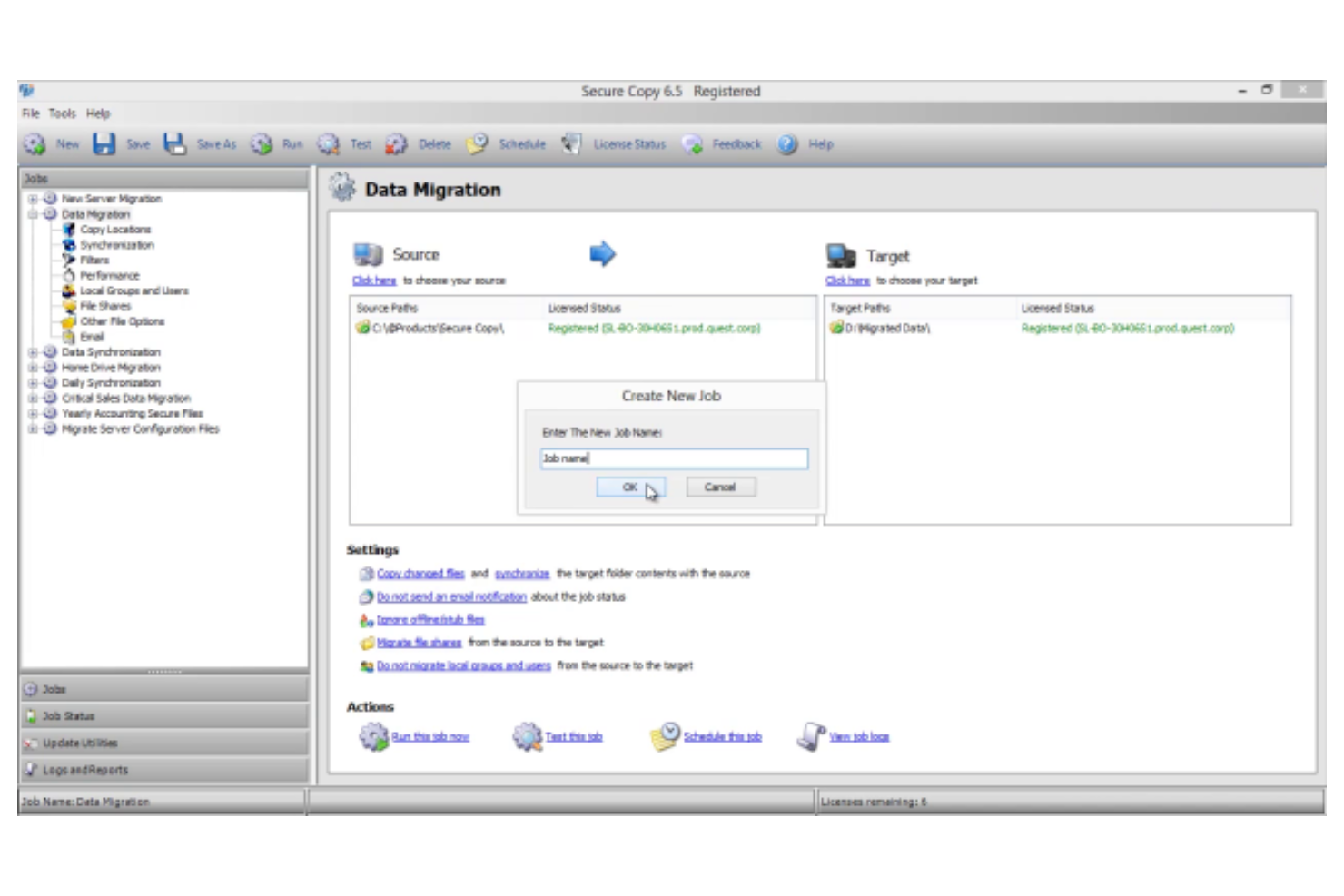
I team che gestiscono database e cercano funzionalità avanzate di migrazione e automazione potrebbero considerare Quest. Questa piattaforma è pensata per professionisti IT e amministratori di database che devono spostare, gestire e automatizzare i dati in ambienti complessi. A differenza di Caspio, Quest è specializzata in migrazioni di database su larga scala, automazione multipiattaforma e monitoraggio delle prestazioni per sistemi aziendali.
Perché Quest è una valida alternativa a Caspio
Se hai bisogno di una soluzione focalizzata su migrazione e automazione dei database, Quest offre funzionalità che Caspio non copre. Ho scelto Quest perché mette a disposizione strumenti per automatizzare migrazioni di dati complesse, gestire modifiche agli schemi e sincronizzare database su più piattaforme. È possibile programmare e monitorare le migrazioni, automatizzare attività ripetitive sui database e garantire l’integrità dei dati durante tutto il processo. Per le organizzazioni con ambienti dati estesi o distribuiti, Quest offre caratteristiche specialistiche di automazione e migrazione che vanno oltre ciò che offrono le piattaforme low-code come Caspio.
Caratteristiche principali di Quest
Altre funzionalità di Quest che potrebbero essere utili se stai confrontando alternative a Caspio:
- Dashboard di monitoraggio delle prestazioni: Monitora la salute del database e le metriche di prestazione in tempo reale.
- Strumenti di mascheramento dei dati: Proteggi le informazioni sensibili mascherando i dati durante le migrazioni e i test.
- Tracciamento e audit delle modifiche: Monitora e registra tutte le modifiche apportate alle strutture e ai dati del database.
- Compatibilità multipiattaforma: Lavora con diversi sistemi di database, inclusi Oracle, SQL Server, MySQL e PostgreSQL.
Integrazioni di Quest
Le integrazioni includono Microsoft, Google Cloud, Snowflake e Databricks.
Pros and Cons
Pros:
- Report diagnostici approfonditi
- Automatizza le attività di routine
- Massima fiducia a livello enterprise
Cons:
- Nessun modulo web low-code
- Non adatto a sviluppatori citizen
Altre alternative a Caspio
Ecco alcune ulteriori alternative a Caspio che non sono entrate nella mia selezione, ma che vale comunque la pena prendere in considerazione:


Come valuto le alternative a Caspio
Valuto gli strumenti su due livelli: le funzionalità fondamentali di database e creazione di applicazioni senza codice che uno strumento deve offrire e gli elementi distintivi, come i modelli PM e i portali per clienti, che differenziano ciascuno di essi.
Funzionalità fondamentali (requisiti essenziali per questo elenco)
Quando seleziono gli strumenti per il mio elenco, assegno a ciascuno un punteggio su una scala da 0 (non offre la funzionalità) a 5 (eccelle in quest'area) per ogni funzionalità fondamentale indicata di seguito. Poi calcolo il punteggio totale dello strumento in percentuale. Ogni strumento deve raggiungere un punteggio totale minimo del 65% per essere preso in considerazione.
- Costruttore di database senza codice: cerco la modellazione relazionale dei dati, con elementi come record collegati, aggregazioni e campi formula, affinché i team di PM possano strutturare i dati dei progetti senza scrivere codice SQL.
- Creazione di applicazioni e moduli personalizzati: ogni strumento dovrebbe offrire strumenti di trascinamento per creare moduli di raccolta delle richieste di progetto, portali per le richieste o applicazioni di monitoraggio adattate al flusso di lavoro effettivo di un team.
- Automazione dei flussi di lavoro: valuto se la piattaforma supporta attivatori in più passaggi, come l'assegnazione automatica delle attività quando viene inviato un modulo o l'instradamento delle approvazioni in base al tipo di progetto.
- Pannelli di controllo e reportistica: i pannelli di controllo dei progetti in tempo reale sono importanti in questo caso: verifico la presenza di grafici personalizzati, filtri e visualizzazioni condivisibili che offrano ai portatori di interesse un quadro chiaro dello stato e dei KPI.
- Ruoli e autorizzazioni degli utenti: il controllo granulare degli accessi è fondamentale, soprattutto per i team che gestiscono portatori di interesse esterni, i quali devono poter visualizzare i dati del progetto senza avere l'accesso completo alla modifica.
- Integrazioni e accesso API: verifico la presenza di connettori nativi per strumenti come Slack, Jira o Google Workspace, oltre alla disponibilità di API REST per il collegamento a sistemi aziendali più ampi.
Una volta ottenuto un elenco di strumenti che soddisfano questi criteri, considero ciò che distingue ciascuna piattaforma.
Fattori distintivi (ciò che differenzia i fornitori)
Ecco come confronto i diversi fornitori:
Caratteristiche distintive
I portali rivolti ai clienti sono un importante elemento di differenziazione: cerco strumenti che consentano di attivare rapidamente un portale con il proprio marchio, dove i portatori di interesse possano monitorare i risultati finali e inviare richieste senza dover acquistare una licenza completa. Anche i diagrammi di Gantt e le visualizzazioni della sequenza temporale sono importanti quando si gestiscono dipendenze tra più flussi di lavoro. Vale la pena valutare anche la creazione di applicazioni assistita dall'intelligenza artificiale, soprattutto per gli sviluppatori non professionisti che vogliono generare un sistema di monitoraggio dei progetti a partire da un'istruzione testuale invece di creare ogni campo uno alla volta.
Oltre le funzionalità
In questo caso è importante il modello tariffario. I prezzi basati sul consumo di Caspio possono sorprendere i team quando i dati dei progetti aumentano, quindi verifico se le alternative offrono prezzi prevedibili per utente, con una scalabilità lineare. Anche la velocità di implementazione è un fattore: cerco piattaforme con modelli PM predefiniti, in modo da non dover costruire tutto da zero il primo giorno. Anche certificazioni di sicurezza come SOC 2 e la conformità al GDPR hanno un peso, soprattutto per i PMO che gestiscono dati sensibili dei clienti o operano in settori regolamentati.
Perché cercare un'alternativa a Caspio?
Sebbene Caspio sia una buona scelta tra le alternative a Caspio, ci sono diversi motivi per cui alcuni utenti cercano soluzioni alternative. Potresti cercare un'alternativa a Caspio perché…
- Hai bisogno di un controllo avanzato delle versioni per i database
- Vuoi funzionalità più flessibili per la collaborazione sui dati
- Richiedi una distribuzione open source o autogestita
- Hai bisogno di tracce di audit più approfondite per la conformità
- Vuoi un maggiore controllo sulle modifiche allo schema
- Richiedi integrazioni con strumenti orientati agli sviluppatori
Se ti riconosci in una di queste situazioni, sei nel posto giusto. Il mio elenco contiene diverse alternative a Caspio più adatte ai team che affrontano queste difficoltà con Caspio e cercano soluzioni alternative.
Funzionalità principali di Caspio
Ecco alcune delle funzionalità principali di Caspio, per aiutarti a mettere a confronto ciò che offrono le soluzioni alternative:
- Creatore visivo di app per la creazione di applicazioni personalizzate
- Strumenti di progettazione per moduli e report con funzionalità di trascinamento
- Autenticazione degli utenti e controlli degli accessi integrati
- Gestione automatizzata dei flussi di lavoro e delle attività
- Hosting basato sul cloud con data center distribuiti in tutto il mondo
- Integrazione con servizi popolari come Salesforce e Zapier
- Autorizzazioni basate sui ruoli per un accesso granulare ai dati
- Funzionalità di importazione ed esportazione programmata dei dati
- Design reattivo per dispositivi mobili e desktop
- Registri di controllo per monitorare l'attività degli utenti